1
Application Guide
Chapter 2. Configuration of the Wireless Router
To set up your FTP Server, please follow the instructions below:
1. Make sure you have a PC connected to the wireless router, either through wireless connection
or wired connection.
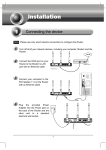
2. Plug an external USB hard disk drive or USB flash drive into the USB port on the back panel of
the Router.
3. Open a Web browser and type the Router’s default domain name http://tplinklogin.net in the
address field to log in the Web-based configuration utility. Then press Enter key.
Figure 2-1 Type in Default Domain Name
4. After a moment, a login window will appear. Enter admin for the User Name and Password,
both in lower case letters. Then click the OK button or press the Enter key.
Figure 2-2 Login Window
-4-