1
Before Initial use
Thank you for purchasing this new digital cordless telephone
ORBIT
Intended Purpose:
This product is intend to be connected indoor to a analogue telephone line.
You have acquired a Orbit, which is a product made in accordance with the Digital Enhanced
Cordless Telecommunications (DECT). DECT technology is characterized by high-security
protection against interceptions as well as high-quality digital transmission. This telephone
was designed for a wide range of applications. For example, this telephone can be used
within a network of base units and handsets, constituting a telephone system which:
- Operates up to 5 handsets at one base unit.
- Allows an intercom between 2 handsets.
- Allows the operation of a handset at up to 4 base units.
Caller ID is a network provider service. After subscribing to Caller ID, this phone will display
the caller’s phone number.
Important
To use ‘Caller ID’ (display caller), this service has to be activated on your phone line.
Normally you need a separate subscription from your telephone company to activate this
function. If you don’t have the Caller ID function on your phone line, the incoming telephone
numbers will NOT be shown on the display of your telephone.
The CE symbol indicates that the unit complies with the essential
requirements of the R&TTE directive.
USER GUIDE
1.1
The features described in this manual are published
with reservation to modifications.
Orbit
1
2
11
3
10
4
9
5
6
7
8
12
1
2
2.1
2.2
2.3
2.4
2.5
2.6
2.7
2.8
2.9
3
3.1
3.2
3.3
3.4
3.5
3.6
3.7
3.8
3.9
3.10
3.11
3.12
4
4.1
4.2
4.3
4.4
4.5
4.6
4.7
4.8
4.9
4.10
5
5.1
6
6.1
6.2
6.3
6.4
6.5
6.6
6.7
2
Safety advice
Getting started
How to use this user guide
Installing the base
Installing the handset
Wall mounting
Keys/Led
Symbols
Display keys
Navigating the menu
Menu overview
Using the telephone
Switching the handset ON/OFF
Changing the menu language
Setting the date and time
Setting the time format
Making a normal telephone call
Receiving a telephone call
Handsfree mode
Adjust earpiece/handsfree volume
Secrecy function (Mute function)
Locating a handset (Paging function)
Keypad Lock
Using the alphanumerical keypad
Phonebook
To access and search in the phonebook
To add an entry
To dial an entry
Show Details
Delete an entry
Delete all entries
Edit Entry
Copy a phonebook entry or all entries to another handset
Memory status
Change the ringtone
Caller Identification
Call Waiting
Calls List
New calls Alert
To view new missed calls
View and dial from the Calls list
Copy a Calls list number into the phonebook
Send a text message to a Calls list number
Delete an entry
Delete all entries
4
5
5
5
6
7
8
9
9
9
10
10
10
10
11
11
11
12
12
12
13
13
13
13
13
13
14
14
14
14
14
15
15
16
16
16
16
17
17
17
17
17
18
18
18
Orbit
Orbit
Orbit
Personalise the handset
Ringtone and volume
Handset name
Keypad beeps
Wallpaper
Menu color
Setting the contrast
Setting the light timeout
Setting the screensaver
Autotalk
PABX Access code
Redial length
Receiving Volume
Using the alarm feature
Base settings
Ringtone
Ringer Volume
Dial Mode
Recall (Flash)
System PIN
Ring Priority
First ring On/Off
Factory Reset
Agenda
SMS
How to write an SMS
Sending an SMS
Read and view the list of received messages (Inbox)
Reading and sending the saved message (Draft folder)
Using the outbox
Template messages
Delete messages
SMS Settings
User Areas
Additional handsets and base stations
Adding a new handset
Removing a handset
Select a base
Using the intercom feature
Troubleshooting
Technical dataTechnical characteristics
Warranty
Warranty period
Warranty handling
Warranty exclusions
Disposal of the device (environment)
Cleaning
18
18
19
19
19
20
20
20
20
20
21
21
21
21
22
22
22
23
23
23
24
24
24
25
26
26
26
27
28
28
28
29
29
30
32
32
32
32
33
34
34
35
35
35
35
35
35
English
7
7.1
7.2
7.3
7.4
7.5
7.6
7.7
7.8
7.9
7.10
7.11
7.12
7.13
8
8.1
8.2
8.3
8.4
8.5
8.6
8.7
9
10
11
11.1
11.2
11.3
11.4
11.5
11.6
11.7
11.8
11.9
12
12.1
12.2
12.3
12.4
13
14
15
15.1
15.2
15.3
16
17
3
Safety advice
1
Safety advice
The following safety advice must always be followed before using electrical equipment.
Please read carefully through the following information concerning safety and proper use.
Make yourself familiar with all the functions of the equipment. Be careful to keep these
advice notes and if necessary pass them on to a third party.
Electrical safety and protection:
• Do not operate the equipment if the mains plug, cable or the equipment itself is
damaged.
• If the equipment is dropped, then it must be checked by an electrician before further
use.
• Dangerous voltages are present inside the equipment. Never open the housing or
insert objects through the ventilation holes.
• Do not allow liquids to get into the equipment. In case of emergency, pull out the plug
from the socket.
• Similarly, if a fault develops during use or before you start to clean the equipment, pull
the plug out if the socket.
• Do not touch the charger and plug contacts with sharp or metal objects.
• Do not carry out any modifications or repairs to the equipment yourself. Have repairs
done to the equipment or the mains cable only by a specialist service centre.
Unsatisfactory repairs can lead to considerable danger for the user.
• Children frequently underestimate the dangers associated with electrical equipment.
Therefore you must never leave children unsupervised in the vicinity of electrical
equipment.
• The equipment is not to be used in a damp room (e.g. bathrooms) or rooms where
there is a lot of dust.
• Equipment connected to the mains during a thunderstorm can be damaged by
lightning. Therefore you should pull the plug out of the mains socket during a storm.
• To completely disconnect the equipment from the electricity supply, the plug must be
removed from the socket. When doing this always pull on the plug itself and never on
the cable.
• Protect the mains cable from hot surfaces or other sources of damage and do not
allow it to become constrained.
• Check the mains cable regularly for any damage.
• Unwind the mains cable completely before use.
• Make sure that the mains cable does not represent a trip hazard.
• The operation of some medical devices may be affected.
• The handset may cause an unpleasant buzzing sound in hearing aids.
Fire safety:
• The heat accumulated inside the equipment can lead to the defect and/or to the fire of
the equipment. Do not expose this equipment therefore to extreme temperature like:
1. direct sun exposure and heater warmth
2. ventilation holes may not be covered
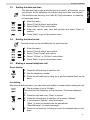
Danger of explosion:
• Never throw batteries in fire.
4
Getting started
Note:
• Only use the charger plug supplied. Do not use other chargers, as this may damage
the batteries cells.
• The wall outlet for the power supply must be close and accessible.
• Only use rechargeable batteries of the same type. Place the batteries with correct
polarity inside the battery compartment (polarity is marked inside the handset). Never
use normal unrechargeable batteries!
As this telephone cannot be used in case of a power cut, you should use a
mains-independent telephone for emergency calls, e.g. a mobile phone.
2
Getting started
2.1
How to use this user guide
In this user guide, following method is used to clarify the instructions:
Text.......”display”.
Text that appears on the display of the phone
Key to press. This key can be a soft key. When the soft key is a symbol, it is shown in the
left column. When the soft key is text, the left or right soft key is shown in the left column
and the text is shown in the right column between quotation marks.
2.2
Installing the base
For installation, do the following:
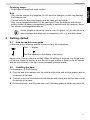
1 Plug one end of the adaptor into the outlet and the other end into the adaptor jack on
the bottom of the base.
2 Connect one end of the telephone cord with the wall phone jack and the other end to
the bottom of the base.
3 Put the telephone- and AC power line cord in the base guides as shown on picture 2A.
5
English
Poisoning danger:
• Keep batteries away from small children.
Getting started
A
C
B
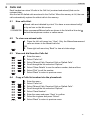
- 2A Back view of base A. Telephone wall outlet
B. Power cable
C. Telephone cord
2.3
Installing the handset
1
2
3
4
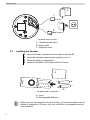
Open the battery compartment as shown on picture 2B.
Insert the batteries respecting the polarity (+ and -).
Close the battery compartment.
Leave the handset on the base unit for 20 hours.
A
+
+
B
- 2B Back view of handset A. Cover
B. Rechargeable batteries
Before you use the telephone for the first time, you must first make sure the
battery is charged for 20 hours. If you do not do this, the telephone will not
work optimally.
6
Getting started
Wall mounting
You can hang the base against the wall by turning the cradle inside the base as shown
below:
2. Rotate 180° Clockwise
1. Lift Cradle
Desk Mode
Wall Mount Mode
3. Release in Position
- 2C Wall mounting Use the template at the back side of the manual to drill the holes in the wall 5 cm apart
horizontally.
Wall plug
Wall
Screw
5 cm
- 2D Wall mounting 7
English
2.4
Getting started
2.5
Keys/Led
Handset
1. Display
2. Right soft menu key
3. Up / Redial / Pause key
4. On-hook / ON-OFF key
5. Alphanumeric keys
6. Keypad lock
1
7. INT key
8. Flash key
2
11
9. Down / Phonebook key
10. Off-hook / Handsfree key
11. Left soft menu key
3
10
4
9
5
6
7
8
- 2E Handset Base
12. Paging key
12
- 2F Base -
8
Getting started
Symbols
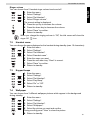
Keypad lock
Handset within base range
(Flashes if you are out of range)
Alarm set
Handsfree
Handset ringer volume is off
Battery full
You have SMS messages
Battery medium
You have missed calls
Battery low
You have new voice mail
Battery is almost discharged
2.7
English
2.6
Display keys
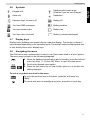
Display-keys (softkeys) are located directly under the display. The function of these 2
keys changes depending on the operation mode. The actual function is displayed as icon
or text directly above the 2 display keys.
2.8
Navigating the menu
The Orbit has a menu system which is easy to use. Each menu leads to a list of options.
The menu map is shown on the following paragraph.
1 When the handset is switched on and in standby, press the left soft
menu key (Key 11 - Picture 2E) “Menu“ to open the main menu.
2 Scroll to the desired menu option.
3 Press the soft menu key to view further options or to confirm the
setting displayed.
To exit or to go back one level in the menu
To go to the previous level in the menu, press the soft menu key
“Back”.
To cancel and return to standby at any time, press the on-hook key.
9
Using the telephone
2.9
Menu overview
Menu
Submenu items
Text Messaging
Calls Lists
3
Write Message
Inbox
Drafts
Outbox
Templates
Delete messages
Text Settings
Missed Calls
Received Calls
Dialled Calls
Delete Calls
Agenda
Add Event (when there are no Events)
Clock & Alarm
Date & Time
Alarm
Time Format
Settings
Set Handset
Set Base
Registration
Register Handset
Select Base
De-register
Using the telephone
3.1
Switching the handset ON/OFF
1 Press and hold the On-Off key to switch the handset off.
2 Press the On-Off key or place the handset in the base to switch the
handset back on.
3.2
Changing the menu language
1 Enter the menu.
2 Select “Settings” and confirm.
3 Select “Set Handset” and confirm.
4 Select “Language” and confirm.
5 Select a language and confirm.
The screen displays “Saved”.
6 Press the on-hook key to return to standby.
The
10
or
arrows indicate that further options are available in the menu.
Using the telephone
Setting the date and time
- The date and time is kept inside the base and send to all handsets, so you
only have to set the date/time ones when using more then one handset.
- The date/time can be set by the Caller ID (Clip) information, or manually
as mentioned below.
1
2
3
4
Enter the menu.
Select “Clock & Alarm” and confirm.
Select “Date & Time” and confirm.
Enter day, month, year, time and minutes and select “Save” to
confirm.
5 Press “Back” to go to the previous menu.
3.4
Setting the time format
The time format can be set differently for each handset.
1
2
3
4
5
3.5
Enter the menu.
Select “Clock & Alarm” and confirm.
Select “Time Format” and confirm.
Select “12 Hour” or “24 Hour” and confirm.
Press “Back” to go to the previous menu.
Making a normal telephone call
Direct dialling
1 Press the off-hook key to start the call.
2 Dial the telephone number.
3 Press the on-hook key to hang up or put the handset back on the
base.
Pre-dialling
With the pre-dialling feature, you can enter and modify a number before making the call.
1 Dial a number of up to 32 digits.
Press and hold the Pause-key to insert a pause. The screen displays a
“P”.
2 Press the soft menu key “Clear” to correct.
3 Press the off-hook key to start the call or select “Options”.
4 If you selected “Options”, scroll and select:
“Save”: to store the number into the phonebook;
“Send Message”: to send a message.
5 Press the on-hook key to hang up or put the handset back on the
base.
11
English
3.3
Using the telephone
Redial a number from the dialled call list
You can redial up to 20 of the last numbers called. If you have stored a name in the
phonebook to go with the number, the name will be displayed instead.
1 Press the redial key.
2 Select a number. If the number is in the phonebook, the name will
be shown.
3 Press the off-hook key to start the call or select “Options”.
4 If you selected “Options”, scroll and select:
“Show Details”: To show the details;
“Save Number”: to store the number into the phonebook;
“Send Message”: to send a message;
“Delete Call”: to remove the number from the call list.
5 Confirm selection.
6 Press the on-hook key to return to standby.
See also “7.11 Redial length” .
3.6
Receiving a telephone call
When you receive an external call, the screen displays “External Call”. To take the call:
1 Press the off-hook key.
OR
Lift the handset off its base if you have activated “Auto Talk”.
(See ”7.9 Autotalk”)
The call duration is displayed after 15 seconds.
2 Press the on-hook key to hang up or put the handset back on the
base.
You can turn the ring volume off during incoming call by selecting “Silence”.
3.7
Handsfree mode
Handsfree lets you talk to your caller without holding the handset. It also enables other
people in the room to listen to both sides of your conversation.
1 To switch any call to handsfree, press the handsfree key during the
call.
3.8
Adjust earpiece/handsfree volume
1 Press up or down to select volume 1-8 during a normal or handsfree
call.
You cannot set the earpiece/handsfree volume independently.
12
Phonebook
Secrecy function (Mute function)
To turn off the microphone so the person on the other side of the line will not hear you.
1 During a conversation, press the soft menu key “Secrecy” to
deactivate the microphone.
“Secrecy On” appears on the display.
2 Select “Off” to activate the microphone again.
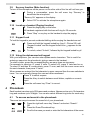
3.10 Locating a handset (Paging function)
1 Press the paging key on the base.
All handsets registered with the base will ring for 30 seconds.
2 Press “Stop” or any key on the handset to stop the paging.
3.11 Keypad Lock
To lock the keypad to prevent accidental dialling while carrying the handset around.
3 Press and hold the keypad locked key (key 6 - Picture 2E) until
“Keypad Locked” and the keypad locked icon appears on the
display.
4 To unlock, select “Unlock”, followed by the keypad locked key #.
3.12 Using the alphanumerical keypad
With your telephone, you can also enter alphanumeric characters. This is useful for
entering a name into the phonebook, giving a name to the handset, ...
To select a letter, press the corresponding key as many times as necessary.
For example, to select an ‘A’, press ‘2’ once. To select a ‘B’, press ‘2’ twice and so on.
To select ‘A’ and then ‘B’ consecutively, press ‘2’ once, wait until the cursor moves on to
the next character, then press ‘2’ twice.
When names are entered, the first character is upper case and then the case switches to
lower. You can manually change the case as below mentioned.
Press ‘0’ to select a space.
Press the #-key to switch between small letters, capitals or numeric
input.
Press the soft menu key “Clear” to correct.
4
Phonebook
Each handset can store up to 250 names and numbers. Names can be up to 12 characters
long and numbers up to 24 digits. You can also select different ring tones for each entry.
4.1
To access and search in the phonebook
There are two ways to access the name list of your phonebook:
1 Press the right soft menu key “Names” and select “Search”.
OR
2 Press the Down/Phonebook key.
3 Scroll to the name you want or enter the first characters of the name.
13
English
3.9
Phonebook
If the phonebook is empty ”Phonebook Empty” will be shown shortly.
4.2
To add an entry
1
2
3
4
5
Press the right soft menu key “Names”.
Select “Add Entry”.
Use the keypad to enter the name, then select “OK”.
Use the keypad to enter the number, then select “Save”.
Select the desired ring melody and press “Select”.
Select “Default melody” if you don’t want to have another ring
melody for this entry.
6 Return to standby.
4.3
To dial an entry
1 Press the Down/Phonebook key.
2 Select the desired name or use the keypad to enter the first letter of
the name.
3 Press the off-hook key to start the call.
4 Return to standby.
4.4
Show Details
1 Press the Down/Phonebook key.
2 Select the desired name or use the keypad to enter the first letter of
the name.
3 Select “Options”.
4 Select “Show Details”.
The name, number and ring melody you have assigned to the entry
appear on the display.
5 Press “Dial” to dial out the number or “Back” to go back.
6 Return to standby.
4.5
Delete an entry
1 Press the Down/Phonebook key.
2 Select the desired name or use the keypad to enter the first letter of
the name.
3 Select “Options”.
4 Select “Delete Entry” and confirm.
4.6
Delete all entries
1 Press the right soft menu key “Names”.
2 Select “Delete Phonebook” and confirm.
14
Phonebook
Edit Entry
1 Press the Down/Phonebook key.
2 Select the desired name or use the keypad to enter the first letter of
the name.
3 Select “Options”.
4 Select “Edit Entry” and confirm.
5 Press the soft menu key “Clear” to delete and use the keypad to
change the name.
6 Select “OK”.
7 Edit the number and select “Save”.
8 Select the desired ring melody and press “Select”.
9 Return to standby.
4.8
Copy a phonebook entry or all entries to another handset
- The copy process can be interrupted when there is an incoming call.
- When other handset is not available (out of range) or memory is full,
the display will show “Copy unsuccessful”.
- When only one handset is registered, “Not available” will be shown
for 2 seconds.
Copy an entry to another handset
1 Press the Down/Phonebook key.
2 Select the desired name or use the keypad to enter the first letter of
the name.
3 Select “Options”.
4 Select “Copy Entry”.
5 Select “To Handset”.
The available handsets (all the handsets that are registered on the
base) are shown.
6 Select the desired handset and confirm.
“Please wait...” appears on the display.
“Copy phonebook?” appears on the display of the destination handset.
7 On the destination handset, press the left menu key to confirm or
the right menu key to cancel the transfer.
8 Return to standby.
Copy all phonebook entries to another handset
1 Press the right soft menu key “Names”.
2 Select “Copy Phonebook”.
3 Select “To Handset”.
15
English
4.7
Caller Identification
The available handsets (all the handsets that are registered on the
base) are shown.
4 Select the desired handset and confirm.
“Please wait...” appears on the display.
“Copy phonebook?” appears on the display of the destination handset.
5 On the destination handset, press the left menu key to confirm or
the right menu key to cancel the transfer.
6 Return to standby.
4.9
Memory status
1 Press the right soft menu key “Names”.
2 Select “Copy Phonebook”.
3 Select “Memory Status”.
The amount of entries in the phonebook are shown + amount of free
entries.
4 Return to standby.
4.10 Change the ringtone
1 Press the Down/Phonebook key.
2 Select the desired name or use the keypad to enter the first letter of
the name.
3 Select “Options”.
4 Select “Ringtone”.
5 Select the desired ring melody and press “Select”.
6 Return to standby.
5
Caller Identification
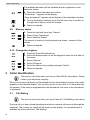
This service only works when you have a Caller ID/Clip subscription. Please
contact your telephone company.
When you receive a call from your fixed telephone line, the telephone number of the caller
appears on the handset display. You can also see his or her name if it is transmitted by
the network. If the name is programmed in the phonebook, the name in the phonebook
is displayed!
5.1
Call Waiting
This service only works when you have Caller ID / Call Waiting subscription.
During a call, you hear a beep (knocking tone) when a second call comes in (through the
earpiece). The number (or name) will be shown on the display. If no number/name is
available the phone will show “Call Waiting”.
16
Calls List
Calls List
Each handset can store 30 calls in the Call List (received and missed) that can be
reviewed later.
Also the last 20 dialled calls are stored in the Call list. When the memory is full, the new
calls automatically replace the oldest calls in the memory.
6.1
New calls Alert
Missed calls are indicated by a text “You have xx new missed call(s)”
or by an Icon on the idle screen.
0123456789
6.2
New unanswered/Missed calls are shown in the list with a blue dot
behind the telephone number or callers name.
To view new missed calls
1 Press the left soft menu key “View”. Only the Missed/unanswered
calls are shown in the Missed calls list.
OR
2 Press right soft menu key “Back” to view at a later stage.
6.3
View and dial from the Calls list
1
2
3
4
5
6
7
6.4
Enter the menu.
Select “Calls List”.
Select “Missed Calls, Received Calls or Dialled Calls”.
Scroll through the list and select “Options”.
Select “Show Details” to see the callers number, date and time.
Select “Dial” to call the number.
Select “Back” to return to previous menu.
Copy a Calls list number into the phonebook
1
2
3
4
5
6
7
8
Enter the menu.
Select “Calls List”.
Select “Missed Calls, Received Calls or Dialled Calls”.
Scroll through the list and select “Options”.
Select “Save Number”.
Enter the name and press “Save” to confirm.
Select the ringtone and press “Select”.
Select “Back” to return to previous menu.
17
English
6
Personalise the handset
6.5
Send a text message to a Calls list number
1
2
3
4
5
6
7
8
Enter the menu.
Select “Calls List”.
Select “Missed Calls, Received Calls or Dialled Calls”.
Scroll through the list and select “Options”.
Select “Send Message”.
Enter the message and press “Options”.
Select “Send” (you can save, insert a symbol, emoticon or template).
The number is pre-entered on the screen, press “Send” to send the
message.
9 Select “Back” to return to previous menu.
6.6
Delete an entry
1
2
3
4
5
6
6.7
Enter the menu.
Select “Calls List”.
Select “Missed Calls, Received Calls or Dialled Calls”.
Scroll through the list and select “Options”.
Select “Delete Call”.
Select “Back” to return to previous menu.
Delete all entries
1
2
3
4
Enter the menu.
Select “Calls List”.
Select “Delete Calls”.
Scroll through the list and select “Missed Calls”, “Received Calls”,
“Dialled Calls” or “All Calls”.
5 Select “Yes” to confirm or “No” to cancel.
6 Select “Back” to return to previous menu.
7
Personalise the handset
7.1
Ringtone and volume
Ringtone
You can choose from 10 different ringer melodies for internal and external calls.
1 Enter the menu.
2 Select “Settings”.
3 Select “Set Handset”.
4 Select “Ringtone”.
5 Select “External Call” for external calls or select “Internal Calls’ for
internal calls and confirm.
6 Select the desired melody and confirm.
During scrolling the melody is played.
7 Return to standby.
18
Personalise the handset
English
Ringer volume
You can choose from 5 handset ringer volume levels and off.
1 Enter the menu.
2 Select “Settings”.
3 Select “Set Handset”.
4 Select “Ringer volume”.
The current setting is displayed.
5 Press the up key to increase the volume.
6 Press the down key to decrease the volume.
7 Select “Save” to confirm.
8 Return to standby.
When you change the ringing volume to “Off”, the idle screen will show the
ringer Off
icon.
7.2
Handset name
You can change the name displayed on the handset during standby (max. 10 characters).
1 Enter the menu.
2 Select “Settings”.
3 Select “Set Handset”.
4 Select “Handset name”.
5 Enter the name you want.
6 Press the soft menu key “Clear” to correct.
7 Select “Save” to confirm.
8 Return to standby.
7.3
Keypad beeps
1
2
3
4
5
6
7.4
Enter the menu.
Select “Settings”.
Select “Set Handset”.
Select “Key Beep”.
Select “On” or “Off”.
Return to standby.
Wallpaper
You can choose from 3 different wallpaper pictures which appear in the background
during standby.
1 Enter the menu.
2 Select “Settings”.
3 Select “Set Handset”.
4 Select “Wallpaper”.
5 Select the picture you want and confirm.
During scrolling press “View” to show the picture.
6 Return to standby.
19
Personalise the handset
7.5
Menu color
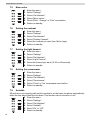
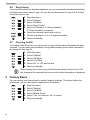
1
2
3
4
5
6
7.6
Setting the contrast
1
2
3
4
5
6
7.7
Enter the menu.
Select “Settings”.
Select “Set Handset”.
Select “Light Timeout”.
Select the timeout you want (15,30 or 45 seconds).
Return to standby.
Setting the screensaver
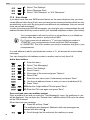
1
2
3
4
5
6
7.9
Enter the menu.
Select “Settings”.
Select “Set Handset”.
Select “Display Contrast”.
Select the contrast you want (low, Mid or high).
Return to standby.
Setting the light timeout
1
2
3
4
5
6
7.8
Enter the menu.
Select “Settings”.
Select “Set Handset”.
Select “Menu colour”.
Select “Blue”, “Orange” or “Pink” and confirm.
Return to standby.
Enter the menu.
Select “Settings”.
Select “Set Handset”.
Select “Screensaver”.
Select “Clock” or “No” screensaver and confirm.
Return to standby.
Autotalk
When there is an incoming call and the handset is on the base, the phone automatically
takes the line when lifted from the base. This function can be turned on or off.
1 Enter the menu.
2 Select “Settings”.
3 Select “Set Handset”.
4 Select “Autotalk”.
5 Select “On” or “Off”.
6 Return to standby.
20
Personalise the handset
It is possible to use your telephone with a prefix number. When dialling from the call list
or phonebook, this prefix will be dialled automatically before the number.
1 Enter the menu.
2 Select “Settings”.
3 Select “Set Handset”.
4 Select “PABX Access Code”.
5 Select “Set code”.
6 Enter the prefix code, e.g. ‘0’ (1 digit only) and select “Save”.
OR
7 Select “On” or “Off”.
8 Return to standby.
When dialling manually a number, this prefix will not be dialled but has to be
entered manually.
7.11 Redial length
It’s possible to set the redial length of 32 digits to 17 digits. By doing this you can prevent
to store for example your phone banking access data into the phones memory.
1 Enter the menu.
2 Select “Settings” and confirm.
3 Select “Set Handset” and confirm.
4 Select “Long” for 32 digits or “Short” for 17 digits and confirm.
5 Return to standby.
7.12 Receiving Volume
This sets the standard volume level for the handset earpiece.
1
2
3
4
5
6
Enter the menu.
Select “Settings”.
Select “Set Handset”.
Select “Receiving volume”.
Select the desired volume (1-8) and confirm.
Return to standby.
7.13 Using the alarm feature
You can have different alarm setting for each handset registered to your base. The alarm
rings only at the handset, not at the base or any other handset. When an alarm is set, the
icon will appear on the top of the display.
21
English
7.10 PABX Access code
Base settings
Set the alarm
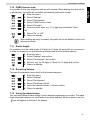
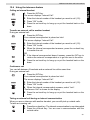
1
2
3
4
5
Enter the menu.
Select “Clock & Alarm”.
Select “Alarm”.
Select “On”.
Select “Once”, “On daily”, or “Mon to Fri” and confirm.
If you have selected “Once”, “On daily” or “Mon to Fri”, the display
will show:
Enter Time:
00:00
6 To deactivate the alarm, select “Off” and confirm.
7 Press “Back” to go to the previous menu.
If the alarm is set on daily or Mon-Fri the
8
icon will remain on the screen.
Base settings
8.1
Ringtone
You can choose from 5 different ringer melodies.
1 Enter the menu.
2 Select “Settings”.
3 Select “Set Base”.
4 Select “Ringtone” .
5 Select the desired melody and confirm.
During scrolling a sample is played.
6 Return to standby.
8.2
Ringer Volume
You can choose from 5 handset ringer volume levels.
1 Enter the menu.
2 Select “Settings”.
3 Select “Set Base”.
4 Select “Ringer Volume”.
The current setting is displayed.
5 Press the up key to increase the volume.
6 Press the down key to decrease the volume.
7 Press “Select” to confirm.
8 Return to standby.
22
Base settings
8.3
Dial Mode
1
2
3
4
5
6
8.4
English
There are 2 types of dialling mode:
• DTMF/Tone dialling (most common used)
• Pulse dialling (for older installations)
To change the dialling mode:
Enter the menu.
Select “Settings”.
Select “Set Base”.
Select “Dialling mode”.
Select “Tone” or “Pulse”.
Return to standby.
Recall (Flash)
Press the Flash key “R” (Key 8 - Picture 2E) to use certain services on your external line
such as “call waiting” (if your phone company offers this feature); or to transfer calls if you
use a telephone exchange (PABX). The Flash key “R” is a brief interruption of the line.
You can set the flash time to 100ms or 250ms.
1
2
3
4
5
Enter the menu.
Select “Settings”.
Select “Set Base”.
Select “Recall Mode”.
Select “Recall 1” for short flash time (100ms) or “Recall 2” for long
flash time (250ms).
6 Return to standby.
8.5
System PIN
The System PIN is used for registering and deregistering handsets and some other
optional settings. The default System PIN is 0000.
1
2
3
4
5
6
7
Enter the menu.
Select “Settings”.
Select “Set Base”.
Select “System PIN”.
Enter the old PIN (0000 by default) and select “OK”.
Enter the new PIN, select “OK” and repeat this.
Return to standby.
23
Factory Reset
8.6
Ring Priority
If you have more then one handset registered, you can choose which handset should ring
first before the others starts to ring. You can also set the amount of rings (2,4 or 6) after
the others start to ring.
1
2
3
4
5
Enter the menu.
Select “Settings”.
Select “Set Base”.
Select “Ring Priority”.
Select “All Handset” or “Select Handset”.
If “Select Handset” is selected:
6 Select the handset that should ring first.
7 Set the ring delay to 2, 4 or 6 rings and confirm.
8 Return to standby.
8.7
First ring On/Off
If you have Caller ID service, your phone will not ring until the caller information has been
received. You can make your handsets to ring without waiting for the caller information
by turning the first ring On:
1
2
3
4
5
6
Enter the menu.
Select “Settings”.
Select “Set Base”.
Select “First Ring”.
Select “On” or “Off” and confirm.
Return to standby.
When turning On the first ring you will hear the default ring tone first. This
will change to the selected ring tone ones the caller information is displayed.
9
Factory Reset
You can restore your phone back to default (original) settings. This doesn’t effect the
phonebook, call list, user data or registrations of handsets.
1
2
3
4
5
6
24
Enter the menu.
Select “Settings”.
Select “Set Base”.
Select “Master Reset”.
Select “Yes” to confirm or “No” to cancel.
Return to standby.
Agenda
You can set 5 event (appointments or reminders) which you can give a name and an alarm
by date and time. The event can be shown as a text message with our without alarm. The
events are stored inside the handset so each handset can have it’s own events. When a
reminder is On, the event name is show together with the alarm
icon for 1 minute.
1 Enter the menu.
2 Select “Agenda” and confirm.
3 Select one of the 5 appointments and select “Option”.
To add an appointment:
4 Select “Add Entry”.
5 Enter a name for the event (max. 24 characters) and confirm.
6 Enter the date and time and confirm.
7 Select “Silent” if you only want a visual indication or “Alarm” if you
want to have visual and audible warning.
8 If you have set “Alarm” the phone will ask you to have it “Ones” or
“Annually (for birthdays).
9 If you have set it “Ones” you can choose to have it “At event time”
or “30 min before”.
To edit the appointment:
10 Select “Edit Event” and confirm.
11 Edit the name of the event and select “Save”.
12 Enter the date and time of the event and select “Save”.
13 Select “Silent” or “Alarm” and confirm.
To delete the appointment:
14 Select “Delete Event” and confirm.
15 Press “Yes” to confirm or “No” to go back.
16 Return to standby.
To delete all events:
17 Select “Delete All Event” and confirm.
18 Press “Yes” to confirm or “No” to go back.
To show details:
19 Select “Show Details” and confirm.
20 Press “Yes” to confirm or “No” to go back.
To send as text:
21 Select “Send as Text” and confirm.
22 The Event will be shown as a text message which you can edit.
23 Select “Option”
24 Select ”Send”
25 Enter the telephone number or select “Search”.
26 Select “Save” to send the event as an SMS.
27 Return to standby.
The caller’s details are always stored (answered or not) in the Calls list. When the list is
full and a new call is received, the oldest will be removed.
25
English
10 Agenda
SMS
11 SMS
This service only works when you have Caller ID/SMS subscription!
You can send and receive SMS with your telephone. This section tells you how to use the
SMS feature.
The phone keeps the messages which are received in the Inbox. You can store a total of
50 SMS messages across all handsets Outboxes, Draft and inbox.
Messages which are ready to be send out to the SMS-server are stored in the Outbox.
Messages which are saved are stored in the Draft box.
Before sending and receiving SMS text messages you need to set the
telephone number of your Network’s SMS Centre for outgoing and incoming
messages (see “ SMS Service center numbers” )
11.1 How to write an SMS
The method is the same as entering a name in the phonebook (“4 Phonebook” ).
To enter a space press ‘0’ and to change from capital to small character or numeric input,
press ‘#’. The remaining amount of characters per message is shown on the upper right
corner of the screen.
11.2 Sending an SMS
1 Enter the menu.
2 Select “Text Messaging”.
3 Select “Write Message”.
4 Start writing the message.
5 Select “Options”.
To save the message in the Draft folder so you can send it later:
6 Select “Save message”.
To add an emoticon:
7 Select “Insert Emoticon”.
8 Choose one of the emoticons and select “Insert”.
To add one of the template text:
9 Select “Use Template”.
10 Choose one of the template text and select “Insert”.
To add a symbol:
11 Select “Insert Symbol”.
12 Choose one of the symbols and select “Insert”.
To Send the message:
13 Select “Send”.
14 Enter the telephone number and select “Send”.
Instead of entering a number with the numerical keypad, you can select a
number out of the phonebook by pressing the left soft key “Search”.
26
SMS
Read and view the list of received messages (Inbox)
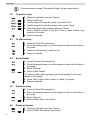
Your telephone display indicates if there are new messages received. The icon
be shown along with “You have X new messages”.
When there are new message:
will
1 Press left soft key “Read”.
The Inbox list appears on the display. This is a combination of new and
read messages. Messages which are new are indicated with a blue
dot icon.
2 Scroll through the list and select “Read” to read the message.
3 Select “Option”.
To delete this message:
4 Select “Delete” and confirm with “Yes”. To cancel press “No”.
To Reply this message:
5 Select “Reply”.
6 Write your message and select “Options”. Same as writing a new
message you have to possibility to send, Save and to use a
template etc ...
7 Select “Send”.
To forward this message to another number:
8 Select “Forward”.
9 Edit the message if needed and select “Option”. Same as writing a
new message you have to possibility to send, Save and to use a
template etc.
10 Select “Send”.
To dial this number:
11 Select “Use Number” and confirm. The number will be dialled
automatically.
To store this number into the phonebook:
12 Select “Save Number”.
13 Enter the name and select “Save”.
14 Edit the telephone number if needed and select “Save”.
To see the message details:
15 Select “Message Details”.
16 The sender’s number is displayed. Press “Dial” if you want to call
the number.
Read the inbox by the menu:
1 Enter the menu.
2 Select “Text Messaging”.
3 Select “Inbox”.
27
English
11.3
SMS
11.4 Reading and sending the saved message (Draft folder)
If you save a message to complete or send later it will be stored in the Draft box. You can
write a message and send it later by saving it into the Draft box. Only one message can
be stored in each user’s draft box.
Edit or Send texts in the draft folder:
1 Enter the menu.
2 Select “Text Messaging”.
3 Select “Drafts”.
4 Select “Edit” to edit your message content.
5 Select “Options”.
You have now the same options as reading the inbox.
11.5 Using the outbox
The outbox contains all messages which are ready to send or failed to be send. The
outbox can store up to 5 messages. In case more then 5 messages are send, the oldest
message successfully send will be removed.
Read the Outbox:
1 Enter the menu.
2 Select “SMS Message”.
3 Select “Outbox”.
4 Select the message and select “Read”.
5 Select “Options”.
To forward this message to another number:
6 Select “Forward”.
7 Edit the message if needed and select “Options”. Same as writing
a new message you have to possibility to Send, Save and to use a
template etc.
8 Select “Send”.
To delete this message:
9 Select “Delete” and confirm with “Yes”. To cancel press “No”.
11.6 Template messages
You can edit you own template messages to use when writing a message. The phone
can store up to 3 templates of maximum 32 characters. Default the templates are empty:
To Edit your own messages:
1 Enter the menu.
2 Select “Text Messaging”.
3 Select “Templates”.
4 Select the template message and select “Options”.
To edit the message:
5 Select “Edit” to edit and select “Save” to store.
To delete the message:
6 Select “Delete” and confirm.
28
SMS
11.7 Delete messages
Enter the menu.
Select “Text Messaging”.
Select “Delete Messages”.
Select “Inbox, Draft, Outbox, or All Messages”.
Confirm with “Yes” or press “No” to cancel.
English
1
2
3
4
5
11.8 SMS Settings
SMS Service center numbers
To send and receive SMS text messages you need the telephone number of your
Network’s SMS Centre. These numbers have been pre-loaded into the phone. If you
accidentally delete the SEND or RECEIVE SMS Service Centre numbers you will need
to re-enter them in order for your SMS Service to work.
The Orbit can store 2 SMS Service center numbers, one incoming and one outgoing. This
sending SMS service number will be dialed out by the phone whenever you send out a SMS.
To set the SMS Center numbers
1
2
3
4
5
6
7
Enter the menu.
Select “Text Messaging”.
Select “Text Settings”.
Select “Service Centres”.
Select “Receiving Centres” or “Send Centres”.
Select “Centre 1”.
Enter the number for the centre and press “Save”.
If there is an incoming call with a number matching with one of these SMS center
numbers, the phone knows it’s a call from the SMS center and will take the line
automatically to receive the messages.
Message alert tone
When you receive a text message, the message alert tone will sound. These beeps can
be switched on or off:
1
2
3
4
5
Enter the menu.
Select “Text Messaging”.
Select “Text Settings”.
Select “Message Alert”.
Select “Yes” or “No”.
Set Message size
A standard text message is 160 characters long. You can set a message to be up to 612
characters and the message will be sent as 4 messages of 160 characters long:
1 Enter the menu.
2 Select “Text Messaging”.
29
SMS
3 Select “Text Settings”.
4 Select “Message Size”.
5 Select “160 Characters” or “612 Characters”.
11.9 User Areas
If you have more than one SMS terminal device on the same telephone line you must
create different User Areas. Each user can have his own Inbox and outbox which are only
accessible by a pin code. By giving each user different sub addresses, they can receive
there own private messages.
In order to receive personal SMS messages, you must give your correspondents the sub
address Number that they need to add to your standard telephone number (See below).
You correspondents will need to add your sub address to your telephone
number when they want to send personal SMS.
E.g. If your personal sub address is "1" and your telephone number is
123456789, your correspondents should send their SMS messages
to:1234567891! This is the number you need to remember and give to your
correspondents.
If no sub address is add to you telephone number or ‘0’, all devices will receive these
messages.
You can change the sub address number to another one but only from 0-9:
Add a User mailbox
1
2
3
4
5
6
7
8
9
10
11
Enter the menu.
Select “Text Messaging”.
Select “Text Settings”.
Select “Users”.
Select one of the users and press “Options”.
Select “Edit”.
Enter the user name (max. 8 characters) and press “Save”.
Use the sub address shown or enter you own sub address (0-9).
Press “Save”.
Enter the 4-digit mailbox PIN and press “Save”.
Enter the PIN code again and press “Save”.
Open and read your own mailbox content
Once a mailbox is set and you enter the “Text Messaging” menu, the mailboxes in use
will be displayed. You can open the “General User” mailbox without PIN code, the others
will be PIN protected.
When there are new message:
1 Press left soft key “Read”.
The mailboxes are displayed. Mailboxes with new messages are
marked with blue dots .
2 Scroll through the list and select the mailbox you want.
30
SMS
English
3 Enter the mailbox PIN code and press OK.
4 Select the message you want and press “Read”.
Edit a user mailbox
1 Enter the menu.
2 Select “Text Messaging”.
3 Scroll to the mailbox you want to edit and press “Select”.
4 Enter the 4 PIN password and press OK.
5 Select “Text Settings”.
6 Select “Users”.
7 Scroll to the user mailbox you want to edit and press “Options”.
8 Select “Edit”.
9 Enter the 4 PIN password and press OK.
10 Edit the name and press “Save”.
11 Enter the new sub-address and press “Save”.
12 Enter the new 4 PIN password and press “Save”.
13 Re-Enter the PIN password and press “Save”.
Delete a user mailbox
1 Enter the menu.
2 Select “Text Messaging”.
3 Scroll to the mailbox you want to edit and press “Select”.
4 Enter the 4 PIN password and press OK.
5 Select “Text Settings”.
6 Select “Users”.
7 Scroll to the user mailbox you want to edit and press “Options”.
8 Select “Delete”.
9 Confirm with “Yes” or press “No” to cancel.
10 Enter the 4 PIN password and press OK.
Set the Common mailbox sub address
1
2
3
4
5
Enter the menu.
Select “Text Messaging”.
Select “Text Settings”.
Select “Mailbox Number”.
Enter the new sub-address and press “Save”.
If you enter a number already in use, you hear an error beep. Enter a
different number to avoid this.
31
Additional handsets and base stations
12 Additional handsets and base stations
You can subscribe up to 5 handsets on a base. Each handset can register up to 4 base
stations and the user can select the base he wants to use.
12.1 Adding a new handset
Only needed when you have deregistered a handset or when you bought a
new one.
To put the base into registration mode:
1 Press and hold the paging key on the base for 3 seconds.
During 60 seconds the base is ready to register.
On the handset:
1 If the handset is new “Please Register” is shown. Press “Menu” and
select “Registration”.
OR
2
3
4
5
Enter the menu.
Select “Registration”.
Select “Register handset”.
Select the number of the base to be associated with the handset
(1-4) and confirm.
6 Enter the system PIN (0000 by default) and confirm.
7 Return to standby.
12.2 Removing a handset
This procedure needs to be carried out on a different handset then the one you want to
remove.
1 Enter the menu.
2 Select “Registration”.
3 Select “De-Register”.
4 Enter the system PIN (0000 by default) and confirm.
5 Scroll to the handset that needs to be removed and confirm.
6 Press “Yes” to confirm or “No” to cancel.
7 Return to standby.
12.3 Select a base
You can switch your handset between bases. The handset must first be registered with
each base individually.
1 Enter the menu.
2 Select “Registration”.
3 Select “Select Base”.
4 Scroll to the base you want to use and confirm. The base currently
in-use is marked with “In-use”.
32
Additional handsets and base stations
Calling an internal handset
1 Press the INT-Key.
The screen displays “Internal Call”.
2 Enter the internal number of the handset you want to call (1-5).
3 Press “OK” to dial.
4 Press the on-hook key to hang up or put the handset back on the
base.
Transfer an external call to another handset
During an external call:
1 Press the INT-Key.
Your external correspondent is placed on hold.
The screen displays “Internal Call”.
2 Enter the internal number of the handset you want to call (1-5).
3 Press “OK” to dial.
4 When the internal correspondent answers, press the on-hook key
to transfer the call.
OR
3 If the internal correspondent doesn’t answer, press the INT key to
retrieve the external correspondent or to go from one to the other.
4 Press the on-hook key to hang up or put the handset back on the
base.
Conference call
You can talk between 2 handsets and an external line at the same time.
During an external call:
1 Press the INT-Key.
Your external correspondent is placed on hold.
The screen displays “Internal Call”.
2 Enter the internal number of the handset you want to call (1-5).
3 Press “OK” to dial.
4 When the internal correspondent answers, select “Join”.
“Conference Call” is shown on the display.
5 Press the on-hook key to hang up or put the handset back on the
base.
Taking an external call during an internal communication
When you are on intercom with another handset, you can still pick up outside calls.
To take an incoming call:
1 Press the on-hook key. The internal communication is now interrupted.
2 Press the off-hook key. You are now in communication with the
outside caller.
33
English
12.4 Using the intercom feature
Troubleshooting
13 Troubleshooting
Symptom
Possible cause
Solution
No display
Batteries uncharged
Check the position of the batteries
Recharge the batteries
Turn ON the handset
Check the telephone cord
connection
Wait until the other handset hangs
up
Bring the handset closer to the base
No tone
The icon
flashes
Handset turned OFF
Telephone cord badly
connected
The line is occupied by
another handset
Handset out of range
The base has no power supply Check the mains connection to the
base
The handset is not registered Register the handset on the base
on the base
Base or handset do not ring The ringing volume is off or
Adjust the ringing volume
low
Not possible to transfer a
The Flash Time is too short or Change the Flash Time
call on PABX
too long
Telephone does not react Manipulation error
Remove the batteries and put them
to pressing the keys
back in place
14 Technical dataTechnical characteristics
Standard
Frequency range
Number of channels
Modulation
Speech coding
Emission power
Range
Number of handsets
Base power supply
Handset Batteries:
Handset autonomy
Handset talk time
Normal conditions of use
Dialling mode
Flash time
Measurements base
Measurements handset
Weight base with adaptor
Weight base without adaptor
Weight handset with batteries
34
DECT(Digital Enhanced Cordless Telecommunications)
GAP (Generic Access Profile)
1880 MHz to 1900 MHz
120 duplex channels
GFSK
32 kbit/s
10 mW ( average power per channel )
300m in open space /50m maximum in-house
Up to 5
230V / 50 Hz / 6,5V DC 300mA
2 rechargeable batteries AAA, NiMh 1,2V, 750mA
110 hours in standby
11 hours
+5 °C to +45 °C
Pulse / Tone
100 or 250 ms
ca. 112mm x 112mm x 64mm (L x B x H)
ca. 34mm x 52,5mm x 154mm (L x B x H)
ca. 319g
ca. 135g
ca. 124g
Warranty
15.1 Warranty period
The Topcom units have a 24-month warranty period. The warranty period starts on the
day the new unit is purchased. The warranty on batteries is limited to 6 months after
purchase. Consumables or defects causing a negligible effect on operation or value of
the equipment are not covered.
The warranty has to be proven by presentation of the original purchase receipt, on which
the date of purchase and the unit-model are indicated.
15.2 Warranty handling
A faulty unit needs to be returned to a Topcom service centre including a valid purchase
note. If the unit develops a fault during the warranty period, Topcom or its officially
appointed service centre will repair any defects caused by material or manufacturing
faults free of charge.
Topcom will at its discretion fulfil its warranty obligations by either repairing or exchanging
the faulty units or parts of the faulty units. In case of replacement, colour and model can
be different from the original purchased unit.
The initial purchase date shall determine the start of the warranty period. The warranty
period is not extended if the unit is exchanged or repaired by Topcom or its appointed
service centres.
15.3 Warranty exclusions
Damage or defects caused by incorrect treatment or operation and damage resulting
from use of non-original parts or accessories not recommended by Topcom are not
covered by the warranty.
Topcom cordless phones are designed to work with rechargeable batteries only. The
damage caused by the use of non-rechargeable batteries is not covered under warranty.
The warranty does not cover damage caused by outside factors, such as lightning, water
and fire, nor any damage caused during transportation. No warranty can be claimed if the
serial number on the units has been changed, removed or rendered illegible.
Any warranty claims will be invalid if the unit has been repaired, altered or modified by the
buyer or by unqualified, non-officially appointed Topcom service centres.
16 Disposal of the device (environment)
At the end of the product lifecycle, you should not throw this product into the
normal household garbage but bring the product to a collection point for the
recycling of electrical and electronic equipments. The symbol on the product,
user guide and/or box indicate this.
Some of the product materials can be re-used if you bring them to a recycling
point. By re-using some parts or raw materials from used products you make an important
contribution to the protection of the environment. Please contact your local authorities in
case you need more information on the collection points in your area.
17 Cleaning
Clean the telephone with a slightly damp cloth or with an anti-static cloth. Never use
cleaning agents or abrasive solvents.
35
English
15 Warranty
SERVICE RETURN CARD - RÜCKSENDEKARTE CARTE DE RETOUR SERVICE - RETOURFICHE
RETURN WITH YOUR DEFECT PRODUCT
Name/Vorname/Prénom/Naam:
Surname/Familienname/Nom/Familienaam:
Street/Straße/Rue/Straat:
Nr./N°:
Box/Postfach/Boîte/Postbus:
Location/Ort./Lieu/Plaats:
Post code/Postleitzahl/Code Postal/Postcode:
Country/Land/Pays/Land:
Tel./Tél.:
E-mail:
Model name/Modellbezeichnung/Nom du modèle/Modelnaam:
Serial Nr/Seriennummer/N° série/Serienummer:
Purchase date/Kaufdatum/Date d’achat/Aankoopdatum:
(DD/MM/YYYY) - (TT/MM/JJJJ)
Fault description/Beschreibung des Defekts/Description de la panne/Beschrijving defect:
(Original Proof of Purchase has to be attached to this return card to be valid for warranty)
Model name/Modellbezeichnung/Nom du modèle/Modelnaam:
Serial Nr/Seriennummer/N° série/Serienummer:
Purchase date/Kaufdatum/Date d’achat/Aankoopdatum:
(DD/MM/YYYY) - (TT/MM/JJJJ)
Fault description/Beschreibung des Defekts/Description de la panne/Beschrijving defect:
R00001
Orbit
visit our website
www.topcom.net
MD2500171