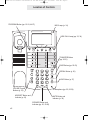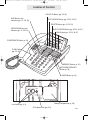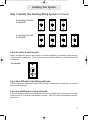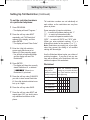
1
ET4300 UG for booklet old buttons v5 for PDF 021105.qxd 2/11/2005 2:55 PM Page 1 User’s Guide Please read before using telephone. ET4300 UG for booklet old buttons v5 for PDF 021105.qxd 2/11/2005 2:55 PM Page 2 Getting Started Congratulations! You’ve purchased a TMC EPIC System Intercom Speakerphone that meets the highest standards for quality and convenience in the Small Office/Home Office environment. To get the most from your system, please take time to read this guide thoroughly. IMPORTANT SAFETY INSTRUCTIONS When using your telephone equipment, basic safety precautions should always be followed to reduce the risk of fire, electric shock and injury to persons, including the following: 1. Do not use this product near water, for example, near a bath tub, wash bowl, kitchen sink, or laundry tub, in a wet basement, or near a swimming pool. 2. Avoid using a telephone (other than a cordless type) during an electrical storm. There may be a remote risk of electric shock from lightning. 3. Do not use the telephone to report a gas leak in the vicinity of the leak. 4. Use only the power cord and batteries indicated in this manual. Do not dispose of batteries in a fire. They may explode. Check with local codes for possible special disposal instructions. SAVE THESE INSTRUCTIONS i ET4300 UG for booklet old buttons v5 for PDF 021105.qxd 2/11/2005 2:55 PM Page 3 Getting Started Before you begin . . . The TMC EPIC System Intercom Speakerphone is designed for easy installation in your home or office. However, it is important that you follow these few simple guidelines: - Take a few minutes to read this manual so that you thoroughly understand the instructions to be followed for proper installation of your EPIC System phones. - This User’s Guide provides easy to understand directions for operation of your system. Please retain these instructions for future reference when adding stations or making changes to your system. Packing List Remove the unit from the package and check this list to be certain all parts are included: User’s Guide Telephone Base Unit Handset Telephone Line Cords (2 long and 1 short) AC Adapter Coiled Handset Cord Wall Mount Bracket/Desk Pedestal This User’s Guide Two Desk Pedestal Feet To order any packing list items, call toll-free 1-800-TMC-1638. ii ET4300 UG for booklet old buttons v5 for PDF 021105.qxd 2/11/2005 2:55 PM Page 4 Optional Accessories External Feature Module (Model number 800-EFM) The External Feature Module is an exciting addition to the EPIC System. It offers ONE of the following features, which you decide by setting switches on the module itself. If you ever need more than one feature, you can add additional Feature Modules to your system. Each External Feature Module offers ONE of the following features: Music On Hold Adapter Enables you to hook-up your radio or a continuous loop recorded message to the system to provide professional music or a recorded message to callers on hold. External Paging Adapter Allows the connection of an external amplifier and speaker to the system, for paging from any EPIC telephone. Perfect for warehouses, outdoors, or for making announcements throughout an entire office. Door Intercom/Door Opener Adapter Enables you to connect a door intercom speaker to the system. Also enables you to connect a magnetic door strike, which can be opened from any station. Perfect for warehouses, front doors or unattended entrances. Other Optional Accessories: 25-foot line cord 25-foot handset cord headset To order an accessory or get the name of the TMC Dealer nearest you, call toll-free 1-800-TMC-1638. iii ET4300 UG for booklet old buttons v5 for PDF 021105.qxd 2/11/2005 2:55 PM Page 5 Table of Contents Getting Started . . . . . . . . . . . . . . . . . . . . . . . . . . . . . . . . . . . . . . . . . . . . . .i Location of Controls . . . . . . . . . . . . . . . . . . . . . . . . . . . . . . . . . . . . . . . . .vii Installing Your System . . . . . . . . . . . . . . . . . . . . . . . . . . . . . . . . . . . . . . . .1-9 Step 1: Identify Your Existing Wiring System . . . . . . . . . . . . . . . . . .1 Step 2: Plan Your Installation . . . . . . . . . . . . . . . . . . . . . . . . . . . . . .2 Step 3: Install Desk/Table Top Phones . . . . . . . . . . . . . . . . . . . . . . .4 Step 4: Install Wall Mounted Phones . . . . . . . . . . . . . . . . . . . . . . . .6 Assigning Station Numbers . . . . . . . . . . . . . . . . . . . . . . . . . . . . . . . .8 Verifying Proper Installation . . . . . . . . . . . . . . . . . . . . . . . . . . . . . . . .9 Setting Up Your System . . . . . . . . . . . . . . . . . . . . . . . . . . . . . . . . . . . . . .10-19 Setting Up Your System at a Glance . . . . . . . . . . . . . . . . . . . . . . . .10 Setting Automatic Line Selection . . . . . . . . . . . . . . . . . . . . . . . . . . . .12 Setting Distinctive Ringing . . . . . . . . . . . . . . . . . . . . . . . . . . . . . . . .13 Setting Up Toll Restriction . . . . . . . . . . . . . . . . . . . . . . . . . . . . . . . . .14 Setting System Call Privacy On/Off . . . . . . . . . . . . . . . . . . . . . . . . .18 Setting Up Private, Auxiliary and Unconnected Lines . . . . . . . . . . . .19 Operating Your System . . . . . . . . . . . . . . . . . . . . . . . . . . . . . . . . . . . . . . .20-43 Using the Desk Pedestal/Wall Mount Bracket . . . . . . . . . . . . . . . . . .20 Indicator Light Description . . . . . . . . . . . . . . . . . . . . . . . . . . . . . . . . .21 Setting Ringers On/Delayed/Off . . . . . . . . . . . . . . . . . . . . . . . . . . . .22 Adjusting Volume Levels . . . . . . . . . . . . . . . . . . . . . . . . . . . . . . . . . .23 Making a Tone/Pulse Selection . . . . . . . . . . . . . . . . . . . . . . . . . . . . .24 Making and Answering a Call . . . . . . . . . . . . . . . . . . . . . . . . . . . . . .25 Using Redial . . . . . . . . . . . . . . . . . . . . . . . . . . . . . . . . . . . . . . . . . . .26 Using Hold . . . . . . . . . . . . . . . . . . . . . . . . . . . . . . . . . . . . . . . . . . . . .27 Using Another Line During a Conversation . . . . . . . . . . . . . . . . . . . .28 iv ET4300 UG for booklet old buttons v5 for PDF 021105.qxd 2/11/2005 2:55 PM Page 6 Table of Contents Operating Your System (Continued) Conferencing Calls . . . . . . . . . . . . . . . . . . . . . . . . . . . . . . . . . . . . . .29 Transferring Calls . . . . . . . . . . . . . . . . . . . . . . . . . . . . . . . . . . . . . . .30 Using Caller ID . . . . . . . . . . . . . . . . . . . . . . . . . . . . . . . . . . . . . . . . .32 Using Telephone Company Voice Mail . . . . . . . . . . . . . . . . . . . . . . .34 Using Flash . . . . . . . . . . . . . . . . . . . . . . . . . . . . . . . . . . . . . . . . . . . .35 Using Mute . . . . . . . . . . . . . . . . . . . . . . . . . . . . . . . . . . . . . . . . . . . .36 Using Do Not Disturb . . . . . . . . . . . . . . . . . . . . . . . . . . . . . . . . . . . .37 Using Line Reserve . . . . . . . . . . . . . . . . . . . . . . . . . . . . . . . . . . . . . .38 Releasing Call Privacy . . . . . . . . . . . . . . . . . . . . . . . . . . . . . . . . . . .39 Using Toll Restriction . . . . . . . . . . . . . . . . . . . . . . . . . . . . . . . . . . . . .40 Using the Call Timer . . . . . . . . . . . . . . . . . . . . . . . . . . . . . . . . . . . . .41 Using a Headset with Your Epic Telephone . . . . . . . . . . . . . . . . . . .42 Adjusting Your Telephone’s Time and Date . . . . . . . . . . . . . . . . . . .43 Memory Dialing . . . . . . . . . . . . . . . . . . . . . . . . . . . . . . . . . . . . . . . . . . . . .44-49 Memory Features . . . . . . . . . . . . . . . . . . . . . . . . . . . . . . . . . . . . . . .44 Using Memory Dial . . . . . . . . . . . . . . . . . . . . . . . . . . . . . . . . . . . . . .45 Using Personal Directory Dial . . . . . . . . . . . . . . . . . . . . . . . . . . . . . .46 Using Shared Directory Dial . . . . . . . . . . . . . . . . . . . . . . . . . . . . . . .47 Special Memory Features . . . . . . . . . . . . . . . . . . . . . . . . . . . . . . . . .48 Intercom Operation . . . . . . . . . . . . . . . . . . . . . . . . . . . . . . . . . . . . . . . . . .50-57 Making Intercom Calls . . . . . . . . . . . . . . . . . . . . . . . . . . . . . . . . . . . .50 Answering Intercom Calls . . . . . . . . . . . . . . . . . . . . . . . . . . . . . . . . .51 Making Pages . . . . . . . . . . . . . . . . . . . . . . . . . . . . . . . . . . . . . . . . . .52 Answering Pages . . . . . . . . . . . . . . . . . . . . . . . . . . . . . . . . . . . . . . .53 Selecting Intercom Ring, Intercom Voice, or Handsfree . . . . . . . . . .54 Using Off Hook Voice Announce . . . . . . . . . . . . . . . . . . . . . . . . . . . .55 Monitoring a Room Using the Intercom . . . . . . . . . . . . . . . . . . . . . .56 Naming Stations . . . . . . . . . . . . . . . . . . . . . . . . . . . . . . . . . . . . . . . .57 v ET4300 UG for booklet old buttons v5 for PDF 021105.qxd 2/11/2005 2:55 PM Page 7 Table of Contents Expanding the Epic System . . . . . . . . . . . . . . . . . . . . . . . . . . . . . . . . . . .58-59 Standard Configuration . . . . . . . . . . . . . . . . . . . . . . . . . . . . . . . . . . .58 Private Lines . . . . . . . . . . . . . . . . . . . . . . . . . . . . . . . . . . . . . . . . . .58 Auxiliary Lines . . . . . . . . . . . . . . . . . . . . . . . . . . . . . . . . . . . . . . . . .59 Centrex Operation . . . . . . . . . . . . . . . . . . . . . . . . . . . . . . . . . . . . . . . . . . .60-63 Using Centrex with your EPIC Telephone . . . . . . . . . . . . . . . . . . . . .60 Storing the Centrex Prefix . . . . . . . . . . . . . . . . . . . . . . . . . . . . . . . . .61 Setting up a Telephone as a Centrex Console . . . . . . . . . . . . . . . . .62 Setting a Telephone to Ring a Centrex Console . . . . . . . . . . . . . . . .63 Additional Information . . . . . . . . . . . . . . . . . . . . . . . . . . . . . . . . . . . . . . . .64-78 Using Other Telephones with your EPIC Telephone . . . . . . . . . . . . .64 Using the Data/Fax Jack . . . . . . . . . . . . . . . . . . . . . . . . . . . . . . . . . .65 Using the Network Services Button . . . . . . . . . . . . . . . . . . . . . . . . .65 Using Optional External Feature Module . . . . . . . . . . . . . . . . . . . . .66 Replacing Your Battery . . . . . . . . . . . . . . . . . . . . . . . . . . . . . . . . . . .68 Adjusting Held Call Reminder . . . . . . . . . . . . . . . . . . . . . . . . . . . . . .69 Adjusting Auto Hold Drop Time . . . . . . . . . . . . . . . . . . . . . . . . . . . . .70 Adjusting Flash Length . . . . . . . . . . . . . . . . . . . . . . . . . . . . . . . . . . .71 Erasing All Feature Settings . . . . . . . . . . . . . . . . . . . . . . . . . . . . . . .72 Setting the Loop Voltage Detector . . . . . . . . . . . . . . . . . . . . . . . . . .73 Troubleshooting Guide . . . . . . . . . . . . . . . . . . . . . . . . . . . . . . . . . . .74 FCC Information . . . . . . . . . . . . . . . . . . . . . . . . . . . . . . . . . . . . . . . .76 Warranty Information . . . . . . . . . . . . . . . . . . . . . . . . . . . . . . . . . . . . .78 Index . . . . . . . . . . . . . . . . . . . . . . . . . . . . . . . . . . . . . . . . . . . . . . . . . . . . . .80-81 vi ET4300 UG for booklet old buttons v5 for PDF 021105.qxd 2/11/2005 2:55 PM Page 8 Location of Controls PROGRAM Button (pp. 10-19, 44-57) MSG Lamp (p. 34) NEW CALL Lamp (pp. 32, 34) TRANSFER Button (pp. 30-31) PAGE Button (pp. 52-53) REDIAL Button (p. 26) HOLD Button (p. 27) VOLUME Control Buttons (p. 23) Microphone (pp. 25, 50-56) HEADSET Button and Indicator (p. 42) MUTE Button and Indicator (p. 36) SPEAKER Button and Indicator (pp. 25, 50-56) vii ET4300 UG for booklet old buttons v5 for PDF 021105.qxd 2/11/2005 2:56 PM Page 9 Location of Controls CALLER ID Button (pp. 32-33) LINE Buttons and Indicators (pp. 21, 25, 38) LEFT ARROW Button (pp. 32-33, 46-47) DELETE Button (pp. 25, 32-33) INTERCOM Button and Indicator (pp. 21, 50-53) RIGHT ARROW Button (pp. 32-33, 46-47) DIAL Button (pp. 32-33, 46-47) CONFERENCE Button (p. 29) FLASH Button (pp. 35, 48) MEMORY Buttons (p. 45) NETWORK SERVICES Button (p. 56) LOWER Button (p. 45) POWER L1/L2 L3/L4 Battery Compartment (p. 68) Line Jacks (pp. 4, 6) AC Adapter Jack (pp. 5-6) viii ET4300 UG for booklet old buttons v5 for PDF 021105.qxd 2/11/2005 2:56 PM Page 10 Installing Your System Step 1: Identify Your Existing Wiring System In order for you to properly connect your EPIC System to an existing wiring system, it is important that you understand its configuration. The following are the most common multiple line situations. They consist of either one or both types of standard telephone jacks: The RJ11 Single Line Jack and the RJ14 Double Line Jack. Your system should match one of them. 2 incoming lines with 1 wall jack Line 1-2 2 incoming lines with 2 wall jacks Line 1 Line 2 Line 1-2 Line 3 Line 1 Line 2 Line 1-2 Line 3-4 3 incoming lines with 2 wall jacks 3 incoming lines with 3 wall jacks 4 incoming lines with 2 wall jacks ix Line 3 ET4300 UG for booklet old buttons v5 for PDF 021105.qxd 2/11/2005 2:56 PM Page 11 Installing Your System Step 1: Identify Your Existing Wiring System (Continued) 4 incoming lines with 3 wall jacks Line 1-2 Line 3 Line 4 Line 1 Line 2 Line 3 4 incoming lines with 4 wall jacks Line 4 Label the jacks at each location. Identify and label the jacks at each location to avoid the possibility of improperly connecting any of the lines to the telephones. To do so, write the line number(s) directly on each jack plate with a felt-tip pen. For example: If you have difficulty in identifying wall jacks. Call the vendor who installed the inside wiring and ask for assistance in identifying your existing wiring system and jacks. If you are installing new wiring and jacks. If any new telephone wiring and modular jacks need to be installed, and four lines are to be used, install two-line RJ14 jacks at each telephone location. Each RJ14 jack accommodates two telephone lines. 1 ET4300 UG for booklet old buttons v5 for PDF 021105.qxd 2/11/2005 2:56 PM Page 12 Installing Your System Step 2: Plan Your Installation Up to 16 Epic System telephones may be connected to form your office/home configuration. Each phone must be assigned a different station number, from 11 to 26. IMPORTANT: Each Epic System telephone must be connected to the same Line 1 telephone number for proper operation. The remaining lines may or not be connected to each station as you desire. Standard Installation: Your Epic telephones come factory-set for a standard “Shared” installation, which is also called “square” in telephone terminology. This means that Line 1 is to be connected to the same Line 1 telephone number at all the stations, Line 2 is to be connected to the same Line 2 telephone number at all the stations, and so on for Lines 3 and 4. This is the desired setup for most installations, and if this is how you will be connecting your Epic System, you do not need to change any of the line connection settings in the telephones. You need only connect the phones to the telephone lines, and then follow the instructions on page 9 to be sure that you have connected the telephone numbers in the same order to each station. Installations with Private Lines, Auxiliary Lines, and Unconnected Lines: You may wish to connect private lines to Lines 2, 3 or 4 at some or all of your telephones. A private line is a telephone number that is connected to only one of the Epic telephones, and is not shared with any other station. You may also wish to connect auxiliary lines to Lines 2, 3 or 4 at some of your telephones. An auxiliary line is a telephone number that is shared by two or more stations, but which is a different telephone number than the corresponding line at the other stations. These sort of installation requirements are common in Centrex environments, or in companies where clusters of telephones share common lines. In addition you may wish to leave some lines unconnected at some stations. If your installation has any of these requirements, carefully fill out the worksheet on the following page and use it as a guide as you connect the telephone lines to your Epic telephones, then follow the instructions on page 19 to properly set each line at each station. ET4300 UG for booklet old buttons v5 for PDF 021105.qxd Installation Worksheet Station Number User’s Name or Telephone Location Line 1 Shared Private L4Aux1 L4Aux2 Unconnected Shared Shared Private L2Aux1 Unconnected Shared Private L3Aux1 Unconnected Shared Private L4Aux1 L4Aux2 Unconnected Shared Shared Private L2Aux1 Unconnected Shared Private L3Aux1 Unconnected Shared Private L4Aux1 L4Aux2 Unconnected Shared Shared Private L2Aux1 Unconnected Shared Private L3Aux1 Unconnected Shared Private L4Aux1 L4Aux2 Unconnected Shared Shared Private L2Aux1 Unconnected Shared Private L3Aux1 Unconnected Shared Private L4Aux1 L4Aux2 Unconnected Shared Shared Private L2Aux1 Unconnected Shared Private L3Aux1 Unconnected Shared Private L4Aux1 L4Aux2 Unconnected Shared Shared Private L2Aux1 Unconnected Shared Private L3Aux1 Unconnected Shared Private L4Aux1 L4Aux2 Unconnected Shared Shared Private L2Aux1 Unconnected Shared Private L3Aux1 Unconnected Shared Private L4Aux1 L4Aux2 Unconnected Shared Shared Private L2Aux1 Unconnected Shared Private L3Aux1 Unconnected Shared Private L4Aux1 L4Aux2 Unconnected Shared Shared Private L2Aux1 Unconnected Shared Private L3Aux1 Unconnected Shared Private L4Aux1 L4Aux2 Unconnected Shared Shared Private L2Aux1 Unconnected Shared Private L3Aux1 Unconnected Shared Private L4Aux1 L4Aux2 Unconnected Shared Shared Private L2Aux1 Unconnected Shared Private L3Aux1 Unconnected Shared Private L4Aux1 L4Aux2 Unconnected Shared Shared Private L2Aux1 Unconnected Shared Private L3Aux1 Unconnected Shared Private L4Aux1 L4Aux2 Unconnected Shared Shared Private L2Aux1 Unconnected Shared Private L3Aux1 Unconnected Shared Private L4Aux1 L4Aux2 Unconnected Shared Shared Private L2Aux1 Unconnected Shared Private L3Aux1 Unconnected Shared Private L4Aux1 L4Aux2 Unconnected Shared Shared Private L2Aux1 Unconnected Shared Private L3Aux1 Unconnected Shared Private L4Aux1 L4Aux2 Unconnected Stn. 16 Stn. 17 Stn. 18 Stn. 24 Stn. 25 Stn. 26 Line 4 Shared Private L3Aux1 Unconnected Stn. 15 Stn. 23 Line 3 Shared Private L2Aux1 Unconnected Stn. 14 Stn. 22 Line 2 Shared Stn. 13 Stn. 21 Page 13 Tel #____ Tel #___________ Tel #___________ Tel #___________ Stn. 12 Stn. 20 2:56 PM Mark each line at each station as either Shared, Private, Aux, or Unconnected. Refer to page 19 if you are not sure of the meaning of these terms. Note that Line 1 must be “Shared” at all the stations, meaning that Line 1 must be connected to the same telephone number at all the stations. IMPORTANT: If you have circled anything other than “Shared” on this worksheet, then after installing your phones according to this worksheet you must follow the instructions on page 19 to set each phone as you have marked on this worksheet. Stn. 11 Stn. 19 2/11/2005 ET4300 UG for booklet old buttons v5 for PDF 021105.qxd 2/11/2005 2:56 PM Page 14 Installing Your System Step 3: Install Desk/Table Top Phones 1 Connect First Line Cord Lines 1&2 L1/L2 Connect one end of a long telephone line cord to the jack on the bottom of the telephone labeled L1/L2. Connect the other end to the jack(s) labeled Lines 1 & 2 either: directly to the wall jack if it is a two-line RJ14 jack OR to a two-line coupler (not provided) if you have two single-line RJ11 jacks for lines 1 and 2. Then connect the two cords of the coupler to the corresponding wall jacks. Two-line couplers are available many places, for example Radio Shack (part #279-401). Line 1 L1/L2 Line 2 2 Connect Second Line Cord Connect one end of a long telephone line cord to the jack on the back of the telephone labeled L3/L4. Connect the other end to the wall jack(s) labeled Lines 3 & 4 in the same manner as described in the previous step. Note: If you are installing a 3-line EPIC telephone, or are connecting a 4-line telephone to only 3 lines, connect the other end of the line cord directly to the wall jack labeled Line 3. 4 L3/L4 ET4300 UG for booklet old buttons v5 for PDF 021105.qxd 2/11/2005 2:56 PM Page 15 Installing Your System Step 3: Install Desk/Table Top Phones (Continued) 3 Connect Handset Plug either end of the coiled handset cord into the handset and the other end into the jack on the side of the telephone. Place the handset in the cradle. 4 Connect Power Cord Plug the AC power cord into the adapter jack on the bottom of the telephone. Thread the power cord into the recessed groove. Plug the AC adapter into an electrical outlet not controlled by a wall switch. 5 Assign a Station Number Refer to page 8 for detailed instructions on assigning a station number. 6 Install Batteries (Optional) It is not necessary for you to install batteries in your Epic telephone for it to function normally. In fact, batteries are not even needed to preserve your memory dial numbers in the event of a power failure. This is because all memory dial numbers are stored in a static memory which retains its contents even with no electrical power. The only purpose of having batteries installed is so that the telephone itself can function for up to two hours in the event of a power failure. You may wish to install batteries in at least one Epic phone for emergency operation, or have another standard phone available. If you wish to install batteries, refer to page 68 for detailed instructions. 7 Verify Proper Installation IMPORTANT: Please remember to perform the procedure on page 9, after you assign each station number, to verify that each telephone is properly installed. 5 ET4300 UG for booklet old buttons v5 for PDF 021105.qxd 2/11/2005 2:56 PM Page 16 Installing Your System Step 4: Install Wall Mounted Phones 1 Connect Cords to Telephone If the wall jack is labeled Lines 1 & 2, connect the short telephone line cord to the jack on the telephone labeled L1/L2. If the wall jack is labeled Lines 3 & 4, connect the short cord to the jack on the telephone labeled L3/L4. Connect the long telephone line cord to the other line jack on the telephone and thread it through its long groove on the bottom of the phone, then plug the AC power cord into the adapter jack on the bottom of the telephone, threading the power cord through its long groove on the bottom of the phone. Thread the short telephone cord through the square hole in the center of the wall mount bracket, and then attach the wall mount bracket to the base of the telephone. 2 Connect Cords to Wall Connect the long telephone line cord to the jack by the baseboard, and plug the AC adapter into the nearest electrical outlet not controlled by a wall switch. 3 Reverse Handset Hook Slide the telephone hook out of the cradle, rotate it 180 degrees so that its tab faces upward, and then slide it back into the cradle. 4 Connect Handset Plug either end of the coiled handset cord into the handset and the other end into the jack on the side of the telephone. Place the handset in the cradle. 6 L1/L2 L3/L4 AC power cord ET4300 UG for booklet old buttons v5 for PDF 021105.qxd 2/11/2005 2:56 PM Page 17 Installing Your System Step 4: Install Wall Mounted Phones (Continued) 5 Assign a Station Number Refer to page 8 for detailed instructions on assigning a station number. 6 Install Batteries (Optional) It is not necessary for you to install batteries in your Epic telephone for it to function normally. In fact, batteries are not even needed to preserve your memory dial numbers in the event of a power failure. This is because all memory dial numbers are stored in a static memory which retains its contents even with no electrical power. The only purpose of having batteries installed is so that the telephone itself can function for up to two hours in the event of a power failure. You may wish to install batteries in at least one Epic phone for emergency operation, or have another standard phone available. If you wish to install batteries, refer to page 68 for detailed instructions. 7 Attach Telephone to Wall Hold the telephone close to the wall and connect the short telephone line cord to the jack. Then mount the telephone to the wall plate, sliding it down firmly so that it locks securely in place. 8 Verify Proper Installation IMPORTANT: Please remember to perform the procedure on page 9, after you assign each station number, to verify that each telephone is properly installed. 7 ET4300 UG for booklet old buttons v5 for PDF 021105.qxd 2/11/2005 2:56 PM Page 18 Installing Your System Assigning Station Numbers Each station must be assigned a different station number. To assign a station a number: 1 Press PROGRAM. - The display will read “Program...” 2 Press the soft key under NEXT. - The display will show the currently assigned station number. 3 Press the soft key under CHANGE repeatedly, until the desired station number is displayed. The choices are Station #11 through Station #26. 4 Press PROGRAM to exit. You may follow the above steps at any time if you wish to change a telephone’s station number. Note: If you are connecting your telephone for the first time, the telephone automatically starts at the station assignment screen, so you begin with step #3. Until a telephone is assigned a station number, the telephone will not operate, and the display will read “Station #??”. To assign this telephone a station number, simply press the soft key under CHANGE repeatedly until the desired station number is displayed. It is important to connect the telephone to the telephone lines before pressing CHANGE, so that the phone can check other existing stations in the system, and avoid offering you a duplicate station assignment. Note: One phone in the system must be set as Station #11 in order for all the system features, such as shared directory dial, to function. Using Station Names If you wish, you may also assign your station a name (See page 57). Then, people will see your station’s name when you call them on the intercom. 8 ET4300 UG for booklet old buttons v5 for PDF 021105.qxd 2/11/2005 2:56 PM Page 19 Installing Your System Verifying Proper Installation The following procedure should be used at each telephone to verify proper installation. Also use this procedure any time you are experiencing difficulty, to test system configuration and identify possible system connection errors. The phone must be connected to the AC power supply, line 1 must be connected to the line 1 jack, and the phone must have been assigned an intercom station number. IMPORTANT: If you ever have a problem with the installation or use of your EPIC System, please check the following procedure before calling our toll-free customer support number for assistance - 1-800-TMC-1638. First, verify that line 1 is connected to the same telephone number at all the telephones. Do do this, press the line 1 button at one of the telephones. The line 1 LED should be green, the speakerphone LED should be red, and dial tone should be heard from the speaker. Now go to each of the other stations and make sure that each line 1 LED is red. Next, make sure that lines 2, 3 and 4 are connected the same at all the phones by following the following steps at each telephone: 1. Press the line 1 button. The line 1 LED should be green, the speakerphone LED should be red, and dial tone should be heard from the speaker. 2. Dial the telephone number for line 2. The line 2 LED should flash slowly. If the line 2 LED does not flash, then line 2 is improperly connected to this telephone. 3. If this telephone utilizes line 3 and/or line 4, repeat steps 1 and 2, substituting the respective phone number(s) in step 2. 9 ET4300 UG for booklet old buttons v5 for PDF 021105.qxd 2/11/2005 2:56 PM Page 20 Setting Up Your System Setting Up Your System At A Glance The following must be done at Program Station Number Assignment Automatic Line Selection Set Distinctive Ringing Toll Restriction Set up and Private, Auxiliary, and Unconnected Lines Set Ringers On/Delayed/Off Select Intercom Ring, Voice or Handsfree each station: Factory Setting Page Not assigned 8 Line 1 12 None Set 13 No Restrictions 14-17 None Set 19 All Ringers On 22 Handsfree 54 Note: You must program a feature only if you wish to change its setting from the Factory Setting. 10 ET4300 UG for booklet old buttons v5 for PDF 021105.qxd 2/11/2005 2:56 PM Page 21 Setting Up Your System Setting Up Your System At A Glance (Continued) The following must be done at Program Station #11: Factory Setting Page “1234” 14 On 18 Tone 24 Store Shared Directory Dial Numbers None Stored 47 Name Stations None Named 57 Set Toll Restriction Access Code Set System Call Privacy On/Off Tone or Pulse Dialing Note: You must program a feature only if you wish to change its setting from the Factory Setting. 11 ET4300 UG for booklet old buttons v5 for PDF 021105.qxd 2/11/2005 2:56 PM Page 22 Setting Up Your System Setting Automatic Line Selection To choose which line will be automatically selected: 1 Press PROGRAM. - The display will read “Program...” 2 Press the soft key under NEXT repeatedly, until ”Auto Seize” appears in the display. You may choose any of the outside lines or the Intercom line to be selected automatically when you lift the handset or press the SPEAKER button The display will show the current auto seize setting. 3 Press the soft key under CHANGE repeatedly, until the desired auto seize setting is displayed. The choices are: Auto Seize:L1 (factory setting) Auto Seize:L2 Auto Seize:L3 Auto Seize:L4 Auto Seize:INTCM 4 Press PROGRAM to exit. This feature allows you to choose which line will be selected automatically when you lift the handset or press the SPEAKER button. You may choose any of the outside lines or the Intercom line. If your chosen line is in-use, the telephone will automatically select the next available line. Note: An incoming call that is ringing at your telephone will be selected automatically when you lift the handset or press the SPEAKER or HEADSET button, regardless of the choices you have made for automatic line selection. If you wish to select a different line while your phone is ringing, you must press the desired LINE button before lifting the handset. 12 ET4300 UG for booklet old buttons v5 for PDF 021105.qxd 2/11/2005 2:56 PM Page 23 Setting Up Your System Setting Distinctive Ringing To assign distinctive rings to one or more lines: 1 Press PROGRAM. - The display will read “Program...” 2 Press the soft key under NEXT repeatedly, until ”Distinctive Ring” appears in the display, and then press ENTER The display will show the distinctive ring setting for Line 1. 3 Press the soft key under CHANGE repeatedly, until the desired distinctive ring setting for Line 1is displayed. The choices are: L1:RING SOUND #1 (factory setting) through RING SOUND #8 4 Press the soft key under NEXT to see the current setting for Line 2, and repeat steps 3 and 4 to change the settings for Lines 2-4. 5 Press PROGRAM to exit. All lines are initially set to ring with Ring Sound #1. If you prefer, you may assign each outside line one of seven other distinctive ringer tones. This feature is usually used in one of four ways: 1 You may want to assign one of your lines its own ring tone and leave the other lines set at the default ring. For example, if line 3 were a private line at your telephone, you may assign it a distinctive ring so you could easily recognize calls ringing on your private line. 2 Or, you may want to assign a particular line the same distinctive ring at all of the stations. For example, if line 3 were the customer service line, you may assign line 3 the same distinctive tone at all the telephones so everybody could easily tell when this line was ringing. 3 Another use of this feature would be to give all of the lines at your telephone the same distinctive ring so that you could easily tell when your particular phone was ringing and differentiate it from the ringing of other nearby telephones. 4 Or, you might give all of your lines the same distinctive ring simply because you prefer that particular ringing tone. Note: At any time when you have a particular distinctive ring setting displayed, you may press the soft key under HEAR to hear an example of that distinctive ring. 13 ET4300 UG for booklet old buttons v5 for PDF 021105.qxd 2/11/2005 2:56 PM Page 24 Setting Up Your System Setting Up Toll Restriction To set the system’s toll restriction access code: At Station #11: 1 Press PROGRAM. - The display will read “Program...” 2 Press the soft key under NEXT repeatedly, until “Toll Restriction” appears in the display, and then press ENTER. - The display will read “Access .” Code: **** 3 Press the soft key under CHANGE if you wish to store a new access code. 4 Enter a 4 digit number. 5 Press PROGRAM to exit. The Toll Restriction feature enables you to control outgoing calls and helps you prevent unauthorized long distance calls. The toll restriction access code is set at station #11. This code is needed when you wish to change any toll restriction settings or when you wish to turn toll restriction on or off at a particular phone. (See page 40). If you ever forget the access code, simply set a new code at Station #11. Until you set the access code, the code will be the one set at the factory, which is “1234”. Setting the restricted numbers and the allowed exceptions at a particular telephone: Follow the instructions on the following three pages for setting toll restrictions at particular phones. After you set a phone’s toll restrictions, the settings will not be erased, even in the event of a power failure. So you do not need to worry about ever having to re-enter the toll restriction settings at any of the stations. If you ever do wish to erase all the toll restriction settings stored at a particular phone, follow the instructions on page 49. Turning toll restriction on/off at a particular telephone: 14 Follow the instructions on page 40 for turning toll restriction on and off at a particular phone. Note: After setting a station’s restrictions, its toll restriction is automatically ON. In the future, you may temporarily override its toll restriction or turn its toll restriction off for a longer period without affecting the settings stored in the telephone. ET4300 UG for booklet old buttons v5 for PDF 021105.qxd 2/11/2005 2:56 PM Page 25 Setting Up Your System Setting Up Toll Restriction (Continued) To set the restricted numbers at a particular telephone: 1 Press PROGRAM. - The display will read “Program...” 2 Press the soft key under NEXT repeatedly, until “Toll Restriction” appears in the display, and then press ENTER. - The display will read “Enter Code:” 3 Enter the 4 digit toll restriction access code which was set at Station #11 (See preceding page). - You will hear a confirmation beep and the display will read “Set Restricted #” 4 Press ENTER - The display will show the currently stored Restriction #1, or indicate “1:” if there is no Restriction #1 yet stored. 5 Press the soft key under CHANGE if you wish to store a new Restriction #1, then dial desired restricted number, up to 6 digits. 6 Press the soft key under SAVE. Toll restriction numbers are set individually at each station, so the restrictions can vary from phone to phone. Some examples of popular restrictions: “1” ... to restrict all numbers starting with “1”. “01” ... to restrict all international calls. “0” ... to restrict all operator-assisted calls. “#976” ... to restrict all “0976” and “1976” calls. (When you enter restricted numbers, “#” is a wildcard that stands for the number “0” or “1”.) Note: Restrictions are usually just a few digits, since they prevent the dialing of all numbers starting with those digits. Use the Worksheet below to plan your choice of restricted numbers. If you plan to set any stations with a different set of restrictions, then use additional copies of this worksheet. Worksheet You can set as many as five restricted numbers at each telephone. Enter the restricted numbers exactly as you would dial them out. Each restriction can be up to 6 digits long. 1st Restriction 2nd Restriction 3rd Restriction 4th Restriction 5th Restriction 7 Press the soft key under NEXT and repeat steps 5-6 if you wish to store any additional restrictions at this phone. 15 ET4300 UG for booklet old buttons v5 for PDF 021105.qxd 2/11/2005 2:56 PM Page 26 Setting Up Your System Setting Up Toll Restriction (Continued) To completely restrict specific lines at a telephone: 1 Press PROGRAM. - The display will read “Program...” 2 Press the soft key under NEXT repeatedly, until “Toll Restriction” appears in the display, and then press ENTER. - The display will read “Enter Code:” 3 Enter the 4 digit toll restriction access code which was set at Station #11 (See page 14). - You will hear a confirmation beep and the display will read “Set Restricted #” 4 Press the soft key under NEXT repeatedly, until “Line Restriction” appears in the display, and then press ENTER. 5 Press the soft key under CHANGE repeatedly, until the desired Line 1 Restriction setting is displayed. The choices are: L1: NORMAL (factory setting) L1: RESTRICTED 6 Press the soft key under NEXT to see the current setting for Line 2, and repeat steps 5 and 6 to change the settings for Lines 2-4. 7 Press PROGRAM to exit. 16 In addition to setting specific restrictions at a particular phone (See preceding page), you may completely restrict any or all of the lines at a particular station. People will not be able to make any outgoing calls on any lines that are completely restricted at a station, with the exception of the allowed numbers at that station and calls to “911”. However, they will still be able to receive incoming calls on these lines, take calls off hold, and have full use of the intercom. The ability to completely restrict lines is useful in an office where you only want people to make calls on certain lines at particular stations. You may also wish to put one station in a public area, such as a lobby, and completely restrict all or most of its lines. ET4300 UG for booklet old buttons v5 for PDF 021105.qxd 2/11/2005 2:56 PM Page 27 Setting Up Your System Setting Up Toll Restriction (Continued) To set the allowed numbers at a particular telephone: If you set restrictions at a particular phone, you will most likely also want to store some allowed exceptions at that telephone. 1 Press PROGRAM. For example, if you restrict long-distance calls, you will probably want to store some allowed area codes, such as “1301”. Or, for example, you may wish to store “1800”, to allow all “1800” calls. Or “1 ” to allow all “1+7 digit” calls. (When you enter allowed numbers, “ ” is a wildcard that stands for any number from 0-9.) You may also want to store some specific allowed numbers, for example other company offices. - The display will read “Program...” 2 Press the soft key under NEXT repeatedly, until “Toll Restriction” appears in the display, and then press ENTER. - The display will read “Enter Code:” 3 Enter the 4 digit toll restriction access code which was set at Station #11 (See page 14). - You will hear a confirmation beep and the display will read “Set Restricted #” 4 Press the soft key under NEXT. - The display will read “Set Allowed #” 5 Press ENTER - The display will show the currently stored Allowed #1, or indicate “1:” if there is no Allowed #1 yet stored. ******* * Use the Worksheet below to plan your choice of allowed numbers. If you plan to set any stations with a different set of allowed numbers, then use additional copies of this worksheet. Worksheet You can set as many as five allowed numbers at each telephone. Enter the allowed numbers exactly as you would dial them out. Each allowed number can be up to 10 digits long. 1st Allowed 2nd Allowed 6 Press the soft key under CHANGE if 3rd Allowed you wish to store a new Allowed #1, then dial desired allowed number, up to 10 digits. 4th Allowed 5th Allowed 7 Press the soft key under SAVE. 8 Press the soft key under NEXT and repeat steps 6-7 if you wish to store any additional allowed numbers at this phone. 17 ET4300 UG for booklet old buttons v5 for PDF 021105.qxd 2/11/2005 2:56 PM Page 28 Setting Up Your System Setting System Call Privacy On/Off To set system call privacy on/off: At Station #11: 1 Press PROGRAM. - The display will read “Program...” 2 Press the soft key under NEXT repeatedly, until “Advanced Setting” appears in the display, and then press ENTER. If you set your system call privacy ON, you may still press the CONFERENCE button at any time during a call to release Call Privacy CONFERENCE ABC FLASH " GHI # JKL 3 Press the soft key under NEXT until “Call Privacy” appears in the display, and then press ENTER. The display will show the current Call Privacy setting 4 Press the soft key under CHANGE repeatedly, until the desired call privacy setting is displayed. The choices are: Call Privacy:ON (factory setting) Call Privacy:OFF 5 Press PROGRAM to exit. Note: Even if you set Call Privacy on, people will still be able to turn Call Privacy off during a call if they wish by pressing the CONFERENCE button. (See page 39) 18 The Call Privacy feature is set at Station #11, and this setting governs the entire system. There are two possible settings: CALL PRIVACY ON: This is the initial factory setting and when this is set nobody can pick up their station and join or listen to your conversation unless you first release the call privacy by pressing the CONFERENCE button. This feature helps prevent eavesdropping and the disturbance of people accidentally interrupting your telephone conversations. CALL PRIVACY OFF: This setting is useful for people who find the call privacy feature unnecessary or inconvenient. In some businesses, people prefer to be able to pick up other stations without the privacy having to be released first or having to be conferenced to the line. Note: There is always call privacy on intercom calls regardless of your system call privacy selection. People at other stations cannot listen in to your intercom conversations. ET4300 UG for booklet old buttons v5 for PDF 021105.qxd 2/11/2005 2:56 PM Page 29 Setting Up Your System Setting Up Private, Auxiliary and Unconnected Lines To program: 1 Press PROGRAM. - The display will read “Program...” 2 Press the soft key under NEXT repeatedly, until ”Line Connections” appears in the display, and then press ENTER. The display will show the current line connection setting for Line 2. 3 Press the soft key under CHANGE repeatedly, until the desired line connection setting for Line 2 is displayed. The choices are: L2: SHARED (factory setting) L2: PRIVATE L2: L2 AUX1 L2: UNCONNECTED 4 Press the soft key under NEXT to see the current setting for Line 3, and repeat steps 3 and 4 to change the settings for Lines 3-4. 5 Press PROGRAM to exit. While you must share the same Line 1 telephone number at all the stations, you may choose to leave some lines unconnected at particular stations or to connect private or auxiliary lines to Lines 2, 3 or 4 at particular stations. SHARED: This is the factory setting for all lines, and is the setting you use if the particular line is connected at this station to the same telephone number as the corresponding line at the other stations. PRIVATE: Use this setting at any telephone that is connected to a different telephone number than the corresponding line at the other stations. For example, you may connect your private telephone number to Line 3 at your station instead of connecting your station to the shared Line 3. In this example, you would set Line 3 at your station as PRIVATE. AUX: Use this setting if two or more stations are connected to a different telephone number than the corresponding line at the other stations, but they share the same number among themselves. For example, you may connect a group of stations to a separate Line 3 telephone number than the rest of the system, yet they share that same Line 3 telephone number among themselves. In this example, you would set Line 3 at these stations to “L3 AUX1.” Note that you can have up to one auxiliary Line 2, one auxiliary Line 3, and up to two auxiliary Line 4’s. UNCONNECTED: Use this feature at any telephone that is not physically connected to all of its lines. For example, you may install an EPIC 4line telephone in a room that is currently wired for only lines 1, 2 and 3. In this example, you would set Line 4 at this station as UNCONNECTED. ET4300 UG for booklet old buttons v5 for PDF 021105.qxd 2/11/2005 2:56 PM Operating Your System Using the Desk Pedestal/Wall Mount Bracket Your EPIC telephone can be placed on a desk or mounted on a wall. If you would like to wall mount your telephone, please refer to the instructions on page 6. The wall mount bracket can also be used as a desk pedestal. Simply attach the bracket in the opposite direction that you would for wall mounting, pressing firmly upward to snap it in place, and clip in the two supplied desk pedestal feet. Many people prefer the extra tilt provided by the pedestal, especially when the phone is placed on a large desk. You may choose to place your EPIC telephone on a desk without the desk pedestal. If you do so, set the desk pedestal/wall mount bracket aside in case you want to use it in the future. 20 Page 30 ET4300 UG for booklet old buttons v5 for PDF 021105.qxd 2/11/2005 2:56 PM Page 31 Operating Your System Indicator Light Description Line indicators Off Line is free On steady (red) On steady (green) On steady (orange) Line is in use at another station Line is in use at your station Line is reserved at your station Flashing slowly (orange) Flashing slowly (red) An outside call is ringing at your telephone An outside call is ringing, but your ringer is Off, Delayed, DND, or another call is already ringing On (red) plus wink On (green) plus wink Call is on hold at another station Call is on hold at your station On (red) plus orange wink Call is on hold past reminder time at another ext. On (green) plus orange wink Call is on hold past reminder time at your station Note that the orange wink alerts everybody to a call that is still on hold past the reminder time. Flashing quickly (red) Flashing quickly (green) Call is being transferred to all stations Call is being transferred to your station Intercom Indicator Off Intercom is free On steady (red) On steady (green) Intercom is in use at another station Intercom is in use at your station Flashing quickly (red) Flashing quickly (green) Someone is paging all stations Someone is intercoming or paging your station LCD Station In-Use Indicators Off That station is free On That station is in-use 21 ET4300 UG for booklet old buttons v5 for PDF 021105.qxd 2/11/2005 2:56 PM Page 32 Operating Your System Setting Ringers On/Delayed/Off To choose how each line will ring: Each line ringer can be set individually. 1 Press PROGRAM. - The display will read “Program...” 2 Press the soft key under NEXT repeatedly, until “Ringer Settings” appears in the display, and then press ENTER. 3 The display will show the current ringer setting for Line 1. 4 Press the soft key under CHANGE repeatedly, until the desired ringer setting for Line 1 is displayed. The choices are: L1 Ringer: ON (factory setting) L1 Ringer: DELAY L1 Ringer: OFF 5 Press the soft key under NEXT to see the current ringer setting for Line 2, and repeat steps 4 and 5 to change the ringer settings for Lines 2-4. 6 Press PROGRAM to exit. An incoming call will flash ORANGE at your telephone... ...or RED if that line ringer is off, delayed, your Do Not Disturb is activated, or another call has already started ringing The ringers for each outside line are controlled individually at each telephone. There are three possible settings for each line ringer: RINGER ON: The line will ring normally. DELAYED RING: The line will start ringing after the first 20 seconds. This is useful for an office where a secretary usually answers the phone. RINGER OFF: The line will not ring. In all these cases, the line indicators will flash normally to signal an incoming call, and you can always answer that line, whether or not it is ringing at your telephone, by pressing the corresponding flashing line button. Note: If you set a ringer ON or DELAYED, and a call comes in on that line while you are having a conversation on another outside line, a double ring will sound every 15 seconds to alert you of the incoming call. This feature, called “off-hook ringing”, can be turned off if you prefer. To do this, press PROGRAM, then press the soft key under NEXT repeatedly until “Off Hook Ring” appears in the display, along with the current setting. Press the soft key under CHANGE if you wish to change the setting, and press PROGRAM to exit. Note that if a call comes in on one of the outside lines while you are engaged in an intercom call, there will never be any off hook ringing. However the line lamps will flash normally to indicate an incoming call. ET4300 UG for booklet old buttons v5 for PDF 021105.qxd 2/11/2005 2:56 PM Page 33 Operating Your System Adjusting Volume Levels To adjust the ringer volume: While the phone is on-hook and idle: 1 Press the up and down VOLUME buttons to set desired ringer volume. With each press, the phone will ring once at the new volume. To adjust the handset volume: While using the handset: 1 Listen to dial tone or voice. 2 Press the up and down VOLUME buttons to set desired handset volume. To adjust the speakerphone volume: While the speakerphone is activated: 1 Listen to dial tone or voice. 2 Press the up and down VOLUME VOLUME Press to raise volume Press to lower volume The Ringer, Handset, Speakerphone, Intercom Speaker and Discrete Alert Volumes can all be set independently by using the VOLUME buttons. To increase the volume, press the UP button. To decrease the volume, press the DOWN button. Eight ringer, four handset, eight speakerphone, eight intercom speaker, and eight discrete alert volumes are available. The speaker volume levels for the intercom and for outside calls are separate and independent of one another. You may, for example, set your speakerphone so that a caller’s voice will be at a normal level, yet intercom pages will come through at a louder volume. buttons to set desired speakerphone volume. To adjust the discrete alert volume: To adjust the intercom speaker volume: While the phone is on-hook and idle: 1 Press HOLD. While using the intercom or receiving a page: 1 Listen to the voice coming through your speaker. 2 Press the up and down arrows of the VOL- 2 Press the up and down VOLUME buttons to set desired intercom speaker volume. UME button to set desired discrete alert volume. With each press, the phone will ring once at the new discrete alert volume. The discrete alert volume setting governs the volume of off-hook ringing, off-hook intercom ringing, the held call reminder, and the line reserve alert. 23 ET4300 UG for booklet old buttons v5 for PDF 021105.qxd 2/11/2005 2:56 PM Page 34 Operating Your System Making a Tone/Pulse Selection To set your system to Tone or Pulse Dialing: * Press the button to send tone signals if your system is set to Pulse Dialing At Station #11: 1 Press PROGRAM. - The display will read “Program...” 2 Press the soft key under NEXT repeatedly, until “Advanced Setting” appears in the display, and then press ENTER. 3 Press the soft key under NEXT until “Tone/Pulse” appears in the display, and then press ENTER. The display will show the current tone/pulse setting 4 Press the soft key under CHANGE repeatedly, until the desired tone/pulse setting is displayed. The choices are: Dial: TONE (factory setting) Dial: PULSE 5 Press PROGRAM to exit. 24 TONE OPER The Tone or Pulse dialing selection is made at Station #11, and this setting governs the entire system. If any of your telephone lines have Pulse service, you must select Pulse Dialing. If all your lines have Tone Service, leave the setting at Tone Dialing. If your system is set to Pulse Dialing, you may button to change the dialing mode press the temporarily to tone during a call. * This feature is useful if you have to send tone signals for access to telephone banking, long distance or other special services. Dialing mode will revert to pulse when you hang up. ET4300 UG for booklet old buttons v5 for PDF 021105.qxd 2/11/2005 2:56 PM Page 35 Operating Your System Making and Answering a Call To make and answer calls using the handset: 1 Lift the handset. If you wish to override automatic line selection, press desired LINE button before lifting the handset. When you lift the handset to make a call, the phone selects a line according to its automatic line selection setting. (See page 12.) If you lift the handset while your phone is ringing, your phone will automatically select the ringing line. If you wish to override automatic line selection, press the desired LINE button before lifting the handset. 2 Replace the handset in the cradle to hang up. To make and answer calls using the speakerphone: 1 Press the SPEAKER button to activate the speakerphone. If you wish to override automatic line selection, press the desired LINE button instead of pressing the SPEAKER button, and you will be connected to that line on speakerphone. 2 Press SPEAKER again to hang up. Note: You may make calls on either handset or speakerphone using the “predialing” feature. Many people find this a convenient and relaxing method of placing calls. See page 49 for details on using the predialing feature. You can use the speakerphone to make or answer an outside call, an intercom call or a page. Simply press the SPEAKER button instead of lifting the handset. When you press the SPEAKER button to make a call, the phone selects a line according to its automatic line selection setting. (See page 12.) If you press the SPEAKER button while your phone is ringing, you will automatically answer the ringing line. If you wish to override automatic line selection, press the desired LINE button instead of pressing the SPEAKER button, and you will be connected to that line on the speakerphone. During a call, you may switch back and forth between handset and speakerphone as much as you like. Simply press the SPEAKER button while using the handset to activate the speakerphone and then hang up your handset. To switch back to a handset call, lift the handset. Note that whenever the SPEAKER indicator is on, you may hang up the handset without disconnecting your call. 25 ET4300 UG for booklet old buttons v5 for PDF 021105.qxd 2/11/2005 2:56 PM Page 36 Operating Your System Using Redial To redial the last phone number you dialed: 1 Go off-hook, either by lifting the handset, pressing SPEAKER, pressing HEADSET, or by pressing the desired LINE button. 2 Press REDIAL. To redial any of the last five phone numbers you dialed: 1 While the phone is on-hook and idle, press REDIAL. - The display will show the last number dialed, along with the time and date of the call, and its duration. 2 Press the right arrow button under the display to scroll through a list of the last five numbers dialed, along with the date, time and duration of each call. 3 Go off-hook at any time to dial the displayed number. 26 Press REDIAL to redial the last number you called PAGE REDIAL Press REDIAL and then the right arrow button to redial any of the last five numbers you dialed HOLD The Redial feature enables you to redial or simply view any of the last five telephone numbers you dialed, along with the time, date and duration of each call. Note that the redial feature is useful if you simply wish to review your recent calls, or if you wish to know the duration of a particular call. There is no need to actually dial the number. ET4300 UG for booklet old buttons v5 for PDF 021105.qxd 2/11/2005 2:56 PM Page 37 Operating Your System Using Hold To put an outside call on hold: 1 Press HOLD. 2 To take the call off hold, press the PAGE Press HOLD to place an outside call on hold REDIAL line button of the line on hold. Note: Once a call is on hold, it can be taken off hold by any EPIC telephone. HOLD While a caller is on hold, you can replace the handset without disconnecting the call. Press the LINE button at any time to return to your call. Note: You cannot put an intercom call on hold. If the call is still on hold at your telephone after one minute, a triple ring will sound, and will sound every minute thereafter to alert you that the caller is still on hold. Note: If you wish, you may change the first held call reminder from two minutes to a different time. (See Page 69.) You can also take a call off from hold at a nonEPIC telephone, by simply seizing the line at that telephone. 27 ET4300 UG for booklet old buttons v5 for PDF 021105.qxd 2/11/2005 2:56 PM Page 38 Operating Your System Using Another Line During a Conversation To make a call on another line: 1 Press HOLD to place the first call on hold. 2 Press another LINE button to make a call on that line. Remember to put your current call on hold before seizing another line REDIAL HOLD 3 Press the LINE button of the first call at any time to return to the first call. To answer a call ringing on another line: 1 Press HOLD to place the first call on hold. 2 Press the flashing LINE button to answer the incoming call. To switch between lines: While having a conversation on one line, you may make a call on another line. Press HOLD to place your first call on hold and then press another LINE button to make a second call. Press the first LINE button at any time to return to your original call and disconnect the second call. If you wish to keep the second call, you must remember to place it on hold before returning to the original call. While having a conversation on one line, if a call comes in on another line, its line lamp will begin flashing and a double ring will sound every 15 seconds to alert you of that incoming call. If an incoming call is ringing on a line that is set to “ringer off” at your telephone, the alerting ring will not sound. You may answer the call by pressing the flashing LINE button. Remember to put the first call on hold before answering the incoming call, or the first call will be disconnected. 1 Press HOLD to place your current call on hold. 2 Press another LINE button to make or answer another call. 28 You can switch between lines as much as you want during the course of a call. Always remember to place your current call on hold before seizing another line, or you will disconnect your current call. ET4300 UG for booklet old buttons v5 for PDF 021105.qxd 2/11/2005 2:56 PM Page 39 Operating Your System Conferencing Calls To conference two outside calls: CONFERENCE 1 Make or answer a call. 2 Press HOLD. FLASH The Conference button allows you to join two outside calls, or another station to an outside call 3 Make or answer a call on another line. 4 When the second call is connected, press the CONFERENCE button. The lines are immediately conferenced. 5 To end a conference call, hang up. Both parties will be disconnected. OR You may press a LINE button if you wish to continue with the call on that line. The party on the other line will be disconnected. To conference another station while on an outside call: 1 Place an intercom call to the desired station. The outside call is automatically placed on hold. 2 After the person at the other station answers, press the CONFERENCE button to create a conference call. 3 To end the conference call, hang up. While having a conversation on one line, you can make or answer a second call on another line, then connect both lines together to create a conference call. If you wish to talk privately with one party during a conference call, press HOLD to place both lines on hold, and then press a LINE button to talk privately with the person on that line. Press CONFERENCE to resume the conference call. You may also use the conference feature to join another station to a call on an outside line. The person at either EPIC telephone can leave the conference call by hanging up, and the remaining station will stay connected to the outside call. Another way to conference another station to an outside call is to tell the person at the other station to press the appropriate LINE button at their telephone. Note that if System Call Privacy is ON, you must first turn Call Privacy OFF by pressing the CONFERENCE button, or the person at the other station will not be able join the call by pressing their LINE button. The person at the other station may remain connected to the outside call. 29 ET4300 UG for booklet old buttons v5 for PDF 021105.qxd 2/11/2005 2:56 PM Page 40 Operating Your System Transferring an Outside Call to Another Station To transfer a call after first announcing it to the other station: 1 Place an intercom call to the desired station. The outside call is automatically placed on hold. 2 Wait for an answer. Announce that you are transferring the call. 3 Press the TRANSFER button. Press TRANSFER to send a call to another station TRANSFER PAGE You may transfer a call to another station after first placing an intercom call to the desired station to announce the call. If the person at the other station wishes to talk to the caller, simply press the TRANSFER button and hang up your telephone. This feature is especially useful for screening calls. Note: If the other EPIC station does not wish to be transferred the call, press the LINE button to return to the outside call. To transfer a call directly, without first announcing it to the other station: 1 Press the TRANSFER button. 2 Dial the desired two-digit station number to transfer the call to that station. You may also transfer a call directly, without announcing it to the other station. While the desired station is ringing, the call will stay on hold at all the other stations, including yours. If the person at the desired station does not answer, you can re-engage the call by pressing the flashing LINE button. Likewise, if you hear your telephone ringing the transfer ring and you are nearer to another telephone, you can take the call at this telephone simply by pressing the flashing LINE button. Note: If the desired station does not answer, it will stop ringing after one minute. 30 ET4300 UG for booklet old buttons v5 for PDF 021105.qxd 2/11/2005 2:56 PM Page 41 Operating Your System Transferring an Outside Call to All Stations To use the transfer ring: 1 Press TRANSFER twice. All the other phones will now ring with the transfer ring. Press TRANSFER twice to transfer a call to all stations Or use the dialpad numbers 31-38 to transfer a call to all stations with a personal ring TRANSFER To use one of eight personal rings: 1 Press TRANSFER and then the desired dial pad number buttons (from 31-38). All the other phones will now ring with the personal ring represented by that number. ABC ! DEF PAGE # JKL $ MNO You may transfer an outside call to all stations by using the transfer ring or one of eight personal rings. If you answer a call that is not for you, and you do not know where to direct it, just press TRANSFER twice. All of the other phones will ring in the transfer ring and the call will be transferred to whoever answers next. The call will remain on hold at your station until another station picks up the call. Your EPIC telephone also features eight unique personal transfer rings which you may use to transfer a call to all of the other stations. This feature is helpful if you wish to transfer a call to a particular person who may not always be by a particular phone. Many people find this method of transferring a call more professional and unobtrusive than the traditional method of using voice pages to call people to the phone. You may assign each person their own personal ring, and each time a call comes in for them, you can transfer the call to all stations with their personal ring. 31 ET4300 UG for booklet old buttons v5 for PDF 021105.qxd 2/11/2005 2:56 PM Page 42 Operating Your System Using Caller ID To see the caller ID information of an incoming call: Press CALLER ID and the arrow buttons to view the caller list The caller ID information will be displayed automatically, with no need to press the CALLER ID button. To use call waiting caller ID: When you are on the line and another call comes in, the display will automatically display the caller ID information. If you wish to answer that call, use the FLASH button to toggle between the calls. To use the NEW CALL Lamp: When the NEW CALL lamp is lit solid, this means that at least one new call has been added to the caller list since the Caller ID button was last pressed. Note that the NEW CALL lamp will turn off as soon as you press the Caller ID button, regardless of whether you view the new calls or not. Note also that if you answer a call at your phone, it will not light the NEW CALL lamp. To view numbers in the caller list: 1 Press the CALLER ID button. 2 Use the right and left arrow buttons under the display to view the caller list. The Caller ID feature works in conjunction with Caller ID service, which may be offered by your local telephone company, is name and number and call waiting caller ID compatible, and can store up to 50 of your most recent calls. In order for this feature to work, you must subscribe to the Caller ID service from your local telephone company. Name and number caller ID and call waiting caller ID may not be available in all areas that offer caller ID service, and may cost more than basic number caller ID service. Note that you must order Caller ID service separately for each line on which you want the service. If you subscribe to Call Waiting Caller ID combined service, your telephone will let you see who is calling while you are on another call. Note that your telephone company must provide this service in order for this feature to work. When you press the CALLER ID button to view the caller list, the display will indicate the number of new calls in the caller list, as well as the total number of calls in the caller list. A “new” call is one that has not yet been viewed. You can then use the right arrow button to view the list from most recent to oldest, or the left arrow button to go from the oldest to the most recent calls. ET4300 UG for booklet old buttons v5 for PDF 021105.qxd 2/11/2005 2:56 PM Page 43 Operating Your System Using Caller ID (Continued) To dial a number in the caller list: 1 Follow the instructions on the previous page for viewing the caller list. 2 Lift your handset, or press DIAL, or SPEAKER, or HEADSET, or a LINE button when the desired number is displayed. When you dial a number from the caller list, the telephone will dial it as it is shown in the display, with a “1” and the area code. If you need to dial it in a different way, press the “#” button to scroll through different choices for dialing the number before going off-hook or pressing DIAL. Entering Area Codes into your Epic telephone Note that before performing step 2, you may press the “#” button repeatedly to scroll through different choices for dialing that number, either with our without the area code or a “1” in front. You may also enter area codes into your EPIC telephone so that telephone numbers are displayed properly, enabling you to dial numbers in the caller list without having to press the “#” button first. To delete numbers from the caller list: You may enter one HOME area code. Use this feature if you only need to dial the seven digits of the telephone numbers for calls in your own area code. After you program your home area code, when you receive a call from within this area code, the screen will display only the seven digits, and only those seven digits will be dialed out. 1 While viewing the caller list, press the DELETE button twice when the desired number is displayed, OR press the DELETE button and keep it depressed for 5 seconds to delete all the numbers in the caller list. Note: In addition to being able to delete any and all records from your caller list, you can decide whether calls are stored in the first place. You may choose separately for each line at your phone. To do this, press PROGRAM, then NEXT until you see “Caller ID Store”, then press ENTER. Press CHANGE if you wish to change the setting for Line 1, and then press NEXT and CHANGE to view and change the settings for Lines 2-4. You may also enter up to six LOCAL area codes. Use this feature if there are certain area codes that require you to dial the area code plus the seven digits, but without the “1” in front. In addition, you may enter up to six “1 PLUS 7” area codes. Use this feature if there are certain area codes that require you to dial a “1” plus the seven digits, but without the area code. To enter your HOME, LOCAL, and “1 PLUS 7” area codes, press PROGRAM, then press NEXT until you see “Area Codes” in the display, then press ENTER. You will see the HOME area code setting. Press CHANGE if you wish to change this setting, or press NEXT to view the LOCAL and “1 PLUS 7” area code settings. Press CHANGE whenever you wish to enter a new code or change a currently stored code. ET4300 UG for booklet old buttons v5 for PDF 021105.qxd 2/11/2005 2:56 PM Page 44 Operating Your System Using Telephone Company Voice Mail To use your MSG lamp to indicate voice mail messages: 1 Subscribe to voice mail service from your local Telephone Company. 2 Follow the instructions at right to set your voice mail detector to the proper line. - The MSG lamp will now flash whenever you have new messages. To access your voice mail messages: 1 Dial the number for your Telephone Company voice mail service. You may wish to store this number in one of your phone’s memory locations for easy access (see page 45). To turn off the MSG lamp: If your MSG lamp ever remains flashing even after you have retrieved your messages, you may turn it off manually by following the following instructions: 1 Press PROGRAM. - The display will read “Program...” 2 Press the soft key under NEXT until “New Call Lamp and VMWI Message” appears in the display. 3 Press the soft key under RESET. 34 If you subscribe to Telephone Company voice mail, the MSG lamp will flash when you have unretrieved messages. Your telephone comes factory-set to detect messages on Line 1. If your voice mail service is on one of the other lines, you may change this setting to the proper line. You may also turn the feature off if you prefer. To do this, press PROGRAM, then NEXT repeatedly until you see “Phone Co VMWI” in the display, then press ENTER. The display will read “VMWI: LINE 1.” Press CHANGE if you wish to select LINE 2, LINE 3, LINE 4, or OFF. Message signals are sent by the Telephone Company in one of two ways: FSK or stutter dial tone. Your telephone comes factory-set to FSK, which means that only its FSK detector is active. If your NEW CALL lamp functions properly, then do not change this setting. However, if your MSG lamp does not flash when you have unretrieved messages, and yet you hear the stutter dial tone when you pick up your handset, first make sure you have followed the above steps to make sure you have set the detector to the line that your voice mail service is on. If your MSG lamp still does not function properly, then set your detector to STUTTER. To do this, follow the above steps to set the proper line, then press NEXT. The display will read “VMWI: FSK.” Press CHANGE if you wish to select STUTTER. This will activate the stutter dial tone detector. ET4300 UG for booklet old buttons v5 for PDF 021105.qxd 2/11/2005 2:56 PM Page 45 Operating Your System Using Flash 1 Press FLASH instead of the switchhook when using custom calling services or when activating certain Centrex or PBX features. CONFERENCE FLASH Press FLASH to access custom calling services such as Call Waiting VOLUME Press the FLASH button instead of pressing the switchhook to activate services such as Call Waiting or 3-Way Calling, or to activate certain PBX or Centrex features. You may be required to press other buttons before or after you press FLASH. Refer to the custom calling instructions provided by your local telephone company or to the operating instructions provided with your PBX. You can store a switchhook flash into a memory location. When you store a flash, it is represented in the display by a small “f”. (See page 48.) Note: The initial factory-set flash length is 700 milliseconds, which is appropriate for most installations. However, you can adjust the flash length to make it longer or shorter. (See page 71.) 35 ET4300 UG for booklet old buttons v5 for PDF 021105.qxd 2/11/2005 2:56 PM Page 46 Operating Your System Using Mute To turn mute on/off during a call: 1 Press MUTE. Press MUTE to turn off your microphone so you cannot be heard - The MUTE indicator turns ON. 2 Press MUTE again to cancel MUTE. - The MUTE indicator turns OFF. HEADSET SPEAKER MUTE The Mute feature allows you to turn off your telephone’s microphone so that the other party cannot hear you. The Mute feature works whether you are using the handset or the speakerphone. It silences only your voice; you will still be able to hear the other party. The Mute feature automatically cancels when you hang up, switch between lines or switch from speakerphone to handset during a call. 36 ET4300 UG for booklet old buttons v5 for PDF 021105.qxd 2/11/2005 2:56 PM Page 47 Operating Your System Using Do Not Disturb (DND) To activate Do Not Disturb: 1 Press PROGRAM. Activate Do Not Disturb to silence your ringer and prevent intercom calls and pages - The display will read “Program...” 2 Press the soft key under NEXT repeatedly, until “Don’t Dsturb:OFF” appears in the display. 3 Press the soft key under CHANGE. The display will now read “Don’t Dsturb:ON”. 4 Press PROGRAM to exit. You will notice that your phone’s DND indicator in the display is now on, and your telephone’s display will read “Do Not Disturb.” To cancel Do Not Disturb: Press the soft key under RESET at any time to cancel Do Not Disturb. The Do Not Disturb feature is useful to prevent interruptions during meetings or whenever you do not want to be disturbed. While the Do Not Disturb feature is activated, your telephone will not ring. Incoming calls will be signaled only by the LINE indicators flashing. Pages will not be heard through your telephone, and other stations will be unable to make intercom calls to you or transfer calls to your telephone. You may still answer any outside call by pressing the desired flashing LINE button. You may also place outside calls and intercom calls while your Do Not Disturb is activated. 37 ET4300 UG for booklet old buttons v5 for PDF 021105.qxd 2/11/2005 2:56 PM Page 48 Operating Your System Using Line Reserve To reserve a line that is currently being used: While the phone is on-hook and idle: 1 Press HOLD. 2 Press the desired LINE button. - The line indicator will turn from red to orange. Press HOLD then... press the desired LINE button to reserve a line currently in use To cancel Line Reserve: 1 Press the LINE button again. - The line indicator will turn from orange back to red. The Line Reserve feature enables you to reserve a line that is currently in use. This feature is especially useful in offices where the phones are in heavy use. You are spared the trouble of constantly monitoring your telephone while waiting for a free line. To reserve a line that someone is using, press HOLD then the desired LINE button. As soon as that line becomes free, your phone will alert you with a triple ring and that line will be reserved for your station. If you do not go off-hook within 15 seconds after you are alerted, the line will become free again for others to use, and your Line Reserve will also cancel automatically if you make or answer a call on another line. 38 ET4300 UG for booklet old buttons v5 for PDF 021105.qxd 2/11/2005 2:56 PM Page 49 Operating Your System Releasing Call Privacy To release call privacy during a call: If your system is set to have call privacy normally ON, it will automatically be on during each call. 1 Press the CONFERENCE button any time you wish to turn the call privacy OFF during a particular call. “Privacy Released” will appear in the display to indicate that call privacy is temporarily off. The CONFERENCE button is also used to release Call Privacy off during a call CONFERENCE FLASH " GHI The Call Privacy feature prevents people at other stations from joining or listening to your conversation unless you conference them to the line or release the call privacy during the call. When you use a telephone line, Call Privacy will automatically be on or off, depending on the system setting which was set at Station #11. (See page 18.) If you release Call Privacy during a call, this new setting will remain for the length of the call, and the setting will automatically return to the system setting when you hang up. Note: Call Privacy is always on for intercom calls. 39 ET4300 UG for booklet old buttons v5 for PDF 021105.qxd 2/11/2005 2:56 PM Page 50 Operating Your System Using Toll Restriction To temporarily turn off toll restriction at a restricted telephone: 1 Press HOLD. 2 Enter the 4 digit toll restriction access code which was set at Station #11. If no code was set, the access code is the initial number set at the factory, which is “1234”. The SPEAKER light will flash indicating that toll restriction is temporarily off, and you may make your call. To turn toll restriction on/off at a particular telephone for a longer period: 1 Press HOLD. 2 Enter “ ” or “#”. * * ... to turn Toll Restriction ON. # ... to turn Toll Restriction OFF (factory setting). 3 Enter the 4 digit toll restriction access code which was set at Station #11. If no code was set, the access code is the initial number set at the factory, which is “1234”. 40 Press HOLD then the four-digit access code to temporarily turn off Toll Restriction at a telephone * Use the and # buttons if you wish to turn Toll Restriction on or off at a telephone for a longer period TONE OPER You may sometimes wish to make an unrestricted call from a restricted telephone. When you use this feature, Toll Restriction will turn back on automatically 10 seconds after you hang up and will be signaled by a flash of the SPEAKER light. You may continue making unrestricted calls without the need of re-entering the access code, as long as you go off-hook again within 10 seconds of hanging up your previous call. You may turn Toll Restriction ON and OFF at a telephone without affecting the Toll Restriction settings stored in that telephone. For instance, you may wish to turn Toll Restriction off for some guests, or you may want Toll Restriction to be on only during certain periods. When you turn off Toll Restriction at a telephone using this feature, it will stay off until you turn it back on. Note: Turning Toll Restriction ON at a telephone will have no effect unless restrictions have been stored at that telephone. (See pages 14-17.) ET4300 UG for booklet old buttons v5 for PDF 021105.qxd 2/11/2005 2:56 PM Page 51 Operating Your System Using the Call Timer To view the elapsed time during your call: The call timer automatically displays the elapsed time during your call Simply view the display, which will automatically display the elapsed time during a call. To restart the timer from zero: Press the left arrow (<)button, which is found directly below the display. Press the left arrow button at any time to restart the timer from zero To view the length of your previous five calls: While the phone is on-hook and idle, press REDIAL. The display will show the elapsed time of the previous call, along with its time and date. Note that you can use the right arrow button under the display to view the lengths of the previous five calls, along with their times and dates. Every call is automatically timed in minutes and seconds. This feature is great for account billing and controlling long distance usage. The minutes and seconds display appears automatically, showing the elapsed time of the call. If you wish to begin counting the time from that instant, press the left arrow button to restart the timer from zero. 41 ET4300 UG for booklet old buttons v5 for PDF 021105.qxd 2/11/2005 2:56 PM Page 52 Operating Your System Using a Headset With Your EPIC Telephone To make and answer a call using the headset: 1 Press the HEADSET button to acti- Use the HEADSET button to toggle the headset on and off. vate the headset. If you wish to override automatic line selection, press the desired LINE button instead of pressing the HEADSET button, and you will be connected to that line on the speakerphone. Then press the HEADSET button to toggle to the headset. 2 Press HEADSET again to hang up. Note: We recommend that you use only the headset that TMC offers as an accessory for the Epic System, model number HS-8200, which has been tested to function properly with your telephone. You may purchase this headset from wherever you purchased your telephones, or by calling TMC directly at 1-800-TMC-1638. HEADSET SPEAKER MUTE Your EPIC telephone is headset-ready. It comes equipped with a 2.5mm headset jack, and a built-in headset amplifier, along with a dedicated HEADSET button Simply plug the accessory telephone headset with a 2.5 millimeter plug into the headset jack, and you are all set. There is no need to buy a headset with a separate amplifier. You can use your headset to make or answer an outside call, an intercom call or a page. Simply press the HEADSET button instead of lifting the handset. During a call, you may switch back and forth between handset and headset and speakerphone as much as you like. Note that whenever the HEADSET indicator is on, you may hang up the handset without disconnecting your call. 42 ET4300 UG for booklet old buttons v5 for PDF 021105.qxd 2/11/2005 2:56 PM Page 53 Operating Your System Adjusting Your Telephone's Time and Date 1 Press PROGRAM. - The display will read “Program...” If you subscribe to Caller ID service, then the Date and Time is set automatically 2 Press the soft key under NEXT repeatedly, until “Time/Date Set” appears in the display, and then press ENTER. The display will show the currently set time. 3 Press the soft key under CHANGE, then enter the time as instructed in the display. 4 Press the soft key under NEXT, then press CHANGE to choose between AM or PM, then press NEXT again. The display will show the currently set date. 5 Press the soft key under CHANGE, then enter the date as instructed in the display. Follow these same steps whenever you wish to adjust your system’s clock. Note: If you subscribe to caller ID service from your local telephone company, then there is no need to set the time and date for your telephone. This will be set automatically by the caller ID information, and will be updated as new calls come in. 6 Press PROGRAM to exit. 43 ET4300 UG for booklet old buttons v5 for PDF 021105.qxd 2/11/2005 2:56 PM Page 54 Memory Dialing Memory Features Your EPIC telephone can store up to 78 of your most often dialed numbers in its memory. - 14 numbers into Upper Memory locations, which you can dial at the touch of a memory button; - 14 numbers into Lower Memory locations, which you can dial by pressing LOWER plus the desired memory button; - 10 numbers into Personal Directory locations, which you can dial by pressing”#” followed by the arrow buttons and the DIAL button; - 40 numbers into Shared Directory locations, which you store at Station #11 and which you can dial from any phone in the system by pressing “ ” followed by the arrow buttons and the DIAL button. * Directory Card Remove the directory card and write down the names or telephone numbers associated with the memory locations where you are storing numbers. To remove the directory card, slide your fingernail under the right edge of the directory card and lift the card out, or simply touch the directory card with a piece of scotch tape and lift upward, as illustrated below. Note: The illustration depicts a different model telephone, but the technique is the same for the ET4300. PROGRAM CALLER ID < DELETE > DIAL NEW CALL LINE 4 LINE 3 LINE 2 LINE 1 INTERCOM 44 LOWER ET4300 UG for booklet old buttons v5 for PDF 021105.qxd 2/11/2005 2:56 PM Page 55 Memory Dialing Using Memory Dial To store a memory dial number: 1 Press PROGRAM. Press Memory button to dial numbers in white spaces Press LOWER, then Memory button to dial numbers in gray spaces - The display will read “Program...” 2 Press the soft key under MEM. - The display will read “Select Location” 3 Press the Memory button where you wish to store the number, or press LOWER followed by the desired memory button if you wish to store the number in a lower memory location. - The display will show the currently stored number, or indicate “Empty Location.” 4 Press the soft key under CHANGE if You may store up to 28 telephone numbers at your telephone which you can dial automatically with the press of a memory button. Note that you can enter hyphens in your numbers for easy reading, as well as flashes and pauses (see page 48). you wish to store a new number. 5 Dial desired telephone number, up To dial a memory dial number: to 32 digits. 6 Press the soft key under SAVE. 1 Press the memory button where the desired telephone number is stored. OR Note: If you ever wish to erase the memory dial numbers stored in your phone, please follow the instructions found on page 49. Press LOWER followed by the desired memory button if you wish to dial a number stored in a lower memory location. When you press a memory button, the speakerphone turns on automatically, and the number is dialed out. You may lift the handset or press HEADSET to switch to a handset or headset call at any time. 45 ET4300 UG for booklet old buttons v5 for PDF 021105.qxd 2/11/2005 2:56 PM Page 56 Memory Dialing Using Personal Directory Dial To store a personal directory dial number: You may store up to 10 personal directory dial telephone numbers at your telephone. 1 Press PROGRAM. Note that you can enter hyphens in your numbers for easy reading, as well as flashes and pauses (see page 48). - The display will read “Program...” 2 Press the soft key under MEM. - The display will read “Select Location” 3 Press the “#” button. - The display will read “ Empty Location,” or indicate that your personal directory is full. 4 Press the soft key under CHANGE if you wish to store a new number, or press NEXT repeatedly until you see the previously stored entry you would like to change, and then press CHANGE. 5 Dial desired telephone number, and then press NEXT. - The display will show the currently stored name, or indicate “No Name.” 6 Press the soft key under CHANGE if you wish to store a new name, and then use the dialpad numbers and the soft keys to enter the name to go along with the telephone number. 7 Press the soft key under SAVE. For a guide on using the dialpad to enter names, please see page 57. If you would like to erase the personal directory numbers stored in your phone, please follow the instructions found on page 49. To dial a personal directory number: 1 While the phone is on-hook and idle, press the “#” button. - The display will read “Personal Dir.” 2 Use the right and left arrow buttons below the display to view the personal directory entries. Note: The directory is organized alphabetically, and you may jump to your desired entry, or one close to it, by pressing the corresponding dialpad number. For example, press the “5” dialpad button three times to jump to the first entry starting with “L”. You can then use the right and left arrow buttons if needed to view the entries starting at that point. 3 When the desired entry is displayed, you may dial it simply by lifting your handset, or by pressing DIAL, or SPEAKER, or HEADSET, or by pressing a desired LINE button. 46 ET4300 UG for booklet old buttons v5 for PDF 021105.qxd 2/11/2005 2:56 PM Page 57 Memory Dialing Using Shared Directory Dial To store a shared directory dial number: At Station #11: 1 Press PROGRAM. - The display will read “Program...” 2 Press the soft key under MEM. - The display will read “Select Location” 3 Press the “ ” button. * - The display will read “ Empty Location,” or indicate that the shared directory is full. 4 Press the soft key under CHANGE if you wish to store a new number, or press NEXT repeatedly until you see the previously stored entry you would like to edit, and then press CHANGE. 5 Dial desired telephone number, and then press NEXT. - The display will show the currently stored name, or indicate “No Name.” 6 Press the soft key under CHANGE if you wish to store a new name, and then use the dialpad numbers and the soft keys to enter the name to go along with the telephone number. 7 Press the soft key under SAVE. The Shared Directory Dial feature allows you to store an additional 40 telephone numbers into memory at Station #11 and dial them from any phone in the system. Note that you can enter hyphens in your numbers for easy reading, as well as flashes and pauses (see page 48). For a guide on using the dialpad to enter names, please see page 57. If you would like to erase the shared directory numbers, please follow the instructions found on page 49. To dial a shared directory number: 1 While the phone is on-hook and idle, press * the “ ” button. - The display will read “Shared Directory” 2 Use the right and left arrow buttons below the display to view the shared directory entries. Note: The directory is organized alphabetically, and you may jump to your desired entry, or one close to it, by pressing the corresponding dialpad number. You can then use the right and left arrow buttons if needed to view the entries starting at that point. 3 When the desired entry is displayed, you may dial it simply by lifting your handset, or by pressing DIAL, or SPEAKER, or HEADSET, or by pressing a desired LINE button. Note: After you store a shared directory dial number at station #11, please allow 24 hours for it to be shared with the other stations in the system. 47 ET4300 UG for booklet old buttons v5 for PDF 021105.qxd 2/11/2005 2:56 PM Page 58 Memory Dialing Special Memory Features Storing a hyphen into memory: You can store hyphens in your memory dial numbers for easy reading. To insert a hyphen into a number you are storing, press PAGE. Each press of PAGE will insert a hyphen. Storing a dialing pause into memory: You can store a pause in a memory location for use with certain banking and long distance services. You may also need to insert a pause between the access number and the telephone number if your telephone is connected to a PBX or Centrex system. To insert a dialing pause into a number you are storing, press HOLD. Each press of HOLD will insert a 1.5 second pause, represented by a “p” in the display. Storing a switchhook flash into memory: You can store a switchhook flash into a memory location for use with certain custom calling services, such as Call Waiting. You may also need to insert a switchhook flash as part of a feature activation code if your telephone is connected to a PBX or Centrex system. To insert a switchhook flash into a number you are storing, press FLASH. Each press of FLASH will insert a 700 millisecond switchhook flash, represented by an “f” in the display. Note: if 700 ms is not an appropriate length for your installation, you may set a different value. (See page 71.) Storing temporary tone dialing into memory: If your system is set to pulse dialing mode, you can store a temporary switch to tone dialing as part of a number you are storing in a memory location. You may, for example, wish to dial a number in pulse followed by an access code in tone dialing. To insert a “switch to tone” into a sequence you are storing, press the (TONE) button. All the following numbers in the sequence will automatically be dialed in tone mode. * 48 ET4300 UG for booklet old buttons v5 for PDF 021105.qxd 2/11/2005 2:56 PM Page 59 Memory Dialing Special Memory Features (Continued) Storing one of the last five numbers dialed into memory: To store a redial number into memory, follow the instructions for entering a number into memory, except simply press REDIAL instead of manually dialing a number. You may then press the soft key under SCROLL to scroll through the last five numbers dialed. Press SAVE when the desired number is displayed. Storing a Caller ID number into memory: To store a caller ID number into memory, follow the instructions for entering a number into memory, except simply press CALLER ID instead of manually dialing a number. You may then press the soft key under SCROLL to scroll through the caller ID list. Press SAVE when the desired number is displayed. Note that you can store caller ID names and numbers into private and shared directories as well into memory button locations. Predialing: You may predial a call, which allows you to casually enter a telephone number and check it in the display before it is dialed out. To make a predialed call, enter the number using the dialpad while the telephone is on-hook, then lift the handset or press the SPEAKER or HEADSET button or press the desired LINE button. If you make a mistake while dialing the number, you can use the DELETE button to erase digits one at a time. Erasing numbers stored in memory: To erase all memory dial numbers and personal directory numbers stored in your telephone, press PROGRAM, then press the soft key under NEXT repeatedly, until “Advanced Setting” appears in the display, and then press ENTER. “Erase Memory” will appear in the display. Press ENTER. “Memory Dials” will appear in the display. Press the soft key under ERASE. After a brief pause, the display will read “Erasing Done!” To erase the shared directory numbers, at station #11 follow the above steps until you see “Memory Dials” in the display. Press NEXT, and you will see “Shared Directory” in the display. Press the soft key under ERASE. After a brief pause, the display will read “Erasing Done!” To erase the toll restrictions stored in your telephone follow the above steps until you see “Erase Memory” in the display. Press NEXT repeatedly, until you see “Erase Toll Restr” in the display, and then press ENTER. If you are not at station #11, you will be prompted to enter the toll restriction access code. Do this, then press the soft key under ERASE. After a brief pause, the display will read “Erasing Done!” 49 ET4300 UG for booklet old buttons v5 for PDF 021105.qxd 2/11/2005 2:56 PM Page 60 Intercom Operation Making Intercom Calls To intercom another station: 1 Press the INTERCOM button, then Use the INTERCOM button and the dialpad to make intercom calls to other stations dial the two-digit station number of the station you wish to intercom. 2 To end the conversation, hang up or press the SPEAKER button. To intercom another station while you are on an outside call: 1 Press the INTERCOM button. The outside call is automatically placed on hold. 2 Place your intercom call the same way as described above. 3 Press the LINE button of your outside call at any time to return to that call. You may place an intercom call by dialing the two-digit station number of the desired station. When you place an intercom call, your speakerphone turns on automatically. If the called station is set to INTERCOM RING, you may speak to the station as soon as they answer. If the called station is set to INTERCOM VOICE or INTERCOM HANDSFREE, you may speak to the station after you hear the confirming tone. Note: If the intercom line is busy or the called station is set to DO NOT DISTURB, you will hear a no action tone. 50 ET4300 UG for booklet old buttons v5 for PDF 021105.qxd 2/11/2005 2:56 PM Page 61 Intercom Operation Answering Intercom Calls To answer an intercom call: A If your phone is set to INTERCOM RING: Press the SPEAKER button or lift the handset and begin talking. B If your phone is set to INTERCOM VOICE: You will hear one ring, then an alert tone followed by the caller’s voice. To answer the voice call at any time, press the SPEAKER button or lift the handset and begin talking. When you hear the intercom ring or the alert tone followed by the caller’s voice, you may lift the handset or press the SPEAKER button to answer the call. If you set your telephone to INTERCOM HANDSFREE, your telephone automatically answers the call on speakerphone and you may respond to the call by speaking towards your telephone. (See page 54 for instructions on Selecting INTERCOM RING, VOICE or HANDSFREE.) C If your phone is set to INTERCOM HANDSFREE: You will hear one ring, then a triple alert tone to let you know that your phone has automatically answered an intercom call on speakerphone. At any time you may respond to the call by speaking towards your telephone. To answer an intercom call if you are currently on an outside call: 1 Press the flashing INTERCOM button. The outside call is automatically placed on hold. 2 Press the LINE button of your outside call at any time to return to that call. 51 ET4300 UG for booklet old buttons v5 for PDF 021105.qxd 2/11/2005 2:56 PM Page 62 Intercom Operation Making Pages To page another station: 1 Press PAGE. 2 Dial the two-digit station number of Press PAGE followed by a station button to make a page to that station the station you wish to page. 3 After you hear the paging tone, speak towards the telephone or lift the handset and make your announcement. To make an All Page: 1 Press the PAGE button twice. 2 After you hear the paging tone, speak towards the telephone or lift the handset and make your announcement. Press PAGE twice to make an All Page TRANSFER PAGE REDIAL The Paging feature allows you to make announcements to other EPIC stations in the system. When you make a Page, your speakerphone is automatically activated; you can talk immediately using the speakerphone, or lift the handset and talk. Note: You may Page another station only if it is not in use, does not have DO NOT DISTURB activated, and is not set to Block Pages. If the station is in any of these conditions, you will hear a no action tone. 3 Replace the handset in the cradle or press the SPEAKER button to hang up. The All Page feature enables you to make announcements through all of the other EPIC stations. When you make an All Page, your announcement, preceded by a double paging alert tone, will be heard at all the phones that are not in use and do not have their DO NOT DISTURB or Page Block activated. 52 ET4300 UG for booklet old buttons v5 for PDF 021105.qxd 2/11/2005 2:56 PM Page 63 Intercom Operation Answering Pages To answer a page directed to your station or an All Page: 1 Lift the handset or press the SPEAKER or HEADSET button, or press the flashing INTERCOM button. 2 Replace the handset in the cradle or press the SPEAKER or HEADSET button to hang up. Once you hear the announcement, you may answer a page directed to your station by lifting the handset, pressing the SPEAKER button or pressing the flashing INTERCOM button. You may answer an All Page by pressing the flashing INTERCOM button. In either case you will then be connected to the caller in a private intercom conversation. A page directed to a particular station may be answered only at that station. However, you may answer an All Page from any phone in the system, even one that is busy on an outside line, has DO NOT DISTURB set or has blocked pages. Blocking Pages at your telephone: If you wish, you may block pages at your telephone. If you do so, when a person at another station makes an All Page, it will not be heard through your telephone. Also, when anyone tries to page your station, they will hear a no action tone and will not be able to make their announcement through your speaker. To block pages at your telephone, press PROGRAM, then press the soft key under NEXT repeatedly until “Intercom Prefs” appears int he display, and then press ENTER. Press the soft key under NEXT until “Pages” appears in the display, along with the current setting. Press the soft key under CHANGE if you wish to change the setting. The choices are Pages: ALLOWED (factory setting), and Pages: BLOCKED. Press PROGRAM to exit. 53 ET4300 UG for booklet old buttons v5 for PDF 021105.qxd 2/11/2005 2:56 PM Page 64 Intercom Operation Selecting Intercom Ring, Intercom Voice, or Handsfree To choose how your phone will respond to intercom calls: 1 Press PROGRAM. - The display will read “Program...” 2 Press the soft key under NEXT repeatedly, until “Intercom Prefs” appears in the display, and then press ENTER. The display will show the current intercom setting. 3 Press the soft key under CHANGE repeatedly, until the desired intercom setting is displayed. The choices are: Intcm:HANDSFREE (factory setting) Intcm:RING Intcm:VOICE 4 Press PROGRAM to exit. You may set your telephone to respond to intercom calls in one of three ways: INTERCOM HANDSFREE: When someone makes an intercom call to you, your telephone will ring once, then give you a triple alert tone which lets you know that your phone has automatically answered the intercom call on speakerphone. You may respond to the call simply by speaking towards your telephone. INTERCOM RING: When someone makes an intercom call to you, your telephone will ring repeatedly with the intercom ring. You may respond to the call by lifting the handset or pressing the SPEAKER button. INTERCOM VOICE: When someone makes an intercom call to you, your telephone will ring once, then give you an alert tone, followed by the caller’s voice. You may respond to the call by lifting the handset or pressing the SPEAKER button. Note: When someone makes an intercom call to you while you are on an outside line, you will hear a single intercom ring regardless of your intercom ringer setting. (See Using Off Hook Voice Announce, page 55.) 54 ET4300 UG for booklet old buttons v5 for PDF 021105.qxd 2/11/2005 2:56 PM Page 65 Intercom Operation Using Off Hook Voice Announce To make an off hook voice announcement: 1 Make an intercom call to another ext. that is busy on an outside call. 2 After you hear the confirming tone, you may make your announcement and your voice will be heard through the speaker at the called station. To respond to an off hook voice announcement: 1 Press the flashing INTERCOM button. The outside call is automatically placed on hold. 2 Press the LINE button of your outside call at any time to return to that call. Your EPIC telephone will allow you to make an intercom call to another station, even if that station is busy on an outside call. Your voice will be heard through the speaker of the called station without interrupting their call in progress. Note: If the station you are calling is busy on the speakerphone or has blocked Off Hook Voice Announcements, you will still be able to alert the station with a single ring, but you will not be able to make your voice announcement. You may respond to an Off Hook Voice Announcement by pressing the flashing INTERCOM button. You will be connected to the other station on the intercom, and the outside call will automatically be placed on hold. When you wish to return to the outside call, press its LINE button, and the intercom call will be disconnected. Blocking off hook voice announcements at your telephone: If you wish, you may block Off Hook Voice Announcements at your telephone. To do so, press PROGRAM, then press the soft key under NEXT repeatedly until “Intercom Prefs” appears in the display, and then press ENTER. Press the soft key under NEXT until “OHVA” appears in the display, along with the current setting. Press the soft key under CHANGE if you wish to change the setting. The choices are OHVA: ALLOWED (factory setting), and OHVA: BLOCKED. Press PROGRAM to exit. 55 ET4300 UG for booklet old buttons v5 for PDF 021105.qxd 2/11/2005 2:56 PM Page 66 Intercom Operation Monitoring a Room Using the Intercom To monitor a room through the speakerphone of another station: 1 Place an intercom call to telephone you wish to monitor. 2 Press MUTE if you want to prevent To monitor sounds in another room, place an intercom call to a station that has been set to HANDSFREE Press MUTE at your telephone to prevent sounds in your room from being transmitted to the room you are monitoring sounds in your room from being heard at the monitored phone. 3 To end monitoring, hang up the HEADSET SPEAKER MUTE handset or press SPEAKER. The remote station will disconnect immediately. Note: The remote phone must be set to Intercom HANDSFREE. (See page 54.) The Room Monitoring feature allows you to activate the speakerphone of another station to monitor sounds in that room. This feature is especially useful in a nursery room or home office where there are children present. The remote station must be set to INTERCOM HANDSFREE. When you call this phone on the intercom, its speakerphone activates and remains on, allowing you to hear sounds in that room until you hang up. To prevent sounds in your room from being transmitted to the room you are monitoring, you must press MUTE on your phone. 56 ET4300 UG for booklet old buttons v5 for PDF 021105.qxd 2/11/2005 2:56 PM Page 67 Intercom Operation Naming Stations To Name a Station in Your Epic System: At Station #11: 1 Press PROGRAM. - The display will read “Program...” 2 Press the soft key under NEXT repeatedly, until “Station Naming” appears in the display, and then press ENTER. - The display will show the currently stored name for station #11, or indicate “No Name” if no name has yet been given to station #11. If you wish, you may give a name to each of your Epic telephones, so that people can see the names along with the station numbers when they place intercom calls. For example, you might name station #12 “Mary” and station #15 “Conference Room.” 3 Press the soft key under CHANGE if you wish to store a new name for station #11, or press NEXT repeatedly until you see the station number that you want to name, and then press CHANGE. 4 Use the dialpad numbers to enter the name for the desired station. The table below shows which dialpad numbers to press for all the different letters and special characters. Note that you can press the 0, *, and # buttons if you want those characters, and you can press the right arrow button below the display to leave an empty space, and the DELETE button any time to make corrections. 5 Press the soft key under SAVE. Repeat steps 1-5 for any additional stations you wish to name. Guide for Entering Names 1 2 3 4 5 6 7 8 9 , A D G J M P T W B E H K N Q U X ‘ C F I L O R V Y & a d g j m S t Z . b e h k n p u w ( c f i l o q v x ) 2 3 4 5 6 r 8 y 1 s 7 z 9 ET4300 UG for booklet old buttons v5 for PDF 021105.qxd 2/11/2005 2:56 PM Page 68 Expanding the Epic System Your Epic system can accomodate up to 16 stations. The maximum number of lines will depend on how you choose to install the system. Standard Configuration This is the most common setup, and is the desired setup for most installations. This installation is also called “square” in telephone terminology. This means that each telephone in the system is connected to the same Line 1 telephone number, the same Line 2 telephone number, and so on for Lines 3 and 4. The chart below shows a simple square configuration. Note that since all lines are shared by all the telephones, calls on any line can be transferred to any station. Also, calls put on hold at one station can be taken off of hold at any other station. Station Number User’s Name Line 1 Tel #555-1883 Line 2 Line 3 Line 4 Tel #555-2870 Tel #555-3847 Tel #555-8698 Stn. 11 Michael Shared Shared Shared Shared Stn. 12 Helen Shared Shared Shared Shared Stn. 13 Sarah Shared Shared Shared Shared Stn. 14 Adam Shared Shared Shared Shared Private Lines You may connect private lines to Lines 2, 3 or 4 at each station. A private line is a telephone number that is connected to just one station. You can have up to three private lines at each telephone. The Chart below shows a few phones, with each one having its own private Line 4. This is a common configuration in Centrex environments. Station Number User’s Name Tel #555-1883 Stn. 11 Michael Shared Shared Shared Stn. 12 Helen Shared Shared Shared Stn. 13 Sarah Shared Shared Shared 58 Line 1 Line 2 Line 3 Line 4 Tel #555-2870 Tel #555-3847 Tel #555-8698 Private (555-2380) Private (555-7516) Private (555-7783) ET4300 UG for booklet old buttons v5 for PDF 021105.qxd 2/11/2005 2:56 PM Page 69 Expanding the Epic System Auxiliary Lines You may connect auxiliary lines to Lines 2, 3 or 4 at each station. An auxiliary line is a telephone number that is shared by two or more stations, but which is a different telephone number than the corresponding line at the other stations. You can have up to one auxiliary Line 2, one auxiliary Line 3, and up to two auxiliary Line 4’s. The Chart below shows an installation where a group of stations shares an auxiliary Line 3. This configuration is useful for workgroups within a company, such as a sales department. Note that in this example, calls coming in on Lines 1, 2, and 4 could be transferred to any station, but calls coming in on Line 3 could only be transferred or taken off of hold by stations within their own group. If this company would like to be able to transfer calls on the L3 AUX telephone number to a station with the Shared Line 3 telephone number, they would need to subscribe to a service such as Centrex from their local telephone company. Station Number User’s Name Line 1 Tel #555-1883 Stn. 11 Michael Shared Shared Stn. 12 Helen Shared Shared Stn. 13 Sarah Shared Shared Stn. 14 Adam Shared Stn. 15 Kate Stn. 16 Lunch Room Line 2 Line 3 Line 4 Tel #555-2870 Tel #555-3847 Tel #555-8698 L3 AUX 1 (555-6381) L3 AUX 1 (555-6381) L3 AUX 1 (555-6381) Shared Shared Shared Shared Shared Shared Shared Shared Shared Shared Shared Shared Shared Shared IMPORTANT NOTE If you plan to connect any private or auxiliary lines to your system, please refer to the worksheet on page 3, and use it as a guide as you connect the telephone lines to your Epic telephones. Then you must set each line at each station, so the system can know how the lines are connected, and function properly. To do this, go to each station, and follow the instructions found on page 19. 59 ET4300 UG for booklet old buttons v5 for PDF 021105.qxd 2/11/2005 2:56 PM Page 70 Centrex Operation Using Centrex With Your EPIC Telephone To set up a private Centrex line at your telephone: 1 Connect the desired private Centrex line to your telephone. 2 Follow the instructions on page 19 for setting up private lines. Your EPIC telephone is ideal for use in a Centrex environment. You can easily connect a private Centrex telephone number to Line 2, 3 or 4 at your phone. The only telephone line that must be connected to the same telephone number on all phones in the system is Line 1. To assign a distinctive ring to your Centrex line: 1 Follow the instructions for assigning distinctive rings, which are found on page 13. To store a Centrex code into a memory location: 1 Follow the instructions starting on page 45 for storing numbers into memory dial locations. To pick up another station’s ringing line: 1 Dial the Centrex pickup code, or press the memory button where you have stored the Centrex pickup code. 2 Dial the Centrex phone number of the ringing station. 60 If you wish, you may assign your Centrex line its own distinctive ringing tone, so that you can easily differentiate calls ringing on your Centrex line from calls ringing on the other lines, or on other nearby phones. You may store your Centrex codes into memory locations and access them at the touch of a button. This is much more convenient than dialing the appropriate Centrex feature code every time you wish to use a Centrex feature. You can pick up another station’s ringing line from any other telephone. If you have set your phone as a Centrex console, and you are being alerted by another station that its Centrex line is ringing, you may pick up that line by dialing the Centrex pickup code, followed by the Centrex telephone number of the station sending the ring. ET4300 UG for booklet old buttons v5 for PDF 021105.qxd 2/11/2005 2:56 PM Page 71 Centrex Operation Storing the Centrex Prefix To store the Centrex prefix: 1 Press PROGRAM. - The display will read “Program...” 2 Press the soft key under NEXT repeatedly, until “Centrex Prefix” appears in the display, then press ENTER. The display will show the currently stored Centrex prefix, or indicate “XXXXXXX” if none has been stored. 3 Press the soft key under CHANGE, then enter the desired Centrex prefix, up to seven digits. 4 Press the soft key under SAVE. If you wish, you may store the Centrex prefix at your telephone. The Centrex prefix is the part of the telephone that you DO NOT dial when you wish to reach another Centrex number in your system. For example, if your Centrex telephone number is 609-555-1380, and people in your office can reach you by dialing “1380”, then your Centrex prefix is “609555.” Entering your Centrex prefix is useful if you subscribe to Caller ID service, and would like the convenience of dialing other Centrex stations from your caller list. When you dial a number from the caller list, the telephone will dial it as it is shown in the display. If you have entered the Centrex prefix, the number will be displayed properly, so that you can dial it simply by pressing DIAL or going off-hook. 5 Press PROGRAM to exit. 61 ET4300 UG for booklet old buttons v5 for PDF 021105.qxd 2/11/2005 2:56 PM Page 72 Centrex Operation Setting up a Telephone as a Centrex Console To set up a telephone as a Centrex console: 1 Press PROGRAM. - The display will read “Program...” 2 Press the soft key under NEXT repeatedly, until “Centrex Console” appears in the display, and then press ENTER. The display will show the current console setting. 3 Press the soft key under CHANGE until the desired console setting is displayed. The choices are: Centrex CSL: OFF (factory setting) Centrex CSL: ON 4 If you have chosen to set the console ON, then press the soft key under NEXT repeatedly and the softkey under CHANGE whenever you wish, to choose which of the stations you wish this telephone to act as a console for. Note that you may set up multiple Centrex consoles, and have each of them be alerted only when the Centrex lines of particular stations are ringing 5 Press PROGRAM to exit. 62 You may choose to set one or more of your Epic telephones as a Centrex console. Any phone that you set as a Centrex console will be alerted by a short ring when another station’s Centrex line is ringing, and the display will indicate which phone is ringing by flashing the corresponding station indicator. When you set up a Centrex console, you can decide which stations you wish to act as a console for. A secretary, for instance, may only wish to act as a Centrex console for the phone of his or her boss. The Centrex console will be alerted that the other phone is ringing after a certain delay, which is set at that other phone. Once you get this alert, you may answer that other station’s ringing line by dialing the Centrex pickup code, followed by the Centrex telephone number of the line you want to pick up. Note that if the other station’s ring console setting is set to “NO,” the Centrex console will get no alert. ET4300 UG for booklet old buttons v5 for PDF 021105.qxd 2/11/2005 2:56 PM Page 73 Centrex Operation Setting a Telephone to Ring a Centrex Console To set up a telephone to ring a Centrex console: 1 Press PROGRAM. - The display will read “Program...” 2 Press the soft key under NEXT repeatedly, until “Ring Console” appears in the display, and then press ENTER. The display will show the current ring console setting. 3 Press the softkey under CHANGE until the desired ring console setting is displayed. The choices are: Ring Console: NO (factory setting) Ring Console: YES 4 If you have chosen “YES,” then you must decide how many seconds you want this station to delay before ringing the Centrex console. Press CHANGE repeatedly to choose a delay of between 2 and 30 seconds. Note that one ring cycle is approximately 6 seconds. If you wish your telephone to notify any Centrex consoles that may have been set up that your Centrex line is ringing, you must choose how long you want your phone to delay before alerting the Centrex console. Note that if you wish your telephone to alert a Centrex Console, you must set your ring console setting to “YES.” Then you must decide how many seconds you want your station to delay before alerting the Centrex Console. You may choose a delay between 2 and 30 seconds. In addition, you must specify which one of your lines is your private Centrex line. This is important, because only when this line rings will the Centrex console be alerted. Calls ringing on the other lines will have no effect on the console. Note that once you set up your telephone to ring a Centrex console, you are simply broadcasting an alert whenever your Centrex line is ringing. The alerts that you broadcast will be received by any other station that has been set up as a Centrex console for your station. Then you must press the soft key under CHANGE until the desired Centrex Line is displayed. The choices are: Centrex Line: L2 Centrex Line: L3 Centrex Line: L4 (factory setting) 5 Press PROGRAM to exit. 63 ET4300 UG for booklet old buttons v5 for PDF 021105.qxd 2/11/2005 2:56 PM Page 74 Additional Information Using Other Telephones With Your EPIC Telephone Using other EPIC intercom telephones Your EPIC telephone is fully compatible with other EPIC intercom phones from TMC. You may mix and match basic, voice mail, and cordless versions as well as mixing and matching EPIC telephones with different numbers of lines. The EPIC system boasts flexibility as well as expandability. Using standard telephones You may also use standard (non-EPIC) telephones in conjunction with your EPIC telephones. All features of the non-EPIC telephones will operate normally. However, they will not be able to share the features of the EPIC telephones. Line Status and Calls on Hold The line status indicators of the EPIC phones will recognize the standard telephones, and when you place a call on hold at a EPIC telephone, you will be able to take the call off hold at a standard telephone. Note: If the line status indicators of your EPIC telephones do not function properly, either failing to light up when a standard telephone uses a line, or staying lit even though no telephone is using a line, then please see page 73 and follow the instructions for setting the loop voltage detector. Call Privacy Call privacy is not observed by non-EPIC telephones. A non-EPIC telephone on any line has access to that line at any time, whether or not it is being used by a EPIC telephone. Intercom Non-EPIC telephones cannot use the intercom feature to communicate with EPIC telephones. Using fax machines and computer modems You may connect computer modems or fax machines to any of your lines, and the line indicators of the Epic telephones will light when these devices are using a line. You may also connect fax machines and computer modems to Line 2 by connecting them to the data/fax jacks. Use of the data/fax jack is discussed on the following page. 64 ET4300 UG for booklet old buttons v5 for PDF 021105.qxd 2/11/2005 2:56 PM Page 75 Additional Information Using the Data/Fax Jack To connect a modem or a fax machine to your Epic phone: The data/fax jack is found on the right side of your Epic phone 1 Simply plug your modem or fax machine into the data/fax jack on the side of the telephone. For added convenience, you may connect modems or fax machines to the telephone line by plugging them into the data/fax jacks, which are found on the right side of the Epic telephones. Note that the data/fax jack is connected to Line 2. Using the Network Services Button To activate a Network Service: 1 While the phone is on-hook and idle, press the NETWORK SERVICES button. - The display will read “Network Services.” Use the NETWORK SERVICES button for easy access to Telephone Company network services 2 Use the right and left arrow buttons below the display to view the Network Services list. 3 When the desired Network Service is displayed, you may dial it simply by lifting your handset, or pressing DIAL , SPEAKER , or the HEADSET button. The NETWORK SERVICES button provides easy access to Telephone Company network services. All the needed feature codes are preprogrammed in the telephone. 65 ET4300 UG for booklet old buttons v5 for PDF 021105.qxd 2/11/2005 2:56 PM Page 76 Additional Information Using Optional External Feature Module External Feature Module set as a Music On Hold Adapter 1 Install External Feature Module. 2 Follow the instructions to set it as a Music on Hold Adapter. The Music on Hold Adapter enables you to easily provide music or a recorded message to callers on hold. 3 Connect a radio or continuous loop recording to the Adapter. External Feature Module set as an External Paging Adapter 1 Install External Feature Module. 2 Follow the instructions to set it as a External Paging Adapter. 3 Connect an amplifier and speaker to the Adapter. 66 The External Paging Adapter allows you to connect an amplifier and speaker to your EPIC system. This accessory is perfect for making announcements in warehouses, outdoor locations or throughout an entire office. ET4300 UG for booklet old buttons v5 for PDF 021105.qxd 2/11/2005 2:56 PM Page 77 Additional Information Using Optional External Feature Module (Continued) External Feature Module set as a Door Intercom/Door Opener Adapter 1 Install External Feature Module. 2 Follow the instructions to set it as a Door Intercom Adapter. 3 Connect a door intercom speaker to the Adapter. 4 If you wish, you may connect a magnetic door strike to the Adapter. You may connect up to four Door Intercom Adapters to your EPIC system. Connect each one to a separate door intercom speaker and assign each a different station number from 23 to 26 (Follow the instructions supplied with the adapter). When someone rings a door speaker, its corresponding station indicator will flash at all the phones. You may answer the door, via the intercom, from any station by placing an intercom call to that station. To answer a door speaker over the intercom: 1 Place an intercom call to the number that is flashing in your display. To adjust the door intercom bell volume at your telephone: While the phone is on-hook and idle: 1 Press HOLD. 2 Press PAGE. 3 Press the up and down VOLUME buttons to set desired door intercom bell volume. To unlock a magnetic door lock: 1 Press the memory button that has been made into a “key” for this door. You may set the door intercom bell volume at each phone separately. The lowest volume setting at each telephone is “OFF”, so you can easily turn off the doorbell at particular telephones. If you choose to connect a magnetic door strike to the system, you may unlock this door from any station by pressing the memory button which has been made into a “key” for this door. To make a memory button into a “key”, press PROGRAM, then MEM, then the memory button where you wish to store the door “key”. Press CHANGE, then press FLASH, then HOLD, followed by the number of the desired door box (from “23” to “26”), then press SAVE. Note: You may press the memory button to unlock the door at any time. There is no need to be connected to the door speaker over the intercom. 67 ET4300 UG for booklet old buttons v5 for PDF 021105.qxd 2/11/2005 2:56 PM Page 78 Additional Information Replacing Your Battery 1 Make sure the AC cord remains attached to the telephone and to an electrical outlet. Install three 1.5V size AA alkaline batteries in the battery comparment 2 Turn the telephone over. 3 Remove desk pedestal/wall mount bracket if attached. 4 Remove battery door cover by using the tip of a ball-point pen, or paper clip, or similar object to release the battery door tab. POWER L1/L2 L3/L4 5 Remove the old battery. 6 Insert 3 pieces of new 1.5V alkaline battery. 7 Close the battery cover. Operation During a Power Failure Your EPIC telephone uses AC power from a standard wall outlet. As long as the telephone is connected to a wall outlet, it will operate using the AC power. Please remember to plug your telephone into a wall outlet that is not controlled by a wall switch. If AC power is disconnected or there is a power failure, the telephone automatically switches to battery operation for approximately two hours. When the power is restored, the telephone automatically switches back to AC power and resumes normal operation. If the battery is missing or low on power when AC power is lost, the telephone will not function. However, all feature settings and memory numbers will be maintained, since they are stored in a static memory that retains its contents without electricity. Please note that it is not necessary for you to install batteries in your Epic telephone for it to function normally. In fact, batteries are not even needed to preserve your memory dial numbers in the event of a power failure. This is because all memory dial numbers are stored in a static memory which retains its contents even with no electrical power. The only purpose of having batteries installed is so that the telephone itself can function for up to two hours in the event of a power failure. You may wish to install batteries in at least one Epic phone for emergency operation, or have another standard phone available. If you do choose to install batteries in your Epic telephone, we recommend only the use of alkaline batteries. Also, please make sure to install the batteries after the telephone has already been plugged into the AC electrical outlet. Note: It is recommended that you have at least one standard telephone connected, that does not require battery power, so that you are always sure to have use of a telephone during a power failure. ET4300 UG for booklet old buttons v5 for PDF 021105.qxd 2/11/2005 2:56 PM Page 79 Additional Information Adjusting Held Call Reminder 1 Press PROGRAM. - The display will read “Program...” 2 Press the soft key under NEXT repeatedly, until “Hold Remind” appears in the display. The display will show the currently set held call reminder time. 3 Press the soft key under CHANGE Your EPIC telephone is factory-set to automatically alert you at 2 minutes, and then every 2 minutes thereafter, if a caller is still on hold. This feature is designed to prevent calls from accidentally being left on hold for long periods. If you would prefer a different first reminder time, you may change the setting to 30 seconds or 1 minute, or you may set the Held Call Reminder OFF if you prefer. repeatedly, until the desired held call reminder time is displayed. The choices are: Hold Remind:2min (factory setting) Hold Remind:1min Hold Remind:30s Hold Remind:OFF 4 Press PROGRAM to exit. 69 ET4300 UG for booklet old buttons v5 for PDF 021105.qxd 2/11/2005 2:56 PM Page 80 Additional Information Adjusting Auto Hold Drop Time 1 Press PROGRAM. - The display will read “Program...” 2 Press the soft key under NEXT repeatedly, until ”Advanced Setting” appears in the display, and then press ENTER. 3 Press the soft key under NEXT repeatedly, until “Hold Drop Time” appears in the display, and then press ENTER. The display will show the currently set hold drop time. 4 Press the soft key under CHANGE repeatedly, until the desired hold drop time is displayed. The choices are: Hold Drop: 5 MIN (5 Minutes) Hold Drop:15 MIN Hold Drop:30 MIN (factory setting) 5 Press PROGRAM to exit. 70 Your EPIC telephone is factory-set to automatically drop a call if it is on hold for more than 30 minutes. This feature is designed to prevent calls from accidentally being placed on hold indefinitely. If you would prefer a different length of time, you may change the setting 5 minutes or 15 minutes instead. ET4300 UG for booklet old buttons v5 for PDF 021105.qxd 2/11/2005 2:56 PM Page 81 Additional Information Adjusting Flash Length 1 Press PROGRAM. - The display will read “Program...” 2 Press the soft key under NEXT repeatedly, until “Advanced Setting” appears in the display, and then press ENTER. Your EPIC telephone is factory-set to have a flash length of 700 milliseconds, which is appropriate for most environments. However, if your installation requires a longer or shorter flash length, you may change the length to 100 milliseconds, 300 milliseconds, or 1 second. 3 Press the soft key under NEXT repeatedly, until “Flash Length” appears in the display, and then press ENTER. The display will show the currently set flash length. 4 Press the soft key under CHANGE repeatedly, until the desired flash length is displayed. The choices are: Length:100ms (100 milliseconds) Length:300ms Length:700ms (factory setting) Length:1 second 5 Press PROGRAM to exit. 71 ET4300 UG for booklet old buttons v5 for PDF 021105.qxd 2/11/2005 2:56 PM Page 82 Additional Information Erasing All Feature Settings To erase all feature settings at a particular telephone: 1 Press PROGRAM. - The display will read “Program...” 2 Press the soft key under NEXT repeatedly, until “Advanced Setting” appears in the display, and then press ENTER. 3 Press the soft key under NEXT until “Erase Settings” appears in the display, and then press ENTER. - The display will read “Feature Settings.” 4 Press the soft key under ERASE. - The display will read “Erasing Done!” 72 To erase all the feature settings stored at a particular station and return that telephone to its original factory settings, follow these steps. Note that when you erase all feature settings at a particular station, you do not erase the memory dial or the shared directory dial numbers that may be stored in this station. If you ever wish to erase stored memory numbers, follow the instructions on page 49. ET4300 UG for booklet old buttons v5 for PDF 021105.qxd 2/11/2005 2:56 PM Page 83 Additional Information Setting the Loop Voltage Detector To set your telephone’s loop voltage detector: 1 Press PROGRAM. - The display will read “Program...” 2 Press the soft key under NEXT repeatedly, until “Advanced Setting” appears in the display, and then press ENTER. 3 Press the soft key under NEXT repeatedly, until “Loop Detect” appears in the display, along with the current setting. 4 Press the soft key under CHANGE repeatedly, until the desired loop detect setting is displayed. The choices are: Loop Detect: 48V (factory setting) Loop Detect: 24V (24 volts) Loop Detect: 12V Loop Detect: OFF Your Epic telephone will light up its line status indicators when a non-EPIC telephone such as a fax machine, modem, or standard telephone is using a line. Note: If the line status indicators of your EPIC telephones do not function properly, either failing to light up when a standard telephone uses a line, or staying lit even though no telephone is using a line, then the loop voltage detector setting needs to be adjusted. The factory setting of 48 volts is appropriate for most installations. If this is not suitable, try setting your phone to 24 volts, and if that does not work, then set it to 12 volts. You can also turn this feature OFF if you prefer. If a line indicator at your EPIC telephone stays lit because there is no telephone line connected, and you wish to turn it off, do not use this feature. Instead refer to page 19 and set this unconnected line at this station to UNCONNECTED. 5 Press PROGRAM to exit. 73 ET4300 UG for booklet old buttons v5 for PDF 021105.qxd 2/11/2005 2:56 PM Page 84 Additional Information Troubleshooting Guide If you are having difficulty with your EPIC telephone, DO NOT RETURN IT! You may find your problem and solution listed below. If not, call TMC’s toll-free customer support line at 1-800-TMC-1638, and an expert will walk you through your problem. You may also use this toll-free line if you ever have a question that is not answered in your User’s Guide. The telephone does not work, and you do not get dial tone. Check all connections and make sure that they are securely in place (See pages 4-7). Make sure that the AC adapter is plugged into a jack not controlled by a wall switch. If possible, check your jack wiring by testing a non-system phone at the jack in question. If this standard telephone does not work, then local telephone company lines or your own wiring may be causing the problem. The display reads “Station #??” Press the soft key under CHANGE to assign this telephone a station number (See page 8). The intercom does not work OR The telephone does not indicate the status of the other EPIC phones in the system OR There is a delay in getting dial tone. The problem may be with your installation: Make sure that the telephone lines are properly installed (See page 9). The problem may be with one telephone: Disconnect one telephone at a time to determine if a particular phone is causing the problem. The problem may be caused by interference: Disconnect all possible sources of interference one at a time to determine if one of these is causing the problem. Possible sources are such things as other phones, fax machines, modems, or such things as radios or computers in extremely close proximity. The problem could be caused by outside interference: Disconnect Line 1 from dial tone at the network interface. If this solves the problem, then the interference is coming from outside over Line 1. If this is the case, call TMC to request an RF line filter, which will be sent to you free of charge. 74 ET4300 UG for booklet old buttons v5 for PDF 021105.qxd 2/11/2005 2:56 PM Page 85 Additional Information Troubleshooting Guide (Continued) Problem Solution The line LED flashes when a call comes in, but the telephone does not ring. Make sure that the ringer is on (See page 22). Adjust the ringer volume control (See page 23). Make sure that Do Not Disturb is not on (See page 37). Some telephones do not ring. If there are several non-system telephones on the line that does not ring disconnect some of them. The telephone does not operate during a power outage. Make sure that fresh batteries are installed in the telephone (See page 68). The battery icon stays lit in the display. Make sure that fresh batteries are installed in the telephone (See page 68). You cannot hear the other party. Adjust the volume control (See page 23). You cannot join a telephone call in progress. The Call Privacy feature prevents another EPIC telephone from interrupting a call in progress. The person already on the call may release the call privacy or conference you into the call (See pages 29 and 39). If you don’t want Call Privacy in your system, you can turn it off (See page 18). The telephone line status indicators stay lit, even though the line is not in use. If this line is not connected to a telephone line, you must set it as UNCONNECTED (See page 19). If this line is connected to a telephone line, yet still stays lit, then adjust the loop voltage detector setting (See page 73). Other problems. Make sure that you have followed all of the instructions in this User’s Guide. If you continue to have problems, call TMC’s toll-free customer support line at 1-800-TMC-1638. If you cannot correct the problem, disconnect the telephone and refer to the TMC limited warranty information on page 78. 75 ET4300 UG for booklet old buttons v5 for PDF 021105.qxd 2/11/2005 2:56 PM Page 86 Additional Information FCC Information This equipment complies with Part 68 of the FCC rules. On the base of this equipment is a label that contains, among other information, the FCC registration number and ringer equivalence number (REN) for this equipment. If requested, this information must be provided to the telephone company. The FCC requires that you connect your telephone to the telephone network through a modular telephone outlet or jack, which must comply with FCC part 68 rules.The modular telephone outlet or jack to which your EPIC telephone must be connected is a USOC RJ11C or RJ14C. The Facility Interface Codes (FIC) for your EPIC telephone is 02LS2 which is a 2-wire, Local Switched Access, Loop-start. The REN is used to determine the quantity of devices which may be connected to the telephone line. The REN for your EPIC telephone is 0.2. Excessive RENs on the telephone line may result in the devices not ringing in response to an incoming call. In most, but not all areas, the sum of the RENs should not exceed five (5). To be certain of the number of devices that may be connected to the line, as determined by the total RENs, contact the telephone company to determine the maximum REN for the calling area. If the terminal equipment EPIC telephone causes harm to the telephone network, the telephone company will notify you in advance that temporary discontinuance of service may be required. But if advance notice isn’t practical, the telephone company will notify you as soon as possible. Also, you will be advised of your right to file a complaint with the FCC if you believe it is necessary. The telephone company may make changes in its facilities, equipment, operations or procedures that could affect the operation of the equipment. If this happens, the telephone company will provide advance notice in order for you to make the necessary modifications in order to maintain uninterrupted service. If trouble is experienced with your EPIC telephone, please contact TMC Corporation at 1-800TMC-1638 for repair and/or warranty information. If the trouble is causing harm to the telephone network, the telephone company may request you remove the equipment from the network until the problem is resolved. Do not attempt to repair or modify this equipment. Please contact TMC Corporation for information on obtaining service for this product. This equipment cannot be used on public coin service provided by the telephone company. Connection to Party Line Service is subject to state tariffs. (Contact the state public utility commission, public service commission or corporation commission for information.) This equipment is hearing-aid compatible. 76 ET4300 UG for booklet old buttons v5 for PDF 021105.qxd 2/11/2005 2:56 PM Page 87 Additional Information FCC Information (Continued) This equipment is capable of providing users access to interstate providers of operator services through the use of access codes. Modification of this equipment by call aggregators to block access dialing codes is a violation of the Telephone Operator Consumers Act of 1990. Warning: Changes or modifications to this unit not expressly approved by the party responsible for compliance could void the user’s authority to operate the equipment. NOTE: This equipment has been tested and found to comply with the limits for a Class B digital device, pursuant to Part 15 of the FCC Rules. These limits are designed to provide reasonable protection against harmful interference in a residential installation. This equipment generates, uses, and can radiate radio frequency energy and, if not installed and used in accordance with the instructions, may cause harmful interference to radio communications. However, there is no guarantee that interference will not occur in a particular installation. If this equipment does cause harmful interference to radio or television reception which can be determined by turning the equipment off and on, the user is encouraged to try to correct the interference by one or more of the following measures: - Reorient or relocate the receiving antenna. - Increase the separation between the equipment and receiver. - Connect the equipment into an outlet on a circuit different from that to which the receiver is connected. - Consult the dealer or an experienced radio TV technician for help. This Class B digital apparatus complies with Canadian ICES-003. Cet appareil numérique de la classe B est conforme à la norme NMB-003 du Canada. Automatic Dialers When programming emergency numbers and/or making test calls to emergency numbers: - Remain on the line and briefly explain to the dispatcher the reason for the call before hanging up. - Perform such activities in the off-peak hours, such as early morning hours or late evenings. 77 ET4300 UG for booklet old buttons v5 for PDF 021105.qxd 2/11/2005 2:56 PM Page 88 Additional Information Warranty Information TWO-YEAR LIMITED WARRANTY We urge you to complete the Warranty Registration Form enclosed with your product and send it in. This will enable you receive future updates and product information from TMC. What does your warranty cover? Any defect in material or workmanship. For how long after the original purchase? Two years. What will TMC do? We will repair or, at our option, replace your TMC product at no charge to you. If we repair your product, we may use reconditioned replacement parts. If we choose to replace your product, we may replace it with a reconditioned one of the same or of a similar design. The exchange unit will be warranted for the remainder of your product’s original warranty period. How do you make a warranty claim? Call TMC to receive a Return Authorization Number. Properly pack your unit, and write the Return Authorization Number on the outside of the box. Do not include the cords etc. which were originally provided with the product unless specifically requested to do so by the TMC representative. Include in the package a copy of the sales receipt or other proof of the date of original purchase. Also print your name, address, phone number, and a detailed description of the defect or operating problem. Ship the product standard UPS or registered mail (you must prepay all shipping costs) to: TMC Corporation, Product Service Center, 2540 Route 130, Unit 117, Cranbury, NJ 08512 After repairing or replacing your TMC product, we will ship it back to you at no cost to you. What does this warranty not cover? - Customer instruction. Your User’s Guide provides information regarding operating instructions and user controls. For additional information, ask your dealer. - Installation and set-up adjustments. Your User’s Guide provides information regarding installation instructions. Please see your dealer for additional information. - Batteries, defects resulting from accidents, alterations, unauthorized repair, failure to follow instructions, misuse, neglect, fire, floods, lightning, and acts of God. - Product which has been modified or incorporated into other products. 78 ET4300 UG for booklet old buttons v5 for PDF 021105.qxd 2/11/2005 2:56 PM Page 89 Additional Information Warranty Information (Continued) - Product purchased or serviced outside the U.S. We do not warrant your TMC products to be compatible with any particular telephone equipment or party line, key telephone systems, or more sophisticated customer premises switching systems. Neither do we warrant your TMC products to function properly in all user environments, since wiring and other factors can affect performance. Limitations and Exclusions This warranty is the only one we offer for your TMC product, and it sets forth all our responsibilities regarding your TMC product. There are no other express warranties. TMC CORPORATION SHALL NOT BE LIABLE FOR INCIDENTAL OR CONSEQUENTIAL DAMAGES RESULTING FROM THE USE OF THIS PRODUCT, OR ARISING OUT OF ANY BREACH OF THIS WARRANTY. ALL EXPRESS AND IMPLIED WARRANTIES, INCLUDING THE WARRANTIES OF MERCHANTABILITY AND FITNESS FOR A PARTICULAR PURPOSE, ARE LIMITED TO THE APPLICABLE WARRANTY PERIOD SET FORTH ABOVE. Some states do not allow the exclusion or limitation of incidental or consequential damages, or limitations on how long an implied warranty lasts, so the above exclusions or limitations may not apply to you. This warranty gives you specific legal rights and you may also have other rights which vary from state to state. 79 ET4300 UG for booklet old buttons v5 for PDF 021105.qxd 2/11/2005 2:56 PM Page 90 Index Access Code, 14 Accessories, iii, 66-67 Automatic Line Selection, 12 Auxiliary Lines, 2-3, 19, 59 Battery Operation, 68 Caller ID, 32-33, 49 Call Privacy, 18, 39 Call Timer, 41 Centrex Console, 62-63 Centrex Operation, 60-63 Clock & Calendar Setting, 43 Conference Calling, 29 Data/Fax Jack, 65 Delete, 25, 32-33 Desk Pedestal, 20 Desk/Table Installation, 4-5 Dial, 32-33, 46-47 Distinctive Ringing, 13 Do Not Disturb, 37 Door Intercom Adapter, iii, 67 Erasing Numbers - erasing all memory dial numbers, 49 - erasing all shared directory numbers, 49 - erasing toll restrictions, 49 Erasing Settings - erasing all feature settings, 72 External Feature Module, iii, 66-67 External Paging Adapter, iii, 66 FCC Information, 76-77 Flash, 35, 48 - adjusting flash length, 71 Handsfree Answer on Intercom, 51, 54 Headset Operation, 42 Hold Feature, 27 80 - adjusting held call reminder, 69 - adjusting auto hold drop time, 70 Indicator Light Description, 21 Intercom - making intercom calls, 50 - answering intercom calls, 51 - making pages, 52 - making All Pages, 52 - answering pages, 53 - blocking pages at your telephone, 53 - using Off Hook Voice Announce, 55 - monitoring a room, 56 - intercom ring selection, 54 Installation - identifying existing wiring, 1 - planning your installation, 2-3 - installing desk/table phones, 4-5 - installing wall mounted phones, 6-7 - assigning station numbers, 8 - verifying proper installation, 9 Line Preference, 12 Line Reserve, 38 Line Selection, 12 Location of Controls, vii-viii Loop Voltage Detection, 73 Making and Answering a Call, 25, 28 - using speakerphone, 25 - using redial, 26, 49 Memory Dialing - features, 44 - storing numbers & dialing, 45 - personal directory dials, 46 - shared directory dials, 47 - special memory features, 48-49 Music On Hold Adapter, iii, 66 Mute, 36 ET4300 UG for booklet old buttons v5 for PDF 021105.qxd 2/11/2005 2:56 PM Page 91 Index Naming Stations, 57 Network Services Button, 65 New Call Lamp, 34 Non-System Phones, 64 Off Hook Ringing, 22, 28 Off Hook Voice Announce - making off hook voice announcement, 55 - responding to an off hook voice announcement, 55 - blocking off hook voice announcements at your telephone, 55 Optional Accessories - music on hold adapter, iii, 66 - external paging adapter, iii, 66 - door intercom adapter, iii, 67 - 25 foot line cord, iii - 25 foot handset cord, iii - headset, iii Packing List, ii Paging - paging another station, 52 - paging all phones, 52 - answering pages, 53 - blocking pages, 53 Pause, 48 Power Failure Operation, 68 Predialing, 25, 49 Private Lines, 2-3, 19, 58 Problems and Solutions, 74-75 - erasing all feature settings, 72 Shared Directory Dials, 44, 47 Speed Dials, 45 Standard Configuration, 2, 58 Station Number Assignment, 8 Station Programming - at each station, 10 - at station #11, 11 Switching Between Lines, 28 Telephone Company Voice Mail, 34 Time and Date Adjustment, 43 Toll Restriction - turning on and off, 40 - setting up, 14-17 Toll Restriction Access Code, 14 Tone/Pulse Selection, 24 - temporary tone dialing, 24, 48 Transferring Calls, 30-31 Troubleshooting Guide, 74-75 Unconnected Lines, 2-3, 19 Voice Mail, 34 Volume Level Adjustments, 23 Wall Mounting Bracket, 20 Wall Mounting Instructions, 6-7 Warranty Information, 78-79 Redial, 26, 49 Resetting Your Phone, 72 Restricting Your Phone, 14-17 Ring Centrex Console, 63 Ringer Control, 22 Room Monitoring, 56 Safety Information, i Setting Up Your System, 10-19 81