1
Targus DVD401 Road Warrior Portable DVD Player Case
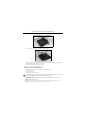
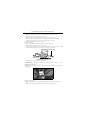
Viewing case mounted on the center console
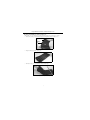
1 Place the viewing case on your car’s center console with the DVD player facing rearward.
2 Sitting on a rear passenger seat, put one of the mounting straps around the back of one of the front
seats.
3 Position the strap’s swivel clasps near the viewing case.
4 Put a second mounting strap around the back of the other seat.
5 Move both straps down towards the base of the seats.
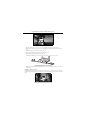
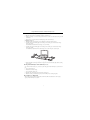
6 Attach each mounting strap’s two swivel clasps to the front D-rings closest to the viewer.
Connecting mounting straps to the front D-rings
7 Tighten each mounting strap until the viewing case is secure on the console and cannot move forward
or backward.
Mounting on the Back of a Seat
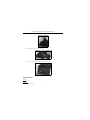
Mounting the viewing case with your DVD player on the back of one seat requires two of the mounting
straps. The upper strap attaches to the viewing case’s front D-rings. The lower strap attaches to the rear Drings.
Viewing case mounted on the back of one seat
5