1
English
、、、
3-862-488-62 (1)
ッチ・ァ、ス・q
ェ`。G
B
Radio Cassette Player
ナwェ I
キPチツアzチハカR Sony オP WM-FX665/
FX663/FX661 イーヲ。ヲャゥ ロセ
ッSツIヲp、U。G
• ・ホ、j・¥イvヲユセ iェYス爰Cュオ• アz・iアqィ篌リ、」ヲPェコ・[アjュオ。]スユ。^、、
ーオソ ワ。GMB。]アj、OァCュオ。^ゥM GRV
。]アjッPク`ォオ。^。Mスユク`アzウ゚キRェコチnュオ• イGエケナ罕ワオ豕讌¥ッ爭iナ©アzヲb・Dセ 罕
・ワオ。、、ソ ワゥM、チエォヲU・¥ッ
• ヲローハヲsタxアスエy・¥ッ爭iナ©アzヲローハヲsタx
ゥMスユ・ホヲhケF 16 ュモスユタW・xゥM 8 ュモスユエT
・x• ヲローハシヨヲアカヌキPセケ (AMS) ・¥ッ爭iーェウt
キjッチ・ソヲbシスゥ コヲア、l。N2 ュコ・©ォeヲア、l
、ホタHヲZ 3 ュコヲア、lェコカ}タY• ヲウ・ホェコササアアセケ-
FX665
2 REMOTE
ィマ・ホサ。ゥ ム
Operating Instructions
タHィュナ・
WALKMAN ャO Sony 、ス・qェコェ`・Uーモシミ/
WALKMAN is a registered trademark of Sony Corporation.
FX663
WM-FX665/FX663/FX661
2 REMOTE
Sony Corporation © 1998 Printed in Malaysia
キヌウニケqキス
FX661
ャーィセ、 aゥホトイケqヲMタI。MスミァOアNーロセ ノナS、_ォB、、ゥホ
シ 鯊羌B /
スミソ H、U、Tコリケqキス。G、zケqヲタ。N・R
ケqケqヲタゥMョa・ホケqキス、、ェコ、@コリ/
2 REMOTE
、zケqヲタ。]ィ」ケマ A-a。^
アNェ™アaェコケqヲタイーヲゥオイィ げロセ W。M
ィテォ ソスTキ・ゥハクヒ、J 1 ュモ R6 (AA) 3 クケケq
ヲタ-
WARNING
To prevent fire or shock hazard, do not
expose the unit to rain or moisture.
ェ`
• スミ、ナオケ、zケqヲタ・Rケq• ェ チ、」キヌウニィマ・ホ Walkman ーロセ ノ。Mスミ
ァ篁qヲタィ Uィセ、 qヲタェココ|イGゥMサGサk-
C
・ササ。ゥ ムサ。ゥ WM-FX665。MWM-FX663 ゥM WM-FX661 ーロセ
セ¥ナェサ。ゥ ムォe。Mスミ・©ャdケ zェコーロセ ャクケ WM-FX665 ォャィムケマクムサ。ゥ ホ-ゼァ@ィマ・ホ
、Wェコ・
」ヲPァ。イMエキヲaェ`ゥ ]ィメヲp。ァカネケ FX665。ィ。^ヲb・ソ、螟、HOLD
The instructions in this manual are for WM-FX665, WM-FX663 and WM-FX661.
Before you start reading, check your model number. WM-FX665 is the model
used for illustration purposes. Any differences in operation are clearly indicated
in the text, for example, “FX665 only”.
FX665
FX663
FX661
2
D
ϥREPEAT
a
VOLUME
OPEN
A
a
b
c
BL
SKIP MODE
FF•AMS
ϥ
REPEAT
ON
NR
FM
SOUND AVLS MODE
ON
MENU
ィ茹Lォャクケ
Other models
d
REW•AMS
c
アN・Rケqケqヲタ (NC-6WM) クヒ、J・Rケq
セケ。Mェ`キNキ・ゥハ・ソスTアN・Rケqセケエ。タYエ。、Jョa・ホケqキスュ^ー遙NソD、jァQィネゥMュサエ茘ャクケ。G
ァケ・™・Rケqャ 3.5 、pョノ・_ャ N、、ャ Nォnャ Nシレャw、jウー。N
ィFッSェ ヤァBォャクケ。G
ァケ・™・Rケqャ 2.5 、pョノチ
ャクケ。G
ァケ・™・Rケqョノカ。ィ M、_アzョa・ホケqキス
ェコケqタ」110 V。G10 、pョノ
220 V。G2.5 、pョノ
ィ茹Lォャクケ。G
ァケ・™・Rケqョノカ。ィ M、_アzョa・ホケqキス
ェコケqタ」120 V。G10 、pョノ
220。 40 V。J2.5 、pョノ
ヲpェGエ。タYサPアzェコョa・ホケqキス、」ャロ
ーt。Mスミクヒ・ホェ™アaェコ・ 谺yエ。カ※。ツ牾
アオセケ。]、、ー ャクケー」・~。^ -
FWD
3
b
ュ^ー遙NソD、jァQィネゥM
ュサエ茘ャクケ
UK, Australia and
Hong Kong models
ヲ
BATT
SET
p
アNァケ・™・Rケqケqヲタクヒ、Jケqヲタォヌ。]ケマ
A -c 。^アz・i・H・Rケqャ
MENU
SET
ノァ ォケqヲタゥホカiヲ讌Rケq
。]ィ」ケマ A-d。^
300 ヲク-
HOLD牀OキΤzキN・~ォ
・¥ッ
」、@ォ
カsョノッ狡 w Walkman ーロセ セ、 萓゙
ァ@ヲpェGWalkman、wツ w。Mゼァ@ォeタウ
・©クムツ
1
ク Dシヨヲアカ。ェコェ ナ・ユ。]BL SKIP* ・¥
ッ爍^。]ィ」ケマ D-c。^。^
w
ツ Walkman ーロセ
・Rケqケqヲタ
(NC-6WM)
Sony ニPケqヲタ
LR6 (SG)
Sony R6P
(SR)
・Rケqケqヲタ
(NC-6WM) 、ホ
Sony ニPケqヲタ
LR6 (SG)
オLスuケqアオヲャ
9
29
30
8
8
36
37
ゼァ@
z Walkman ーロセ
シスゥ
マアa。]ィ」ケマ D-a。^
ヲローハソ aセケヲローハソ ワコマアa。Gシミキヌ
アa (TYPE I)。NCrO2 アa (TYPE 「コ) ゥホェ ン
アa (TYPE 「シ) シスゥ
1
2
クヒ、Jイーヲ。コマアaォ œ•REPEAT カ}ゥlシスゥ テスユク`
ュオカq-
* EIAJ。]Electronic Industries Association
of Japan。^ェコシミキヌエ qュネ。]ィマ・ホ Sony
ーェタWィtヲCイーヲ。コマアa。^-
ヲb Walkman 、Wスユク`ュオカq
ェ`
ヲbササアアセケ、Wスユク`ュオカq
• ケqヲタケリゥRオ
オu-
ロセ
゙ァ@ア。ェp・iッ犢|チY
ササアアセケ、W VOL アアサsウ]ゥw、_ウフ、j-
Walkman 、W VOLUME アアサsウ]ゥwャ ー
6 -
ァレュフォリトウアz・ホニPケqヲタ・HィDアoウフィホゥハ
ッ
。]ィ」ケマ A-e。^
ヲp、wクヒヲウコマアaケqヲタ。MエNァ筵Rケqケq
ヲタィ U。Mィテクヒ・ホケqヲタイーAC-E15HG ォャ・谺yケqキスツ牾オセケ 。]、」
ェ™アaェコ。^ウsアオィ せqヲタイー DC IN 1.5 V ゥM
ョa・ホケqキス
-ァO・ホ・
茹L・谺yケqキスツ牾
アオセケAC-E15HG ェコウWョ貘HヲaーマヲモイァヲbチハカR・HォeスミタヒャdアzキΘaェコケqタ」ゥMエ。
タYェコキ・ゥハ-
エ。タYェコケqキ・
ウsアオタYタケヲユセ
]ィ」ケマ B° ^
1
ァ筥ユセ コキLォャエ。タYテュゥTヲaウsアオィそ
ササアアセケ。]カネケ FX665/FX663。^-
2
3
アNササアアセケウsアオィ 2 REMOTEアNシミヲウLゥMRェコィ箍シ、タァOタケヲb・ェ。N
・kヲユ、WヲpェGヲユセ Pアzヲユヲキ、」ーt。Nゥホェフチn
ュオ、」ァ。、テ。Mスミオyオyツ牴ハヲユセ HォK
サPアzェコヲユヲキテュゥTカKヲX-
ュn
ォ
U。]ィ」ケマ D -
b。^
シスゥ ノォ œ •
REPEAT
ーア、 スゥ
p
ァヨカi
ーア、 ノォ
FF•AMS
ーhヲZ。]ゥホュヒアa。^
ーア、 ノォ
REW•AMS
ュォスニアz・ソヲbナ・ェコヲア、l シスゥ ノォ œ •
。]ュォスニウ豁コヲア、l
・¥ッ爍^
REPEAT 2 ャΛホ 2
ャΗH、W
ュnーア、 讎アュォスニ
スミヲAォ @ヲク
エMァ荀U、@ュコヲア、l「A
シスゥ ノォ FF•
タHヲZ 3 ュコヲア、lェコ
AMS、@ヲク「A、マ
カ}タY (AMS*)
スニォ
エMァ荀U、@ュコヲア、l「A
シスゥ ノォ REW•
タHヲZ 2 ュコヲア、lェコ
AMS、@ヲク「A、マ
カ}タY (AMS*)
スニォ
アqタYシスゥ t、@ュア
ーア、 ノォ FF•
。]ク D、マュア・¥ッ爍^
AMS2ャΛホ・H、W
アqタYシスゥ P、@ュア
ーア、 ノォ REW•
。]ュヒアaヲローハシスゥ ¥ッ爍^ AMS2ャΛホ・H、W
シスゥ t、@ュア
* ヲpェGェナ・ユェ _ 12 ャΓMWalkman ーロセ ヨ
カiコマアaヲワ、U、@ュコヲア、l-
ソ ワシスゥ
メヲ。。]ィ」ケマ D-c。^
、マスニォ
MENU。Mナ罕ワ・ ミスユヲワナ罕
・ワオ。、、 MODE。Mィテォ SET ソ ワゥメサンシメ
ヲ。シスゥ
ィ箝アシスゥ
アqエツ・dアaャ[ィコ、@ュアカ}ゥl
ィ箝アシスゥ
ソ ワ
a
Å
ケ AMS。MREPEAT ウ讎アゥM BL SKIP
ェコェ`クム
• ュnゼァ@ヲローハシヨヲアカヌキPセケゥMュォスニウ讎ア・¥
ッ爍Mアzサンュnヲア、lカ。ヲウ 4 ャΛホ 4 ャΗH、W
ェコェナ・ユ-ヲワ、_ェナ・ユク D・¥ッ爍Mアzサンュn
12 ャΛホァ
コェナ・ユ-ヲ]ヲケ。Mヲア、lカ。ヲウ
セクュオョノ。Mウoィヌ・¥ッ爨」キ|タヒエ ナ・ユ。M、]
アN、」キ|ゼァ@-ヲPシヒ。MヲpェGヲア、l、コェコソ©
ュオケq・ュセAキΙC。Mウoィヌ・¥ッ狎゙ァ@・iッ爨」
コ ⊃T -
、マスニォ MENU。Mナ罕ワ・ ミスユヲワナ罕ワ
オ。、、 a NR。Mィテォ SET ナ罕ワ。ァON。ィ* ァ
クュオエ CセケォYクgァ
酖メゥ
・qアツナvィ yァ MDOLBY。M、ホツ D シミウケaャーァ
、
酖メゥ ス・q、ァーモシミ-
ス
Thank you for purchasing the Sony
WM-FX665/FX663/FX661 Radio
Cassette Player.
Some features are:
•You can enjoy low bass sounds by
the powerful headphone.
• You can choose from 2 different
emphasizing tones: MB (MEGA
BASS) and GRV (GROOVE) to
adjust to your favorite sound.
• LCD Menu function that lets you
select and switch functions in the
display window of the main unit.
• Auto Memory Scanning function
that lets you store and recall up to
16 stations for FM and 8 stations
for AM automatically.
• AMS (Automatic Music Sensor)
function that searches the
beginning of the current and 2
previous tracks, and succeeding 3
tracks at high speed.
• Useful remote control.
Preparing a Power
Source
Choose one of the three power
sources below; dry battery,
rechargeable battery, and mains.
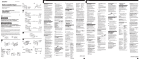
Dry Battery (see Fig. A-a)
Attach the supplied battery case,
and then insert one R6 (size AA)
battery with correct polarity.
Notes
• Do not charge a dry battery.
• When you are not going to use your
Walkman for a long time, remove
the battery to prevent damage from
battery leakage and corrosion.
Rechargeable Battery
1
2
* ヲローハシヨヲアカヌキPセケ
(ィ」ヲクュカ)
DC IN 1.5 V
• Do not tear off the film on the
rechargeable battery.
• Use only the supplied battery
charger to charge the supplied
rechargeable battery.
• Remove the charger unit from the
wall outlet as soon as possible after
the rechargeable battery has been
charged. Overcharging may damage
the rechargeable battery.
• The battery charger and the
rechargeable battery may become
warm during charging, but it is not a
problem.
• Be sure not to short-circuit the
battery. When you carry it with you,
use the supplied carrying case. If
you do not use the carrying case, do
not carry with other metallic objects
such as keys in your pocket.
When to replace/charge
the battery (see Fig. A-d)
Replace or charge the battery when
the BATT lamp dims.
Battery life (Approx. hours)(EIAJ*)
Tape
Radio
playback reception
Rechargeable
8
9
battery (NC-6WM)
Sony alkaline
29
30
LR6 (SG)
Sony R6P (SR)
8
8
Rechargeable
battery (NC-6WM)
and Sony
36
37
alkaline LR6 (SG)
3
Insert the rechargeable battery
(NC-6WM) into the charger
with correct polarity.
Plug in the charger to the
mains.
UK, Australia and Hong Kong
model: Full charging takes
about 3.5 hours.
North, Central and South
America, European Continent,
and Saudi Arabia models :
Full charging takes about 2.5
hours.
Korean model : The full
charging time depends on the
voltage of your mains.
110 V: 10 hours
220 V: 2.5 hours
Other models: The full
charging time depends on the
voltage of your mains.
120 V: 10 hours
220–240 V: 2.5 hours
If the plug does not fit your
mains, attach the supplied AC
plug adaptor. (Excluding
Chinese models)
Insert the fully charged battery
into the rechargeable battery
compartment (see Fig. A-c).
You can charge the battery about
300 times.
Wear the “L” marked side to
the left ear and “R” marked
side to the right ear.
If the earphones do not fit to
your ears or the sound is
unbalanced, turn around the
earphones a little to fit to your
ears firmly.
Releasing HOLD
(see Fig. C)
The HOLD function locks the
Walkman to prevent from operating
when you accidentally press a
button. If the Walkman is locked,
unlock it before operating.
1
Slide HOLD to the opposite
direction of the arrow.
To lock the Walkman
Slide HOLD in the direction of the
arrow.
To lock and unlock the
remote control
See “Using the Remote Control”.
zOperating the
Walkman
Playing a Tape
(see Fig. D-a)
The Auto Tape Selector
automatically selects the tape
(normal (TYPE I), CrO2 (TYPE II) or
metal (TYPE IV) ) for playback.
Note
1
Insert a cassette.
2
Press ϥREPEAT to start
playing then adjust the volume.
• The battery life may shorten
depending on the operation for the
unit.
For maximum performance we
recommend that you use an alkaline
battery.
House Current (mains)
(see Fig. A-e)
Remove the rechargeable battery if
inserted and attach the battery case.
Connect the AC power adaptor ACE15HG (not supplied) to the DC IN
1.5 V of the battery case and to the
mains. Do not use any other AC
power adaptor.
Specifications for AC-E15HG varies
for each area. Check your local
voltage and the polarity of the plug
before purchasing.
Polarity of
the plug
Connecting the
Headphones
When adjusting the volume on
the Walkman
Set the VOL control on the remote
control at maximum.
When adjusting the volume on
the remote control
Set the VOLUME control on the
Walkman to around 6.
To operate using the remote
control
See “Using the Remote Control”.
To
play the other side
stop playback
fast forward
rewind
repeat the track
you are listening to
(Repeat Single
Track function)
(see Fig. B)
1
Connect the micro plug firmly
to the remote control. (FX665/
FX663 only)
2
Connect the remote control to
2REMOTE.
play the other side
from the beginning
(Skip Reverse
function)
play the same side
from the beginning
(Rewind Auto
Play function)
FF•AMS for two
seconds or
more during
stop
REW•AMS
for two
seconds or
more during
stop
* Automatic Music Sensor
* Measured value by the standard
of EIAJ (Electronic Industries
Association of Japan). (Using a
Sony HF series cassette tape)
(see Fig. A-b)
e
ケqヲタォ ワソO
BATT lamp
3
Notes
Welcome !
zGetting Started
シスゥ Dolby NR。]ァ
ーセク。^ィtイホソ©
サsェココマアa。]ィ」ケマ D-c。^
ゼァ@ィマ・ホササアアセケ
ィ」。ァィマ・ホササアアセケ。ィ-
ォヌ、コケqャy。]ョa・ホケqキス。^
、マスニォ MENU。Mナ罕ワ・ ミスユヲワオ。
、、 BLSKIP。Mィテォ SET ナ罕ワ。ァON。ィ-
ツ wゥMクムツ サアアセケ
。]、jャ ノシニ。^(EIAJ*)
コマアaシスゥ
8
ケ ローハシヨヲアカヌキPセケゼァ@ョノェコケハケハチnェコ
ェ`クム
• ケハケハチnオ jッチ、、ヲア、lクケヲモ、」ヲP-ヲロ
ーハシヨヲアカヌキPセケゼァ@ョノエMァ菎HヲZ 3 ュコ
ヲア、lェコカ}タY。M、マスニカヌィモ。ァ• – – –。ィ
チnヲZャO 3 ュモェ ハチn。^-ヲPシヒ。MキΧM
茹©ォe
ァ 2 ュコヲア、lェコカ}タY。M、マスニナ・ィ
。ァ•• – – –。ィケハケハチn-ヲpェGァE、Uヲア、l
ェコクケスXエ ヨ。Mケハケハチn、]ャロタウエ ヨ-
アN HOLD キニヲVスbタYェコャロ、マ、隕V-
ィ」。ァィマ・ホササアアセケ。ィ-
ケqヲタォ ワソOォGョノォKァ ォケqヲタゥホオケ
ケqヲタ・Rケq-
・Rケqケqヲタ。]ィ」ケマ A-b。^
1
クムツ HOLD。]ィ」ケマ C。^
スミカカスbタY、隕Vキニーハ HOLD-
ケqヲタケリゥR
z カ}ゥl
トオァi
• スミ、ナシケ、U・Rケqケqヲタェコチ。ス、• ・uィマ・ホェ™アaェコ・Rケqセケィモオケーtウニェコ・Rケq
ケqヲタ・Rケq• ・Rケqケqヲタ・Rケqァケイヲ。Mコノ・iッ爭゚ァYアqタ
、Wケqキスエ。ョyゥ゙、U・Rケqセケ。M・RケqケLォラ・i
ッ犢lテa・Rケqケqヲタ• ・Rケqョノ。M・RケqセケゥM・Rケqケqヲタ・iッ犒o
シ Mウo、」ャOーンテD• ーネ・イ、」ィマ・Rケqケqヲタオuアオ。MタHィュト箜aョノ
スミ・ホーtウニェコォKト
箚ー-ヲpェG、」・ホォKト箚
イー。Mスミ、ナヲPァOェコェ ンェォ・ ]ヲp、fウU、、
ェコニ_ーヘ。^イVヲb、@ー_ト箜a-
find the beginning
of the next track/
succeeding 3 tracks
(AMS*)
find the beginning
of the current track/
previous 2 tracks
(AMS*)
Press (see
Fig. D-b)
ϥREPEAT
during playback
p
FF•AMS
during stop
REW•AMS
during stop
ϥREPEAT
for two seconds
or more during
playback
To stop a
single repeat,
press it again.
FF•AMS once/
repeatedly
during
playback
REW•AMS
once/
repeatedly
during
playback
(continued)
Note on Beeps during AMS
operations
• The beeps differ in relation to the
track number being searched. When
finding the beginning of the next 3
tracks during AMS operations,
beeps “• – – –” (beep followed by
three long beeps) are emitted
repeatedly. Likewise, when finding
the beginning of the previous 2
tracks, beeps “•• – –␣ –” are emitted
repeatedly. While the remaining
tracks are reduced, the number of
long beeps are reduced accordingly.
To skip a long blank space
between musics. (BL SKIP*
function) (see Fig. D-c)
Press MENU repeatedly to set the
cursor to BL SKIP in the display.
Then press SET to show “ON”.
* The Walkman fast forwards the tape
to the next track if there is a blank
space longer than 12 seconds.
To select playback mode
(see Fig. D-c)
Press MENU repeatedly to set the
cursor to MODE in the display.
Then press SET to select the desired
mode.
To play
Both sides repeatedly
Both sides once
from the side facing
the cassette holder
Select
a
Å
Note on AMS, REPEAT Single
Track and BL SKIP
• To operate the AMS and the
REPEAT Single Track functions, you
need a blank of 4 seconds or longer
between the tracks. For the BL SKIP
function, you need a blank of 12
seconds or longer. Therefore, if there
is noise between the tracks, these
functions will not detect the blank
and will not operate. Likewise, if the
recording level is moderately low
within a track, these functions may
inaccurately operate.
To play a tape recorded with
Dolby* NR system
(see Fig. D-c)
Press MENU repeatedly to set the
cursor to a NR (Dolby noise
reduction) in the display. Then
press SET to show “ON”.
* Dolby noise reduction manufactured
under license from Dolby
Laboratories Licensing Corporation.
“DOLBY”and the double-D symbol
a are trademarks of Dolby
Laboratories Licensing Corporation.
(turn over)
English
、、、
ェ`
E
ヲャュオ。]ィ」ケマ E-a。^
1
a
2
TUNING +/–
p•RADIO OFF
3
RADIO ON•
BAND
b
ォ RADIO ON•BAND チ茹エカ}ヲャュオ
セ
、マスニォ RADIO ON•BAND チ菫 ワ
AM。]スユエT。^ゥホ FM。]スユタW。^ォ TUNING +/– チ菴ユソモゥメュnェコケq
・xヲpェGアzォ TUNING +/– チ莇Xャζ
トチ。MWalkman ーロセ NヲローハスユソモヲU
ケq・x-
テ
• キΗワシニー{テ{ョノ。MヲpェGアz、」ッ爰ケヲィ、Wュz
ィBニJ 3 ゥホィBニJ 4。MエNアqィBニJ 2 ー_ュォスニカi
ヲ
• ヲpェGアzオケ、@ュモキs・xケwウ]ヲP、@ュモケwウ]
クケ。Mォh・©ォeヲsタxェコケq・xアNウQィ
ィマ・ホササアアセケ。]ィ」ケマ G。^
ュnィ
ツ Ν
ヲウテ FX665/FX663
wヲsタxェコケq・x
ォ モ、Wュzカカァヌ。MィテヲbィBニJ 3 、」スユ
ソモヲワ、@ュモケq・xヲモォ
TUNING+/– チ茗
ェスィで罕ワ。ァ– – – –。ィ-キΓァ– – – –。ィー{
テ{ョノォ ENTER チ
p•RADIO OFF チ
ュnァ スシsシスアオヲャョトェG
SET
MENU
d
c
TUNING +/–
PRESET +/–
PRESET +/–
RADIO ON•BAND
RADIO ON•
BAND
ENTER
ENTER
F
• 、_スユエTアオヲャ。GWalkman ーロセ 罔ウ、コ
クmヲ。、ムスu-、 ュュォキsゥwヲV Walkman
ーロセ Hタ
フィホェコスユエTアオヲャケ _スユタWアオヲャ。]ケマ E-b。^。Gゥオェ サ
アアセケウnスu、ホゥヤヲ ムスu。MヲpェGアオヲャ、エ
、」ヲn。M、マスニォ MENUチ茯テアNナ罕ワ・
シミスユヲワナ罕ワオ。、、 FM MODE。Mィテォ
SET チ莖q MONO。]ウ讎ユ。^。NLOCAL
。]・サセ ^ゥホ・™オL。]・゚ナ 鮹n。^シメヲ。ソ ワ
ウフィホアオヲャ-
ェ`
• ヲbヲャュオョノァO、チツ_ケqキス。Mァ_ォhアオヲャェコケq
・x・iッ犒Lェkヲsタxケwウ]ケq・x-
NR
1
GRV
MENU
MENU
BATT
SET
_ FX665/FX663
キΚマ・ホササアアセケョノ。Mィ」。ァィマ・ホササアア
セケ。ィ-
ェ`
FX665/FX663
ϥREPEAT
SOUND/AVLS
B(RADIO ON•BAND)
3
ォ RADIO ON•BAND チ莖オウqヲャ
ュオ、マスニォ RADIO ON•BAND チ菫 ワ
スユエTゥホスユタWォ ENTER チ茗スィで罕ワオ。・Xイ{
。ァA。ィWalkman ーロセ }ゥlキjッチゥMヲsタxケq
・xケwウ]クケナ罕ワヲZ。M・ホPRESET+/–チ菴
スユソモ、@ケq・x-
。]ィ」ケマ E-d。^
1
2
p(RADIO OFF)
3
FF/REW•PRESET +/–
BAND(RADIO ON•
BAND)
HOLD indicator
ォ ワソO
HOLD
HOLD indicator
FX665/
Nカカァヌケwウ]-
4
5
アオウqヲャュオィテソ ワゥメサンェiャqォ ENTER チ
タWイvシニヲr、ニ。Mナ罕ワオ。ー{テ{ケwウ]
クケキβWイvシニヲr、ニョノ。Mケwウ]クケー{テ{。M
・ホ TUNING +/– チ菴ユソモアzュnヲsタx
ェコ、@ュモケq・x。MヲA・ホPRESET+/–ソ
セワケwウ]クケキβWイvシニヲr、ニ、ホケwウ]クケー{テ{ョノ。M
ォ ENTER チ
・ホ PRESET +/– チ菴ユソモ、@ケq・x-
、マスニォ MENUチ茖MアNナ罕ワ・ ミスユ
ヲワAVLS。Mィテォ SETチ茹Hナ罕ワ
。ァ 。ィ-
ィマ・ホ AVLS チ茖]カネケ FX665/
FX663。^
SOUND/
zェ™・[ォHョァ
ェ`キNィニカオ
テ _・RケqケqヲタゥM・Rケqセケカキェセ
ケ
_ FX665/FX663
ェ ホササアアセケョノィ」。ァィマ・ホササアアセケ。ィ-
ェ`
• ィマ・ホ AVLS ・¥ッ倏・・[アjァCュオョノ。MヲpェG
チnュオイ」・ヘ・「ッu。Mスミスユュオカq• ・uュn、」エォケqヲタ。M・サウ]ゥw、@ェスヲウョト-
• ・™キsェコ・Rケqケqヲタゥホェ チゥ m・シ・ホェコ
・Rケqケqヲタ。M・iッ爨」ッ爰ケ・™・Rコ。ケq。M
・イカキ、マスニ・Rケqシニヲク、ァヲZ、~ッ 爰ケ・™・R
ケq• ヲう_・Rケqセケゥウウ。・~ーシェコサハオPシミ・ワゼ
ァ@ケqタ」。N・¥ッモオ・-
テ
テ
_ササアアセケカキェセ
ュュィマ・ホェ™アaェコササアアセケ -
ォ SOUND/AVLSチ菫 ワゥメサンェコシメ
ヲ。。MィCォ @ヲク。Mナ罕ワナワ、ニヲp、U。G
MB。G・[アjァCュオ
GRV。Gカi、@ィB・[アjァCュオ
No message。Gテ ]・ソア`。^
キΤzウ]ゥw AVLS。]ヲローハュオカqュュサs
ィtイホ。^・¥ッ牋ノ。Mウフ、jュオカq・iウQタ」サs・H
ォOナ@アzェコヲユヲキ-
FX661
œ
ー」ャー、Fェ ノカ。ウsト スゥ ~。Mァレュフ
、」ォリトウィマ・ホカWケL 90 、タトチェココマアa-・ヲュフ
ォワチ。。Mョeゥ dヲ
、@・ケアzヲsタxゥメウ゚キRェコケq・x、Jヲsタx
セケ。MエNッ牋eゥ aスユソモ・ヲュフアz・iケwウ]ヲhケF 16 ュモスユタW・xゥM 8 ュモ
スユエT・x-
FF•PRESET +
HOLD
ュnクムツ遙Mスミキニーハ HOLD ィマカタヲ箴ミ
ッセョ 「-
ュnクムー」ヲケ・¥ッ爍MヲAヲクォ
AVLS チ 2 ャΛホ 2 ャΗH、W-
アzッ爭H・
REW•PRESET –
テ _カWケL 90 、タトチェココマアaカキェセ
ィマ・ホ SOUND チ茖]カネケ
FX663。^
ャGサルタヒュラ
・dアaャ[・エ、」カ}
• ヲpェG・ソヲbシスゥ マアa。Mォhーア、 スゥ テ
キニーハ OPEN• キ スゥ ノ、チツ_ケqキスゥホアzィマ・ホ、wッモァケ
ケqェコ、zケqヲタゥホ・Rケqケqヲタ。MエNキ|イ」・ヘ
ウoコリア。ェp。MヲAヲクアオウqケqキスゥホエォキsェコ
ケqヲタュオカqスユ、」、j
• ュYヲウ。ァ 。ィナ罕ワェΗワヲb AVLS ェャ
コA。Mォ SET チ茯マ。ァ 。ィョ 「-
Listening to the
Radio (see Fig. E-a)
1
Press RADIO ON•BAND to
turn on the radio.
2
Press RADIO ON• BAND
repeatedly to select AM or FM.
3
Press TUNING+/– to tune in to
the desired station.
If you keep pressing
TUNING+/– for a few
seconds, the Walkman will start
tuning to the stations
automatically.
シスゥ
アN HOLD キニーハィマカタヲ箴ミッセナS・X-
ォOナ@アzェコナ・トア(AVLS)
、箍ハヲsタxケq・x。]、箍ハヲsタx・¥ッ爍^
VOL
1
ケq・xェコケwスユ
4
G
ノエツスbタY、隕Vキニーハ HOLD-
ォ
SOUND/AVLSチ 2ャΛホ2ャΗ
・H、W。Mナ罕ワ。ァ 。ィ-
2
SET
クムツ
•。ァGRV。ィシメヲ。、UヲpェGチnュオ・「ッu。Mスミソ
セワ。ァMB。ィゥホ No message シメヲ。-
1
FWD
、マスニォ MENUチ茖MアNナ罕ワ・ ミスユ
ヲワ SOUND。Mィテォ SET チ菫 ワゥメ
サンェコシメヲ。-ィCォ @ヲク。Mナ罕ワナワ、ニ
ヲp、U。G
MB (MEGA BASS)。G・[アjァCュオ
GRV (GROOVE)。Gカi、@ィB・[アjァC
ュオ
Nomessage。]オLナ罕ワ。^。Gテ ]・ソア`。^
ケ
ヲローハスユソモゥMヲsタxケq・x。]ヲローハヲs
タxアスエy・¥ッ爍^。]ィ」ケマ E-c。^
FM
SOUND AVLS MODE
アN HOLD キニヲVスbタYゥメォ コ、隕VキΤzォ
莪ノ。Mナ罕ワセケォhナ罕ワ
。ァHold。ィ-
3
キェセ
ヲウテ FX661
・[アjァCュオ
1
BL
SKIP MODE
1
ィマ・ホィ茹L・¥ッ爍]ィ」ケマ F° ^
ュnテ シヲャュオセ
ォ
ー」、F、Uュアサ。ゥ コ・H・~。Mササアアセケ、W
ゥメヲウォ 茫M・Dセ Wケ ウォ 茗コ・¥ッ牀ロ
ヲP-スミセ¥ナェアzーロセ コサ。ゥ ム-
_ーロセ
• ァOナ©ーロセ シクィゥホィ だ_ーハ。Mァ_ォh・i
ッ犂」・ヘャGサル• ァOァ箍ロセ
mヲbセaェ
スゥホェスアオィ
ィじァ・ モョgェコヲa、陦MゥホヲhィFケミ。Nシ鯊
タ罍Nキ|イOィきB。Nキ|ィ
カーハェコヲa
、陦Mゥホゥ mヲbコ ャオ。ェ コィTィョクフ• キΘbーェキナ。]40「J・H、W。^ゥホァCキナ。]0「J
・H、U。^ア
Uィマ・ホーロセ ノ。MイGエケナ罕
・ワセケキ|ナワアoテ HャンイMゥホナ罕ワウtォラナワ
コC-ヲbォヌキナ、U。Mナ罕ワセケアNォたニ・ソ
ア ` • ヲpェGーロセ wェ チ、」・ホ。Mォhヲbエ。、Jコマ
アaォe。M・©アNィ 莎]ヲbシスゥ メヲ。ィテケwシ
エX、タトチ-
_ケqヲタカキェセ
、」ュnァ筵Rケqケqヲタゥホ、zケqヲタサPァOェコ
ェ ンェォ・ Vヲb、@ー_ト箜a-ケqヲタェコ・ソ。N
ュtキ・・iッ犁Qェ ンェォ・ N・~ヲaアオヲィオuク
ヲモオoシ yヲィヲMタI-
テ _タYタケヲユセ Aヲユセ
ク Wヲw・™
ヲbセrィョ。NテMィョゥホゼチa・
ハィョ
ス ノ。M、」ュnィマ・ホタYタケヲユセ Aヲユセ Mヲ]
ャーヲウ、゙ー_・豕qィニャGェコヲMタI。MヲbャYィヌヲa
ーマャOェkォ゚クT、 コ-ァYィマヲbィBヲ谿ノィマ
・ホ。MヲpェG・ホ、モ、jェコュオカqヲャナ・、]キ|ヲウヲM
タI。M、ラィ
莅Oヲbセ Vーィク コョノュヤ-ヲウシ遖
ヲbヲMタIェコア。ェp、U。Mアz・イカキッSァOッd、゚ゥホ
シネーアィマ・ホヲユセ
ノコマアaヲロヲ讒ヨカi
ヲpヲウ。ァON。ィナ罕ワェΗワヲb BL SKIP
ェャコA。Mォ SET チ茯マ。ァON。ィョ 「ササアアセケナ罕ワ、」・ソア`。]カネケ FX665/
FX663。^
ァ篏サアアセケサP Walkman ーロセ _カ}。M
オMヲZヲAアオ、W-
ウWョ
チnュオウ。、タ
タWイvュSウ
FM。G 87.5-108 MHz
AM。G 530-1,710 kHz。]・_ャ N、、ャ N
ォnャ ^
531-1,602 kHz。]ィ茹Lー a。^
コマアaウ。、タ
ィセ、
・トアィ
l
ィマ・ホタYタケヲユセ Aヲユセ ノタウチラァK、j
ュオカq-ナ・トアアMョaォリトウ、」ュnウsト ャナ・。N
、」・ホ、jュオカqヲャナ・。N、」ュnェ ノカ。ヲャナ・ヲpェGアzヲウヲユサ コクgセ Mォhァ nエ pュオ
カqゥホーア、 マ・ホヲユセ
タWイvナTタウ
。]テ Wァ
ク。^
シスゥ G20-18,000 Hz
ソ鬣X
タYタケヲユセ ]2 REMOTE カ▽ユ。^
ュtク ©ァワ8-300」[
キモナU・L、H
チ`ナ
アNュオカqウ]クmヲbォ Ζ ュ。Mウo、」ヲ©
ナ©アzヲロ、vチル・iナ・ィ ぇ~ャノェコチnュオ。Mヲモ・B
、」キ|・エツZ・L、H-
コ @
イMシ莠マタYゥMコマケD
ィCィマ・ホ 10 、pョノ。MエN・ホ CHK-1 イM
シ莖a。]・シェ™アaェコ。^ -
ェ`
• ・u・ホアタッ
コイMシ莖a-
イMシ茹~ウ。
スミ・ホウn・ャオyナルツI、 M、」ュnィマ・ホーs
コ■NィTェoゥホィ茹Lオ}トタキサセッ-
ェ`
• ゥwエチイMシ菎Yタケヲユセ Aヲユセ
ケqキスュnィD
1. 5 V ・Rケqケqヲタ
、@ュモ R6 (AA) 3 クケケqヲタ
、リ、o。]シe「Aーェ「Aイ`。^
ャ 109。ム78.6。ム25.9mm。]・]ャA・Y・Xウ。
、タゥMアアサsセケ。^
ュォカq
ャ 145 ァJ
ャ 210ァJ。]・]ャA、@・RケqケqヲタゥM、@イーコマ
アa。^
ェ™アaーt・
ケqヲタイー (1)
アaササアアェコ・゚ナ鮹nヲユセ (1)
・Rケqセケ (1)
・Rケqケqヲタ(NC-6WM。M1.2V。M600mAh。M
Ni-CD) (1)
・RケqケqヲタォKト箚ー (1)
ォKト箋U(1)
・谺yエ。カ※。ツ犇ォセケ (1)。]・_ャ N、、
ャ Nォnャ Nシレャw。NィFッSェ ヤァB。NソD
、jァQィネ。NエツツA。N、、ー遙Nュサエ茘ャクケー」
・~。^
To turn off the radio
Press p•RADIO OFF .
To improve the broadcast
reception
• For AM: The Walkman has a
built-in antenna. Reorient the
Walkman horizontally to obtain
optimum AM reception.
For FM (see Fig. E-b): Extend
the cord of the remote control, the
aerial. If the reception is still not
good, press MENU repeatedly to
set the cursor to FM MODE in the
display. Then press SET to choose
from MONO (monaural), LOCAL
or none (stereo) mode for best
reception.
5
Notes
• If you cannot complete step 3 or 4
while the indications are flashing,
repeat from step 2.
• If you preset a new station to the
same preset number, the previously
stored station will be erased.
To cancel the stored station
Follow the procedure above and in
step 3, instead of tuning in to a
station, press and hold TUNING+/
– until “– – – –” is displayed. Press
ENTER while “– – – –” is flashing.
Using Other
Functions (see Fig. F)
Emphasizing Bass
1
Note
• Do not remove the power sources
while listening to the radio, or the
received stations may not be stored.
Presetting Radio
Stations
Once you store your favorite
stations in memory, you can tune
them easily. You can preset up to 16
stations for FM and 8 stations for
AM.
Tuning in to and Storing
Radio Stations
Automatically (AutoMemory Scanning
function) (see Fig. E-c)
1
2
3
ウ]ュpゥMウWョ讎pヲウナワーハ。Mョ、、」・tヲ豕q
ェセ-
4
Press RADIO ON•BAND to
turn on the radio.
Press RADIO ON•BAND
repeatedly to select AM or FM.
Press ENTER until “A” appears
in the display.
The Walkman starts searching
and storing stations.
After the preset number
appears, tune in to a station
using PRESET+/–.
p(RADIO OFF)
Storing Radio Stations
Manually (ManualMemory function) (see
VOL
Fig. E-d)
HOLD
4
You can preset the stations in any
order.
1
2
Turn on the radio and select the
desired band.
Press ENTER.
The frequency digits and a
preset number flash in the
display.
While the frequency digits and
the preset number are flashing,
tune in to a station you wish to
store using TUNING+/–, and
select a preset number using
PRESET+/–.
While the frequency digits and
the preset number are flashing,
press ENTER.
Tune in to a station using
PRESET+/–.
Press MENU repeatedly to set
the cursor to SOUND in the
display. Then press SET to
select the desired mode. With
each press, the indications
change as follows.
MB (MEGA BASS): emphasizes
bass sound
GRV(GROOVE):emphasizes
deeper bass sound
No message: off (normal)
For FX665/FX663
When using the remote control, see
“Using the Remote Control”.
Note
• If the sound is distorted with the
mode “GRV”, select the mode “MB”
or no message.
Protecting Your Hearing
(AVLS)
When you set the AVLS (Automatic
Volume Limiter System) function to
on, the maximum volume is kept
down to protect your ears.
1
Press MENU repeatedly to set
the cursor to AVLS in the
display. Then press SET to
show “ ”.
For FX665/FX663
When using the remote control, see
“Using the Remote Control”.
Notes
• If the sound is distorted when you
listen to the bass-boosted sound
with the AVLS function, turn down
the volume.
• The setting is stored as long as the
battery is not replaced.
On the unit
Using the Remote
Control (see Fig. G)
All buttons on the remote control
unless otherwise noted below
function identically to those
corresponding on the main unit.
Read the direction for your model.
To lock the buttons
For FX665/FX663
1 Slide HOLD in the direction of
the arrow.
When you press any button
“Hold” appears in the display.
To unlock, slide HOLD in the
opposite direction of the arrow.
For FX661
1 Slide HOLD so that the yellow
mark appears.
To unlock, slide HOLD so that
the yellow mark is hidden.
Using SOUND (FX665/FX663
only)
Press SOUND/AVLS to select the
desired mode. With each press, the
indications in the display changes
as follows:
MB: emphasizes bass sound
GRV: emphasizes deeper bass
sound
No message: off (normal)
Using AVLS (FX665/FX663
only)
Press and hold SOUND/AVLS for
two seconds or more. “ ” appears
in the display.
To cancel, press and hold SOUND/
AVLS for two seconds or more
again.
z Additional
Information
Precautions
On rechargeable battery and
charger
• If the rechargeable battery is new
or has not been used for a long
time, it may not be charged
completely until you use it several
times.
• The nameplate indicating the
operating voltage, power
consumption, etc. is located on the
bottom exterior of the battery
charger.
On batteries
Do not carry the dry or
rechargeable batteries with coins or
other metallic objects. It can
generate heat if the positive and
negative terminals of the batteries
are accidentally contacted by a
metallic object.
• Do not drop the unit or give a
shock to the unit, or it may cause
a malfunction.
• Do not leave the unit in a location
near heat sources, or in a
place subject to direct sunlight,
excessive dust or sand, moisture,
rain, mechanical shock, or in a car
with its windows closed.
• The LCD display may become
hard to see or slow down when
using the unit at high
temperatures (above 40°C/104°F)
or at low temperatures (below
0°C/32°F). At room temperature,
the display will return to its
normal operating condition.
• If the unit has not been used for
long, set it in the playback mode
and warm it up for a few minutes
before inserting a tape.
Troubleshooting
The cassette holder does not
open.
• If the tape is playing, stop and
then slide OPEN.
• This condition may occur when
you remove the power sources
during playback, or when you use
exhausted dry or rechargeable
battery. Set the power sources
again or replace the exhausted
battery with new one.
The volume cannot be turned up.
• If “ ” appears for AVLS display,
press SET so that “ ”
disappears.
On tapes longer than 90
minutes
The tape fast forwards by itself
during playback.
If “ON” appears for BL SKIP
display, press SET so that “ON”
disappears.
We do not recommend the use of
tapes longer than 90 minutes except
for a long continuous playback.
They are very thin and tend to be
stretched easily.
The display on the remote control
is not normal (FX665/FX663 only).
Disconnect the remote control from
the Walkman, then connect it again.
On the remote control
Use the supplied remote control
only for each unit.
On headphones/earphones
Road safety
Do not use headphones/earphones
while driving, cycling, or operating
any motorized vehicle. It may
create a traffic hazard and is illegal
in some areas. It can also be
potentially dangerous to play your
headphones/earphones at high
volume while walking, especially at
pedestrian crossings.
You should exercise extreme
caution or discontinue use in
potentially hazardous situations.
Preventing hearing damage
Do not use headphones/earphones
at high volume. Hearing experts
advise against continuous, loud and
extended play. If you experience a
ringing in your ears, reduce volume
or discontinue use.
Specifications
Radio section
Frequency range
FM: 87.5 – 108 MHz
AM: 530 – 1,710 kHz (North,
Central, and South America)
531 – 1,602 kHz (other
countries)
Tape section
Frequency response
(Dolby NR off)
Playback: 20 – 18,000 Hz
Output
Headphones (2REMOTE jack)
Load impedance 8 – 300 ohms
General
To clean the exterior
Power requirements
1.5 V
Rechargeable battery
One R6 (size AA) battery
Dimensions (w/h/d)
Approx. 109 x 78.6 x 25.9 mm
(43⁄8 x 31⁄8 x 11⁄16 inches) incl.
projecting parts and controls
Mass
Approx. 145 g (5.2 oz)
Approx. 210 g (7.5 oz) incl.
a rechargeable battery and
a cassette
Supplied accessories
Battery case (1)
Stereo earphones with remote
control (1)
Battery charger (1)
Rechargeable battery (NC-6WM,
1.2 V, 600 mAh, Ni-Cd) (1)
Rechargeable battery carrying case
(1)
Carrying pouch (1)
AC plug adaptor (1) (except for
North, Central, and South
American, European, Saudi
Arabian, Australian, Korean,
Chinese, and Hong Kong
models)
Use a soft cloth slightly moistened
with water. Do not use alcohol,
benzine or thinner.
Design and specifications are subject
to change without notice.
Caring for others
Keep the volume at a moderate
level. This will allow you to hear
outside sounds and to be
considerate to the people around
you.
Maintenance
To clean the tape head and
path
Use the cleaning cassette CHK-1
(not supplied) every 10 hours of
use.
Note
• Use only the recommended cleanig
cassette.
Note
• Clean the headphones/earphones
plug periodically.