1
3-247-458-62(1)
The validity of the CE marking is restricted to only those
countries where it is legally enforced, mainly in the
countries EEA (European Economic Area).
Radio
Cassette Player
' ! "# $%& CE -./%+ ,*0 #123 EEA ()* $*+,
*
'
English
To cancel the stored station
Preparations
To Insert Batteries
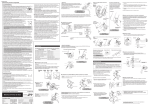
A
1 Slide open the battery compartment lid,
and insert two R6 (size AA) dry batteries
with correct polarity.
Operating Instructions
Replace the batteries with new ones when "
flashes in the display.
"
Playing a Tape
“WALKMAN” is a registered trademark of Sony Corporation.
“
”
is a trademark of Sony Corporation.
1 Insert a cassette. B
2 Press NPLAY.
Adjust the volume with VOLUME.
To
Press
Stop playback
xSTOP
WM-FX288/FX244
Wind rapidly*
MFF or mREW
Sony Corporation ©2002 Printed in China
* If you leave the unit after the tape has been wound or
rewound, the battery will be consumed rapidly. Be
sure to press xSTOP.
Note
• Do not open the cassette holder while the tape is
running.
A
Listening to the Radio
1 If the HOLD function is turned on, slide the
HOLD switch in the opposite direction of
the arrow to unlock the controls.
2 Press FM or AM to select the desired band
and to turn on the radio.
3 Press TUNING +/– to tune in to the desired
station.
If you hold down TUNING +/– for a few
seconds, the Walkman starts scanning for
stations and stops for 3 seconds each time a
station is tuned. When the desired
frequency digits appear, press TUNING +/
– to stop.
AA (R6) x 2
B
C
FM
AM
FWD
REV
To turn off the radio
Press OFF.
To improve broadcast reception C
AVLS
NORM•LIMIT
VOLUME*
DX•LOCAL
or/NY
ST•FM MONO
•For FM: Extend the headphones/earphones cord
(antenna) or adjust DX•LOCAL or ST•FM MONO.
•For AM: Reorient the unit itself.
MEGA BASS
Presetting Radio Stations
i
xSTOP
MFF
You can preset up to 40 stations.
For Canada, the U.S.A. and Central/South America:
30 for FM and 10 for AM.
For other countries: 35 for FM and 5 for AM.
ENTER
NPLAY**
TUNING +/–
OFF
mREW
AM
PRESET +/–
FM
HOLD
Presetting Automatically Scanned
Stations
* There is a tactile dot beside VOLUME on the main unit to show the direction to turn up the volume.
** The button has a tactile dot.
!" #$ %&' ( VOLUME *
)& **
Specifications
• Frequency range
FM: 87.5 - 108 MHz
AM: 530 - 1 710 kHz (North, Central and South America)
531 - 1 602 kHz (Other countries)
• Power requirements
3V DC, batteries R6 (size AA) × 2
• Dimensions (w/h/d)
Approx. 91.4 × 115.5 × 37.8 mm (3 5⁄8 × 4 5⁄8 × 1 1⁄2 inches)
excl. projecting parts and controls
• Mass
Approx. 149 g (5.3 oz) (main unit only)
• Supplied accessories
Stereo headphones or Stereo earphones (1)
Carrying case with belt clip or Carrying pouch (1)
Battery life* (approximate hours)
Sony alkaline LR6 (SG)** Sony R6P (SR)
Tape playback
25
7.5
Radio reception 40
14
* Measured value by the standard of JEITA (Japan Electronics
and Information Technology Industries Association).
(Using a Sony HF series cassette tape)
**When using Sony LR6(SG) “STAMINA” alkaline dry
batteries (produced in Japan).
Note
• The battery life may be shorter depending on the operating
condition, the surrounding temperature and battery type.
Design and specifications are subject to change without notice.
Ka(
\'
*-[ *- 5'
R6P(SR) *6 *6 & -
**KR6(SG)
t
t
"/H ` R
:
sm
mn
/%H D#:
Japan Electronics and3 JEITA A c/#C #Df @# EgW B z *
-.Information Technology Industries Association
.-HF (( 4 : 9:X "/H[ :,3
: Hf LR6 (SG) “STAMINA” /# /*1D : 2G**
-., T3
<=>
1d $*H{ L*% SH; '# H+0 / 0 /*1D H
4p •
-
(C /*1D R ` P],
.e
?HW sn − t :FM
.,2Y `1: /H03 ?HWX ssn − thn :AM
.MH6j 3 ?HWX sn − ths
f -&
%G − .AA B#C3 R6 A8 4 /*1, ,H[D * :9 h
\`5'^4K^g'[ R
9
@& _8 $*D <?Lj , hkssttksm ]
."# ()HY3 xHL sm N)( !5T
.s3 /H( Zj G
: 0 /H( B0H G
:
.s3 #2 cX 0 x?{ !D %?C #2 DG
1 Press FM or AM.
2 Press ENTER for more than 3 seconds.
Preset number 1 will flash in the display
and the Walkman starts scanning the
stations from the lower frequencies and
stops for about 3 seconds when a station is
received.
3 If you wish to preset the received station,
press ENTER while the preset number is
flashing.
The received station is preset on preset
number 1 and the unit starts scanning for
the next receivable station.
4 Repeat step 3 until all receivable stations are
preset.
To stop scanning
Press OFF. The radio is turned off at the same time.
Note
• If stations are already stored, the newly preset stations
replace the old ones when the above procedure is
completed.
•
Presetting Stations Manually
•
•
•
•
-*[T % H PHG 8C @
+
1 Press FM or AM.
2 Press ENTER.
The frequency digits and a preset number
flash in the display.
3 While the frequency digits and the preset
number are flashing, tune in to a station you
wish to store using TUNING +/–, and select
a preset number using PRESET +/–.
4 While the frequency digits and the preset
number are flashing, press ENTER.
Notes
• If you cannot complete step 3 or 4 while the
indications are flashing, repeat from step 2.
• If a station is already stored, the new station replaces
the old one.
Follow the procedure above and in step 3, press and
hold TUNING +/– until “- - - -” is displayed and
select the preset number you want to cancel using
PRESET +/–. Press ENTER while “- - - -” is flashing.
Playing the preset radio stations
1 Press FM or AM.
2 Press PRESET +/– to select the stations that
you want to play.
Using Other Functions
Locking the controls
Set the HOLD switch in the direction of the G mark
to lock the controls.
The HOLD function only locks the radio operation
buttons and MEGA BASS.
Emphasizing bass sound
Press MEGA BASS.
“MEGA BASS” appears in the display.
Notes
• If the sound is distorted when MEGA BASS is
activated, turn down the volume of the main unit or
press MEGA BASS again to turn off the MEGA BASS
function.
• Bass emphasis may not show great effect if the volume
is turned up too high.
Protecting your hearing — AVLS
(Automatic Volume Limiter System)
Set AVLS to LIMIT. The maximum volume is kept
down to protect your ears.
Precautions
On batteries
• Do not carry dry batteries with coins or other metallic objects.
It can generate heat if the positive and negative terminals of the
batteries are accidentally contacted by a metallic object.
• When you are not going to use your Walkman for a long time,
remove the batteries to prevent damage from battery leakage
and corrosion.
On handling
• Do not leave the unit in a location near heat sources, or in a
place subject to direct sunlight, excessive dust or sand,
moisture, rain, mechanical shock, or in a car with its windows
closed.
• We do not recommend the use of tape longer than 90 minutes.
They are very thin and tend to be stretched easily. This may
cause malfunction of the unit or sound deterioration.
• The LCD display may become hard to see or slow down when
using the unit at high temperatures (above 40°C/104°F) or at
low temperatures (below 0°C/32°F). At room temperature, the
display will return to its normal operating condition.
• If the unit has not been used for a long time, set it in the
playback mode to warm it up for a few minutes before you
start using it again.
On headphones/earphones
Road safety
Do not use headphones/earphones while driving, cycling, or
operating any motorized vehicle. It may create a traffic hazard
and is illegal in some areas. It can also be potentially dangerous
to play your headphones/earphones at high volume while
walking, especially at pedestrian crossings.
You should exercise extreme caution or discontinue use in
potentially hazardous situations.
Preventing hearing damage
Do not use headphones/earphones at high volume. Hearing
experts advise against continuous, loud and extended play. If
you experience a ringing in your ears, reduce the volume or
discontinue use.
Caring for others
Keep the volume at a moderate level. This will allow you to hear
outside sounds and to be considerate to the people around you.
On maintenance
• Clean the tape head and tape path using a cotton swab and
commercially available cleaning solvent after every 10 hours of
use.
• To clean the exterior, use a soft cloth slightly moistened in
water. Do not use alcohol, benzine or thinner.
• Clean the headphones/earphones plugs periodically.
FG *H LKI I P;0
TUNING +/– *?, o8 ,3 $1u EG0 $*XgC IDw
>D(C "DJ @* *6, @ ”- - - -” OHG @/ 0 ` fJ
'
<2^0 ENTER *? "P -PRESET +/– *? :, E<T %HC
-”- - - -” K
FG *H LKI I % 4567
-AM 0 FM *? "P 1
R
: %HC 1d *6 PRESET +/– *? "P 2
-
!+,
A - ./0
4 5/*1, 6%0 7&8 9: ; <1= >?, @ 1
-&&+ D1# EF $GH I .AA B#C3 R6 A8
”
” <J K 2G $/L MH6N, /*1D D:, @
-OH
123 4567
/9 QML .5R6
B -9: 6%0 1
STC !K BU
-NPLAY *? "P 2
-VOLUME QH# :, + M( "DP
_8 5N G , 7 *C EF `G HOLD b8C "DP
-@&
MEGA BASS *? /%H **0 5N, HOLD 8a x#
-"#
+KVD( -1 ))R
-MEGA BASS *? "P
-OH `G ”MEGA BASS” H[vC H;/
<=>
J8y2C + #Df ?/? 8a : 2G + 7/ z ZT •
Y :, + M( #, @ ,MEGA BASS %%H
MEGA 8a S#/] ^ $H MEGA BASS *? "P 0
-BASS
H^v H 0 %%H J8y2C + #Df ?/? 8a 4p •
-'L + M( $%/ 2G HDX `
& %&'Y !! Z<[ AVLS– W!XY 5=
\!M&
O
M( `G0 K8y @/ -LIMIT IPC `G AVLS *? "DP
-!Z0 /
{ +
!1!= #!-D
- .=
C x(Lj 0 C #2 I1 I 4& ,# 0 /% /*1D | •
D( DLC SHf0 9( ZT $*H / 0 !g 4p -MH6j
-N1u #/H1, '
'
(L /*1D
U }0 }%8 /*1D R? ,/f 2 $H8 : % ;: Y gW X ZT •
-72G ~[2 A
X /*1D ): iH( 4G
#$ .ND .=
c
<J OH 0 $*H{ *%+ 4 l/H Y \H •
# $*: + 0 H1C 0 D 0 H 0 *D 4 ) *# 0 H[DC
-g2
'#* fH[j 4 R2 gW / -#% n 4 `G0 7f "/H[ :, _+2 •
-+ G # Y 6 lD(/ ,(, E/ @/ L
'
XH _D+ 0 ,+, T )H H= _D+ 0 )( /*D OH 4p •
4 `G03 R8* $/[ $*H L*% Y : 2G A1, D
% ,H $*H L*% -.x˚H8 4 03 O8y $/[ 0 .x˚mn
-D1 ` OH
&/ 7XH R
: IP `G 71DP ,/f 2 $H8 : % Y a ZT •
-/L 4 7
: D >)% IJD
]X9 '56^_Y '56 .=
` %&' >
/0 0 /* L*% 0 $*: $% <2^0 Zj G
:kB0H G
: ( H= H0 W *HC XH `G 'H16 / 0 !g 4p -\H& Z DXH
M( Zj G
:kB0H G
: HDG R
: 4p X ->f2C K,
-$C *DG 4X0 2G 6 ,$*16 `G }12/ 0H( <2^0 I8H
`G }12 ` UC : 4G U 0 / *g{ 6 !G D2/
-
& $*16
"U
W!XY ab cK
I
( <HD6 _+2/ -I8H M( Zj G
:kB0H G
: ( @ ,!Z0 5H, H[ ZT -I8H +, /f H8 R
: x,
-
: 4G U 0 + M( K8y,
/d -7
4C ED L*u j R
: T !Z ! _/ -' + M( o8
-! @W
! .=
HC U;2 l/g 21 &( :, "/H H "/H B0* U;2, @ •
-
: 4 G: sn X
(
( -<C, ' D G
1 : ,L*u U;2 •
-H2 0 4/?2D 0 &
-
;2 /*% H `G Zj G
:kB0H G
: (, U;2, @ •
:;"
89
xSTOP *?
R
: S#/T
mREW 0 MFF *?
*GH(, "/H U
@/ ,78 $%GT 0 "/H U G 4 < , W X Y 9XH ZT *
S#/] xSTOP *? "P 4 XN -GH(, /*1D 2&[ \:
-Y
<=>
-"/H H: <2^0 9: ; _ ` •
% 4567
>?, @ , IP HOLD 5N 8a 9X ZT 1
5N !8 @(, 7 *C EF c, HOLD b8C
-@& _8
,=HC LC *6 AM 0 FM *? "P 2
-/%H
-,=HC 1d `G 8
TUNING +/– *? "P 3
$C fJ
'
TUNING +/– *?, e8, 9
ZT
4G U/ 1d R1: Y gW 0D/ ,^ IJ,
`G 8C @ $H ^ h $C R1: G
*? "P ,i=HC %%H @* *a 2G -1d
-R1: G S#/] TUNING +/–
8!;? @0
-OFF *? "P
C A- .-6 BC
Zj G
:kB0H G
: !: /
, @ :FM 5& -D
•
ST•FM MONO 0 DX•LOCAL BH# "DP 0 .)W3
-!Df l(
-7(8 Y EF H, @ :AM 5& -D
FG *H I JK=
-1& mn ` +/ o8 !2p
k`1: /H0 /Hj $&C / 2 ++q /%
-AM L
1& sn FM L
1& hn :,2Y
1& t FM L
1& ht :MH6j ++q /%
-AM L
*H 4>67 K!L
!M& &( I JK=
FG
-AM 0 FM *? "P 1
-^ h 4G /? $C ENTER *? "P 2
Y gW 0D/ OH s >D(C "DJ @* K/
R1: G 4G U/ 0 %%H 4 1d R1:
-1& /0 D#: 2G ^ h $C
*? "P ,$HXg 1#C 1d o8 %*0 ZT 3
->D(C "DJ @* K <2^0 ENTER
Y 0D/ s >D(C "DJ @* 1#C 1d o8 @/
-D#: 4p 1d R1: G
4p 1d I
L o8 @/ 0 ` 3 $1u *H, @ 4
-$HXg D#:
4>67 !&5' @0
-9 c8 /%H S#/T @/ -OFF *? "P
<=>
1d ! D: @/ ,'#D( $HXg a8d 1d %L 2G •
-EG0 $*XgC 4 < 2G $/L MH6N,
ON FG *H I JK=
-AM 0 FM *? "P 1
-ENTER *? "P 2
-OH >D(C "DJ @* %%H @* K/
`G 8C, @ ,>D(C "DJ @* %%H @* K <2^0 3
TUNING +/– *? :, $HXg ;8 %HC 1d
-PRESET +/– *? :, >D(C "DJ @* *6, @
*? "P ,>D(C "DJ @* %%H @* K <2^0 4
-ENTER
<=>
4 *H, @ ,H[vC K <2^0 4 0 3 $1u <T !2p @ ZT •
-2 $1u
MH6N, 1d ! D: @/ ,'#D( $HXg a8d 1d %L 2G •
-$/L
A
“- - - -”
A
A
G
1
AA (R6) x 2
B
C
FM
“- - - -”
1
“
”
1
AM
2
FWD
•
B
1
2
REV
B
1
•
N
2 N
G
x
x
M
M
m
m
*
*
*
x
DX•LOCAL
/
ST•FM MONO
AVLS
NORM•LIMIT
VOLUME*
i
”
x
•
•
“
•
•
•
xSTOP
•
MEGA BASS
MFF
•
ENTER
NPLAY**
1
TUNING +/–
AM
PRESET +/–
FM
HOLD
•
2
3
OFF
mREW
—
•
1
•
2
3
•
*
**
•
C
•
•
•
•
•
•
•
C
•
•
*
•
•
**
•
• FM
•
•
•
• AM :
•
•
•
•
•
1
2
3
*
**
•
×
•
w/h/d
×
•
×
25
7.5
40
14
2
4
*
**
1
“
”
•
3
•
•
•
•
1
4
1
2
OFF
3
•
4
•
1
•
2
3
1
2
4
•
•
•
°C
°C