1
3-246-102-41(1)
Printed on 100% recycled paper using VOC (Volatile
Organic Compound)-free vegetable oil based ink.
Radio
Cassette Player
– Lead-free solder (is) used for soldering in main portions.
– The main printed wiring boards do not contain halogenated
flame retardants.
– No Poly-Vinyl-Chloride is used for the cord of the
Headphones.
– Vegetable-based Plastic is used for the cabinet of the main
unit. Vegetable-based plastic can be decomposed into water
(H2O) and carbon dioxide (CO2) by natural microorganisms.
It uses recyclable natural sources, and aims to save petroleum
resource.
Operating Instructions
The validity of the CE marking is restricted to only those
countries where it is legally enforced, mainly in the
countries EEA (European Economic Area).
English
To cancel a stored station
Preparations
To Insert Batteries
Follow the procedure above and in step 3, press and
hold TUNING +/– until “- - - -” is displayed and
select the preset number you want to cancel using
PRESET +/–. Press ENTER while “- - - -” is flashing.
A
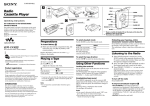
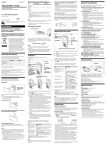
1 Slide open the battery compartment lid,
and insert two R6 (size AA) dry batteries
with correct polarity.
Replace the batteries with the new ones when “
flashes in the display.
Playing the preset radio stations
”
Playing a Tape
1 Insert a cassette.
2 Press NPLAY.
Adjust the volume with VOLUME.
“WALKMAN” is a registered trademark of Sony Corporation.
WM-EC1
“
” is a trademark of Sony Corporation.
Sony Corporation ©2002 Printed in Japan
AA (R6) x 2
Emphasizing bass sound
xSTOP
Wind rapidly*
MFF or mREW
Press MEGA BASS.
“MEGA BASS” appears in the display.
Listening to the Radio
1 If the HOLD function is turned on, slide the
HOLD switch in the opposite direction of
the arrow to unlock the controls.
Make sure that the tape has stopped
completely.
2 Press FM or AM to select the desired band
and to turn on the radio.
3 Press TUNING +/– to tune in to the desired
station.
If you hold down TUNING +/– for a few
seconds, the Walkman will start tuning to
the stations automatically.
To turn off the radio
Press OFF.
ST•FM MONO
To improve broadcast reception B
i
•For FM: Extend the headphones/earphones cord
(antenna) or adjust ST•FM MONO.
•For AM: Reorient the unit itself.
AVLS
VOLUME*
MEGA BASS
MFF
Set AVLS to LIMIT. The maximum volume is kept
down to protect your ears.
Precautions
On batteries
• Do not carry dry batteries with coins or other metallic objects.
It can generate heat if the positive and negative terminals of the
batteries are accidentally contacted by a metallic object.
• When you are not going to use your Walkman for a long time,
remove the batteries to prevent damage from battery leakage
and corrosion.
On handling
• Do not leave the unit in a location near heat sources, or in a
place subject to direct sunlight, excessive dust or sand,
moisture, rain, mechanical shock, or in a car with its windows
closed.
• Do not use cassettes longer than 90 minutes except for long
continuous playback.
• The LCD display may become hard to see or slow down when
using the unit at high temperatures (above 40°C/104°F) or at
low temperatures (below 0°C/32°F). At room temperature, the
display will return to its normal operating condition.
• If the unit has not been used for a long time, set it in the
playback mode to warm it up for a few minutes before you
start using it again.
TUNING +/–
You can preset up to 30 stations, 20 for FM and 10 for
AM.
Presetting Automatically Scanned
Stations
Do not use headphones/earphones while driving, cycling, or
operating any motorized vehicle. It may create a traffic hazard
and is illegal in some areas. It can also be potentially dangerous
to play your headphones/earphones at high volume while
walking, especially at pedestrian crossings.
You should exercise extreme caution or discontinue use in
potentially hazardous situations.
mPREW
FM
PRESET +/–
AM
HOLD
OFF
* There is a tactile dot beside VOLUME on the main unit to show the direction to turn up the volume.
** The button has a tactile dot.
Specifications
Sony alkaline LR6 (SG)** Sony R6P (SR)
Tape playback
Protecting your hearing—AVLS
(Automatic Volume Limiter System)
On headphones/earphones
NPLAY**
• Frequency range
FM: 87.5 - 108 MHz
AM: 530 - 1 710 kHz (North, Central and South America)
531 - 1 602 kHz (Other countries)
• Power requirements
3V DC, batteries R6 (size AA) x 2
• Dimensions (w/h/d)
Approx. 91.6 x 116.1 x 35.3 mm (3 5⁄8 × 4 5⁄8 × 1 7⁄16 inches)
excl. projecting parts and controls
• Mass
Approx. 174 g (6.2 oz) (main unit only)
• Supplied accessory
Stereo headphones or Stereo earphones (1)
Notes
• If the sound is distorted when MEGA BASS is
activated, turn down the volume of the main unit or
select normal mode.
• Bass emphasis may not show great effect if the volume
is tuned up too high.
Presetting Radio Stations
ENTER
xSTOP
Set the HOLD switch in the direction of the G mark
to lock the controls.
The HOLD function only locks the radio operation
buttons and MEGA BASS.
Press
AM
FM
Locking the controls
Stop playback
Note
• Do not open the cassette holder while the tape is
running.
B
Using other functions
To
* If you leave the unit after the tape has been wound or
rewound, the battery will be consumed rapidly. Be
sure to press xSTOP.
A
1 Press FM or AM to select the band.
2 Press PRESET +/–.
25
7.5
Radio reception 40
14
* Measured value by the standard of JEITA (Japan Electronics
and Information Technology Industries Association).
(Using a Sony HF series cassette tape)
**When using Sony LR6(SG) “STAMINA” alkaline dry
batteries (produced in Japan).
Note
• The battery life may be shorter depending on the operating
condition, the surrounding temperature and battery type.
1 Press FM or AM to select the desired band
and to turn on the radio.
2 Press ENTER for more than 2 seconds.
Preset number 1 will flash in the display
and the Walkman starts scanning the
stations from the lower frequencies and
stops for about 3 seconds when a station is
received.
3 If you wish to preset the received station,
press ENTER while the preset number is
flashing.
The received station is preset on preset
number 1 and the unit starts scanning for
the next receivable station.
4 Repeat step 3 until all receivable stations are
preset.
To turn off the radio
Press OFF.
Design and specifications are subject to change without notice.
Note
• If stations are already stored, the newly preset stations
replace the old ones when the above procedure is
completed.
Presetting Stations Manually
1 Press FM or AM.
2 Press ENTER.
The frequency digits and a preset number
flash in the display.
3 While the frequency digits and the preset
number are flashing, tune in to a station you
wish to store using TUNING +/–, and select
a preset number using PRESET +/–.
4 While the frequency digits and the preset
number are flashing, press ENTER.
Notes
• If you cannot complete step 3 or 4 while the indicators
are flashing, repeat from step 2.
• If a station is already stored, the new station replaces
the old one.
Road safety
Preventing hearing damage
Do not use headphones/earphones at high volume. Hearing
experts advise against continuous, loud and extended play. If
you experience a ringing in your ears, reduce the volume or
discontinue use.
Caring for others
Keep the volume at a moderate level. This will allow you to hear
outside sounds and to be considerate to the people around you.
On maintenance
• Clean the tape head and tape path using a cotton swab and
commercially available cleaning solvent after every 10 hours of
use.
• To clean the exterior, use a soft cloth slightly moistened in
water. Do not use alcohol, benzine or thinner.
• Clean the headphones/earphones plugs periodically.
A
AM
B
“- - - -”
A
A
G
1
“- - - -”
1
AA (R6) x 2
“
1
”
2
FM
•
1
2
N
•
1
2 N
G
x
M
x
m
M
*
•
ST•FM MONO
•
AVLS
m
*
x
“
”
*
•
•
x
i
•
VOLUME*
MEGA BASS
ENTER
xSTOP
MFF
•
1
•
•
2
3
•
•
—
TUNING +/–
NPLAY**
mPREW
FM
PRESET +/–
AM
HOLD
OFF
1
2
*
**
•
•
B
3
•
*
**
•
•
•
•
•
•
•
•
•
•
*
•
•
1
2
**
B
•
• FM :
•
• AM :
•
•
3
•
1
*
**
•
×
•
7.5
40
14
4
2
*
w/h/d
×
25
×
•
**
•
“
”
•
3
•
(1)
•
1
•
1
2
4
3
OFF
4
•
•
•
1
2
3
1
2
4
•
•
•
90
°C
°C