1
3-858-914-12(1)
SAFETY NOTES ON THE UNIT
Radio Cassette Player
Operating Instructions
WALKMAN is a registered trademark of Sony Corporation.
WM-FX251
©1997 by Sony Corporation
Printed in Malaysia
OWNER'S RECORD
The model number is located at the front and the
serial number is located inside the cassette holder.
Record the serial number in the space provided
below. Refer to them whenever you call upon your
Sony dealer regarding this product.
Model No. WM-FX251
Serial No.
INFORMATION
This equipment has been tested and found to comply
with the limits for a Class B digital device, pursuant
to Part 15 of the FCC Rules. These limits are
designed to provide reasonable protection against
harmful interference in a residential installation. This
equipment generates, uses, and can radiate radio
frequency energy and, if not installed and used in
accordance with the instructions, may cause harmful
interference to radio communications. However,
there is no guarantee that interference will not occur
in a particular installation. If this equipment does
cause harmful interference to radio or television
reception, which can be determined by turning the
equipment off and on, the user is encouraged to try
to correct the interference by one or more of the
following measures:
WARNING
• To prevent fire or shock hazard, do not expose the
unit to rain or moisture.
• Do not use headphones/earphones while driving,
cycling, or operating a motorized vehicle. It may
create a traffic hazard and is illegal in some areas. It
can also be potentially dangerous to play your
headphones/earphones at high volume while
walking, especially at pedestrian crossings. You
should exercise extreme caution or discontinue use in
potentially hazardous situations.
• To prevent shock hazards, never open the unit while
it is connected to the power source.
CAUTION
• Do not use headphones/earphones at high volume.
Hearing experts advise against continuous, loud and
extended play. If you experience a ringing in your
ears, reduce volume or discontinue use.
• Keep the volume at a moderate level. This will allow
you to hear outside sounds and to be considerate to
the people around you.
SAFETY NOTES ON POWER SOURCES
To avoid battery leakage, fire, damage, explosion, etc.,
follow the descriptions below.
You are cautioned that any changes or modifications
not expressly approved in this manual could void
your authority to operate this equipment.
Troubleshooting
Preparations
• Do not leave the unit in a location near
heat sources, or in a place subject to direct
sunlight, excessive dust or sand, moisture,
rain, mechanical shock, or in a car with its
windows closed.
• Do not wind the headphones/earphones
cord around the unit. The buttons may be
kept pressed, causing unnecessary battery
usage.
• Do not use cassettes longer than 90
minutes except for long continuous
playback.
• If the unit has not been used for a long
time, set it in the playback mode to warm
it up for a few minutes before inserting a
cassette.
• For cleaning the case, use a soft cloth
slightly moistened with mild detergent
solution. Do not use alcohol, benzine or
thinner.
The volume is not turned up.
To Insert batteries
If you have any questions or problem
concerning your Walkman, please consult
your nearest Sony dealer.
DANGER
• Do not carry dry batteries with coins or other metallic
objects. It can generate heat if the positive and
negative terminals of the batteries are accidentally
contacted by a metallic object.
WARNING
• Use only the Sony AC-E30HG AC power adaptor (not
supplied).
• To disconnect the AC power adaptor, only use the
plug and not the cable.
• Do not charge a dry battery.
• Check the ] and } on the batteries, and be sure to
insert them like the illustration in this manual.
CAUTION
– Reorient or relocate the receiving antenna.
– Increase the separation between the equipment and
receiver.
– Connect the equipment into an outlet on a circuit
different from that to which the receiver is
connected.
– Consult the dealer or an experienced radio/TV
technician for help.
This device complies with Part 15 of the FCC Rules.
Operation is subject to the following two conditions:
(1) This device may not cause harmful interference,
and (2) this device must accept any interference
received, including interference that may cause
undesired operation.
Precautions
• When you are not going to use your Walkman for a
long time, remove the batteries to prevent damage
from battery leakage and corrosion.
Specifications
• Frequency range
For U area indication:
FM: 87.5-108MHz (0.1MHz step)
AM: 530-1710kHz (10kHz step)
For E area indication:
FM: 87.5-108MHz (0.05MHz step)
AM: 531-1602kHz (9kHz step)
• Power requirements
3V DC batteries AA (R6) x 2/External DC 3V
power sources
• Dimensions
115 x 90.5 x 34.4 mm (4 5⁄8 x 3 5⁄8 x 1 3⁄8 inches)
(w/h/d) incl. projecting parts and controls
• Mass
Approx. 150g (5.3 oz)
Approx. 230g (8.2 oz) incl. batteries and a tape
• Supplied accessories
Stereo headphones (1)/Carrying case (1)
Design and specifications are subject to change
without notice.
This warranty is valid only in the United States.
• AVLS is set to LIMIT.
}
The sound is unstable or no audio.
}
]
•Insert two size AA (R6) batteries properly.
•Replace all batteries if they are weak.
AA(R6)X2
The display shows incorrect information
•The display may show incorrect information or the
preset stations may not be recalled correctly when
you use the unit for the first time, or when you
have left the unit without batteries for a long time.
In these cases, turn the tape and radio off and then
press BAND for about 10 seconds, you will hear a
beep sound through the headphones and the
memories of all the preset stations will be
canceled. Reset these functions again.
Poor tape playback quality.
•Clean the headphones plug.
•Dirty heads. Clean them with a cotton swab
slightly moistened with cleaning fluid or alcohol.
]
DC IN 3V
Battery life (approximate hours)
Sony alkaline
LR6 ( SG )
Sony
R6P ( SR )
playback
22
7
radio
33
13
Notes
• When the batteries become weak, the sound will be
unstable or cannot be heard. In such case, replace both
batteries.
• When replacing batteries, replace both batteries within
30 minutes; otherwise all the memories will be
canceled.
• The battery life may shorten depending on the
operation of the unit.
• If the battery compartment lid comes off, attach it as
shown.
2
1
To use external power
•For house current: Connect AC-E30HG AC power
adaptor (not supplied) to the DC IN 3V jack.
The polarity of the plug
To use the carrying case
LIMITED WARRANTY
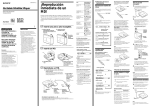
Location of parts and controls
Listening to the radio
0)
pSTOP
1
Press RADIO ON/OFF.
FM
LOCAL
Press BAND to select the band (FM1, FM2,
FM3 or AM).
Each time you press the button, the display
changes.
VOLUME (
BAND
You can store radio stations into the unit’s memory.
You can preset up to 20 radio stations, 5 for each
FM1, FM2, FM3 or AM bands.
AM
AVLS
BAND
NORM/CrO2/METAL•
DX/LOCAL
To limit the maximum volume
automatically
NORM CrO2/METAL
Set AVLS (Automatic Volume Limiter System) to
LIMIT. The maximum volume is kept down to
protect your ears, even if you turn the volume up.
To cancel the AVLS function, set AVLS to NORM.
Note
• Do not open the cassette holder while the tape is
running.
3
MHz
AM
KHz
3
Press TUNING –/+ to tune the station you
want.
–
2
TUNING
Insert a cassette and press (PLAY.
+
FM 1
MHz
PLAY
To turn off the radio
Press RADIO ON/OFF.
To tune the station quickly
To
Press
Stop playback
p
Fast-forward
or rewind the tape
) or 0 (For the side facing
forward)
Press a preset number (1-5) for 2 seconds,
the displayed frequency will flash with a
beep sound and the station is stored.
5
If the broadcast becomes noisy when a cassette with a
metallic shell or label is inserted, remove the cassette.
To listen to the radio abroad
FM
Set NORM•CrO2/METAL to match the
tape type.
3
Tune in the desired station by using the
BAND and TUNING – or +.
Note
2
MHz
1
2
2
FM
Playing a tape
RADIO ON/OFF
If a station is already stored, the new station
replaces the old one.
FM 1
MHz
1-5 (preset)
Press RADIO ON/OFF.
DX
2
DC IN 3V
To preset radio stations
For FM, extend the headphones/earphones cord or
adjust the DX/LOCAL.
For AM, reorient the unit itself.
1
RADIO ON/OFF
(PLAY
TUNING –/+
RADIO ON/OFF
To improve broadcast reception
Hold down TUNING –/+ in step 3. The frequency
digits change quickly. When you release the button,
the frequency digits change slowly. When the
desired frequency digits appear, press TUNING –/+
again.
The frequency range differs depending on the area.
If you listen to the radio in an area of different
frequency range, change the area indication in the
display.
1 Press BAND for about 10 seconds while the radio
is turned on.
2 Press TUNING – or + to change the area
indication.
("U": U.S.A., Canada and Central and South
America, "E": European and other countries).
3 Press BAND to set the frequency range.
Notes
• If you change the frequency range, all the preset
stations will be canceled.
• When you want to cancel during a change of the area
indication.
Press BAND after pressing TUNING – or +, all the
preset stations will be canceled.
4
1
3
2
FM 1
MHz
To play the preset radio stations
Press BAND to select the band, and then press the
corresponding preset button.