1
n 134 N
Customizing Your VAIO Computer
Managing Power with VAIO Power Management
Power management helps you set up power schemes for running on AC or battery power to suit your requirements for power
consumption.
VAIO Power Management is a software application developed exclusively for VAIO computers. With this software
application, you can enhance the Windows power management functions to ensure better operation of your computer and
longer battery life. For more information on VAIO Power Management, see the help file on the VAIO Power Management
software.
Activating VAIO Power Management
VAIO Power Management functionalities are added to the Windows Power Options Properties.
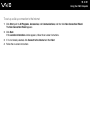
To activate VAIO Power Management
1
Click Start and then Control Panel.
2
Click Performance and Maintenance.
3
Click Power Options.
The Power Options Properties window appears.
4
Select the VAIO Power Management tab.
To restore the default settings
1
On the VAIO Power Management tab, click Advanced.
The VAIO Power Management window appears.
2
Follow the on-screen instructions to change the settings.