1
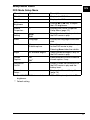
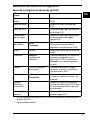
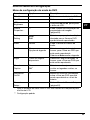
Photo Mode Setup Menu
US
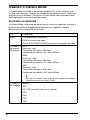
Thumbnail view
Menu item
Option
Description
LCD
Brightness
—
Use the < or , key* to adjust
the LCD brightness.
Information
On/Off
—
Shows or hides the information on
the battery level.
General
Setup…
—
Displays the General Setup Menu
(page 14).
*
For VGN-TZ100 Series models, use the F5 or F6 key to adjust the LCD
brightness.
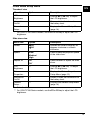
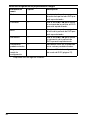
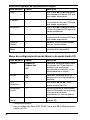
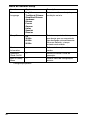
Slide show view
Menu item
Option
Description
Rotate
3 90°
4 90°
Rotates the current image by 90
degrees clockwise or counterclockwise.
Speed
Slow
Medium*
High
Select the desired playback speed
of the slide show.
Repeat All
On
Off*
Select whether to repeat the slide
show.
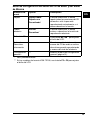
LCD
Brightness
—
Use the < or , key** to adjust
the LCD brightness.
Picture
Properties…
—
Displays the Picture Properties
Setup Menu (page 12).
Information
On/Off
—
Shows or hides the information on
the battery level.
General
Setup…
—
Displays the General Setup Menu
(page 14).
*
Default setting
** For VGN-TZ100 Series models, use the F5 or F6 key to adjust the LCD
brightness.
13