1
n 64 N
Using Peripheral Devices
Connecting a Digital Video Camcorder
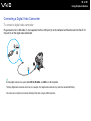
To connect a digital video camcorder
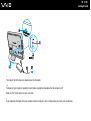
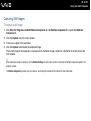
Plug one end of an i.LINK cable (1) (not supplied) into the i.LINK port (2) on the computer and the other end into the DV In/
Out port (3) on the digital video camcorder.
✍
On Sony digital video cameras, ports labeled DV Out, DV In/Out, or i.LINK are i.LINK-compatible.
The Sony digital video camcorder shown here is an example. Your digital video camcorder may need to be connected differently.
You cannot access the pictures stored on a Memory Stick when using an i.LINK connection.