1
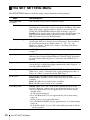
Items
Item descriptions
*5
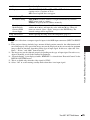
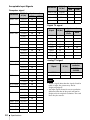
CC Display
CC1/CC2/CC3/CC4/Text1/Text2/Text3/Text4: Select the closed
caption service (Captions or Text).
Off: Closed caption does not appear.
Network Setting*4
IP Address Setup
Auto (DHCP): The IP address is assigned automatically from the
DHCP server such as a router.
Manual: To specify the IP Address manually.
IP Address/Subnet
Mask/Default
Gateway/DNS
Server/Apply
When “Manual” is selected for “IP Address Setup,” select the item
with the B or b key and input the value with V or v key. When all
items are entered, select “Apply” then press the ENTER key. The
entered settings will be registered.
Lamp Timer Reset
When replacing the lamp, resets the lamp timer (page 37).
Notes
The SET SETTING Menu
Adjustments and Settings Using a Menu
*1: Executes APA when a computer signal is input via the RGB input connector (INPUT A/INPUT
B).
*2: If the projected image includes large amount of black portion around it, the APA function will
not work properly and a part of the image may not be displayed on the screen and also optimum
image cannot be obtained, depending on the type of input signal. In this case, adjust the “Dot
Phase,” “H size,” and “Shift” items manually.
*3: The image may not be adjusted properly depending on the type of input signal. In such a case,
adjust it manually to suit to the connected equipment.
*4: “Network Setting” is not displayed while “REMOTE” is selected from “External Control” in the
INSTALL SETTING menu.
*5: This is available only when the video signal is NTSC.
*6: Select “Off” to avoid entering standby mode when there is no input signal.
25