1
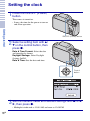
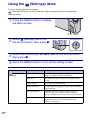
4 Select [Go to next], then press z.
your desired area with
5 Select
b/B on the control button, then
press z.
Getting started
6 Select [OK], then press z.
Note
• The camera does not have a feature for superimposing dates on images. By using “PMB” in the
CD-ROM (supplied), you can print or save images with the date.
x Setting the date and time again
Press the MENU button, then select
(Settings) t
(Clock Settings) (page 49).
17GB