1
Garage Door Remote Control
Model G6K
1. INTRODUCTION
2. PROGRAM A KEYPAD TO A GARAGE DOOR RECEIVER (CONT)
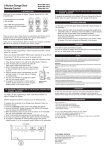
Congratulations on your purchase of the Skylink® Garage Door Remote
Control Model G6K. The Model G6K works with the Skylink® Garage Door
Receiver, such as Smart ButtonTM and EQ / IQ Garage Door Opener. In
this package, you will find a keyless entry transmitter with 3V lithium
batteries and screws.
Garage Door
Remote Control
(Batteries inside)
1 pc 2.6 x 6 screw
1 pc 2.6 x 12 screw
1 pc 2.6 x 25 screw
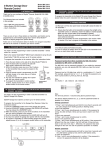
III) PROGRAM KEYPAD TO IQ GARAGE DOOR OPENER
1. Press and hold the PROG button on the LCD Wall Console for 10
seconds until the “PROG” icon appears on the display.
2. Press the PROG button again until the “
” icon appears on the
display.
3. Activate the keypad transmitter by entering the password and door
number. For example, if the password is 0000 and door 1 is used,
you should enter [0000][#][1]. If a remote is programmed, the “
”
icon will stay on.
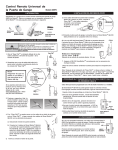
2. PROGRAM A KEYPAD TO A GARAGE DOOR RECEIVER
Remote Icon
Before proceeding, please remove the battery isolator from the keypad
transmitter.
The keypad transmitter can operate up to 4 garage door receivers / doors.
Same PIN will be used for all doors. The factory default password is [0 0 0 0].
To
To
To
To
operate
operate
operate
operate
door
door
door
door
1,
2,
3,
4,
you
you
you
you
will
will
will
will
enter
enter
enter
enter
[0
[0
[0
[0
0
0
0
0
0
0
0
0
0][#][1]
0][#][2]
0][#][3]
0][#][4]
3. INSTALLATION
To program the keypad transmitter into a garage door receiver, you must
decide which door you need to operate. If you only have one garage
door receiver, we suggest you to use door 1. i.e. [0 0 0 0][#][1]. Follow
the instructions below to program the keypad transmitter.
TM
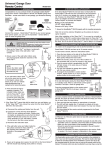
I) PROGRAM KEYPAD TO GTR SMART BUTTON
1. With the GTR Smart ButtonTM connected on your
existing wall button. The red light on the Smart
ButtonTM should flash after plugging in the power.
If the red light on the Smart ButtonTM is flashing
slowly, that indicates it is in standby mode.
2. Press the learn button on the side of the GTR.
3. Once the learn button is pressed, the red LED will
flash quickly. You may release the learn button.
4. Enter the default PIN [0 0 0 0][#][x] within 5
seconds, where x is the door number.
5. Once the keypad transmitter is programmed, the
red LED will flash slowly, in the same way as it
flashes in standby mode.
2. If additional remote needs to be programmed, press the up button
“ ”, the “
” icon will flash again, you may program additional
remotes.
You can mount the keypad transmitter on a
desired location with the screws provided.
Lift up the cover and insert screw above
the keypad in the slot provided (a). Remove
the battery cover and insert the second
screw in the lower slot (b). Tighten all
screws. Replace the battery cover, insert
and tighten screw (c).
(a)
(c)
(b)
4. TROUBLE SHOOTING
Q: Door opener does not react after pressing the button on the keypad
transmitter?
Learn Button
A: - Ensure you hear 3 beeps from the keypad transmitter after entering
the default PIN [0 0 0 0][#][x] within 5 seconds, where x is the door
number. If you do not hear 3 beeps, that means the PIN you entered
is incorrect. Re-enter the correct PIN.
- Ensure the wires is successfully connected from the Smart ButtonTM
to the wall mounted door control.
- Ensure the keypad transmitter has been programmed to the Smart
ButtonTM. Refer to section 2 for how to program a keypad to the
receiver.
II) PROGRAM KEYPAD TO EQ GARAGE DOOR OPENER
1. Press the “Learn” button on the EQ garage door opener, yellow LED
will flash for 30 seconds.
2. Within 30 seconds, activate the keypad transmitter by entering the
password and door number. For example, if the password is 0000
and door 1 is used, you should enter [0000][#][1].
3. Once the keypad is programmed, the yellow LED will be off.
5. REMOVE THE KEYPAD TRANSMITTER FROM
THE GARAGE DOOR RECEIVER
You can delete the keypad transmitter(s) from the garage door receiver.
Refer to the manual of the garage door receiver to erase the keypad
transmitter.
Learn and Set Button
6. CHANGE PIN
Follow the instructions below to change the PIN.
To change your PIN:
1. Enter the current PIN, (factory default PIN 0 0 0 0), press * .
2. Enter new 4 to 6 digit PIN, press * .
3. Enter new PIN again, press * .
For example, if you are changing the PIN number from 0000 to 123456,
enter the following sequence, 0000, *, 123456, * , 123456, * .
LED (yellow)
LED (red)
If confirmed, the backlit LED flashes and the unit emits a long beep.
7. BATTERY
Two 3 volt Lithium type (CR2032) batteries (included).
-
Battery
Compartment
+
It is time to change the batteries when the backlight no longer appears.
8. ADDITIONAL TRANSMITTER
You can program additional transmitters to the Skylink®
receivers. Skylink® offers Keychain Transmitters and
Visor Transmitters to work with your receiver. For
more information, please visit our website at
www.skylinkhome.com or contact us.
9. WARNING
DO NOT let children use the garage door transmitter without adult supervision.
Children can injure themselves or others by the garage door.
10. FCC
The Garage Door Remote Control is approved by the FCC and it complies with
Part 15 of the FCC Rules. Its operation is subject to the following two conditions :
1. This device may not cause harmful interference.
2. This device must accept any interference that may cause undesired operation.
WARNING:
Changes or modifications to this unit not expressly approved by the party
responsible of compliance could void the user’s authority to operate the equipment.
11. WARRANTY
If, within one year from date of purchase, this product should become defective
(except battery), due to faulty workmanship or materials, it will be repaired or
replaced, without charge. Proof of purchase and a Return Authorization are required.
12. CUSTOMER SERVICE
If you would like to order Skylink’s product or have difficulty getting your Skylink
remote control to work or download information and user manual, please :
1. visit our FAQ section at www.skylinkhome.com, or
2. email us at [email protected], or
3. call our toll free at 1-800-304-1187 from Monday to Friday, 9 am to 5 pm EST.
Fax (800) 286-1320
CUSTOMER SERVICE
17 Sheard Avenue, Brampton, Ontario, Canada L6Y 1J3
Email:[email protected]
http://www.skylinkhome.com
P/N. 101Z489-001
® are registered trademarks of their respective corporations
©2009 SKYLINK GROUP