1
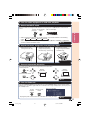
Observe the following safeguards when setting up your
projector.
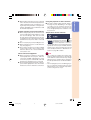
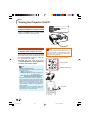
Caution concerning the lamp unit
■ Potential hazard of glass particles if lamp ruptures. In
case of lamp rupture, contact
your nearest Sharp Authorized Ser vice Center or
Dealer for replacement.
See “Replacing the Lamp” on
page 50.
Caution concerning the setup of the projector
■ For minimal servicing and to maintain high
image quality, SHARP recommends that this
projector be installed in an area free from
humidity, dust and cigarette smoke. When the
projector is subjected to these environments,
the vents and lens must be cleaned more often. As long as the projector is regularly
cleaned, use in these environments will not
reduce the overall operation life of the unit.
Internal cleaning should only be performed
by a Sharp Authorized Service Center or
Dealer.
When using the projector in high-altitude
areas such as mountains (at altitudes of
approximately 4,900 feet (1,500 meters)
or more)
■ When you use the projector in high-altitude
areas with thin air, set “Fan Mode” to “High”.
Neglecting this can affect the longevity of the
optical system.
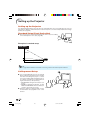
Warning about placing the projector in
a high position
■ When placing the projector in a high position,
ensure that it is secured carefully to avoid personal injury caused by the projector falling
down.
Do not subject the projector to hard impact and/or vibration.
■ Protect the lens so as not to hit or damage
the surface of the lens.
Rest your eyes occasionally.
■ Continuously watching the screen for long
hours will cause eye strain. Be sure to occasionally rest your eyes.
Do not set up the projector in places exposed to direct sunlight or bright light.
Avoid locations with extremes of temperature.
■ Position the screen so that it is not in direct
sunlight or room light. Light falling directly on
the screen washes out the colors, making
viewing difficult. Close the curtains and dim
the lights when setting up the screen in a
sunny or bright room.
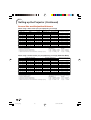
■ The operating temperature of the projector is
from 41°F to 95°F (+5°C to +35°C).
■ The storage temperature of the projector is
from –4°F to 140°F (–20°C to +60°C).
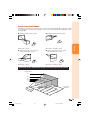
Caution regarding placing of the projector
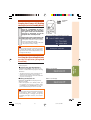
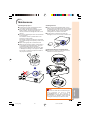
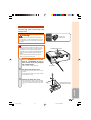
■ Allow at least 11 13/16 inches (30 cm) of space
between the exhaust vent and the nearest
wall or obstruction.
■ Be sure that the intake vent and the exhaust
vent are not obstructed.
■ If the cooling fan becomes obstructed, a protection circuit will automatically put the projector into standby mode to prevent overheat
damage. This does not indicate a malfunction. (See pages 48 and 49.) Remove the projector power cord from the wall outlet and wait
at least 10 minutes. Place the projector where
the intake and exhaust vents are not blocked,
plug the power cord back in and turn on the
projector. This will return the projector to the
normal operating condition.
■ Place the projector on a level site within the
adjustment range (8 degrees) of the adjustment foot.
Do not block the exhaust and intake
vents.
8
DT-100_EN_a
8
05.7.22, 5:47 AM