1
B E F O R E O P E R AT I N G
M A N U A L O P E R AT I O N
• Before operating your new microwave oven make
sure you read and understand this operation manual
completely.
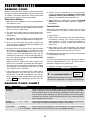
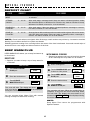
TIME COOKING
Your oven can be programmed for 99 minutes 99 seconds
(99.99). Always enter the seconds after the minutes,
even if they are both zeros.
• Suppose you want to cook for 5 minutes at 100%.
• Before the oven can be used, follow these procedures:
1. Plug in the oven. Close the door. The oven display
will show ENJOY YOUR
OVEN
PRESS CLEAR
AND
PRESS
CLOCK .
PROCEDURE
2. Touch the STOP/CLEAR pad.
will appear.
:
2
TO SET THE CLOCK
PROCEDURE
TIMER
CLOCK
2
2
3
0
TIMER
CLOCK
15 . 0 0
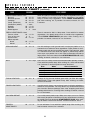
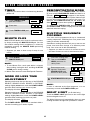
There are eleven preset power levels.
Using lower power levels increases the cooking time
which is recommended for foods such as cheese, milk
and long slow cooking of meats. Consult cookbook or
recipes for specific recommendations.
ENTER
T I ME
TOUCH POWER
LEVEL PAD NUMBER OF TIMES
FOR DESIRED POWER
12:30
12:30
Touch TIMER/CLOCK pad again.
This is a 12 hour clock. If you attempt to enter an
incorrect clock time, ERROR will appear in the display.
Touch the STOP/CLEAR pad and re-enter the time.
• If the electrical power supply to your microwave
oven should be interrupted, the display will intermittently show ENJOY YOUR
OVEN
PRESS CLEAR
AND
PRESS CLOCK after the power is reinstated.
If this occurs during cooking, the program will be
erased. The time of day will also be erased. Simply
touch STOP/CLEAR pad and reset the clock for the
correct time of day.
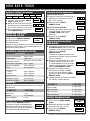
APPROXIMATE
PERCENTAGE
OF POWER
COMMON WORDS
FOR
POWER LEVELS
POWER LEVEL x 1
100%
High
POWER LEVEL x 2
POWER LEVEL x 3
90%
80%
POWER LEVEL x 4
POWER LEVEL x 5
70%
60%
Medium High
POWER LEVEL x 6
POWER LEVEL x 7
50%
40%
Medium
POWER LEVEL x 8
POWER LEVEL x 9
30%
20%
Med Low/Defrost
POWER LEVEL x 10
10%
Low
POWER LEVEL x 11
0%
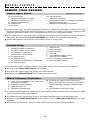
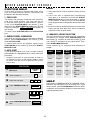
• Suppose you want to defrost for 5 minutes at 30%.
PROCEDURE
1 5
0
D I S P L AY
0
15 . 0 0
Enter defrosting time.
STOP/CLEAR
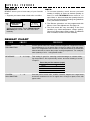
Touch the STOP/CLEAR pad to:
1.
2.
3.
4.
START
MINUTE PLUS
TO SET POWER LEVEL
Enter the correct time of
day by touching the numbers in sequence.
3
15 . 0 0
Touch START/MINUTE PLUS pad.
D I S P L AY
Touch TIMER/CLOCK
pad and number 2.
2
0
COOK DEFROST
• Suppose you want to enter the correct time of day
12:30 (A.M. or P.M.).
1
0
Enter cooking time.
3. Set clock.
1
5
1
D I S P L AY
2
Erase if you make a mistake during programming.
Cancel timer.
Stop the oven temporarily during cooking.
Return the time of day to the display.
POWER
LEVEL
x8
1P -3 0
Touch POWER LEVEL pad eight times or hold
down until the desired power level appears.
3
START
MINUTE PLUS
5. Cancel a program during cooking, touch twice.
15 . 0 0
COOK DEFROST
Touch START/MINUTE PLUS pad.
When the defrost time is complete, a long tone
will sound and END will appear in the display.
9