1
Thank you for purchasing this SHARP product.
To obtain the best performance from this product, please read this
manual carefully. It will guide you in operating your SHARP product.
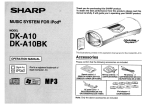
MUSIC SYSTEM FOR iPod®
MODEL
DK-A10
DK-A10BK
N
FUNCTIO
CLOCK
VOL
/
SNOOZE
DIMMER
ALARM
SLEEP
DISPLAY
FOLDER
E SOUND
/DEMO
PLAY
MODE
EQ
TUNING
CLEAR
MEMORY
This illustrations printed in this operation manual are for the model DK-A10.
OPERATION MANUAL
Accessories
Please confirm that the following accessories are included.
iPod is a registered trade marks of
Apple Computer, Inc.
Remote control 1
FM antenna 1
AM loop antenna 1
RRMCGA110AWSA (DK-A10) (QANTL0010AWZZ) QANTW0004AW09 (DK-A10)
RRMCGA111AWSA (DK-A10BK)
92LFANT1535A (DK-A10BK)
AC power cord 1
QACCD0025AW09 (DK-A10)
QACCD0025AWZZ (DK-A10BK)
Note:
This product is not compatible with MTP and AAC file systems.
iPod adaptor 8
UACRTA008AW01
Note: Only the above accessories are included.
DK-A10
DK-A10BK
SPECIAL NOTES
Important Instruction
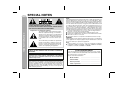
CAUTION: TO REDUCE THE RISK OF ELECTRIC SHOCK,
DO NOT REMOVE COVER (OR BACK).
NO USER-SERVICEABLE PARTS INSIDE. REFER SERVICING TO QUALIFIED SERVICE PERSONNEL.
Explanation of Graphical Symbols:
The lightning flash with arrowhead symbol,
within an equilateral triangle, is intended to
alert the user to the presence of uninsulated
“dangerous voltage” within the product’s enclosure that may be of sufficient magnitude
to constitute a risk of electric shock to persons.
The exclamation point within an equilateral
triangle is intended to alert the user to the
presence of important operating and maintenance (servicing) instructions in the literature accompanying the appliance.
WARNING: TO REDUCE THE RISK OF FIRE OR ELECTRIC
SHOCK, DO NOT EXPOSE THIS APPLIANCE TO RAIN OR
MOISTURE.
This product is classified as a CLASS 1 LASER PRODUCT
“Caution: Use of any controls, adjustments or procedures
other than those specified herein may result in hazardous
radiation exposure.”
Note to CATV system installer:
This reminder is provided to call the CATV system installer's
attention to Article 820-40 of the National Electrical Code that
provides guidelines for proper grounding and, in particular,
specifies that the cable ground shall be connected to the
grounding system of the building, as close to the point of
cable entry as practical.
2
NOTE
This equipment has been tested and found to comply with the limits for a
Class B digital device, pursuant to Part 15 of the FCC Rules. These
limits are designed to provide reasonable protection against harmful interference in a residential installation. This equipment generates, uses,
and can radiate radio frequency energy and, if not installed and used in
accordance with the instructions, may cause harmful interference to radio communications. However, there is no guarantee that interference
will not occur in a particular installation. If this equipment does cause
harmful interference to radio or television reception, which can be determined by turning the equipment off and on, the user is encouraged to try
to correct the interference by one or more of the following measures:
Reorient or relocate the receiving antenna.
Increase the separation between the equipment and receiver.
Connect the equipment into an outlet on a circuit different from that to
which the receiver is connected.
Consult the dealer or an experienced radio/TV technician for help.
WARNING
FCC Regulations state that any unauthorized changes or modifications
to this equipment not expressly approved by the manufacturer could void
the user's authority to operate this equipment.
Not e:
Licensed under one or more of U.S. Pat. 4,972,484, 5,214,678,
5,323,396, 5,530,655, 5,539,829, 5,544,247, 5,606,618, 5,610,985,
5,740,317, 5,777,992, 5,878,080 or 5,960,037.
FOR YOUR RECORDS
For your assistance in reporting this unit in case of loss or theft,
please record below the model number and serial number which
are located on the rear of the unit.
Please retain this information.
Model number
.......................................................
Serial number
.......................................................
Date of purchase .......................................................
Place of purchase .......................................................
IMPORTANT SAFETY INSTRUCTIONS
Electricity is used to perform many useful functions, but it can also
cause personal injuries and property damage if improperly handled.
This product has been engineered and manufactured with the
highest priority on safety. However, improper use can result in
electric shock and/or fire. In order to prevent potential danger, please
observe the following instructions when installing, operating and
cleaning the product. To ensure your safety and prolong the service
life of this product, please read the following precautions carefully
before use.
DK-A10
DK-A10BK
10) Protect the power cord from being walked on or pinched particularly at
plugs, convenience receptacles, and the point where they exit from
the apparatus.
11) Only use attachments/accessories specified by the manufacturer.
12) Use only with the cart, stand, tripod, bracket, or table
specified by the manufacturer, or sold with the apparatus.
When a cart is used, use caution when moving the cart/
apparatus combination to avoid injury from tip-over.
2) Keep these instructions.
13) Unplug this apparatus during lightning storms or when unused for
long periods of time.
5) Do not use this apparatus near water.
14) Refer all servicing to qualified service personnel. Servicing is required
when the apparatus has been damaged in any way, such as powersupply cord or plug is damaged, liquid has been spilled or objects
have fallen into the apparatus, the apparatus has been exposed to
rain or moisture, does not operate normally, or has been dropped.
6) Clean only with dry cloth.
Additional Safety Information
3) Heed all warnings.
4) Follow all instructions.
15) Power Sources - This product should be operated only from the
type of power source indicated on the marking label. If you are
not sure of the type of power supply to your home, consult your
product dealer or local power company. For product intended
8) Do not install near any heat sources such as radiators, heat registers,
stoves, or other apparatus (including amplifiers) that produce heat.
to operate from battery power, or other sources, refer to the
operating instructions.
9) Do not defeat the safety purpose of the polarized or grounding-type
plug. A polarized plug has two blades with one wider than the other.
16) Overloading - Do not overload wall outlets, extension cords, or
A grounding type plug has two blades and a third grounding prong.
integral convenience receptacles as this can result in a risk of
The wide blade or the third prong are provided for your safety. If
fire or electric shock.
the provided plug does not fit into your outlet, consult an electrician
for replacement of the obsolete outlet.
17) Object and Liquid Entry - Never push objects of any kind into
this product through openings as they may touch dangerous
voltage points or short-out parts that could result in a fire or
electric shock. Never spill liquid of any kind on the product.
7) Do not block any ventilation openings. Install in accordance with
the manufacturer's instructions.
Important Instruction
1) Read these instructions.
3
Important Instruction
DK-A10
DK-A10BK
IMPORTANT SAFETY INSTRUCTIONS (continued)
18) Damage Requiring Service - Unplug this product from the wall
outlet and refer servicing to qualified service personnel under
the following conditions :
a) When the AC cord or plug is damaged,
b) If liquid has been spilled, or objects have fallen into the
product,
c) If the product has been exposed to rain or water,
d) If the product does not operate normally by following
the operating instructions. Adjust only those controls
that are covered by the operating instructions as an
improper adjustment of other controls may result in
damage and will often require extensive work by a
qualified technician to restore the product to its normal
operation,
e) If the product has been dropped or damaged in
any way, and
f) When the product exhibits a distinct change in
performance - this indicates a need for service.
19) Replacement Parts - When replacement parts are required,
be sure the service technician has used replacement parts
specified by the manufacturer or have the same characteristics
as the original part. Unauthorized substitutions may result in
fire, electric shock, or other hazards.
20) Safety Check - Upon completion of any service or repairs to this
product, ask the service technician to perform safety checks to
determine that the product is in proper operating condition.
21) Wall or ceiling mounting - When mounting the product on a wall
or ceiling, be sure to install the product according to the method
recommended by the manufacturer.
22) Power Lines - An outside antenna system should not be located
in the vicinity of overhead power lines or other electric light or
power circuits, or where it can fall into such power lines or circuits.
When installing an outside antenna system, extreme care should
be taken to keep from touching such power lines or circuits as
contact with them might be fatal.
4
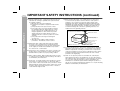
23) Outdoor Antenna Grounding - If an outside antenna or cable system
is connected to the product, be sure the antenna or cable system is
grounded so as to provide some protection against voltage surges
and built-up static charges. Article810 of the National Electrical Code,
ANSI/NFPA 70, provides information with regards to proper grounding
of the mast and supporting structure, grounding of the lead-in wire to
an antenna discharge unit, connection to grounding electrodes, and
requirements for the grounding electrode.
Example of antenna grounding as per
National Electrical Code, ANSI/NFPA 70
ANTENNA LEAD IN WIRE
GROUND
CLAMP
ANTENNA DISCHARGE UNIT
(NEC SECTION 810-20)
ELECTRIC
SERV ICE
EQUIPMENT
GROUNDING CONDUCTORS
(NEC SECTION 810-21)
GROUND CLAMPS
NEC - NATIONAL ELECTRICAL CODE
S2898A
P OWER SERVICE GROUNDING
ELECTRODE SYSTEM
(NEC ART 250, PART H)
24) Protective Attachment Plug - The product is equipped with an attachment
plug having overload protection. This is a safety feature. See Instruction
Manual for replacement or resetting of protective device. If replacement
of the plug is required, be sure the service technician has used a replacement plug specified by the manufacturer that has the same overload
protection as the original plug.
25) Stand - Do not place the product on an unstable cart, stand, tripod or
table. Placing the product on an unstable base can cause the product to
fall, resulting in serious personal injuries as well as damage to the product.
Use only a cart, stand, tripod, bracket or table recommended by the
manufacturer or sold with the product. When mounting the product on a
wall, be sure to follow the manufacturer's intructions. Use only the mounting
hardware recommended by the manufacturer.
Contents
ENERGY STAR® Program Information
DK-A10
DK-A10BK
Page
General Information
Precautions . . . . . . . . . . . . . . . . . . . . . . . . . . . . . . . . . . . . . . . . . 6
Controls and indicators . . . . . . . . . . . . . . . . . . . . . . . . . . . . .7 - 9
Preparation for Use
System connections . . . . . . . . . . . . . . . . . . . . . . . . . . . . . . . . . 10
Remote control . . . . . . . . . . . . . . . . . . . . . . . . . . . . . . . . . . . . . 11
Basic Operation
General control . . . . . . . . . . . . . . . . . . . . . . . . . . . . . . . . . . . . . 12
Setting the clock . . . . . . . . . . . . . . . . . . . . . . . . . . . . . . . . . . . . 13
iPod
Listening to the iPod . . . . . . . . . . . . . . . . . . . . . . . . . . . . . .14 - 16
To comply with the ENERGY STAR® standards mentioned above,
please cancel the demonstration mode, as described on page 10.
ENERGY STAR® is a U.S. registered mark.
Special Note
Supply of this product does not convey a license nor imply any right
to distribute content created with this product in revenue-generating
broadcast systems (terrestrial, satellite, cable and/or other distribution channels), revenue-generating streaming applications (via Internet, intranets and/or other networks), other revenue-generating
content distribution systems (pay-audio or audio-on-demand applications and the like) or on revenue-generating physical media (compact discs, digital versatile discs, semiconductor chips, hard drives,
memory cards and the like). An independent license for such use is
required. For details, please visit http://mp3licensing.com
MPEG Layer-3 audio coding technology licensed from Fraunhofer
IIS and Thomson.
CD or MP3/WMA disc Playback
Listening to a CD or MP3/WMA disc . . . . . . . . . . . . . . . . .17 - 18
Advanced CD or MP3/WMA disc playback . . . . . . . . . . . .19 - 20
MP3/WMA folder mode (only for MP3/WMA files) . . . . . . .21 - 22
Radio
Listening to the radio . . . . . . . . . . . . . . . . . . . . . . . . . . . . .23 - 24
General Information
Products that have earned
the ENERGY STAR® are
designed to protect the
environment through
superior energy efficiency.
Advanced Features
Alarm and sleep operation. . . . . . . . . . . . . . . . . . . . . . . . . .25 - 26
Enhancing your system . . . . . . . . . . . . . . . . . . . . . . . . . . . . . . 27
References
Troubleshooting chart . . . . . . . . . . . . . . . . . . . . . . . . . . . . .28 - 29
Maintenance . . . . . . . . . . . . . . . . . . . . . . . . . . . . . . . . . . . . . . . . 29
Specifications . . . . . . . . . . . . . . . . . . . . . . . . . . . . . . . . . . . . . . 29
CONSUMER LIMITED WARRANTY . . . . . . . . . . . . . .Back cover
5
DK-A10
DK-A10BK
Precautions
General
General Information
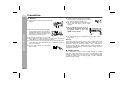
Use the unit on a firm, level surface free from
vibration.
Keep the unit away from direct sunlight,
strong magnetic fields, excessive dust,
humidity and electronic/electrical equipment (home computers, facsimiles, etc.)
which generate electrical noise.
Do not place anything on top of the unit.
Do not expose the unit to moisture, to temperatures higher than
140˚F (60˚C) or to extremely low temperatures.
If your system does not work properly, disconnect the AC power
cord from the AC outlet. Plug the AC power cord back in, and then
turn on your system.
In case of an electrical storm, unplug the
unit for safety.
Hold the AC power plug by the head when
removing it from the AC outlet, as pulling
the cord can damage internal wires.
The AC power plug is used as disconnect
device and shall always remain readily
operable.
Do not remove the outer cover, as
this may result in electric shock. Refer internal service to your local
SHARP service facility.
This unit should only be used within the range of 41˚F - 95˚F
(5˚C - 35˚C).
Warning:
The voltage used must be the same as that specified on this unit.
Using this product with a higher voltage other than that which is
specified is dangerous and may result in a fire or other type of
accident causing damage. SHARP will not be held responsible for
any damage resulting from use of this unit with a voltage other than
that which is specified.
Volume control
The sound level at a given volume setting depends on speaker
efficiency, location and various other factors. It is advisable to avoid
exposure to high volume levels, which occurs while turning the unit
on with the volume control setting up high, or while continually
listening at high volumes.
6
Controls and indicators
DK-A10
DK-A10BK
15
16
17
18 19
20
1
Reference page
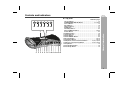
1. iPod Terminal . . . . . . . . . . . . . . . . . . . . . . . . . . . . . . . . . . . . 15
2. POWER ON/STAND-BY Button . . . . . . . . . . . . . . . . 11, 12, 23
3. Clock Button . . . . . . . . . . . . . . . . . . . . . . . . . . . . . . . . . . . . . 13
4. iPod Button . . . . . . . . . . . . . . . . . . . . . . . . . . . . . . . . . . . . . . 14
5. Remote Sensor . . . . . . . . . . . . . . . . . . . . . . . . . . . . . . . . . . . 11
6. CD Button . . . . . . . . . . . . . . . . . . . . . . . . . . . . . . . . . . . . . . . 17
7. Auxiliary Button . . . . . . . . . . . . . . . . . . . . . . . . . . . . . . . . . . 27
8. Snooze/Dimmer Button . . . . . . . . . . . . . . . . . . . . . . . . . 12, 25
9. Tuner Button . . . . . . . . . . . . . . . . . . . . . . . . . . . . . . . . . . . . 23
10. CD Eject Button . . . . . . . . . . . . . . . . . . . . . . . . . . . . . . . . . . 18
11. Alarm Indicator . . . . . . . . . . . . . . . . . . . . . . . . . . . . . . . . . . . 25
12. Alarm Button . . . . . . . . . . . . . . . . . . . . . . . . . . . . . . . . . . . . . 25
13. Alarm ON/OFF Button. . . . . . . . . . . . . . . . . . . . . . . . . . . . . . 25
14. E Sound Button . . . . . . . . . . . . . . . . . . . . . . . . . . . . . . . 10, 12
15. Play/Pause Button . . . . . . . . . . . . . . . . . . . . . . . . . . . . . 16, 18
16. Skip Down, Tuner Preset Down Button . . . . . . 13, 16, 18, 24
17. Skip Up, Tuner Preset Up Button . . . . . . . . . . . 13, 16, 18, 24
18. Stop Button . . . . . . . . . . . . . . . . . . . . . . . . . . . . . . . . . . . . . 12
19. Volume Down Button . . . . . . . . . . . . . . . . . . . . . . . . . . . . . 12
20. Volume Up Button . . . . . . . . . . . . . . . . . . . . . . . . . . . . . . . . 12
General Information
Top panel
2 3 4 5 6 7 8 9 10 11 12 13 14
7
DK-A10
DK-A10BK
Controls and indicators (continued)
1
2
3
4
5
6
7
8
General Information
11
The model name/serial no.label (*)
12
15
16
17
13
14
The iPod
rating label (*)
Display
Reference page
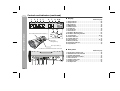
1. Alarm Indicator . . . . . . . . . . . . . . . . . . . . . . . . . . . . . . . . . . . 25
2. Sleep Indicator . . . . . . . . . . . . . . . . . . . . . . . . . . . . . . . . . . . 26
3. MP3 Indicator . . . . . . . . . . . . . . . . . . . . . . . . . . . . . . . . . . . . 18
4. WMA Indicator . . . . . . . . . . . . . . . . . . . . . . . . . . . . . . . . . . . 18
5. FOLD Indicator . . . . . . . . . . . . . . . . . . . . . . . . . . . . . . . . . . . 22
6. CD Indicator . . . . . . . . . . . . . . . . . . . . . . . . . . . . . . . . . . . . . 18
7. iPod Indicator . . . . . . . . . . . . . . . . . . . . . . . . . . . . . . . . . . . . 14
8. Aux Indicator . . . . . . . . . . . . . . . . . . . . . . . . . . . . . . . . . . . . 27
9. FM Stereo Mode Indicator . . . . . . . . . . . . . . . . . . . . . . . . . . 23
10. FM Stereo Receiving Indicator . . . . . . . . . . . . . . . . . . . . . . 23
11. Total Indicator . . . . . . . . . . . . . . . . . . . . . . . . . . . . . . . . . 18, 22
12. Random Indicator . . . . . . . . . . . . . . . . . . . . . . . . . . . . . . . . . 19
13. Summer Indicator . . . . . . . . . . . . . . . . . . . . . . . . . . . . . . . . . 13
14. Pause Indicator . . . . . . . . . . . . . . . . . . . . . . . . . . . . . . . . 16, 18
15. Memory Indicator . . . . . . . . . . . . . . . . . . . . . . . . . . . . . . . . . 20
16. Repeat Play Indicator . . . . . . . . . . . . . . . . . . . . . . . . . . . . . . 19
17. Play Indicator . . . . . . . . . . . . . . . . . . . . . . . . . . . . . . . . . . . . 18
The spec label (*)
(*) Label is located at the bottom of the unit.
Rear panel
Reference page
1. FM 75 Ohms Antenna Jack . . . . . . . . . . . . . . . . . . . . . . . . . 10
2. AM Antenna Ground Terminal . . . . . . . . . . . . . . . . . . . . . . 10
3. Summer Time Switch . . . . . . . . . . . . . . . . . . . . . . . . . . . . . . 13
4. AM Loop Antenna Terminal . . . . . . . . . . . . . . . . . . . . . . . . . 10
5. Video Out Jack . . . . . . . . . . . . . . . . . . . . . . . . . . . . . . . . . . . 27
6. Auxiliary Input Jacks . . . . . . . . . . . . . . . . . . . . . . . . . . . . . . 27
7. Headphone Jack . . . . . . . . . . . . . . . . . . . . . . . . . . . . . . . . . . 27
8. AC Input Jack . . . . . . . . . . . . . . . . . . . . . . . . . . . . . . . . . . . . 10
1
8
9 10
2 3 4 5 6
7
8
DK-A10
DK-A10BK
11
1
2
FUNCTION
3
CLOCK
VOL
SLEEP
4
5
6
7
8
ALARM
DISPLAY
FOLDER
E SOUND
/DEMO
PLAY
MODE
TUNING
CLEAR
9
10
SNOOZE/
DIMMER
MEMORY
EQ
12
13
14
15
16
17
18
19
20
Reference page
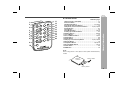
1. Remote Control Transmitter . . . . . . . . . . . . . . . . . . . . . . . . 11
2. Function Button . . . . . . . . . . . . . . . . . . . . . . . . . . . . . . . . . . 16
3. On/Stand-by Button . . . . . . . . . . . . . . . . . . . . . . . . . 11, 12, 23
4. Volume Up and Down Buttons . . . . . . . . . . . . . . . . . . . . . . 12
5. Skip Down, Tuner Preset Down Button . . . . . . 13, 16, 18, 24
6. Folder Button . . . . . . . . . . . . . . . . . . . . . . . . . . . . . . . . . . . . 21
7. Stop Button . . . . . . . . . . . . . . . . . . . . . . . . . . . . . . . . . . . . . 18
8. Play Mode Button . . . . . . . . . . . . . . . . . . . . . . . . . . . . . . 16, 19
9. Tuning Up and Down Buttons . . . . . . . . . . . . . . . . . . . . . . . 23
10. Memory Button . . . . . . . . . . . . . . . . . . . . . . . . . . . . . . . . 20, 24
11. Clock Button . . . . . . . . . . . . . . . . . . . . . . . . . . . . . . . . . . . . . 13
12. Snooze/Dimmer Button . . . . . . . . . . . . . . . . . . . . . . . . . 12, 25
13. Sleep Button . . . . . . . . . . . . . . . . . . . . . . . . . . . . . . . . . . . . . 26
14. Alarm Button . . . . . . . . . . . . . . . . . . . . . . . . . . . . . . . . . . . . 25
15. Skip Up, Tuner Preset Up Button . . . . . . . . . . . 13, 16, 18, 24
16. Display Button . . . . . . . . . . . . . . . . . . . . . . . . . . . . . . . . . . . 16
17. Play/Pause Button . . . . . . . . . . . . . . . . . . . . . . . . . . 16, 18, 19
18. E Sound/Demo Button . . . . . . . . . . . . . . . . . . . . . . . . . . 10, 12
19. Clear Button . . . . . . . . . . . . . . . . . . . . . . . . . . . . . . . . . . . . . 20
20. EQ Button . . . . . . . . . . . . . . . . . . . . . . . . . . . . . . . . . . . . . . . 12
Note:
Before using remote control, please remove plastic shield at battery
holder.
Remote
controller
General Information
Remote control
Plastic shield
Battery holder
9
DK-A10
DK-A10BK
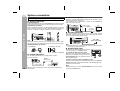
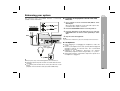
System connections
Make sure to unplug the AC power cord before any connections.
Antenna connection
Supplied FM antenna:
Connect the FM antenna wire to the FM 75 OHMS jack and position the FM
antenna wire in the direction where the strongest signal can be received.
Supplied AM loop antenna:
Connect the AM loop antenna to the AM and GND terminals. Position the
AM loop antenna for optimum reception. Place the AM loop antenna on a
shelf, etc., or attach it to a stand or a wall with screws (not supplied).
iPod connecting to TV
iPod photo and 5th Generation iPod with photo and video can be
view by connecting to TV/monitor.
If the TV/monitor has a video input, connect it to the VIDEO OUT
jack on the rear of the unit.
TV
Video cable
(not supplied)
To video
input Jack
Preparation for Use
AC power connection
After checking all the connections have been made correctly, plug the
AC power cord of this unit into the AC outlet. If you plug in the unit first,
the unit will enter the demonstration mode.
Note:
Placing the antenna on the unit or near the AC power cord may cause
noise pickup. Place the antenna away from the unit for better reception.
Installing the AM loop antenna:
< Assembling >
< Attaching to the wall >
To AC input
Note:
Unplug the AC power cord from the AC outlet if the unit will not be in
use for a prolonged period of time.
Demonstration mode
Wall
Screws (not supplied)
Outdoor FM antenna
Use an outdoor FM antenna if you require better reception.
Consult your dealer.
Outdoor
FM antenna
75 ohms
coaxial cable
10
AC outlet
(AC 120 V, 60 Hz)
Note:
When an outdoor FM antenna is used, disconnect the supplied FM
antenna wire.
The first time the unit is plugged in, the unit will
enter the low power consumption mode.
To activate the demonstration mode:
When the unit is in the power stand-by mode
(low power consumption mode), press the E
SOUND/DEMO button. The unit will enter the
demonstration mode.
To return to the low power consumption mode:
When the unit is in the power stand-by mode, press the E SOUND/
DEMO button again. The iPod terminal door will automatically close
if iPod unit is not inserted.
Note:
When the power is on, the E SOUND/DEMO button can be used to
select the E SOUND mode.
Remote control
DK-A10
DK-A10BK
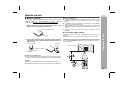
Battery installation
This product contains a CR Coin Lithium Battery which contains
Perchlorate Material – special handling may apply, California
residents, see www.dtsc.ca.gov/hazardouswaste/perchlorate/
1
While pushing the locking tab toward the center of the
remote control, slide out the battery holder.
Back of remote control
Notes concerning use:
Replace the battery if the operating distance is reduced or if the
operation becomes erratic. Purchase “CR 2025”, coin lithium
battery.
Periodically clean the transmitter on the remote control and the
sensor on the unit with a soft cloth.
Exposing the sensor on the unit to strong light may interfere with
operation. Change the lighting or the direction of the unit if this
occurs.
Keep the remote control away from moisture, heat, shock, and
vibrations.
Locking tab
2
Remove the old battery from the battery holder, insert the
new battery and then slide the battery holder back into the
remote control.
Battery holder
Positive (+)
side up
The remote control can be used within the range shown below:
Press the ON/STAND-BY button. Does the power turn on? Now, you
can enjoy music.
Remote sensor
Polarity (+) symbol
Battery type
Locking tab
Preparation for Use
Test of the remote control
Check the remote control after checking all the connections (see
page 10).
Point the remote control directly at the remote sensor on the unit.
Precautions for battery use:
Remove the battery if the unit will not be used for long periods of
time. This will prevent potential damage due to battery leakage.
Caution:
Do not use rechargeable battery (nickel-cadmium battery, etc.).
Installing the battery incorrectly may cause the unit to malfunction.
FUNCTION
CLOCK
SNOOZE/
DIMMER
VOL
SLEEP
ALARM
FOLDER
DISPLAY
PLAY
MODE
E SOUND
/DEMO
TUNING
CLEAR
EQ
MEMORY
11
DK-A10
DK-A10BK
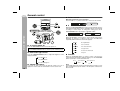
General control
Volume control
Main unit and remote control operation:
Press the VOL (+ or –) button to increase or decrease the volume.
0 ..... 30 MAXIMUM
E SOUND control
When the E SOUND/DEMO button is pressed, the unit will enter the
E Sound mode and adjust low bass and high frequency automatically
according to volume input. To change the setting, press the E
SOUND/DEMO button repeatedly to toggle ON or OFF.
FUNCTION
CLOCK
SNOOZE/
DIMMER
SLEEP
ALARM
SNOOZE/
DIMMER
Basic Operation
VOL
FOLDER
PLAY
MODE
VOL
Equalizer
DISPLAY
E SOUND
/DEMO
E SOUND
/DEMO
TUNING
CLEAR
EQ
When the EQ button is pressed, the current mode setting will be
displayed. To change to a different mode, press the EQ button
repeatedly until the desired sound mode appears.
MEMORY
EQ
To turn the power on
Press the ON/STAND-BY button to turn the power on.
After use:
Press the ON/STAND-BY button to enter the power stand-by mode.
Illumination light control
Press the SNOOZE/DIMMER button to adjust the brightness of the
display and LED.
FL and LED off
FL and LED dim
FLAT
No equalization.
ROCK
For rock music.
CLASSICS
Volume auto fade-in
If you turn off and on the main unit with the volume set to 27 or
higher, the volume starts at 16 and fades in to the last set level.
12
Vocals are enhanced.
VOCAL
For jazz.
JAZZ
Function
When the FUNCTION button on remote control is pressed, the
current function will change to different mode, press the FUNCTION
button repeatedly to select desired function.
iPod
FL and LED light on
For classical music.
For pop music.
POPS
Tuner FM ST
AUX
Tuner FM mono
AM
Note:
The backup function protect the memorized function mode for a few
days should there be a power failure or the AC power cord becomes
disconnected.
Setting the clock
DK-A10
DK-A10BK
4
FUNCTION
CLOCK
Press the
or
button to adjust the minutes and then
press the CLOCK button.
SNOOZE/
DIMMER
VOL
SLEEP
ALARM
DISPLAY
PLAY
MODE
E SOUND
/DEMO
TUNING
CLEAR
EQ
MEMORY
In this example, the clock is set for the 12-hour (12:00 AM) display.
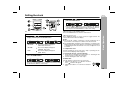
1
2
Press the CLOCK button for more than 2 seconds.
Press the
or
button to select 12-hour or 24-hour
display and then press the CLOCK button.
“AM 12:00”
“AM 0:00”
“0:00”
3
The 12-hour display will appear.
(AM 12:00 - PM 11:59)
The 12-hour display will appear.
(AM 0:00 - PM 11:59)
The 24-hour display will appear.
(0:00 - 23:59)
Press the
or
button to adjust the hour and then
press the CLOCK button.
Press the
or
button once to advance the time by 1 hour.
Hold it down to advance continuously.
Press the
or
button once to advance the time by
1 minute. Hold it down to change the time in 5-minutes interval.
You can press the CLEAR button to abort clock setting.
To confirm the time display:
[When the unit is in the stand-by mode]
Press the CLOCK button to enter the clock function.
[When the power is on]
Press DISPLAY button on remote control to toggle between the
function information and clock display.
Notes:
The clock will continue counting for 8 hours should there be a
power failure or the AC power cord becomes disconnected.
The “CLOCK ADJ” will appear or time will flash to confirm the time
display when the AC power supply is restored after a power failure
or unplugging the unit after 8 hours. If incorrect, readjust the clock
as follows.
To readjust the clock:
Perform “Setting the clock” from step 1. Step 2 (selecting the 12hour or 24-hour display) will be skipped.
To change the 12-hour or 24-hour display:
1 Clear all the programmed contents. [Refer to “Clearing all the
memory (reset)” on page 29 for details.]
2 Perform “Setting the clock” from step 1.
Basic Operation
FOLDER
Summer time:
The ST switch is located on the rear of the unit.
1 Slide the ST switch to +1 to advance the time 1
hour.
indicator will appear.
2 Slide the ST switch to -1 to turn the clock back 1
hour.
13
DK-A10
DK-A10BK
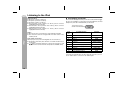
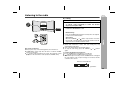
Listening to the iPod
Supported iPod:
iPod nano (software 1.0 above)
iPod photo (software 1.0 above)
iPod mini (software 1.2 above)
5th Generation iPod (software 1.0 above) (Dock connector
equipped Click Wheel model)
4th Generation iPod (software 3.0.2 above) (Dock connector
equipped Click Wheel model)
3rd Generation iPod (software 2.2 above) (Dock connector
equipped Click Wheel model)
iPod
Notes:
Once the iPod is connected to the unit it will begin charging.
The iPod unit cannot be charged while the main unit is in the
stand-by mode.
Auto power on function:
When you press any of the following buttons, the unit turns on.
iPod button (main unit): The unit turns on and the “iPod” function
is activated.
/ button (main unit and remote control): The unit turns on and
playback of the last function will start (iPod, CD, TUNER, AUX).
iPod adaptor connection
Choose the iPod adaptor that fits your iPod. Your iPod will fit snuggly
into the correct adaptor. If your iPod is not mentioned below, an iPod
adaptor may have been included with your iPod unit.
The number (3-10)
shows which iPod fits
iPod
Adapter
No.
3
4
5
6
7
6
7
8
9
10
7
iPod Description
iPod mini
4G iPod & U2 iPod
4G iPod
iPod photo & Color U2 iPod
iPod photo
iPod with color display
iPod with color display
iPod nano
iPod (10/12/05 w/video)
iPod (10/12/05 w/video)
Capacity
4GB & 6GB
20GB
40GB
20GB & 30GB
40GB & 60GB
20GB
60GB
2GB & 4GB
30GB
60GB
Note:
If you have an iPod that does not have an iPod connector, you can
use an audio cable to connect it to the AUX IN jacks.
14
DK-A10
DK-A10BK
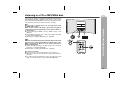
Push the iPod sliding door.
To remove iPod adaptor
main unit (top)
EQ
protection cover
EQ
+
Dock connector
iPod
iPod playback
1
Press the ON/STAND-BY button to turn the power on. The
iPod terminal door will automatically open when the
display is on.
2
3
Press the iPod button.
Insert iPod unit in iPod slot of main unit.
iPod
iPod
iPod bottom
+
pull up
push stopper
iPod adaptor
iPod adaptor
iPod dock
iPod connector
4
Press the
/
button to start playback.
15
DK-A10
DK-A10BK
Listening to the iPod (continued)
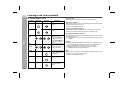
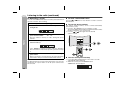
Various iPod functions
iPod
Function
Main unit
Remote
control
Operation
Play
Press in the pause
mode.
System on operation
When main unit turn to power on (including alarm function), iPod unit
will automatically turn to power on.
* Invalid for iPod 3rd Generation.
Pause
Press in the playback
mode.
System off (standby) operation
When main unit turn to standby mode (including alarm and sleep
function), iPod unit will automatically turn to standby mode.
Track up/
down
Press in the playback
or pause mode.
If you press the button
in the pause mode,
press the / button
to start the desired
track.
Press and hold down
in the playback mode.
Release the button to
resume playback.
Fast
forward/
reverse
Display
____
DISPLAY
Repeat
____
Press in the playback
mode to toggle iPod
unit display.
Press to toggle repeat
mode.
PLAY
MODE
Random
____
PLAY
MODE
16
iPod operation
Below operation can be done depend on iPod generation.
Press and hold down
to toggle random
mode.
iPod playback detection function
When iPod unit start playback (including iPod alarm function), below
operation will occur:
During other function is selected, automatically change to iPod
function.
Caution:
During playback (including iPod alarm function) operation on iPod
unit, sound from main unit will be late for 5 seconds maximum.
It is recommended to use alarm function on main unit.
Unplug all iPod accessory before you insert to iPod slot.
iPod playback may become malfunction.
Hint:
When iPod unit is inserted, iPod unit will automatically go to power
off if there is no operation for 8 seconds.
* Invalid for iPod 3rd Generation.
Listening to a CD or MP3/WMA disc
DK-A10
DK-A10BK
MP3:
MP3 is a form of compression. It is an acronym which stands
for MPEG Audio Layer 3.
MP3 is a type of audio code which is processed by significant
compression from the original audio source with very little loss
in sound quality.
This system supports MPEG 1 Layer 3, MPEG 2 Layer 3, and
VBR files.
During VBR file playback, time counter in the display may differ
from its actual playback time.
Bitrate which is supported by MP3 is 32 ~ 320 kbps.
WMA:
WMA files are Advanced System Format files that include audio
files which are compressed with Windows Media Audio codec.
WMA is developed by Microsoft as an audio format file for
Windows Media Player.
“MP3” and “WMA” indicator will light up after the unit reads
information on an MP3 or WMA disc.
Bitrate which is supported by WMA is 64 ~ 160 kbps.
FUNCTION
SLEEP
FOLDER
SNOOZE/
DIMMER
ALARM
DISPLAY
PLAY
MODE
E SOUND
/DEMO
TUNING
CLEAR
MEMORY
Auto power on function:
When you press any of the following buttons, the unit turns on.
CD button (main unit): The unit turns on and the “CD” function is
activated.
/ button (main unit and remote control): The unit turns on and
playback of the last function starts (iPod, CD,TUNER,AUX).
CLOCK
VOL
EQ
CD or MP3/WMA disc Playback
This system can play back a standard CD, CD-R/RW in the CD format
and CD-R/RW with MP3 or WMA files, but cannot record on them.
Some audio CD-R and CD-RW discs may not be playable due to the
state of the disc or the device that was used for recording.
17
DK-A10
DK-A10BK
Listening to a CD or MP3/WMA disc (continued)
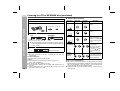
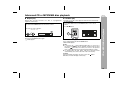
1
2
3
Press the ON/STAND-BY button to turn the power on.
Function
Press the CD button.
Insert the disc into the disc, label side up.
CD or MP3/WMA disc Playback
5" (12 cm)
18
4
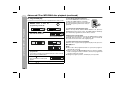
Press the
Remote
control
Operation
Play
Press in the stop
mode.
Stop
Press in the playback
mode.
Pause
Press in the playback
mode. Press the /
button to resume playback from the paused
point.
Press in the playback
or stop mode.
If you press the button
in the stop mode,
press the / button
to start the desired
track.
Press and hold down
in the playback mode.
Release the button to
resume playback.
3" (8 cm)
[MP3/WMA]
Total number of Total playing
tracks on the disc time of the disc
Total number
of files
Due to the structure of the disc information, it takes longer to
read an MP3/WMA disc than a normal CD (approximately 20
to 90 seconds).
Press the
Main unit
OPEN/CLOSE button to close the disc tray 1.
[CD]
5
Various disc functions
/
Track up/
Track down
button to start playback.
Disc play indicator
Playback will begin from track 1.
After the last track on the disc is played, the unit will stop
automatically.
To remove the discs:
In the stop mode, press the EJECT button.
Caution:
Do not play discs of special shapes (heart, octagon, etc).
It may cause malfunctions.
Do not push the disc while it is moving.
If the power fails while the disc is moving, wait until the power is
restored.
If TV or radio interference occurs during CD operation, move the
unit away from the TV or radio.
Fast forward/Fast
reverse
Notes for CD or MP3/WMA disc:
When the end of the last track is reached during fast forward,
“END” will appear on the display and CD operation will be paused.
When the beginning of the first track is reached during fast
reverse, the unit will enter the playback mode.
Rewritable multi session discs which writing is not finished, can
still be played.
Advanced CD or MP3/WMA disc playback
Random play
Repeat play can play all tracks on a disc or a programmed
sequence continuously.
To repeat play:
Press the PLAY MODE button on the remote control.
Press the
/
/
The tracks on the disc can be played in random order automatically.
To random play:
Press and hold down the PLAY MODE button on the remote
control.
Press / button.
button.
FUNCTION
CLOCK
SNOOZE/
DIMMER
VOL
SLEEP
FOLDER
PLAY
MODE
ALARM
DISPLAY
PLAY
MODE
E SOUND
/DEMO
TUNING
CLEAR
EQ
MEMORY
To cancel repeat play:
Press the PLAY MODE button again.
“ ” will disappear.
To cancel random play:
Press and hold down the PLAY MODE button.
“RND” will disappear.
Notes:
If you press the
button during random play, you can move to
the track selected next by the random operation. On the other
hand, the
button does not allow you to move to the previous
track. The beginning of the track being played will be located.
In random play, the CD player will select and play tracks
automatically. (You cannot select the order of the tracks.)
Caution:
After performing repeat play, be sure to press the
Otherwise, the disc will play continuously.
button.
CD or MP3/WMA disc Playback
Repeat play
DK-A10
DK-A10BK
19
DK-A10
DK-A10BK
Advanced CD or MP3/WMA disc playback (continued)
Programmed play
You can choose up to 32 selections for playback in the order you like.
CD or MP3/WMA disc Playback
1
2
While in the stop mode, press the
MEMORY button to enter the
programming save mode.
MEMORY
To cancel the programmed play mode:
While in the stop mode and the “MEM” indicator is lit, press the
CLEAR button on the remote control. The “MEM” indicator will disappear and all the programmed contents will be cleared.
Press the
or
button to
select the desired track.
Selected track number
3
Press the MEMORY button to save the track number.
Adding tracks to the program:
If a program has been previously stored, the “MEM” indicator will be
displayed. Then follow steps 1 - 6 to add tracks. The new tracks will
be stored after the last track of the original program.
To check which tracks are programmed:
While the unit is stopped in the programmed play mode, press the
or
button.
4
Repeat steps 2 - 4 for other tracks. Up to 32 tracks can be
programmed.
If you make a mistake, the programmed tracks can be cleared
by pressing the CLEAR button.
5
Press the
button.
The total number in memory will
appear.
6
20
To clear the programmed selections:
Press the CLEAR button on the remote control while the “MEM” indicator is flashing.
Each time the button is pressed, one track will
be cleared, beginning with the last track programmed.
Press the
/
button to start playback.
Notes:
When a disc with programmed tracks is ejected, the program is
automatically canceled.
Even if you press the ON/STAND-BY button to enter the stand-by
mode or change the function from CD to another, the programmed
selections will not be cleared.
During the program operation, random play is not possible.
MP3/WMA folder mode (only for MP3/WMA files)
To playback MP3/WMA (Windows Media Audio) file
There are many music sites on the internet that you can download
MP3/WMA (Windows Media Audio) music files. Follow the
instructions from the website on how to download the music files.
You can then playback these downloaded music files by burning
them to a CD-R/RW disc.
Your downloaded song/files are for personal use only. Any other
usage of the song without owner’s permission, is against the law.
DK-A10
DK-A10BK
FUNCTION
CLOCK
SNOOZE/
DIMMER
VOL
SLEEP
FOLDER
FOLDER
ALARM
DISPLAY
PLAY
MODE
E SOUND
/DEMO
TUNING
CLEAR
EQ
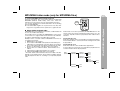
About folder playback order
If MP3/WMA files are recorded in several folders, a folder number will
be set to each folder automatically.
These folders can be selected by the FOLDER button on the remote
control. If there is no supported file formats inside the selected folder,
the folder is skipped and the next folder will be selected.
Example: How to set folder number if MP3/WMA format files are
recorded as below figure.
1. ROOT folder is set as folder 1.
2. As for folders inside ROOT folder (Folder A and Folder B), the
folder which is recorded earlier on the disc will be set as folder 2.
3. As for folder inside Folder A (Folder C and Folder D), the folder
which is recorded earlier on the disc will be set as folder 3.
4. Because there is no folder in Folder C, Folder D will be set as
folder 4.
5. Folder E that is inside Folder D will be set as folder 5.
6. Folder B inside ROOT folder will be set as folder 6.
* The folder and file order information which is recorded on the disc
depends on the writing software. There maybe possibilities that this
unit will playback the files not according to our expected playback
order.
Folder mode on/off can be operated by the FOLDER button on the
remote control. Files that are played when folder mode is set to the
on position, may differ from those played back when folder mode is
turned off.
Folder Mode Off case:
All the files starting from the selected folder or file will be played back.
If file 3 inside Folder C is selected, all the files starting from file 3 will
be played back.
Folder Mode On case:
All the files inside the selected folder will be played back.
In case Folder D is selected, file 4, 5 and 6 will be played back. File
7 and 8 in Folder E will not be played back.
ROOT
(FOLDER 1)
FOLDER A
(FOLDER 2)
FOLDER B
(FOLDER 3)
FOLDER C
(FOLDER 4)
FILE 3
FILE 4
FILE 5
FOLDER D
(FOLDER 5)
FILE 6
FILE 7
FILE 8
FOLDER E
(FOLDER 6)
CD or MP3/WMA disc Playback
MEMORY
FILE 9
FILE 10
FILE 1
FILE 2
21
DK-A10
DK-A10BK
MP3/WMA folder mode (only for MP3/WMA files) (continued)
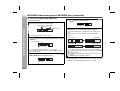
Procedure to playback MP3/WMA disc
4
To playback CD-R/RW.
1
Select desired file to be played back by pressing the
or
button. (Folder mode off)
Press the CD button, and load a MP3/WMA disc.
After disc is loaded, disc info will be displayed.
CD or MP3/WMA disc Playback
MP3 indicator
CD indicator
WMA indicator
5
TOTAL indicator
2
Press the
/ button.
Playback will start and file name will be displayed.
Title, Artist & Album name is displayed if it is recorded on the
disc.
Display content can be changed by pressing the DISPLAY
button.
In case folder is selected, proceed to step 2.
In case file is selected, proceed to step 4.
Press the FOLDER button, and press the TUNING
( or ) button to select desired playback folder. (Folder
mode on)
Timer Counter
Clock Display
FOLDER indicator
Album Name
Artist Name
FOLDER name
To start playback with folder mode on, go to step 5.
To change the playback folder, press the TUNING (
select another folder.
3
or
) to
Select desired file to be played back by pressing the
or
button. Proceed to step 5.
FILE name
22
FILE name
In case of playback with the folder mode on, press the TUNING (
or ) button, and the folder can be selected even though it is in
playback/pause mode.
It will continue playback/pause mode in the 1st track of the
selected folder.
( 1) MP3 ID3-Tag only support version 1.x.
Note:
If “NO SUPPORT” is displayed, it means “Copyright protected
WMA file” or “Not supported playback file” is selected.
Listening to the radio
DK-A10
DK-A10BK
Tuning
CLOCK
SLEEP
SNOOZE/
DIMMER
FOLDER
ALARM
DISPLAY
PLAY
MODE
E SOUND
/DEMO
TUNING
CLEAR
EQ
MEMORY
Auto power on function:
When you press any of the following buttons, the unit turns on.
TUNER button (main unit): The unit turns on and the TUNER
function is activated.
/ button (main unit and remote control): The unit turns on and
playback of the last function starts (iPod, CD, TUNER, AUX).
Press the ON/STAND-BY button to turn the power on.
3
Press the TUNING ( or ) button on the remote control
to tune in to the desired station.
Press the TUNER button on main unit or FUNCTION button
on remote control repeatedly to select the desired
frequency band (FM or AM).
Manual tuning:
Press the TUNING ( or ) button as many times as required
to tune in to the desired station.
Auto tuning:
When the TUNING ( or
) button is pressed for more than
0.5 seconds, scanning will start automatically and the tuner will
stop at the first receivable broadcast station.
Notes:
When radio interference occurs, auto scan tuning may stop
automatically at that point.
Auto scan tuning will skip weak signal stations.
To stop the auto tuning, press the TUNING (
or
) button
again.
Radio
FUNCTION
VOL
1
2
To receive an FM stereo transmission:
Press the TUNER button to display the “ST” indicator.
“ ” will appear when an FM broadcast is in stereo.
If the FM reception is weak, press the TUNER button to extinguish
the “ST” indicator. The reception changes to monaural, and the
sound becomes clearer.
FM stereo mode indicator
FM stereo receiving indicator
23
DK-A10
DK-A10BK
Listening to the radio (continued)
Memorizing a station
Radio
You can store 40 AM and FM stations in memory and recall them at
the push of a button. (Preset tuning)
1
2
Perform steps 1 - 3 in “Tuning” on page 23.
3
Within 30 seconds, press the
or
button to select the
preset channel number.
Store the stations in memory, in order, starting with preset
channel 1.
4
Within 30 seconds, press the MEMORY button to store that
station in memory.
Press the MEMORY button to enter the preset tuning
saving mode.
To recall a memorized station
Press the
or
desired station.
button for less than 0.5 seconds to select the
To scan the preset stations
The stations saved in memory can be scanned automatically.
(Preset memory scan)
1 Press the
or
button for more than 0.5 seconds.
The preset number will flash and the programmed stations will be
tuned in sequentially, for 5 seconds each.
2 Press the
or
button again when the desired
station is located.
FUNCTION
If the “MEMORY” and preset number indicators disappear
before the station is memorized, repeat the operation from step
2.
CLOCK
SNOOZE/
DIMMER
VOL
SLEEP
FOLDER
ALARM
DISPLAY
PLAY
MODE
E SOUND
/DEMO
TUNING
5
Repeat steps 1 - 4 to set other stations, or to change a
preset station.
When a new station is stored in memory, the station previously
memorized for that preset channel number will be erased.
Note:
The backup function protects the memorized stations for a few hours
should there be a power failure or the AC power cord becomes
disconnected.
24
CLEAR
EQ
MEMORY
To erase entire preset memory
1
2
Press and hold the CLEAR button for more than 3 seconds.
“TUN CLEAR” will be displayed.
Within 10 seconds, press the MEMORY button.
“COMPLETE” will be displayed.
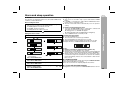
Alarm and sleep operation
DK-A10
DK-A10BK
Before setting the alarm:
1 Check that the clock is set to the correct time (refer page 13).
If it is not set, you cannot use the alarm function.
2 For iPOD playback: Insert iPod to the unit.
3 For TUNER: Set preset memory.
4 For CD playback: Insert disc to the unit.
Setting the alarm content
1
2
Press and hold the ALARM button for more than 2 seconds.
Press the
or
button to select source or buzzer.
If TUNER is selected, press the
preset station.
Press the ALARM button.
3
or
button to select a
Press the
or
button to adjust the minute.
Press the ALARM button.
5
If other than BUZZER is selected in step 2, press the
button to select volume.
Press the ALARM button.
Activating and deactivating the alarm
1 Press the ALARM ON/OFF button on main unit to activate and
deactivate the alarm function. When activated:
During power on, “ALARM” will appear.
During stand-by mode, ALARM indicator will light up.
2 Set to CLOCK function or stand-by mode.
Checking the alarm setting
Press the ALARM button.
The selected source or buzzer type will blink.
The unit will display the alarm time for 3 seconds.
During stand-by mode, the display will remain for 6 seconds.
Example: The time is 10:00 AM and iPod function is selected.
Notes:
Buzzer sound will be output from right speaker only.
Alarm will not activate during power on mode.
When iPod is selected in step 2, if iPod unit is not detected during
alarm activation, source will automatically change to BUZZER 1.
When performing alarm using another unit connected to AUX,
select AUX in step 2. The unit will turn on and enter the stand-by
mode automatically, however, the connected unit to AUX will not
turn on or off.
Snooze function
Press the
or
button to adjust the hour.
Press the ALARM button.
4
Changing alarm source only
After source is selected in step 2, press and hold the ALARM
button.
If TUNER is selected, press and hold the ALARM button after
preset station is selected in step 3.
The time and volume will be automatically set to the previous
setting.
Advanced Features
Alarm
The unit turns on and play desired source (iPod, CD, TUNER, AUX)
or Buzzer sound for 30 minutes.
Once timer playback has started, pressing the SNOOZE/DIMMER
button will stop playback for 5 minutes.
Once the snooze time has expired, playback will continue.
or
To turn off the alarm function
During alarm or snooze, press the ALARM ON/OFF button to turn off.
25
DK-A10
DK-A10BK
Alarm and sleep operation (continued)
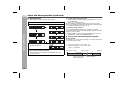
Sleep operation
The radio and iPod can be turned off automatically.
Advanced Features
1
2
Play back the desired sound source.
Press the SLEEP button to select sleep time.
To confirm the remaining sleep time:
1 While “SLEEP” is indicated, press the SLEEP button once to select “SLEEP XXX”.
“XXX” is sleep remaining time.
The remaining sleep time is displayed for about 10 seconds.
You can change the remaining sleep time while it is displayed by
pressing the SLEEP button (steps 2 - 3).
To cancel the sleep operation:
Press the ON/STAND-BY button while “SLEEP” is indicated.
To cancel the sleep operation without setting the unit to the stand-by
mode, proceed as follows.
1 While “SLEEP” is indicated, press the SLEEP button to select
“SLEEP OFF”, and press the MEMORY button.
To use alarm and sleep operation together
Sleep and alarm:
For example, you can fall asleep listening to the radio and wake up
to iPod in the next morning.
3
Press the MEMORY button.
“SLEEP” will appear.
4
The unit will enter the power stand-by mode automatically
after the preset time has elapsed.
The volume will be turned down 1 minute before the sleep
operation finishes.
1
2
Set the sleep time (see left, steps 1 - 4).
While the sleep timer is set, set the alarm
(steps 1 - 5, page 25).
Sleep timer setting
Alarm setting
10 minutes - 2 hours
Sleep operation will
automatically stop
26
End time
30 minutes
Alarm start time
Enhancing your system
DK-A10
DK-A10BK
Listening to the playback sounds from VCR,
DVD, etc.
The connection cord is not included. Purchase a commercially
available cord as shown below.
1
White
To the line output jacks
White
Red
2
3
Press the ON/STAND-BY button to turn the power on.
4
Play the connected equipment.
Press the AUX button on the main unit once or press the
FUNCTION button on remote control repeatedly to select
AUX.
Note:
To prevent noise interference, place the unit away from the television.
Headphones
RCA cord
(not supplied)
Before plugging in or unplugging the headphones, reduce the
volume.
Be sure your headphones have a 1/8" (3.5 mm) diameter plug and
impedance between 16 and 50 ohms. The recommended
impedance is 32 ohms.
Plugging in the headphones disconnects the speakers
automatically. Adjust the volume using the VOL (+ or –) control.
During alarm activation, sound will be output to the speaker even
if headphones is plugged in.
Advanced Features
When using video equipment, connect the audio output to this
unit and the video output to a television.
VCR, DVD, etc.
Red
Use a connection cord to connect the VCR, DVD etc. to the
AUX IN jacks.
Auto power on function:
When you press any of the following buttons, the unit turns on.
AUX button (main unit): The unit turns on and the AUX function is
activated.
/ button (main unit and remote control): The unit turns on and
playback of the last function starts (iPod, CD, TUNER, AUX).
27
DK-A10
DK-A10BK
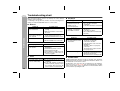
Troubleshooting chart
Many potential problems can be resolved by the owner without
calling a service technician.
If something is wrong with this product, check the following before
calling your authorized SHARP dealer or service center.
General
References
Symptom
The clock is not set to
the correct time.
When a button is
pressed, the unit does
not respond.
No sound is heard.
Possible cause
Is the ST switch set to the correct
setting?
Did a power failure occur? Reset
the clock.
Set the unit to the power stand-by
mode and then turn it back on.
If the unit still malfunctions, reset it.
Is the volume level set to “0”?
Are the headphones connected?
Remote control
Symptom
The remote control does
not operate.
Possible cause
Is the AC power cord of the unit
plugged in?
Is the battery polarity correct?
Are the batteries dead?
Is the distance or angle incorrect?
Does the remote control sensor receive strong light?
CD player
Symptom
Playback does not start.
Playback stops in the
middle or is not
performed properly.
Playback sounds are
skipped, or stopped in
the middle of a track.
Possible cause
Is the disc loaded upside down?
Does the disc satisfy the
standards?
Is the disc distorted or scratched?
Is the unit located near excessive
vibrations?
Is the disc very dirty?
Has condensation formed inside
the unit?
iPod
Symptom
No sound is produced.
No image appears on the
TV/monitor.
iPod will not charge
Possible cause
The iPod is not playing.
The iPod is not properly
connected to the unit.
Is the AC power cord of the unit
plugged in?
The video cable is not properly
connected.
The TV/monitor’s input selection
is not properly set.
Wrong iPod adaptor is used.
The iPod is not making full contact
with the iPod connector.
The main unit is in stand-by mode.
Tuner
Symptom
The radio makes unusual
noises continuously.
28
Possible cause
Is the unit placed near the TV or
computer?
Is the FM antenna or AM loop
antenna placed properly? Move
the antenna away from the AC
power cord if it's located nearby.
Condensation
Sudden temperature changes, storage or operation in an extremely
humid environment may cause condensation inside the cabinet or on
the transmitter on the remote control.
Condensation can cause the unit to malfunction. If this happens,
leave the power on with no disc until normal playback is possible
(about 1 hour). Wipe off any condensation on the transmitter with a
soft cloth before operating the unit.
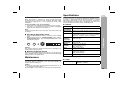
Specifications
Clearing all the memory (reset)
1
2
Press the ON/STAND-BY button to enter the power stand-by
mode.
While pressing down the SNOOZE/DIMMER button and the
E SOUND/DEMO button, press the ON/STAND-BY button until
“CLEAR ALL” appears.
SNOOZE/
DIMMER
E SOUND
/DEMO
Caution:
This operation will erase all data stored in memory including clock,
alarm settings and tuner preset.
Before transporting the unit
Remove the iPod and the disc from the unit. Then, set the unit to the
power stand-by mode. Carrying the unit with iPod left docked might
damage both the unit and the iPod.
As part of our policy of continuous improvement, SHARP reserves
the right to make design and specification changes for product
improvement without prior notice. The performance specification
figures indicated are nominal values of production units. There may
be some deviations from these values in individual units.
General
Power source AC 120 V, 60 Hz
Power
33 W
consumption
Output power Front speakers: RMS: 4W (2W + 2W) (10% T.H.D.)
Subwoofer: RMS: 10W (5W + 5W) (10% T.H.D.)
Speaker
1-way type light-up speaker system
Front Speaker: 2-1/2"(6.5 cm) - 12 ohms - Full Range
Subwoofer: 4" (10 cm) - 8 ohms - Full Range
Speaker
Front Speakers: 4W
maximum
Subwoofer: 10W
input power
Speaker rated Front Speakers: 2W
input power
Subwoofer: 5W
Output
Headphones: 16 - 50 ohms
terminals
(recommended: 32 ohms)
Video output: 1Vp-p
Input
Auxiliary (audio signal):
terminals
500 mV/47 k ohms
Dimensions
Width: 19-11/16" (500 mm)
Height: 5-7/8" (150 mm)
Depth: 9-7/8" (250 mm)
Weight
11.7 lbs. (5.3 kg)
References
If trouble occurs
When this product is subjected to strong external interference
(mechanical shock, excessive static electricity, abnormal supply
voltage due to lightning, etc.) or if it is operated incorrectly, it may
malfunction.
If such a problem occurs, do the following:
1 Set the unit to the stand-by mode and turn the power on again.
2 If the unit is not restored in the previous operation, unplug and
plug in the unit, and then turn the power on.
Note:
If neither operation above restores the unit, clear all the memory by
resetting it.
DK-A10
DK-A10BK
Maintenance
Cleaning the cabinet
Periodically wipe the cabinet with a soft cloth and a diluted soap
solution, then with a dry cloth.
Caution:
Do not use chemicals for cleaning (gasoline, paint thinner, etc.). It
may damage the cabinet finish.
Do not apply oil to the inside of the unit. It may cause malfunctions.
Tuner
Frequency range
FM: 87.5 - 108 MHz
AM: 530 - 1,720 kHz
29
z
CONSUMER LIMITED WARRANTY
SHARP ELECTRONICS CORPORATION warrants to the first consumer purchaser that this Sharp brand product (the “Product”), when shipped in its original container, will be free from defective workmanship and materials, and agrees that it will, at its option, either repair the defect or replace the defective Product or part thereof
with a new or remanufactured equivalent at no charge to the purchaser for parts or labor for the period(s) set forth below.
This warranty does not apply to any appearance items of the Product nor to the additional excluded item(s) set forth below nor to any Product the exterior of which has
been damaged or defaced, which has been subjected to improper voltage or other misuse, abnormal service or handling, or which has been altered or modified in
design or construction.
In order to enforce the rights under this limited warranty, the purchaser should follow the steps set forth below and provide proof of purchase to the servicer.
The limited warranty described herein is in addition to whatever implied warranties may be granted to purchasers by law. ALL IMPLIED WARRANTIES INCLUDING
THE WARRANTIES OF MERCHANTABILITY AND FITNESS FOR USE ARE LIMITED TO THE PERIOD(S) FROM THE DATE OF PURCHASE SET FORTH BELOW.
Some states do not allow limitations on how long an implied warranty lasts, so the above limitation may not apply to you.
Neither the sales personnel of the seller nor any other person is authorized to make any warranties other than those described herein, or to extend the duration of any
warranties beyond the time period described herein on behalf of Sharp.
The warranties described herein shall be the sole and exclusive warranties granted by Sharp and shall be the sole and exclusive remedy available to the purchaser.
Correction of defects, in the manner and for the period of time described herein, shall constitute complete fulfillment of all liabilities and responsibilities of Sharp to the
purchaser with respect to the Product, and shall constitute full satisfaction of all claims, whether based on contract, negligence, strict liability or otherwise. In no event
shall Sharp be liable, or in any way responsible, for any damages or defects in the Product which were caused by repairs or attempted repairs performed by anyone
other than an authorized servicer. Nor shall Sharp be liable or in any way responsible for any incidental or consequential economic or property damage. Some states
do not allow the exclusion of incidental or consequential damages, so the above exclusion may not apply to you.
THIS WARRANTY GIVES YOU SPECIFIC LEGAL RIGHTS. YOU MAY ALSO HAVE OTHER RIGHTS WHICH VARY FROM STATE TO STATE.
Model Specific Section
Your Product Model Number & Description:
SHARP ELECTRONICS CORPORATION
Sharp Plaza,
Mahwah, New Jersey 07430-2135
DK-A10/DK-A10BK
(Be sure to have this information available when you need service for your Product.)
Warranty Period for this Product:
One (1) CORPORATION
year parts and labor from the date of purchase.
SHARP
Additional Item(s) Excluded from Warranty Coverage (if any): Non-functional accessories, supplies, and consumable items.
Where to Obtain Service:
At a Sharp Authorized Servicer located in the United States.
To find a location of the nearest Sharp Authorized Servicer, call Sharp toll free at 1-800-BE-SHARP.
What to do to Obtain Service:
Ship prepaid or carry in your Product to a Sharp Authorized Servicer.
Be sure to have Proof of Purchase available. If you ship the Product, be sure it is insured and
packaged securely.
TO OBTAIN SUPPLY, ACCESSORY OR PRODUCT INFORMATION, CALL 1-800-BE-SHARP.
SHARP ELECTRONICS CORPORATION
Sharp Plaza, Mahwah, New Jersey 07430-2135
SHARP CORPORATION
06/12/5
DK-A10_BACK.fm
Printed in Malaysia
TINSEA155AWZZ
07B R KI 1
TINSEA095AWZZ