1
Operation
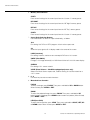
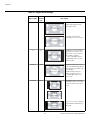
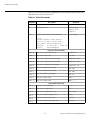
Table 4-1. Aspect Ratio Settings
Aspect Ratio
Remote
Control
Key
16:9
16:9
Description
Select 16:9 to view 16:9 DVDs
and HDTV programs in their
native aspect ratio.
EL
IM
IN
A
R
Y
16:9 Image on
16:9 Screen (Display)
4:3 images are stretched
horizontally to fit a 16:9 screen.
4:3 Image, stretched to fill
16:9 Screen (Display)
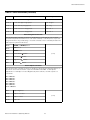
4:3
4:3
4:3 Image on
16:9 Screen (Display)
LBOX
PR
Letterbox
4:3 Image on
16:9 Display
(Letterbox aspect ratio)
VirtualWide
VWIDE
4:3 Image on
16:9 Screen (Display)
Standard 4:3 scales the input
signal to fit in the center of the
16:9 screen. 4:3 is the aspect
ratio used by computer
monitors, standard television
programming and most VHS
video cassettes.
Letterbox mode scales (zooms
in on) a 4:3 image linearly (by the
same amount on all sides) to fill
a 16:9 display.
Letterbox is best suited for
viewing LaserDisc movies or
non-anamorphic DVDs on a
16:9 screen.
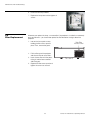
VirtualWide scales a 4:3 image
NON-linearly (more on the sides
than in the center) to fit a 16:9
screen.
4:3 Image on
16:9 Screen
with VirtualWide
4:3 Image on
2.35:1 Screen
with VirtualWide
48
On a 2.35:1 screen, the image is
centered between black bars on
either side.
Runco VX-22d Owner’s Operating Manual