1
Wireless Headset
Turning the headset on and off
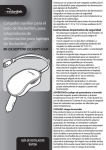
Congratulations on your purchase of the RF-GPS31104 wireless headset.
This headset represents the state of the art in wireless headset design and
is designed for reliable and trouble-free performance.
Package contents
• Wireless headset
“Pairing” Your headset
• Charger
• Quick Setup Guide
Product features
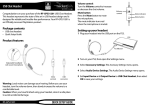
Power/Send/End button
Volume down
Volume up
1 To turn on the headset, press and hold the power button for about
two seconds. The headset beeps and the indicator blinks yellow-green.
2 To turn off the headset, press and hold the power button for about
four seconds. The headset beeps and the indicator briefly lights red.
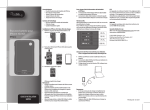
Your new Rocketfish Bluetooth wireless headset needs to be paired to your PS3
Turn your PS3 off on the back for about 10 seconds and then back on.
Power on your PS3 console with the touch power button on the front of
the PS3.
Find the Settings menu and press X on Accessory Settings.
Press X on the icon labeled: Register Bluetooth® Device.
Indicator light
Charger connector
Earpiece
Ear loop
Charging the battery
Peel off the protective plastic film on the front of the headset, then charge
the headset before using.
• Connect the smaller end of the micro USB cable (included) to the
opening on the end of the headset. To connect the cable to a power
source, either connect the larger end of the cable to a USB port on
your computer, or to the included wall adapter, which you then plug
into a wall outlet. If you charge with your computer, make sure the
computer is powered on. While the battery is charging, the indicator
lights red. When the battery is fully charged, the indicator lights
yellow-green.
Note: Charge the headset with attached USB cable and provided wall charger only.
RF-GPS31104
QUICK SETUP GUIDE
Scroll down and press X on the icon labeled Manage Bluetooth Devices.
Select Yes to register a new device (if this is the first time registering a
Bluetooth device) then press X on Start Scanning.
Now prepare your Rocketfish Bluetooth wireless headset to be paired with
the PS3 by holding down the Power/Send/End button (the entire top
area) on the Rocketfish Bluetooth wireless headset for about 8 seconds.
The LED on the device will start flashing a continuous green.
Once scan is complete, the PS3 will recognize all Bluetooth devices within
range. This device will be recognized as RF-QX3.
When prompted for a pass key, enter 0000 (four zeros) as the Pass Key and
press X on OK.
You should then be taken to a new screen stating Register completed
Press O and go to Audio Device Settings. Within Input Device find your new
paired Rocketfish Bluetooth wireless headset device identified as RF-QX3.
Then set your microphone input levels to the desired settings (We suggest
level 3). The headset will now be connected. This will complete the pairing
process.
Wear it how you like it
The RF-GPS31104 is ready to wear on your right ear. If you prefer the left,
gently remove and flip over the ear loop. Gently snap the ear loop back on
to the headset and rotate into position.
90-day limited warranty
Visit www.rocketfishproducts.com for details.
For more complete Warranty Information, go to www.rocketfishproducts.com and
follow the link.
Contact Rocketfish:
For customer service please call 1-800-620-2790
www.rocketfishproducts.com
Distributed by Best Buy Purchasing, LLC
7601 Penn Avenue South, Richfield, Minnesota, U.S.A. 55423-3645
© 2010 BBY Solutions, Inc.
All rights reserved. ROCKETFISH is a trademark of BBY Solutions, Inc. Registered
in some countries. All other products and brand names are trademarks of their
respective owners.
ENGLISH 10-0607
FCC Part 15
This device complies with Part 15 of the FCC Rules. Operation of this
product is subject to the following two conditions: (1) this device may not
cause harmful interference, and (2) this device must accept any
interference received, including interference that may cause undesired
operation.
Canada Statement
This equipment complies with RSS210 of the IC Rules. Operation is subject
to the following two conditions:
1 This device may not cause harmful interference, and
2 This device must accept any interference received, including
interference that may cause undesired operation.