1
6.2 When the Emulator Debugger Does Not Start Up Properly
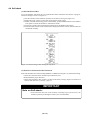
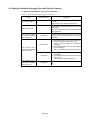
(1) When the LED Display of PC4701 is Abnormal
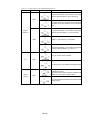
Table 6.1 LED's abnormal display and its checkpoints
Error
LEDs do not light up.
Connection to
the target system
Checkpoint
-
Recheck the power cable is connected to the
PC4701.
See the instruction manual of the PC4701.
All LEDs remain lit.
The POWER LED of
"STATUS OF TARGET"
does not light up.
-
Connected
Recheck the connection between the PC4701 and
this product.
See "3.5 Connecting the PC4701 and Emulation
Pod" (page 34).
Check power is properly supplied to the target
system and that the target system is properly
grounded.
(1) Check that both the main and sub clocks of the
emulator debugger are not set to "EXT".
Disconnected
See the CLK command of the emulator
debugger.
(2) Check the oscillation circuit in the emulation
pod is oscillating.
The CLOCK LED of
"STATUS OF TARGET"
does not light up.
See "3.3 Selecting Clock Supply" (page 29).
Connected
(1) Check the oscillation circuit in the target system
is oscillating.
(2) Check the switches in the emulation pod are
correctly set.
See "3.2 Switch Settings" (page 25).
The RESET LED of
"STATUS OF TARGET"
does not go out.
Connected
( 65 / 74 )
Check if the reset pin of the target system is pulled
up.