1
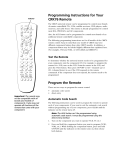
RCU500
Universal
Remote Control
PO WER
VC R 1
VC R 2
•LD
REW
SAT•
CAB
LE
TV
AUD
IO
PLAY
REC
FF
STOP
DSPY
PAU
SE
CHAN
ENTE
VOL
R
VOL
MUT
E
CH
1
AN
PREV
2
4
CH
3
5
7
6
8
INPU
T
9
0
AR•
CLE
E
DON
TV•V
CR
M
PRO
•
ENU
E•
COD
SRC
G
PIP
H
–
MOVE
PIP
MOV
E
SYS
TEM
LIN
K
+
TABLE OF CONTENTS
SWA
P
FREE
ZE
5AV
This Universal Remote Control is compatible with
most models of infrared controlled Televisions,
VCRs, Cable Boxes, and Audio Equipment
manufactured after 1984. Please retain this guide
for future reference.
Button Description .............................................2
Setting Up Your Universal Remote ...................2
Programming Your Universal Remote
Code Search..................................................3
Code Lists .....................................................4
Operating a TV ...................................................5
Operating a Cable Box ......................................6
Operating a Satellite Receiver............................6
Operating A VCR ................................................7
Operating a Laserdisc Player .............................8
Operating Audio Equipment..............................9
Operating A TV/VCR Combo ..........................10
Special Operations............................................10
Code Lists
TV................................................................11
VCR .............................................................12
Laserdisc Player ..........................................13
Satellite Receiver ........................................13
Cable Box ...................................................13
TV/VCR Combinations ...............................13
Audio Equipment .......................................14
Warranty...............................................Center Card
Button Description
Device Buttons
VCR 2•LD AUDIO
REW
PLAY
FF
REC
STOP
PAUSE
DSPY
CHAN
Channel and Sound
(DSPY, ENTER, VOL,
CHAN, MUTE, PREV CH)
Use these buttons to control
sound and channel changes.
Number Buttons (0-9)
VOL
CHAN
MUTE
2
3
4
5
6
7
8
9
INPUT
TV•VCR
E
CO
D
NU
•
CH
OG
NE
CL
EA
•
SR
•
PR
R
0
SWAP
PIP
+
–
Use these buttons to directly
enter channel numbers for a
TV, VCR and Cable Box.
Also used for accessing preset channels of an AM/FM
tuner or entering disk and
track numbers for a CD player. Also used for entering
program code numbers from
brand lists.
MOVE
MOVE PIP
PIP Buttons
PREV CH
1
DO
(MENU•PROG, MOVE, –, +,
G, H) Use these buttons to
adjust on-screen menu
features and programming
information.
ENTER
VOL
Menu Buttons
VCR Buttons
(TV/VCR, REW, PLAY, FF,
REC, STOP, PAUSE)
Use these buttons to control
playback from a VCR or
Laserdisc Player. Also used
to record onto a VCR tape.
VCR1 SAT•CABLE TV
P O W ER
ME
(VCR1, VCR2•LD,
SAT•CABLE, AUDIO, TV)
Determines which device
you are controlling.
FREEZE
SYSTEMLINK5AV
(PIP, MOVE PIP, SWAP,
FREEZE) Use these buttons
to adjust the Picture-in
Picture feature if it is
available on your TV.
Code Search Button
Programs devices by
searching through brand
codes. Use when code lists
are not available or when
the listed code does not
work with your device.
See page 3.
Setting Up Your Universal Remote
Place Batteries in the remote
1. Remove the battery compartment cover.
2. Place four AAA batteries as shown,
matching the + and – end of each battery as
indicated in the battery compartment.
3. Replace the cover.
Determine if your remote needs programming
Some RCA, GE and ProScan devices may already be pre-programmed.
1. Press the button of the device you want to
control (for example TV).
2. If the device turns on, press another button,
to confirm (for example CHANNEL UP).
3. If the device you selected (TV) responds,
you will not need to program the remote.
If the device you selected (TV) does
not respond, you will need to program
the remote. (See pages 3-4 for
programming instructions).
4. Repeat steps 1-3 for other devices.
2
P O W ER
VCR1 SAT•CABLE TV
VCR 2•LD AUDIO
CHAN
Programming Your Universal Remote
The remote may already be set up to operate your brand of TV, VCR, Laserdisc,
Satellite Receiver, Audio Equipment, or Cable Box. It is pre-programmed with the
following codes: TV-000, VCR1-000, AUDIO-003, and SAT•Cable Box-000. For
brands that require programming, there are two ways to program: Using Code
Lists or Code Search. Use Code Search if the code lists are not available or if the
codes from the lists do not operate a device.
Programming a Device using CODE SEARCH
PRESS
& HOLD
CO
DE
CODE
•
SEARCH
CH
SR
1. Manually turn on your device
(TV, VCR, Laserdisc Player, Satellite
Receiver, Cable Box or Audio Equipment).
2. Press and hold CODE•SRCH.
VCR1 SAT•CABLE TV
3. Press and release the device button you
want to set up (TV, VCR1, VCR2•LD,
SAT•CABLE, or AUDIO).
VCR 2•LD AUDIO
RELEASE
6. Once the device turns off,
press and release ENTER.
7. With the device on, press another button,
for example CHANNEL UP. If the device
responds, no further programming is
required. If the device does not respond,
repeat steps 1-7.
E
CO
D
CH
5. Press POWER repeatedly until the device
turns off (you may have to press up to
100 times).
CODE
•
SEARCH
SR
4. Release CODE•SRCH.
PO W ER
V
ENTER
CHAN
3
Programming Your Universal Remote
Programming a Device using the Code Lists
1. Find codes for each device and brand on
page numbers shown below.
2. Press and hold the TV, VCR1, VCR2•LD,
SAT•CABLE, or AUDIO button you want to
set up.
3. Enter the three digit code from the
TV, VCR, Laserdisc Player, Satellite Receiver,
Cable Box, or Audio code list.
Device
Page
TV
11
VCR
12
LaserDisc Player 13
Satellite Receiver 13
Cable Box
13
Audio Equipment 14
VCR1 SAT•CABLE TV
PRESS
& HOLD
ENTER
YOUR
CODE
VCR 2•LD AUDIO
1
2
3
4
5
6
7
8
9
0
RELEASE
VCR1 SAT•CABLE TV
VCR 2•LD AUDIO
4. Release the device key.
5. With the device on, press another button, for
example CHANNEL UP. If the device
responds, no further programming is
required. If the device does not respond,
repeat 2-4 using another code.
CHAN
6. Enter your device codes here for easy reference.
TV CODE
VCR1 CODE
SAT•CABLE CODE
4
VCR2•LD CODE
AUDIO
Operating A TV
Turning the TV On and Off.
1. Press TV to set the remote to control the
TV (Most RCA, GE and ProScan models will
only turn on when TV is pressed,
not POWER.)
VCR1 SAT•CABLE TV
VCR 2•LD AUDIO
P O W ER
2. Press POWER to turn the TV on or off.
V
Change Channels on the TV
CHAN
Press CHANNEL UP or CHANNEL DOWN
to change channels on the TV or enter the
channels as you would normally for
your TV.
CHAN
Use the buttons below to adjust features on
your TV.
DISPLAY – Shows displays on the screen and
clears menus from the screen.
DSPY
MUTE – Switches the TV sound on or off.
If your TV has picture-in-picture, you may be
able to use the following buttons to adjust PIP.
PIP (PICTURE-IN-PICTURE) – Turns the small
picture on or off.
ENTER
CHAN
PREV CH
VOL
VOL
PREV CH (PREVIOUS CHANNEL) – Changes
back and forth between two channels. Select a
channel using the number buttons and then
select another. Press PREV CH to switch
between the two channels.
CHAN
MUTE
PIP
SWAP
MOVE PIP
FREEZE
PIP MOVE – Moves the small picture to the
next corner.
SWAP – Switches the channel in the small
picture with the big picture.
FREEZE – Freezes or unfreezes the small
picture.
You may want to experiment with the remote to
determine all the buttons which will work with
your TV.
5
Operating A Cable Box
Turning the Cable Box On and Off.
1. Point the remote at the cable box
and press SAT•CABLE.
VCR1 SAT•CABLE TV
VCR 2•LD AUDIO
2. Press POWER to turn it on or off.
P O W ER
V
Changing Channels on the Cable Box.
Press CHANNEL UP or DOWN to change
channels on the cable box or enter the
channel as you would normally for your
cable box.
CHAN
CHAN
Operating A Satellite Receiver
Turning the Satellite Receiver On and Off.
1. Point the remote at the Satellite Receiver
and press SAT•CABLE.
VCR1 SAT•CABLE TV
VCR 2•LD AUDIO
2. Press POWER to turn it on or off.
P O W ER
You may want to experiment with the
remote to determine all the buttons which
work with your Satellite Receiver.
6
V
Operating A VCR
Turn the VCR On and Off.
1. Press VCR1 or VCR2•LD to set the remote
to control the VCR. (Most RCA, GE and
ProScan models will only turn on when
pressing VCR not POWER).
PO W ER
VCR1 SAT•CABLE TV
VCR 2•LD AUDIO
P O W ER
2. Press POWER to turn the VCR on or off.
V
Watch a tape in your VCR.
1. Turn on the VCR.
PLAY
2. Insert a tape in the VCR.
STOP
3. Press PLAY to start the tape.
4. Press STOP when you are finished.
REW
5. Press REW to rewind the tape.
6. Press PAUSE to pause the tape.
PAUSE
Record one channel and watch another.
1. Press VCR1 or VCR2•LD to set the remote
to control the VCR.
2. Tune the VCR to the channel
you want to record.
VCR1 SAT•CABLE TV
VCR 2•LD AUDIO
1
2
3
4
5
6
7
8
9
Y
CHAN
E
CHAN
0
ENTER
P
3. Press REC to start recording.
REC
4. Press TV/VCR.
TV•VCR
BLE TV
5. Press TV to set the remote to control the TV.
6. Press CHANNEL UP or DOWN to
change channels on the TV.
7. To see the channel you are recording,
tune the TV to channel 3 or 4
(same as CH3/4 switch on the VCR). Tune
to 90, 91, or 92 for some RCA, GE or
ProScan products.
Y
CHAN
E
CHAN
P
7
Operating A Laserdisc Player
Turn the Laserdisc Player On and Off.
VCR 2•LD
1. Press VCR2•LD to set the remote to control
the Laserdisc Player. (Most RCA and ProScan
models will only turn on when pressing
VCR2•LD not POWER).
P O W ER
2. Press POWER to turn the Laserdisc Player
on or off.
V
Watch a disc in your Laserdisc Player.
1. Turn on the Laserdisc Player.
2. Place a disc in the Laserdisc Player.
PLAY
3. Press PLAY to start the disc.
STOP
4. Press STOP when you are finished.
PAUSE
5. Press PAUSE to pause the disc.
You may want to experiment with the
remote to determine all the buttons which
work with your Laserdisc Player.
8
Operating Audio Equipment
Turn the Audio Equipment On and Off.
1. Press AUDIO to set the remote to control
the Audio Equipment. (Most RCA, GE and
ProScan models will only turn on when
pressing AUDIO not POWER).
AUDIO
P O W ER
2. Press POWER to turn the Audio Equipment
on or off.
V
Play a tape or CD in your Audio Equipment.
1. Turn on the Audio Equipment.
2. Insert a tape or CD.
PLAY
3. Press PLAY to start the tape or CD.
STOP
4. Press STOP when you are finished.
REW
5. Press REW to rewind the tape.
6. Press PAUSE to pause the tape or CD.
PAUSE
You may want to experiment with the
remote to determine all the buttons which
work with your Audio Equipment.
9
Operating A TV/VCR Combo Unit
Some TV/VCR combination units may be controlled by using a
combination of TV and VCR codes. For example, the Samsung TV/VCR
combo unit may be controlled by both the Samsung TV
code and the Samsung VCR code.
Special Operations
RCA, GE and PROSCAN Brand Devices:
Many of these devices (TVs and VCRs) will not need to be
programmed. In the event that programming is required,
the code search method is suggested.
Note: With these brands, the device button (TV, VCR1, VCR2•LD,
AUDIO) will usually turn the units on. The POWER button will only
turn off the device, if you used the TV, VCR1 or AUDIO button to turn
the unit on.
SCIENTIFIC ATLANTIC Cable Boxes:
This brand of cable box can be programmed using the code search
method by using the CHANNEL UP key rather than POWER during
Code Search. NOTE: The device must be turned on prior to beginning
the code search. Once the device turns off, press and release ENTER.
In most cases this cable box can be turned on and off using the
CHANNEL UP key not the POWER button. If the unit will not turn
on using the CHANNEL UP key, then manually turn it on and
only partial compatibility will be achieved.
JERROLD or GENERAL INSTRUMENTS Cable Boxes:
These units can be programmed using the code search method.
In some cases, these devices will change channels during the
code search. Continue until the unit turns off, then press
and release ENTER.
ZENITH and OAK cable boxes
Some Zenith and Oak Cable Boxes require pressing CHANNEL
DOWN rather than ENTER after numeric entry.
10
TV Code List
Admiral................................................005
Amtron ................................................064
Akai .....................................................002
Anam National....................................038
AOC ................................011,019,027,088
Bell & Howell.....................................005
Candle ...................................011,027,033
Citizen.............................011,027,033,064
Colortyme..............................011,027,084
Concerto.......................................011,027
Contec/Cony............036,037,040,042,064
Craig ....................................................064
Curtis Mathes ...........000,011,015,027,037
CXC .....................................................064
Daewoo .................................011,019,027
Daytron ........................................011,027
Dimensia .............................................000
Electrohome............006,011,014,027,038,
061,068
Emerson ...........011,026,027,028,029,030,
031,032,037,042,053,064,065,
067,075,076,078,079,091,094,095,096
Envision........................................011,027
Fisher ..............................017,021,039,041
Funai ...................................................064
GE.....................000,008,009,011,012,027,
038,068,086,089,091
Goldstar ..................003,004,006,011,019,
027,037,050
Hallmark.......................................011,027
Hitachi..............009,011,027,036,037,040,
047,048,063,080,094,097,098
Infinity.................................................013
JBL .......................................................013
Jensen...........................................011,027
JVC .......012,024,036,037,040,048,051,074
Kawasho................................002,011,027
Kenwood ........................006,011,014,027
Kloss Novabeam..........................035,043
KTV .....................................................078
Loewe..................................................013
Luxman.........................................011,027
LXI ....................000,013,018,021,023,054
Magnavox.........006,007,010,011,013,016,
027,033,035,043,049,066,087,089
Marants................................................013
Marantz ...........................011,013,027,069
Memorex .............................................005
MGA ........................006,011,014,019,022,
027,041,056,061,068
Mitsubishi................006,011,014,019,022,
027,041,055,056,061,068
MTC .......................................011,019,027
Multivision ..........................................081
NAD..............................................018,023
NEC ...................011,014,019,027,038,084
Panasonic........................012,013,038,086
Penney...........................000,008,011,019,
027,040,068,077,086,088
Philco.........006,007,010,011,013,016,019,
027,033,035,037,038,043,087,089
Philips........002,006,007,010,011,013,016,
033,035,037,038,043,066,073
Pioneer.....................011,027,045,062,093
Portland ..........................011,019,027,037
ProScan ...............................................000
Proton .............................011,027,037,072
Quaser ...................................012,038,092
Radio Shack...................000,021,025,036,
037,059,064,078
RCA .........................000,006,011,019,027,
034,038,044,046,088
Realistic ...............................................021
Sampo ..........................................011,027
Samsung ........................006,011,014,015,
019,027,036,037,077
Sanyo.................017,021,039,056,057,058
Scott .......................................028,037,064
Sears ..........000,006,011,014,017,018,021,
023,027,039,040,041,051,071,083,095
Sharp .......................011,020,025,027,037,
052,053,059,060
Signature ......................................005,094
Sony ....................................................002
Soundesign............................011,027,033
Sylvania .....006,007,010,011,013,016,027,
033,035,043,049,066,087,089
Symphonic ...................................064,076
Tatung .................................................038
Technics ..............................................012
Techwood ....................................011,027
Teknika..........................011,019,027,033,
036,037,040,066
Telecaption .........................................090
TMK..............................................011,027
Toshiba ..........................018,021,023,040,
071,077,085,090
Universal ......................................008,009
Victor...................................................051
Vidtech .........................................019,027
Wards ......................000,005,006,007,008,
009,010,011,013,019,
025,027,028,035,043,
059,066,076,082,089
Yamaha...........................006,014,019,027
Zenith ...........................................001,099
11
VCR Code List
Admiral .......................................006
Aiwa............................................015
Akai...........003,017,022,023,063,066
Audio Dynamics..................014,016
Bell & Howell ............................002
Broksonic ...................................010
Candle ............007,009,013,044,045,
046,052
Canon ..................................008,053
Capehart .....................................001
Citizen.............007,009,013,044,045,
046,052
Colortyme...................................014
Craig.....................................007,012
Curtis-Mathes ........000,007,008,014,
015,044,046,053,064,067
Daewoo ........................013,045,052
dbx.......................................014,016
Dimensia ....................................000
Dynatech ....................................015
Electrohome ...............................027
Emerson .........008,009,010,013,015,
020,023,027,034,041,
042,047,049,057,062,
065,067,068,070
Fisher.....................002,012,018,019,
043,048,058
Funai...........................................015
GE .............000,007,008,032,037,053
Goldstar..................009,014,046,060
Harman Kardon .........................014
Hitachi....................005,015,035,036
Instant Replay ............................008
JCL ..............................................008
JC Penney.......002,005,007,008,014,
.........................016,030,035,051,053
JVC...................002,014,016,030,046
Kenwood .....................002,014,016,
......................................030,044,046
Lloyd...........................................015
Logik...........................................031
Magnavox...............008,029,053,056
Marantz...........002,008,014,016,029,
................................030,044,046,061
Marta...........................................009
MEI .............................................008
Memorex ................008,009,012,015
MGA.....................................004,027
Midland.......................................032
Minolta.................................005,035
Mitsubishi ........004,005,027,035,040
Montgomery Ward.....................006
MTC .....................................007,015
Multitech ................007,015,031,032
12
NEC .......................002,014,016,030,
044,046,059,061,064
Panasonic.............................008,053
Pentax ...........................005,035,044
Pentex Research.........................046
Philco .....................008,029,053,056
Philips ..................................008,029
Pioneer ...................005,016,033,050
Portland.........................044,045,052
ProScan.......................................000
Quartz.........................................002
Quasar .................................008,053
RCA.................000,005,007,008,028,
035,037,054,069
Radio Shack/Realistic.........002,006,
008,009,012,015,
019,027,043,053
Samsung ..........007,013,022,032,042
Sansui...................................016,071
Sanyo ...................................002,012
Scott .................004,013,041,049,068
Sears ...............002,005,009,012,018,
019,035,043,048
Sharp ...............006,024,027,039,045
Shintom ..................017,026,031,035
Signature.....................................015
Sony ..............................017,026,038
Sylvania ...........008,015,029,053,056
Symphonic..................................015
Tandy...................................002,015
Tashiko .......................................009
Tatung ........................................030
Teac...............................015,030,069
Technics .....................................008
Teknika ..................008,009,015,021
Toshiba............005,013,019,048,049
Totevision ............................007,009
TMK ............................................067
Unitech .......................................007
Vector Research............014,016,044
Victor ..........................................016
Video Concepts ............014,016,044
Videosonic..................................007
Wards.......005,006,007,008,009,012,
013,015,025,027,031,035
Yamaha ...........002,014,016,030,046
Zenith .....................011,017,026,072
Laserdisc Player Code List
Pioneer .........................................33
ProScan.........................................37
RCA...............................................37
Satellite Receiver Code List
Chaparral .................................80,81
Cheyenne .....................................81
Drake .......................................82,83
General Instruments ..........92,93,94
Realistic ........................................84
Sierra I,II,III..................................81
STS1 ..............................................85
STS2 ..............................................86
STS3 ..............................................87
STS4 ..............................................88
Toshiba.........................................89
Uniden..........................................90
Video Cipher II ............................91
Cable Box Code List
ABC ........................022,046,053,054
Anvision...............................007,008
Cablestar ..............................007,008
Diamond.....................................056
Eagle ....................................007,008
Eastern Int. .................................002
General Instrument*...................046
GI 400* ..................004,005,015,023,
................................024,025,030,036
Hamlin.............003,012,013,034,048
Hitachi .........................037,043,046
Jerrold*.....004,005,015,023,024,025,
.........................030,036,045,046,047
Macom .................................037,043
Magnavox 007,008,019,021,026,028,
.........................029,032,033,040,041
NSC .............................................009
Oak* ..............................001,016,038
Oak Sigma..................................016
Panasonic ...............003,027,039,061
Philips ......007,008,019,021,026,028,
.........................029,032,033,040,041
Pioneer..........................018,020,044
RCA ......................................000,027
Randtek................................007,008
Regal .............................003,012,013
Regency ...............................002,033
Samsung .....................................044
Sci. Atlanta * .................003,022,035
Signature.....................................046
Sprucer .......................................027
Starcom.......................................046
Stargate 2000 ..............................058
Sylvania................................011,059
Teknika.......................................006
Texscan .........................010,011,059
Tocom .............017,021,049,050,055
Unika.............................031,032,041
Universal .......................051,052,060
Viewstar ...007,008,019,021,026,028,
.........................029,032,033,040,041
Warner Amex .............................044
Zenith*....................014,042,057,061
TV/VCR Combinations
Use TV or VCR codes listed for your brand to operate your TV/VCR combo unit.
* See special notes on page 10.
13
Audio Equipment Code List
ADS
AMP........................................01
AIWA
CD ..........................................60
AKAI
AMP...................................02,08
DENON
CD .........................................57
DYNAMIC BASS
AM/FM ...................................29
CD ..........................................25
TAPE..................................26,27
PHONO..................................28
EMERSON
CD ..........................................66
FISHER
AMP........................................23
CD ..........................................67
HITACHI
CD ..........................................63
JVC
AMP...................................16,58
AM/FM ..............................30,35
CD ..........................................32
TAPE..................................33,34
AUX........................................31
KENWOOD
AMP...................................17,74
AM/FM ...................................74
CD ................................67,70,77
TAPE..................................71,72
PHONO..................................73
PANASONIC
AMP........................................12
AM/FM ...................................38
CD .....................................36,83
TAPE ......................................37
PHILLIPS
AMP........................................62
AM/FM ...................................62
CD ..........................................61
PIONEER
AMP........................................14
AM/FM ...................................42
CD ..........................................39
TAPE..................................40,41
RCA
AMP........................................24
AM/FM ...................................03
CD ................................07,43,44
TAPE ......................................06
PHONO..................................05
AUX ...................................04,54
REALISTIC
CD .....................................63,66
SANSUI
CD ..........................................45
SCOTT
CD ..........................................66
TAPE..................................55,56
KYOCERA
AMP........................................09
SHERWOOD
AMP...................................11,13
LOTTE (NEC)
CD ..........................................75
SONY
AMP........................................21
AM/FM ...................................49
CD ..........................................46
TAPE..................................48,53
PHONO..................................47
MAGNAVOX
AMP........................................65
AM/FM ...................................65
CD ..........................................61
MARANTZ
AMP...................................22,76
AM/FM ...................................76
CD ..........................................68
MITSUBISHI
AMP...................................15,59
AM/FM ...................................59
NAKAMICHI
AMP........................................20
14
ONKYO
AM/FM ...................................82
CD ..........................................78
TAPE..................................80,81
PHONO..................................79
TEAC
AMP........................................10
CD ..........................................69
TECHNICS
AM/FM ...................................52
CD ..........................................50
TAPE ......................................51
YAMAHA
AMP...................................18,19
15
Universal
Remote
THIS SYSTEMLINKTM 5+
REMOTE CONTROL IS
COMPATIBLE WITH MOST MODELS
OF THE FOLLOWING BRANDS
(with infrared controlled components
manufactured after 1984):
© 1994 Thomson Consumer Electronics, Inc.
2000 Clements Bridge Road
Deptford, NJ 08096-2088
Made in Mexico
Printed and packaged in the USA
Part Number 1Q57 437-01A
RCU500
16