1
*CPFUHTGG"5RGCMGTRJQPG"-KV"HQT"5CP[Q
17-920
OWNER’S MANUAL — Please read before using this equipment.
#"+/2146#06"#
If an icon appears at the end of a paragraph, go
to the box on that page with the corresponding
icon for pertinent information.
± — Note
."%#76+10".
•
Speaker
° — Hint
. — Caution
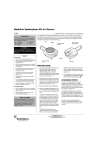
Power and Mode Indicator
Mode-Switching
Finger Groove
NE
Plug
Be sure to unplug the speakerphone before
starting the vehicle, or you may cause it to
lockup.
RP
If your cigarette-lighter socket or power outlet
remains on when the vehicle is turned off,
and you plan to leave your vehicle for more
than a week, unplug the speakerphone to
prevent excessive battery discharge and
difficulty starting your vehicle.
KE
•
ý
# — Important
— Warning
HO
Rý
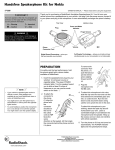
Thank you for purchasing the RadioShack Handsfree Speakerphone Kit. The kit turns your
cellular phone into a speakerphone in your vehicle. Just plug it into any standard (negative
ground) 12-volt power source, connect it to your phone and plug in the microphone. It even
automatically recharges the phone’s battery. .
HAND
S FR
EE
SP
EA
Volume
MIC Jack
Phone Connector Cord
MIC Jack
24'2#4#6+10
R
ý
"9#40+0)ý
R
"
Always wear your seat belt. Never place a
phone where it could damage or interfere with
the operation of any passive safety device
(airbags or seat belts).
±"016'"±"
•
If your vehicle’s cigarette-lighter socket is
difficult to reach, outlet adapters are
available at your local RadioShack store or
online at RadioShack.com.
•
You might have to turn the ignition key to
Accessory or ON to power the cigarettelighter socket.
•
Replacement microphones (RSU 12294229)
are available through your local RadioShack
store.
•
Anytime the indicator is lit, power is on and
the phone’s battery is charging.
•
To avoid feedback, position the microphone
so it is not directly in line with the speaker.
You might need to turn the speaker slightly.
Changing Modes
•
Disconnecting and reconnecting the cord
does not change the mode.
•
If you are unable to make a call in handsfree
mode, contact your phone store to update
the phone’s software.
For safety and the best performance, hold
the phone upright with a phone holder,
available at your local RadioShack store or
online at RadioShack.com.
Rý
1. Insert the speakerphone’s plug into your
vehicle’s 12-volt power source or
cigarette-lighter socket. The green
POWER indicator lights. Turn the
speaker grill toward you to allow at least
2 inches of clearance so you can use the
mode switch on the back.±
2. Plug the phone connector, located on the
end of the coiled cord, into the slot on
the base of the phone. TOP should face
the same direction as the keypad. The
connector only fits one way; do not force
it.
3. Plug the microphone into the MIC Jack.
4. Attach the supplied microphone to your
car’s visor using the supplied visor clip,
or to your clothing using the supplied
label clip.
To attach the microphone to the visor,
slide the clip on the visor and tuck the
wire into the space between the
windshield glass and trim or under the
trim. Run the wire down to the dash and
around the dash edge, being careful not
to put the wire where it can be pinched
by the door.
To attach the microphone to your
clothing, attach the lapel clip about six
inches below your chin. Leave a
comfortable length of cord between the
microphone and the speaker. Wrap up
the excess cord so it does not interfere
with vehicle operation.
5. Turn the phone on if it has not turned on
automatically. The speakerphone beeps
to indicate it is working, and the POWER
indicator lights.±
%*#0)+0)"/1&'5
You can use the speakerphone in either
handsfree or privacy mode. To change
modes, briefly insert your finger in the modeswitching finger groove on the back of the
speaker. The switch is an electronic optical
device. When your finger breaks the beam
the indictor changes color. ±
operate through the speakerphone. The
POWER indicator lights steadily green. You
can talk and listen without holding the
phone.±
In privacy mode, the phone operates
normally. Pick up the phone and use it like
any other handset.
In handsfree mode, the phone’s internal
microphone and speaker are disabled to
© 2002 RadioShack Corporation.
All Rights Reserved.
RadioShack and RadioShack.com are trademarks
used by RadioShack Corporation.
*#0&5(4''"12'4#6+10
±"016'"±"
Outgoing Calls
•
•
When placing a call, you will not always hear
the touch-tones through the speakerphone.
This is normal.
It may take a moment for the speakerphone
to switch between you and the person you
are talking to on the phone. You may need to
pause for a moment to hear.
Adjusting the Volume
See the phone’s owner’s manual for the proper
setting instructions.
To make a call, dial a number and press
TALK on your cellular phone to begin talking.
Press END when you are finished.±
When an incoming call rings on your cellular
phone, press TALK and begin speaking.
Press END when you are finished.
#&,756+0)"6*'"81.7/'
You can control the speakerphone’s volume
from your wireless phone or the rotary
volume control on the speakerphone. Keep
the volume as low as possible to comfortably
hear the other party. If the volume is too high,
Limited Ninety-Day Warranty
This product is warranted by RadioShack against
manufacturing defects in material and workmanship
under normal use for ninety (90) days from the date of
purchase from RadioShack company-owned stores
and authorized RadioShack franchisees and dealers.
EXCEPT AS PROVIDED HEREIN, RadioShack
MAKES NO EXPRESS WARRANTIES AND ANY IMPLIED WARRANTIES, INCLUDING THOSE OF MERCHANTABILITY AND FITNESS FOR A PARTICULAR
PURPOSE, ARE LIMITED IN DURATION TO THE
DURATION OF THE WRITTEN LIMITED WARRANTIES CONTAINED HEREIN. EXCEPT AS PROVIDED
HEREIN, RadioShack SHALL HAVE NO LIABILITY
OR RESPONSIBILITY TO CUSTOMER OR ANY
OTHER PERSON OR ENTITY WITH RESPECT TO
ANY LIABILITY, LOSS OR DAMAGE CAUSED DIRECTLY OR INDIRECTLY BY USE OR PERFORMANCE OF THE PRODUCT OR ARISING OUT OF
ANY BREACH OF THIS WARRANTY, INCLUDING,
BUT NOT LIMITED TO, ANY DAMAGES RESULTING
FROM INCONVENIENCE, LOSS OF TIME, DATA,
PROPERTY, REVENUE, OR PROFIT OR ANY INDIRECT, SPECIAL, INCIDENTAL, OR CONSEQUENTIAL DAMAGES, EVEN IF RadioShack HAS BEEN
ADVISED OF THE POSSIBILITY OF SUCH DAMAGES.
Some states do not allow limitations on how long an
implied warranty lasts or the exclusion or limitation of
incidental or consequential damages, so the above
limitations or exclusions may not apply to you.
In the event of a product defect during the warranty period, take the product and the RadioShack sales receipt as proof of purchase date to any RadioShack
store. RadioShack will, at its option, unless otherwise
provided by law: (a) correct the defect by product repair without charge for parts and labor; (b) replace the
product with one of the same or similar design; or (c)
refund the purchase price. All replaced parts and products, and products on which a refund is made, become
the property of RadioShack. New or reconditioned
parts and products may be used in the performance of
warranty service. Repaired or replaced parts and products are warranted for the remainder of the original
warranty period. You will be charged for repair or replacement of the product made after the expiration of
the warranty period.
This warranty does not cover: (a) damage or failure
caused by or attributable to acts of God, abuse, accident, misuse, improper or abnormal usage, failure to
follow instructions, improper installation or maintenance, alteration, lightning or other incidence of excess voltage or current; (b) any repairs other than
those provided by a RadioShack Authorized Service
Facility; (c) consumables such as fuses or batteries;
(d) cosmetic damage; (e) transportation, shipping or
insurance costs; or (f) costs of product removal, installation, set-up service adjustment or reinstallation.
This warranty gives you specific legal rights, and you
may also have other rights which vary from state to
state.
RadioShack Customer Relations, 200 Taylor Street,
6th Floor, Fort Worth, TX 76102
the other party might hear as echo. Reduce
the volume to eliminate any echo.
Adjust the speakerphone’s volume to a
comfortable level by moving the volume
control toward the POWER indicator (louder),
or away from the POWER indicator (softer).
On some models of Sanyo phones, the
volume of the tones generated when
pressing the buttons on the key pad cannot
by controlled by the phone. If the tones are
too loud, reduce the volume on the
speakerphone. Once you complete dialing,
you might have to readjust the volume to a
comfortable listening level.±
#"016'"#$176"81+%'"37#.+6;
Wireless phones use radio waves to
accommodate many users on a radio
network. Radio communications do not
always provide the same voice quality and
reliability as your land-line phone.
When using your wireless phone, you may
experience dropped calls, crosstalk, echo,
speech distortion, or other voice quality
degradation. These distortions are generally
caused by the wireless network.
Your Handsfree Speakerphone Kit cannot
improve the phone’s performance. Variations
in voice quality that you experience in the
privacy mode will be heard with the speaker
and may be louder because they are
amplified.
If you are experiencing a badly distorted call,
check to see that the phone has a good
signal level, since low signal levels are
typically associated with poor voice quality. If
your signal level is good and you are still
experiencing poor voice quality, hang up and
redial the number to get a different channel.
12/99
RadioShack Corporation
Fort Worth, Texas 76102
17-920
1262-117
04/02
Printed in USA