1
 8000
Removable Hard Disk Storage System
Quick Start Guide
PN 6-67388-02
6-67388-01 Rev
Rev A
A
PN
*6-67388-02* INSTALLATION INSTRUCTIONS
DIRECTIVES D’INSTALLATION
INSTRUCCIONES DE INSTALACIÓN
INSTRUÇÕES DE INSTALAÇÃO
Please read instructions before inserting cartridges.
Veuillez lire les directives avant d’insérer les cartouches.
Lea las instrucciones antes de insertar los cartuchos.
Leia as instruções antes de inserir os cartuchos.
FIRST THINGS FIRST
EN
Before You Start
Thank you for choosing the Quantum RDX 8000. This device is as easy
to install and set up as it is to use. Don’t insert any cartridges yet—
just follow these instructions in order:
• Read Important Safety Instructions
• Unpack and Install Your RDX 8000
• Connect Power and Network Cables
• Power Up and Assign IP Address
• Install RDX Utility Software
• Launch RDX 8000 Remote Management Interface (RMI)
• Configure Operating Mode
• Register Your RDX 8000
Read Important Safety Instructions
Read the Important Safety Instructions on page 11. Failure to follow
all Safety Instructions may result in serious injury, death or property
damage, and may void your warranty.
1
UNPACK AND INSTALL YOUR RDX 8000
Your RDX 8000 package should contain the following items:
• RDX 8000 unit
• Power cord
• Rackmount hardware ears, Torx screws
• RDX Cartridges (if ordered with your RDX 8000)
• Quick Start Guide (this document)
You will also need an Ethernet cable to connect the RDX 8000
to your network. (not included)
Note: The unit must be horizontal, with operating temperature between +10° and +35°C
and operating humidity of 20–80% (non-condensing). Keep the unit away from areas with
high levels of dust, debris or smoke, or where it may easily be knocked over.
2
UNPACK AND INSTALL YOUR RDX 8000
Desktop Installation
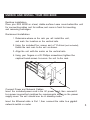
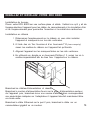
Place your RDX 8000 on a level, stable surface. Leave room behind the unit
for connecting cables and for airflow, and room in front for inserting
and removing cartridges.
Rackmount Installation
1. Determine where on the rack you will install the unit,
and mark the location on the vertical rails.
2. Using the included Torx screws and a T10 driver (not included),
fasten the rack ears to the unit as shown.
3. Align the unit with the marks on the vertical rails.
4. Using your fingers or a #3 Phillips screwdriver, tighten the
captive thumb screws to secure the unit to the rack.
Connect Power and Network Cables
Insert the included power cord in the AC power input, then connect it
to a power source that matches the requirements shown on the power
supply cover. The unit should now be in standby mode.
Insert the Ethernet cable in Port 1, then connect the cable to a gigabit
network switch or router.
3
FRONT AND BACK PANELS
1
2
3
8
6
9
7
5
4
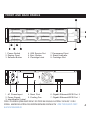
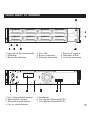
1. Power Switch
2. Display Panel
3. Selector Button
4. USB Service Port
5. Eject Button
6. Cartridge Label
7. Emergency Eject
8. Status Indicator
9. Cartridge Slot
1
2
3
4
5
1. AC Power Input
4. Reset Port
2. Power Supply
5. Cooling Fan
3. Identification Label 6
7
6. Gigabit Ethernet/iSCSI Port 2
7. Gigabit Ethernet/iSCSI Port 1
1RWH 7R HQDEOH (WKHUQHW SRUW 2 \RX PXVW EH UXQQLQJ ILUPZDUH YHUVLRQ 1.33 RU
ODWHU. &KHFN IRU ILUPZDUH DQG GRFXPHQWDWLRQ XSGDWHV DW ZZZ.TXDQWXP.FRP/
6HUYLFHDQG6XSSRUW
4
POWER UP AND ASSIGN IP ADDRESS
Power Up
In standby mode, the power indicator glows solid amber. To power up,
press the power switch on the front. The indicator will flash green for
about 2 minutes while the RDX 8000 boots up. Once the boot sequence is
complete, the indicator glows solid green and the display panel will
show the unit’s status.
To power down the RDX 8000, press and hold the power switch for
4 seconds, then release it. The indicator will flash amber until the
unit is in standby mode, when it will glow solid amber.
Assign IP Address
The RDX 8000 is configured to communicate over Ethernet Port 1,
and will search for an IP address as follows:
1. After powering up, it will search your local network for a
DHCP server.
2. If a DHCP server is found, it will assign an IP address to the
RDX 8000; this address will appear on the display panel.
3. If no DHCP server is found after 60 seconds, the RDX 8000
will assign a static IP address, which will then appear on
the display panel.
4. Once an IP address is assigned, you may use RDX 8000 RMI
to reconfigure the unit to a new static IP address or redirect it
to a DHCP server.
5
INSTALL RDX UTILITY SOFTWARE
RDX Utility software enables you to eject your removable cartridges safely.
To install RDX Utility:
• Using a Web browser, go to
www.quantum.com/ServiceandSupport/
• Find the listing for your operating system and right-click the icon
to download
• With the compressed file saved to your local directory, double-click
to launch
• Follow the on-screen prompts to place RDX Utility on your drive
iSCSI Connection
You need to configure the iSCSI Initiator on the host computer to
complete the iSCSI connection. Microsoft includes an iSCSI Initiator
with Windows Server 2008 and Windows 7; iSCSI Initiators for XP and
Windows Server 2003 are available from the Microsoft Download Center.
iSCSI Initiators for Macintosh and Linux operating systems are also available
online. Contact Quantum Technical Support for help.
Use the following procedure to set up the Windows iSCSI Initiator:
1. Open Microsoft iSCSI Initiator.
2. On the Discovery tab under Target Portals, click Add.
3. Type the current IP address of the RDX 8000 unit, then click OK.
The IQN for the RDX 8000 unit should appear on the Targets tab under
available targets.
4. Highlight the RDX 8000 IQN by clicking on it.
5. Depending on the version of MS Initiator in use, click “Log On” or
“Connect.” The RDX 8000 IQN should now change to connected.
The RDX 8000 is now connected via iSCSI.
6
LAUNCH RDX 8000 RMI
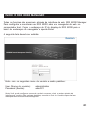
All functions are accessible through the Web-based interface RDX 8000 RMI.
To configure and monitor your RDX 8000, launch a Web browser on
the host computer. Copy the IP address from the RDX 8000 display into the
browser’s address bar, then press Enter.
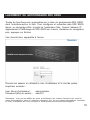
The following screen should appear:
Log in with the following default username and password:
User:
Password:
administrator
adm001
Note: You can set custom usernames, access levels and passwords through the user interface.
For details, refer to the User Guide available at www.quantum.com/ServiceandSupport/.
7
USING RDX 8000 RMI
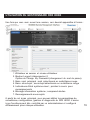
Once you are logged in, you should see the following screen:
1.
2.
3.
4.
5.
6.
7.
Logged in user and user level
Logout button / Change My Password option
Main topic bar; selected topic highlighted in red
Subtopic bar; selected subtopic highlighted in red
Visual system status indicators; mouse over for details
System information block; includes alerts
Subtopic details
From this main screen, you can apply settings for monitoring, configuration,
management and diagnostics of the RDX 8000. Access to these features can
be controlled by an administrator and set separately for each user.
8
CONFIGURE OPERATING MODE
The RDX 8000 can be configured for a variety of applications by using one of
the two operating modes shown here. The operation mode selected will apply
to all eight slots of the RDX 8000.
Mode 1—Tape Library: The unit appears to the host application as an 8-slot
library (autoloader, media changer) containing one generic LTO tape drive.
This mode requires all cartridges to be reformatted before use. See User
Manual for instructions on formatting.
Mode 2—JBOD: The unit appears to the host operating system as
8 individual drives, each with a separate drive letter.
Apply Mode Settings
The RDX 8000 is preconfigured for JBOD mode. To set a different operating
mode, select the tab CONFIGURE > Device. At the lower right, select the tab
Device. To set System Mode, use the pull-down menu and select Tape Library.
Assign a new System Name if required, and click Submit to apply the changes.
A confirmation dialog will verify that the settings have been changed.
9
REGISTER YOUR RDX 8000
Your RDX 8000 should now be operating smoothly—and we want to help you
keep it that way. For the fastest product support and the latest drivers and
downloads, register your RDX 8000 today at www.quantum.com/Registration/.
Limited Warranty: If any defect in material or manufacture appears
within 3 years of the date of original purchase of this product, it will be
replaced or the purchase price refunded. For more information go to
www.quantum.com/ServiceandSupport/. This warranty does not apply
to normal wear or damage from misuse, abuse or accident. Quantum will
not be liable for any lost data or other indirect, incidental or consequential
damages. This warranty gives you specific rights – you may have other
rights that vary from country to country.
Quantum Technical Support
To find supporting documents and answers to frequently asked questions, or
to contact support personnel, go to
www.quantum.com/ServiceandSupport/.
Linear Tape-Open, LTO, the LTO Logo, Ultrium, and the Ultrium Logo are trademarks of HP, IBM,
and Quantum in the US and other countries.
Quantum and the Quantum logo are trademarks of Quantum Corp.
RDX is a Registered Trademark of Tandberg Data ASA.
© Quantum Corp 2011
10
IMPORTANT SAFETY INSTRUCTIONS
This device complies with part 15 of the FCC Rules. Operation is subject to the following two conditions:
(1) This device may not cause harmful interference, and (2) this device must accept any interference received,
including interference that may cause undesired operation.
Note: This equipment has been tested and found to comply with the limits for a Class A digital device,
pursuant to part 15 of the FCC Rules. These limits are designed to provide reasonable protection against
harmful interference when the equipment is operated in a commercial environment. This equipment
generates, uses, and can radiate radio frequency energy and, if not installed and used in accordance
with the instruction manual, may cause harmful interference to radio communications. Operation of this
equipment in a residential area is likely to cause harmful interference in which case the user will be
required to correct the interference at his own expense.
Note: Changes or modifications not expressly approved by the party responsible for compliance could void
the user’s authority to operate the equipment.
This Class A digital apparatus complies with Canadian ICES-003.
Important Safety Instructions
1) Read these instructions.
2) Keep these instructions.
3) Heed all warnings.
4) Follow all instructions.
5) Do not use this apparatus near water.
6) Clean only with dry cloth.
7) Do not block any ventilation openings. Install in accordance with the manufacturer’s instructions.
8) Do not install near any heat sources such as radiators, heat registers, stoves, or other apparatus
(including amplifiers) that produce heat.
9) Do not defeat the safety purpose of the polarized or grounding-type plug. A polarized plug has two
blades with one wider than the other. A grounding type plug has two blades and a third grounding prong.
The wide blade or the third prong are provided for your safety. If the provided plug does not fit into your
outlet, consult an electrician for replacement of the obsolete outlet.
10) Protect the power cord from being walked on or pinched particularly at plugs, convenience receptacles,
and the point where they exit from the apparatus.
11) Only use attachments/accessories specified by the manufacturer.
12) Use only with the cart, stand, tripod, bracket, or table specified by the manufacturer, or sold with the
apparatus. When a cart is used, use caution when moving the cart/apparatus combination to avoid injury
from tip-over.
13) Unplug this apparatus during lightning storms or when unused for long periods of time.
14) Refer all servicing to qualified service personnel. Servicing is required when the apparatus has been
damaged in any way, such as power-supply cord or plug is damaged, liquid has been spilled or objects
have fallen into the apparatus, the apparatus has been exposed to rain or moisture, does not operate
normally, or has been dropped.
11
PREMIÈREMENT
FR
Avant de débuter
Merci d’avoir choisi le RDX 8000 d’Quantum. Cet appareil est aussi facile
à installer et configurer qu’à utiliser. N’insérez aucune cartouche –
suivez d’abord ces directives, dans l’ordre :
• Veuillez lire les importantes consignes de sécurité
• Déballez et installez votre RDX 8000
• Branchez les câbles d’alimentation et réseau
• Mise en marche et assignation de l’adresse IP
• Installation du logiciel utilitaire RDX
• Lancement du gestionnaire RDX 8000
• Configuration du mode de fonctionnement
• Enregistrez votre RDX 8000
Importantes consignes de sécurité
Veuillez lire les importantes consignes de sécurité à la page 22.
Toute dérogation aux consignes de sécurité pourrait entraîner de
sérieuses blessures, la mort ou des dommages à la propriété et
pourrait annuler votre garantie.
12
DÉBALLEZ ET INSTALLEZ VOTRE RDX 8000
La boîte de votre RDX 8000 devrait contenir les objets suivants :
• Le RDX 8000
• Cordon d’alimentation
• Oreilles du châssis, vis Torx
• Cartouches RDX (si commandées avec votre RDX 8000)
• Guide abrégé (le présent document)
Vous aurez également besoin d’un câble Ethernet pour brancher votre
RDX 8000 sur votre réseau. (non compris)
Remarque : Cet appareil doit être installé à l’horizontal et fonctionner dans un environnement
où la température se maintient entre +10° et +35°C et le taux d’humidité oscille entre 20 et 80 %
(sans condensation). Évitez que l’appareil se trouve dans un lieu où il y a beaucoup de poussière,
de débris ou de fumée, ou dans un endroit où il serait susceptible d’être renversé.
13
DÉBALLEZ ET INSTALLEZ VOTRE RDX 8000
Installation de bureau
Placez votre RDX 8000 sur une surface plane et stable. Veillez à ce qu’il y ait de
l’espace derrière l’appareil pour les câbles de raccordement et la circulation d’air
et de l’espace devant pour permettre l’insertion et le retrait des cartouches.
Installation en châssis
1. Déterminez l’emplacement sur le châssis où vous allez installer
l’appareil et marquez-le sur les rails verticales.
2. À l’aide des vis Torx fournies et d’un tournevis T10 (non compris),
vissez les oreilles du châssis sur l’appareil tel qu’illustré.
3. Alignez l’appareil sur les marques faites sur les rails verticaux.
4. En utilisant vos doigts ou un tournevis Phillips n° 3, serrez les vis à
oreilles imperdables afin de bien fixer l’appareil sur le châssis.
Branchez les câbles d’alimentation et réseau
Branchez le cordon d’alimentation fourni sur la prise d’alimentation secteur
de l’appareil puis, branchez-le sur une source d’alimentation correspondant
aux paramètres indiqués sur l’adaptateur. L’appareil devrait maintenant être
en mode veille.
Branchez le câble Ethernet sur le port 1 puis, branchez le câble sur un
commutateur gigabit ou un routeur.
14
FACES AVANT ET ARRIÈRE
1
2
3
8
6
9
7
5
4
1. Interrupteur de marche/arrêt
2. Affichage
3. Bouton de sélection
4. Port USB
5. Bouton d’éjection
6. Étiquette cartouche
7. Éjection d’urgence
8. Indicateur d’état
9. Fente de cartouche
1
2
3
4
5
6
7
1. Prise d’alimentation secteur
2. Alimentation secteur
3. Étiquette d’identification
4. Port de réinitialisation
5. Ventilateur
6. Port gigabit Ethernet/iSCSI 2
7. Port gigabit Ethernet/iSCSI 1
15
MISE EN MARCHE ET ASSIGNATION D’ADRESSE IP
Mise en marche
En mode veille, l’indicateur d’alimentation s’allume en continu en couleur
ambre. Pour mettre l’appareil en marche, appuyez sur l’interrupteur
d’alimentation sur le devant. L’indicateur clignotera en vert pendant
environ deux minutes, le temps que le RDX 8000 s’amorce. Une fois la
séquence d’amorçage terminée, l’indicateur s’allume en vert continu et
l’affichage indique l’état de l’appareil.
Pour arrêter le RDX 8000, appuyez sur l’interrupteur d’alimentation pendant
quatre secondes puis, relâchez-le. L’indicateur clignotera en couleur ambre
jusqu’à ce que l’appareil passe en mode veille, alors, l’indicateur s’allumera
en continu en couleur ambre.
Assignation d’adresse IP
Le RDX 8000 est configuré pour communiquer par le biais du port
Ethernet 1 et il cherchera une adresse IP de la façon suivante :
1. Après la mise en marche, l’appareil cherchera un serveur
DHCP sur votre réseau local.
2. S’il trouve un serveur DHCP, il assignera une adresse IP au
RDX 8000 ; cette adresse apparaîtra à l’affichage.
3. S’il ne trouve pas de serveur DHCP après un délai de
60 secondes, le RDX 8000 assignera une adresse IP statique,
qui apparaîtra alors à l’affichage.
4. Une fois qu’une adresse IP est assignée, vous pouvez utiliser le
gestionnaire RDX 8000 pour reconfigurer l’appareil en lui
attribuant une nouvelle adresse IP statique ou en le redirigeant
vers un serveur DHCP.
16
INSTALLATION DU LOGICIEL UTILITAIRE RDX
Le logiciel utilitaire RDX vous permet d’éjecter les cartouches amovibles
en toute sécurité. Pour installer le logiciel utilitaire RDX :
• À l’aide d’un navigateur Web, allez à
www.quantum.com/ServiceandSupport/
• Trouvez la liste pour votre système d’exploitation et cliquez avec
le bouton droit de la souris pour effectuer le téléchargement
• Une fois le fichier condensé sauvegardé dans votre répertoire local,
double-cliquez sur celui-ci pour le lancer
• Suivez les directives à l’écran pour installer le logiciel utilitaire
RDX sur votre disque
Connexion iSCSI
Vous devez configurer l’initiateur iSCSI sur l’ordinateur hôte pour compléter la
connexion iSCSI. Microsoft offre un initiateur iSCSI avec Windows Server 2008
et Windows 7 ; les initiateurs iSCSI pour XP et Windows Server 2003 sont
disponibles auprès du Centre de téléchargement Microsoft. Les initiateurs iSCSI
pour les systèmes d’exploitation Macintosh et Linux sont également offerts en
ligne. Pour assistance, communiquez avec le support technique d’Quantum.
Exécutez la procédure suivante pour configurer l’initiateur Windows iSCSI :
1. Ouvrez l’initiateur Windows iSCSI.
2. À partir de l’onglet Discovery, sous Target Portals, cliquez sur Add.
3. Tapez l’adresse IP actuelle du RDX 8000 puis, cliquez sur OK. Le nom
IQN pour le RDX 8000 devrait apparaître à l’onglet Targets, sous les
cibles disponibles.
4. Mettez en surbrillance le nom IQN du RDX 8000 en cliquant dessus.
5. Selon la version d’initiateur MS employée, cliquez sur Log On ou Connect.
L’IQN du RDX 8000 devrait maintenant passé à l’état connecté.
Le RDX 8000 est maintenant connecté via iSCSI.
17
LANCEMENT DU GESTIONNAIRE RDX 8000
Toutes les fonctions sont accessibles par le biais du gestionnaire RDX 8000
dont l’interface est sur le Web. Pour configurer et surveiller votre RDX 8000,
lancez un navigateur Web à partir de l’ordinateur hôte. Copiez l’adresse IP
apparaissant à l’affichage du RDX 8000 sur la barre d’adresse du navigateur
puis, appuyez sur Entrée.
Ceci devrait alors apparaître à l’écran
Ouvrez une session en utilisant le nom d’utilisateur et le mot de passe
implicites suivants :
User (Nom d’utilisateur) :
Password (Mot de passe) :
administrator
adm001
Remarque : Vous pouvez définir des noms d’utilisateurs, des niveaux d’accès et des mots de
passe personnalisés à partir de l’interface utilisateur. Pour de plus amples informations, consultez
le Guide d’utilisation que vous trouverez à www.quantum.com/ServiceandSupport/.
18
UTILISATION DU GESTIONNAIRE RDX 8000
Une fois que vous avez ouvert une session, ceci devrait apparaître à l’écran :
1. Utilisateur en session et niveau utilisateur
2. Bouton Logout (déconnexion) /
Option de Change My Password (changement du mot de passe)
3. Barre sujet principal ; sujet sélectionné en surbrillance rouge
4. Barre sous-sujet ; sous-sujet sélectionné en surbrillance rouge
5. Indicateurs d’état système visuel ; pointer la souris pour
renseignements
6. Blocage information système ; comprend alertes
7. Renseignements sous-sujets
À partir de cet écran principal, vous pouvez définir les paramètres de
surveillance, configuration, gestion et diagnostic du RDX 8000. L’accès
à ces fonctions peut être contrôlé par un administrateur et configuré
différemment pour chaque utilisateur.
19
CONFIGURATION DU MODE DE FONCTIONNEMENT
Le RDX 8000 peut être configuré pour une multitude d’applications en
employant l’un des deux modes de fonctionnement illustrés ici. Le mode
de fonctionnement sélectionné s’appliquera aux huit fentes du RDX 8000.
Mode 1—Tape Library (Bandothèque) : L’appareil apparaît à l’application hôte
comme étant une bandothèque à huit fentes (autochargeur, changeur de
média) contenant un lecteur de bande LTO générique. Ce mode requiert que
toutes les cartouches soient reformatées avant utilisation. Consultez le Guide
d’utilisation afin de connaître la procédure à suivre pour reformater.
Mode 2—JBOD : L’appareil apparaît au système d’exploitation hôte comme
étant huit lecteurs distincts, chacun identifié par une lettre.
Appliquer la configuration du mode de fonctionnement
Le RDX 8000 a été préconfiguré pour le mode JBOD. Pour choisir un mode de
fonctionnement différent, sélectionnez l’onglet CONFIGURE > Device (Configurer
> Appareil). Dans le coin inférieur droit, sélectionnez l’onglet Device (Appareil).
Pour choisir System Mode (le Mode Système),à partir du menu déroulant,
choisissez Tape Library (Bandothèque). Attribuez un nouveau System Name (Nom
Système) au besoin et cliquez sur Submit (Soumettre) pour appliquer les changements.
Un dialogue de confirmation indiquera que la configuration a été modifiée.
20
ENREGISTREZ VOTRE RDX 8000
Votre RDX 8000 devrait maintenant fonctionnement normalement, et nous
désirons vous aider à ce que cela demeure ainsi. Pour profiter d’un support
technique des plus rapides et avoir accès aux plus récents pilotes et
téléchargements, enregistrez votre RDX 8000 dès aujourd’hui à
www.quantum.com/Registration/.
Garantie limitée : Si un quelconque défaut matériel ou vice de fabrication
se manifeste dans les 3 ans à compter de la date d’achat de ce produit,
il sera remplacé ou le prix d’achat sera remboursé. Pour de plus amples
informations, allez à www.quantum.com/ServiceandSupport/.
Cette garantie ne s’applique pas en cas d’usure normale ou de dommages
consécutifs à un mauvais usage, un usage abusif ou un accident. Quantum
ne sera pas responsable de toute perte de données ou autres dommages
indirects, accessoires ou consécutifs. Cette garantie vous octroie certains
droits spécifiques. Il se peut que vous ayez d’autres droits ; ceux-ci
diffèrent d’un pays à un autre.
Support technique Quantum
Pour obtenir de la documentation sur ce produit et trouver réponse aux questions
fréquemment posées, allez à www.quantum.com/ServiceandSupport/.
Quantum et le logo Quantum sont des marques de commerce d’Quantum Corp.
RDX est une marque déposée de Tandberg Data ASA.
21
IMPORTANTES CONSIGNES DE SÉCURITÉ
Cet appareil est conforme à la section 15 des réglementations de la FCC. Le fonctionnement est soumis aux
deux conditions suivantes : (1) Cet appareil n’est pas censé causer d’interférences nuisibles, et (2) cet appareil
doit recevoir toute interférence, y compris celles pouvant causer un fonctionnement non désiré.
Remarque : Cet appareil a été testé et approuvé comme étant conforme aux limites préconisées pour un
appareil numérique de la classe A conformément à la section 15 des réglementations de la FCC. Ces limites
sont conçues pour assurer une protection raisonnable contre un brouillage préjudiciable lorsque l’appareil est
utilisé dans un milieu résidentiel. Cet appareil génère, utilise et peut émettre de l’énergie de radiofréquence
et, s’il n’est pas installé et utilisé conformément aux instructions, peut perturber les communications radio.
L’exploitation faite en zone résidentielle peut entraîner une interférence nuisible, ce qui obligerait le
propriétaire à prendre les dispositions nécessaires pour en éliminer les causes.
Remarque : Toute modification non autorisée par les autorités responsables de la conformité peut entraîner
la révocation du droit d’utilisation de cet appareil.
Cet appareil numérique de la classe A est conforme à la norme NMB-003 du Canada.
Importantes consignes de sécurité
1) Lisez les présentes directives.
2) Conservez les présentes directives.
3) Respectez toutes les consignes.
4) Suivez toutes les directives.
5) N’utilisez pas cet appareil à proximité de l’eau.
6) Nettoyez cet appareil uniquement à l’aide d’un chiffon sec.
7) Ne bloquez aucune ouverture d’aération. Installez l’appareil conformément aux directives du fabricant.
8) N’installez pas l’appareil à proimité de sources de chaleur tel que radiateurs, appareils chauffants,
cuisnières et auttes appareils (y compris les amplificateurs) qui génèrent de la chaleur.
9) Ne tentez pas de défaire l’objectif sécuritaire de la fiche polarisée ou de mise à la terre. Une fiche polarisée
comporte deux lames avec une plus large que l’autre. Une fiche avec mise à la terre a deux lames et une
troisième broche de mise à la terre. La lame large ou la troisième broche a été prévue pour votre sécurité.
Si vous ne parvenez pas à brancher la fiche fournie dans votre prise secteur, consultez un électricien pour
le remplacement la prise obsolète.
10) Protégez le cordon d’alimentation de façon à ce qu’il ne soit pas piétiné ni écrasé. Il faut aussi faire
attention aux fiches, prises et points de sortie de l’appareil.
11) Utilisez uniquement des accessoires recommandés par le fabricant.
12) Utilisez l’appareil uniquement avec un chariot, un meuble, un trépied, un support ou une table spécifié
par le fabricant ou vendu avec l’appareil. Lorsque l’appareil est posé sur un meuble à roulettes, usez de
précaution lorsque vous déplacez l’ensemble meuble à roulettes/appareil de façon à éviter toute blessure
due à un renversement.
13) Débranchez l’appareil sur réseau électrique lors d’orages ou si vous ne prévoyez pas l’utiliser pendant
une période prolongée.
14) Confiez toute réparation à du personnel qualifié. Une réparation est nécessaire si l’appareil a été
endommagé de quelconque manière, par ex. si le câble ou la fiche d’alimentation est abîmé(e), ou du
liquide a été renversé ou si des objets sont tombés dans l’appareil, ou encore si ce dernier a été exposé
à la pluie ou à l’humidité, ne fonctionne pas normalement, ou est tombé.
22
COMENCEMOS POR EL PRINCIPIO
ES
Antes de comenzar
Gracias por elegir RDX 8000 de Quantum. Este dispositivo es fácil de instalar y
configurar, y también es fácil de usar. No inserte ningún cartucho todavía —
simplemente siga estas instrucciones en orden:
• Lea las instrucciones de seguridad importantes
• Desempaque e instale su RDX 8000
• Conecte los cables de alimentación y los cables de red
• Encienda y asigne una dirección IP
• Instale el software utilitario de RDX
• Inicie el administrador de RDX 8000
• Configure el modo de operación
• Registre su RDX 8000
Lea las instrucciones de seguridad importantes
Lea las instrucciones de seguridad importantes que aparecen en la página 33.
Si no se siguen todas las instrucciones de seguridad, se podrían provocar
lesiones graves, muerte o daños a la propiedad, y su garantía podría
quedar anulada.
23
DESEMPAQUE E INSTALE SU RDX 8000
Su paquete de RDX 8000 debe contener los siguientes artículos:
• Unidad RDX 8000
• Cable de alimentación
• Orejas metálicas para montaje de estante, tornillos Torx
• Cartuchos RDX (si los pidió con su RDX 8000)
• Guía de inicio rápido (este documento)
También necesitará un cable Ethernet para conectar el RDX 8000 a su red.
(no incluido)
Nota: Esta unidad debe estar en posición horizontal, a una temperatura de funcionamiento
entre +10° y +35 °C y una humedad de funcionamiento entre 20 y 80 % (sin condensación).
Mantenga la unidad alejada de áreas con niveles altos de polvo, suciedad o humo, o sitios
desde donde se pueda caer.
24
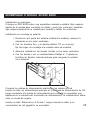
DESEMPAQUE E INSTALE SU RDX 8000
Instalación en escritorio
Coloque su RDX 8000 sobre una superficie nivelada y estable. Deje espacio
detrás de la unidad para conectar los cables y para que corra aire, también
deje espacio delante de la unidad para insertar y retirar los cartuchos.
Instalación en montaje en estante
1. Decida en qué parte del estante instalará la unidad y marque la
ubicación en los rieles verticales.
2. Con los tornillos Torx y un destornillador T10 (no incluido),
fije las orejas de montaje a la unidad como se muestra.
3. Alinee la unidad con las marcas hechas en los rieles verticales.
4. Con los dedos o con un destornillador Phillips n.º 3 ajuste los
tornillos de fijación manual cautivos para asegurar la unidad
en el estante.
Conecte los cables de alimentación eléctrica y los cables de red
Inserte el cable de alimentación provisto en la entrada de alimentación de CA,
luego conéctelo a la fuente de alimentación que cumpla los requisitos que
aparecen en la cubierta del suministro de alimentación. La unidad ahora debe
estar en modo de espera.
Inserte el cable Ethernet en el Puerto 1, luego conecte el cable a un
conmutador de red gigabit o un enrutador.
25
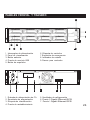
PANELES FRONTAL Y TRASERO
1
2
3
8
6
9
7
5
4
1.
2.
3.
4.
5.
Interruptor de alimentación
Panel de visualización
Botón selector
Puerto de servicio USB
Botón de expulsión
6. Etiqueta de cartucho
7. Expulsión de emergencia
8. Indicador de estado
9. Ranura para cartucho
1
2
3
4
5
6
7
1.
2.
3.
4.
Entrada de alimentación de CA
Suministro de alimentación
Etiqueta de identificación
Puerto de restablecimiento
5. Ventilador de refrigeración
6. Puerto 2 Gigabit Ethernet/iSCSI
7. Puerto 1 Gigabit Ethernet/iSCSI
26
ENCIENDA Y ASIGNE UNA DIRECCIÓN IP
Encendido
En el modo de espera, el indicador de alimentación está encendido de color
amarillo sin parpadear. Para encender la unidad, presione el interruptor
de alimentación que se encuentra en el frente. El indicador parpadeará en
color verde durante 2 minutos aproximadamente mientras arranca la unidad
RDX 8000. Una vez terminada la secuencia de arranque, el indicador quedará
encendido de color verde sin parpadear y el panel de visualización mostrará
el estado de la unidad.
Para apagar el RDX 8000, presione y mantenga presionado el interruptor de
alimentación durante 4 segundos, luego suéltelo. El indicador parpadeará
en color amarillo hasta que la unidad esté en modo de espera, entonces
quedará encendido de color amarillo sin parpadear.
Asignar una dirección de IP
El RDX 8000 está configurado para comunicarse mediante el Puerto 1
Ethernet, y buscará una dirección IP de la siguiente manera:
1. Después del encendido, buscará un servidor DHCP en su red local.
2. Si encuentra un servidor DHCP, este le asignará una dirección IP
al RDX 8000; esta dirección aparecerá en el panel de visualización.
3. Si no se encuentra ningún servidor DHCP después de
transcurridos 60 segundos, el RDX 8000 asignará una dirección
IP fija, que luego aparecerá en el panel de visualización.
4. Una que vez que se haya asignado una dirección IP, podrá usar el
administrador de RDX 8000 para volver a configurar la unidad con
una dirección IP fija nueva o redirigirla a un servidor DHCP.
27
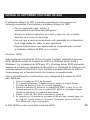
INSTALE EL SOFTWARE UTILITARIO DE RDX
El software utilitario de RDX le permite expulsar de forma segura los
cartuchos extraíbles. Para instalar el software utilitario de RDX:
• Con un explorador web, diríjase a
www.quantum.com/ServiceandSupport/
• Busque su sistema operativo en la lista y haga clic con el botón
derecho en el icono de descarga
• Una vez que el archivo comprimido esté guardado en su directorio
local, haga doble clic sobre él para ejecutarlo
• Siga las instrucciones que aparecerán en la pantalla para colocar
el software utilitario de RDX en su unidad
Conexión iSCSI
Debe configurar el iniciador de iSCSI en el equipo host para completar la conexión
iSCSI. Microsoft incluye un iniciador de iSCSI con Windows Server 2008 y
Windows 7; los iniciadores de iSCSI para XP y Windows Server 2003 se pueden
obtener en el Centro de descargas de Microsoft. Los iniciadores de iSCSI para los
sistemas operativos Macintosh y Linux también se pueden obtener en Internet.
Comuníquese con el Servicio técnico de Quantum si necesita ayuda.
Siga el procedimiento a continuación para configurar el iniciador de iSCSI
para Windows:
1. Abra el iniciador de iSCSI de Microsoft.
2. En la pestaña Discovery (Descubrimiento) debajo de Target Portals
(Portales de destino), haga clic en Add (Agregar).
3. Escriba la dirección IP actual de la unidad RDX 8000, y haga clic en OK.
Deberá aparecer el IQN para la unidad RDX 8000 en la pestaña Targets
(Destinos) debajo de los destinos disponibles.
4. Resalte el IQN del RDX 8000 haciendo clic sobre él.
5. De acuerdo con la versión del iniciador de MS que esté usando, haga clic
en “Log On” (Iniciar sesión) o “Connect” (Conectar). Ahora el IQN del
RDX 8000 debe pasar a conectado.
El RDX 8000 ya está conectado mediante iSCSI.
28
INICIE EL ADMINISTRADOR DE RDX 8000
Se puede acceder a todas las funciones desde el administrador de RDX 8000
con interfaz basada en la web. Para configurar y monitorear su RDX 8000, abra
un explorador web en el equipo host. Copie la dirección IP de la pantalla del
RDX 8000 en la barra de direcciones del explorador, luego presione Intro.
Debe aparecer la siguiente pantalla:
Inicie sesión con el siguiente nombre de usuario y la siguiente
contraseña predeterminados:
User (Nombre de usuario):
Password (Contraseña):
administrator
adm001
Nota: Puede configurar nombres de usuario, niveles de acceso y contraseñas personalizados
mediante la interfaz de usuario. Para obtener detalles, consulte la Guía del usuario, disponible en
www.quantum.com/ServiceandSupport/.
29
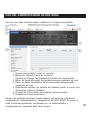
USO DEL ADMINISTRADOR DE RDX 8000
Una vez que haya iniciado sesión, deberá ver la siguiente pantalla:
1. Usuario conectado y nivel de usuario
2. Botón de Logout (cierre de sesión) /
Opción de Change My Password (cambio de contraseña)
3. Barra de tema principal; tema seleccionado resaltado en rojo
4. Barra de tema secundario; tema secundario seleccionado
resaltado en rojo
5. Indicadores visuales de estado del sistema; pasar el cursor por
arriba para obtener detalles
6. Cuadro de información del sistema; incluye alertas
7. Detalles de tema secundario
Desde esta pantalla principal, puede aplicar opciones de monitoreo,
configuración, administración y diagnóstico del RDX 8000. El acceso a
estas funciones puede ser controlado por un administrador y
configurado por separado para cada usuario.
30
CONFIGURE EL MODO DE OPERACIÓN
El RDX 8000 se puede configurar para diferentes aplicaciones mediante uno
de los dos modos de operación que se muestran aquí. El modo de operación
seleccionado se utilizará para las ocho ranuras del RDX 8000.
Modo 1—Tape Library (Biblioteca de cintas): La unidad aparece en la
aplicación host como una biblioteca de 8 ranuras (cargador automático,
cambiador de medios) que contiene una unidad de cinta LTO genérica.
Este modo requiere que todos los cartuchos se reformateen antes de su uso.
Consulte el Manual del usuario para obtener instrucciones sobre el formateo.
Modo 2—JBOD: La unidad aparece en el sistema operativo host como
8 unidades individuales, cada una con una letra de unidad diferente.
Aplicar la configuración de modo
El RDX 8000 viene preconfigurado para el modo JBOD. Para establecer un
modo de operación diferente, seleccione la pestaña CONFIGURE > Device
(CONFIGURAR > Dispositivo). En el extremo inferior derecho, seleccione la
pestaña Device (Dispositivo). Para establecer el System Mode (modo del
sistema), utilice el menú desplegable y seleccione Tape Library (Biblioteca de
cintas). Asigne un nuevo System Name (nombre de sistema) si es necesario, y
haga clic en Submit (Enviar) para aplicar los cambios. Una ventana de diálogo
de confirmación verificará que se haya cambiado la configuración.
31
REGISTRE SU RDX 8000
Ahora su RDX 8000 debería funcionar sin problemas; y queremos ayudarlo a
que siga siendo así. Para obtener un soporte de producto más rápido y los
controladores y las descargas más actualizados, registre su RDX 8000 hoy en
www.quantum.com/Registration.
Garantía limitada: Si aparece algún defecto de material o fabricación
antes del transcurso de 3 año de la fecha de compra original del producto,
este será reemplazado o se reembolsará el precio de compra. Para obtener
más información, diríjase a www.quantum.com/ServiceandSupport/.
Esta garantía no se aplica en caso de desgaste normal, o daños por mal
uso, abuso o accidente. Quantum no se hace responsable por la pérdida de
datos u otros daños indirectos, incidentales o accidentales. Esta garantía
le otorga derechos específicos; es posible que posea otros derechos que
varíen según el país.
Soporte técnico de Quantum
Para obtener documentos de soporte y respuestas a las preguntas más
frecuentes, diríjase a www.quantum.com/ServiceandSupport/.
Quantum y el logotipo de Quantum son marcas registradas de Quantum Corp.
RDX es una marca comercial registrada de Tandberg Data ASA.
32
INSTRUCCIONES IMPORTANTES DE SEGURIDAD
Este dispositivo cumple con la parte 15 de las Reglas de FCC. El funcionamiento depende de las dos condiciones
que se mencionan a continuación: (1) Este dispositivo no causa interferencia nociva y (2) este dispositivo debe
aceptar toda interferencia recibida, incluida la interferencia que pueda ocasionar un funcionamiento no deseado.
Nota: Este equipo ha sido probado y cumple con los límites correspondientes a un dispositivo digital Clase B,
según la parte 15 de las Normas de FCC. Estos límites están diseñados para proporcionar protección razonable
contra interferencias nocivas cuando el equipo se opera en entornos comerciales. Este equipo genera,
utiliza y puede irradiar energía de radiofrecuencia y, si no se instala y no se usa de acuerdo con el manual
de instrucciones, puede generar interferencia perjudicial en las comunicaciones de radio. Es muy posible
que el uso de este equipo en un área residencial provoque interferencia perjudicial; en este caso el usuario
deberá solucionar la interferencia a su propio cargo.
Nota: Los cambios y las modificaciones no aprobados expresamente por el organismo responsable del
cumplimiento podrían anular la autoridad del usuario para utilizar el equipo.
Este aparato digital de clase A cumple con las normas ICES-003 de Canadá.
Instrucciones importantes de seguridad
1) Lea estas instrucciones.
2) Guarde estas instrucciones.
3) Respete todas las advertencias.
4) Siga todas las instrucciones.
5) No use este equipo en la cercanía de agua.
6) Limpie solamente con un trapo seco.
7) No obstruya ningún orificio de ventilación. Instale el producto de acuerdo con las instrucciones del fabricante.
8) No instala cerca de fuentes de calor como radiadores, rejillas de calefacción, estufas u otros equipos
(incluidos amplificadores) que produzcan calor.
9) Respete la función de seguridad del enchufe de conexión a tierra o polarizado. Un enchufe polarizado
tiene dos clavijas: una más ancha que la otra. Un enchufe de conexión a tierra posee dos clavijas y una tercera
prolongación de conexión a tierra. La clavija ancha y la tercera clavija se proporcionan para su seguridad.
Si el enchufe proporcionado no encaja en su tomacorriente, comuníquese con un electricista para reemplazar
el tomacorriente obsoleto.
10) Proteja el cable de alimentación contra pisadas o pellizcos especialmente en los enchufes macho, las tomas
de corriente y el punto en el que salen del equipo.
11) Solo use acoplamientos y/o accesorios especificados por el fabricante.
12) Use solo con el carro, la plataforma, el trípode, el soporte o la mesa que especifica el fabricante o que
se vende con el equipo. Si usa un carro, tenga cuidado al moverlo junto con el equipo para evitar lesiones
provocadas por el vuelco de estos.
13) Desenchufe este equipo durante tormentas eléctricas o si no se utilizará durante períodos prolongados.
14) Confíe todos los trabajos de mantenimiento a personal de mantenimiento calificado. Se requiere
mantenimiento si el aparato se dañó de alguna forma; por ejemplo, si se dañó el cable de alimentación
o el enchufe, si se derramó líquido o cayeron objetos dentro del aparato, si se expuso a la lluvia o a la
humedad, si no funciona normalmente o si se cayó.
33
IMPORTANTE ANTES DE UTILIZAR O APARELHO
PT
Antes de começar a utilizar o aparelho
Obrigado por escolher a Quantum RDX 8000. Esse aparelho é de fácil
instalação e uso. Não inserir nenhum cartucho ainda— siga apenas
as instruções na ordem a seguir:
• Leia as Instruções importantes de segurança
• Retire o RDX 8000 do pacote e instale-o
• Conecte os cabos de força e de rede
• Ligue o aparelho e registre o endereço de IP
• Instale o software RDX Utility
• Inicie o RDX 8000 Manager
• Configure o modo de operação
• Registre seu RDX 8000
Leia as Instruções Importantes de Segurança
Leia as Instruções Importantes de Segurança na página 44. A não
observância das Instruções de Segurança pode ocasionar ferimentos
sérios,morte ou dano de propriedade, além de violar sua garantia.
34
RETIRE O RDX 8000 DO PACOTE E INSTALE-O
O pacote do RDX 8000 deve conter os seguintes itens:
• Aparelho RDX 8000
• Cabo de força
• Alças do rack, Chaves Torx
• Cartuchos RDX (quando pedido com o aparelho)
• Guia rápido do usuário
Um cabo Ethernet será também necessário para conectar o RDX 8000
a sua rede. (não incluído)
Nota: O aparelho deve ser colocado na posição horizontal, com temperatura entre 10º e 35º
e umidade de 20 a 80% (sem condensação). Mantenha o produto longe de áreas com altos
níveis de poeira, detritos ou fumaça, ou de locais que possa ser derrubado.
35
RETIRE O RDX 8000 DO PACOTE E INSTALE-O
Instalação do desktop
Posicione seu RDX 8000 em uma superfície plana e estável. Deixe a parte
de trás do aparelho livre para conectar cabos e para saída de ar, e a parte
da frente livre para inserir e remover cartuchos.
Instalação do rack
1. Defina em que local do rack o aparelho será instalado e marque
o local dos trilhos verticais.
2. Utilizando as chaves Torx incluídas e uma chave T10 (não incluída),
aperte as alças do rack no aparelho, como mostra a figura.
3. Alinhe o aparelho com as marcas dos trilhos verticais.
4. Utilizando seus dedos ou uma chave Philips 3, aperte os parafusos
cativos de aperto manual para prender o aparelho ao rack.
Cabo de força e de rede
Insira o cabo de força incluído na entrada AC, conecte-a a uma fonte de
energia compatível com os requerimentos exibidos na etiqueta. O aparelho
deve estar agora no modo standby.
Insira o cabo Ethernet na Porta 1, conecte o cabo a um interruptor ou
roteador de rede de um gigabit.
36
PAINÉIS FRONTAIS E TRASEIROS
1
2
3
8
6
9
7
5
4
1.
2.
3.
4.
5.
Botão Power
Painel de visualização
Botão de seleção
Porta USB
Botão Eject
6. Etiqueta do cartucho
7. Ejeção de emergência
8. Indicador de status
9. Slot de Cartucho
1
2
3
4
5
6
7
1. Entrada de força AC
2. Fornecimento de energia
3. Etiqueta de identificação
4. Botão Reset
5. Ventilador de resfriamento
6. Gigabit Ethernet/iSCSI Porta 2
7. Gigabit Ethernet/iSCSI Porta 1
37
LIGUE O APARELHO E REGISTRE O ENDEREÇO DE IP
Ligue o aparelho
No modo standby, o indicador de energia fica com a luz acesa. Para ligar
o aparelho, aperte o botão power na parte frontal. O indicador ficará
verde e irá piscar por aproximadamente 2 minutos enquanto o RDX 8000
é ligado. Ao ser totalmente ligado, o indicador ficará verde e o painel
exibirá o status do aparelho.
Para desligar o RDX 8000, pressione o botão power por 4 segundos e
depois solte-o. O indicador piscará até que o aparelho fique no modo
standby, com a luz acesa.
Registre o endereço de IP
O RDX 8000 está configurado para estabelecer comunicação com a
Porta 1 Ethernet, e irá buscar por endereço de IP da seguinte maneira:
1. Após ser ligado, buscará em sua rede local um servidor DHCP.
2. Se o servidor DHCP não for encontrado, será criado um
endereço de IP para o RDX 8000, que será exibido no painel.
3. Se nenhum servidor for encontrado após 60 segundos,
o RDX 8000 irá criar um endereço de IP estático, sendo exibido
no painel.
4. Uma vez criado o endereço de IP, você poderá utilizar o
RDX 8000 Manager para reconfigurar o aparelho para um novo
endereço de IP estático ou redirecioná-lo a um servidor DHCP.
38
INSTALAR O SOFTWARE RDX UTILITY
O software RDX Utility permite que você retire seus cartuchos com
segurança. Para instalar o RDX Utility:
• Utilizando um navegador da web, acesse
www.quantum.com/ServiceandSupport/
• Encontre a listagem para seu sistema operacional, clique com
o botão direito do mouse no ícone para iniciar o download
• Dê um clique duplo no arquivo salvo em seu diretório local
para iniciar
• Siga os passos para instalar o RDX Utility em seu drive
Conexão iSCSI
Você precisa configurar o iSCSI Initiator no computador host para completar
a conexão iSCSI. A Microsoft inclui um iSCSI Initiator com o Windows Server
2008 e Windows 7; o iSCSI Initiator para XP e Windows Server 2003 está
disponível no Centro de Download da Microsoft. iSCSI Initiator para Macintosh
e Linux também está disponível online. Em caso de necessidade, entre em
contato com a Assistência Técnica Quantum.
Utilize os passos a seguir para configurar o Windows iSCSI Initiator:
1. Abra o Microsoft iSCSI Initiator.
2. Na aba Discovery embaixo do Target Portals, clique em Add.
3. Digite o endereço de IP atual do aparelho RDX 8000 e clique em OK.
O IQN para o aparelho RDX 8000 deve aparecer nas abas Targets embaixo
das targets disponíveis.
4. Selecione o IQN RDX 8000 clicando nele.
5. Dependendo da versão do MS Initiator utilizada, clique em “Log On”
ou “Connect”. O IQN RDX 8000 deve mudar o status para conectado.
O RDX 8000 está agora conectado via iSCSI.
39
INICIE O RDX 8000 MANAGER
Todas as funções são acessíveis através da interface da web RDX 8000 Manager.
Para configurar e monitorar seu RDX 8000, abra um navegador da web no
computador host. Copie o endereço de IP do display do RDX 8000 para a
barra de endereços do navegador e aperte Enter.
A seguinte tela deverá ser exibida:
Entre com os seguintes nome de usuário e senha padrões:
User (Nome do usuário):
Password (Senha):
administrator
adm001
Nota: Você pode configurar nomes de usuário e acessar níveis e senhas através da
interface de usuário. Para maiores detalhes, consulte o Guia do Usuário disponível em
www.quantum.com/ServiceandSupport/.
40
UTILIZANDO O RDX 8000 MANAGER
Uma vez conectado, você deverá ver a seguinte tela:
1. Usuário conectado e nível do usuário
2. Botão Logout (desconectar) / Change My Password (Mudar senha)
3. Barra de tarefas principal, estando selecionada a tarefa
em vermelho
4. Barra de subtarefa, estando selecionada a subtarefa em vermelho
5. Indicadores de status de sistema visual; passe o mouse
para detalhes
6. Quadro de informação de sistema; inclui alertas
7. Detalhes de subtarefas
A partir desse menu principal, você pode aplicar funções de monitoramento,
configuração, administração e diagnósticos do RDX 8000. O acesso a esses
recursos pode ser controlado por um administrador e configurado
separadamente para cada usuário.
41
CONFIGURE O MODO DE OPERAÇÃO
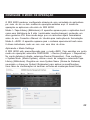
O RDX 8000 pode ser configurado através de uma variedade de aplicativos
por meio de um ou dois modos de operação exibidos aqui. O modo de
operação se aplica aos oito slots do RDX 8000.
Modo 1—Tape Library (Biblioteca): O aparelho aparece para o aplicativo host
como uma biblioteca de 8 slots (autoloader, media changer), contendo um
drive genérico LTO. Esse modo exige que os cartuchos sejam formatados
antes do uso. Consulte o Manual do Usuário para instruções de formatação.
Modo 2—JBOD: O aparelho aparece para o sistema operacional host como
8 drives individuais, cada um com com uma letra de drive.
Aplicando o Modo Settings
O RDX 8000 está preconfigurado para o modo JBOD. Para escolher um outro
modo de operação, selecione CONFIGURE > Device (Configure > Dispositivo).
No canto debaixo à direita, selecione Device (Dispositivo). Para configurar
o System Mode (Modo System), utilize o menu de rolagem e selecione Tape
Library (Biblioteca). Registre um novo System Name (Nome de Sistema)
se exigido e clique em Submit (Submeter) para aplicar as modificações.
Uma caixa de confirmação irá verificar se todas as mudanças foram feitas.
42
REGISTRE SEU RDX 8000
Seu RDX 8000 deve estar operando de forma suave, e queremos ajudá-lo
para que o mesmo continue assim. Para rápida assistência do produto
e drivers e downloads mais recentes, registre hoje mesmo seu RDX 8000 em
www.quantum.com/Registration.
Garantia Limitada: Caso apareça qualquer defeito de material ou de fabricação dentro de 3 (um) ano da compra deste produto, ocorrerá a troca do
aparelho ou a devolução do dinheiro. Para maiores informações, acesse www.
quantum.com/ServiceandSupport/. Essa garantia não se aplica em caso de
desgastes ou danos causados por uso impróprio do aparelho ou acidente.
A Quantum não se responsabilizará por nenhum dado perdido ou outros danos
indiretos, incidentais ou consequenciais. Esta garantia oferece a você direitos
específicos - você pode ter outros direitos que variam de país para país.
Assistência técnica Quantum
Para encontrar documentos de assistência e FAQ, acesse
www.quantum.com/ ServiceandSupport/.
Quantum and the Quantum logo are trademarks of Quantum Corp.
RDX é uma marca registrada da Tandberg Data ASA.
43
INSTRUÇÕES IMPORTANTES DE SEGURANÇA
Este dispositivo cumpre com a 15a. parte das Regras FCC. A operação está sujeita a seguintes duas
condições: (1) Este dispositivo pode não causar interferências prejudiciais, e (2) este dispositivo aceitará
qualquer interferência recebida, incluindo interferência que pode causar operações indesejadas.
Nota: Este equipamento foi testado e verificado observando os limites de um dispositivo digital classe B, em
conformidade com a parte 15 da Lei FCC. Esses limites foram concebidos para proporcionar proteção
razoável contra interferência nociva quando o equipamento for utilizado em um ambiente comercial. Este
equipamento gera, usa e pode irradiar energia de radiofreqüência, e se não for instalado e utilizado em
conformidade com as instruções, poderá causar interferência prejudicial às comunicações de rádio. Operar
este equipamento em uma área residencial poderá da mesma forma ocasionar interferência prejudicial; nesse
caso, o usuário deverá corrigir a interferência por sua própria conta.
Nota: Qualquer alteração não aprovada pela parte responsável pode violar o direito de o usuário operar
o aparelho.
Este aparelho digital de Classe A está de acordo com o ICES-003 do Canadá.
Instruções Importantes de Segurança
1) Leia as instruções.
2) Guarde as instruções.
3) Observe atentamente todos os avisos.
4) Siga todas as instruções.
5) Não utilize este aparelho perto da água.
6) Limpe o aparelho com um pano limpo.
7) Não bloqueie as saídas de ventilação. Instale de acordo com as instruções do fabricante.
8) Não instale o aparelho perto de fontes de calor tais como radiadores, aquecedores, fogões ou outros
aparelhos (incluindo amplificadores) que produzam calor.
9) Não danifique o lacre de segurança dos plugues polarizados ou tipo terra. Um plugue polarizado tem dois
pinos chatos com um mais largo que o outro. Um plugue tipo terra tem dois pinos chatos e um terceiro pino
terra. O pino chato ou o terceiro pino são fornecidos para a sua segurança. Quando o plugue fornecido não
encaixar na tomada, consulte um eletricista para trocar a tomada.
10) Proteja o cabo de força a fim de que o mesmo não seja pisado ou amassado, especialmente em
conexões, receptáculos de conveniência e no ponto em que saem do aparelho.
11) Use somente dispositivos/acessórios especificados pelo fabricante.
12) Use apenas com carrinho, estante, tripé, suporte ou mesa especificados pelo fabricante ou vendido com
o aparelho. Ao utilizar um carrinho, cuidado ao mover o conjunto de carrinhos/aparelho para evitar danos
provocados por quedas.
13) Desligue o aparelho da tomada durante uma tempestade de raios ou quando não for usado por um
longo período de tempo.
14) Consulte pessoal qualificado para qualquer seviço. A manutenção se faz necessária sempre que o
produto apresentar qualquer tipo de dano, como danos ao cabo de força ou à tomada, derramamento
de líquidos ou queda de objetos no interior do produto, exposição à chuva ou à umidade, funcionamento
anormal ou queda.
44