1
DVD VIDEO PLAYER
Read this manual first!
Congratulations on purchasing this Philips product.
We’ve included everything you need to get started.
If you have any problems, Philips representatives can
help you get the most from your new product by explaining:
• Hookups,
• First time setup, and
• Operation.
For fast help, call us first!
Tel: see back page of this manual
737
DVD
Important notes for users in the
U.K.
Mains plug
This apparatus is fitted with an approved 13
Amp plug. To change a fuse in this type of plug
proceed as follows:
1
2
Remove fuse cover and fuse.
3
Refit the fuse cover.
Fix new fuse which should be a BS1362 5 Amp,
A.S.T.A. or BSI approved type.
If the fitted plug is not suitable for your jack
outlets, it should be cut off and an appropriate
plug fitted in its place.
If the mains plug contains a fuse, this should
have a value of 5 Amp. If a plug without a fuse
is used, the fuse at the distribution board
should not be greater than 5 Amp.
Note: The severed plug must be disposed to
avoid a possible shock hazard should it be
inserted into a 13 Amp jack elsewhere.
How to connect a plug
The wires in the mains lead are coloured with
the following code: blue = neutral (N),
brown = live (L).
¶ As these colours may not correspond with the
colour markings identifying the terminals in
your plug, proceed as follows:
– Connect the blue wire to the terminal
marked N or coloured black.
– Connect the brown wire to the terminal
marked L or coloured red.
– Do not connect either wire to the earth
terminal in the plug, marked E (or e) or
coloured green (or green and yellow).
Before replacing the plug cover, make certain
that the cord grip is clamped over the sheath
of the lead - not simply over the two wires.
Copyright in the U.K.
Recording and playback of material may
require consent. See Copyright Act 1956 and
The Performer’s Protection Acts 1958 to 1972.
CAUTION
Use of controls or adjustments or
performance of procedures other than
herein may result in hazardous
radiation exposure or other unsafe
operation.
VAROITUS
Muiden kuin tässä esitettyjen
toimintojen säädön tai asetusten
muutto saattaa altistaa vaaralliselle
säteilylle tai muille vaarallisille
toiminnoille.
DK
SF
Advarsel: Usynlig laserstråling ved
åbning når sikkerhedsafbrydere er ude
af funktion. Undgå utsættelse for
stråling.
Luokan 1 laserlaite
Varoitus! Laitteen käyttäminen
muulla kuin tässä käyttöohjeessa
mainitulla tavalla saattaa altistaa
käyttäjän turvallisuusluokan 1
ylittävälle näkymättömälle
lasersäteilylle.
Oikeus muutoksiin varataan. Laite
ei saa olla alttiina tippu-ja
roiskevedelle.
Bemærk: Netafbryderen er sekundært
indkoblet og ofbryder ikke strømmen
fra nettet. Den indbyggede netdel er
derfor tilsluttet til lysnettet så længe
netstikket sidder i stikkontakten.
S
Klass 1 laseraparat
Varning! Om apparaten används på
annat sätt än i denna bruksanvisning
specificerats, kan användaren utsättas
för osynlig laserstrålning, som
överskrider gränsen för laserklass 1.
Observera! Stömbrytaren är sekundärt
kopplad och bryter inte strömmen från
nätet. Den inbyggda nätdelen är
därför ansluten till elnätet så länge
stickproppen sitter i vägguttaget.
Huom.Toiminnanvalitsin on kytketty
toisiopuolelle, eikä se kytke laitetta irti
sähköverkosta. Sisäänrakennettu
verkko-osa on kytkettynä
sähköverkkoon aina silloin, kun pistoke
on pistorasiassa.
General Information
Environmental Information
Laser safety
All unnecessary packaging has been
omitted. The packaging has been made
easy to separate into three materials:
cardboard (box), polystyrene foam
(buffer) and polyethylene (bags, protective
foam sheet).
This unit employs a laser. Due to possible
eye injury, only a qualified service person
should remove the cover or attempt to
service this device.
Your DVD player consists of materials
which can be recycled and reused if
disassembled by a specialised company.
Please observe the local regulations
regarding the disposal of packaging
materials, exhausted batteries and old
equipment.
Manufactured under license from Dolby
Laboratories. “Dolby”, “Pro Logic” and the
double-D symbol are trademarks of Dolby
Laboratories.
DivX, DivX Certified, and
associated logos are
trademarks of
DivXNetworks, Inc and
are used under license.
NOTE:
PICTURES SHOWN MAYBE
DIFFERENT BETWEEN
COUNTRIES.
CAUTION
(WARNING LOCATION: ON THE
BACKPLATE OF THE SET)
NEVER MAKE OR CHANGE
CONNECTIONS WITH THE
POWER SWITCHED ON.
Important Note:
Due to the numerous versions of new
CD-Audio copy protection or
enhanced CD-Audio protection
recently available on certain discs,
Philips is unable to guarantee that
this DVD Player is fully compatible
with such new discs. Should you have
difficulty playing any such CD-Audio
discs, kindly refer them to your CDAudio disc retailer.
The DVD VIDEO player is in
conformity with the EMC directive
and low-voltage directive.
For Customer Use:
Read carefully the information located at
the bottom of your DVD VIDEO player
and enter below the Serial No. Retain this
information for future reference.
LASER
Type
Wave length
Output Power
Model No. DVD VIDEO 737
Serial No. _______________
Beam divergence
Semiconductor laser
GaAlAs
650 nm (DVD)
780 nm (VCD/CD)
7 mW (DVD)
10 mW (VCD/CD)
60 degree
English
Index
Français
English --------------------------------------- 6
Deutsch
Français ------------------------------------ 33
Nederlands
Deutsch ------------------------------------ 61
Nederlands ------------------------------- 89
CAUTION
VISIBLE AND INVISIBLE LASER
RADIATION WHEN OPEN.
AVOID EXPOSURE TO BEAM.
ADVARSEL
SYNLIG OG USYNLIG
LASERSTRÅLING VED ÅBNING
UNDGÅ UDSÆTTELSE FOR STRÅLING
VARNING
SYNLIG OCH OSYNLIG
LASERSTRÅLNING NÄR DENNA DEL
ÄR ÖPPNAD BETRAKTA EJ STRÅLEN
VARO!
AVATTAESSA OLET ALTTIINA
NÄKYVÄLLE JA NÄKYMÄTTÖMÄLLE
LASER SÄTEILYLLE. ÄLÄ KATSO
SÄTEESEEN
VORSICHT
GEFAHR VON SICHTBARER UND
UNSICHTBARER LASERSTRAHLUNG
BEI GEÖFFNETEM GEHÄUSE.
ATTENTION
RAYONNEMENT LASER VISIBLE ET
INVISIBLE EN CAS D’OUVERTURE
EXPOSITION DANGEREUSE AU
FAISCEAU
5
Contents
English
Introduction
Supplied accessories ................................... 7
Region Codes ............................................... 7
Care and safety information ..................... 7
Connections
Basic Connections ...................................... 8
Picture ...................................................... 8
Sound ........................................................ 8
Connecting TV ......................................... 8-9
Using SCART jack .................................. 8
Using CVBS jack ..................................... 9
Connecting the power cord ..................... 9
Optional : Connecting to an Audio System
....................................................................... 10
Optional: Connecting Digital AV Receiver
....................................................................... 10
Functional Overview
Front and Rear Panels .............................. 11
Remote Control ........................................ 12
Getting Started
Step 1: Inserting batteries into the
Remote Control ........................................ 13
Using the Remote Control to operate
the Player ............................................... 13
Step 2: Setting up the TV ......................... 14
Selecting the colour system that
corresponds to your TV ..................... 14
Step 3: Setting language preference ....... 15
Setting the OSD Language ................. 15
Setting the Audio, Subtitle and Disc
menu language ...................................... 15
Disc Operations
Playable Discs ............................................. 16
Playing discs ................................................ 16
Using the Disc Menu ................................ 17
Symbols Used in this Manual .................. 17
Basic playback controls ...................... 17-18
Pausing playback ................................... 17
Selecting track/chapter ....................... 17
Mute ........................................................ 17
Resuming playback from the last
stopped point ........................................ 17
Zoom ...................................................... 18
Repeat ..................................................... 18
6
Repeat A-B ............................................. 18
Time Search ........................................... 18
Special DVD features ............................... 19
Playing a Title ......................................... 19
Camera Angle ........................................ 19
Changing the Audio Language ........... 19
Changing the Audio Channel ............. 19
Subtitles .................................................. 19
Special VCD & SVCD Features .............. 19
Playback Control (PBC) ...................... 19
Preview ................................................... 20
Playing MP3/Picture disc .......................... 21
General Operation .............................. 21
Playback selection ................................ 21
Program playback ................................. 21
Special MP3/JPEG features ...................... 22
Preview Function (JPEG) .................... 22
Zoom picture (JPEG) .......................... 22
Playback with multi-angles (JPEG) .... 22
Scan Effect (JPEG) ................................ 22
Playback speed control (MP3) ........... 22
JPEG and MP3 simultaneous playback .
.................................................................. 22
DVD Menu Options
Basic Operations ....................................... 23
General Setup menu ................................. 23
Screen Saver .......................................... 23
Smart Power ......................................... 23
Audio Setup Menu .............................. 24-25
DOWNMIX .......................................... 24
3D ............................................................ 24
Night Mode ........................................... 24
Digital Output ....................................... 25
Analog Output ...................................... 25
Video Setup Menu ............................... 26-27
TV Display ............................................. 26
Smart Picture ........................................ 26
Brightness .............................................. 27
Preference Setup Menu ..................... 27-28
Parental ............................................. 27-28
Password ................................................ 28
Default .................................................... 28
Troubleshooting ......................... 29–30
Specifications ...................................... 31
Glossary ...................................................................... 32
Supplied accessories
SCART cable
(black)
Audio cable
(white, red)
Remote Control
and
two AA batteries
PREVIEW
MUTE
Region Codes
DVD discs must be labeled for ALL
regions or Region 2 in order to play on
this Player.
You cannot play Discs that are labeled for
other regions.
Look for symbols above on your DVD
discs.
2
ALL
Care and safety information
● Power supply voltage
– Check that the operating voltage
indicated on the typeplate is identical to
the voltage of your local power supply. If
not, please consult your dealer.
● Power consumption
– When the system is switched to
Standby mode, it is still consuming power.
To disconnect the system from the power
supply completely, remove the AC power
plug from the wall jack.
● Avoid high temperatures, moisture,
water and dust
– Do not expose the player, batteries or
discs to humidity, rain, sand or excessive
heat (caused by heating equipment or
direct sunlight.)
● Avoid condensation problem
– The lens may cloud over when the
player is suddenly moved from cold to
warm surroundings, making it impossible
to play a disc. Leave the player in the
warm environment until the moisture
evaporates.
● Do not block the vents
– Do not operate the DVD Player in an
enclosed cabinet, allow about 10 cm (4
inches) of free space all around the player
for adequate ventilation.
10 cm
(4 inches)
10 cm
(4 inches)
PHILIPS
DVD Home Cinema System
10 cm
(4 inches)
● Care of the cabinet
– Use a soft cloth slightly moistened
with a mild detergent solution. Do not
use a solution containing alcohol, spirits,
ammonia or abrasives.
● Finding a suitable location
– Place the player on a flat, hard, and
stable surface.
● Disc handling
– To clean a CD, wipe it in a
straight line from the center
towards the edge using a
soft, lint-free cloth. A
cleaning agent may damage
the disc!
– Write only on the printed side of a
CDR(W) and only with a soft felt-tipped pen.
– Handle the disc by its edge, do not
touch the surface.
7
English
General Information
Connections
English
Basic Connections
● Please refer to the instruction books of
your TV, VCR, Stereo or other devices as
necessary to make the best connections.
The following guidelines are options for
the best picture and sound quality
available on your DVD player.
Picture
Connecting TV
IMPORTANT!
– You only need to make one video
connection from the following
options, depending on the
capabilities of your TV system.
– SCART connection will let you
use the features of both the Audio
and Video in the DVD Player.
* Use CVBS Video Output for good
picture quality.
** Use SCART Output for best picture
quality.
Back
of TV
Sound
1 Digital audio connections provide the
clearest sound with a digital amplifier or
receiver. Connect the DVD player’s
COAXIAL DIGITAL AUDIO OUT to
your amplifier or receiver.
2 If the digital connection is not possible,
use the audio cables (white/red) to
connect AUDIO IN (L/R) jacks to your
amplifier, receiver, stereo or TV.
TV IN SCART
TO TV
SCART IN
L
VIDEO
R
COAXIAL
TV OUT
Warning!
– Never make or change
connections with the power
switched on.
– Connect the DVD Player directly
to the TV.
– Do not connect the DVD player
AUDIO OUT to the PHONO IN of
your amplifier or receiver.
8
Using SCART jack
● Use the SCART cable (black) to connect
the DVD Player’s SCART jack (TV OUT)
to the connector (TV IN) on the TV
(cable supplied).
Helpful Hint:
– Ensure that the “TV” indication on
SCART cable is connected to the TV
set and “DVD” indication on SCART
cable is connected to the DVD Player.
Connections
English
Connecting the power cord
Back
of TV
RIGHT
AUDIO IN
VIDEO IN
LEFT
AUDIO IN
COMPONENT
VIDEO IN
AUDIO
OUT
S-VIDEO
IN
Pr/Cr
~ AC MAINS
Pb/Cb
VIDEO IN
Y
TO TV
AUDIO IN
TO TV
VIDEO IN
L
L
VIDEO
R
COAXIAL
R
TV OUT
Using Composite Video jack (CVBS)
1 Use the composite video cable (yellow)
to connect the DVD Player’s CVBS
(VIDEO) jack to the video input jack (or
labeled as A/V In,Video In, Composite or
Baseband) on the TV (cable not supplied).
2 To hear the sound of this DVD Player
through your TV, use the audio cables
(white/red) to connect AUDIO OUT (L/
R) jacks of the DVD Player to the
corresponding AUDIO IN jacks on the TV
(cable supplied).
After everything is connected
properly, plug in the AC power cord
to the power outlet.
Never make or change any connections
with the power switched on.
Press STANDBY ON on the DVD
Player front panel,
“NO DISC” may appear on the
display panel.
NO DISC
IR
9
Connections
English
Optional : Connecting to an
Audio System
Optional : Connecting Digital AV
Receiver
STEREO
AV Receiver
LEFT
AUDIO IN
COAXIAL IN
RIGHT
AUDIO IN
TO Digital AV Receiver
DIGITAL AUDIO IN
TO STEREO
AUDIO IN
L
R
L
VIDEO
R
COAXIAL
VIDEO
COAXIAL
TV OUT
TV OUT
Stereo system has Dolby Pro Logic
or Right / Left Audio In jack
1 Use the composite video cable (yellow) to
connect the DVD Player’s CVBS (VIDEO)
jack to the video input jack (or labeled as
A/V In,Video In, Composite or Baseband)
on the TV (cable not supplied).
2 Use the audio cables (white/red) to
connect AUDIO OUT (L/R) jacks of
the DVD Player to the corresponding
AUDIO IN jacks on the stereo system
(cable supplied).
Receiver has a PCM, Dolby Digital,
or MPEG2 decoder
1 Select one of the video connections
(CVBS VIDEO IN or SCART jack (TV
OUT) depending on the options available
on your TV.
2 Connect the COAXIAL jack of the DVD
Player to the corresponding COAXIAL
Digital Audio In jack on your Receiver
(cable not supplied).
3 Set the DVD Player’s Digital Output to
PCM-ONLY or ALL depending on the
capabilities of your Receiver (see page 25
“Digital Output”).
Helpful Hint:
– If the audio format of the Digital Output
does not match the capabilities of your
receiver, the receiver will produce a strong,
distorted sound or no sound at all.
10
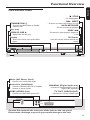
Functional Overview
English
Front and Rear Panels
9 STOP
– To stop playback
T NEXT
STANDBY-ON B
–
– To search or select next chapter or track
To switch the DVD Player to Standby
mode or ON
2; PLAY/PAUSE
– To start or interrupt playback
Disc tray
PREV S
OPEN/CLOSE /
–
– To search or select previous chapter or
track
Open/Close the disc tray
IR Sensor
Display
–
– Point the remote control towards this
sensor
Shows the current status of the DVD
Player
DVD VIDEO PLAYER
IR
Mains (AC Power Cord)
–
Connect to a standard AC outlet
Audio Out (Left/Right)
–
COAXIAL (Digital audio out)
Connect to AUDIO inputs of an amplifier,
receiver or stereo system
– Connect to coaxial AUDIO input of a
digital audio equipment
CVBS (VIDEO Out)
–
TV OUT (VIDEO OUT)
Connect to CVBS Video input of a TV
– Connect to a TV with SCART input
L
VIDEO
R
COAXIAL
TV OUT
Caution: Do not touch the inner pins of the jacks on the rear panel.
Electrostatic discharge may cause permanent damage to the unit.
11
Functional Overview
English
Remote Control
POWER B
RETURN / TITLE
– To go back to previous menu /
show title menu
–
DISC MENU
To switch the DVD player to
standby mode or ON
0-9 numerical key pad
– Enters or exits the disc contents
menu
– Switches on or off the playback
control mode (for VCD version
2.0 only)
–
Selects numbered items in a
menu
DISPLAY
–
Displays information on TV
screen during playback
1 2 3 4
– Selects an item in the menu/
fast forward/backward, slow forward/
backward
SYSTEM MENU
–
PREVIEW
MUTE
OK
Access or exit DVD Player’s
system menu
– Acknowledge menu selection
S
– To search or select previous
chapter or track
T
– To search or select next chapter
or track
SUBTITLE
–
STOP ( 9 )
– To stop playback
PLAY ( B )
– To start playback
PAUSE ( ; )
– To pause playback temporarily /
frame-by-frame playback
ANGLE
–
Selects a DVD camera angle
ZOOM
–
Enlarge a picture on the TV
screen
AUDIO
–
REPEAT
To access into subtitle language
system menu
To access into audio language
system menu
– Selects various repeat modes
REPEAT (A-B)
– Repeats playback a specific section
on a disc
PREVIEW
– To preview the content of a track
or whole disc
MUTE
– Disables or enables sound output
Helpful Hint:
Press “STOP” for about 2 seconds to
OPEN or CLOSE disc tray.
12
Getting Started
English
Step 1: Inserting batteries into
the Remote Control
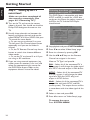
3
1
2
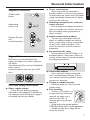
1 Open the battery compartment.
3 Insert two batteries type R06 or AA,
following the indications (+-) inside
the compartment.
3 Close the cover.
Using the Remote Control to
operate the Player
1 Aim the Remote Control
directly at the remote
sensor (iR) on the front
panel.
IR
2 Do not put any objects
between the Remote
Control and the DVD
Player while operating the
DVD Player.
PREVIEW
MUTE
CAUTION!
– Remove batteries if they are
exhausted or if the Remote Control
is not being used for a long time.
– Do not use old and new or
different types of batteries in
combination.
– Batteries contain chemical
substances, so they should be
disposed properly.
13
Getting Started
English
Step 2:
Setting up the TV
Selecting the colour system that
corresponds to your TV
IMPORTANT!
Make sure you have completed all
the necessary connections. (See
pages 8-9 “Connecting TV”).
This DVD Player is compatible with both
NTSC and PAL. In order for a DVD disc
to play on this Player, the colour system of
the Disc, the TV and the DVD Player
should match.
1 Turn on the TV and set to the correct
video-in channel. You should see the blue
Philips DVD background screen on the
TV.
2 Usually these channels are between the
lowest and highest channels and may be
called FRONT, A/V IN, or VIDEO. See your
TV manual for more details.
➜ Or, you may go to channel 1 on your
TV, then press the Channel down button
repeatedly until you see the Video In
channel.
➜ Or, the TV Remote Control may have a
button or switch that chooses different
video modes.
➜ Or, set the TV to channel 3 or 4 if you
are using an RF modulator.
3 If you are using external equipment, (eg.
audio system or receiver), turn it on and
select the appropriate input source for
the DVD Player output. Refer to the
equipment owner’s manual for detail.
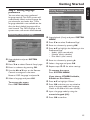
1
2
3
4
Stop playback and press SYSTEM MENU.
Press 4 3 to select ‘Video Setup’ page.
Enter its submenu by pressing OK.
Use the 1 2 3 4 keys on the Remote
Control to navigate in the menu.
Move to ‘TV Type’ and press 2.
PAL – Select this if the connected TV is
PAL system. It will change the video signal
of a NTSC disc and output in PAL format.
NTSC – Select this if the connected TV
is NTSC system. It will change the video
signal of a PAL disc (VCD only) and
output in NTSC format.
Multi – Select this if the connected TV is
compatible with both NTSC and PAL
(multi-system). The output format will be
in accordance with the video signal of the
disc.
5 Select an item and press OK.
6 Press 1 to return to ‘Video Setup’ page.
To remove the menu
Press SYSTEM MENU.
14
Step 3: Setting language
preference
Setting the Audio, Subtitle and Disc
menu language
You can select your own preferred
language settings.This DVD system will
automatically switch to the language for
you whenever you load a disc. If the
language selected is not available on the
disc, the disc’s default language will be
used instead. The OSD language in the
system menu, will remain once selected.
Setting the OSD Language
1 Stop playback (if any) and press SYSTEM
MENU.
2 Press 4 3 to select ‘Preference Page’.
3 Enter its submenu by pressing OK.
4 Press 3 4 to highlight the following in the
Preference Page.
– ‘Audio’ (disc’s soundtrack)
– ‘Subtitle’ (disc’s subtitles)
– ‘Disc Menu’ (disc’s menu)
1 Stop playback and press SYSTEM
MENU.
2 Press 4 3 to select ‘General Setup’ page.
3 Enter its submenu by pressing OK.
4 Use the 1 2 3 4 keys on the Remote
Control to navigate in the menu.
Move to ‘OSD Language’ and press 2.
5 Select a language and press OK.
To remove the menu
Press SYSTEM MENU.
5 Enter its submenu by pressing 2.
6 Select a language and press OK.
7 Repeat steps 3~5 for other settings.
To remove the menu
Press SYSTEM MENU.
If you choose OTHERS in Audio,
Subtitle or Disc Menu,
1 Press 3 4 to highlight ‘Others’.
2 Press OK and when you are asked to
enter a language code (see ‘Language
Code’ at the end of this user manual).
3 Input a language code by using the
numeric keypad (0-9).
4 Press OK to confirm.
15
English
Getting Started
Disc Operations
English
IMPORTANT!
– Depending on the DVD or VIDEO
CD, some operations may be
different or restricted.
– Do not push on the disc tray or
put any objects other than disc on
the disc tray. Doing so may cause
the disc player malfunction.
Playable Discs
Your DVD Player will play:
● Discs:
– Digital Video Discs (DVDs)
– Video CDs (VCDs)
– Super Video CDs (SVCDs)
– Digital Video Discs + Recordable(DVD+R)
– DigitalVideo Discs + Rewritable(DVD+RW)
– Compact Discs (CDs)
– MP3 disc on CD-R(W):
– Maximum 30 characters display.
– Supported sampling frequencies :
32 kHz, 44.1 kHz, 48 kHz (MPEG-1)
16 kHz, 22.05 kHz, 24 kHz (MPEG-2)
– Supported Bit-rates : 32~256 kbps
(MPEG-1), 8~160 kbps (MPEG-2)
variable bitrates
– Picture (JPEG) files on CD-R(W):
– JPEG/ISO 9660 format.
– MPEG-4 disc on CD-R(W):
– Simple profile
– Advanced simple profile (640-480)
– DivX® disc on CD-R(W):
– DivX 4.x and 5.x
– GMC (Global Motion Compensation)
and Q-Pel (Quarter Pixel) not
supported
Helpful Hint:
– If you are having trouble playing a
certain disc, remove the disc and try a
different one. Improper formatted disc will
not play on this DVD Player.
16
IMPORTANT!
If the inhibit icon appears on the
TV screen when a button is
pressed, it means the function is
not available on the current disc
or at the current time.
Playing discs
1 Connect the power cords of the DVD
Player and TV (and any optional stereo or
AV receiver) to a power outlet.
2 Turn on the TV power and set to the
correct Video In channel. (See page 14
“Setting up the TV”).
3 Press STANDBY-ON on the DVD Player
front panel.
➜ You should see the blue Philips DVD
background screen on the TV.
4 Press OPEN•CLOSE 0 button to open
the disc tray and load in a disc, then press
the same button again to close the disc
tray.
➜ Make sure the label side is facing up.
For double-sided discs, load the side you
want to play facing up.
5 Playback will start automatically
(depending on the disc type).
➜ If a disc menu shows on the TV, see
next page on “Using the Disc Menu”.
➜ If the disc is locked by parental control,
you must enter your four-digit password.
(See page 27-28).
6 At any time, simply press STOP to stop
playback.
Using the Disc Menu
Basic playback controls
Depending on the disc, a menu may
appear on the TV screen once you load
the disc.
Unless otherwise stated, all operations
described are based on Remote Control
use.
To select a playback feature or item
● Use the 1 2 3 4 or numeric keypad
(0-9) on the Remote Control, then press
PLAY B to start playback.
To access or remove the menu
● Press DISC MENU on the Remote
Control.
Symbols Used in this Manual
The below symbols appear in some
headings and notes with the following
meanings:
Pausing playback
DVD
VCD
CD
MP3
DivX JPEG
1 During playback, press PAUSE ;.
➜ Playback will pause and sound will be
muted.
2 Press PAUSE ; again to select the
previous or next picture frame.
3 To return to normal playback, press
PLAY B.
Selecting track/chapter
DVD
VCD
CD
1 Press and hold T / S, then press B
DVD
– Description refers to playback of DVD-video discs
VCD
– Description refers to playback of Video CDs
CD
– Description refers to playback of Audio CDs
MP3
– Description refers to playback of MP3 files
to resume normal playback.
➜ While searching, pressing T / S
again will decrease/increase the search
speed.
Mute
1 Press MUTE repeatedly to disable and
enable the sound output.
JPEG
– Description refers to playback of JPG files
DivX
– Description refers to playback of DivX files
Resuming playback from the last
stopped point DVD VCD
Resume playback of the last 5 discs is
possible, even if the disc was ejected or
the power switched off.
● Load one of the last 5 discs.
➜ “LOADING” appears.
● Press PLAY B and the disc will be
played back from the last point.
To cancel resume mode
● In stop mode, press STOP 9 again.
Helpful Hint:
– Resume option may not be available on
some discs.
17
English
Disc Operations
Disc Operations
English
Zoom DVD VCD JPEG
Zooming allows you to enlarge the video
image during playback.
1 Press ZOOM during playback to select
the zoom factor.
2 Within 5 seconds, press 1 2 3 4 to pan
across the TV screen.
3 Press ZOOM repeatedly to increase and
decrease the zoom factor.
➜ Playback will continue.
Repeat DVD VCD
CD
MP3
You can play a chapter, track, title or
entire disc repeatedly.
● Press REPEAT continuously to choose a
Repeat mode during playback.
➜ DVD
‘CHAPTER REPEAT ON/TITLE REPEAT ON/
REPEAT OFF’ appears on the TV screen.
➜ VCD CD
‘REP-ONE/REP-ALL/OFF’ appears on the TV
screen.
➜ MP3
‘REP-ONE/FOLDER REPEAT/DISC REPEAT/
REPEAT OFF’ appears on the TV screen.
Repeat A-B DVD VCD
CD
You can play only a specific portion of a
Title or Track repeatedly.
1 During playback, press REPEAT A-B as
your chosen starting point.
➜ ‘A TO B SET A’ appears on the TV
screen.
2 When the disc reaches your selected
ending point, press REPEAT A-B again.
➜ ‘A TO B SET B’ appears briefly on the
TV screen, and the repeat sequence
begins.
3 To resume regular playback, press REPEAT
A-B again.
➜ ‘A TO B
screen.
18
CANCELLED’
appears on the TV
Time Search DVD VCD
The Time Search function allows you to
start playback at any chosen time on the
disc.
1 Press and hold DISPLAY.
➜ The time edit box appears.
2 Enter hours, minutes and seconds in the
time edit box using Remote Control
numerical key pad.
➜ If incorrect or invalid time is entered,
the numbers will blink on the TV screen.
For DVD
➜ Title/Chapter Remain: displays the
remaining time of the current title/
chapter.
➜ Title/Chapter Elapsed: displays the
elapsed time of the current title/chapter.
For VCD
➜ Title/Single Remain: displays the
remaining time of the current title/single
track.
➜ Title/Single Elapsed: displays the elapsed
time of the current title/single track.
3 Press OK to confirm selection.
➜ Playback starts from the selected time
on the disc.
Helpful Hint:
– This feature will not be applicable to
VCD discs with Playback control in PBC ON.
Special DVD Features
Special VCD & SVCD Features
Playing a Title
Playback Control (PBC)
1 Press DISC MENU.
➜ The disc title menu appears on the TV
screen.
2 Use 341 2 keys or numeric keypad
(0-9) to select a play option.
3 Press OK key to confirm.
Camera Angle
● Press ANGLE repeatedly to select
different desired angle.
Changing the Audio Language
● Press AUDIO repeatedly to select
different audio langauges.
Changing the Audio Channel
For VCD
● Press AUDIO to select the available
audio channels provided by the disc
(STEREO, LEFT MONO, RIGHT MONO
or MIX MONO).
English
Disc Operations
For VCD with Playback Control (PBC)
feature (version 2.0 only)
● In stop mode, press DISC MENU to
toggle between ‘PBC ON’ and ‘PBC OFF’.
➜ If you select ‘PBC ON’, the disc menu
(if available) will appear on the TV.
➜ Use the S / T to highlight your
selection and press OK to confirm or use
the numeric keypad (0-9) to select a play
option.
● During playback, pressing DISC MENU
will return to the menu screen (if PBC is
on).
If you want to skip the index menu
and playback directly from the
beginning,
● In stop mode, press DISC MENU key on
the remote control to switch off the
function.
Subtitles
● Press SUBTITLE repeatedly to select
different subtitle langauges.
19
Disc Operations
English
Preview VCD SVCD
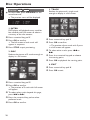
● At stop mode, press PREVIEW on the
remote control.
➜ The preview menu will be displayed.
3. TRACK
Reduce the picture of a single track
enough to display in a full screen.
1. INTRO
DVD player will playback every track for
few seconds with full screen to obtain a
summary of the disc content.
1 Press numerical key pad ‘1’.
2 Press OK to confirm.
➜ The full screen of each track will
appear in sequence.
3 Press STOP to quit previewing.
2. DISC
Reduce the picture of 9 tracks enough to
display in a full screen.
1 Press numerical key pad ‘3’.
2 Press OK to confirm.
➜ The preview of one track with 9 parts
in a full screen will appear.
3 To select other tracks, press S or
T.
4 Press the numerical key pad to choose
the starting point.
5 Press OK to playback the starting point.
4. EXIT
1 Press numerical key pad ‘4’.
2 Press OK to exit.
1 Press numerical key pad ‘2’.
2 Press OK to confirm.
➜ The preview of 9 track with full screen
will appear.
3 To select other tracks beyond this page,
press S or T.
4 Press the numerical key pad to select
preferred track.
5 Press OK to confirm.
20
●
●
●
●
●
This player can playback DivX, MPEG-4,
MP3, JPEG,VCD & SVCD files on a
personally recorded CD-R/RW disc or
commercial CD.
Maximum files programmable is 99.
MP3: Maximum supported bitrate is 320
kbps or 48 kHz.
DivX: DivX4.x and 5.x comply with this
standard, except GMC (Global Motion
Compensation) and QP (Quarter Pixel)
features.
MPEG-4: All video codecs that comply
with specifications of ISO-MPEG4.
JPEG: For baseline JPEG, maximum
resolution is 5120 x 3840 (beyond this,
picture will be cropped) For progressive
JPG, maximum resolution 2048 x 1536
(beyond this, picture will not be displayed).
Playing MP3/DivX/MPEG-4/JPEG
IMPORTANT!
You have to turn on your TV and set to
the correct Video In channel. (See page
14 “Setting up the TV”).
General Operation
1 Load an MP3/DivX/MPEG-4/JPEG disc.
➜ The disc menu appears on the TV
screen.
2 Use 3 4 to select the folder and press
OK to open the folder.
3 Press 2 to enter the file list.
Playback selection
During playback, you can;
● Press S / T to select another file in
the current folder.
● Use 1 2 3 4 on the remote to rotate/flip
the picture files.
● Press ; repeatedly to pause/resume
playback.
In stop mode, you can;
● Press REPEAT continuously to access
different ‘Play Mode’.
➜ FOLDER: files will be played back once.
➜ REPEAT ONE: one file being played
repeatedly.
➜ REPEAT FOLDER: all files in one folder
being played repeatedly.
➜ SHUFFLE: all files in the current folder
being played at random order.
Possible experience encountered:
– It is normal to experience an occasional
“skip” while listening to your MP3 discs.
– It is normal to experience an occasional
pixelation during MPEG-4/DivX playback
due to clarity of digital contents during
internet downloading.
– Some files may be distorted during
playback due to the configuration and
characteristics of the disc.
Program Playback
1 In the DISC MENU, press the 3 4 to
select one file or S / T to open the
next six files.
2 Press DISC MENU select ‘Program’.
3 Press OK or PLAY to add the selected
4 Press 3 4 or use the numeric keypad
(0-9) to highlight an option.
5 Press OK to confirm.
➜ The playback will start from the
selected file to the end of the folder.
file into the program.
➜ The maximum is 99 files.
4 To view the selected program file, select
‘Playlist’.
➜ The programmed file(s) list appears.
5 Select one of the programmed file(s) and
press OK or PLAY.
➜ The playback will start from the
selected file to the end of the playlist.
21
English
Disc Operations
Disc Operations
English
Special MP3/JPEG features
IMPORTANT!
You have to turn on your TV and set to
the correct Video In channel. (See page
14 “Setting up the TV”).
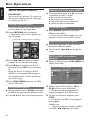
Preview Function (JPEG)
This function shows the content of the
current folder or the whole disc.
1 Press PREVIEW during playback.
➜ Thumbnails of 9 pictures appears on
the TV screen.
Playback with multi-angles (JPEG)
● During playback, press 3 4 1 2 to rotate
the picture on the TV screen.
3: flip the picture vertically
4: flip the picture horizontally
1: rotate the picture anti-clockwise
2: rotate the picture clockwise
Scan Effect (JPEG)
● Press ANGLE repeatedly to choose
different scan effect.
➜ Various of scan effect appears on the
top left hand corner on the TV screen.
(example for 9 thumbnail pictures display)
Playback speed control (MP3)
● Press 1 2 repeatedly to play backward/
forward at different speed.
● You can press S / T to change the
tracks.
2 Press S / T to display the other
pictures on the previous/next page.
3 Use 1 2 3 4 to highlight one of the
JPEG and MP3 simultaneous
playback
1 Select an MP3 file, press DISC MENU to
select ‘Slide Show’.
picture and press OK to start playback,
or,
Move the cursor to highlight SLIDE
SHOW on the bottom of the page to
start playback from the first picture on
the current page.
4 Press DISC MENU to return to MP3/
Picture CD menu.
Zoom picture (JPEG)
2 Select a picture file and press OK or
● During playback, press ZOOM repeatedly
to display the picture with different scales.
PLAY to start music slide show.
➜ The picture will be played back in
sequence together with MP3 music.
● Use 1 2 3 4 to view the zoomed picture.
3 To quit simultaneous playback, press
STOP.
➜ The picture and MP3 music playback
will stopped.
Helpful Hint:
– During simultaneous playback of JPEG
and MP3, S / T keys are invalid.
22
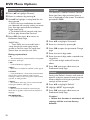
DVD Menu Options
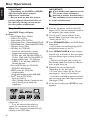
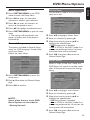
1 Press SYSTEM MENU in the STOP
mode to enter the Setup Menu.
Screen Saver
This function is used to turn the screen
saver on or off.
English
Basic Operations
2 Press OK to enter the next level
submenu or confirm your selection.
3 Press 1 2 to enter the submenu or
return to the previous menu.
4 Press 34 to highlight the desired menu.
5 Press SYSTEM MENU to quit the setup
menu.
➜ The settings will be stored in the
player’s memory even if the player is
switched off.
General Setup menu
The options included in General Setup
menu are: ‘OSD Language’, ‘Screen Saver’
and ‘Smart Power’.
Follow the steps below:
1 Press 34 to highlight ‘Screen Saver’.
2 Enter its submenu by pressing 2.
3 Move the cursor by pressing 34 to
highlight the selected item.
➜ Off: Screen saver is disabled.
➜ On: In STOP or No DISC mode, if no
actions are performed within 5 minutes,
the screen saver will be activated.
4 Press OK, then press 1 to return to
General Setup Page.
Smart Power
When in ‘Stop’ or ‘No Disc’ mode, the
DVD Player will switch to standby mode
after 15 minutes of inactivity for energy
saving.
1 Press SYSTEM MENU to enter the
setup menu.
2 Press 3 4 to select the ‘General Setup’
page.
3 Press OK to confirm.
1 Press 34 to highlight ‘Smart Power’.
2 Enter its submenu by pressing 2.
3 Move the cursor by pressing 34 to
NOTE:
Some of the features in the DVD
Menu Options are described in
“Getting Started”.
highlight the selected item.
➜ Off: Smart Power is disabled.
➜ On: In STOP or No DISC mode, if no
actions are performed for 15 minutes, the
smart power will be activated.
4 Press OK, then press 1 to return to
General Setup Page.
23
DVD Menu Options
English
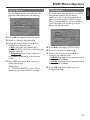
Audio Setup Menu
3D
The options included in Audio Setup
menu are: ‘Downmix’, ‘3D’, ‘Night Mode’,
‘Digital Output’ and ‘LPCM Output’.
3D sound provides a virtual surround
sound experience using just two speakers.
1 Press SYSTEM MENU.
2 Press 3 4 to select the ‘Audio Setup’
page.
3 Press OK to confirm.
Downmix
1 Press 34 to highlight ‘3D’.
2 Enter its submenu by pressing 2.
3 Move the cursor by pressing 34 to
highlight the selected item.
➜ Off: Disable 3D sound.
➜ On: Enable 3D sound.
1 Press the 34 keys to highlight
4 Press OK, then press 1 to return to
Audio Setup Page.
‘Downmix’.
2 Enter its submenu by pressing 2.
3 Move the cursor by pressing the 34 keys
to highlight the selected item.
➜ LT/RT: Select this option if your DVD
Player is connected to a Dolby Prologic
decoder.
➜ Stereo: Select this option when output
delivers sound from only the two front
speakers and subwoofer.
Night Mode
High volume outputs are softened,
enabling you to watch your favourite
action movie without disturbing others at
night.
4 Press OK, then press 1 to return to
Audio Setup Page.
1 Press 34 to highlight ‘Night Mode’.
2 Enter its submenu by pressing 2.
3 Move the cursor by pressing 34 to
highlight the selected item.
➜ Off: Disable night mode.
➜ On: Enable night mode.
4 Press OK, then press 1 to return to
Audio Setup Page.
24
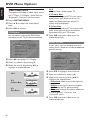
Digital Output
LPCM Output
Set the Digital output according to your
optional audio equipment connection.
If you connect the DVD Player to a PCM
compatible receiver via the digital
terminals, such as coaxial or optical etc,
you may need to adjust ‘LPCM Output’.
Discs are recorded at a certain sampling
rate. The higher the sampling rate, the
better the sound quality.
1 Press 34 to highlight ‘Digital Output’.
2 Enter its submenu by pressing 2.
3 Move the cursor by pressing 34 to
highlight the selected item.
➜ All: If you have connected your
DIGITAL AUDIO OUT to a multi-channel
decoder/receiver.
➜ PCM Only: Only if your receiver is
not capable of decoding multi-channel
audio.
4 Press OK, then press 1 to return to
Audio Setup Page.
Helpful Hint:
– If DIGITAL OUTPUT is set to ‘All’, all
audio settings except MUTE are invalid.
1 Press 34 to highlight ‘LPCM Output’.
2 Enter its submenu by pressing 2.
3 Move the cursor by pressing 34 to
highlight the selected item.
➜ 48kHz: Playback a disc recorded at the
sampling rate of 48kHz.
➜ 96kHz: Playback a disc recorded at the
sampling rate of 96kHz.
4 Press OK, then press 1 to return to
Audio Setup Page.
25
English
DVD Menu Options
DVD Menu Options
English
Video Setup Menu
The options included in Video Setup menu
are: ‘TV Type’, ‘TV Display’, ‘Smart Picture’,
‘Brightness’, ‘Contrast’ and ‘Saturation’.
1 Press SYSTEM MENU.
2 Press 3 4 to select the ‘Video Setup’
page.
3 Press OK to confirm.
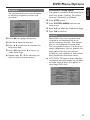
TV Display
Set the aspect ratio of the DVD Player
according to the TV you have connected.
16:9
➜ If you have a wide-screen TV.
4:3 Letter Box
➜ If you have a normal TV. In this case, a
wide picture with black bands on the
upper and lower portions of the TV
screen will be displayed.
4:3 Pan Scan
➜ If you have a normal TV and want both
sides of the picture to be trimmed or
formatted to fit your TV screen.
4 Press OK, then press 1 to return to
Video Setup Page.
Smart Picture
In this menu, you can choose a picture
setting from a fixed set of ideal predefined
picture settings.
1 Press 34 to highlight ‘TV Display’.
2 Enter its submenu by pressing 2.
3 Move the cursor by pressing 34 to
highlight the selected item.
16:9
4:3
Letter Box
4:3
Pan Scan
1 Press 34 to highlight ‘Smart Picture’.
2 Enter its submenu by pressing 2.
3 Move the cursor by pressing 34 to
highlight the selected item.
➜ Standard: select the standard picture
setting.
➜ Bright: make the TV picture brighter.
➜ Soft: make the TV picture softer.
➜ Personal: achieve the colour effect set
in the ‘Brightness’, ‘Contrast’ and
‘Saturation’ menu.
4 Press OK, then press 1 to return to
Video Setup Page.
26
Brightness
Preference Setup Menu
You can personalise your picture colour
by adjusting brightness,contrast and
saturation.
The options included in Preference Setup
menu are: ‘Audio’, ‘Subtitle’, ‘Disc Menu’,
‘Parental’, ‘Password’ and ‘Default’.
1 Press STOP twice.
2 Press SYSTEM MENU to enter the
setup menu.
3 Press 3 4 to select the ‘Preference’ page.
4 Press OK to confirm.
Parental
1 Press 34 to highlight ‘Brightness’.
2 Press 2 to open the level bar.
3 Press 3 4 to decrease or increase the
brightness level.
4 Press OK, then press 1 to return to
Video Setup Page.
● Repeat steps 1 - 4 for adjusting the
contrast and saturation feature.
Some DVDs may have a parental level
assigned to the complete disc or to
certain scenes on the disc. This feature
lets you set a playback limitation level.
The rating levels are from 1 to 8 and are
country dependent. You can prohibit the
playing of certain discs that are not
suitable for your children or have certain
discs played with alternative scenes.
● VCD, SVCD, CD have no level indication,
so parental control function has no effect
on those kinds of discs. This applies to
most illegal DVD discs.
27
English
DVD Menu Options
DVD Menu Options
English
Parental - cont’d
1 Press 34 to highlight ‘Parental’.
2 Enter its submenu by pressing 2.
3 Use 34 to highlight a rating level for the
Password
This feature is used for Parental Control.
Enter your four digit password when a
hint is displayed on the screen. The default
password is 0000.
disc inserted.
➜ DVDs that are rated above the level
you selected will not play unless you enter
your four-digit password and choose a
higher level rating.
➜ To disable Parental controls and have
all Discs play, choose ‘No Parental’.
4 Press OK, then press 1 to return to
Preference Setup Page.
Helpful Hint:
– Some DVDs are not encoded with a
rating though the movie rating may be
printed on the Disc cover. The rating level
feature does not work for such Discs.
Rating explanations
2G
– General Audience; recommended as acceptable
for viewers of all ages.
3 PG
– Parental Guidance suggested.
4 PG13
– Material is unsuitable for children under age 13.
5-6 PG-R
– Parental Guidance - Restricted; recommended
that parents restrict children under 17 from
viewing or allow to view only when supervised by
a parent or adult guardian.
7 NC-17
– No children under age 17; not recommended
viewing for children under age 17.
8 ADULT
– Mature material; should be viewed only by
adults due to graphic sexual material, violence or
language.
NO PARENTAL
– It will play all discs.
28
1 Press 34 to highlight ‘Password’.
2 Enter its submenu by pressing 2.
3 Press OK to open the password ‘Change’
page.
4 Enter the new 4-digit code.
5 Enter the new 4-digit code a second time
to confirm.
➜ The new 4 digit code will be take
effect.
6 Press OK, then press 1 to return to
Preference Setup Page.
Default
Setting the ‘Default’ function will reset all
options and your personal settings to the
factory defaults and all your personal
settings will be erased.
1 Press 34 to highlight ‘Default’.
2 Highlight RESET by pressing 2.
3 Press OK, then press 1 to return to
Preference Setup Page.
Caution!
– When this function is activated, all
settings will be reset to factory
defaults.
WARNING
Under no circumstances should you try to repair the system yourself, as this will
invalidate the warranty. Do not open the system as there is a risk of electric shock.
If a fault occurs, first check the points listed below before taking the system for repair. If
you are unable to remedy a problem by following these hints, consult your dealer or
Philips for help.
Problem
Solution
No power
– Check if the AC power cord is properly connected.
– Press the STANDBY ON on the front of the DVD
system to turn on the power.
No picture
– Refer to your TV’s manual for correct Video In
channel selection. Change the TV channel until you
see the DVD screen.
– Check if the TV is switched on.
Distorted picture
– Sometimes a small amount of picture distortion may
appear depending on the disc being played back. This
is not a malfunction.
Completely distorted picture or
black/white picture with DVD
– Connect DVD Player directly to the TV.
– Make sure the disc is compatible with the DVD/
Player.
– Ensure that the DVD Player’s TV System is set to
match that of the Disc and your TV.
No sound or distorted sound
– Adjust the volume.
– Check that the speakers are connected correctly.
No audio at digital output
– Check the digital connections.
– Check if your receiver can decode MPEG-2 or DTS
and if not, please make sure the digital output is set
to PCM.
– Check if the audio format of the selected audio
language matches your receiver capabilities.
No sound and picture
– Check that the SCART cable is connected to the
correct device (See Connecting TV).
Disc can’t be played
–
–
–
–
Picture freezes momentarily
during playback
– Check the disc for fingerprints/scratches and
clean with a soft cloth wiping from centre to edge.
No return to start-up screen when
disc is removed
– Reset the unit by switching the player off, then on
again.
The DVD+R/CD-R must be finalized.
Ensure the disc label is facing up.
Check if the disc is defective by trying another disc.
If you have recorded a Picture CD or MP3 CD
yourself, ensure that your disc contains at least 10
pictures or 5 MP3 tracks.
– Region code incorrect.
29
English
Troubleshooting
Troubleshooting
English
Problem
Solution
The player does not respond to
the Remote Control
– Aim the Remote Control directly at the sensor
on the front of the player.
– Reduce the distance to the player.
– Replace the batteries in the Remote Control.
– Re-insert the batteries with their polarities (+/–
signs) as indicated.
Buttons do not work
– To completely reset the player, unplug the AC
cord from the AC outlet for 5-10 seconds.
Player does not respond to some
operating commands during playback.
– Operations may not be permitted by the disc.
Refer to the instructions of the disc jacket.
DVD Player cannot read
CDs/DVDs
– Use a commonly available cleaning CD/DVD to
clean the lens before sending the DVD Player for
repair.
Menu items cannot be selected
– Press STOP twice before selecting System Menu.
– Depending on the disc availability, some menu items
cannot be selected.
Unable to play DivX movies
– Check that the DivX file is encoded in ‘Home
Theater’ mode with DivX 5.x encoder.
If you are unable to remedy a problem by following these hints, consult your dealer
or service center (HOTLINE).
30
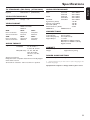
TV STANDARD (PAL/50Hz) (NTSC/60Hz)
AUDIO PERFORMANCE
Number of lines
Playback
DA Converter
DVD
625
Multistandard
525
(PAL/NTSC)
VIDEO PERFORMANCE
CVBS
RGB (SCART)
SVCD
1Vpp — 75
0.7 Vpp — 75
VIDEO FORMAT
Digital Compression
MPEG 2 for DVD,SVCD
MPEG 1 for VCD
MPEG-4
DVD
Horiz. resolution
Vertical resolution
50Hz
720 pixels
576 lines
60Hz
720 pixels
480 lines
VCD
Horiz. resolution
Vertical resolution
50Hz
352 pixels
288 lines
60Hz
352 pixels
240 lines
CD/VCD
Signal-Noise (1kHz)
Dynamic range(1kHz)
Crosstalk (1kHz)
Distortion/noise (1kHz)
MPEG MP3
MPEG Audio L3
Mpeg/ AC-3/
DTS/PCM
compressed Digital
16, 20, 24 bits
fs, 44.1, 48, 96 kHz
MP3(ISO 9660) 96, 112, 128, 256
kbps & variable
bit rate fs, 32, 44.1,
48 kHz
Analog Sound Stereo
Dolby Surround compatible downmix from Dolby Digital
multi-channel sound
3D Sound for virtual 5.1 channel sound on 2 speakers
4Hz- 44kHz
4Hz- 22kHz
4Hz- 22kHz
4Hz- 20kHz
4Hz- 20kHz
110 dB
100 dB
105 dB
90 dB
CONNECTIONS
Scart Output
Video Output
Audio Output(L+R)
Digital Output
AUDIO FORMAT
Digital
24bit
fs 96 kHz
fs 48 kHz
fs 48 kHz
fs 44.1kHz
fs 44.1kHz
English
Specifications
Euroconnector
Cinch (yellow)
Cinch (white/red)
1 coaxial
IEC60958 for CDDA / LPCM
IEC61937 for MPEG 1/2, Dolby
Digital and DTS
CABINET
Dimensions (w x h x d)
Weight
435 x 43 x 310 mm
Approximately 2.5 kg
POWER CONSUMPTION
Power consumption in Standby mode
<5W
* typical playing time for movie with 2 spoken languages and
3 subtitle languages
Specifications subject to change without prior notice
31
Glossary
English
Analog: Sound that has not been turned into
numbers. Analog sound varies, while digital sound has
specific numerical values. These jacks send audio
through two channels, the left and right.
Aspect ratio: The ratio of vertical and horizontal
sizes of a displayed image. The horizontal vs. vertical
ratio of conventional TVs. is 4:3, and that of widescreens is 16:9.
AUDIO OUT Jacks: Jacks on the back of the DVD
System that send audio to another system (TV, Stereo,
etc.).
Bit Rate: The amount of data used to hold a given
length of music; measured in kilobits per seconds, or
kbps. Or, the speed at which you record. Generally,
the higher the bit rate, or the higher the recording
speed, the better the sound quality. However, higher
bit rates use more space on a Disc.
Chapter: Sections of a picture or a music piece on a
DVD that are smaller than titles. A title is composed
of several chapters. Each chapter is assigned a chapter
number enabling you to locate the chapter you want.
Disc menu: A screen display prepared for allowing
selection of images, sounds, subtitles, multi-angles, etc
recorded on a DVD.
Digital: Sound that has been converted into
numerical values. Digital sound is available when you
use the DIGITAL AUDIO OUT COAXIAL or
OPTICAL jacks. These jacks send audio through
multiple channels, instead of just two channels as
analog does.
Dolby Digital: A surround sound system developed
by Dolby Laboratories containing up to six channels
of digital audio (front left and right, surround left and
right, center and subwoofer).
DTS: Digital Theater Systems. This is a surround
sound system, but it is different from Dolby Digital.
The formats were developed by different companies.
JPEG: A very common digital still picture format. A
still-picture data compression system proposed by the
Joint Photographic Expert Group, which features small
decrease in image quality in spite of its high
compression ratio.
32
MP3: A file format with a sound data compression
system. “MP3” is the abbreviation of Motion Picture
Experts Group 1 (or MPEG-1) Audio Layer 3. By using
MP3 format. one CD-R or CD-RW can contain about
10 times as much data volume as a regular CD can.
Multichannel: DVD is specified to have each sound
track constitute one sound field. Multichannel refers
to a structure of sound tracks having three or more
channels.
Parental Level: A function of the DVD to limit
playback of the disc by the age of the users according
to the limitation level in each country. The limitation
varies from disc to disc; when it is activated, playback
will be prohibited if the software’s level is higher than
the user-set level.
PCM (Pulse Code Modulation): A system for
converting analog sound signal to digital signal for
later processing, with no data compression used in
conversion.
Playback control (PBC): Refers to the signal
recorded on video CDs or SVCDs for controlling
reproduction. By using menu screens recorded on a
Video CD or SVCD that supports PBC, you can enjoy
interactive-type software as well as software having a
search function.
Region code: A system for allowing discs to be
played back only in the region designated beforehand.
This unit will only play discs that have compatible
region codes. You can find the region code of your
unit by looking on the product label. Some discs are
compatible with more than one region (or ALL
regions).
Title: The longest section of a picture or music
feature on DVD, music, etc., in video software, or the
entire album in audio software. Each title is assigned a
title number enabling you to locate the title you want.
VIDEO OUT jack: Jack on the back of the DVD
System that sends video to a TV.