1
EN
Indicator behavior
Under charging
Battery fully charged
In OFF mode
Flashing white
Off
In Aux-in mode
Flashing white
Solid white
In Bluetooth mode
Flashing blue/Solid blue
(follow working status)
Flashing blue/Solid blue (follow
working status)
ES
Comportamiento del indicador
Always there to help you
Register your product and get support at
www.philips.com/welcome
SBT10
Cargando
Batería completamente
cargada
Blanco parpadeante
Desactivado
Question?
Contact
Philips
En modo de desconexión
En modo de entrada auxiliar Blanco parpadeante
Short User Manual
En modo Bluetooth
FR
EN Before using your product, read all accompanying safety
information.
ES Antes de utilizar el producto, lea toda la información de
seguridad que se adjunta.
FR Avant d’utiliser votre produit, lisez toutes les
informations sur la sécurité fournies.
Blanco permanente
Azul parpadeante/azul
Azul parpadeante/azul
permanente (según el
permanente (según el estado
estado de funcionamiento) de funcionamiento)
Comportement du voyant
En charge
Batterie entièrement chargée
En mode OFF
Blanc clignotant
Éteint
En mode Aux-in
Blanc clignotant
Blanc continu
En mode Bluetooth
Bleu clignotant/Bleu
continu (selon le statut de
fonctionnement)
Bleu clignotant/Bleu continu (selon le
statut de fonctionnement)
EN
Note: In Bluetooth mode, when the
battery is empty, BT100 turns off
automatically. And the Bluetooth indicator
flashes white while recharging. To return to
Bluetooth mode, turn BT100 off and select
Bluetooth mode again. And the USB socket
is for charging only.
ES
Nota: En el modo Bluetooth, cuando la
batería está descargada, el BT100 se apaga
automáticamente. Además, el indicador de
Bluetooth parpadea en blanco durante la
recarga. Para volver al modo Bluetooth,
apague el BT100 y vuelva a seleccionar el
modo Bluetooth. La toma USB sirve solo
para cargar.
FR
Remarque : en mode Bluetooth, lorsque
la batterie est vide, BT100 s’éteint
automatiquement. Et le voyant Bluetooth
clignote en blanc lors de la charge. Pour
revenir en mode Bluetooth, éteignez
BT100 et sélectionnez à nouveau le mode
Bluetooth. Et la prise USB est destinée
uniquement à la charge.
X
AU
OFF
F
X
AU
OF
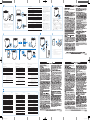
EN To select the Bluetooth mode/Aux-in mode, slide the
OFF AUX switch to the /AUX position.
To switch off BT100, slide the OFF AUX switch to the
OFF position.
ES Para seleccionar el modo Bluetooth o el modo de
entrada auxiliar, deslice el interruptor OFF AUX a la
posición /AUX.
Para apagar el BT100, deslice el interruptor OFF AUX
a la posición OFF.
FR Pour sélectionner le mode Bluetooth/Aux-in, faites glisser
le commutateur OFF AUX vers la position /AUX.
Pour éteindre BT100, faites glisser le commutateur OFF
AUX vers la position OFF.
Always there to help you
Register your product and get support at
www.philips.com/welcome
SBT10
Question?
Contact
Philips
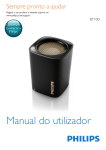
PHILIPS BT100
X
AU
F
1
X
AU
X
AU
OFF
User Manual
OF
OFF
2
F
OF
X
AU
EN To download the full user manual, visit www.philips.
com/support.
ES Para descargar el manual de usuario completo, visite
www.philips.com/support.
P&F USA, Inc. PO Box 2248, Alpharetta, GA 30023-2248
FR Pour télécharger le manuel d’utilisation complet,
rendez-vous sur www.philips.com/support.
EN
Note: Make sure that no audio input cable is connected to
the AUX socket.
ES
Nota: Asegúrese de que no hay un cable de entrada de audio
conectado a la toma AUX.
FR
Remarque : assurez-vous qu’aucun câble d’entrée audio n’est
connecté à la prise AUX.
Bluetooth indicator
Indicador de Bluetooth
Voyant Bluetooth
Indicator
Bluetooth connection
Indicador
Conexión Bluetooth
Voyant
Connexion Bluetooth
Flashing blue
Connecting or waiting for connection
Azul parpadeante
Conectando o esperando conexión
Bleu clignotant
Connexion en cours ou en attente
Solid blue
Connected
Azul permanente
Conectado
Bleu continu
Connecté
Button functions in Bluetooth mode
Funciones de los botones en el modo Bluetooth
Fonctions de bouton en mode Bluetooth
Status
Estado
Statut
Incoming call
Press to answer an incoming call.
Press and hold for more than 3 seconds to
reject an incoming call.
Llamada
entrante
During a call
Press to end the current call.
Press and hold for more than 3 seconds
to change call between BT100 and mobile
phone.
Durante
Púlselo para finalizar la llamada actual.
una llamada Manténgalo pulsado durante más de
3 segundos para cambiar la llamada entre el
Specifications
Amplifier
Appel entrant
3 segundos para rechazar una llamada entrante.
Manténgalo pulsado durante 8 segundos para
borrar la información de emparejamiento de
Bluetooth.
ES
Especificaciones
Amplificador
Appuyez sur ce bouton pour répondre à
un appel entrant.
Maintenez enfoncé pendant plus de
3 secondes pour refuser un appel entrant.
Au cours d'un
appel
dispositivo BT100 y el teléfono móvil.
Press and hold for 8 seconds to clear the
pairing information.
EN
Púlselo para responder una llamada entrante.
Manténgalo pulsado durante más de
Appuyez sur ce bouton pour mettre fin à
l'appel en cours.
Maintenez enfoncé pendant plus de
3 secondes pour transférer un appel entre
BT100 et le téléphone portable.
Maintenez ce bouton enfoncé pendant
8 secondes pour effacer les informations
de couplage Bluetooth.
FR
Spécificités
Amplificateur
Rated Output Power
2W RMS
Potencia de salida
2 W RMS
Puissance de sortie nominale
2 W RMS
Signal to Noise Ratio
>70dB
Relación señal/ruido
>70 dB
Rapport signal/bruit
> 70 dB
Aux-in Link
300 mV RMS, 10 kohm
Conexión de entrada auxiliar
300 mV RMS, 10 kohmios
Aux-in Link
300 mV RMS, 10 kOhm
Bluetooth
Bluetooth
Bluetooth
Bluetooth specification
V3.0 + EDR
Especificación de Bluetooth
V3.0 + EDR
Spécification Bluetooth
V3.0 + EDR
Supported Profiles
HFPv1.5, A2DPv1.2
Perfiles compatibles
HFPv1.5, A2DPv1.2
Profils pris en charge
HFPv1.5, A2DPv1.2
Advanced features
Echo and noise cancellations
Funciones avanzadas
Fonctionnalités avancées
Range
10 m/33 feet line of sight
Eliminación del ruido y
del eco
Suppression de l'écho et
du bruit
Alcance
10 m en línea de visión
Portée
10 m (alignée)
General information
DC power input
USB: 5V, 500mA;
Built-in Li-Polymer battery
3.7V 500mAh
Battery working time
>8 hours
Dimensions-Main Unit
(L x W x H)
63 x 63 x 82 mm
Weight- Main Unit
0.18 kg
BT100_27_SUM_V1.0.indd 8-14
Información general
Informations générales
Entrada de alimentación de CC
USB: 5 V, 500 mA;
Entrée CC
USB : 5 V, 500 mA ;
Batería de polímero de litio integrada
3,7 V, 500 mAh
Batterie Li-polymère intégrée
3,7 V 500 mAh
Tiempo de funcionamiento de la
batería
>8 horas
Autonomie de la batterie
>8 heures
Dimensions : unité principale
(L x l x H)
63 x 63 x 82 mm
Poids - Unité principale
0,18 kg
Dimensiones: unidad principal
(ancho x alto x profundo)
63 x 63 x 82 mm
Peso: unidad principal
0,18 kg
11/6/2014 3:02:34 PM