1
12nc: 8239 210 97091
Printed in China
27DVCR55
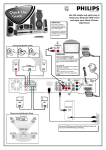
There are many ways to connect your new TV/VCR/DVD to your other equipment.This Quick-Use Guide
shows the easiest, most common connections for the TV/VCR/DVD.
CABLE TV SIGNAL
ANTENNA or
CABLE TV SIGNAL
2
IN
OUT
4
CABLE BOX
3
ANT.
L
AUDIO OUT
R
COAXIAL
RF COAXIAL
CABLE
ANT.
1
2
3
4
5
OR
ANT.
Disconnect all equipment from the power outlets. Connect the equipment to the power outlets only after you
have finished hooking up everything. Never make or change connections with equipment connected to the power outlet.
If you do not have a Cable Box, simply connect your Antenna or Cable TV signal directly to the ANT(enna)
jack on the rear of the TV/VCR/DVD.
If you do have a Cable Box or Satellite Receiver, first connect the Cable TV or Satellite signal to the IN jack
on the Cable Box or Satellite Receiver. Then, use an RF coaxial cable (not supplied) to connect the OUT
jack of the Cable Box or Satellite Receiver to the ANT(enna) jack on the TV/VCR/DVD. To view any channel,
set the TV/VCR/DVD to the output channel of the Cable Box or Satellite Receiver (channel 3 or 4). Then, select channels
at the Cable Box or Satellite Receiver.
When all connections are complete, plug the power cord of the TV/VCR/DVD into an active power
outlet.
Press the STANDBY-ON 2 button on the TV/VCR/DVD or its remote to turn on the TV/VCR/DVD. The
first time you turn on the TV/VCR/DVD, you should complete the TV/VCR/DVD setup. See the other side
of this Quick-Use Guide for details.
Quick Use Guide (cont’d)
Setting Up the TV/VCR/DVD the First Time
1
2
Press STANDBY-ON 2 to turn on the TV/VCR/DVD.
1
Press ENTER repeatedly to select English, French, or
Spanish as the language for TV/VCR/DVD setup menus.
STANDBY-ON PICTURE
1
2
3
4
5
6
7
8
9
+100
LANGUAGE
[ENGLISH] ESP FRA
SPEED
0
+10
C.RESET
ZOOM
4
VOL.
MUTE
AUTO PRESET
PLAY
2-3
3
4
SELECT
CH.
- SET UP-
2
SLEEP
STOP
DISC
MENU
RECORD
DISPLAY
Press 3 or 4 to select AUTO PRESET.Then press
ENTER to set up TV channels. When setup is complete,
the lowest TV channel will appear on the TV/VCR/DVD.
ENTER
SETUP
TITLE
RETURN
CLEAR SEARCH MODE REPEAT
REPEAT
AUDIO
ANGLE
A-B
MODE
To watch TV, press the CH. 3 or 4 button to select
memorized channels. Remember, if you are using a Cable Box
or Satellite Receiver, set the TV/VCR/DVD to channel 3 or 4.
Change channels at the Cable Box or Satellite Receiver.
SUBTITLE
PHILIPS
Playing a Disc
1
2
3
Press STANDBY-ON 2 to turn on the
TV/VCR/DVD.
4
Press PLAY B to close the tray. Playback may
start automatically. If not, press PLAY B again.
If a DVD Disc menu appears, use the 1 234, ENTER,
or Number buttons to select features or start playback.
Follow the instructions in the menu.
5
Press SELECT to put the unit in DVD mode. The
green DVD light will appear on the front of the
TV/VCR/DVD.
Press OPEN/CLOSE / on the front of the
TV/VCR/DVD to open the disc tray. Put a Disc in
the tray with the label facing up and the shiny side
facing down.
DV D
STANDBY-ON
VOLUME
PLAY
NEXT
V C R
STOP
SELECT
OPEN/CLOSE
CHANNEL
REC/OTR
REW
PLAY
F.FWD
STOP/EJECT
HEADPHONE VIDEO
SEARCH
DV D
L AUDIO R
TV/VCR
3
1
STANDBY-ON PICTURE
1
SLEEP
2
SELECT
3
CH.
4
5
7
8
SPEED
9
0
+10
C.RESET
ZOOM
VOL.
MUTE
5
2
6
+100
To stop playing the Disc, press STOP 9.
Playable Discs
PREV
PLAY
4
STOP
DISC
MENU
RECORD
DISPLAY
ENTER
The TV/VCR/DVD will play the following Discs.
SETUP
TITLE
RETURN
CLEAR SEARCH MODE REPEAT
REPEAT
AUDIO
ANGLE
A-B
MODE
ReWritable
Recordable
DVDs must have a Region Code of ALL regions or Region 1.
ALL
SUBTITLE
PHILIPS
1
DVDs must be recorded in the NTSC Color System.
8239 210 97091 / Printed in China
OEMN02248/TD958UJ*****
Detailed playback features and additional functions are described in the
accompanying owner’s manual.