1
IOLAN
SDS/SCS/STS/MDC
User’s Guide
Version 4.5
Part #5500161-45
July 2013
IOLAN Device Server User’s Guide
1-1
Copyright Statement
This document must not be reproduced in any way whatsoever, either printed or electronically, without the consent of:
Perle Systems Limited,
60 Renfrew Drive
Markham, ON
Canada
L3R 0E1
Perle reserves the right to make changes without further notice, to any products to improve reliability, function, or design.
Perle, the Perle logo, and IOLAN are trademarks of Perle Systems Limited.
Microsoft, Windows NT®/Windows 2000®/Windows Vista®/Windows Server 2003®/Windows 2003 R2®/Windows
2008®/Windows 2008 R2®/Windows XP®/Windows 7®/Windows 8®/Windows Server 2012® and Internet Explorer® are
trademarks of Microsoft Corporation.
Netscape is a trademark of Netscape Communications Corporation.
Mozilla Firefox is a trademark of the Mozilla Foundation.
Solaris is a registered trademark of Sun Microsystems, Inc. in the USA and other countries.
Perle Systems Limited, 2005-2013.
FCC Note
The IOLAN Device Server has been found to comply with the limits for a Class A digital device,
pursuant to Part 15 of the FCC rules. These limits are designed to provide reasonable protection
against harmful interference when the equipment is operated in a commercial environment. This
equipment generates, uses, and can radiate radio frequency energy and, if not installed and used in
accordance with the instructions in this Guide, may cause harmful interference to radio
communications. Operation of this equipment in a residential area is likely to cause harmful
interference, in which case the user will be required to correct the interference at his/her own
expense.
EN 55022: 1998, Class A, Note
WARNING This is a Class A product. In a domestic environment this product may cause radio interference in which case the
user may be required to take adequate measures.
Caution: the IOLAN Device Server is approved for commercial use only.
ATEX Directive Information: (ONLY APPLIES TO THE IOLAN SDS4 HL MODEL!)
In order to comply with the ATEX directive, the IOLAN SDS4 HL must be installed in an ATEX certified IP54
min. enclosure and the IOLAN SDS4 HL must be installed so that the unit’s labelling is visible after
installation.
ATEX labelling;
IOLAN Device Server User’s Guide
1-2
Table of Contents
Preface ...............................................................................25
About This Book ........................................................................ 25
Intended Audience..................................................................... 25
Documentation........................................................................... 25
Typeface Conventions............................................................... 26
Online Help ................................................................................. 26
About the IOLAN ........................................................................ 27
IOLAN Family Models ................................................................ 27
Chapter 1 Introduction......................................................27
IOLAN Features.......................................................................... 28
Hardware ................................................................................................. 28
Software .................................................................................................. 29
Accessing the IOLAN ......................................................................... 29
General Features ............................................................................... 29
Advanced Features ............................................................................ 30
Security ................................................................................................... 30
Chapter 2 Hardware and Connectivity ............................32
Introduction ................................................................................ 32
IOLAN Components................................................................... 32
What’s Included ...................................................................................... 32
What You Need to Supply...................................................................... 32
Available Accessories............................................................................ 33
IOLAN SDS/SCS/STS/MDC User’s Guide, Version 4.5
3
Table of Contents
Power Supply Specifications.................................................... 33
Desktop Models ...................................................................................... 33
Power Over Ethernet (PoE) Models................................................... 33
I/O Models ............................................................................................... 34
Rack Mount Models (except Electric Utility models) .......................... 34
DC Power Requirements ................................................................... 34
AC Power Requirements.................................................................... 34
Medical Unit Models ............................................................................... 34
Electric Utility Models ............................................................................ 34
Power Options.................................................................................... 34
DC Power Requirements ................................................................... 35
AC Power Requirements.................................................................... 35
TELCO-NEBS Models............................................................................. 35
Getting to Know Your IOLAN.................................................... 36
Overview.................................................................................................. 36
1-Port ....................................................................................................... 37
2-Port ....................................................................................................... 38
4-Port and 8-Port desktop models ........................................................ 39
I/O............................................................................................................. 40
Top View ............................................................................................ 40
End View ............................................................................................ 40
Rack Mount ............................................................................................. 41
Console Port/LED View...................................................................... 41
Serial/Ethernet View........................................................................... 41
Medical Unit ............................................................................................ 42
Top View ............................................................................................ 42
Serial View ......................................................................................... 42
Power/Ethernet View.......................................................................... 42
Electric Utility models ............................................................................ 43
Front (LED/Console port)View ........................................................... 43
Back (Serial/Ethernet/power) View .................................................... 43
Console/Serial Switch ............................................................................ 44
Console Mode .................................................................................... 44
Serial Mode ........................................................................................ 44
Dedicated Console Port ......................................................................... 45
Connecting your IOLAN to the Network .................................. 45
Powering up your IOLAN .......................................................... 45
Desktop/Rack Mount Models (excluding Electric Utility models)...... 45
4
Table of Contents
Medical Unit Models ............................................................................... 46
Terminal Block Models .......................................................................... 46
DC Power Models (excluding Electric Utility models) ........................ 47
Disconnecting 48V Power Supplies from the IOLAN ......................... 48
Electric Utility Models ............................................................................ 48
Wiring ................................................................................................. 48
Wiring up an HV unit .......................................................................... 49
Wiring up a DHV unit.......................................................................... 50
Wiring up a LDC unit .......................................................................... 51
TELCO - NEBS Models........................................................................... 52
Install Locations for LDC Models ....................................................... 52
Wiring up a the Fail-Safe Relay ......................................................... 52
Chapter 3 Configuration Methods ...................................54
Introduction ................................................................................ 54
Configuration Methods Overview............................................. 55
Configures an IP Address...................................................................... 55
Requires a Configured IP Address ....................................................... 55
Easy Config Wizard ................................................................... 56
DeviceManager........................................................................... 57
Overview.................................................................................................. 57
Access Platforms ................................................................................... 57
Features................................................................................................... 57
Connecting to the IOLAN Using DeviceManager ................................ 57
Using DeviceManager ............................................................................ 59
Navigating the Options....................................................................... 59
Downloading the Configuration .......................................................... 60
WebManager............................................................................... 60
Overview.................................................................................................. 60
Access Platforms ................................................................................... 60
Features................................................................................................... 60
Connecting to the IOLAN Using WebManager .................................... 61
Using WebManager ................................................................................ 62
Command Line Interface ........................................................... 63
Overview.................................................................................................. 63
5
Table of Contents
Access Platforms ................................................................................... 63
Features................................................................................................... 63
Connecting to the IOLAN Using the CLI............................................... 63
Through the Network.......................................................................... 63
Through the Serial Port ...................................................................... 64
Using the CLI .......................................................................................... 64
Menu............................................................................................ 64
Overview.................................................................................................. 64
Access Platforms ................................................................................... 64
Features................................................................................................... 64
Connecting to the IOLAN Using the Menu ........................................... 64
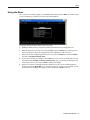
Using the Menu....................................................................................... 65
DHCP/BOOTP ............................................................................. 66
Overview.................................................................................................. 66
Features................................................................................................... 66
Connecting to the IOLAN Using DHCP/BOOTP................................... 66
Using DHCP/BOOTP............................................................................... 66
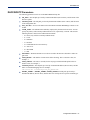
DHCP/BOOTP Parameters ..................................................................... 67
SNMP........................................................................................... 68
Overview.................................................................................................. 68
Access Platforms ................................................................................... 68
Features................................................................................................... 68
Connecting to the IOLAN Using SNMP ................................................ 68
Using the SNMP MIB .............................................................................. 69
IOLAN+ Interface........................................................................ 70
Overview.................................................................................................. 70
Access Platforms ................................................................................... 70
Connecting to the IOLAN to Use the IOLAN+ Interface ...................... 70
Using the IOLAN+ Interface................................................................... 70
Changes to the IOLAN+ Interface ......................................................... 71
Chapter 4 Getting Started.................................................75
Introduction ................................................................................ 75
6
Table of Contents
Easy Configuration Wizard ....................................................... 76
Setting Up the Network ............................................................. 77
Using DeviceManager ............................................................................ 77
Using WebManager ................................................................................ 78
Using a Direct Serial Connection to Specify an IP Address............... 78
Using a Direct Serial Connection to Enable BOOTP/DHCP .............. 79
Using ARP-Ping ...................................................................................... 80
For an IPv6 Network ............................................................................... 80
Setting Up the Serial Port(s) ..................................................... 81
Setting Up Users ........................................................................ 83
Chapter 5 Using DeviceManager and WebManager.......84
Introduction ................................................................................ 84
Navigating DeviceManager/WebManager................................ 85
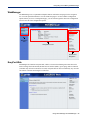
DeviceManager ....................................................................................... 85
WebManager ........................................................................................... 86
EasyPort Web ......................................................................................... 86
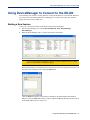
Using DeviceManager to Connect to the IOLAN..................... 87
Starting a New Session.......................................................................... 87
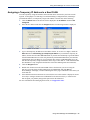
Assigning a Temporary IP Address to a New IOLAN.......................... 88
Adding/Deleting IOLANs Manually ....................................................... 89
Logging in to the IOLAN ........................................................................ 89
Using WebManager to Connect to the IOLAN......................... 90
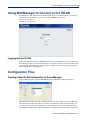
Logging into the IOLAN ......................................................................... 90
Configuration Files .................................................................... 90
Creating a New IOLAN Configuration in DeviceManager ................... 90
Opening an Existing Configuration File ............................................... 91
Importing an Existing Configuration File ............................................. 91
Managing the IOLAN.................................................................. 91
Chapter 6 Network Settings .............................................92
7
Table of Contents
Introduction ................................................................................ 92
IP Settings .................................................................................. 93
IPv4 Settings ........................................................................................... 93
Overview ............................................................................................ 93
Field Descriptions............................................................................... 93
IPv6 Settings ........................................................................................... 94
Overview ............................................................................................ 94
Field Descriptions............................................................................... 94
Adding/Editing a Custom IPv6 Address ............................................. 96
Advanced ................................................................................................ 97
Overview ............................................................................................ 97
Field Descriptions............................................................................... 97
Advanced.................................................................................. 100
Host Table ............................................................................................. 100
Overview .......................................................................................... 100
Functionality ..................................................................................... 100
Field Descriptions............................................................................. 100
Adding/Editing a Host .......................................................................... 101
Route List .............................................................................................. 102
Overview .......................................................................................... 102
Functionality ..................................................................................... 102
Field Descriptions............................................................................. 102
Adding/Editing Routes......................................................................... 103
DNS/WINS.............................................................................................. 104
Overview .......................................................................................... 104
Functionality ..................................................................................... 104
Field Descriptions............................................................................. 104
Editing/Adding DNS/WINS Servers.................................................. 105
RIP.......................................................................................................... 105
Overview .......................................................................................... 105
Functionality ..................................................................................... 105
Field Descriptions............................................................................. 106
Dynamic DNS ........................................................................................ 107
Overview .......................................................................................... 107
Functionality ..................................................................................... 107
Field Descriptions............................................................................. 107
Account Settings .............................................................................. 108
Cipher Suite Field Descriptions........................................................ 109
Adding/Editing a Cipher Suite .......................................................... 110
Validation Criteria Field Descriptions ............................................... 111
IPv6 Tunnels ......................................................................................... 112
8
Table of Contents
Overview .......................................................................................... 112
Field Descriptions............................................................................. 112
Adding/Editing an IPv6 Tunnel......................................................... 113
Chapter 7 Configuring Serial Ports ...............................114
Introduction .............................................................................. 114
Serial Ports ............................................................................... 114
Overview................................................................................................ 114
Functionality ......................................................................................... 114
Editing a Serial Port ......................................................................... 115
Copying a Serial Port ....................................................................... 116
Resetting a Serial Port ..................................................................... 117
Serial Port Profiles................................................................... 117
Common Tabs....................................................................................... 117
Overview .......................................................................................... 117
Hardware Tab Field Descriptions..................................................... 118
Email Alert Tab Field Descriptions ................................................... 120
Packet Forwarding Tab Field Descriptions ...................................... 121
SSL/TLS Settings Tab Field Descriptions ........................................ 124
Cipher Suite Field Descriptions........................................................ 125
Adding/Editing a Cipher Suite .......................................................... 126
Validation Criteria Field Descriptions ............................................... 127
Console Management Profile .............................................................. 129
Overview .......................................................................................... 129
Functionality ..................................................................................... 129
General Tab Field Descriptions........................................................ 129
Advanced Tab Field Descriptions .................................................... 130
TruePort Profile .................................................................................... 133
Overview .......................................................................................... 133
Functionality ..................................................................................... 133
General Tab Field Descriptions........................................................ 133
Adding/Editing Additional TruePort Hosts ........................................ 135
Adding/Editing a Multihost Entry ...................................................... 136
Advanced Tab Field Descriptions .................................................... 136
TCP Sockets Profile ............................................................................. 140
Overview .......................................................................................... 140
Functionality ..................................................................................... 140
General Tab Field Descriptions........................................................ 140
Adding/Editing Additional Hosts ....................................................... 142
Adding/Editing a Multihost Entry ...................................................... 142
Advanced Tab Field Descriptions .................................................... 144
9
Table of Contents
UDP Sockets Profile ............................................................................. 146
Overview .......................................................................................... 146
Functionality ..................................................................................... 146
General Tab Field Descriptions........................................................ 149
Advanced Tab Field Descriptions .................................................... 150
Terminal Profile .................................................................................... 151
Overview .......................................................................................... 151
Functionality ..................................................................................... 151
General Tab Field Descriptions........................................................ 151
Advanced Tab Field Descriptions .................................................... 153
User Service Settings........................................................................... 155
Login Settings .................................................................................. 155
Telnet Settings ................................................................................. 155
Rlogin Settings ................................................................................. 156
SSH Settings.................................................................................... 157
SLIP Settings ................................................................................... 158
PPP Settings .................................................................................... 161
Printer Profile........................................................................................ 167
Overview .......................................................................................... 167
General Tab Field Descriptions........................................................ 167
Advanced Tab Field Descriptions .................................................... 168
Serial Tunneling Profile ....................................................................... 169
Overview .......................................................................................... 169
Functionality ..................................................................................... 169
General Tab Field Descriptions........................................................ 170
Advanced Tab Field Descriptions .................................................... 171
Virtual Modem Profile........................................................................... 172
Overview .......................................................................................... 172
Functionality ..................................................................................... 172
General Tab Field Descriptions........................................................ 172
Advanced Tab Field Descriptions .................................................... 174
Phone Number to Host Mapping...................................................... 176
VModem Phone Number Entry ........................................................ 176
Control Signal I/O Profile ..................................................................... 177
Overview .......................................................................................... 177
Functionality ..................................................................................... 177
General Tab Field Descriptions........................................................ 177
Input Signal Field Descriptions......................................................... 178
Output Signal Field Descriptions...................................................... 179
Modbus Gateway Profile...................................................................... 180
Overview .......................................................................................... 180
Functionality ..................................................................................... 180
General Tab Field Descriptions........................................................ 180
Advanced Field Descriptions............................................................ 181
10
Table of Contents
Modbus Slave IP Settings Field Descriptions .................................. 182
Adding/Editing Modbus Slave IP Settings........................................ 184
Modbus Slave Advanced Settings Field Descriptions...................... 185
Power Management Profile.................................................................. 187
Overview .......................................................................................... 187
Functionality ..................................................................................... 187
General Tab Field Descriptions........................................................ 187
Advanced Tab Field Descriptions .................................................... 187
Editing Power Management Plug Settings Field Descriptions ......... 188
Monitoring Tab Field Descriptions.................................................... 189
Remote Access (PPP) Profile .............................................................. 191
Overview .......................................................................................... 191
Functionality ..................................................................................... 191
General Tab Field Descriptions........................................................ 192
Dynamic DNS Field Descriptions........................................................ 193
Authentication Tab Field Descriptions.............................................. 194
Advanced Tab Field Descriptions .................................................... 197
Remote Access (SLIP) Profile ............................................................. 200
Overview .......................................................................................... 200
General Tab Field Descriptions........................................................ 200
Advanced Tab Field Descriptions .................................................... 201
Custom Application Profile ................................................................. 203
Overview .......................................................................................... 203
Functionality ..................................................................................... 203
General Tab Field Description ......................................................... 203
Advanced Tab Field Description ...................................................... 203
Port Buffering........................................................................... 205
Overview................................................................................................ 205
Functionality ......................................................................................... 205
Local Port Buffering.......................................................................... 205
Remote Port Buffers......................................................................... 206
Field Definitions.................................................................................... 206
Advanced.................................................................................. 208
Advanced Serial Settings Tab ............................................................. 208
Overview .......................................................................................... 208
Field Descriptions............................................................................. 208
Modems Tab.......................................................................................... 210
Overview .......................................................................................... 210
Functionality ..................................................................................... 210
Adding/Editing a Modem .................................................................. 210
TruePort Baud Rate Tab ...................................................................... 211
11
Table of Contents
Overview .......................................................................................... 211
Functionality ..................................................................................... 211
Field Definitions................................................................................ 211
Chapter 8 Configuring Users .........................................212
Introduction .............................................................................. 212
User Settings............................................................................ 213
Overview................................................................................................ 213
Functionality ......................................................................................... 213
Adding/Editing Users .............................................................. 214
General Tab........................................................................................... 214
Overview .......................................................................................... 214
Functionality ..................................................................................... 214
Field Descriptions............................................................................. 214
Services Tab ......................................................................................... 216
Overview .......................................................................................... 216
Functionality ..................................................................................... 216
Field Descriptions............................................................................. 216
Advanced Tab ....................................................................................... 218
Overview .......................................................................................... 218
Field Descriptions............................................................................. 218
Sessions Tab ........................................................................................ 220
Overview .......................................................................................... 220
Functionality ..................................................................................... 220
Field Descriptions............................................................................. 220
Serial Port Access Tab......................................................................... 222
Overview .......................................................................................... 222
Field Descriptions............................................................................. 222
Introduction .............................................................................. 223
Authentication.......................................................................... 223
Chapter 9 Configuring Security .....................................223
Authentication ...................................................................................... 224
Local ...................................................................................................... 225
Overview .......................................................................................... 225
Field Descriptions............................................................................. 225
RADIUS.................................................................................................. 226
Overview .......................................................................................... 226
12
Table of Contents
General Field Descriptions............................................................... 226
Attributes Field Descriptions ............................................................ 227
Kerberos................................................................................................ 228
Field Descriptions............................................................................. 228
LDAP/Microsoft Active Directory ........................................................ 229
Overview .......................................................................................... 229
Field Descriptions............................................................................. 229
TACACS+ .............................................................................................. 231
Overview .......................................................................................... 231
Field Descriptions............................................................................. 231
SecurID .................................................................................................. 232
Overview .......................................................................................... 232
Field Descriptions............................................................................. 232
NIS.......................................................................................................... 233
Field Descriptions............................................................................. 233
SSH............................................................................................ 234
Overview................................................................................................ 234
Functionality ......................................................................................... 234
Users Logging into the IOLAN Using SSH....................................... 234
Users Passing Through the IOLAN Using SSH (Dir/Sil) .................. 235
Field Descriptions ................................................................................ 236
SSL/TLS .................................................................................... 237
Overview................................................................................................ 237
Functionality ......................................................................................... 237
Field Descriptions ................................................................................ 238
Cipher Suite Field Descriptions........................................................ 239
Adding/Editing a Cipher ................................................................... 240
Validation Criteria Field Descriptions ............................................... 241
VPN............................................................................................ 242
Overview................................................................................................ 242
Functionality ......................................................................................... 242
IKE Phase 1 Proposals .................................................................... 243
ESP Phase 2 Proposals................................................................... 243
IPsec ...................................................................................................... 243
Field Descriptions............................................................................. 243
Adding/Editing the IPsec Tunnel ...................................................... 244
Shared Secret Field Description ...................................................... 246
Remote Validation Criteria Field Descriptions.................................. 247
13
Table of Contents
L2TP/IPsec ............................................................................................ 248
Field Descriptions............................................................................. 248
Exceptions ............................................................................................ 249
Field Descriptions............................................................................. 249
Adding/Editing a VPN Exception...................................................... 250
Advanced .............................................................................................. 250
Field Description .............................................................................. 250
HTTP Tunneling ....................................................................... 251
Functionality ......................................................................................... 251
Adding/Editing the HTTP Tunnel ........................................................ 251
Field Descriptions............................................................................. 251
Configuring HTTP Tunnel .................................................................... 252
Field Descriptions............................................................................. 252
Configuring HTTP Tunnel Proxy ......................................................... 253
Field Descriptions............................................................................. 253
Configuring HTTP Tunnel Proxy Advanced....................................... 254
Field Descriptions............................................................................. 254
Configuring HTTP Tunnel Destination ............................................... 254
Field Descriptions............................................................................. 255
Services .................................................................................... 257
Overview................................................................................................ 257
Functionality ......................................................................................... 257
Field Descriptions ................................................................................ 257
Keys and Certificates .............................................................. 259
Chapter 10 Configuring I/O Interfaces...........................261
Introduction .............................................................................. 261
Technical Specifications ......................................................... 261
Settings..................................................................................... 262
Overview................................................................................................ 262
I/O Access Functionality...................................................................... 262
Field Descriptions............................................................................. 262
Advanced Slave Modbus Settings ................................................... 263
Failsafe Timer Functionality ................................................................ 265
Overview .......................................................................................... 265
Field Descriptions............................................................................. 265
14
Table of Contents
UDP Functionality................................................................................. 266
Overview .......................................................................................... 266
Field Descriptions............................................................................. 266
I/O UDP Settings.............................................................................. 267
Temperature Functionality .................................................................. 268
Overview .......................................................................................... 268
Field Descriptions............................................................................. 268
Channels................................................................................... 269
Analog ................................................................................................... 269
Overview .......................................................................................... 269
Field Descriptions............................................................................. 270
Digital Input........................................................................................... 271
Overview .......................................................................................... 271
Functionality ..................................................................................... 271
Field Descriptions............................................................................. 272
Digital Output........................................................................................ 274
Overview .......................................................................................... 274
Functionality ..................................................................................... 274
Field Descriptions............................................................................. 275
Relay ...................................................................................................... 277
Overview .......................................................................................... 277
Field Descriptions............................................................................. 278
Digital I/O Extension............................................................................. 279
Overview .......................................................................................... 279
Functionality ..................................................................................... 280
Field Descriptions............................................................................. 281
Adding/Editing Additional Hosts ....................................................... 283
Adding/Editing a Multihost Entry ...................................................... 283
Temperature.......................................................................................... 284
Field Descriptions............................................................................. 285
Alarm Settings ...................................................................................... 286
Basic Analog Alarm Settings............................................................ 286
Advanced Analog Alarm Settings..................................................... 287
I/O UDP...................................................................................... 289
UDP Unicast Format............................................................................. 289
UDP Broadcast Packet .................................................................... 289
Analog Section ............................................................................... 290
Digital/Relay Section...................................................................... 291
Serial Pin Signal Section ............................................................... 291
UDP Unicast Example .......................................................................... 292
15
Table of Contents
I/O Modbus Slave ..................................................................... 292
Modbus Serial Application Connected to the Serial Port ................. 292
Modbus Serial Application Connected to the Network..................... 292
Modbus TCP Application ..................................................................... 293
Modbus I/O Access.................................................................. 293
Function Codes .................................................................................... 293
I/O Coil/Register Descriptions............................................................. 294
Serial Port Coil/Register Descriptions................................................ 295
A4/T4 Registers .................................................................................... 295
A4D2/A4R2 Registers........................................................................... 296
D4/D2R2 Registers ............................................................................... 297
Serial Pin Signals ................................................................................. 297
TruePort I/O .............................................................................. 298
TruePort/Modbus Combination........................................................... 298
API Over TruePort Only ....................................................................... 299
Accessing I/O Data Via TruePort ............................................ 300
Introduction........................................................................................... 300
Setup...................................................................................................... 300
Format of API Commands ................................................................... 301
Get Commands ..................................................................................... 301
Command Format ............................................................................ 301
Response Format............................................................................. 301
Set Commands ..................................................................................... 302
Command Format ............................................................................ 302
Successful Response Format .......................................................... 303
Unsuccessful Response Format ...................................................... 303
Error Codes........................................................................................... 304
I/O SNMP Traps ........................................................................ 304
Chapter 11 Configuring Clustering................................305
Introduction .............................................................................. 305
Clustering Slave List ............................................................... 305
Overview................................................................................................ 305
16
Table of Contents
Adding Clustering Slaves .................................................................... 306
Overview .......................................................................................... 306
Field Descriptions............................................................................. 306
Advanced Clustering Slave Options................................................... 307
Overview .......................................................................................... 307
Editing Clustering Slave Settings ..................................................... 307
Chapter 12 Configuring the Option Card ......................309
Introduction .............................................................................. 309
Option Card Settings ............................................................... 309
Overview................................................................................................ 309
Functionality ......................................................................................... 309
Configuring the IOLAN Modem Card ..................................... 309
Configuring a Wireless (PCMCIA) WAN Card ....................... 310
Overview................................................................................................ 310
Field Descriptions ................................................................................ 310
Configuring a USB Modem ..................................................... 312
Overview................................................................................................ 312
Field Descriptions ................................................................................ 312
Configuring a Fiber Optic Card .............................................. 314
Overview................................................................................................ 314
Field Descriptions ................................................................................ 314
Chapter 13 Configuring the System ..............................315
Introduction .............................................................................. 315
Alerts......................................................................................... 315
Email Alerts........................................................................................... 315
Overview .......................................................................................... 315
Functionality ..................................................................................... 315
Field Descriptions............................................................................. 316
Syslog.................................................................................................... 318
Overview .......................................................................................... 318
Field Descriptions............................................................................. 318
Management ............................................................................. 319
17
Table of Contents
SNMP ..................................................................................................... 319
Overview .......................................................................................... 319
SNMP Tab Field Descriptions .......................................................... 319
SNMP Traps Tab Field Descriptions................................................ 321
Time ....................................................................................................... 323
Overview .......................................................................................... 323
Functionality ..................................................................................... 323
Network Time Tab Field Descriptions .............................................. 323
Time Zone/Summer Time Tab Field Descriptions............................ 325
Custom App/Plugin .............................................................................. 326
Overview .......................................................................................... 326
Field Description .............................................................................. 326
Advanced .............................................................................................. 326
Overview .......................................................................................... 326
Advanced Tab Field Descriptions .................................................... 327
Bootup Files Tab Field Descriptions ................................................ 327
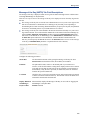
Message of the Day (MOTD) Tab Field Descriptions ...................... 329
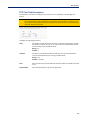
TFTP Tab Field Descriptions ........................................................... 330
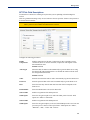
SFTP Tab Field Descriptions ........................................................... 331
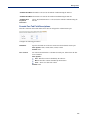
Console Port Tab Field Descriptions................................................ 332
Chapter 14 Controlling the RPS, I/O Channels, IPsec .333
Introduction .............................................................................. 333
RPS Control.............................................................................. 333
Overview................................................................................................ 333
Field Descriptions ................................................................................ 333
Plug Control .......................................................................................... 334
Overview .......................................................................................... 334
Field Descriptions............................................................................. 334
Serial Port Power Control ....................................................... 336
Overview................................................................................................ 336
Field Descriptions ................................................................................ 336
Power Plug Status............................................................................ 336
I/O Channels ............................................................................. 337
Overview................................................................................................ 337
IPsec Tunnel Control ............................................................... 338
Chapter 15 System Administration................................339
18
Table of Contents
Introduction .............................................................................. 339
Managing Configuration Files ................................................ 339
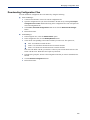
Saving Configuration Files .................................................................. 339
Downloading Configuration Files ....................................................... 340
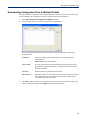
Downloading Configuration Files to Multiple IOLANs ...................... 341
Uploading Configuration Files ............................................................ 342
Specifying a Custom Factory Default Configuration ........................ 342
Resetting the IOLAN to the Default Configuration ............................ 343
Downloading IOLAN Firmware ............................................... 343
Calibrating I/O .......................................................................... 343
Calibrating Analog Input...................................................................... 343
Calibrating Voltage........................................................................... 344
Calibrating Current ........................................................................... 344
Calibrating Temperature Input ............................................................ 344
Calibrating Thermocouple ................................................................ 344
Calibrating RTD................................................................................ 344
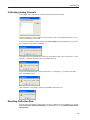
Calibrating Analog Channels .............................................................. 345
Resetting Calibration Data................................................................... 345
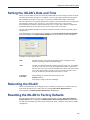
Setting the IOLAN’s Date and Time........................................ 346
Rebooting the IOLAN............................................................... 346
Resetting the IOLAN to Factory Defaults .............................. 346
Resetting the SecurID Node Secret........................................ 347
Language Support ................................................................... 347
Loading a Supplied Language ............................................................ 347
Translation Guidance........................................................................... 348
Software Upgrades and Language Files ............................................ 348
Downloading Terminal Definitions......................................... 349
Creating Terminal Definition Files ...................................................... 349
Resetting Configuration Parameters ..................................... 350
Lost admin Password.............................................................. 351
19
Table of Contents
Chapter 16 Applications .................................................352
Introduction .............................................................................. 352
Configuring Modbus................................................................ 352
Overview................................................................................................ 352
Configuring a Master Gateway......................................................... 352
Configuring a Slave Gateway........................................................... 352
Modbus Gateway Settings................................................................... 353
Modbus Master Gateway ................................................................. 353
Modbus Slave Gateway ................................................................... 353
Modbus Serial Port Settings................................................................ 354
Modbus Master Settings .................................................................. 354
Modbus Slave Settings .................................................................... 355
Configuring PPP Dial On Demand.......................................... 356
Setting Up Printers .................................................................. 357
Remote Printing Using LPD................................................................. 357
Remote Printing Using RCP ................................................................ 358
Remote Printing Using Host-Based Print Handling Software .......... 358
Configuring a Virtual Private Network ................................... 359
IOLAN-to-Host/Network ....................................................................... 359
Network-to-Network ............................................................................. 362
Host-to-Host.......................................................................................... 363
VPN Client-to-Network ......................................................................... 365
Configuring HTTP Tunnels ..................................................... 366
Serial-to Serial ...................................................................................... 366
Serial-to Host ....................................................................................... 368
Host-to Host .......................................................................................... 370
Tunnel Relay ......................................................................................... 373
Appendix A RADIUS and TACACS+ ..............................377
Introduction .............................................................................. 377
RADIUS ..................................................................................... 377
Supported RADIUS Parameters .......................................................... 377
Accounting Message............................................................................ 381
20
Table of Contents
Mapped RADIUS Parameters to IOLAN Parameters ......................... 382
Perle RADIUS Dictionary Example...................................................... 384
TACACS+ .................................................................................. 386
Accessing the IOLAN Through a Serial Port Users .......................... 386
Accessing the IOLAN Through a Serial Port User Example Settings388
Accessing the IOLAN from the Network Users ................................. 389
Accessing the IOLAN from the Network User Example Settings .... 390
Appendix B SSL/TLS Ciphers ........................................391
Introduction .............................................................................. 391
Valid SSL/TLS Ciphers ............................................................ 391
Appendix C Virtual Modem AT Commands ..................393
Virtual Modem Initialization Commands................................ 393
Appendix D Pinouts and Cabling Diagrams .................395
Serial Pinouts ........................................................................... 395
DB25 Male ............................................................................................. 395
DB25 Female ......................................................................................... 396
RJ45 ....................................................................................................... 397
RJ45 (for desktop and rack mount models) ..................................... 398
RJ45 (for SCS48C/SCS32C/SCS16C/SCS8C models)................... 399
RJ45 (for SDS32C/SDS16C/SDS8C) .............................................. 400
RJ45 (for medical unit models) ........................................................ 401
DB9 Male (Serial Only) ......................................................................... 401
DB9 Male I/O.......................................................................................... 402
Power Over Ethernet Pinouts ................................................. 402
EIA-232 Cabling Diagrams ...................................................... 403
Terminal DB25 Connector ................................................................... 403
DB25 Male ....................................................................................... 403
DB25 Female ................................................................................... 403
RJ45................................................................................................. 404
DB9 Male ......................................................................................... 405
Modem DB25 Connector...................................................................... 406
DB25 Male ....................................................................................... 406
21
Table of Contents
RJ45................................................................................................. 406
DB9 Male ......................................................................................... 407
Appendix E Setting Jumpers .........................................408
Introduction .............................................................................. 408
1-Port IOLAN DB25 Male/Female ........................................................ 408
1-Port IOLAN RJ45 ............................................................................... 409
1-Port IOLAN RJ45 P (Power Over Ethernet) ..................................... 409
1-Port IOLAN DB9................................................................................. 410
2-Port IOLAN SDS1M (Modem)............................................................ 410
2-Port IOLAN ......................................................................................... 411
2-Port IOLAN RJ45 P (Power Over Ethernet) ..................................... 411
4-Port Desktop IOLAN.......................................................................... 412
Digital I/O Module ................................................................................. 413
Analog Input Module ............................................................................ 413
Appendix F I/O Wiring Diagrams ...................................415
Wiring I/O Diagrams................................................................. 415
Digital I/O............................................................................................... 415
Digital Input Wet Contact ................................................................. 415
Digital Input Dry Contact .................................................................. 415
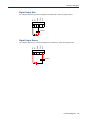
Digital Output Sink ........................................................................... 416
Digital Output Source ....................................................................... 416
Analog Input.......................................................................................... 417
Current ............................................................................................. 417
Voltage ............................................................................................. 417
Temperature Input ................................................................................ 418
Thermocouple .................................................................................. 418
RTD 2-Wire ...................................................................................... 418
RTD 3-Wire ...................................................................................... 418
RTD 4-Wire ...................................................................................... 419
Relay Output ......................................................................................... 419
Normally Open Contact.................................................................... 419
Normally Closed Contact ................................................................. 419
Appendix G Utilities ........................................................420
Introduction .............................................................................. 420
22
Table of Contents
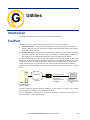
TruePort .................................................................................... 420
API I/O Access Over TruePort ................................................ 421
API Request Format ............................................................................. 421
API Response Format .......................................................................... 421
Error Codes...................................................................................... 422
Decoder..................................................................................... 422
Appendix H Accessories ................................................423
Introduction .............................................................................. 423
Installing a Perle PCI Card ...................................................... 423
Starter Kit (Adapters/Cable).................................................... 426
RJ45F to DB25M DTE Crossover Adapter.......................................... 426
RJ45F to DB25M DCE Modem Adapter .............................................. 427
RJ45F to DB25F DTE Crossover Adapter .......................................... 428
RJ45F to DB9M DTE Crossover Adapter............................................ 429
RJ45F to DB9F DTE Crossover Adapter ............................................ 430
Sun/Cisco RJ45M Connector Cable for Rack Mount Models ........... 430
SCS48C/SCS32C/SCS16C/SCS8C Starter Kit........................ 431
RJ45F to DB25M DTE Crossover Adapter.......................................... 431
RJ45F to DB25M DCE Modem Adapter .............................................. 432
RJ45F to DB25F DTE Crossover Adapter .......................................... 433
RJ45F to DB9M DTE Crossover Adapter............................................ 434
RJ45F to DB9F DTE Crossover Adapter ............................................ 435
Sun/Cisco Roll-Over Adapter for Rack Mount Models...................... 435
Appendix I Troubleshooting...........................................436
Introduction .............................................................................. 436
Hardware Troubleshooting ..................................................... 436
Communication Issues............................................................ 437
DeviceManager Problems ....................................................... 437
Host Problems.......................................................................... 438
23
Table of Contents
RADIUS Authentication Problems.......................................... 438
Login Problems........................................................................ 439
Problems with Terminals ........................................................ 439
Unknown IP Address ............................................................... 440
DHCP/BOOTP Problems.......................................................... 440
Callback Problems................................................................... 440
Language Problems................................................................. 440
Modem Problems ..................................................................... 441
PPP Problems .......................................................................... 441
Printing Problems .................................................................... 441
Long Reboot Cycle .................................................................. 441
SSL/TLS .................................................................................... 442
I/O Models................................................................................. 442
IPv6 Issues ............................................................................... 443
Contacting Technical Support................................................ 444
Making a Technical Support Query .................................................... 444
Who To Contact ............................................................................... 444
Have Your Product Information Ready ............................................ 444
Making a support query via the Perle web page .............................. 444
Repair Procedure.................................................................................. 445
Feedback on this Manual..................................................................... 445
Appendix J Data Logging ...............................................446
Introduction .............................................................................. 446
Trueport Profile ........................................................................ 446
TCP Socket Profile................................................................... 446
Appendix K Modbus Remapping ...................................447
24
Table of Contents
Configuring the Modbus UID Translation Feature ................ 447
Appendix L Symmetric Key File.....................................449
Symmetric Key File.................................................................. 449
Appendix M Troubleshooting the USB Modem ............450
Modem not connecting to the network. ................................. 450
USB Modem Support and Custom Options.......................... 453
Downloading Custom USB Modem Configuration Files................... 453
Glossary ...........................................................................455
Index .................................................................................457
25
Preface
About This Book
This guide provides the information you need to:
z
configure the IOLAN
z
incorporate the IOLAN into your production environment
Intended Audience
This guide is for administrators who will be configuring the IOLAN.
Some prerequisite knowledge is needed to understand the concepts and examples in this guide:
z
If you are using an external authentication application(s), working knowledge of the
authentication application(s).
z
Knowledge of SFTP/TFTP, the transfer protocol the IOLAN uses.
Documentation
The following documentation is included on the IOLAN installation CD:
z
IOLAN 1-Port Quick Start Guide
z
IOLAN 2-4-Port Quick Start Guide
z
IOLAN Rack Mount Quick Start Guide
z
IOLAN I/O Quick Start Guide
z
IOLAN Electric Utility Terminal Server Quick Start Guide
z
IOLAN SDS/SCS/STS/MDC User’s Guide
z
IOLAN SDS/SCS/STS/MDC Command Line Reference Guide
z
IOLAN MDC Hardware Installation Guide
z
TruePort User’s Guide
z
TruePort Installation and Configuration Guide for Windows NT®
z
Online Help in the DeviceManager (automatically installed with the DeviceManager application)
z
Link to knowledge base
IOLAN SDS/SCS/STS/MDC User’s Guide, Version 4.5
25
Typeface Conventions
Typeface Conventions
Most text is presented in the typeface used in this paragraph. Other typefaces are used to help you
identify certain types of information. The other typefaces are:
Typeface Example
Usage
At the C: prompt, type:
This typeface is used for code examples and systemgenerated output. It can represent a line you type in, or a
piece of your code, or an example of output.
add host
Set the value to TRUE.
The typeface used for TRUE is also used when referring to
an actual value or identifier that you should use or that is
used in a code example.
subscribe project subject
The italicized portion of these examples shows the
typeface used for variables that are placeholders for
values you specify. This is found in regular text and in
code examples as shown. Instead of entering project,
you enter your own value, such as stock_trader, and
for yourcode, enter the name of your program.
run yourcode.exec
File, Save
This typeface and comma indicates a path you should
follow through the menus. In this example, you select
Save from the File menu.
IOLAN User’s Guide
This typeface indicates a book or document title.
See About the IOLAN for more
information.
This indicates a cross-reference to another chapter or
section that you can click on to jump to that section.
Online Help
Online help is provided in the DeviceManager. You can click on the What’s This button (
or
and then click on a field to get field-level help. Or, you can press the F1 key to get window-level
help. You can also get the User’s Guide online by selecting Help, Help Topics.
)
26
1
Introduction
Chapter 1
About the IOLAN
The IOLAN is an Ethernet communications/terminal server that allows serial devices to be connected
directly to LANs. The IOLAN can connect to a wide range of devices including:
z
Terminals for multi-user UNIX systems
z
Data acquisition equipment (manufacturing, laboratory, scanners, etc.)
z
Retail point-of-sale equipment (bar coding, registers, etc.)
z
PCs using terminal emulation or SLIP/PPP
z
Modems for remote access and Internet access
z
ISDN adapters for branch remote access and Internet access
z
All types of serial printers
The performance and flexibility of the IOLAN allows you to use a wide range of high speed devices
in complex application environments. The IOLAN products will work in any server environment
running TCP/UDP/IP.
IOLAN Family Models
The IOLAN comes in several different models to meet your network needs:
z
DS—Offered as a 1-port unit (DB25M, DB25F, RJ45, and DB9M interfaces available), this
model provides general IOLAN functionality and supports software configurable serial interface
protocols EIA-232/422/485.
z
TS—This model is available with two serial ports (RJ45 only) and supports EIA-232 only. The
TS model is similar to the DS model supporting only general IOLAN functionality.
z
SDS—This model is available in both desktop and rack mount configurations. Both models
support software configurable serial interface protocols EIA-232/422/485. The SDS model has
the advanced secure IOLAN feature set in addition to the general IOLAN functionality.The SDS
models also include the “Electric Utility” variants which include both HV (High Voltage AC and
DC) and LDC (Low Voltage DC) models as well as the TELCO-NEBS LDC model. The Iolan
SDS M model supports 1 or 3 serial ports with an intergrated V.92 modem .The SDS P is
802.3af Power over Ethernet complaint. Ethernet interface speeds of 10/100 Mbps.
z
STS—This model comes in two desktop models and several rack mount configurations. All
models support EIA-232 only except for the STS P which utilizes Power over Ethernet
technology. The STS model has the advanced secure IOLAN feature set in addition to the
general IOLAN functionality.
z
SCS—This model comes in several rack mount configurations. All models support EIA-232
only and have an internal PCI card interface. The internal PCI card interface can be used either
for installation of a V.92 modem card or optionally a wireless fiber card. The SCS model has the
advanced secure IOLAN feature set in addition to the general IOLAN functionality. MDC—
Offered as a 4-port and 8-port unit (RJ45 only), this model is a medical unit compliant with IEC
IOLAN SDS/SCS/STS/MDC User’s Guide, Version 4.5
27
IOLAN Features
60601-1 and has galvanically isolated EIA-232 serial ports. The MDC model has the advanced
secure IOLAN feature set in addition to the general IOLAN functionality.
z
HL— Offered as a 4-port unit (RJ45 only), this model is a Hazard Location model. The SDS HL
model is suitable for use in Class I, Divison 2 groups A, B, C, D or unclassified locations.
NOTE:
z
In order to comply with the ATEX directive, the IOLAN SDS4 HL must be installed in
an ATEX certified IP54 min. enclosure and the IOLAN SDS4 HL must be installed so
that the unit’s labelling is visible.
See Hardware for information about the hardware specifications for your IOLAN model. See
Software for a list of the basic and advanced software features.
IOLAN Features
Hardware
The IOLAN is a communications server used for making serial network connections. It attaches to
your TCP/IP network and allows serial devices such as modems, terminals, or printers to access the
LAN. It also allows LAN devices to access devices or equipment attached to IOLAN serial ports.
This section highlights the hardware and software components you can expect to find in your IOLAN
model.
Hardware Features
IOLAN Models
Galvanically
Isolated Serial
Ports
Serial Interface
Serial Power In
Pin
Serial Power Out
Pin
z
DB9M
z
z
z
z
SDS1 I/O
z
z
MDC
RJ45
STS
z
SCS
z
SDS
DB25M
STS4\8D
z
Medical
unit
STS4 P
z
SDS1/2/4 P
SDS1\3
TS2
DB25F
Rack Mount
SDS2/4HL
Serial
Connectors
DS1 I/O
DS1
Desktop
z
z
z
z
z
z
z
z
RJ45
z
EIA-232
z
z
EIA-422
z
EIA-485
z
DB25F
z
z
DB25M
z
z
RJ45
z
z
z
z
z
z
z
z
z
z
z
z
z
z
z
z
z
z
z
DB25F
z
DB25M
z
RJ45
z
z
z
z
z
z
z
1
z
z
z
z
z
z
z
z1
Introduction
28
IOLAN Features
Hardware Features
Auto Sensing
Ethernet
Interface
IOLAN Models
10/100
z
z
z
z
z
z
z
z
z
10/100/1000
z
z
PCI Interface
z
z
Optional V.92 Modem
z
Power over
Ethernet
External AC
z
z
I/O Interface
Power Supply
z
z
z
z
z
z
z
z
2
z
2
z
Internal AC
DC
z
z
z
z
Dedicated Console Port
z
z
z
z
z
z
z
z
Note 1: Not supported on STS8-D.
Note 2: Optional power supply.
Software
This section describes the supported software features available.
Accessing the IOLAN
All IOLAN models can be accessed through any of the following methods:
z
Easy Config Wizard, an easy configuration wizard that allows you to quickly setup the IOLAN
in a Windows® environment
z
DeviceManager, a fully functional Microsoft, Windows NT®/Windows 2000®/Windows
Vista®/Windows Server 2003®/Windows 2003 R2®/Windows 2008®/Windows 2008
R2®/Windows XP®/Windows 7®/Windows 8® and Windows Server 2012®
configuration/management tool.
z
WebManager, a web browser (HTTP/HTTPS) option for configuring/managing the IOLAN
z
Menu, a window-oriented menu interface for configuration and user access
z
CLI, a Command Line Interface option for configuration/management and user access
z
SNMP, allowing remote configuration via SNMP as well as statistics gathering
z
DHCP/BOOTP, a method of automatically updating the IOLAN
z
IOLAN+ interface, for IOLAN+ users, IOLAN models with 16 ports or fewer can be configured
using the IOLAN+ menu
General Features
Basic IOLAN software features are available on all IOLAN models.
z
IPv6 support.
z
Support for TCP/IP and UDP protocols including telnet and raw connections.
z
Printer support via LPD and RCP.
z
Virtual modem emulation.
Introduction
29
IOLAN Features
z
‘Fixed tty’ support for several operating systems using Perle’s TruePort utility.
z
DHCP/BOOTP for automated network-based setup.
z
Dynamic statistics and line status information for fast problem diagnosis.
z
Multisession support when accessing the IOLAN from either the serial port or the network.
z
Modbus master/slave/gateway support.
z
An SDK for custom programs and plugin support.
z
I/O interface on the IOLAN I/O models (Analog, Temperature, Digital, and Relay).
z
Ability to disable services (for example, Telnet, TruePort, Syslog, SNMP, Modbus, HTTP) for
additional security.
z
Ability to enable Ping responses.
Advanced Features
Advanced IOLAN software features can be found on all IOLAN models except DS and TS models.
z
External authentication using any of the following systems:
–
RADIUS
–
Kerberos
–
TACACS+
–
NIS
–
SecurID
–
LDAP/Microsoft Active Directory
z
Support for TCP/IP and UDP protocols.
z
Dynamic DNS with DYNDNS.org.
z
Domain Name Server (DNS) support.
z
WINS support for Windows® environments.
z
Remote access support including PPP, SLIP, and SLIP with VJ Compression.
z
Ability to remotely manage the Perle Remote Power Switch (RPS).
z
Ability to cluster several IOLANs.
z
Email alert notification.
z
PPP authentication via PAP /CHAP/ MSCHAP.
z
SSH connections (supported ciphers are Blowfish, 3DES, AES, CAST128, and Arcfour).
z
SSL/TLS connections.
z
Logging via Syslog.
z
RIP authentication (via password or MD5).
z
SNTP (versions 1, 2, 3, and 4 are supported).
Security
The IOLAN security features can include (depending on your IOLAN model):
z
Supervisory and serial port password protection.
z
Ability to set serial port access rights.
z
Ability to assign users access level rights to control their access.
z
Trusted host filtering (IP filtering), allowing only those hosts that have been configured in the
IOLAN access to the IOLAN.
z
Idle port timers, which close a connection that has not been active for a specified period of time.
z
Ability to individually disable network services that won’t be used by the IOLAN.
Introduction
30
IOLAN Features
z
SSH client/server connections (SSH 1 and SSH 2).
z
SSL/TLS client/server data encryption (TLSv1 and SSLv2).
z
Ability to setup Virtual Private Networks.
z
Access to firewalled/Nated devices via HTTP tunnels.
Introduction
31
2
Hardware and
Connectivity
Chapter 2
Introduction
This chapter describes how to physically set up your IOLAN unit. It includes an overview of the
IOLAN hardware components and how to power up the IOLAN to make sure it works correctly.
IOLAN Components
What’s Included
The following components are included with your product:
z
IOLAN unit
z
External power supply (desktop models only)
Note:
SDS P (Power Over Ethernet) models, I/O models, HL model and terminal block models
do not have an external power supply.
z
Quick Start Guide (all IOLAN models except medical unit models). Soft copy exists on the
CDROM.
z
A CD-ROM containing documentation, firmware, configuration software, TruePort, etc.
z
All IOLAN models (except medical unit models) that have an RJ45 serial connector(s) come
with an RJ45JDB9F adapter
Added components for rack mount models:
z
3’ CAT5 RJ45 Administration cable
z
Rack mounting kit
z
(SCS models only) IOLAN Cable Starter Kit (see Appendix H, Accessories for pinout
diagrams).
Added components for medical unit models:
z
multi-function wall plate and associated mounting kit
z
IOLAN MDC Hardware Installation Guide (a soft copy also exists on the CDROM)
z
IOLAN MDC & Philips DeviceLink II System Integration Guide
What You Need to Supply
Before you can begin, you need to have the following:
z
A serial cable(s) to connect serial devices to your IOLAN unit
z
An Ethernet CAT5 10/100/1000BASE-T cable to connect the IOLAN unit to the network
z
Connection to power (Only applies to DC, I/O, Terminal Block and Electric Utility models)
IOLAN SDS/SCS/STS/MDC User’s Guide, Version 4.5
32
Power Supply Specifications
Available Accessories
The following accessories are available for purchase for the various IOLAN models (except medical
unit models):
z
DIN Rail Mounting Kit (35mm) for the desktop models and Electric Utility models.
z
IOLAN modem card for SCS rack mount models
z
PCI adapter card for SCS rack mount models (for wireless WAN cards, modem cards and fiber
LAN cards)
z
3 meter RJ45M-RJ45M 8-wire Sun/Cisco modular cable
z
RJ45 to DB25 DTE Male adapter
z
RJ45 to DB25 DCE Male adapter
z
RJ45 to DB25 DTE Female adapter
z
RJ45 to DB9 Male DTE adapter
z
RJ45 to DB9 Female DTE adapter
Contact your distributor for details.
Power Supply Specifications
Desktop Models
If you are providing a power supply for a desktop IOLAN model, your power supply must meet the
following requirements:
z
DC barrel connector: The cable attached to the power supply should be about 20AWG. The
barrel dimensions of the cable-plug are OD=5.5, ID=2.1, and length= 9.5mm, with a straight
barrel, and positive polarity on the inside and negative polarity on the outside. The voltage
output should be between 9-30V DC and a minimum of 600 mA.
z
Terminal Block connector: The cable attached to the power supply should be about 20AWG.
See the Quick Start Guide for your model to determine the power requirements
z
Power can also be provided by:
z
Serial Port 1, pin 1 on the DS/SDS1 models
z
Serial Port 2, pin 1 on the SDS2 model
z
Serial Port 4, pin 1 on the SDS4/SCS4 /SCS4 HL models
z
Ethernet on the P series models (Power over Ethernet)
Note:
Explosion WARNING
SDS4 HL model ONLY.
Do not disconnect while circuit is live unless area is known to be non-hazardous.
Power Over Ethernet (PoE) Models
The 1-port/4-port SDS P models can be powered by either the external DC power supply (not
included) or PoE or both. The 2-port SDS P does not accommodate an external power supply and can
be powered only through PoE.
The IOLAN SDS P model is considered a Powered Device (PD) and can only accept power from an
IEEE 802.3AF compliant Power Source Equipment (PSE) device. The IOLAN PoE can receive up to
13W of power using one of the following methods to connect to a PSE:
z
Using the two unused twisted pair wires (10/100Mb only).
z
Using the two data pairs or “phantom power” method (100Mb).
Hardware and Connectivity 33
Power Supply Specifications
I/O Models
The power supply for a desktop IOLAN I/O model must meet the following requirement:
z
Output between 9-30V DC and a minimum of 600mA current.
z
20 AWG wire.
Note:
The maximum load for the Relay channel is 1A @ 30VDC or 0.5A @ 120 VAC.
Rack Mount Models (except Electric Utility models)
DC Power Requirements
The IOLAN DC is supplied with an integral Terminal Connections block to facilitate connection to a
DC source(s). The DC supply(s) should have adequate over-current protection within the closed rack
system and comply with local or national standards applicable to the installation territory. You need
wire gauge 20 to 22 AWG to connect the IOLAN rack mount unit to the power source.
Note:
The equipment must be grounded for safety and to ensure ESD protection for correct
operation and protection of the internal circuitry.
Note:
WARNING
Before servicing this product ensure the power source has been disconnected. For dual input
or dual power supply models, ensure both sources have been disconnected.
AC Power Requirements
AC power rack mount units come with standard power cords, specific to your country, that should be
used to power the IOLAN unit.
Note:
WARNING
Before servicing this product ensure the power source has been disconnected. For dual input
or dual power supply models, ensure both sources have been disconnected.
Medical Unit Models
The MDC model comes with standard power cords, specific to your country, that should be used to
power the IOLAN unit.
Electric Utility Models
Power Options
The Electrical Utility series of IOLAN units can be purchased with three different power source
options;
HV -
Single High Voltage power input with nominal AC range of 100V-240V (50-60Hz) or
nominal DC range of 125V-250V.
DHV - Dual redundant High Voltage power inputs with nominal AC range of 100V-240V (5060Hz) or nominal DC range of 125V-250V. Either power source can be used to supply
power to the unit. When both power inputs are live, the unit operates in a load sharing
fashion. Note that the power input pairs are electrically isolated from each other. This means
that when using both power inputs either input can be in either the AC or DC range.
LDC -
Dual, low voltage DC power inputs with nominal range of 24V-60V. The power supply can
be fed by either source1 or source 2 or both. When both power inputs are live, the unit
selects the input with the highest voltage. The other input is not used unless it becomes the
Hardware and Connectivity 34
Power Supply Specifications
highest voltage at some point, in which case the unit will switch to it. No power loss will
occur during a switch over.
DC Power Requirements
HV and DHV models:
The IOLAN can be powered via a DC source. The following are the ranges for the DC voltage
supported by the unit;
Minimum: 88 VDC
Nominal: 125-250 VDC
Maximum: 300 VDC
The DC supply(s) should have adequate over-current protection within the closed rack system
and comply with local or national standards applicable to the installation territory.
You need wire gauge 14 to 18AWG to connect the IOLAN rack mount unit to the power source.
LDC models:
The IOLAN can be powered via a DC source. The following are the ranges for the DC voltage
supported by the unit;
Minimum: 18 VDC
Nominal: 24-60 VDC
Maximum: 72 VDC
You need wire gauge 12 to 18AWG to connect the IOLAN rack mount unit to the power source.
Note:
The equipment must be grounded for safety and to ensure ESD protection for correct
operation and protection of the internal circuitry.
AC Power Requirements
HV and DHV models;
The IOLAN can be powered via an AC source. The following are the ranges for the AC voltage
supported by the unit.
Minimum: 85 VAC
Nominal: 100-240 VAC
Maximum: 265 VAC
You need wire gauge 14 to 18AWG to connect the IOLAN rack mount unit to the power source.
TELCO-NEBS Models
LDC models:
The IOLAN can be powered via a DC source. The following are the ranges for the DC voltage
supported by the unit;
Minimum: 18 VDC
Nominal: 24-60 VDC
Maximum: 72 VDC
The Battery Return input terminals of the IOLAN can support either Isolated DC return (DC-I)
or Common DC return (DC-C).
You need wire gauge 12 to 18AWG to connect the IOLAN rack mount unit to the power source.
Note:
The equipment must be grounded for safety and to ensure ESD protection for correct
operation and protection of the internal circuitry.
Hardware and Connectivity 35
Getting to Know Your IOLAN
Getting to Know Your IOLAN
This section describes the hardware components found on your IOLAN unit.
Overview
All IOLANs have the same basic hardware components to allow you to connect to serial devices,
connect to the network, monitor LAN and serial activity, and manage the unit. Below is a list of these
components:
z
Serial Port(s)—Connector(s) that will be used to connect to a serial device.
z
Activity—This LED blinks to indicate LAN activity. (For medical unit models, the LED is
indicated by the
symbol.)
z
Link10/100—This LED indicates the Ethernet connection speed for desktop models only:
z
z
–
Green—10 Mbits
–
Amber—100 Mbits
–
Off—no LAN connection
Link10/100/1000—This LED indicates the Ethernet connection speed for rack mount models
only:
–
Green—10/100 Mbits
–
Amber—1000 Mbits
–
Off—no LAN connection
Power/Ready —This LED can cycle through several colors (amber, green, red) during a boot
process, but should complete with a solid green light. The label of the LED, and whether or not
the LED blinks green after power depends on the IOLAN, as shown in the table below. You can
learn more about the Power/Ready LED in Hardware Troubleshooting .
IOLAN
Model
LED Label
Green light
Red light
Desktop
Power/Ready
Solid — Indicates the
IOLAN has completed the
power up cycle.
Solid — Indicates the
IOLAN has a fatal error.
Blinks — After power up, a
blinking green light
indicates that the console
switch is in the on position.
Rack mount
System Ready
Solid — Indicates the
IOLAN has completed the
power up cycle.
Blinks — After power up, a
blinking red means the
IOLAN has a critical error.
See Hardware
Troubleshooting for
possible causes.
Solid — Indicates the
IOLAN has a fatal error.
Blinks — After power up, a
blinking red means the
IOLAN has encountered a
critical error.
See Hardware
Troubleshooting for
possible causes.
Hardware and Connectivity 36
Getting to Know Your IOLAN
IOLAN
Model
LED Label
Medical unit
Green light
Red light
Solid — Indicates the
IOLAN has completed the
power up cycle.
Solid — Indicates the
IOLAN has a fatal error.
Blinks — After power up, a
blinking red light means the
IOLAN has encountered a
critical error.
See Hardware
Troubleshooting for
possible causes.
z
External Power Supply—For all IOLAN models, this can be an external AC power supply, DC
terminal, or power cord, depending on the model.
z
Console/Serial Switch—Found on desktop models only (rack mount models have a dedicated
console port), this switch determines whether port 1 functions as a serial port or a console port. If
you have an extended temperature or I/O model, you will see two console switches.
Console/Serial Switch 1 is used to determine the console/serial setting for Port 1 and the
Console/Serial Switch 2 is not used.
z
Reset—The inset RESET button will reboot all IOLAN desktop and rack mount models if
pushed in and released quickly. It will reset the IOLAN to factory defaults if pushed in and held
for more than three seconds. (The RESET button is not available on medical unit models.) You
can learn more about the Reset button in Resetting the IOLAN to the Default Configuration .
z
Serial Activity—All IOLAN models (except medical unit models) have an LED that blinks for
serial activity.
z
z
Tx—Blinks with transmit serial activity. There is a Tx LED for each serial port.
z
Rx—Blinks with receive serial activity. There is an Rx LED for each serial port.
Ethernet—The Ethernet connector. SCS and SDS8/16/32C models have dual Ethernet.
1-Port
This section describes the components found on the IOLAN 1-port models.
External Power Supply
Console/Serial
Switch
Reset
Ethernet
Power/Ready
Link/10/100
Activity (LAN)
Serial Activity
Serial Port
Hardware and Connectivity 37
Getting to Know Your IOLAN
The 1-port IOLAN has one serial connection that is one of the following connectors: DB25 male,
DB25 female, RJ45, or DB9 male.
2-Port
This section describes the components found on the IOLAN 2-port models.
External Power Supply
Console/Serial
Switch
Reset
Ethernet
Power/Ready
Link/10/100
Activity (LAN)
Serial Activity
Serial Ports
The 2-port IOLAN has two RJ45 serial connections. The 2-port IOLAN can support an 8-pin
connector if there is no requirement for power in (pin 1) or power out (pin 10) pins. The 2-Port P
model (Power over Ethernet) does not come with an external power supply connector.
Hardware and Connectivity 38
Getting to Know Your IOLAN
4-Port and 8-Port desktop models
This section describes the components found on the IOLAN 4-port models.
External Power Supply
Console/Serial
Switch
Reset
Ethernet
Power/Ready
Link/10/100
Activity (LAN)
Serial Activity
Serial Ports
The 4-port IOLAN model has four RJ45 serial connections.
The STS8-D IOLAN model has eight RJ45 serial connections.
Hardware and Connectivity 39
Getting to Know Your IOLAN
I/O
This sections describes the basic components found on the IOLAN I/O models.
Top View
The following image shows a typical IOLAN I/O model. Your I/O model may have I/O connectors in
slightly different positions.
External Power Supply
Power/Ready
Link/10/100
Activity (LAN)
Serial Activity
End View
The IOLAN I/O model shown is an A4D2. Different IOLAN I/O models have different I/O connector
configurations.
I/O connectors
I/O connectors
External Power Supply
Reset
Ethernet
Console/Serial
Switch
Serial Port
All IOLAN I/O models have a DB9M serial connector.
Hardware and Connectivity 40
Getting to Know Your IOLAN
Rack Mount
This section describes the basic components of all rack mount IOLAN models. This example uses the
IOLAN SCS with dual Ethernet and dual AC power.
Console Port/LED View
Power ON/OFF
Server LEDs
Serial Activity
Console Port
Serial/Ethernet View
Serial Ports
Dual Ethernet
Dual AC Power
PCI Card Faceplate
(SCS models only)
Reset
Hardware and Connectivity 41
Getting to Know Your IOLAN
Medical Unit
This section describes the basic components found on the IOLAN medical unit models.
Top View
Power
LAN Activity
Serial View
Serial Ports
Power/Ethernet View
Power ON/OFF
AC Power
Ethernet
Hardware and Connectivity 42
Getting to Know Your IOLAN
Electric Utility models
This section describes the basic components of the Electric Utility models. This example uses the
SDS32C DHV model.
Front (LED/Console port)View
Server LEDs
Serial Activity
Console Port
Back (Serial/Ethernet/power) View
Serial ports
Ethernet ports
Reset switch Power/relay
Hardware and Connectivity 43
Getting to Know Your IOLAN
Console/Serial Switch
Located at the back of the desktop IOLAN models is a switch that controls whether serial port 1 is in
Console or Serial mode.
Note:
The SDS T (Extended Temperature) models have two switches, Switch 1 is used for
Console/Serial mode and Switch 2 is unused.
Look at your model to verify the direction of the ON switch position. ON indicates that serial port 1
is in Console mode; otherwise serial port 1 is in Serial mode.
Console Mode
Console mode is used when you have a direct connection between a serial device (like a terminal or a
PC) and the IOLAN, accessed by the admin user to configure/manage the IOLAN. Console mode
automatically sets serial port settings as:
z
Serial Interface to EIA-232
z
Speed to 9600
z
Flow Control to No
z
Bits to 8
z
Stop Bits to 1
z
Parity to None
Console mode also displays extra system messages.
Serial port 1 will ignore any Serial Port settings when in Console mode, so you need to turn Console
mode off to use serial port 1 in your network.
Note:
When the console switch is in the on position, the Power/Ready LED will blink green.
Serial Mode
Serial mode is used when the IOLAN acts as a communications server, or anytime you are not
connecting directly to the IOLAN to configure it. You can connect directly to the IOLAN in Serial
mode, but the IOLAN will not display all the messages/information you will get in Console mode.
Hardware and Connectivity 44
Connecting your IOLAN to the Network
Dedicated Console Port
The rack mount IOLAN models have a dedicated Console port, located on the LED side of the
IOLAN. You can use the supplied Administration cable (with the supplied RJ45JDB9F adapter if
needed) to connect a terminal to the Console/Admin port to view diagnostic information and/or
configure the IOLAN using the Menu or Command Line Interface (CLI). You can configure the baud
rate and flow control of the dedicated Console port.
Connecting your IOLAN to the Network
To connect the IOLAN to the network, use a straight-through two-pair Category 5 unshielded
twisted-pair (UTP) cable, or four-pair for Gigabit connections. Connect the RJ-45 Ethernet port on
the IOLAN to a switch, hub, repeater, server or other network device.
Note:
To comply with the Telcordia GR-1089 NEBS standard, connect Ethernet interfaces only to
intra-building or unexposed wiring or cabling. The intra-building cable must be shielded and
the shield must be grounded at both ends.
Alternatively, if shielded cabling is not used, the Ethernet wiring (cabling) must directly
connect to equipment within the same frame, cabinet or line-up and the equipment must be
separated by a distance of 6 meters or less.
Note:
WARNING
The intra-building port(s) of the equipment or subassembly is suitable for connection to
intra-building or unexposed wiring or cabling only. The intra-building port(s) of the
equipment or subassembly MUST NOT be metallically connected to interfaces that
connect to the OSP or its wiring. These interfaces are designed for use as intra-building
interfaces only (Type 2 or Type 4 ports as described in GR-1089-CORE, Issue 4) and
require isolation from the exposed OSP cabling. The addition of Primary Protectors is not
sufficient protection in order to connect these interfaces metallically to OSP wiring.
Powering up your IOLAN
Desktop/Rack Mount Models (excluding Electric Utility models)
To power up the desktop or rack mount IOLAN, perform the following steps:
1.
Rack mount models only: Using the rack mount brackets included with your IOLAN, you can
rack mount the IOLAN from the front or the back of the chassis, depending on your
environment. Make sure you don’t block the IOLAN’s side air vents. Each IOLAN is 1U in
height, and does not require any extra space between units; therefore, you can rack mount up to
five IOLANs in a 5U rack.
2.
Plug the external power supply into the IOLAN and then into the electrical outlet. Connect it to
the PSE if you have a P series (Power over Ethernet) model.
3.
Rack mount models only: Power on the IOLAN unit using the Power ON/OFF switch.
4.
You will see the LEDs blink for several seconds and then remain a solid green, indicating that it
is ready to configure/use.
Before you start to configure the IOLAN, you should set the desktop IOLAN jumpers if you want to
terminate the line or use the power in pin feature (instead of an external power supply, if your
desktop IOLAN model supports it).
In some circumstances, the setting of jumpers may be required:
z
IOLAN DS and SDS models where EIA-422/485 line termination is required.
z
IOLAN I/O models with Digital I/O for setting the channels as input or output.
Hardware and Connectivity 45
Powering up your IOLAN
z
IOLAN I/O models with Analog I/O for setting Voltage/Current.
See Appendix E, Setting Jumpers to see how to set the jumpers for your IOLAN desktop model.
Medical Unit Models
To power up the medical unit IOLAN, perform the following steps:
1.
You can attach the multi-function wall plate included with your medical unit IOLAN to the wall,
then mount the IOLAN on the wall plate. Alternatively, you can mount the IOLAN on a tabletop
or any suitable horizontal surface. See the IOLAN MDC Hardware Installation Guide for more
information on how to mount the medical unit IOLAN.
2.
Plug a power cable into the left side (power/Ethernet panel) of the IOLAN unit and then into the
electrical outlet.
3.
Power on the IOLAN unit using the Power ON/OFF switch.
4.
You will see the LEDs blink for several seconds and then remain a solid green, indicating that it
is ready to configure/use.
Terminal Block Models
Perform the following steps to power up the unit:
1.
Ensure power is NOT applied to the wires prior to connection.
2.
On each end wire, remove the insulation from the copper wire 5 mm (3/16 of an inch).
Note:
3.
For I/O models the Terminal Block is plugable.
Loosen the left screw on the top of the terminal connector block, then insert your positive (+)
wire into the left terminal and screw it down tight. Loosen the right screw on the top of the
terminal connector block, then insert your negative (-) wire into the right terminal and screw it
down tight.
+ Left
- Right
4.
Plug the power supply into the electrical outlet.
5.
A solid green LED indicates the unit is powered up.
For I/O models, you should set the IOLAN jumpers for Digital I/O (see Digital I/O Module ) or
Analog Input (Analog Input Module ) channels.
Hardware and Connectivity 46
Powering up your IOLAN
DC Power Models (excluding Electric Utility models)
To power up the IOLAN with DC power requirements, perform the following steps:
1.
Verify that the power switch on the IOLAN unit and the power source is in the Off position.
2.
Connect the primary and secondary DC input using the following specifications:
a.
Use wire gauge 12 to 22 AWG.
b.
Strip insulation 7mm from wire ends. (If using stranded wire, twist all strands together to
ensure all wire strands are used for the connection.)
c.
Connect supply with reference to the terminal block diagram and electrical specifications:
Earthing wire
Secondary Supply: Negative (-) wire
Secondary Supply: Positive (+) wire
Primary Supply: Negative (-) wire
Primary Supply: Positive (+) wire
DC Power Supply
Note:
When connecting only a single power supply source, ensure the connection is the
primary supply and the secondary terminals are left unconnected.
Primary Supply:
Positive (+) wire to Circuit 1, terminal marked +
Negative (-) wire to Circuit 1, terminal marked Secondary (back-up) Supply:
Positive (+) wire to Circuit 2, terminal marked +
Negative (-) wire to Circuit 2, terminal marked Note:
When connecting dual power supply sources, the IOLAN supports a common
positive (+) circuit arrangement ONLY.
Earthing Wire:
Ground wire to terminal marked with circular earthing symbol.
Screws:
Tighten terminal connector block screws to 4.5 lbs-inches (0.51Nm) torque.
3.
Switch On the power supplies.
4.
Switch On the IOLAN. (The power LEDS 1 and 2 will indicate the status of the power source at
the respective input. If both the primary and secondary power source are available, both LED 1
and LED 2 will be luminated indicated power detected from each input.)
Hardware and Connectivity 47
Powering up your IOLAN
Disconnecting 48V Power Supplies from the IOLAN
To disconnect the power supply(s) from the IOLAN, do the following:
1.
Switch off the IOLAN.
2.
Switch off the power source(s).
3.
Disconnect all DC power input cables from the IOLAN terminal connector block.
4.
Remove any attached devices to the serial or Ethernet port(s).
Your IOLAN is ready to be moved.
Electric Utility Models
To power up the IOLAN, Electric Utility models, perform the following steps:
1.
Ensure that the power supply side of the connection is been powered down before
attempting to connect the wires on the IOLAN side.
2.
Connect the power as outlined in the “wiring” section below which matches your model.
3.
Enable power to unit. Unit should now power up.Selecting Install Locations for LDC Models
Wiring
Safety warnings for ALL Electric Utility models
Note:
The Electric Utility series of IOLAN units do not have a power switch, and an
appropriately rated circuit breaker must be installed externally to the unit. If two power
sources are used, each source must have a circuit breaker. As a safety precaution you
should not rely upon the unit's front panel LEDs as a power indicator.
Safety warnings for HV and DHV models.
Note:
WARNING
This unit should be installed in a restricted access location where access can only be
gained by service personnel or users who have been instructed about the reasons for the
restrictions applied to the location and about any precautions that shall be taken; and
access is through the use of a tool or lock and key, or other means of security, and is
controlled by the authority responsible for the location.
All equipment must be installed according to the applicable country wiring codes.
Grounding of HV and DHV models
The Electric Utility series of IOLAN units have a chassis ground screw. This connection must be
connected to "Equipment Ground" for DC installations or "Safety Ground" for AC installations. A
second “earth ground” connection is provided for secondary grounding. This should only be used in
conjunction with the grounding screw provided on the terminal connector.
Note:
For your safety, before attempting to connect or modify any of the electrical connections
to the unit, please be sure all wiring is disconnected from any live power source. Power
should only be applied when you are sure that the wiring is correct and any safety covers
are properly installed.
Hardware and Connectivity 48
Powering up your IOLAN
Wiring up an HV unit
Terminal # Description
Usage
1
Normally Open Normally Open is a fail-safe relay connection. Use this with the
Common terminal to act as switch contacts that remain open when
the unit is powered off or in a failure state.
2
Common
Common is a fail-safe relay connection. Use this terminal in
conjunction with the Normally Open or Normally Closed terminals.
3
Normally
Closed
Normally Closed is a fail-safe relay connection. Use this with the
Common terminal to act as switch contacts that remain closed
when the unit is powered off or in a failure state.
4
+/L
+ / L is connected to the positive (+) input for DC sources or to the
Live input for AC sources. Use with partner terminal -/N.
5
-/N
- / N is connected to the negative (-) input for DC sources or to the
Neutral input for AC sources. Use with partner terminal +/L.
6
Chassis Ground Chassis Ground must be connected to "Equipment Ground" for DC
installations or "Safety Ground" for AC installations.
E
Earth Ground
Earth Ground is a connection to the chassis that can be used for
earth bonding.
NOTES:
1.
For terminal# 1 through 6, the use of ring terminals size #6 (M3.5) is recommended using stranded wire size AWG
18-14. Tighten all screws to a torque of 12 Lb-in (1.36 Nm).
2.
For terminal# E, the use of ring terminal size #8 (M4) is recommended using stranded wire size AWG 18-14.
Tighten screw to a torque of 12 Lb-in (1.36 Nm).
3.
Use the “Chassis Ground” terminal connection for grounding the unit. “Earth Ground” should be used as secondary
grounding source only.
4.
Be sure to replace the clear plastic electrical safety shield before applying power to the unit.
Hardware and Connectivity 49
Powering up your IOLAN
Wiring up a DHV unit
Terminal # Description
Usage
1
Normally Open Normally Open is a fail-safe relay connection. Use this with the
Common terminal to act as switch contacts that remain open when
the unit is powered off or in a failure state.
2
Common
Common is a fail-safe relay connection. Use this terminal in
conjunction with the Normally Open or Normally Closed terminals.
3
Normally
Closed
Normally Closed is a fail-safe relay connection. Use this with the
Common terminal to act as switch contacts that remain closed
when the unit is powered off or in a failure state.
4
Chassis Ground Chassis Ground must be connected to "Equipment Ground" for DC
installations or "Safety Ground" for AC installations.
5
+ / L (source 1) + / L (Source 1) is connected to the positive (+) input for DC
sources or to the Live input for AC sources. Use with partner
terminal -/N(Source 1).
6
- / N(source 1)
7
+ / L (source 2) + / L (Source 2) is connected to the positive (+) input for DC
sources or to the Live input for AC sources. Use with partner
terminal -/N(Source 2).
8
- / N(source 2)
- / N (Source 2) is connected to the negative (-) input for DC
sources or to the Neutral input for AC sources. Use with partner
terminal +/L(Source 2).
E
Earth Ground
Earth Ground is a connection to the chassis that can be used for
earth bonding.
- / N (Source 1) is connected to the negative (-) input for DC
sources or to the Neutral input for AC sources. Use with partner
terminal +/L(Source 1).
Hardware and Connectivity 50
Powering up your IOLAN
NOTES:
1. For terminal# 1 through 8, the use of ring terminals size #6 (M3.5) is recommended using stranded wire size AWG
18-14. Tighten all screws to a torque of 12 Lb-in (1.36 Nm).
2. For terminal# E, the use of ring terminal size #8 (M4) is recommended using stranded wire size AWG 18-14. Tighten
screw to a torque of 12 Lb-in (1.36 Nm).
3.
Use the “Chassis Ground” terminal connection for grounding the unit. “Earth Ground” should be used as secondary
grounding source only.
4. Be sure to replace the clear plastic electrical safety shield before applying power to the unit.
Wiring up a LDC unit
1.
Ensure that the power supply side of the connection is been powered down before attempting to
connect the wires on the IOLAN side.
2.
Connect the power as outlined in the “wiring” section below.
3.
Enable power to unit. Unit should now power up.
Note:
CAUTION
ESD sensitivity: This product contains Electrostatic Sensitive Devices. Follow ESD
mitigative procedures during installation and maintenance.
Terminal # Description
Usage
1
Normally Open Normally Open is a fail-safe relay connection. Use this with the
Common terminal to act as switch contacts that remain open when
the unit is powered off or in a failure state.
2
Common
Common is a fail-safe relay connection. Use this terminal in
conjunction with the Normally Open or Normally Closed terminals.
3
Normally
Closed
Normally Closed is a fail-safe relay connection. Use this with the
Common terminal to act as switch contacts that remain closed
when the unit is powered off or in a failure state.
4
Input 1+
Input 1+ is connected to the positive (+) input or the DC sources.
Use with partner terminal Input 1-.
5
Input 1-
Input 1- is connected to the negative (-) input or the DC sources.
Use with partner terminal Input 1+.
Hardware and Connectivity 51
Powering up your IOLAN
Terminal # Description
Usage
6
Input 2+
Input 2+ is connected to the positive (+) input or the DC sources.
Use with partner terminal Input 2-.
7
Input 2-
Input 2- is connected to the negative (-) input or the DC sources.
Use with partner terminal Input 2+.
E
Chassis Ground Chassis Ground is a connection to the chassis that can be used for
earth bonding.
NOTES:
1. For terminal# 1 through 7, strip insulation from wire 9/32-5/16 (7 -8mm) using stranded wire size 18-12 AWG.
Tighten screw to a torque of 4.5 Lb-in (0.51Nm).
2. For terminal# E (Chassis ground), the use of ring terminal size #8 (M4) is recommended using stranded wire size
AWG 18-14. Tighten screw to a torque of 12 Lb-in (1.36 Nm).
3. When power is applied, if both sources are available, both power LED 1 and LED 2 (on front of unit) will be
luminated indicating power detected from both sources.
4. Unit is suitable for installation as part of the Common Bond Network (CBN). The LDC’s power supply input
terminals are isolated from the equipment frame ground.
TELCO - NEBS Models
The Perle IOLAN LDC TELCO-NEBS models have been certified to be NEBS compliant.
To ensure compliance, power up the IOLAN LDC model and perform the following steps:
1.
Ensure that the power supply side of the connection is been powered down before attempting to
connect the wires on the IOLAN side.
2.
Connect the power as outlined in the “wiring” section below.
3.
Enable power to unit. Unit should now power up.
Safety warnings for TELCO - NEBS models.
Note:
The TELCO - NEBS series of IOLAN units do not have a power switch, and an
appropriately rated circuit breaker must be installed externally to the unit. If two power
sources are used, each source must have a circuit breaker. As a safety precaution you
should not rely upon the unit's front panel LEDs as a power indicator.
Install Locations for LDC Models
The unit may be installed in one of the following locations.
z
Network Telecommunications Facilities. (such as a central office).
z
Locations where the NEC (National Electric Company) guidelines apply such as customer
premises, general business offices, residential and retail.
z
OSP (Outside Plant) such as outside cabinets and environmental locations.
Wiring up a the Fail-Safe Relay
The LDC series of IOLAN units are also fashioned with a Fail-Safe Relay. The relay is engaged after the unit
is powered up and the software has loaded properly. Should a failure occur, the relay will be disengaged until
the unit returns to a normal state of operation. A failure is defined as a condition which causes the unit to stop
running.
Hardware and Connectivity 52
Powering up your IOLAN
A SPDT set of contacts are provided to the user. These three contact connections are known as "Common",
"Normally Open" and "Normally Closed", and are electrically isolated to the relay. The contacts are rated for
voltages up to 30V DC /AC with a maximum current of 3A.
Hardware and Connectivity 53
3
Configuration Methods
Chapter 3
Introduction
This chapter provides information about the different methods you can use to configure the IOLAN.
Before you can configure the IOLAN, you must assign an IP address to the IOLAN. See the Chapter
4, Getting Started to find out how to assign an IP address to the IOLAN.
Once an IP address is assigned to the IOLAN, you can use any of the configuration methods to:
z
Configure users.
z
Configure IOLAN server parameters.
z
Configure serial port parameters.
z
Configure network parameters.
z
Configure time parameters.
z
Reboot the IOLAN.
z
Manage the Perle Remote Power Switch (when applicable).
z
Manage I/O channels (when applicable).
z
View statistics while connected to the IOLAN.
IOLAN SDS/SCS/STS/MDC User’s Guide, Version 4.5
54
Configuration Methods Overview
Configuration Methods Overview
Some of the IOLAN configuration methods have the capability of configuring an IP address, which is
the first required configuration step for a new IOLAN. Once the IOLAN has been assigned an IP
address, any of the configuration methods can be used to configure the IOLAN.
Configures an IP Address
Following is a list of methods for setting the IOLAN IP address and a short explanation of when you
would want to use that method:
z
Easy Config Wizard—The Easy Config Wizard is available from the CD ROM included with
your IOLAN. You can use the Easy Config Wizard to set the IOLAN’s IP address and configure
serial ports. This configuration method would typically be used when:
z
All ports are to have the same configuration.
z
Only the most commonly used profiles are required.
z
Straightforward application with no advanced functionality required.
z
Easy Config is installed on a Windows®-based PC with local network access to the IOLAN.
z
DeviceManager—Use this method when you can connect the IOLAN to the network and access
the IOLAN from a Windows® PC. The DeviceManager is a Windows®-based application that
can be used for IOLAN configuration and management. The DeviceManager can be used to
assign an IP address and perform the complete configuration and management of the IOLAN.
z
Direct Connection—Use this method when you can connect to the IOLAN from a serial
terminal or from a computer running terminal emulation software over a serial port. Using this
method, you will need to configure and/or manage the IOLAN using either the Menu or CLI.
z
DHCP/BOOTP—Use this method when you have a BOOTP or DHCP server running and you
can connect the IOLAN to your network. The IOLAN will automatically obtain an IP address
from a local network DHCP/BOOTP server when this service is enabled (it is disabled by
default). You can also configure certain IOLAN parameters that will be passed from the
DHCP/BOOTP server to the IOLAN when it boots up. Other configurators such as
DeviceManager, CLI, or Menu can be used to set this option, and obtain the initial IP address.
z
ARP-Ping—Use this method when you can connect the IOLAN to the network and want to
assign a temporary IP address to the IOLAN by adding an ARP entry to your PC and then
pinging it.
z
IPv6 Network—When the IOLAN is connected to an IPv6 network, its local link address is
determined using stateless auto configuration.
Once an IP address has been assigned to the IOLAN, in most cases, you can continue to use the same
method if it is a configurator or you can switch to any other configuration method.
Requires a Configured IP Address
The following configuration methods require that an IP address already be assigned to the IOLAN.
z
WebManager—WebManager is a fully functional, browser-based configuration method.
z
IOLAN+ Interface—The IOLAN+ interface is available on IOLAN models that are 1-16 ports
(this is not supported on DS1, TS2, and medical unit models) and uses the interface that is
available on the IOLAN+ product line.
Configuration Methods 55
Easy Config Wizard
Easy Config Wizard
The Easy Config Wizard is a configuration wizard that will configure all the serial ports on your
IOLAN to one of the following:
z
Console Management
z
TruePort (Virtual COM Port)
z
TCP Sockets (Raw TCP)
z
Terminal
z
Printer (not supported on DS1/TS2 models)
z
Serial Tunneling
You can launch the Easy Config Wizard from the Perle website or from the installation CD-ROM.
The Easy Config Wizard has been designed to walk you through the configuration process for any of
the available configuration options shown on the Welcome window.
Configuration Methods 56
DeviceManager
DeviceManager
Overview
The DeviceManager is a Windows®-based application that can be used to connect to the IOLAN to
actively manage and configure it or can create new IOLAN configurations offline. See Chapter 5,
Using DeviceManager and WebManager for information on configuring/managing the IOLAN with
DeviceManager.
Access Platforms
The DeviceManager can be run from Microsoft, Windows NT®/Windows 2000®/Windows
Vista®/Windows Server 2003®/Windows 2003 R2®/Windows 2008®/Windows 2008 R2®/Windows
XP®/Windows 7®/Windows 8®/and Windows Server 2012®..
DeviceManager can be installed from the product CD-ROM or downloaded from the Perle website.
Unless the IOLAN has already been configured with a Gateway, DeviceManager can only access
IOLANs in the local subnet. The DeviceManager can be accessed by only the admin user.
Features
DeviceManager supports the following features:
z
The ability to download the same configuration file to several IOLANs in one operation.
z
The ability to save a configuration file locally in text format, in addition to the binary format.
z
The ability to create a configuration file without being connected to the IOLAN.
z
The ability to open a session to the IOLAN and download a (saved) configuration file to it.
z
The ability to download/upload keys/certificates to/from the IOLAN.
z
The ability to download custom files, such as new terminal definitions and a custom language
files to the IOLAN.
Connecting to the IOLAN Using DeviceManager
Before you can use DeviceManager, you need to install it on your Windows operating system from
the IOLAN CD-ROM or you can download it from the Perle website. After the DeviceManager
application is installed, click Start, All Programs, Perle, DeviceManager, DeviceManager to start
the application. When you launch the DeviceManager, it will scan the network for IOLANs:
Configuration Methods 57
DeviceManager
All discovered IOLANs will be displayed on the list along with their name and IP address. When a
new IOLAN is discovered on the network, that has not yet been assigned an IP address, it will be
displayed with an IP Address of Not Configured. To configure the IP address, click on the IOLAN
and then click the Assign IP button.
Choose the method you want to use to assign an IP address to the IOLAN:
z
Type in the IP address that you want to assign to this IOLAN.
z
Enable the Have the IOLAN automatically get a temporary IP Address option. This will turn
on DHCP/BOOTP, so the IOLAN will attempt to get its IP address from your DHCP/BOOTP
server. If you don’t have a DHCP/BOOTP server, DeviceManager will temporarily assign an IP
address in the range of 169.254.0.1-169.254.255.255 that will be used only for the duration
of the DeviceManager/IOLAN communication.
After you configure the IP address, click the Assign IP button.
The refreshed list will now display the assigned IP address for the new IOLAN. To connect to the
IOLAN, click the IOLAN entry and click OK. You will be asked to supply the admin password (the
factory default password is superuser).
If you have a successful connection, the DeviceManager will retrieve the configuration and then
display the IOLAN’s System Information and you can begin configuring the IOLAN.
Note:
The DeviceManager does not automatically update the IOLAN’s configuration. You must
download the configuration changes to the IOLAN and then reboot the IOLAN to make the
configuration changes take effect.
Configuration Methods 58
DeviceManager
Using DeviceManager
After you have successfully connected to the IOLAN, DeviceManager displays the following
window:
Menu/Quick Access Buttons
Navigation
Tree
Display Area
Download Button
Navigating the Options
The left-hand navigation tree allows you to quickly and easily navigate the various Configuration and
Statistics pages of DeviceManager. Further navigation is available in the form of buttons and tabs in
the display area of DeviceManager, depending on where you are in the navigation tree, as shown in
the below.
Notice that when you expand a parent node in the tree (e.g., Serial), the tree displays the same
options that appear as buttons in the display area, as shown below. This gives you the choice of using
the navigation tree or buttons to navigate the options.
Configuration Methods 59
WebManager
Downloading the Configuration
When you have completed all your configuration changes, click the Download All Changes button
to download the configuration to the IOLAN. You must reboot the IOLAN for your configuration
changes to take effect.
WebManager
Overview
The WebManager is a web browser-based method of configuring/managing the IOLAN. It follows
the same design as the DeviceManager, so it is easy to switch between the WebManager and
DeviceManager when configuring your IOLAN. See Chapter 5, Using DeviceManager and
WebManager for information on configuring/managing the IOLAN with DeviceManager.
Access Platforms
You can access the IOLAN through WebManager from any system that can run a web browser.
WebManager can be accessed by the admin user or any user who has Admin Level privileges.
Features
WebManager supports the following features:
z
The ability to open a session to the IOLAN and download a (saved) configuration file to it.
z
The ability to save a configuration file locally in text format, in addition to the binary format.
z
The ability to download/upload keys/certificates to/from the IOLAN.
z
The ability to download custom files, such as new terminal definitions and a custom language
files to the IOLAN.
z
From WebManager, you can launch EasyPort Web, which can be used to:
z
access clustered IOLANs
z
access ports configured with the Console Management profile and launch an SSH or Telnet
session to those console ports
z
exercise power management capability (when using the Perle Remote Power Switch)
Configuration Methods 60
WebManager
Connecting to the IOLAN Using WebManager
Before you can connect to the IOLAN using WebManager, the IOLAN must already be configured
with a known IP address; see Setting Up the Network to configure an IP address on your IOLAN.
To connect to the IOLAN through the WebManager:
1.
Open your web browser and type in the IP address of the IOLAN that you want to
manage/configure and press Enter; for example: http://123.123.123.123.
2.
If you successfully connect to the IOLAN, a login screen will appear.
3.
If you are accessing the IOLAN in non-secure HTTP, just type in the username “admin” and the
associated password (the factory default password is superuser) If the IOLAN has already
been configured for secure access mode (HTTPS), select the Secure Login link and then type in
the username “admin” and the associated password.
Note:
The secure HTTP (HTTPS) mode requires that the SSL Passphrase is already defined
in the IOLAN configuration and the SSL/TLS certificate/private key and CA list must
have already been downloaded to the IOLAN; see Keys and Certificates for more
information.
Configuration Methods 61
WebManager
Using WebManager
After you have successfully logged into WebManager, you will see the following:
Navigation
Tree
System
Information
You navigate through the different configuration windows by selecting an option in the left-hand
navigation tree. When you click on an option that is under a folder, more navigation options are
displayed:
Navigation Tabs
The Network folder contains two configuration options, IP Address and Advanced. Notice that
when the IP Address option is selected, there are more navigation options in the form of the tabs, IP
Settings and Advanced.
Remember that in the WebManager, it is necessary to press the Apply button to save your changes.
Configuration Methods 62
Command Line Interface
Command Line Interface
Overview
The Command Line Interface (CLI) is a command line option for IOLAN configuration/management.
See the Command Line Interface Reference Guide for a full breakdown of all the CLI commands and
their functionality.
Access Platforms
The CLI is accessed by any application that supports a Telnet or SSH session to the IOLAN’s IP
address, such as Putty, SecureCRT, or from a command prompt. You can also access the CLI from a
dumb terminal or PC connected to a serial port.
Features
The CLI supports the following features:
z
You can access the IOLAN from any application that supports Telnet or SSH.
z
The ability to clear the ARP table (cache).
z
The ability to save a configuration file locally in text format, in addition to the binary format.
z
For existing IOLAN+ customers, the native IOLAN+ CLI to be used by entering the iolan+
command. See your IOLAN User’s Guide for information on using the IOLAN+ CLI.
Note:
The IOLAN+ CLI is not supported on IOLAN models with more than 16 ports or the
DS1/TS2 and medical unit models.
Connecting to the IOLAN Using the CLI
There are two ways you can access the IOLAN, through the network (Ethernet connection) or
through the serial connection. If you are accessing the IOLAN through the network, the IOLAN must
already have a known IP address configured; see Using a Direct Serial Connection to Specify an IP
Address for information on configuring an IP address.
Through the Network
To connect to the IOLAN through the network to configure/manage it using the CLI, do the
following:
1.
Start a Telnet or SSH session to the IOLAN’s IP address; for example:
telnet 10.10.201.100
2.
You will get a Login: prompt. You can login as the admin user or as a user with Admin Level
rights. If the login is successful, you will get a prompt that displays the IOLAN model and
number of ports:
Login: admin
Password:
SDS2#
You will see a prompt that displays the model and number of the IOLAN. You are now ready to
start configuring/managing your IOLAN using the CLI.
Configuration Methods 63
Menu
Through the Serial Port
To connect to the IOLAN through the serial port to configure/manage it using the CLI (or Menu), see
Using a Direct Serial Connection to Specify an IP Address .
After you have established a connection to the IOLAN, you will get a Login: prompt. You can login
as the admin user or as a user with Admin Level rights. If the login is successful, you will get a
prompt that displays the IOLAN model and number of ports:
Login: admin
Password:
SDS2#
You will see a prompt that displays the model and number of the IOLAN. You are now ready to start
configuring/managing your IOLAN using the CLI
Using the CLI
After you have successfully logged in, you can start configuring/managing the IOLAN by typing in
commands at the prompt. If you are not sure what commands are available, you can type a ?
(question mark) at any time during a command to see your options.
See the Command Line Interface Reference Guide for more information about the CLI.
Menu
Overview
The Menu is a graphical representation of the CLI. You can look up Menu parameter explanations in
the Command Line Interface Reference Guide. The only operations that the Menu does not support
are the downloading and uploading of files to/from the IOLAN.
Access Platforms
The Menu is accessed by any application that supports a Telnet or SSH session to the IOLAN’s
IP address, such as Putty, SecureCRT, or from a command prompt. You can also access the Menu
from a dumb terminal or PC connected to a serial port.
Features
The Menu supports the following features:
z
You can access the IOLAN from any application that supports Telnet or SSH.
z
For existing IOLAN+ customers, the native IOLAN+ menu interface can be used by entering the
iolan+ command to display and use the native IOLAN+ menu interface. See your IOLAN
User’s Guide for information on using the IOLAN+ interface. See IOLAN+ Interface for more
information about IOLAN+ interface.
Connecting to the IOLAN Using the Menu
To connect the IOLAN using the Menu, follow the directions for Connecting to the IOLAN Using
the CLI .
Configuration Methods 64
Menu
Using the Menu
After you have successfully logged in, type screen at the prompt and press Enter. You will be asked
to enter a terminal type, and then you will see the following Menu:
To navigate through the Menu options, do the following:
1.
Highlight a Menu option by using the keyboard up and down arrows to navigate the list.
2.
When the Menu item you want to access is highlighted, press the Enter key to either get to the
next list of options or to get the configuration screen, depending on what you select.
3.
When you are done configuring parameters in a screen, press the Enter key and then the Enter
key again to Accept and exit the form.
4.
If you want to discard your changes, press the Esc key to exit a screen, at which point you will
be prompted with Changes will be lost, proceed? (y/n), type y to discard your changes or n to
return to the screen so you can press Enter to submit your changes.
5.
If there are a number of predefined options available for a field, you can scroll through those
items by pressing the Space Bar or you can type l (lowercase L) to get a list of options, use the
up/down arrows to highlight the option you want, and then press Enter to select it.
Configuration Methods 65
DHCP/BOOTP
DHCP/BOOTP
Overview
Several IOLAN parameters can be configured through a DHCP/BOOTP server during the IOLAN
bootup. This is particularly useful for configuring multiple IOLANs.
Not all configuration parameters are supported in the DHCP/BOOTP configuration (see
DHCP/BOOTP Parameters for supported configuration parameters), so you will need to use another
configuration method, such as DeviceManager, WebManager or CLI, to complete the configuration.
Features
DHCP/BOOTP supports the following features:
z
DHCP/BOOTP can supply the IOLAN’s IP address.
z
The DHCP/BOOTP server can configure certain server and user configuration parameters when
the IOLAN is booted.
z
The DHCP/BOOTP server can auto-configure the IOLAN with basic setup information (IP
address, subnet/prefix bits, etc.).
z
The DHCP/BOOTP server can download a new version of firmware when the IOLAN is
rebooted.
z
The DHCP/BOOTP server can download a full configuration file when the IOLAN is rebooted.
Connecting to the IOLAN Using DHCP/BOOTP
The IOLAN will automatically request an IP address from the DCHP/BOOTP server when the
Obtain IP address automatically using DHCP/BOOTP parameter is enabled. To enable the Obtain
IP address automatically using DHCP/BOOTP parameter, follow the directions in Using a Direct
Serial Connection to Enable BOOTP/DHCP .
Using DHCP/BOOTP
To use DHCP/BOOTP, edit the bootp file with IOLAN configuration parameters. You can use
DHCP/BOOTP to perform the following actions on a single or multiple IOLANs on bootup:
z
auto-configure with minimal information; for example, only an IP address
z
auto-configure with basic setup information (IP address, subnet/prefix bits, etc.)
z
download a new version of firmware
z
download a full configuration file
DHCP/BOOTP is particularly useful for multiple installations: you can do all the IOLANs’
configuration in one DHCP/BOOTP file, rather than configure each IOLAN manually. Another
advantage of DHCP/BOOTP is that you can connect the IOLAN to the network, turn on its power
and let autoconfiguration take place. All the configuration is carried out for you during the
DHCP/BOOTP process.
Configuration Methods 66
DHCP/BOOTP
DHCP/BOOTP Parameters
The following parameters can be set in the DHCP/BOOTP bootp file:
z
SW_FILE—The full path, pre-fixed by hostname/IP address (IPv4 or IPv6), and file name of the
firmware update.
z
CONFIG_FILE—The full path, pre-fixed by hostname/IP address (IPv4 or IPv6), and file name
of the configuration file.
z
GUI_ACCESS—Access to the IOLAN from the HTTP or HTTPS WebManager. Values are on
or off.
z
AUTH_TYPE—The authentication method(s) employed by the IOLAN for all users. You can
specify the primary and secondary authentication servers, separated by a comma. This uses the
following numeric values for the authentication methods.
–
0—None (only valid for secondary authentication)
–
1—Local
–
2—RADIUS
–
3—Kerberos
–
4—LDAP/Microsoft Active Directory
–
5—TACACS+
–
6—SECURID
–
7—NIS
z
SECURITY—Restricts IOLAN access to devices listed in the IOLAN’s host table. Values are
yes or no.
z
TFTP_RETRY—The number of TFTP retries before aborting. This is a numeric value, for
example, 5.
z
TFTP_TMOUT—The time, in seconds, before retrying a TFTP download/upload. This is a
numeric value, for example, 3.
z
CUSTOM_LANG—The full path, pre-fixed by a hostname/IP address (IPv4 or IPv6), and file
name of a translated language file. For example,
192.101.34.211 /accounting/Iolan_ds_german.txt.
z
EXTRA_TERM1—(EXTRA_TERM2, EXTRA_TERM3) The full path, pre-fixed by a
hostname/IP address (IPv4 or IPv6), and file name of a termcap file for a specific terminal type.
Configuration Methods 67
SNMP
SNMP
Overview
The IOLAN supports configuration and management through SNMP. SNMP Management tools
(SNMP client/MIB browser software) can be used to set IOLAN configuration parameters and/or
view IOLAN statistics.
Before you can configure/manage the IOLAN using SNMP, you need to set the IOLAN IP address
and configure a read-write user for SNMP version 3 or a community for SNMP version 1 or 2. You
can use DeviceManager, CLI, or the Menu to set the IP address and user/community (don’t forget to
reboot the IOLAN before connecting with the SNMP manager to make your changes take effect).
Access Platforms
You can access the IOLAN SNMP MIB from any system that runs your SNMP client/MIB browser
software.
Features
SNMP supports the following features:
z
You can configure SNMP traps.
z
Since not all versions of SNMP support secure communication, password parameters must be set
using another configuration method.
Connecting to the IOLAN Using SNMP
Before you can connect to the IOLAN through an SNMP Management tool or MIB browser, you
need to set the following components through another configuration method.
1.
Configure a known IP address on the IOLAN.
2.
Configure a read-write user for SNMP version 3 or a community for SNMP version 1 or 2 on the
IOLAN.
3.
Reboot the IOLAN to make sure the changes take effect.
To connect to the IOLAN through an SNMP Management tool or MIB browser, do the following:
1.
Load the perle-sds.MIB file from the IOLAN CD-ROM or Perle website into your SNMP
manager (this MIB works for all SDS, SCS, STS, and MDC models).
Note:
You need to have the following MIBs installed in your SNMP manager (these are
usually part of the standard SNMP client/MIB browser):
z
SNMPv2-SMI
z
SNMPv2-TC
z
IPV6-TC
2.
Verify that the read-write user for SNMP version 3 or a community for SNMP version 1 or 2
match the configuration on the IOLAN.
3.
Type in the IOLAN’s IP address and connect to the IOLAN.
You are now ready to start configuring the IOLAN using SNMP.
Configuration Methods 68
SNMP
Using the SNMP MIB
After you have successfully connected to the IOLAN through your SNMP Management tool or MIB
browser, expand the PERLE-IOLAN-SDS-MIB folder to see the IOLAN’s parameter folders. Below is
an example of the configurable parameters under the ServicesInfo folder.
The first variable in each folder is the Status variable, for example, serviceStatus. When you
perform a GET on this variable, one of the following values will be returned:
z
1—Indicates that the container folder is active with no changes.
z
2—Indicates that the container folder is active with change(s).
Once you have completed setting the variables in a folder, you will want to submit your changes to
the IOLAN. To do this, set the Status variable to 4. If you want to discard the changes, set the Status
variable to 6.
z
4—Indicates that the changes in the container folder are to be submitted to the IOLAN.
z
6—Indicates that the changes in the container folder are to be discarded.
If you want to save all the changes that have been submitted to the IOLAN, you need to expand the
adminInfo container folder and SET the adminFunction to 1 to write to FLASH. To make the
configuration changes take effect, SET the adminFunction to 3 to reboot the IOLAN.
Configuration Methods 69
IOLAN+ Interface
IOLAN+ Interface
Overview
For environments that have both IOLAN and IOLAN+ models or for users who prefer to configure
using the IOLAN+ Menu or CLI, the IOLAN+ user interface is available. The IOLAN+ interface is
supported on all IOLAN SDS, SCS, and STS models up to and including 16 serial ports.
Access Platforms
The Menu is accessed by any application that supports a Telnet or SSH session to the IOLAN’s
IP address, such as Putty, SecureCRT, or from a command prompt. You can also access the Menu
from a dumb terminal or PC connected to a serial port.
Connecting to the IOLAN to Use the IOLAN+ Interface
To connect the IOLAN to using the IOLAN+ interface, follow the directions for Connecting to the
IOLAN Using the CLI .
Using the IOLAN+ Interface
After you have successfully logged in to the IOLAN, you can type iolan+ at the CLI command
prompt to access the IOLAN+ configuration menu (you must have User Level Normal or Admin).
Note:
The IOLAN and the IOLAN+ admin user share the same password. The default admin
password is superuser (not iolan).
If you choose to use the IOLAN+ configuration interface, you should always configure the IOLAN
using the IOLAN+ interface. The IOLAN/IOLAN+ fields do not map directly between the two
interfaces. If you configure a field in the IOLAN configuration interface to a value that is invalid in
the IOLAN+ interface and then attempt to use the IOLAN+ interface, the invalid field value will
show up as ****** (all asterisks), although the IOLAN will interpret the value as valid.
Configuration Methods 70
IOLAN+ Interface
Changes to the IOLAN+ Interface
You should be aware that the following IOLAN+ configuration fields are no longer supported:
z
You no longer have the option of selecting access, Authentication/Logging. Also, kill, reboot,
and stats are not available.
z
When you select port, the following fields are not available on the Port Setup Menu:
** Administrator **
Hardware
Speed
[9600 ]
Parity
[None ]
Bit
[8]
Stop
[1 ]
Break
[Disabled]
Monitor DSR
[No ]
Monitor DCD
[No ]
Interface
[EIA-232]
User
Name [abcd
]
Terminal type [dumb
]
TERM
[
]
Video pages
[5]
CLI/Menu
[CLI ]
Reset Term
[No ]
PORT SETUP MENU
Flow ctrl
Flow ctrl
[None
]
Input Flow
[Enabled ]
Output Flow [Enabled ]
IP Addresses
Src
[
Dst
[
]
]
Keys
Hot
Quit
Del
Echo
Mask
REMOTE-ADMIN
[^A]
[^]]
[^H]
[^E]
Intr
Kill
Sess
[^C]
[^\]
N/A
[
]
Access
Access
[Local ]
[No ]
UDP Retries
N/A
N/A
Retry Interval
N/A
N/A
Authentication
N/A
[No ]
Mode
[Raw
]
N/A
Connection [None
]
N/A
Host [
]
[Yes ]
Remote Port
[0
]
Local Port
[10001]
________________________________________________________________________________
Options
Keepalive
Rlogin/Telnet
Debug options
Map CR to CR LF
Hex data
Secure
MOTD
z
User, Name—only when using LPD/LPR, Name no longer is used as the queue name
z
Options, Rlogin/Telnet
z
Options, Debug options
z
Options, Hex data
z
Options, Secure
z
Keys, Sess
z
Access, UDP Retries
z
Access, Retry Interval
z
Access, Authentication
Configuration Methods 71
IOLAN+ Interface
z
When you select line, Access, the following fields are not available on the Access Menu:
** Administrator **
TTY Name
1
[abcd
2
[abcdef
Access
] [Local
] [Local
ACCESS MENU
Authentication
] N/A
] N/A
Mode
[Raw
[Raw
REMOTE-ADMIN
UDP Retries Interval
]
N/A
N/A
]
N/A
N/A
________________________________________________________________________________
z
z
Authentication
z
UDP Retries
z
Interval
When you select line, Options, the following fields are not available on the Options Menu:
** Administrator **
TTY Opt
CR
HEX
1
N/A
[No ] N/A
2
N/A
[No ] N/A
OPTIONS
Rlogin/Telnet
N/A
N/A
MENU
Keepalive
[No ]
[No ]
REMOTE-ADMIN
________________________________________________________________________________
z
Opt
z
HEX
z
Rlogin/Telnet
Configuration Methods 72
IOLAN+ Interface
z
When you select access, Remote access sites., the following fields are not available on the
Remote Access Systems Screen:
** Administrator **
Sitename
User name
Password
[
[
[
Device type
Service type
Inactivity
(
N/A
N/A
Phone number
Login-script
[
N/A
REMOTE ACCESS SYSTEMS SCREEN
REMOTE-ADMIN
]
]
]
)
]
________________________________________________________________________________
z
z
Service type
z
Inactivity
z
Login-script
When you select access, Remote site devices., the following fields are not available on the
Remote Site Device Screen:
** Administrator **
Type
[
IP Addresses
Src Addr
Dst Addr
N/A
N/A
Modem
Config
Dial Comm
Hang Up
[
N/A
N/A
REMOTE SITE DEVICES SCREEN
]
]
PPP Configuration
Restart timer [3 ]
Max Retries
[10]
Inactivity
[0
REMOTE-ADMIN
Dialer Configuration
Dial Timeout [45]
Dial Retries [2 ]
]
________________________________________________________________________________
z
IP Address, Src Address
z
IP Address, Dst Address
z
Modem, Dial Comm
z
Modem, Hang Up
Configuration Methods 73
IOLAN+ Interface
When you select server, the following fields are not available on the Server Configuration menu:
** Administrator **
SERVER CONFIGURATION
REMOTE-ADMIN
Name
[wchiewsds2
]
Debug mode
N/A
IP address
[172.16.22.7
]
Subnet mask
[255.255.0.0
]
Ethernet address (00:80:d4:88:88:88)
Ethernet speed [AUTO
]
Language
[English ]
Identification
[
]
Lock
[Disabled]
Password limit
[3 ]
CR to initiate
N/A
SNAP encoding
N/A
Boot host
[
] Boot diagnostics
N/A
Boot file
[
]
Init file
[
]
MOTD file
[
]
Domain name
[
]
Name server
[
]
NS Port
N/A
WINS server
[
]
________________________________________________________________________________
z
Debug mode
z
CR to initiate
z
SNAP encoding
z
Boot diagnostics
z
NS Port
A new parameter was added, Interface, to the to Port Setup Menu, to specify whether you are setting
up the serial line as a EIA-232 or EIA-422 line.
Configuration Methods 74
4
Getting Started
Chapter 4
Introduction
There are several different configuration methods available to configure the IOLAN (see Chapter 3,
Configuration Methods for more information). This chapter describes the three main minimal
configuration requirements for the IOLAN through either Easy Config Wizard (cannot configure
users using this method), DeviceManager, or WebManager:
Note:
If you are setting up the IOLAN medical unit (MDC) model, you must first install the latest
firmware to take advantage of the full feature set available with the MDC model. The latest
firmware can be found either on the CD-ROM that came with the IOLAN or on the Perle
website, www.perle.com/downloads (when you access the webpage, select your specific
IOLAN model). See Downloading IOLAN Firmware for information on how to download
the latest IOLAN firmware.
1.
Setting up the network—This minimally consists of configuring an IP address or enabling
DHCP/BOOTP. Once the IOLAN has an IP address, you can use any configuration method.
2.
Setting up the serial ports—You will want to select the serial port profile that matches the serial
port requirement/scenario for your serial device.
3.
Setting up users—This is an optional step, which is only required when your implementation
requires users to access the IOLAN and you are not using external authentication.
IOLAN SDS/SCS/STS/MDC User’s Guide, Version 4.5
75
Easy Configuration Wizard
Easy Configuration Wizard
The Easy Config Wizard quickly sets up the IOLAN’s network configuration and all serial ports to
one of the following:
z
Console Management—Allows users on the network to connect to a serial device that is
connected to a serial port on the IOLAN.
z
TruePort (Virtual COM Port)—Allows a networked system to communicate with your serial
device through a virtual COM or TTY port, using the Perle TruePort software.
z
TCP Sockets (Raw TCP)—Allows hosts on the network to communicate with a serial device
that requires raw data throughput (such as a printer or card reader) connected to the IOLAN
serial port.
z
Terminal—Allows a terminal device to connect to a specified host on the network through a
serial port on the IOLAN.
z
Printer—Allows hosts on the network to talk to a printer using LPD connected to the IOLAN.
z
Serial Tunneling—Allows IOLANs on the network to establish a virtual link between their
serial ports. Typically, one IOLAN’s serial port is configured as a Tunnel Server and the other
IOLAN’s serial port is configured as a Tunnel Client.
Getting Started
76
Setting Up the Network
Setting Up the Network
The most important part of setting up the network is assigning an IP address to the IOLAN, whether
this is a static IP address or enabling a DHCP/BOOTP-assigned IP address. You should also assign a
name to the IOLAN, to make it easier to recognize. This section deals primarily with setting the IP
address.
Using DeviceManager
To use the DeviceManager, you must first install it on a Windows® operating system. The
DeviceManager is able to automatically discover all IOLANs on your local network, even if they
have not yet been assigned an IP address. If routers on the network have been setup to propagate
multicasts, DeviceManager will also be able to discover IOLANs in other networks. The
DeviceManager installation wizard can be found on the CD-ROM included in the IOLAN package.
1.
Connect the IOLAN to the network.
2.
Power on the IOLAN.
3.
From the CD-ROM that was included in the IOLAN packaging, select the DeviceManager link.
4.
Click on the link under Location and click Open to automatically start the DeviceManager
installation.
5.
Install the DeviceManager by following the installation wizard. On the last window, check the
Yes, I want to launch DeviceManager now. box and click the Finish button.
6.
When you launch the DeviceManager, it will automatically scan the local network and display
any IOLANs that it can find.
7.
Any IOLAN that does not have an IP address will be displayed as Not Configured, with the
Model and MAC Address to identify the IOLAN. Highlight the IOLAN that you want to assign
an IP address to and click the Assign IP button.
8.
Choose the method you want to use to assign an IP address to the IOLAN:
z
Type in the IP address that you want to assign to this IOLAN.
z
Enable the Have the IOLAN automatically get a temporary IP address option. This will
turn on DHCP/BOOTP, so the IOLAN will attempt to get its IP address from your
DHCP/BOOTP server. If you don’t have a DHCP/BOOTP server, DeviceManager will
temporarily assign an IP address in the range of 169.254.0.1-169.254.255.255 that will
be used only for the duration of the DeviceManager/IOLAN communication.
Click the Assign IP button.
9.
You are now ready to configure the IOLAN. Double-click the IOLAN you just configured IP
address for to open a configuration session. Type superuser (the factory default admin user
password) in the Login window and click OK.
10. Expand the Server Configuration folder and select Server. Verify the IP address configuration.
You should also enter a name in the Server Name field to make the IOLAN easily identifiable.
11. To make your edits take effect, you need to download the new configuration file and then reboot
the IOLAN. Download the configuration file to the IOLAN by selecting Tools, Download
Configuration to Unit or click the Download All Changes button.
12. Reboot the IOLAN by selecting Tools, Reboot Server or click the Reboot IOLAN button.
For more information on configuring the IOLAN using DeviceManager, see Chapter 5, Using
DeviceManager and WebManager .
Getting Started
77
Setting Up the Network
Using WebManager
To use the WebManager as your configurator, you must first assign an IP address to the IOLAN. You
can use the Easy Config Wizard to assign an IP address to the IOLAN or any of the other methods
described in this section. Once the IP address is assigned to the IOLAN, simply type the IP address
into the Address field of your web browser and press the Enter key.
Using a Direct Serial Connection to Specify an IP Address
You can connect to the IOLAN’s serial console port using a PC with a terminal emulation package,
such as HyperTerminal or a terminal.
Note:
This procedure does not apply to IOLAN medical unit models.
1.
Connect the IOLAN to your PC or dumb terminal. Make sure the DIP switch is in Console mode
(for desktop models, this sets the IOLAN serial port 1 to EIA-232) or that you are connected to
the dedicated Console port (for rack mount models). When connecting a terminal or PC directly
(without modems), the EIA-232 signals need to be crossed over (‘null modem’ cable). See
Appendix D, EIA-232 Cabling Diagrams for cabling diagrams.
2.
Using a PC emulation application, such as HyperTerminal, or from a dumb terminal, set the Port
settings to 9600 Baud, 8 Data bits, No Parity, 1 Stop Bits, and No Hardware Flow control to
connect to the IOLAN. You can change these settings for future connections on the rack mount
models (the IOLAN must be rebooted for these changes to take place).
3.
When prompted, type admin for the User and superuser for the Password. You should now see
the a prompt that displays the model type and port number; for example, SCS16#.
4.
You are now logged into the IOLAN and can set the IP address by typing from the command line
using the Command Line Interface (CLI).
For single Ethernet connection models, type:
set server internet <ipv4address>
For dual Ethernet connection (SCS) models, type:
set server internet eth1 <ipv4address>
Where ipv4address is the IP Address being assigned to the IOLAN.
5.
Type the following command:
save
6.
If you are going to use another configuration method, such as WebManager or DeviceManager,
unplug a desktop IOLAN or turn Off a rack mount IOLAN. On a desktop IOLAN, change the
DIP switch to Off Serial (DIP switch in the up position) and connect it to your serial device. Plug
the IOLAN back in, automatically rebooting the IOLAN in the process.
7.
If you want to complete the configuration using a direct connection, see Command Line
Interface and/or Menu . After you complete configuring the IOLAN, unplug the IOLAN. If this
is a desktop model, change the IOLAN DIP switch to Off Serial (DIP switch in the up position)
and connect it to your serial device. Plug the IOLAN back in, automatically rebooting the
IOLAN in the process.
Getting Started
78
Setting Up the Network
Using a Direct Serial Connection to Enable BOOTP/DHCP
If you are using BOOTP, you need to add an entry in the BOOTP server for the IOLAN that
associates the MAC address (found on the back of the IOLAN) and the IP address that you want to
assign to the IOLAN. After you have made the MAC address/IP address association for BOOTP, use
the following directions for BOOTP or DHCP.
You can connect to the IOLAN using a PC with a terminal emulation package, such as
HyperTerminal or a dumb terminal.
Note:
This procedure does not apply to IOLAN medical unit models.
1.
Connect the IOLAN to your PC or dumb terminal. Make sure the DIP switch is in Console mode
(for desktop models, this sets the IOLAN serial port to EIA-232) or that you are connected to the
dedicated Console port (for rack mount models). When connecting a terminal or PC directly
(without modems), the EIA-232 signals need to be crossed over (‘null modem’ cable). See
Appendix D, EIA-232 Cabling Diagrams for cabling diagrams.
2.
Using a PC emulation application, such as HyperTerminal, or from a dumb terminal, set the Port
settings to 9600 Baud, 8 Data bits, No Parity, 1 Stop Bits, and No Hardware Flow control to
connect to the IOLAN. You can change these settings for future connections on the rack mount
models (the IOLAN must be rebooted for these changes to take place).
3.
When prompted, type admin for the User and superuser for the Password. You should now see
the a prompt that displays the model type and port number; for example, SCS16#.
4.
You are now logged into the IOLAN and can set the IP address by typing from the command line
using the Command Line Interface (CLI). Type the following command:
set server internet dhcp/bootp on
5.
Type the following command:
save
6.
Type the following command:
reboot
7.
When the IOLAN reboots, it will automatically poll for an IP address from the DHCP/BOOTP
server. If the IOLAN has dual Ethernet, each Ethernet connection will automatically be assigned
an IP address, you can access the IOLAN through either IP address.
8.
To view the DHCP/BOOTP assigned IP address, type the following command:
show interface ethernet
If for some reason it cannot obtain an IP address from your DHCP/BOOTP server, you will have to
either reconnect to the IOLAN on the console port and reboot it or push the RESET button to access
the IOLAN.
You are now ready to configure the IOLAN. See Chapter 3, Configuration Methods for information
on the different IOLAN configuration methods.
Getting Started
79
Setting Up the Network
Using ARP-Ping
You can use the ARP-Ping (Address Resolution Protocol) method to temporarily assign an IP address
and connect to your IOLAN to assign a permanent IP address. To use ARP-Ping to temporarily assign
an IP address:
1.
From a local UNIX/Linux host, type the following at the system command shell prompt:
arp -s a.b.c.d aa:bb:cc:dd:ee:ff
On a Windows® 2000 or newer system, type the following at the command prompt:
arp -s a.b.c.d aa-bb-cc-dd-ee-ff
(where a.b.c.d is the IPv4 address you want to temporarily assign to the IOLAN, and
aa:bb:cc:dd:ee:ff is the Ethernet (MAC) address of IOLAN (found on the back of the unit).
2.
Whether you use UNIX or Windows®, you are now ready to ping to the IOLAN. Here is a UNIX
example of the sequence to use:
arp -s 192.168.209.8 00:80:d4:00:33:4e
ping 192.168.209.8
From the ping command issued in step 2, the IOLAN will pickup and use the IP address entered into
the ARP table in step 1. You are now ready to configure the IOLAN. See Chapter 3, Configuration
Methods for information on the different IOLAN configuration methods.
For an IPv6 Network
The IOLAN has a factory default link local IPv6 address based upon its MAC Address. For example,
the link local address is:
IOLAN MAC Address: 00-80-D4-AB-CD-EF
Link Local Address: fe80::0280:D4ff:feAB:CDEF
By default, the IOLAN will listen for IPV6 router advertisements to obtain additional IPV6
addresses. No configuration is required, however, you can manually configure IPV6 addresses and
network settings; see Chapter 6, Network Settings for more information on IPv6 configuration
options.
You are now ready to configure the IOLAN. See Chapter 3, Configuration Methods for information
on the different IOLAN configuration methods.
Getting Started
80
Setting Up the Serial Port(s)
Setting Up the Serial Port(s)
The DeviceManager and WebManager have the following serial port profiles that will simplify serial
port setup:
z
Console Management—The Console Management profile configures a serial port to provide
network access to a console or administrative port. This profile sets up a serial port to support a
TCP socket that listens for a Telnet or SSH connection from the network.
z
TruePort—The TruePort profile configures a serial port to connect network servers or
workstations running the TruePort software to a serial device as a virtual COM port. This profile
is ideal for connecting multiple serial ports to a network system or server.
z
TCP Sockets—The TCP Sockets profile configures a serial port to allow a serial device to
communicate over a TCP network. The TCP connection can be configured to be initiated from
the network, a serial device connected to the serial port, or both. This is sometimes referred to as
a raw connection or a TCP raw connection.
z
UDP Sockets—The UDP Sockets profile configures a serial port to allow communication
between the network and serial devices connected to the IOLAN using the UDP protocol.
z
Terminal—The Terminal profile configures a serial port to allow network access from a terminal
connected to the IOLAN’s serial port. This profile is used to access predefined hosts on the
network from the terminal.
z
Printer—The Printer profile configures a serial port to support a serial printer that can be
accessed by the network.
z
Serial Tunneling—The Serial Tunneling profile configures a serial port to establish a virtual link
over the network to a serial port on another IOLAN. Both IOLAN serial ports must be
configured for Serial Tunneling (typically one serial port is configured as a Tunnel Server and
the other serial port as a Tunnel Client).
Getting Started
81
Setting Up the Serial Port(s)
z
Virtual Modem—The Virtual Modem (Vmodem) profile configures a serial port to simulate a
modem. When the serial device connected to the IOLAN initiates a modem connection, the
IOLAN starts up a TCP connection to another IOLAN configured with a Virtual Modem serial
port or to a host running a TCP application.
z
Control Signal I/O—The Control Signal I/O profile enables the use of the EIA-232 serial port
signal pins to be used as assigned Digital Inputs or Digital Outputs.
z
Modbus Gateway—The Modbus Gateway profile configures a serial port to act as a Modbus
Master Gateway or a Modbus Slave Gateway.
z
Power Management—The Power Management profile configures a serial port to communicate
with a Remote Power Switch’s (RPS) administration port. This allows network access to the RPS
and permits access to statistics and control of the RPS’s power plugs.
z
Remote Access (PPP)—The Remote Access (PPP) profile configures a serial port to allow a
remote user to establish a PPP connection to the IOLAN’s serial port. This is typically used with
a modem for dial-in or dial-out access to the network.
z
Remote Access (SLIP)—The Remote Access (SLIP) profile configures a serial port to allow a
remote user to establish a SLIP connection to the IOLAN’s serial port. This is typically used with
a modem for dial-in or dial-out access to the network.
z
Custom Application/Plugin—The Custom Application/Plugin profile configures a serial port to
run a custom application or IOLAN plugin. After you download the custom application files and
specify the application name and any parameters you want to pass to it, the IOLAN will execute
the application when the serial port is started.
Each serial port profile contains all the parameters that are required to completely configure the serial
port scenario represented by the profile.
To select a serial port profile in the DeviceManager, connect through the DeviceManager to the
IOLAN you are configuring and select Serial, Serial Ports in the navigation pane. Highlight the
serial port you want to configure and then click Edit.
When the default serial port profile Terminal displays, click the Change Profile button and select the
appropriate profile for the serial port. See Chapter 7, Configuring Serial Ports for more information
on the serial port profiles and their configuration parameters.
Getting Started
82
Setting Up Users
Setting Up Users
When you have a user who is accessing a device connected to a serial port from the network or who
is accessing the network from a device connected to a serial port through the IOLAN, you can create
a user account and configure the user’s access privileges. Notice that there is a Default user; the
Default user’s parameters are inherited by users logging into the IOLAN who are being authenticated
by an external authentication method (see Authentication for more information) or are accessing the
IOLAN as a Guest (see Local for more information).
To add a user account, click on the Users page in the navigation pane.
Click the Add button to create a user account.
To quickly add a user, fill out the field in the General tab and click OK.
See Chapter 8, Configuring Users for more information about the other user parameters you can
configure.
Getting Started
83
5
Using DeviceManager
and WebManager
Chapter 5
Introduction
The DeviceManager and WebManager IOLAN managers have been designed to be very similar to
use. DeviceManager is a Windows®-based application and WebManager is a browser-based
application. Both options use the IOLAN’s IP address to access the IOLAN; the DeviceManager can
be used to assign an IP address to a new IOLAN and the WebManager requires that the IOLAN
already have an IP address before it can be used to configure the IOLAN.
When using WebManager, you are required to click the Apply button each time you make a change to
a configuration window/tab. In DeviceManager, you must download your configuration changes to
the IOLAN either periodically or after you are done with the configuration changes. From both
managers you must reboot the IOLAN in order for you configuration changes to take effect.
IOLAN SDS/SCS/STS/MDC User’s Guide, Version 4.5
84
Navigating DeviceManager/WebManager
Navigating DeviceManager/WebManager
The DeviceManager and WebManager have very similar navigation methods. The left-hand side of
the manager is the navigation tree and the center is the configuration area. The DeviceManager has
menu and quick access buttons, whereas the WebManager has system information and some
navigation options on the far right-hand side.
DeviceManager
The DeviceManager has a navigation tree that you can use to access the available Configuration and
Statistics pages in the display area. When you select an option in the navigation tree, you can often
navigate the tabs or buttons in the display area to access the various configuration and statistics
options. See Using DeviceManager for more information on how to navigate the pages of
DeviceManager.
Menu/Quick Access Buttons
Navigation Tree
Display Area
Using DeviceManager and WebManager 85
Navigating DeviceManager/WebManager
WebManager
The WebManager uses a expandable/collapsible buttons with folders and pages for the navigation
tree. You can expand the buttons to view the folders and pages to see the available configuration
options. When you access a configuration page, you can often navigate the tabs in the configuration
area to access all of the configuration options.
Navigation
Tree
Configuration Area
System Info/
Navigation
EasyPort Web
WebManager also launches EasyPort Web, which is a browser-based management tool that can be
used to manage clustered IOLANs, Remote Power Switches (RPSs), power plugs, and I/O channels
(available only when an I/O model is accessed). EasyPort Web can also be launched by any user who
can connect to the IOLAN through a web browser.
Using DeviceManager and WebManager 86
Using DeviceManager to Connect to the IOLAN
Using DeviceManager to Connect to the IOLAN
DeviceManager can connect to existing IOLANs or assign an IP address to a new IOLAN. Whenever
you connect to the IOLAN through the DeviceManager, you connect as the admin user and must
supply the password for the admin user.
Starting a New Session
To start a new session and connect to the IOLAN using the DeviceManager:
1.
Start the DeviceManager by selecting Start, All Programs, Perle, DeviceManager,
DeviceManager.
2.
When the DeviceManager starts, it searches the network for IOLANs.
Note:
If you are not seeing IPv6 addresses in the list (you must expand the entry), see IPv6
Issues to find out how to install IPv6 support.
If your IOLAN is not in the local network and you do not have a multicast enabled router in your
network and therefore is not displayed in the selectable list, but can be pinged from your PC, you
can add it to the selectable list by clicking the Add button.
Click the Add button and type in the IOLAN’s IP address; this field supports IPv4 and IPv6
addresses. Click the Close button when you have completed adding all the manual entries. Select
the manually added server to connect to it.
Using DeviceManager and WebManager 87
Using DeviceManager to Connect to the IOLAN
Assigning a Temporary IP Address to a New IOLAN
You can temporarily assign an IP address to the IOLAN that is connected to your local network
segment, for the purpose of connecting to it and downloading a configuration file (containing a
permanent IP address). To temporarily assign an IP address to the IOLAN, do the following:
1.
Click the Refresh button. The IOLAN will be displayed in the IP Address column as Not
Configured.
2.
Select the new IOLAN and click the Assign IP button. The following window is displayed:
Version 3.1 or lower
Version 3.2 or higher
3.
Type a valid temporary IP address into the address field or, in version 3.2 or higher, enable the
Have the IOLAN automatically get a temporary IP address. If you enable the temporary IP
address, the IOLAN will enable DHCP/BOOTP on your IOLAN and attempt to get an IP address
from the DHCP/BOOTP server (this will permanently enable DHCP/BOOTP in your IOLAN’s
configuration, until you change it). If your network does not have a DHCP/BOOTP server, the
IOLAN will temporarily assign an IP address in the range of 169.254.0.1-169.254.255.255
(this IP address is only assigned for the duration of the DeviceManager/IOLAN connection).
4.
Click the Assign IP button.
5.
Double-click the IOLAN in the IOLAN List. If this is the first time you are accessing the
IOLAN, type in the factory default admin password, superuser, and click OK. The
DeviceManager will display a window indicating that it is trying to authenticate and connect you
on the IOLAN.
6.
If the authentication and connection are successful, the Server Info window is displayed. You are
now ready to configure the IOLAN. If authentication was unsuccessful, try to connect to the
IOLAN again; you probably mistyped the password for the admin user.
For more information about managing the IOLAN, see Configuration Files .
Using DeviceManager and WebManager 88
Using DeviceManager to Connect to the IOLAN
Adding/Deleting IOLANs Manually
To permanently add/delete the IOLAN to/from the IOLAN List, click the Add button. The following
window is displayed:
To permanently add the IOLAN to the IOLAN list, click the Add button and type in the IPv4 or IPv6
address of the IOLAN. To permanently delete the IOLAN from the IOLAN list, select the IOLAN’s
IP address and click the Delete button.
Logging in to the IOLAN
To log in to the IOLAN, double-click on the IOLAN in the Device Server List. You will be
prompted for the admin Password (the default is superuser).
If the authentication and connection are successful, the IOLAN’s Server Info window is displayed.
If you cannot connect to the IOLAN, you can highlight the IOLAN and click the Ping button to
verify that the DeviceManager can communicate with the IOLAN’s IP Address. If the ping times out,
then you might need to set up a Gateway in your IOLAN or verify that your network is
communicating correctly.
Using DeviceManager and WebManager 89
Using WebManager to Connect to the IOLAN
Using WebManager to Connect to the IOLAN
WebManager can only connect to IOLANs that already have an assigned IP address. To connect to
the IOLAN, type the IP address of the IOLAN into the Address field as such:
http://10.10.234.34.
You will see the login screen.
Logging into the IOLAN
Type in the admin password in the Password field and click the Login button. A user who does not
have admin privileges can access EasyPort Web to access clustered serial ports, Perle Remote Power
Switches (RPS), and/or RPS plugs (must already be configured on this IOLAN) by typing their user
name and password on the login screen.
Configuration Files
Creating a New IOLAN Configuration in DeviceManager
In DeviceManager, when you select File, New, the New Configuration window is displayed.
Select the IOLAN model for which you want to create a new configuration file. Any configuration
file created in this manner can only be save locally. To download a created configuration file, you
must first connect to the IOLAN, import the created configuration file into DeviceManager (this is
not available in WebManager), and then download the configuration file to the IOLAN and reboot it.
Using DeviceManager and WebManager 90
Managing the IOLAN
Opening an Existing Configuration File
If you select the File, Open, a browse window is opened so you can select the configuration file you
want to edit. IOLAN configuration files saved in the DeviceManager can be in the IOLAN-native
binary format (.dme) or as a text file (.txt), which can be edited with a text editor. Either
configuration version can be imported into the DeviceManager. IOLAN configuration files saved
from WebManager can also be opened into DeviceManager.
Importing an Existing Configuration File
If you have a local, saved configuration file that you want to download to the IOLAN, you must first
connect to the IOLAN that you want to download the configuration file to. Once you have
successfully logged into the IOLAN, in DeviceManager select Tools, Import Configuration from a
File and in WebManager select Administration, Restore/Backup. You need to download the file in
DeviceManager and in both managers you need to reboot the IOLAN.
Managing the IOLAN
Most of the management tasks, such as setting the time/date, downloading keys/certificates,
downloading firmware, downloading custom files, resetting serial ports, etc., are found under the
Tools menu option in the DeviceManager and under Administration in WebManager.
Using DeviceManager and WebManager 91
6
Network Settings
Chapter 6
Introduction
The Network section is used to configure the parameters that identify the
IOLAN within the network and how the IOLAN accesses hosts on the
network. The following configuration windows are available:
z
IP Settings—This window configures the IOLAN’s name, IP
address, and Ethernet information. See IP Settings for more
information.
z
Advanced—This window configures hosts that the IOLAN will be communicating with, routes,
DNS/WINS servers, RIP, Dynamic DNS, and IPv6 Tunnels. See Advanced for more information
on these options.
IOLAN SDS/SCS/STS/MDC User’s Guide, Version 4.5
92
IP Settings
IP Settings
IPv4 Settings
Overview
The parameters in IPv4 settings are used to access the IOLAN and are how the IOLAN accesses the
network.
.
Field Descriptions
Configure the following parameters:
System Name
The System Name is used for informational purposes by such tools as the
DeviceManager and is also used in conjunction with the Domain field to
construct a fully qualified domain name (FQDN).
Default: Terminal Server-xxxxxx (where xxxxxx is the last 6 digits of the
Terminal Server’s MAC address )
Domain
This field is combined with the System Name to construct the fully qualified
domain name (FQDN). For example, if the domain is mycompany.com and the
Server Name is set to accounting, the FQDN would be
accounting.mycompany.com.
Obtain IP Address When enabled, the IOLAN will request an IP address from the DHCP/BOOTP
automatically using server. By default, when this option is enabled, the IOLAN will also attempt to
DHCP/BOOTP
retrieve the DNS server, WINS server, and default gateway from the
DHCP/BOOTP server.
Default: Disabled
Use the following
IP Address
Assign a specific IP address to the IOLAN.
Field Format: IPv4 address
IP Address
The IOLAN’s unique IPv4 network IP address.
Field Format: IPv4 address
Subnet Mask
The network subnet mask. For example, 255.255.0.0.
93
IP Settings
Default Gateway
Specify the gateway IP address that will provide general access beyond the
local network.
Field Format: IPv4 address
Default Gateway
Obtain
Automatically
When DHCP/BOOTP is enabled, you can enable this option to have the
IOLAN receive the Default Gateway IP address from the DHCP/BOOTP
server.
Default: Enabled
DNS Server
Specify the IP address of a DNS host in your network for host name resolution.
Field Format: IPv4 or IPv6 address
DNS Server Obtain When DHCP/BOOTP is enabled, you can enable this option to have the
Automatically
IOLAN receive the DNS IP address from the DHCP/BOOTP server.
Default: Enabled
WINS Server
Specify the IP address of a WINS (Windows Internet Naming Service) host in
your network for host resolution.
Field Format: IPv4 address
WINS Server
Obtain
Automatically
When DHCP/BOOTP is enabled, you can enable this option to have the
IOLAN receive the WINS IP address from the DHCP/BOOTP server.
Default: Enabled
IPv6 Settings
Overview
Configure IPv6 settings when the IOLAN resides in an IPv6 network.
Field Descriptions
Configure the appropriate parameters:
Obtain IPv6
Address(es) using
When enabled, you can configure the IOLAN to obtain the IPv6 address(es)
using IPv6 Autoconfiguration or a DHCPv6 server.
Default: Enabled
94
IP Settings
IPv6
When enabled, the IOLAN will send out a Router Solicitation message. If a
Autoconfiguration Router Advertisement message is received, the IOLAN will configure the IPv6
address(es) and configuration parameters based on the information contained in
the advertisement. If no Router Advertisement message is received, the IOLAN
will attempt to connect to a DHCPv6 server to obtain IPv6 addresses and other
configuration parameters.
Default: Enabled
DHCPv6
When enabled, requests IPv6 address(es) and configuration information from
the DHCPv6 server.
Default: Disabled
Custom IPv6
Address List
Displays the list of custom configured IPv6 addresses.
Add Button
Adds a custom IPv6 address.
Edit Button
Edits an existing IPv6 address.
Delete Button
Deletes an IPv6 address from the Custom IPv6 address list.
Default Gateway
Specify the gateway IP address that will provide general access beyond the
local network.
Field Format: IPv6 address
DNS Server
Specify the IPv6 address of a DNS host in your network for host name
resolution.
Field Format: IPv6 address
x
x
x
x
DNS Server Obtain When DHCPv6 is enabled, you can enable this option to have the IOLAN
Automatically
receive the DNS IP address from the DHCPv6 server.
Default: Enabled
DHCPv6 Settings
IPv6 Address(es)
When enabled, the IOLAN will accept IPv6 address(es) from the DHCPv6
server.
Default: Disabled
DHCPv6 Settings
Network Prefix
When enabled, the IOLAN will accept the network prefix from the DHCPv6
server.
Default: Disabled
95
IP Settings
Adding/Editing a Custom IPv6 Address
You can manually add one of the following:
z
The IPv6 network prefix (and the IOLAN will determine an IPv6 address based on the network
prefix and the IOLAN MAC address).
z
The complete IPv6 address.
Configure the following parameters:
Create a unique
When enabled, the IOLAN will derive an IPv6 address from the entered
IPv6 address on the network prefix and the IOLAN’s MAC address.
network
Default: Enabled
Network Prefix
Specify the IPv6 network prefix. The IOLAN will derive the complete IPv6
address from the entered network prefix and the IOLAN’s MAC address.
Default: Enabled
Network Prefix
IPv6 Prefix Bits
Specify the network prefix bits for the IPv6 address.
Range: 0-64
Default: 64
Use the following
IPv6 address
Enable this option when you want to enter a specific IPv6 address.
Default: Disabled
IPv6 Address
Specify the complete IPv6 address.
Field Format: IPv6 address
IPv6 Address IPv6 Specify the network prefix bits for the IPv6 address.
Prefix Bits
Range: 0-128
Default: 64
x
x
96
IP Settings
Advanced
Overview
The Advanced tab configures Active Standby (SCS and SDS8/16/32C models only), DNS update,
IPv6 Advertising Router settings, and the Ethernet interface(s) hardware speed and duplex.
Configure the parameters in the Advanced tab only if:
z
you have already set up Dynamic DNS with DynDNS.com
z
you want to enable Active Standby (SCS models only)
z
you want to specify the line speed and duplex
z
you want the IOLAN to act as an IPv6 Advertising Router
Field Descriptions
Configure the appropriate parameters:
Register Address in When this parameter is set, the Terminal Server will provide the
DNS
DHCP/DHCPv6 server with a fully qualified domain name (FQDN), so that the
DHCP/DHCPv6 server can update the network's DNS server with the newly
assigned IP address.
Default: Disabled
Maximum
The Maximum Transmission Unit (MTU) size of an IP frame that will be sent
Transmission Unit over the network. If your IOLAN has more then one Ethernet interface each
(MTU)
interface can be set separately, however only one MTU size can be set for both
IPV4 or IPV6 frames.
MTU IPV4: 68-1500 bytes
MTU IPV6: 68-1500 bytes
97
IP Settings
Domain Prefix
(Dual Ethernet models only) A domain prefix to uniquely identify the Ethernet
interface to the DNS when the IOLAN has two Ethernet interfaces. The FQDN
that is sent to the DNS will be one of the following formats, depending on what
is configured in the System Settings section on the IPv4 Settings tab:
z
<Server Name>.<Domain Prefix>.<Domain Name>
z
<Server Name>.<Domain Prefix>
Field Format: Maximum 8 alphanumeric characters
Enable Active
Standby
(SCS and SDS8/16/32C models only) Active Standby permits the grouping of
Ethernet LAN connections to provide for link failover. Both Ethernet
connections will have the same Ethernet MAC address. Active standby refers
to the process by which a failure of one interface can be automatically
overcome by having its traffic routed to the other interface.
Default: Disabled
Monitoring Interval (SCS and SDS8/16/32C models only) The interval in which the active interface
is checked to see if it is still communicating.
Default: 100 ms
Recovery Delay
x
(SCS and SDS8/16/32C models only) The time that the IOLAN will wait to
make the secondary interface (Ethernet 2) active after it has been detected as
up.
Default: 200 ms
Enable IPv6 Router When enabled, the IOLAN will periodically send IPV6 Router Advertisement
Advertisement
messages and respond to Router Solicitation messages. The Router
Advertisement message can be configured to contain any of the following
information:
z
DHCPv6—Use the DHCPv6 server to obtain additional IPV6 address(es)
and configuration parameters.
z
DHCPv6 Configuration Options—Use DHCPv6 server to obtain
additional configuration parameters.
z
Network Prefixes—Advertise the selected custom configured network
prefixes.
Default: Disabled
Advertise DHCPv6 When enabled, the Router Advertisement message indicates to use the
DHCPv6 server for obtaining additional IPv6 addresses and configuration
parameters.
Default: Disabled
Advertise DHCPv6 When enabled, the Router Advertisement message indicates to use the
Configuration
DHCPv6 server to obtain additional configuration parameters.
Options
Default: Disabled
Advertise the
The network prefix of the IPV6 addresses created in the IPv6 Settings tab in
following Network the Custom IPv6 Address List are included in the Router Advertisement
Prefix(es)
message. You can choose to enabled or disable specific network prefixes from
being advertised to hosts.
Default: Enabled
98
IP Settings
Interface 1
Hardware Speed
and Duplex
Define the Ethernet connection speed (desktop models can support up to 100
Mbps and rack mount and medical unit models can support up to 1000 Mbps).
Data Options:
z
Auto—automatically detects the Ethernet interface speed and duplex
z
z
z
z
z
10 Mbps Half Duplex
10 Mbps Full Duplex
100 Mbps Half Duplex
100 Mbps Full Duplex
1000 Mbps Full Duplex
Default: Auto
Interface 2
Hardware Speed
and Duplex
Define the Ethernet connection speed (available on dual Ethernet models only).
Data Options:
z
Auto—automatically detects the Ethernet interface speed and duplex
z
z
z
z
z
10 Mbps Half Duplex
10 Mbps Full Duplex
100 Mbps Half Duplex
100 Mbps Full Duplex
1000 Mbps Full Duplex
Default: Auto
99
Advanced
Advanced
Host Table
Overview
The Host table contains the list of hosts that will be accessed by an IP address or Fully Qualified
Domain Name (FQDN) from the IOLAN. This table will contain a symbolic name for the host as
well as its IP address or FQDN. When a host entry is required elsewhere in the configuration, the
symbolic name will be used.
Functionality
You can configure up to 50 hosts using IPv4 or IPv6 internet addresses on desktop IOLAN models;
you can configure up to 100 hosts on rack mount and medical unit IOLAN models.
Field Descriptions
Configure the appropriate parameters:
IP Filtering
Data Options:
z
Allow all traffic—Allows any host to connect to the IOLAN.
z
Allow only defined traffic
Allow traffic only to/from hosts defined with IP
addresses—A security feature that when enabled, the
IOLAN will only accept data from or send data to hosts
configured in the IOLAN’s Host Table.
Allow traffic to/from address range—A security feature
that when enabled, the IOLAN will only accept data from
or send data to hosts configured within this IPV4 address
range.
Default: Allow all traffic
Add Button
Adds a host to the host table.
Edit Button
Changes a host that already exists in the host table.
100
Advanced
Delete Button
Deletes a host from the host table
Adding/Editing a Host
Configure the appropriate parameters:
Host Name
The name of the host. This is used only for the IOLAN configuration.
Field Format: Up to 14 characters, no spaces.
IP Address
The host’s IP address.
Field Format: IPv4 or IPv6 address
Fully Qualified
Domain Name
When you have DNS defined in the IOLAN, you can enter a DNS resolvable
fully qualified domain name (note: FQDN’s are excluded as accessible hosts
when IP Filtering is enabled).
101
Advanced
Route List
Overview
Entering routes in the routing list enables the identification of gateways to be used for accessing
specific hosts or external networks from the IOLAN's local network.
Functionality
There are three types of routes:
z
Default—A route that provides general access beyond your local network.
z
Host—A route defined for accessing a specific host external to your local network.
z
Network—A route defined for accessing a specific network external to your local network.
You can specify up to 20 routes on desktop IOLAN models; you can specify up to 49 routes on rack
mount and medical unit IOLAN models.
Two types or gateways (method of accessing specific hosts or external networks) can be configured:
z
Host—Specify a specify host that will provide access to the route destination.
z
Interface—Specify the IPv6 tunnel, Remote Access (PPP)-defined serial port, or Remote Access
(SLIP)-defined serial port that will provide access to the route destination.
Field Descriptions
The following buttons are available on this window:
Add Button
Adds a route to the Route List.
Edit Button
Changes an existing route in the Route List.
Delete Button
Deletes a route from the Route List.
102
Advanced
Adding/Editing Routes
From the Route List tab, if you click the Add or Edit button, you will be able to add a new or edit an
existing route.
Configure the appropriate parameters:
Type
Specify the type of route you want to configure.
Data Options:
z
Host—A route defined for accessing a specific host external to your local
network.
z
Network—A route defined for accessing a specific network external to
your local network.
z
Default—A route which provides general access beyond your local
network.
Default: Default
IP Address
When the route Type is defined as Host, this field will contain the IP address of
the host. If the route Type is defined as Network, the network portion of the IP
address must be specified and the Host port of the address will be set to 0.
Example: to access network 10.10.20, the address 10.10.20.0 would be
specified in this field.
Format: IPv4 or IPv6 address
IPv4 Subnet Mask When the route is a Network route, you must specify the network’s subnet
mask.
IPv6 Prefix Bits
If the IP address is IPv6, then you must specify the network’s prefix bits.
Range: 0-128
Host
Select this option when a host is being used at the route gateway.
Default: Enabled, None
103
Advanced
Interface
The Interface list is comprised of configured IPv6 tunnels and serial ports
defined for Remote Access (PPP) and Remote Access (SLIP) profiles. Select
this option when you want to use the specified interface as the gateway to the
destination.
Field Option(s): IPv6 tunnels, Remote Access (PPP) and Remote Access
(SLIP) serial ports
Default: Disabled
DNS/WINS
Overview
You can configure WINS servers for PPP-client name resolution and DNS servers for PPP-client
name resolution and IOLAN host name resolution (for example, when specifying Bootup file).
Functionality
You can configure up to four DNS and four WINS servers. If you specified a DNS and/or WINS
server on the Network, IP Settings tabs (either IPv4 or IPv6), it will be automatically entered into the
appropriate list. If the DNS and/or WINS server is provided by a DHCP server, these will NOT be
viewable in the list, however, you can add DNS and/or WINS servers to supplement the DHCP
supplied server.
Field Descriptions
The following buttons are available on this window:
Add DNS Button
Adds a DNS server.
Edit DNS Button
Edits an existing DNS server.
Delete DNS Button Deletes a DNS server.
Add WINS Button Adds a WINS server.
Edit WINS Button Edits an existing WINS server.
Delete WINS
Button
Deletes a WINS server.
104
Advanced
Editing/Adding DNS/WINS Servers
Configure the parameter:
DNS IP Address
You can configure up to four DNS servers.
Field Format: IPv4 or IPv6 address
WINS IP Address
You can configure up to four WINS servers.
Field Format: IPv4 address
RIP
Overview
The Routing Information Protocol (RIP) is a routing protocol used with almost every TCP/IP
implementation. Its function is to pass routing information from a router or gateway to a neighboring
router(s) or gateway(s). RIP messages contain information about destinations which can be reached
and the number of hops which are required. The hop-count is the basic metric of RIP and so RIP is
referred to as a “distance vector protocol”. RIP messages are carried in UDP datagrams.
Functionality
You can configure RIP to selectively advertise networks remotely connected via a SLIP/PPP link on
the Ethernet connection, and pass RIP routing information to remotely connected clients. As this can
be undesirable in some environments, this behavior can be configured and is defaulted to the nonrouting behavior.
Transmission and reception of Routing Information Protocol (RIP) packets over PPP and SLIP
connections can be configured on a per user basis or on a per serial port basis.
The Routing parameter can be configured:
z
On the Advanced tab for Remote Access (PPP) and Remote Access (SLIP) profiles configured
for a serial port to determine the exchange of RIP packets between the IOLAN and remotely
connected users connected from the serial side.
z
On the Services tab for each local user to determine the exchange of RIP packets between the
IOLAN and remotely connected users connected from the serial side.
z
By the RADIUS server for users authenticated by RADIUS, the RADIUS-defined FramedRouting parameter determines the exchange of RIP packets.
There are four options for setting the Routing parameters:
z
None—Routing information is not exchanged across the link. This is the default setting for a line
and a locally defined user.
z
Send—Routing information is only transmitted to the remote user.
z
Listen—Routing information is only received from the remote user.
z
Send and Listen—Routing information is transmitted to and received from the remote user.
The local User Routing parameter or RADIUS Framed-Routing parameter, if set, override the serial
port Routing parameter for a connection.
105
Advanced
Field Descriptions
Configure the appropriate parameters:
Ethernet Mode
Enable/disable RIP (Routing Information Protocol) mode for the Ethernet
interface.
Data Options:
z
None—Disables RIP over the Ethernet interface.
z
Send—Sends RIP over the Ethernet interface.
z
Listen—Listens for RIP over the Ethernet interface.
z
Send and Listen—Sends RIP and listens for RIP over the Ethernet
interface.
Default: None
Authentication
Method
Specify the type of RIP authentication.
Data Options:
z
None—No authentication for RIP.
z
Password—Simple RIP password authentication.
z
MD5—Use MD5 RIP authentication.
Default: None
Password
Specify the password that allows the router tables to be updated.
Confirm Password Retype in the password to verify that you typed in it correctly.
ID
The MD5 identification key.
Start Date
The start date that the MD5 key becomes valid. The date format is dependent
on your system’s settings.
Start Time
The time that the MD5 key becomes valid. The time format is dependent on
your system’s settings.
End Date
The last day that the MD5 key is valid. The date format is dependent on your
system’s settings.
106
Advanced
End Time
The time that the MD5 key becomes invalid. The time format is dependent on
your system’s settings.
Key
The MD5 key that is being used by your routers.
Confirm Key
Retype the MD5 key that is being used by your routers to verify that it was
typed correctly.
Dynamic DNS
Overview
Dynamic DNS Service providers enable users to access a server connected to the internet that has
been assigned a dynamic IP address. The IOLAN product line has built-in support for the
DynDNS.com service provider. Refer to www.DynDNS.com for information on setting up an account.
Functionality
When the IOLAN is assigned a dynamic IP address, it will inform the DynDNS.com service provider
of its new IP address. Users can then use DynDNS.com as a DNS service to get the IP address of the
IOLAN. In order to take advantage of this service, the following steps need to be taken.
1.
Create an account with DynDNS.com and configure the name your IOLAN will be known by on
the internet (the Host name). For example, create a host name such as
yourcompanySCS.DynDNS.org.
2.
Enable the Network Dynamic DNS feature and configure the IOLAN’s dynamic DNS
parameters to match the Host’s configuration on the DynDNS.com server. Every time the
IOLAN gets assigned a new IP address, it will update DynDNS.com with the new IP address.
3.
Users accessing the IOLAN via the internet can now access it via its fully qualified host name.
For example, telnet yourcompanySCS.DynDNS.org.
Field Descriptions
Configure the appropriate parameters:
Enable Dynamic
Enables/disables the dynamic DNS feature. When Dynamic DNS is enabled,
DNS for the system the IOLAN will automatically update its IP address with DynDNS.org if it
changes.
Default: Disabled
Host
Specify the registered hostname with DynDNS.org that will be updated with
the IOLAN’s IP address should it change. Put in the full name; for example,
mydeviceserver.dyndns.org.
107
Advanced
User Name
Specify the user name used to access the account set up on the DynDNS.org
server.
Password
Specify the password used to access the account set up on the DynDNS.org
server.
Account Settings
Button
Click this button to configure the Dynamic DNS DynDNS.org account
information.
Account Settings
Enter the information about your DynDNS.com account so the IOLAN can communicate IP address
updates. These settings are global and apply to all Dynamic DNS settings.
Configure the appropriate parameters:
System Type
Specify how your account IP address schema was set up with DynDNS.org.
Refer to www.DynDNS.org for information about this parameter.
Data Options: Dynamic, Static, Custom
Default: Dynamic
Wildcard
Adds an alias to *.yourcompanySCS.dyndns.org pointing to the same IP
address as entered for yourcompanySCS.dyndns.org.
Connection Method Specify how the IOLAN is going to connect to the DynDNS.org server.
Data Options:
z
HTTP
z
HTTP through Port 8245
z
HTTPS—for a secure connection to the DynDNS server
Default: Disabled
Cipher Suite Button Launches the cipher information window so you can specify the type of
encryption that will be used for data that is transferred between the
DynDNS.org server and the IOLAN.
See Cipher Suite Field Descriptions for more information.
108
Advanced
Validate Peer
Certificate
Enables/disables peer validation between the DynDNS.org server and the
IOLAN. This may be desirable, since the DynDNS user name and password are
sent from the Terminal Server to the DynDNS server when the IP address needs
to be updated and when an account refresh is performed. Account refreshes are
done periodically to ensure that DynDNS accounts do not auto-delete should
the IP address change infrequently. This parameter will only take effect if
HTTPS is selected as the connection method.
Default: Disabled
Validation Criteria Launches the peer validation criteria window so you can specify the
Button
information used to validate the connection between the DynDNS.org server
and the IOLAN.
See Validation Criteria Field Descriptions for more information.
Cipher Suite Field Descriptions
Note:
Some combinations of cipher groups may not be available on some firmware versions.
The SSL/TLS cipher suite is used to encrypt data between the IOLAN and the client. You can specify
up to five cipher groups.
The following buttons are available:
Add Button
Adds a cipher to the cipher list.
Edit Button
Edits a cipher in the cipher list.
Delete Button
Deletes a cipher from the cipher list.
Move Up Button
Moves a cipher up in preference in the cipher list.
Move Down Button Moves a cipher down in preference in the cipher list.
109
Advanced
Adding/Editing a Cipher Suite
To see a list of valid cipher suite combinations, see Appendix B, SSL/TLS Ciphers.
Configure the following parameters:
Encryption
Select the type of encryption that will be used for the SSL connection.
Data Options:
z
Any—Will use the first encryption format that can be negotiated.
z
AES
z
3DES
z
DES
z
ARCFOUR
z
ARCTWO
Default: Any
Min Key Size
The minimum key size value that will be used for the specified encryption
type.
Data Options: 40, 56, 64, 128, 168, 256
Default: 40
Max Key Size
The maximum key size value that will be used for the specified encryption
type.
Data Options: 40, 56, 64, 128, 168, 256
Default: 256
Key Exchange
The type of key to exchange for the encryption format.
Data Options:
z
Any—Any key exchange that is valid is used (this does not, however,
include ADH keys).
z
RSA—This is an RSA key exchange using an RSA key and certificate.
z
EDH-RSA—This is an EDH key exchange using an RSA key and
certificate.
z
EDH-DSS—This is an EDH key exchange using a DSA key and
certificate.
z
ADH—This is an anonymous key exchange which does not require a
private key or certificate. Choose this key if you do not want to
authenticate the peer device, but you want the data encrypted on the
SSL/TLS connection.
Default: Any
110
Advanced
HMAC
Select the key-hashing for message authentication method for your encryption
type.
Data Options:
z
Any
z
MD5
z
SHA1
Default: Any
Validation Criteria Field Descriptions
If you choose to configure validation criteria, the information in the peer SSL/TLS certificate must
match exactly the information configured in this window in order to pass peer authentication and
create a valid SSL/TLS connection.
Configure the following parameters:
Country
A country code; for example, US. This field is case sensitive in order to
successfully match the information in the peer SSL/TLS certificate.
Data Options: Two characters
State/Province
An entry for the state/province; for example, IL. This field is case sensitive in
order to successfully match the information in the peer SSL/TLS certificate.
Data Options: Maximum 128 characters
Locality
An entry for the location; for example, Chicago. This field is case sensitive in
order to successfully match the information in the peer SSL/TLS certificate.
Data Options: Maximum 128 characters
Organization
An entry for the organization; for example, Accounting. This field is case
sensitive in order to successfully match the information in the peer SSL/TLS
certificate.
Data Options: Maximum 64 characters
Organization Unit
An entry for the unit in the organization; for example, Payroll. This field is
case sensitive in order to successfully match the information in the peer
SSL/TLS certificate.
Data Options: Maximum 64 characters
111
Advanced
Common Name
An entry for common name; for example, the host name or fully qualified
domain name. This field is case sensitive in order to successfully match the
information in the peer SSL/TLS certificate.
Data Options: Maximum 64 characters
Email
An entry for an email address; for example, [email protected]. This field
is case sensitive in order to successfully match the information in the peer
SSL/TLS certificate.
Data Options: Maximum 64 characters
IPv6 Tunnels
Overview
IPv6 tunnels transport IPv6 data packets from one IPv6 network to another IPv6 network over an
IPv4 network. In addition to creating the IPv6 tunnel, you must also create the route that will
transport the data packets through the IPv4 network in the Route List (see Route List for more
information).
Field Descriptions
The following buttons are available:
Add Button
Adds an IPv6 tunnel.
Edit Button
Edits an existing IPv6 tunnel.
Delete Button
Deletes an IPv6 tunnel. If a tunnel is associated with a route, it cannot be
deleted until the route is either changed or deleted.
112
Advanced
Adding/Editing an IPv6 Tunnel
When you add/edit an IPv6 tunnel, you are determining how an IPv6 message will reach an IPv6
device through an IPv4 network.
Configure the following parameters:
Name
The name of the IPv6 tunnel.
Field Format: Maximum 16 alphanumeric characters
Default: ipv6_tunnel1
Mode
The method or protocol that is used to create the IPv6 tunnel.
z
Manual—When enabled, the IOLAN will manually create the IPv6 tunnel
to the specified Remote Host through the specified Interface.
z
6to4—When enabled, the IOLAN will broadcast to the multicast address
192.88.99.1 through the specified Interface. When the closest 6to4 router
responds, it will create the IPv6 tunnel, encapsulating and decapsulating
IPv6 traffic sent to and from the IOLAN.
z
Teredo—When enabled, the Teredo protocol encapsulates the IPv6 packet
as an IPv4 UDP message, allowing it to pass through most network
address translator (NAT) boxes and create an IPv6 tunnel to the specified
Remote Host (a Teredo server) through the specified Interface.
Default: Manual
Remote Host
The IPv4 host that can access the IPv6 network when the Mode is Manual.
The Teredo server when the Mode is Teredo.
Default: None
Interface
The interface that the IOLAN is going to use to access the Remote Host. The
list is comprised of the Ethernet interface(s) and serial ports configured for the
Remote Access (PPP) or Remote Access (SLIP) profiles.
Default: Ethernet 1
113
7
Configuring Serial Ports
Chapter 7
Introduction
The Serial section is used to configure the serial ports on your IOLAN. The
following configuration windows are available:
z
Serial Ports—Configures the type of connection that the serial port is
being used for. This is accomplished by selecting a connection profile
and then configuring the applicable parameters for that profile. See
Serial Ports for more information.
z
Port Buffering—Configures serial port data buffering preferences. See
Port Buffering for more information.
z
Advanced—Configures those parameters that are applicable to specific
environments. You will find modem and TruePort configuration options, in addition to others,
here. See Advanced for more information.
Serial Ports
Overview
Each IOLAN serial port can be connected to serial device. Each serial port can then be configured
according to a serial port profile that coincides with the serial device attached to that serial port and
how the serial device is accessed/used.
Functionality
When you select the Serial Ports navigation option, you will see a list with the number of serial ports
on your IOLAN. As you configure the serial ports, the information for each serial port is displayed.
To configure/change a serial port, click the Edit button.
IOLAN SDS/SCS/STS/MDC User’s Guide, Version 4.5
114
Serial Ports
Editing a Serial Port
In the Serial Port Settings window, click on a serial port and then click the Edit button, the
following window is displayed:
115
Serial Ports
Click the Change Profile button to select a different serial port profile if you don’t want the
displayed profile:
As you select the different serial port profiles, a short description and a picture representing a typical
application of the profile is displayed. When you have selected the appropriate profile for the serial
port, click OK and those serial port profile configuration options will be displayed.
Copying a Serial Port
Once you configure a serial port, you can copy the serial port settings to other serial ports by
selecting a serial port and then clicking the Copy button on the Serial Ports Settings window.
116
Serial Port Profiles
Resetting a Serial Port
When you change a serial port’s configuration, you can download the configuration file to the
IOLAN and then reset a specific serial port(s) to see how you change affects the serial port’s
behavior. To reset a serial port, select Tools, Reset, Serial Port(s).
Serial Port Profiles
Common Tabs
Overview
There are several functions that are common to more than one profile. These functions are:
z
Hardware—Configure the physical serial line parameters. See Hardware Tab Field
Descriptions .
z
Email Alert—Configure email alerts for the serial line (these can also be configured globally for
all lines under the System settings). See Email Alert Tab Field Descriptions .
z
Packet Forwarding—Configure data packet parameters. See Packet Forwarding Tab Field
Descriptions .
z
SSL/TLS—Configure SSL/TLS encryption options for the serial port. See SSL/TLS Settings
Tab Field Descriptions .
117
Serial Port Profiles
Hardware Tab Field Descriptions
The Hardware tab configures all the serial port hardware connection information. The window below
shows an SDS1 model; your Hardware tab might display a subset of the parameters described,
depending on the IOLAN model and supported hardware.
Configure the following parameters:
Serial Interface
Specifies the type of serial line that is being used with the IOLAN.
Data Options: EIA-232, EIA-422, or EIA-485.
SCS/STS/MDC models support only EIA-232.
Default: EIA-232
Speed
Specifies the baud rate of the serial line; keep in mind that speed is affected by
the length of the cable. You can also specify a custom baud rate. When you
enter a custom baud rate, the IOLAN will calculate the closest baud rate
available to the hardware. The exact baud rate calculated can be viewed in the
Serial Ports statistics.
Range: 50-230400, custom supports 50-1843200
Default: 9600
Data Bits
Specifies the number of bits in a transmitted character.
Default: 8
Parity
Specifies the type of parity being used for the data communication on the serial
port. If you want to force a parity type, you can specify Mark for 1or Space for
0.
Data Options: Even, Odd, Mark, Space, None
Default: None
Stop Bits
Specifies the number of stop bits that follow a byte.
Data Options: 1,1.5, 2. 1.5 is only available on the 1-port and 2-port models,
but not on the modem line (Serial Port 2) of the SDS1M model.
Default: 1
118
Serial Port Profiles
Duplex
Used with a EIA-485 serial interface, specify whether the serial port is Full
Duplex (communication both ways at the same time) or Half Duplex
(communication in one direction at a time).
Default: Full
TX Driver Control Used with a EIA-485 serial interface, if your application supports RTS
(Request To Send), select this option. Otherwise, select Auto.
Default: Auto
Flow Control
Defines whether the data flow is handled by the software (Soft), hardware
(Hard), Both, or None. If you are using SLIP, set to Hard only. If you are using
PPP, set to either Soft or Hard (Hard is recommended). If you select Soft with
PPP, you must set the ACCM parameter when you configure PPP for the Serial
Port.
Data Options: Soft, Hard, Both, None
Default: None
Enable Inbound
Flow Control
Determines if input flow control is to be used.
Default: Enabled
Enable Outbound
Flow Control
Determines if output flow control is to be used.
Default: Enabled
Monitor DSR
Specifies whether the EIA-232 signal DSR (Data Set Ready) should be
monitored. This is used with modems or any device that sends a DSR signal.
When it is monitored and the IOLAN detects a DSR signal, the serial port
profile is started. The Monitor DSR parameter is not available for medical unit
models. If both Monitor DCD and Monitor DSR are enabled, both signals must
be detected before the serial port profile is started.
Default: Disabled
Monitor DCD
Specifies whether the EIA-232 signal DCD (Data Carrier Detect) should be
monitored. This is used with modems or any other device that sends a DCD
signal. When it is monitored and the IOLAN detects a DCD signal, the serial
port profile is started. If both Monitor DCD and Monitor DSR are enabled, both
signals must be detected before the serial port profile is started.
Default: Disabled
Discard Characters When enabled, the IOLAN will discard characters received with a parity or
Received with
framing error.
Errors
Default: Disabled
Enable Echo
Suppression
This parameter applies only to EIA-485 Half Duplex mode. All characters will
be echoed to the user and transmitted across the serial ports. Some EIA-485
applications require local echo to be enabled in order to monitor the loopback
data to determine that line contention has occurred. If your application cannot
handle loopback data, echo suppression should be enabled.
Default: Disabled
Monitor DCD
Specifies whether the EIA-232 signal DCD (Data Carrier Detect) should be
monitored. This is used with modems or any other device that sends a DCD
signal. When it is monitored and the IOLAN detects a DCD signal, the serial
port profile is started. If both Monitor DCD and Monitor DSR are enabled, both
signals must be detected before the serial port profile is started.
Default: Disabled
119
Serial Port Profiles
Enable Line
Termination
Used with EIA-422 and EIA-485 on SDS 8-port and 16-port rack mount
IOLAN models, specifies whether or not the line is terminated; use this option
when the serial port is connected to a device at the end of the serial network.
Default: Disabled
Email Alert Tab Field Descriptions
Email notification can be set at the Server and/or serial port levels. You can set unique email
notifications for each serial port because the person who administers the IOLAN might not be the
same person who administers the serial device(s) attached to the IOLAN port. Therefore, email
notification can be sent to the proper person(s) responsible for the hardware.
The following event triggers an email notification on the Serial Port for the specified Level:
z
DSR signal loss, Warning Level
z
I/O alerts, Critical Level
Configure the following parameters:
Enable Port Email Enable/disable email alert settings for this serial port.
Alert
Default: Disabled
Use System Email
Alert Settings
Determines whether you want the Serial Port to inherit the Email Alert settings
from the System Email Alert configuration. If this is enabled, System and
Serial Port notification events will have the same Email Alert setting.
Default: Enabled
Level
Choose the event level that triggers an email notification.
Data Options: Emergency, Alert, Critical, Error, Warning, Notice, Info, Debug
Default: Emergency
Use System Setting By default, the fields are populated with the "global email" parameters. If you
wish to override a field you must uncheck this field.
To
An email address or list of email addresses that will receive the email
notification.
Subject
A text string, which can contain spaces, that will display in the Subject field of
the email notification.
120
Serial Port Profiles
From
This field can contain an email address that might identify the IOLAN name or
some other value.
Reply To
The email address to whom all replies to the email notification should go.
Packet Forwarding Tab Field Descriptions
The Packet Forwarding tab can be used to control/define how and when serial port data packets are
sent from the IOLAN to the network.
Configure the following parameters:
Minimize Latency This option ensures that all application data is immediately forwarded to the
serial device and that every character received from the device is immediately
sent on the network. Select this option for timing-sensitive applications.
Default: Enabled
Optimize Network This option provides optimal network usage while ensuring that the application
Throughput
performance is not compromised. Select this option when you want to
minimize overall packet count, such as when the connection is over a WAN.
Default: Disabled
Prevent Message
Fragmentation
This option detects the message, packet, or data blocking characteristics of the
serial data and preserves it throughout the communication. Select this option
for message-based applications or serial devices that are sensitive to intercharacter delays within these messages.
Default: Disabled
Delay Between
Messages
The minimum time, in milliseconds, between messages that must pass before
the data is forwarded by the IOLAN.
Range: 0-65535
Default: 250 ms
121
Serial Port Profiles
Custom Packet
Forwarding
This option allows you to define the packet forwarding rules based on the
packet definition or the frame definition.
Default: Disabled
Packet Definition
When enabled, this group of parameters allows you to set a variety of packet
definition options. The first criteria that is met causes the packet to be
transmitted. For example, if you set a Force Transmit Timer of 1000 ms and a
Packet Size of 100 bytes, whichever criteria is met first is what will cause the
packet to be transmitted.
Default: Enabled
Packet Size
The number of bytes that must be received from the serial port before the
packet is transmitted to the network. A value of zero (0) ignores this parameter.
Range: 0-1024 bytes
Default: 0
Idle Time
The amount of time, in milliseconds, that must elapse between characters
before the packet is transmitted to the network. A value of zero (0) ignores this
parameter.
Range: 0-65535 ms
Default: 0
Enable Trigger1
Character
When enabled, specifies the character that when received will define when the
packet is ready for transmission. The actual transmission of the packet is based
on the Trigger Forwarding Rule.
Range: hexadecimal 0-FF
Default: 0
Enable Trigger2
Character
When enabled, creates a sequence of characters that must be received to
specify when the packet is ready for transmission (if the End Trigger1
character is not immediately followed by the End Trigger2 character, the
IOLAN waits for another End Trigger1 character to start the End Trigger1/End
Trigger2 character sequence). The actual transmission of the packet is based on
the Trigger Forwarding Rule.
Range: hexadecimal 0-FF
Default: 0
Frame Definition
When enabled, this group of parameters allows you to control the frame that is
transmitted by defining the start and end of frame character(s). If the internal
buffer (1024 bytes) is full before the EOF character(s) are received, the packet
will be transmitted and the EOF character(s) search will continue.
Default: Disabled
SOF1 Character
When enabled, the Start of Frame character defines the first character of the
frame, any character(s) received before the Start of Frame character is ignored.
Range: hexadecimal 0-FF
Default: 0
SOF2 Character
When enabled, creates a sequence of characters that must be received to create
the start of the frame (if the SOF1 character is not immediately followed by the
SOF2 character, the IOLAN waits for another SOF1 character to start the
SOF1/SOF2 character sequence).
Range: hexadecimal 0-FF
Default: 0
122
Serial Port Profiles
Transmit SOF
Character(s)
When enabled, the SOF1 or SOF1/SOF2 characters will be transmitted with
the frame. If not enabled, the SOF1 or SOF1/SOF2 characters will be stripped
from the transmission.
Default: Disabled
EOF1 Character
Specifies the End of Frame character, which defines when the frame is ready to
be transmitted. The actual transmission of the frame is based on the Trigger
Forwarding Rule.
Range: hexadecimal 0-FF
Default: 0
EOF2 Character
When enabled, creates a sequence of characters that must be received to define
the end of the frame (if the EOF1 character is not immediately followed by the
EOF2 character, the IOLAN waits for another EOF1 character to start the
EOF1/EOF2 character sequence), which defines when the frame is ready to be
transmitted. The actual transmission of the frame is based on the Trigger
Forwarding Rule.
Range: hexadecimal 0-FF
Default: 0
Trigger
Forwarding Rule
Determines what is included in the Frame (based on the EOF1 or EOF1/EOF2)
or Packet (based on Trigger1 or Trigger1/Trigger2). Choose one of the
following options:
z
Strip-Trigger—Strips out the EOF1, EOF1/EOF2, Trigger1, or
Trigger1/Trigger2, depending on your settings.
z
Trigger—Includes the EOF1, EOF1/EOF2, Trigger1, or
Trigger1/Trigger2, depending on your settings.
z
Trigger+1—Includes the EOF1, EOF1/EOF2, Trigger1, or
Trigger1/Trigger2, depending on your settings, plus the first byte that
follows the trigger.
z
Trigger+2—Includes the EOF1, EOF1/EOF2, Trigger1, or
Trigger1/Trigger2, depending on your settings, plus the next two bytes
received after the trigger.
Default: Trigger
123
Serial Port Profiles
SSL/TLS Settings Tab Field Descriptions
You can create an encrypted connection using SSL/TLS for the following profiles: TruePort, TCP
Sockets, Terminal (the user’s Service must be set to SSL_Raw), Serial Tunneling, Virtual Modem,
and Modbus. When you enable this feature, it will automatically use the global SSL/TLS settings
(configured on Security, SSL/TLS), although you can configure unique SSL/TLS settings for the
serial port.
When configuring SSL/TLS, the following configuration options are available:
z
You can set up the IOLAN to act as an SSL/TLS client or server.
z
There is an extensive selection of SSL/TLS ciphers that you can configure for your SSL/TLS
connection; see Appendix B, SSL/TLS Ciphers for a list of SSL/TLS ciphers.
Note:
z
Some combinations of cipher groups are not available on FIPS firmware versions.
You can enable peer certificate validation, for which you must supply the validation criteria that
was used when creating the peer certificate (this is case sensitive, so keep that in mind when
enabling and configuring this option).
Note:
See Keys and Certificates for information about SSL/TLS support documents.
Configure the following parameters:
Enable SSL/TLS
Activates the SSL/TLS settings for the serial port.
Default: Disabled
Use global settings Uses the SSL/TLS settings configured in the Security section for the serial
port.
Default: Enabled
SSL/TLS Version
Specify whether you want to use:
z
Any—The IOLAN will try a TLSv1 connection first. If that fails, it will
try an SSLv3 connection. If that fails, it will try an SSLv2 connection.
z
TLSv1—The connection will use only TLSv1.
z
SSLv3—The connection will use only SSLv3.
Default: Any
SSL/TLS Type
Specify whether the IOLAN serial port will act as an SSL/TLS client or server.
Default: Client
Cipher Suite Button Click this button to specify SSL/TLS connection ciphers.
See Cipher Suite Field Descriptions for more information.
Validate Peer
Certificate
Enable this option when you want the Validation Criteria to match the Peer
Certificate for authentication to pass. If you enable this option, you need to
download an SSL/TLS certificate authority (CA) list file to the IOLAN.
Default: Disabled
124
Serial Port Profiles
Validation Criteria Click this button to create peer certificate validation criteria that must be met
Button
for a valid SSL/TLS connection.
See Validation Criteria Field Descriptions for more information.
Cipher Suite Field Descriptions
The SSL/TLS cipher suite is used to encrypt data between the IOLAN and the client. You can specify
up to five cipher groups.
Note:
Some combinations of cipher groups may not be available on some firmware versions.
The following buttons are available on this window:
Add Button
Adds a cipher to the cipher list.
Edit Button
Edits a cipher in the cipher list.
Delete Button
Deletes a cipher from the cipher list.
Move Up Button
Moves a cipher up in preference in the cipher list.
Move Down Button Moves a cipher down in preference in the cipher list.
125
Serial Port Profiles
Adding/Editing a Cipher Suite
To see a list of valid cipher suite combinations, see Appendix B, SSL/TLS Ciphers.
Configure the following parameters:
Encryption
Select the type of encryption that will be used for the SSL connection.
Data Options:
z
Any—Will use the first encryption format that can be negotiated.
z
AES
z
3DES
z
DES
z
ARCFOUR
z
ARCTWO
Default: Any
Min Key Size
The minimum key size value that will be used for the specified encryption
type.
Data Options: 40, 56, 64, 128, 168, 256
Default: 40
Max Key Size
The maximum key size value that will be used for the specified encryption
type.
Data Options: 40, 56, 64, 128, 168, 256
Default: 256
Key Exchange
The type of key to exchange for the encryption format.
Data Options:
z
Any—Any key exchange that is valid is used (this does not, however,
include ADH keys).
z
RSA—This is an RSA key exchange using an RSA key and certificate.
z
EDH-RSA—This is an EDH key exchange using an RSA key and
certificate.
z
EDH-DSS—This is an EDH key exchange using a DSA key and
certificate.
z
ADH—This is an anonymous key exchange which does not require a
private key or certificate. Choose this key if you do not want to
authenticate the peer device, but you want the data encrypted on the
SSL/TLS connection.
Default: Any
126
Serial Port Profiles
HMAC
Select the key-hashing for message authentication method for your encryption
type.
Data Options:
z
Any
z
MD5
z
SHA1
Default: Any
Validation Criteria Field Descriptions
If you choose to configure validation criteria, the information in the peer SSL/TLS certificate must
match exactly the information configured in this window in order to pass peer authentication and
create a valid SSL/TLS connection.
Configure the following parameters:
Country
A country code; for example, US. This field is case sensitive in order to
successfully match the information in the peer SSL/TLS certificate.
Data Options: Two characters
State/Province
An entry for the state/province; for example, IL. This field is case sensitive in
order to successfully match the information in the peer SSL/TLS certificate.
Data Options: Maximum 128 characters
Locality
An entry for the location; for example, Chicago. This field is case sensitive in
order to successfully match the information in the peer SSL/TLS certificate.
Data Options: Maximum 128 characters
Organization
An entry for the organization; for example, Accounting. This field is case
sensitive in order to successfully match the information in the peer SSL/TLS
certificate.
Data Options: Maximum 64 characters
Organization Unit
An entry for the unit in the organization; for example, Payroll. This field is
case sensitive in order to successfully match the information in the peer
SSL/TLS certificate.
Data Options: Maximum 64 characters
127
Serial Port Profiles
Common Name
An entry for common name; for example, the host name or fully qualified
domain name. This field is case sensitive in order to successfully match the
information in the peer SSL/TLS certificate.
Data Options: Maximum 64 characters
Email
An entry for an email address; for example, [email protected]. This field
is case sensitive in order to successfully match the information in the peer
SSL/TLS certificate.
Data Options: Maximum 64 characters
128
Serial Port Profiles
Console Management Profile
Overview
The Console Management profile provides access through the network to a console or administrative
port of a server or router attached to the IOLAN’s serial port. This profile configures the IOLAN’s
serial port to set up a TCP socket that will listen for a Telnet or SSH connection from the network.
Functionality
Use the Console Management profile when you are configuring users who need to access a serial
console port from the network.
General Tab Field Descriptions
The Console Management General tab configures how the serial port will be accessed by the user
through the network.
Configure the following parameters:
Protocol
Specify the connection method that users will use to communicate with a serial
device connected to the IOLAN through the network.
Data Options: Telnet, SSH
Default: Telnet
Listen for
Connections on
TCP Port
The port number that the IOLAN will listen on for incoming TCP connections.
Default: 10001, depending on the serial port number
Enable IP Aliasing Enables/disables the ability to access a serial device connected to the serial port
by an IP address (or host name that can be resolved to the Internet Address in a
DNS network) instead of the IOLAN’s IP address and port number.
Default: Disabled
129
Serial Port Profiles
IP Address
Users can access serial devices connected to the IOLAN through the network
by the specified Internet Address (or host name that can be resolved to the
Internet Address in a DNS network).
Field Format: IPv4 or IPv6 Address
Advanced Tab Field Descriptions
The Console Management Advanced tab configures serial port options that may be required by
certain applications.
Configure the following parameters:
Authenticate User Enables/disables login/password authentication for users connecting from the
network.
Default: Disabled
Enable TCP
Keepalive
Enables a per-connection TCP keepalive feature. After the configured number
of seconds, the connection will send a gratuitous ACK to the network peer,
thus either ensuring the connection stays active OR causing a dropped
connection condition to be recognized.
This parameter needs to be used in conjunction with Monitor Connection
Status Interval parameter found in the Serial, Advanced, Advanced Settings
tab. The interval specifies the inactivity period before "testing" the connection.
Default: Disabled
Enable Message of Enables/disables the display of the message of the day.
the Day (MOTD) Default: Disabled
Enable Microsoft
Special
Administrator
Console (SAC)
support
When enabled, a user can access SAC (the interface of the Microsoft
Emergency Management Systems utility) through EasyPort Web when the
IOLAN’s serial port is connected to a Microsoft Server 2003 or Microsoft
Server 2008 host.
Default: Disabled
130
Serial Port Profiles
Multisessions
The number of extra network connections available on a serial port, in addition
to the single session that is always available. Enabling multisessions will
permit multiple users to monitor the same console port. Each user monitoring
the port can be assigned different privileges to this port.
Range: Dependent on model:
z
1-port: 0
z
2-port: (4 x #-of-ports) -1
z
STS/SDS 4+ ports: (2 x #-of-ports) -1
z
SCS 4+ ports: (2 x (#-of-ports + 1)) -1
Default: 0
Idle Timeout
Use this timer to close a connection because of inactivity. When the Idle
Timeout expires, the IOLAN will end the connection.
Range: 0-4294967 seconds (about 49 days)
Default: 0 seconds so the port will never timeout
Session Timeout
Use this timer to forcibly close the session/connection when the Session
Timeout expires.
Default: 0 seconds so the port will never timeout
Range: 0-4294967 seconds (about 49 days)
Break Handling
Specifies how a break is interpreted.
Data Range:
z
None—The IOLAN ignores the break key completely and it is not passed
through to the host.
z
Local—The IOLAN deals with the break locally. If the user is in a
session, the break key has the same effect as a hot key.
z
Remote—When the break key is pressed, the IOLAN translates this into a
telnet break signal which it sends to the host machine.
z
Break Interrupt—On some systems such as SunOS, XENIX, and AIX, a
break received from the peripheral is not passed to the client properly. If
the client wishes to make the break act like an interrupt key (for example,
when the stty options -ignbrk and brkintr are set).
Default: None
131
Serial Port Profiles
Session Strings
Controls the sending of ASCII strings to serial devices at session start and
session termination as follows;
z
Send at Start - If configured, this string will be sent to the serial device on
power-up of the IOLAN, or when a kill line command is issued on this
serial port. If the "monitor DSR" or "monitor DCD" options are set, the
string will also be sent when the monitored signal is raised.
Range: 0-127 alpha-numeric characters. Non printable ascii characters
must be entered in this format <027>. The decimal numbers within the
brackets must be 3 digits long (example 003 not 3).
z
Send at End - If configured, this string will be sent to the serial device
when the TCP session on the LAN is terminated. If multihost is
configured, this string will only be send in listen mode to the serial device
when all multihost connections are terminated.
Range: 0-127 alpha-numeric characters. Non printable ascii characters
must be entered in this format <027>. The decimal numbers within the
brackets must be 3 digits long (example 003 not 3).
z
Delay after Send—If configured, a delay time is sent to the device. This
delay can be used to provide the serial device with time to process the
string before the session is initiated.
Range: 0-65535 ms
Default: 10 ms
Dial In
If the console port is remote and will be dialing in via modem or ISDN TA,
enable this parameter.
Default: Disabled
Dial Out
If you want the modem to dial a number when the serial port is started, enable
this parameter.
Default: Disabled
Dial Timeout
The number of seconds the IOLAN will wait to establish a connection to a
remote modem.
Range: 1-99
Default: 45 seconds
Dial Retry
The number of times the IOLAN will attempt to re-establish a connection with
a remote modem.
Range: 0-99
Default: 2
Modem
The name of the predefined modem that is used on this line.
Phone
The phone number to use when Dial Out is enabled.
132
Serial Port Profiles
TruePort Profile
Overview
TruePort is especially useful when you want to improve data security, as you can enable an SSL/TLS
connection between the TruePort host port and the IOLAN. TruePort is COM Port redirector that is
supplied with the IOLAN. TruePort can be installed as a client on a Workstation or Server and
supports a variety of operating systems. It, in conjunction with the IOLAN, emulates a local serial
port (COM port), to the application, to provide connectivity to a remote serial device over the
network. The TruePort profile operates in conjunction with the TruePort software.
Functionality
TruePort is a COM port redirector utility for the IOLAN. It can be run in two modes (these modes
will be set on the client software when it is configured):
z
TruePort Full mode—This mode allows complete device control and operates as if the device
was directly connected to the Workstation/Server’s local serial port. It provides a complete COM
port interface between the attached serial device and the network. All serial controls, baud rate
control, etc., are sent to the IOLAN and replicated on its associated serial port.
z
TruePort Lite mode—This mode provides a simple raw data interface between the application
and the remote serial port. Although the port will still operate as a COM port, control signals are
ignored. In this mode, the serial communications parameters must be configured on the IOLAN.
See the TruePort User’s Guide for more details about the TruePort client software.
General Tab Field Descriptions
The TruePort General tab determines how the TruePort connection is initiated and then sets up the
appropriate connection parameters.
133
Serial Port Profiles
Configure the following parameters:
Connect to remote When enabled, the IOLAN initiates communication to the TruePort client.
system
Default: Enabled
Host Name
The configured host that the IOLAN will connect to (must be running
TruePort).
Default: None
TCP Port
The TCP Port that the IOLAN will use to communicate through to the TruePort
client.
Default: 10001 for serial port 1, then increments by one for each serial port
Connect to
Multiple Hosts
When enabled, the IOLAN will establish a connection to multiple clients
(Hosts). When using the multiple hosts feature, all TruePort clients must be
running in Lite mode.
Default: Disabled
Send Name on
Connect
When enabled, the port name will be sent to the host upon session initiation. This
will be done before any other data is sent or received to/from the host.
Default: Disabled
Define Additional
Hosts Button
Click this button to define the hosts that this serial port will connect to. This
button is also used to define the Primary/Backup host functionality.
See Adding/Editing Additional TruePort Hosts for more information.
Listen for
Connection
When enabled, the IOLAN will wait for connections to be initiated by the
TruePort Client.
Default: Disabled
TCP Port
The TCP Port that the IOLAN will use to communicate through to the TruePort
client.
Default: 10001 for serial port 1, then increments by one for each serial port
134
Serial Port Profiles
Allow Multiple
Hosts to Connect
When this option is enabled, multiple hosts can connect to a serial device that
is connected to this serial port. Note: These multiple clients (Hosts) need to be
running TruePort in Lite mode.
Default: Disabled
Adding/Editing Additional TruePort Hosts
You can define a list of hosts that the serial device will communicate to through TruePort Lite or a
primary/backup host.
Configure the following parameters:
Define additional When this option is enabled, you can define up to 49 hosts that the serial device
hosts to connect to connected to this serial port will attempt communicate to. With this mode of
operation, the IOLAN will connect to multiple hosts simultaneously.
Default: Enabled
Add Button
Click the Add button to add a host to the list of hosts that will be receiving
communication from the serial device connected to the IOLAN.
See Adding/Editing a Multihost Entry for more information.
Edit Button
Highlight an existing host and click the Edit button to edit a host in the list of
hosts that will be receiving communication from the serial device connected to
the IOLAN.
Delete Button
Highlight an existing host and click the Edit button to edit a host in the list of
hosts that will be receiving communication from the serial device connected to
the IOLAN.
Define a primary When this option is enabled, you need to define a primary host that the serial
host and backup... device connected to this serial port will communicate to and a backup host, in
the event that the IOLAN loses communication to the primary host. The
IOLAN will first establish a connection to the primary host. Should the
connection to the primary host be lost (or never established), the IOLAN will
establish a connection the backup host. Once connected to the backup, the
IOLAN will attempt to re-establish a connection to the Primary host, once this
is successfully done, it gracefully shuts down the backup connection.
Default: Disabled
135
Serial Port Profiles
Primary Host
Specify a preconfigured host that the serial device will communicate to through
the IOLAN.
Default: None
TCP Port
Specify the TCP port that the IOLAN will use to communicate to the Primary
Host.
Default: 0
Backup Host
Specify a preconfigured host that the serial device will communicate to through
the IOLAN if the IOLAN cannot communicate with the Primary Host.
Default: None
TCP Port
Specify the TCP port that the IOLAN will use to communicate to the Backup
Host.
Default: 10000
Adding/Editing a Multihost Entry
When you click the Add or Edit button, the Host Entry window appears. The hosts in the multihost
list must already be defined. If you add a host that was defined with its fully qualified domain name
(FQDN), it must be resolvable by your configured DNS server.
C
Host Name
Specify the preconfigured host that will be in the multihost list.
Default: None
TCP Port
Specify the TCP port that the IOLAN will use to communicate to the Primary
Host.
Default: 10000 + serial port number - 1 (so serial port 47 defaults to 10046)
Advanced Tab Field Descriptions
The TruePort Advanced tab determines how the TruePort connection is initiated and then sets up the
appropriate connection parameters.
136
Serial Port Profiles
Configure the following parameters:
Signals high
when...
This option has the following impact based on the state of the TruePort
connection:
z
TruePort Lite Mode—When enabled, the EIA-232 signals remain active
before, during, and after the TruePort connection is established. When
disabled, the EIA-232 signals remain inactive during and after the
Trueport connection is established.
z
TruePort Full Mode—When enabled, the EIA-232 signals remain active
before and after the TruePort connection and the TruePort client will
control the state of the signals during the established TruePort connection.
When disabled, the EIA-232 signals remain inactive before and after the
TruePort connection and the TruePort client will control the state of the
signals during the established TruePort connection.
Default: Enabled
Enable Message of Enables/disables the display of the message of the day.
the Day (MOTD) Default: Disabled
Enable TCP
Keepalive
Enables a per-connection TCP keepalive feature. After the configured number
of seconds, the connection will send a gratuitous ACK to the network peer,
thus either ensuring the connection stays active OR causing a dropped
connection condition to be recognized.
This parameter needs to be used in conjunction with Monitor Connection
Status Interval parameter found in the Serial, Advanced, Advanced Settings
tab. The interval specifies the inactivity period before "testing" the connection.
Default: Disabled
137
Serial Port Profiles
Enable Data
Logging
When enabled, serial data will be buffered if the TCP connection is lost. When
the TCP connection is re-established, the buffered serial data will be sent to its
destination. If using the Trueport profile, data logging is only supported in Lite
Mode.
The minimum data buffer size for all models is 1 KB. The maximum data
buffer size is 2000 KB for DS1/TS2/STS8D, all other models are 4000 KB. If
the data buffer is filled, incoming serial data will overwrite the oldest data.
Values: 1-2000 KB (DS1/TS1/STS8D) - Default 4 KB
Values: 1-4000 KB (all other models) - Default 256 KB
Default: Disabled
Note: A kill line or a reboot of the IOLAN causes all buffered data to be
lost.
Some profile features are not compatible with the data logging feature. See
Appendix J, Data Logging.
To change the default data logging buffer size see Advanced Serial Settings
Tab .
Idle Timeout
Use this timer to close a connection because of inactivity. When the Idle
Timeout expires, the IOLAN will end the connection.
Range: 0-4294967 seconds (about 49 days)
Default: 0 seconds so the port will never timeout
Session Timeout
Use this timer to forcibly close the session/connection when the Session
Timeout expires.
Default: 0 seconds so the port will never timeout
Range: 0-4294967 seconds (about 49 days)
Session Strings
Controls the sending of ASCII strings to serial device at session start as
follows;
z
Send at Start—If configured, this string will be sent to the serial device
on power-up of the IOLAN, or when a kill line command is issued on this
serial port. If the "monitor DSR" or "monitor DCD" options are set, the
string will also be sent when the monitored signal is raised.
Range: 0-127 alpha-numeric characters
Range: hexadecimal 0-FF
z
Delay after Send - If configured, will inset a delay after the string is sent
to the device. This delay can be used to provide the serial device with time
to process the string before the session is initiated.
Default: 10 ms
Dial In
If the device is remote and will be dialing in via modem or ISDN TA, enable
this parameter.
Default: Disabled
Dial Out
If you want the modem to dial a number when the serial port is started, enable
this parameter.
Default: Disabled
Dial Timeout
The number of seconds the IOLAN will wait to establish a connection to a
remote modem.
Range: 1-99
Default: 45 seconds
138
Serial Port Profiles
Dial Retry
The number of times the IOLAN will attempt to re-establish a connection with
a remote modem.
Range: 0-99
Default: 2
Modem
The name of the predefined modem that is used on this line.
Phone
The phone number to use when Dial Out is enabled.
139
Serial Port Profiles
TCP Sockets Profile
Overview
The TCP Socket profile allows for a serial device to communicate over a TCP network. The TCP
connection can be initiated from a host on the network and/or a serial device. This is typically used
with an application on a Workstation or Server that communicates to a device using a specific TCP
socket. This is often referred to as a RAW connection.
Functionality
The TCP Sockets profile permits a raw connection to be established in either direction, meaning that
the connection can be initiated by either the Workstation/Server or the IOLAN.
General Tab Field Descriptions
Configure the following parameters:
Listen for
Connection
When enabled, the IOLAN listens for a connection to be established by the
Workstation/Server on the network.
Default: Enabled
140
Serial Port Profiles
TCP Port
The TCP port that the IOLAN will use to listen for incoming connections.
Default: 10000 plus the serial port number, so serial port 5 would have a
default of 10005
Allow Multiple
Hosts to Connect
When this option is enabled, multiple hosts can connect to the serial device that
is connected to this serial port.
Default: Disabled
Enable IP Aliasing Enables/disables the ability to access a serial device connected to the serial port
by an IP address (or host name that can be resolved to the Internet Address in a
DNS network) instead of the IOLAN’s IP address and port number.
Default: Disabled
IP Address
Users can access serial devices connected to the IOLAN through the network
by the specified Internet Address (or host name that can be resolved to the
Internet Address in a DNS network).
Field Format: IPv4 or IPv6 Address
Connect To
When enabled, the IOLAN initiates communication to the Workstation/Server.
Default: Disabled
Host Name
The name (resolvable via DNS) or IP address of the configured host the
IOLAN will connect to.
TCP Port
The TCP Port that the IOLAN will use to communicate to the client.
Default: 0
Connect to
Multiple Hosts
When enabled, allows a serial device connected to this serial port to
communicate to multiple hosts.
Default: Disabled
Define Additional
Hosts Button
Click this button to define the hosts that this serial port will connect to. This
button is also used to define the Primary/Backup host functionality.
Initiate Connection If the serial port hardware parameters have been setup to monitor DSR or
Automatically
DCD, the host session will be started once the signals are detected. If no
hardware signals are being monitored, the IOLAN will initiate the session
immediately after being powered up.
Default: Enabled
Initiate Connection Initiates a connection to the specified host when any data is received on the
When any data is serial port.
received
Default: Disabled
Initiate Connection Initiates a connection to the specified host only when the specified character is
When
received on the serial port.
<hexadecimal
Default: Disabled
value> is received
When enabled, the port name will be sent to the host upon session initiation. This
Send name on
Connect
will be done before any other data is sent or received to/from the host
Default: Disabled
Permit
Connections in
Both Directions
When this option is enabled, the connection can be initiated by either the
IOLAN or a host.
Default: Disabled
141
Serial Port Profiles
Adding/Editing Additional Hosts
You can define a list of hosts that the serial device will communicate to or a primary/backup host.
Configure the following parameters:
Define additional When this option is enabled, you can define up to 49 hosts that the serial device
hosts to connect to connected to this serial port will attempt communicate to. With this mode of
operation, the IOLAN will connect to multiple hosts simultaneously.
Default: Enabled
Add Button
Click the Add button to add a host to the list of hosts that will be receiving
communication from the serial device connected to the IOLAN.
Edit Button
Highlight an existing host and click the Edit button to edit a host in the list of
hosts that will be receiving communication from the serial device connected to
the IOLAN.
Delete Button
Click the Delete button to delete a host to the list of hosts that will be receiving
communication from the serial device connected to the IOLAN.
Define a primary When this option is enabled, you need to define a primary host that the serial
host and backup... device connected to this serial port will communicate to and a backup host, in
the event that the IOLAN loses communication to the primary host. The
IOLAN will first establish a connection to the primary host. Should the
connection to the primary host be lost (or never established), the IOLAN will
establish a connection the backup host. Once connected to the backup, the
IOLAN will attempt to re-establish a connection to the Primary host, once this
is successfully done, it gracefully shuts down the backup connection.
Default: Disabled
Primary Host
Specify a preconfigured host that the serial device will communicate to through
the IOLAN.
Default: None
TCP Port
Specify the TCP port that the IOLAN will use to communicate to the Primary
Host.
Default: 0
Backup Host
Specify a preconfigured host that the serial device will communicate to through
the IOLAN if the IOLAN cannot communicate with the Primary Host.
Default: None
TCP Port
Specify the TCP port that the IOLAN will use to communicate to the Backup
Host.
Default: 10000
Adding/Editing a Multihost Entry
When you click the Add or Edit button, the Host Entry window appears. The hosts in the multihost
list must already be defined (see Host Table to learn how to create a host). If you add a host that was
defined with its fully qualified domain name (FQDN), it must be resolvable by your configured DNS
server.
Configure the following parameters:
Host Name
Specify the preconfigured host that will be in the multihost list.
Default: None
142
Serial Port Profiles
TCP Port
Specify the TCP port that the IOLAN will use to communicate to the Host.
Default: 0
143
Serial Port Profiles
Advanced Tab Field Descriptions
Configure the following parameters:
Authenticate User Enables/disables login/password authentication for users connecting from the
network.
Default: Disabled
Enable TCP
Keepalive
Enables a per-connection TCP keepalive feature. After the configured number
of seconds, the connection will send a gratuitous ACK to the network peer,
thus either ensuring the connection stays active OR causing a dropped
connection condition to be recognized.
This parameter needs to be used in conjunction with Monitor Connection
Status Interval parameter found in the Serial, Advanced, Advanced Settings
tab. The interval specifies the inactivity period before "testing" the connection.
Default: Disabled
Enable Message of Enables/disables the display of the message of the day.
the Day (MOTD) Default: Disabled
Enable Data
Logging
When enabled, serial data will be buffered if the TCP connection is lost. When
the TCP connection is re-established, the buffered serial data will be sent to its
destination. If using the Trueport profile, data logging is only supported in Lite
Mode.
The minimum data buffer size for all models is 1 KB. The maximum data
buffer size is 2000 KB for DS1/TS2/STS8D, all other models are 4000 KB. If
the data buffer is filled, incoming serial data will overwrite the oldest data.
Values: 1-2000 KB (DS1/TS1/STS8D) - Default 4 KB
Values: 1-4000 KB (all other models) - Default 256 KB
Default: Disabled
Note: A kill line or a reboot of the IOLAN causes all buffered data to be
lost.
Some profile features are not compatible with the data logging feature. See
Appendix J, Data Logging.
To change the default data logging buffer size see Advanced Serial Settings
Tab .
144
Serial Port Profiles
Idle Timeout
Session Timeout
Use this timer to close a connection because of inactivity. When the Idle
Timeout expires, the IOLAN will end the connection.
Range: 0-4294967 seconds (about 49 days)
Default: 0 seconds so the port will never timeout
Use this timer to forcibly close the session/connection when the Session
Timeout expires.
Default: 0 seconds so the port will never timeout
Range: 0-4294967 seconds (about 49 days)
Session Strings
Controls the sending of ASCII strings to serial devices at session start and
session termination as follows;
z
Send at Start - If configured, this string will be sent to the serial device on
power-up of the IOLAN, or when a kill line command is issued on this
serial port. If the "monitor DSR" or "monitor DCD" options are set, the
string will also be sent when the monitored signal is raised.
Range: 0-127 alpha-numeric characters. Non printable ascii characters
must be entered in this format <027>. The decimal numbers within the
brackets must be 3 digits long (example 003 not 3).
z
Send at End - If configured, this string will be sent to the serial device
when the TCP session on the LAN is terminated. If multihost is
configured, this string will only be send in listen mode to the serial device
when all multihost connections are terminated.
Range: 0-127 alpha-numeric characters. Non printable ascii characters
must be entered in this format <027>. The decimal numbers within the
brackets must be 3 digits long (example 003 not 3).
z
Delay after Send—If configured, a delay time is sent to the device. This
delay can be used to provide the serial device with time to process the
string before the session is initiated.
Range: 0-65535 ms
Default: 10 ms
Dial In
If the device is remote and will be dialing in via modem or ISDN TA, enable
this parameter.
Default: Disabled
Dial Out
If you want the modem to dial a number when the serial port is started, enable
this parameter.
Default: Disabled
Dial Timeout
The number of seconds the IOLAN will wait to establish a connection to a
remote modem.
Range: 1-99
Default: 45 seconds
Dial Retry
The number of times the IOLAN will attempt to re-establish a connection with
a remote modem.
Range: 0-99
Default: 2
Modem
The name of the predefined modem that is used on this line.
Phone
The phone number to use when Dial Out is enabled.
145
Serial Port Profiles
UDP Sockets Profile
Overview
The UDP profile configures a serial port to send or receive data to/from the LAN using the UDP
protocol.
Functionality
You can use UDP profile in the following two basic modes. The first is to send data coming from the
serial device to one or more UDP listeners on the LAN. The second is to accept UDP datagrams
coming from one or more UDP senders on the LAN and forward this data to the serial device. You
can also configure a combination of both which will allow you to send and receive UDP data to/from
the LAN.
Sample UDP Sockets configuration screen.
Four individual entries are provided to allow you greater flexibility to specify how data will be
forwarded to/from the serial device. All four entries support the same configuration parameters. You
can configure one or more of the entries as needed.
The first thing you need to configure for an entry is the “Direction” of the data flow. The following
options are available;
z
Disabled - UDP service not enabled.
z
LAN to Serial - This setting will allow UDP data to be received from one or more hosts on the
LAN and forwarded to the serial device attached to this serial port.
z
Serial to LAN - This setting will allow data originating from the serial device attached to this
serial port to be sent to one or more hosts on the LAN using UDP datagrams.
z
Both - Allows for data to flow from the serial device to the LAN and from the LAN to the serial
device.
146
Serial Port Profiles
The role of each of the configurable parameters in an entry depends on the “Direction” selected.
When the direction is "LAN to Serial" the role of the additional parameters is as follow;
z
Start IP Address - This is the IP address of the host from which the UDP data will originate. If
the data will originate from a number of hosts, this becomes the starting IP address of a range.
z
End IP Address - If you wish to receive data only from the single host defined by "Start IP
address", leave this entry as is (0.0.0.0). If you wish to accept data from a number of hosts, this
address will represent the upper end of a range starting from "Start IP Address". Only data
originating from this range will be forwarded to the serial port.
z
UDP port - This is the UPD port from which the data will originate. There are three options for
this parameter.
z
Auto Learn - The first UDP message received will be used to define which UDP port we
are going to accept UDP data from. Once learned, only data from this UDP port will be
accepted. The data must also originate from a host which is in the IP range defined for this
entry.
z
Any Port - Any UDP port will be accepted as long as the data originates from a host in the
IP range defined for this entry.
z
Port - Only data originating from the UDP port configured here as well as originating from
a host in the IP range defined for this entry will be accepted.
When the direction is "Serial to LAN" the role of the additional parameters is as follow;
z
Start IP Address - This is the IP address of the host to which the serial data will be sent using
UDP datagrams. If the serial data is to be sent to more than one host, this becomes the starting IP
address of a range.
z
End IP Address - If you wish to send serial data to a single host, leave this entry as is (0.0.0.0).
If you wish to send the serial data to a number of hosts, this address will represent the upper end
of a range starting from "Start IP Address".
z
UDP port - This is the UPD port to which the serial data will be forwarded. For a direction of
"Serial to LAN", you must specify the port to be used.
When the direction is "Both" the role of the additional parameters is as follow;
z
Start IP Address - This is the IP address of the host to which the serial data will be sent using
UDP datagrams. It is also the IP address of the host from which UDP data coming from the LAN
will be accepted from. If the data is to be sent to or received from more than one host, this
becomes the starting IP address of a range.
z
End IP Address - If you wish to send serial data to a single host and only receive data from the
single UDP host, leave this entry as is (0.0.0.0). If the data is to be sent to or received from more
than one host, this address will represent the upper end of a range starting from "Start IP
Address". Only data originating from this range will be forwarded to the serial port.
z
UDP Port - This is the UPD port to which the serial data will be forwarded as well as the UPD
port from which data originating on the LAN will be accepted from. For a direction of "Both",
there are two valid option for the UDP Port as follows;
z
Auto Learn - The first UDP message received will be used to define which port we are
going to accept UDP data from. Once learned, only data from this UDP port will be accepted
and serial data being forwarded to the LAN will be sent to this UDP port. Until the port is
learned, data from the serial port intended to be sent to the LAN will be discarded.
147
Serial Port Profiles
z
Port - Serial data being forwarded to the LAN from the serial device will sent to this UDP
port. Only data originating from the UDP port configured here (as well as originating from a
host in the IP range defined for this entry) will be forwarded to the serial device.
Special values for "Start IP address"
z
0.0.0.0 - This is the "auto learn IP address” value which is valid only in conjunction with the
"LAN to Serial" setting. The first UDP packet received for this serial port will set the IP address
from which we will accept future UDP packets to be forwarded to the serial port. For this setting,
leave the "End IP Address" as 0.0.0.0.
z
255.255.255.255 - This selection is only valid in conjunction with the "LAN to Serial" setting. It
will accept all UDP packets received for this serial port regardless of the originating IP address.
For this setting, leave the "End IP Address" as 0.0.0.0.
z
Subnet directed broadcast - You can use the “Start IP Address” field to enter a subnet directed
broadcast address. This is done by specifying the subnet address with the host portion filled with
1s. For example, if you are on the subnet 172.16.x.x with a subnet mask of 255.255.254.0 than
you would specify an IP address of 172.16.1.255 (all ones for host portion). For this setting,
leave the "End IP Address" as 0.0.0.0. For any “LAN to Serial” ranges you have defined for this
serial port, you must ensure that IP address of this IOLAN is not included in the range. If your IP
address is within the range, you will receive the data you send via the subnet directed broadcasts
as data coming in from the LAN.
An example UDP configuration is described based on the following window.
The UDP configuration window, taken from the DeviceManager, is configured to:
z
UDP Entry 1
All UDP data received from hosts that have an IP address that falls within the range of
172.16.1.25 to 172.16.1.50 and source UDP Port of 33010 will be sent to the serial device.
The IOLAN will not send any data received on its serial port to the host range defined by this
entry.
z
UDP Entry 2
All hosts that have an IP Address that falls within the range of 172.16.1.75 to 172.16.1.80
and who listen to UDP Port 33009 will receive UDP data from the serial device. No UDP data
originating from the hosts defined by this entry will be forwarded to the serial device.
z
UDP Entry 3
All hosts that have an IP address that falls within the range of 172.16.1.1 to 172.16.1.20
and listen to Port 33001 will be sent the data from the serial device in UDP format. The serial
device will only receive UDP data from the hosts in that range with a source UDP Port of
33001. The IOLAN will listen for data on the port value configured in the Listen for
connections on UDP port parameter. (10001 in above example)
z
UDP Entry 4
148
Serial Port Profiles
This entry is disabled since Direction is set to Disabled.
General Tab Field Descriptions
Configure the following parameters:
Listen for
connections on
UDP port
The IOLAN will listen for UDP packets on the specified port.
Default: 1000+<port-number> (for example, 10001 for serial port 1)
Direction
The direction in which information is received or relayed:
z
Disabled—UDP service not enabled.
z
LAN to Serial—This setting will allow UDP data to be received from one
or more hosts on the LAN and forwarded to the serial device attached to
this serial port.
z
Serial to LAN—This setting will allow data originating from the serial
device attached to this serial port to be sent to one or more hosts on the
LAN using UDP datagrams.
z
Both—Allows for data to flow from the serial device to the LAN and from
the LAN to the serial device.
Default: Both for UDP 1 and Disabled for all other UDP ranges
Start IP Address
The first host IP address in the range of IP addresses (for IPv4 or IPv6) that the
IOLAN will listen for messages from and/or send messages to.
Field Format: IPv4 or IPv6 address
End IP Address
The last host IP address in the range of IP addresses (for IPv4, not supported
for IPv6) that the IOLAN will listen for messages from and/or send messages
to.
Field Format: IPv4 address
UDP Port
Determines how the IOLAN’s UDP port that will send/receive UDP messages
is defined:
z
Auto Learn—The IOLAN will only listen to the first port that it receives a
UDP packet from. Applicable when Direction is set to LAN to Serial or
Both.
z
Any Port—The IOLAN will receive messages from any port sending UDP
packets. Applicable when Direction is set to LAN to Serial.
z
Port—The port that the IOLAN will use to relay messages to
servers/hosts. This option works with any Direction except Disabled. The
IOLAN will listen for UDP packets on the port configured by the Listen
for connections on UDP port parameter.
Default: Auto Learn
149
Serial Port Profiles
Port
The UDP port to use.
Default: 0 (zero)
Advanced Tab Field Descriptions
Configure the following parameters:
Session Strings
Controls the sending of ASCII strings to serial devices at session start as
follows;
z
Send at Start—If configured, this string will be sent to the serial device
on power-up of the IOLAN or when a kill line command is issued on this
serial port. If the "monitor DSR" or "monitor DCD" options are set, the
string will also be sent when the monitored signal is raised.
Range: 0-127 alpha-numeric characters
Range: hex 0-FF
z
Delay after Send—If configured, will inset a delay after the string is sent
to the device. This delay can be used to provide the serial device with time
to process the string before the session is initiated or terminated.
Default: 10 ms
150
Serial Port Profiles
Terminal Profile
Overview
The Terminal profile allows network access from a terminal connected to the IOLAN’s serial port.
This profile is used to access pre-defined hosts on the network from the terminal.
Functionality
This profile can be configured for users:
z
who must be authenticated by the IOLAN first and then a connection to a host can be
established.
z
who are connecting through the serial port directly to a host.
General Tab Field Descriptions
Configure the following parameters:
151
Serial Port Profiles
Terminal Type
Specifies the type of terminal connected to the line.
Data Options:
z
Dumb
z
WYSE60
z
VT100
z
ANSI
z
TVI925
z
IBM3151TE
z
VT320 (specifically supporting VT320-7)
z
HP700 (specifically supporting HP700/44)
z
Term1, Term2, Term3 (user-defined terminals)
Default: Dumb
Require Login
When users access the IOLAN through the serial port, they must be
authenticated, using either the local user database or an external authentication
server.
Default: Enabled
User Service
Settings Button
After a user has been successfully authenticated, the IOLAN will connect to
the specified host using the specified protocol according to:
z
the User Service parameter for locally configured users
z
the Default User Service parameter for users who are externally
authenticated
z
TACACS+/RADIUS for externally authenticated users where the target
host is passed to the IOLAN
See User Service Settings for field descriptions of the various User Service
Settings.
Connect to Remote When the serial port is started, the IOLAN will initiate a connection to the
System
specified host using the specified protocol. With this option, user
authentication will not be performed by the IOLAN.
Default: Disabled
Protocol
Specify the protocol that will be used to connect to the specified host.
Data Options: Telnet, SSH, Rlogin
Default: Telnet
Settings Button
Click this button to define the settings for the protocol that will be used to
connect the user to the specified host.
Host Name
The name (resolvable via DNS) or IP address of the configured host the
IOLAN will connect to.
TCP Port
The TCP Port that the IOLAN will use to connect to the host.
Default: Telnet-23, SSH-22, Rlogin-513
Automatically
If the serial port hardware parameters have been setup to monitor DSR or
DCD, the host session will be started once the signals are detected. If no
hardware signals are being monitored, the IOLAN will initiate the session
immediately after being powered up.
Default: Enabled
152
Serial Port Profiles
When any data is
received
Initiates a connection to the specified host when any data is received on the
serial port.
Default: Disabled
When
<hexadecimal
value> is received
Initiates a connection to the specified host only when the specified character is
received on the serial port.
Default: Disabled
Advanced Tab Field Descriptions
Configure the following parameters:
Enable Message of Enables/disables the display of the message of the day.
the Day (MOTD) Default: Disabled
Reset Terminal on When enabled, resets the terminal definition connected to the serial port when
disconnect
a user logs out.
Default: Disabled
Allow Port Locking When enabled, the user can lock his terminal with a password using the
Hotkey Prefix (default Ctrl-a) ^a l (lowercase L). The IOLAN prompts the
user for a password and a confirmation.
Default: Disabled
153
Serial Port Profiles
Hotkey Prefix
The prefix that a user types to lock a serial port or redraw the Menu.
Data Range:
z
^a l—(Lowercase L) Locks the serial port until the user unlocks it. The
user is prompted for a password (any password, excluding spaces) and
locks the serial port. Next, the user must retype the password to unlock the
serial port.
z
^r—When you switch from a session back to the Menu, the screen may
not be redrawn correctly. If this happens, use this command to redraw it
properly. This is always Ctrl R, regardless of the Hotkey Prefix.
You can use the Hotkey Prefix key to lock a serial port only when the Allow
Port Locking parameter is enabled.
Default: hexadecimal 01 (Ctrl-a, ^a)
Idle Timeout
Use this timer to close a connection because of inactivity. When the Idle
Timeout expires, the IOLAN will end the connection.
Range: 0-4294967 seconds (about 49 days)
Default: 0 seconds so the port will never timeout
Session Timeout
Use this timer to forcibly close the session/connection when the Session
Timeout expires.
Default: 0 seconds so the port will never timeout
Range: 0-4294967 seconds (about 49 days)
Session Strings
Controls the sending of ASCII strings to serial device at session start as
follows;
z
Send at Start—If configured, this string will be sent to the serial device
on power-up of the IOLAN, or when a kill line command is issued on this
serial port. If the "monitor DSR" or "monitor DCD" options are set, the
string will also be sent when the monitored signal is raised.
Range: 0-127 alpha-numeric characters
Range: hexadecimal 0-FF
z
Delay after Send - If configured, will inset a delay after the string is sent
to the device. This delay can be used to provide the serial device with time
to process the string before the session is initiated.
Default: 10 ms
Dial Timeout
The number of seconds the IOLAN will wait to establish a connection to a
remote modem.
Range: 1-99
Default: 45 seconds
Dial Retry
The number of times the IOLAN will attempt to re-establish a connection with
a remote modem.
Range: 0-99
Default: 2
Dial In
If the device is remote and will be dialing in via modem or ISDN TA, enable
this parameter.
Default: Disabled
Dial Out
If you want the modem to dial a number when the serial port is started, enable
this parameter.
Default: Disabled
154
Serial Port Profiles
User Service Settings
Login Settings
These settings apply to users who are accessing the network from a terminal connected to the
IOLAN’s serial port. The Telnet, Rlogin, SSH, SLIP, PPP settings take effect when the connection
method is defined in the user’s profile (or are passed to the IOLAN by a RADIUS or TACACS+
server when those authentication methods are being used).
Configure the following parameters:
Limit Connection
to User
Makes the serial port dedicated to the specified user. The user won’t need to
enter their login name - just their password.
Initial Mode
Specifies the initial interface a user navigates when logging into the serial port.
Data Options: Menu, Command Line
Default: Command Line
Terminal Pages
The number of video pages the terminal supports.
Range: 1-7
Default: 5 pages
Telnet Settings
The Telnet settings apply when the User Service is set to Telnet or the Terminal profile specifies a
Telnet connection to a host.
Configure the following parameters:
Terminal Type
Type of terminal attached to this serial port; for example, ANSI or WYSE60.
155
Serial Port Profiles
Enable Local Echo Toggles between local echo of entered characters and suppressing local echo.
Local echo is used for normal processing, while suppressing the echo is
convenient for entering text that should not be displayed on the screen, such as
passwords. This parameter can be used only when Enable Line Mode is
enabled.
Default: Disabled
Enable Line Mode When enabled, keyboard input is not sent to the remote host until Enter is
pressed, otherwise input is sent every time a key is pressed.
Default: Disabled
Map CR to CRLF When enabled, maps carriage returns (CR) to carriage return line feed (CRLF).
Default: Disabled
Interrupt
Defines the interrupt character. Typing the interrupt character interrupts the
current process. This value is in hexadecimal.
Default: 3 (ASCII value ^C)
Quit
Defines the quit character. Typing the quit character closes and exits the current
telnet session. This value is in hexadecimal.
Default: 1c (ASCII value FS)
EOF
Defines the end-of-file character. When Enable Line Mode is enabled, entering
the EOF character as the first character on a line sends the character to the
remote host. This value is in hexadecimal.
Default: 4 (ASCII value ^D)
Erase
Defines the erase character. When Line Mode is Off, typing the erase character
erases one character. This value is in hexadecimal.
Default: 8 (ASCII value ^H)
Echo
Defines the echo character. When Line Mode is On, typing the echo character
echoes the text locally and sends only completed lines to the host. This value is
in hexadecimal.
Default: 5 (ASCII value ^E)
Escape
Defines the escape character. Returns you to the command line mode. This
value is in hexadecimal.
Default: 1d (ASCII value GS)
Rlogin Settings
The Rlogin settings apply when the User Service is set to Rlogin or the Terminal profile has Require
Login selected and specifies an Rlogin connection to a host.
Configure the following parameter:
Terminal Type
Type of terminal attached to this serial port; for example, ANSI or WYSE60.
156
Serial Port Profiles
When Connect to remote system is selected, the Rlogin window requires the name of the user who
is connecting to the host.
Configure the following parameters:
Terminal Type
Type of terminal attached to this serial port; for example, ANSI or WYSE60.
User
This name is passed on to the specified host for the Rlogin session, so that the
user is only prompted for a password.
SSH Settings
The SSH settings apply when the User Service is set to SSH or the Terminal profile specifies an SSH
connection to a host.
Note:
Some combinations of cipher groups are not available on FIPS firmware versions.
SSH-1 protocol is not available on FIPS firmware versions.
Configure the following parameters:
Terminal Type
Type of terminal attached to this serial port; for example, ANSI or WYSE60.
Verbose Mode
When enabled, displays debug messages on the terminal.
Default: Disabled
Enable
Compression
When enabled, requests compression of all data. Compression is desirable on
modem lines and other slow connections, but will only slow down things on
fast networks.
Default: Disabled
157
Serial Port Profiles
Strict Host Key
Checking
When enabled, a host public key (for each host you wish to ssh to) must be
downloaded into the IOLAN.
Default: Enabled
Auto Login
When enabled, creates an automatic SSH login, using the Name and Password
values.
Default: Disabled
Name
The name of the user logging into the SSH session.
Field Format: Up to 20 alphanumeric characters, excluding spaces
Password
The user’s password when Auto Login is enabled.
Field Format: Up to 20 alphanumeric characters, excluding spaces
SSH1
When enabled, selects an SSH version 1 connection.
Default: Enabled
SSH1 Cipher
Select the encryption method (cipher) that you want to use for your SSH
version 1 connection:
Data Options:
z
3DES
z
Blowfish
Default: 3DES
SSH2
When enabled, selects an SSH version 2 connection. If both SSH 1 and SSH 2
are selected, the IOLAN will attempt to make an SSH 2 connection first. If that
connection fails, it will attempt to connect to the specified host using SSH 1.
Default: Enabled
SSH2 Ciphers
Opt1-5
Select the order of negotiation for the encryption method (ciphers) that the
IOLAN will use for the SSH version 2 connection:
Data Options:
z
3DES
z
Blowfish
z
AES
z
Arcfour
z
CAST
RSA
When enabled, an authentication method used by SSH version 1 and 2. Use
RSA authentication for the SSH session.
Default: Enabled
DSA
When enabled, an authentication method used by SSH version 2. Use DSA
authentication for the SSH session.
Default: Enabled
Keyboard
Authentication
When enabled, the user types in a password for authentication.
Default: Enabled
SLIP Settings
The SLIP settings apply when the User Service is set to SLIP.
158
Serial Port Profiles
Configure the following parameters:
Local IP Address
The IPv4 address of the IOLAN end of the SLIP link. For routing to work you
must enter an IP address in this field. Choose an address that is part of the same
network or subnetwork as the remote end; for example, if the remote end is
address 192.101.34.146, your local IP address can be 192.101.34.145. Do not
use the IOLAN’s (main) IP address in this field; if you do so, routing will not
take place correctly.
Remote IP Address The IPv4 address of the remote end of the SLIP link. Choose an address that is
part of the same network or subnetwork as the IOLAN. If your user is
authenticated by the IOLAN, this remote IP address will be overridden if you
have set a Framed IP Address for the user. If your user is authenticated by
RADIUS and the RADIUS parameter Framed-Address is set in the RADIUS
file, the IOLAN will use the value in the RADIUS file in preference to the
value configured here.
Subnet Mask
The network subnet mask. For example, 255.255.0.0. If your user is
authenticated by RADIUS and the RADIUS parameter Framed-Netmask is set
in the RADIUS file, the IOLAN will use the value in the RADIUS file in
preference to the value configured here.
MTU
The Maximum Transmission Unit (MTU) parameter restricts the size of
individual SLIP packets being sent by the IOLAN. Enter a value between 256
and 1006 bytes; for example, 512. The default value is 256. If your user is
authenticated by the IOLAN, this MTU value will be overridden when you
have set a Framed MTU value for the user. If your user is authenticated by
RADIUS and the RADIUS parameter Framed-MTU is set in the RADIUS file,
the IOLAN will use the value in the RADIUS file in preference to the value
configured here.
Default: 256
Routing
Determines the routing mode (RIP, Routing Information Protocol) used on the
SLIP interface as one of the following options:
z
None—Disables RIP over the SLIP interface.
z
Send—Sends RIP over the SLIP interface.
z
Listen—Listens for RIP over the SLIP interface.
z
Send and Listen—Sends RIP and listens for RIP over the SLIP interface.
This is the same function as the Framed-Routing attribute for RADIUS
authenticated users.
Default: None
159
Serial Port Profiles
VJ Compression
When enabled, Van Jacobson compression is used on this link. When enabled,
C-SLIP, or compressed SLIP, is used. When disabled, plain SLIP is used. CSLIP greatly improves the performance of interactive traffic, such as Telnet or
Rlogin.
If your user is authenticated by the IOLAN, this VJ compression value will be
overridden if you have set a Framed Compression value for a user. If your
user is authenticated by RADIUS and the RADIUS parameter FramedCompression is set in the RADIUS file, the IOLAN will use the value in the
RADIUS file in preference to the value configured here.
Default: Enabled
160
Serial Port Profiles
PPP Settings
The PPP settings apply when the User Service is set to PPP.
Configure the following parameters:
IPv4 Local IP
Address
The IPV4 IP address of the IOLAN end of the PPP link. For routing to work,
you must enter a local IP address. Choose an address that is part of the same
network or subnetwork as the remote end; for example, if the remote end is
address 192.101.34.146, your local IP address can be 192.101.34.145. Do not
use the IOLAN’s (main) IP address in this field; if you do so, routing will not
take place correctly.
IPv4 Remote IP
Address
The IPV4 IP address of the remote end of the PPP link. Choose an address that
is part of the same network or subnetwork as the IOLAN. If you set the PPP
parameter IP Address Negotiation to On, the IOLAN will ignore the remote IP
address value you enter here and will allow the remote end to specify its IP
address. If your user is authenticated by RADIUS and the RADIUS parameter
Framed-Address is set in the RADIUS file, the IOLAN will use the value in
the RADIUS file in preference to the value configured here. The exception to
this rule is a Framed-Address value in the RADIUS file of 255.255.255.254;
this value allows the IOLAN to use the remote IP address value configured
here.
IPv4 Subnet Mask The network subnet mask. For example, 255.255.0.0. If your user is
authenticated by RADIUS and the RADIUS parameter Framed-Netmask is set
in the RADIUS file, the IOLAN will use the value in the RADIUS file in
preference to the value configured here.
IPv6 Local
The local IPv6 interface identifier of the IOLAN end of the PPP link. For
Interface Identifier routing to work, you must enter a local IP address. Choose an address that is
part of the same network or subnetwork as the remote end. Do not use the
IOLAN’s (main) IP address in this field; if you do so, routing will not take
place correctly.
Field Format: The first 64 bits of the Interface Identifier must be zero,
therefore, ::abcd:abcd:abcd:abcd is the expected format.
161
Serial Port Profiles
IPv6 Remote
The remote IPv6 interface identifier of the remote end of the PPP link. Choose
Interface Identifier an address that is part of the same network or subnetwork as the IOLAN. If
you enable Negotiate IP Address Automatically, the IOLAN will ignore the
remote IP address value you enter here and will allow the remote end to
specify its IP address. If your user is authenticated by RADIUS and the
RADIUS parameter Framed-Interface-ID is set in the RADIUS file, the
IOLAN will use the value in the RADIUS file in preference to the value
configured here.
Field Format: The first 64 bits of the Interface Identifier must be zero,
therefore, ::abcd:abcd:abcd:abcd is the expected format.
ACCM
Specifies the ACCM (Asynchronous Control Character Map) characters that
should be escaped from the data stream.
Field Format: This is entered as a 32-bit hexadecimal number with each bit
specifying whether or not the corresponding character should be escaped. The
bits are specified as the most significant bit first and are numbered 31-0. Thus
if bit 17 is set, the 17th character should be escaped, that is, 0x11 (XON). The
value 000a0000 will cause the control characters 0x11 (XON) and 0x13
(XOFF) to be escaped on the link, thus allowing the use of XON/XOFF
(software) flow control. If you have selected Soft Flow Control on the Serial
Port, you must enter a value of at least 000a0000 for the ACCM.
Default: 00000000, which means no characters will be escaped
MRU
The Maximum Receive Unit (MRU) parameter specifies the maximum size of
PPP packets that the IOLAN’s port will accept. If your user is authenticated by
the IOLAN, the MRU value will be overridden if you have set a MTU value for
the user. If your user is authenticated by RADIUS and the RADIUS parameter
Framed-MTU is set in the RADIUS file, the IOLAN will use the value in the
RADIUS file in preference to the value configured here.
Range: 64-1500 bytes
Default: 1500
Authentication
The type of authentication that will be done on the link. You can use PAP or
CHAP (MD5-CHAP, MS-CHAPv1 and MS-CHAPv2) to authenticate a user or
client on the IOLAN. When setting either PAP and CHAP, make sure the
IOLAN and the PPP peer, have the same setting. For example, if the IOLAN is
set to PAP, but the remote end is set to CHAP, the connection will be refused.
Data Options:
None - no authentication will be performed.
PAP—is a one time challenge of a client/device requiring that it respond with a
valid username and password. A timer operates during which successful
authentication must take place. If the timer expires before the remote end has
been authenticated successfully, the link will be terminated.
CHAP—challenges a client/device at regular intervals to validate itself with a
username and a response, based on a hash of the secret (password). A timer
operates during which successful authentication must take place. If the timer
expires before the remote end has been authenticated successfully, the link will
be terminated. MD5-CHAP and Microsoft MS-CHAPv1/MS-CHAPv2 are
supported. The IOLAN will attempt MS-CHAPv2 with MPPC compression,
but will negotiate to the variation of CHAP, compression and encryption that
the remote peer wants to use.
Default: CHAP
162
Serial Port Profiles
User
Complete this field only if you have specified PAP or CHAP (security
protocols) in the Authentication field, and
z
you wish to dedicate this line to a single remote user, who will be
authenticated by the IOLAN, or
z
you are using the IOLAN as a router (back-to-back with another IOLAN).
When Connect is set to Dial Out or both Dial In/Dial Out are enabled, the User
is the name the remote device will use to authenticate a port on this IOLAN.
The remote device will only authenticate your IOLAN’s port when PAP or
CHAP are operating. You can enter a maximum of sixteen alphanumeric
characters; for example, tracy201. When connecting together two networks,
enter a dummy user name; for example, DS_HQ.
Note If you want a reasonable level of security, the user name and password
should not be similar to a user name or password used regularly to login to the
IOLAN. External authentication can not be used for this user.
Field Format: You can enter a maximum of 254 alphanumeric characters.
Password
Complete this field only if you have specified PAP or CHAP (security
protocols) in the Security field and:
z
you wish to dedicate this serial port to a single remote user, who will be
authenticated by the IOLAN, or
z
you are using the IOLAN as a router (back-to-back with another IOLAN)
Password means the following:
z
When PAP is specified, this is the password the remote device will use to
authenticate the port on this IOLAN.
z
When CHAP is specified, this is the secret (password) known to both ends
of the link upon which responses to challenges shall be based.
Field Format: You can enter a maximum of 16 alphanumeric characters.
Remote User
Complete this field only if you have specified PAP or CHAP (security
protocols) in the Security field, and
z
you wish to dedicate this line to a single remote user, who will be
authenticated by the IOLAN, or
z
you are using the IOLAN as a router (back-to-back with another IOLAN)
When Dial In or Dial In/Dial Out is enabled, the Remote User is the name the
IOLAN will use to authenticate the port on the remote device. Your IOLAN
will only authenticate the port on the remote device when PAP or CHAP are
operating. When connecting together two networks, enter a dummy user name;
for example, DS_SALES.
Note If you want a reasonable level of security, the user name and password
should not be similar to a user name or password used regularly to login to the
IOLAN. This option does not work with external authentication.
Field Format: You can enter a maximum of 254 alphanumeric characters.
163
Serial Port Profiles
Remote Password
Complete this field only if you have specified PAP or CHAP (security
protocols) in the Security field, and
z
you wish to dedicate this serial port to a single remote user, and this user
will be authenticated by the IOLAN, or
z
you are using the IOLAN as a router (back-to-back with another IOLAN)
Remote password means the following:
z
When PAP is specified, this is the password the IOLAN will use to
authenticate the remote device.
z
When CHAP is specified, this is the secret (password) known to both ends
of the link upon which responses to challenges will be based.
Remote Password is the opposite of the parameter Password. Your IOLAN
will only authenticate the remote device when PAP or CHAP is operating.
Field Format: You can enter a maximum of 16 alphanumeric characters.
Routing
Determines the routing mode (RIP, Routing Information Protocol) used on the
PPP interface.This is the same function as the Framed-Routing attribute for
RADIUS authenticated users.
Data Options
z
None—Disables RIP over the PPP interface.
z
Send—Sends RIP over the PPP interface.
z
Listen—Listens for RIP over the PPP interface.
z
Send and Listen—Sends RIP and listens for RIP over the PPP interface.
Default: None
Configure Req.
Timeout
The maximum time, in seconds, that LCP (Link Control Protocol) will wait
before it considers a configure request packet to have been lost.
Range: 1-255
Default: 3 seconds
Configure Req.
Retries
The maximum number of times a configure request packet will be re-sent
before the link is terminated.
Range: 0-255
Default: 10 seconds
Terminate Req.
Timeout
The maximum time, in seconds, that LCP (Link Control Protocol) will wait
before it considers a terminate request packet to have been lost.
Range: 1-255
Default: 3 seconds
Terminate Req.
Retries
The maximum number of times a terminate request packet will be re-sent
before the link is terminated.
Range: 0-255
Default: 2 seconds
Configure NAK
Retries
The maximum number of times a configure NAK packet will be re-sent
before the link is terminated.
Range: 0-255
Default: 10 seconds
164
Serial Port Profiles
Authentication
Timeout
The timeout, in minutes, during which successful PAP or CHAP authentication
must take place (when PAP or CHAP are specified). If the timer expires before
the remote end has been authenticated successfully, the link will be terminated.
Range: 1-255
Default: 1 minute
Roaming Callback A user can enter a telephone number that the IOLAN will use to callback
him/her. This feature is particularly useful for a mobile user. Roaming callback
can only work when the User Enable Callback parameter is enabled. Enable
Roaming Callback therefore overrides (fixed) User Enable Callback.To use
Enable Roaming Callback, the remote end must be a Microsoft Windows OS
that supports Microsoft’s Callback Control Protocol (CBCP). The user is
allowed 30 seconds to enter a telephone number after which the IOLAN ends
the call.
Default: Disabled
Challenge Interval The interval, in minutes, for which the IOLAN will issue a CHAP re-challenge
to the remote end. During CHAP authentication, an initial CHAP challenge
takes place, and is unrelated to CHAP re-challenges. The initial challenge takes
place even if re-challenges are disabled. Some PPP client software does not
work with CHAP re-challenges, so you might want to leave the parameter
disabled in the IOLAN.
Range: 0-255
Default: 0 (zero), meaning CHAP re-challenge is disabled
Address/Control
Compression
This determines whether compression of the PPP Address and Control fields
take place on the link. For most applications this should be enabled.
Default: Enabled
Protocol
Compression
This determines whether compression of the PPP Protocol field takes place on
this link.
Default: Enabled
VJ Compression
When enabled, Van Jacobson Compression is used on this link. If your user is
authenticated by the IOLAN, this VJ compression value will be overridden if
you have enabled the User, Enable VJ Compression parameter. If the user is
authenticated by RADIUS and the RADIUS parameter Framed-Compression
is set in the RADIUS file, the IOLAN will use the value in the RADIUS file in
preference to the value configured here.
Default: Enabled
Magic Negotiation Determines if a line is looping back. If enabled (On), random numbers are sent
on the link. The random numbers should be different, unless the link loops
back.
Default: Disabled
IP Address
Negotiation
Specifies whether or not IP address negotiation will take place. IP address
negotiation is where the IOLAN allows the remote end to specify its IP
address. When On, the IP address specified by the remote end will be used in
preference to the Remote IP Address set for a Serial Port. When Off, the
Remote IP Address set for the Serial Port will be used.
Default: Disabled
165
Serial Port Profiles
Dynamic DNS
Button
Launches the Dynamic DNS window when IP Address Negotiation is enabled,
which can then update the DNS server with the IP address that is negotiated
and accepted for the PPP session.
166
Serial Port Profiles
Printer Profile
Overview
The Printer profile allows for the serial port to be configured to support a serial printer device that
can be access by the network.
General Tab Field Descriptions
Configure the following parameter:
Map CR to CR/LF Defines the default end-of-line terminator as CR/LF (ASCII carriage-return
line-feed) when enabled.
Default: Disabled
167
Serial Port Profiles
Advanced Tab Field Descriptions
Configure the following parameter:
Session Strings
Controls the sending of ASCII strings to serial device at session start as
follows;
z
Send at Start—If configured, this string will be sent to the serial device
on power-up of the IOLAN, or when a kill line command is issued on this
serial port. If the "monitor DSR" or "monitor DCD" options are set, the
string will also be sent when the monitored signal is raised.
Range: 0-127 alpha-numeric characters
Range: hexadecimal 0-FF
z
Delay after Send - If configured, will inset a delay after the string is sent
to the device. This delay can be used to provide the serial device with time
to process the string before the session is initiated.
Default: 10 ms
168
Serial Port Profiles
Serial Tunneling Profile
Overview
The Serial Tunneling profile allows two IOLANs to be connected back-to-back over the network to
establish a virtual link between two serial ports based on RFC 2217.
Functionality
The serial device that initiates the connection is the Tunnel Client and the destination is the Tunnel
Server, although once the serial communication tunnel has been successfully established,
communication can go both ways.
A more detailed implementation of the Serial Tunneling profile is as follows:
Serial
perle
Server
Tunnel
Network
perle
Serial
IOLAN
IOLAN
Client
Tunnel
The Server Tunnel will also support Telnet Com Port Control protocol as detailed in RFC 2217.
Serial
Network
perle
Server
Tunnel
IOLAN
Running
2217 Application
The IOLAN serial port signals will also follow the signals on the other serial port. If one serial port
receives DSR then it will raise DTR on the other serial port. If one serial port receives CTS then it
will raise RTS on the other serial port. The CD signal is ignored.
169
Serial Port Profiles
General Tab Field Descriptions
Configure the following parameters:
Act As Tunnel
Server
The IOLAN will listen for an incoming connection request on the specified
Internet Address on the specified TCP Port.
Default: Enabled
TCP Port
The TCP port that the IOLAN will listen for incoming connection on.
Default: 10000+serial port number; so serial port 5 is 10005.
Act as Tunnel
Client
The IOLAN will initiate the connection the Tunnel Server.
Default: Disabled
Host Name
A preconfigured host name that is associated with the IP address of the Tunnel
Server.
TCP Port
The TCP port that the IOLAN will use to connect to the Tunnel Server.
Default: 10000+serial port number; so serial port 5 is 10005.
Enable TCP
Keepalive
Enables a per-connection TCP keepalive feature. After the configured number
of seconds, the connection will send a gratuitous ACK to the network peer,
thus either ensuring the connection stays active OR causing a dropped
connection condition to be recognized.
This parameter needs to be used in conjunction with Monitor Connection
Status Interval parameter found in the Serial, Advanced, Advanced Settings
tab. The interval specifies the inactivity period before "testing" the connection.
Default: Disabled
170
Serial Port Profiles
Advanced Tab Field Descriptions
Configure the following parameters:
Break Length
When the IOLAN receives a command from its peer to issue a break signal,
this paramters defines the length of time the break condition will be asserted on
the serial port
Default: 1000ms (1 second)
Delay After Break This parameter defines the delay between the termination of a a break
condition and the time data will be sent out the serial port.
Default: 0ms (no delay).
Session Strings
Controls the sending of ASCII strings to serial devices at session start and
session termination as follows;
z
Send at Start—If configured, this string will be sent to the serial device
on power-up of the IOLAN or when a kill line command is issued on this
serial port. If the "monitor DSR" or "monitor DCD" options are set, the
string will also be sent when the monitored signal is raised.
Range: 0-127 alpha-numeric characters
Range: hexadecimal 0-FF
z
z
z
Send at End—If configured, this string will be sent to the serial device
when the TCP session on the LAN is terminated. If multihost is
configured, this string will only be send in listen mode to the serial device
when all multihost connections are terminated.
Range: 0-127 alpha-numeric characters
Range: hexadecimal 0-FF
Delay after Send—If configured, will inset a delay after the string is sent
to the device. This delay can be used to provide the serial device with time
to process the string before the session is initiated or terminated.
Default: 10 ms
171
Serial Port Profiles
Virtual Modem Profile
Overview
Virtual Modem (Vmodem) is a feature of the IOLAN that provides a modem interface to a serial
device. It will respond to AT commands and provide signals in the same way that a serially attached
modem would. This feature is typically used when you are replacing dial-up modems with the
IOLAN in order to provide Ethernet network connectivity.
Functionality
The serial port will behave in exactly the same fashion as it would if it were connected to a modem.
Using AT commands, it can configure the modem and the issue a dial-out request (ATTD). The
IOLAN will then translate the dial request into a TCP connection and data will be begin to flow in
both directions. The connection can be terminated by “hanging” up the phone line.
You can also manually start a connection by typing ATD<ip_address>,<port_number> and end
the connection by typing +++ATH. The ip_address can be in IPv4 or IPv6 formats and is the IP
address of the receiver. For example, ATD123.34.23.43,10001 or you can use
ATD12303402304310001, without any punctuation (although you do need to add zeros where there
are not three digits presents, so that the IP address is 12 digits long).
General Tab Field Descriptions
Configure the following parameters:
172
Serial Port Profiles
Listen on TCP Port The IOLAN TCP port that the IOLAN will listen on.
Default: 10000 + serial port number (for example, serial port 12 defaults to
10012)
Connect
Automatically At
Startup
When enabled, automatically establishes the virtual modem connection when
the serial port becomes active.
Default: Enabled
Host Name
The preconfigured target host name.
TCP Port
The port number the target host is listening on for messages.
Default: 0 (zero)
Connect Manually When enabled, the virtual modem requires an AT command before it
Via AT Command establishes a connection. Specify this option when your modem application
sends a phone number or other AT command to a modem. The serial device
can supply an IP address directly or it can provide a phone number that will be
translated into an IP address by the IOLAN using the mapping table.
Default: Disabled
Phone Number to
Host Mapping
Button
When your modem application provides a phone number in an AT command
string, you can map that phone number to the destination host.
Send Connection
Status As
When enabled, the connection success/failure indication strings are sent to the
connected device, otherwise these indications are suppressed. This option also
determines the format of the connection status results that are generated by the
virtual modem.
Default: Enabled
Verbose String
When enabled, the connection status is sent by text strings to the connected
device.
Default: Disabled
Success String
String that is sent to the serial device when a connection succeeds.
Default: CONNECT <speed>, for example, CONNECT 9600
Failure String
String that is sent to the serial device when a connection fails.
Default: NO CARRIER
Numeric Codes
When enabled, the connection status is sent to the connected device using the
following numeric codes:
z
0 OK
z
1 CONNECTED
z
2 RING
z
3 NO CARRIER
z
4 ERROR
z
6 ITERFACE DOWN
z
7 CONNECTION REFUSED
z
8 NO LISTENER
Default: Enabled
See Phone Number to Host Mapping for information about the window that
appears when you click this button.
173
Serial Port Profiles
Advanced Tab Field Descriptions
Configure the following parameters:
Echo characters in When enabled, echoes back characters that are typed in (equivalent to
command mode
ATE0/ATE1 commands).
Default: Disabled
DTR Signal Always Specify this option to make the DTR signal always act as a DTR signal.
On
Default: Enabled
DTR Signal Acts as Specify this option to make the DTR signal always act as a DCD signal.
DCD
Default: Disabled
DTR Signal Acts as Specify this option to make the DTR signal always act as a RI signal.
RI
Default: Disabled
RTS Signal Always Specify this option to make the RTS signal always act as a RTS signal.
On
Default: Enabled
RTS Signal Acts as Specify this option to make the RTS signal always act as a DCD signal.
DCD
Default: Disabled
RTS Signal Acts as Specify this option to make the RTS signal always act as a RI signal.
RI
Default: Disabled
DCD Signal Always When you configure the DTR or RTS signal pin to act as a DCD signal, enable
On
this option to make the DCD signal always stay on.
Default: Enabled
DCD Signal On
when host
connection
established
When you configure the DTR or RTS signal pin to act as a DCD signal, enable
this option to make the DCD signal active only during active communication.
Default: Disabled
174
Serial Port Profiles
Additional modem You can specify additional virtual modem commands that will affect how
initialization
virtual modem starts. The following commands are supported: ATQn, ATVn,
ATEn, +++ATH, ATA, ATI0, ATI3, ATS0, AT&Z1, AT&Sn, AT&Rn, AT&Cn,
AT&F, ATS2, ATS12, ATO (ATD with no phone number), and ATDS1.
See Appendix C, Virtual Modem AT Commands for a more detailed
explanation of the support initialization commands.
Enable Message of When enabled, displays the Message of the Day (MOTD) when a successful
the Day (MOTD) virtual modem connection is made.
Default: Disabled
Enable TCP
Keepalive
Enables a per-connection TCP keepalive feature. After the configured number
of seconds, the connection will send a gratuitous ACK to the network peer, thus
either ensuring the connection stays active OR causing a dropped connection
condition to be recognized.
This parameter needs to be used in conjunction with Monitor Connection
Status Interval parameter found in the Serial, Advanced, Advanced Settings
tab. The interval specifies the inactivity period before "testing" the connection.
Default: Disabled
AT Command
Response Delay
The amount of time, in milliseconds, before an AT response is sent to the
requesting device.
Default: 250 ms
Session Strings
Controls the sending of ASCII strings to serial devices at session start as
follows;
z
Send at Start—If configured, this string will be sent to the serial device
on power-up of the IOLAN or when a kill line command is issued on this
serial port. If the "monitor DSR" or "monitor DCD" options are set, the
string will also be sent when the monitored signal is raised.
Range: 0-127 alpha-numeric characters
Range: hex 0-FF
z
Delay after Send—If configured, will inset a delay after the string is sent
to the device. This delay can be used to provide the serial device with time
to process the string before the session is initiated or terminated.
Default: 10 ms
175
Serial Port Profiles
Phone Number to Host Mapping
If your modem application dials using a phone number, you can add an entry in the Phone Number to
Host Mapping window that can be accessed by all serial ports configured as Virtual Modem. You
need to enter the phone number sent by your modem application and the IOLAN IP address and TCP
Port that will be receiving the “call”. 1-port models support up to 4 entries, all other desktop models
support up to 8 entries, and rack mount and medical unit models support up to 48 entries.
The following buttons are available:
Add Button
Click the Add button to display a window that allows you to configure the
phone number or AT command your modem application sends and the
IOLAN’s IP address and TCP port number that is receiving the call.
Edit Button
Click on a phone number entry and click the Edit button to change any values
configured for the phone number.
Delete Button
Click on a phone number entry and click the Delete button to remove it from
the phone number list.
VModem Phone Number Entry
Create an entry in the Phone Number to Host Mapping window.
Configure the following parameters:
Phone Number
Specify the phone number your modem application sends to the modem. Note:
The IOLAN does not validate the phone number, so it must be entered in the
exact way the application will send it. For example, if you enter 555-1212 in
this table and the application sends 5551212, the IOLAN will not match the
two numbers. Spaces will be ignored.
176
Serial Port Profiles
Host IP Address
Specify the IP address of the IOLAN that is receiving the virtual modem
connection.
Field Format: IPv4 or IPv6 address
Host
Specify the host name (from the host table) of the IOLAN that is receiving the
virtual modem connection.
TCP Port
Specify the TCP Port on the IOLAN that is set to receive the virtual modem
connection.
Default: 0
Control Signal I/O Profile
Overview
The Control Signal I/O profile is only available on IOLAN I/O models. When you configure a serial
port for Control Signal I/O, you are using the DSR, DCD, CTS, DTR, and RTS serial pins for I/O
channel Digital Input (DSR, DCD, and CTS) or Digital Output (DTR and RTS).
Functionality
The Control Signal I/O profile enables the use of the EIA-232 serial port pins to be used as assigned
Digital Inputs or Digital Outputs.
General Tab Field Descriptions
The General tab displays the signal pins. This window is also used to enable/disable the signal pins.
Highlight a signal and then click the Edit button to configure the signal pin’s parameters.
177
Serial Port Profiles
Input Signal Field Descriptions
See Digital I/O Extension for information about the I/O Extension tab.
Configure the following parameters:
Description
Provide a description of the channel, making it easier to identify.
Data Options: Maximum 20 characters, including spaces
Latch
Latches (remembers) the activity transition (active to inactive or inactive to
active).
Data Options: None, Inactive-to-Active, Active-to-Inactive
Default: None
Invert Signal
When enabled, inverts the actual condition of the I/O signal in the status;
therefore, an inactive status will be displayed as active.
Default: Disabled
Trigger
When the trigger condition is met, triggers the specified alarm action.
Data Options:
z
Disabled—No alarm settings. This is the default.
z
Inactive—When the expected Digital input is active, going inactive will
trigger an alarm.
z
Active—When the expected Digital input is inactive, going active will
trigger an alarm.
Default: Disabled
Auto Clear Mode
When enabled, automatically clears the alarm when the trigger condition
changes; for example, if the Trigger is Inactive and the alarm is triggered, once
the input becomes active again, the alarm will automatically be cleared
Default: Enabled
Manual Clear
Mode
When enabled, a triggered alarm must be manually cleared.
Default: Disabled
178
Serial Port Profiles
Email
When enabled, sends an email alert to an email account(s) set up in the System
settings when an alarm is triggered or cleared. The email alert data includes the
severity level and the value that caused the alarm to trigger or clear. The Email
Alert is associated with Level Critical.
Default: Disabled
Syslog
When enabled, sends a message to syslog when an alarm is triggered or
cleared. The syslog entry includes the severity level and the value that caused
the alarm to trigger or clear. The syslog message is associated with Level
Critical.
Default: Disabled
SNMP
When enabled, sends an SNMP trap when an alarm is triggered or cleared. The
trap consists of the severity level and whether the alarm was triggered or
cleared.
Default: Disabled
Output Signal Field Descriptions
See Digital I/O Extension for information about the I/O Extension tab.
Configure the following parameters:
Description
Provide a description of the channel, making it easier to identify.
Data Options: Maximum 20 characters, including spaces
Failsafe Action
When there has been no I/O activity within the specified time (set in the I/O
Interfaces, Settings on the Failsafe Timer tab) and the Failsafe Timer is
triggered.
Data Options:
z
None—The state of the Digital/Relay output remains the same, no change.
z
Activate Output—Activates the channel.
z
Deactivate Output—Deactivates the channel.
Default: None
179
Serial Port Profiles
Modbus Gateway Profile
Overview
Each serial port can be configured as either a Modbus Master gateway or a Modbus Slave gateway,
depending on your configuration and requirements. If your model supports I/O, see Modbus I/O
Access for more information on using the Modbus protocol to access I/O data.
Functionality
The Modbus Gateway profile configures a serial port to act as a Modbus Master Gateway or a
Modbus Slave Gateway.
General Tab Field Descriptions
180
Serial Port Profiles
Configure the following parameters:
Mode
Specify how the Modbus Gateway is defined on the serial port.
Data Options:
z
Modbus Master—Typically, the Modbus Master is connected to the
Serial Port and is communicating to Modbus Slaves on the network.
z
Modbus Slave—Typically, the Modbus Master is accessing the IOLAN
through the network to communicated to Modbus Slaves connected to the
IOLAN’s Serial Ports.
Default: Modbus Master Gateway
Destination Slave
IP Mappings
Button
Click this button to launch the Destination Slave IP Settings window, where
you can configure the TCP/Ethernet Modbus Slaves that the Modbus Master on
the Serial Port will communicate with.
Advanced Slave
Settings Button
Click this button to configure global Modbus Slave settings.
UID Range
You can specify a range of UIDs (1-247), in addition to individual UIDs.
Field Format: Comma delimited; for example, 2-35, 50, 100-103
IP Address
Set the IP address to be used for this serial port when using the IP Aliasing
feature.
See Enable IP Aliasing for details about how to enable this feature.
Modbus/RTU
Select this option when the Modbus/RTU protocol is being used for
communication between the Modbus Master and Slave.
Default: Enabled
Modbus/ASCII
Select this option when Modbus/ASCII protocol is being used for
communication between the Modbus Master and Slave.
Default: Disabled
Append CR/LF
When Modbus/ASCII is selected, adds a CR/LF to the end of the transmission;
most Modbus devices require this option.
Default: Enabled
Advanced Field Descriptions
Configure the following parameters:
181
Serial Port Profiles
Idle Timeout
Use this timer to close a connection because of inactivity. When the Idle
Timeout expires, the IOLAN will end the connection.
Range: 0-4294967 seconds (about 49 days)
Default: 0 (zero), which does not timeout, so the connection is permanently
open.
Enable Modbus
Exceptions
When enabled, an exception message is generated and sent to the initiating
Modbus device when any of the following conditions are encountered: there is
an invalid UID, the UID is not configured in the Gateway, there is no free
network connection, there is an invalid message, or the target device is not
answering the connection attempt.
Default: Enabled
Character Timeout Used in conjunction with the Modbus RTU protocol, specifies how long to
wait, in milliseconds, after a character to determine the end of frame.
Range: 10-10000
Default: 30 ms
Message Timeout
Time to wait, in milliseconds, for a response message from a Modbus TCP or
serial slave (depending if the Modbus Gateway is a Master Gateway or Slave
Gateway, respectively) before sending a Modbus exception.
Range: 10-10000
Default: 1000 ms
Session Strings
Controls the sending of ASCII strings to serial devices at session start as
follows;
z
Send at Start—If configured, this string will be sent to the serial device
on power-up of the IOLAN or when a kill line command is issued on this
serial port. If the "monitor DSR" or "monitor DCD" options are set, the
string will also be sent when the monitored signal is raised.
Range: 0-127 alpha-numeric characters
Range: hex 0-FF
z
Delay after Send—If configured, will inset a delay after the string is sent
to the device. This delay can be used to provide the serial device with time
to process the string before the session is initiated or terminated.
Default: 10 ms
Modbus Slave IP Settings Field Descriptions
This window is used to configure the Modbus Slaves.
182
Serial Port Profiles
The following buttons are available:
Add Button
Adds an entry into the Modbus Destination Slave IP Settings table.
Edit Button
Edits an entry in the Modbus Destination Slave IP Settings table.
Delete Button
Deletes an entry from the Modbus Destination Slave IP Settings table.
183
Serial Port Profiles
Adding/Editing Modbus Slave IP Settings
Configure the following parameters:
UID Start
When Destination is set to Host and you have sequential Modbus Slave IP
addresses (for example, 10.10.10.1, 10.10.10.2, 10.10.10.3, etc.), you can
specify a UID range (not supported with IPv6 addresses) and the IOLAN will
automatically increment the last digit of the configured IP address. Therefore,
you can specify a UID range of 1-100, and the IOLAN will route Master
Modbus messages to all Modbus Slaves with IP addresses of 10.10.10.1 10.10.10.100.
Range: 1-247
Default: 0 (zero)
UID End
When Destination is set to Host and you have sequential Modbus Slave IP
addresses (for example, 10.10.10.1, 10.10.10.2, 10.10.10.3, etc.), you can
specify a UID range (not supported with IPv6 addresses) and the IOLAN will
automatically increment the last digit of the configured IP address. Therefore,
you can specify a UID range of 1-100, and the IOLAN will route Master
Modbus messages to all Modbus Slaves with IP addresses of 10.10.10.1 10.10.10.100.
Range: 1-247
Default: 0 (zero)
Type
Specify the configuration of the Modbus Slaves on the network.
Data Options:
z
Host—The IP address is used for the first UID specified in the range. The
last octet in the IPv4 address is then incremented for subsequent UID’s in
that range.
z
Gateway—The Modbus Master Gateway will use the same IP address
when connecting to all the remote Modbus slaves in the specified UID
range.
Default: Host
Start IP Address
The IP address of the TCP/Ethernet Modbus Slave.
Field Format: IPv4 or IPv6 address
184
Serial Port Profiles
End IP Address
Displays the ending IP address of the TCP/Ethernet Modbus Slaves, based on
the Start IP address and the UID range (not supported for IPv6 addresses).
Field Format: IPv4 address
Protocol
Specify the protocol that is used between the Modbus Master and Modbus
Slave(s).
Data Options: TCP or UDP
Default: TCP
UDP/TCP Port
The destination port of the remote Modbus TCP Slave that the IOLAN will
connect to.
Range: 0-65535
Default: 502
Modbus Slave Advanced Settings Field Descriptions
Configure the following parameters:
TCP/UDP Port
The network port number that the Slave Gateway will listen on for both TCP
and UDP messages.
Default: 502
Next Request Delay A delay, in milliseconds, to allow serial slave(s) to re-enable receivers before
issuing next Modbus Master request.
Range: 0-1000
Default: 50 ms
Enable Serial
When enabled, a UID of 0 (zero) indicates that the message will be broadcast to
Modbus Broadcasts all Modbus Slaves.
Default: Disabled
Request Queuing
When enabled, allows multiple, simultaneous messages to be queued and
processed in order of reception.
Default: Enabled
185
Serial Port Profiles
Embedded
When this option is selected, the address of the slave Modbus device is
embedded in the message header.
Default: Enabled
Remapped
Used for single device/port operation. Older Modbus devices may not include a
UID in their transmission header. When this option is selected, you can specify
the UID that will be inserted into the message header for the Modbus slave
device. This feature supersedes the Broadcast feature.
Default: Disabled
Remap UID
Specify the UID that will be inserted into the message header for the Slave
Modbus serial device.
Range: 1-247
Default: 1
Enable IP Aliasing When enabled, allows for multiple requests to serial slaves (from an Ethernet
Master/s) to be processed simultaneously.
Default: Off
See IP Address for details about setting the IP address to be used with this
serial port.
Enable SSL/TLS
using global
settings
When enabled, Modbus Slave Gateway messages to remote TCP Modbus
Masters are encrypted via SSL/TLS.
Default: Disabled
186
Serial Port Profiles
Power Management Profile
Overview
The Power Management profile applies when there is a Perle Remote Power Switch (RPS) connected
to the serial port. This profile is used to configure the RPS. See RPS Control for information on how
to actively management the RPS.
Functionality
The Power Management profile configures a serial port to communicate with a Remote Power
Switch’s (RPS) administration port. This allows network access to the RPS and permits access to
statistics and control of the RPS’s power plugs.
General Tab Field Descriptions
Configure the following parameters:
RPS Name
Specify a name for the RPS.
RPS Model
Specify the RPS model.
Data Options: RSP820, RPS830, RPS1620, RPS1630
Default: RSP820
Edit Button
Highlight a plug and then click the Edit button to configure the plug.
Advanced Tab Field Descriptions
187
Serial Port Profiles
Configure the following parameters:
Session Strings
Controls the sending of ASCII strings to serial devices at session start as
follows;
z
Send at Start—If configured, this string will be sent to the serial device
on power-up of the IOLAN or when a kill line command is issued on this
serial port. If the "monitor DSR" or "monitor DCD" options are set, the
string will also be sent when the monitored signal is raised.
Range: 0-127 alpha-numeric characters
Range: hex 0-FF
z
Delay after Send—If configured, will inset a delay after the string is sent
to the device. This delay can be used to provide the serial device with time
to process the string before the session is initiated or terminated.
Default: 10 ms
Editing Power Management Plug Settings Field Descriptions
Configure the following parameters:
Name
Specify a name for the plug to make it easier to recognize and manage.
Power Up Interval Specify the amount of time, in seconds, that the RPS will wait before powering
up a plug. This can be useful if you have peripherals that need to be started in a
specific order.
Data Options: .5, 1, 2, 5, 15, 30, 60, 120, 180, 300
Default: .5 seconds
Default State
Sets the default state of the plug.
Data Options: On, Off
Default: Off
Associated Port
When a server or router has its console port connected to one of the serial ports
on this IOLAN and that server/router is also powered by this RPS, the
server/router serial port number should be entered here. This will give you
direct access to some RPS commands when managing that server or router
(using Telnet or SSH).
188
Serial Port Profiles
Monitoring Tab Field Descriptions
Configure the following parameters:
Monitor Host
This is the host which is to be monitored via PINGs. If the host stops responding
to the PINGs, the power on this plug will be cycled in an attempt to recover the
host.
Default: None
Ping
Interval -Specify the frequency ( in minutes ) at which the configured host
will be PING’ed.
Default - 15 minutes
z
Timeout - Specify the length of time ( in seconds ) to wait for a reply
Default - 60 seconds
z
Retries - Specify the number of times to re-try the PING when the host
does not reply. This is in addition to the orginial PING request.
Default - 2
z
189
Serial Port Profiles
Wait Before
Cycling Power
Enables a delay before cycling the power on the plug. This delay allows for the
sending of notification(s) of the impending power cycle. Notifications can be
sent to a user on the console port of the host being monitored and/or via email.
This gives system administrators the time to take appropriate action.
Default: Disabled
z
Delay—Specify a delay (in minutes) before cycling the power on the plug.
Default - 5 Minutes
Send Notification—Specify the desired notification to be sent advising of the
impending power cycle.
z
By Email—Send an email. Details configured in “Email Alert” tab.
z
To Serial Port—Send a message to the serial port associated with this
power plug. This is usually the console port on the host being monitored.
190
Serial Port Profiles
Remote Access (PPP) Profile
Overview
The Remote Access (PPP) profile configures a serial port to allow a remote user to establish a PPP
connection to the IOLAN’s serial port. This is typically used with a modem for dial-in or dial-out
access to the network or a wireless WAN card.
Functionality
There are two options for PPP user authentication:
1.
You can configure a specific user/password and a specific remote user/password per a serial port.
2.
You can create a secrets file with multiple users and their passwords that will globally
authenticate users on all serial ports.
You can use configure PPP authentication in the configuration or in the secrets file, but not both.
If you want to use a secrets file, you must download the secrets file to the IOLAN for CHAP or PAP
authentication; the files must be downloaded to the IOLAN using the names chap-secrets and
pap-secrets, respectively. The file can be downloaded to the IOLAN under the Custom Files
option by selecting the Download Other File parameter.
In the Remote Access (PPP) profile, you must also specify the Authentication option as PAP or
CHAP on the Authentication tab, but must leave the User, Password, Remote User, and Remote
Password fields blank.
An example of the CHAP secrets file follows:
# Secrets for authentication using CHAP
# client
server
secret
barney
fred
flintstone1234567890
fred
barney
wilma
acceptable local IP addresses
192.168.43.1
192.168.43.2
An example of the PAP secret file follows:
# Secrets for authentication using PAP
# client
server
secret
barney
*
flintstone1234567890
fred
*
wilma
acceptable local IP addresses
191
Serial Port Profiles
General Tab Field Descriptions
Configure the following parameters:
IPv4 Local IP
Address
The IPV4 IP address of the IOLAN end of the PPP link. For routing to work,
you must enter a local IP address. Choose an address that is part of the same
network or subnetwork as the remote end; for example, if the remote end is
address 192.101.34.146, your local IP address can be 192.101.34.145. Do not
use the IOLAN’s (main) IP address in this field; if you do so, routing will not
take place correctly.
IPv4 Remote IP
Address
The IPV4 IP address of the remote end of the PPP link. Choose an address that
is part of the same network or subnetwork as the IOLAN. If you set the PPP
parameter IP Address Negotiation to On, the IOLAN will ignore the remote IP
address value you enter here and will allow the remote end to specify its IP
address. If your user is authenticated by RADIUS and the RADIUS parameter
Framed-Address is set in the RADIUS file, the IOLAN will use the value in
the RADIUS file in preference to the value configured here. The exception to
this rule is a Framed-Address value in the RADIUS file of 255.255.255.254;
this value allows the IOLAN to use the remote IP address value configured
here.
IPv4 Subnet Mask The network subnet mask. For example, 255.255.0.0. If your user is
authenticated by RADIUS and the RADIUS parameter Framed-Netmask is set
in the RADIUS file, the IOLAN will use the value in the RADIUS file in
preference to the value configured here.
Negotiate IP
Address
Automatically
Specifies whether or not IP address negotiation will take place. IP address
negotiation is where the IOLAN allows the remote end to specify its IP
address. When On, the IP address specified by the remote end will be used in
preference to the Remote IP Address set for a Serial Port. When Off, the
Remote IP Address set for the Serial Port will be used.
Default: Disabled
Dynamic DNS
Button
Launches the Dynamic DNS window when IP Address Negotiation is enabled,
which can then update the DNS server with the IP address that is negotiated
and accepted for the PPP session.
192
Serial Port Profiles
IPv6 Local
The local IPv6 interface identifier of the IOLAN end of the PPP link. For
Interface Identifier routing to work, you must enter a local IP address. Choose an address that is
part of the same network or subnetwork as the remote end. Do not use the
IOLAN’s (main) IP address in this field; if you do so, routing will not take
place correctly.
Field Format: The first 64 bits of the Interface Identifier must be zero,
therefore, ::abcd:abcd:abcd:abcd is the expected format.
IPv6 Remote
The remote IPv6 interface identifier of the remote end of the PPP link. Choose
Interface Identifier an address that is part of the same network or subnetwork as the IOLAN. If
you enable Negotiate IP Address Automatically, the IOLAN will ignore the
remote IP address value you enter here and will allow the remote end to
specify its IP address. If your user is authenticated by RADIUS and the
RADIUS parameter Framed-Interface-ID is set in the RADIUS file, the
IOLAN will use the value in the RADIUS file in preference to the value
configured here.
Field Format: The first 64 bits of the Interface Identifier must be zero,
therefore, ::abcd:abcd:abcd:abcd is the expected format.
IPv6 Global
Network Prefix
You can optionally specify an IPv6 global network prefix that the IOLAN will
advertise to the device at the other end of the PPP link.
Default: 0:0:0:0
IPv6 Prefix Bits
Specify the prefix bits for the IPv6 global network prefix.
Default: 64
Dynamic DNS Field Descriptions
Dynamic DNS can be enabled and configured on a serial port level. If you enable Dynamic DNS and
leave the parameters blank, the Dynamic DNS system parameters will be used (Network, Advanced,
Dynamic DNS tab).
Configure the following parameters:
Enable Dynamic
Enables/disables the ability to register a new IP address with the DNS server.
DNS for this Serial Default: Disabled
Port
Host
Specify the host name that will be updated with the PPP session’s IP address
on the DNS server.
User Name
Specify the user name used to access the DNS server.
193
Serial Port Profiles
Password
Specify the password used to access the DNS server.
Account Settings
Button
Click this button to configure the Dynamic DNS DynDNS.org account
information.
See Account Settings for information on how to configure the Account
Settings window.
Authentication Tab Field Descriptions
Configure the following parameters:
Authentication
The type of authentication that will be done on the link. You can use PAP or
CHAP (MD5-CHAP, MS-CHAPv1 and MS-CHAPv2) to authenticate a user or
client on the IOLAN. When setting either PAP and CHAP, make sure the
IOLAN and the PPP peer, have the same setting. For example, if the IOLAN is
set to PAP, but the remote end is set to CHAP, the connection will be refused.
Data Options:
None - no authentication will be performed.
PAP—is a one time challenge of a client/device requiring that it respond with a
valid username and password. A timer operates during which successful
authentication must take place. If the timer expires before the remote end has
been authenticated successfully, the link will be terminated.
CHAP—challenges a client/device at regular intervals to validate itself with a
username and a response, based on a hash of the secret (password). A timer
operates during which successful authentication must take place. If the timer
expires before the remote end has been authenticated successfully, the link will
be terminated. MD5-CHAP and Microsoft MS-CHAPv1/MS-CHAPv2 are
supported. The IOLAN will attempt MS-CHAPv2 with MPPC compression,
but will negotiate to the variation of CHAP, compression and encryption that
the remote peer wants to use.
Default: CHAP
194
Serial Port Profiles
User
Complete this field only if you have specified PAP or CHAP (security
protocols) in the Authentication field, and
z
you wish to dedicate this line to a single remote user, who will be
authenticated by the IOLAN, or
z
you are using the IOLAN as a router (back-to-back with another IOLAN).
When Connect is set to Dial Out or both Dial In/Dial Out are enabled, the User
is the name the remote device will use to authenticate a port on this IOLAN.
The remote device will only authenticate your IOLAN’s port when PAP or
CHAP are operating. You can enter a maximum of sixteen alphanumeric
characters; for example, tracy201. When connecting together two networks,
enter a dummy user name; for example, DS_HQ.
Note If you want a reasonable level of security, the user name and password
should not be similar to a user name or password used regularly to login to the
IOLAN. External authentication can not be used for this user.
Field Format: You can enter a maximum of 254 alphanumeric characters.
Password
Complete this field only if you have specified PAP or CHAP (security
protocols) in the Security field and:
z
you wish to dedicate this serial port to a single remote user, who will be
authenticated by the IOLAN, or
z
you are using the IOLAN as a router (back-to-back with another IOLAN)
Password means the following:
z
When PAP is specified, this is the password the remote device will use to
authenticate the port on this IOLAN.
z
When CHAP is specified, this is the secret (password) known to both ends
of the link upon which responses to challenges shall be based.
Field Format: You can enter a maximum of 16 alphanumeric characters.
Remote User
Complete this field only if you have specified PAP or CHAP (security
protocols) in the Security field, and
z
you wish to dedicate this line to a single remote user, who will be
authenticated by the IOLAN, or
z
you are using the IOLAN as a router (back-to-back with another IOLAN)
When Dial In or Dial In/Dial Out is enabled, the Remote User is the name the
IOLAN will use to authenticate the port on the remote device. Your IOLAN
will only authenticate the port on the remote device when PAP or CHAP are
operating. When connecting together two networks, enter a dummy user name;
for example, DS_SALES.
Note If you want a reasonable level of security, the user name and password
should not be similar to a user name or password used regularly to login to the
IOLAN. This option does not work with external authentication.
Field Format: You can enter a maximum of 254 alphanumeric characters.
195
Serial Port Profiles
Remote Password
Complete this field only if you have specified PAP or CHAP (security
protocols) in the Security field, and
z
you wish to dedicate this serial port to a single remote user, and this user
will be authenticated by the IOLAN, or
z
you are using the IOLAN as a router (back-to-back with another IOLAN)
Remote password means the following:
z
When PAP is specified, this is the password the IOLAN will use to
authenticate the remote device.
z
When CHAP is specified, this is the secret (password) known to both ends
of the link upon which responses to challenges will be based.
Remote Password is the opposite of the parameter Password. Your IOLAN
will only authenticate the remote device when PAP or CHAP is operating.
Field Format: You can enter a maximum of 16 alphanumeric characters.
Authentication
Timeout
The timeout, in minutes, during which successful PAP or CHAP authentication
must take place (when PAP or CHAP are specified). If the timer expires before
the remote end has been authenticated successfully, the link will be terminated.
Range: 1-255
Default: 1 minute
CHAP Challenge
Interval
The interval, in minutes, for which the IOLAN will issue a CHAP re-challenge
to the remote end. During CHAP authentication, an initial CHAP challenge
takes place, and is unrelated to CHAP re-challenges. The initial challenge takes
place even if re-challenges are disabled. Some PPP client software does not
work with CHAP re-challenges, so you might want to leave the parameter
disabled in the IOLAN.
Range: 0-255
Default: 0 (zero), meaning CHAP re-challenge is disabled
Enable Roaming
Callback
A user can enter a telephone number that the IOLAN will use to callback
him/her. This feature is particularly useful for a mobile user. Roaming callback
can only work when the User Enable Callback parameter is enabled. Enable
Roaming Callback therefore overrides (fixed) User Enable Callback.To use
Enable Roaming Callback, the remote end must be a Microsoft Windows OS
that supports Microsoft’s Callback Control Protocol (CBCP). The user is
allowed 30 seconds to enter a telephone number after which the IOLAN ends
the call.
Default: Disabled
196
Serial Port Profiles
Advanced Tab Field Descriptions
Configure the following parameters:
Routing
Determines the routing mode (RIP, Routing Information Protocol) used on the
PPP interface.This is the same function as the Framed-Routing attribute for
RADIUS authenticated users.
Data Options
z
None—Disables RIP over the PPP interface.
z
Send—Sends RIP over the PPP interface.
z
Listen—Listens for RIP over the PPP interface.
z
Send and Listen—Sends RIP and listens for RIP over the PPP interface.
Default: None
ACCM
Specifies the ACCM (Asynchronous Control Character Map) characters that
should be escaped from the data stream.
Field Format: This is entered as a 32-bit hexadecimal number with each bit
specifying whether or not the corresponding character should be escaped. The
bits are specified as the most significant bit first and are numbered 31-0. Thus
if bit 17 is set, the 17th character should be escaped, that is, 0x11 (XON). The
value 000a0000 will cause the control characters 0x11 (XON) and 0x13
(XOFF) to be escaped on the link, thus allowing the use of XON/XOFF
(software) flow control. If you have selected Soft Flow Control on the Serial
Port, you must enter a value of at least 000a0000 for the ACCM.
Default: 00000000, which means no characters will be escaped
MRU
The Maximum Receive Unit (MRU) parameter specifies the maximum size of
PPP packets that the IOLAN’s port will accept. If your user is authenticated by
the IOLAN, the MRU value will be overridden if you have set a MTU value for
the user. If your user is authenticated by RADIUS and the RADIUS parameter
Framed-MTU is set in the RADIUS file, the IOLAN will use the value in the
RADIUS file in preference to the value configured here.
Range: 64-1500 bytes
Default: 1500
197
Serial Port Profiles
Configure Request The maximum time, in seconds, that LCP (Link Control Protocol) will wait
Timeout
before it considers a configure request packet to have been lost.
Range: 1-255
Default: 3 seconds
Configure Request The maximum number of times a configure request packet will be re-sent
Retries
before the link is terminated.
Range: 0-255
Default: 10 seconds
Terminate Request The maximum time, in seconds, that LCP (Link Control Protocol) will wait
Timeout
before it considers a terminate request packet to have been lost.
Range: 1-255
Default: 3 seconds
Terminate Request The maximum number of times a terminate request packet will be re-sent
Retries
before the link is terminated.
Range: 0-255
Default: 2 seconds
Configure NAK
Retries
The maximum number of times a configure NAK packet will be re-sent
before the link is terminated.
Range: 0-255
Default: 10 seconds
Enable
Address/Control
Compression
This determines whether compression of the PPP Address and Control fields
take place on the link. For most applications this should be enabled.
Default: Enabled
Enable Protocol
Compression
This determines whether compression of the PPP Protocol field takes place on
this link.
Default: Enabled
Enable VJ
Compression
When enabled, Van Jacobson Compression is used on this link. If your user is
authenticated by the IOLAN, this VJ compression value will be overridden if
you have enabled the User, Enable VJ Compression parameter. If the user is
authenticated by RADIUS and the RADIUS parameter Framed-Compression
is set in the RADIUS file, the IOLAN will use the value in the RADIUS file in
preference to the value configured here.
Default: Enabled
Enable Magic
Negotiation
Determines if a line is looping back. If enabled (On), random numbers are sent
on the link. The random numbers should be different, unless the link loops
back.
Default: Disabled
Idle Timeout
Use this timer to close a connection because of inactivity. When the Idle
Timeout expires, the IOLAN will end the connection.
Range: 0-4294967 seconds (about 49 days)
Default: 0 (zero), which does not timeout, so the connection is permanently
open.
Direct Connect
Specify this option when a modem is not connected to this serial port.
Default: Enabled
198
Serial Port Profiles
Dial In
If the device is remote and will be dialing in via modem or ISDN TA, enable
this parameter.
Default: Disabled
Dial Out
If you want the modem to dial a number when the serial port is started, enable
this parameter.
Default: Disabled
Dial In/Out
Enable this option when you want the serial port to do either of the following:
z
accept a call from a modem or ISDN TA
z
dial a number when the serial port is started
Default: Disabled
MS Direct Host
Specify this option when the serial port is connected to a Microsoft Guest
device.
Default: Enabled
MS Direct Guest
Enable this option when the serial port is connected to a Microsoft Host device.
Default: Disabled
Dial Timeout
The number of seconds the IOLAN will wait to establish a connection to a
remote modem.
Range: 1-99
Default: 45 seconds
Dial Retry
The number of times the IOLAN will attempt to re-establish a connection with
a remote modem.
Range: 0-99
Default: 2
Modem
The name of the predefined modem that is used on this line.
Phone
The phone number to use when Dial Out is enabled.
Session Strings
Controls the sending of ASCII strings to serial device at session start as
follows;
z
Send at Start—If configured, this string will be sent to the serial device
on power-up of the IOLAN, or when a kill line command is issued on this
serial port. If the "monitor DSR" or "monitor DCD" options are set, the
string will also be sent when the monitored signal is raised.
Range: 0-127 alpha-numeric characters
Range: hexadecimal 0-FF
z
Delay after Send - If configured, will inset a delay after the string is sent
to the device. This delay can be used to provide the serial device with time
to process the string before the session is initiated.
Default: 10 ms
199
Serial Port Profiles
Remote Access (SLIP) Profile
Overview
The Remote Access (SLIP) profile configures a serial port to allow a remote user to establish a SLIP
connection to the IOLAN’s serial port. This is typically used with a modem for dial-in or dial-out
access to the network.
General Tab Field Descriptions
Configure the following parameters:
Local IP Address
The IPv4 address of the IOLAN end of the SLIP link. For routing to work you
must enter an IP address in this field. Choose an address that is part of the same
network or subnetwork as the remote end; for example, if the remote end is
address 192.101.34.146, your local IP address can be 192.101.34.145. Do not
use the IOLAN’s (main) IP address in this field; if you do so, routing will not
take place correctly.
Remote IP Address The IPv4 address of the remote end of the SLIP link. Choose an address that is
part of the same network or subnetwork as the IOLAN. If your user is
authenticated by the IOLAN, this remote IP address will be overridden if you
have set a Framed IP Address for the user. If your user is authenticated by
RADIUS and the RADIUS parameter Framed-Address is set in the RADIUS
file, the IOLAN will use the value in the RADIUS file in preference to the
value configured here.
Subnet Mask
The network subnet mask. For example, 255.255.0.0. If your user is
authenticated by RADIUS and the RADIUS parameter Framed-Netmask is set
in the RADIUS file, the IOLAN will use the value in the RADIUS file in
preference to the value configured here.
200
Serial Port Profiles
Advanced Tab Field Descriptions
Configure the following parameters:
MTU
The Maximum Transmission Unit (MTU) parameter restricts the size of
individual SLIP packets being sent by the IOLAN. Enter a value between 256
and 1006 bytes; for example, 512. The default value is 256. If your user is
authenticated by the IOLAN, this MTU value will be overridden when you
have set a Framed MTU value for the user. If your user is authenticated by
RADIUS and the RADIUS parameter Framed-MTU is set in the RADIUS file,
the IOLAN will use the value in the RADIUS file in preference to the value
configured here.
Default: 256
Routing
Determines the routing mode (RIP, Routing Information Protocol) used on the
SLIP interface as one of the following options:
z
None—Disables RIP over the SLIP interface.
z
Send—Sends RIP over the SLIP interface.
z
Listen—Listens for RIP over the SLIP interface.
z
Send and Listen—Sends RIP and listens for RIP over the SLIP interface.
This is the same function as the Framed-Routing attribute for RADIUS
authenticated users.
Default: None
VJ Compression
When enabled, Van Jacobson compression is used on this link. When enabled,
C-SLIP, or compressed SLIP, is used. When disabled, plain SLIP is used. CSLIP greatly improves the performance of interactive traffic, such as Telnet or
Rlogin.
If your user is authenticated by the IOLAN, this VJ compression value will be
overridden if you have set a Framed Compression value for a user. If your
user is authenticated by RADIUS and the RADIUS parameter FramedCompression is set in the RADIUS file, the IOLAN will use the value in the
RADIUS file in preference to the value configured here.
Default: Enabled
201
Serial Port Profiles
Session Strings
Controls the sending of ASCII strings to serial device at session start as
follows;
z
Send at Start—If configured, this string will be sent to the serial device
on power-up of the IOLAN, or when a kill line command is issued on this
serial port. If the "monitor DSR" or "monitor DCD" options are set, the
string will also be sent when the monitored signal is raised.
Range: 0-127 alpha-numeric characters
Range: hexadecimal 0-FF
z
Delay after Send - If configured, will inset a delay after the string is sent
to the device. This delay can be used to provide the serial device with time
to process the string before the session is initiated.
Default: 10 ms
Direct Connect
If the device is remote and will be dialing in via modem or ISDN TA, enable
this parameter.
Default: Disabled
Dial In
If the device is remote and will be dialing in via modem or ISDN TA, enable
this parameter.
Default: Disabled
Dial Out
If you want the modem to dial a number when the serial port is started, enable
this parameter.
Default: Disabled
Dial In/Out
Enable this option when you want the serial port to do either of the following:
z
accept a call from a modem or ISDN TA
z
dial a number when the serial port is started
Default: Disabled
Dial Timeout
The number of seconds the IOLAN will wait to establish a connection to a
remote modem.
Range: 1-99
Default: 45 seconds
Dial Retry
The number of times the IOLAN will attempt to re-establish a connection with
a remote modem.
Range: 0-99
Default: 2
Modem
The name of the predefined modem that is used on this line.
Phone
The phone number to use when Dial Out is enabled.
202
Serial Port Profiles
Custom Application Profile
Overview
The Custom App/Plugin profile is used in conjunction with custom applications created for the
IOLAN by using the Perle SDK. See the SDK Programmer’s Guide (the SDK and guide are
accessible via a request form located on the Perle website at
www.perle.com/supportfiles/SDK_Request.shtml) for information about the functions that
are supported.
Functionality
You must download the program and any ancillary files to the IOLAN and set the serial port to the
Custom App/Plugin profile to actually run a custom application. You must also specify the program
executable and any parameters you want to pass to the program in the Command Line field. The
custom application is automatically run when the serial port is started.
General Tab Field Description
Configure the following parameter:
Command Line
The name of the SDK program executable that has been already been
downloaded to the IOLAN, plus any parameters you want to pass to the
program.Use the shell CLI command as described in the SDK Programmer’s
Guide to manage the files that you have downloaded to the IOLAN. For
example, using sample outraw program, you would type:
outraw 192.168.2.1:10001 Acct:10001
if you were starting the application on a serial port.
Field Format: Maximum of 80 characters
Advanced Tab Field Description
Configure the following parameter:
203
Serial Port Profiles
Session Strings
Controls the sending of ASCII strings to serial device at session start as
follows;
z
Send at Start—If configured, this string will be sent to the serial device
on power-up of the IOLAN, or when a kill line command is issued on this
serial port. If the "monitor DSR" or "monitor DCD" options are set, the
string will also be sent when the monitored signal is raised.
Range: 0-127 alpha-numeric characters
Range: hexadecimal 0-FF
z
Delay after Send - If configured, will inset a delay after the string is sent
to the device. This delay can be used to provide the serial device with time
to process the string before the session is initiated.
Default: 10 ms
204
Port Buffering
Port Buffering
Overview
The Port Buffering feature allows data activity on the IOLAN’s serial ports to be held in memory for
viewing at a later stage without affecting the normal operation of the serial ports.
Note:
Port Buffering is only supported on serial port(s) configured for the Console Management
profile.
Functionality
Port Buffering is required by system administrators to capture important information from devices
attached to the IOLAN. If a device (such as a Router) has a problem and sends a warning message
out of its console port while no one is connected, the warning can be lost. With Port Buffering
enabled, the messages will be captured in memory or in a file and can be viewed later to aid
administrators in diagnosing and fixing problems.
Local Port Buffering
Port buffer information for the serial port can be viewed after successful connection to a device on a
serial port. The user can toggle between communicating to the device on the serial port and viewing
the port buffer data for that device by entering a the View Buffer String (default ~view). Local port
buffering is limited to 256Kb and will be flushed after the IOLAN reboots.
To view the local port buffer for a particular serial port, you must:
1.
Connect to the device on that serial port by Telnet or SSH (the serial port(s) must be set to the
Console Management profile to support this type of connection).
2.
Once you have established a connection to a device, you can enter the View Buffer String at any
time to switch the display to the content of the port buffer for that particular serial port.
3.
To return to communicating to the device, press the ESC key and the communication session will
continue from where you left off.
To navigate through the port buffer data, the following chart illustrates the keyboard keys or “hot
keys” that can be used to view the port buffer data. Press the ESC key and to continue to
communicate with the device on that particular serial port.
Keyboard
Buttons Hot Keys
Direction
Page Up
<CTRL>B
Up
Page Down
<CTRL>F
Down
Home
<CTRL>T
Top of the buffer data (oldest data)
End
<CTRL>E
Bottom of the buffer (latest data)
ESC
Exit viewing port buffer data.
205
Port Buffering
Remote Port Buffers
The Remote Port Buffering feature allows data received from serial ports on the IOLAN to be sent to
a remote server on the LAN. The remote server, supporting Network File System (NFS), allows
administrators to capture and analyze data and messages from the serial device connected to the
IOLAN serial port.
Remote Port Buffering data can be encrypted or raw and/or time stamped. The data is transmitted to
an NFS server where a unique remote file is created for each serial port using the configured serial
port Name for the file name. If the serial port Name parameter is left blank, the IOLAN will create
unique files using the IOLAN’s Ethernet MAC address and serial port number. It is recommended
that a unique NFS directory and serial port Name be configured if multiple IOLANs use the same
NFS host for Remote Port Buffering.
The filenames will be created on the NFS host with a .ENC extension to indicate data encrypted files
or .DAT for unencrypted files. If the data is encrypted, the Decoder utility application must be run on
the NFS server to convert the encrypted data to a readable file for administrators to analyze. The
Decoder Utility can be found on your installation CDROM or on the Perle website (www.perle.com).
The data that is sent to the remote buffer file is appended to the end of the file (even through IOLAN
reboots), so you will want to create a size limit on the file on your remote NFS host, to keep the
buffer file size from becoming too large for your system.
Field Definitions
Port buffering displays or logs data received on the IOLAN serial port.
Configure the following parameters:
Enable Local
Buffering
Enables/disables local port buffering on the IOLAN.
Default: Disabled
View Port Buffering The string used by a a session connected to a serial port to display the port
String
buffer for that particular serial port.
Data Options: Up to an 8 character string. You can specify control
(unprintable) codes by putting the decimal value in angle brackets < > (for
example, Escape b is <027>b).
Default: ~view
206
Port Buffering
Enable Remote
(NFS) Buffering
Enables/disables port buffering on a remote system. When you enable this
option, you have the ability to save the buffered data to a file(s) (one file is
created for each serial port) and/or send it to the Syslog host for viewing on the
Syslog host’s monitor.
Default: Disabled
NFS Host
The NFS host that the IOLAN will send data to for its Remote Port Buffering
feature. The IOLAN will open a file on the NFS host for each serial port
configured for Console Management, and will send serial port data to be
written to that file(s).
Default: None
NFS Directory
The directory and/or subdirectories where the Remote Port Buffering files
will be created. For multiple IOLANs using the same NFS host, it is
recommended that each IOLAN have its own unique directory to house the
remote port log files.
Default: /device_server/portlogs
Encrypt Data
Determines if the data sent to the NFS host is sent encrypted or in the clear
across the LAN.
NOTE: When NFS encryption is enabled, the Decoder utility software is
required to be installed on the NFS host for decrypting the data to a readable
format. The Decoder utility software can be found on the installation CD-ROM
and on the www.perle.com website.
Default: Disabled
Enable Port
When enabled, buffered data is sent to the syslog host to be viewed on the
Buffering to Syslog host’s monitor. Choose the event level that will be associated with the "port
buffer data" in the syslog.
Data Options: Emergency, Alert, Critical, Error, Warning, Notice, Info, Debug.
Default Level: Info
Default: Disabled
Add Time Stamp to Enable/disable time stamping of the serial port buffer data.
Data
Default: Disabled
Enable Key Stroke When enabled, key strokes that are sent from the network host to the serial
Buffering
device on the IOLAN’s serial port are buffered.
Default: Disabled
207
Advanced
Advanced
Advanced Serial Settings Tab
Overview
Advanced serial port settings apply to all serial ports.
Field Descriptions
Configure the following parameters:
Process Break
Signals
Enables/disables proprietary inband SSH break signal processing, the Telnet
break signal, and the out-of-band break signals for TruePort.
Default: Disabled
Flush Data Before When enabled, deletes any pending outbound data when a port is closed.
Closing Serial Port Default: Disabled
Deny Multiple
Network
Connections
Allows only one network connection at a time per a serial port. Application
accessing a serial port device across a network with get a connection (socket)
refused until:
z
All data from previous connections on that serial port has drained
z
There are no other connections
z
Up to a 1 second interconnection poll timer has expired
Enabling this feature automatically enables a TCP keepalive mechanism which
is used to detect when a session has abnormally terminated. The keepalive is
sent after 3 minutes of network connection idle time.
Applications using this feature need to be aware that there can be some
considerable delay between a network disconnection and the port being
available for the next connection attempt, allowing any data sent on prior
connections to be transmitted out of the serial port. Application network retry
logic needs to accommodate this feature.
Default: Disabled
208
Advanced
Data Logging
Buffer Size
The minimum data buffer size for all models is 1 KB. The maximum data
buffer size is 2000 KB for DS1/TS2/STS8D, all other models are 4000 KB. If
the data buffer is filled, incoming serial data will overwrite the oldest data.
Values: 1-2000 KB (DS1/TS1/STS8D) - Default 4 KB
Values: 1-4000 KB (all other models) - Default 256 KB
The Data Logging buffer size is a valid option for the TruePort Profile and
TCP Sockets Profile .
Default: Disabled
Pre V4.3G Data
Logging Mode
Enable the data logging feature previous to v4.3G firmware.
Default: Disabled
Serial Port Menu
String
When a user connects to the IOLAN through the network, the string used to
access the Easy Port Access menu without disconnecting the network
connection.
Data Options: You can specify control (unprintable) codes by putting the
decimal value in angle brackets < > (for example, ESC-b is <027>b).
Default: ~menu
Session Escape
String
When a user connects to the IOLAN through the network, the string is used to
access the Reverse Session Menu.
Data Options: You can specify control (unprintable) codes by putting the
decimal value in angle brackets < > (for example, ESC-b is <027>b).
Default: <026>s (Ctrl-z s)
Power Management Users accessing the IOLAN through the network can enter the string to bring
Menu String
up the Power Bar Management menu.
Data Options: You can specify control (unprintable) codes by putting the
decimal value in angle brackets < > (for example, ESC-b is <027>b).
Default: <016> (Ctrl-p)
Monitor
Connection
Interval Status
Specify how often, in seconds, the IOLAN will send a TCP Keepalive to
services that support TCP Keepalive.
Default: 180 seconds
Retry Interval
Sets the maximum time to wait for a response asfter sending a TCP keep alive
message.
Options: 1-32767
Default: 5 seconds
Retry Attempts
The number of TCP keepalive retires before the connection is closed.
Values: 1-32767
Default: 5
209
Advanced
Modems Tab
Overview
You need to configure a modem if there is a modem connected to the IOLAN. If your IOLAN model
contains an internal modem or a PCI slot (SCS models) for a modem card, a permanent modem string
called internal_modem or IOLAN modem, respectively, exists permanently in your configuration.
Functionality
Modems are usually configured for PPP/SLIP dial in/out connections, although some modems do
support raw data communication. When you click on the Modems tab, you will see the following:
If any modems have been configured, they will be displayed.
Adding/Editing a Modem
You can add new modems or edit existing modems through the following window:
Configure the following parameters:
Name
The name of the modem.
Restrictions: Do not use spaces.
Initialization String The initialization string of the modem; see your modem’s documentation.
210
Advanced
TruePort Baud Rate Tab
Overview
The TruePort utility acts as a COM port redirector that allows applications to talk to serial devices
across a network as though the serial devices were directly attached to the server. For IOLAN I/O
models, you can also monitor and control I/O through the TruePort client.
Functionality
Since some older applications may not support the higher baud rates that the IOLAN is capable of
achieving, the baud rate can be mapped to a different value on the IOLAN. Through TruePort, you
can map the baud rate of the host COM port to a higher baud rate for the serial line that connects the
serial device and the IOLAN. See TruePort for more information about the TruePort utility.
Field Definitions
Configure the following parameter:
Actual Baud Rate
The actual baud rate that runs between the IOLAN and the connected serial
device.
Range: 50-230400, you can also specify a custom baud rate
211
8
Configuring Users
Chapter 8
Introduction
You can configure up to four users in the IOLAN’s local user database
for all DS, SDS, and STS 1-port to 4-port desktop models, in addition
to the admin user. You can configure up to 48 users in the IOLAN’s
local user database for all STS, SCS, and SDS rack mount models and
all MDC medical unit models, in addition to the admin user. A user
can even represent a device, like a barcode reader or a card swipe
device, that you want to be authenticated.
When users are connecting to the IOLAN via serial ports, the user
database can be used to:
z
Have the user authenticated prior to establishing a connection to a
network host.
z
Establish a different connection type to the host specific to each user.
z
Create a profile different from the Default user profile.
When users are connecting to the IOLAN from a network connection, the user database can be used
to:
z
Provide authentication on the IOLAN prior to establishing a serial connection via PPP or SLIP.
z
Authenticate users prior to providing access to a serially attached console port (such as a Unix
server or router).
Note:
You do not need user accounts for users who are externally authenticated.
IOLAN SDS/SCS/STS/MDC User’s Guide, Version 4.5
212
User Settings
User Settings
Overview
The Users window allows you to add, edit, and delete users from the IOLAN.
Functionality
The Users window displays the users who have been configured. You can add users, edit existing
users, or delete users from this window. You cannot delete the pre configured admin user. See
Adding/Editing Users for information on the parameters available when adding or editing a user.
213
Adding/Editing Users
Adding/Editing Users
General Tab
Overview
The General tab configures the basic user information.
Functionality
You must, minimally, provide a User Name and Level for a user.
Field Descriptions
Configure the following parameters:
User Name
The name of the user.
Restrictions: Do not use spaces.
Password
The password the user will need to enter to login to the IOLAN.
Confirm Password Enter the user’s password again to verify it is entered correctly.
214
Adding/Editing Users
Level
The access that a user is allowed.
Data Options:
z
Admin—The admin level user has total access to the IOLAN. You can
create more than one admin user account but we recommend that you only
have one. They can monitor and configure the IOLAN. Users configured
with this level can access the unit either via serial Terminal Profile
connection or via a network originated Telnet or SSH connection to the
IOLAN.
z
Normal—The Normal level user has limited access to the IOLAN.
Limited CLI commands and Menu access are available with the ability to
configure the user’s own configuration settings. Users configured with this
level can access the unit either via serial Terminal Profile connection or
via a network originated Telnet or SSH connection to the IOLAN.
z
Restricted—The Restricted level user can only access predefined sessions
or access the Easy Port Access menu. Users configured with this level will
be restricted to pre-defined sessions or limited CLI commands when
connecting through the serial port via the Terminal Profile. The CLI
commands are limited to those used for initiating a session. If connection
to the IOLAN is done with Telnet or SSH from the network, the user will
be presented with the Easy Port Access menu.
z
Menu—The menu level user will only be able to access predefined
session when connecting through a serial port with the Terminal profile or
will be limited to the Easy Port Access menu when connecting from the
network. The Easy Port Access allows the user to connect to the accessible
line without disconnecting their initial connection to the IOLAN. Does not
have any access to CLI commands.
When the admin user logs into the IOLAN, the prompt ends with a #, whereas
all other users’ prompts ends with a $ or £, depending on the character set.
Default: Normal
Note:
A technique for giving a serially attach user (dial-in or terminal attached), the same menus as
one that is network connected is to do the following:
1. Define the serial port with a Terminal Profile using telnet protocol with a direct
connection to Host IP address 127.0.0.0 (local loop back).
2. When the user connects to that serial port a Telnet session will be established to the
IOLAN and the user will appear to have connected from the network.
215
Adding/Editing Users
Services Tab
Overview
The Services tab configures the connection parameters for a user. Any connection parameters
configured in this window will override the serial port connection parameters.
Functionality
When a Terminal profile is set for the serial port and Require Login has been selected, user’s
accessing the IOLAN through the serial port will be authenticated. Once authentication is successful,
the Service specified here is started. For example, if the Service Telnet is specified, the IOLAN will
start a Telnet connection to the specified Host IP/TCP Port after the user is successfully authenticated
(logs in successfully).
Within the Terminal profile, there are a number of settings that apply to possible Services. Once it is
known which user is connected, and which service is to be used, then the settings from both the
Terminal profile and the user are used. User parameters take precedence over serial port parameters.
Field Descriptions
Configure the following parameters:
Service
Used in conjunction with the Terminal Profile. After the user has successfully
been authenticated, the specified service is started.
Data Options: DSPrompt, Telnet, SSH, RLogin, SLIP, PPP, TCP Raw, SSL
Raw
Default: DSPrompt
Host IP
When the User Service is set to Telnet or TCP Clear, the target host IP
address. If no IP address is specified, the Host IP value in the Default User
configuration will be used.
Default: None
216
Adding/Editing Users
TCP Port
When the User Service is Telnet, this is the target port number. The default
value will change based on the type of Service selected; the most common
known port numbers are used as the default values.
IPv4 Address
Used for User Service PPP or SLIP, sets the IP address of the remote user.
Enter the address in dot decimal notation as follows:
z
n.n.n.n—(where n is a number) Enter the IP address of your choice. This
IP address will then be used in preference to the Remote IP Address set
for a line.
The following IP addresses have a special meaning:
z
255.255.255.254—The IOLAN will use the Remote IP Address set in the
PPP settings for the serial port that this user is connecting to.
z
255.255.255.255—When the User Service is PPP, the IOLAN will allow
the remote machine to specify its IP address (overriding the IP address
negotiation value configured in the PPP settings).
z
255.255.255.255—When the User Service is SLIP, the IOLAN will use
the Remote IP Address set for the line (no negotiation).
Default: 255.255.255.254
IPv4 Subnet Mask If the remote user is on a subnet, enter the network’s subnet mask. For
example, a subnet mask of 255.255.0.0.
IPv6 Interface
Indentifier
Used for User Service PPP, sets the IPv6 address of the remote user. Enter the
address in IPv6 format.
Field Format: The first 64 bits of the Interface Identifier must be zero,
therefore, ::abcd:abcd:abcd:abcd is the expected format.
MTU
Used for User Service PPP or SLIP, specifies the maximum size of packets, in
bytes, being transferred across the link. On noisy links it might be preferable to
fragment large packets being transferred over the link, since there will a be
quicker recovery from errors.
Data Options:
z
PPP—MTU will be the maximum size of packets that the IOLAN will
negotiate for this port. This value is negotiated between the two ends of
the link.
z
SLIP—MTU will be the maximum size of packets being sent by the
IOLAN.
The User MTU value will override the MTU/MRU values set for a Serial Port.
Range: PPP: 64-1500 bytes, SLIP: 256-1006 bytes
Default: PPP is 1500 bytes, SLIP is 256 bytes
Routing
Determines the routing mode used for RIP packets on the PPP and SLIP
interfaces. Values are:
z
None—RIP packets are neither received nor sent by the IOLAN.
z
Send—RIP packets can only be sent by the IOLAN.
z
Listen—RIP packets can only be received by the IOLAN.
z
Send and Listen—RIP packets are sent and received by the IOLAN.
Default: None
217
Adding/Editing Users
Enable VJ
Compression
Used for User Service PPP or SLIP, determines whether Van Jacobsen
Compression is used on the link. VJ compression is a means of reducing the
standard TCP/IP header from 40 octets to approximately 5 octets. This gives a
significant performance improvement, particularly when interactive
applications are being used. For example, when the user is typing, a single
character can be transmitted and thus have the overhead of the full TCP/IP
header. VJ Compression has minimal effect on other types of links, such as ftp,
where the packets are much larger. The User VJ Compression option will
override the VJ Compression value set for a Serial Port.
Default: Disabled
Advanced Tab
Overview
The Advanced tab is used to configure those parameters that control the user session; this includes
session length, language, the hotkey used for switching between sessions, access to clustered ports,
etc.
Field Descriptions
Configure the following parameters:
Idle Timeout
The amount of time, in seconds, before the IOLAN closes a connection due to
inactivity. The default value is 0 (zero), meaning that the Idle Timer will not
expire (the connection is open permanently). The User Idle Timeout will
override all other Serial Port Idle Timeout parameters.
Range: 0-4294967
Default: 0
218
Adding/Editing Users
Session Timeout
The amount of time, in seconds, before the IOLAN forcibly closes a user’s
session (connection). The default value is 0 (zero), meaning that the session
timer will not expire (the session is open permanently, or until the user logs
out). The User Session Timeout will override all other Serial Port Session
Timeout parameters.
Range: 0-4294967
Default: 0
Enable Callback
When enabled, enter a phone number for the IOLAN to call the user back (the
Enable Callback parameter is unrelated to the Serial Port Remote Access
(PPP) profile Dial parameter).
Note: the IOLAN will allow callback only when a user is authenticated. If the
protocol over the link does not provide authentication, there will be no
callback. Therefore, when the Serial Port profile is set to Remote Access
(PPP), you must use either PAP or CHAP, because these protocols provide
authentication.
The IOLAN supports another type of callback, Roaming Callback, which is
configurable when the Serial Port profile is set to Remote Access (PPP).
Default: Disabled
Phone Number
The phone number the IOLAN will dial to callback the user (you must have set
Enable Callback enabled).
Restrictions: Enter the number without spaces.
Language
You can specify whether a user will use English or Custom Language as the
language that appears in the Menu or CLI. The IOLAN supports one custom
language that must be downloaded to the IOLAN.
Default: English
See Language Support for more information about Custom Languages.
Hotkey Prefix
The prefix that a user types to control the current session.
Data Options:
z
^a number—To switch from one session to another, press ^a (Ctrl-a) and
then the required session number. For example, ^a 2 would switch you to
session 2. Pressing ^a 0 will return you to the IOLAN Menu.
z
^a n—Display the next session. The current session will remain active.
The lowest numbered active session will be displayed.
z
^a p—Display the previous session. The current session will remain
active. The highest numbered active session will be displayed.
z
^a m—To exit a session and return to the IOLAN. You will be returned to
the menu. The session will be left running.
z
^a l—(Lowercase L) Locks the serial port until the user unlocks it. The
user is prompted for a password (any password, excluding spaces) and the
serial port is locked. The user must retype the password to unlock the
serial port.
z
^r—When you switch from a session back to the Menu, the screen may
not be redrawn correctly. If this happens, use this command to redraw it
properly. This is always Ctrl R, regardless of the Hotkey Prefix.
The User Hotkey Prefix value overrides the Serial Port Hotkey Prefix value.
You can use the Hotkey Prefix keys to lock a serial port only when the serial
port’s Allow Port Locking parameter is enabled.
Default: Hex 01 (Ctrl-a or ^a)
219
Adding/Editing Users
Sessions Tab
Overview
The Sessions tab is used to configure specific connections for users who are accessing the network
through the IOLAN’s serial port.
Functionality
Users who have successfully logged into the IOLAN (User Service set to DSprompt) can start up to
four login sessions on network hosts. These users start sessions through the EasyPort Menu option
Sessions.
Multiple sessions can be run simultaneously to the same host or to different hosts. Users can switch
between different sessions and also between sessions and the IOLAN using Hotkey commands (see
Hotkey Prefix for a list of commands).
Users with Admin or Normal privileges can define new sessions and use them to connect to Network
hosts; they can even configure them to start automatically on login to the IOLAN. Restricted and
Menu users can only start sessions predefined for them in their user configuration.
Field Descriptions
Configure the following parameters:
220
Adding/Editing Users
Session 1, 2, 3, 4
You can configure up to four (4) sessions that the user can select from to
connect to a specific host after that user has successfully logged into the
IOLAN (used only on serial ports configured for the Terminal profile).
Data Options:
z
None—No connection is configured for this session.
z
Telnet—For information on the Telnet connection window, see Telnet
Settings .
z
SSH—For information on the SSH connection window, see SSH Settings .
z
RLogin—For information on the RLogin connection window, see Rlogin
Settings .
Default: None
Settings Button
Click this button to configure the connection parameters for this session.
Connect
Automatically
Specify whether or not the session(s) will start automatically when the user
logs into the IOLAN.
Default: Disabled
Host
The host that the user will connect to in this predefined session.
Default: None
TCP Port
The TCP port that the IOLAN will use to connect to the host in this predefined
session.
Default: Telnet-23, SSH-22, Rlogin-513
221
Adding/Editing Users
Serial Port Access Tab
Overview
The Serial Port Access tab controls the user’s read/write access on any given IOLAN serial port.
This pertains to users that are connecting from the network to a serial over a Console Management
type session.
This can be useful when you have multiple users connecting to the same serial device and you wish
to control the viewing and/or the write to and from the device. See the Multisessions and User
Authentication parameters in the Console Management Profile for the serial port settings.
Field Descriptions
Configure the following parameters:
Serial Port Access Specifies the user access rights to each IOLAN serial port device. There can be
multiple users connected to a particular serial device and these settings
determine the rights of this user for any of the listed serial ports.
Data Options:
z
Read/Write—The user has read and write access to the serial port.
z
Read In—The User will see data going to the serial port, from all
network-connected users that have write privileges to this serial port.
z
Read Out—The user will have access to all data originating from the
serial device.
Users can read data going in both directions by selecting both the Read In and
Read Out options.
Default: Read/Write
Allow Access to
Clustered Ports
When enabled, allows the user access to IOLANs that have been configured in
the clustering group.
Default: Enabled
222
9
Configuring Security
Chapter 9
Introduction
The Security group includes the following configuration options:
z
Authentication—When a serial port is configured for the
Console Management or TCP Sockets profile, the user can be
authenticated either locally in the IOLAN user profile or
externally. This option configures the external authentication
server. SeeAuthentication for more information.
z
SSH—This configuration window configures the SSH server in
the IOLAN. See SSH for more information.
z
SSL/TLS—This configuration window configures global
SSL/TLS settings, which can be overridden on the serial port
level. See SSL/TLS for more information.
z
VPN—This configuration window configures the Virtual Personal Network (VPN) IPsec and
L2TP/IPsec tunnel parameters. See VPN for more information.
z
HTTP Tunnel—This configuration window configures the Http Tunneling parameters. See
HTTP Tunneling for more information.
z
Services—This configuration window is used to enable/disabled client and daemon services that
run in the IOLAN. See Services for more information.
Authentication
Authentication can be handled by the IOLAN or through an external authentication server.
Authentication is different from authorization, which can restrict a user’s access to the network
(although this can be done through the concept of creating sessions for a user, see Sessions Tab for
more information). Authentication ensures that the user is defined within the authentication
database—with the exception of using the Guest authentication option under Local Authentication,
which can accept any user ID as long as the user knows the configured password.
For external authentication, the IOLAN supports RADIUS, Kerberos, LDAP/Microsoft Active
Directory, TACACS+, SecurID, and NIS. You can specify a primary authentication method and a
secondary authentication method. If the primary authentication method fails (cannot connect to the
server or authentication fails), the secondary authentication method is tried (unless you enable the
Only Use as backup option, in which case the secondary authentication method will be tried only
when the IOLAN cannot communicate with the primary authentication host). This allows you to
specify two different authentication methods. If you do specify two different authentication methods,
the user will be prompted for his/her username once, but will be prompted for a password for each
authentication method tried. For example, user Alfred’s user ID is maintained in the secondary
authentication database, therefore, he will be prompted for his password twice, because he is not in
the primary authentication database.Unlike the other external authentication methods, RADIUS and
TACACS+ can also send back Serial Port and User parameters that are used for the duration of the
IOLAN SDS/SCS/STS/MDC User’s Guide, Version 4.1
223
Authentication
connection. Therefore, any parameters configured by RADIUS or TACACS+ will override the same
parameters configured in the IOLAN. See Appendix A, RADIUS and TACACS+ for more
information.
Authentication
In the Authentication window, you can select up to two methods of authentication made up of
external authentication options and/or the local user database.
Configure the following parameters:
Primary
Authentication
Method
The first authentication method that the IOLAN attempts.
Data Options: Local, RADIUS, Kerberos, LDAP/Microsoft Active directory,
TACACS+, SecurID, NIS
Default: Local
Secondary
Authentication
Method
If the Primary Authentication Method fails, the next authentication method
that the IOLAN attempts. You can choose to use authentication methods in
combination. For example, you can specify the Primary Authentication
Method as Local and the Secondary Authentication Method as RADIUS.
Therefore, some users can be defined in the IOLAN (Local) others in RADIUS.
Data Options: None, Local, RADIUS, Kerberos, LDAP/Microsoft Active
Directory, TACACS+, SecurID, NIS
Default: None
Settings Button
Click this button to configure the authentication method.
Only use as backup The secondary authentication method will be tried only when the IOLAN
cannot communicate with the primary authentication host.
Default: Disabled
Only authenticate
admin user in the
local database
When enabled, the IOLAN will only authenticate the admin user in the local
user database, regardless of any external authentication methods configured.
When disabled, a user called admin must exist when only external
authentication methods are configured, or you will not be able to access the
IOLAN as the admin user, except through the console port.
Default: Enabled
224
Authentication
Local
Overview
When Local authentication is selected, the user must either be configured in the IOLAN’s User List
or you must enable Guest users.
Field Descriptions
Configure the following parameters:
Enable Guest Mode Allow users who are not defined in the Users database to log into the IOLAN
with any user ID and the specified password. Guest users inherit their settings
from the Default User ’s configuration.
Default: Disabled
Guest Password
The password that Guest users must use to log into the IOLAN.
Confirm Password Type the Guest Password in again to verify that it is correct.
225
Authentication
RADIUS
Overview
RADIUS is an authentication method that the IOLAN supports that can send back User information;
see RADIUS on page 363 for more information on the User parameters that can be sent back by
RADIUS.
General Field Descriptions
Configure the following parameters:
First Authentication Name of the primary RADIUS authentication host.
Host
Default: None
Second
Name of the secondary RADIUS authentication host, should the first RADIUS
Authentication Host host fail to respond.
Default: None
Secret
The secret (password) shared between the IOLAN and the RADIUS
authentication host.
Authentication Port The port that the RADIUS host listens to for authentication requests.
Default: 1812
Enable Accounting Enables/disables RADIUS accounting.
Default: Disabled
First Accounting
Host
Name of the primary RADIUS accounting host.
Default: None
Second Accounting Name of the secondary RADIUS accounting host.
Host
Default: None
Secret
The secret (password) shared between the IOLAN and the RADIUS accounting
host.
226
Authentication
Account Port
The port that the RADIUS host listens to for accounting requests.
Default: 1813
Enable Accounting Enables/disables whether or not the IOLAN validates the RADIUS accounting
Authenticator
response.
Default: Enabled
Retry
The number of times the IOLAN tries to connect to the RADIUS server before
erroring out.
Range: 0-255
Default: 5
Timeout
The time, in seconds, that the IOLAN waits to receive a reply after sending out
a request to a RADIUS accounting or authentication host. If no reply is
received before the timeout period expires, the IOLAN will retry the same host
up to and including the number of retry attempts.
Range: 1-255
Default: 3 seconds
Attributes Field Descriptions
Configure the following parameters:
NAS-Identifier
This is the string that identifies the Network Address Server (NAS) that is
originating the Access-Request to authenticate a user.
Field Format: Maximum 31 characters, including spaces
Automatically
When enabled, the IOLAN will send the IOLAN’s Ethernet 1 IPv4 address to
determine NAS-IP- the RADIUS server.
Address
Default: Enabled
227
Authentication
Use the following
NAS-IP-Address
When enabled, the IOLAN will send the specified IPv4 address to the RADIUS
server.
Default: Disabled
IP Address
The IPv4 address that the IOLAN will send to the RADIUS server.
Default: 0.0.0.0
Automatically
determine NASIPv6-Address
When enabled, the IOLAN will send the IOLAN’s IPv6 address to the
RADIUS server.
Default: Enabled
Use the following When enabled, the IOLAN will send the specified IPv6 address to the RADIUS
NAS-IPv6-Address server.
Default: Disabled
IPv6 Address
The IPv6 address that the IOLAN will send to the RADIUS server.
Field Format: IPv6 address
Kerberos
Field Descriptions
Configure the following parameters:
Realm
The Kerberos realm is the Kerberos host domain name, in upper-case letters.
KDC Domain
The name of a host running the KDC (Key Distribution Center) for the
specified realm. The host name that you specify must either be defined in the
IOLAN’s Host Table before the last reboot or be resolved by DNS.
KDC Port
The port that the Kerberos server listens to for authentication requests.
Default: 88
228
Authentication
LDAP/Microsoft Active Directory
Overview
LDAP (Lightweight Directory Access Protocol) is an application protocol for querying and
modifying directory services running over TCP/IP. It is also used as a method of authenticating users.
Microsoft Active Directory is an LDAP like directory service. It can be used for authenticating users
in a similar fashion to LDAP. In this manual, the use of LDAP is synonymous with Microsoft Active
Directory.
The following parameter need to be configured to use this feature.
Field Descriptions
Host Name
The name or IP address of the LDAP/Microsoft Active Directory host. If you
use a host name, that host must either have been defined in the IOLAN’s Host
Table before the last reboot or be resolved by DNS. If you are using TLS, you
must enter the same string you used to create the LDAP certificate that resides
on your LDAP/Microsoft Active Directory server.
Port
The port that the LDAP/Microsoft Active Directory host listens to for
authentication requests.
Default: 389
Base
The domain component (dc) that is the starting point for the search for user
authentication. You can enter up to 128 characters for the base.
f
229
Authentication
User Attribute
This defines the name of the attribute used to communicate the user name to
the server.
Options:
z
OpenLDAP(uid)—Chose this option if you are using an OpenLDAP
server. The user attribute on this server is “uid”.
z
Microsoft Active Directory(sAMAccountName)—Chose this option if
your LDAP server is a Microsoft Active Directory server. The user
attribute on this server is “sAMAccountName”.
z
Other—If you are running something other than a OpenLDAP or
Microsoft Active Directory server, you will have to find out from your
system administrator what the user attribute is and enter it in this field.
Default: OpenLDAP(uid)
Encrypt Passwords Checking this parameter will cause the IOLAN to encrypt the password using
Using MD5 digest MD5 digest before sending it to server. If this option is not checked, the
password is sent to the server in the clear.
Default: Disabled
Authenticate
This option will cause the Terminal Server to authenticate with the LDAP
IOLAN with LDAP server before the user authentication takes place. The user name/password to
server
use for this authentication is configured below.
Default: Disabled
Name
The user name associated with the IOLAN
Append Base to
Name
When checked, this causes the domain component configured in the “base”
parameter to be appended to the user name. This allows for a fully qualified
name to be used when authenticating the IOLAN.
Default: Enabled but if the base parameter is not configured, it does not
modify the name.
Confirm
You must enter the exact same value as the password field. Since the password
is not echoed, this ensures that the field was entered correctly.
Default: Blank
Enable TLS
Enables/disables the Transport Layer Security (TLS) with the LDAP/Microsoft
Active Directory host.
Default: Disabled.
TLS Port
Specify the port number that LDAP/Microsoft Active Directory will use for
TLS.
Default: 636
If you are using LDAP or Microsoft Active Directory with TLS, you need to download a CA list to
the IOLAN that includes the certificate authority (CA) that signed the LDAP certificate on the LDAP
host by selecting Tools, Advanced, Keys and Certificates. See Keys and Certificates for more
information on the LDAP certificate.
230
Authentication
TACACS+
Overview
TACACS+ is an authentication method that the IOLAN supports that can send back User
information; see Appendix A, RADIUS and TACACS+ for more information on the User parameters
that can be sent back by TACACS+.
Field Descriptions
Configure the following parameters:
Authentication/
Authorization
Primary Host
The primary TACACS+ host that is used for authentication.
Default: None
Authentication/
Authorization
Secondary Host
The secondary TACACS+ host that is used for authentication, should the
primary TACACS+ host fail to respond.
Default: None
Authentication/
The port number that TACACS+ listens to for authentication requests.
Authorization Port Default: 49
Authentication/
Authorization
Secret
The TACACS+ shared secret is used to encrypt/decrypt TACACS+ packets in
communications between two devices. The shared secret may be any
alphanumeric string. Each shared secret must be configured on both client and
server sides.
Enable
Authorization
Enables authorization on the TACACS+ host, meaning that IOLAN-specific
parameters set in the TACACS+ configuration file can be passed to the IOLAN
after authentication.
Default: Disabled
Enable Accounting Enables/disables TACACS+ accounting.
Default: Disabled
231
Authentication
Accounting
Primary Host
The primary TACACS+ host that is used for accounting.
Default: None
Accounting
Secondary Host
The secondary TACACS+ host that is used for accounting, should the primary
accounting TACACS+ host fail to respond.
Default: None
Accounting Port
The port number that TACACS+ listens to for accounting requests.
Default: 49
Accounting Secret
The TACACS+ shared secret is used to encrypt/decrypt TACACS+ packets in
communications between two devices. The shared secret may be any
alphanumeric string. Each shared secret must be configured on both client and
server sides.
Use Alternate
Service Names
The TACACS+ service name for Telnet or SSH is normally “raccess”. The
service name for Web Manager or Device Manager is “EXEC”. In some cases,
these service names conflicted with services used by Cisco devices. If this is
the case, checking this field will cause the service name for Telnet or SSH to be
“perlecli” and the service name for Web Manager or Device Manager to be
“perleweb”.
SecurID
Overview
If you need to reset the SecurID secret, select Tools, Reset, Reset SecurID Node Secret.
Field Descriptions
Configure the following parameters:
Primary/Master
Host
The first SecurID server that is tried for user authentication.
Default: None
Replica/Slave Host If the first SecurID server does not respond to an authentication request, this is
the next SecurID server that is tried for user authentication.
Default: None
UDP Port
The port number that SecurID listens to for authentication requests.
Default: 5500
232
Authentication
Encryption Type
Legacy
The type of encryption that will be used for SecurID server communication.
Data Options: DES, SDI
Default: SDI
s
If you are running SecurID 3.x or 4.x, you need to run in Legacy Mode. If you
are running SecurID 5.x or above, do not select Legacy Mode.
Default: Disabled
NIS
Field Descriptions
Configure the following parameters:
NIS Domain
The NIS domain name.
Primary NIS Host
The primary NIS host that is used for authentication.
Default: None
Secondary NIS Host The secondary NIS host that is used for authentication, should the primary NIS
host fail to respond.
Default: None
233
SSH
SSH
Overview
The IOLAN contains SSH Server software that you need to configure if the IOLAN is going to be
accessed via SSH. If you specify more than one Authentication method and/or Cipher, the IOLAN
will negotiate with the client and use the first authentication method and cipher that is compatible
with both systems.
Functionality
When you are using the SSH connection protocol, keys need to be distributed to all users and the
IOLAN. Below are a couple of example scenarios for key/certificate distribution.
Users Logging into the IOLAN Using SSH
This scenario applies to serial ports configured for Console Management using the SSH protocol. In
the following example, users are connecting to the IOLAN via SSH from the LAN. Therefore, the
following keys need to be exchanged:
z
Upload the IOLAN SSH Public Key to each user’s host machine who is connecting and logging
into the IOLAN using SSH.
z
Download the SSH Public Key from each user’s host machine who is connecting and logging
into the IOLAN using SSH.
Lynn
Device Server Public Key
Lynn Private Key
perle
Network
Tracy
SSH
Device Server Public Key
Tracy Private Key
Device Server
Server
Device Server Private Key
Lynn Public Key
Tracy Public Key
Dennis Public Key
Dennis
Device Server Public Key
Dennis Private Key
234
SSH
Users Passing Through the IOLAN Using SSH (Dir/Sil)
This scenario applies to serial ports configured for the Terminal profile and are required to login to
the IOLAN. The user’s service is set to the SSH protocol, therefore, users first log into the IOLAN
and then are connected to a specified host (configured for the user when User Service SSH is
selected) through an SSH connection. Lynn and Tracy automatically connect to the HR Server and
Dennis automatically connects to the Development Server via SSH through the IOLAN. All the SSH
negotiation is being done between the IOLAN and the target servers, therefore, the following keys
need to be exchanged:
z
Download the SSH Host Public Key to the IOLAN for each of the hosts that the IOLAN is
connecting to.
z
Download the SSH User Private Key for each user whose User Service is set to SSH.
z
Copy the SSH User Public Key to the host that the user is connecting to (this is done outside the
scope of the IOLAN).
Lynn
Sales Server Private Key
Dennis Public Key
Tracy
SSH
perle
Sales Server
Device Server
Sales Server Public Key
HR Server Public Key
Lynn Private Key
Tracy Private Key
Dennis Private Key
Dennis
HR Server
HR Server Private Key
Lynn Public Key
Tracy Public Key
235
SSH
Field Descriptions
Configure the following parameters:
Note:
Some combinations of cipher groups are not available on FIPS firmware versions.
SSH-1 protocol is not available on FIPS firmware versions.
Allow SSH-1
Protocol
Allows the user’s client to negotiate an SSH-1 connection, in addition to SSH2.
Default: Disabled
RSA
When a client SSH session requests RSA authentication, the IOLAN’s SSH
server will authenticate the user via RSA.
Default: Enabled
DSA
When a client SSH session requests DSA authentication, the IOLAN’s SSH
server will authenticate the user via DSA.
Default: Enabled
KeyboardInteractive
The user types in a password for authentication.
Default: Enabled
Password
The user types in a password for authentication.
Default: Enabled
3DES
The IOLAN SSH server’s 3DES encryption is enabled/disabled.
Default: Enabled
CAST
The IOLAN SSH server’s CAST encryption is enabled/disabled.
Default: Enabled
Blowfish
The IOLAN SSH server’s Blowfish encryption is enabled/disabled.
Default: Enabled
Arcfour
The IOLAN SSH server’s Arcfour encryption is enabled/disabled.
Default: Enabled
236
SSL/TLS
AES
The IOLAN SSH server’s AES encryption is enabled/disabled.
Default: Enabled
Break String
The break string used for inband SSH break signal processing. A break signal
is generated on a specific serial port only when the server's break option is
enabled and the user currently connected using reverse SSH has typed the
break string exactly.
Field Format: maximum 8 characters
Default: ~break, where ~ is tilde
Enable Verbose
Output
Displays debug messages on the terminal.
Default: Disabled
Allow Compression Requests compression of all data. Compression is desirable on modem lines
and other slow connections, but will only degrade data trransmission speeds on
faster networks.
Default: Disabled
Login Timeout
Set the time to wait for the SSH client to complete the login. If the timer
expires before the login is completed, the session is terminated.
Default: 120 seconds
Values: 1-600 seconds
SSL/TLS
Overview
When SSL/TLS is configured, data is encrypted between the IOLAN and the host/device (which must
also support SSL/TLS). When you configure the SSL/TLS settings in the System section, you are
configuring the default global SSL/TLS settings; you are not configuring an SSL/TLS server.
Functionality
You can create an encrypted connection using SSL/TLS for the following profiles: TruePort, TCP
Sockets, Terminal (the user’s Service must be set to SSL_Raw), Serial Tunneling, Virtual Modem,
and Modbus.
When configuring SSL/TLS, the following configuration options are available:
z
You can set up the IOLAN to act as an SSL/TLS client or server.
z
There is an extensive selection of SSL/TLS ciphers that you can configure for your SSL/TLS
connection; Appendix B, SSL/TLS Ciphers for a list of SSL/TLS ciphers.
Note:
z
Some combinations of cipher groups are not available on FIPS firmware versions.
You can enable peer certificate validation, for which you must supply the validation criteria that
was used when creating the peer certificate (this is case sensitive).
Note:
See Keys and Certificates for information about SSL/TLS support documents.
237
SSL/TLS
Field Descriptions
Configure the following parameters:
SSL/TLS Version
Specify whether you want to use:
z
Any—The IOLAN will try a TLSv1 connection first. If that fails, it will
try an SSLv3 connection. If that fails, it will try an SSLv2 connection.
z
TLSv1—The connection will use only TLSv1.
z
SSLv3—The connection will use only SSLv3.
Default: Any
SSL/TLS Type
Specify whether the IOLAN serial port will act as an SSL/TLS client or server.
Default: Client
Cipher Suite Button Click this button to specify SSL/TLS connection ciphers.
Validate Peer
Certificate
Enable this option when you want the Validation Criteria to match the Peer
Certificate for authentication to pass. If you enable this option, you need to
download an SSL/TLS certificate authority (CA) list file to the IOLAN.
Default: Disabled
Validation Criteria Click this button to create peer certificate validation criteria that must be met
Button
for a valid SSL/TLS connection.
SSL Certificate
Passphrase
This is the SSL/TLS passphrase used to generate an encrypted RSA/DSA
private key. This private key and passphrase are required for both HTTPS and
SSL/TLS connections, unless an unencrpyted private key was generated, then
the SSL passphrase is not required. Make sure that you download the SSL
private key and certificate if you are using the secure HTTP option (HTTPS) or
SSL/TLS. If both RSA and DSA private keys are downloaded to the IOLAN,
they need to be generated using the same SSL passphrase for both to work.
238
SSL/TLS
Cipher Suite Field Descriptions
Note:
Some combinations of cipher groups may not be available on some firmware versions.
The SSL/TLS cipher suite is used to encrypt data between the IOLAN and the client. You can specify
up to five cipher groups.
The following buttons are available on the Cipher Suite window:
Add Button
Adds a cipher to the cipher list.
Edit Button
Edits a cipher in the cipher list.
Delete Button
Deletes a cipher from the cipher list.
Move Up Button
Moves a cipher up in preference in the cipher list.
Move Down Button Moves a cipher down in preference in the cipher list.
239
SSL/TLS
Adding/Editing a Cipher
See Appendix B, SSL/TLS Ciphers on page 375 for a list of valid SSL/TLS ciphers.
Configure the following parameters:
Encryption
Select the type of encryption that will be used for the SSL connection.
Data Options:
z
Any—Will use the first encryption format that can be negotiated.
z
AES
z
3DES
z
DES
z
ARCFOUR
z
ARCTWO
Default: Any
Min Key Size
The minimum key size value that will be used for the specified encryption
type.
Data Options: 40, 56, 64, 128, 168, 256
Default: 40
Max Key Size
The maximum key size value that will be used for the specified encryption
type.
Data Options: 40, 56, 64, 128, 168, 256
Default: 256
Key Exchange
The type of key to exchange for the encryption format.
Data Options:
z
Any—Any key exchange that is valid is used (this does not, however,
include ADH keys).
z
RSA—This is an RSA key exchange using an RSA key and certificate.
z
EDH-RSA—This is an EDH key exchange using an RSA key and
certificate.
z
EDH-DSS—This is an EDH key exchange using a DSA key and
certificate.
z
ADH—This is an anonymous key exchange which does not require a
private key or certificate. Choose this key if you do not want to
authenticate the peer device, but you want the data encrypted on the
SSL/TLS connection.
Default: Any
240
SSL/TLS
HMAC
Select the key-hashing for message authentication method for your encryption
type.
Data Options:
z
Any
z
MD5
z
SHA1
Default: Any
Validation Criteria Field Descriptions
If you choose to configure validation criteria, then the information in the peer SSL/TLS certificate
must match exactly the information configured in this window in order to pass peer authentication
and create a valid SSL/TLS connection.
Configure the following parameters:
Country
A country code; for example, US. This field is case sensitive in order to
successfully match the information in the peer SSL/TLS certificate.
Data Options: Two characters
State/Province
An entry for the state/province; for example, IL. This field is case sensitive in
order to successfully match the information in the peer SSL/TLS certificate.
Data Options: Maximum 128 characters
Locality
An entry for the location; for example, Chicago. This field is case sensitive in
order to successfully match the information in the peer SSL/TLS certificate.
Data Options: Maximum 128 characters
Organization
An entry for the organization; for example, Accounting. This field is case
sensitive in order to successfully match the information in the peer SSL/TLS
certificate.
Data Options: Maximum 64 characters
Organization Unit
An entry for the unit in the organization; for example, Payroll. This field is
case sensitive in order to successfully match the information in the peer
SSL/TLS certificate.
Data Options: Maximum 64 characters
241
VPN
Common Name
An entry for common name; for example, the host name or fully qualified
domain name. This field is case sensitive in order to successfully match the
information in the peer SSL/TLS certificate.
Data Options: Maximum 64 characters
Email
An entry for an email address; for example, [email protected]. This field
is case sensitive in order to successfully match the information in the peer
SSL/TLS certificate.
Data Options: Maximum 64 characters
VPN
Overview
A Virtual Private Network (VPN) creates a secure, dedicated communications network tunnelled
through another network.
You can configure the IOLAN for:
z
a host-to-host Virtual Private Network (VPN) connection
z
a host-to-network VPN connection
z
a network-to-network VPN connection
z
or host/network-to-IOLAN VPN connection (allowing serial devices connected to the IOLAN to
communicate data to a host/network).
In addition to being able to configure up to 64 IPsec tunnels, you can configure an L2TP/IPsec tunnel
that will allow hosts to create a VPN tunnel to the IOLAN. The L2TP/IPsec VPN protocol is required
by the Windows XP® operating system. Later versions of Windows® may support both VPN
protocols, however check with the Windows® documentation that came with your Windows® pc.
Note:
Before you enable/configure any VPN tunnels, you should configure any exceptions or you
might not be able to access the IOLAN except through a VPN tunnel or the console port. See
Exceptions for more information about exceptions.
Note:
If you are configuring IPsec and/or L2TP/IPsec, you must also enable the IPsec service
found in Security, Services navigation tree.
Functionality
The information in this section applies only to setting up IPsec VPN tunnels, not L2TP/IPsec VPN
tunnels.
The IOLAN can be configured as a VPN gateway using the IPsec protocol. You can configure the
VPN connection using two IOLANs as the local and remote VPN gateways or the IOLAN as the
local VPN gateway and a host/server running the VPN software as the remote VPN gateway.
If the VPN tunnel is being configured for an IPv6 network that is going through a router(s), the
router(s) must have manual IPv6 address entry capability, similar to what Windows Vista® provides.
VPN servers/clients can support various VPN parameters. However, the following parameters are
REQUIRED to be set to the following values to support a VPN tunnel between the IOLAN and a
VPN server/client:
perfect forward secrecy: no
protocol: ESP
mode: tunnel (not transport)
opportunistic encryption: no
aggressive mode: no
242
VPN
IKE Phase 1 Proposals
The following IKE Phase 1 proposals are supported by the IOLAN VPN gateway:
z
Ciphers—3DES, AES
z
Hashes—MD5, SHA1
z
Diffie-Hellman Groups—2 (MODP1024), 5 (MODP1536), 14 (MODP2048), 15 (MODP3072),
16 (MODP4096), 17 (MODP6144), 18 (MODP8192)
ESP Phase 2 Proposals
The following ESP Phase 2 proposals are supported by the IOLAN VPN gateway:
z
Ciphers—3DES, AES
z
Authentication Algorithms—MD5, SHA1, SHA2
IPsec
When an IPsec tunnel becomes active, you are requiring that all access to the IOLAN go through the
configured IPsec tunnel(s), so you must configure any exceptions first see (Exceptions). for more
information on exceptions) or you will not be able to access the IOLAN through the network unless
you are configured to go through the IPsec tunnel (you can still access the IOLAN through the
Console port).
Field Descriptions
The following buttons are available:
Add Button
Click this button to add a new IPsec VPN tunnel.
Edit Button
Select an existing IPsec VPN tunnel to edit the tunnel’s parameters.
Delete Button
Select an existing IPsec VPN tunnel to remove the tunnel.
243
VPN
Adding/Editing the IPsec Tunnel
When you click the Add button or select an IPsec tunnel and click the Edit button, the following
window is displayed:
Configure the following parameters:
Name
Provide a name for the IPsec VPN tunnel to make it easy to identify.
Text Characteristics: Maximum of 16 characters, spaces not allowed
Authentication
Method
Specify the authentication method that will be used between VPN peers to
authenticate the VPN tunnel.
Data Options:
z
Shared Secret—A text-based secret that is used to authenticate the IPsec
tunnel (case sensitive). This applies to all VPN tunnels (IPsec and
L2TP/IPsec).
z
RSA Signature—RSA signatures are used to authenticate the IPsec
tunnel. When using this authentication method, you must download the
IPsec RSA public key to the IOLAN and upload the IPsec RSA public key
from the IOLAN to the VPN gateway.
z
X.509 Certificate—X.509 certificates are used to authenticate the IPsec
tunnel. When using this authentication method, you must include the
signing authority’s certificate information in the SSL/TLS CA list and
download it to the IOLAN.
Default: Shared Secret
244
VPN
Secret/Remote
Depending on the Authentication Method:
Validation Criteria Shared Secret—Specify the text-based secret that is used to authenticate the
Button
IPsec tunnel (case sensitive). This applies to all VPN tunnels (IPsec and
L2TP/IPsec).
X.509 Certificate—Specify the remote X.509 certificate validation criteria that
must match for successful authentication (case sensitive). Note that all
validation criteria must be configured to match the X.509 certificate. An
asterisk (*) is valid as a wildcard.
See Shared Secret Field Description for more information.
See Remote Validation Criteria Field Descriptions or more information on the
X.509 certificate validation criteria.
Local Device
When the VPN tunnel is established, one side of the tunnel is designated as
Right and the other as Left. You are configuring the IOLAN-side of the VPN
tunnel.
Data Options: Left, Right
Default: Left
Local IP Address
The IP address of the IOLAN. You can specify %defaultroute when the IP
address of the IOLAN is not always known (for example, when it gets its IP
address from DHCP). When %defaultroute is used, a default gateway must
be configured in the route table (Network, Advanced, Route List tab).
Field Format: IPv4 address, IPv6 address, FQDN, %defaultroute
Local External IP
Address
When NAT Traversal (NAT_T) is enabled, this is IOLAN’s external IP address
or FQDN. When the IOLAN is behind a NAT router, this will be its public IP
address.
Field Format: IPv4 address, IPv6 address, FQDN
Local Next Hop
The IP address of the router/gateway that will forward data packets to the
remote VPN (if required). The router/gateway must reside on the same subnet
at the IOLAN. Leave this parameter blank if you want to use the Default
Gateway configured in the IOLAN.
Field Format: IPv4 or IPv6 address
Local Host/Network The IP address of a specific host, or the network address that the IOLAN will
Address
provide a VPN connection to.
Field Format: IPv4 or IPv6 address
Local IPv4 Subnet The subnet mask of the local IPv4 network. Keep the default value when you
Mask
are configuring a host-to-host VPN connection.
Default: 255.255.255.255
Local IPv6 Prefix
Bits
The prefix bits of the local IPv6 network. Keep the default value when you are
configuring a host-to-host VPN connection.
Default: 0
Remote IP Address The IP address or FQDN of the remote VPN peer. If you want to accept a VPN
connection from any VPN peer, you can enter %any in this field.
Field Format: IPv4 address, IPv6 address, FQDN, %any
Remote External IP When NAT Traversal (NAT_T) is enabled, the remote VPN’s public external IP
Address
address or FQDN.
Field Format: IPv4 address, IPv6 address, FQDN
245
VPN
Remote Next Hop
The IP address of the router/gateway that will forward data packets to the
IOLAN (if required). The router/gateway must reside on the same subnet at the
remote VPN.
Field Format: IPv4 or IPv6 address
Remote
Host/Network
Address
The IP address of a specific host or the network address that the IOLAN will
provide a VPN connection to. If the IPsec tunnel is listening for connections
(Boot Action set to Add), and the field value is left at 0.0.0.0, any VPN peer
with a private remote network/host that conforms to RFC 1918 (10.0.0.0/8,
172.16.0.0./12, 192.168.0.0/16) will be allowed to use this tunnel if it
successfully authenticates.
Field Format: IPv4 or IPv6 address
Remote IPv4
Subnet Mask
The subnet mask of the remote IPv4 network. Keep the default value when you
are configuring a host-to-host VPN connection.
Default: 255.255.255.255
Remote IPv6 Prefix The prefix bits of the remote IPv6 network. Keep the default value when you
Bits
are configuring a host-to-host VPN connection.
Default: 0
Boot Action
Determines the state of the VPN network when the IOLAN is booted.
Data Options:
z
Start—Starts the VPN network, initiating communication to the remote
VPN.
z
Add—Adds the VPN network, but doesn’t initiate a connection to the
remote VPN.
z
Ignore—Maintains the VPN network configuration, but the VPN network
is not started and cannot be started through the IPsec command option.
When defining peer VPN gateways, one side should be defined as Start
(initiate) and the other as Add (listen). It is invalid to define both gateways as
Add. VPN connection time can take longer when both gateways are set to
Start, as both sides will attempt to initiate the same VPN connection.
Default: Start
Shared Secret Field Description
When the Authentication Method is set to Shared Secret, you can enter a secret that applies to all
VPN tunnels (both the IPsec and L2TP/IPsec protocols) to successfully authenticate and create a
valid connection.
Configure the following parameter:
Secret
When the Authentication Method is set to Shared Secret, enter the casesensitive secret word.This applies to all VPN tunnels (IPsec and L2TP/IPsec).
Field Format: Maximum of 16 characters, spaces not allowed
246
VPN
Remote Validation Criteria Field Descriptions
When the Authentication Method is set to X.509 Certificate, you can configure the remote
validation criteria. The information in the remote X.509 certificate must match exactly the
information configured in this window in order to successfully authenticate and create a valid
connection.
Configure the following parameters:
Country
A country code; for example, US. This field is case sensitive in order to
successfully match the information in the remote X.509 certificate.
Data Options: Two characters, asterisk (*) works as a wildcard
State/Province
An entry for the state/province; for example, IL. This field is case sensitive in
order to successfully match the information in the remote X.509 certificate.
Data Options: Maximum 128 characters, asterisk (*) works as a wildcard
Locality
An entry for the location; for example, Chicago. This field is case sensitive in
order to successfully match the information in the remote X.509 certificate.
Data Options: Maximum 128 characters, asterisk (*) works as a wildcard
Organization
An entry for the organization; for example, Accounting. This field is case
sensitive in order to successfully match the information in the remote X.509
certificate.
Data Options: Maximum 64 characters, asterisk (*) works as a wildcard
Organization Unit
An entry for the unit in the organization; for example, Payroll. This field is
case sensitive in order to successfully match the information in the remote
X.509 certificate.
Data Options: Maximum 64 characters, asterisk (*) works as a wildcard
Common Name
An entry for common name; for example, the host name or fully qualified
domain name. This field is case sensitive in order to successfully match the
information in the remote X.509 certificate.
Data Options: Maximum 64 characters, asterisk (*) works as a wildcard
Email
An entry for an email address; for example, [email protected]. This field
is case sensitive in order to successfully match the information in the remote
X.509 certificate.
Data Options: Maximum 64 characters, asterisk (*) works as a wildcard
247
VPN
L2TP/IPsec
In order to create a VPN tunnel on Windows XP® , you must use the L2TP/IPsec protocol. When
L2TP/IPsec is enabled, the IOLAN will listen for L2TP/IPsec VPN tunnel requests.
When you enable L2TP/IPsec, you are requiring that all access to the IOLAN go through the
L2TP/IPsec tunnel, so you must configure any exceptions first see (Exceptions) for more information
on exceptions) or you will not be able to access the IOLAN through the network unless you are
configured to go through the L2TP/IPsec tunnel (you can still access the IOLAN through the Console
port).
Field Descriptions
Configure the following parameters:
Allow L2TP/IPsec
connections
When enabled, the IOLAN listens for L2TP/IPsec VPN tunnel connections.
Note: to allow non-VPN tunnel connections to the IOLAN, you must create
entries in the VPN Exceptions list.
Default: Disabled
Local IP Address
If the IPsec local address is set to 0.0.0.0, the IOLAN will listen for
L2TP/IPsec connections on (the IP address of) the network interface
assocaiated with (ie: on the same network as) the IOLAN’s default gateway. If
no default gateway exisits, the IOLAN will not listen for L2TP/IPsec
connections.
Default: 0.0.0.0
Authentication
Method
Specify the authentication method that will be used between VPN peers to
authenticate the VPN tunnel.
Data Options:
z
Shared Secret—A text-based secret that is used to authenticate the IPsec
tunnel (case sensitive).
z
X.509 Certificate—X.509 certificates are used to authenticate the IPsec
tunnel. When using this authentication method, you must include the
signing authority’s certificate information in the SSL/TLS CA list and
download it to the IOLAN.
Default: Shared Secret
248
VPN
Remote Validation Depending on the Authentication Method:
Criteria
Shared Secret—Specify the text-based secret that is used to authenticate the
IPsec tunnel (case sensitive). This applies to all VPN tunnels (IPsec and
L2TP/IPsec).
X.509 Certificate—Specify the remote X.509 certificate validation criteria
that must match for successful authentication (case sensitive). Note that all
validation criteria must be configured to match the X.509 certificate. An
asterisk (*) is valid as a wildcard.
See Shared Secret Field Description for more information.
See Remote Validation Criteria Field Descriptions or more information on the
X.509 certificate validation criteria.
IPv4 Local IP
Address
Specify the unique IPv4 address that hosts accessing the IOLAN through the
L2TP tunnel will use.
Field Format: IPv4 address
IPv4 Remote IP
Start Address
Specify the first IPv4 address that can be assigned to incoming hosts through
the L2TP tunnel.
Field Format: IPv4 address
IPv4 Remote IP
End Address
Specify the end range of the IPv4 addresses that can be assigned to incoming
hosts through the L2TP tunnel.
Field Format: IPv4 address
Authentication
Specify the authentication method that will be used for the L2TP tunnel.
Data Options: CHAP, PAP, Both
Default: Both
Exceptions
Exceptions allow specific hosts or any host in a network to access the IOLAN outside of a VPN
tunnel. This is especially useful when allowing local network hosts access to the IOLAN when VPN
tunnels have been configured for remote user security.
Field Descriptions
The following buttons are available:
Add Button
Click the Add button to add a VPN exception to the Exception List.
Edit Button
Highlight an Exception List entry and click the Edit button to change the entry.
249
VPN
Delete Button
Highlight an Exception List entry and click the Delete button to remove the
entry from the list.
Adding/Editing a VPN Exception
The following parameters are available:
IP Address
The IP address of the host that will communicate with the IOLAN outside of
the VPN tunnel.
Field Format: IPv4 or IPv6 address
Network
The network address that will communicate with the IOLAN outside of the
VPN tunnel.
Field Format: IPv4 or IPv6 address
IPv4 Subnet Mask The IPv4 subnet mask for the IPv4 network.
Default: 0.0.0.0
IPv6 Prefix Bits
The IPv6 prefix bits for the IPv6 network.
Range: 0-128
Default: 0
Advanced
Field Description
Configure the following parameter:
Use NAT Traversal NAT Traversal should be enabled when the IOLAN is communicating through
(NAT_T)
a router/gateway to a remote VPN that also has NAT Traversal enabled.
Default: Enabled
250
HTTP Tunneling
HTTP Tunneling
Overview
A HTTP tunnel is a firewall-safe communication channel between two IOLAN’s. HTTP tunnels can
transport arbitrary TCP/IP or UDP/IP data for applications such as Telnet/SSH or any other TCP
application and most UDP applications.
You can configure the IOLAN for:
z
a serial-to-serial HTTP tunnel connection
z
a serial-to-host HTTP tunnel connection
z
a host-to-host HTTP tunnel connection
z
Tunnel Relay connection
See Configuring HTTP Tunnels for more information on setup requirements for these
scenarios.
Functionality
The information in this section applies only to setting up HTTP tunnels.
A minimum of two IOLAN’s must be configured to create a communication channel. One IOLAN
must be configured as the listener and the other IOLAN must be configured as the connecting
IOLAN.
Adding/Editing the HTTP Tunnel
Field Descriptions
The following buttons are available:
Add Button
Click the Add button to add an HTTP Tunnel entry to the list.
Edit Button
Highlight an HTTP Tunnel entry and click the Edit button to change the entry.
Delete Button
Highlight an HTTP Tunnel entry and click the Delete button to remove the
entry from the list.
251
HTTP Tunneling
Configuring HTTP Tunnel
Field Descriptions
The following parameters are available for configuring a HTTP Tunnel.:
Name
Provide a name for this tunnel. This name must match the tunnel name on the
tunnel peer IOLAN DS.
Connect to
Provide the Host name or IP address of the listening IOLAN DS.
Proxy Settings
If a proxy server is being used, allows for the configuration of proxy specific parameters.
Listen for
Connections
Listen for connection requests generated from the connecting IOLAN DS
Restrict to IP
Only accept connection requests from this IP address
Shared Secret
If a secret is defined, then both sides of the tunnel must set the same secret. A
secret is used to ensure that the Tunnel is being established with the correct peer.
HTTPS
When enabled, secure access mode (HTTPS) will be used to establish the tunnel.
Restrict Access to
this IOLAN only
If enabled, tunnel connections will only be allowed to access local devices (serial
ports) on this IOLAN. Connection requests going to external IP hosts on the local LAN will be not allowed.
Note:
HTTPS mode requires that the SSL Passphrase is already defined in the IOLAN
configuration and the SSL/TLS certificate/private key and CA list must have already
been downloaded to the IOLAN; see Keys and Certificates for more information.
252
HTTP Tunneling
Configuring HTTP Tunnel Proxy
Proxy servers are used in larger companies and organizations. Ask your network administrator if you
need to configure a Proxy server.
Field Descriptions
.
The following parameters are available for configuring the Proxy specific parameters.
Use HTTP Proxy
Enables the Proxy parameters.
Host/IP
The Host name or IP address of the Proxy server.
Port
The HTTP/HTTPS port number of the Proxy server. Default: 8080.
Username
The "username" which will be used by the Terminal Server to authenticate with
the proxy server (if authentication is required by the proxy server).
Password
The "password" which will be used by the Terminal Server to authenticate with
the proxy server (if authentication is required by the proxy server).
Domain
This field is only used if authentication is needed with the proxy server. If the
proxy server does not expect this field, it can be left blank.
Note:
We support the following types of authentication; Local Windows account authentication
(clear text, SPA) and Digest authentication (MD5).
Ensure that your Proxy Server does not restrict HTTP-CONNECT messages to port 443 and
allows HTTP-CONNECT messages on Port 80
253
HTTP Tunneling
Configuring HTTP Tunnel Proxy Advanced
Field Descriptions
Keepalive Interval The number of seconds between sending keepalives for HTTP connections.
Keepalives are used to prevent idle connections from closing. In most cases
this value does not need to be changed.
Default: 30 seconds
Maximum
Connection Age
The maximum amount of time an HTTP connection will stay open in minutes.
In most cases this value does not need to be changed.
Default: 1440 mins. (1 day).
Configuring HTTP Tunnel Destination
The following buttons are available.
Add Button
Click the Add button to add an HTTP Tunnel Destination entry to the list.
254
HTTP Tunneling
Edit Button
Highlight an HTTP Tunnel Destination entry and click the Edit button to
change the entry.
Delete Button
Highlight an HTTP Tunnel Destination entry and click the Delete button to
remove the entry from the list.
Field Descriptions
Configure the following parameters if host access via a tunnel is needed. Each entry in the list box
defines the application and port numbers an external client will use to access the destination host or
application.
Tunnel
Select the HTTP tunnel to use for this connection
Destination
The address of an external host on the peer IOLAN’s LAN. If the destination is
a serial port on the Peer IOLAN or the peer IOLAN itself, select "Same as Tunnel".
Add new Services
Select either predefined services or custom services.
Predefined Services Select the service or services required. For predefined services, you must specify
an alias local IP address which will be used by the external host to access the service.
Custom Services
Local Port
Selecting custom services allows you to enter in a custom application configuration. Select either TCP or UDP.
The listening TCP/IP or UPD/IP port. This is the port the local host will be using.
255
HTTP Tunneling
Destination
Port
The port number used by the destination host or destination application.
Local IP Alias Users can access the HTTP tunnel through this IP address. Typically this field is
only needed if the IOLAN has a listener on the same local TCP port. If not entered, the IP address of the IOLAN is used.
Limited access to
attached serial
devices only
Allow only attached serial devices to connect to this destination.
Add button
Acts like an "apply" button.
Delete button
Highlight an HTTP Tunnel Destination entry and click the Delete button to
remove the entry from the list.
Note:
When HTTP tunneling is used TCP and UDP ports 50,000 and above are reserved and
should not be configured by the user.
256
Services
Services
Overview
Services are either daemon or client processes that run on the IOLAN. You can disable any of the
services for security reasons.
Functionality
If you disable any of the daemons, it can affect how the IOLAN can be used or accessed. For
example, if you disable WebManager (HTTPS and HTTP) services, you will not be able to access the
IOLAN with the WebManager. If you disable the DeviceManager service, the DeviceManager will
not be able to connect to the IOLAN. If you do not want to allow users to Telnet to the IOLAN, you
can disable the Telnet Server service; therefore, disabling daemons can also be used as an added
security method for accessing the IOLAN.
By default, all daemon and client applications are enabled, except IPsec, and running on the IOLAN.
Field Descriptions
Enable/disable the following options:
Telnet Server
Telnet daemon process in the IOLAN listening on TCP port 23.
Default: Enabled
TruePort Full
Mode
The TruePort daemon process in the IOLAN that supports TruePort Full Mode
on UDP port 668. You can still communicate with the IOLAN in Lite Mode
when this service is disabled.
Default: Enabled
Syslog Client
Syslog client process in the IOLAN.
Default: Enabled
Modbus
Modbus daemon process in the IOLAN listening on port 502.
Default: Enabled
SNMP
SNMP daemon process in the IOLAN listening on UDP port 161 and sending
traps on UDP port 162.
Default: Enabled
257
Services
DeviceManager
DeviceManager daemon process in the IOLAN. If you disable this service, you
will not be able to connect to the IOLAN with the DeviceManager application.
The DeviceManager listens on port 33812 and sends on port 33813.
Default: Enabled
WebManager
(HTTP)
WebManager daemon process in the IOLAN listening on port 80.
Default: Enabled
WebManager
(HTTPS)
Secure WebManager daemon process in the IOLAN listening on port 443.
Default: Enabled
If you are using the WebManager in secure mode (HTTPS), you need to
download the SSL/TLS private key and certificate to the IOLAN. You also
need to set the SSL Passphrase parameter with the same password that was
used to generate the key. See Keys and Certificates for more information.
SSH Server
SSH daemon process in the IOLAN listening on TCP port 22.
Default: Enabled
NTP/SNTP Client
Simple Network Time Protocol client process in the IOLAN. NTP/SNTP client
listens on UDP port 123.
Default: Enabled
Dynamic Routing
(RIP)
Dynamic Routing daemon process in the IOLAN listening on port 520/521.
Default: Enabled
IPsec
IPsec daemon process in the IOLAN listening and sending on UDP port 500.
Default: Disabled
Allow Ping
Responses
The IOLAN will respond to incoming pings.
Default: Enabled
Note:
TCP ports 2601, 2602 and 2603 are used internally by the IOLAN.
258
Keys and Certificates
Keys and Certificates
When you are using SSH, SSL/TLS, LDAP/Microsoft Active Directory, or HTTPS, you will need to
install keys and/or certificates or get server keys in order to make those options work properly. All
certificates need to be created and all keys need to be generated outside of the IOLAN, with the
exception of the IOLAN SSH Public keys, which already exist in the IOLAN. SSH keys must be
generated using the OpenSSH format.
Certificate Authorities (CAs) such as Verisign, COST, GTE CyberTrust, etc. can issue certificates. Or,
you can create a RSA or DSA self-signed certificate using a utility such as OpenSSL.
To download or keys, a certificate, or a CA list or to upload the IOLAN public SSH key, select Tools,
Advanced, Keys and Certificates.
The following fields are available:
Key / Certificate
Select the key or certificate that you want to download to the IOLAN or upload
the Management Module’s SSH Public Key.
Data Options:
z
Upload Server SSH Public Key, used for SSH management access
z
Download SSH User Public Key, used for SSH management access
z
Download SSL/TLS Private Key, required if using HTTPS and/or
SSL/TLS
z
Download SSL/TLS Certificate, required if using HTTPS and/or
SSL/TLS
z
Download SSL/TLS CA, required if using LDAP/Microsoft Active
Directory with TLS, SSL/TLS, and/or X.509 certificate authentication for
an IPsec tunnel
z
Download NTP/SNTP Keys File, required if using NTP/SNTP server
authentication
File Name
The file that you are going to download/upload to/from the IOLAN via TFTP.
Key Type
Specify the type of authentication that will be used for the SSH session. The
following list details the keys that support each key type.
Data Options:
z
RSA—Server SSH Public Key, SSH User Public Key, SSH User Private
Key, SSH Host Public Key
z
DSA—Server SSH Public Key, SSH User Public Key, SSH User Private
Key, SSH Host Public Key
User Name
The name of the user for whom you are downloading the SSH User Public or
Private Key to the IOLAN.
v
259
Keys and Certificates
Host Name
The name of the host for which you are downloading the SSH Host Public or
Private Key to the IOLAN.
IPsec Tunnel Name Select the IPsec tunnel that the RSA public key is being used to authenticate.
260
10
Configuring I/O
Interfaces
Chapter 10
Introduction
There is a line of IOLANs that can control/monitor the following types
of I/O:
z
Analog Input
z
Digital Input/Output
z
Relay Output
z
Temperature Input
Some of the models are I/O combinations and some of the models support one I/O type, although all
of the SDS I/O models are extensions of the feature rich SDS IOLAN.
Technical Specifications
Digital I/O
z
2 or 4 channels depending on model
z
software selectable as inputs or outputs
z
optical isolation of 2000V rms
Digital Input
z
Dry Contact: Logic 0 = open. Logic 1 = close to GND
z
Wet Contact: Logic 0 = 0-3V. Logic 1 = 10V-30V
Digital Output
z
Open collector to 30V (source, sink or both)
z
200mA max load
z
Digital out (DO) or pulse mode
z
Form C type SPDT
z
Contact rating: 1A@30VDC, 0.5A@AC: 120VAC
z
Breakdown voltage: 500 VAC (50/60 Hz)
z
Relay on time: 7 msec. Relay off time 3 msec
z
Total switching time: 10 msec
z
Insulation resistance: 1000 MW minimum at 500 VDC
Relay
IOLAN SDS/SCS/STS/MDC User’s Guide, Version 4.5
261
Settings
Settings
Overview
The I/O Interfaces Settings window configures the parameters that are global to all I/O channels.
I/O Access Functionality
Field Descriptions
Configure the following parameters:
Enable I/O Access Enables/disables Modbus as the communication protocol for all the I/O
to Modbus protocol channels.
Default: Disabled
UID
This is the UID you are assigning to the IOLAN, which is acting as a Modbus
slave.
Default: 255
Advanced Modbus Click this button to configure global Modbus Slave settings.
Settings Button
See Advanced Slave Modbus Settings for field descriptions.
Allow Modbus TCP Allows a host running a Modbus/TCP application to communicate to the I/O
Application (API) channels using the standard Modbus API.
Default: Permanently enabled when Enable I/O Access via Modbus protocol
is enabled
See Modbus I/O Access for function codes and I/O coil/registration
descriptions.
Allow Modbus
RTU/ASCII via
TruePort
Enables/disables serial Modbus application access to the I/O over the network
using the TruePort COM redirector feature.
Default: Disabled
See Modbus I/O Access for function codes and I/O coil/registration
descriptions and Accessing I/O Data Via TruePort for the Perle API.
262
Settings
Idle Timeout
Use this timer to close a connection because of inactivity. When the Idle
Timeout expires, the IOLAN will end the connection.
Range: 0-4294967 seconds (about 49 days)
Default: 0 (zero), which does not timeout, so the connection is permanently
open.
Enable Modbus
Exceptions
When enabled, an exception message is generated and sent to the initiating
Modbus device when any of the following conditions are encountered: there is
an invalid UID, the UID is not configured in the Gateway, there is no free
network connection, there is an invalid message, or the target device is not
answering the connection attempt.
Default: Enabled
Enable I/O Access Enables/disables serial application access to the I/O over the network using the
via TruePort
TruePort COM redirector feature.
Default: Disabled
Enable SSL
Encryption
Enables/disables SSL encryption for the I/O data between the IOLAN and the
TruePort host.
Default: Disabled
Listen TCP Port
The TCP port that the IOLAN will listen to for I/O channel data requests from
TruePort.
Default: 33816
Allow I/O Access
via API through
TruePort
Allows serial application access to the I/O over the network using the TruePort
COM redirector feature via a custom application using the Perle API.
Default: Permanently enabled when Enable I/O Access via TruePort is
enabled
See Modbus I/O Access for function codes and I/O coil/registration
descriptions and Accessing I/O Data Via TruePort for the Perle API.
Advanced Slave Modbus Settings
The parameters in this window configure global Modbus gateway settings that apply to all serial ports
configured first as the Modbus Gateway profile and then as a Modbus Slave.
Configure the following parameters:
263
Settings
TCP/UDP Port
The network port number that the Slave Gateway will listen on for both TCP
and UDP messages.
Default: 502
Next Request Delay A delay, in milliseconds, to allow serial slave(s) to re-enable receivers before
issuing next Modbus Master request.
Range: 0-1000
Default: 50 ms
Enable Serial
When enabled, a UID of 0 (zero) indicates that the message will be broadcast to
Modbus Broadcasts all Modbus Slaves.
Default: Disabled
Request Queuing
When enabled, allows multiple, simultaneous messages to be queued and
processed in order of reception.
Default: Enabled
Embedded
When this option is selected, the address of the slave Modbus device is
embedded in the message header.
Default: Enabled
Remapped
Used for single device/port operation. Older Modbus devices may not include a
UID in their transmission header. When this option is selected, you can specify
the UID that will be inserted into the message header for the Modbus slave
device. This feature supersedes the Broadcast feature.
Default: Disabled
Remap UID
Specify the UID that will be inserted into the message header for the Slave
Modbus serial device.
Range: 1-247
Default: 1
Enable SSL/TLS
When enabled, Modbus Slave Gateway messages to remote TCP Modbus
using global settings Masters are encrypted via SSL/TLS.
Default: Disabled
264
Settings
Failsafe Timer Functionality
Overview
The Failsafe Timer tab configures the I/O failsafe timer. The Failsafe Timer is enabled on a global
basis and provides a trigger mechanism that can be configured for each channel when no I/O traffic
has occurred for the specified amount of time. This traffic information would include any statistical
data updates based on the refresh timer for Statistics. A Failsafe Action can be configured for each
Digital Output channel, each Serial Signal Output pin (DTR and RTS), and each Relay channel to
either Activate or Deactivate the output.
The Failsafe Timer has a different function when I/O Extension is enabled for Digital Output
channels, Relay channels, or the Serial Signal Output pins (DTR and RTS). For I/O Extension, the
Failsafe Timer provides a per channel or per serial signal output pin trigger mechanism that is
activated when there are no TCP sessions for the specified amount of time.
Field Descriptions
Configure the following parameters:
Enable I/O Failsafe Enables/disables the Failsafe Timer. This is the global setting that must be
Timer
enabled to set the Failsafe Action on the channel for digital output and relay
channels or output signal pins. When this timer expires because of no I/O
activity within the specified time interval, the Failsafe Action set for the
channel determines the action on the output. When the channel or serial signal
pin is configured for I/O extension, the timer expires there are no TCP sessions
for the specified time interval.
Default: Disabled
Timeout
The number of seconds that must elapse before the channel/serial signal pin
Failsafe Action is triggered.
Range: 1-9999
Default: 30 seconds
265
Settings
UDP Functionality
Overview
The UDP tab configures the I/O UDP broadcast settings. The I/O UDP broadcast feature periodically
broadcasts the I/O channel status in a UDP message.
You can configure up to four sets of IP address entries (each entry consisting of a start and end IP
address range) to broadcast I/O status data. The broadcast frequency of the UDP packets to the
configured UDP IP addresses can be defined to accommodate network traffic and monitoring PC
application requirements. For details of the UDP I/O datagram see I/O UDP .
Field Descriptions
Configure the following parameters:
Enable UDP
Broadcast of I/O
Status
Enables/disables UDP broadcast of I/O channel status (data).
Default: Disabled
Broadcast Interval Enter the interval, in seconds, for UDP broadcasts of I/O channel status (data).
Range: 1-9999
Default: 30 seconds
Settings Button
Click this button to configure the UDP IP addresses that will receive the I/O
status information.
See I/O UDP Settings for field descriptions for the I/O UDP Settings window.
266
Settings
I/O UDP Settings
Configure the following parameters:
UDP Entry
When enabled, broadcasts I/O status (data) to the specified range of IP
addresses.
Default: Disabled
Start IP Address
The first host IP address in the range of IP addresses (for IPV4 or IPV6) that
the IOLAN will listen for messages from and/or send messages to.
Field Format: IPv4 or IPv6 address
End IP Address
The last host IP address in the range of IP addresses (for IPV4, not required for
IPV6) that the IOLAN will listen for messages from and/or send messages to.
Field Format: IPv4 address
Port
The UDP port that the IOLAN will use to relay messages to servers/hosts.
Default: 0 (zero)
267
Settings
Temperature Functionality
Overview
The Temperature tab configures the temperature scale settings for T4 models.
Field Descriptions
Configure the following parameter:
Temperature Scale Select the temperature scale that will be used to display temperature data.
Data Options: Fahrenheit or Celsius
Default: Celsius
268
Channels
Channels
The Channels section displays the I/O Channels window, through which you can enable/disable the
I/O channels.
Highlight a channel and then click the Edit button to configure the parameters for that channel.
Analog
Overview
Analog channels monitor current/voltage input. Note that the internal jumpers must match the
software setting (by default, they are set to Current); see Analog Input Module to find out how to set
the internal jumpers.
For example, in an industrial freezer warehouse, the IOLAN A4R2 is used to monitor humidity
transducers, which are in place to help prevent freezer burn. If the humidity reaches a certain
percentage (monitored by an Analog channel) a syslog message is sent to the Monitoring Application.
The Monitoring Application then sends a command to the IOLAN via the Perle API that causes the
Relay channel to activate an internal freezer dehumidifier. The relay is turned off when the Analog
channel sends a clear syslog message to the Monitoring Application and the Relay channel is
deactivated.
A4D2
Monitoring
Application
Relay
perle
Network
IOLAN
Analog I/O
Relay
Analog
Industrial
Freezers
Analog
269
Channels
Field Descriptions
Configure the following parameters:
Description
Provide a description of the channel, making it easier to identify.
Data Options: Maximum 20 characters, including spaces
Type
Select the type of input being measured.
Data Options: Current or Voltage
Default: Current
Range
Select the range for the measurement type.
Data Options:
z
Current—0-20 mA, 4-20 mA
z
Voltage—+/- 10V, +/- 5V, +/- 1V, +/- 500mV, +/- 150mV
Default: Current is 0-20 mA. Voltage is +/- 10V.
Alarm Settings
Button
Click the Alarm Settings button to specify the trigger and clear levels for the
alarms. Notice that the Analog Alarm Settings window has two alarm
configuration views, a basic alarm view and an advanced alarm view.
See Alarm Settings for field descriptions.
270
Channels
Digital Input
Overview
When the channel is set for digital input, it monitors voltage or current. Note that the internal jumpers
must match the software setting and must be set to Input, which is the default; see Digital I/O
Module to find out how to set the internal jumpers.
Functionality
The Digital input channels allow you to configure the following options:
z
You can choose to remember the last state change, or latch, that occurred. Your options are to
latch (remember) when the state changes from inactive to active or active to inactive.
z
You can choose to invert the signal, which is useful if your sensor is wired in such a way that
closed is actually inactive, whereas closed is normally considered active.
z
You can also configure an alarm trigger and clear mode based on whether the Digital input is
active or inactive, sending an email, syslog message, and/or SNMP trap when the alarm is
triggered or cleared.
In an industrial freezer warehouse example, a D4 is used to monitor the open door sensor, so that
every time a freezer door is opened, an alarm is triggered and a syslog message is sent to a syslog
server, where the monitoring application notes the time.
D4
Monitoring
Application
Input
perle
Network
Digital I/O
IOLAN
Input
Industrial
Freezers
271
Channels
Field Descriptions
Configure the following parameters:
Description
Provide a description of the channel, making it easier to identify.
Data Options: Maximum 20 characters, including spaces
Input Mode
When selected, the channel will be reading the status of the line (input). The
internal jumpers must match the software configuration; the internal jumpers
are factory configured for Input Mode.
Default: Input Mode
Latch
Latches (remembers) the activity transition (active to inactive or inactive to
active).
Data Options: None, Inactive-to-Active, Active-to-Inactive
Default: None
Invert Signal
When enabled, inverts the actual condition of the I/O signal in the status;
therefore, an inactive status will be displayed as active.
Default: Disabled
Trigger
When the trigger condition is met, triggers the specified alarm action.
Data Options:
z
Disabled—No alarm settings. This is the default.
z
Inactive—When the expected Digital input is active, going inactive will
trigger an alarm.
z
Active—When the expected Digital input is inactive, going active will
trigger an alarm.
Default: Disabled
272
Channels
Auto Clear Mode
When enabled, automatically clears the alarm when the trigger condition
changes; for example, if the Trigger is Inactive and the alarm is triggered, once
the input becomes active again, the alarm will automatically be cleared
Default: Enabled
Manual Clear
Mode
When enabled, a triggered alarm must be manually cleared.
Default: Disabled
Email
When enabled, sends an email alert to an email account(s) set up in the System
settings when an alarm is triggered or cleared. The email alert data includes the
severity level and the value that caused the alarm to trigger or clear. The Email
Alert is associated with Level Critical.
Default: Disabled
Syslog
When enabled, sends a message to syslog when an alarm is triggered or
cleared. The syslog entry includes the severity level and the value that caused
the alarm to trigger or clear. The syslog message is associated with Level
Critical.
Default: Disabled
SNMP
When enabled, sends an SNMP trap when an alarm is triggered or cleared. The
trap consists of the severity level and whether the alarm was triggered or
cleared.
Default: Disabled
273
Channels
Digital Output
Overview
When the channel is set for digital output, either voltage is applied to the channel or the channel is
grounded. Note that the internal jumpers must match the software setting and must be set to Output
(by default, they are set to Input); see Digital I/O Module to find out how to set the internal jumpers.
Functionality
The Digital output channels support three types of Digital output: sink (voltage), source (ground), and
sink and source (apply voltage or ground). For the output type, you can configure the following
options:
z
You can choose to manually activate/deactivate the Digital output.
z
You can choose to manually activate/deactivate the Digital output and then specify that the
Digital output will either pulse (you get to specify the active and inactive pulse times)
continuously or for a specified number of pulse counts.
z
You can choose to manually activate/deactivate the Digital output and then specify a delay
before the output goes from inactive to active or active to inactive.
z
You can also specify a failsafe action that can either activate or inactivate the Digital output
when the failsafe timer is triggered (see Failsafe Timer Functionality for more information).
In an industrial freezer warehouse, the IOLAN D4 is used to monitor the freezer doors. When one of
the industrial freezer doors are left open for more than five minutes, the Monitoring Application
(using the Perle API) starts the Digital output sink, causing the strobe light on top of the offending
freezer to activate.
Output
D4
Monitoring
Application
Input
Digital I/O
perle
Network
Output
IOLAN
Input
Industrial
Freezers
274
Channels
Field Descriptions
Configure the following parameters:
Description
Provide a description of the channel, making it easier to identify.
Data Options: Maximum 20 characters, including spaces
Output Mode
When selected, the channel will drive the line (output). The internal jumpers
must match the software configuration, so if you change this setting to Output
Mode, you will have to also change the internal hardware jumpers.
Default: Disabled
Type
Specify the type of digital output.
Data Options:
z
Sink—Specifies that the channel will be grounded when active.
z
Source—Specifies that the channel will provide voltage when active.
z
Sink and Source—Specifies that channel will be grounded when it is
inactive and will provide voltage when it is active.
Default: Sink
Output
Specify how the channel output will be handled.
Data Options:
z
Manual—You must manually manipulate the channel output.
z
Pulse—Activates and deactivates the channel output activity in intervals
after it is manually activated.
z
Inactive-to-Active Delay—The channel output will remain inactive for
the specified time interval after it is manually started.
z
Active-to-Inactive Delay—The channel output will go inactive after the
specified time interval after it is manually started.
Default: Manual
275
Channels
Pulse Mode
When Output is set to Pulse, you can specify the manner of the pulse.
Data Options:
z
Continuous—Continuously pulses active and inactive.
z
Count—Pulses an active/inactive sequence for the specified number of
times.
Default: Continuous
Pulse Count
The channel output will pulse for the specified number of times; each count
consists of an active/inactive sequence.
Default: 1
Inactive Signal
Width
How long the channel will remain inactive during pulse mode.
Range: 1-9999 x 100 ms
Default: 1 (100 ms)
Active Signal
Width
How long the channel will be active during the pulse mode.
Range: 1-9999 x 100 ms
Default: 1 (100 ms)
Delay
When a deactivate command is issued, a delay is implemented before the
command is executed.
Range: 1-9999 x 100 ms
Default: 1 (100 ms)
Failsafe Action
When there has been no I/O activity within the specified time (set in the I/O
Interfaces, Settings on the Failsafe Timer tab) and the Failsafe Timer is
triggered.
Data Options:
z
None—The state of the Digital/Relay output remains the same, no change.
z
Activate Output—Activates the channel.
z
Deactivate Output—Deactivates the channel.
Default: None
276
Channels
Relay
Overview
Relay channels can open or close a contact for a higher voltage circuit using a lower level control
voltage. The Relay output channels work as a physical on/off switch, and are used to drive higher
voltage devices with a lower controlling voltage.
You can configure the following Relay output channel options:
z
You can choose to manually activate/deactivate the Relay output.
z
You can choose to manually activate/deactivate the Relay output and then specify that the Relay
output will either pulse (you get to specify the active and inactive pulse times) continuously or
for a specified number of pulse counts.
z
You can choose to manually activate/deactivate the Relay output and then specify a delay before
the output goes from inactive to active or active to inactive.
z
You can also specify a failsafe action that can either active or inactivate the Relay output when
the failsafe timer is triggered (see Failsafe Timer Functionality for more information).
In an industrial freezer warehouse, the IOLAN A4R2 is used to monitor humidity transducers, which
are used to help prevent freezer burn. If the humidity reaches a certain percentage (monitored by an
Analog channel) a syslog message is sent to the Monitoring Application, causing the Relay channel
to activate an internal freezer dehumidifier. The Relay channel is deactivated when the Analog
channel sends a clear syslog message to the Monitoring Application and the Relay channel is
deactivated.
A4D2
Monitoring
Application
Relay
perle
Network
IOLAN
Relay I/O
Relay
Analog
Industrial
Freezers
Analog
277
Channels
Field Descriptions
Configure the following parameters:
Description
Provide a description of the channel, making it easier to identify.
Data Options: Maximum 20 characters, including spaces
Output
Specify how the channel output will be handled.
Data Options:
z
Manual—You must manually manipulate the channel output.
z
Pulse—Activates and deactivates the channel output activity in intervals
after it is manually activated.
z
Inactive-to-Active Delay—The channel output will remain inactive for
the specified time interval after it is manually started.
z
Active-to-Inactive Delay—The channel output will go inactive after the
specified time interval after it is manually started.
Default: Manual
Pulse Mode
When Output is set to Pulse, you can specify the manner of the pulse.
Data Options:
z
Continuous—Continuously pulses active and inactive.
z
Count—Pulses an active/inactive sequence for the specified number of
times.
Default: Continuous
Pulse Count
The channel output will pulse for the specified number of times; each count
consists of an active/inactive sequence.
Default: 1
Inactive Signal
Width
How long the channel will remain inactive during pulse mode.
Range: 1-9999 x 100 ms
Default: 1 (100 ms)
278
Channels
Active Signal
Width
How long the channel will be active during the pulse mode.
Range: 1-9999 x 100 ms
Default: 1 (100 ms)
Delay
When a deactivate command is issued, a delay is implemented before the
command is executed.
Range: 1-9999 x 100 ms
Default: 1 (100 ms)
Failsafe Action
When there has been no I/O activity within the specified time (set in the I/O
Interfaces, Settings on the Failsafe Timer tab) and the Failsafe Timer is
triggered.
Data Options:
z
None—The state of the Digital/Relay output remains the same, no change.
z
Activate Output—Activates the channel.
z
Deactivate Output—Deactivates the channel.
Default: None
Digital I/O Extension
Overview
The Digital I/O extension feature connects a digital input signal to digital output(s)/relay(s) and/or a
TCP/IP application over an IP network. Therefore, when the state of the digital input changes, you
can also change the state of the digital output or relay channel or output serial signal pin on a local
I/O channel(s), other IOLAN I/O channels, other IOLAN serial signal pins, or the data can be sent to
an application(s).
For example, when the door opens (I/O digital input sensor) in a factory, a light goes on in the
reception office (remote IOLAN relay channel), and the door open/close is logged by an application
on a remote host.
Warehouse
perle
Reception
Front Door
perle
IOLAN
IOLAN
Network
Remote Host
279
Channels
Functionality
The Digital I/O extension feature requires the digital input to be connected to one or more digital
outputs/relays (local or on another IOLAN model), output serial signal pins, and/or TCP/IP
applications. In order to create a successful connection between the input and output or application,
one side must be must be set to Listen for connection and the other side must be set to Connect to.
When the state of an input channel changes, a message is sent to all sessions currently associated with
that channel.
When the IOLAN is communicating to an application, there is no need for the output channel or
application to respond to messages from the input channel. Each input channel is reported
individually, so the receiving application gets the status only at the point at which the channel state
has changed.
The message format (from input channel to output channel/application) consists of 20 bytes per
status; 10 bytes are currently used and 10 are being reserved for future use.
Message Type Input Number IOLAN MAC
Current Alarm Current Status
(1 Byte)
(1 Byte)
Address (6 Bytes) State (1 Byte) of Input (1 Byte)
z
z
Message type: (1 Byte)
z
0 = Digital input status
z
1 = Serial I/O status
Input number: (1 Byte)
z
Digital input will be 1, 2, 3, or 4 to represent the channel number
z
Serial I/O will be 5 = DSR, 6 = DCD, or 7 = CTS
z
MAC Address of the IOLAN sending the input information. (6 Bytes)
z
Current Alarm State: (1 Byte)
z
z
Reserved
(10 Bytes)
z
0 = Not in alarm
z
1 = In Alarm
Current Status of Input: (1 Byte)
z
0 = Inactive for digital input.
z
1 = Active for digital input.
Reserved for future use. Reserved bytes will have the value 0x00. (10 Bytes)
Applications should be written in such a way so that they look at the Message type byte to determine
the format of the message. If the application encounters a Message type it does not recognize, it
should discard the message and read the next 20 byte block.
280
Channels
Field Descriptions
The Local connection option is different depending on whether you are configuring a Digital Input
or a Digital Output/Relay channel. The Local connection option for Digital Input lists all the local
Digital Output channels or output serial signal pins that it is associated with. Digital Input can be
connected to multiple local Digital Output or Relay channels or output serial signal pins. However, a
Digital Output can only be associated with one Digital Input channel or input serial signal pin. The
Local connection option for Digital Output configures the specific local Digital Input channel or
input serial signal pin on the same IOLAN that it is to be connected to.
For a description of the SSL/TLS parameters (not available when Local connection is configured),
see SSL/TLS Settings Tab Field Descriptions .
Digital Input/DSR/DCD/CTS
Digital Output/Relay/DTR/RTS
Configure the following parameters:
Enable I/O
extension
When enabled, the digital channel can be connected to:
z
A Digital output or relay (if the I/O model supports relay) channel on the
same IOLAN
z
Output Serial Signal Pins (DTR/RTS)
z
A Digital output channel on another IOLAN(s) or output serial signal pins
(DTR/RTS) on another IOLAN(s)
z
A TCP/IP application(s) running on a host on the network
Default: Disabled
Listen for
connection
When enabled, the channel/serial signal pin will wait for connections to be
initiated by another I/O channel or a TCP/IP application.
Default: Enabled
Input TCP Port
The TCP port that the channel/serial signal pin will use to listen for incoming
connections.
Default: 2000 for channel 1, then increments by one for each channel
281
Channels
Allow Multiple
Hosts to Connect
When this option is enabled, multiple I/O channels and/or TCP/IP applications
can connect to this channel/serial signal pin.
Default: Disabled
Connect to
When enabled, the channel/serial signal pin initiates communication to another
I/O channel or a TCP/IP application.
Default: Enabled
Host Name
The configured host or another IOLAN that the I/O channel will connect to.
Default: None
TCP Port
The TCP Port that the channel/serial signal pin will use to communicate to
another IOLAN or a TCP/IP application.
Default: 2000 for channel 1, then increments by one for each channel
Connect to Multiple When enabled, input channel or serial signal pin can communicate to multiple
Hosts
hosts running a TCP/IP application or I/O channels.
Default: Disabled
Define Additional
Hosts Button
Click this button to define the hosts/IOLANs that this channel or serial signal
pin will connect to. This button is also used to define the Primary/Backup host
functionality.
Local connection
When this option is enabled, the input or output, depending on how the channel
or serial signal pin is configured, will be associated with another local IOLAN
I/O channel or serial signal pin.
z
When the channel is configured as digital input or when configuring an
input serial signal pin, the Output Channels parameter displays all the
local digital output signals or relays that it is associated with.
z
When the channel is configured as digital output, you must select a local
digital input channel or input serial signal pin on the IOLAN.
Note that the Failsafe Action is not compatible this option.
Default: Disabled
Enable TCP
Keepalive
Enables a per-connection TCP keepalive feature. After the configured number
of seconds, the connection will send a gratuitous ACK to the network peer,
thus either ensuring the connection stays active OR causing a dropped
connection condition to be recognized.
This parameter needs to be used in conjunction with Monitor Connection
Status Interval parameter found in the Serial, Advanced, Advanced Settings
tab. The interval specifies the inactivity period before "testing" the connection.
Default: Disabled
282
Channels
Adding/Editing Additional Hosts
You can define a list of hosts that the I/O channel will communicate to or a primary/backup host.
Configure the following parameters:
Define additional When this option is enabled, you can define up to 49 hosts/IOLANs that the
hosts to connect to I/O channel or serial signal pin will attempt communicate to. With this mode of
operation, the I/O channel will connect to multiple hosts/IOLANs
simultaneously.
Default: Enabled
Add Button
Click the Add button to add a host to the list of hosts that will be receiving
communication from the I/O channel or serial signal pin.
Edit Button
Highlight an existing host and click the Edit button to edit a host in the list of
hosts that will be receiving communication from the I/O channel.
Delete Button
Click the Delete button to delete a host to the list of hosts that will be receiving
communication from the I/O channel or serial signal pin.
Define a primary When this option is enabled, you need to define a primary host that the I/O
host and backup... channel will communicate to and a backup host, in the event that the I/O
channel loses communication to the primary host. The I/O channel will first
establish a connection to the primary host. Should the connection to the
primary host be lost (or never established), the I/O channel will establish a
connection the backup host. Once connected to the backup, the I/O channel will
attempt to re-establish a connection to the Primary host, once this is
successfully done, it gracefully shuts down the backup connection.
Default: Disabled
Primary Host
Specify a preconfigured host that the I/O channel or serial signal pin will
communicate to.
Default: None
TCP Port
Specify the TCP port that the I/O channel or serial signal pin will use to
communicate to the Primary Host.
Default: 2000 for channel 1, then increments by one for each channel
Backup Host
Specify a preconfigured host that the I/O channel or serial signal pin will
communicate to if the I/O channel cannot communicate with the Primary Host.
Default: None
TCP Port
Specify the TCP port that the channel or serial signal pin will use to
communicate to the Backup Host.
Default: 0
Adding/Editing a Multihost Entry
When you click the Add or Edit button, the Host Entry window appears. The hosts in the multihost
list must already be defined (see Host Table to learn how to create a host). If you add a host that was
defined with its fully qualified domain name (FQDN), it must be resolvable by your configured DNS
server.
Configure the following parameters:
Host Name
Specify the preconfigured host that will be in the multihost list.
Default: None
283
Channels
TCP Port
Specify the TCP port that the I/O channel or serial signal pin will use to
communicate to the Host.
Default: 0
Temperature
Temperature input channels monitor RTD or thermocouple temperature sensors inputs for the most
common ranges. You can also configure severity alarms that can send an email, a syslog message,
and/or an SNMP trap when an alarm is triggered or cleared; See Alarm Settings for more information
about the alarms.
RTD ranges are:
z
Pt100 a=385 -50 to 150C
z
Pt100 a=392 -50 to 150C
z
Pt1000 a=385 -40 to 160C
z
Pt100 a=385 0 to 100C
z
Pt100 a=392 0 to 100C
z
NiFe604 a=518 -80 to 100C
z
Pt100 a=385 0 to 200C
z
Pt100 a=392 0 to 200C
z
NiFe604 a=518 0 to 100C
z
Pt100 a=385 0 to 400C
z
Pt100 a=392 0 to 400C
z
Pt100 a=385 -200 to 200C
z
Pt100 a=392 -200 to 200C
z
T -100 to 400C
Note:
IEC RTD 100 ohms.=0.00385
JIS RTD 100 ohms.=0.00392
Thermocouple ranges are:
z
B 500 to 1800C
z
K 0 to 1370C
z
E 0 to 1000C
z
R 500 to 1750C
z
J 0 to 760C
z
S 500 to 1750C
In the following example, a Temperature I/O IOLAN is used to monitor industrial freezer
temperature sensors, with an alarm set to send a syslog message if the temperature rises above 31o C.
Monitoring
Application
perle
T4
Network
Temperature I/O
IOLAN
Industrial
Freezers
284
Channels
Field Descriptions
Configure the following parameters:
Description
Provide a description of the channel, making it easier to identify.
Data Options: Maximum 20 characters, including spaces
Type
Specify the type of sensor you are using to measure temperature.
Data Options: RTD, Thermocouple
Default: RTD
Range
Specify the temperature range that you want to measure.
Data Options:
z
RTD—Pt100 a=385 -50 to 150C, Pt100 a=385 0 to 100C,
Pt100 a=385 0 to 200C, Pt100 a=385 0 to 400C,
Pt100 a=385 -200 to 200C, Pt100 a=392 -50 to 150C,
Pt100 a=392 0 to 100C, Pt100 a=392 0 to 200C,
Pt100 a=392 0 to 400C, Pt100 a=392 -200 to 200C,
Pt1000 a=385 -40 to 160C, NiFe604 a=518 -80 to 100C,
NiFe604 a=518 0 to 100C
z
Thermocouple—B 500 to 1800C, E 0 to 1000C,
J 0 to 760C, K 0 to 1370C, R 500 to 1750C,
S 500 to 1750C, T -100 to 400C
Default: RTD is Pt100 a=385 -50 to 150C. Thermocouple is J 0 to 760C.
Alarm Settings
Button
Click the Alarm Settings button to specify the trigger and clear levels for the
alarms. Notice that the Analog Alarm Settings window has two alarm
configuration views, a basic alarm view and an advanced alarm view.
s
See Alarm Settings for field descriptions.
285
Channels
Alarm Settings
Analog and Temperature input models support an Alarm mechanism in which you can specify up to
five severity levels of alarm triggers and clear levels; the alarm triggers/clear levels can activate in
either increasing or decreasing severity levels.
Each time an alarm is triggered or cleared, you can specify any combination of the following to be
initiated:
z
An SNMP trap
z
An email message
z
A message to syslog
Basic Analog Alarm Settings
The basic Analog Alarm Settings window allows you to configure one severity alarm, whereas the
advanced window allows you to configure up to five severity alarm levels.
Configure the following parameters:
Trigger alarm when Specify the value that will trigger an alarm, the measurement is based on the
input value is
Type and Range that you specify. This value must not fall within the scope of
the value used to clear an alarm.
Clear alarm when Specify that value that will clear an alarm, the measurement is based on the
input value is
Type and Range that you specify. This value must not fall within the scope of
the value used to trigger an alarm.
Send Email Alert
When enabled, sends an email alert to an email account(s) set up in the System
settings when an alarm is triggered or cleared. The email alert data includes the
severity level and the value that caused the alarm to trigger or clear. The Email
Alert is associated with Level Critical.
Default: Disabled
286
Channels
Send Syslog Alert
When enabled, sends a message to syslog when an alarm is triggered or
cleared. The syslog entry includes the severity level and the value that caused
the alarm to trigger or clear. The syslog message is associated with Level
Critical.
Default: Disabled
Send SNMP Alert When enabled, sends an SNMP trap when an alarm is triggered or cleared. The
trap consists of the severity level and whether the alarm was triggered or
cleared.
Default: Disabled
Advanced Analog Alarm Settings
The advanced Analog Alarm Settings window expands the basic alarm settings options to up to five
severity levels.
Configure the following parameters:
Trigger Type
If the Trigger Type is Low, an alarm is triggered when the input drops below
the specified Trigger value; other severity level trigger values must decrease in
value with each subsequent level. If the Trigger Type is High, an alarm is
triggered when the input is higher than the specified Trigger value; other
severity level trigger values must increase in value with each subsequent level.
Clear Mode
To clear an alarm, the input must drop below the specified value when Trigger
Type is High or go above the specified value when Trigger Type is Low.
Level 1-5
Defines the Level severity settings for up to five levels. If the Trigger Type is
Low, an alarm is triggered when the input drops below the specified Trigger
value; other severity level trigger values must decrease in value with each
subsequent level. If the Trigger Type is High, an alarm is triggered when the
input is higher than the specified Trigger value; other severity level trigger
values must increase in value with each subsequent level.
287
Channels
Trigger
If the Trigger Type is Low, an alarm is triggered when the input drops below
the specified Trigger value; other severity level trigger values must decrease in
value with each subsequent level. If the Trigger Type is High, an alarm is
triggered when the input is higher than the specified Trigger value; other
severity level trigger values must increase in value with each subsequent level.
Clear
To clear an alarm, the input must drop below the specified value when Trigger
Type is High or go above the specified value when Trigger Type is Low.
Email
When enabled, sends an email alert to an email account(s) set up in the System
settings when an alarm is triggered or cleared. The email alert data includes the
severity level and the value that caused the alarm to trigger or clear. The Email
Alert is associated with Level Critical.
Default: Disabled
Syslog
When enabled, sends a message to syslog when an alarm is triggered or
cleared. The syslog entry includes the severity level and the value that caused
the alarm to trigger or clear. The syslog message is associated with Level
Critical.
Default: Disabled
SNMP
When enabled, sends an SNMP trap when an alarm is triggered or cleared. The
trap consists of the severity level and whether the alarm was triggered or
cleared.
Default: Disabled
288
I/O UDP
I/O UDP
Industrial applications often monitor the status of I/O devices such as sensors, alarms, relays, etc. by
polling for I/O data. The IOLAN’s I/O UDP feature can help to minimize network traffic by
broadcasting I/O status to industrial applications on specified intervals, providing I/O status in a
timely manner.
The IOLAN’s I/O UDP broadcast feature sends the status of attached I/O devices to defined hosts on
the network. Depending upon the IOLAN model and the configuration of the I/O channels, the UDP
packet contains the current status and/or data of each enabled I/O channel or serial pin signal.
UDP Unicast Format
PC applications must be able to interpret the UDP packet to obtain I/O channel status and data. This
section provides the detailed structure of the UDP datagram and its data format.
UDP Broadcast Packet
Version
(1 Byte)
Total Packet Length
(2 Bytes)
Analog Section
Digital/Relay Section Serial Pin Signal Section
Each section, with the exceptions of the Version and Total Packet Length sections, is comprised of its
own subset of bytes.
Note:
All 2 byte values are in big Endian (network) order. All 4 byte values are IEEE 754 single
precision floating point numbers in big Endian (network) order.
z
Version—The current version of the format of I/O UDP broadcast packet.
z
Total Packet Length—The total length of the UDP packet.
z
Analog Section—The Analog Section of the UDP packet, which contains data/status of the
Analog I/O channels. The Analog Channel Data subsection (within the Analog Section) will only
exist if the channel(s) is enabled.
z
Digital/Relay Section—The Digital/Relay Section of the UDP packet, which contains status of
Digital and Relay I/O channels. The Channel Data subsection within the Digital/Relay Section
will always be present.
z
Serial Pin Signal Section—The Serial Pin Signal Section of the UDP packet, which contains the
status of the IOLAN’s serial port’s control signal pins. The Serial Pin Signal Data subsection
within the Serial Signal Pins Section will always be present.
289
I/O UDP
Analog Section
The Analog Section of the UDP packet is comprised of I/O data for each enabled Analog channel.
Note:
If the IOLAN I/O model does not support Analog channels, the Analog Channel Data
subsection of the Analog Section will NOT be present in the UDP packet.
Section Channel
Length Enabled
2 Bytes
1 Byte
Analog Channel Data (for each enabled channel)
curRawValue minRawValue maxRawValue curEngValue minEngValue maxEngValue
2 Bytes
2 Bytes
2 Bytes
4 Bytes
4 Bytes
4 Bytes
z
Section Length—The total length of the Analog section (this value will vary, the field length is
2 Bytes). This value will vary because it will contain one Analog Channel Data subsection
(18 bytes) for each Analog channel that is enabled.
z
Channel Enabled—The Channel Enabled field is 1 byte in least significant bit order, for each
channel. If the channel is enabled, the bit is set to 1. If the channel is disabled, the bit is set to 0
(zero).
Channel Enabled (1 Byte, one bit for each channel)
Channel 4 Channel 3 Channel 2 Channel 1
z
Analog Channel Data—Consists of Analog Channel Data for each enabled Analog channel on
the IOLAN. If an Analog channel is disabled, there is no data for that channel. Therefore, the
Analog Section will contain the Section Length value, the Channel Enabled value, and 18 bytes
of I/O data for each enabled Analog channel. For example, an IOLAN I/O model with four
Analog channels that has only three of those Analog channels enabled will contain 54 bytes of
Analog Channel Data (18 bytes * 3 Analog channels).
The following values make up the Analog Channel Data for each enabled Analog channel:
z
curRawValue—The current raw value received by the channel.
z
minRawValue—The minimum raw value received by the channel until it is cleared.
z
maxRawValue—The maximum raw value received from the channel until it is cleared.
z
curEngValue—The current raw value that has been converted to voltage/current for Analog
or Celsius/Fahrenheit for Temperature.
z
minEngValue—The minimum raw value that has been converted to voltage/current for
Analog or Celsius/Fahrenheit for Temperature until it is cleared.
z
maxEngValue—The maximum raw value that has been converted to voltage/current for
Analog or Celsius/Fahrenheit for Temperature until it is cleared.
290
I/O UDP
Digital/Relay Section
The Digital/Relay Section of the UDP packet provides the status of Digital and Relay channels. The
data for the status of each channel is represented by 1 byte, with each bit representing a channel (least
significant bit format).
Note:
The Digital/Relay Channel Data subsection is present in the UDP packet regardless of
whether or not the IOLAN model supports Digital/Relay channels.
Length Channel
Enabled
2 Bytes
Digital/Relay Channel Data (1 Byte, one bit for each channel)
1 Byte
Channel 4 Channel 3 Channel 2 Channel 1
z
Length—The length of Digital/Relay Section within the UDP packet (this value will always be 2
Bytes).
z
Channel Enabled—This is based on the configuration of the Digital/Relay channels. The
Channel Enabled field is 1 byte in least significant bit order, for each channel. If the channel is
enabled, the bit is set to 1. If the channel is disabled, the bit is set to 0 (zero).
Channel Enabled (1 Byte, one bit for each channel)
Channel 4 Channel 3 Channel 2 Channel 1
z
Digital/Relay Channel Data—Each bit represents a channel status, 1 for on or 0 for off (unless
the channel has been configured to be inverted, in which case 0 is on and 1 if off).
Serial Pin Signal Section
The Serial Pin Signal Section of the UDP packet provides the status of the serial pin signals from the
IOLAN’s serial port. Each serial pin signal (DSR, DTR, CTS, etc.) is mapped to a bit in the 1-byte
data section.
Note:
Length
2 Bytes
The Serial Pin Signal Data subsection is present in the UDP packet regardless of whether or
not the serial port is configured for the Control I/O profile or the serial pin signals are
enabled.
Pin
Enabled
Serial Pin Signal Data (1 Byte, one bit for each signal)
1 Byte
RTS
DTR
CTS
DCD
DSR
z
Length—The total length of the Serial Pin Signal Data (this value will always be 2 Bytes).
z
Pin Enabled—This based upon the configuration of the signal pins on the serial port. When the
serial port profile is set to Control I/O and a serial pin signal(s) is enabled, the bit is set to 1. For
any serial pin signals that are disabled, the bit is set to 0 (zero) and any data associated with those
serial pin signals should be ignored.
Pin Enabled (1 Byte, one bit for each serial pin signal)
RTS
z
DTR
CTS
DCD
DSR
Serial Pin Signal Data—1 byte with each bit being set to high (1) or low (0) for the appropriate
serial pin signals.
291
I/O Modbus Slave
UDP Unicast Example
For an example of the I/O UDP unicast, see the sample program, ioudpbcast.c, found on your CDROM.
I/O Modbus Slave
If you have a Modbus serial or TCP application, it can access I/O connected to the IOLAN when the
I/O Global Modbus Slave is enabled. You must supply a unique UID for the IOLAN, as it will act as
a Modbus Slave.
There are three ways your Modbus Application can connect to the IOLAN to access I/O.
Modbus Serial Application Connected to the Serial Port
Your Modbus serial application can be connected right to the IOLAN serial port to access I/O.
Serial
UID: 15
perle
Power
IOLAN
PC running a
Modbus Serial
Application
I/O Digital
Output
Modbus Serial Application Connected to the Network
If you want to access the I/O from a LAN connection, you can install TruePort on the PC running the
Modbus serial application as described in TruePort I/O and connect to the IOLAN over the network.
UID: 15
PC running a
Modbus Serial
Application
Power
perle
Network
IOLAN
I/O Digital
Output
292
Modbus I/O Access
Modbus TCP Application
If you have a Modbus RTU or Modbus ASCII program, you can access the I/O by connecting to the
IOLAN over the network.
UID: 15
PC running a
Modbus RTU
or ASCII
Application
Power
perle
Network
IOLAN
I/O Digital
Output
Modbus I/O Access
The section defines the function codes and registers you will need to access the I/O through Modbus
TCP, Modbus serial, or Modbus serial/TruePort.
Function Codes
The following function codes are supported by the IOLAN:
z
01
read coils
z
03
read multiple holding registers
z
04
read input registers
z
05
write coil
z
06
write single register
z
08
diagnostics (echo the request)
z
15
force multiple coils
z
16
write multiple registers
There are four Modbus data models:
Discrete Input
Not used
Coils
Digital Input (DI), Alarm state for DI, Digital Output (DO). All coils
are Boolean values and are 1 byte.
Input Registers (IR)
Analog Input (AI), Alarm state for AI. All Input Registers are 2 bytes
long.
Holding Registers
Status (R), Control value (R/W or W). Holding Registers with _ENG
registers are 4 bytes long, all other Holding Registers are 2 bytes
long.
All coil/register values are in decimal.
293
Modbus I/O Access
I/O Coil/Register Descriptions
This section contains descriptions of I/O coils:
z
MB_REG_DI_SENSOR—Status of Digital input. 1 is Active, 0 is Inactive. If Invert Signal is
configured on, 0 is Active, 1 is Inactive. If input is Latched, returns latched status.
z
MB_REG_DI_SENSOR_ALARM_STATE—Indication if input is in alarm state. 1 is In
Alarm state, 0 is Not in Alarm state. A write of any value clears the alarm state.
z
MB_REG_DO_SENSOR—Status of Digital output. 1 is Active, 0 is Inactive. If Invert Signal
is configured on, 0 is Active, 1 is Inactive.
This section contains descriptions of I/O holding registers:
z
MB_REG_HR_DI_SENSOR_LATCH—The latch status of the Digital input. 1 is Latched, 0 is
Not latched. A write of any value will clear the latch.
z
MB_REG_HR_DO_SENSOR_PULSE_ISW—Inactive Signal Width. This is how long the
channel will remain inactive during pulse mode in increments of 100ms. Valid values are 19999. The default is 1 (100 ms).
z
MB_REG_HR_DO_SENSOR_PULSE_ASW—Active Signal Width. This is how long the
channel will be active during the pulse mode in increments of 100ms. Valid values are 1-9999.
The default is 1 (100 ms).
z
MB_REG_HR_DO_SENSOR_PULSE_COUNT—The number of times the channel output
will pulse. Each count consists of an active/inactive sequence. The default is 1 cycle.
z
MB_REG_HR_AI_CLEAR_ALARM_LATCH—Used to reset a latched alarm state. A write
of any value will clear the alarm latch for the specific Analog input.
z
MB_REG_HR_AI_CLEAR_MAX—Used to reset the Analog input maximum value reached.
A write of any value will reset the maximum.
z
MB_REG_HR_AI_CLEAR_MIN—Used to reset the Analog input minimum value reached. A
write of any value will reset the minimum.
This section contains descriptions of I/O input registers:
z
MB_REG_IR_CURR_ENG—The current value of an Analog or Temperature input converted
to appropriate units. For Analog, this will be in voltage or current, depending on the
configuration. For the Temperature, this value will be in Celsius or Fahrenheit, depending on
configuration.
z
MB_REG_IR_MIN_ENG—The minimum converted value ever reached on this input since the
IOLAN was re-started or a manual clear was issued.
z
MB_REG_IR_MAX_ENG—The maximum converted value ever reached on this input since
the IOLAN was re-started or a manual clear was issued.
z
MB_REG_IR_CURR_RAW—The current raw value received from the Analog to Digital
converter. This is a hexadecimal value in the range of 0 -0xFFFF.
z
MB_REG_IR_MIN_RAW—The minimum raw value ever reached on this input since the
IOLAN was re-started or a manual clear was issued.
z
MB_REG_IR_MAX_RAW—The maximum converted value ever reached on this input since
the IOLAN was re-started or a manual clear was issued.
z
MB_REG_IR_ALARM_LEVEL—This gives the current alarm severity level for the
corresponding Analog input. Severity levels range from 0 (not in alarm) to 5 (highest alarm
severity).
294
Modbus I/O Access
Serial Port Coil/Register Descriptions
This section contains descriptions of serial port coils:
z
MB_REG_DI_DSR—The status of the DSR input signal. 1 is Active, 0 is Inactive. If Invert
Signal is configured on, 0 is Active, 1 is Inactive. If input is Latched, returns latched status.
z
MB_REG_DI_DSR_ALARM_STATE—The alarm state of DSR input signal. 1 is In Alarm
state, 0 is Not in Alarm state. A write of any value clears the alarm state.
z
MB_REG_DI_DCD—The status of DCD line. 1 is Active, 0 is Inactive. If Invert Signal is
configured on, 0 is Active, 1 is Inactive.
z
MB_REG_DI_DCD_ALARM_STATE—The alarm state of DCD input signal. 1 is in Alarm
state, 0 is Not in Alarm state. A write of any value clears the alarm state.
z
MB_REG_DI_CTS—The status of CTS input signal. 1 is Active, 0 is Inactive. If Invert Signal
is configured on, 0 is Active, 1 is Inactive.
z
MB_REG_DI_CTS_ALARM_STATE—The alarm state of CTS input signal. 1 is Alarm, 0 is
Not in Alarm. A write of any value clears the alarm state.
z
MB_REG_DO_DTR—The status of DTR output signal. 1 is Active, 0 is Inactive.
z
MB_REG_DO_RTS—The status of RTS output signal. 1 is Active, 0 is Inactive.
This section contains descriptions of serial port holding registers:
z
MB_REG_HR_DI_DSR_LATCH—The latched status for the DSR signal. 1 is Latched, 0 is
Not Latched. A write any value will clear the latch.
z
MB_REG_HR_DI_DCD_LATCH—The latched status for the DCD signal. 1 is Latched, 0 is
Not Latched. A write any value will clear the latch.
z
MB_REG_HR_DI_CTS_LATCH—The latched status for the CTS signal. 1 is Latched, 0 is
Not Latched. A write any value will clear the latch.
A4/T4 Registers
The following registers are supported by the IOLAN A4 and T4 Input models:
Data Model
A1/T1
A2/T2
A3/T3
A4/T4
R/W
MB_REG_HR_AI_CLEAR_ALARM_LATCH
2049
2050
2051
2052
W
MB_REG_HR_AI_CLEAR_MAX
2113
2114
2115
2116
W
MB_REG_HR_AI_CLEAR_MIN
2177
2178
2179
2180
W
MB_REG_IR_CURR_ENG
2080
2112
2144
2176
R
MB_REG_IR_MIN_ENG
2082
2114
2146
2178
R
MB_REG_IR_MAX_ENG
2084
2116
2148
2180
R
MB_REG_IR_CURR_RAW
2086
2118
2150
2182
R
MB_REG_IR_MIN_RAW
2087
2119
2151
2183
R
MB_REG_IR_MAX_RAW
2088
2120
2152
2184
R
MB_REG_IR_ALARM_LEVEL
2089
2121
2153
2185
R
Holding Registers:
Input Registers:
295
Modbus I/O Access
A4D2/A4R2 Registers
The following coils and registers are supported by the IOLAN A4D2 and A4R2 I/O models:
Data Model
A1
A2
A3
A4
D1/R1 D2/R2 R/W
-----
-----
-----
-----
6149
6150
R
-----
-----
-----
-----
6213
6214
R/W
-----
-----
-----
-----
6661
6662
R/W
MB_REG_HR_DI_SENSOR_LATCH
-----
-----
-----
-----
6149
6150
R/W
MB_REG_HR_DO_SENSOR_PULSE_ISW
-----
-----
-----
-----
6213
6214
R/W
MB_REG_HR_DO_SENSOR_PULSE_ASW
-----
-----
-----
-----
6277
6278
R/W
MB_REG_HR_DO_SENSOR_PULSE_COUNT -----
-----
-----
-----
6341
6342
R/W
MB_REG_HR_AI_CLEAR_ALARM_LATCH
2049
2050
2051 2052 -----
-----
W
MB_REG_HR_AI_CLEAR_MAX
2113
2114
2115 2116
-----
-----
W
MB_REG_HR_AI_CLEAR_MIN
2177
2178
2179 2180 -----
-----
W
MB_REG_IR_CURR_ENG
2080
2112
2144 2176 -----
-----
R
MB_REG_IR_MIN_ENG
2082
2114
2146 2178 -----
-----
R
MB_REG_IR_MAX_ENG
2084
2116
2148 2180 -----
-----
R
MB_REG_IR_CURR_RAW
2086
2118
2150 2182 -----
-----
R
MB_REG_IR_MIN_RAW
2087
2119
2151 2183 -----
-----
R
MB_REG_IR_MAX_RAW
2088
2120
2152 2184 -----
-----
R
MB_REG_IR_ALARM_LEVEL
2089
2121
2153 2185 -----
-----
R
Coils:
MB_REG_DI_SENSOR
* MB_REG_DI_SENSOR_ALARM_STATE
MB_REG_DO_SENSOR
Holding Registers:
Input Registers:
*For DI alarm state, read will get state, write will clear alarm.
296
Modbus I/O Access
D4/D2R2 Registers
The following coils and registers are supported by the IOLAN D4 and D2R2 I/O models:
Data Model
D1
D2
D3/R1
D4/R2
R/W
6145
6146
6147
6148
R
6209
6210
6211
6212
R/W
6657
6658
6659
6660
R/W
MB_REG_HR_DI_SENSOR_LATCH
6145
6146
6147
6148
R/W
MB_REG_HR_DO_SENSOR_PULSE_ISW
6209
6210
6211
6212
R/W
MB_REG_HR_DO_SENSOR_PULSE_ASW
6273
6274
6275
6276
R/W
MB_REG_HR_DO_SENSOR_PULSE_COUNT 6337
6338
6339
6340
R/W
Coils:
MB_REG_DI_SENSOR
* MB_REG_DI_SENSOR_ALARM_STATE
MB_REG_DO_SENSOR
Holding Registers:
*For DI alarm state, read will get state, write will clear alarm.
Serial Pin Signals
The following coils and registers are supported by the IOLAN I/O models:
Data Model
Pin
R/W
MB_REG_DI_DSR
4225
R
MB_REG_DI_DSR_ALARM_STATE
4289
R/W
MB_REG_DI_DCD
4353
R
MB_REG_DI_DCD_ALARM_STATE
4417
R/W
MB_REG_DI_CTS
4481
R
MB_REG_DI_CTS_ALARM_STATE
4545
R/W
MB_REG_DO_DTR
4673
R/W
MB_REG_DO_RTS
4737
R/W
MB_REG_HR_DI_DSR_LATCH
4097
R/W
MB_REG_HR_DI_DCD_LATCH
4609
R/W
MB_REG_HR_DI_CTS_LATCH
5121
R/W
Coils:
Holding Registers:
297
TruePort I/O
TruePort I/O
You can see a sample API I/O over TruePort program called ioapiotp.c on the CD-ROM.
TruePort/Modbus Combination
If you have a Modbus serial application running on a PC that is connected to a network, you can use
TruePort as a virtual serial connection to communicate with the IOLAN over the network to access
I/O data. You also have the option of enabling SSL as a security option to encrypt the data that is
communicated between the IOLAN and the host machine (SSL/TLS must be configured in the Server
settings and on the TruePort host).
UID: 15
PC running a
Modbus Serial
Application/
TruePort
Power
perle
Network
IOLAN
I/O Digital
Output
The host running TruePort must be in Modbus/ASCII or Modbus/RTU mode.
298
TruePort I/O
API Over TruePort Only
If you have a custom application that talks to a serial port, you can use TruePort as a virtual serial
port to communicate with the IOLAN over the network to access I/O data using the Perle API. You
also have the option of enabling SSL as a security option to encrypt the data that is communicated
between the IOLAN and the host machine (SSL/TLS must be configured in the Server settings and
on the TruePort host). See Accessing I/O Data Via TruePort for more information on the API.)
PC running
Custom
Application (API)/
TruePort
Power
perle
Network
IOLAN
I/O Digital
Output
The host running TruePort must be in I/O API mode.
299
Accessing I/O Data Via TruePort
Accessing I/O Data Via TruePort
Introduction
Analog and Digital I/O data, as well as output control, can be accessed in several ways. To have
access from an application running on a workstation or server, the I/O Applications Program
Interface (API) provided within Trueport can be used. This API uses a command/response format to
get or set data on each individual I/O channel register. A sample program (ioapiotp.c)
demonstrating typical usage can be found on the IOLAN product CD-ROM.
Setup
After TruePort has been properly installed and configured on the workstation or server and initiated
from the application, it will setup a connection to the appropriate IOLAN. It will then be available to
relay commands to the IOLAN and communicate responses back the application. TruePort will create
a COM port to which the application can write commands to and read responses from. Since all
communications are done via this COM port, the application need only use standard serial
communication interface calls.
The following steps should be taken:
1.
Install the Trueport software on the server or workstation on which the application will be
running.
2.
Configure the virtual communication port (COM) (see Trueport User Guide for details).
3.
Run the application. Typically the application will:
a.
Open the COM port.
b.
Send Commands to the COM port using standard write commands.
c.
Read Responses from the COM port using standard read commands.
Note:
d.
All commands are forwarded to the IOLAN over the network where the specific I/O
channel registers are modified or read, and then responses are sent back to TruePort
where they will be made available to be read from the COM port.
Once the desired operations are completed, the COM port can be closed.
300
Accessing I/O Data Via TruePort
Format of API Commands
There are two groups of commands:
z
Get Commands—Retrieve values of the I/O channel registers
z
Set Commands—Set values on the I/O channel registers.
Note:
All commands need to be written to the COM port as a single write.
I/O Channel registers are all assigned unique addresses, which need to be referenced in all of the
commands. Please refer to the documentation specific you the applicable mode, for the list and
addresses of all the registers.
Model
Go to...
A4
A4/T4 Registers
T4
A4/T4 Registers
A4D2
A4D2/A4R2 Registers
A4R2
A4D2/A4R2 Registers
D4
D4/D2R2 Registers
D2/R2
D4/D2R2 Registers
Get Commands
The following tables show the general structure to be used for Get commands.
Note:
Numeric values provided in the API documentation are in Hexadecimal (hex) format.
Command Format
Byte(s)
# of Bytes
Value
1
1
Command Code:
z
0x01 – Get “coils” (Boolean register)
z
0x03 – Get “holding registers” (R/W registers)
z
0x04 – Get “input registers” (R only register)
2-3
2
Starting register number (see A4/T4 Registers , A4D2/A4R2 Registers ,
or D4/D2R2 Registers for this value).
4-5
2
Number of registers to read. If this value is greater than 1, the response
will contain the values of multiple consecutive registers.
Response Format
Byte(s)
# of Bytes
Value
1
1
Command that this is a response to. If an error has been detected, the
command value will have the high bit set (OR with 0x80). For
example: The command is 0x04, so the command field in the response
would be 0x84.
2
1
Length of data (in bytes) starting in next byte.
3-n
n
Requested register values.
301
Accessing I/O Data Via TruePort
Example 1: Read the status of the first digital input (DI1) on a D2R2 unit.
DI1 sensor is a coil register with the decimal value of 6145 (hex 0x1801).
Request:
0x01 0x18 0x01 0x00 0x01
Response: 0x01 0x01 0x01
(Digital input 1 is active)
Example 2: Read the values for the Inactive Signal Width, Active Signal Width, and Pulse
count for the second digital output (DO2) on a D4 unit.
DO2, Inactive Signal Width is a holding register with the decimal value of 6210 (hexadecimal
0x1842).
Request:
0x03 0x18 0x42 0x00 0x03
Response: 0x03 0x06 0x00 0x0A 0x00 0x11 0x00 0x0F
(Inactive =10*100ms, Active= 17*100ms, and Pulse count = 15)
Example 3: Read the raw current, minimum and maximum values of the third Analog input
(A3) on an A4D2 unit.
A3 current raw value is an input register with the decimal value of 2150 (hexadecimal 0x0866).
Request:
0x04 0x08 0x86 0x00 0x03
Response: 0x04 0x06 0x10 0x03 0x0F 0x30 0x10 0x20
(Current = 0x1003, Minimum = 0x0F30, and Maximum = 0x1020)
Set Commands
The following tables show the general structure to be used for set commands.
Note:
Numeric values provided in the API documentation are in Hexadecimal (hex) format.
Command Format
Byte(s)
# of Bytes
Value
1
1
Command Code (in hexadecimal):
z
0x0F – Set “Boolean registers” (R/W coils)
z
0x10 – Set “holding registers” (read/write registers)
2-3
2
Starting register number (see A4/T4 Registers , A4D2/A4R2 Registers ,
or D4/D2R2 Registers for this value).
4-5
2
Number of registers to set. If this value is greater than 1, the response
will contain the values of multiple consecutive registers.
6
1
The length of the data (in bytes) to be written to the registers.
7-n
n
Data to be written to the registers.
If accessing registers which are 2 or 4 bytes, the data is in Network
order (Big endian) format (that is, MSB, LSB).
For Boolean registers, the value field will be a bit field with the LSBit
corresponding to the IO channel referenced by the starting register.
302
Accessing I/O Data Via TruePort
Successful Response Format
Byte(s)
# of Bytes
Value
1
1
Command code (from request).
2
2
Starting register number (see A4/T4 Registers , A4D2/A4R2 Registers ,
or D4/D2R2 Registers for this value) from request.
4
2
Number of registers written.
Unsuccessful Response Format
Byte(s)
# of Bytes
Value
1
1
Command that this is a response to. If an error has been detected, the
command value will have the high bit set (OR with 0x80). For
example: The Command is 0x10, so the command field in the response
would be 0x90.
1
1
Error code, see Error Codes .
Example 1: Turn on the first relay on a D2R2 unit.
The first relay (R1) is a digital out coil register with a decimal value of 6659 (hexadecimal 0x1A03).
Request:
0x0F 0x1A 0x03 0x00 0x01 0x01 0x01
Response: 0x0F 0x1A 0x03 0x00 0x01
Example 2: Turn on the first and second relay on a D2R2 unit.
The first relay (R1) is a digital out coil register with a decimal value of 6659 (hexadecimal 0x1A03).
Request:
0x0F 0x1A 0x03 0x00 0x02 0x01 0x03 (03 = “00000011” which sets R1 and R2 to 1)
Response: 0x0F 0x1A 0x03 0x00 0x02
Note:
When reading or writing consecutive “Boolean” (coils) registers, the values of the registers
are combined into a single byte as shown by the example above. Two registers (coils) are
being written but the length of the data is 1 byte. The one byte contains the value for both
registers as follows:
303
I/O SNMP Traps
Error Codes
Code Name
Description
01
Illegal Function
The function code received in the query is not an allowable action for
the server (or slave).
02
Illegal Data
Address
The data address received in the query is not an allowable address for
the server (or slave).
03
Illegal Data Value A value contained in the query data field is not an allowable value for
server (or slave).
04
Slave Device
Failure
An unrecoverable error occurred while the server (or slave) was
attempting to perform the requested action.
I/O SNMP Traps
When you enable SNMP traps for Digital and Analog inputs, a value is returned when an alarm
triggers or clears. This section decodes the SNMP specific trap numbers. The value returned from the
trap will be the I/O channel number that is generating the trap.
Specific
Trap #
Alarm
Description
1
IO_DI_ALARM_SENSOR
Trap for the Digital input Trigger.
2
IO_DI_ALARM_SERIAL_DSR
Trap for the Digital input DSR serial pin Trigger.
3
IO_DI_ALARM_SERIAL_DCD
Trap for the Digital input DCD serial pin Trigger.
4
IO_DI_ALARM_SERIAL_CTS
Trap for the Digital input CTS serial pin Trigger.
5
IO_AI_ALARM_LEVEL1
Trap for Analog input Alarm Level 1.
6
IO_AI_ALARM_LEVEL2
Trap for Analog input Alarm Level 2.
7
IO_AI_ALARM_LEVEL3
Trap for Analog input Alarm Level 3.
8
IO_AI_ALARM_LEVEL4
Trap for Analog input Alarm Level 4.
9
IO_AI_ALARM_LEVEL5
Trap for Analog input Alarm Level 5.
10
IO_DI_ALARM_SENSOR_CLEAR
Trap for Digital input trigger Clear Mode.
11
IO_DI_ALARM_SERIAL_DSR_CLEAR Trap for Digital input DSR serial pin trigger Clear
Mode.
12
IO_DI_ALARM_SERIAL_DCD_CLEAR Trap for Digital input DCD serial pin trigger Clear
Mode.
13
IO_DI_ALARM_SERIAL_CTS_CLEAR Trap for Digital input CTS serial pin trigger Clear
Mode.
14
IO_AI_ALARM_LEVEL1_CLEAR
Trap for the Analog input Alarm Level 1 Clear.
15
IO_AI_ALARM_LEVEL2_CLEAR
Trap for the Analog input Alarm Level 2 Clear.
16
IO_AI_ALARM_LEVEL3_CLEAR
Trap for the Analog input Alarm Level 3 Clear.
17
IO_AI_ALARM_LEVEL4_CLEAR
Trap for the Analog input Alarm Level 4 Clear.
18
IO_AI_ALARM_LEVEL5_CLEAR
Trap for the Analog input Alarm Level 5 Clear.
304
11
Configuring Clustering
Chapter 11
Introduction
Clustering is a way to provide access to the serial ports of many IOLANs
through a single IP address.
Clustering Slave List
Overview
The IP address that will be used to access all clustered serial ports will be that of the Master IOLAN
in the cluster. All other IOLANs in the cluster will be referred to as Slave IOLANs. Users can also
access slave serial ports using EasyPort Web; EasyPort Web is automatically launched when a user
types in the IP address of the Master IOLAN in a web browser. If the user has Admin privileges, the
WebManager will first be displayed with an option to proceed to EasyPort Web.
The Clustering Slave List window displays the slave IOLAN entries and the number of ports on
those slave IOLANs.
Note:
No special configuration is required on the Slave IOLANs to enable this functionality.
The following buttons are available:
Add Button
Click this button to display a window to configure and add a new Slave
IOLAN’s configuration to the clustering group.
See Adding Clustering Slaves on page 306 for more information.
Delete Button
Select a Slave IOLAN and click this button to delete it from the clustering
group.
Advanced Button
Select a Slave IOLAN and click this button to configure the individual Slave
IOLAN’s serial ports.
See Advanced Clustering Slave Options on page 307 for more information.
IOLAN SDS/SCS/STS/MDC User’s Guide, Version 4.5
305
Clustering Slave List
Adding Clustering Slaves
Overview
When you add a clustering slave IOLAN entry, you are adding the IOLAN that users will access
through this master IOLAN.
Field Descriptions
Configure the following parameters:
Server Name
Specify a name for the slave IOLAN in the clustering group. This name does
not have to correspond to the proper host name, as it is just used within the
IOLAN.
Field Format: Maximum 15 alphanumeric characters, including spaces
IP Address
Specify the IP address of the slave IOLAN in the clustering group.
Field Format: IPv4
Number of Ports
Specify the number of ports in the Slave IOLAN that you are adding to the
clustering group.
Data Options: 1, 2, 4, 8, 18, 24, 36, 48
Default: 1
Starting Slave TCP Specify the first TCP Port number (as specified in the slave IOLAN’s serial
Port
port configuration) on the slave host.
Default: 10001, and increments by one for each serial port
Starting Master
TCP Port
Specify the TCP port number you want to map the first slave IOLAN DS Port
number to. This number should not be a port number that is already in use by
the master IOLAN.
Default: 1024, and then increments by one for each new slave entry
Protocol
Specify the protocol that will be used to access the slave IOLAN port.
Data Options: SSH, Telnet
Field Format: Telnet
306
Clustering Slave List
Advanced Clustering Slave Options
Overview
The Advanced button provides a means of configuring each individual serial port’s name, connection
protocol, and port association in the clustered IOLAN slave. The Clustering Slave Settings window
displays each clustered serial port slave entry, you need to click the Edit button to configure the
individual serial port settings.
If you click the Retrieve Port Names button, the DeviceManager will connect to the clustering slave
IOLAN and download all the serial port names--you can change the names and other settings when
you click the Edit button.
Editing Clustering Slave Settings
Change the individual serial port settings Slave Port Settings window.
Configure the following parameters:
Port Name
Specify a name for the port.
Default: A combination of the port number, the @ symbol, and the IP address;
for example, [email protected].
307
Clustering Slave List
Slave TCP Port
Specify the TCP Port number configured on the Slave IOLAN that is
associated to the port number you are configuring.
Range: 1-99999
Master TCP Port
Specify the TCP port number you want to map to the Slave IOLAN TCP Port.
User’s will use this TCP port number to access the Slave IOLAN’s port.
Default: 1024, and then increments by one for each new slave entry
Protocol
Specify the protocol that will be used to access the port.
Data Options: SSH, Telnet
Default: Telnet
308
12
Configuring the Option
Card
Chapter 12
Introduction
SCS models have a built-in option card slot that supports one of the
following options cards (purchased separately):
Perle IOLAN modem card
PCMCIA Wireless Wan card
USB modem card
Fiber optic card offered in Fast Ethernet or Gigabit speeds.
Perle PCI Adapter card for use with a user supplied USB modem card.
Perle PCI Adapter card for use with a user supplied wireless WAN card.
Option Card Settings
Overview
The Option Card settings allow you to configure the option card slot for the specific card being
installed in the unit.IOLAN.
Functionality
In order to activate the “option card” you must install the card into the PCI slot of the IOLAN and
configure the operating parameters.
To install the option card, please follow the instruction IOLAN described in Installing a Perle PCI
Card .
Configuring the IOLAN Modem Card
The IOLAN Modem card Configure button automatically takes you to the Terminal serial port
profile, although you can set and configure any serial port profile appropriate for modem use. See the
Chapter 7, Configuring Serial Ports for information on the configuration options for the serial port
profile that fits your modem usage.
IOLAN SDS/SCS/STS/MDC User’s Guide, Version 4.5
309
Configuring a Wireless (PCMCIA) WAN Card
Configuring a Wireless (PCMCIA) WAN Card
Overview
SCS IOLAN models support a wireless WAN card that can be installed to permit access to the
IOLAN via the internet or other WAN network. If you are using a USB modem, please see
Configuring a USB Modem . When the PCI card type has been configured to be a Wireless WAN
card, the serial port associated with the wireless WAN card is automatically set to PPP. No other PPP
configuration is typically required. The wireless WAN card will establish a GPRS data connection
over the service provider’s GSM network. The service provider will assign an IP address to your
wireless connection. This address may be public or private and it may be dynamically or statically
assigned, depending on the type of account established with the service provider. If a static, public IP
address has been assigned, the IOLAN will be directly accessible via that IP address. If a dynamic,
public IP address has been assigned, you may access your IOLAN with the assistance of a dynamic
DNS service provider. These service providers provide a method of accessing your device server
using a standard URL (for example, yourcompany.dyndns.org), when the IP address assigned by the
Wireless provider is dynamic. The IOLAN SCS supports dynamic DNS updates to DynDNS.com
(see www.DynDNS.com for more information).
Field Descriptions
Configure the following parameters:
Card
Specify the wireless WAN card you are using.
Data Options:
z
Sierra Wireless AirCard 881—You are using a Sierra Wireless AirCard
881 WAN card.
z
Sony Ericsson PC300—You are using a Sony Ericsson PC300 wireless
WAN card.
z
Sierra Wireless—You are using a Sierra wireless WAN card.
z
Sony Ericsson—You are using a Sony Ericsson wireless WAN card.
z
Use Standard Driver—If the wireless WAN card you are using is not
listed, try the standard driver.
z
Use Custom Driver—A custom driver downloaded from the Perle
website.
Default: Sierra Wireless AirCard 881
310
Configuring a Wireless (PCMCIA) WAN Card
APN
Specify the APN required by your internet provider to access their network.
See the internet provider documentation for more information.
User Name
Specify the name required by your internet provider to access their network.
Password
Specify the password required by your internet provider to access their
network.
Phone Number
Specify the phone number provided by your service provider to access their
wireless network.
Field Format: Probably similar to *99***1#
Initialization String Specify the initialization string required by your internet service provider for
your wireless modem.
When you click the Advanced button, the Remote Access (PPP) profile is displayed. The wireless
WAN card uses PPP to communicate with its wireless provider. See Remote Access (PPP) Profile
for information on how to configure PPP.
311
Configuring a USB Modem
Configuring a USB Modem
Overview
SCS IOLAN models support a USB Wireless Modem that can be installed to permit access to the
IOLAN via the internet or other WAN network. If you are using a PCMCIA Wireless Card, See
Configuring a Wireless (PCMCIA) WAN Card . When the PCI card type has been configured to be
USB, the serial port associated with the USB Modem is automatically set to PPP. No other PPP
configuration is typically required. The USB Modem will establish a GPRS data connection over the
service provider’s GSM network. The service provider will assign an IP address to your wireless
connection. This address may be public or private and it may be dynamically or statically assigned,
depending on the type of account established with the service provider. If a static, public IP address
has been assigned, the IOLAN will be directly accessible via that IP address. If a dynamic, public IP
address has been assigned, you may access your IOLAN with the assistance of a dynamic DNS
service provider. These service providers provide a method of accessing your device server using a
standard URL (for example, yourcompany.dyndns.org), when the IP address assigned by the Wireless
provider is dynamic. The IOLAN SCS supports dynamic DNS updates to DynDNS.com (see
www.DynDNS.com for more information).
Field Descriptions
Configure the following parameters:
APN
Specify the APN required by your internet provider to access their network.
See the internet provider documentation for more information.
User Name
Specify the name required by your internet provider to access their network.
Password
Specify the password required by your internet provider to access their
network.
Phone Number
Specify the phone number provided by your service provider to access their
wireless network.
Field Format: Probably similar to *99***1#
Initialization String Specify the initialization string required by your internet service provider for
your wireless modem.
312
Configuring a USB Modem
PIN
If you have locked your SIM using a PIN, you must enter this PIN here in
order to allow the IOLAN to access it. If you have never locked your SIM card,
leave this field blank. You can enter up to 8 digits for the PIN.
When you click the Advanced button, the Remote Access (PPP) profile is displayed. The USB
modem uses PPP to communicate with its wireless provider. See Remote Access (PPP) Profile for
information on how to configure PPP.
313
Configuring a Fiber Optic Card
Configuring a Fiber Optic Card
Overview
SCS IOLAN models support the ability to replace the second Ethernet interface with a fiber optic
connection.
Field Descriptions
Configure the following parameters:
Card
Specify the type of fiber card you will be using.
z
KTI KG-500F—Gigabit fiber card.
z
Transition Networks N-FX-SC5-02—100MB card.
The type selected must match the card installed in the PCI slot.
No additional configuration is required for the fiber card.
The fiber card will now replace the second Ethernet interface on the unit. All configuration
parameters related to “Interface 2” will now apply to the fiber card. If the options card configuration
is changed to “None” or the card is removed from the PCI slot, the second Ethernet interface will be
come active again using the configuration parameters for “Interface 2”.
314
13
Configuring the System
Chapter 13
Introduction
This chapter describes the alerts (email and syslog) that can be configured
for the IOLAN and the advanced options (SNMP, time, custom
applications/plugins, and other miscellaneous configuration options) that
you will want to look at to see if they are required for your implementation.
Alerts
Email Alerts
Overview
Email notification can be set at the Server and/or Line levels. You can set email notification at these
levels because it is possible that the person who administers the IOLAN might not be the same person
who administers the serial device(s) attached to the IOLAN port. Therefore, email notification can be
sent to the proper person(s) responsible for the hardware.
Functionality
Email notification requires an SMTP host that is accessible by the IOLAN to process the email
messages sent by the IOLAN. When you enable email notification at the Server level, you can also
use those settings at the serial port level, or you can configure email notification specifically for each
serial port. When you choose an event Level, you are selecting the lowest notification level; for
example, if you select Level Error, you will get notifications for all events that trigger Error, Critical,
Alert, and Emergency messages. The level order, from most inclusive to least inclusive, is as
follows: Debug, Info, Notice, Warning, Error, Critical, Alert, Emergency.
The following events trigger an email notification on the System for the specified Level:
z
Reboot, Alert Level
z
IOLAN System Failure, Error Level
z
Authentication Failure, Notice Level
z
Successful Login, Downloads (all), Configuration Save Commands, Info Level
IOLAN SDS/SCS/STS/MDC User’s Guide, Version 4.5
315
Alerts
Field Descriptions
Configure the following parameters:
Enable Email Alert Enables/disables a global email alerts setting. Even if this option is disabled,
you can still configure individual serial port email alerts. When this option is
enabled, individual serial ports can inherit these email alerts settings.
Default: Disabled
Level
Choose the event level that triggers an email notification.
Data Options: Emergency, Alert, Critical, Error, Warning, Notice, Info,
Debug
Default: Emergency
To
An email address or list of email addresses that will receive the email
notification.
Subject
A text string, which can contain spaces, that will display in the Subject field of
the email notification.
From
This field can contain an email address that might identify the IOLAN name or
some other value.
Reply To
The email address to whom all replies to the email notification should go.
Outgoing Mail
Server
The SMTP host (email server) that will process the email notification request.
This can be either a host name defined in the IOLAN host table or the SMTP
host IP address.
Username
If your mail server requires you to authenticate with it before it will accept
email messages, use this field to configure the authorized user name.
Maximum size of user name is 64 characters.
316
Alerts
Password
Enter the password associated with the user configured in “Username”.
Maximum size of password is 64 characters.
Encryption
Choose the type of encryption desired. Valid options are;
None - All information is sent in the clear.
SSL - Select this if your email server requires SSL.
TLS - Select this if your email server requires TLS
Verify Peer
Certificate
When checked this will enable the validation of the certificate presented by the
email server. To validate the certificate, you will need to download the
appropriate CA list into the IOLAN. If the certificate is not found to be valid,
the communication with the email server will be terminated. No authentication
will take place and the email message will not be forwarded to the email
server. If this option is not checked, the certificate validation will still be
attempted but if it fails, a syslog message will be generated but the
authentication and forwarding of the email will still take place.
Default: Enabled if SSL or TLS encryption is selected. Disabled if no
encryption is selected.
TCP Port
This is the TCP port used to communicate with the email server.
Default: 25 for non-SSL, 465 if SSL/TLS is used
NTLM Domain
This field is only used if SPA authentication is performed with the email
server. It may or may not be required. If the email server does not expect this
field, it can be left blank.
317
Alerts
Syslog
Overview
The IOLAN can be configured to send system log messages to a syslog daemon running on a remote
host if the Syslog service is activated. You can configure a primary and secondary host for the syslog
information and specify the level for which you want syslog information sent.
Note:
You must ensure that the Syslog Client service in the Security, Services window is enabled
(by default it is enabled) for these settings to work.
Field Descriptions
Configure the following parameters:
Primary Host
The first preconfigured host that the IOLAN will attempt to send system log
messages to; messages will be displayed on the host’s monitor.
Default: None
Secondary Host
If configured, the IOLAN will attempt to send system log messages to this
syslog host as well as the primary syslog host defined. Messages will be
displayed on the host’s monitor.
Default: None
Level
Choose the event level that triggers a syslog entry.
Data Options: Emergency, Alert, Critical, Error, Warning, Notice, Info, Debug
Default: Emergency
318
Management
Management
SNMP
Overview
If you are using SNMP to manage/configure the IOLAN, or to view statistics or traps, you must set
up a User in SNMP version 3 or a Community in SNMP version 1,2 to allow your SNMP manager to
connect to the IOLAN; this can be done in the DeviceManager, WebManager, CLI, or Menu. You
must then load the perle-sds.MIB (found on the CD-ROM packaged with the IOLAN) file into your
SNMP manager before you connect to the IOLAN.
Note:
Ensure that the SNMP service found in the Security, Services page is enabled (by default it
is enabled).
SNMP Tab Field Descriptions
Configure the following parameters:
Contact
The name and contact information of the person who manages this SMNP
node.
Location
The physical location of the SNMP node.
Community
The name of the group that devices and management stations running SNMP
belong to. Community only applies to SNMP v1 and v2c
319
Management
Internet Address
The IP address of the SNMP manager that will send requests to the IOLAN. If
the address is 0.0.0.0, any SNMP manager with the Community name can
access the IOLAN. If you specify a network address, for example
172.16.0.0, any SNMP manager within the local network with the
Community name can access the IOLAN.
Field Format: IPv4 or IPv6 address
Permissions
Permits the IOLAN to respond to SNMP requests.
Data Options:
z
None—There is no response to requests from SNMP.
z
Readonly—Responds only to Read requests from SNMP.
z
Readwrite—Responds to both Read and Write requests from SNMP.
Default: None
V3 Read-write User This user can view and edit SNMP variables.
V3 Read-Write
Security Level
Select the security level for the Read-Writer user. This must match the
configuration set up in the SNMP manager.
Data Options:
z
None—No security is used.
z
Auth—User authentication is used.
z
Auth/Priv—User authentication and privacy (encryption) settings are
used.
Default: None
V3 Read-Write
Auth Algorithm
Specify the authentication algorithm that will be used for the read-write user.
Data Options: MD5, SHA
Default: MD5
V3 Read-Write
Auth Password
Type in the read-write user’s authentication password.
V3 Read-Write
Retype the user’s authentication password.
Confirm Password
V3 Read-Write
Specify the read-write user’s privacy algorithm (encryption).
Privacy Algorithm Data Options: DES, AES
Default: DES
V3 Read-Write
Privacy Password
Type in the read-write user’s privacy password.
V3 Read-Write
Retype the privacy password.
Confirm Password
V3 Read-Only User This user can only read SNMP variables.
V3 Read-Only
Security Level
Select the security level for the Read-Only user. This must match the
configuration set up in the SNMP manager.
Data Options:
z
None—No security is used.
z
Auth—User authentication is used.
z
Auth/Priv—User authentication and privacy (encryption) settings are
used.
Default: None
320
Management
V3 Read-Only Auth Specify the authentication algorithm that will be used for the read-only user.
Algorithm
Data Options: MD5, SHA
Default: MD5
V3 Read-Only Auth Type in the read-only user’s authentication password.
Password
V3 Read-Only
Retype the user’s authentication password.
Confirm Password
V3 Read-Only
Specify the read-only user’s privacy algorithm (encryption).
Privacy Algorithm Data Options: DES, AES
Default: DES
V3 Read-Only
Privacy Password
Type in the read-only user’s privacy password.
V3 Read-Only
Retype the privacy password.
Confirm Password
SNMP Traps Tab Field Descriptions
Configure the following parameters:
Trap checkbox
Check this box to enable the entry of the trap information.
Internet Address
The IP address of the SNMP manager(s) that will receive messages from the
IOLAN.
Field Format: IPv4 or IPv6 address
Version
Select the version of trap you want the IOLAN to send. Valid options are v1,
v2c or v3.
Default: v1
321
Management
Type
Select between Trap and Inform. Inform requires the host receiving the trap to
acknowledge the receipt of the trap.
Community
The name of the group that devices and management stations running SNMP
belong to. Community only applies to SNMP v1 and v2c
Timeout
This is only used for Inform traps. Select the number of seconds to wait for the
acknowledgement of the trap.
Default: 1 second
Retries
This is only used for Inform traps. Select the number of times the trap will be
sent if no acknowledgement is received.
Default: 3
V3 Trap User
This field identifies the system sending the traps to the host receiving the traps.
Same user name is used for all traps sent by this system.
V3 Trap Security
Level
Select the security level for the V3 traps. This must match the configuration set
up in the SNMP manager.
Data Options:
z
None—No security is used.
z
Auth—Trap authentication is used.
z
Auth/Priv—Trap authentication and privacy (encryption) settings are
used.
Default: None
V3 Trap Auth
Algorithm
Specify the authentication algorithm that will be used for the read-only user.
Data Options: MD5, SHA
Default: MD5
V3 Trap Auth
Password
Type in the password associated with traps sent from this host.
V3 Trap Confirm
Password
Re-enter the password associated with traps sent from this host.
V3 Trap Privacy
Algorithm
Specify the privacy algorithm (encryption) which will be used with traps.
Data Options: DES, AES
Default: DES
V3 Trap Privacy
Password
Type in the password associated with the encryption method being used for
traps.
V3 Trap Confirm
Password
Re-type the password associated with the encryption method being used for
traps.
V3 EngineID
This is the current engine ID. The Engine ID is a string which uniquely
identifies this SNMP agent.
V3 Use Default
EngineID
When this field is selected, the firmware will use the default Engine ID. The
default Engine ID is the MAC address of the Ethernet interface to ensure that
the Engine ID is unique to this agent.
322
Management
V3 Create
EngineID Using
String
The string entered in this field will be combined with the defined string in hex
of 800007AE04 to form the Engine ID. Ensure each string is unique for each
IOLAN on your network.
Time
Overview
You can set standard and summer time (daylight savings time) in the IOLAN. You can specify the
summer time settings as absolute, on a fixed date and time, or relative, on something like the third
day of the third week at this time in June.
Functionality
The IOLAN has a real-time internal clock, allowing the date and time to be set and viewed. It will
maintain the time over a short power outage and after reboots of the IOLAN. If you do not set the
time, it will start the clock at the factory set time.
When you set the IOLAN’s time, the connection method and time zone settings can affect the actual
internal clock time that is being set. For example, if you are connecting to the IOLAN through the
DeviceManager and your PC’s time zone is set to Pacific Standard Time (GMT -8:00) and the
IOLAN’s time zone is set to Eastern Standard Time (GMT -5:00), the IOLAN’s time is actually three
hours ahead of your PC’s time. Therefore, if you set the IOLAN’s time to 2:30 pm in the
DeviceManager, the IOLAN’s actual internal clock time is 5:30 pm. This is the only configuration
method that interprets the time and converts it between time zones, as necessary.
Network Time Tab Field Descriptions
You can configure your NTP/SNTP client in the IOLAN to automatically synchronize the IOLAN’s
time.
Configure the following parameters:
323
Management
NTP/SNTP Mode
The NTP/SNTP mode.
Data Options:
z
None—NTP/SNTP is turned off.
z
Unicast—Sends a request packet periodically to the Primary host. If
communication with the Primary host fails, the request will be sent to the
Secondary host.
z
Broadcast/Multicast—Listen for any broadcasts from an NTP/SNTP
server and then synchronizes its internal clock to the message.
z
Manycast/Anycast—Sends a request packet as a broadcast on the LAN to
get a response from any NTP/SNTP server. The first response that is
received is used to synchronize its internal clock and then operates in
Unicast mode with that NTP/SNTP server.
Default: None
NTP/SNTP Version Version of NTP/SNTP.
Range: 1-4
Default: 4
Enable
Authentication
Sets NTP/SNTP server authentication on or off.
Default: Off
Key ID
Specify the key id associated with this host. This key must exist in the ntp/sntp
(symmetric key) file that was downloaded to the IOLAN.
Valid key ID’s: 1-65534
(Note: the structure for the ntp/sntp (symmetric key) file can be found in your
IOLAN User’s Guide - Appendix L)
Primary Host
The name of the primary NTP/SNTP server from the IOLAN host table. Valid
with Unicast and Multicast modes, although in Multicast mode, the IOLAN
will only accept broadcasts from the specified host NTP/SNTP server.
Secondary Host
The name of the secondary NTP/SNTP server from the IOLAN host table.
Valid with Unicast and Multicast modes, although in Multicast mode, the
IOLAN will only accept broadcasts from the specified host NTP/SNTP server.
324
Management
Time Zone/Summer Time Tab Field Descriptions
You can configure an automatic summer time (daylight savings time) time change.
Configure the following parameters:
Time Zone Name
The name of the time zone to be displayed during standard time.
Field Format: Maximum 4 characters and minimum 3 characters (do not use
angled brackets < >)
Time Zone Offset
The offset from UTC for your local time zone.
Field Format: Hours hh (valid -12 to +14) and minutes mm (valid 0 to 59
minutes)
Summer Time
Name
The name of the configured summer time zone; this will be displayed during
the summer time setting. If this parameter is not set, then the summertime
feature will not work.
Field Format: Maximum 4 characters and minimum 3 characters (do not use
angled brackets < >)
Summer Time
Offset
The offset from standard time in minutes. Valid values are 0 to 180.
Range: 0-180
Default: 60
Summer Time
Mode
You can configure the summer time to take effect:
z
None—No summer time change.
z
Fixed—The summer time change goes into effect at the specified time
every year. For example, April 15 at 1:00 pm.
z
Recurring—The summer time changes goes into effect every year at same
relative time. For example, on the third week in April on a Tuesday at 1:00
pm.
Default: None
Fixed Start Date
Sets the exact date and time in which the IOLAN’s clock will change to
summer time (daylight saving time) hours.
Fixed End Date
Sets the exact date and time in which the IOLAN’s clock will end summer time
hours and change to standard time.
325
Management
Recurring Start
Date
Sets the relative date and time in which the IOLAN’s clock will change to
summer time (daylight saving time) hours. Sunday is considered the first day of
the week.
Recurring End Date Sets the relative date and time in which the IOLAN’s clock will end summer
time hours and change to standard time. Sunday is considered the first day of
the week.
Custom App/Plugin
Overview
You can create custom applications for the IOLAN by using the Perle SDK. See the SDK
Programmer’s Guide (the SDK and guide are accessible via a request form located on the Perle
website at www.perle.com/supportfiles/SDK_Request.shtml) for information about the
functions that are supported. You must download the program and any ancillary files to the IOLAN
and set the Serial Port Profile to Custom App/Plugin to run a custom application. You must also
specify the program executable in the Command Line parameter.
A custom application or plugin can be run on the serial port. In this situation, the application will start
once the serial port is activated and operate solely on the context of that serial port and any network
communications related to that serial port. You could run a different custom application on each serial
port. The serial port custom application or plugin is configured by specifying the Custom
App/Plugin profile for the serial port.
The system level custom application or plugin will begin execution immediately following the system
startup. It runs on the context of the whole system and can access network communications as well as
any or all serial ports.
Field Description
Configure the following parameter:
Command Line
The name of the application that has been already been downloaded to the
IOLAN, plus any parameters you want to pass to the program. For example,
using sample outraw program (this is sample program supplied with the
SDK), you would type:
outraw -s 0 192.168.2.1:10001 Acct:10001
if you were starting the application on the Server (notice the -s 0 parameter
specifies serial port 1 to this particular application).
Field Format: Maximum of 80 characters
Advanced
Overview
Review the configuration options in the Advanced page to determine if any of them apply to your
implementation.
326
Management
Advanced Tab Field Descriptions
Configure the following parameters:
Bootup Files Tab Field Descriptions
Use System Name
in Prompts
Displays the System Name field value instead of default product name. When
enabled, the Server Name is displayed in the IOLAN login prompt, CLI
prompt, WebManager login screen, and the heading of the Menu.
Default: Disabled
Display Login
Banner
This parameter concerns the banner information (product name/software
version). This banner information is presented to a user with a login prompt.
For security reasons, you can turn off the display of this information.
Default: Disabled
Use Custom Login When set, and a custom language file is in use, the login prompt and password
Prompt
prompt will use the string defined in the language file as the login prompt and
password prompt instead of the default prompt,
login:
password:
Default: Disabled
Bypass Login
Password
When set, authorized users who do not have a password set, with the exception
of the admin user, WILL NOT be prompted for a password at login with Local
Authentication.
Default: Disabled
Use a Generic
WebManager
Login Screen
When set, and the user connects to the IOLAN using WebManager, the
WebManager login screen that is displayed is generic — the Perle banner,
IOLAN model name, and firmware version are not displayed to the user.
Default: Disabled
Password Retry
Limit
The number of attempts a user is allowed to enter a password for a serial port
connection from the network, before the connection is terminated and the user
has to attempt to login again. For users logging into the serial port, if this limit
is exceeded, the serial port is disabled for 5 minutes. A user with Admin level
rights can restart the serial port, bypassing the timeout, by issuing a kill on the
disabled serial port.
Default: 3
327
Management
Select Java if communication is via port 23(Telnet) or port 22(SSH) and the
IOLAN is not restricted by a firewall.
Select Javascript if you need to communicate through a firewall on port 8080
using EasyPort Web.
To end and close a Telnet session, type CTRL] then type quit
To end and close a SSH session, on a new line type ~. (period).
EasyPort Web
You must have a SFTP/TFTP server running on any host that you are uploading or downloading files
to/from. When you specify the file path, the path must be relative to the default path set in your
SFTP/TFTP server software.
Configure the following parameters:
Firmware Host
The host name or IP address of the server that contains the firmware file. If you
use a host name, it must exist in the IOLAN’s host table or be resolved by
DNS.
Field Format: Resolvable host name, IPv4 address, IPv6 address
Firmware File
The path and file name, relative to the default path of your TFTP server
software, of the update software for the IOLAN that will be loaded when the
IOLAN is rebooted.
Firmware, Use
SFTP
Fir
Check this box if you wish to use SFTP (Secure File Transfer Protocol) instead
of TFTP (Trivial File Transfer Protocol). The IOLAN will use the SFTP server
information entered under the SFTP tab.
Configuration Host The host name or IP address of the server that contains the configuration file. If
you use a host name, it must exist in the IOLAN’s host table or be resolved by
DNS.
Field Format: Resolvable host name, IPv4 address, IPv6 address
Configuration File The path and file name, relative to the default path of your TFTP server
software, of the configuration file for the IOLAN that will be loaded when the
IOLAN is rebooted.
Configuration, Use Check this box if you wish to use SFTP (Secure File Transfer Protocol) instead
of TFTP (Trivial File Transfer Protocol). The IOLAN will use the SFTP server
SFTP
information entered under the SFTP tab.
328
Management
Message of the Day (MOTD) Tab Field Descriptions
The message of the day is displayed when users log into the IOLAN through a telnet or SSH session
or through WebManager or EasyPort Web.
There are two ways to retrieve the message of the day to be displayed to users when they log into the
IOLAN:
z
The message of the day file is retrieved from a SFTP/TFTP server every time a user logs into the
IOLAN. You must have a SFTP/TFTP server running on any host that you are uploading or
downloading files to/from when using SFTP/TFTP. When you specify the file path, the path must
be relative to the default path set in your SFTP/TFTP server software.
z
The message of the day file is downloaded to the IOLAN and retrieved locally every time a user
logs into the IOLAN. You can download an MOTD file to the IOLAN in the DeviceManager by
selecting Tools, Advanced, Custom Files and then selecting the Download Other File option
and browse to the MOTD file. In WebManager, select Administration, Custom Files and select
the Other File option and browse to the MOTD file. After the MOTD is downloaded to the
IOLAN, you must specify the MOTD file name in the Filename field to access it as the message
of the day (no SFTP/FTP Host parameter is required when the file is internal).
Configure the following parameters:
TFTP Host
The host that the IOLAN will be getting the Message of the Day file from.
Field Format: Resolvable host name, IPv4 address, IPv6 address
Filename
The path and file name, relative to the default path of your TFTP server
software, of the file that contains a string that is displayed when a user connects
to the IOLAN. The IOLAN will look for the file internally (it must already be
downloaded), if only the file is specified (no TFPT host) or the file cannot be
found on the specified TFPT host.
Use SFTP
Check this box if you wish to use SFTP (Secure File Transfer Protocol) instead
of TFTP (Trivial File Transfer Protocol). The IOLAN will use the SFTP server
information entered under the SFTP tab.
Display MOTD in When enabled, displays the Message of the Day to users who are logging into
WebManager/
WebManager or EasyPort Web.
EasyPort Web
Default: Disabled
329
Management
TFTP Tab Field Descriptions
You must have a TFTP server running on any host that you are uploading or downloading files
to/from.
Note:
TFTP file transfers send via UDP packets. When the packet delivery is interrupted for any
reason and a timeout occurs, that packet is resent if the retry count allows it. Therefore, if a
very large file is being transferred and is interrupted, the entire file is not resent, just the part
of the file that was not received.
Configure the following parameters:
Retry
The number of times the IOLAN will retry to transmit a TPFT packet to/from a
host when no response is received. A value of 0 (zero) means that the IOLAN
will not attempt a retry should TFTP fail.
Range: 0-5
Default: 5
Timeout
The time, in seconds, that the IOLAN will wait for a successful transmit or
receipt of TFTP packets before retrying a TFTP transfer.
Range: 3-10
Default: 3 seconds
Host
Select the host entry from the IOLANs host table which corresponds to the FTP
server.
HTTP Tunnel
Select the HTTP tunnel to be used for this traffic.
330
Management
SFTP Tab Field Descriptions
You must have a SFTP server running on any host that you are uploading or downloading files
to/from.
These are global SFTP settings. They are used whenever the user specifies “SFTP” as the protocol to
be used for the file transfer.
Note:
Some combinations of cipher groups are not available on FIPS firmware versions.
SSH-1 protocol is not available on FIPS firmware versions.
Configure the following parameters:
Enable
Compression
Enables compression of all data. Compression of data is desirable on slow
connections, however on faster networks, compression will degrade overall
data transmission rates.
Default: Disabled
Auto Logon
When checked, the IOLAN will automatically log into the SFTP server using
the Name field. If Keyboard Interactive is checked the IOLAN will also send
the configured Password field.
Default: Disabled
Name
Enter the user name that will be used to automatically log into the SFTP server.
Password
Enter the password that will be used to automatcially log in the SFTP server.
Host
Select the host entry from the IOLANs host table which corresponds to the
SFTP server.
HTTP Tunnel
Select the HTTP tunnel to be used for this traffic.
SSH 1 enable
Enable to negotiation of the SSH1 protocol.
SSH1 Cipher
Select the encryption cipher to be used if the SSH1 protocol is used. Valid
options are “3DES” or “Blowfish”.
SSH 2 enable
Enable to negotiation of the SSH2 protocol.
SSH2 Cipher
Select the encryption cipher(s) to be used if the SSH2 protocol is used. You can
provide up to five values in order of preference. Valid options are “3DES”,
“Blowfish”, “AES”, “CAST” and “Arcfour”.
331
Management
Authentication RSA Allow RSA to be used as the method of authenticating the IOLAN.
Authentication DSA Allow DSA to be used as the method of authenticating the IOLAN.
Authentication
Keyboard
Interactive
Allow “Keyboard Interactive” to be used as the method of authenticating the
IOLAN.
Console Port Tab Field Descriptions
This tab is found on rack mount models and is used to configure the Admin/Console port.
Configure the following parameters:
Baud Rate
Specifies the baud rate of the line connected to the dedicated console port.
Data Options: 9600, 19200, 38400, 57600, 115200
Default: 9600
Flow Control
For IOLAN models that have a dedicated console port, defines how the data
flow is handled.
Data Options:
z
Soft—Data flow control is handled by the software.
z
Hard—Data flow control is handled by the hardware.
z
None—There is no data flow control.
Default: None
x
332
14
Controlling the RPS, I/O
Channels, IPsec
Chapter 14
Introduction
The Control section appears when the IOLAN is connected to a Remote Power Switch and/or an I/O
model or you want to control the IPsec tunnel.
RPS Control
Overview
When a Remote Power Switch’s (RPS) console port is attached to the IOLAN’s serial port and the
serial port is configured for the Power Management profile, you will be able to control the RPS’s
power plugs either universally or individually (power on/off the whole RPS or individual plugs).
Field Descriptions
The following buttons are available:
On Button
Turns all the RPS plugs on.
Off Button
Turns all the RPS plugs off.
Cycle Button
Turns all the RPS plugs off and then on.
Reset to Default
State Button
Resets all the RPS plugs to the default state as configured in the Power
Management profile settings.
Plug Control Button Displays a window that allows you to manage the individual plugs on the RPS.
IOLAN SDS/SCS/STS/MDC User’s Guide, Version 4.5
333
RPS Control
Plug Control
Overview
When you click the Plug Control button, you can power on/off individual plugs.
Field Descriptions
The “Power Status” field above can contain the following values;
•
On - Power is currently being applied to the plug.
•
Off - Power is currently not being applied to the plug.
The “Monitor Host Status” field above can contain the following values;
•
Disabled - Feature is currently disabled.
•
Discovering- Host has never responded to a PING. After a PING response is received once, the
status will not return to “discovering until a reboot is performed or a “kill line” is issued on this
port.
•
Waiting reboot- Monitored host has not responded to all PING retries. It is now marked as
needing a reboot and is executing the “delay before reboot” (if configured).
•
Rebooting- The monitor host has determined that the host is not responding and has initiated a
“power cycle” on the plug in order to re-boot the host.
•
Monitoring- The host is being monitored and is responding to PING requests.
The “# Reboots” field above can contain the number of times that this power plug has been cycled
due to a failure to respond to the PINGs.
The “Last Reboot” field above can contain the date and time of the last reboot to take place due to a
failure to respond to the PINGs.
The following buttons are available:
334
RPS Control
Power
Monitor Host
OK Button
Controls the power state of the plug as follows;
On Button - Turns the selected plug on.
Off Button - Turns the selected plug off.
Cycle Button - Turns the selected plug off and then on.
If host monitoring has been enabled on this plug, these buttons control the
state of the feature as follows;
On Button - Enables the host monitor function.
Off Button - Disables the host monitor function.
Reset Statistics Button - Resets the “# reboots” and “Last Reboot” fields
Closes the window.
335
Serial Port Power Control
Serial Port Power Control
Overview
The Serial Port Power Control window allows you to manage the power plugs that have been
associated with the serial devices connected to the IOLAN.
Field Descriptions
The following buttons are available:
On Button
Turns the selected plug on.
Off Button
Turns the selected plug off.
Cycle Button
Turns the selected plug off and then on.
Power Plug Status
Button
Displays a window that provides the plug status for every plug associated with
the serial port.
Power Plug Status
This Power Plug Status window displays the status of all the plugs associated with a serial port.
Click OK to close this window.
336
I/O Channels
I/O Channels
Overview
When the DeviceManager is connected to an I/O model IOLAN, the I/O Status/Control option is
available. You can view the I/O status and manually control such options as clearing alarms, clearing
minimum/maximum values, resetting the channel(s), and activating/deactivating output.
The following buttons are available:
Reset Channel
Button
Resets the highlighted channel (click on a channel to highlight it).
Clear Alarm
Button
Clears the alarm. Note that if the condition that tripped the alarm still exists, the
alarm will not look like it’s cleared, but will reflect the appropriate alarm level
severity. Alarm Level 0 means that the alarm has not been triggered.
Clear Latched
Input Button
Clears the latched value.
Clear Minimum
Value Button
Clears the minimum value.
Clear Maximum
Value Button
Clears the maximum value.
Activate Output
Button
Manually activates the channel output.
Deactivate Output Manually deactivates the channel output.
Button
Reset All Channels Resets all the channels.
Button
Refresh Button
Resets the highlighted channel (click on a channel to highlight it).
337
IPsec Tunnel Control
IPsec Tunnel Control
You can start, stop, and restart all the IPsec tunnels. When you start the IPsec tunnels, the Boot
Action configured for each IPsec tunnel is what determines its state.
The following buttons are available:
Start Button
Starts all IPsec VPN tunnels.
Stop Button
Stops all IPsec VPN tunnels.
Restart Button
Stops and then starts all IPsec VPN tunnels.
338
15
System Administration
Chapter 15
Introduction
This chapter addresses the functions that the admin user or a user with Admin Level privileges might
do. This chapter uses the DeviceManager as the configuration method described in most
administrative functions. As a general rule, administrative functions are accessed from the menu bar
in the DeviceManager and under the Administration option in the WebManager’s navigation tree.
Managing Configuration Files
Saving Configuration Files
When you connect to the IOLAN using either DeviceManager or WebManager, the IOLAN’s active
configuration file is loaded into the configurator. To save a backup of the configuration file locally,
do the following:
z
z
In DeviceManager:
1.
From the menu bar, select File, Save As.
2.
In the Save As dialog box, specify a name and format for the file. Notice that you can save
the file as either a .dme or a .txt file. Either file format can be imported into the
DeviceManager and downloaded to the IOLAN in the future. The .dme is a binary file and
the .txt file is a text file that can be viewed in any text editor.
3.
Click Save.
In WebManager:
1.
In the navigation tree, select the Administration option.
2.
In the configuration area, click the Backup/Restore button.
3.
Select the tab corresponding to the transfer method you wish to use. The options are;
z
Web - Uses HTTP to transfer the data
z
TFTP - Uses Trivial File Transfer Protocol to transfer the data
z
SFTP - Uses Secure File Transfer Protocol to transfer the data.
Note: For both TFTP or SFTP, you must have a host on your network which will act as the
TFTP or SFTP server. HTTP does not require any other host.
4.
In the Backup group box, select the format (Binary or Text) in which you want to save the
file. Either file format can be imported into the DeviceManager and downloaded to the
IOLAN in the future.
5.
Click the Backup Configuration button.
IOLAN SDS/SCS/STS/MDC User’s Guide, Version 4.5
339
Managing Configuration Files
Downloading Configuration Files
You can download a configuration file to the IOLAN by doing the following:
z
z
In DeviceManager:
1.
Connect to the IOLAN to retrieve the current configuration file.
2.
Open the configuration file you want to download to the IOLAN by selecting File, Import
Configuration from a File and then browsing to the configuration file. This will replace the
retrieved configuration file.
3.
Select Tools, Download Configuration to IOLAN or click the Download All Changes
button.
4.
Reboot the IOLAN.
In WebManager:
1.
In the navigation tree, select the Administration option.
2.
In the configuration area, click the Backup/Restore button.
3.
Select the tab corresponding to the transfer method you wish to use. The options are;
z
Web - Uses HTTP to transfer the data
z
TFTP - Uses Trivial File Transfer Protocol to transfer the data
z
SFTP - Uses Secure File Transfer Protocol to transfer the data.
Note: For both TFTP or SFTP, you must have a host on your network which will act as the
TFTP or SFTP server. HTTP does not require any other host.
4.
In the Restore group box, browse to the configuration file that you want to download to the
IOLAN.
5.
Click the Restore Configuration button.
6.
Reboot the IOLAN.
340
Managing Configuration Files
Downloading Configuration Files to Multiple IOLANs
You can download a configuration file to multiple IOLANs at the same time by doing the following
in DeviceManager (DeviceManager is the only configurator that does this function):
1.
Select Tools, Download Configuration to Multiple IOLANs.
2.
Specify the IOLANs that you want to download the configuration to:
Enter the following information for each IOLAN that you want to configure with the same
configuration file:
3.
IP Address
Enter the IP address of the IOLAN that you want to download the
configuration to.
Field Format: IPv4 or IPv6 address
Server Name
The name of the IOLAN. The IOLAN name that you put in this field is
passed into the configuration before it is downloaded to the IOLAN and
cannot be left blank.
Password
Enter the admin user password for the IOLAN.
Reboot Server
Determines whether or not the IOLAN is rebooted after it has received the
new configuration. The new configuration definitions will not go into
effect until the IOLAN is rebooted.
Click Add to add the IOLAN to the download list. You can also click on the IOLAN entry and
edit any information and then click Update to make the edits permanent.
341
Managing Configuration Files
4.
Click the Download> button to start the download process. A status window will display with
the configuration download status.
Uploading Configuration Files
When you upload a configuration to the DeviceManager, you are uploading the IOLAN’s working
configuration file. In most other configurators (the exception being SNMP), you are always seeing
the working configuration file.
In DeviceManager, select Tools, Upload Configuration from IOLAN. The working configuration
file will automatically be loaded into the DeviceManager.
Specifying a Custom Factory Default Configuration
When you receive the IOLAN, it comes with a factory default configuration that the IOLAN can be
reset to at any time. Administrators might find it useful to customize the factory default configuration
file, so that if the IOLAN gets reset to its factory defaults, it will be reset to defaults that the
Administrator specified.
There are two ways you can set the custom factory default configuration:
z
Download a file to the IOLAN—You can download a custom factory default file to the IOLAN
using any of the configuration methods. In DeviceManager, you must connect to the IOLAN and
then select Tools, Advanced, Custom Files, Custom Factory Default Configuration and then
specify the file. In WebManager, you must connect to the IOLAN and then select
Administration, Reset, Factory Defaults, Set Current Configuration as Factory Default.
z
Download the current configuration to the IOLAN—You can specify the configuration that
you are working with/on as the custom factory default configuration using any of the
configuration methods (you must be connected to the IOLAN). In DeviceManager, select Tools,
Advanced, Set Factory Default to IOLAN. In WebManager, select Administration, Reset,
Factory Defaults, Get and Set Factory Default Configuration File.
342
Downloading IOLAN Firmware
Resetting the IOLAN to the Default Configuration
The RESET button is available on all IOLAN models (except medical unit models). The button
allows you to reset the IOLAN to its Perle or custom factory default configuration. The Power/Ready
LED color and the resetting of the IOLAN default configuration vary depending on how long you
press and hold the RESET button, as shown in the table below.
When you press and
hold the RESET
button for...
LED color
IOLAN system status
Less than 3 seconds
Blinking amber
Reboots
Between 3 and 10
seconds
Blinking amber, then turns Reboots and resets the configuration to the
solid amber when you
factory default (either the Perle or custom
release the RESET button default configuration)
Over 10 seconds
Blinking amber, then turns Reboots and resets the configuration to the
solid amber when you
Perle factory default configuration
release the RESET button
Downloading IOLAN Firmware
To upgrade the IOLAN firmware (software):
z
In DeviceManager, select Tools, Advanced, Download Firmware to IOLAN. You can browse
to the firmware location. Once the firmware download is complete, you will be prompted to
reboot the IOLAN. You can choose to reboot the IOLAN at another time by selecting Tools,
Reset, Reboot IOLAN.
z
In WebManager, under the Administration option, select Update Firmware. Either browse to
the firmware file and then click the Upload button or configure the TFTP or SFTP server and
click the Upload button. Note: If you use the TFTP or SFTP option, the specified TFTP or SFTP
server must be on the same subnet as the IOLAN.
Upgrading the firmware does not affect the IOLAN’s configuration file or downloaded custom files.
Calibrating I/O
All I/O channels are factory calibrated and should not need recalibration during initial use. However
should calibration be required, you can recalibrate in DeviceManager or WebManager. In
DeviceManager, you calibrate the I/O channel(s) by selecting Tools, I/O Channels, Calibrate. In
WebManager, you calibrate the I/O channel(s) by selecting I/O Channels, Calibrate.
Calibrating Analog Input
To calibrate an Analog input channel, read the section that applies to the type of input you are
calibrating. Note that calibration will be done for the active channel configuration; for example, if
Channel A1 is set to voltage, you cannot calibrate it for current. The voltage range configured for this
channel will also dictate what is being calibrated. For example, if this channel is configured for a
range of +/-10V, calibrating this channel will calibrate all channels which are configured for +/-10V.
During the calibration process, you will be asked to apply the minimum and maximum configured
range value to the channel; for example, to calibrate for voltage +/- 10V, you will be prompted to first
apply -10V and then +10V to the channel.
Also, you cannot actively calibrate disabled channels (although, for Voltage, if you enable the
channel and then set it for a range that has already been calibrated for another channel, it will also be
calibrated).
343
Calibrating I/O
Calibrating Voltage
When calibrating the IOLAN Analog input for voltage, you will need a calibration meter that is better
than .1% volts precision. When you calibrate one channel, all voltage channels are automatically
calibrated for that range; if another channel is set for a different range, you will need to calibrate that
channel separately, but all channels that use that range are also automatically calibrated.
Calibrating Current
When calibrating the IOLAN Analog input for current, you will need a calibration meter that is better
than .1% current precision. Each channel needs to be calibrated individually.
Calibrating Temperature Input
To calibrate an Analog (Temperature) input channel, read the section that applies to the type of input
you are calibrating. Note that calibration will be done for the active channel configuration; for
example, if Channel A1 is set to thermocouple, you cannot calibrate it for RTD. During the
calibration process, you will be asked to apply the minimum and maximum range value to the
channel in either mV or Ohms; for example, to calibrate for thermocouple J 0 to 760C, you will be
prompted to first apply -80mV and then +80mV to the channel.
Also, you cannot actively calibrate disabled channels (although if you enable the channel and then set
it for the type of thermocouple or RTD that has already been calibrated on another channel, it will
also be calibrated).
Calibrating Thermocouple
When calibrating the IOLAN Analog input for thermocouple, you will need a calibration meter that is
better than .15% accuracy. When you calibrate one channel, all thermocouple channels are
automatically calibrated for that range; if another channel is set for a different range, you will need to
calibrate that channel separately, but all channels that use that range are automatically calibrated.
Calibrating RTD
When calibrating the IOLAN Analog input for RTD, you will need a resistor that is better than .05%
Ohms accuracy. When you calibrate one channel, all RTD channels are automatically calibrated for
that range; if another channel is set for a different range, you will need to calibrate that channel
separately, but all channels that use that range are automatically calibrated.
344
Calibrating I/O
Calibrating Analog Channels
Analog Input can be calibrated for Analog and Temperature IOLAN models.
Select the channel you want to calibrate. This example uses an A4 model that has channel A1 set to
Current with a Range of 0 to 20mA.
If you have not disabled confirmation messages (Tools, Options in DeviceManager only), you will
get prompted to verify channel calibration.
Click Yes to proceed with calibration. You are now prompted to apply 0 mA to the positive (+) and
negative (-) terminals. Once that is done, click Yes to proceed.
You are now prompted to apply 20 mA to the positive (+) and negative (-) terminals. Once that is
done, click Yes to proceed.
Once calibration is successfully completed, click OK to finish the process.
Resetting Calibration Data
You can reset the I/O channels calibrations to the factory calibrations in DeviceManager by selecting
Tools, I/O Channels, Reset Calibrate Data or in WebManager by selecting Administration, Reset,
I/O Calibration.
345
Setting the IOLAN’s Date and Time
Setting the IOLAN’s Date and Time
When you set the IOLAN’s time, the connection method and time zone settings can affect the actual
internal clock time that is being set. For example, if you are connecting to the IOLAN through the
DeviceManager and your PC’s time zone is set to Pacific Standard Time (GMT -8:00) and the
IOLAN’s time zone is set to Eastern Standard Time (GMT -5:00), the IOLAN’s time is actually three
hours ahead of your PC’s time. Therefore, if you set the IOLAN’s time to 2:30 pm in the
DeviceManager, the IOLAN’s actual internal clock time is 5:30 pm. This is the only configuration
method that interprets the time and converts it between time zones, as necessary.
All other configuration methods set the IOLAN’s internal clock time to the time specified, with no
interpretation.
To set the IOLAN’s system clock in DeviceManager, select Tools, Advanced, Set Unit Time/Date
and in WebManager select Administration, Date/Time. The Set Date/Time window is displayed.
Configure the following parameters:
Date
The IOLAN’s date. The format of the IOLAN’s date is dependent on the
Windows operating system and regional settings.
Time
The IOLAN’s internal clock time, based on your PC’s time zone. For example,
if your PC’s time zone is set to Pacific Standard Time (GMT -8:00) and the
IOLAN’s time zone is set to Eastern Standard Time (GMT -5:00), the IOLAN’s
time is three hours ahead of your PC’s time. If you set the IOLAN’s time to
2:30 pm, the IOLAN’s actual internal clock time is 5:30 pm.
Use the PCs
Date/Time
When enabled, sets the IOLAN’s time to the PCs time.
Default: Enabled
This option is unique to the DeviceManager.
Rebooting the IOLAN
When you download any file (configuration, keys, certificates, firmware, etc.) to the IOLAN, you
must reboot the IOLAN for it to take effect by selecting Tools, Reset, Reboot Server in
DeviceManager and Administration, Reboot Unit in WebManager.
Resetting the IOLAN to Factory Defaults
You can reset the IOLAN to its factory default configuration by selecting Tools, Reset, Reset to
Factory Default in DeviceManager and Administration, Reset, Factory Defaults in WebManager.
The IOLAN will automatically reboot itself with the Perle factory default or custom factory default
configuration.
346
Resetting the SecurID Node Secret
Resetting the SecurID Node Secret
If you are using SecurID external authentication, you can select Tools, Reset, Reset SecurID Node
Secret in DeviceManager and Administration, Reset, SecurID Secret in WebManager to reset the
node secret. You do not need to reboot the IOLAN for this to take effect, it works instantly.
Language Support
Two language files, in addition to English, are supplied on the supplemental CD, French and German.
You can use any of these language files to create a translation into a language of your choice. You
can download the language file (whether the language is supplied or translated) into the IOLAN and
select the Language option of Custom Language or Customlang (custom language), making the
Menu and CLI field labels display in the desired language.
You can view Menu or CLI in one other language only (as well as English). If you download another
language file, this new language will replace the first language you downloaded.
You can revert to English at any time; the English language is stored permanently in the IOLAN and
is not overwritten by your new language. Each user logged into the IOLAN can operate in either
English or the downloaded language.
Loading a Supplied Language
This section describes how to download a language file using the CLI, since it is the least intuitive
method. French and German language files are provided on the supplemental CD.
To load one of the supplied languages into the IOLAN, so the Menu or CLI fields appear in another
language, do the following:
1.
Open the supplemental CD and identify the language file, either Iolan_ds_French.txt or
Iolan_ds_German.txt, or supply one of your own translated files.
2.
Copy the language file to a host machine on the network; place it in the main file system or on
the main hard drive.
3.
Either use the TFTP/SFTP defaults in the IOLAN or, configure as necessary, TFTP/SFTP in the
IOLAN.
4.
In the CLI of the IOLAN, enter the host IP address and file name; for example,
netload customlang 172.16.4.1 /temp/Iolan_ds_French.txt
snetload customlang 172.16.4.1 /temp/Iolan_ds_French.txt
The IOLAN will download the language file via TFTP or SFTP.
In DeviceManager select Tools, Advanced, Custom Files and then select Download Custom
Language File and browse to the language file. In WebManager select Administration, Custom
Files and then specify the Custom Language File option and browse to the language file.
5.
To set an individual user to the new language, go to the Users menu and, in the Language field
select Customlang. In the CLI (only) you can set individual users or all users to the new
language; see the set user * command.
6.
The user will see the change of language when he/she logs out (Main Menu, Sessions Menu,
Logout) and logs back into the IOLAN. If, as Admin user, you change your language setting to
Customlang, you will see the text menus display in the new language when you save and exit
the Change User form. Users with Level Normal can also change their display language.
347
Language Support
Note:
If you download a new software version, you can continue to use your language unchanged;
however, we recommend translating the new strings, which will be added to the end of the
language file. A Reset to Factory Defaults will reload the Customlang as English.
On successful download, the Customlang in the IOLAN will be overwritten by the new
language.
Translation Guidance
To help you with your translation, of supplied ASCII text language files we offer the following
guidance:
z
The IOLAN will support languages other than English (and the supplied German and French
languages). The English language file, english.txt, displays the character length of each line
at the beginning of the line. If a translated line goes over that character length, it will be
displayed truncated in the Menu or CLI.
z
Translate line for line, do not omit lines if you do not know the translation; leave the original
untranslated text in place. Also, you must maintain the same sequential order of lines. It is a good
practice to translate the file using a text editor that displays line numbers, so you can periodically
verify that the line sequence has not changed from the original file (by comparing it to the
original file).
z
Keep all translations in quotes, otherwise the line will not display properly.
z
Each line must end with a carriage return.
z
If a line contains only numbers, for example 38400, leave that line in place, unchanged (unless
you are using a different alphabet).
Software Upgrades and Language Files
If you receive a software upgrade for the IOLAN, the language files supplied on the supplemental
diskette/CD might also have been updated. We will endeavour to provide a list of those changes in
another text file on the same supplemental CD.
Note:
The upgrade of your software (firmware) will not change the display of the language in the
Menu or CLI.
If you are already using one of the supplied languages, French or German, you probably want to
update the language file in the IOLAN. Until you update the IOLAN with the new language file, new
text strings will appear in English.
If you are already using a language translated from an earlier version, you probably want to amend
your translation. When a language file is updated, we will try to maintain the following convention:
1.
New text strings will be added to the bottom of the file (not inserted into the body of the existing
file).
2.
Existing text strings, if altered, will be altered in sequence; that is, in their current position in the
file.
3.
The existing sequence of lines will be unchanged.
4.
Until you have the changes translated, new text strings will appear in the Menu or CLI in
English.
348
Downloading Terminal Definitions
Downloading Terminal Definitions
All terminal types can be used on the IOLAN. Some terminal types which are not already defined in
the IOLAN, however, are unable to use Full Screen mode (menus) and may not be able to page
through sessions properly. When installed, the IOLAN has several defined terminal types—Dumb,
WYSE60, VT100, ANSI, TVI925, IBM3151, VT320-7, and HP700/44.
If you are not using, or cannot emulate, any of these terminal types, you can add up to three
additional terminal definitions to the IOLAN. The terminal definitions can be downloaded from a
TCP/IP host.
To download terminal definitions, follow these steps:
1.
Decide which TCP/IP host you are going to use. It must be a machine with enabled.
2.
Configure SFTP/TFTP in the IOLAN as necessary.
3.
Select Tools, Advanced, Custom Files from the menu bar in DeviceManager and
Administration, Custom Files in WebManager.
4.
From the File Type drop-down, select Download Terminal Definition. Select the terminal
definition option 1, 2, or 3 and then browse to the terminal definition file that is being
downloaded to the IOLAN.
5.
In the Terminal profile, select the Terminal Type Termx that you custom defined.
Creating Terminal Definition Files
To create new terminal definition files, you need to copy and edit the information from the terminfo
database.
1.
On a UNIX host, change directory to /usr/lib/terminfo/x (where x is the first letter of the
required terminal type). For a Wyse60, for example, you would enter the command
cd /usr/lib/terminfo/w.
2.
The termcap files are compiled, so use the command infocmp termfile to read the required
file (for example: infocmp wy60).
3.
Check the file for the attribute xmc#n (where n is greater than or equal to 1). This attribute will
corrupt menu and form displays making the terminal type unsuitable for using Menu mode.
4.
If the terminal definition is suitable, change to a directory of your choice.
5.
Rename and copy the file to the directory specified at step 4. using the command
infocmp termfile > termn where n is greater than or equal to 1; (for example,
infocmp wy50 > term1). Make sure the file has global read and execute permission for its
entire path.
6.
Edit the file to include the following capabilities in this format:
term=
acsc=
bold=
civis=
clear=
cnorm=
cup=
rev=
rmacs=
rmso=
smacs=
smso=
page=
circ=
349
Resetting Configuration Parameters
For example:
term=AT386 | at386| 386AT |386at |at/386 console
acsc=jYk?lZm@qDtCu4x3
bold=\E[1m
civis=
clear=\E[2J\E[H
cnorm=
cup=\E[%i%p1%02d;%p2%02dH
rev=\E4A
rmacs=\E[10m
rmso=\E[m
smacs=\E[12m
smso=\E[7m
page=
circ=n
Note:
As you can see from the example, capabilities which are not defined in the terminfo file must
still be included (albeit with no value). Each entry has an 80 character limit.
On some versions of UNIX, some of the capabilities are appended with a millisecond delay
(of the form $<n>). These are ignored by the IOLAN and can be left out.
The ‘acsc’ capability, if defined, contains a list of character pairs. These pairs map the
characters used by the terminal for graphics characters to those of the standard (VT100)
character set.
Include only the following character pairs:
jx, kx, lx, mx, qx, tx, ux and xx
(where x must be substituted by the character used by the terminal). These are the boxdrawing characters used to display the forms and menus of Menu mode. They must be
entered in this order.
The last two capabilities will not be found in the terminfo file. In the page field you must
enter the escape sequence used by the terminal to change screens. The circ field defines
whether the terminal can use previous page and next page control sequences. It must be set
to y or n. These capabilities can be found in the documentation supplied with the terminal.
Resetting Configuration Parameters
You can reset the IOLAN to its factory default settings (this will reset it to the Perle factory default or
custom factory default settings, depending on what has been configured) through any of the following
methods:
z
You can push in the recessed button at the back of the IOLAN hardware for three to ten seconds
(pushing it in and then quickly releasing will just reboot the IOLAN)
z
DeviceManager, select Tools, Reset, Reset to Factory Defaults
z
CLI, at the command line type, reset factory
z
WebManager, select Administration, Reset, Factory Default, and then click the Reset to
Factory Defaults button
z
Menu, select Network Configuration, Reset to Factory Defaults
z
SNMP, in the adminInfo folder, Set the adminFunction variable to 2
350
Lost admin Password
Lost admin Password
If the admin user password is lost, there are only two possible ways to recover it:
z
reset the IOLAN to the factory defaults
z
have another user that has Admin level rights, if one is already configured, reset the admin
password
351
16
Applications
Chapter 16
Introduction
This chapter provides examples of how to integrate the IOLAN within different network
environments or applications. Each scenario provides an example of a typical setup and describes the
configuration steps to achieve the IOLAN functionality feature.
Configuring Modbus
This sections provides a brief overview of the steps required to configure the IOLAN for your
Modbus environment. You can read the Modbus Gateway Settings and Modbus Serial Port Settings
sections for more specific information about the Modbus settings.
Overview
This section describes the high-level steps required to configure the IOLAN as a Modbus Master or
Slave Gateway.
Configuring a Master Gateway
To configure a Master Gateway (Modbus Master connected to the serial side of the IOLAN), do the
following:
1.
Set the serial port that is connected to the serial Modbus Master to the Modbus Gateway profile.
2.
In the Modbus Gateway profile on the General tab, set the Mode to Modbus Master.
3.
Still on the General tab, click the Destination Slave IP Mappings button to map the Modbus
Slave’s IP addresses and their UIDs that the serial Modbus Master will attempt to communicate
with.
4.
For specialized configuration options, select the Advanced tab and configure as required.
Configuring a Slave Gateway
To configure a Slave Gateway (Modbus Master resides on the TCP/Ethernet network), do the
following:
1.
Set the serial port that is connected to the serial Modbus Slave(s) to the Modbus Gateway
profile.
2.
In the Modbus Gateway profile on the General tab, set the Mode to Modbus Slave.
3.
Still on the General tab, specify the Modbus Slave UIDs that the TCP Modbus Master will
attempt to communicate with.
4.
Still on the General tab, click the Advanced Slave Settings button to configure global Slave
Gateway settings.
5.
For specialized configuration options, select the Advanced tab and configure as required.
IOLAN SDS/SCS/STS/MDC User’s Guide, Version 4.1
352
Configuring Modbus
Modbus Gateway Settings
The scenarios in this section are used to illustrate how the IOLAN’s Modbus Gateway settings are
incorporated into a Modbus device environment. Depending on how your Modbus Master or Slave
devices are distributed, the IOLAN can act as both a Slave and Master Gateway(s) on a multiport
IOLAN or as either a Slave or Master Gateway on a single port IOLAN.
Modbus Master Gateway
The IOLAN acts as a Master Gateway when the Modbus Master is connected to a serial port on the
IOLAN. Each Modbus Master can communicate to UIDs 1-247.
Modbus Slave
Serial
Master Gateway
TCP
EIA-232
Network
IOLAN
EIA-422/485
Modbus Slave
Modbus Master
Modbus Slave
Modbus Master
Modbus Slave Gateway
The IOLAN acts as a Slave Gateway when the Modbus Master resides on the TCP/Ethernet network
and the Modbus Slaves are connected to the serial ports on the IOLAN. Note: The IOLAN provides a
single gateway to the network-attached Modbus Masters. This means that all Modbus Slaves attached
to the IOLAN’s serial ports must have a unique UID. Multiple Masters on the network can
communicate with these Modbus Slaves. Note: If a transaction is in progress to a Modbus Slave,
other requests to that same device will be queued until that transaction is complete.
Modbus Master
Slave Gateway
TCP
Modbus Slave
EIA-232
Network
IOLAN
Modbus Master
Serial
EIA-422/485
Modbus Slave
Modbus Slave
Modbus Slave
353
Configuring Modbus
Modbus Serial Port Settings
Modbus Master Settings
When the Modbus Masters is attached to the IOLAN’s serial port, configure that serial port to the
Modbus Gateway profile acting as a Modbus Master. You must configure the Modbus TCP Slaves
on the TCP/Ethernet side so the IOLAN can properly route messages, using the Modbus Slave’s
UIDs, to the appropriate TCP-attached devices.
Modbus Slave
IP: 10.10.10.12
UID: 23
Master Gateway
TCP
IOLAN
IP: 10.10.10.10
Modbus Slave
IP: 10.10.10.11
UID: 22
Serial
Network
EIA-422/485
EIA-232
Modbus Master
Serial Port 1
Modbus Master
To configure the Modbus Master on serial port 1, do the following:
1.
Select the Modbus Gateway profile for serial port 1.
2.
On the General tab, enable the Modbus Master parameter.
3.
Click the Destination Slave IP Mappings button and click the Add button in the Destination
Slave IP Mappings window.
4.
Configure the Destination Slave IP Mappings window as follows:
The IOLAN will send a request and expect a response from the Modbus Slave with an IP
Address of 10.10.10.11 on Port 502 with UID 22 and from the Modbus Slave with and IP
Address of 10.10.10.12 on Port 502 with UID 23 (remember when Type is set to Host, the
IOLAN increments the last octet of the IP address for each UID specified in the range).
354
Configuring Modbus
Modbus Slave Settings
When you have Modbus Slaves on the serial side of the IOLAN, configure the serial port to the
Modbus Gateway profile acting as a Modbus Slave. There is only one Slave Gateway in the IOLAN,
so all Modbus serial Slaves must be configured uniquely for that one Slave Gateway; all serial
Modbus Slaves must have unique UIDs, even if they reside on different serial ports, because they all
must be configured to communicate through the one Slave Gateway.
Modbus Master
Slave Gateway
TCP
Network
IOLAN
IP: 10.10.10.10
Modbus Master
Serial Port 1
EIA-422/485
Modbus Slave
Modbus Slave UID: 7
Modbus Slave
UID: 6
UID: 8
To configure the Modbus Gateway on serial port 1, do the following:
1.
Select the Modbus Gateway profile for serial port 1.
2.
On the General tab, enable the Modbus Slave parameter.
3.
Still on the General tab, specify the UID Range as 6-8 as shown below:
4.
Click the Advanced Slave Settings button to verify that the default settings are acceptable.
355
Configuring PPP Dial On Demand
Configuring PPP Dial On Demand
The IOLAN can be configured to access remote networks via modems connected to the serial
interface of the IOLAN. By configuring the IOLAN for the Remote Access (PPP) profile, data that
is destined for the remote network will initiate a modem connection to the remote network to route
the data to its appropriate destination.
172.16.0.0
PPP Local IP Addr: 195.16.20.23
PPP Remote IP Addr: 195.16.20.24
Local Host
perle
Network
IOLAN
204.16.0.0
Example shows IOLAN
configuration
perle
Network
Remote Host
204.16.25.72
If you want to configure a serial port to use PPP dial on demand, do the following:
1.
Create an entry for the modem and its initialization string (Serial, Advanced, Modems tab).
2.
Set the serial port to Remote Access (PPP).
3.
In Remote Access (PPP), select the Advanced tab. Enable the Connect option and select Dial
Out. Set the Modem parameter to the modem you just added. Enter the Phone number that the
modem will be calling.
4.
Still on the Advanced tab, set the Idle Timeout parameter to a value that is not zero (setting this
value to zero creates a permanent connection).
5.
On the General tab, enter one of the following:
z
A Local and/or Remote IPv4 Address
z
A Local and/or Remote IPv6 Interface Identifier
Note that this IP address or interface identifier should be on its own unique network; that is, not
part of the local or remote networks.
In this example, the local network has an IPv4 address of 172.16.0.0/16 and the remote network
has an IPv4 address of 204.16.0.0/16, so we arbitrarily assigned the PPP IPv4 Local IP Address
as 195.16.20.23 and the PPP IPv4 Remote IP Address as 195.16.20.24.
356
Setting Up Printers
6.
Next you need to create a gateway and destination route entry. Select Network, Advanced, and
the Route List tab.
For the destination, if you want the connection to be able to reach any host in the remote
network, set the Type to Network and specify the network IP address and subnet/prefix bits; if
you want the connection to go directly to a specific remote host, set the Type to Host and specify
the host’s IP address.
We want a specific host to the be destination, so we configured the Type as Host:
We also need to create a Gateway entry using the same PPP IPv4 local IP address. Any traffic
that goes through the gateway will automatically cause PPP to dial out:
Setting Up Printers
The IOLAN can communicate with printers on its serial ports using LPD and RCP protocols, as well
as print handling software using TCP/IP.
Remote Printing Using LPD
When setting up a serial line that access a printer using LPD, do the following:
1.
Set the serial port to Printer and configure the Speed, Flow Control, Stop Bits, Parity, and Bits
parameters so that they match the printer’s port settings.
2.
Save your settings and restart the serial port.
3.
Verify that LPD has been configured on the network host. To configure LPD on the network
host, you need to know the name or IP address of the IOLAN and the print queue, either
raw_p<port_number> for a raw data connection or ascii_p<portnumber> for an ASCII
character connection. If you want to direct output to a hunt group, omit the port number(s). For
example: raw_p or ascii_p. You can optionally append _d or _f to the queue name to add a
<control d> or <form feed> to the end of the print job.
4.
To execute a print job on a UNIX Linux system, use the following syntax:
lp -d raw_p<port_number> <filename>
357
Setting Up Printers
Remote Printing Using RCP
When setting up a serial port that accesses a printer using RCP, do the following:
1.
Set the serial port to Printer and configure the Speed, Flow Control, Stop Bits, Parity, and Bits
parameters so that they match the printer’s port settings.
2.
Save your settings and restart the serial port.
3.
To execute a print job, use either of the following syntaxes:
rcp <filename> <ip_address>:<line_name>
or
rcp <filename> <IOLAN_Name><line_name>
where <#> is the IOLAN serial port number.
Remote Printing Using Host-Based Print Handling Software
Printers connected to the IOLAN can be accessed by TCP/IP hosts using print handling software.
1.
Set the serial port to TCP Sockets. Enable the Listen for connection option. On the Hardware
tab, configure the Speed, Flow Control, Stop Bits, Parity, and Bits parameters so that they
match the printer’s port settings.
2.
Save your settings and restart the serial port.
3.
The print handling software needs to know the Name of the IOLAN and the TCP Port number
assigned to the printer serial port.
358
Configuring a Virtual Private Network
Configuring a Virtual Private Network
You can configure the IOLAN to act as a Virtual Private Network (VPN) gateway using the IPsec
protocol. Any of the following scenarios can be configured using one IOLAN and a host/server
running IPsec software or two IOLANs, each acting as the VPN gateway. All the examples have NAT
Traversal (NAT_T) enabled, since both VPN gateways are running through routers.
IOLAN-to-Host/Network
The following example shows how to configure an IPsec tunnel between serial devices connected to
the IOLAN and a host/network. NAT Traversal (NAT_T) is enabled in this example (on both sides)
because the VPN tunnel is going private network to public network to private network. This example
uses an RSA signature for the authentication method, so the steps required to configure the
authentication are in this example.
Unencrypted
Data
External IP Address
196.15.23.56
External IP Address
199.24.23.88
Router
Router
Right
Remote VPN
Gateway
Internet
172.16.45.1
Left
172.16.45.99
192.168.45.99
IPsec Tunnel--Encrypted Data
192.168.45.45
Unencrypted
Data
192.168.45.87
1.
192.168.45.12
Configure the IPsec tunnel in the IOLAN:
359
Configuring a Virtual Private Network
360
Configuring a Virtual Private Network
2.
Use a utility (for example, Openswan’s newhostkey/showhostkey utilities) to generate the RSA
signature public key. Copy the public key portion to a file using the following format:
<description>=<keydata>
or just
<keydata>
For example:
# RSA 1024 bits
scs48_vpn
Tue Jan 3 15:29:33 2006
leftrsasigkey=0sAQOEmzSTdNv1ZUJW9UmPtUY84gM5AGEAOq9gUwFqnOUsESfnuXlxPe+Mc+uf
XYvg1vxYZ0XhdIh1FwFeeIQLyRvD447mjriMFjJfheMUtHqOZhvWSE18ZfGEXNOo7yagZqLzjxu9
XJIA2SAGV+/LL3epPqW2fV5ORxVrf7uWn7I5FQ==
Note that the pound sign (#) indicates a comment line and all characters in that line are ignored.
The key value itself should not have an carriage returns.
3.
In the DeviceManager, select Tools, Advanced, Keys and Certificates. In the WebManager,
select Tools, Administration, Keys/Certificates. Download the RSA signature file to the
DeviceManager, specifying the IPsec tunnel it’s for:
4.
In the same Keys and Certificates window, upload the IOLAN’s RSA signature public key:
Install the IOLAN’s public key in the remote VPN gateway for the Serial_Devices IPsec tunnel.
5.
Enable the IPsec service found in Security, Services.
361
Configuring a Virtual Private Network
Network-to-Network
The following examples shows how to configure a network-to-network IPsec tunnel. This example
uses the X.509 Certificate authentication method, so it includes the configuration requirements for the
X.509 certificate. NAT Traversal (NAT_T) is enabled in this example (on both sides) because the
VPN tunnel is going private network to public network to private network. Notice also that the serial
devices connected to the IOLAN can be accessed by the VPN tunnel, since they are included in the
network configuration as part of the 172.16.45.0 subnetwork.
External IP Address External IP Address
199.15.23.56
196.15.23.56
Router
Router
Left
Right
Remote VPN
Gateway
Internet
172.16.45.1
Unencrypted
Data
172.16.45.23
192.168.45.99
172.16.45.99
192.168.45.45
IPsec Tunnel--Encrypted Data
Unencrypted
Data
172.16.45.84
192.168.45.87
192.168.45.12
1.
Configure the IPsec tunnel in the IOLAN:
2.
Click the Remote Validation Criteria button and enable and populate the fields that are required
for the remote X.509 certificate validation. If you just want to validate the X.509 certificate
signer, you do not need to enable any of the remote validation criteria fields.
362
Configuring a Virtual Private Network
3.
If the signer of the remote X.509 certificate has not already been included in the CA list file that
has already been downloaded to the IOLAN, you need to add (append) the signer of the X.509
certificate to the CA list file and then download the file to the IOLAN by selecting Tools,
Advanced, Keys and Certificates. In the Keys and Certificates window, select Download
SSL/TLS CA and the file name and click OK. Note that this file must be a concatenation of all
certificate signers required for any SSL/TLS, LDAP, SSH, and/or IPsec connections.
4.
Enable the IPsec service found in Security, Services.
Host-to-Host
The following example shows how to configure two IOLANs to work as VPN gateways for a host-tohost IPsec tunnel. NAT Traversal (NAT_T) is enabled in this example (on both sides) because the
VPN tunnel is going private network to public network to private network. In this example, both of
the IOLAN VPN gateways have a DHCP assigned IP address.
External IP Address
Left
196.15.23.56
IOLAN VPN
Gateway
Router
DHCP assigned IP
External IP Address
199.24.23.88
Router
Right
IOLAN VPN
Gateway
DHCP assigned IP
Internet
172.16.45.99
Unencrypted
Data
192.168.45.99
IPsec Tunnel--Encrypted Data
172.16.45.23
1.
Unencrypted
Data
192.168.45.87
The following window configures the Left IOLAN VPN Gateway:
363
Configuring a Virtual Private Network
%defaultroute is entered for the Local IP Address because the IP address is DHCP assigned
and is therefore subject to change.
2.
The following window configures the Right IOLAN VPN Gateway:
%defaultroute is entered for the Local IP Address because the IP address is DHCP assigned
and is therefore subject to change.
%any is entered for the Remote IP Address to indicate that it will accept a VPN connection
from any host/network; this is necessary because the Left IOLAN VPN gateway is DHCP
assigned and cannot be known.
Also note that Boot Action on the Left IOLAN VPN gateway is set to Start, meaning that it will
try to initiate the VPN connection, while the Boot Action on the Right IOLAN VPN gateway is
set to Add, which will listen for a VPN connection request.
3.
Enable the IPsec service found in Security, Services.
364
Configuring a Virtual Private Network
VPN Client-to-Network
The following example shows how to configure a VPN client-to-network IPsec tunnel. In this
example, the IOLAN will accept VPN connections from multiple VPN clients on private networks
that want to access the public 199.24.0.0 subnetwork through the VPN gateway. NAT Traversal
(NAT_T) is disabled in this example (on both sides) because the VPN tunnel is going private network
to public network.
Initiate Communication
VPN Client
Broadband
Router
Router
Right
Internet
172.16.45.45
172.16.45.99
199.24.10.1
IPsec Tunnel--Encrypted Data
199.24.45.87
199.24.10.10
Unencrypted
Data
199.24.45.12
Configure the IPsec tunnel in the IOLAN:
The Remote IP Address field is set to any to allow any VPN client to communicate in the IPsec
tunnel that can validate the Secret. Also, the Remote Host/Network field is configured for 0.0.0.0
to allow any remote peer private IP address (RFC 1918—10.0.0.0/8, 172.16.0.0./12, 192.168.0.0/16)
access to the IPsec tunnel. Lastly, the Boot Action is set to Add to listen for an IPsec tunnel
connection.
365
Configuring HTTP Tunnels
Configuring HTTP Tunnels
Note:
When HTTP tunneling is used TCP and UDP ports 50000 and above are reserved and
should not be configured by the user.
Serial-to Serial
The following example will demonstrate how to set up a serial device (VT100 Terminal) to serial
device (Linux host, console port) connection via an HTTPS tunnel. HTTPS will be used because data
security is required. Because IOLAN 1 is behind the firewall, it will need to initiate the HTTP tunnel
connection.
For more HTTP tunneling configuration parameters see
HTTP Tunneling
Terminal
Console Management
IOLAN 1
IOLAN 2
Internet
VT100
100.10.50.1
100.10.50.2
Linux Host
HTTPS Tunnel--Encrypted Data
Configure a “connect to” HTTP tunnel on IOLAN 1
Match name on IOLAN 2
IP address of IOLAN 2
Check HTTPS for
secure tunnel connection. This must
match configuration
on IOLAN 2
366
Configuring HTTP Tunnels
Configure a “Listen for connection” HTTP tunnel on IOLAN 2
Match name on IOLAN 1
Check HTTPS for secure tunnel connection.
This must match configuration IOLAN 1
On IOLAN 1, under Serial port configuration, select serial ports and configure for Terminal profile.
Specify a terminal type
Protocol - Telnet
Add host IP address
for IOLAN 2
TCP port number
must match TCP port
number on IOLAN 2
Select tunnel1
367
Configuring HTTP Tunnels
On IOLAN 2, under serial port configuration, select serial port and configure for Console
Management profile..
Protocol - Telnet
TCP port number
must match TCP
port number on
IOLAN 1
The setup for HTTP Tunnel serial-to-serial is now complete.
Serial-to Host
The following example will demonstrate how to setup a serial device (Point of Sale terminal) to an IP
host (100.10.60.3) connection via an HTTP tunnel. Because IOLAN 1 is behind the firewall, it will
need to initiate the tunnel connection to IOLAN 2. At the application level, the serial device will
initiate the connection with the IP host.
For more HTTP tunneling configuration parameters see
HTTP Tunneling
System/Device
TCP Sockets
Point of Sale
IOLAN 2
IOLAN 1
100.10.50.1
10.10.50.2
Serial Device
10.10.60.3
HTTP Tunnel Data
368
Configuring HTTP Tunnels
Configure a “connect to” HTTP tunnel on IOLAN 1
Match name on IOLAN 2
IP address of IOLAN 2
Configure a “Listen for connection” HTTP tunnel on IOLAN 2
Match name on IOLAN 1
Add The IP host to the host table on IOLAN 2.
369
Configuring HTTP Tunnels
Configure the serial port on IOLAN 2, as follows;
Use TCP Sockets
Select “connect to”
Select the IP host
from host table.
Match TCP port number IP host is listening
on.
Configure connection
to use “tunnel1”.
When IOLAN 1 boots, it will establish an HTTP tunnel to IOLAN 2.
IOLAN 2 will initiate a connection between the serial device and the IP host. The connection will use
the destination TCP port 20001.
The setup for HTTP Tunnel Host-to-Serial is now complete.
Host-to Host
The following example will demonstrate how to setup an IP Host (10.10.100.2) to an IP Host
(100.10.50.60) connection via an HTTP tunnel. In this example, the hosts are doing a TFTP transfer
which uses the UDP protocol.
Because IOLAN 1 is behind the firewall, it will need to initiate the tunnel connection to IOLAN 2.
For more HTTP tunneling configuration parameters see
HTTP Tunneling
370
Configuring HTTP Tunnels
TFTP Server
TFTP Client
IOLAN 1
10.10.100.2
IOLAN 2
100.10.50.1
10.10.50.2
100.10.50.60
HTTP Tunnel Data
Configure a “connect to” HTTP tunnel on IOLAN 1
Match name on IOLAN 2
IP address of IOLAN 2
371
Configuring HTTP Tunnels
Configure a “Listen for connection” HTTP tunnel.
Match name on IOLAN 1
On IOLAN 1, under HTTP Tunnel, add a Tunnel destination.
Select
predefined
tunnel entry
IP address of TFTP
Server
Select UDP
Destination
Port
number for TFTP
packets
Local Port number
for TFTP packets
The setup for HTTP Tunnel Host-to-Host is now complete.
372
Configuring HTTP Tunnels
Tunnel Relay
The following example will demonstrate how to setup an IP host (10.10.10.10) to an IP Host
(10.10.11.11) connection using HTTP tunnels when both hosts are sitting behind a firewall. To do
this, a third IOLAN which is not behind a firewall is required.
Because IOLAN 1 and IOLAN 3 are both behind a firewall, each will need to initiate a connection to
IOLAN2 who is in the open.
For more HTTP tunneling configuration parameters see
IOLAN 1
10.10.50.2
HTTP Tunneling
IOLAN 2
100.10.50.1
IOLAN 3
10.10.50.3
HTTP Tunnel Data
Telnet Client
10.10.10.10
Telnet Host
10.10.11.11
Configure a “connect to” HTTP tunnel on IOLAN 1
Match name on IOLAN 2
IP address of IOLAN 2
373
Configuring HTTP Tunnels
Configure a “Listen for connection” HTTP tunnel on IOLAN 2
Match name on IOLAN 1
Configure a second “Listen for connection to IOLAN
Match name on IOLAN 3
374
Configuring HTTP Tunnels
Configure a “connect to” HTTP tunnel on IOLAN 3
Match name on IOLAN 2
IP address of IOLAN 2
On IOLAN 1, under HTTP Tunnel, add a Tunnel destination
Select tunnel1
Select Same asTunnel
Select TCP
Destination port number to be used by
IOLAN 1 for communications. Default starts
at 40001.
This is the port number the telnet client
will use.
375
Configuring HTTP Tunnels
On IOLAN 2, under HTTP Tunnel, add a Tunnel destination.
Select tunnel2
IP address of final
destination Telnet host
Select TCP
Destination port set
to 23 for Telnet
protocol
Local port number to
be used by IOLAN 2
for communications.
Note: This value must match destination port number on
IOLAN 1
The setup for HTTP Tunnel Relay is now complete.
376
A
RADIUS and TACACS+
Appendix A
Introduction
This chapter describes the parameters that can be passed to the IOLAN when a user logs into the
IOLAN (serial port set to profile Terminal) from external authentication RADIUS and TACACS+
servers.
RADIUS
Although RADIUS can be used strictly for external authentication, it can also be used to configure
line and user parameters. Therefore, when a user is being authenticated using RADIUS, it is possible
that the user’s configuration is a compilation of the parameters passed back from RADIUS, the
IOLAN parameters if the user has also been set up as a local user in the IOLAN, and the Default
User’s parameters for any parameters that have not been set by either RADIUS or the user’s local
configuration.
Supported RADIUS Parameters
This section describes the attributes which will be accepted by the IOLAN from a RADIUS server in
response to an successful authentication request.
Type
Name
Description
1
User-Name
Request
The name of the user to be authenticated.
2
User-Password
Request
The password of the user to be authenticated.
4
NAS-IP-Address
Response
The IOLAN’s IPV4 address.
5
NAS-Port
Response
If the user is connected to a physical port then the
port number of the port is sent. If the user is
connected to the IOLAN itself then a port number
of 0 is sent.
IOLAN SDS/SCS/STS/MDC User’s Guide, Version 4.5
377
RADIUS
Type
Name
6
Service-Type
Description
Response
Indicates the service to use to connect the user to
the IOLAN. A value of 6 indicates administrative
access to the IOLAN. Supported values are:
z
1—Login
z
3—Callback-Login
Equivalent to the IOLAN User Service set by
Type 15, Login-Service.
z
z
z
z
z
z
2—Framed
4—Callback-Framed
Equivalent to the IOLAN User Service set by
Type 7, Framed-Protocol.
7—NAS prompt
9—Callback NAS-prompt
Equivalent to IOLAN User Service DSLogin.
6—Administrative User
11—Callback Administrative User
Equivalent to IOLAN User Service DSLogin
and the User gets Admin privileges.
7
Framed-Protocol
Response
The link layer protocol to be used by this user.
Determines the User Service when Service-Type is
set to Framed or Callback-Framed. Supported
values are:
z
1—PPP
z
2—SLIP
8
Framed-IP-Address
Response
The IP Address to be assigned to this user for PPP
or SLIP.
9
Framed-IP-Netmask
Response
The subnet to be assigned to this user for PPP or
SLIP.
12
Framed-MTU
Response
Attribute indicates the Maximum Transmission
Unit (MTU) to be configured for the user, when it is
not negotiated by some other means such as PPP.
13
Framed-Compression
Response
Indicates a compression protocol to be used for the
PPP or SLIP link. Supported value is:
z
1—Van Jacobson TCP/IP compression.
14
Login-Host
Response
Indicates the host with which the user can connect
to when the Service-Type is set to 1 (Login) or 3
(Callback-Login).
15
Login-Service
Response
Indicates the IOLAN User Service to use to
connect the user a host. Supported values are:
z
0—Telnet
z
1—Rlogin
z
2—TCP Clear
z
5—SSH
z
6—SSL Raw
RADIUS and TACACS+ 378
RADIUS
Type
Name
Description
16
Login-TCP-Port
Response
Indicates the TCP port with which the user is to be
connected when the Service-Type is set to 1
(Login) or 3 (Callback-Login).
19
Callback-Number
Response
Specifies the callback phone number. This is the
same implementation as 20 (Callback-ID), but
takes precedence if 20 is set.
20
Callback-ID
Response
Specifies the callback phone number. This is the
same implementation as 19 (Callback-Number), but
19 takes precedence if both are set.
22
Framed-Route
Response
When the PPP IPv4 interface comes up, the IOLAN
will add routes to the user’s PPP interface in the
same order they were received
25
Class
Response
Received attributes are send in the Accounting
Reply messages.
26
Vendor-Specific
Response
Perle’s defined attributes for line access rights and
user level. See Perle RADIUS Dictionary Example
on page 384 for an example of this file.
Line Access Rights for port n (where n is the line
number):
Name: Perle-Line-Access-Port-n
Type: 100 + n
Data Type: Integer
Value: Disabled (0), ReadWrite(1), ReadInput(2),
ReadInputWrite (3), ReadOutput (4),
ReadOutputWrite (5), ReadOutputInput (6),
ReadOutputInputWrite (7)
Name: Perle-User-Level
Type: 100
Data Type: Integer
Value: Admin(1), Normal(2), Restricted(3),
Menu(4)
Name: Perle-Clustered-Port-Access
Type: 99
Data Type: Integer
Value: Disabled(0), Enabled(1)
27
Session-Timeout
Response
Maximum number of seconds the user will be
allowed to stay logged on.
28
Idle-Timeout
Response
Use this timer to close a connection because of
inactivity. When the Idle-Timeout expires, the
IOLAN will end the connection. The maximum
value is 4294967 seconds (about 49 days). A value
of 0 (zero) means the Idle-Timeout will not expire,
so the connection is permanently open.
31
Calling-Station-Id
Response
For reverse telnet and reverse ssh the IP address of
the client will be sent. All other server type do not
send this field.
32
NAS-Identifier
Response
If the identifier is configured then this field will be
sent.
RADIUS and TACACS+ 379
RADIUS
Type
Name
Description
61
NAS-Port-Type
Response
For reverse telnet and reverse ssh connections, a
type of Virtual (5) will be sent. For a PPP
connection type a type of Async (0) will be sent.
For all direct connect service types a type of Async
(0) will be sent.
87
NAS-Port-Id
Response
For sessions originating from the serial port:
<line-name> or “SERIAL:xx”, where xx starts
at serial port 1.
For reverse Telnet and SSH Ethernet sessions:
“ETH:REVSESS:xx”, where xx is the serial
port being accesses, otherwise 00 for a ILOAN
management session.
For Device manager sessions:
“DEVMGR”
For HTTP sessions:
“HTTP”
95
NAS-IPv6-Address
Response
The IPv6 address of the IOLAN.
96
Framed-Interface-Id
Response
The remote IPv6 interface identifier for the remote
end of the PPP link.
98
Login-IPv6-Host
Response8 For LOGIN and CALLBACK service types, the
IPv4 address of the login host is sent to the radius
accounting host.
99
Framed-IPv6-Route
Response
When the PPP IPv6 interface comes up, the IOLAN
will add routes to the user’s PPP interface in the
same order they were received.
RADIUS and TACACS+ 380
RADIUS
Accounting Message
This section describes the attributes which will be included by the IOLAN when sending an
accounting message to the RADIUS server.
Type
Name
Description
1
User-Name
The name of the user to be authenticated.
4
NAS-IP-Address
IP Address of IOLAN LAN interface.
5
NAS-Port
If the user is connected to a physical port then the port
number of the port is sent. If the user is connected to the
IOLAN itself then a port number of 0 is sent.
6
Service-Type
Indicates the service to use to connect the user to the
IOLAN. A value of 6 indicates administrative access to
the IOLAN. Supported values are:
z
1—Login
z
3—Callback-Login
Equivalent to the IOLAN User Service set by Type
15, Login-Service.
z
z
z
z
2—Framed
4—Callback-Framed
Equivalent to the IOLAN User Service set by Type
7, Framed-Protocol.
7—NAS prompt
9—Callback NAS-prompt
Equivalent to IOLAN User Service DSPrompt.
6—Administrative User
11—Callback Administrative User
Equivalent to IOLAN User Service DSPrompt and the
User gets Admin privileges.
z
z
14
Login-IP-Host
For LOGIN and CALLBACK service types, the IPv4
address of the login host is sent to the radius accounting
host.
31
Calling-Station-Id
For reverse telnet and reverse ssh the IP address of the
client will be sent. All other server type do not send this
field.
32
NAS-Identifier
If the identifier is configured then this field will be sent.
40
Acct-Status-Type
Indicates if this is the beginning or end of a session.
Supported values are: 1 = Start 2 =Stop.
42
Acct-Input-Octets
Number of bytes which were received from the user
during this session.
43
Acct-Output-Octets
Number of bytes where were transmitted to the user
during this session.
44
Acct-Session-ID
A string which identifies the session. The same string
must be used in the start and stop messages.
45
Acct-Authentic
Indicates how the user was authenticated. Supported
values are: 1 = Local 2 = RADIUS.
RADIUS and TACACS+ 381
RADIUS
Type
Name
Description
46
Acct-Session-Time
Number of seconds for which the user has been
connected to a specific session.
47
Acct-Input-Packets
Number of packets which were received from the user
during this session.
48
Acct-Output-Packets
Number of packets which were transmitted to the user
during this session.
49
Acct-Terminate-Cause Indicates how the session was terminated: Supported
values include: 1 = User Request 2= Lost Carrier
3=Lost Service 4= Idle Timeout 5= Session Timeout
14 = Port Suspended 16 = Callback.
61
NAS-Port-Type
For reverse telnet and reverse ssh connections, a type of
Virtual (5) will be sent. For a PPP connection type a
type of Async (0) will be sent. For all direct connect
service types a type of Async (0) will be sent.
77
Connect-Info
.For reverse telnet, reverse ssh and direct serial
connections the serial port baud rate is send to the radius
accounting server.
87
NAS-Port-Id
For sessions originating from the serial port:
<line-name> or “SERIAL:xx”, where xx starts at
serial port 1.
For reverse Telnet and SSH Ethernet sessions:
“ETH:REVSESS:xx”, where xx is the serial port
being accesses, otherwise 00 for a ILOAN
management session.
For Device manager sessions:
“DEVMGR”
For HTTP sessions:
“HTTP”
95
NAS-IPv6-Address
The IPv6 address of the IOLAN
98
Login-IPv6-Host
For LOGIN and CALLBACK service types, the IPv4
address of the login host is sent to the radius accounting
host.
Mapped RADIUS Parameters to IOLAN Parameters
When authentication is being done by RADIUS, there are several Serial Port and User parameters
that can be set by the RADIUS server. Any parameters sent by that RADIUS server that are not
supported by the IOLAN are discarded. Below is a list of the RADIUS parameters and their IOLAN
parameters:
RADIUS Parameter
IOLAN Parameter
Service-Type
This has no IOLAN field, although it needs
to be set to Framed-User in the RADIUS
server if the port is set for PPP or SLIP. For
a Console Management profile set the
RADIUS Service-Type to NAS prompt.
Framed-Protocol
Set to SLIP or PPP service.
RADIUS and TACACS+ 382
RADIUS
Framed-Address
Framed-Netmask
Remote IP Address field under either SLIP
or PPP.
Caution: the exception to the above rule is
a Framed-Address value of
255.255.255.254. When this value is
specified in the RADIUS file, the unit will
use the Remote IP address configured for a
PPP line in the IOLAN.
IPv4 Subnet Mask field under either SLIP
or PPP.
Framed-Compression
VJ Compression field under either SLIP or
PPP.
Framed-MTU
MTU field under SLIP.
MRU field under PPP.
Idle-Timeout
Idle Timeout under the serial port
Advanced settings.
Login-Service
Corresponds to one of the following User
Service parameters: Telnet, Rlogin, TCP
Clear, SSH, or SSL Raw.
Session-Timeout
Session Timeout under the serial port
Advanced settings.
Callback-Number
Combination of the Enable Callback and
Phone Number fields under User,
Advanced settings.
Callback-ID
Combination of the Enable Callback and
Phone Number fields under User,
Advanced settings.
RADIUS and TACACS+ 383
RADIUS
Perle RADIUS Dictionary Example
The IOLAN has defined Vendor Specific RADIUS attributes in order for the RADIUS server to be
configured to support the IOLAN features of Line Access Rights and User Level. These attributes
have been defined in Supported RADIUS Parameters on page 377 to allow the RADIUS server to be
configured for RADIUS users to have this level of configuration.
See below for an example of the Perle defined attributes for the RADIUS server for a 4-port IOLAN
(although the dictionary can contain 48 ports, even if they are not all defined):
# Perle dictionary.
#
#
Perle Systems Ltd.
#
http://www.perle.com/
#
#
Enable by putting the line "$INCLUDE dictionary.perle" into
#
the main dictionary file.
#
# Version: 1.30 21-May-2008 Add attribute for clustered port access
# Version: 1.20 30-Nov-2005 Add new line access right values for ports
#
up to 49.
# Version: 1.10 11-Nov-2003 Add new line access right values
# Version: 1.00 17-Jul-2003 original release for vendor specific field
support
#
VENDOR
#
Perle
1966
Perle Extensions
ATTRIBUTE
ATTRIBUTE
ATTRIBUTE
ATTRIBUTE
ATTRIBUTE
ATTRIBUTE
ATTRIBUTE
ATTRIBUTE
ATTRIBUTE
ATTRIBUTE
ATTRIBUTE
ATTRIBUTE
ATTRIBUTE
ATTRIBUTE
ATTRIBUTE
ATTRIBUTE
ATTRIBUTE
ATTRIBUTE
ATTRIBUTE
ATTRIBUTE
ATTRIBUTE
ATTRIBUTE
ATTRIBUTE
ATTRIBUTE
ATTRIBUTE
ATTRIBUTE
ATTRIBUTE
ATTRIBUTE
ATTRIBUTE
ATTRIBUTE
ATTRIBUTE
Perle-Clustered-Port-Access
Perle-User-Level
Perle-Line-Access-Port-1
Perle-Line-Access-Port-2
Perle-Line-Access-Port-3
Perle-Line-Access-Port-4
Perle-Line-Access-Port-5
Perle-Line-Access-Port-6
Perle-Line-Access-Port-7
Perle-Line-Access-Port-8
Perle-Line-Access-Port-9
Perle-Line-Access-Port-10
Perle-Line-Access-Port-11
Perle-Line-Access-Port-12
Perle-Line-Access-Port-13
Perle-Line-Access-Port-14
Perle-Line-Access-Port-15
Perle-Line-Access-Port-16
Perle-Line-Access-Port-17
Perle-Line-Access-Port-18
Perle-Line-Access-Port-19
Perle-Line-Access-Port-20
Perle-Line-Access-Port-21
Perle-Line-Access-Port-22
Perle-Line-Access-Port-23
Perle-Line-Access-Port-24
Perle-Line-Access-Port-25
Perle-Line-Access-Port-26
Perle-Line-Access-Port-27
Perle-Line-Access-Port-28
Perle-Line-Access-Port-29
99
100
101
102
103
104
105
106
107
108
109
110
111
112
113
114
115
116
117
118
119
120
121
122
123
124
125
126
127
128
129
integer
integer
integer
integer
integer
integer
integer
integer
integer
integer
integer
integer
integer
integer
integer
integer
integer
integer
integer
integer
integer
integer
integer
integer
integer
integer
integer
integer
integer
integer
integer
Perle
Perle
Perle
Perle
Perle
Perle
Perle
Perle
Perle
Perle
Perle
Perle
Perle
Perle
Perle
Perle
Perle
Perle
Perle
Perle
Perle
Perle
Perle
Perle
Perle
Perle
Perle
Perle
Perle
Perle
Perle
RADIUS and TACACS+ 384
RADIUS
ATTRIBUTE
ATTRIBUTE
ATTRIBUTE
ATTRIBUTE
ATTRIBUTE
ATTRIBUTE
ATTRIBUTE
ATTRIBUTE
ATTRIBUTE
ATTRIBUTE
ATTRIBUTE
ATTRIBUTE
ATTRIBUTE
ATTRIBUTE
ATTRIBUTE
ATTRIBUTE
ATTRIBUTE
ATTRIBUTE
ATTRIBUTE
ATTRIBUTE
Perle-Line-Access-Port-30
Perle-Line-Access-Port-31
Perle-Line-Access-Port-32
Perle-Line-Access-Port-33
Perle-Line-Access-Port-34
Perle-Line-Access-Port-35
Perle-Line-Access-Port-36
Perle-Line-Access-Port-37
Perle-Line-Access-Port-38
Perle-Line-Access-Port-39
Perle-Line-Access-Port-40
Perle-Line-Access-Port-41
Perle-Line-Access-Port-42
Perle-Line-Access-Port-43
Perle-Line-Access-Port-44
Perle-Line-Access-Port-45
Perle-Line-Access-Port-46
Perle-Line-Access-Port-47
Perle-Line-Access-Port-48
Perle-Line-Access-Port-49
130
131
132
133
134
135
136
137
138
139
140
141
142
143
144
145
146
147
148
149
integer
integer
integer
integer
integer
integer
integer
integer
integer
integer
integer
integer
integer
integer
integer
integer
integer
integer
integer
integer
#
Perle Clustered Port Access Values
VALUE
Perle-Clustered-Port-Access Disabled
VALUE
Perle-Clustered-Port-Access Enabled
#
0
1
Perle User Level Values
VALUE
VALUE
VALUE
VALUE
#
Perle
Perle
Perle
Perle
Perle
Perle
Perle
Perle
Perle
Perle
Perle
Perle
Perle
Perle
Perle
Perle
Perle
Perle
Perle
Perle
Perle-User-Level
Perle-User-Level
Perle-User-Level
Perle-User-Level
Admin
Normal
Restricted
Menu
1
2
3
4
Perle Line Access Right Values
VALUE
VALUE
VALUE
VALUE
VALUE
VALUE
VALUE
VALUE
Perle-Line-Access-Port-1
Perle-Line-Access-Port-1
Perle-Line-Access-Port-1
Perle-Line-Access-Port-1
Perle-Line-Access-Port-1
Perle-Line-Access-Port-1
Perle-Line-Access-Port-1
Perle-Line-Access-Port-1
Disabled
Read-Write
Read-Input
Read-Input-Write
Read-Output
Read-Output-Write
Read-Output-Input
Read-Output-Input-Write
0
1
2
3
4
5
6
7
VALUE
VALUE
VALUE
VALUE
VALUE
VALUE
VALUE
VALUE
Perle-Line-Access-Port-2
Perle-Line-Access-Port-2
Perle-Line-Access-Port-2
Perle-Line-Access-Port-2
Perle-Line-Access-Port-2
Perle-Line-Access-Port-2
Perle-Line-Access-Port-2
Perle-Line-Access-Port-2
Disabled
Read-Write
Read-Input
Read-Input-Write
Read-Output
Read-Output-Write
Read-Output-Input
Read-Output-Input-Write
0
1
2
3
4
5
6
7
VALUE
VALUE
VALUE
VALUE
VALUE
VALUE
VALUE
Perle-Line-Access-Port-3
Perle-Line-Access-Port-3
Perle-Line-Access-Port-3
Perle-Line-Access-Port-3
Perle-Line-Access-Port-3
Perle-Line-Access-Port-3
Perle-Line-Access-Port-3
Disabled
Read-Write
Read-Input
Read-Input-Write
Read-Output
Read-Output-Write
Read-Output-Input
0
1
2
3
4
5
6
RADIUS and TACACS+ 385
TACACS+
VALUE
Perle-Line-Access-Port-3
Read-Output-Input-Write 7
VALUE
VALUE
VALUE
VALUE
VALUE
VALUE
VALUE
VALUE
Perle-Line-Access-Port-4
Perle-Line-Access-Port-4
Perle-Line-Access-Port-4
Perle-Line-Access-Port-4
Perle-Line-Access-Port-4
Perle-Line-Access-Port-4
Perle-Line-Access-Port-4
Perle-Line-Access-Port-4
Disabled
Read-Write
Read-Input
Read-Input-Write
Read-Output
Read-Output-Write
Read-Output-Input
Read-Output-Input-Write
0
1
2
3
4
5
6
7
...
TACACS+
Although TACACS+ can be used strictly for external authentication, it can also be used to configure
Serial Port and User parameters. Therefore, when a user is being authenticated using TACACS+, it is
possible that the user’s configuration is a compilation of the parameters passed back from the
TACACS+ authentication server, the User’s IOLAN parameters if the user has also been set up as a
local user in the IOLAN, and the Default User’s parameters for any parameters that have not been set
by either TACACS+ or the User’s local configuration.
User and Serial Port parameters can be passed to the IOLAN after authentication for users accessing
the IOLAN from the serial side and users accessing the IOLAN from the Ethernet side connections.
Accessing the IOLAN Through a Serial Port Users
This section describes the attributes which will be accepted by the IOLAN from a TACACS+ server
in response to an authentication request for Direct Users.
Name
Value(s)
Description
priv-lvl
12-15 (Admin)
8-11 (Normal)
4-7 (Restricted)
0-3 (Menu)
The IOLAN privilege level.
Perle_User_Service
0 (Telnet)
1 (Rlogin)
2 (TCP_Clear)
3 (SLIP)
4 (PPP)
5 (SSH)
6 (SSL_Raw)
Corresponds to the User Service setting in
the IOLAN.
If no value is specified, DSPrompt is the
default User Service.
service = telnet
{
addr =
port =
}
service = rlogin
{
addr =
}
Settings when Perle_User_Service is set to 0.
IPv4 or IPv6 address
TCP port number
Settings when Perle_User_Service is set to 1.
IPv4 or IPv6 address
RADIUS and TACACS+ 386
TACACS+
Name
service = tcp_clear
{
addr =
port =
}
service = slip
{
routing =
addr =
Value(s)
Description
Settings when Perle_User_Service is set to 2.
IPv4 or IPv6 address
TCP port number
Settings when Perle_User_Service is set to 3.
true (Send and Listen)
false (None)
IPv4 or IPv6 address
}
service = ppp
{
routing =
Settings when Perle_User_Service is set to 4.
service = ssh
{
addr =
port =
}
Settings when Perle_User_Service is set to 5.
true (Send and Listen)
false (None)
addr =
IPv4 or IPv6 address
port =
TCP port number
ppp-vj-slot-compression true or false
callback-dialstring
phone number, no
punctuation
}
service = ssl_raw
{
addr =
port =
}
IPv4 or IPv6 address
TCP port number
Settings when Perle_User_Service is set to 6.
IPv4 or IPv6 address
TCP port number
RADIUS and TACACS+ 387
TACACS+
Accessing the IOLAN Through a Serial Port User Example Settings
The following example shows the parameters that can be set for users who are accessing the IOLAN
from the serial side. These settings should be included in the TACACS+ user configuration file.
Service = EXEC
{
priv-lvl = x
#
#
#
#
x
x
x
x
=
=
=
=
12-15
8-11
4-7
0-3
(Admin)
(Normal)
(Restricted)
(Menu)
timeout=x
# x = session timeout in seconds
idletime=x
# x = Idle timeout in seconds
Perle_User_Service = x
#
#
#
#
#
#
#
#
x = 0 Telnet
x = 1 Rlogin
x = 2 TCP_Clear
x = 3 SLIP
x = 4 PPP
x = 5 SSH
x = 6 SSL_RAW
If not specified, command prompt
}
#
Depending on what Perle_User_Service is set to
service = telnet
{
addr = x.x.x.x
port = x
}
# ipv4 or ipv6 addr
# tcp_port #
service = rlogin
{
addr = x.x.x.x
}
# ipv4 or ipv6 addr
service = tcp_clear
{
addr = x.x.x.x
port = x
}
service = slip
{
routing=x
addr = x.x.x.x
}
# ipv4 or ipv6 addr
# tcp_port #
# x = true (Send and Listen)
# x = false (None)
# ipv4 addr
RADIUS and TACACS+ 388
TACACS+
service = ppp
{
routing=x
# x = true (Send and Listen)
# x = false (None)
addr = x.x.x.x
# ipv4 or ipv6 addr
ppp-vj-slot-compression = x # x =true or false
callback-dialstring = x # x = number to callback on
}
service = ssh
{
addr = x.x.x.x
port = x
}
# ipv4 or ipv6 addr
# tcp_port #
service = ssl_raw
{
addr = x.x.x.x
# ipv4 or ipv6 addr
port = x
# tcp_port #
}
Accessing the IOLAN from the Network Users
This section describes the attributes which will be accepted by the IOLAN from a TACACS+ server
in response to an authentication request for Reverse Users. The TACACS+ service needs to be set
to EXEC/raccess or just raccess on the well known port.
Name
Value(s)
Description
priv-lvl
12-15 (Admin)
8-11 (Normal)
4-7 (Restricted)
0-3 (Menu)
The IOLAN privilege level.
Perle_Line_Access_#
# = port number
0 (Disabled)
1 (ReadWrite)
2 (ReadInput)
3 (ReadInputWrite)
4 (ReadOuptut)
5 (ReadOutputWrite)
6 (ReadOutputInput)
7 (ReadOuputWrite)
For the specified line, provides the User’s
Line Access rights.
timeout
0-4294967
Session timeout in seconds.
idletime
0-4294967
Idle timeout in seconds.
Perle_Clustered_Port_Access 0 (Disabled)
1 (Enabled)
Control access to clustered ports.
RADIUS and TACACS+ 389
TACACS+
Accessing the IOLAN from the Network User Example Settings
The following example shows the parameters that can be set for users who are accessing the IOLAN
from the Ethernet side. These settings should be included in the TACACS+ user configuration file.
# Settings for telnet/SSH
service = raccess
{
priv-lvl = x
#
#
#
#
access
x
x
x
x
=
=
=
=
12-15 (Admin)
8-11 (Normal)
4-7 (Restricted)
0-3 (Menu)
Perle_Line_Access_i=x
i
x
x
x
x
x
x
x
x
x
=
=
=
=
=
=
=
=
=
=
port number
0 (Disabled)
1 (Read/Write)
2 (Read Input)
3 (Read Input/Write)
4 (Read Output)
5 (Read Output/Write)
6 (Read Output/Input)
7 (Read Output/Write)
session timeout in seconds
timeout=x
#
#
#
#
#
#
#
#
#
#
idletime=x
# x = Idle timeout in seconds
Perle_Clustered_Port_Access=x
# x = 0 (Disabled)
# x = 1 (Enabled)
}
Note:
Users who are accessing the IOLAN through WebManager or DeviceManager and are being
authenticated by TACACS+ must have the Admin privilege level and the TACACS+ service
level must be set to EXEC.
# Settings for WebManager and DeviceManager access
service=EXEC
{
priv-lvl = 12
# x = 12-15 (Admin)
Perle_Line_Access_i=x
#
#
#
#
#
#
#
#
#
i
x
x
x
x
x
x
x
x
=
=
=
=
=
=
=
=
=
port number
0 (Disabled)
1 (Read/Write)
2 (Read Input)
3 (Read Input/Write)
4 (Read Output)
5 (Read Output/Write)
6 (Read Output/Input)
7 (Read Output/Write)
Perle_Clustered_Port_Access = 1 # enable clustered port access
}
RADIUS and TACACS+ 390
B
SSL/TLS Ciphers
Appendix B
Introduction
This appendix contains a table that shows valid SSL/TLS cipher combinations.
Note:
Some combinations of cipher groups are not available on FIPS firmware versions.
Valid SSL/TLS Ciphers
This chart displays all of the valid SSL/TLS combinations.
Full Name
SSL
Ver.
KeyExchange
KeyAuthentication Encryption Size HMAC
ADH-AES256-SHA
SSLv3
Kx=DH
Au=None
Enc=AES
256
Mac=SHA1
DHE-RSA-AES256-SHA
SSLv3
Kx=DH
Au=RSA
Enc=AES
256
Mac=SHA1
DHE-DSS-AES256-SHA
SSLv3
Kx=DH
Au=DSS
Enc=AES
256
Mac=SHA1
AES256-SHA
SSLv3
Kx=RSA
Au=RSA
Enc=AES
256
Mac=SHA1
EDH-RSA-DES-CBC3-SHA
SSLv3
Kx=DH
Au=RSA
Enc=3DES
168
Mac=SHA1
EDH-DSS-DES-CBC3-SHA
SSLv3
Kx=DH
Au=DSS
Enc=3DES
168
Mac=SHA1
DES-CBC3-SHA
SSLv3
Kx=RSA
Au=RSA
Enc=3DES
168
Mac=SHA1
DES-CBC3-MD5
SSLv2
Kx=RSA
Au=RSA
Enc=3DES
168
Mac=MD5
ADH-AES128-SHA
SSLv3
Kx=DH
Au=None
Enc=AES
128
Mac=SHA1
DHE-RSA-AES128-SHA
SSLv3
Kx=DH
Au=RSA
Enc=AES
128
Mac=SHA1
DHE-DSS-AES128-SHA
SSLv3
Kx=DH
Au=DSS
Enc=AES
128
Mac=SHA1
AES128-SHA
SSLv3
Kx=RSA
Au=RSA
Enc=AES
128
Mac=SHA1
RC2-CBC-MD5
SSLv2
Kx=RSA
Au=RSA
Enc=RC2
128
Mac=MD5
DHE-DSS-RC4-SHA
SSLv3
Kx=DH
Au=DSS
Enc=RC4
128
Mac=SHA1
RC4-SHA
SSLv3
Kx=RSA
Au=RSA
Enc=RC4
128
Mac=SHA1
RC4-MD5
SSLv3
Kx=RSA
Au=RSA
Enc=RC4
128
Mac=MD5
RC4-MD5
SSLv2
Kx=RSA
Au=RSA
Enc=RC4
128
Mac=MD5
RC4-64-MD5
SSLv2
Kx=RSA
Au=RSA
Enc=RC4
64
Mac=MD5
EDH-RSA-DES-CBC-SHA
SSLv3
Kx=DH
Au=RSA
Enc=DES
56
Mac=SHA1
EDH-DSS-DES-CBC-SHA
SSLv3
Kx=DH
Au=DSS
Enc=DES
56
Mac=SHA1
IOLAN SDS/SCS/STS/MDC User’s Guide, Version 4.5
391
Valid SSL/TLS Ciphers
Full Name
SSL
Ver.
KeyExchange
KeyAuthentication Encryption Size HMAC
DES-CBC-SHA
SSLv3
Kx=RSA
Au=RSA
Enc=DES
56
Mac=SHA1
DES-CBC-MD5
SSLv2
Kx=RSA
Au=RSA
Enc=DES
56
Mac=MD5
EXP-EDH-RSA-DES-CBC-SHA
SSLv3
Kx=DH(512)
Au=RSA
Enc=DES
40
Mac=SHA1
EXP-EDH-DSS-DES-CBC-SHA
SSLv3
Kx=DH(512)
Au=DSS
Enc=DES
40
Mac=SHA1
EXP-DES-CBC-SHA
SSLv3
Kx=RSA(512)
Au=RSA
Enc=DES
40
Mac=SHA1
EXP-RC2-CBC-MD5
SSLv3
Kx=RSA(512)
Au=RSA
Enc=RC2
40
Mac=MD5
ADH-DES-CBC3-SHA
SSLv3
Kx=DH
Au=None
Enc=3DES
168
Mac=SHA1
ADH-DES-CBC-SHA
SSLv3
Kx=DH
Au=None
Enc=DES
56
Mac=SHA1
EXP-ADH-DES-CBC-SHA
SSLv3
Kx=DH(512)
Au=None
Enc=DES
40
Mac=SHA1
ADH-RC4-MD5
SSLv3
Kx=DH
Au=None
Enc=RC4
128
Mac=MD5
EXP-ADH-RC4-MD5
SSLv3
Kx=DH(512)
Au=None
Enc=RC4
40
Mac=MD5
EXP-RC2-CBC-MD5
SSLv2
Kx=RSA(512)
Au=RSA
Enc=RC2
40
Mac=MD5
EXP-RC4-MD5
SSLv3
Kx=RSA(512)
Au=RSA
Enc=RC4
40
Mac=MD5
EXP-RC4-MD5
SSLv2
Kx=RSA(512)
Au=RSA
Enc=RC4
40
Mac=MD5
SSL/TLS Ciphers 392
C
Virtual Modem AT
Commands
Appendix C
Virtual Modem Initialization Commands
Note:
Virtual Modem initialization commands are only supported on IOLAN firmware and
configurators version 3.2 or higher.
You can initialize the modem connection using any of the following commands:
Command
Description
Options
ATQn
Quiet mode. Determines if result codes will be n=0, result codes will be sent.
sent to the connected terminal. Basic results
(default)
codes are OK, CONNECT, RING, NO
n=1, no result codes will be sent.
CARRIER, and ERROR.
Setting quiet mode also suppresses the “RING”
message for incoming calls.
ATVn
Verbose mode. Determines if result codes are
displayed as text or numeric values.
ATEn
Echo mode. Determines whether characters sent n=0, disable echo.
from the serial device will be echoed back by
n=1, enable echo. (default)
the IOLAN when VModem is in “command”
mode. Any AT commands not supported will
return an “ok” if n=1.
+++ATH
Hang up. This command instructs the IOLAN to
terminate the current session and go into
“command” mode.
ATA
Answer call. Instructs the VModem to accept
connection requests. VModem will give the
terminal up to 3 minutes to answer the call. If
the ATA is not received within 3 minutes, all
pending sync messages will be discarded.
ATI0
Return the modem manufacturer name.
ATI3
Return the modem model name.
ATS0
Sets the value of the S0 register. The S0 register
controls the “auto answer” behavior.
In “manual” mode, the IOLAN will not accept
incoming sessions until an ATA is issued by the
serial device. In “auto answer” mode, the
IOLAN will automatically accept an incoming
connection request.
n=0, display as numeric values.
n=1, display as text. (default)
Register=0, sets “manual answer”
mode
Register=1-255, “auto answer”
mode (default)
IOLAN SDS/SCS/STS/MDC User’s Guide, Version 4.5
393
Virtual Modem Initialization Commands
Command
Description
Options
AT&Z1
Set command allows the user to store an IP
address and port number or phone number to
use when making a connection. The user will
issue an ATDS1 to cause the IOLAN to initiate
the connection.
AT&Sn
Sets the behavior of IOLAN’s DTR signal.
(DSR from a DCE perspective)
AT&Rn
Sets the behavior of IOLAN’s RTS signal. (CTS n=0, RTS always high. (default).
from a DCE perspective)
n=3, RTS signal acts as DCD.
If line is configured for hardware flow control, n=4, RTS signal acts as RI.
the RTS is used for this purpose and the setting
of this command is ignored.
AT&Cn
Sets the behaviour of the DCD signal.
AT&F
Sets the modes back to the factory defaults. This
is a hard-coded default configuration which
does not look at any user configuration.
ATS2
Sets the value of the S2 register. The S2 register
controls which character is used to enter
“command” mode. (this is the potential
replacement for the +++ (default) in front of the
ATH command).
This register will hold the hexadecimal value of
the “escape” character. Any value > 27 will
disable the ability to escape into “command”
mode.
ATS12
Sets the value of the S12 register. The S12
register controls the minimum length of idle
time which must elapse between the receipt of
the escape character and the A (first character of
the ATH sequence). Units are 1/50th of a
second. The default is 50 = 1 second.
ATO
(ATD with no phone number) Establishes a
connection using the IP and port specified in the
telephone number field.
ATDS1
Establishes a connection using the IP and port
(or phone number) specified in the Phone
Number field (stored by the AT&Z1 command).
n=0, DTR signal always high.
(default)
n=2, DTR signal acts as DCD.
n=3, DTR signal acts as RI.
n=0, DCD always on.
n=1, DCD follows state of
connection (off when no
connection, on when TCP
connection exists). (default)
Virtual Modem AT Commands 394
D
Pinouts and Cabling
Diagrams
Appendix D
Serial Pinouts
DB25 Male
This section defines the pinouts for the DB25 male connection used on the 1-port IOLAN. The power
out pin (Pin 9) is available in the SDS model only.
Pin 1
Pin 13
Pin 14
Pin 25
The following table provides pinout information:
Pinout
EIA-232
EIA-422
EIA-485
Full Duplex
EIA-485
Half Duplex
1
Shield
Shield
Shield
Shield
2 (out)
TxD
3 (in)
RxD
4 (out)
RTS
5 (in)
CTS
6 (in)
DSR
7
GND
GND
GND
GND
8 (in)
DCD
9
Power out
Power out
Power out
Power out
12
Power in
Power in
Power in
Power in
13
CTS-
14
TxD+
TxD+
DATA+
15
TxD-
TxD-
DATA-
IOLAN SDS/SCS/STS/MDC User’s Guide, Version 4.5
395
Serial Pinouts
Pinout
EIA-232
EIA-485
Full Duplex
EIA-422
18
RTS+
19
RTS-
EIA-485
Half Duplex
20 (out) DTR
21
RxD+
RxD+
22
RxD-
RxD-
25
CTS+
The power in pin (pin 12) can be 9-30V DC.
DB25 Female
This section defines the pinouts for the DB25 female connection used on the 1-port IOLAN. The
power out pin (Pin 9) is available in the SDS model only.
Pin 13
Pin 1
Pin 25
Pin 14
The following table provides pinout information:
Pinout
EIA-232
EIA-422
EIA-485
Full Duplex
EIA-485
Half Duplex
1
Shield
Shield
Shield
Shield
2 (in)
RxD
3 (out)
TxD
4 (in)
CTS
5 (out)
RTS
6 (out)
DTR
7
GND
GND
GND
GND
8 (in)
DCD
9
Power out
Power out
Power out
Power out
12
Power in
Power in
Power in
Power in
13
RTS-
14
RxD+
RxD+
Pinouts and Cabling Diagrams 396
Serial Pinouts
EIA-422
EIA-485
Full Duplex
15
RxD-
RxD-
18
CTS+
19
CTS-
Pinout
20 (in)
EIA-232
EIA-485
Half Duplex
DSR
21
TxD+
TxD+
DATA+
22
TxD-
TxD-
DATA-
25
RTS+
The power in pin (pin 12) can be 9-30V DC.
RJ45
The RJ45 serial connector is available on IOLAN rack mount, desktop, Sun/Cisco, and medical unit
models. The RJ45 pinouts vary depending on the IOLAN model. See the appropriate section for the
RJ45 pinout information specific to your IOLAN model.
IOLAN model
Number
of Pins See...
desktop (1-port, 2-port, 4-port and
8-port)
10
RJ45 (for desktop and rack mount models)
rack mount
8
RJ45 (for desktop and rack mount models)
SCS48C/SCS32C/SCS16C/SCS8C 8
(Sun/Cisco)
RJ45 (for SCS48C/SCS32C/SCS16C/SCS8C
models)
SDS8C/SDS16C/SDS32C (Dual
Ethernet and Electric Utility
models)
8
RJ45 (for SDS32C/SDS16C/SDS8C)
medical unit models
10
RJ45 (for medical unit models)
Pinouts and Cabling Diagrams 397
Serial Pinouts
RJ45 (for desktop and rack mount models)
This section defines the pinouts for the RJ45 connection. 1-port, 2-port, and 4-port desktop IOLAN
models have a 10-pin RJ45 connector, however they can support an 8-pin connector if there is no
requirement for power in (pin 1) or power out (pin 10). The STS8-D and all rack mount IOLAN
models have an 8-pin RJ45 connector.
Pin 1
Pin 10
The following table provides pinout information:
Pinout
10-pin
Pinout
8-pin
1
EIA-232
EIA-422
EIA-485
Full Duplex
EIA-485
Half Duplex
Power In
Power In
Power In
Power In
TxD+
TxD+
DATA+
DATA-
2 (in)
1
DCD
3 (out)
2
RTS
4 (in)
3
DSR
5 (out)
4
TxD
TxD-
TxD-
6 (in)
5
RxD
RxD+
RxD+
7
6
GND
GND
GND
8 (in)
7
CTS
RxD-
RxD-
9 (out)
8
DTR
Power out
Power out
10
Power out
GND
Power out
The power in pin (Pin 1) can be 9-30V DC. The 2-port IOLAN has power in on Port 2 only. The 4port IOLAN has power in on Port 4 only.
Pinouts and Cabling Diagrams 398
Serial Pinouts
RJ45 (for SCS48C/SCS32C/SCS16C/SCS8C models)
This section defines the pinouts for the RJ45 connection for the SCS48C/SCS32C/SCS16C/SCS8C
(Sun/Cisco) models only.
Pin 8
Pin 1
The following table provides pinout information, including the different pinouts for the Admin port
and serial ports:
Pinout
8-pin
EIA-232
Admin Port
EIA-232
Serial Ports
1
DCD (in)
RTS (out)
2
RTS (out)
DTR (out)
3
DSR (in)
TxD (out)
4
TxD (out)
GND
5
RxD (in)
GND
6
GND
RxD (in)
7
CTS (in)
DSR/DCD (in)
8
DTR (out)
CTS (in)
Pinouts and Cabling Diagrams 399
Serial Pinouts
RJ45 (for SDS32C/SDS16C/SDS8C)
Dual Ethernet and Electric Utility models
This section defines the pinouts for the RJ45 connection for the Dual Ethernet (SDSxxC models) and
Electric Utility models. The serial ports can be set to operate in EIA-232, EIA-422 or EIA-485 mode.
The table provides the pinout for each of the modes of operation. The console port is an EIA-232
dedicated port. It’s pinout is detailed in a separate table below.
Pin 8
Pin 1
The following table provides pinout information for the serial ports:
Pin#
EIA-232
EIA-422
EIA-485
Full Duplex
EIA-485
Half Duplex
1
RTS (out)
TxD+
TxD+
DATA+
2
DTR(out)
3
TxD (out)
TxD-
TxD-
DATA-
4
GND
GND
GND
GND
5
GND
GND
GND
GND
6
RxD (in)
RxD+
RxD+
7
DSR (in)
8
CTS (in)
RxD-
RxD-
The following table provides pinout information for the Admin port. For some models Perle supply’s
a RJ45 Admin cable (part# 1107015-10) that should be used to connect from the Admin port on the
IOLAN to the (some models) Perle supplied RJ45 to serial adapter.
Pinout
8-pin
EIA-232
Admin Port
1
DCD (in)
2
RTS (out)
3
DSR (in)
4
TxD (out)
5
RxD (in)
6
GND
7
CTS (in)
8
DTR (out)
Pinouts and Cabling Diagrams 400
Serial Pinouts
RJ45 (for medical unit models)
This section defines the pinouts for the RJ45 connection for the medical unit models.
Pin 10
Pin 1
The following table provides pinout information:
Pinout
10-pin
EIA-232
1
DTR (out)
2
TxD (out)
3
RxD (in)
4
DCD (in)
5
RTS (out)
6
CTS (in)
7
low current output (-12V) (out)
8
low current output (+12V) (out)
9
GND
10
Shield
DB9 Male (Serial Only)
This section defines the pinouts for the DB9 male connection used on the 1-port IOLAN that is serial
only (not I/O).
The following table provides pinout information:
Pinout
9-pin
EIA-232
1 (in)
DCD
2 (in)
RxD
RxD+
3 (out)
TxD
TxD+
TxD+/RxD+
4 (out)
DTR
5
GND
GND
GND
6 (in)
DSR
RxD-
7
RTS
8 (in)
CTS
9
EIA-422/485 EIA-485
Full Duplex Half Duplex
TxD-
TxD-/RxD-
Pinouts and Cabling Diagrams 401
Power Over Ethernet Pinouts
DB9 Male I/O
This section defines the pinouts for the DB9 male connection used on the 1-port IOLAN I/O models.
The following table provides pinout information:
Pinout
9-pin
EIA-232
EIA-422/485 EIA-485
Full Duplex Half Duplex
1(in)
DCD
2 (in)
RxD
RxD+
3 (out)
TxD
TxD-
TxD-/RxD-
4 (out)
DTR
5
GND
GND
GND
6 (in)
DSR
RxD-
7
RTS
TxD+
8 (in)
CTS
TxD+/RxD+
9
Power Over Ethernet Pinouts
This section defines the pinouts for the RJ45 Ethernet connection used on the IOLAN SDS P or
IOLAN SCS P models.
Pin 1
Pin 8
The following table provides pinout information:
Pinout
Standard
802.3AF Unit-4 Wire
802.3AF Unit-8 Wire
1
Tx+
Tx+/+Voltage
Tx+
2
Tx-
Tx-/+Voltage
Tx-
3
Rx+
Rx+/-Voltage
Rx+
4
N/C
+Voltage
5
N/C
+Voltage
6
Rx-
7
N/C
-Voltage
8
N/C
-Voltage
Rx-/-Voltage
Rx-
Pinouts and Cabling Diagrams 402
EIA-232 Cabling Diagrams
EIA-232 Cabling Diagrams
This section shows how to create EIA-232 cables that are compatible with the Device Server.
Terminal DB25 Connector
The following diagrams show how the null modem cable should be configured when connecting to a
terminal DB25.
DB25 Male
IOLAN DS1
DB25 (DTE)
Terminal DB25
(DTE)
2 (TxD)
3 (RxD)
3 (RxD)
2 (TxD)
4 (RTS)
5 (CTS)
5 (CTS)
4 (RTS)
6 (DSR)
20 (DTR)
7 (GND)
7 (GND)
20 (DTR)
6 (DSR)
DB25 Female
IOLAN DS1
DB25 (DCE)
Terminal DB25
(DTE)
3 (TxD)
3 (RxD)
2 (RxD)
2 (TxD)
5 (RTS)
5 (CTS)
4 (CTS)
4 (RTS)
20 (DSR)
20 (DTR)
7 (GND)
7 (GND)
6 (DTR)
6 (DSR)
Pinouts and Cabling Diagrams 403
EIA-232 Cabling Diagrams
RJ45
This cabling table does NOT apply to SCS48C/SCS32C/SCS16C/SCS8C (Sun/Cisco),
SDS32C/SDS16C/SDS8C (Electrical Utility) or medical unit models.
Terminal DB25
(DTE)
IOLAN RJ45
10-pin
8-pin
4
(DSR)
3
20 (DTR)
3
(RTS)
2
5 (CTS)
5
(TxD)
4
3 (RxD)
6
(RxD)
5
2 (TxD)
7
(GND)
6
7 (GND)
8
(CTS)
7
4 (RTS)
9
(DTR)
8
6 (DSR)
Cabling for SCS48C/SCS32C/SCS16C/SCS8C (Sun/Cisco) and SDS32C/SDS16C/SDS8C
(Electrical Utility).
IOLAN
RJ45
Terminal DB25
(DTE)
7 (DSR)
20 (DTR)
1 (RTS)
5 (CTS)
3 (TxD)
3 (RxD)
6 (RxD)
2 (TxD)
4 (GND)
7 (GND)
8 (CTS)
4 (RTS)
2 (DTR)
6 (DSR)
Pinouts and Cabling Diagrams 404
EIA-232 Cabling Diagrams
DB9 Male
IOLAN DS1
DB9 Male
Terminal DB25
(DTE)
3 (TxD)
3 (RxD)
2 (RxD)
2 (TxD)
7 (RTS)
5 (CTS)
8 (CTS)
4 (RTS)
6 (DSR)
20 (DTR)
5 (GND)
7 (GND)
4 (DTR)
6 (DSR)
Pinouts and Cabling Diagrams 405
EIA-232 Cabling Diagrams
Modem DB25 Connector
The following diagrams show how a standard straight through cable should be configured when
connecting to a DB25 modem.
DB25 Male
IOLAN DS1
DB25 (DTE)
Modem DB25
(DCE)
2 (TxD)
2 (RxD)
3 (RxD)
3 (TxD)
4 (RTS)
4 (CTS)
5 (CTS)
5 (RTS)
6 (DSR)
6 (DSR)
7 (GND)
7 (GND)
8 (DCD)
8 (DCD)
20 (DTR)
20 (DTR)
RJ45
This cabling table does NOT apply to SCS48C/SCS32C/SCS16C/SCS8C (Sun/Cisco),
SDS32C/SDS16C/SDS8C (Electrical Utility) or medical unit models.
Modem DB25
(DCE)
IOLAN RJ45
10-pin
8-pin
2
(DCD)
1
8 (DCD)
3
(RTS)
2
4 (CTS)
4
(DSR)
3
6 (DSR)
5
(TxD)
4
2 (RxD)
6
(RxD)
5
3 (TxD)
7
(GND)
6
7 (GND)
8
(CTS)
7
5 (RTS)
9
(DTR)
8
20 (DTR)
Pinouts and Cabling Diagrams 406
EIA-232 Cabling Diagrams
DB9 Male
IOLAN DS1
DB9 Male
Modem DB25
(DCE)
1 (DCD)
8 (DCD)
2 (RxD)
3 (TxD)
3 (TxD)
2 (RxD)
4 (DTR)
20 (DTR)
5 (GND)
7 (GND)
6 (DSR)
6 (DSR)
7 (RTS)
4 (CTS)
8 (CTS)
5 (RTS)
Pinouts and Cabling Diagrams 407
E
Setting Jumpers
Appendix E
Introduction
The IOLAN contains jumpers that you might need to set before you configure it and put it into
production. You can set the power out pin, pin 9, to a fixed 5V DC output or to the external adapter
output; this can range from 9-30V DC (if an external adapter is shipped with the IOLAN, it has a 12V
DC output); maximum output power is 1 (one) watt per a serial port. By default, the power out pin is
set to no power. You can set the IOLAN line termination to on or off (this is off by default) if you
are using EIA-422/485 (not applicable for I/O models).
1-Port IOLAN DB25 Male/Female
To change the settings, do the following:
1.
Unplug the IOLAN from the electrical outlet and disconnect everything from the box.
2.
Open the case by unscrewing the two side screws, one on each side, and lifting off the top of the
case. You should see the following:
Screw
Pin1
J1
J4
J9
Serial Connection
Power
DIP
Switch
Reset
RJ45
Screw
3.
To change the power pin out, locate J4. For the fixed 5V DC output, jumper pins 1 and 2. For the
output to equal the external adapter input, jumper pins 2 and 3.
4.
To turn line termination on, locate and jumper J1 for Full Duplex Rx (422) or locate and jumper
J9 for Half Duplex Rx/Tx (485).
5.
Close the IOLAN case by replacing the case lid and the two screws. You can now power it on
with the new settings.
IOLAN SDS/SCS/STS/MDC User’s Guide, Version 4.5
408
Introduction
1-Port IOLAN RJ45
To change the settings, do the following:
1.
Unplug the IOLAN from the electrical outlet and disconnect everything from the box.
2.
Open the case by unscrewing the two side screws, one on each side, and lifting off the top of the
case. You should see the following:
Screw
J4
Power
Pin1
RJ45 Serial
DIP
Switch
Reset
RJ45
J9
J1
Screw
3.
To change the power pin out, locate J4. For the fixed 5V DC output, jumper pins 1 and 2. For the
output to equal the external adapter input, jumper pins 2 and 3.
4.
To turn line termination on, locate and jumper J1 for Full Duplex Rx (422) or J9 for Half Duplex
Rx/Tx (485).
5.
Close the IOLAN case by replacing the case lid and the two screws. You can now power it on
with the new settings.
1-Port IOLAN RJ45 P (Power Over Ethernet)
To change the settings, do the following:
1.
Unplug the IOLAN from the electrical outlet and disconnect everything from the box.
2.
Open the case by unscrewing the two side screws, one on each side, and lifting off the top of the
case. You should see the following:
Screw
RJ45 Serial
J4
Pin1
Power
DIP
Switch
Reset
J8 J7
RJ45
Screw
3.
To change the power pin out, locate J4. For the fixed 5V DC output, jumper pins 1 and 2. For the
output to equal the external adapter input, jumper pins 2 and 3.
4.
To turn line termination on, locate and jumper J7 for Full Duplex Rx or locate and jumper J8 for
Half Duplex Rx/Tx.
5.
Close the IOLAN case by replacing the case lid and the two screws. You can now power it on
with the new settings.
Setting Jumpers 409
Introduction
1-Port IOLAN DB9
To change the settings, do the following:
1.
Unplug the IOLAN from the electrical outlet and disconnect everything from the box.
2.
Open the case by unscrewing the two side screws, one on each side, and lifting off the top of the
case. You should see the following:
Screw
Power
J9
J1
DB9 Serial
DIP
Switch
Reset
RJ45
Screw
3.
To turn line termination on, locate and jumper J1 for Full Duplex Rx (422) or J9 for Half Duplex
Rx/Tx (485).
4.
Close the IOLAN case by replacing the case lid and the two screws. You can now power it on
with the new settings.
2-Port IOLAN SDS1M (Modem)
To change the settings, do the following:
1.
Unplug the IOLAN from the electrical outlet and disconnect everything from the box.
2.
Open the case by unscrewing the two side screws, one on each side, and lifting off the top of the
case. You should see the following:
Screw
J4
Pin1
J8
RJ45 Serial
Power
DIP
Switch
Reset
Modem
J7
RJ45
Screw
3.
To change the power pin out, locate J4. For the fixed 5V DC output, jumper pins 1 and 2. For the
output to equal the external adapter input, jumper pins 2 and 3.
4.
To turn line termination on, locate and jumper J7 for Full Duplex Rx or locate and jumper J8 for
Half Duplex Rx/Tx.
5.
Close the IOLAN case by replacing the case lid and the two screws. You can now power it on
with the new settings.
Setting Jumpers 410
Introduction
2-Port IOLAN
To change the settings, do the following:
1.
Unplug the IOLAN from the electrical outlet and disconnect everything from the box.
2.
Open the case by unscrewing the two side screws, one on each side, and lifting off the top of the
case. You should see the following:
Screw
J4
Power
1
RJ45
Pin1
Pin1
J7 J9
J8 J11
DIP
Switch
Reset
2
RJ45
RJ45
Screw
3.
To change the power pin out, locate the set of three pins associated with the line you want to set
(Line 1 is J4; Line 2 is the set the three pins just to the left of port 2). For the fixed 5V DC
output, jumper pins 1 and 2. For the output to equal the external adapter input, jumper pins 2
and 3.
4.
To turn line termination on for Line 1, locate and jumper J7 for Full Duplex Rx or locate and
jumper J8 for Half Duplex Rx/Tx. To turn line termination on for Line 2, locate and jumper J9
for Full Duplex Rx and locate and jumper J11 for Half Duplex Rx/Tx.
5.
Close the IOLAN case by replacing the case lid and the two screws. You can now power it on
with the new settings.
2-Port IOLAN RJ45 P (Power Over Ethernet)
To change the settings, do the following:
1.
Unplug the IOLAN from the electrical outlet and disconnect everything from the box.
2.
Open the case by unscrewing the two side screws, one on each side, and lifting off the top of the
case. You should see the following:
Screw
J221
J220
1
J7
J8
RJ45
Pin1
DIP
Switch
Reset
J210
J209
Pin1
2
RJ45
RJ45
Screw
3.
For the fixed 5V DC output, locate and jumper J220 for Line 1 (as shown in the diagram) and/or
jumper J221 for Line 2.
4.
To turn line termination on for Line 1, locate and jumper J7 for Full Duplex Rx or locate and
Jumper J8 for Half Duplex Rx/Tx. To turn line termination on for Line 2, locate and jumper J209
for Full Duplex Rx or locate and Jumper J210 for Half Duplex Rx/Tx.
Setting Jumpers 411
Introduction
5.
Close the IOLAN case by replacing the case lid and the two screws. You can now power it on
with the new settings.
Note:
Serial power in is not supported in the SDS2 PoE model.
4-Port Desktop IOLAN
To change the settings, do the following:
1.
Unplug the IOLAN from the electrical outlet and disconnect everything from the box.
2.
Open the case by unscrewing the two side screws, one on each side, and lifting off the top of the
case. You should see the following:
Screw
1
Power
J8
J4
2
Reset
J5
J7 J11 J9
DIP
Switch
J10
3
J24 J22
The pin with the
square represents
Pin 1 --->
J6
4
J25 J23
RJ45
Screw
3.
The following table describes how to jumper the pins for line termination, fixed 5V output, and
for output equal to the external adapter input:
Port #
4.
Line Termination
5V Output
Input Volt Output
1
Jumper J7 for Full
Duplex
Jumper J8 for Half
Duplex Rx/Tx
J4, jumper pins 1 & 2
J4, jumper pins 2 &
3
2
Jumper J9 for Full J5, jumper pins 1 & 2
Duplex Rx
Jumper J11 for Half
Duplex Rx/Tx
J5, jumper pins 2 &
3
3
Jumper J22 for Full J10, jumper pins 1 & 2 J10, jumper pins 2
Duplex Rx
&3
Jumper J24 for Half
Duplex Rx/Tx
4
Jumper J23 for Full J6, jumper pins 1 & 2
Duplex Rx
Jumper J25 for Half
Duplex Rx/Tx
J6, jumper pins 2 &
3
Close the IOLAN case by replacing the case lid and the two screws. You can now power it on
with the new settings.
Setting Jumpers 412
Introduction
Digital I/O Module
IOLANs that have Digital I/O have an input/output jumper that must be set for each channel and must
match the software configuration for each channel. Depending on the model, the placement of the
digital I/O board can change, so the diagram below shows how to set jumper for any digital board.To
change the settings, do the following:
1.
Detach the IOLAN from the electrical power source and disconnect everything from the box.
2.
Open the case by unscrewing the five side screws, two on each side plus the grounding screw,
and lifting off the top of the case. You should see the following configuration for the digital I/O
board:
Channel 2/4
J5
Pin1
Pin1
J3
Channel 1/3
I/O
Note:
Jumper pins 1 and 2 for Input. Jumper pins 2 and 3 for Output.
3.
To turn line termination on, locate and jumper J8 for Half Duplex Rx/Tx.
4.
To configure either Channel 1 or Channel 3 (depending on how many Digital channels your I/O
supports and following the mylar channel definitions) for Input, jumper J3 pin 1 and 2 (as
shown); this is the default setting. To configure either Channel 2 or Channel 4 (depending on
how many Digital channels your I/O supports and following the mylar channel definitions) for
Output, jumper J5 pin 2 and 3 (as shown).
5.
Close the IOLAN case by replacing the case lid and the five screws. You can now power it on
with the new settings.
Analog Input Module
IOLANs that have Analog Input have a voltage/current jumper that must be set for each channel and
must match the software configuration for each channel. To change the settings, do the following:
1.
Detach the IOLAN from the electrical power source and disconnect everything from the box.
Setting Jumpers 413
Introduction
2.
Open the case by unscrewing the five side screws, two on each side plus the grounding screw,
and lifting off the top of the case. You should see the following configuration for the analog input
board:
Channel 1
JP1
I/O
Channel 4
Channel 2 Channel 3
JP2
JP3
I/O
JP4
3.
To configure Channel 1 for Voltage, no jumper should be set (as shown); this is the default
setting. To configure Channel 2 for Current, jumper both J2 pins (as shown).
4.
Close the IOLAN case by replacing the case lid and the five screws. You can now power it on
with the new settings.
Setting Jumpers 414
F
I/O Wiring Diagrams
Appendix F
Wiring I/O Diagrams
This section describes how to wire the various IOLAN I/O models.
Digital I/O
Make sure the Digital I/O jumpers support the software setting; see Digital I/O Module for jumper
settings.
Digital Input Wet Contact
VCC
COM
GND
D1
D2
If you are using a wet contact for your Digital input, for channel D1 connect one wire to D1 and the
other wire to GND. The power source is supplied by external sources.
Power
Source
Digital Input Dry Contact
VCC
COM
GND
D1
D2
If you are using a dry contact for your Digital input, for channel D1 connect one wire to D1 and the
other wire to COM. The power source is supplied by the COM (common) connector.
Power
Source
IOLAN SDS/SCS/STS/MDC User’s Guide, Version 4.5
415
Wiring I/O Diagrams
Digital Output Sink
+
+
-
VCC
COM
GND
D1
D2
For a Digital output sink (ground) configuration for channel D1, follow the diagram below.
Battery
Device
Digital Output Source
VCC
COM
GND
D1
D2
For a Digital output source (voltage) configuration for channel D1, follow the diagram below.
+
+
-
-
Battery
Device
I/O Wiring Diagrams 416
Wiring I/O Diagrams
Analog Input
Make sure the Analog jumpers support the software setting; see Analog Input Module for jumper
settings.
Current
+
-
GND
A4-
A4+
A3+
A3-
A2-
A2+
A1+
A1-
To connect channel A1 with a 2-wire shielded cable, connect the positive wire to A1+, the negative
wire to A1-, and optionally the shield to GND.
shield
If you have the positive/negative wires reversed, the output will always read 0 (zero).
Voltage
+
-
GND
A4-
A4+
A3+
A3-
A2-
A2+
A1+
A1-
To connect to Channel A1 with a 2-wire shielded cable, connect the positive wire to A1+, the
negative wire to A1-, and optionally the shield to GND.
shield
If you have the positive/negative wires reversed, the polarity of the voltage will be reversed.
I/O Wiring Diagrams 417
Wiring I/O Diagrams
Temperature Input
If you are using RTD sensors, a short detected status will be displayed if the wires are connected
improperly. RTD or thermocouple sensors will display an open detection status when the circuit is
broken.
Thermocouple
+
A4A4s
A4+
A3s
A3+
A3-
A2A2s
A2+
A1s
A1+
A1-
To connect to Channel A1 with a 2-wire cable, connect the positive wire to A1+ and the negative
wire to A1-; you will not be using the A1s connection.
-
RTD 2-Wire
A4A4s
A4+
A3s
A3+
A3-
A2A2s
A2+
A1s
A1+
A1-
In a 2-wire RTD configuration, connect the excite wire to A1-, the return wire to A1+, and jumper the
sense wire from A1s with a insulated wire going to A1+.
excite
return
sense
RTD 3-Wire
A4A4s
A4+
A3s
A3+
A3-
A2A2s
A2+
A1s
sense
excite
return
A1+
A1-
In a 3-wire RTD configuration, connect the return wire to A1+, the excite wire to A1-, and the sense
wire to A1s.
I/O Wiring Diagrams 418
Wiring I/O Diagrams
RTD 4-Wire
A4A4s
A4+
A3s
A3+
A3-
A2A2s
A2+
A1s
sense
excite
return
A1+
A1-
In a 4-wire RTD configuration, connect the return wire to A1+, the excite wire to A1-, the sense wire
to A1s, and leave the fourth wire disconnected.
Relay Output
Normally Open Contact
R2
NC
NO
COM
NO
R1
COM
NC
To connect Relay channel R1 for a circuit that is normally inactive, connect one wire to the COM
(common) connector and one wire to the NO (normally open) connector.
Normally Closed Contact
COM
NO
NC
NO
R2
R1
COM
NC
To connect relay channel R1 for a circuit that is normally active, connect one wire to the COM
(common) connector and one wire to the NC (normally closed) connector.
I/O Wiring Diagrams 419
G
Utilities
Appendix G
Introduction
This chapter provides information on the TruePort and Decoder utilities.
TruePort
TruePort is a com port redirector utility for the IOLAN. It can be run in two modes:
z
TruePort Full mode—This mode allows complete device control and operates exactly like a
directly connected serial port. It provides a complete COM port interface between the attached
serial device and the network.
z
TruePort Lite mode—This mode provides a simple raw data interface between the device and
the network. Although the port will still operate as a COM port, control signals are ignored. In
this mode, the serial communications parameters must be configured on the IOLAN.
Network
Ethernet
UNIX, running
TruePort Daemon,
baud rate 4,800
perle
You use TruePort when you want to connect extra terminals to a server using the IOLAN rather than
a multi-port serial card. TruePort is especially useful when you want to improve data security, as you
can enable an SSL/TLS connection between the TruePort host port and the IOLAN. When run on
UNIX, TruePort allows you to print directly from a terminal to an attached printer (transparent
printing). You can also remap the slow baud rate of your UNIX server to a faster baud rate, as shown
below.
Serial Connection
Map UNIX baud
rate 4,800 to
230,400 for faster
throughput
PC
Currently, TruePort is supported on Linux, Windows® , SCO® , Solaris® , and others. For a complete
list of of supported operating systems, see the Perle website.
For more information, see the TruePort User Guide or the TruePort Installation and Configuration
Guide for Windows® NT on the CD-ROM.
IOLAN SDS/SCS/STS/MDC User’s Guide, Version 4.5
420
API I/O Access Over TruePort
API I/O Access Over TruePort
You can access IOLAN I/O data through TruePort using the Perle API. The API uses the
command/response format. See the ioapiotp.c sample program, found on the product CD-ROM,
for an example implementation.
API Request Format
All data in the Request must be sent as a single write to the COM port. The API command takes the
following format:
Number of Bytes
Value
1
Function Code (in hexadecimal):
z
01—Get read/write boolean register
z
03—Get read/write register
z
04—Get read only register
z
15—Set read/write boolean register (0x0F)
z
16—Set read/write register (0x10)
2
Starting register number (see A4/T4 Registers , A4D2/A4R2 Registers ,
or D4/D2R2 Registers for this value).
2
Number of registers to act on starting from the register defined in byte
2 above.
n
Data for write. Some values must be read/written as a unit consisting of
2 consecutive registers. If the request is to write, the data to write
follows the number of registers. If accessing registers consisting of 2
bytes or 4 bytes, the data is in big endian (network order) format.
API Response Format
The API command takes the following response format:
Number of Bytes
Value
1
Function code of request if no error. Most significant bit will be set if
an error occurred.
1
Length of data in response if no error occurred. If an error occurred, the
byte will contain the error code (see the Error Codes table below).
n
Data response for request (the number of bytes is dependent on the
number and type of registers requested). If the request returns 2 or 4
byte values, it will be in big endian (network order) format. If the
request returns boolean values, the least significant bit (bit 0) represents
the first value requested and bits 1 to 7 represents subsequent boolean
values. If more than 8 boolean registers are requested, they are returned
in successive bytes.
Utilities 421
Decoder
Error Codes
Code Name
Description
01
Illegal Function
The function code received in the query is not an allowable action for
the server (or slave).
02
Illegal Data
Address
The data address received in the query is not an allowable address for
the server (or slave).
03
Illegal Data Value A value contained in the query data field is not an allowable value for
server (or slave).
04
Slave Device
Failure
An unrecoverable error occurred while the server (or slave) was
attempting to perform the requested action.
Decoder
If you are using Port Buffering NFS Encryption, you need to run the Decoder utility to view the port
buffering logs. See the Readme file to install the Decoder utility on any of the following operating
systems:
z
Windows® 2000 and greater platform
Note:
The Windows/DOS platform restricts the converted readable file to an 8.3 filename
limitation.
z
DOS
z
Solaris x86
z
Solaris Sparc 32-bit/64-bit
z
Linux x86 v2.4.x
Utilities 422
H
Accessories
Appendix H
Introduction
This chapter provides information about peripheral IOLAN options that can be ordered separately
from the product. Contact your sales representative to find out how to order the products listed in this
appendix.
Installing a Perle PCI Card
This sections describes how to install the Perle IOLAN modem card and the Perle PCI adapter card,
used with a wireless WAN card, in your SCS rack mount model.
IOLAN Modem Card
PCI Adapter Card
The location and brackets are slightly different for the 32-port and 48-port SCS rack mount models,
but the basic installation concept is the same. The PCI adapter card bracket is found on the serial side
of the 8-port/16-port/32-port models and the LED side of the 48-port model.
Note:
1.
Do not touch any of the components within the SCS IOLAN while performing the PCI
adapter card installation.
Unscrew the six screws on the top of the SCS IOLAN.
IOLAN SDS/SCS/STS/MDC User’s Guide, Version 4.5
423
Installing a Perle PCI Card
2.
Unscrew the four screws along the bottom of the serial side of the SCS IOLAN. On the SCS 8port/16-port/32-port models, this includes the screw that is at the bottom of the PCI face plate.
3.
Slide the top of the IOLAN off of the chassis.
4.
Carefully holding the bracket just behind the face plate, unscrew the two screws at the top of the
8-port/16-port/32-port removable face plate or the two side screws of the 48-port removable face
plate of the piece you just took off.
48-port model
32-port model
The 8-port/16-port/32-port models are displayed below with the face plate and bracket taken
apart.
5.
Unscrew the screw in the bracket. The 8-port/16-port/32-port bracket is shown below.
6.
Slide the PCI adapter card into the bracket.
32-port model
48-port model
Accessories 424
Installing a Perle PCI Card
7.
The black bracket should then fit on the inside of the PCI adapter card bracket. Align the adapter
card bracket and then insert the screw and tighten it to keep it firmly in place.
32-port model
Note:
48-port model
You must attach the bracket to the PCI adapter card before you slide it into the PCI slot.
8.
If you are installing the PCI Adapter card, slide the wireless WAN card into the adapter card.
9.
Slide the PCI adapter card into the PCI slot.
10. You can now replace the top of the IOLAN chassis by aligning it and sliding it into the base.
You can throw away the face plate, as you will not be needing it.
32-port model
48-port model
11. Replace all the screws on the top and the serial side of the IOLAN. If you installed a wireless
WAN card, you can now attach the external antenna to the card.
Accessories 425
Starter Kit (Adapters/Cable)
Starter Kit (Adapters/Cable)
The IOLAN Starter Kit includes the following for all IOLAN models (except the medical unit
models):
z
RJ45F to DB25M DTE Crossover Adapter
z
RJ45F to DB25M DCE Modem Adapter
z
RJ45F to DB25F DTE Crossover Adapter
z
RJ45F to DB9M DTE Crossover Adapter
z
RJ45F to DB9F DTE Crossover Adapter
z
Sun/Cisco RJ45M Connector Cable for Rack Mount Models
The adapters/cable can be purchased as a kit or individually.
RJ45F to DB25M DTE Crossover Adapter
The following diagram shows the IOLAN RJ45F-->DB25M DTE crossover adapter pinouts. This is
model number DBA0011.
RJ45F
DB25M DTE
(TxD) 4
3 (RxD)
(RxD) 5
2 (TxD)
(GND) 6
7 (GND)
(DTR) 8
6 (DSR)
8 (DCD)
(DSR) 3
20 (DTR)
(RTS) 2
5 (CTS)
(CTS) 7
4 (RTS)
Accessories 426
Starter Kit (Adapters/Cable)
RJ45F to DB25M DCE Modem Adapter
The following diagram shows the IOLAN RJ45FJDB25M DCE modem adapter pinouts. This is
model number DBA0013.
RJ45F
DB25M
(TxD) 4
2 (RxD)
(RxD) 5
3 (TxD)
(GND) 6
7 (GND)
(DTR) 8
20 (DTR)
(DSR) 3
6 (DSR)
(DCD) 1
8 (DCD)
(RTS) 2
4 (RTS)
(CTS) 7
5 (CTS)
Accessories 427
Starter Kit (Adapters/Cable)
RJ45F to DB25F DTE Crossover Adapter
The following diagram shows the IOLAN RJ45JDB25F DTE crossover adapter pinouts. This is
model number DBA0010.
RJ45F
DB25F
(TxD) 4
3 (RxD)
(RxD) 5
2 (TxD)
(GND) 6
7 (GND)
(DTR) 8
6 (DSR)
8 (DCD)
(DSR) 3
20 (DTR)
(RTS) 2
5 (CTS)
(CTS) 7
4 (RTS)
Accessories 428
Starter Kit (Adapters/Cable)
RJ45F to DB9M DTE Crossover Adapter
The following diagram shows the IOLAN RJ45JDB9M crossover adapter pinouts. This is model
number DBA0021.
RJ45F
DB9M
(TxD) 4
2 (RxD)
(RxD) 5
3 (TxD)
(GND) 6
5 (GND)
(DTR) 8
1 (DCD)
6 (DSR)
(DSR) 3
4 (DTR)
(RTS) 2
8 (CTS)
(CTS) 7
7 (RTS)
Accessories 429
Starter Kit (Adapters/Cable)
RJ45F to DB9F DTE Crossover Adapter
The following diagram shows the IOLAN RJ45FJDB9F crossover adapter pinouts. This is model
number DBA0020.
RJ45F
DB9F
(TxD) 4
2 (RxD)
(RxD) 5
3 (TxD)
(GND) 6
5 (GND)
(DTR) 8
1 (DCD)
6 (DSR)
(DSR) 3
4 (DTR)
(RTS) 2
8 (CTS)
(CTS) 7
7 (RTS)
Sun/Cisco RJ45M Connector Cable for Rack Mount Models
This is a 3 meter RJ45MJRJ45M 8-wire Sun/Cisco modular cable. The following diagram shows
how the IOLAN RJ45M cable is configured when connecting to the supplied Sun/Cisco RJ45 cable.
This model number is CAB0030.
IOLAN
RJ45M
Sun/Cisco
RJ45M
(RTS) 2
8 (CTS)
(DSR) 3
2 (DTR)
(TxD) 4
6 (RxD)
(RxD) 5
3 (TxD)
(GND) 6
4 (GND)
(CTS) 7
1 (RTS)
(DTR) 8
7 (DSR)
Accessories 430
SCS48C/SCS32C/SCS16C/SCS8C Starter Kit
SCS48C/SCS32C/SCS16C/SCS8C Starter Kit
(Adapters/Cable)
The IOLAN Starter Kit includes the following for the SCS48C/SCS32C/SCS16C/SCS8C
(Sun/Cisco) models:
z
RJ45F to DB25M DTE Crossover Adapter
z
RJ45F to DB25M DCE Modem Adapter
z
RJ45F to DB25F DTE Crossover Adapter
z
RJ45F to DB9M DTE Crossover Adapter
z
RJ45F to DB9F DTE Crossover Adapter
z
Sun/Cisco Roll-Over Adapter for Rack Mount Models
The adapters/cable can be purchased as a kit or individually.
RJ45F to DB25M DTE Crossover Adapter
The following diagram shows the IOLAN RJ45FJDB25M DTE crossover adapter pinouts. This is
model number DBA0011C.
RJ45F
DB25M DTE
(TxD) 3
3 (RxD)
(RxD) 6
2 (TxD)
(GND) 4
(GND) 5
7 (GND)
(DTR) 2
6 (DSR)
8 (DCD)
(DSR) 7
20 (DTR)
(RTS) 1
5 (CTS)
(CTS) 8
4 (RTS)
Accessories 431
SCS48C/SCS32C/SCS16C/SCS8C Starter Kit
RJ45F to DB25M DCE Modem Adapter
The following diagram shows the IOLAN RJ45FJDB25M DCE modem adapter pinouts. This is
model number DBA0013C.
RJ45F
DB25M
(TxD) 3
2 (TxD)
(RxD) 6
3 (RxD)
(GND) 4
(GND) 5
7 (GND)
(DTR) 2
20 (DTR)
(DSR) 7
8 (DCD)
(RTS) 1
4 (RTS)
(CTS) 8
5 (CTS)
Accessories 432
SCS48C/SCS32C/SCS16C/SCS8C Starter Kit
RJ45F to DB25F DTE Crossover Adapter
The following diagram shows the IOLAN RJ45JDB25F DTE crossover adapter pinouts. This is
model number DBA0010C.
RJ45F
DB25F
(TxD) 3
3 (RxD)
(RxD) 6
2 (TxD)
(GND) 4
(GND) 5
7 (GND)
(DTR) 2
6 (DSR)
8 (DCD)
(DSR) 7
20 (DTR)
(RTS) 1
5 (CTS)
(CTS) 8
4 (RTS)
Accessories 433
SCS48C/SCS32C/SCS16C/SCS8C Starter Kit
RJ45F to DB9M DTE Crossover Adapter
The following diagram shows the IOLAN RJ45JDB9M crossover adapter pinouts. This is model
number DBA0021C.
RJ45F
DB9M
(TxD) 3
2 (RxD)
(RxD) 6
3 (TxD)
(GND) 4
(GND) 5
5 (GND)
(DTR) 2
1 (DCD)
6 (DSR)
(DSR) 7
4 (DTR)
(RTS) 1
8 (CTS)
(CTS) 8
7 (RTS)
Accessories 434
SCS48C/SCS32C/SCS16C/SCS8C Starter Kit
RJ45F to DB9F DTE Crossover Adapter
The following diagram shows the IOLAN RJ45FJDB9F crossover adapter pinouts. This is model
number DBA0020C.
RJ45F
DB9F
(TxD) 3
2 (RxD)
(RxD) 6
3 (TxD)
(GND) 4
(GND) 5
5 (GND)
(DTR) 2
1 (DCD)
6 (DSR)
(DSR) 7
4 (DTR)
(RTS) 1
8 (CTS)
(CTS) 8
7 (RTS)
Sun/Cisco Roll-Over Adapter for Rack Mount Models
This is a RJ45MJRJ45F Sun/Cisco adapter. This model number is DBA0031C.
IOLAN
RJ45F
Sun/Cisco
RJ45M*
1
8
2
7
3
6
4
5
5
4
6
3
7
2
8
1
*The Sun/Cisco RJ45M connector attaches to the Sun/Cisco Console port.
Accessories 435
I
Troubleshooting
Appendix I
Introduction
This chapter provides information that can help resolve problems with the IOLAN.
Hardware Troubleshooting
The Power/Ready LED stays red after a boot (See Getting to Know Your IOLAN for the LED
label on your IOLAN unit.):
If the IOLAN Power/Ready LED is red and stays red for over 10 seconds, you have a hardware
problem that might require factory service. First, try the following:
z
If the IOLAN is not in Console mode, do the following:
a.
Set up a direct connection to the IOLAN; see Console/Serial Switch for information on this
type of connection.
b.
Power the IOLAN off.
c.
Switch the Console dip switch to On.
d.
Power the IOLAN on.
e.
Read the messages on the console to determine if the problem can be fixed.
If there is a problem with the IOLAN firmware, you will need to reload the firmware, which can
be found either on the CD-ROM that came with the IOLAN or on the Perle website,
www.perle.com/downloads (when you access the webpage, select your specific IOLAN
model).
z
If the IOLAN is already in Console mode and the Power LED stays red, you need to make
arrangements to return the IOLAN.
z
In Console mode for desktop models or viewing the Console port in rack mount models, see if
you need to reload the firmware, which can be found either on the CD-ROM that came with the
IOLAN or on the Perle website, www.perle.com/downloads (when you access the webpage,
select your specific IOLAN model).
z
If the bootloader option does not appear when you reboot the IOLAN (to load new firmware),
you need to make arrangements to return the IOLAN.
If you purchased the IOLAN less than 30 days before this problem appears, contact your distributor;
otherwise, see the Perle web site (www.Perle.com) for factory service information.
Note:
No factory service can be performed on IOLANs that have not been registered.
The Power/Ready LED blinks red (See Communication Issues for the LED label on your
IOLAN unit.):
z
Good Boot: When the IOLAN cycles through a good boot, the LED blinks for several seconds
and then stays a solid green.
IOLAN SDS/SCS/STS/MDC User’s Guide, Version 4.5
436
Communication Issues
z
Non-critical Error Boot: When the IOLAN cycles through a boot and a non-critical error
occurs, such as a bad port, the LED will blink red briefly before displaying a solid green. You
should reboot the IOLAN while monitoring the Console port to view the error information.
z
Critical Error Boot: When the IOLAN cycles through a boot and a critical error occurs, such as
corrupted firmware, the LED continues to blink red. View the diagnostic information displayed
on the terminal connected to the Console port for information on how to correct the problem.
z
Fatal Error Boot: When the IOLAN cycles through a boot and a fatal error occurs, the LED
stays a solid red).
Communication Issues
General communication checks and practices are as follows:
z
Are your cables connected and correctly configured? If you are using EIA-232, see EIA-232
Cabling Diagrams to verify that your cables are correctly configured.
z
Can you ping your host? If you can ping but packet loss is reported, ping another host/device on
the same network. This will tell you whether the problem is specific to the host/device or general
to the network.
z
After entering or changing IP information for your IOLAN, reboot the IOLAN (does not apply
when using BOOTP or DHCP). Once the IOLAN has rebooted, other network devices should be
able to communicate with it (ping, telnet, etc.). Also, protocols such as ARP and proxy-ARP will
work properly.
z
Use the show routes command (command line only) or view the Routes statistics. Is there a
route to the host?
z
If the WebManager or DeviceManager cannot communicate with the IOLAN, verify that the
Server Services HTTP and/or HTTPS are enabled for WebManager and DeviceManagerD is
enabled for DeviceManager. If you are using only HTTPS, the connection URL must start with
https://.
DeviceManager Problems
Error Message: 16 bit Windows Subsystem - C:\WINDOWS\SYSTEM32\AUTOEXEC.NT. The
system file is not suitable for running MS-DOS and Microsoft Windows applications. Choose
'Close' to terminate the application.
The error message can be misleading, because it is displayed even if the AUTOEXEC.NT file is
actually missing.
To verify whether you have the file, type %windir%/system32/ in the address bar of an Explorer
window. If there is no AUTOEXEC.NT file proceed as follows:
1.
Browse to %windir%/repair/ (usually C:\WINDOWS\repair).
2.
Right-click and Copy the AUTOEXEC.NT file.
3.
Browse to %windir%/system32/ (usually C:\WINDOWS\System32).
4.
Right-click inside the window and Paste the file.
The error condition described here may also be the result of corruption of the AUTOEXEC.NT file, in
which case the above procedure may be helpful to restore a valid file.
If the above procedure does not fix the DeviceManager installation problem, see
http://support.microsoft.com/?kbid=324767 for the official Microsoft explanation.
Troubleshooting 437
Host Problems
Host Problems
Cannot access a host by name:
z
If using DNS or if DNS is required, ensure a nameserver is configured on your IOLAN and is
accessible (ping it).
z
If not using DNS, verify that the host is configured in the Host Table. Check access to the host
by pinging it using the host’s IP address.
Cannot access a host on a local network, verify:
z
The network address is correct.
z
The subnet mask is set correctly and reflects the network configuration.
z
The broadcast address is set correctly and reflects the network configuration.
Cannot access a host on a remote network:
z
Use the show route command to verify that there is a route to the remote host. If no gateway is
specified, verify that a default gateway is specified. Ping the default gateway to check if it is
working.
z
Consider the situation beyond the gateway; for example, are intermediate gateways and the
remote host available? Also, check the messages returned by the ping command; for example,
that a particular host or gateway is unreachable.
Gateways added into the gateway table are ignored by the IOLAN:
z
Have you used BOOTP and entered a single static gateway in the bootptab file entry? If yes, the
other gateways will be ignored.
Access to host lost after a few minutes.
z
If the route to this host goes through routers, make sure those routers are all sending RIP packets
across the networks.
RADIUS Authentication Problems
User is waiting up to 60 seconds before login is accepted or denied and Authentication is set to
RADIUS. User has entered User Name and Password, and has pressed Enter.
z
Check RADIUS configuration of primary and secondary authentication/accounting hosts
specified, if you have retry and timeout values greater than the default, the IOLAN will be
spending time trying each of these hosts and keeping the user waiting.
z
Adjust RADIUS configuration: specify just one host, reduce Timeout and Retry values to the
default or less than default.
You cannot progress beyond the login and password prompts when authentication is set to
RADIUS:
z
On the RADIUS host, check the secret (password), you should see it displayed in clear text in the
RADIUS clients file. If you are unsure whether it is the same secret which you entered in the
IOLAN, go to the IOLAN and re-enter a new secret.
z
On the RADIUS host, verify that there is only one entry for a particular user; do not have
multiple entries of the same user name (even if the passwords are different).
Troubleshooting 438
Login Problems
Login Problems
You cannot obtain a login on any of the serial ports
z
Connect via the Admin port and check the settings of the front-mounted ports; they have
probably been set to a profile that does support serial connections, such as the Console
Management profile (in CLI or Menu, ‘direct’ or ‘silent’ telnet/rlogin). Try setting the serial
port(s) to the Terminal profile (DSlogin in CLI or Menu).
You have lost or don't know your password (as Admin user).
z
You must reset the IOLAN to its factory default settings using the Reset switch on the rear
panel. There is no procedure to access the IOLAN without a password.
Problems with Terminals
The following section concerns problems with the appearance of data on your terminal screen.
The IOLAN logs me out after a few minutes:
z
Check the Idle Timer value set for the user. The default setting for the Idle Timer for all users is
0 seconds (does not timeout).
Corrupt data.
z
Check your line settings (baud rate, stop bits, etc.)
Missing data.
z
Verify that the same type of flow control is set in both your terminal and on the IOLAN’s port.
Error message not permitted on a dumb terminal after typing the CLI command
screen.
z
Set your Line to Termtype VT100, ANSI or WYSE60 (or other form of terminal emulation, if
you have downloaded one). The default line type in the IOLAN is Dumb, which does not support
the graphics characters necessary to view the text-based menus.
Screen corruption when using the text-based menu system.
z
Verify that the terminal setup in the IOLAN matches your terminal.
z
Verify that entries in the term file match your terminal setup.
z
If using a PC/computer, verify that the type of terminal emulation selected in your application
matches those supported by the IOLAN.
When using the function keys on your keyboard, nothing happens or your sessions keep
swapping.
z
Change your Hotkey Prefix character. The function keys on the keyboards of some terminals
(like WYSE60) send character sequences which begin with ^a; unfortunately, ^a is also the
default Hotkey Prefix, which you use to switch between sessions. A valid alternative would be
^b (hexadecimal=02). If you are the system administrator, you can change any user’s Hotkey
Prefix character.
When using a downloaded terminal definition, you are having problems using arrow keys.
z
Use Ctrl-K, Ctrl-J, Ctrl-H and Ctrl-L for up, down, left and right respectively.
When switching from a session back to the text menus, both screen images are superimposed.
z
Press ^r to redraw the screen.
INIT: Error in terminal file <filename>
z
This error indicates that you have exceeded the 80 character limit for one or more of the terminal
capabilities defined in the reported file.
INIT: Error on line n in terminal file <filename>
z
You have omitted the = sign from the reported line.
Troubleshooting 439
Unknown IP Address
Unknown IP Address
You have already configured the IOLAN and you do know your password, and have lost,
misconfigured, or don't know the IP address of the IOLAN, so you cannot obtain a successful
login.
z
If the IOLAN resides within the local network segment, you can use DeviceManager to find the
IOLAN.
z
You can connect directly to the serial port of the IOLAN, as explained in Using a Direct Serial
Connection to Specify an IP Address .
DHCP/BOOTP Problems
Messages: host name too long or filename too long.
z
The IOLAN can only accept host names of 14 characters or file names of 64 characters, so verify
that you are not attempting to pass a string that is longer than those maximums.
DHCP or BOOTP have been set up to configure my IOLAN, but does not seem to have done
anything.
z
Check that the server DHCP/BOOTP service is set to on, if not set it to on and reboot.
z
Check that your BOOTP server is configured for your IOLAN or that your DHCP server has an
active lease pool (scope) with at least 1 free IP address.
You observe TFTP errors when the IOLAN boots, for example:
TFTP: File not found : filename
TFTP: Timed out
This has a number of causes, including:
z
The file names you specified to DHCP/BOOTP do not exist or are in the wrong place.
z
The server for any of the downloadable files in your bootfile has no TFTP server running.
z
Verify that lease data in your DHCP server manager is correct.
z
Reset or restart the DHCP server.
Callback Problems
User Callback is On, and a number is configured for the line, but the IOLAN is not calling the
user back:
z
Verify that the phone number is entered under the user (not the line).
z
Verify that the callback Phone Number is valid.
z
Verify that the modem at the user’s end is set to ‘auto-answer’.
Language Problems
In a customized language, the text strings appear in the wrong place in the Menu, CLI, or
WebManager.
z
Check the original ASCII text file you used to translate to your customised language. The
sequence of the line much match exactly (be aware that comments don’t affect line sequence, but
can affect the actual line that the strings appear on). So, if you strip out all comments, if the
original file says line 1000 should be string none, then line 1000 (stripped of comments) should
be the translated version of none.
Troubleshooting 440
Modem Problems
Modem Problems
The IOLAN is not initializing the modem.
z
Check your Line Service is set to SLIP or PPP. If your line service is set to any other type, the
IOLAN will not initialize a modem. You will need to configure the modem manually.
PPP Problems
The link fails on start-up when there are remote IP addresses set for both a user (Framed IP
value) and a line (Remote IP address).
z
Check the IP address set for the user; this is used in preference to the IP address set for a line. If
there is a problem with the user’s IP address, negotiation will fail; the IOLAN will not use the
line’s IP address as an alternative.
The link fails on start-up and security (either PAP or CHAP) is enabled on the line.
z
Check the remote client/device has the same setting; that is, PAP if the IOLAN is using PAP. The
IOLAN does not perform negotiation with the remote end over PAP or CHAP.
At the remote end, the client software locks up when security (CHAP) is enabled on the line.
z
Disable CHAP re-challenge parameter (challenge_interval) in the IOLAN. Some PPP client
software does not work when receiving CHAP re-challenges.
PPP is not running successfully over your 485 half-duplex environment.
z
PPP is incompatible with half-duplex; it must be run over a full-duplex environment.
Printing Problems
The print job fails to print on the device attached to the serial port.
z
On the line where the printer is attached, set Line Service to Printer. Print jobs will not print
when the line service is set incorrectly.
When using RCP, the network host receives a rejection message from the IOLAN. The result is
that the print job does not take place.
z
Print using LPD
or
z
Modify the printer interface scripts on the network host to overcome this weakness of RCP. The
modification will force the network host to continue trying to send the print job when the
IOLAN’s printer port is busy.
Long Reboot Cycle
Rebooting the IOLAN takes a long time.
If you are not using DHCP/BOOTP, disable this within the Server Services; otherwise, the IOLAN
waits to timeout for a request to DHCP/BOOTP.
Troubleshooting 441
SSL/TLS
SSL/TLS
If you are experiencing problems obtaining a successful SSL/TLS connection, you can set your
Syslog Level to Notice and view the syslog for the following messages:
Line not SSL enabled. Abort connection when a user who is configured for Service SSL_RAW
tries to login on the serial port.
The user has been configured for an SSL_RAW connection, but the line has not been configured to
enable SSL. To resolve this, either enable the line for SSL or change the user's Service to
TCP_CLEAR if SSL is not wanted.
Could not obtain peer's certificate.
z
User has selected a cipher key exchange of ADH (anonymous Diffie-Hellman) and enabled Peer
verification. ADH does not use certificates so they will not be sent in an SSL/TLS handshake.
Disable Peer Verification or change to a cipher suite that uses certificates.
z
User has selected Peer Verification on the configured SSL/TLS server and has not configured a
certificate for the client. Either disable peer verification on the SSL/TLS server or configure a
certificate for the SSL/TLS client.
SSL_accept failed on the SSL/TLS server device.
z
The device has failed to accept an SSL/TLS connection on top of a TCP connection that has just
been established. This could indicate that the peer from which TruePort is trying to accept a
connection from is not configured for SSL/TLS. Verify that the peer has been configured for an
SSL/TLS client connection.
Certificate did not match configuration
z
The message is displayed when Validate Peer Certificate has been enabled, but the configured
Validation Criteria does not match the corresponding data in the certificate received from the
peer. The data configured must match exactly to the data in the certificate. The data is also case
sensitive.
unknown protocol message when trying to make an SSL/TLS connection
z
This will be displayed when both sides of the TCP connection are configured as SSL/TLS
clients. Change one of the end points to act as an SSL/TLS server.
z
One of the endpoints is not configured for SSL/TLS. Make sure both endpoints are configured
for SSL/TLS, verify that one is a client and the other is a server.
tlsv1 alert handshake failure or sslv3 alert handshake failure
z
The remote site has an SSL/TLS error and is sending this message with an alert message. Look at
the error messages on the remote end and fix the problem indicated.
I/O Models
An I/O Digital or Relay controlled motor is starting/stopping
z
Digital and Relay channels have automatically resetting fuses, meaning that if the circuit gets
overloaded and the fuse blows, it will automatically reset when the circuit cools down.
An A4R2 model is starting/stopping
z
The A4R2 model can run at 55 degrees Celsius ambient temperature when the input voltage is
22VDC or below. If the input voltage exceeds 22VDC, the maximum ambient temperature will
drop into the range of 45-50 degrees Celsius to run successfully.
Troubleshooting 442
IPv6 Issues
IPv6 Issues
You are not seeing the IPv6 address value when you attempt to connect to the IOLAN.
Many Windows® based systems have IPv6 support already enabled, however, if you need to install
IPv6 then follow the procedure below.
To install IPv6 support do the following:
1.
In Control Panel, double-click the Network Connections icon.
2.
Double-click the Local Area Connection entry.
3.
In the Local Area Connection Status window, click the Properties button on the General tab.
4.
In the Local Area Connections window, click the Install button on the General tab.
5.
In the Select Network Component Type window, select Protocol and click the Add button.
6.
In the Select Network Protocol window, select Microsoft TCP/IP version 6 and click the OK
button.
Troubleshooting 443
Contacting Technical Support
Contacting Technical Support
Making a Technical Support Query
Who To Contact
Note:
Perle offers free technical support to Perle Authorized Distributors and Registered Perle
Resellers.
If you bought your product from a registered Perle supplier, you must contact their Technical Support
department; they are qualified to deal with your problem.
Have Your Product Information Ready
When you make a technical support enquiry please have the following information ready:
Item
Write Details Here
Product Name
Problem Description
Your Name
Company Name and
Address
Country
Phone Number
Fax Number
Email Address
Making a support query via the Perle web page
If you have an internet connection, please send details of your problem to Technical Support using
the email links provided on the Perle web site in the Support/Services area.
Click here to access our website at the following URL:
http://www.perle.com
Troubleshooting 444
Contacting Technical Support
Repair Procedure
Before sending the IOLAN for repair, you must contact your Perle supplier. If, however, you bought
your product directly from Perle you can contact directly.
Customers who are in Europe, Africa or Middle East can submit repair details via a website form.
This form is on the Perle website, www.perle.com, in the Support/Services area.
Click here to access our web site at the following URL:
http://www.perle.com/support_services/rma_form.asp
Feedback on this Manual
If you have any comments or suggestions for improving this manual please email Perle using the
following address:
Email: [email protected]
Please include the title, part number and date of the manual (you can find these on the title page at
the front of this manual).
Troubleshooting 445
J
Data Logging
Appendix J
Introduction
This appendix provides additional information about the Data Logging Feature
Trueport Profile
The following features are not compatible when using the Data Logging feature.
z
Allow Multiple Hosts to connect
z
Connect to Multiple Hosts
z
Monitor DSR or DCD
z
Signals high when not under Trueport client control
z
Message of the day
z
Session timeout
TCP Socket Profile
The following features are not compatible when using the Data Logging feature.
z
Allow Multiple Hosts to connect
z
Connect to Multiple Hosts
z
Monitor DSR or DCD
z
Permit connections in both directions
z
Authenticate user
z
Message of the day
z
Session timeout
IOLAN SDS/SCS/STS/MDC User’s Guide, Version 4.5
446
K
Modbus Remapping
Appendix K
Introduction
This appendix provides additional information about the Modbus Remapping feature.
Modbus Remapping Feature
The Modbus remapping feature allows a TCP Modbus Master to poll a Modbus slave device and
have the IOLAN translate the UID to a different UID for the slave device. The Master UID has to be
unique on the IOLAN. The Slave UID must be unique on each serial port. The translate rules are
controlled by a file downloaded to the IOLAN.
The following procedure will allow you to use the Modbus remapping feature:
Create a configuration file
z
The file must be called "modbus_remap"
z
One translate rule per line
z
The fields on a line are separated by a comma
Line format for one UID is:
port,master_uid,slave_uid
z
port: is the IOLAN port number that the slave is connected to
z
master_uid: is the UID that the TCP Modbus Master uses
z
slave_uid: is the UID that the Modbus slave uses
Line format for UID ranges is:
port,master_start-master_end,slave_start,slave_end
z
port: is the IOLAN port number that the slave is connected to
z
master_start: is the first master UID in the range
z
master_end: is the last master UID in the range
z
slave_start: is the first slave UID in the range
z
slave_end: is the last slave UID in the range
Configuring the Modbus UID Translation Feature
1.
On the serial port Modbus Gateway, configure Modbus slave. Configuration parameters such as
“UID range” and UID Address Mode will be ignored in this mode of operation
IOLAN SDS/SCS/STS/MDC User’s Guide, Version 4.5
447
Configuring the Modbus UID Translation Feature
2.
Down load the "modbus_remap" file that you created to the IOLAN using:
z
Device Manager: use "tools-advanced-custom files" dialog "download other file"
z
Web Manager: use "administration-custom files" page "other file"
z
CLI: use the command "netload customapp-file" command
Modbus Remapping 448
L
Symmetric Key File
Appendix L
Symmetric Key File
This section defines the layout of the NTP/SNTP Symmetric Key file that must be downloaded to the
IOLAN in order to use NTP/SNTP server authentication feature. Each line of the NTP/SNTP
symmetric key file consists of three fields: a key ID in the range 1 to 65,534, inclusive, a key type
and a message digest key consisting of a printable ASCII string equal to or less than 20 characters or
a 40 character hex digit string.
key ID
key type
message digest key
1
MD5
CeR{+’9LRTY:a0=P?GOA
ascii string
2
MD5
POE)+’9KRMY:P0-PZOQ
ascii string
3
MD5
E)+’9KRRTS {+’9LRTpp
ascii string
4
MD5
ECeE)+’9KRDSRuurQPiw
ascii string
5
SHA1
0e9e44502940294fa788aafaac34ccb126347d34
hex digit string
6
SHA1
f4e9e4454e9e4450294faccb126309ff4ccb1200
hex digit string
7
SHA1
e9e44502949e4450294ccb12634e9e447d3489
hex digit string
8
SHA1
40294fa7894faccb126502944fac4e9e788aafaa
hex digit string
Note:
Note:1-10 key ID entries are allowed in this NTP/SNTP key file. Both MD5 and SHA1 are
supported. Key ID 0 is excluded.
IOLAN SDS/SCS/STS/MDC User’s Guide, Version 4.5
449
M
Troubleshooting the
USB Modem
Appendix M
Modem not connecting to the network.
This appendix provides some helpful troubleshooting tips for getting your USB modem to connect to
your wireless network.
In most cases, the IOLAN will be able to detect, initialize and operate the USB modem automatically.
The pre-requisites for successfully connecting your USB modem to your service provider’s network
are an installed Perle USB option card that is configured with the service provider’s APN, phone
number (normally *99#), optional username, password and PIN#/SIM lock code. Refer to
Configuring a USB Modem .
After configuring the USB option card and USB modem settings, you must save the configuration
and either reboot the IOLAN or kill the PCI line service (the last serial line service) for the settings to
take effect. Successful connection to the wireless network can take up to 2 minutes. Most USB
modems have LEDs indicating the connection status. A solid green or blue LED on your USB
modem usually indicate a successful wireless connection. If the connection is not established after
this time, please try the following:
1)
Connect a terminal to the IOLAN using the console port and cable.
2)
Login as admin
3)
Issue the CLI command “usb show modem”
Depending on the various stages of trying to connect to the wireless network, you may see the
following reponses on your terminal. While the responses are mostly self-explanatory, the
instructions below will suggest an action to take.
Output:
“USB modem feature is not supported on this hardware.”
Action:
This feature is only valid on the IOLAN SCS models. Acquire IOLAN with option card slot
and Perle USB option card.
Output:
“USB option card was not configured. Please select, configure and save the
configuration for the USB option card and retry this command.”
Action:
The usb option card and modem has not been configured. See Configuring a USB Modem
Output:
IOLAN SDS/SCS/STS/MDC User’s Guide, Version 4.5
450
Modem not connecting to the network.
“No USB modem device detected. Please connect a USB modem to one
of the USB ports.”
Action:
The software is not detecting a USB modem in the USB port. If one is inserted, please make
sure that it is properly seated in the USB connector.
Output:
Manufacturer: manufacturer name
Product: product name
Vendor id: id
Stor. Prod Id: id
“USB modem detected and appears to be in storage mode.”
Action:
None. This is displayed prior to initializing the USB modem. Wait a couple of seconds and
issue this command again.
Output:
Manufacturer: manufacturer name
Product: product name
Vendor id: id
Stor. Prod Id: id
“Attempting to flip USB modem into modem mode.”
Action:
None. The IOLAN is attempting to initialize the USB modem.. Wait a minute and issue this
command again.
Output:
Manufacturer: manufacturer name
Product: product name
Vendor id: id
Stor. Prod Id: id
In database?: Yes
“Attempting to flip USB modem into modem mode using USB mode switch configuration”
Action:
None. The IOLAN is attempting to initialize the USB modem.. Wait a minute and issue this
command again.
Output:
Manufacturer: manufacturer name
Product: product name
Vendor id: id
Stor. Prod Id: id
In database?: Yes
“Failed to initialize USB modem. Please try another USB modem device or contact Perle
customer support with the device information above.”
Troubleshooting the USB Modem 451
Modem not connecting to the network.
Action:
Try a different USB modem or search the internet linux community for possible updates to
the usb_modeswitch configuration file for that vendor and product id. The USB modem
may also be defective. Contact Perle support if there is no information on the internet
pertaining to your USB modem. When searching the internet look for “usb_modeswitch
vvvv:pppp” (vvvv is the vendor Id and pppp is the product Id from output above).
Output:
Manufacturer: manufacturer name
Product: product name
Vendor id: id
Stor. Prod Id: id
In database?: No
“Failed to initialize USB modem. Device configuration not found in our list of supported
USB modems. Please try another USB modem device or contact Perle customer support
with the device information above.
Action:
The information for this USB modem is not in our database. This could be due to the fact
that this is a new model introduced after this version of software was issued. Try a different
USB modem or search the internet linux community for a usb_modeswitch configuration
file for that vendor and product id. Contact Perle support if there is no information on the
internet pertaining to your USB modem. When searching the internet look for
“usb_modeswitch vvvv:pppp” (vvvv is the vendor Id and pppp is the product Id from output
above).
Output:
Manufacturer: manufacturer name
Product: product name
Vendor id: id
Modem Prod Id: id
“USB modem appears to be functioning normally. If connection problems persist, please
review your USB modem configuration (APN, PIN #, PHONE #).”
Action:
As far as the driver can tell, the USB modem is functioning correctly. At this point, if you
are not able to establish a connection with the network, the source of the problem could be
the usb modem configuration. Check your configuration parameters and ensure it matches
the information given to you by the network provider. See Configuring a USB Modem
Output:
Manufacturer: manufacturer name
Product: product name
Vendor id: id
Modem Prod Id: id
“USB modem appears to be functioning normally. If connection problems persist, please
review your USB modem configuration (APN, PIN #, PHONE #).”
Action:
Troubleshooting the USB Modem 452
USB Modem Support and Custom Options
As far as the driver can tell, the USB modem is functioning correctly. If there is no wireless
network connectivity, verify the APN, phone number and optional PIN#, user and password
settings. Each service provider’s network will have different requirements. See Configuring
a USB Modem .
If this does not resolve the problem, use the Vendor id and product id to search the linux
community for any problems with this particular device. If the recommendation is to use a
device name override, use the “usb create modem-file devname ttyUSBn” (n = 1 to 4) to
create the override option. Please remember to save your changes and either reset the PCI
option line service or reboot the IOLAN, in order for the changes to take effect.
USB Modem Support and Custom Options
While we strive to include support for as wide a range of USB modems as possible, our support for
USB modems is currently limited to the Communication Device Class Abstract Control Model
interface (dev/ttyACMx device node), and the USB Serial Converter support for generic GSM and
CDMA modems interface (dev/ttyUSBx device node). The IOLAN attempts to initialize the USB
modem assuming the CDC-ACM type device, and after 30 seconds and multiple retries, it will try to
initialize using the USB serial converter generic GSM/CDMA method. This latter method, requires a
USB communication utility called “usb_modeswitch” that has a database of USB modems of this
class. Should you have a USB modem that is not in our database, but is available by way of the
linux internet community, please follow instruction below on how to download the file to the IOLAN.
or contact Perle support for assistance.
There are also USB modems that require that a different device node be used other than the default
/dev/ttyUSB0 device nodes. If after validating your USB modem configuration, you still do not have
wireless connectivity, you may need to search through the Linux community using your USB
modem’s vendor id and product id, to determine if an override for the device node is required. The
“usb modem status” command will output the information you need to do the search for connectivity
issues in the linux community. To override the default device name, please use the following
command:
usb create modem-file devname ttyUSBn (where n is an interface number between 1 - 4)
Should you find it necessary to remove the devname override, please use the “usb delete modem-file”
command. This command will also remove any custom, downloaded usb_modem and modeswitch
files (see next section).
Downloading Custom USB Modem Configuration Files
If you have a usb_modeswitch file which you have found for your USB modem and this modem is
not currently in the IOLAN database, you can download the file as follows;
1)
Connect a terminal to the IOLAN using the console port and cable.
2)
Login as admin
3)
Issue the following CLI command;
netload customapp-file <ip_address> <filename>
ip_address is the address of your tftp server
filename is the usb_modeswitch file full path and name
This will transfer the usb_modeswitch file from your TFTP server to the IOLAN. The file name is in
the format “vvvv:pppp” where;
Troubleshooting the USB Modem 453
USB Modem Support and Custom Options
vvvv = Vendor ID
pppp = Storage Product ID
At this point, you can either re-boot the IOLAN or kill the PCI port to re-try the USB modem.
Troubleshooting the USB Modem 454
Glossary
This chapter provides definitions for Device Server terms.
BOOTP (BOOTstrap
Protocol)
An Internet protocol that enables a diskless workstation to discover its own IP address, the IP
address of a BOOTP server on the network, and a file to be loaded into memory to boot the
machine. This enables the workstation to boot without requiring a hard or floppy disk drive.
Callback
A security feature where the Device Server calls back the User at a predetermined number
defined in the User’s account.
CHAP (Challenge
Handshake
Authentication
Protocol)
Standard authentication protocol for PPP connections. It provides a higher level of security than
PAP and should be used whenever possible. see PAP
Community (SNMP)
An SNMP community is the group that devices and management stations running SNMP belong
to. It helps define where information is sent.
DHCP (Dynamic Host A TCP/IP protocol that provides static and dynamic address allocation and management.
Configuration
Protocol)
Direct Connection
Connections that bypass the Device Server enabling the user to log straight into a specific host.
A direct connection is recommended where a user logging in to the Device Server is not
required.
Ethernet
A high-speed (10Mbps,100Mbps) cable technology that connects devices to a LAN, using one
or more sets of communication protocols.
Fixed Callback
A method where there is a specific number defined to callback a user.
Local Authentication
Uses the user ID and password stored within the Device Server User database.
LPD
Line Printer Daemon. A printer protocol that uses TCP/IP to establish connections between
printers and workstations on a network. The technology was developed originally for BSD
UNIX and has since become the de facto cross-platform printing protocol.
Modem Initialization
String
A series of commands sent to the modem by a communications program at start up. These
commands tell a modem how to set itself up in order to communicate easily with another
modem.
MOTD
Message of the day. This is defined by a file whose contents display when users log into the
Device Server.
Multicast
The broadcasting of messages to a specified group of workstations on a LAN, WAN, or internet.
NAK (Negative
Acknowledgment)
A communication control character sent by the receiving destination indicating that the last
message was not received correctly.
IOLAN SDS/SCS/STS/MDC User’s Guide, Version 4.5
455
PAP (Password
Authentication
Protocol)
Standard authentication protocol for PPP connections. see CHAP
RADIUS (Remote
An open standard network security server that communicates with the PAP protocol.
Authentication Dial In
Users Services)
Reverse Connection
Connections that originate from a host that go directly to a serial device through the Device
Server.
RIP (Routing
A protocol that allows gateways and hosts to exchange information about various routes to
Information Protocol) different networks.
Roaming Callback
A method where the client supplies the number for callback when they dial in.
RPC
Remote Procedure Call. A type of protocol that allows a program on one computer to execute a
program on a server computer.
Silent Connection
Silent connections are the same as direct connections except that they are permanently
established. The host login prompt is displayed on the screen. Logging out redisplays this
prompt. Silent connections, unlike direct connections, however, make permanent use of pseudo
tty resources and therefore consume host resources even when not in use.
SNMP (Simple
A protocol for managing network devices.
Network Management
Protocol)
Subnet/Prefix Bits
Identifies the device’s IP address, which portion constitutes the network address and which
portion constitutes the host address.
456
Index
A
admin
default password 77
lost password 351
analog
calibrating 343
API
I/O commands 300, 421
TruePort 299
ARP-Ping, setting an IP address 80
authentication, general 223
B
binary configuration file 91
BOOTP
parameters 67
setting an IP address 79
C
cabling, EIA-232 403
calibrating
analog 343
temperature 344
certificates
LDAP CA list 259
SSH, OpenSSH 259
SSL 259
CLI
IOLAN+ interface 63
configuration files
formats 91
connecting to the Device Server
console mode 44
serial mode 44
setting IP address 55
console mode 44
custom factory default configuration 342
D
DB25
pinouts
female 396
male 395
power in pin
female 397
male 396
DB9 male pinouts 401, 402
DC power requirements 34
Decoder utility 422
default admin password 77
definitions 455
Device Server models 27
DeviceManager
overview 57
setting an IP address 77
DHCP
parameters 67
setting an IP address 79
direct connect
setting an IP address 78
E
EasyPort Web 86
email notification events 120, 315
F
factory default configuration
custom 342
original 343
factory defaults, resetting to 350
H
Host 370
host-based printing 358
Host-to Host 370
HTTP Tunnels 366
I
installing
IOLAN modem card 423
IOLAN SDS/SCS/STS/MDC User’s Guide, Version 4.5
457
J Index
rack mount 45
interface, IOLAN+ 70
I/O
Modbus 293
UDP 289
I/O SNMP traps 304
IOLAN+ interface 70
CLI 63
Menu 64
IOLAN+, supported models 70
IPsec 243
IPv6, setting an IP address 80
models, Device Server 27
modem card 423
modem parameters 210
J
online help, using 26
OpenSSH 259
N
NFS
Decoder utility 422
port buffering 205
NIS parameters 233
O
jumpers
line termination 408
power out 408
setting 408
P
K
keys
HTTPS 259
SSH 259
L
L2TP/IPsec 248
language
translating 348
upgrading firmware 348
LDAP
parameters 229
line termination, setting jumper
LPD printing 357
M
medical unit
description 27, 42
installing firmware 75
power supply 34
powering up 46
Menu
conventions 65
IOLAN+ 70
Menu IOLAN+ interface 64
MIB 68
Modbus
configuration overview 352
gateway settings 353
I/O access 293
line settings 354
TruePort 298
mode
console 44
serial 44
408
parameters
BOOTP/DHCP 67
LDAP 229
modems 210
NIS 233
port buffering 206
RADIUS 226
SecurID 232
SSH server 234
TACACS+ 231
password
admin default 77
IOLAN+ admin 70
lost 351
PCI slot 423
pin, power in
DB25 female 397
DB25 male 396
serial RJ45 398
pinouts
DB25 female 396
DB25 male 395
DB9 male 401, 402
RJ45 ethernet 402
RJ45 MDC serial 401
RJ45 SCS48C serial 399
RJ45 serial 398, 400, 449
port buffering 205
Decoder utility
Decoder utility 206
local 205
parameters 206
remote 206
power in pin
DB25 female 397
DB25 male 396
serial RJ45 398
power out, setting jumper 408
printers 357
printing
IOLAN SDS/SCS/STS/MDC User’s Guide, Version 4.5
458
R Index
host-based 358
LPD 357
RCP 358
product repair 445
R
rack mount
description 41, 43
installing 45
RADIUS
parameters 226
supported RADIUS parameters 382
RCP printing 358
resetting to factory defaults 350
RIP
overview 105
RJ45
ethernet pinouts 402
MDC serial pinouts 401
SCS48C serial pinouts 399
serial pinouts 398, 400, 449
RJ45 serial power in pin 398
S
SecurID parameters 232
Serial 366
serial mode 44
Serial-to Host 368, 370, 373
Serial-to Serial 366
services
line
printer 357
signal I/O 177
UDP 146
vmodem 172
sessions 220
setting an IP address
ARP-Ping 80
BOOTP/DHCP 79
DeviceManager 77
direct connect 78
IPv6 80
signal I/O
general 177
SNMP
I/O traps 304
support MIBs 68
using 68
SSH server parameters 234
SSL certificate 259
supported models
IOLAN+ 70
technical support
contacting 444
online 444
product information 444
product repair 445
via the internet 444
temperature
calibrating 344
terminal definitions
creating 349
downloading 349
text configuration file 91
TruePort
API 299
Modbus 298
TruePort utility 133, 420
Tunnel Relay 373
U
UDP
configuring 146
UDP, I/O 289
user sessions 220
utility
Decoder 422
TruePort 133, 420
V
virtual modem 172
vmodem
overview 172
VNP
IPsec 243
VPN
exceptions 249
L2TP/IPsec 248
W
WebManager
overview 60
T
TACACS+ parameters
231
IOLAN SDS/SCS/STS/MDC User’s Guide, Version 4.5
459