1
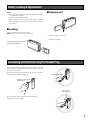
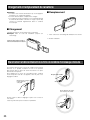
Battery Loading & Replacement
Notes:
• Refer to the operating instructions included with the battery and battery charger.
• Prepare a fully charged battery.
• Battery replacement is recommended when the power
indicator lights up in red and a constant beep is heard in
the headset.
■ Replacement
w
■ Loading
q
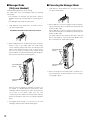
Insert the battery as shown in the figure.
Note: Be sure to insert it until the lock clicks.
1. Slide the battery lock down.
2. Remove the battery.
When inserting the battery, check the
positive and negative sides.
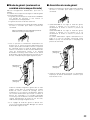
Connecting and Disconnecting the Headset Plug
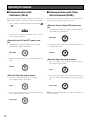
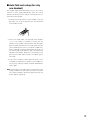
When connecting the headset plug to this product, hold the
plug and push it straight into the earphone output jack and
microphone input jack.
When disconnecting the headset plug from this product,
hold the plug and pull it straight out.
Do not hold the cable.
Pull/insert the plug straight,
holding this part.
Do not pull this
part up and down.
Do not hold the cable or pull the plug up and down.
Doing so may cause trouble.
9