1
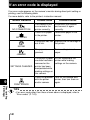
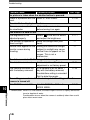
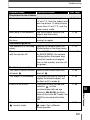
If an error code is displayed
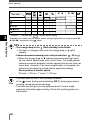
If an error code appears on the camera’s monitor during direct print setting or
printing, see the following table.
For more details, refer to the printer’s instruction manual.
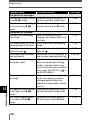
Monitor indication
Possible cause
Corrective action
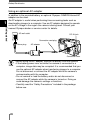
NO CONNECTION
The camera is not
connected to the
printer correctly.
Disconnect the camera
and connect it again
correctly.
There is no paper
in the printer.
Load some paper in the
printer.
NO PAPER
The printer has run Replace the ink cartridge in
out of ink.
the printer.
NO INK
The paper is
jammed.
Remove the jammed
paper.
JAMMED
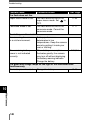
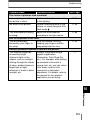
SETTINGS CHANGED
The printer’s paper Do not manipulate the
cassette has been printer while making
removed or the
settings on the camera.
printer has been
manipulated while
making settings on
the camera.
There is a problem Turn off the camera and
with the printer
printer, then turn them on
and/or camera.
again.
9
Direct printing
(PictBridge)
PRINT ERROR
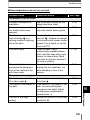
TIPS
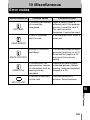
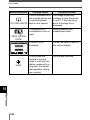
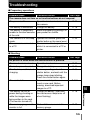
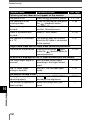
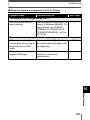
• If an error code other than those shown above is displayed, refer to
“Error codes” (P. 143).
142