1
Components
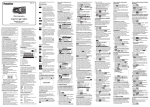
Front view
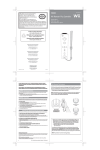
Attaching Wii accessories
Jacket
NOTE: The Power Button on the Wii Remote controller
can be pressed through the jacket.
Wii MotionPlus connector plug
Plugs into the External Extension Connector on the
bottom of the Wii Remote.
The Nunchuk, Classic Controller, or other accessories that connect to the External
Extension Connector, can be used while Wii MotionPlus is attached to the Wii Remote.
Follow these procedures to connect these accessories to Wii MotionPlus.
1. Remove the connector cover from
the bottom of Wii MotionPlus.
Grasp the cover by the sides as
shown.
Lock fingers
Insert into the holes on the bottom of the Wii Remote.
Connector cover
Sensor unit
Back view
2. Insert the connector plug into the
External Extension Connector on the
bottom of Wii MotionPlus until it
clicks into place.
Lock Release buttons
Press when attaching or removing Wii MotionPlus
from the Wii Remote.
Lock Switch
Slide towards the top of the Wii Remote to lock Wii
MotionPlus into place.
Wrist Strap slot
3. Pass the Connector Cover cord
through the connector hook on the
back of the connector.
Connector hook
Pass the wrist strap through when installing
Wii MotionPlus onto the Wii Remote.
Bottom view
Jacket slots
Connector cover
attached
Tabs on the bottom of the sensor unit fit
into these slots.
Connector cover
Protects the External Extension Connector
on the bottom of Wii MotionPlus
Bottom view
4. Insert the tab on the edge of the
connector cover into the connector
hook. Press the connector cover
firmly into place on the connector
plug.
External Extension Connector
Connector cover
removed
For connecting accessories such as the
Nunchuk and Wii Classic Controller.
Connector cover cord
Insert this cord into the Connector Hook
on the plug of the accessory being
plugged into the connector.
Continued next page
2
5. Place your hand through the wrist
strap and adjust the strap lock so
that the strap will not fall off your
wrist. Do not over tighten the strap
lock so that it’s uncomfortable. It
should just be tight enough to hold
the wrist strap in place.
3
4. Insert the connector cover into the
External Extension Connector on
the bottom of Wii MotionPlus.
Lever
Close the lever (if your strap lock
has one) until it clicks to hold the
strap lock in place.
Removing Wii accessories
Follow these procedures to remove the Nunchuk, Classic Controller, or other accessories
that you have connected to Wii MotionPlus.
1. Remove the connector cover from
the accessory connector plug.
Be sure to pull the connector cover
straight out of the connector hook
to prevent damage to the tab on
the edge of the cover.
Pull cover
straight out of
connector hook.
2. Press the lock release levers on the
sides of the accessory connector
plug and pull the plug straight out
of the connector.
3. Remove the connector cover cord
from the accessory plug’s
connector hook.
4
5