1
I
Checking battery power
Be sure to check the camera's battery power after installing a
fresh battery pack or prior to taking photographs in order to
avoid acciden tal fai lure.
1
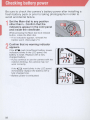
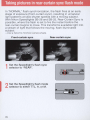
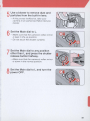
Set the Main dial to any position
other than L. Confirm that the
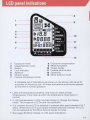
indicators appear in the LCD panel
and inside the viewfinder .
While pressing th e Main dial lock-release
button, rotate the Main dial.
-If no indicators appear, reinstall the
battery pack. (See page 21.)
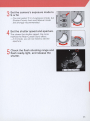
Confirm that no warning indicator
appears .
2
If the C1!!!I mark (insufficient battery power
indicator) blinks in the LCD pane l, th e
battery is weak. Replace with a fully
charged battery.
- If you continue to use the camera with the
indictor blinking, the camera may not
work correctly.
If the C=:J mark blinks in the LCD panel,
immediately replace the battery with a
fully charged one.
-Battery power is exhausted.
22