1
ProSafe® 16-AP Wireless Management System
Data Sheet
WMS5316
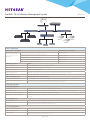
Internet
WMS5316
UTM150
GS748T
GS724TP
GS724TP
GS724TP
WNDAP350
WNDAP350
WNAP320
WNAP320
WNDAP350
WNAP320
WG103
WG103
WG103
Features and Benefits
Supported Access Point Models
Minimum Firmware Version Requires
Up to 16 mixed access points are
simultaneously supported by the
Wireless Management System
(WMS5316)
WNDAP360 ProSAFE Dual Band 802.11n Wireless Bccess Point
WNDAP360_V2.0.7
WNDAP350 ProSAFE Dual Band 802.11n Wireless Access Point
WNDAP350_V2.0.27
WNAP320 ProSAFE 802.11n Wireless Access Point
WNAP320_V2.0.3
WNAP210v1 ProSAFE 802.11n Wireless Access Point
WNAP210_V2.0.27
WG103 ProSAFE 802.11g Wireless Access Point
WG103_V2.0.37
WMS5316 Key Features
Benefits
Access Point Discovery
Discovers NETGEAR Wireless Access Points everywhere on the LAN
Wireless Performance Optimization
Allows centralized RF management, Quality of Service (QoS)
Wireless Security Configuration
Streamlines security configuration tasks
Wireless Network Monitoring
Summarizes managed access point status, rogue access points, wireless clients status, and wireless network usage
Maintenance Operations
Provides remote management, and firmware updates for the managed access points on the LAN
Network Configuration Levels
Ease of Use Even for Non-professional Users
Basic Settings for a Typical Network
The basic settings fit the most common network configurations. All wireless access points belong to the same organization or business.
Advanced Settings for Access Point Groups
If completely separate networks share a single LAN, advanced settings allow set up of access point groups. For example, a shopping mall might
need access point groups if several businesses share a LAN, but each business has its own network.
Technical Specifications
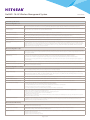
IP and VLAN Configuration
Own IP Address
Fixed IP address only (no DHCP client mode for the Wireless Management System itself)
DHCP Server
The Wireless Management System can function as a DHCP server. Multiple DHCP server pools can be added for different VLANs.
VLANs for the Wireless Management System
Untagged Management VLAN (default) or dedicated management VLAN (tagged)
VLANs for the Access Points - Multiple SSIDs
For each access point group, up to 8 tagged VLANs can be configured per radio, a maximum of 16 SSIDs per group for both the radios (2.4 GHz
and 5 GHz).
Access Point Discovery
Automatic Discovery
Layer 2 discovery method if the Wireless Management System and all the wireless access points on the LAN are in the same IP subnet
IP Discovery
Layer 3 discovery method if the the Wireless Management System and the wireless access points use different IP subnets. IP discovery can
be used to find the access points for each subnet, one subnet at a time.
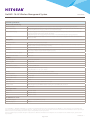
Access Point Management
Managed Access Point Assignment
After the Wireless Management System discovers the access points, they can be “added” and set “managed” by the Wireless Management System
Access Point Information Edition
Name (modifiable), model (cannot be modified), user name for logging in to the access point (cannot be modified), password (modifiable)
Access Point Groups
Initially all the wireless access points belong to the same access point group. Up to 8 independent groups of managed access points can be
configured and each access point can belong to only one group.
Page 2 of 4