1
Reference Manual for the Integrated ADSL Modem and Wireless Router with Voice, Model
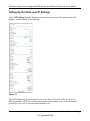
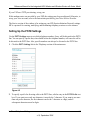
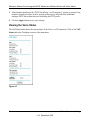
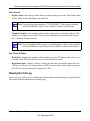
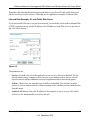
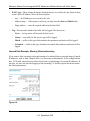
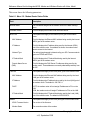
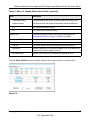
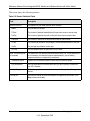
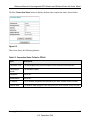
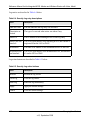
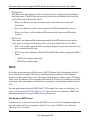
This screen shows the following parameters:
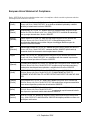
Table 6-1. Menu 3.2 - Modem Router Status Fields
Field
Description
Account Name
The Host Name assigned to the modem router in the Basic Settings
menu.
Firmware Version
This field displays the modem router firmware version.
ADSL Port
These parameters apply to the Internet (ADSL) port of the modem
router.
MAC Address
This field displays the Ethernet MAC address being used by the Internet
(ADSL) port of the modem router.
IP Address
This field displays the IP address being used by the Internet (ADSL)
port of the modem router. If no address is shown, the modem router
cannot connect to the Internet.
Network Type
The network type depends is determined by your ISP. Common network
types are PPPoE and PPPoA.
IP Subnet Mask
This field displays the IP Subnet Mask being used by the Internet
(ADSL) port of the modem router.
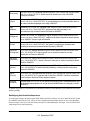
Domain Name Server
(DNS)
LAN Port
This field displays the DNS Server IP addresses being used by the
modem router. These addresses are usually obtained dynamically from
the ISP.
These parameters apply to the Local (ADSL) port of the modem router.
MAC Address
This field displays the Ethernet MAC address being used by the Local
(LAN) port of the modem router.
IP Address
This field displays the IP address being used by the Local (LAN) port of
the modem router. The default is 192.168.0.1.
DHCP
If OFF, the modem router will not assign IP addresses to PCs on the
LAN.
If ON, the modem router will assign IP addresses to PCs on the LAN.
IP Subnet Mask
This field displays the IP Subnet Mask being used by the Local (LAN)
port of the modem router. The default is 255.255.255.0.
Modem
These parameters apply to the Local (WAN) port of the modem router.
ADSL Firmware Version
The version of the firmware.
Modem Status
The connection status of the modem.
6-6
Managing Your Network
v1.0, September 2006