1
Contents
Introduction .................................................................................................................... 3
Package Contents ...........................................................................................
Features ...........................................................................................................
What is Wireless LAN? ....................................................................................
Wireless LAN Modes .......................................................................................
Notes on Wireless LAN Configuration ............................................................
4
5
6
7
8
Hardware Installation .................................................................................................... 9
System Requirements for the Card ................................................................ 9
Install the PCI Adapter ..................................................................................... 9
Connecting the Adjustable Antenna to the Card ............................................ 10
LED Indicators ................................................................................................ 11
Driver Installation ......................................................................................................... 12
Driver
Driver
Driver
Driver
installation for Windows XP ................................................................
installation for Windows ME ................................................................
installation for Windows 2000 ............................................................
installation for Windows 98 .................................................................
12
14
16
19
Installing and Using the WLAN Utility ......................................................................... 22
Installation in Windows ................................................................................. 22
Using Wireless Utility In Windows XP ........................................................... 24
Using the NetComm NP5420 WLAN Utility In Windows 98/2000/ME .......... 28
Appendix A: FAQ .......................................................................................................... 33
Appendix B: Troubleshooting ..................................................................................... 34
Installing Network Protocols .......................................................................... 34
Disabling Windows XP’s Wireless Zero Configuration ................................ 34
Appendix C: Specifications ......................................................................................... 36
Appendix D: Registering your NetComm Product ..................................................... 36
Trademarks and Notices ...............................................................................
Warranty Registration Form ..........................................................................
Product Warranty ............................................................................................
Limitations of Warranty ..................................................................................
www.netcomm.com.au
Page 2
36
37
39
39
Rev. 1 - YML678
NP5420 11G Wireless PC Card User Guide
Introduction
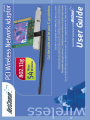
Congratulations on your purchase of the NetComm NP5420 11G Wireless PC Card. This PCI
card provides you with an innovative wireless networking solution. The NP5420 is easy to set
up and use, and with this wireless technology, you can share files and network resources on the
network—without inconvenient wires!
The Card is a network Adapter with 54Mbps data rate operating in the ISM band implementing
the IEEE 802.11g standard. This Adapter provides Device Drivers for Windows Operating
Systems. It also provides tools for the configuration of the Card. The tool, as well as the
installation steps of the plug-and-play procedure for the Windows operating systems, is
described in this document.
Follow these installation steps to ensure the quick and easy installation of your NetComm
NP5420 11G Wireless PC Card:
1.
Read the documentation and plan the installation.
2.
Install the hardware.
3.
Install the drivers.
4.
Install and use NetComm's WLAN Utility or use Windows XP WLAN utility (XP only).
Rev. 1 - YML678
NP5420 11G Wireless PC Card User Guide
www.netcomm.com.au
Page 3
Package Contents
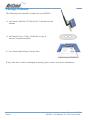
The following items should be contained in your NP5420:
❏ NetComm’s NP5420 11G Wireless PC Card and external
antenna
❏ NetComm Driver / Utility CD-ROM (a copy of
this user’s manual included)
❏ User Guide and Package Contents Note.
If any of the above items are damaged or missing, please contact your dealer immediately.
www.netcomm.com.au
Page 4
Rev. 1 - YML678
NP5420 11G Wireless PC Card User Guide
Features
The NetComm NP5420 11G Wireless PC Card complies with the IEEE 802.11g specification,
allowing it to communicate with other wireless devices that support the standard. Features of
the NP5420 are:
■ 2.4GHz frequency band, which complies with the worldwide requirement
■ Wireless interface following the IEEE 802.11g standard
■ PCI interface
■ Enciphering/deciphering of wireless data by the implementation of the WEP algorithm
■ Wire-free access to networked resources beyond the desktop
■ Allows users move between Access Points without resetting their connection configuration
■ Data rate of up to 54 Mbps
■ IEEE802.11g WLAN Card Configuration utility
■ External Antenna with LEDs indicating Power and Link
■ Supports most popular operating systems
Rev. 1 - YML678
NP5420 11G Wireless PC Card User Guide
www.netcomm.com.au
Page 5
What is Wireless LAN?
Wireless Local Area Network (WLAN) systems offer a great number of advantages over
traditional wired systems. WLAN is flexible and easy to setup and manage.
Using radio frequency (RF) technology, a WLAN transmits and receives data through the air. A
WLAN combines data connectivity with user mobility. For example, users can roam from a
conference room to their office without being disconnected from the network.
Using WLAN, users can conveniently access-shared information, and network administrators
can configure and augment networks without installing or moving network cables.
WLAN technology provides users with many convenient and cost saving features:
Mobility:
WLAN provide LAN users with access to real-time
information anywhere in their organization, providing service
opportunities that are impossible with wired networks.
Ease of Installation:
Installing is easy for novice and expert users alike,
eliminating the need to install network cables in walls and
ceilings.
Scalability:
WLAN can be configured in a variety of topologies to adapt
to specific applications and installations. Configurations are
easily changed and range from peer-to-peer networks suitable
for a small number of users to full infrastructure networks of
thousands of users roaming over a broad area.
www.netcomm.com.au
Page 6
Rev. 1 - YML678
NP5420 11G Wireless PC Card User Guide
Wireless LAN Modes
Wireless LANs can be configured in one of two ways:
Ad-hoc Networking
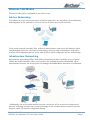
Also known as a peer-to-peer network, an ad-hoc network is one that allows all workstations
and computers in the network to act as servers to all other users on the network.
Users on the network can share files, print to a shared printer, and access the Internet with a
shared modem. However, with ad-hoc networking, users can only communicate with other
wireless LAN computers that are in the same wireless LAN workgroup, and are within range.
Infrastructure Networking
Infrastructure networking differs from ad-hoc networking in that it includes an access point.
Unlike the ad-hoc structure where users on the LAN contend the shared bandwidth, on an
infrastructure network, the access point can manage the bandwidth to maximize its utilization.
Additionally, the access point enables users on a wireless LAN to access an existing wired
network, allowing wireless users to take advantage of the wired networks resources, such as
Internet, email, file transfer, and printer sharing.
Rev. 1 - YML678
NP5420 11G Wireless PC Card User Guide
www.netcomm.com.au
Page 7
Infrastructure networking has the following advantages over ad-hoc networking:
Extended range:
Each wireless LAN computer within the range of the
access point can communicate with other wireless
LAN computers within range of the access point.
Roaming:
The access point enables a wireless LAN computer
to move through a building and still be connected to
the LAN.
Wired to wireless LAN connectivity:
The access point bridges the gap between wireless
LANs and their wired counterparts.
Notes on Wireless LAN Configuration
When configuring a wireless LAN (WLAN), be sure to note the following points:
■ Optimize the performance of the WLAN by ensuring that the distance between access
points is not too far. In most buildings, WLAN Adapters operate within a range of 10 ~ 30
metres, depending on the thickness and structure of the walls.
■ Radio waves can pass through walls and glass but not metal. If there is interference in
transmitting through a wall, it may be that the wall has reinforcing metal in its structure.
Install another access point to circumvent this problem or try moving your existing access
point.
■ Floors usually have metal girders and metal reinforcing struts that interfere with WLAN
transmission. It is recommended that you use at least one access point for each level of your
building.
www.netcomm.com.au
Page 8
Rev. 1 - YML678
NP5420 11G Wireless PC Card User Guide
Hardware Installation
This section gives detailed instructions for connecting your NB5420 to a PCI slot of a desktop
computer.
System Requirements for the Card
■ Operating System: Microsoft Windows 98/ME/2000/XP
■ Desktop computer with a CD-ROM drive
■ One free PCI slot
■ Pentium-Class 90MHz or higher
Install the PCI Adapter
NOTE: These instructions apply to most desktop computers. For detailed information on
inserting a PCI Adapter into your desktop computer, consult the desktop computer
User’s Manual.
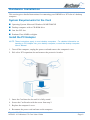
1. Turn off the computer‚ unplug the power cord and remove the computer's cover.
2. Pick a free PCI expansion slot and remover the protective bracket.
3. Insert the Card into the slot until it is fully seated.
4. Secure the Card bracket with the screw from step 2.
5. Replace the computer’s cover.
6. Reconnect the power cord and turn on the computer.
Rev. 1 - YML678
NP5420 11G Wireless PC Card User Guide
www.netcomm.com.au
Page 9
Connecting the Adjustable Antenna to the Card
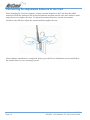
After installing the Card on computer, connect external Antenna to the Card from the SMA
connector. Hold the antenna in the desired orientation and then turn the lock nut clockwise until
snug (do not over tighten the nut). To adjust the antenna direction, turn the nut counter
clockwise one full turn, adjust the antenna and then tighten the nut.
After hardware installation is completed, please go to the Driver Installation section and follow
the instructions for your operating system.
www.netcomm.com.au
Page 10
Rev. 1 - YML678
NP5420 11G Wireless PC Card User Guide
LED Indicators
The following table describes the meaning of LED indicators:
LED
MEANING
POWER
Indicates that the Card is powered on (solid green).
LINK
Indicates link status. The LED lights up (solid green) while
the wireless connection is linked.
The LED is blinking green while wireless data transmitting /
receiving.
Rev. 1 - YML678
NP5420 11G Wireless PC Card User Guide
www.netcomm.com.au
Page 11
Driver Installation
The following sections cover the installation of the NetComm NP5420 WLAN PCI Card driver
in Windows Operating Systems.
Note:
You have to install your hardware first before you begin to install the drivers.
Driver installation for Windows XP
Follow the steps below to install the NP5420 11G Wireless PC Card drivers for Windows XP.
1. Insert the NP5420 into a spare PCI slot in your desktop PC. (Refer to the section on
Hardware installation for instructions.)
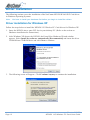
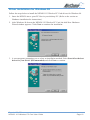
2. After Windows XP detects the NP5420, the Found New Hardware Wizard window
appears. Select Install the software automatically [Recommended] and insert the driver
CD-ROM into CD-ROM drive and click Next to continue.
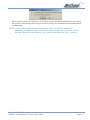
3. The following screen will appear. Click Continue Anyway to continue the installation.
www.netcomm.com.au
Page 12
Rev. 1 - YML678
NP5420 11G Wireless PC Card User Guide
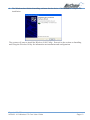
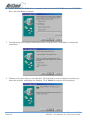
4. The Windows has finished installing software for the device. Click Finish to complete the
installation
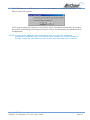
The system will start to install the Wireless LAN Utility. Proceed to the section on Installing
and Using the Wireless Utility for information on installation and configuration.
Rev. 1 - YML678
NP5420 11G Wireless PC Card User Guide
www.netcomm.com.au
Page 13
Driver installation for Windows ME
Follow the steps below to install the NP5420 11G Wireless PC Card drivers for Windows ME.
1. Insert the NP5420 into a spare PCI slot in your desktop PC. (Refer to the section on
Hardware installation for instructions.)
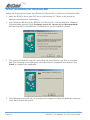
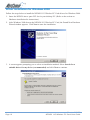
2. After Windows ME detects the NP5420 11G Wireless PC Card, the Add New Hardware
Wizard window appears. Select Automatic search for a better driver (Recommended)
and insert the driver CD-ROM into CD-ROM drive and click Next to continue.
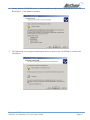
3. The system will find the setup files and follow the instruction to copy files to your hard
disk. The following screen will appear when the software installation has finished. Click
Finish to complete the installation.
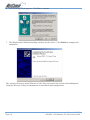
4. The following screen will ask you to restart your computer to finish the hardware setting up.
Click Yes to reboot the system.
www.netcomm.com.au
Page 14
Rev. 1 - YML678
NP5420 11G Wireless PC Card User Guide
After system reboot, the Wireless LAN Utility will be installed automatically. Proceed to
the section on Installing and Using the Wireless Utility for information on installation and
configuration.
NOTE: In most cases, Windows will automatically copy all of the files needed for
networking. If Windows asks you for the files and prompts you to input the path to
the files. Follow the instructions on your screen, and then click OK to continue.
Rev. 1 - YML678
NP5420 11G Wireless PC Card User Guide
www.netcomm.com.au
Page 15
Driver installation for Windows 2000
Follow the steps below to install the NP5420 11G Wireless PC Card drivers for Windows 2000.
1. Insert the NP5420 into a spare PCI slot in your desktop PC. (Refer to the section on
Hardware installation for instructions.)
2. After Windows 2000 detects the NP5420 11G Wireless PC Card, the Found New Hardware
Wizard window appears. Click Next to start the installation.
3. A screen appears prompting you to select an installation method. Select Search for a
suitable driver for my device (recommended) and click Next to continue.
www.netcomm.com.au
Page 16
Rev. 1 - YML678
NP5420 11G Wireless PC Card User Guide
4. Ensure that the CD-ROM driver is selected and insert the driver CD-ROM into your CDROM drive. Click Next to continue.
5. The following screen appears showing the driver search result. Click Next to continue the
installation.
Rev. 1 - YML678
NP5420 11G Wireless PC Card User Guide
www.netcomm.com.au
Page 17
6. The following screen appears. Click Yes to continue
7. The Windows has finished installing software for the device. Click Finish to complete the
installation.
The system will start to install Wireless LAN Utility. Proceed to the section on Installing and
Using the Wireless Utility for information on installation and configuration.
www.netcomm.com.au
Page 18
Rev. 1 - YML678
NP5420 11G Wireless PC Card User Guide
Driver installation for Windows 98
Follow the steps below to install the NP5420 11G Wireless PC Card drivers for Windows 98.
1. Insert the NP5420 into a spare PCI slot in your desktop PC. (Refer to the section on
Hardware installation for instructions.)
2. After Windows 98 detects the NP5420 11G Wireless PC Card, the Add New Hardware
Wizard window appears. Clicks Next to continue the installation.
3. A screen appears prompting you to select an installation method. Select Search for the best
driver for your device. (Recommended) and click Next to continue.
Rev. 1 - YML678
NP5420 11G Wireless PC Card User Guide
www.netcomm.com.au
Page 19
4. Ensure that the CD-ROM drive is selected. Insert the driver CD-ROM into your CD-ROM
drive and click Next to continue.
5. The following screen appears showing the driver search result. Click Next to continue the
installation.
6. Windows 98 copies files to your hard disk. The following screen will appear to inform you
when the software installation has finished. Click Finish to complete the installation.
www.netcomm.com.au
Page 20
Rev. 1 - YML678
NP5420 11G Wireless PC Card User Guide
7. The following screen will ask you to restart your computer to finish the installation. Click
Yes to reboot the system.
After system reboot, the Wireless LAN Utility will be installed automatically. Proceed to
the section on Installing and Using the Wireless Utility for information on installation and
configuration.
NOTE: In most cases, Windows will automatically copy all of the files needed for
networking. If Windows asks you for the files and prompts you to input the path to
the files. Follow the instructions on your screen, and then click OK to continue.
Rev. 1 - YML678
NP5420 11G Wireless PC Card User Guide
www.netcomm.com.au
Page 21
Installing and Using the WLAN Utility
The following sections cover the NetComm NP5420 WLAN Utility installation and
configuration.
Installation in Windows
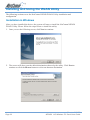
After you have installed the driver, the system will start to install the NetComm NP5420
WLAN Utility. Please follow the steps below to install the utility.
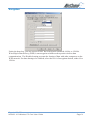
1. Once you see the following screen, click Next to continue.
2. The screen will show you the default destination chosen by the utility. Click Next to
continue or click the Browse button to select an alternate destination.
www.netcomm.com.au
Page 22
Rev. 1 - YML678
NP5420 11G Wireless PC Card User Guide
3. The following screen allows you to review and change the settings before completing the
installation. Click Next to continue or click Back to review or change any settings.
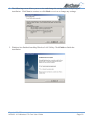
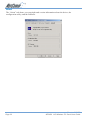
5. Windows has finished installing Wireless LAN Utility. Click Finish to finish the
installation.
Rev. 1 - YML678
NP5420 11G Wireless PC Card User Guide
www.netcomm.com.au
Page 23
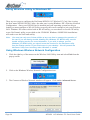
Using Wireless Utility In Windows XP
Wireless LAN Utility
There are two ways to configure the NetComm NP5420 11G Wireless PC Card. One is using
the NetComm NP5420 WLAN Utility; the other one is using Windows XP’s Wireless Network
Configuration. Once your NP5420 card is installed and your operating system has drivers
loaded you must configure a WLAN Utility to specify the correct settings to join your Wireless
LAN. Windows XP comes with a built-in WLAN utility, you can choose to use the XP utility
or use NetComm's utility as provided on the CD-ROM. Windows 98/ME/2000 installations
will need to use the NetComm utility.
Note:
You must use only one of these utilities at any one time to manage the operation of
the card if you are having trouble disabling the Windows XP WLAN utility see the
trouble shooting section for more information. If you wish to always use the
Windows XP WLAN utility you should move the shortcut for the NetComm utility
from the Startup section of your Start menu to your desktop - this will prevent the
NetComm Utility from launching when Windows is started.
Using Windows Wireless Network Configuration
1. Click the right key of the mouse on the Wireless LAN Utility icon and select Exit from the
pop-up menu.
2. Click on the Windows Wireless Network Configuration icon.
3. The Connect to Wireless Network window will appear. Click on the Advanced button.
www.netcomm.com.au
Page 24
Rev. 1 - YML678
NP5420 11G Wireless PC Card User Guide
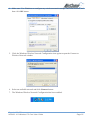
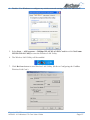
4. Make sure “Use Windows to configure my wireless network settings” has been selected, and
then click OK button.
5. Click the Windows Wireless Network Configuration icon again to open the Connect to
Wireless Network window.
6. Select an available network and click Connect button.
7. The Windows Wireless Network Configuration has been enabled.
Rev. 1 - YML678
NP5420 11G Wireless PC Card User Guide
www.netcomm.com.au
Page 25
8. Click Properties to start Windows Wireless Network Configuration.
Using the NetComm NP5420 WLAN Utility (for Windows XP only)
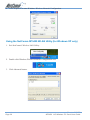
1. Exit NetComm’s Wireless LAN Utility.
2. Double click Windows Wireless Network Configuration icon.
3. Click Advanced button.
www.netcomm.com.au
Page 26
Rev. 1 - YML678
NP5420 11G Wireless PC Card User Guide
4. Disable “Use Windows to configure my wireless network settings” and click OK button.
5. Select Start -> All Programs -> 54Mbps WLAN WLAN PCI Card then click NetComm
NP5420 WLAN Utility to start the Wireless LAN Utility.
6. The Wireless LAN Utility will be enabled.
7. Click Re-Scan button to start Wireless LAN Utility. (Refer to Configuring the CardBus
Wireless LAN Card.)
Rev. 1 - YML678
NP5420 11G Wireless PC Card User Guide
www.netcomm.com.au
Page 27
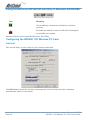
Using the NetComm NP5420 WLAN Utility In Windows 98/2000/ME
Wireless LAN Utility icon
Icon
Meaning
Green indicates a connection is linked to a wireless
network.
Red indicates that the wireless LAN card is looking for
an available access point.
Double-click the icon to open the Wireless LAN Utility.
Configuring the NP5420 11G Wireless PC Card
Link Info
This screen shows you the status of your current connection.
Click Re-Scan to search for wireless connection (the Card will search for the connection
automatically when it is activated).
www.netcomm.com.au
Page 28
Rev. 1 - YML678
NP5420 11G Wireless PC Card User Guide
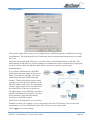
Configuration
The profile setting allows you to save configurations in different profiles for different working
environments. The default profile will contain the initial configuration setting when you install
the Card.
Under the Operating Mode drop-box, you may choose either Infrastructure or Ad-Hoc. The
Infrastructure mode allows a wireless adapter to communicate with a wired network employing
an Access Point, while the Ad-Hoc mode allows wireless-to-wireless, peer-to-peer
communication.
If you choose Infrastructure, the SSID
should have the same name as the Access
Point. If you choose Ad-Hoc, all clients
should share the same SSID name and
channel. When using Infrastructure mode
you do not need to specify channels as the
NP5420 adapter will select the appropriate
channel when it finds an access point with
the same SSID. If two access points are
broadcasting the same SSID they should be
on different channels (preferably 2 or more
apart) and their range should partially
overlap to avoid 'black spots'.
Under Power Saving Mode, you can select
Enabled to allow your adapter to go to sleep mode while the Card doesn’t proceed the data
transmission. Or select Disabled to make the Card never go to sleep mode.
Click Apply to save the settings.
Rev. 1 - YML678
NP5420 11G Wireless PC Card User Guide
www.netcomm.com.au
Page 29
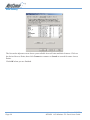
Site Survey
The list on the adjacent screen shows you available Access Points and their features. Click on
the desired Access Point, then click Connect to connect or Search to search for more Access
Points.
Click OK when you are finished.
www.netcomm.com.au
Page 30
Rev. 1 - YML678
NP5420 11G Wireless PC Card User Guide
Encryption
Under the drop-box, you can choose to have WEP encryption Disabled, 64-Bit, or 128-Bit.
Wired Equivalent Privacy (WEP) is an encryption scheme used to protect wireless data
communication. The Disabled setting prevents the sharing of data with other computers on the
WEP network. For data sharing to be enabled, select the level of encryption desired, either 64 or
128-bit.
Rev. 1 - YML678
NP5420 11G Wireless PC Card User Guide
www.netcomm.com.au
Page 31
About
The “About” tab shows you copyright and version information about the driver, the
configuration utility, and the firmware.
www.netcomm.com.au
Page 32
Rev. 1 - YML678
NP5420 11G Wireless PC Card User Guide
Appendix A: FAQ
1. What is IEEE 802.11 standard?
The IEEE 802.11 is a wireless LAN industry standard, and the objective of IEEE 802.11 is
to make sure that different manufactures’ wireless LAN devices can communicate to each
other.
2. What is WEP?
As described in the IEEE 802.11 standard, WEP (Wired Equivalent Privacy) is a data
privacy mechanism based on a 40 bit shared key algorithm.
3. My desktop PC cannot recognize the Wireless Network PCI Adapter.
Please make sure that the Card is inserted into the PCI slot of your desktop PC properly
(check this when the PC is powered off).
And also make sure that the PCI controller is enabled in the BIOS of your desktop PC.
Try installing the card in a different PCI slot.
4. In Infrastructure mode, my desktop PC cannot communicate with the others PCs on
the network.
First, make sure that the SSID is same as the others PC.
Check if the WEP is enabled on the Access Point, if it is, set your Adapter’s WEP the same
as the Access Point.
Also check the Access Point’s Authentication Type and Preamble Type and match those
settings.
5. In ad-hoc mode, my desktop PC cannot communicate with the others PCs on the
network.
Make sure the SSID and the Channel number are the same as other wireless stations.
Check if WEP settings are the same in all wireless stations.
Check the Network Properties, make sure proper protocol is installed and File and Printer
Sharing is enabled.
Rev. 1 - YML678
NP5420 11G Wireless PC Card User Guide
www.netcomm.com.au
Page 33
Appendix B: Troubleshooting
Installing Network Protocols
Protocols are necessary for computers to be recognized on your network. Windows 2000 users
need to check their Windows User Guides for protocol installation.
Installing the Network Protocols for Windows 98 and Millennium
1. From the Start Menu, select Settings and bring up the Control Panel. From the Control
Panel, double-click on the Network icon.
Note:
Before adding any network protocols, verify that the protocol is not already
installed. Never install duplicate protocols.
2. Select NP5420 11G Wireless PC Card from the list and click the Add button.
3. Highlight Protocol and click the Add button.
4. Select Microsoft from the list of “Manufacturers” and TCP/IP from the list of “Network”
Protocols” and click the OK button to finish the installation.
Disabling Windows XP’s Wireless Zero Configuration
You may need to disable Windows XP’s Wireless Zero Configuration service if you are having
connection issues with the NetComm NP5420 11G Wireless PC Card.
Note:
Before continuing, please ensure that you are logged in as Administrator or have
administrator privileges on your computer.
1. From the Windows XP Start menu, select Control Panel. If your Control Panel window is
in Category View, click on Switch to Classic View before continuing.
2. Double click on the Administrative Tools icon.
The Administrative Tools screen will appear, double click on the Services icon.
www.netcomm.com.au
Page 34
Rev. 1 - YML678
NP5420 11G Wireless PC Card User Guide
3. Once the Services window has loaded, scroll down until you see the “Wireless Zero
Configuration” entry.
Double click on Wireless Zero Configuration to bring up the following properties page.
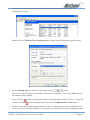
4. Set the Startup Type to “Disable” and then click the
button.
The service will be stopped by Windows. Once this is complete, click on the OK button at
the bottom of the window.
5. Now, click the
is done, click the
in the top right hand corner of the Services window to close it. Once this
in the top right hand corner of the Administrative Tools menu.
6. You have now finished disabling the Wireless Zero Configuration service for Windows XP.
To use your NetComm Wireless device you must now run the NetComm Configuration tool.
Rev. 1 - YML678
NP5420 11G Wireless PC Card User Guide
www.netcomm.com.au
Page 35
Appendix C: Specifications
Standards:
IEEE 802.11g
PCI Local Bus 2.1 Compliance
Channels:
11 Channels (US, Canada)
13 Channels (Europe)
14 Channels (Japan)
Antenna:
Dipole antenna with reversed SMA Connector
Frequency:
2.4 to 2.4835GHz (Industrial Scientific Medical Band)
Data Rate:
up to 54Mbps
Operating Ranges:
Indoor (varies depends on the environment):
Up to 50M @ 11Mbps
Up to 30M @ 54Mbps
Outdoor (varies depends on the environment):
Up to 150M @ 11Mbps
Up to 90M @ 54Mbps
Temperature:
Operating:
0° ~ 55° C
Storage:
-25° ~ 70° C
Humidity:
10% to 90% (non-condensing)
Appendix D: Registering your NetComm Product
To ensure that the conditions of your warranty are complied with, please go to the NetComm
web site for quick and easy registration of your product at
www.netcomm.com.au
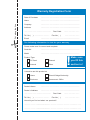
Alternatively, you can complete the Warranty Registration Form on the following page and mail
it to NetComm Limited, PO Box 1200, Lane Cove NSW 2066.
Trademarks and Notices
NetComm™ is a trademark of NetComm Limited. Windows® is a registered trademark of
Microsoft Corporation. Other brand and product names are trademarks or registered trademarks
of their respective holders. Information is subject to change without notice. All rights reserved.
Please note that the images used in this document may vary slightly from those of the actual
product. Specifications are accurate at the time of the preparation of this document but are
subject to change without notice.
www.netcomm.com.au
Page 36
Rev. 1 - YML678
NP5420 11G Wireless PC Card User Guide
Cut along the line
Warranty Registration Form
Date of Purchase
….......…………...........……….................................
Name
….......…………...........……….................................
Company
….......…………...........……….................................
Address
….......…………...........……….................................
…………………….........……...........
Tel No (
) ..............……….….
E-mail
Post Code
Fax No (
)
.....………....……….
....………...……….
….......…………...........……….................................
The following information is vital for your warranty
Please make sure it’s correct and complete.
Serial No
….......…………...........……….................................
Model
….......…………...........……….................................
!
Make sure
you fill this
section in!
Product Type:
PC Card
External
Internal
Other
I intend to use this product at:
Home
School/College/University
Business
Government Office
Dealer’s Name
….......…………...........……….................................
Dealer’s Address
….......…………...........……….................................
…………………….........……...........
Tel No (
) ..............……….….
Post Code
Fax No (
)
.....………....……….
....………...……….
How did you find out about our products?
…………………….............................………………………………………....…………
…………………….............................………………………………………....…………
Product Warranty
The warranty is granted on the following conditions:
1. This warranty extends to the original purchaser (you) and is not transferable;
2. This warranty shall not apply to software programs, batteries, power supplies, cables or
other accessories supplied in or with the product;
3. The customer complies with all of the terms of any relevant agreement with NetComm and
any other reasonable requirements of NetComm including producing such evidence of
purchase as NetComm may require;
4. The cost of transporting product to and from NetComm’s nominated premises is your
responsibility; and,
5. NetComm does not have any liability or responsibility under this warranty where any cost,
loss, injury or damage of any kind, whether direct, indirect, consequential, incidental or
otherwise arises out of events beyond NetComm’s reasonable control. This includes but is
not limited to: acts of God, war, riot, embargoes, acts of civil or military authorities, fire,
floods, electricity outages, lightning, power surges, or shortages of materials or labour.
6. The customer is responsible for the security of their computer and network at all times.
Security features may be disabled within the factory default settings. NetComm recommends
that you enable these features to enhance your security.
The warranty is automatically voided if:
1. You, or someone else, use the product, or attempts to use it, other than as specified by
NetComm;
2. The fault or defect in your product is the result of a voltage surge subjected to the product
either by the way of power supply or communication line, whether caused by thunderstorm
activity or any other cause(s);
3. The fault is the result of accidental damage or damage in transit, including but not limited to
liquid spillage;
4. Your product has been used for any purposes other than that for which it is sold, or in any
way other than in strict accordance with the user manual supplied;
5. Your product has been repaired or modified or attempted to be repaired or modified, other
than by a qualified person at a service centre authorised by NetComm; and,
6. The serial number has been defaced or altered in any way or if the serial number plate has
been removed.
Limitations of Warranty
The Trade Practices Act 1974 and corresponding State and Territory Fair Trading Acts or
legalisation of another Government (“the relevant acts”) in certain circumstances imply
mandatory conditions and warranties which cannot be excluded. This warranty is in addition to
and not in replacement for such conditions and warranties.
To the extent permitted by the Relevant Acts, in relation to your product and any other materials
provided with the product (“the Goods”) the liability of NetComm under the Relevant Acts is
limited to, at the option of NetComm to:
■
Replacement of the Goods; or
■
Repair of the Goods; or
■
Payment of the cost of replacing the Goods; or
■
Payment of the cost of having the Goods repaired.
All NetComm ACN 002 490 486 products have a standard 12 months warranty from date of
purchase. However some products have an extended warranty option (refer to packaging). To
be eligible for the extended warranty you must supply the requested warranty information to
NetComm within 30 days of the original purchase by registering on-line via the NetComm web
site at www.netcomm.com.au.
NetComm reserves the right to request proof of purchase upon any warranty claim.
Rev. 1 - YML678
NP5420 11G Wireless PC Card User Guide
www.netcomm.com.au
Page 39