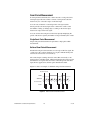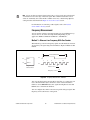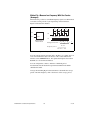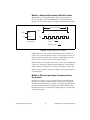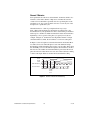
1
USER GUIDE AND SPECIFICATIONS NI cDAQ-9172 Français Deutsch ni.com/manuals Contents Introduction ............................................................................................. 4 Safety Guidelines .................................................................................... 5 Safety Guidelines for Hazardous Voltages ...................................... 5 Related Documentation........................................................................... 6 Device Documentation and Specifications ...................................... 9 Training Courses.............................................................................. 9 Technical Support on the Web......................................................... 9 Installing the Software ............................................................................ 10 Installing NI-DAQmx ...................................................................... 10 Installing Other Software................................................................. 10 Installing the NI cDAQ-9172.................................................................. 11 Mounting the NI cDAQ-9172.......................................................... 12 NI 9901 Desktop Mounting Kit................................................ 12 NI 9910 DIN-Rail Kit............................................................... 13 NI 9905 Panel Mount Kit ......................................................... 13 Setting Up the NI cDAQ-9172................................................................ 15 Understanding LED Indications.............................................................. 17 Active LED ...................................................................................... 17 Ready LED ...................................................................................... 17 Using the NI cDAQ-9172 ....................................................................... 18 C Series I/O Modules....................................................................... 18 Correlated vs. Static DIO Modules........................................... 19 cDAQ Module Interface .................................................................. 19 USB-STC2 ....................................................................................... 19 AI and AO Sample Timing....................................................... 19 Triggering Modes ..................................................................... 19 Independent Data Streams ........................................................ 19 PFI Signals................................................................................ 20 Flexible Counter/Timers........................................................... 20 Analog Input ............................................................................................20 Analog Input Triggering...................................................................20 AI Start Trigger Signal..............................................................21 AI Reference Trigger Signal .....................................................22 AI Pause Trigger Signal ............................................................24 Analog Input Timing Signals ...........................................................24 AI Sample Clock .......................................................................24 AI Sample Clock Timebase.......................................................25 Convert Behavior For Analog Input Modules...........................25 Getting Started with AI Applications in Software ...........................28 Analog Output .........................................................................................28 Analog Output Data Generation Methods........................................28 Software-Timed Generations ....................................................29 Hardware-Timed Generations ...................................................29 Analog Output Triggering ................................................................30 Analog Output Timing Signals.........................................................31 AO Sample Clock......................................................................31 AO Start Trigger Signal ............................................................31 AO Pause Trigger Signal...........................................................33 Minimizing Glitches on the Output Signal.......................................34 Getting Started with AO Applications in Software..........................34 Digital I/O................................................................................................35 Correlated vs. Static DIO Modules ..................................................35 Static DIO.........................................................................................36 Digital Waveform Acquisition (Correlated Input) ...........................36 DI Sample Clock Signal............................................................36 Digital Waveform Generation (Correlated Output) .........................37 Buffered Digital Waveform Generation....................................38 Change Detection Event ...................................................................39 Routing Change Detection Event to an Output Terminal .........39 Change Detection Acquisition..........................................................39 Digital Input/Output Configuration for NI 9401 ..............................39 PFI ...........................................................................................................40 Counters...................................................................................................40 Counter Input Applications ..............................................................42 Counting Edges .........................................................................42 Pulse-Width Measurement ........................................................44 Period Measurement..................................................................46 Semi-Period Measurement ........................................................48 Frequency Measurement ...........................................................49 Position Measurement ...............................................................54 Two-Signal Edge-Separation Measurement..............................57 Counter Output Applications............................................................59 Simple Pulse Generation ...........................................................59 Pulse Train Generation..............................................................61 Frequency Generation ...............................................................62 Frequency Division ...................................................................63 NI cDAQ-9172 User Guide and Specifications 2 ni.com Counter Timing Signals ................................................................... 63 Counter n Source Signal ........................................................... 64 Counter n Gate Signal............................................................... 65 Counter n Aux Signal ............................................................... 65 Counter n A, Counter n B, and Counter n Z Signals ................ 66 Counter n Up_Down Signal ..................................................... 66 Counter n HW Arm Signal ....................................................... 66 Counter n Internal Output and Counter n TC Signals .............. 67 Frequency Output Signal .......................................................... 67 Default Counter/Timer Routing....................................................... 68 Counter Triggering .......................................................................... 68 Other Counter Features .................................................................... 69 Cascading Counters .................................................................. 69 Counter Filters .......................................................................... 69 Prescaling.................................................................................. 70 Duplicate Count Prevention...................................................... 71 Synchronization Modes ............................................................ 73 Digital Routing and Clock Generation.................................................... 75 Clock Routing .................................................................................. 76 80 MHz Timebase .................................................................... 76 20 MHz Timebase .................................................................... 76 100 kHz Timebase .................................................................... 76 Specifications .......................................................................................... 77 Analog Input .................................................................................... 77 Analog Output.................................................................................. 77 Digital Waveform Characteristics (Slots 1 through 4 Only) ........... 78 PFI Characteristics (Slots 5 and 6 Only) ......................................... 78 General-Purpose Counter/Timers (Slots 5 and 6 Only)................... 79 Frequency Generator (Slots 5 and 6 Only) ...................................... 80 External Digital Triggers (Slots 5 and 6 or with Some AI Modules) .................................................................................. 80 Module I/O States ............................................................................ 80 Power Requirements ........................................................................ 80 Bus Interface .................................................................................... 81 Physical Characteristics ................................................................... 81 Safety ............................................................................................... 81 Environmental.................................................................................. 82 Shock and Vibration ........................................................................ 82 Electromagnetic Compatibility ........................................................ 83 CE Compliance ................................................................................ 83 Environmental Management............................................................ 83 Where to Go for Support......................................................................... 84 © National Instruments Corporation 3 NI cDAQ-9172 User Guide and Specifications Introduction This user guide describes how to use the National Instruments cDAQ-9172 chassis and lists specifications. For an interactive demonstration of how to install the NI cDAQ-9172, go to ni.com/info and enter daqinstall. The NI cDAQ-9172 is an eight-slot USB chassis designed for use with C Series I/O modules. The NI cDAQ-9172 chassis is capable of measuring a broad range of analog and digital I/O signals and sensors using a Hi-Speed USB 2.0 interface. For module specifications, refer to the documentation included with your C Series I/O module(s) or go to ni.com/manuals. 1 NI cDAQ-9172 7 Ready ON 1 2 2 3 4 5 Active OFF 3 11-30 VDC 15 W 4 1 2 3 4 Power Switch Ready/Active LEDs Power Connector USB Connector 5 5 6 7 6 Empty Module Slots Installed C Series I/O Modules Screw for Ground Connection Figure 1. NI cDAQ-9172 Chassis NI cDAQ-9172 User Guide and Specifications 4 ni.com Safety Guidelines Operate the NI cDAQ-9172 chassis only as described in this user guide. Because some C Series I/O modules may have more stringent certification standards than the NI cDAQ-9172 chassis, the combined system may be limited by individual component restrictions. Refer to the Using the NI cDAQ-9172 section of this document for more details. Note Caution The NI cDAQ-9172 chassis is not certified for use in hazardous locations. Hot Surface This icon denotes that the component may be hot. Touching this component may result in bodily injury. Safety Guidelines for Hazardous Voltages If hazardous voltages are connected to the module, take the following precautions. A hazardous voltage is a voltage greater than 42.4 Vpk or 60 VDC to earth ground. Ensure that hazardous voltage wiring is performed only by qualified personnel adhering to local electrical standards. Caution Caution Do not mix hazardous voltage circuits and human-accessible circuits on the same module. Make sure that chassis and circuits connected to the module are properly insulated from human contact. Caution The NI cDAQ-9172 chassis provides no isolation, but some modules offer isolation. Follow the safety guidelines for each module when using hazardous voltage. Caution © National Instruments Corporation 5 NI cDAQ-9172 User Guide and Specifications Related Documentation Each application software package and driver includes information about writing applications for taking measurements and controlling measurement devices. Check ni.com/manuals for the most recent hardware documentation, and refer to Table 1 for a list of locations for driver and application software documentation. The following document location references assume you have NI-DAQmx 8.8 or later, and where applicable, version 7.1 or later of the NI application software. Table 1. NI Driver and Application Software Documentation Software NI-DAQmx for Windows Document/Description Location/Topic DAQ Getting Started Guide—describes how to install and use the NI-DAQmx driver software for Windows and your data acquisition (DAQ) device, how to confirm the device is operating properly, and how to take an NI-DAQmx measurement. Start»Programs» National Instruments» NI-DAQ»DAQ Getting Started Guide NI-DAQ Readme—includes information about NI-DAQmx and Traditional NI-DAQ (Legacy). Describes how to choose the API to use, new features, and a list of known issues, supported devices, and devices not supported. Also provides details about system requirements. Start»Programs» National Instruments» NI-DAQ»NI-DAQ Readme NI-DAQmx Help—explains how to get started in your OS and ADE; provides an NI-DAQmx overview; includes information about programming the most common measurement tasks with references to examples in CVI/C, C++, .NET. Start»Programs» National Instruments» NI-DAQ»NI-DAQmx Help NI cDAQ-9172 User Guide and Specifications 6 ni.com Table 1. NI Driver and Application Software Documentation (Continued) Software LabVIEW Document/Description Location/Topic Getting Started with LabVIEW—describes the LabVIEW graphical programming environment and the basic LabVIEW features you use to build data acquisition and instrument control application. Start»All Programs» National Instruments» LabVIEW»LabVIEW Manuals or navigate to the labview\manuals directory and opening LabVIEW Help—provides information about LabVIEW programming concepts, step-by-step instructions for using LabVIEW, and reference information about LabVIEW VIs, functions, palettes, menus, and tools. Help»Search the LabVIEW Help LV_Getting_Started.pdf LabVIEW Help Topics Specific to NI-DAQmx © National Instruments Corporation Includes overview information and a tutorial to learn how to take an NI-DAQmx measurement in LabVIEW using the DAQ Assistant. From the Contents tab, Getting Started»Getting Started with DAQ Describes the LabVIEW NI-DAQmx VIs and properties. From the Contents tab, VI and Function Reference» Measurement I/O VIs and Functions Contains the conceptual and how-to information you need to acquire and analyze measurement data in LabVIEW, including common measurements, measurement fundamentals, NI-DAQmx key concepts, and device considerations. From the Contents tab, Taking Measurements 7 NI cDAQ-9172 User Guide and Specifications Table 1. NI Driver and Application Software Documentation (Continued) Software LabWindows™/CVI™ Document/Description Location/Topic LabWindows/CVI Help Data Acquisition book—contains NI-DAQmx measurement concepts and step-by-step instructions about creating a measurement task using the DAQ Assistant. Help»Contents, then select Using LabWindows/CVI» Data Acquisition»Taking an NI-DAQmx Measurement in LabWindows/CVI LabWindows/CVI Help NI-DAQmx Library book—contains NI-DAQmx API overviews and function reference. LibraryReference» NI-DAQmx Library Measurement Studio/Microsoft Visual Studio .NET Microsoft Visual Studio .NET Help/NI Measurement Studio Help—contains NI-DAQmx methods and properties. Measurement Studio» NI Measurement Studio Help and select NI-DAQmx .NET Class Library or NI-DAQmx Visual C++ Class Library ANSI C without NI Application Software NI-DAQmx Help Start»All Programs» National Instruments» NI-DAQ»NI-DAQmx Help NI-DAQmx C Reference Help—describes the NI-DAQmx Library functions. Start»All Programs» National Instruments» NI-DAQ»NI-DAQmx C Reference Help NI cDAQ-9172 User Guide and Specifications 8 ni.com Table 1. NI Driver and Application Software Documentation (Continued) Software Document/Description .NET Languages without NI Application Software* Location/Topic NI-DAQmx .NET Help—contains conceptual topics for using NI-DAQmx with Visual C# and Visual Basic .NET. Start»All Programs» National Instruments» NI-DAQ»NI-DAQmx .NET Reference Help. Expand NI Measurement Studio Help» NI Measurement Studio .NET Class Library»Reference to view the function reference. Expand NI Measurement Studio Help» NI Measurement Studio .NET Class Library»Using the Measurement Studio .NET Class Libraries Visual Studio .NET Help—contains conceptual topics for using NI-DAQmx with Visual C# and Visual Basic .NET. Help»Contents. Select Measurement Studio from the Filtered By drop-down list and follow the location instructions for the NI-DAQmx .NET Help. * With the Microsoft .NET Framework version 1.1 or later, you can use NI-DAQmx to create applications using Visual C# and Visual Basic .NET without Measurement Studio. You need Microsoft Visual Studio .NET 2003 or Microsoft Visual Studio 2005 for the API documentation to be installed. Device Documentation and Specifications Check ni.com/manuals for the most recent device and software documentation. If you do not have Web access, NI-DAQmx includes a Documentation CD that includes documentation available when NI-DAQmx released. Training Courses If you need more help getting started developing an application with NI products, NI offers training courses. To enroll in a course or obtain a detailed course outline, refer to ni.com/training. Technical Support on the Web For additional support, refer to ni.com/support or zone.ni.com. © National Instruments Corporation 9 NI cDAQ-9172 User Guide and Specifications Installing the Software Installing NI-DAQmx The DAQ Getting Started Guide, which you can download at ni.com/ manuals, offers NI-DAQmx users step-by-step instructions for installing software and hardware, configuring channels and tasks, and getting started developing an application. Installing Other Software If you are using other software, refer to the installation instructions that accompany your software. NI cDAQ-9172 User Guide and Specifications 10 ni.com Installing the NI cDAQ-9172 Figure 2 shows the dimensions of the NI cDAQ-9172 chassis. 19.0 mm (0.75 in.) 165.1 mm (6.50 in.) 36.4 mm (1.43 in.) NI cDAQ-9172 88.1 mm (3.50 in.) ON Ready 59.6 mm (2.35 in.) Active 1 2 3 4 5 6 7 8 OFF 51.7 mm (2.04 in.) 11-30 VDC 15 W 4.10 mm (0.16 in.) 254.0 mm (10.00 in.) 23.7 mm (0.94 in.) 44.1 mm (1.74 in.) 20.3 mm (0.80 in.) 25.0 mm (0.98 in.) 53.8 mm (2.12 in.) 44.1 mm (1.74 in.) 63.1 mm (2.49 in.) 46.0 mm (1.81 in.) 24.8 mm (0.98 in.) 58.9 mm (2.32 in.) 31.7 mm (1.25 in.) 19.1 mm (0.75 in.) 23.2 mm (0.91 in.) Figure 2. NI cDAQ-9172 with Dimensions in Millimeters (Inches) © National Instruments Corporation 11 NI cDAQ-9172 User Guide and Specifications Mounting the NI cDAQ-9172 You can mount the NI cDAQ-9172 chassis using a desktop, a 35 mm DIN-Rail, or a panel mount accessory kit. For accessory ordering information, refer to ni.com. Caution Your installation must meet the following requirements: • Allows 25.4 mm (1 in.) of clearance above and below the NI cDAQ-9172 chassis for air circulation. • Allows at least 50.8 mm (2 in.) of clearance in front of the modules for common connector cabling such as the 10-terminal detachable screw terminal connector and, as needed, up to 88.9 mm (3.5 in.) of clearance in front of the modules for other types of cabling. For more information about mechanical dimensions, refer to ni.com/ info and enter the info code cDAQMechanical. For more information about cable dimensions, refer to ni.com/info and enter the info code cDAQCable. NI 9901 Desktop Mounting Kit The NI 9901 Desktop Mounting Kit includes two metal feet you can install on the sides of the NI cDAQ-9172 chassis for desktop use. With this kit, you can tilt the NI cDAQ-9172 chassis for convenient access to the I/O module connectors. When you install the two metal feet, the two existing screws on the power switch side of the chassis must be removed. After removing the screws, replace them with the two longer screws included in the NI 9901 Desktop Mounting Kit. Figure 3. NI 9901 Desktop Mounting Kit NI cDAQ-9172 User Guide and Specifications 12 ni.com NI 9910 DIN-Rail Kit The NI 9910 DIN-Rail Kit contains one clip for mounting the chassis on a standard 35 mm DIN-Rail. To mount the chassis on a DIN-Rail, fasten the DIN-Rail clip to the chassis using a number 2 Phillips screwdriver and two M4 × 17 screws. The screws are included in the DIN-Rail kit. Make sure the DIN-Rail kit is installed as illustrated in Figure 4, with the larger lip of the DIN-RAIL positioned up. When the DIN-Rail kit is properly installed, the NI cDAQ-9172 chassis is centered on the DIN-Rail. Caution Remove the I/O modules before removing the chassis from the DIN-Rail. Figure 4. DIN-Rail Installation on the NI cDAQ-9172 NI 9905 Panel Mount Kit To mount the chassis on a panel, align the chassis on the panel mount accessory. Attach the chassis to the panel mount kit using two M4 × 17 screws (as shown in Figure 5). National Instruments provides these screws with the panel mount kit. You must use these screws because they are the correct depth and thread for the panel. These slots in the panel mount kit © National Instruments Corporation 13 NI cDAQ-9172 User Guide and Specifications can be used with M4, M5, No. 8, or No.10 panhead screws. Figure 5 illustrates the panel dimensions and installation on the NI cDAQ-9172 chassis. Refer to the documentation included with the NI 9905 Panel Mount Kit for more detailed dimensions. 330.2 mm (13.00 in.) NATIONAL INSTRUMENTS NI cDAQ-9172 ON Ready Active 1 2 3 4 5 6 7 OFF 8 88.1 mm (3.47 in.) 11-30 VDC 15 W 48.1 mm (1.90 in.) 28.1 mm (1.11 in.) Figure 5. Panel Mount Dimensions and Installation on the NI cDAQ-9172 NI cDAQ-9172 User Guide and Specifications 14 ni.com Setting Up the NI cDAQ-9172 Complete the following steps to prepare the NI cDAQ-9172 chassis for use: 1. Before connecting the hardware, install the NI-DAQmx software. Refer to the DAQ Getting Started Guide for more information about software installation. The NI-DAQmx software is included on the CD shipped with your kit and is available for download at ni.com/support. The DAQ Getting Started Guide is available after installation from Start»All Programs»National Instruments»NI-DAQ»DAQ Getting Started Guide. Other NI documentation is available from ni.com/manuals. Note 2. If you are not using any mounting accessories, attach the provided rubber standoffs to the back of the NI cDAQ-9172 chassis. 3. Make sure the NI cDAQ-9172 chassis power switch is turned off. 4. Attach a ring lug to a 14 AWG (1.6 mm) wire. Connect the ring lug to the ground terminal on the side of the chassis using the ground screw. Attach the other end of the wire to the system safety ground. 1 1 Attached to System Ground Figure 6. Ring Lug Attached to Ground Terminal Note Additionally, attach a wire with a ring lug to all other C Series I/O module cable shields. You must connect this wire to the ground terminal of the chassis using the ground screw. 5. © National Instruments Corporation Remove the plastic cover from the connector in any empty module slot. 15 NI cDAQ-9172 User Guide and Specifications 6. Squeeze both C Series I/O module latches, insert the I/O module into the module slot, and press until both latches lock the module in place. 7. Connect the NI cDAQ-9172 chassis with the supplied USB cable to any available USB port on your computer. 8. Connect the power source to the NI cDAQ-9172 chassis. The NI cDAQ-9172 chassis requires an external power supply that meets the specifications in the Power Requirements section. The NI cDAQ-9172 chassis uses a DC input jack with a locking ring. Use only this connector with the NI cDAQ-9172 chassis. Refer to the Specifications section for more information about the connector. Note 9. Secure the power supply and USB cables, as depicted in Figure 7, using the two tie wraps and adhesive tie wrap mounts included in the shipping kit. The tie wraps and adhesive mounts help secure the non-latching USB connection. They can also be used to route the cables to a desirable position. 172 NI -9 AQ cD Figure 7. cDAQ Chassis With Secured Cables 10. Power on the NI cDAQ-9172 chassis. 11. Double-click the Measurement & Automation icon, shown at left, on the desktop to open MAX. 12. Expand Devices and Interfaces, and then expand NI-DAQmx Devices. NI cDAQ-9172 User Guide and Specifications 16 ni.com 13. Check that your device appears under Devices and Interfaces. If your device does not appear, press <F5> to refresh the view in MAX. If your device is still not recognized, refer to ni.com/support/install for troubleshooting information. 14. Right-click your device and select Self-Test. If you need help during the self-test, select Help»Help Topics» NI-DAQmx and click MAX Help for NI-DAQmx. When the self-test finishes, a message indicates successful verification or an error. If an error occurs, refer to ni.com/support/install for troubleshooting information. When in use, the NI cDAQ-9172 chassis may become warm to the touch. This is normal. Note Understanding LED Indications Active LED The Active LED indicates whether the NI cDAQ-9172 chassis is communicating over the USB bus. Table 2. Active LED LED Definition Amber Power is applied, but USB connection is not established Green USB traffic present Off No USB traffic present Ready LED The Ready LED is lit when the NI cDAQ-9172 chassis is ready for use. The color indicates whether the USB connection is Full-Speed or Hi-Speed. Table 3. Ready LED LED © National Instruments Corporation Definition Amber Hi-Speed (480 Mbit/sec) Green Full-Speed (12 Mbit/sec) Off USB connection is not established 17 NI cDAQ-9172 User Guide and Specifications Using the NI cDAQ-9172 The cDAQ system consists of three parts: C Series I/O modules, the cDAQ module interface, and the USB-STC2. These components digitize signals, perform D/A conversions to generate analog output signals, measure and control digital I/O signals, and provide signal conditioning. C Series I/O Module cDAQ Module Interface USBSTC2 USB 2.0 C Series I/O Module C Series I/O Module Figure 8. NI cDAQ-9172 Block Diagram C Series I/O Modules National Instruments C Series I/O modules provide built-in signal conditioning and screw terminal, spring terminal, BNC, D-SUB, or RJ-50 connectors. A wide variety of I/O types are available, allowing you to customize the cDAQ system to meet your application needs. C Series I/O modules are hot-swappable and automatically detected by the NI cDAQ-9172 chassis. I/O channels are accessible using the NI-DAQmx driver software. Because the modules contain built-in signal conditioning for extended voltage ranges or industrial signal types, you can usually make your wiring connections directly from the C Series I/O modules to your sensors/actuators. In most cases, the C Series I/O modules provide isolation from channel-to-earth ground. For more information about which C Series I/O modules are compatible with the NI cDAQ-9172 chassis, refer to the KnowledgeBase document, C Series Modules Supported in the NI cDAQ-9172 CompactDAQ. NI cDAQ-9172 User Guide and Specifications 18 ni.com To access this KnowledgeBase, go to ni.com/info and enter the info code rdcdaq. Correlated vs. Static DIO Modules Digital I/O module capabilities are determined by the type of digital signals that the module is capable of measuring or generating. Static digital I/O modules are designed for signals that change slowly and are accessed by software-timed reads and writes. Correlated digital I/O modules are for signals that change rapidly and are updated by either software-timed or hardware-timed reads and writes. For more information about Digital I/O modules, refer to the Digital I/O section. cDAQ Module Interface The cDAQ Module Interface manages data transfers between the USB-STC2 and the C Series I/O modules. The interface also handles autodetection, signal routing, and synchronization. USB-STC2 The USB-STC2 features independent high-speed data streams; flexible AI and AO sample timing; triggering; PFI signals for multi-device synchronization; flexible counter/timers with hardware gating; digital waveform acquisition and generation; and static DIO. AI and AO Sample Timing The USB-STC2 contains advanced analog input and analog output timing engines. A wide range of timing and synchronization signals are available through the PFI lines. Refer to the Analog Input Timing Signals and Analog Output Timing Signals sections for more information about the configuration of these signals. Triggering Modes The NI cDAQ-9172 supports different trigger modes, such as start trigger, reference trigger, and pause trigger with analog, digital, or software sources. Refer to the Analog Input Triggering and Analog Output Triggering sections for more information. Independent Data Streams The NI cDAQ-9172 supports four independent high-speed data streams; allowing for up to four simultaneous hardware timed tasks, such as analog input, analog output, buffered counter/timers, and correlated digital input/output. © National Instruments Corporation 19 NI cDAQ-9172 User Guide and Specifications PFI Signals The PFI signals, available through correlated digital input and output modules installed in slots 5 and/or 6, provide access to advanced features such as triggering, synchronization, and counter/timers. Refer to the PFI section for more information. The PFI pins have a digital filter circuit at the inputs that is configurable on a per-line basis. The filters allow the rejection of noise caused by noisy environments, bounces on switches, and so on. Flexible Counter/Timers The NI cDAQ-9172 includes two general-purpose 32-bit counter/timers that can be used to count edges, measure pulse-widths, measure periods and frequencies, and perform position measurements (encoding). In addition, the counter/timers can generate pulses, pulse trains, and square waves with adjustable frequencies. You can access the counter inputs and outputs using correlated digital I/O modules in slots 5 and/or 6. Refer to the Counters section for more information. Analog Input To perform analog input measurements, insert a supported analog input C Series I/O module into any slot on the cDAQ chassis. The measurement specifications, such as number of channels, channel configuration, sample rate, and gain, are determined by the type of C Series I/O module used. For more information and wiring diagrams, refer to the documentation included with your C Series I/O modules. The NI cDAQ-9172 has one AI timing engine, which means that only one analog input task can be running at a time on a chassis. However, the analog input task can include channels from multiple analog input modules. Analog Input Triggering A trigger is a signal that causes an action, such as starting or stopping the acquisition of data. When you configure a trigger, you must decide how you want to produce the trigger and the action you want the trigger to cause. The NI cDAQ-9172 chassis supports internal software, external digital triggering, and analog triggering. Three triggers are available: start trigger, reference trigger, and pause trigger. An analog or digital trigger can initiate these three trigger actions. Any C Series correlated digital input module can supply a digital trigger when installed in slots 5 or 6, and some C Series analog modules can supply an analog or digital trigger in any slot. The start, reference, and pause NI cDAQ-9172 User Guide and Specifications 20 ni.com triggers can come from three separate modules if desired. To find your module triggering options, refer to the documentation included with your C Series I/O modules. For more information about using digital modules for triggering, refer to the Digital I/O section. AI Start Trigger Signal Use the AI Start Trigger (ai/StartTrigger) signal to begin a measurement acquisition. A measurement acquisition consists of one or more samples. If you do not use triggers, begin a measurement with a software command. Once the acquisition begins, configure the acquisition to stop in one of the following ways: • When a certain number of points is sampled (in finite mode) • After a hardware reference trigger (in finite mode) • With a software command (in continuous mode) An acquisition that uses a start trigger (but not a reference trigger) is sometimes referred to as a posttriggered acquisition. That is, samples are measured only after the trigger. When you are using an internal sample clock, you can specify a delay from the start trigger to the first sample. Using a Digital Source To use ai/StartTrigger with a digital source, specify a source and an edge. Use the following signals as the source: • Any PFI terminal. • Counter n Internal Output The source also can be one of several other internal signals on your NI cDAQ-9172 chassis. Refer to the Device Routing in MAX topic in the NI-DAQmx Help or the LabVIEW Help in version 8.0 or later for more information. The NI-DAQmx Help is available after installation from Start» All Programs»National Instruments»NI-DAQ»NI-DAQmx Help. To view the LabVIEW Help, in version 8.0 or later, select Help» Search the LabVIEW Help in LabVIEW. Alternately, to download the LabVIEW Help, go to ni.com/manuals. You also can specify whether the measurement acquisition begins on the rising edge or falling edge of ai/StartTrigger. © National Instruments Corporation 21 NI cDAQ-9172 User Guide and Specifications Using an Analog Source Some C Series I/O modules can generate a trigger based on an analog signal. In NI-DAQmx, this is called the Analog Comparison Event. When you use an analog trigger source for ai/StartTrigger, the acquisition begins on the first rising edge of the Analog Comparison Event signal. Routing AI Start Trigger to an Output Terminal You can route ai/StartTrigger to any output PFI terminal. The output is an active high pulse. AI Reference Trigger Signal Use a reference trigger (ai/ReferenceTrigger) signal to stop a measurement acquisition. To use a reference trigger, specify a buffer of finite size and a number of pretrigger samples (samples that occur before the reference trigger). The number of posttrigger samples (samples that occur after the reference trigger) desired is the buffer size minus the number of pretrigger samples. Once the acquisition begins, the NI cDAQ-9172 chassis writes samples to the buffer. After the NI cDAQ-9172 chassis captures the specified number of pretrigger samples, the NI cDAQ-9172 chassis begins to look for the reference trigger condition. If the reference trigger condition occurs before the NI cDAQ-9172 captures the specified number of pretrigger samples, the NI cDAQ-9172 ignores the condition. If the buffer becomes full, the NI cDAQ-9172 continuously discards the oldest samples in the buffer to make space for the next sample. This data can be accessed (with some limitations) before the NI cDAQ-9172 chassis discards it. Refer to the KnowledgeBase document, Can a Pretriggered Acquisition be Continuous?, for more information. To access this KnowledgeBase, go to ni.com/info and enter the info code rdcanq. NI cDAQ-9172 User Guide and Specifications 22 ni.com When the reference trigger occurs, the NI cDAQ-9172 continues to write samples to the buffer until the buffer contains the number of posttrigger samples desired. Figure 9 shows the final buffer. Reference Trigger Pretrigger Samples Posttrigger Samples Complete Buffer Figure 9. Reference Trigger Final Buffer Using a Digital Source To use ai/ReferenceTrigger with a digital source, specify a source and an edge. Either PFI or one of several internal signals on the NI cDAQ-9172 chassis can provide the source. Refer to the Device Routing in MAX topic in the NI-DAQmx Help or the LabVIEW Help in version 8.0 or later for more information. The NI-DAQmx Help is available after installation from Start» All Programs»National Instruments»NI-DAQ»NI-DAQmx Help. To view the LabVIEW Help, in version 8.0 or later, select Help» Search the LabVIEW Help in LabVIEW. Alternately, to download the LabVIEW Help, go to ni.com/manuals. You also can specify whether the measurement acquisition stops on the rising edge or falling edge of ai/ReferenceTrigger. Using an Analog Source Some C Series I/O modules can generate a trigger based on an analog signal. In NI-DAQmx, this is called the Analog Comparison Event. When you use an analog trigger source, the acquisition stops on the first rising or falling edge of the Analog Comparison Event signal, depending on the trigger properties. Routing AI Reference Trigger Signal to an Output Terminal You can route ai/ReferenceTrigger to any output PFI terminal. © National Instruments Corporation 23 NI cDAQ-9172 User Guide and Specifications AI Pause Trigger Signal You can use the AI Pause Trigger (ai/PauseTrigger) signal to pause and resume a measurement acquisition. The internal sample clock pauses while the external trigger signal is active and resumes when the signal is inactive. You can program the active level of the pause trigger to be high or low. Using a Digital Source To use ai/PauseTrigger, specify a source and a polarity. The source can be either from PFI or one of several other internal signals on your NI cDAQ-9172 chassis. Refer to the Device Routing in MAX topic in the NI-DAQmx Help or the LabVIEW Help in version 8.0 or later for more information. The NI-DAQmx Help is available after installation from Start» All Programs»National Instruments»NI-DAQ»NI-DAQmx Help. To view the LabVIEW Help, in version 8.0 or later, select Help» Search the LabVIEW Help in LabVIEW. Alternately, to download the LabVIEW Help, go to ni.com/manuals. Using an Analog Source Some C Series I/O modules can generate a trigger based on an analog signal. In NI-DAQmx, this is called the Analog Comparison Event. When you use an analog trigger source, the internal sample clock pauses when the Analog Comparison Event signal is low and resumes when the signal goes high (or vice versa). Note Pause triggers are only sensitive to the level of the source, not the edge. Analog Input Timing Signals AI Sample Clock A sample consists of one reading from each channel in the AI task. ai/SampleClock signals the start of a sample of all analog input channels in the task. ai/SampleClock can be generated from external or internal sources. NI cDAQ-9172 User Guide and Specifications 24 ni.com PFI Analog Comparison Event Ctr n Internal Output Sigma-Delta Module Internal Output PFI ai/SampleClock Timebase Analog Comparison Event ai/SampleClock Programmable Clock Divider 20 MHz Timebase 100 kHz Timebase Figure 10. Sample Clock Timing Options Routing AI Sample Clock to an Output Terminal You can route ai/SampleClock to any output PFI terminal. AI Sample Clock Timebase The AI Sample Clock Timebase (ai/SampleClockTimebase) signal is divided down to provide a source for ai/SampleClock. ai/SampleClock Timebase can be generated from external or internal sources. ai/SampleClockTimebase is not available as an output from the chassis. Convert Behavior For Analog Input Modules Scanned Scanned C Series analog input modules contain a single A/D converter and a multiplexer to select between multiple input channels. When the cDAQ Module Interface receives a Sample Clock pulse, it begins generating a Convert Clock for each scanned module in the current task. Each Convert Clock signals the acquisition of a single channel from that module. The Convert Clock rate depends on the module being used, the number of channels used on that module, and the system Sample Clock rate. The driver chooses the fastest conversion rate possible based on the speed of the A/D converter for each module and adds 10 µs of padding between each channel to allow for adequate settling time. This scheme enables the channels to approximate simultaneous sampling. If the AI Sample Clock rate is too fast to allow for 10 µs of padding, NI-DAQmx selects a conversion rate that spaces the AI Convert Clock pulses evenly throughout the sample. NI-DAQmx uses the same amount of padding for all the modules in the task. To explicitly specify the conversion rate, use the © National Instruments Corporation 25 NI cDAQ-9172 User Guide and Specifications ActiveDevs and AI Convert Clock Rate properties using the DAQmx Timing property node or functions. Simultaneous Sample-and-Hold Simultaneous sample-and-hold (SSH) C Series analog input modules contain multiple A/D converters or circuitry that allows all the input channels to be sampled at the same time. These modules sample their inputs on every Sample Clock pulse. Sigma-Delta Sigma-delta C Series analog input modules function much like SSH modules, but use A/D converters that require a high-frequency oversample clock to produce accurate, synchronized data. Sigma-delta modules in the cDAQ chassis automatically share a single oversample clock to synchronize data from all sigma-delta modules. This clock is used as the AI Sample Clock Timebase. While most modules supply a common oversample clock frequency (12.8 MHz), some modules, such as the NI 9234, supply a different frequency. When sigma-delta modules with different oversample clock frequencies are used in an analog input task, the AI Sample Clock Timebase can use any of the available frequencies; by default, the fastest available is used. The sampling rate of all modules in the system is an integer divisor of the frequency of the AI Sample Clock Timebase. When one or more sigma-delta modules are in an analog input task, the sigma-delta modules also provide the signal used as the AI Sample Clock. This signal is used to cause A/D conversion for other modules in the system, just as the AI Sample Clock does when a sigma-delta module is not being used. When sigma-delta modules are in an AI task, the chassis automatically issues a synchronization pulse to each sigma-delta modules that resets their ADCs at the same time. Both the synchronization pulse and the oversample clock can be routed from or to any PFI line to allow synchronization between multiple chassis. Because of the filtering used in sigma-delta A/D converters, these modules usually exhibit a fixed input delay relative to non-sigma-delta modules in the system. This input delay is specified in the C Series I/O module documentation. NI cDAQ-9172 User Guide and Specifications 26 ni.com Slow Sample Rate Modules Some C Series analog input modules are specifically designed for measuring signals that vary slowly, such as temperature. Because of their slow rate, it is not appropriate for these modules to constrain the AI Sample Clock to operate at or slower than their maximum rate. When using such a module in the cDAQ chassis, the maximum Sample Clock rate can run faster than the maximum rate for the module. When operating at a rate faster than these slow rate modules can support, the slow rate module returns the same point repeatedly, until a new conversion completes. The first point is acquired when the task is committed. The second point is acquired after the start trigger. ai/StartTrigger 1st A/D Conversion Data from A/D Conversion (Slow Module) 2nd A/D Conversion 3rd A/D Conversion B A C ai/SampleClock Data Returned to AI Task A A A B B B C Figure 11. Sample Clock Timing Example For example, if running an AI task at 1 kHz using a module with a maximum rate of 10 Hz, the slow module returns 100 samples of the first point, followed by 100 samples of the second point, etc. Other modules in the task will return 1,000 new data points per second, which is normal. When performing a single-point acquisition, no points are repeated. Refer to the KnowledgeBase document, C Series Modules Supported in the NI cDAQ-9172 CompactDAQ, for more information. To access this KnowledgeBase, go to ni.com/info and enter the info code rdcdaq. © National Instruments Corporation 27 NI cDAQ-9172 User Guide and Specifications Getting Started with AI Applications in Software You can use the NI cDAQ-9172 chassis in the following analog input applications: • Single-Point • Finite • Continuous For more information about programming analog input applications and triggers in software, Refer to the NI-DAQmx Help or the LabVIEW Help in version 8.0 or later for more information. The NI-DAQmx Help is available after installation from Start» All Programs»National Instruments»NI-DAQ»NI-DAQmx Help. To view the LabVIEW Help, in version 8.0 or later, select Help» Search the LabVIEW Help in LabVIEW. Alternately, to download the LabVIEW Help, go to ni.com/manuals. Analog Output To generate analog output, insert an analog output C Series I/O module in any slot on the NI cDAQ-9172 chassis. The generation specifications, such as the number of channels, channel configuration, update rate, and output range, are determined by the type of C Series I/O module used. For more information, refer to the documentation included with your C Series I/O modules. You can run one hardware-timed (waveform) analog output task at a time on the NI cDAQ-9172 chassis, with up to 16 waveform channels. At the same time, you can also run one or more software-timed (single-point or immediate) tasks. For each analog output module, you can either: • Assign all of the channels on the module to the hardware-timed task. • Assign all of the channels on the module to one or more software-timed tasks. On a single AO module, you cannot assign some channels to a hardware-timed task and other channels (on the same module) to a software-timed task. Analog Output Data Generation Methods When performing an analog output operation, you either can perform software-timed or hardware-timed generations. Hardware-timed generations must be buffered. NI cDAQ-9172 User Guide and Specifications 28 ni.com Software-Timed Generations With a software-timed generation, software controls the rate at which data is generated. Software sends a separate command to the hardware to initiate each DAC conversion. In NI-DAQmx, software-timed generations are referred to as on-demand timing. Software-timed generations are also referred to as immediate or static operations. They are typically used for writing out a single value, such as a constant DC voltage. The following considerations apply to software-timed generations: • If any AO channel on a module is used in a hardware-timed (waveform) task, no channels on that module can be used in a software-timed task. • You can configure software-timed generation to simultaneously update. • Only one simultaneous update task can run at a time. • Simultaneous update is not restricted to 16 channels. • A hardware-timed AO task and a simultaneous update AO task cannot run at the same time. Hardware-Timed Generations With a hardware-timed generation, a digital hardware signal controls the rate of the generation. This signal can be generated internally on the chassis or provided externally. Hardware-timed generations have several advantages over software-timed acquisitions: • The time between samples can be much shorter. • The timing between samples is deterministic. • Hardware-timed acquisitions can use hardware triggering. Hardware-timed AO operations on the NI cDAQ-9172 chassis must be buffered. Buffered Analog Output A buffer is a temporary storage in computer memory for generated samples. In a buffered generation, data is moved from a host buffer to the NI cDAQ-9172 onboard FIFO before it is written to the C Series I/O modules. © National Instruments Corporation 29 NI cDAQ-9172 User Guide and Specifications One property of buffered I/O operations is sample mode. The sample mode can be either finite or continuous: • Finite—Finite sample mode generation refers to the generation of a specific, predetermined number of data samples. After the specified number of samples is written out, the generation stops. • Continuous—Continuous generation refers to the generation of an unspecified number of samples. Instead of generating a set number of data samples and stopping, a continuous generation continues until you stop the operation. There are three different continuous generation modes that control how the data is written. These modes are regeneration, onboard regeneration, and non-regeneration: – In regeneration mode, you define a buffer in host memory. The data from the buffer is continually downloaded to the FIFO to be written out. New data can be written to the host buffer at any time without disrupting the output. – With onboard regeneration, the entire buffer is downloaded to the FIFO and regenerated from there. After the data is downloaded, new data cannot be written to the FIFO. To use onboard regeneration, the entire buffer must fit within the FIFO size. The advantage of using onboard regeneration is that it does not require communication with the main host memory once the operation is started, which prevents problems that may occur due to excessive bus traffic or operating system latency. – With non-regeneration, old data is not repeated. New data must continually be written to the buffer. If the program does not write new data to the buffer at a fast enough rate to keep up with the generation, the buffer underflows and causes an error. Analog Output Triggering Analog output supports two different triggering actions: • Start trigger • Pause trigger An analog or digital trigger can initiate these actions. Any C Series correlated digital module in slots 5 and/or 6 can supply a digital trigger, and some C Series analog modules can supply an analog trigger. For more information refer to the AO Start Trigger Signal section of this document or to the documentation included with your C Series I/O module(s). NI cDAQ-9172 User Guide and Specifications 30 ni.com Analog Output Timing Signals The NI cDAQ-9172 chassis features the following AO (waveform generation) timing signals: • AO Sample Clock • AO Start Trigger • AO Pause Trigger AO Sample Clock The AO sample clock (ao/SampleClock) signals when all the analog output channels in the task update. ao/SampleClock can be generated from external or internal sources. PFI Analog Comparison Event ao/SampleClock Ctr n Internal Output PFI ao/SampleClock Timebase Analog Comparison Event Programmable Clock Divider 20 MHz Timebase 100 kHz Timebase Figure 12. Analog Output Timing Options Routing AO Sample Clock to an Output Terminal You can route ao/SampleClock to any output PFI terminal. AO Sample Clock Timebase Signal The AO Sample Clock Timebase (ao/SampleClockTimebase) signal is divided down to provide a source for ao/SampleClock. ao/SampleClockTimebase can be generated from external or internal sources, and is not available as an output from the chassis. AO Start Trigger Signal Use the AO Start Trigger (ao/StartTrigger) signal to initiate a waveform generation. If you do not use triggers, you can begin a generation with a software command. If you are using an internal sample clock, you can specify a delay from the start trigger to the first sample. For © National Instruments Corporation 31 NI cDAQ-9172 User Guide and Specifications more information, refer to the NI-DAQmx Help. The NI-DAQmx Help is available after installation from Start»All Programs»National Instruments»NI-DAQ»NI-DAQmx Help. Using a Digital Source To use ao/StartTrigger, specify a source and a rising or falling edge. The source can be one of the following signals: • A pulse initiated by host software • Any PFI terminal • ai/ReferenceTrigger • ai/StartTrigger The source also can be one of several internal signals on the NI cDAQ-9172 chassis. Refer to the Device Routing in MAX topic in the NI-DAQmx Help or the LabVIEW Help in version 8.0 or later for more information. The NI-DAQmx Help is available after installation from Start» All Programs»National Instruments»NI-DAQ»NI-DAQmx Help. To view the LabVIEW Help, in version 8.0 or later, select Help» Search the LabVIEW Help in LabVIEW. Alternately, to download the LabVIEW Help, go to ni.com/manuals. You also can specify whether the waveform generation begins on the rising edge or falling edge of ao/StartTrigger. Using an Analog Source Some C Series I/O modules can generate a trigger based on an analog signal. In NI-DAQmx, this is called the Analog Comparison Event, depending on the trigger properties. When you use an analog trigger source, the waveform generation begins on the first rising or falling edge of the Analog Comparison Event signal, depending on the trigger properties. The analog trigger circuit must be configured by a simultaneously running analog input task. Routing AO Start Trigger Signal to an Output Terminal You can route ao/StartTrigger to any output PFI terminal. The output is an active high pulse. NI cDAQ-9172 User Guide and Specifications 32 ni.com AO Pause Trigger Signal Use the AO Pause trigger signal (ao/PauseTrigger) to mask off samples in a DAQ sequence. When ao/PauseTrigger is active, no samples occur, but ao/PauseTrigger does not stop a sample that is in progress. The pause does not take effect until the beginning of the next sample. When you generate analog output signals, the generation pauses as soon as the pause trigger is asserted. If the source of the sample clock is the onboard clock, the generation resumes as soon as the pause trigger is deasserted, as shown in Figure 13. Pause Trigger Sample Clock Figure 13. ao/PauseTrigger with the Onboard Clock Source If you are using any signal other than the onboard clock as the source of the sample clock, the generation resumes as soon as the pause trigger is deasserted and another edge of the sample clock is received, as shown in Figure 14. Pause Trigger Sample Clock Figure 14. ao/PauseTrigger with Other Signal Source Using a Digital Source To use ao/PauseTrigger, specify a source and a polarity. The source can be a PFI signal or one of several other internal signals on the NI cDAQ-9172 chassis. You also can specify whether the samples are paused when ao/PauseTrigger is at a logic high or low level. Refer to the Device Routing in MAX topic in the NI-DAQmx Help or the LabVIEW Help in version 8.0 or later for more information. © National Instruments Corporation 33 NI cDAQ-9172 User Guide and Specifications The NI-DAQmx Help is available after installation from Start» All Programs»National Instruments»NI-DAQ»NI-DAQmx Help. To view the LabVIEW Help, in version 8.0 or later, select Help»Search the LabVIEW Help in LabVIEW. Alternately, to download the LabVIEW Help, go to ni.com/manuals. Using an Analog Source Some C Series I/O modules can generate a trigger based on an analog signal. In NI-DAQmx, this is called the Analog Comparison Event, depending on the trigger properties. When you use an analog trigger source, the samples are paused when the Analog Comparison Event signal is at a high or low level, depending on the trigger properties. The analog trigger circuit must be configured by a simultaneously running analog input task. Minimizing Glitches on the Output Signal When you use a DAC to generate a waveform, you may observe glitches on the output signal. These glitches are normal; when a DAC switches from one voltage to another, it produces glitches due to released charges. The largest glitches occur when the most significant bit of the DAC code changes. You can build a lowpass deglitching filter to remove some of these glitches, depending on the frequency and nature of the output signal. Go to ni.com/support for more information about minimizing glitches. Getting Started with AO Applications in Software You can use the NI cDAQ-9172 chassis in the following analog output applications: • Single-Point (On-Demand) Generation • Finite Generation • Continuous Generation • Waveform Generation For more information about programming analog output applications and triggers in software, refer the LabVIEW Help, in version 8.0 or later, or to the NI-DAQmx Help. The NI-DAQmx Help is available after installation from Start» All Programs»National Instruments»NI-DAQ»NI-DAQmx Help. To view the LabVIEW Help, in version 8.0 or later, select Help» Search the LabVIEW Help in LabVIEW. Alternately, to download the LabVIEW Help, go to ni.com/manuals. NI cDAQ-9172 User Guide and Specifications 34 ni.com Digital I/O To use digital I/O, insert a digital I/O C Series module into any slot on the NI cDAQ-9172 chassis. The I/O specifications, such as number of lines, logic levels, update rate, and line direction, are determined by the type of C Series I/O module used. For more information, refer to the documentation included with your C Series I/O modules. Correlated vs. Static DIO Modules Digital I/O module capabilities are determined by the type of digital signals that the module is capable of measuring or generating. Static digital I/O modules are designed for signals that change slowly and are accessed by software-timed reads and writes. Correlated digital I/O modules are for signals that change rapidly and are updated by either software-timed or hardware-timed reads and writes. Correlated digital I/O modules can perform the following tasks: • Used in any slot—Software-timed reads and writes • Used in slots 1 though 4—Digital waveform generation and acquisition (correlated input/output) • Used in slots 5 and 6—Counter/timer • Used in slots 5 and 6—Access PFI signals To determine the capability of digital I/O modules supported by the NI cDAQ-9172 chassis, refer to the KnowledgeBase document, C Series Modules Supported in the NI cDAQ-9172 CompactDAQ. To access this KnowledgeBase document, go to ni.com/info and enter the info code rdcdaq. Available features, such as trigger and counter/timer, are determined by the slot containing the digital I/O C Series module and the capabilities of the module. Table 4. Digital Module Slot Features Slots Static DIO PFI1 Counter/Timer1 Digital Waveform/Change Detection1 1 Yes — — Yes 2 Yes — — Yes 3 Yes — — Yes 4 Yes — — Yes © National Instruments Corporation 35 NI cDAQ-9172 User Guide and Specifications Table 4. Digital Module Slot Features (Continued) Slots Static DIO PFI1 Counter/Timer1 Digital Waveform/Change Detection1 5 Yes Yes Yes — 6 Yes Yes Yes — 7 Yes — — — 8 Yes — — — 1 Requires the use of a correlated digital I/O module. Static DIO Each of the DIO lines can be used as a static DI or DO line. You can use static DIO lines to monitor or control digital signals on some C Series I/O modules. Each DIO line can be individually configured as a digital input (DI) or digital output (DO), depending on the C Series I/O module being used. All samples of static DI lines and updates of static DO lines are software-timed. Digital Waveform Acquisition (Correlated Input) You can acquire digital waveforms using correlated digital modules in slots 1 through 4. The DI waveform acquisition FIFO stores the digital samples. The NI cDAQ-9172 chassis samples the DIO lines on each rising or falling edge of the di/SampleClock signal. DI Sample Clock Signal Use the DI Sample Clock (di/SampleClock) signal to sample digital I/O on slots 1 through 4, using correlated digital modules, and store the result in the DI waveform acquisition FIFO. The NI cDAQ-9172 chassis does not have an independent DI Sample Clock circuit. Therefore, you must route an external signal or one of many internal signals from another subsystem to function as the DI Sample Clock. For example, you can correlate digital and analog samples in time by setting the AI Sample Clock or AO Sample Clock as the source of the DI Sample Clock. To sample a digital signal independent of an AI, AO, or DO operation, you can configure a counter to generate the desired DI Sample Clock or use an external signal as the source of the DI Sample Clock. If the NI cDAQ-9172 chassis receives a di/SampleClock signal when the FIFO is full, it reports an overflow error to the host software. NI cDAQ-9172 User Guide and Specifications 36 ni.com Using an Internal Source To use di/SampleClock with an internal source, specify the signal source and the polarity of the signal. Use the following signals as the source: • AI Sample Clock • AI Convert Clock • AO Sample Clock • Counter n Internal Output • Frequency Output • DI Change Detection Output Several other internal signals can be routed to di/SampleClock. Refer to the Device Routing in MAX topic in the NI-DAQmx Help or the LabVIEW Help in version 8.0 or later for more information. The NI-DAQmx Help is available after installation from Start» All Programs»National Instruments»NI-DAQ»NI-DAQmx Help. To view the LabVIEW Help, in version 8.0 or later, select Help» Search the LabVIEW Help in LabVIEW. Alternately, to download the LabVIEW Help, go to ni.com/manuals. Using an External Source You can route the following signals as di/SampleClock: • Any PFI terminal • Analog Comparison Event (an analog trigger) You can sample data on the rising or falling edge of di/SampleClock. Routing DI Sample Clock to an Output Terminal You can route di/SampleClock to any output PFI terminal. The PFI circuitry inverts the polarity of di/SampleClock before driving the PFI terminal. Digital Waveform Generation (Correlated Output) With a hardware-timed generation, a digital hardware signal controls the rate of the generation. This signal can be generated internally on the chassis or provided externally. Hardware-timed generations have several advantages over software-timed acquisitions: • The time between samples can be much shorter. • The timing between samples can be deterministic. Hardware-timed operations must be buffered. © National Instruments Corporation 37 NI cDAQ-9172 User Guide and Specifications Buffered Digital Waveform Generation A buffer is a temporary storage in computer memory for generated samples. In a buffered generation, data is moved from a host buffer to the NI cDAQ-9172 onboard FIFO before it is written to the C Series I/O modules. Buffered generations typically allow for much faster transfer rates than nonbuffered generations because data is moved in large blocks, rather than one point at a time. The DO sample clock causes all lines in the task to update at the same time. One property of buffered I/O operations is the sample mode. The sample mode can be either finite or continuous: • Finite—Finite sample mode generation refers to the generation of a specific, predetermined number of data samples. After the specified number of samples has been written out, the generation stops. • Continuous—Continuous generation refers to the generation of an unspecified number of samples. Instead of generating a set number of data samples and stopping, a continuous generation continues until you stop the operation. There are several different methods of continuous generation that control what data is written. These methods are regeneration, onboard regeneration, and non-regeneration modes: – In regeneration mode, you define a buffer in host memory. The data from the buffer is continually downloaded to the FIFO to be written out. New data can be written to the host buffer at any time without disrupting the output. – With onboard regeneration, the entire buffer is downloaded to the FIFO and regenerated from there. After the data is downloaded, new data cannot be written to the FIFO. To use onboard regeneration, the entire buffer must fit within the FIFO size. The advantage of using on board regeneration is that it does not require communication with the main host memory once the operation is started, thereby preventing any problems that may occur due to excessive bus traffic or operating system latency. – With non-regeneration, old data is not repeated. New data must be continually written to the buffer. If the program does not write new data to the buffer at a fast enough rate to keep up with the generation, the buffer underflows and causes an error. NI cDAQ-9172 User Guide and Specifications 38 ni.com Change Detection Event The Change Detection Event is the signal generated when a change on the rising or falling edge lines is detected by the change detection task. Routing Change Detection Event to an Output Terminal You can route ChangeDetectionEvent to any output PFI terminal. Change Detection Acquisition You can configure lines on correlated digital modules in slots 1 through 4 to detect rising or falling edges. When one or more of these lines sees the edge specified for that line, the NI cDAQ-9172 chassis samples all the lines in the task. The rising and falling edge lines do not necessarily have to be in the task. Change detection acquisitions can be buffered or nonbuffered: • Nonbuffered Change Detection Acquisition—In nonbuffered acquisitions, correlated digital input modules in any slot may be in the task, but the rising/falling edge detection lines must be in slots 1 through 4. • Buffered Change Detection Acquisition—A buffer is a temporary storage in computer memory for acquired samples. In a buffered acquisition, data is stored in the NI cDAQ-9172 onboard FIFO then transferred to a PC buffer. Buffered acquisitions typically allow for much faster transfer rates than nonbuffered acquisitions because data accumulates and is transferred in blocks, rather than one sample at a time. With buffered acquisitions, all modules in the task must be in slots 1 through 4. Digital Input/Output Configuration for NI 9401 When you change the configuration of lines on a NI 9401 digital I/O module between input and output, NI-DAQmx temporarily reserves all of the lines on the module for communication to send the module a line configuration command. If another task or route is actively using the module, to avoid interfering with the other task, NI-DAQmx generates an error instead of sending the line configuration command. During the line configuration command, the output lines are maintained without glitching. © National Instruments Corporation 39 NI cDAQ-9172 User Guide and Specifications PFI You can configure channels of a correlated digital module in slots 5 and 6 as Programmable Function Interface (PFI) terminals. You can configure each PFI individually as the following: • Static digital input • Static digital output • Timing input signal for AI, AO, DI, DO, or counter/timer functions • Timing output signal from AI, AO, DI, DO, or counter/timer functions Each PFI input also has a programmable digital filter circuit that is configurable on a per-line basis. The filters allow the rejection of noise caused by noisy environments, bounces on switches, and so on. Refer to the NI-DAQmx Help for more information. The NI-DAQmx Help is available after installation from Start»All Programs»National Instruments» NI-DAQ»NI-DAQmx Help. Counters The NI cDAQ-9172 chassis has two general-purpose 32-bit counter/timers and one frequency generator, as shown in Figure 15. The general-purpose counter/timers can be used for many measurement and pulse generation applications. Some counter/timer signals may be routed to PFI signals. To access PFI signals, you must use a correlated digital I/O C Series module in slot 5 and/or 6. For more information about C Series signal connections for counters, refer to the NI-DAQmx Help. The NI-DAQmx Help is available after installation from Start» All Programs»National Instruments»NI-DAQ»NI-DAQmx Help. Note NI cDAQ-9172 User Guide and Specifications 40 ni.com Counter 0 Input Selection Muxes Counter 0 Source (Counter 0 Timebase) Counter 0 Gate Counter 0 Internal Output Counter 0 Aux Counter 0 HW Arm Counter 0 A Counter 0 TC Counter 0 B (Counter 0 Up_Down) Counter 0 Z Counter 1 Input Selection Muxes Counter 1 Source (Counter 1 Timebase) Counter 1 Gate Counter 1 Internal Output Counter 1 Aux Counter 1 HW Arm Counter 1 A Counter 1 TC Counter 1 B (Counter 1 Up_Down) Counter 1 Z Input Selection Muxes Frequency Generator Frequency Output Timebase Freq Out Figure 15. NI cDAQ-9172 Counters Counters have seven input signals, although in most applications only a few inputs are used. For information about connecting the counter signals, refer to the Default Counter/Timer Routing section. The following sections describe various counter applications. © National Instruments Corporation 41 NI cDAQ-9172 User Guide and Specifications Counter Input Applications Counting Edges In edge counting applications, the counter counts edges on its Source after the counter is armed. You can configure the counter to count rising or falling edges on its Source input. You also can control the direction of counting (up or down). The counter values can be read on demand or with a sample clock. Single-Point (On-Demand) Edge Counting With single-point (on-demand) edge counting, the counter counts the number of edges on the Source input after the counter is armed. On-demand refers to the fact that software can read the counter contents at any time without disturbing the counting process. Figure 16 shows an example of single-point edge counting. Counter Armed SOURCE Counter Value 0 1 2 3 4 5 Figure 16. Single-Point (On-Demand) Edge Counting You also can use a pause trigger to pause (or gate) the counter. When the pause trigger is active, the counter ignores edges on its Source input. When the pause trigger is inactive, the counter counts edges normally. NI cDAQ-9172 User Guide and Specifications 42 ni.com You can route the pause trigger to the Gate input of the counter. You can configure the counter to pause counting when the pause trigger is high or when it is low. Figure 17 shows an example of on-demand edge counting with a pause trigger. Counter Armed Pause Trigger (Pause When Low) SOURCE Counter Value 0 0 1 2 3 4 5 Figure 17. Single-Point (On-Demand) Edge Counting with Pause Trigger Buffered (Sample Clock) Edge Counting With buffered edge counting (edge counting using a sample clock), the counter counts the number of edges on the Source input after the counter is armed. The value of the counter is sampled on each active edge of a sample clock. The NI cDAQ-9172 transfers the sampled values to host memory. The count values returned are the cumulative counts since the counter armed event. That is, the sample clock does not reset the counter. You can route the counter sample clock to the Gate input of the counter. You can configure the counter to sample on the rising or falling edge of the sample clock. Figure 18 shows an example of buffered edge counting. Notice that counting begins when the counter is armed, which occurs before the first active edge on Gate. Counter Armed Sample Clock (Sample on Rising Edge) SOURCE Counter Value 0 1 2 3 4 5 3 Buffer 6 7 3 6 Figure 18. Buffered (Sample Clock) Edge Counting © National Instruments Corporation 43 NI cDAQ-9172 User Guide and Specifications Controlling the Direction of Counting In edge counting applications, the counter can count up or down. You can configure the counter to do the following: • Always count up • Always count down • Count up when the Counter n B input is high; count down when it is low For information on connecting counter signals, refer to the Default Counter/Timer Routing section. Pulse-Width Measurement In pulse-width measurements, the counter measures the width of a pulse on its Gate input signal. You can configure the counter to measure the width of high pulses or low pulses on the Gate signal. You can route an internal or external periodic clock signal (with a known period) to the Source input of the counter. The counter counts the number of rising (or falling) edges on the Source signal while the pulse on the Gate signal is active. You can calculate the pulse width by multiplying the period of the Source signal by the number of edges returned by the counter. A pulse-width measurement is accurate even if the counter is armed while a pulse train is in progress. If a counter is armed while the pulse is in the active state, it waits for the next transition to the active state to begin the measurement. Single Pulse-Width Measurement With single pulse-width measurement, the counter counts the number of edges on the Source input while the Gate input remains active. When the Gate input goes inactive, the counter stores the count in a hardware save register and ignores other edges on the Gate and Source inputs. The software then reads the stored count. NI cDAQ-9172 User Guide and Specifications 44 ni.com Figure 19 shows an example of a single pulse-width measurement. GATE SOURCE 0 Counter Value 1 2 HW Save Register 2 Figure 19. Single Pulse-Width Measurement Buffered Pulse-Width Measurement Buffered pulse-width measurement is similar to single pulse-width measurement, but buffered pulse-width measurement takes measurements over multiple pulses. The counter counts the number of edges on the Source input while the Gate input remains active. On each trailing edge of the Gate signal, the counter stores the count in a hardware save register. The NI cDAQ-9172 transfers the stored values to host memory. Figure 20 shows an example of a buffered pulse-width measurement. GATE SOURCE Counter Value 0 1 2 3 1 2 3 Buffer 3 3 2 2 Figure 20. Buffered Pulse-Width Measurement © National Instruments Corporation 45 NI cDAQ-9172 User Guide and Specifications If you are using an external signal as the Source, at least one Source pulse should occur between each active edge of the Gate signal. This condition ensures that correct values are returned by the counter. If this condition is not met, consider using duplicate count prevention, described in the Duplicate Count Prevention section. Note For information on connecting counter signals, refer to the Default Counter/Timer Routing section. Period Measurement In period measurements, the counter measures a period on its Gate input signal after the counter is armed. You can configure the counter to measure the period between two rising edges or two falling edges of the Gate input signal. You can route an internal or external periodic clock signal (with a known period) to the Source input of the counter. The counter counts the number of rising (or falling) edges occurring on the Source input between the two active edges of the Gate signal. You can calculate the period of the Gate input by multiplying the period of the Source signal by the number of edges returned by the counter. Single Period Measurement With single period measurement, the counter counts the number of rising (or falling) edges on the Source input occurring between two active edges of the Gate input. On the second active edge of the Gate input, the counter stores the count in a hardware save register and ignores other edges on the Gate and Source inputs. The software then reads the stored count. Figure 21 shows an example of a single period measurement. GATE SOURCE 0 Counter Value 1 2 3 4 HW Save Register 5 5 Figure 21. Single Period Measurement NI cDAQ-9172 User Guide and Specifications 46 ni.com Buffered Period Measurement Buffered period measurement is similar to single period measurement, but buffered period measurement measures multiple periods. The counter counts the number of rising (or falling) edges on the Source input between each pair of active edges on the Gate input. At the end of each period on the Gate signal, the counter stores the count in a hardware save register. The NI cDAQ-9172 transfers the stored values to host memory. The counter begins when it is armed. The arm usually occurs in the middle of a period of the Gate input. So the first value stored in the hardware save register does not reflect a full period of the Gate input. In most applications, this first point should be discarded. Figure 22 shows an example of a buffered period measurement. Counter Armed GATE SOURCE 1 Counter Value 2 1 2 2 2 (Discard) 3 1 2 3 2 (Discard) 3 1 3 2 (Discard) 3 Buffer 3 3 Figure 22. Buffered Period Measurement If you are using an external signal as the Source, at least one Source pulse should occur between each active edge of the Gate signal. This condition ensures that correct values are returned by the counter. If this condition is not met, consider using duplicate count prevention, described in the Duplicate Count Prevention section. Note For information about connecting counter signals, refer to the Default Counter/Timer Routing section. © National Instruments Corporation 47 NI cDAQ-9172 User Guide and Specifications Semi-Period Measurement In semi-period measurements, the counter measures a semi-period on its Gate input signal after the counter is armed. A semi-period is the time between any two consecutive edges on the Gate input. You can route an internal or external periodic clock signal (with a known period) to the Source input of the counter. The counter counts the number of rising (or falling) edges occurring on the Source input between two edges of the Gate signal. You can calculate the semi-period of the Gate input by multiplying the period of the Source signal by the number of edges returned by the counter. Single Semi-Period Measurement Single semi-period measurement is equivalent to single pulse-width measurement. Buffered Semi-Period Measurement In buffered semi-period measurement, on each edge of the Gate signal, the counter stores the count in a hardware save register. The NI cDAQ-9172 transfers the stored values to host memory. The counter begins counting when it is armed. The arm usually occurs between edges on the Gate input, which means that the first value stored in the hardware save register does not reflect a full semi-period of the Gate input. In most applications, this first point should be discarded. Figure 23 shows an example of a buffered semi-period measurement. Counter Armed GATE SOURCE Counter Value 1 0 2 2 2 Buffer 1 2 3 3 2 3 1 1 2 12 3 1 1 22 3 1 2 Figure 23. Buffered Semi-Period Measurement NI cDAQ-9172 User Guide and Specifications 48 ni.com If you are using an external signal as the Source, at least one Source pulse should occur between each active edge of the Gate signal. This condition ensures that correct values are returned by the counter. If this condition is not met, consider using duplicate count prevention, described in the Duplicate Count Prevention section. Note For information on connecting counter signals, refer to the Default Counter/Timer Routing section. Frequency Measurement You can use the counters to measure frequency in several different ways. You can choose one of the following methods depending on your application: Method 1, Method 1b, Method 2, and Method 3. Method 1—Measure Low Frequency With One Counter This method is good for low frequency signals. Use this method to measure one period of your signal using a known timebase. Figure 24 illustrates this method. Interval Measured F1 F1 Gate Ft Source 1 2 3 … … N Ft Single Period Measurement Period of F1 = N Ft Frequency of F1 = Ft N Figure 24. Frequency Measurement—Method 1 You can route the signal to measure (F1) to the Gate of a counter. You can route a known timebase (Ft) to the Source of the counter. The known timebase can be 80MHzTimebase. For signals that might be slower than 0.02 Hz, use a slower known timebase. You can configure the counter to measure one period of the gate signal. The frequency of F1 is the inverse of the period. © National Instruments Corporation 49 NI cDAQ-9172 User Guide and Specifications Method 1b—Measure Low Frequency With One Counter (Averaged) This method is good for low to medium frequency signals. Use this method to measure several periods of your signal using a known timebase. Figure 25 illustrates this method. T1 F1 Gate Ft Source Intervals Measured T2 … TK F1 1 2 ...N11... ...N2 … 1... ...NK Ft Buffered Period Measurement Average Period of F1 = Frequency of F1 = N1 + N2 + …NK K × 1 Ft K × Ft N1 + N2 + …NK Figure 25. Frequency Measurement—Method 1b You can route the signal to measure (F1) to the Gate of a counter. You can route a known timebase (Ft) to the Source of the counter. The known timebase can be 80MHzTimebase. For signals that might be slower than 0.02 Hz, use a slower known timebase. You can configure the counter to make K + 1 buffered period measurements. Recall that the first period measurement in the buffer should be discarded. Average the remaining K period measurements to determine the average period of F1. The frequency of F1 is the inverse of the average period. NI cDAQ-9172 User Guide and Specifications 50 ni.com Method 2—Measure High Frequency With Two Counters This method is good for high frequency signals. Use this method to measure one pulse of a known width using your signal and derive the frequency of your signal from the result. Figure 26 illustrates this method. Width of Pulse (T) Pulse Pulse Gate 1 F1 Source 2 … N F1 Pulse-Width Measurement Width of T = Pulse N F1 Frequency of F1 = N T Figure 26. Frequency Measurement—Method 2 In this method, you route a pulse of known duration (T) to the Gate of a counter. You can generate the pulse using a second counter. You also can generate the pulse externally and connect it to a PFI terminal. You only need to use one counter if you generate the pulse externally. Route the signal to measure (F1) to the Source of the counter. Configure the counter for a single pulse-width measurement. Suppose you measure the width of pulse T to be N periods of F1. Then the frequency of F1 is N/T. Another option would be to measure the width of a known period instead of a known pulse. Method 3—Measure Large Range of Frequencies Using Two Counters By using two counters, you can accurately measure a signal that might be high or low frequency. This technique is called reciprocal frequency measurement. In this method, you generate a long pulse using the signal to measure. You then measure the long pulse with a known timebase. The NI cDAQ-9172 chassis can measure this long pulse more accurately than the faster input signal. © National Instruments Corporation 51 NI cDAQ-9172 User Guide and Specifications You can route the signal to measure to the Source input of Counter 0, as shown in Figure 27. Assume this signal to measure has frequency F1. Configure Counter 0 to generate a single pulse that is the width of N periods of the source input signal. Signal to Measure (F1) SOURCE OUT COUNTER 0 Signal of Known Frequency (F2) SOURCE OUT COUNTER 1 GATE CTR_0_SOURCE (Signal to Measure) CTR_0_OUT (CTR_1_GATE) 0 1 2 3 … N Interval to Measure CTR_1_SOURCE Figure 27. Frequency Measurement—Method 3 Then route the Counter 0 Internal Output signal to the Gate input of Counter 1. You can route a signal of known frequency (F2) to the Counter 1 Source input. F2 can be 80MHzTimebase. For signals that might be slower than 0.02 Hz, use a slower known timebase. Configure Counter 1 to perform a single pulse-width measurement. Suppose the result is that the pulse width is J periods of the F2 clock. From Counter 0, the length of the pulse is N/F1. From Counter 1, the length of the same pulse is J/F2. Therefore, the frequency of F1 is given by F1 = F2 * (N/J). NI cDAQ-9172 User Guide and Specifications 52 ni.com Choosing a Method for Measuring Frequency The best method to measure frequency depends on several factors including the expected frequency of the signal to measures, the desired accuracy, how many counters are available and how long the measurement can take. • Method 1 uses only one counter. It is a good method for many applications. However, the accuracy of the measurement decreases as the frequency increases. Consider a frequency measurement on a 50 kHz signal using an 80 MHz Timebase. This frequency corresponds to 1600 cycles of the 80 MHz Timebase. Your measurement may return 1600 ±1 cycles depending on the phase of the signal with respect to the timebase. As your frequency becomes larger, this error of ±1 cycle becomes more significant, as Table 5 illustrates. Table 5. Frequency Measurement Method 1 Task Equation Example 1 Example 2 Actual Frequency to Measure F1 50 kHz 5 MHz Timebase Frequency Ft 80 MHz 80 MHz Actual Number of Timebase Periods Ft/F1 1600 16 Worst Case Measured Number of Timebase Periods (Ft/F1) – 1 1599 15 Measured Frequency Ft F1/(Ft – F1) 50.031 kHz 5.33 MHz Error [Ft F1/(Ft – F1)] – F1 31 Hz 333 kHz Error % [Ft/(Ft – F1)] – 1 0.06% 6.67% • Method 1b (measuring K periods of F1) improves the accuracy of the measurement. A disadvantage of Method 1b is that K + 1 measurements are required. These measurements take more time and consume some of the available USB bandwidth. • Method 2 is accurate for high frequency signals. However, the accuracy decreases as the frequency of the signal to measure decreases. At very low frequencies, Method 2 may be too inaccurate for your application. Another disadvantage of Method 2 is that it requires two counters (if you cannot provide an external signal of known width). An advantage of Method 2 is that the measurement completes in a known amount of time. • Method 3 measures high and low frequency signals accurately. However, it requires two counters. © National Instruments Corporation 53 NI cDAQ-9172 User Guide and Specifications Table 6 summarizes some of the differences in methods of measuring frequency. Table 6. Frequency Measurement Method Comparison Measures High Frequency Signals Accurately Measures Low Frequency Signals Accurately Method Number of Counters Used Number of Measurements Returned 1 1 1 Poor Good 1b 1 Many Fair Good 2 1 or 2 1 Good Poor 3 2 1 Good Good For information on connecting counter signals, refer to the Default Counter/Timer Routing section. Position Measurement You can use the counters to perform position measurements with quadrature encoders or two-pulse encoders. You can measure angular position with X1, X2, and X4 angular encoders. Linear position can be measured with two-pulse encoders. You can choose to do a single-point (on-demand) position measurement or a buffered (sample clock) position measurement. You must arm a counter to begin position measurements. Measurements Using Quadrature Encoders The counters can perform measurements of quadrature encoders that use X1, X2, or X4 encoding. A quadrature encoder can have up to three channels—channels A, B, and Z. X1 Encoding When channel A leads channel B in a quadrature cycle, the counter increments. When channel B leads channel A in a quadrature cycle, the counter decrements. The amount of increments and decrements per cycle depends on the type of encoding—X1, X2, or X4. NI cDAQ-9172 User Guide and Specifications 54 ni.com Figure 28 shows a quadrature cycle and the resulting increments and decrements for X1 encoding. When channel A leads channel B, the increment occurs on the rising edge of channel A. When channel B leads channel A, the decrement occurs on the falling edge of channel A. Ch A Ch B Counter Value 5 6 7 7 5 6 Figure 28. X1 Encoding X2 Encoding The same behavior holds for X2 encoding except the counter increments or decrements on each edge of channel A, depending on which channel leads the other. Each cycle results in two increments or decrements, as shown in Figure 29. Ch A Ch B Counter Value 5 6 7 8 9 9 7 8 6 5 Figure 29. X2 Encoding X4 Encoding The counter increments or decrements similarly on each edge of channels A and B for X4 encoding. Whether the counter increments or decrements depends on which channel leads the other. Each cycle results in four increments or decrements, as shown in Figure 30. Ch A Ch B Counter Value 5 6 7 8 9 10 11 12 13 13 12 11 10 9 8 7 6 5 Figure 30. X4 Encoding © National Instruments Corporation 55 NI cDAQ-9172 User Guide and Specifications Channel Z Behavior Some quadrature encoders have a third channel, channel Z, which is also referred to as the index channel. A high level on channel Z causes the counter to be reloaded with a specified value in a specified phase of the quadrature cycle. You can program this reload to occur in any one of the four phases in a quadrature cycle. Channel Z behavior—when it goes high and how long it stays high—differs with quadrature encoder designs. You must refer to the documentation for your quadrature encoder to obtain timing of channel Z with respect to channels A and B. You must then ensure that channel Z is high during at least a portion of the phase you specify for reload. For example, in Figure 31, channel Z is never high when channel A is high and channel B is low. Thus, the reload must occur in some other phase. In Figure 31, the reload phase is when both channel A and channel B are low. The reload occurs when this phase is true and channel Z is high. Incrementing and decrementing takes priority over reloading. Thus, when the channel B goes low to enter the reload phase, the increment occurs first. The reload occurs within one maximum timebase period after the reload phase becomes true. After the reload occurs, the counter continues counting as before. The figure illustrates channel Z reload with X4 decoding. Ch A Ch B Ch Z Max Timebase Counter Value 5 6 7 8 9 0 1 2 3 4 A=0 B=0 Z=1 Figure 31. Channel Z Reload with X4 Decoding NI cDAQ-9172 User Guide and Specifications 56 ni.com Measurements Using Two Pulse Encoders The counter supports two pulse encoders that have two channels—channels A and B. The counter increments on each rising edge of channel A. The counter decrements on each rising edge of channel B, as shown in Figure 32. Ch A Ch B Counter Value 2 3 4 5 4 3 4 Figure 32. Measurements Using Two Pulse Encoders For information on connecting counter signals, refer to the Default Counter/Timer Routing section. Two-Signal Edge-Separation Measurement Two-signal edge-separation measurement is similar to pulse-width measurement, except that there are two measurement signals—AUX and Gate. An active edge on the AUX input starts the counting and an active edge on the Gate input stops the counting. You must arm a counter to begin a two edge separation measurement. After the counter has been armed and an active edge occurs on the AUX input, the counter counts the number of rising (or falling) edges on the Source. The counter ignores additional edges on the AUX input. The counter stops counting upon receiving an active edge on the Gate input. The counter stores the count in a hardware save register. You can configure the rising or falling edge of the AUX input or the Gate input to be the active edge. Use this type of measurement to count events or measure the time that occurs between edges on two signals. This type of measurement is sometimes referred to as start/stop trigger measurement, second gate measurement, or A-to-B measurement. Single Two-Signal Edge-Separation Measurement With single two-signal edge-separation measurement, the counter counts the number of rising (or falling) edges on the Source input occurring between an active edge of the Gate signal and an active edge of the AUX signal. The counter then stores the count in a hardware save register and ignores other edges on its inputs. Software then reads the stored count. © National Instruments Corporation 57 NI cDAQ-9172 User Guide and Specifications Figure 33 shows an example of a single two-signal edge-separation measurement. Counter Armed Measured Interval AUX GATE SOURCE Counter Value 0 0 0 0 1 2 3 4 5 6 7 8 HW Save Register 8 8 8 Figure 33. Single Two-Signal Edge-Separation Measurement Buffered Two-Signal Edge-Separation Measurement Buffered and single two-signal edge-separation measurements are similar, but buffered measurement measures multiple intervals. The counter counts the number of rising (or falling) edges on the Source input occurring between an active edge of the Gate signal and an active edge of the AUX signal. The counter then stores the count in a hardware save register. On the next active edge of the Gate signal, the counter begins another measurement. The NI cDAQ-9172 transfers the stored values to host memory. Figure 34 shows an example of a buffered two-signal edge-separation measurement. AUX GATE SOURCE Counter Value 1 2 3 1 3 Buffer 2 3 1 2 3 3 3 3 3 3 Figure 34. Buffered Two-Signal Edge-Separation Measurement For information about connecting counter signals, refer to the Default Counter/Timer Routing section. NI cDAQ-9172 User Guide and Specifications 58 ni.com Counter Output Applications Simple Pulse Generation The counter can output a single pulse. The pulse appears on the Counter n Internal Output signal of the counter. You can specify a delay from when the counter is armed to the beginning of the pulse. The delay is measured in terms of a number of active edges of the Source input. You can specify a pulse width. The pulse width is also measured in terms of a number of active edges of the Source input. You also can specify the active edge of the Source input (rising or falling). Figure 35 shows a generation of a pulse with a pulse delay of four and a pulse width of three (using the rising edge of Source). Counter Armed SOURCE OUT Figure 35. Single Pulse Generation Single Pulse Generation with Start Trigger The counter can output a single pulse in response to one pulse on a hardware Start Trigger signal. The pulse appears on the Counter n Internal Output signal of the counter. You can route the Start Trigger signal to the Gate input of the counter. You can specify a delay from the Start Trigger to the beginning of the pulse. You also can specify the pulse width. The delay and pulse width are measured in terms of a number of active edges of the Source input. After the Start Trigger signal pulses once, the counter ignores the Gate input. © National Instruments Corporation 59 NI cDAQ-9172 User Guide and Specifications Figure 36 shows a generation of a pulse with a pulse delay of four and a pulse width of three (using the rising edge of Source). GATE (Start Trigger) SOURCE OUT Figure 36. Single Pulse Generation with Start Trigger Retriggerable Single Pulse Generation The counter can output a single pulse in response to each pulse on a hardware Start Trigger signal. The pulses appear on the Counter n Internal Output signal of the counter. You can route the Start Trigger signal to the Gate input of the counter. You can specify a delay from the Start Trigger to the beginning of each pulse. You also can specify the pulse width. The delay and pulse width are measured in terms of a number of active edges of the Source input. The counter ignores the Gate input while a pulse generation is in progress. After the pulse generation is finished, the counter waits for another Start Trigger signal to begin another pulse generation. Figure 37 shows a generation of two pulses with a pulse delay of five and a pulse width of three (using the rising edge of Source). GATE (Start Trigger) SOURCE OUT Figure 37. Retriggerable Single Pulse Generation For information on connecting counter signals, refer to the Default Counter/Timer Routing section. NI cDAQ-9172 User Guide and Specifications 60 ni.com Pulse Train Generation Continuous Pulse Train Generation This function generates a train of pulses with programmable frequency and duty cycle. The pulses appear on the Counter n Internal Output signal of the counter. You can specify a delay from when the counter is armed to the beginning of the pulse train. The delay is measured in terms of a number of active edges of the Source input. You specify the high and low pulse widths of the output signal. The pulse widths are also measured in terms of a number of active edges of the Source input. You also can specify the active edge of the Source input (rising or falling). The counter can begin the pulse train generation as soon as the counter is armed, or in response to a hardware Start Trigger. You can route the Start Trigger to the Gate input of the counter. You also can use the Gate input of the counter as a Pause Trigger (if it is not used as a Start Trigger). The counter pauses pulse generation when the Pause Trigger is active. Figure 38 shows a continuous pulse train generation (using the rising edge of Source). SOURCE OUT Counter Armed Figure 38. Continuous Pulse Train Generation Continuous pulse train generation is sometimes called frequency division. If the high and low pulse widths of the output signal are M and N periods, then the frequency of the Counter n Internal Output signal is equal to the frequency of the Source input divided by M + N. For information on connecting counter signals, refer to the Default Counter/Timer Routing section. © National Instruments Corporation 61 NI cDAQ-9172 User Guide and Specifications Frequency Generation You can generate a frequency by using a counter in pulse train generation mode or by using the frequency generator circuit. Using the Frequency Generator The frequency generator can output a square wave at many different frequencies. The frequency generator is independent of the two general-purpose 32-bit counter/timer modules on the NI cDAQ-9172 chassis. Figure 39 shows a block diagram of the frequency generator. 20 MHz Timebase ÷2 Frequency Output Timebase Frequency Generator Freq Out 100 kHz Timebase Divisor (1–16) Figure 39. Frequency Generator Block Diagram The frequency generator generates the Frequency Output signal. The Frequency Output signal is the Frequency Output Timebase divided by a number you select from 1 to 16. The Frequency Output Timebase can be either the 20 MHz Timebase divided by 2 or the 100 kHz Timebase. The duty cycle of Frequency Output is 50% if the divider is either one or an even number. For an odd divider, suppose the divider is set to D. In this case, Frequency Output is low for (D + 1)/2 cycles and high for (D – 1)/2 cycles of the Frequency Output Timebase. Figure 40 shows the output waveform of the frequency generator when the divider is set to 5. Frequency Output Timebase FREQ OUT (Divisor = 5) Figure 40. Frequency Generator Output Waveform NI cDAQ-9172 User Guide and Specifications 62 ni.com Frequency Output can be routed to any output PFI terminal. The FREQ OUT signal also can be routed to DO Sample Clock and DI Sample Clock. In software, program the frequency generator as you would program one of the counters for pulse train generation. For information on connecting counter signals, refer to the Default Counter/Timer Routing section. Frequency Division The counters can generate a signal with a frequency that is a fraction of an input signal. This function is equivalent to continuous pulse train generation. For information on connecting counter signals, refer to the Default Counter/Timer Routing section. Counter Timing Signals In slots 5 and/or 6 of the NI cDAQ-9172 chassis, you can configure C Series correlated digital input/output modules as one of the following counter timing signals: • Counter n Source • Counter n Gate • Counter n Aux • Counter n A • Counter n B • Counter n Z • Counter n Up_Down • Counter n HW Arm • Counter n Internal Output • Counter n TC • Frequency Output In this section, n refers to either Counter 0 or 1. For example, Counter n Source refers to two signals—Counter 0 Source (the source input to Counter 0) and Counter 1 Source (the source input to Counter 1). © National Instruments Corporation 63 NI cDAQ-9172 User Guide and Specifications Counter n Source Signal The selected edge of the Counter n Source signal increments and decrements the counter value, depending upon the application the counter is performing. Table 7 lists how this terminal is used in various applications. Table 8 lists Counter n Source minimum pulse width. Table 7. Counter Applications and Counter n Source Application Purpose of Source Terminal Pulse Generation Counter Timebase One Counter Time Measurements Counter Timebase Two Counter Time Measurements Input Terminal Nonbuffered Edge Counting Input Terminal Buffered Edge Counting Input Terminal Two-Edge Separation Counter Timebase Table 8. Counter n Source Timing Synchronization Mode Description Counter n Source Pulse Width * † Min (ns)*† Max (ns) 80 MHz Source 6.2 — Other Internal Source 12.5 — External Source 16.0 — The times in this table are measured at the pin of the device. Actual performance depends on the module in use. Routing a Signal to Counter n Source Each counter has independent input selectors for the Counter n Source signal. You can route the following signals to the Counter n Source input: • 80 MHz Timebase • 20 MHz Timebase • 100 kHz Timebase • Any PFI terminal • Analog Comparison Event In addition, you can route Counter 1 TC or Counter 1 Gate to Counter 0 Source. You can also route Counter 0 TC or Counter 0 Gate to Counter 1 Source. NI cDAQ-9172 User Guide and Specifications 64 ni.com Routing Counter n Source to an Output Terminal You can route Counter n Source to any output PFI terminal. Counter n Gate Signal The Counter n Gate signal can perform many different operations depending on the application including starting and stopping the counter, and saving the counter contents. Routing a Signal to Counter n Gate Each counter has independent input selectors for the Counter n Gate signal. You can route the following signals to the Counter n Gate input: • Any PFI terminal • ai/ReferenceTrigger • ai/StartTrigger • ai/SampleClock • ai/ConvertClock • ao/SampleClock • di/SampleClock • do/SampleClock • Change Detection Event • Analog Comparison Event In addition, you can route Counter 1 Internal Output or Counter 1 Source to Counter 0 Gate. You can also route Counter 0 Internal Output or Counter 0 Source to Counter 1 Gate. Some of these options may not be available in some driver software. Routing Counter n Gate to an Output Terminal You can route Counter n Gate to any output PFI terminal. Counter n Aux Signal The Counter n Aux signal indicates the first edge in a two-signal edge-separation measurement. © National Instruments Corporation 65 NI cDAQ-9172 User Guide and Specifications Routing a Signal to Counter n Aux Each counter has independent input selectors for the Counter n Aux signal. You can route the following signals to the Counter n Aux input: • Any PFI terminal • ai/ReferenceTrigger • ai/StartTrigger • Analog Comparison Event In addition, you can route Counter 1 Internal Output, Counter 1 Gate, Counter 1 Source, or Counter 0 Gate to Counter 0 Aux. You can also route Counter 0 Internal Output, Counter 0 Gate, Counter 0 Source, or Counter 1 Gate to Counter 1 Aux. Some of these options may not be available in some driver software. Counter n A, Counter n B, and Counter n Z Signals Counter n B can control the direction of counting in edge counting applications. Use the A, B, and Z inputs to each counter when measuring quadrature encoders or measuring two pulse encoders. Routing Signals to A, B, and Z Counter Inputs Each counter has independent input selectors for each of the A, B, and Z inputs. You can route the following signals to each input: • Any PFI terminal • Analog Comparison Event Routing Counter n Z Signal to an Output Terminal You can route Counter n Z to any output PFI terminal. Counter n Up_Down Signal Counter n Up_Down is another name for the Counter n B signal. Counter n HW Arm Signal The Counter n HW Arm signal enables a counter to begin an input or output function. To begin any counter input or output function, you must first enable, or arm, the counter. In some applications, such as buffered semi-period measurement, the counter begins counting when armed. In other applications, such as single pulse-width measurement, the counter begins NI cDAQ-9172 User Guide and Specifications 66 ni.com waiting for the Gate signal when it is armed. Counter output operations can use the arm signal in addition to a start trigger. Software can arm a counter or configure counters to be armed on a hardware signal. Software calls this hardware signal the Arm Start Trigger. Neutrally software routes the Arm Start Trigger to the Counter n HW Arm input of the counter. Routing Signals to Counter n HW Arm Input You can route the following signals to the Counter n HW Arm input: • Any PFI terminal • ai/ReferenceTrigger • ai/StartTrigger • Analog Comparison Event You can route Counter 1 Internal Output to Counter 0 HW Arm. You can also route Counter 0 Internal Output to Counter 1 HW Arm. Some of these options may not be available in some driver software. Counter n Internal Output and Counter n TC Signals Counter n TC is an internal signal that asserts when the counter value is 0. The Counter n Internal Output signal changes in response to Counter n TC. The two software-selectable output options are pulse output on TC and toggle output on TC. The output polarity is software-selectable for both options. Routing Counter n Internal Output to an Output Terminal You can route Counter n Internal Output to any output PFI terminal. Frequency Output Signal The Frequency Output (FREQ OUT) signal is the output of the frequency output generator. Routing Frequency Output to a Terminal You can route Frequency Output to any output PFI terminal. The FREQ OUT signal can also route to DO Sample Clock and DI Sample Clock. © National Instruments Corporation 67 NI cDAQ-9172 User Guide and Specifications Default Counter/Timer Routing Counter/timer signals are available to correlated digital I/O C Series modules in slots 5 and/or 6. To determine the signal routing options for modules installed in your system, refer to the Device Routes tab in MAX. Counter Triggering Counters support three different triggering actions: • Arm Start Trigger—to begin any counter input or output function, you must first enable, or arm, the counter. Software can arm a counter or configure counters to be armed on a hardware signal. Software calls this hardware signal the Arm Start Trigger. Internally, software routes the Arm Start Trigger to the Counter n HW Arm input of the counter. For counter output operations, you can use the arm start trigger to have start trigger-like behavior. The arm start trigger can be used for synchronizing multiple counter input and output tasks. • Start Trigger—for counter output operations, you can configure a start trigger to begin a finite or continuous pulse generation. Once a continuous generation triggers, the pulses continue to generate until you stop the operation in software. For finite generations, the specified number of pulses is generated and the generation stops unless you use the retriggerable attribute. When you use this attribute, subsequent start triggers cause the generation to restart. When using a start trigger, the start trigger source routes to the Counter n Gate signal input of the counter. For counter input operations, the arm start trigger can imitate trigger-like behavior. • Pause Trigger—you can use pause triggers in edge counting and continuous pulse generation applications. For edge counting acquisitions, the counter stops counting edges while the external trigger signal is low and resumes when the signal goes high or vice versa. For continuous pulse generations, the counter stops generating pulses while the external trigger signal is low and resumes when the signal goes high or vice versa. When using a pause trigger, the pause trigger source routes to the Counter n Gate signal input of the counter. NI cDAQ-9172 User Guide and Specifications 68 ni.com Other Counter Features Cascading Counters You can internally route the Counter n Internal Output and Counter n TC signals of each counter to the Gate inputs of the other counter. By cascading two counters together, you can effectively create a 64-bit counter. By cascading counters, you also can enable other applications. For example, to improve the accuracy of frequency measurements, use reciprocal frequency measurement, as described in the Method 3—Measure Large Range of Frequencies Using Two Counters section. Counter Filters You can enable a programmable debouncing filter on each PFI signal. When the filters are enabled, the NI cDAQ-9172 chassis samples the input on each rising edge of a filter clock. The NI cDAQ-9172 chassis uses an onboard oscillator to generate the filter clock with a 40 MHz frequency. For more information, refer to the NI-DAQmx Help. The NI-DAQmx Help is available after installation from Start»All Programs»National Instruments»NI-DAQ»NI-DAQmx Help. Note NI-DAQmx only supports filters on counter inputs. The following is an example of low to high transitions of the input signal. High to low transitions work similarly. Assume that an input terminal has been low for a long time. The input terminal then changes from low to high, but glitches several times. When the filter clock samples the signal high on N consecutive edges, the low to high transition is propagated to the rest of the circuit. The value of N depends on the filter setting, as listed in Table 9. Table 9. Counter Input Filters Filter Setting N (Filter Clocks Needed to Pass Signal) Pulse Width Guaranteed to Pass Filter Pulse Width Guaranteed to Not Pass Filter 125 ns 5 125 ns 100 ns 6.425 µs 257 6.425 µs 6.400 µs 2.56 ms ~101,800 2.56 ms 2.54 ms Disabled — — — © National Instruments Corporation 69 NI cDAQ-9172 User Guide and Specifications You can configure the filter setting for each input independently. On power up, the filters are disabled. Figure 41 shows an example of a low to high transition on an input with its filter set to 125 ns (N = 5). PFI Terminal Filter Clock (40 MHz) 1 1 2 3 4 1 2 3 4 5 Filtered input goes high when terminal is sampled high on five consecutive filter clocks. Filtered Input Figure 41. Filter Example Enabling filters introduces jitter on the input signal. For the 125 ns and 6.425 µs filter settings, the jitter is up to 25 ns. On the 2.56 ms setting, the jitter is up to 10.025 µs. Prescaling Prescaling allows the counter to count a signal that is faster than the maximum timebase of the counter. The NI cDAQ-9172 chassis offers 8X and 2X prescaling on each counter (prescaling can be disabled). Each prescaler consists of a small, simple counter that counts to eight (or two) and rolls over. This counter can run faster than the larger counters, which simply count the rollovers of this smaller counter. Thus, the prescaler acts as a frequency divider on the Source and puts out a frequency that is one-eighth (or one-half) of what it is accepting. External Signal Prescaler Rollover (Used as Source by Counter) Counter Value 0 1 Figure 42. Prescaling Prescaling is intended for frequency measurement where the measurement is made on a continuous, repetitive signal. The prescaling counter cannot be read; therefore, you cannot determine how many edges have occurred since the previous rollover. You can use prescaling for event counting provided it is acceptable to have an error of up to seven (or one). You can use prescaling when the counter Source is an external signal. Prescaling is not available if the counter Source is one of the internal timebases (80MHzTimebase, 20MHzTimebase, or 100kHzTimebase). NI cDAQ-9172 User Guide and Specifications 70 ni.com Duplicate Count Prevention Duplicate count prevention (or synchronous counting mode) ensures that a counter returns correct data in applications that use a slow or non-periodic external source. Duplicate count prevention applies only to buffered counter applications such as measuring frequency or period. In such buffered applications, the counter stores the number of times an external Source pulses between rising edges on the Gate signal. Example Application That Works Correctly (No Duplicate Counting) Figure 43 shows an external buffered signal as the period measurement Source. Rising Edge of Gate Counter detects rising edge of Gate on the next rising edge of Source. Gate Source 6 Counter Value 7 1 7 Buffer 2 1 2 7 Figure 43. Duplicate Count Prevention Example On the first rising edge of the Gate, the current count of seven is stored. On the next rising edge of the Gate, the counter stores a two because two Source pulses occurred after the previous rising edge of Gate. The counter synchronizes or samples the Gate signal with the Source signal, which means that the counter does not detect a rising edge in the Gate until the next Source pulse. In this example, the counter stores the values in the buffer on the first rising Source edge after the rising edge of Gate. The details of when exactly the counter synchronizes the Gate signal vary depending on the synchronization mode. Synchronization modes are described in the Synchronization Modes section. © National Instruments Corporation 71 NI cDAQ-9172 User Guide and Specifications Example Application That Works Incorrectly (Duplicate Counting) In Figure 44, after the first rising edge of Gate, no Source pulses occur, which means that the counter does not write the correct data to the buffer. No Source edge, so no value written to buffer. Gate Source Counter Value 6 7 1 7 Buffer Figure 44. Duplicate Count Example Example Application That Prevents Duplicate Count With duplicate count prevention enabled, the counter synchronizes both the Source and Gate signals to the 80 MHz Timebase. By synchronizing to the timebase, the counter detects edges on the Gate even if the Source does not pulse. This enables the correct current count to be stored in the buffer even if no Source edges occur between Gate signals, as shown in Figure 45. Counter detects rising Gate edge. Counter value increments only one time for each Source pulse. Gate Source 80 MHz Timebase Counter Value 6 Buffer 7 0 1 7 0 7 Figure 45. Duplicate Count Prevention Example NI cDAQ-9172 User Guide and Specifications 72 ni.com Even if the Source pulses are long, the counter increments only once for each Source pulse. Normally, the counter value and Counter n Internal Output signals change synchronously to the Source signal. With duplicate count prevention, the counter value and Counter n Internal Output signals change synchronously to the 80 MHz Timebase. Duplicate count prevention should only be used if the frequency of the Source signal is 20 MHz or less. Note When To Use Duplicate Count Prevention Use duplicate count prevention if the following conditions are true: • You are making a counter measurement. • You are using an external signal (such as PFI x) as the counter Source. • The frequency of the external source is 20 MHz or less. • You can have the counter value and output to change synchronously with the 80 MHz Timebase. In all other cases, you should not use duplicate count prevention. Enabling Duplicate Count Prevention in NI-DAQmx You enable duplicate count prevention in NI-DAQmx by setting the Enable Duplicate Count Prevention attribute/property. For specific information on finding the Enable Duplicate Count Prevention attribute/property, refer to the help file for the API you are using. Synchronization Modes The 32-bit counter counts up or down synchronously with the Source signal. The Gate signal and other counter inputs are asynchronous to the Source signal. The NI cDAQ-9172 chassis synchronizes these signals before presenting them to the internal counter. The NI cDAQ-9172 chassis uses one of three synchronization methods: • 80 MHz source mode • Other internal source mode • External source mode In NI-DAQmx, the chassis uses 80 MHz source mode if you perform the following: • Perform a position measurement • Select duplicate count prevention © National Instruments Corporation 73 NI cDAQ-9172 User Guide and Specifications Otherwise, the mode depends on the signal that drives Counter n Source. Table 10 describes the conditions for each mode. Table 10. Synchronization Mode Conditions Duplicate Count Prevention Enabled Type of Measurement Signal Driving Counter n Source Synchronization Mode Yes Any Any 80 MHz Source No Position Measurement Any 80 MHz Source No Any 80 MHz Timebase 80 MHz Source No All Except Position Measurement 20 MHz Timebase, 100 kHz Timebase Other Internal Source No All Except Position Measurement Any Other Signal (such as PFI) External Source 80 MHz Source Mode In 80 MHz source mode, the NI cDAQ-9172 synchronizes signals on the rising edge of the source, and counts on the following rising edge of the source, as shown in Figure 46. Source Synchronize Count Figure 46. 80 MHz Source Mode Other Internal Source Mode In other internal source mode, the NI cDAQ-9172 chassis synchronizes signals on the falling edge of the source and counts on the following rising edge of the source, as shown in Figure 47. Source Synchronize Count Figure 47. Other Internal Source Mode NI cDAQ-9172 User Guide and Specifications 74 ni.com External Source Mode In external source mode, the chassis generates a delayed Source signal by delaying the Source signal by several nanoseconds. The NI cDAQ-9172 chassis synchronizes signals on the rising edge of the delayed Source signal and counts on the following rising edge of the source, as shown in Figure 48. Source Synchronize Delayed Source Count Figure 48. External Source Mode Digital Routing and Clock Generation The digital routing circuitry has the following functions: • Manages the flow of data between the bus interface and the acquisition/generation sub-systems (analog input, analog output, digital I/O, and the counters). The digital routing circuitry uses FIFOs (if present) in each sub-system to ensure efficient data movement. • Routes timing and control signals. The acquisition/generation sub-systems use these signals to manage acquisitions and generations. These signals can come from the following sources: • – Your C Series I/O modules – User input through the PFI terminals using correlated digital C Series I/O modules in slots 5 and/or 6 Routes and generates the main clock signals for the NI cDAQ-9172 chassis. To determine the signal routing options for C Series I/O modules installed in the NI cDAQ-9172 chassis, refer to the Device Routes tab in MAX. © National Instruments Corporation 75 NI cDAQ-9172 User Guide and Specifications Clock Routing Figure 49 shows the clock routing circuitry of the NI cDAQ-9172 chassis. 80 MHz Timebase Onboard 80 MHz Oscillator ÷4 20 MHz Timebase ÷ 200 100 kHz Timebase Figure 49. NI cDAQ-9172 Clock Routing Circuitry 80 MHz Timebase You can use the 80 MHz Timebase as the Source input to the 32-bit general-purpose counter/timers. The 80 MHz Timebase can be generated from the following sources: • Onboard oscillator • External signal (by using the external reference clock) 20 MHz Timebase The 20 MHz Timebase normally generates many of the AI and AO timing signals. The 20 MHz Timebase can function as the Source input to the 32-bit general-purpose counter/timers. The 20 MHz Timebase is generated by dividing down the 80 MHz Timebase. 100 kHz Timebase You can use the 100 kHz Timebase to generate many of the AI and AO timing signals. The 100 kHz Timebase can also function as the Source input to the 32-bit general-purpose counter/timers. The 100 kHz Timebase is generated by dividing down the 20 MHz Timebase by 200. NI cDAQ-9172 User Guide and Specifications 76 ni.com Specifications These specifications are for the NI cDAQ-9172 chassis only. These specifications are typical at 25 °C unless otherwise noted. For the C Series I/O module specifications, refer to the documentation for the C Series I/O modules you are using. Analog Input Input FIFO size ...................................... 2,047 samples Sample rate1 Maximum........................................ 3.2 MS/s (multi-channel, aggregate) Minimum ........................................ 0 S/s Timing accuracy2 ................................... 50 ppm of sample rate Timing resolution2 ................................. 50 ns Number of channels supported .............. Determined by the C Series I/O modules Analog Output Numbers of channels supported In hardware-timed task ................... 16 In non-hardware-timed task ............ Determined by the C Series I/O modules Maximum update rate ............................ 1.6 MS/s (multi-channel, aggregate) Timing accuracy..................................... 50 ppm of sample rate Timing resolution ................................... 50 ns Output FIFO size.................................... 8,191 samples shared among channels used 1 2 Performance dependent on type of installed C Series I/O modules and number of channels in the task. Does not include group delay. Refer to C Series I/O module documentation for more information. © National Instruments Corporation 77 NI cDAQ-9172 User Guide and Specifications AO waveform modes..............................Non-periodic waveform, periodic waveform regeneration mode from onboard memory, periodic waveform regeneration from host buffer including dynamic update Digital Waveform Characteristics (Slots 1 through 4 Only)1 Waveform acquisition (DI) FIFO........................................................2,047 samples Waveform generation (DO) FIFO........................................................2,047 samples Digital input sample clock frequency Streaming to application memory............................................0 to 8 MHz, system dependent Finite................................................0 to 10 MHz Digital output sample clock frequency Streaming from application memory............................................0 to 8 MHz, system dependent Regenerate from FIFO.....................0 to 10 MHz Finite................................................0 to 10 MHz Digital output or digital input sample clock source................................Any PFI, analog sample or convert clock, analog output sample clock, Ctr n Internal Output, and many other sources PFI Characteristics (Slots 5 and 6 Only)1 Functionality ...........................................Static digital input, static digital output, timing input, and timing output Timing output sources ............................Many analog input, analog output, counter, digital input, and digital output timing signals 1 Requires correlated digital I/O modules installed on the appropriate slot(s). NI cDAQ-9172 User Guide and Specifications 78 ni.com Debounce filter settings ......................... Selectable per input: 125 ns, 6.425 µs, 2.56 ms, disable, high and low transitions Timing input frequency.......................... 0 to 20 MHz Timing output frequency........................ 0 to 20 MHz General-Purpose Counter/Timers (Slots 5 and 6 Only)1 Number of counter/timers ...................... 2 Resolution .............................................. 32 bits Counter measurements ........................... Edge counting, pulse, semi-period, period, two-edge separation Position measurements........................... X1, X2, X4 quadrature encoding with Channel Z reloading; two-pulse encoding Output applications ................................ Pulse, pulse train with dynamic updates, frequency division, equivalent time sampling Internal base clocks................................ 80 MHz, 20 MHz, 100 kHz External base clock frequency ............... 0 to 20 MHz Base clock accuracy ............................... 50 ppm Output frequency.................................... 0 to 20 MHz Inputs...................................................... Gate, Source, HW_Arm, Aux, A, B, Z, Up_Down Routing options for inputs...................... Any PFI, analog trigger, many internal signals FIFO ....................................................... 2 samples Data transfers ......................................... High-speed data stream, programmed I/O 1 Requires correlated digital I/O modules installed in the appropriate slot(s). © National Instruments Corporation 79 NI cDAQ-9172 User Guide and Specifications Frequency Generator (Slots 5 and 6 Only) Number of channels................................1 Base clocks .............................................10 MHz, 100 kHz Divisors...................................................1 to 16 (integers) Base clock accuracy................................50 ppm Output is available on any PFI terminal. External Digital Triggers (Slots 5 and 6 or with Some AI Modules) Source .....................................................Any PFI terminal Polarity....................................................Software-selectable for most signals Analog input function .............................Start Trigger, Reference Trigger, Pause Trigger, Sample Clock, Sample Clock Timebase Analog output function ...........................Start Trigger, Pause Trigger, Sample Clock, Sample Clock Timebase Counter/timer functions ..........................Gate, Source, HW_Arm, Aux, A, B, Z, Up_Down Module I/O States At power-on ............................................Module-dependent. Refer to the documentation included with the C Series I/O module(s). With USB cable removed .......................Reverts to power-on state Power Requirements You must use a National Electric Code (NEC) Class 2 power source with the NI cDAQ-9172 chassis. Some I/O modules have additional power requirements. For more information about C Series I/O module(s) power requirements, refer to documentation included with the C Series I/O module(s). Note Note Sleep mode for C Series I/O modules is not supported in the NI cDAQ-9172. NI cDAQ-9172 User Guide and Specifications 80 ni.com Input voltage range................................. 11 V to 30 V Maximum required input power ............ 15 W Power input connector ........................... DC input jack with locking, threaded ring 0.8 in. (2 mm) center pin Power input mating connector ............... Switchcraft S760K Bus Interface USB specification .................................. USB 2.0 Hi-Speed Power from USB 4.10 to 5.25 V ................................. 500 µA maximum High-performance data streams ............. 4 Types available ............................... Analog input, analog output, digital input, digital output, counter/timer input Physical Characteristics Chassis weight (unloaded) ..................... Approx. 840 g (1 lb 13 oz) Chassis dimensions (unloaded) .............. 25.4 cm × 8.81 cm × 5.89 cm (10.0 in. × 3.5 in. × 2.3 in.) Safety If you need to clean the chassis, wipe it with a dry towel. This product is designed to meet the requirements of the following standards of safety for electrical equipment for measurement, control, and laboratory use: • IEC 61010-1, EN-61010-1 • UL 61010-1, CSA 61010-1 Note For UL and other safety certifications, refer to the product label or visit ni.com/ certification, search by model number or product line, and click the appropriate link in the Certification column. © National Instruments Corporation 81 NI cDAQ-9172 User Guide and Specifications Environmental The NI cDAQ-9172 chassis is intended for indoor use only. For outdoor use, mount the system in a suitably rated enclosure. Operating temperature1 (IEC-60068-2-1 and IEC-60068-2-2) .....–20 to 55 °C Storage temperature (IEC-60068-2-1 and IEC-60068-2-2) .....–40 to 85 °C Ingress protection ...................................IP 30 Operating humidity (IEC-60068-2-56) ...................................10 to 90% RH, noncondensing Storage humidity (IEC-60068-2-56) ...................................5 to 95% RH, noncondensing Maximum altitude...................................2,000 m Pollution Degree (IEC 60664) ................2 Shock and Vibration To meet these specifications, you must panel mount the NI cDAQ-9172 system and affix ferrules to the ends of the terminal lines. Operational shock ...................................30 g peak, half-sine, 11 ms pulse (Tested in accordance with IEC-60068-2-27. Test profile developed in accordance with MIL-PRF-28800F.) Random vibration Operating .........................................5 to 500 Hz, 0.3 grms Nonoperating ...................................5 to 500 Hz, 2.4 grms (Tested in accordance with IEC-60068-2-64. Nonoperating test profile exceeds the requirements of MIL-PRF-28800F, Class 3.) 1 When operated in temperatures below 0 °C, you must use the PS-5 power supply, or another power supply rated for below 0 °C. NI cDAQ-9172 User Guide and Specifications 82 ni.com Electromagnetic Compatibility This product is designed to meet the requirements of the following standards of EMC for electrical equipment for measurement, control, and laboratory use: Note • EN 61326 EMC requirements; Minimum Immunity • EN 55011 Emissions; Group 1, Class A • CE, C-Tick, ICES, and FCC Part 15 Emissions; Class A For EMC compliance, operate this device according to product documentation. CE Compliance This product meets the essential requirements of applicable European Directives, as amended for CE marking, as follows: • 2006/95/EC; Low-Voltage Directive (safety) • 2004/108/EC; Electromagnetic Compatibility Directive (EMC) Refer to the Declaration of Conformity (DoC) for this product for any additional regulatory compliance information. To obtain the DoC for this product, visit ni.com/ certification, search by model number or product line, and click the appropriate link in the Certification column. Note Environmental Management National Instruments is committed to designing and manufacturing products in an environmentally responsible manner. NI recognizes that eliminating certain hazardous substances from our products is beneficial not only to the environment but also to NI customers. For additional environmental information, refer to the NI and the Environment Web page at ni.com/environment. This page contains the environmental regulations and directives with which NI complies, as well as other environmental information not included in this document. Waste Electrical and Electronic Equipment (WEEE) EU Customers At the end of their life cycle, all products must be sent to a WEEE recycling center. For more information about WEEE recycling centers and National Instruments WEEE initiatives, visit ni.com/environment/weee.htm. ⬉ᄤֵᙃѻક∵ᶧࠊㅵ⧚ࡲ⊩ ˄Ё RoHS˅ Ёᅶ᠋ National Instruments ヺড়Ё⬉ᄤֵᙃѻકЁ䰤ࠊՓ⫼ᶤѯ᳝ᆇ⠽䋼ᣛҸ (RoHS)DŽ ݇Ѣ National Instruments Ё RoHS ড়㾘ᗻֵᙃˈ䇋ⱏᔩ ni.com/environment/rohs_chinaDŽ (For information about China RoHS compliance, go to ni.com/environment/rohs_china.) © National Instruments Corporation 83 NI cDAQ-9172 User Guide and Specifications Where to Go for Support The National Instruments Web site is your complete resource for technical support. At ni.com/support you have access to everything from troubleshooting and application development self-help resources to email and phone assistance from NI Application Engineers. National Instruments corporate headquarters is located at 11500 North Mopac Expressway, Austin, Texas, 78759-3504. National Instruments also has offices located around the world to help address your support needs. For telephone support in the United States, create your service request at ni.com/support and follow the calling instructions or dial 512 795 8248. For telephone support outside the United States, contact your local branch office: Australia 1800 300 800, Austria 43 662 457990-0, Belgium 32 (0) 2 757 0020, Brazil 55 11 3262 3599, Canada 800 433 3488, China 86 21 5050 9800, Czech Republic 420 224 235 774, Denmark 45 45 76 26 00, Finland 358 (0) 9 725 72511, France 01 57 66 24 24, Germany 49 89 7413130, India 91 80 41190000, Israel 972 3 6393737, Italy 39 02 41309277, Japan 0120-527196, Korea 82 02 3451 3400, Lebanon 961 (0) 1 33 28 28, Malaysia 1800 887710, Mexico 01 800 010 0793, Netherlands 31 (0) 348 433 466, New Zealand 0800 553 322, Norway 47 (0) 66 90 76 60, Poland 48 22 3390150, Portugal 351 210 311 210, Russia 7 495 783 6851, Singapore 1800 226 5886, Slovenia 386 3 425 42 00, South Africa 27 0 11 805 8197, Spain 34 91 640 0085, Sweden 46 (0) 8 587 895 00, Switzerland 41 56 2005151, Taiwan 886 02 2377 2222, Thailand 662 278 6777, Turkey 90 212 279 3031, United Kingdom 44 (0) 1635 5235455 National Instruments, NI, ni.com, and LabVIEW are trademarks of National Instruments Corporation. Refer to the Terms of Use section on ni.com/legal for more information about National Instruments trademarks. Other product and company names mentioned herein are trademarks or trade names of their respective companies. For patents covering National Instruments products, refer to the appropriate location: Help»Patents in your software, the patents.txt file on your media, or ni.com/patents. © 2006–2008 National Instruments Corporation. All rights reserved. 371747F-01 Jun08