1
Chapter 3 – Using Your Wireless Modem
Using Short Message Service (SMS)
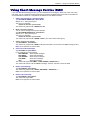
If you have SMS (Short Message Service), you can manipulate such messages in these ways: send, read, store,
and delete. The AT commands needed to perform these functions are listed below. Please refer to the EDGE AT
Command Reference Guide for a complete list and definitions of the SMS commands.
1.
Send a short message to a specified number.
Type AT+CMGS="8585551212" <press Enter>
Wait for the “>” before entering text.
Then type your message:
Please call me soon. <press ctrl Z>
The modem may respond with +CMGS:<mr> OK
2.
Write a message to memory.
You can store a message to send it at a later date.
Type AT+CMGW=”8585551212” <press Enter>
Wait for the “>” before entering text.
Then type your message:
Please call me soon. <press ctrl Z>
The modem may respond with +CMGW: <index> (The index number will be given)
3.
Send a message from storage.
Type AT+CMSS=x <press Enter>
The modem may respond with +CMSS: 1 OK (The transmission is successful. One SMS message is sent.)
Note: The x represents an index location.
4.
View a list of stored messages.
Type AT+CMGL=x <press Enter>
For x, substitute one of the following:
"REC UNREAD" Shows unread messages.
"REC READ"
Shows read messages.
"STO UNSENT" Shows unsent messages.
"STO SENT"
Shows sent messages.
"ALL"
Shows all messages.
The modem will respond AT+CMGL: 1,"REC UNREAD","8585551212",1...
The modem will continue until all UNREAD messages, numbers, and index number are listed.
5.
Read a stored message.
Type AT+CMGR=x <press Enter>
The modem may respond with +CMGR: "REC READ", "8585551212", ......
Note: The x represents an index location.
6.
Delete a stored message.
Type AT+CMGD=x <press Enter>
The modem will respond OK.
Note: The x represents an index location.
Multi-Tech Systems, Inc. MultiModem EDGE USB Wireless Modem User Guide
23