1
nrf`h=obcbobk`b=drfab=
jfqbi
RSMP=táêÉäÉëë=e~åÇëÉí
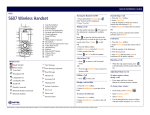
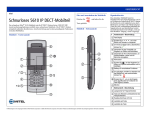
1 Earpiece Speaker
2 Softkeys
3 Off-Hook Key
Turning the Handset On/Off
1. Press and hold the On-hook key
“Switch on/off is displayed.
Transferring a Call
until
3. Dial the number to which you want to transfer
the call and press Call.
Making a Call
4. Select Release to connect the two parties.
Dial the number and press
. The name of
the called party is displayed if available.
5 Key Lock and Upper/Lower Case
OR
7 Microphone
8 Sound Off Key
9 Tactile Indicators
2. Select New Call.
2. Press “Yes/No.”
4 Voice Mail Access
6 Space
1. Press the More softkey.
OR
Wait for an answer, announce the transfer
and then select Release.
Press
to open the call list and use the
Navigation key to scroll the list of your last
Conference
twenty calls. Press
2. Select New Call to put the current call on
hold.
to dial.
1. Press the More softkey.
10 On-Hook and On/Off Key
OR
11 Navigation Keys
1. Press the Menu softkey.
12 Display
2. Select Contacts, and select Call contact.
13 Headset Connector
3. Select contact from list.
5. Press More and then select Join to
conference all the parties together.
14 LED
4. 4. Press
Rejecting a Call
or Call to dial the number.
Answering a Call
• Press
Display Icons
to answer a call in normal mode.
3. Dial the number of the third party.
4. Wait for an answer.
• When the ring signal sounds, press
Call information will be stored in the Call list.
OR
Adjusting Volume Levels
To adjust earpiece volume
during a call:
Signal Strength Indicator
Voice Mail
Battery Icon (fully charged)
Keypad Locked
• Press the
Handsfree key to answer in
speaker mode.
Battery Icon (discharged)
Phone Lock
Ending a Call
Sound Off
Microphone Muted
Loudspeaker On
Missed Call
Placing a call on Hold
• In the menu, select Settings.
Loudspeaker Off
Incoming Call
1. Press the More softkey.
To retrieve the Held call:
• Select Sound & Alerts.
• Select Volume.
• Use the navigation key arrows to adjust
selected volume and press Back to save.
1. Press the More softkey.
To turn Loudspeaker on/off:
Microphone Off
Outgoing Call
Headset Connected
System Connection
• Press
to end a call.
2. Select Hold/Retrieve to put the call on hold.
2. Select Hold/Retrieve to retrieve the call on
hold.
j=jáíÉä=EÇÉëáÖåF=áë=~=êÉÖáëíÉêÉÇ=íê~ÇÉã~êâ=çÑ=jáíÉä=kÉíïçêâë=`çêéçê~íáçåK==«=OMNNI=jáíÉä=kÉíïçêâë=`çêéçê~íáçåK=^ää=çíÜÉê=éêçÇìÅíë=~åÇ=ëÉêîáÅÉë=~êÉ=íÜÉ=íê~ÇÉã~êâë=çÑ=íÜÉáê=êÉëéÉÅíáîÉ=ÜçäÇÉêëK=^ää=êáÖÜíë=êÉëÉêîÉÇK
• Press upper and lower navigation key arrows
to increase/decrease volume.
To change ringer volume:
• Press the Handsfree key
during a call.
before or
nrf`h=obcbobk`b=drfab=
To turn ring signal on/off in standby mode:
• Press
to toggle ring signal on/off. (The silenced icon
Menu Structure
appears.)
On hook/Standby Menu
Locking/Unlocking the Keypad
• Press
and then Lock to lock.
• Select
and then Yes to unlock.
Call list
Calls
Charging the Battery
Missed calls
Call time
Call services
Place the telephone in the desktop charger. The Battery icon indicates charge level. The phone is fully
functional while in the charger.
Call contact
Add contact
Contacts
Navigating the Menu
Delete contact
Enter the menu by pressing the Menu key. Use the Left/Right navigation keys to choose a tab, and
then press the Select sofkey to open it. Use the Up/Down navigation keys to scroll through menu
choices. Press Select to make a selection or press the Back key to back up one step. Confirm your
settings by pressing Select. Return to standby mode by pressing Back or the
Edit contact
Central phonebook
Sound & alerts
key.
Headset
On hook/ Standby Menu
Display
Time & Date
13:00
Contacts
Settings
Calls
Settings
Locks
Answering
Language
Select
Back
In charger
System
Owner ID
NOTE: Menu options are dependent upon system programming.
j=jáíÉä=EÇÉëáÖåF=áë=~=êÉÖáëíÉêÉÇ=íê~ÇÉã~êâ=çÑ=jáíÉä=kÉíïçêâë=`çêéçê~íáçåK==«=OMNNI=jáíÉä=kÉíïçêâë=`çêéçê~íáçåK=^ää=çíÜÉê=éêçÇìÅíë=~åÇ=ëÉêîáÅÉë=~êÉ=íÜÉ=íê~ÇÉã~êâë=çÑ=íÜÉáê=êÉëéÉÅíáîÉ=ÜçäÇÉêëK=^ää=êáÖÜíë=êÉëÉêîÉÇK