1
Cloning Procedures (Cont.)
Learning / Teaching a Master STB1000 Setup using a TLL-1100A Clone Programmer (Cont.)
Learn Setup from Master STB1000
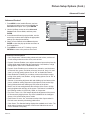
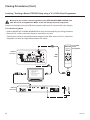
1. Ensure the Master STB1000 is set up completely and the EBL is in
Pass-through Mode.
2. If an analog channel is not available, direct tune the Master STB1000
to an Aux source, or select an Aux source, such as AV-1, from the
Input Menu. Then, plug one end of the MPI cable into the MPI port on
the STB jack panel.
3. Turn ON the TLL-1100A.
4. Use the MODE button on the TLL-1100A to select Clone Mode.
5. Use the Left/Right arrows on the TLL-1100A to select the Memory
CBank (1 to 8) in which to store the Master STB Setup.
6. Plug the other end of the MPI cable into the MPI port on the bottom of
the TLL-1100A. The Clone Selection Menu will display on the screen.
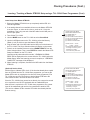
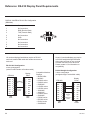
7. Press 1 on the Installer Remote to select LEARN FROM TV from the
Clone Selection Menu. Then, press ENTER to transfer the Master STB
Setup into CBankX on the TLL-1100A.
Learning usually takes about 90 seconds. “LEARNING IN PROGRESS” will be displayed on the screen while the TLL-1100A copies the
Master Setup. When the Learning process is complete, a “LEARNING
COMPLETE” message will be displayed.
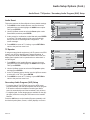
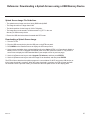
CLONE SELECTION MENU
Selected Bank: CBankX Saved
(1) LEARN FROM TV
(2) TEACH TO TV
(3) SET CLONE CLOCK FROM TV
(4) SET TV CLOCK FROM CLONE
(5) DISPLAY TV SETUP
(6) DISPLAY CLONE SETUP
CLONE CLOCK = XX:XX
TV
CLOCK = XX:XX
THE CLONE IS VERSION VX.X.X
- To change menu items, press
channel keys or digits.
- To execute item, press Enter.
8. When Learning is complete, disconnect the MPI cable from the Master
STB1000.
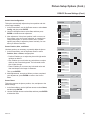
(Optional) Set the Clock
Set the time on a Master STB’s clock. (If the time has already been copied
from an STB1000 into the TLL-1100A clone programmer, you can set the
Master STB’s clock by copying the time from the clone programmer.) The
TLL-1100A can copy the current time to both a Master STB and to the
clone’s internal clock—accurate to within one minute.
Since the TLL-1100A’s time cannot be set directly, the current time needs
to be copied from an LG STB equipped with an enabled MPI port.
After the time is copied to the TLL-1100A clone programmer, the current
time will be maintained and can then be transferred to another STB.
(This can be a Master STB or another STB which has already had the
features set up.)
206-4147
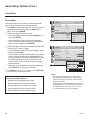
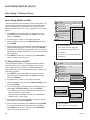
CLONE SELECTION MENU
Selected Bank: CBankX Saved
(1) LEARN FROM TV
(2) TEACH TO TV
(3) SET CLONE CLOCK FROM TV
(4) SET TV CLOCK FROM CLONE
(5) DISPLAY TV SETUP
(6) DISPLAY CLONE SETUP
CLONE CLOCK = XX:XX
TV
CLOCK = XX:XX
THE CLONE IS VERSION VX.X.X
- To change menu items, press
channel keys or digits.
- To execute item, press Enter.
53