1
Playing Music
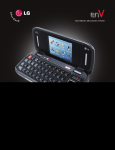
The enV doesn't miss a beat with its built-in music player.
You can store tons of music on an optional microSD card* and
even listen to them in stereo sound through a Bluetooth headset!
Flip Open
1. Press right on the Navigation Key,
select Music & Tones (1).
2. Select My Music (4), choose a category,
then press
to play.
3. Use the side Volume Keys
to
adjust volume when a song is playing.
4. Press the End Key to exit the music player.
Flip Closed
1. Press up on the Navigation Key.
2. Press left or right to scroll through songs.
3. Press the End Key to exit the music player.
*Sold separately.
Note: To turn on Music Only Mode (RF off except Bluetooth), press right on the Navigation Key,
select Music & Tones (1), press the Left Soft Key for Mode, select On and press
.