1
QUICK START GUIDE
Dedicated Hot Keys
Using Scalable Font
Bluetooth® Pairing
FM Tuner
Restrictions
www.lgusa.com/wineII
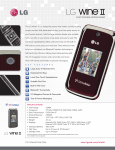
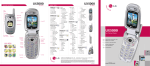
Getting to Know Your Phone
Hot Keys
Widget
Camera Lens
Alarm
Clock
Images easyedgeSM
Navigation Key
Headset
Jack
Volume
Up/Down
microSD™ Memory
Slot
Left Soft Key
(Message)
Camera
Key
Micro USB/
Charging
Port
Bluetooth
My Menu
easyedge
Calendar
Speakerphone
Key
Hot Keys
Voice
Command
Key
Send Key
Voicemail
Key
Vibrate Mode/
Shift Key
*Press and hold the Lock Key to lock the keypad.
Menu/
OK Key
Right
Soft Key
(Contacts)
Clear &
Back Key
Power/
End Key
Lock/
Space Key*
Dedicated Hot Keys
LG Wine II’s dedicated hot keys provide quick access to
convenient features. Plus, you can customize the Widget
Hot Key so even more features are just a click away!
Hot Keys
Widget – Customize this key to access the notepad,
calendar, and more.
Alarm Clock – Set up to five alarms.
Images – Access photos you’ve taken and default
wallpapers.
easyedge – download games, ringtones, pictures,
and more.
Customize Widget Hot Key
1. From standby mode and with the flip open, press
.
2. Select Settings (9), and then choose Display (2).
3. Select Widget (2), and then choose Widget Settings (1).
4. From here, you may choose which widgets you’d like to
add. Highlight a feature using the Navigation Key, and
then press
to mark it.
5. When you’re finished marking features, press the
Left Soft Key for Done.
Using Scalable Font
Font too small? Want to fit more text on the screen
at once? Don’t worry, you can adjust the size of
on-screen text on the fly!
1. From standby mode and with the flip open,
press
.
2. Select Settings (9), and then choose Display (2).
3. Select Font Settings (8).
4. From here, you may adjust the font type, size,
and color by scrolling to each category and then
pressing left or right on the Navigation Key.
5. When you’re finished adjusting font settings,
press
to save your changes.
Bluetooth® Pairing
Connect to accessories, computers, and other phones
via Bluetooth wireless technology. Once connected, you
may take advantage of hands-free audio, data transfer,
and other wireless conveniences.
1. Before you begin, set your Bluetooth accessory into
pairing mode.*
2. From standby mode and with the flip open, press up
on the Navigation Key to access the Bluetooth menu.
3. Select Paired Devices (1), and then press the
Left Soft Key for Search.
4. If Bluetooth power is off, press
and then select New Search (1).
to turn it on,
5. Highlight your device and press
6. Press
for Pair.
to connect to your device.
*Refer to your Bluetooth accessory’s user guide for information
about initiating pairing mode and the passcode if asked
(typically “0000”).
Note: Bluetooth accessories sold separately.
FM Tuner
Enjoy live local radio directly on your phone! Just plug
in a headset and have access to a full range of stations.
You can even program preset channels!
1. From standby mode and with the flip open, insert the
included headset into the headset jack located on the
top left corner of the phone.
2. Press
, and then select FM Radio (0).
3. Press right on the Navigation Key to locate a local
music station.
4. To manually program a station, press the Right Soft
Key for Options, and then select Add New (3).
5. Press
for Save.
Note: To automatically scan for channels instead of manually
programming them, press
for Channel, press
for Scan,
and select Yes (1). If you’ve already added a channel, press
for Channel, press the Right Soft Key for Options, and select
Auto Scan (7).
Restrictions
Want a little privacy, or want to let someone borrow your
phone—with limits? With LG Wine II, you can easily restrict
incoming or outgoing calls and messages, along with
several other features.
1. From standby mode and with the flip open, press
and then select Settings (9).
,
2. Select Security (3).
3. Enter the lock code (typically the last four digits of
your phone number), and press
.
4. Choose Restrictions (2), re-enter your lock code, and
press
.
5. Use the Navigation Key to select the category you
wish to restrict, and then press
.
6. Select the level of restriction you wish, and then
press
.
Optional Accessories
Maximize your phone with these cutting-edge accessories at lgusa.com/wineII.
Bluetooth Headset
(HBM-570)
Bluetooth Solar
Speakerphone
(HFB-500)
© 2010 LG Electronics, Inc. All rights reserved. LG is a registered trademark of LG Electronics,
Inc. Wine is a registered trademark of LG Electronics, Inc. easyedgeSM is a service mark of
U.S. Cellular®. microSD is a trademark of SanDisk. The Bluetooth® word mark and logos are
registered trademarks owned by Bluetooth SIG, Inc. and any use of such marks by LG Electronics
MobileComm, U.S.A., Inc. is under license. All other marks are proprietary to their respective
owners. All phone images are simulated. Unless otherwise specified herein, all accessories
referenced herein are sold separately.
Vehicle Power Charger