1
Quick Start Guide
Fastap™ Keypad
Transferring Music
Playing Music
Bluetooth®
Pairing
Taking a Picture/
Recording a Video
LGmobilephones.com/Swift
Getting to Know Your Phone
Navigation Key
Headset
Jack
Camera
Volume
Up/Down
Camera
Key
Music Key
microSD™
Port
Music Control
Keys
Micro USB/
Charging
Port
Alltel Web
Contact List
Alltel Shop
Ringers
Left Soft Key
(Celltop)
Speakerphone
Key
Menu/OK
Key
Talk Key
Right Soft Key
(Message)
Voice
Command Key
Power/End
Key
Clear & Back Key
Speaker
Voicemail Key
Shift Key
Alltel Search Key
Microphone
Fastap™ Keypad
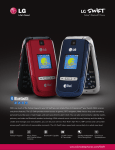
Quickly access fun features on your LG Swift using the Fastap keypad. The unique
integrated hot keys give the phone a great look and added functionality.
Messaging
Images
Send and receive
e-mail on the go!
Simply follow the
wizard to get started.
View your photos, shop
for new wallpapers, and
adjust wallpapers on
the internal and external
displays.
GPS
Download Alltel Navigation for maps, directions,
and more. Subscription
required.
Alltel Shop
Download the latest
ringtones, wallpapers,
games, and more.
Alarm Clock
Games
Set up to five alarms
with customizable
ringtones.
Play great games
downloaded from
Alltel Shop.
Transferring Music
Stay in the groove by keeping your favorite songs in your pocket.
It’s easy to transfer music from your PC to your LG Swift.*
1. Insert a microSD card* (gold contacts facing down)
into your phone.
2. The first time you transfer music, you must format
the card. Press
to enter the main menu, and
then select Settings (9) > Security (3).
3. Enter the lock code (typically the last four digits of your
phone number), and then press .
4. Select Reset Default (5) > Memory (1) > Card Memory (3).
5.When prompted to clear all of the card memory, select
Yes (1). You will need to enter your lock code again to
confirm this action. When finished, press .
6. Connect a USB cable* between LG Swift and your PC.
7. Select USB Mass Storage (2).
8.The PC will recognize the phone as a Removable Disk
and a screen will appear. Drag and drop music files on
your PC into the My_Music folder.
9. When done, disconnect the phone.
*USB cable and microSD card required. Sold separately.
Playing Music
Forget carrying around a separate MP3 player. A great allin-one device, LG Swift’s integrated music player lets you
keep your tunes at your fingertips.
1. From standby mode and with the flip open, insert a
microSD card* containing music into your phone.
2. Press the side
Key on the left side of the phone.
3. Press
to begin playing the highlighted song. You can
access additional music player features by pressing the
Right Soft Key for Options.
4. To continue listening to music while you perform other
tasks, press
and then select Yes (1).
NOTE: For added portability, you can listen to music with the flip closed.
and then press
to begin
To do this, simply press and hold
playing the highlighted song.
*microSD card sold separately.
Bluetooth® Pairing
With LG Swift’s Bluetooth wireless technology, you can
easily connect to headsets, speakers, computers, and more.
1. Set your Bluetooth accessory into pairing mode.*
to enter the main menu,
2. From standby mode, press
and then select Settings (9) > Bluetooth (5) > Paired
Devices (1).
3. Press the Left Soft Key for Search. If Bluetooth is off,
you’ll be prompted to turn it on.
4. Select New Search (1).
5.Once your Bluetooth device has been found, highlight it
and press
for Pair.
6. Enter the passcode* (typically “0000” – 4 zeroes), and
then press
for OK.
7. Select Yes (1) to connect with the device.
*Refer to your Bluetooth accessory’s user manual for
information about initiating pairing mode and the passcode.
Taking a Picture/Recording a Video
Never miss a moment with LG Swift’s 1.3 megapixel camera
and camcorder. Take pictures and record videos instantly
with this versatile phone.
1. To take a picture with the flip open, press and hold
Key.
the side
To record a video, press
and select
Record Video (2).
2. Press the Right Soft Key for Options to access
customizable features.
3. Press
to take the picture or start/stop recording.
4. Press
to send the photo/video to someone.
NOTE: You can create self-portraits with the flip closed. From standby mode,
and select Take Photo (1) or Record Video (2).
press and hold
Optional Accessories
Maximize your phone with these cutting-edge accessories at LGmobilephones.com/Swift.
Bluetooth Headset
Bluetooth Headset
Bluetooth Stereo Headset
Bluetooth Solar Car Kit
Stereo Headset
Vehicle Power Charger
(HBM-760)
(HBM-770)
All materials in this document including, without limitation, the design, the text, and any marks
are the property of LG Electronics, Inc. ALL RIGHTS RESERVED. Copyright © 2008 LG
Electronics, Inc. All product and service marks contained herein that are not LG Electronics,
Inc. proprietary marks are the trademarks of their respective owners. LG Electronics, Inc.
makes no claim to such properties. Phone features and specifications are subject to change
without prior notice. The use of non-LG approved accessories will void the warranty and may
result in damage to the phone, the phone exploding, or other dangerous conditions. Please
consult product manual for full details. microSD™ is a trademark of SanDisk. The Bluetooth®
word mark and logos are registered trademarks owned by Bluetooth SIG, Inc. and any use of
such marks by LG Electronics MobileComm, U.S.A., Inc. is under license.
(HBS-250)
XX%
Cert no. XXX-XXX-XXX