Transcript
ce
1
Origina
Sin l &
st
Be 4
99
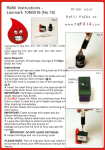
Refill Instructions Lexmark 10N0227 (No.27)
fig.1
fig.2
Lexmark
X72, X74, X75, X1110, X1130, X1150, X1160, X1170, X1180,
X1185, X2230, X2240, X2250
Z13, Z23, Z25, Z33, Z34, Z35, Z75, Z513, Z515, Z597, Z601,
Z604, Z605, Z607, Z612, Z615, Z617, Z713
fig.3
Remove Lid
Cut
Here
Items Required
Original Lexmark 27 Cartridge, Syringe & Filling Tube Cyan,
Magenta & Yellow Ink 5ml, sharp knife, news paper, sellotape
Instructions
1. Assemble syringe and steel filling tube and fill with
appropriate colour ink. (fig.2)
2. Remove the top from the black ink bottle and using the
syringe remove 5ml of the colour ink (fig.3)
3. The lid has to be removed from the cartridge. Cut around
the edge with a sharp knife and then remove (fig.4)
4. Insert the steel filling tube into the appropriate filling holes.
(fig.5). Push down into centre of the sponge.
IMPORTANT: Cartridge contains a sponge and a slight
resistant may be felt.
5. SLOWLY Inject ink. Stop filling before ink overflows as you
Print Head
do not want the ink to contaminate the other colours.
End
6. Repeat steps 4 and 5 with the other 2 colours
7. Blot printer heads with tissue before continuing to fill next
colour.
IMPORTANT: Clean syringe with water and dry before refilling
next colour.
8. After refilling replace the lid and stick it down with sellotape
9. Leave the cartridge to stand overnight on non-absorbent
surface this will ensure no leakage and give the ink time to fully
saturate the sponge.
Magenta
IMPORTANT: DO NOT LEAVE ON TISSUE.
Refill
10. Install cartridge and run a priming cycle.
Holes
PLEASE NOTE: The ink indicator level may need to be turned
off. Check your HP instructions manual for details.
For more info go to help.jrinkjet.co.uk
fig.4
Print Head
fig.5
Yellow
Refill
Holes
Cyan
Refill
Holes