1
Troubleshooting
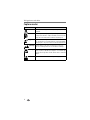
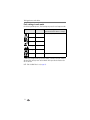
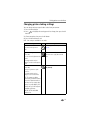
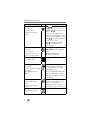
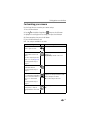
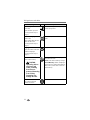
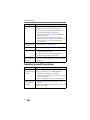
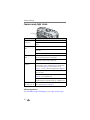
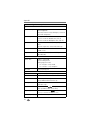
Camera ready light status
Ready light
Status
Cause/solution
Ready light glows
steady green.
Camera is on; ready to take a picture or video.
Ready light blinks
green.
Picture is being processed and saved to the camera.
Shutter button is pressed halfway down. Focus and exposure
are set.
Pictures are being transferred to computer, camera is
connected.
Camera firmware upgrade is in process.
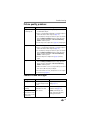
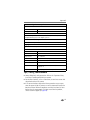
Ready light blinks
amber.
Flash is not charged. Wait. Resume picture taking when the
light stops blinking and glows steady green.
Auto exposure or auto focus are not locked. Release the
Shutter button and recompose the picture.
Ready light glows
steady red.
Camera’s internal memory or card is full.
Transfer pictures to the computer (page 32), delete pictures
from the camera (page 21), switch storage locations
(page 15), or insert a card with available memory (page 7).
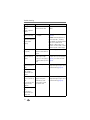
Camera is processing. Wait. Resume picture taking when the
light turns green.
Card is read-only. Change storage location to internal memory
(page 15), or use a different card.
Camera DRAM is full and video recording is stopped.
Recording resumes using internal memory or SD/MMC card.
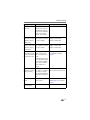
Ready light blinks red Insert new batteries. If using rechargeable batteries, charge
and camera turns off. before inserting (page 2 and page 3).
Still having problems?
Visit www.kodak.com/go/cx7220support, or see Chapter 8, Getting help.
39