1
% !"#$ $%&$'(
Preliminary knowledge
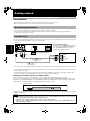
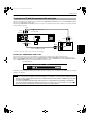
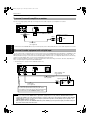
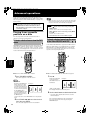
Names of parts and controls
Refer to the corresponding pages indicated in () for details.
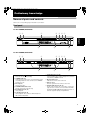
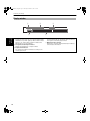
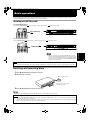
Front panel
For XV-S400BK/XV-S402SL
1 2
3
4 5 6 7
DVD/SUPER VCD/VCD/CD PLAYER
STOP
PLAY
PAUSE
SKIP
Preliminary
knowledge
OPEN/CLOSE
STANDBY
STANDBY/ON
DOLBY
D I G I T A L
8
0
9
For XV-S300BK/XV-S302SL
1 2
3
4
5 6 7
DVD/SUPER VCD/VCD/CD PLAYER
OPEN/CLOSE
STANDBY
STOP
PLAY
PAUSE
SKIP
DOLBY
D I G I T A L
STANDBY/ON
8
1 STANDBY/ON
button (23)
Turns the unit on or off (standby).
2 STANDBY indicator
Lights when the power cord is connected and the unit is
on standby. When the unit is turned on, the STANDBY
indicator goes off.
3 Disc tray (23)
Used to load a disc.
4 0 (OPEN/CLOSE) button (23)
Used to open and close the disc tray.
5 7 (STOP) button (24, 42)
Stops playback.
9
0
7 8 (PAUSE) button (24, 42)
Pauses playback. Also, used to display nine continuous
still pictures (STROBE function).
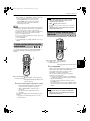
8 Display window (10)
Indicates the current status of the unit.
9 Remote sensor
Receives signals from the remote control unit.
0 4/¢ (SKIP) buttons (24, 42)
Used to skip a chapter, title or track. Also, used for the
page selection of a menu screen (for Video CD/SVCD).
Holding down 4 or ¢ during playback reverses or
advances playback rapidly (except MP3 CD).
6 3 (PLAY) button (24, 42)
Starts playback. Also, used as a SELECT button for
PBC of Video CDs/SVCDs.
5