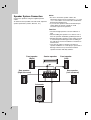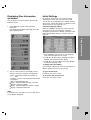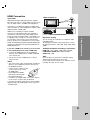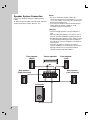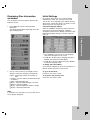
1
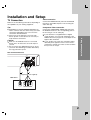
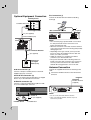
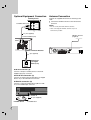
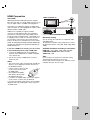
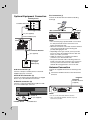
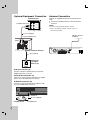
Optional Equipment Connection
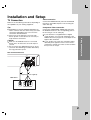
Auxiliary device
OUT
iPod connection (I)
Connect the iPod and the unit with iPod docking
station.(I).
IN
To AUDIO OUT (L/R)
VIDEO
iPod
UNEM
AUDIO (L)
AUDIO (R)
Rear of DVD/CD Receiver
I
(supplied)
A (not supplied)
To AV IN AUDIO (L/R)
Rear of DVD/CD Receiver
O (not supplied)
DVD Player
(or Digital
Device, etc)
OPTICAL
OUT
Notes:
• The connector plug is protected with a cover when
it is first purchased. Please remove the cover
before operationg the unit.
• When the iPod is not connected, insert the terminal
cover. This prevents dust from entering and possibly
damaging the unit.
• Depending on the type of iPod, you may need to
insert one of the dock adapters into the dock slot
before you station your iPod.
• Adjust the volume to a moderate level before
youconnect your iPod and this unit.
• The jack for the iPod cable of docking station are
keyed so that the cable connectors only connect in
one way. Connect the end on the cable with the
marked “v” facing upwards to rear on the unit.
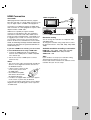
Antenna Connection
AUX IN connection (A)
Connect a Output of auxiliary device to the AUX
AUDIO Input (L/R) Connector.
OPTICAL IN connection (O)
Connect the supplied FM antenna for listening to the
radio.
Connect the FM Wire antenna to the FM antenna
connector.
Connect an optical output of DVD Player (or Digital
Device etc) to the OPTICAL IN connector.
FM Wire Antenna
(supplied)
AUDIO IN connection (D)
Connect a output of portable device (MP3 or PMP
etc) to the AUDIO input connector.
To AUDIO IN
D (not supplied)
Portable device
7
To AUDIO OUT
Notes:
• Be sure to fully extend the FM wire antenna.
• After connecting the FM Wire antenna, keep it as
horizontal as possible.