1
R
BLUETOOTH ® IN-CAR
TELEPHONE HANDBOOK
Publication Part No. JJM 10 31 99 552
Published June 2005 by Technical Communications, Jaguar Cars Limited
L
JAGUAR CARS LIMITED, as manufacturer, is dedicated to the design and production
of vehicles which meet the expectations of the world’s most discerning purchasers.
This handbook forms part of the owner literature supplied with your vehicle. It is
designed to complement the relevant features and systems of the vehicle, and make
them easy to understand and operate. For safety and the pleasure you will get from your
new vehicle, please take the time to get well acquainted with your vehicle by reading the
handbooks.
This handbook describes every option and model variant available and therefore,
some of the items covered may not apply to your particular vehicle.
For the specification of a particular vehicle, owners should consult their Jaguar
Dealer/Authorised Repairer.
To cover changes, it is sometimes necessary to issue one or more handbook
supplements. When reading this handbook, check the owner literature for possible
supplements. Any further updates will be posted on the Jaguar Cars internet site and can
be accessed at www.jaguar.com in the Owner Information area.
For full details of the owner literature originally supplied with the vehicle, owners should
consult their Jaguar Dealer/Authorised Repairer.
When left-hand or right-hand is used in the text, this refers to the left-hand side or
right-hand side of the vehicle, when viewed from the rear.
The manufacturer reserves the right to vary its specifications with or without notice, and
at such times and in such manner as it thinks fit. Major as well as minor changes may be
involved in accordance with the Manufacturer’s policy of constant product improvement.
All rights reserved. No part of this publication may be reproduced, stored in a retrieval
system or transmitted, in any form, electronic, mechanical, photocopying, recording or
other means without prior written permission from the Service Division of
Jaguar Cars Limited.
This book is printed on paper that originates from sustainable forests, is
recyclable, bio-degradable and acid-free. The wood pulp is chlorine-free and
the effluent water is purified before being discharged.
2
R
Contents
Quick Overview. . . . . . . . . . . . 6
Introduction. . . . . . . . . . . . . . 15
Safety. . . . . . . . . . . . . . . . . . . 17
Audio Panel Controls . . . . . . 19
Getting Started . . . . . . . . . . . 21
Phone Book. . . . . . . . . . . . . . 25
Hands-free Controls. . . . . . . 27
Hands-free Operation . . . . . 31
Touch-screen Controls . . . . 34
Voice Activation . . . . . . . . . . 38
Declaration of Conformity . . 39
A comprehensive index is located at the
back of this handbook.
3
L
4
R
Quick Overview
Quick Overview
INTRODUCTION . . . . . . . . . . . . . . . . . . 6
TOUCH-SCREEN SYSTEM . . . . . . . . . 6
AUDIO SYSTEM . . . . . . . . . . . . . . . . . 10
5
L
Quick Overview
Quick Overview
INTRODUCTION
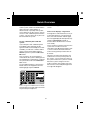
TOUCH-SCREEN SYSTEM
Bluetooth communication operates
between bluetooth equipped devices; in
this case, the Jaguar Touch-screen
System or Audio System and a mobile
phone.
Icons and buttons used in the following
Touch-screen instructions:
Phone Mode button, to
manually select the phone
mode. Located to the left of the
Touch-screen.
Send/End icon. Located on the
Touch-screen.
There are a limited number of mobile
phones (currently ten) that have been
tested and proved to function correctly
with the Jaguar system - ask your Jaguar
Dealer for details.
Before any phone can operate with the
Jaguar system, it must be Paired with the
system.
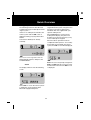
Switching ON the ignition
Each time the ignition is switched on, the
following screens may be displayed.
This involves the phone and the Jaguar
system communicating a unique code
between them, at initiation, so that in
future they each recognise one another.
When Pairing any phone with the Jaguar
system make sure that the phone is
switched on, the phone battery is fully
charged and the User's Handbook for the
phone is available.
This Quick Overview describes the
Touch-screen System first (Page 6),
followed by the Audio System display
(Page 10).
This screen may be displayed for a few
seconds while the system is performing a
self-check.
The Bluetooth system is identical for both
the Touch-screen and the Audio displays,
the difference is only in the way that the
information is presented to the user.
Do not take any action. However, should
the screen stay on for longer than twenty
seconds, switch the ignition OFF and wait
for at least 6 minutes. Refer to Reason for
Ignition OFF for 6 Minutes, page 8 for
more information.
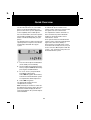
After the brief system check, you should
see the following screen:
6
R
Quick Overview
Use the touch-screen keypad to enter the
following digit sequence and press the
green Send/End icon.
This screen will be displayed to indicate
one of two possible conditions:
1. There is no phone currently Paired to
the vehicle system or no phone is
available. Should this be the case, this
screen will continue to be displayed
while the system is in phone mode
(the system may display the Discover
Me screen ready for you to Pair your
Bluetooth mobile phone).
##3#*#
The display will then show the following
screen.
2. Displayed only for a few seconds if a
phone IS Paired, but whilst the system
is booting-up and looking for a Paired
device. If the last Paired phone is
available and switched on in
Bluetooth mode, then the screen
changes from No BT Phone to Phone
Connected.
At the Discover Me screen the vehicle
system is waiting for communication with
a Bluetooth equipped telephone.
Pairing your phone
The following instructions describe how
to initiate Pairing your mobile phone to the
Jaguar system.
Check that your mobile phone is set to the
Jaguar Bluetooth system, using the menu
functions on the phone. Refer to the
handbook that was supplied with your
specific mobile phone.
If there is no mobile phone Paired to the
vehicle system and the No BT Phone
screen is displayed, Pairing may be
performed as follows:
When Jaguar device is found on the
mobile phone display, the phone will
prompt you to enter the pass key (1313)
on the mobile phone keypad.
Select Phone Mode (if not already
selected).
7
L
Quick Overview
When the above operation has been
completed and the phone is successfully
Paired and connected with the vehicle
system, the Phone Connected screen
will be displayed.
1. Press the vehicle Phone Mode button.
(If not already in phone mode.)
2. Use the touch-screen keypad to enter
the key sequence ##2#*#, followed by
the green, Send/End icon on the
screen.
Note: The screen may briefly change from
Discover Me to No BT Phone whilst the
system connects the Bluetooth link,
before the Phone Connected screen is
displayed.
3. To use or access your phonebook
immediately after Pairing:
Switch OFF the ignition for 6 minutes,
to allow the vehicle Bluetooth system
to complete the download process.
Downloading your phonebook entries
The Phonebook entries on your mobile
phone can be downloaded from your
phone to the vehicle system, dependent
on the capability of the mobile phone.
4. Switch ON the ignition.
The download should now have
completed successfully.
Note: Should you not wish to switch off
the ignition for 6 minutes at this time, the
phone book will be displayed after the
next normal ignition off cycle that elapses
for that duration.
For more information, refer to the specific
Quick Guide (available from your Jaguar
Dealer or Authorised Repairer) for your
phone.
The following process will only work with
specific phones. The phone must be ON
and already Paired with the Jaguar
system.
Reason for Ignition OFF for 6 Minutes
The Bluetooth phone module in the
vehicle remains active for 6 minutes after
the ignition has been switched off.
It is important to wait this 6 minutes so
that a clean boot-up of the Bluetooth
module is achieved and the correct
information is stored.
8
R
Quick Overview
Then, refer to Page 7 at the Discover Me
screen.
Once a phone has been Paired with the
vehicle system, it will not need to be done
again unless the vehicle battery is
disconnected, or possibly if the system
closes down for security reasons, or if you
choose to Pair a different phone with the
system - only one phone at any time can
be Paired with the system.
If the screen displays - Registered
If the ignition is switched to Accessory or
to the ON position for a short period of
time, then switched OFF and ON again,
the message displayed subsequently may
change to Registered (instead of
Discover Me or No BT Phone or Phone
Connected).
To pair a different phone with the
system
If you attempt to Pair a different phone
immediately after switching ON the
ignition and the last Paired phone is NOT
available, you will have 2 minutes within
which to enter the the digit sequence
##3#*# to put the system into Discover
Me mode.
This is not due to a fault. It is because the
system has sensed an incorrect
shut-down of the Bluetooth module - that
is, it has not been allowed to follow its
normal closing down procedure time of
6 minutes.
However, the state of the five bars still
indicates the correct (current) status of
the system. You can still Pair a phone to
the system and use the system as normal.
This is because, when the ignition is
switched ON, the system is looking for the
last Paired phone and if it does not find it
the system will revert to the Handset in
Use screen.
When the system changes from one
mode to another (for example, Discover
Me to Phone connected) the Registered
message will disappear.
To Pair a different phone, select Phone
Mode and use the keypad to enter the
following digit sequence ##3#*#.
Press the green Send/End icon to initiate
the Pairing process again and to overwrite
the previously Paired phone.
9
L
Quick Overview
AUDIO SYSTEM
The buttons used in the following Audio
System instructions:
Phone Mode button, to
manually select the phone
mode. Located to the left of the
Audio panel display.
Send/End button. Located to
the left of the Audio panel
display.
This screen will be displayed to indicate
one of two possible conditions:
1. There is no phone currently Paired to
the vehicle system or no phone is
available. Should this be the case, this
screen will continue to be displayed
while the system is in phone mode
(the system may display the SIG****
or SIG***** screen ready for you to
Pair your Bluetooth mobile phone).
Switching ON the ignition
Each time the ignition is switched on, the
following screens may be displayed.
2. Displayed only for a few seconds if a
phone IS Paired, but whilst the system
is booting-up and looking for a Paired
device. If the last Paired phone is
available and switched on in
Bluetooth mode, then the screen
changes from SIG to SIG*.
This screen may be displayed for a few
seconds while the system is performing a
self-check.
Do not take any action. However, should
the screen stay on for longer than twenty
seconds, switch the ignition OFF and wait
for at least 6 minutes. Refer to Reason for
Ignition OFF for 6 Minutes, page 12 for
more information.
After the brief system check, you should
see the following screen:
10
R
Quick Overview
Check that your mobile phone is set to the
Jaguar Bluetooth system, using the menu
functions on the phone. Refer to the
handbook that was supplied with your
specific mobile phone.
Pairing your phone
The following instructions describe how
to initiate Pairing your mobile phone to the
Jaguar system.
If there is no mobile phone Paired to the
vehicle system and the SIG screen is
displayed, Pairing may be performed as
follows:
When Jaguar device is found on the
mobile phone display, the phone will
prompt you to enter the pass key (1313)
on the mobile phone keypad.
Select Phone Mode (if not already
selected).
When the above operation has been
completed and the phone is successfully
Paired and connected with the vehicle
system, the SIG* screen will be displayed.
Use touch-screen keypad to enter the
following digit sequence and press the
Send/End button.
Note: The screen may briefly change from
SIG**** to SIG whilst the system connects
the Bluetooth link, before the SIG* screen
is displayed.
##3#*#
The display will then show the following
screen.
At the SIG**** screen the vehicle system
is waiting for communication with a
Bluetooth equipped telephone.
11
L
Quick Overview
Reason for Ignition OFF for 6 Minutes
The Bluetooth phone module in the
vehicle remains active for 6 minutes after
the ignition has been switched off.
Downloading your phonebook entries
The Phonebook entries on your mobile
phone can be downloaded from your
phone to the vehicle system, dependent
on the capability of the mobile phone.
It is important to wait this 6 minutes so
that a clean boot-up of the Bluetooth
module is achieved and the correct
information is stored.
For more information, refer to the specific
Quick Guide (available from your Jaguar
Dealer or Authorised Repairer) for your
phone.
Once a phone has been Paired with the
vehicle system, it will not need to be done
again unless the vehicle battery is
disconnected, or possibly if the system
closes down for security reasons, or if you
choose to Pair a different phone with the
system - only one phone at any time can
be Paired with the system.
The following process will only work with
specific phones. The phone must be ON
and already Paired with the Jaguar
system.
1. Press the vehicle phone mode button.
(If not already in Phone Mode.)
2. Use the Audio panel keypad to enter
the key sequence ##2#*#, followed by
pressing the Send/End button.
3. To use or access your phonebook
immediately after Pairing:
Switch OFF the ignition for 6 minutes,
to allow the vehicle Bluetooth system
to complete the download process.
4. Switch ON the ignition.
The download should now have
completed successfully.
Note: Should you not wish to switch off
the ignition for 6 minutes at this time, the
phone book will be displayed after the
next normal ignition off cycle that elapses
for that duration.
12
R
Quick Overview
To pair a different phone with the
system
If you attempt to Pair a different phone
immediately after switching ON the
ignition and the last Paired phone is NOT
available, you will have 2 minutes within
which to enter the the digit sequence
##3#*# to put the system into SIG****
mode.
This is because, when the ignition is
switched ON, the system is looking for the
last Paired phone and if it does not find it
the system will revert to the Handset
screen and drop out of Phone Mode.
To Pair a different phone, select Phone
Mode and use the keypad to enter the
following digit sequence ##3#*#.
Press the Send/End button to initiate the
Pairing process again and to overwrite the
previously Paired phone.
Then, refer to Page 11 at the SIG****
screen.
13
L
14
R
Introduction
I ntroduction
WHAT IS BLUETOOTH?
Call volume
The volume of telephone calls can be
adjusted for hands-free phone operation.
To adjust the volume, operate the audio
system’s ON/OFF volume control during
a phone call.
Bluetooth is an international standard that
allows electronic components to
communicate with each other, using a
short-range radio link. Bluetooth
eliminates the need for wires or cables:
typically, devices can communicate at a
range of up to 10 metres (33 feet).
If the audio system is in use when the
phone becomes active, the audio system
source is suppressed for the duration of
the call.
The Bluetooth in-car telephone system
allows certain mobile phones to be used
hands free in your vehicle: there is no
need to connect the mobile phone to a
cradle or cable.
The Jaguar telephone system is designed
to function with a wide variety of
Bluetooth-equipped mobile phones. The
audio and echo characteristics vary
between models of mobile phones: as a
result, it may take a few seconds for the
vehicle system to adapt to provide
optimal audio performance.
Bluetooth is a registered trademark of
Bluetooth SIG, Inc.
SYSTEM OVERVIEW
The vehicle’s Bluetooth telephone system
can be used with an appropriate,
Bluetooth-equipped mobile phone.
In order to achieve the best possible
audio performance, it may be necessary
to reduce the system volume slightly
when using certain mobile phones.
The mobile phone must be paired with the
vehicle system before use. See
page 21 for more information.
Audio panel display
Phone related messages are shown on
the audio panel display or touch-screen
(where fitted) when the phone system is
active.
Once paired, the mobile phone can be
operated via the steering wheel switches
or the keypad and phone buttons on the
audio panel or touch-screen. The mobile
phone doesn’t need to be physically
connected to the vehicle: it can be left in
a jacket pocket, for instance. Calls are
routed through the vehicle’s audio
speakers, and a dedicated microphone is
fitted to the roof lining, near the driver’s
head.
You can use the system to answer or
reject incoming calls, make outgoing calls
or alter the call volume. The system does
not support SMS text messages.
Note: The vehicle ignition must be set to
position I or II in order to use the phone.
15
L
Introduction
ABOUT THIS HANDBOOK
VOICE ACTIVATION
Take particular note of the following
symbols used throughout this manual:
(Where fitted)
The Bluetooth telephone system can be
used in conjunction with the Voice
Activation System to provide the driver
with completely hands-free
communication. Voice commands are
picked up by the system microphone.
Note: A note contains additional
information which is relevant to the
feature/item.
Caution: A caution contains important
additional information that is relevant
to the efficient and/or safe usage of the
telephone system.
For information about using voice
activation, refer to the audio systems and
JaguarVoice handbook, or the
touch-screen display handbook.
! WARNING:
A warning is a procedure which must
be followed precisely to help avoid the
risk of personal injury.
!
WARNING:
The voice activation system must not
be used to call emergency numbers, as
voice patterns can change under
stress, resulting in commands
becoming unrecognisable.
16
R
Safety
S afety
SAFETY
Persons with pacemakers should:
!
WARNING:
Read this information before using
your in-car telephone system.
Driving
Check local regulations on the use of
telephones in the areas where you drive
and always obey them. Observe the
following guidelines when using your
phone while driving:
•
Give full attention to driving - safe
driving is your first responsibility.
•
Always use hands-free operation
when driving.
•
When receiving a call, if driving
conditions demand, pull off the road
and park.
•
Preferably use the vehicle hands-free
system.
•
ALWAYS keep the phone more than
15 centimetres (6 inches) from their
pacemaker when the phone is
switched ON.
•
Turn the phone OFF immediately if
there is any reason to suspect that
interference is taking place.
Other medical devices
If you use any other personal medical
device, consult the manufacturer of your
device, or your doctor, to determine that it
is adequately shielded from external RF
energy.
Turn your phone OFF in health care
facilities when any regulations posted in
such areas instruct you to do so.
Hospitals or health care facilities may be
using equipment that could be sensitive
to external RF energy.
Electronic devices
Most modern electronic equipment is
shielded from RF signals.
Vehicles
RF signals may affect non-Jaguar or
improperly installed equipment. Always
consult the manufacturer of any
equipment that has been retro-fitted to
your vehicle.
However, certain equipment may not be
shielded against RF signals from your
telephone.
Pacemakers
The Health Industry Manufacturers
Association recommends that a minimum
separation of 15 centimetres (6 inches) is
maintained between a wireless phone
antenna and a pacemaker to avoid
potential interference with the
pacemaker. These recommendations are
consistent with the independent research
by and recommendations of Wireless
Technology Research.
Posted facilities
Turn your phone OFF in any facility where
posted notices so require.
Blasting areas
To avoid interfering with blasting
operations, turn your phone OFF when in
a blasting area or in areas posted: Turn off
two-way radios. Obey all signs and
instructions.
17
L
Safety
Potentially explosive atmospheres
Areas with a potentially explosive
atmosphere are often but not always
clearly marked. Turn your phone OFF
when you are in such an area, as the use
of unapproved electrical equipment can
cause an explosion or fire resulting in
bodily injury or death.
Airbags
Airbags inflate with great force.
! WARNING:
Do NOT place objects, including both
installed or portable wireless
equipment, in the area over an airbag
or in the airbag deployment area. If
in-vehicle wireless equipment is
improperly installed and the airbag
inflates, serious injury could result.
18
R
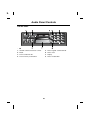
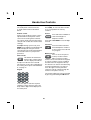
Audio Panel Controls
Bluetooth
THE XJ, S-TYPE AND X-TYPE
1. ON/OFF switch and volume control.
6. Display.
2. Phone mode button.
7. Phone keypad - buttons 0 to 9 (except
where touch-screen is fitted, see
page 34).
3. Cancel/correct telephone numbers.
4. Phone memory recall button.
8. Scroll memory location.
5. Phone send/end calls
.
19
L
Audio Panel Controls
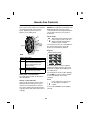
THE XK ONLY
1. ON/OFF switch and volume control.
5. Phone keypad - buttons 0 to 9.
2. Mode.
6. Phone clear.
3. Phone send/end calls.
7. Display.
4. Phone memory recall button.
8. Phone mode button.
20
R
Getting Started
G etting Started
PAIRING YOUR PHONE
Note:
Before use, your mobile phone must be
connected or paired with the vehicle’s
Bluetooth system.
•
Once a mobile phone has been paired
with the vehicle, the system will look
for the same phone each time the
ignition is switched ON. If no phone is
detected, the message No BT Phone
will appear on the touch-screen to
confirm that no phone is connected
after approximately three minutes.
•
When a mobile phone is paired to the
vehicle and the Bluetooth connection
is established, one bar will be
displayed next to the antenna icon.
However, you will need to refer to your
mobile phone’s display to determine
the strength of the network signal.
•
If an incorrect Passkey is entered, your
mobile phone should prompt you to
enter the correct Passkey.
•
If there is a delay of approximately five
minutes when pairing a phone with the
vehicle, a screen with the message
Handset In Use may be displayed. If
this occurs, switch the vehicle ignition
to OFF and wait for at least five
minutes before repeating the pairing
procedure.
Vehicles with touch-screen
Follow these steps to pair your phone
with the vehicle:
•
Switch the vehicle’s ignition ON
(position II).
•
Press the
button, to the left of the
touch-screen.
•
Using the touch-screen keypad, enter
the code ##3#*#, then touch
.
•
The message Discover Me will be
displayed, to confirm that the system
is ready to pair with a mobile phone.
•
Switch on your mobile phone’s
Bluetooth connection, using the
phone’s menu. (See your phone’s
manual for more information.)
•
Select search for other Bluetooth
devices or Audio Accessories from
your mobile phone’s menu.
•
Select Jaguar in your phone’s paired
device list, in order to connect to the
vehicle’s Bluetooth system.
•
Enter the Passkey on your mobile
phone (the Passkey is 1313).
•
Under certain circumstances, the
message No BT Phone may be
displayed briefly.
•
After a short delay, the message
Phone Connected will confirm that
the phone and vehicle are paired.
21
L
Getting Started
If the phone is not detected within two
minutes (after switching ON the ignition),
the audio system will exit phone mode
and revert to its previous audio mode.
Vehicles without touch-screen
Follow these steps to pair your phone
with the vehicle:
•
Switch the vehicle’s ignition ON
(position II).
•
Press the
button on the audio
panel. SIG will be displayed.
•
Using the audio panel keypad, enter
the code ##3#*# and press the
button.
Note:
It is recommended to use the code
##3#*# to pair your phone because
this code has no automatic time-out
period.
•
SIG**** will be displayed.
•
Switch on your mobile phone’s
Bluetooth connection, using the
phone’s menu. (Refer to the manual
for of your specific phone).
•
Select search for other Bluetooth
devices or Audio Accessories from
your mobile phone’s menu.
•
Select Jaguar in your phone’s paired
device list, in order to connect to the
vehicle’s Bluetooth system.
•
Enter the Passkey on your mobile
phone (the Passkey is 1313). SIG will
be displayed initially.
•
Once the vehicle and phone are
paired, SIG * will appear on the audio
panel.
Once a mobile phone is paired with the
vehicle, SIG will be displayed initially
when the ignition is switched ON. SIG*
will then be displayed, once the phone is
detected.
22
•
Once a mobile phone is paired with
the vehicle, SIG***** will be displayed
initially when the ignition is switched
ON. If no phone is detected, the
message SIG will confirm that no
phone is connected after
approximately two minutes.
•
If an incorrect Passkey is entered, your
mobile phone should prompt you to
enter the correct Passkey.
R
Getting Started
All vehicles
REJECTING A CALL
Once a mobile phone is paired with the
vehicle, the vehicle will look for this
specific phone every time the ignition is
switched ON.
(The XJ, X-TYPE and S-TYPE)
Pairing other phones
Only one mobile phone can be paired with
the vehicle at a time. Once paired, the
vehicle will look for the same phone each
time the ignition is switched ON (position
II): you do not need to manually pair the
phone with the vehicle every time you
switch the ignition ON.
(The XK only)
Press CANCEL on the audio
panel to reject an incoming
call.
Press C/TA on the audio panel to
reject an incoming call.
LAST NUMBER REDIAL
(The XK only)
Press and hold the send/end
button on the audio panel to recall
the last number dialled. See page
33 for more information.
The Bluetooth function of your mobile
phone must be switched on when the
ignition is switched ON in order for it to
pair with the vehicle automatically.
If a different Bluetooth mobile phone is to
be used with the vehicle, it must be paired
manually, as described previously. This
phone will then become the default
phone, which the system will look for
each time the ignition is switched ON.
RECONNECTING A PHONE
Disconnecting a phone
To disconnect a mobile phone from the
system:
If you manually unpair the phone, it is
advisable to delete Jaguar from the list of
Bluetooth devices before pairing it with
the vehicle again.
•
Press the
button on the audio
panel or touch-screen.
•
Enter ##3#*# on the keypad, and
press the
button.
Once a mobile phone has been paired
with the vehicle, Jaguar may be shown in
the phone’s list of Bluetooth devices (see
your mobile phone manual for more
information).
A mobile phone can also be disconnected
via the mobile phone’s keypad. Refer to
your phone’s manual for more details.
23
L
Getting Started
EXITING THE VEHICLE
The vehicle telephone system will remain
active for six minutes after the ignition is
switched OFF. If a call is received during
this period, and the mobile phone remains
within 10 metres of the vehicle, the call
will still be transferred to the vehicle
system: you will not be able to hear the
call through the phone.
There are two ways of allowing a call to be
taken via the phone:
•
Transfer the audio function back to
the mobile phone.
•
Switch off the Bluetooth connection
via the mobile phone (phone will
remain paired).
Refer to your mobile phone manual for
more information.
SILENT MODE
Certain mobile phones have a Silent
mode or profile, which prevents the
handset from ringing when a call is
received.
If the mobile phone is set to Silent, it will
also prevent the vehicle phone system
from ringing.
24
R
Phone Book
P hone Book
PHONE BOOK TRANSFERS
Note: The location number of phone book
entries stored on your mobile phone may
change once they are transferred to the
vehicle phone book: location numbers are
not preserved when phone books are
copied via Bluetooth.
Any phone numbers stored in your mobile
phone book can be copied to the
vehicle’s phone system.
In most cases, this will happen
automatically when you pair the phone
with the vehicle.
If you wish to clear the vehicle phone
book completely, unpair (disconnect) the
vehicle and mobile phone manually, see
page 23. Switch the ignition OFF, and
wait for 6 minutes before switching the
ignition ON.
However, with some mobile phones, you
may need to manually transfer the phone
book.
•
Make sure the vehicle ignition is ON
and the vehicle and phone are paired.
•
Press the
button on the audio
panel or touch-screen surround.
•
Enter ##2#*# on the audio panel or
touch-screen keypad, and press the
button.
•
Switch OFF the ignition for 6 minutes,
to allow the vehicle Bluetooth system
to complete the download process.
The phone book can then be transferred
again once the phone and vehicle are
paired.
If you wish to pair a new phone with the
vehicle and replace the current vehicle
phone book, follow the relevant pairing
procedure on page 21. Once paired,
switch the ignition OFF, and wait for 6
minutes before switching the ignition ON.
Note: If the ignition is not switched OFF
for 6 minutes, phone book entries from
the new phone may be merged with
existing entries in the vehicle phone book.
It will also help to ensure that all phone
book entries from the new phone are
transferred automatically to the vehicle (if
your phone supports this feature).
If at a later time a different phone is paired
with the vehicle, the original phone book
will be cleared, and the phone book from
the new phone will be transferred instead.
Updating the phone book
Once the phone book has been copied to
the vehicle, it will not be updated
automatically. You will need to repeat the
Transfer procedure (as stated above) to
update the phone book.
Certain phones allow single or multiple
phone book entries to be transferred to
the vehicle (refer to the manual of your
specific mobile phone for more
information). These entries will be added
to the end of the vehicle phone book.
25
L
Phone Book
Phone book capacity
Mobile Phone Configuration
Phone supports phone memory and SIM
card downloads.
Phone only supports phone memory
downloads.
Phone only supports SIM card downloads.
Phone doesn’t support phone memory or
SIM card downloads.
Certain mobile phones store the phone
book in two different areas: the SIM card
and the phone memory. With some
mobile phones, it is not possible to
transfer addresses stored in one or both
of these areas. The table above explains
how this affects the number of entries that
can be stored in the vehicle phone book.
This enables the system to handle
contacts who have several different
phone numbers.
Note: Certain mobile phones do not allow
phone book entries stored on the SIM
card to be transferred via Bluetooth.
However, it may be possible to transfer
the SIM phone book to the mobile
phone’s memory, before copying it to the
vehicle phone book. Refer to your mobile
phone manual for more information.
Phone book suffixes
With some mobile phones, it is possible to
store phone numbers in different
categories:
Work/Office
•
Mobile
•
Home
500 (from SIM card)
0
If numbers are stored in your mobile
phone in these categories, the vehicle
phone book will add a suffix to each entry:
WK (work/office), MN (mobile) or HM
(home).
The system can store a maximum of 500
entries but this figure varies, depending
on the type of mobile phone used.
•
Vehicle Phone Book Capacity
500 (max. of 250 from phone memory,
and 250 from SIM card)
500 (from phone memory)
26
R
Hands-free Controls
A udio panel
STEERING WHEEL CONTROLS
The following table describes the
functions of the steering wheel controls
for the XJ, S-TYPE and X-TYPE.
The XJ, X-TYPE and S-TYPE
Four system control switches are situated
on the left-hand side of the steering
wheel, duplicating the functions of
buttons on the audio panel. These
switches provide finger-tip control of
audio, telephone and voice activation
systems whilst driving.
Switch Function
1
Start voice function, or mute
where voice not fitted.
Answer phone call when
ringing.
Send/End when in Phone
mode.
2
Increase/decrease volume.
3
Hold for 2 seconds to select
Phone Ready mode.
Press and release to cycle
through FM, AM, cassette, CD
or MD and CD Changer.
4
In Phone mode, scroll through
stored numbers.
In Audio mode, scroll through
radio stations or CD/MD
tracks.
Press and hold to select next
strong radio station, next CD
or change cassette side.
The XJ and S-TYPE only
X-TYPE only
Note: For X-TYPE, switches 2 and 4 are
part-rotating switches that self-centre
when released. For XJ and S-TYPE,
switches 2 and 4 are rocker switches.
27
L
Hands-free Controls
Audio panel control functions
The audio panel controls for the XJ,
S-TYPE and X-TYPE are described
below.
The keypad can also be used in Memory
Recall (MR), to enter a location number,
or to scroll up/down the memory
locations.
Volume control
During a call, the phone volume can be
adjusted with the audio panel volume
control or the steering wheel switches.
Cancel
The volume will be memorised for future
calls (this will not alter other audio volume
settings).
Press and hold CANCEL to clear all digits
entered.
To adjust: During a phone call, press
MODE on the audio panel repeatedly until
Fade is displayed. Using the volume
control knob or the steering wheel button,
set the fade volume to your personal
preference.
Press this button to dial the
entered telephone number. It
is also used to end a call that
is in progress.
Press and release CANCEL to
clear the last digit of a
telephone number.
Send/end
Memory recall
Press to access the phone
memory location number.
Either a memory location
number can be entered from the keypad,
or memory locations can be scrolled up
and down from the keypad scroll keys.
Phone mode
This button will activate the
phone mode, ready to make a
call. The display will indicate
that phone mode has been selected.
This function can also be controlled from
the steering wheel: press and hold button
3, see page 27.
This function can also be controlled using
steering wheel button 4, see page 27.
Press the upper or lower part of the
control to seek up or down through the
numbers in the phone memory.
Keypad
Last number redial may also be activated
by pressing and holding the MR button.
Press the digits to enter the required
telephone number. Each key press will
beep and the digits will be displayed on
the audio panel.
28
R
Hands-free Controls
To adjust: During a phone call, press
MODE on the audio panel repeatedly until
Fade is displayed. Using the volume
control knob or the steering wheel button,
set the fade volume to your personal
preference.
The XK only
Four system control switches are situated
on the left-hand side of the steering
wheel, duplicating the functions of
buttons on the audio panel.
Phone mode
This button will activate the phone
mode, ready to make a call. The
display will indicate that phone
mode has been selected.
This function can also be controlled from
the steering wheel: press and hold
button 2, see illustration opposite.
Keypad
Switch Function
1
Increase volume.
2
Press and hold to access
phone mode. Momentarily
press and release to exit
phone mode.
3
Decrease volume.
4
Press and release to scroll up
to next memory location.
Press the digits to enter the required
telephone number. Each key press will
beep and the digits will be displayed on
the audio panel.
The keypad can also be used in Memory
Recall (MR), to enter a location number,
or to scroll up/down the memory
locations.
Audio panel control functions
The audio panel controls for the XK are
described below.
Clear
Volume control and fader
During a call, the phone volume can be
adjusted with the audio panel volume
control or the steering wheel switches.
Press and release C/TA to clear
the last digit of a telephone
number.
Press and hold C/TA to clear all digits
entered.
The volume will be memorised for future
calls (this will not alter other audio volume
settings).
29
L
Hands-free Controls
Display messages - all vehicles
The following messages may be
displayed:
Send/end
Press this button to dial the
entered telephone number. It is
also used to end a call that is in
progress.
This function can also be controlled from
the steering wheel: press and hold
button 4 (see page 29).
CD or TAPE
When a call has ended, press this
button to cycle through CD, Tape
or insert a tape function.
Note: These buttons are inoperative
during a phone call.
Memory recall
Press to access the phone
memory location number. Either a
memory location number can be
entered from the keypad, or memory
locations can be scrolled up and down
from the keypad scroll keys.
This function can also be controlled using
the steering wheel button 4, see page 29.
Press the upper or lower part of the
control to seek up or down through the
numbers in the phone memory.
30
•
Call - There is an incoming call.
•
Calling - A call is being established.
•
Empty - Memory location is empty.
•
Location - Memory location number
or prompt for memory location
number.
•
No service - No cellular or Bluetooth
service is available.
•
Phone - System entering phone
mode.
•
Please Wait - phone book
information loading - A short delay
will be experienced whilst information
is transferred from your mobile phone.
•
SIG - System Indicator Gauge: this
indicates the current status of the
Bluetooth telephone system.
R
Hands-free Operation
Hands -free operation
RECEIVING A CALL
MAKING A CALL
An incoming call automatically switches
the sound system into the phone mode.
The audio panel display will show Call and
the phone will ring through the vehicle’s
audio system.
When making a call, there are three
methods of dialling: keypad, memory
search and last number redial.
Keypad dialling
To dial:
If automatic answer has been
programmed the call will automatically
answer after two rings.
Press and hold
or;
on the steering wheel
To answer:
press
Press on the steering wheel or;
Phone will be displayed.
press on the audio panel.
Key in the phone number on the audio
panel keypad. The number will be
displayed.
To end:
Press on the steering wheel or;
on the audio panel.
To connect:
press on the audio panel.
Call line Ident
If the caller has the call line ident (CLI)
feature, Call is shown on the audio panel
display, followed by the caller’s phone
number and name (when available). The
display may truncate lengthy names.
Press
on the steering wheel or;
press
on the audio panel.
The display will show Calling.
To end:
31
Press
on the steering wheel or;
press
on the audio panel.
L
Hands-free Operation
Speed dialling
MEMORY RECALL DIALLING
Note: Speed dialling selects the first nine
locations stored in your phone’s address
book.
Using audio panel
Press on the audio panel.
To dial:
Phone will be displayed.
Press and hold
or;
press
Press the MR button.
on the steering wheel
Location will be displayed.
On the audio panel keypad, press
required memory number 1 to 499.
on the audio panel.
Phone will be displayed.
On the audio panel keypad, press and
hold the required speed dialling memory
location number 1 to 9, which
corresponds with locations 1 to 9 in
your mobile phone’s address book.
Note: The location number of phone book
entries stored on your mobile phone may
vary from those stored in the vehicle
phone book.
After three seconds, Calling will be
displayed.
Press on the steering wheel or;
To end:
The display will show Calling.
To connect:
press on the audio panel.
Press
on the steering wheel or;
To end:
press
on the audio panel.
Press on the steering wheel or;
Note: Speed dialling can only be used
once your mobile phone’s address book
has been transferred to the vehicle’s
phone system. For more information, refer
to page 25.
press on the audio panel.
Using steering wheel controls
Press and hold button 3, see page 27.
Phone will be displayed.
On the audio panel keypad, press
required memory number 1 to 749.
To connect:
Press on the steering wheel or;
press on the audio panel.
The display will show Calling.
To end:
Press on the steering wheel or;
press on the audio panel.
32
R
Hands-free Operation
LAST NUMBER REDIAL
MULTIZONE VOICE
Note: Last number redial recalls the
phone number of the last call made since
the ignition was switched on.
(The XJ only, if fitted)
To transfer control of the phone from the
rear of the vehicle to the front, when not
on a call, press
once.
When the ignition is switched off, the last
number called may be lost from the
system memory.
The display will show Phone In Use.
Press
a second time and the display
will show Phone.
To dial:
Press on the steering wheel or;
The rear system is now out of phone
mode and the front occupants have full,
hands-free control.
press on the audio panel.
Phone will be displayed.
To transfer control of the phone during a
call, press
.
On the audio panel, press and hold the
MR button. The display will show the last
number called.
For more detailed information, please
refer to the Rear Multimedia handbook.
Note: If the last number was dialled using
the audio panel keypad, you can change
the number by pressing Cancel.
To connect:
Press on the steering wheel or;
press on the audio panel.
The display will show Calling.
To end:
Press on the steering wheel or;
press on the audio panel.
33
L
Touch-screen Controls
Touch- screen Controls
OVERVIEW
MAKING A CALL
On vehicles fitted with the navigation
system, the audio panel keyboard is
replaced with touch-screen controls.
Control of the system via the steering
wheel controls is unchanged, as
described in the previous section.
With the ignition switch in position I or II,
pressing the
button to the left of the
screen will display the following screen
controls.
Calls are made by using the digit and
touch-controls, or the memory
functions described on page 35.
Erroneous digits can be deleted by
touching
.
The number called is displayed at the top
of the screen.
The screen will display Calling when
establishing a call. On connection,
Connected is displayed and is
illuminated.
The message window to the right of the
screen will provide information on the
telephone system’s status. The display
will show Phone Connected if the phone
is correctly connected, or No BT Phone if
the phone is not properly connected.
If the ignition is switched off, the call will
be maintained and the touch-screen can
be manually turned off. Touch
to
terminate the call.
34
R
Touch-screen Controls
RECEIVING A CALL
Last number redial
On receipt of a call, the screen will display
Incoming Call regardless of the audio
system operating mode.
The Last Number Redial memory
function enables the user to quickly recall
the previously used number.
This is accompanied by Accept and
Cancel touch-controls, enabling the user
to answer the call or cancel it.
Use of the touch-control automatically
call the previous number and reverts to
the standard phone display, with the call
timer and
activated.
OTHER FUNCTIONS
Use of the List touch-control will display
the last ten numbers dialled.
Using the menu
Note: Last Number Redial recalls the
last ten numbers called since the ignition
switch was turned to position I or II. The
list may be lost each time the ignition is
switched off.
Searching by Name
It is possible to list names stored in the
vehicle phone book, whilst the vehicle is
in motion.
Touch Menu to display the above screen.
This screen provides access to memory
functions and last number redial.
!
WARNING:
Jaguar recommends that the driver
does not use this feature whilst the
vehicle is in motion. Give full attention
to driving - safe driving is your first
responsibility.
When the vehicle is in motion, it will not be
possible to use the Name touch-control.
35
L
Touch-screen Controls
Location number
Name entry
The Location Number screen enables
the user to search the phone memory by
location.
On the phone menu, select Name. The
screen above will be displayed. Touch the
required alphabetical group to narrow
your search, then scroll through the list.
Upon pressing the location number
touch-control, a location number is
requested. A list of locations is then
displayed as above (dependent upon
those stored in the memory). The desired
location may then be dialled by touching
the location number.
List by name
When the vehicle is in motion, the scroll
touch controls at the right-hand side of
the touch-screen will be inhibited for
safety.
Note: The location number of phone book
entries stored on your mobile phone may
vary from those stored in the vehicle
phone book.
With the memory list displayed above,
scroll through the list of names using the
arrowed buttons. Touch the desired list
number to make the call.
Use
36
to terminate the call.
R
Touch-screen Controls
MULTIZONE VOICE
DTMF tones
Whilst in a call you can transmit a DTMF
(Dual Tone Multi-Frequency) tone, to
remotely control equipment such as an
answering machine. Key in the
appropriate numbers on the audio panel
keypad. The numbers entered will be
displayed on the audio panel.
(The XJ only, if fitted)
To transfer control of the phone from the
rear of the vehicle to the front, when not
on a call, press
once.
The display will show Phone In Use.
Press a second time and the screen
below will be displayed:
Scratch pad
During a call, the audio panel keypad may
be used to store a number to be dialled
once the current call is terminated. The
number entered will be displayed on the
audio panel: once the current call is
terminated, the number can be dialled by
pressing
on the steering wheel, or
on the audio panel.
Note: DTMF tones may be heard when
entering a number.
The rear system is now out of phone
mode and the front occupants have full
hands-free control.
Changing a phone number
When making a call, you can change the
phone number shown on the audio
display using the CANCEL button (audio
panel) or C (touch-screen).
To transfer control of the phone during a
call, press
.
For more detailed information, please
refer to the Rear Multimedia handbook.
A momentary press erases any single
digit, a long press erases the complete
number.
ADDITIONAL INFORMATION
Continuity of calls
Whilst in a call in hands-free mode, the
call remains connected if the vehicle
ignition is turned OFF (position 0). When
the call ends, another call cannot be
made or received through the vehicle
system unless the ignition switch is
turned to position I or II.
PIN feature
The PIN feature is not supported at
present by the Bluetooth telephone
system.
Therefore, please ensure that your mobile
phone is not locked by a PIN whilst it is
connected to the Bluetooth telephone
system.
37
L
Voice Activation
Voice Activ ation
JAGUARVOICE OVERVIEW
Improving voice recognition
The voice activation system uses a
microphone mounted in the vehicle’s roof
lining. The microphone filters out ambient
noise, however these additional points
will help to ensure that the commands are
properly understood:
(Where fitted)
Voice activation enables you to activate
the main functions of the telephone
system by speaking to it. This avoids the
need to operate controls manually,
allowing you to concentrate fully on
driving the vehicle.
•
Speak continuously and at a normal
volume. Avoid pauses between words
and unusual emphasis.
•
Do not speak while the system is
making an announcement. The
system displays LISTENING and
beeps while it is waiting for a voice
command.
Note: The system does not use your
mobile phone’s address book. Voice tags
are stored separately in the vehicle’s
telephone system.
•
Noise interference from outside the
vehicle may affect the system. It is
advisable to keep the doors, windows
and sunroof closed.
The voice activation system prompts you
with announcements and questions, to
guide you to the required function. For
more information, refer to the audio
systems and JaguarVoice handbook, or
the touch-screen display handbook.
•
If a command is not understood, the
system responds with Sorry,
Command Not Recognised or No
Speech Detected. Please give the
command again.
•
Avoid background noise in the
vehicle, and ask passengers not to
talk while you are speaking to the
system.
•
The microphone is positioned to pick
up the driver’s voice. Passengers may
not be understood as accurately, and
are advised instead to speak directly
into the mobile phone.
In addition, the vehicle’s telephone
system allows up to 25 phone numbers to
be stored, which can be recalled with
voice commands. Each phone number
must be allocated a voice tag; a single
spoken command which can be used to
recall the phone number.
!
WARNING:
The voice activation system must not
be used to call emergency numbers, as
voice patterns can change under
stress, resulting in commands
becoming unrecognisable.
38
R
Declaration of Conformity
Declaration of Conformity
EUROPEAN UNION
DIRECTIVES CONFORMANCE
STATEMENT
EXPORT CONTROLS
This product contains commodities,
technology or software exported from the
United States in accordance with the
Export Administration regulations.
Diversion contrary to U.S. or Canadian
law is prohibited.
Hereby, Jaguar Cars
Limited declares that this
product is in compliance
with:
•
•
FCC/INDUSTRY CANADA
NOTICE
The essential requirements and other
relevant provisions of Directive
1999/5/EC.
This device complies with Part 15 of the
FCC rules. Operation is subject to the
following two conditions: (1) this device
may not cause harmful interference, and
(2) this device must accept any
interference received, including
interference that may cause undesired
operation.
All other relevant EU Directives.
FCC ID: IHDBTUM
IC: 109BTUM
Changes or modifications not expressly
approved by the party responsible for
compliance could void the user's
authority to operate the equipment.
The above gives an example of a typical
Product Approval Number.
Note: This equipment has been tested
and found to comply with the limits for a
Class B digital device, pursuant to part 15
of the FCC Rules. These limits are
designed to provide reasonable
protection against harmful interference in
a residential installation.
You can view your product’s Declaration
of Conformity (DoC) to Directive
1999/5/EC (the R&TTE Directive) at:
•
www.motorola.com/rtte
To find your DoC, enter the Product
Approval Number from your product’s
label in the Search bar on the website.
This equipment generates, uses and can
radiate radio frequency energy and, if not
installed and used in accordance with the
instructions, may cause harmful
interference to radio communications.
However, there is no guarantee that
interference will not occur in a particular
installation.
The Bluetooth word mark and logos are
owned by the Bluetooth SIG, Inc. and any
use of such marks by Jaguar Cars Limited
is under licence. Other trademarks and
trade names are those of their respective
owners.
39
L
Declaration of Conformity
If this equipment does cause harmful
interference to radio or television
reception, which can be determined by
turning the equipment off and on, the user
is encouraged to try to correct the
interference by one or more of the
following measures:
•
Reorient or relocate the receiving
antenna.
•
Increase the separation between the
equipment and receiver.
•
Connect the equipment into an outlet
on a circuit different from that to which
the receiver is connected.
•
Consult the dealer or an experienced
radio/TV technician for help.
40
R
Index
A
Address book . . . . . . . . . . . . . . . . . . .
Audio panel . . . . . . . . . . . . . . . . . . . . .
Audio Panel, XJ, S-TYPE, X-TYPE . . .
Cancel . . . . . . . . . . . . . . . . . . . . . . .
Keypad . . . . . . . . . . . . . . . . . . . . . .
Memory recall . . . . . . . . . . . . . . . . .
Phone mode . . . . . . . . . . . . . . . . . .
Send/end. . . . . . . . . . . . . . . . . . . . .
Volume control . . . . . . . . . . . . . . . .
Audio Panel, XK. . . . . . . . . . . . . . . . . .
CD or tape. . . . . . . . . . . . . . . . . . . .
Clear . . . . . . . . . . . . . . . . . . . . . . . .
Keypad . . . . . . . . . . . . . . . . . . . . . .
Memory recall . . . . . . . . . . . . . . . . .
Phone mode . . . . . . . . . . . . . . . . . .
Send/end. . . . . . . . . . . . . . . . . . . . .
Volume control . . . . . . . . . . . . . . . .
T
25
19
28
28
28
28
28
28
28
29
30
29
29
30
29
30
29
Touch-screen controls. . . . . . . . . . . .
Last number redial . . . . . . . . . . . . .
List by name. . . . . . . . . . . . . . . . . .
Location number . . . . . . . . . . . . . .
Making a call . . . . . . . . . . . . . . . . .
Multizone voice . . . . . . . . . . . . . . .
Name entry. . . . . . . . . . . . . . . . . . .
Receiving a call . . . . . . . . . . . . . . .
V
Voice activation . . . . . . . . . . . . . . 16, 38
Volume . . . . . . . . . . . . . . . . . . . . . . . . 15
B
Bluetooth description . . . . . . . . . . . . . 15
C
Call continuity . . . . . . . . . . . . . . . . . . . 37
Call volume . . . . . . . . . . . . . . . . . . . . . 15
Changing a phone number . . . . . . . . . 37
D
Declaration of conformity . . . . . . . . . . 39
Display messages . . . . . . . . . . . . . . . . 30
DTMF tones. . . . . . . . . . . . . . . . . . . . . 37
H
Hands-free operation . . . . . . . . . . . . .
Last number redial . . . . . . . . . . . . .
Making a call . . . . . . . . . . . . . . . . . .
Memory recall dialling . . . . . . . . . . .
Multizone voice . . . . . . . . . . . . . . . .
Receiving a call . . . . . . . . . . . . . . . .
Speed dialling . . . . . . . . . . . . . . . . .
31
33
31
32
33
31
32
M
Messages . . . . . . . . . . . . . . . . . . . . . . 30
P
Pairing . . . . . . . . . . . . . . . . . . . . . . . . . 21
Phone book . . . . . . . . . . . . . . . . . . . . . 25
PIN. . . . . . . . . . . . . . . . . . . . . . . . . . . . 37
S
Safety . . . . . . . . . . . . . . . . . . . . . . . . .
Steering wheel controls. . . . . . . . . . . .
XJ, S-TYPE, X-TYPE . . . . . . . . . . . .
XK . . . . . . . . . . . . . . . . . . . . . . . . . .
System overview . . . . . . . . . . . . . . . . .
34
35
36
36
34
37
36
35
17
27
27
29
15
41