1
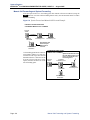
Inter-Tel CS-5200/5400
Communication Servers
Administrator Guide
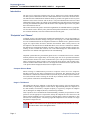
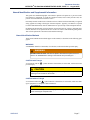
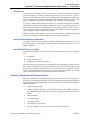
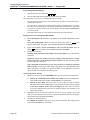
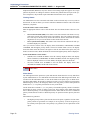
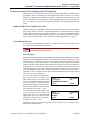
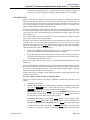
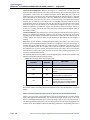
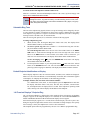
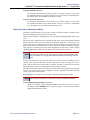
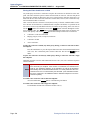
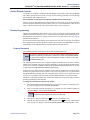
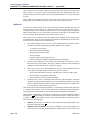
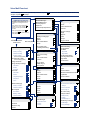
Voice Mail Administrator Features
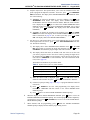
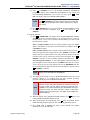
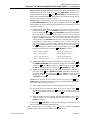
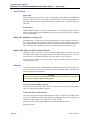
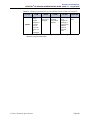
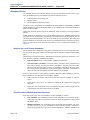
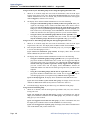
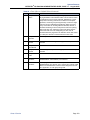
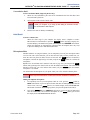
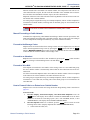
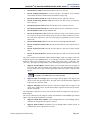
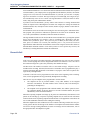
If your voice mail system has Automatic Speech Recognition (ASR) capability
and it is enabled for the administrator mailbox, you can complete voice mail
tasks by issuing spoken commands or by pressing dialpad digits.
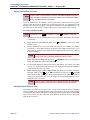
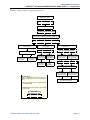
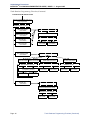
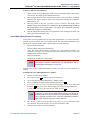
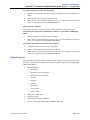
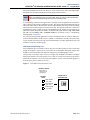
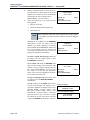
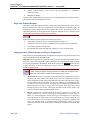
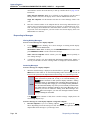
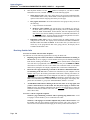
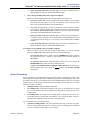
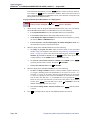
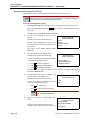
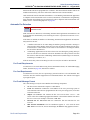
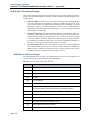
Accessing the Voice Mail Administrator’s Mailbox
— Call the voice mail access number.
— Say “Login” or press .
— Say or enter the administrator mailbox number. Then enter the password,
and press # .
— Say “Nine” or press 9 to access the voice mail administrator menu.
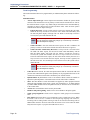
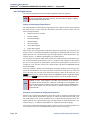
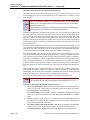
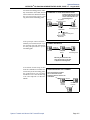
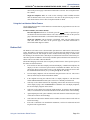
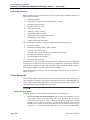
To Record a Broadcast Message:
—
—
—
—
Access the voice mail administrator’s mailbox and menu (see above).
Say “Broadcast Message” or press 1 to send a broadcast message.
Record the message.
When the message is recorded, hang up or press # for more options.
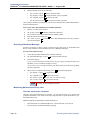
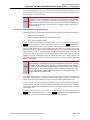
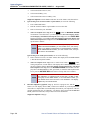
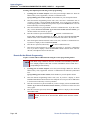
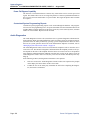
To Perform Mailbox Maintenance:
— Access the voice mail administrator’s mailbox and menu (see above).
— Say “Mailbox Maintenance” or press 2 to select the Mailbox/Group List
Maintenance option.
— Say or enter the mailbox, extension ID, or group list number to be accessed
and follow the prompts.
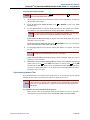
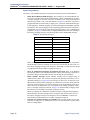
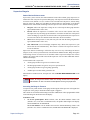
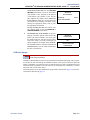
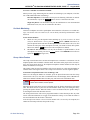
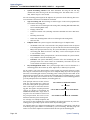
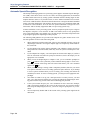
To Import a Fax Document:
— Using a fax machine, obtain dial tone and access the voice mail administrator’s mailbox and menu (see above).
— Say “Import Fax” or press 4 to select the Import Fax option.
— Say or enter the fax document number.
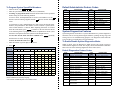
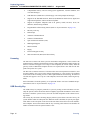
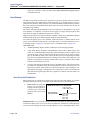
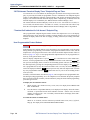
Quick Reference Guide To System,
Voice Mail, and Diagnostics
Administrator Features
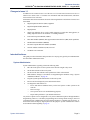
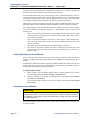
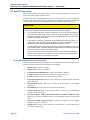
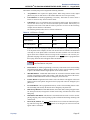
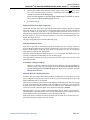
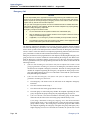
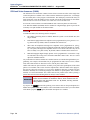
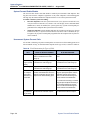
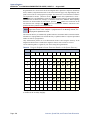
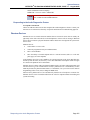
These are the basic instructions for the most frequently used system administrator and voice mail administrator features. For detailed information on these features, refer to the Administrator Guide.
System Administrator Features
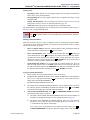
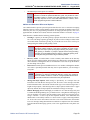
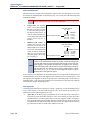
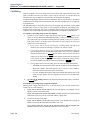
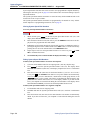
To Place the System in Night or Day Mode:
— While on-hook, enter
9
8
6
0
.
To Place a Single Node in Day or Night Mode:
— While on-hook, enter 9 8 6 1 (Enable Network Night Mode) OR
enter 9 8 6 2 (Enable Network Day Mode). Then enter the desired
node number.
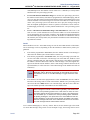
To Set System or Network Date and Time:
— While on-hook, enter 9 8 0 0 (System Date/Time), or enter
9
0 (Network Date/Time).
1
8
— Use the dialpad buttons to enter the month, day, and year. For example,
press 010305 for January 3, 2005. Or, press # to skip ahead without
changing the date.
— Use the dialpad buttons to enter the time in hours and minutes. For example,
enter 0900 for 9:00. Or press # twice to exit without changing the time.
— If the system is set for 12-hour display format, press 1 for AM or press 2
for PM.
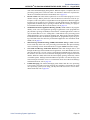
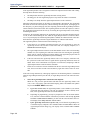
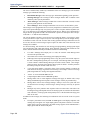
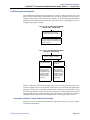
If the document number does not already exist, say “Yes” or press # if the
number is correct or say “Re-enter” or press 3 and re-renter the number.
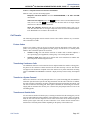
To Synchronize Network Time:
If the document number already exists, say “Yes” or press # to replace the
document or say “Re-enter” or press 3 to enter another number.
To Respond to an Alarm Message:
If you did not enter a valid number, enter a new number.
— When prompted, press START on the fax machine.
— When the fax transmission is complete, say “Continue” or press
tinue importing documents, or press
to exit.
#
to con-
While on-hook, enter
9
8
1
1
.
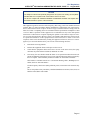
— When a minor alarm indication appears, write down the alarm information.
— While on-hook, clear the alarm by entering 9 8 5 0 (Clear System
Alarm) OR entering 9 8 5 1 (Clear Network Alarm).
— Look up the alarm in the Administrator Guide and take the appropriate
action.
© Inter-Tel, Inc. February 2005 printed in US
Part No. 835.2461-5
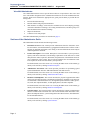
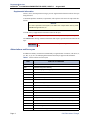
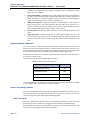
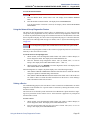
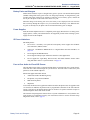
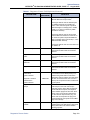
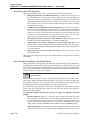
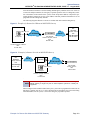
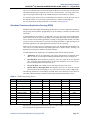
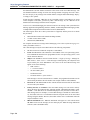
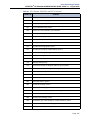
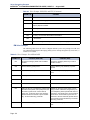
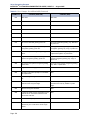
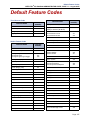
Default Administrator Feature Codes
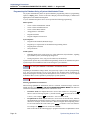
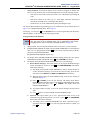
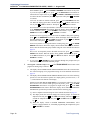
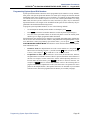
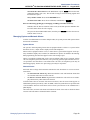
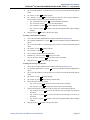
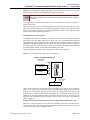
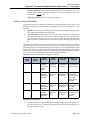
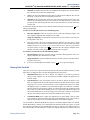
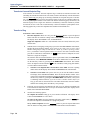
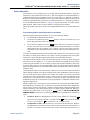
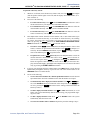
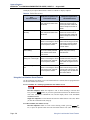
To Program System Speed-Dial Numbers:
— While on-hook, enter 9 8 0 1 .
— Enter the speed dial location code (000-999) or (0000-4999).
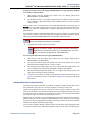
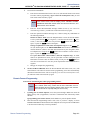
— To change or program the name: Enter the desired name for the speed-dial
number using one of the following methods:
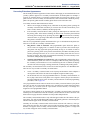
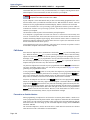
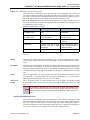
In numeric mode, the dialpad buttons are used to enter numbers 0-9, the #
button is used for entering a hyphen, and the
button is used for entering a
colon.
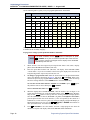
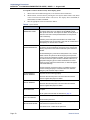
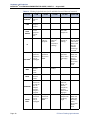
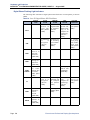
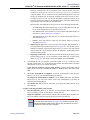
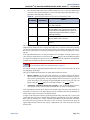
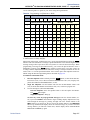
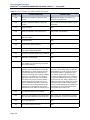
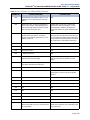
In alphanumeric mode, dialpad buttons are used to enter the desired letters,
numbers, and punctuation. The number of times a button is pressed determines which character is entered. When adjoining characters are located
under the same button, press FWD to advance to the next character. Refer
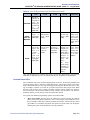
to the following chart to program information in alphanumeric mode. (Note
that letters correspond to the letters printed on the dialpad buttons.)
To erase the current name and leave it blank: Press
until the name is erased. Then press # .
To leave the name the same: Press
#
MUTE
repeatedly
.
2
3
4
5
6
7
8
9
10
11
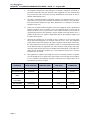
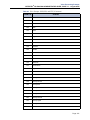
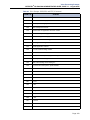
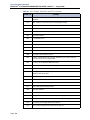
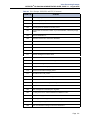
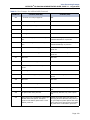
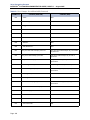
JAPANESE CHARACTERS*
ENGLISH CHARACTERS
CODE
(US/EU)
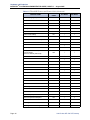
FEATURE NAME
9823
Automatic Diagnostics Delivery On/Off
9866
9851
Clear Network Alarm
9869
Modem Reset
9850
Clear System Alarm
9860
Night Ring On/Off
9982/9182
Compression On/Off
9825
Periodic Diagnostics On/Off
9981/9181
Compression Statistics
9900/9100
Diagnostics On/Off
9801
Program System Speed Dial
9862
Enable Network Day
9810
Set Network Date/Time
9861
Enable Network Night
9800
Set Time/Date
9867
Modem Disable
9811
Synchronize Network Time
9932/9132
Modem Enable
Program Database
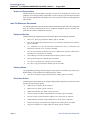
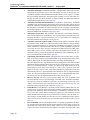
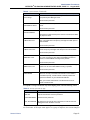
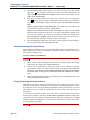
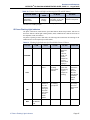
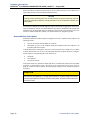
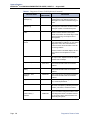
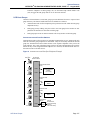
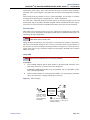
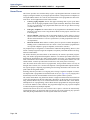
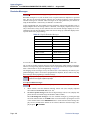
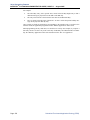
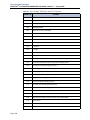
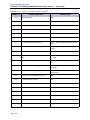
System Diagnostics Features
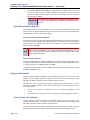
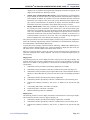
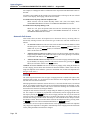
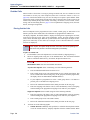
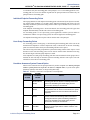
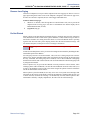
System diagnostics mode allows a system administrator to perform diagnostics
functions such as freezing/unfreezing the database, printing message logs, and
seizing a device for troubleshooting purposes. Use diagnostics mode when the
system is idle to avoid affecting system performance.
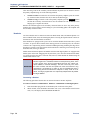
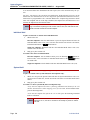
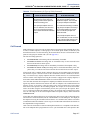
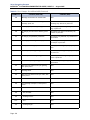
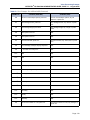
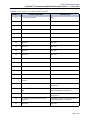
While on-hook, enter the Diagnostics Mode feature code (9900 or 9100) to
enable/disable diagnostics mode. The display shows DIAGNOSTICS ON/OFF.
Then enter one of the following diagnostics feature codes (9xxx).
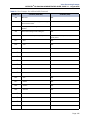
NUMBER OF TIMES BUTTON IS PRESSED
1
FEATURE NAME
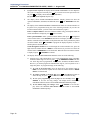
To Enable/Disable System Diagnostics Mode:
— Enter the number (up to 48 digits) to be stored.
— Press # .
BUTTON
CODE
(US/EU)
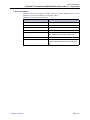
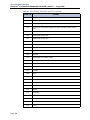
Default Diagnostics Feature Codes
1
-
&
(
)
1
A
I
U
E
O
a
CODE
(US/EU)
2
A
B
C
'
2
KA
KI
KU
KE
KO
i
9926/9126
Diagnostic - ASAI Snoop Off
9963/9163
SO
u
9927/9127
Diagnostic - ASAI Snoop On
9972/9172
Diagnostic - Print Auxdata
9922/9122
Diagnostic - Dump Extension
9975/9175
Diagnostic - Print Message Log
9936/9136
Diagnostic - Dump Node Information
9976/9176
Diagnostic - Print Network Log
9933/9133
Diagnostic - Dump System Diagnostics
9978/9178
Diagnostic - Query Node Traffic
3
D
E
F
!
4
G
H
I
*
5
J
K
L
# or /**
6
M
N
O
Ñ or #**
7
P
Q
R
8
T
U
9
W
0
@
3
SE
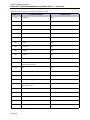
FEATURE NAME
CODE
(US/EU
FEATURE NAME
Diagnostic - Network Groups
SA
SHI
SU
4
TA
CHI
TSU
TE
TO
e
5
NA
NI
NU
NE
NO
o
6
HA
HI
FU
HE
HO
tsu
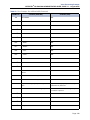
9943/9143
Diagnostic - Heap Dump
9928/9128
Diagnostic - Show Version
S
7
MA
MI
MU
ME
MO
ya
9947/9147
Diagnostic - Heap Statistics
9987/9187
Diagnostic - SIP View
V
?
8
YA
YU
YO
.
,
yu
9948/9148
Diagnostic - ISDN View
X
Y
Z
9
RA
RI
RU
RE
RO
yo
9910-9912/ Diagnostic - Spare 1-3
9110-9112
9962/9162
Diagnostic - Major Reset
9974/9174
Diagnostic - System History
:
.
,
0
WA
WO
N
pa
ba
long
9945/9145
Diagnostic - Mark as Leaks
9983/9183
Diagnostic - View Displays
*The Japanese characters are only available if the multilingual feature is enabled and Japanese is installed as the secondary language.
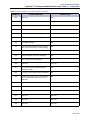
9946/9146
Diagnostic - Mark as Quiescent
9973/9173
Seize Device
9964/9164
Diagnostic - Minor Reset
9993/9133
System History Freeze
**The character available depends on the software version.
9939/9139
Diagnostic: Network Freeze Zone –
System Histories
9998/9198
System History Unfreeze
9989/9189
Diagnostic - Network Unfreeze Zone –
System Histories
Part Number
580.8001
CS-5200/5400
COMMUNICATION SERVERS
ADMINISTRATOR GUIDE
ISSUE 1.1, August 2005
©Inter-Tel, Inc., August 2005, printed in the USA
NOTICE
This Inter-Tel® CS-5200/5400 Communication Servers Administrator Guide is released by Inter-Tel, Inc.
as a guide for system and voice mail administrators. It provides information necessary to properly
administer the system.
The contents of this guide, which reflect current Inter-Tel standards, are subject to revision or change
without notice. Some features or applications mentioned may require a future release and are not available in the initial release. Future product features and applications are subject to availability and cost.
Some features or applications may require additional hardware and/or specific software. Software packages released after the publication of this guide will be documented in addenda to the guide or succeeding issues of the guide.
For sales, service, or technical support, contact your local authorized Inter-Tel reseller.
If you have any questions or comments regarding this guide or other technical documentation, contact
the Inter-Tel Technical Publications Department at: [email protected].
All products and services mentioned in this publication are the trademarks, service marks, registered marks, or registered service
marks of their respective owners.
Inter-Tel®, Axxess®, Enterprise® Messaging, and Unified Communicator® are registered trademarks of Inter-Tel, Incorporated.
IBM® is a registered trademark of International Business Machines Corporation.
Microsoft® Windows® and ActiveSync® are a registered trademarks of Microsoft Corporation.
AudioCodes™ is a trademark of AudioCodes Ltd.
INTER-TEL® CS-5200/5400
Contents
ADMINISTRATOR GUIDE, ISSUE 1.1 – August 2005
Contents
CONTENTS
PAGE
FCC Regulations
ix
Safety Regulations
xii
Network Security Statement
xiv
Document Overview
1
Introduction . . . . . . . . . . . . . . . . . . . . . . . . . . . . . . . . . . . . . . . . . . . . . . . . . . . . . . . . . . . . . . 2
“Endpoints” and “Phones” . . . . . . . . . . . . . . . . . . . . . . . . . . . . . . . . . . . . . . . . . . . . . . . . . . 2
Changes to Issue 1.1. . . . . . . . . . . . . . . . . . . . . . . . . . . . . . . . . . . . . . . . . . . . . . . . . . . . . . . . 3
Intended Audience . . . . . . . . . . . . . . . . . . . . . . . . . . . . . . . . . . . . . . . . . . . . . . . . . . . . . . . . . 3
Sections of the Administrator Guide . . . . . . . . . . . . . . . . . . . . . . . . . . . . . . . . . . . . . . . . . . 4
Multicultural English References. . . . . . . . . . . . . . . . . . . . . . . . . . . . . . . . . . . . . . . . . . . . . 5
Document Navigation Aids . . . . . . . . . . . . . . . . . . . . . . . . . . . . . . . . . . . . . . . . . . . . . . . . . . 5
Inter-Tel Reference Documents . . . . . . . . . . . . . . . . . . . . . . . . . . . . . . . . . . . . . . . . . . . . . . 6
Hazard Identification and Supplemental Information . . . . . . . . . . . . . . . . . . . . . . . . . . . 7
Abbreviations and Acronyms . . . . . . . . . . . . . . . . . . . . . . . . . . . . . . . . . . . . . . . . . . . . . . . . 8
Product Description
11
Introduction . . . . . . . . . . . . . . . . . . . . . . . . . . . . . . . . . . . . . . . . . . . . . . . . . . . . . . . . . . . . . 12
Summary of Hardware and Software Features . . . . . . . . . . . . . . . . . . . . . . . . . . . . . . . . 13
Licensing. . . . . . . . . . . . . . . . . . . . . . . . . . . . . . . . . . . . . . . . . . . . . . . . . . . . . . . . . . . . . . . . 14
USB Security Key . . . . . . . . . . . . . . . . . . . . . . . . . . . . . . . . . . . . . . . . . . . . . . . . . . . . . . . . 14
Inter-Tel CS-5200. . . . . . . . . . . . . . . . . . . . . . . . . . . . . . . . . . . . . . . . . . . . . . . . . . . . . . . . . 15
Inter-Tel CS-5400. . . . . . . . . . . . . . . . . . . . . . . . . . . . . . . . . . . . . . . . . . . . . . . . . . . . . . . . . 15
Digital Expansion Interface . . . . . . . . . . . . . . . . . . . . . . . . . . . . . . . . . . . . . . . . . . . . . . . . 15
System Capacities . . . . . . . . . . . . . . . . . . . . . . . . . . . . . . . . . . . . . . . . . . . . . . . . . . . . . . . . 15
System Network Capacities . . . . . . . . . . . . . . . . . . . . . . . . . . . . . . . . . . . . . . . . . . . . . . . . 16
Voice Processing Systems . . . . . . . . . . . . . . . . . . . . . . . . . . . . . . . . . . . . . . . . . . . . . . . . . . 16
Voice Processing System Applications . . . . . . . . . . . . . . . . . . . . . . . . . . . . . . . . . . . . . . . . 17
Voice Mail Networking . . . . . . . . . . . . . . . . . . . . . . . . . . . . . . . . . . . . . . . . . . . . . . . . . . . . 20
Page v
Contents
INTER-TEL® CS-5200/5400 ADMINISTRATOR GUIDE, ISSUE 1.1 – August 2005
CONTENTS
Administrator Procedures
PAGE
21
Introduction . . . . . . . . . . . . . . . . . . . . . . . . . . . . . . . . . . . . . . . . . . . . . . . . . . . . . . . . . . . . . 22
System Administrator Procedures . . . . . . . . . . . . . . . . . . . . . . . . . . . . . . . . . . . . . . . . . . . 23
Voice Mail Administrator Procedures . . . . . . . . . . . . . . . . . . . . . . . . . . . . . . . . . . . . . . . . 57
Administrator Programming Planning Sheets . . . . . . . . . . . . . . . . . . . . . . . . . . . . . . . . . 69
Hardware and Endpoints
75
Introduction . . . . . . . . . . . . . . . . . . . . . . . . . . . . . . . . . . . . . . . . . . . . . . . . . . . . . . . . . . . . . 77
Inter-Tel CS-5200/5400 Communication Servers Chassis . . . . . . . . . . . . . . . . . . . . . . . . 77
Chassis Interfaces/Connections . . . . . . . . . . . . . . . . . . . . . . . . . . . . . . . . . . . . . . . . . . . . . 77
Modules. . . . . . . . . . . . . . . . . . . . . . . . . . . . . . . . . . . . . . . . . . . . . . . . . . . . . . . . . . . . . . . . . 79
IP Operating Modes . . . . . . . . . . . . . . . . . . . . . . . . . . . . . . . . . . . . . . . . . . . . . . . . . . . . . . 79
IP Endpoints. . . . . . . . . . . . . . . . . . . . . . . . . . . . . . . . . . . . . . . . . . . . . . . . . . . . . . . . . . . . . 81
ITP and SIP Connectivity . . . . . . . . . . . . . . . . . . . . . . . . . . . . . . . . . . . . . . . . . . . . . . . . . . 90
Features Common to IP and Digital Inter-Tel Endpoints . . . . . . . . . . . . . . . . . . . . . . . . 93
Digital Endpoints . . . . . . . . . . . . . . . . . . . . . . . . . . . . . . . . . . . . . . . . . . . . . . . . . . . . . . . . 101
Single Line Endpoints . . . . . . . . . . . . . . . . . . . . . . . . . . . . . . . . . . . . . . . . . . . . . . . . . . . . 106
Optional System Equipment. . . . . . . . . . . . . . . . . . . . . . . . . . . . . . . . . . . . . . . . . . . . . . . 108
Additional Information and Troubleshooting. . . . . . . . . . . . . . . . . . . . . . . . . . . . . . . . . 109
System Features
111
Introduction . . . . . . . . . . . . . . . . . . . . . . . . . . . . . . . . . . . . . . . . . . . . . . . . . . . . . . . . . . . . 117
Access to the Features . . . . . . . . . . . . . . . . . . . . . . . . . . . . . . . . . . . . . . . . . . . . . . . . . . . . 117
Attendant Phones. . . . . . . . . . . . . . . . . . . . . . . . . . . . . . . . . . . . . . . . . . . . . . . . . . . . . . . . 132
Hunt Groups. . . . . . . . . . . . . . . . . . . . . . . . . . . . . . . . . . . . . . . . . . . . . . . . . . . . . . . . . . . . 134
Trunk Features. . . . . . . . . . . . . . . . . . . . . . . . . . . . . . . . . . . . . . . . . . . . . . . . . . . . . . . . . . 152
Inter-Tel Endpoint Features . . . . . . . . . . . . . . . . . . . . . . . . . . . . . . . . . . . . . . . . . . . . . . . 166
Multilingual Capability . . . . . . . . . . . . . . . . . . . . . . . . . . . . . . . . . . . . . . . . . . . . . . . . . . . 172
Intercom Calls . . . . . . . . . . . . . . . . . . . . . . . . . . . . . . . . . . . . . . . . . . . . . . . . . . . . . . . . . . 175
Station-to-Station Messages . . . . . . . . . . . . . . . . . . . . . . . . . . . . . . . . . . . . . . . . . . . . . . . 180
Off-Hook Voice Announce (OHVA) . . . . . . . . . . . . . . . . . . . . . . . . . . . . . . . . . . . . . . . . . 184
Outside Calls . . . . . . . . . . . . . . . . . . . . . . . . . . . . . . . . . . . . . . . . . . . . . . . . . . . . . . . . . . . 186
Placing Calls On Hold . . . . . . . . . . . . . . . . . . . . . . . . . . . . . . . . . . . . . . . . . . . . . . . . . . . . 193
Call Waiting . . . . . . . . . . . . . . . . . . . . . . . . . . . . . . . . . . . . . . . . . . . . . . . . . . . . . . . . . . . . 196
Page vi
INTER-TEL® CS-5200/5400
CONTENTS
System Features (Continued)
Contents
ADMINISTRATOR GUIDE, ISSUE 1.1 – August 2005
PAGE
Call Transfer . . . . . . . . . . . . . . . . . . . . . . . . . . . . . . . . . . . . . . . . . . . . . . . . . . . . . . . . . . . 197
Call Screening . . . . . . . . . . . . . . . . . . . . . . . . . . . . . . . . . . . . . . . . . . . . . . . . . . . . . . . . . . 200
Reverse Transfer . . . . . . . . . . . . . . . . . . . . . . . . . . . . . . . . . . . . . . . . . . . . . . . . . . . . . . . . 201
Conference Calls . . . . . . . . . . . . . . . . . . . . . . . . . . . . . . . . . . . . . . . . . . . . . . . . . . . . . . . . 202
Record-A-Call . . . . . . . . . . . . . . . . . . . . . . . . . . . . . . . . . . . . . . . . . . . . . . . . . . . . . . . . . . 207
Agent Help . . . . . . . . . . . . . . . . . . . . . . . . . . . . . . . . . . . . . . . . . . . . . . . . . . . . . . . . . . . . . 208
System Forwarding . . . . . . . . . . . . . . . . . . . . . . . . . . . . . . . . . . . . . . . . . . . . . . . . . . . . . . 211
Call Forward . . . . . . . . . . . . . . . . . . . . . . . . . . . . . . . . . . . . . . . . . . . . . . . . . . . . . . . . . . . 217
Speed Dial . . . . . . . . . . . . . . . . . . . . . . . . . . . . . . . . . . . . . . . . . . . . . . . . . . . . . . . . . . . . . . 221
Intercom, Speed Dial, and Feature Code Directories . . . . . . . . . . . . . . . . . . . . . . . . . . . 227
House Phone . . . . . . . . . . . . . . . . . . . . . . . . . . . . . . . . . . . . . . . . . . . . . . . . . . . . . . . . . . . . 230
Redial . . . . . . . . . . . . . . . . . . . . . . . . . . . . . . . . . . . . . . . . . . . . . . . . . . . . . . . . . . . . . . . . . 231
Redirect Call. . . . . . . . . . . . . . . . . . . . . . . . . . . . . . . . . . . . . . . . . . . . . . . . . . . . . . . . . . . . 233
Paging . . . . . . . . . . . . . . . . . . . . . . . . . . . . . . . . . . . . . . . . . . . . . . . . . . . . . . . . . . . . . . . . . 234
Remove from Paging . . . . . . . . . . . . . . . . . . . . . . . . . . . . . . . . . . . . . . . . . . . . . . . . . . . . . 235
Do-Not-Disturb . . . . . . . . . . . . . . . . . . . . . . . . . . . . . . . . . . . . . . . . . . . . . . . . . . . . . . . . . 235
Do-Not-Disturb Override . . . . . . . . . . . . . . . . . . . . . . . . . . . . . . . . . . . . . . . . . . . . . . . . . 239
Remote Programming . . . . . . . . . . . . . . . . . . . . . . . . . . . . . . . . . . . . . . . . . . . . . . . . . . . . 239
Default Endpoint . . . . . . . . . . . . . . . . . . . . . . . . . . . . . . . . . . . . . . . . . . . . . . . . . . . . . . . . 242
Hookflash/Recall . . . . . . . . . . . . . . . . . . . . . . . . . . . . . . . . . . . . . . . . . . . . . . . . . . . . . . . . 243
Reminder Messages . . . . . . . . . . . . . . . . . . . . . . . . . . . . . . . . . . . . . . . . . . . . . . . . . . . . . . 244
Record Keeping and Maintenance Features . . . . . . . . . . . . . . . . . . . . . . . . . . . . . . . . . . 245
Audio Diagnostics . . . . . . . . . . . . . . . . . . . . . . . . . . . . . . . . . . . . . . . . . . . . . . . . . . . . . . . 252
Phantom Devices . . . . . . . . . . . . . . . . . . . . . . . . . . . . . . . . . . . . . . . . . . . . . . . . . . . . . . . . 255
Voice Processing Features
257
Introduction . . . . . . . . . . . . . . . . . . . . . . . . . . . . . . . . . . . . . . . . . . . . . . . . . . . . . . . . . . . . 259
Automated Attendant . . . . . . . . . . . . . . . . . . . . . . . . . . . . . . . . . . . . . . . . . . . . . . . . . . . . 259
Automatic Fax Detection. . . . . . . . . . . . . . . . . . . . . . . . . . . . . . . . . . . . . . . . . . . . . . . . . . 263
Automatic Speech Recognition . . . . . . . . . . . . . . . . . . . . . . . . . . . . . . . . . . . . . . . . . . . . . 264
Call Routing Announcement . . . . . . . . . . . . . . . . . . . . . . . . . . . . . . . . . . . . . . . . . . . . . . 265
Page vii
Contents
INTER-TEL® CS-5200/5400 ADMINISTRATOR GUIDE, ISSUE 1.1 – August 2005
CONTENTS
Voice Processing Features (Continued)
PAGE
Directories . . . . . . . . . . . . . . . . . . . . . . . . . . . . . . . . . . . . . . . . . . . . . . . . . . . . . . . . . . . . . 268
EM Directories . . . . . . . . . . . . . . . . . . . . . . . . . . . . . . . . . . . . . . . . . . . . . . . . . . . . . . . . . . 271
E-mail Reader . . . . . . . . . . . . . . . . . . . . . . . . . . . . . . . . . . . . . . . . . . . . . . . . . . . . . . . . . . 274
Fax-On-Demand . . . . . . . . . . . . . . . . . . . . . . . . . . . . . . . . . . . . . . . . . . . . . . . . . . . . . . . . 274
Record-A-Call . . . . . . . . . . . . . . . . . . . . . . . . . . . . . . . . . . . . . . . . . . . . . . . . . . . . . . . . . . 276
Scheduled Time-based Application Routing (STAR) . . . . . . . . . . . . . . . . . . . . . . . . . . . 277
Voice Mail . . . . . . . . . . . . . . . . . . . . . . . . . . . . . . . . . . . . . . . . . . . . . . . . . . . . . . . . . . . . . . 279
Subscriber Features. . . . . . . . . . . . . . . . . . . . . . . . . . . . . . . . . . . . . . . . . . . . . . . . . . . . . . 284
Unified Messaging . . . . . . . . . . . . . . . . . . . . . . . . . . . . . . . . . . . . . . . . . . . . . . . . . . . . . . . 284
Voice Processing Prompts
293
Default Voice Processing Prompts . . . . . . . . . . . . . . . . . . . . . . . . . . . . . . . . . . . . . . . . . . 294
Default Feature Codes
357
Index
359
Page viii
INTER-TEL® CS-5200/5400
FCC Regulations
ADMINISTRATOR GUIDE, ISSUE 1.1 – August 2005
FCC Regulations
IMPORTANT
1.
This equipment complies with Part 68 of Federal Communications Commission (FCC)
rules. On the side of the equipment chassis is a label that contains, among other information, the FCC registration number and ringer equivalence number (REN) for this
equipment. Customers connecting this equipment to the telephone network shall, before
such connection is made, give notice to the telephone company of the particular line(s)
to which such connection is to be made, and shall provide the telephone company with
the following information:
•
Complies with Part 68 of the FCC Rules
•
FCC registration number:
•
USOC numbers of required interface jacks (see chart on next page)
•
Service order code (SOC), as applicable (see chart on next page)
•
Facility interface code (FIC) (see chart on next page)
•
REN, as applicable (see chart on next page)
NOTE
The REN is used to determine the number of devices that can be connected
to a single telephone line so that all the devices will ring or otherwise respond
to incoming calls. Each device that can be connected to a telephone line has
a REN value. When the sum of device RENs on a line exceeds the maximum
REN value the line can support, usually 5.0, some or all of the devices may
not ring or respond appropriately. To identify the REN for lines in a telephone
service area, contact the telephone company.
The telephone company should also be given notice upon final disconnection of this
equipment from the particular line(s).
It is also the responsibility of the customer to provide the telephone company with registration numbers of any other devices which are configured for connection to the telephone network.
2.
This equipment cannot be used on public coin service provided by the telephone company. Connection to party line service is subject to state tariffs. (Contact the state public
utility commission, public service commission, or corporation commission for information.)
3.
If this equipment causes harm to the telephone network, the telephone company will
notify the customer in advance that service may be temporarily discontinued. But if
advance notice is not practical, the telephone company will notify the customer as soon
as possible. Also, the customer will be advised of the right to file a complaint with the
FCC, if necessary.
Page ix
FCC Regulations
INTER-TEL® CS-5200/5400 ADMINISTRATOR GUIDE, ISSUE 1.1 – August 2005
4.
The telephone company may make changes in its facilities, equipment, operations, or
procedures which may affect the operation of this equipment. If so, the customer shall
be given advance notice so that any necessary modifications can be made in order to
maintain uninterrupted service.
5.
If trouble is experienced with this equipment, contact a local authorized factory service
representative for repairs and/or warranty information. The customer, users, and unauthorized technicians should not repair, make adjustments to, or attempt to service this
equipment in any way.
6.
In the event of trouble with the telephone line(s), this equipment must be disconnected
from the telephone line(s). If trouble ceases, the equipment must be repaired by an
authorized factory service representative. If the trouble continues to occur with the
equipment disconnected, the telephone company should be notified that they have a
problem. If this is the case, repairs or adjustments made by the telephone company will
be made at their expense.
7.
Allowing this equipment to be operated in such a manner as to not provide proper
answer supervision signaling is in violation of Part 68 of FCC rules. This equipment
returns answer supervision signals to the public telephone network when: answered by
the called station, answered by the attendant, routed to a recorded announcement that
can be administered by the equipment user, and/or routed to a dial prompt. This equipment also returns answer supervision on all DID calls forwarded back to the public telephone network. Permissible exceptions are: a call is unanswered, busy tone is received,
or reorder tone is received.
8.
This equipment is capable of providing users access to interstate providers of operator
services through the use of equal access codes. Failure to provide equal access capabilities is a violation of the Telephone Operator Consumer Services Improvement Act of
1990 and Part 68 of the FCC Rules.
TYPE OF PORTINTERFACE
FACILITY INTERFACE CODE (FIC)
2-Wire Loop
02LS2
D4 Superframe/AMI
04DU9-BN
–
6.0Y
RJ-48C
D4 Superframe with
B8ZS
04DU9-DN
–
6.0Y
RJ-48C
Extended Super
frame (ESF)
04DU9-1KN
–
6.0Y
RJ-48C
ESF with B8ZS
04DU9-1SN
–
6.0Y
RJ-48C
Primary Rate ISDN
04DU9-1SN
–
6.0Y
RJ-48C
Page x
RINGER EQUIVALENCE NO. (REN)
SERVICE ORDER
CODE (SOC)
USOC JACK
CONNECTOR
–
INTER-TEL® CS-5200/5400
FCC Regulations
ADMINISTRATOR GUIDE, ISSUE 1.1 – August 2005
NOTICE
The telephone instruments specifically designed for this system have hearing aid-compatible
handsets that are in compliance with section 68.316 of the FCC Rules.
The IP SLA complies with UL60950/CSA60950 and EN 60950 standards and complies with
EN 55022 and CFR 47 part 15 of the FCC Rules.
This equipment generates and uses radio frequency (RF) energy and if not installed and used
properly, that is, in strict accordance with the manufacturer’s instructions, may cause interference to radio and television reception. It has been type tested and found to comply with the
limits for a Class A computing device in accordance with the specifications in Subpart J of Part
15 of FCC Rules. Operation of this equipment in a residential area may cause unacceptable
interference to radio and TV reception requiring the operator to take whatever steps are necessary to correct the interference. However, there is no guarantee that interference will not occur
in a particular installation. If this equipment does cause interference to radio or television
reception, which can be determined by turning the equipment off and on, the user is encouraged to try to correct the interference by one or more of the following measures:
•
Reorient the receiving antenna.
•
Relocate the equipment chassis with respect to the receiver.
•
Check that the equipment chassis and receiver are not on the same circuit; the equipment must be powered from an isolated, dedicated AC outlet.
•
If necessary, the user should consult the dealer or an experienced radio/television technician for additional suggestions. The user may find the following booklet prepared by
the FCC helpful: “How to Identify and Resolve Radio-TV Interference Problems.”
This booklet is available from the U.S. Government Printing Office, Washington, D.C.
20402, Stock No. 004-000-00398-5.
If radio frequency interference (RFI) problems persist, contact Inter-Tel Customer Support.
The is now product safety certified by Canadian Standards Association (CSA) for use in
both the United States and Canada.
Page xi
Safety Regulations
INTER-TEL® CS-5200/5400 ADMINISTRATOR GUIDE, ISSUE 1.1 – August 2005
Safety Regulations
IMPORTANT SAFETY INSTRUCTIONS
NOTICE
The “C US” indicator adjacent to the Canadian Standards Association (CSA) mark on the
product label signifies that the system has been evaluated to the applicable ANSI/UL and
CSA Standards for use in both the United States and Canada. The CSA is a Nationally Recognized Testing Laboratory (NRTL). NRTL is a designation granted by the U.S. Occupational Health and Safety Administration (OSHA) to laboratories which have been accredited
to certify products to U.S. Standards.
Before installation, check the local electrical codes for important information concerning the
installation of telephone and electronic equipment.
The following safety information is reprinted from UL 1459. When using your telephone
equipment, basic safety precautions should always be followed to reduce the risk of fire, electric shock, and injury to persons.
Page xii
1.
Read and understand all instructions.
2.
Follow all warnings and instructions marked on the product.
3.
Unplug this product from the wall outlet before cleaning. Do not use liquid cleaners or
aerosol cleaners. Use a damp cloth for cleaning.
4.
Do not use this product near water (for example, in a wet basement).
5.
Do not place this product on an unstable cart, stand, or table. The product may fall,
causing serious damage to the product.
6.
Slots and openings in the chassis and the back or bottom are provided for ventilation, to
protect it from overheating; these openings must not be blocked or covered. This product should never be placed near or over a radiator or heat register. This product should
not be placed in a built-in installation unless proper ventilation is provided.
7.
This product should be operated only from the type of power source indicated in the
manual. If you are not sure of the type of power source to your building, consult your
dealer or local power company.
8.
This product is equipped with a three-wire grounding type plug, a plug having a third
(grounding) pin. This plug will only fit into a grounding type power outlet. This is a
safety feature. If you are unable to insert the plug into the outlet, contact your electrician to replace your obsolete outlet. Do not defeat the safety purpose of the grounding
type plug.
9.
Do not allow anything to rest on the power cord. Do not locate this product where the
cord will be abused by persons walking on it.
10.
Do not use an extension cord with this product’s AC power cord. The AC outlet for this
product should not be used for any other electrical equipment.
INTER-TEL® CS-5200/5400
Safety Regulations
ADMINISTRATOR GUIDE, ISSUE 1.1 – August 2005
11.
Never push objects of any kind into this product through chassis slots as they may touch
dangerous voltage points or short out parts that could result in a risk of fire or electric
shock. Never spill liquid of any kind on the product.
12.
To reduce the risk of electric shock, do not disassemble this product, but take it to a
qualified serviceman when some service or repair work is required. Opening or removing covers may expose you to dangerous voltages or other risks. Incorrect reassembly
can cause electric shock when the product is subsequently used.
13.
Unplug this product from the wall outlet and refer servicing to qualified service personnel under the following conditions:
•
When the power supply cord or plug is damaged or frayed.
•
If liquid has been spilled into the product.
•
If the product has been exposed to rain or water.
•
If the product does not operate normally by following the operating instructions.
Adjust only those controls that are covered by the operating instructions because
improper adjustment of other controls may result in damage and will often require
extensive work by a qualified technician to restore the product to normal operation.
•
If the product has been dropped or the chassis has been damaged.
•
If the product exhibits a distinct change in performance.
14.
Avoid using a telephone (other than a cordless type) during an electrical storm. There
may be a remote risk of electric shock from lightning.
15.
Do not use the telephone to report a gas leak in the vicinity of the leak.
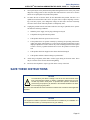
SAVE THESE INSTRUCTIONS
NOTICE
!
An exclamation point within a triangle, such as the one silk-screened on the
front of the equipment cabinet, or chassis, is intended to alert the user to a hazard that may result in bodily harm. To promote safe operation, maintenance,
and servicing of equipment, pay attention to the hazards identified in the literature accompanying the product.
Be sure to read and follow all of the instructions included in this manual and other applicable
literature.
NOTICE
The equipment contains no operator access areas and is certified only for installation in a
restricted access location, by trained personnel only. (UL 60950-1)
Page xiii
Network Security Statement
INTER-TEL® CS-5200/5400 ADMINISTRATOR GUIDE, ISSUE 1.1 – August 2005
Network Security Statement
Although no telecommunications system or data network is entirely secure, as long as appropriate security measures are put in place and properly maintained by both the customer and the
installing company, this architecture and its associated server-based applications are substantially secure against unauthorized access to the customer's data network via the telecommunications system. Appropriate security measures include, but are not limited to, the proper
implementation of user/administrative accounts, passwords, firewalls, Network Address Translation (NAT), access control lists, virus protection, security updates, etc., and the proper maintenance of access points/programs and their respective accounts/passwords.
Page xiv
INTER-TEL® CS-5200/5400
Document Overview
ADMINISTRATOR GUIDE, ISSUE 1.1 – August 2005
Document Overview
CONTENTS
PAGE
Introduction. . . . . . . . . . . . . . . . . . . . . . . . . . . . . . . . . . . . . . . . . . . . . . . . . . . . . . . . . . . . . . . . . . 2
“Endpoints” and “Phones” . . . . . . . . . . . . . . . . . . . . . . . . . . . . . . . . . . . . . . . . . . . . . . . . . . . . . 2
Computer Science Roots . . . . . . . . . . . . . . . . . . . . . . . . . . . . . . . . . . . . . . . . . . . . . . . . . . . . . 2
Usage in This Manual . . . . . . . . . . . . . . . . . . . . . . . . . . . . . . . . . . . . . . . . . . . . . . . . . . . . . . . 2
Changes to Issue 1.1 . . . . . . . . . . . . . . . . . . . . . . . . . . . . . . . . . . . . . . . . . . . . . . . . . . . . . . . . . . . 3
Intended Audience . . . . . . . . . . . . . . . . . . . . . . . . . . . . . . . . . . . . . . . . . . . . . . . . . . . . . . . . . . . . 3
System Administrator . . . . . . . . . . . . . . . . . . . . . . . . . . . . . . . . . . . . . . . . . . . . . . . . . . . . . . . 3
Voice Mail Administrator . . . . . . . . . . . . . . . . . . . . . . . . . . . . . . . . . . . . . . . . . . . . . . . . . . . . 4
Sections of the Administrator Guide. . . . . . . . . . . . . . . . . . . . . . . . . . . . . . . . . . . . . . . . . . . . . . 4
Multicultural English References . . . . . . . . . . . . . . . . . . . . . . . . . . . . . . . . . . . . . . . . . . . . . . . . 5
Document Navigation Aids . . . . . . . . . . . . . . . . . . . . . . . . . . . . . . . . . . . . . . . . . . . . . . . . . . . . . 5
Paper . . . . . . . . . . . . . . . . . . . . . . . . . . . . . . . . . . . . . . . . . . . . . . . . . . . . . . . . . . . . . . . . . . . . 5
Electronic PDF. . . . . . . . . . . . . . . . . . . . . . . . . . . . . . . . . . . . . . . . . . . . . . . . . . . . . . . . . . . . . 5
Header and Footer Guides . . . . . . . . . . . . . . . . . . . . . . . . . . . . . . . . . . . . . . . . . . . . . . . . . . . . 6
Inter-Tel Reference Documents . . . . . . . . . . . . . . . . . . . . . . . . . . . . . . . . . . . . . . . . . . . . . . . . . . 6
Equipment Manuals . . . . . . . . . . . . . . . . . . . . . . . . . . . . . . . . . . . . . . . . . . . . . . . . . . . . . . . . . 6
Planning Sheets . . . . . . . . . . . . . . . . . . . . . . . . . . . . . . . . . . . . . . . . . . . . . . . . . . . . . . . . . . . . 6
Phone User Guides . . . . . . . . . . . . . . . . . . . . . . . . . . . . . . . . . . . . . . . . . . . . . . . . . . . . . . . . . 6
Hazard Identification and Supplemental Information . . . . . . . . . . . . . . . . . . . . . . . . . . . . . . . 7
Hazard Identification Methods . . . . . . . . . . . . . . . . . . . . . . . . . . . . . . . . . . . . . . . . . . . . . . . . 7
WARNING . . . . . . . . . . . . . . . . . . . . . . . . . . . . . . . . . . . . . . . . . . . . . . . . . . . . . . . . . . . . 7
CAUTION with Triangle . . . . . . . . . . . . . . . . . . . . . . . . . . . . . . . . . . . . . . . . . . . . . . . . . 7
CAUTION without Triangle . . . . . . . . . . . . . . . . . . . . . . . . . . . . . . . . . . . . . . . . . . . . . . 7
Supplemental Information . . . . . . . . . . . . . . . . . . . . . . . . . . . . . . . . . . . . . . . . . . . . . . . . . . . . 8
Abbreviations and Acronyms . . . . . . . . . . . . . . . . . . . . . . . . . . . . . . . . . . . . . . . . . . . . . . . . . . . 8
Page 1
Document Overview
INTER-TEL® CS-5200/5400 ADMINISTRATOR GUIDE, ISSUE 1.1 – August 2005
Introduction
The Inter-Tel CS-5200/5400 Communication Servers Administrator Guide contains information that System Administrators and Voice Mail Administrators need to know about the InterTel 5000 Network Communications Solutions family of products. The guide focuses on system
hardware and software features and on the use of System Administrator and Voice Mail
Administrator phone features to perform typical administrator tasks and activities. Instructions
for using non-Administrator phones and the features other endpoints appear in the user guides
that come with those devices.
This section describes the guide’s content and organization, the intended audience, typographical conventions used to identify safety hazards and important information, related Inter-Tel,
Inc. technical documents, and a list of abbreviations used in the guide.
“Endpoints” and “Phones”
As digital, wireless, and computerized communication methods have evolved, the language of
telecommunications has had to change to keep pace. Not long ago, voice and modem-encoded
text were communicated from one telephone instrument to another across a global network of
copper wire, optical fiber, microwave antennas, and satellites. More recently, however, the
development of the Internet and of World Wide Web (www) sites have introduced a multimedia dimension to information and made it all more readily accessible through computer networking. As this evolution has occurred, new words and meanings have been introduced to
describe the new methods and equipment used for communicating.
Telephone systems that once provided only phone service to consumers have become “communication platforms” that support many devices that people can use for personal and business
communication. Phones now share communciation space with personal digital assistants
(PDA), with wireless phones capable of text messaging, taking photos, and recording video,
with fax machines that transmit and receive messages across Internet Protocol (IP), and with
“soft” phones that are displayed and used from computer screens.
Computer Science Roots
When referring to communication protocols in computer science, the term “endpoint”
describes an entity on one end of a Transport Layer connection. The Transport Layer is the
Transmission Control Protocol/Internet Protocol (TCP/IP) layer in the Open Systems Interconnect (OSI) network model. Utilizing the TCP/IP layer standard, Internet servers send and
receive packets of data across the World Wide Web.
Usage in This Manual
This manual uses the term “endpoint” to describe the entire category of devices that the InterTel 5000 family of products supports. In this context, digital and IP phones are endpoints, as
are data modules, fax machines, computer telephony (CT) gateways, Single-Line Adapters
(SLA), IP Single-Line Adapters (IP-SLA), and answering machines.
And, to promote clear communication and understanding, commonly accepted names of endpoints are used as appropriate. In particular, desktop IP endpoints are also referred to as IP
phones. Digital endpoints are also referred to as digital phones. Wireless endpoints are also
referred to as wireless phones. And, analog single line endpoints are also referred to as single
line phones or single line sets.
NOTE
Page 2
In the manual and in Database (DB) Programming, a phone may also be called a
“station” when reference to the phone and its environment are intended. Or, it may
be called “device” in the most general sense.
Computer Science Roots
INTER-TEL® CS-5200/5400
Document Overview
ADMINISTRATOR GUIDE, ISSUE 1.1 – August 2005
Changes to Issue 1.1
In addition to the content of Issue 1.0 of the Inter-Tel CS-5200/5400 Communication Servers
Administrator Guide, Issue 1.1 contains new information and related instructions, and identified errors have been corrected.
Information and related instructions about the following hardware and software features have
been added:
•
Digital Expansion Interface (DEI) equipment
•
Digital Endpoint Module (DEM-16)
•
Digital phones
•
Single-Line Adapters (SLA), each of which supports two single line analog phones, or
analog endpoints such as fax machines or recording machines
•
Four-trunk Loop Start Module (LSM-4)
•
Basic Rate Module (BRM-S) that supports Basic Rate Interface (BRI) trunk capabilities
•
Modem Data Port Module (MDPM)
•
Personal Computer Data Port Module (PCDPM)
•
Network Address Translation (NAT) traversal
•
Off-Hook Voice Announce
Intended Audience
This guide provides information and procedures for carrying out typical System Administrator
and Voice Mail Administrator tasks.
System Administrator
System Administrators typically perform the following tasks:
•
Place the local system or other systems in the network in night or day mode
•
Set the date and time of the local system
•
Set the network date and time and resynchronize clocks in the network
•
Make database changes, as described in “Programming the Database Using a System
Administrator Phone’’ on page 26.
•
Program System Speed Dial numbers on the local system
•
Receive and clear displayed system and network alarms
•
Use diagnostic mode features to:
—
Freeze and unfreeze database history on the local system or other systems in the
network.
—
Print error logs.
—
Seize specific devices for troubleshooting purposes.
—
Report audio problems to your installer/technician.
Any Inter-Tel phone can be designated as a System Administrator phone through Database
Programming. However, to facilitate programming and to manage alarm messages, Inter-Tel
recommends using a Model 8660 Six-Line Display IP phone or a Model 8560, Executive, or
Professional Six-Line Display digital phone for this purpose. System Administrator features
are described in detail beginning on page 23.
System Administrator
Page 3
Document Overview
INTER-TEL® CS-5200/5400 ADMINISTRATOR GUIDE, ISSUE 1.1 – August 2005
Voice Mail Administrator
Voice Mail Administrators can use special features that are not provided to other voice mail
users. The mailbox designated as the Administrator mailbox has all of the standard subscriber
features, which can be found in the appropriate user guide, plus the ability to perform the following tasks:
•
Record a broadcast message
•
Perform mailbox and group list maintenance
•
With Audiotex recordings, create and select customized voice mail company greetings,
Automated Attendant recordings, call routing announcements, and hunt group overflow and announcement station recordings
•
Import fax documents
•
Customize voice mail prompts
Voice Mail Administrator procedures are described on page 57.
Sections of the Administrator Guide
This Administrator Guide includes the following sections:
•
Document Overview: This section provides information about the document’s structure and content, associated documents, typographical methods used to call the reader’s
attention to important information, and a listing of selected abbreviations and acronyms
used throughout the document.
•
Product Description: The Product Description section describes system processes,
capacity and feature summaries, and licensing requirements of the Inter-Tel CS-5200/
5400 platform. defines capacities, dimensions, and parameters of the hardware and software components of the systems. The section also identifies the environmental conditions required to ensure safe and reliable system operation.
For further details, turn to the section. Or, if viewing the PDF version of the manual, go
directly to the section by clicking Product Description.
•
Administrator Procedures: This section provides procedures for performing typical
System Administrator and Voice Mail Administrator tasks and activities.
For further details, turn to the section. Or, if viewing the PDF version of the manual, go
directly to the section by clicking Administrator Procedures.
•
Hardware and Endpoints: This section describes the physical equipment that makes
up the Inter-Tel 5000 Network Communications Solutions. Included are the Inter-Tel
CS-5200/5400 Communication Servers; the Digital Expansion Interface (DEI); processor, trunk, and endpoint modules; IP and digital phones; and other endpoints.
For further details, turn to the section. Or, if viewing the PDF version of the manual, go
directly to the section by clicking Hardware and Endpoints.
•
System Features: The System Features section describes the business communication
features available to Inter-Tel 5000 users. The section identifies trunk and feature codes,
phone and endpoint features, system management and control features, and Administrator and Attendant features.
For further details, turn to the section. Or, if viewing the PDF version of the manual, go
directly to the section by clicking System Features.
Page 4
Voice Mail Administrator
INTER-TEL® CS-5200/5400
•
Document Overview
ADMINISTRATOR GUIDE, ISSUE 1.1 – August 2005
Voice Processing Features: The Voice Processing Features section describes Basic
Voice Mail features and optional external Voice Mail options.
For further details, turn to the section. Or, if viewing the PDF version of the manual, go
directly to the section by clicking Voice Processing Features.
For reference, the guide also provides a comprehensive list of Voice Processing Prompts to aid
in the development of custom messages and a table that summarizes Default Feature Codes.
Multicultural English References
This guide supports the requirements of administrators in the United States of America (US)
and in the Inter-Tel Europe market, which includes the United Kingdom (UK). Because of this
dual support, dual references are made to industry features, standards, and jargon, as appropriate throughout the guide. For the purposes of this guide, British English technical terms are
assumed to apply to other English-speaking European cultures, as well.
For example, the US telecom industry refers to a communication line between a public switching system and a private switching system as a “central office (CO) trunk.” In the UK, this
same type of line is called a “local exchange trunk.” Applying the dual-reference guideline
would result in the following statements:
•
During system installation, the technician connects CO trunks/local exchange trunks to
the LSM-2 modules
•
To turn the Diagnostics Mode on or off at an Administrator phone, the System Administrator enters 9900 (9100 in Europe).
However, this guide does not make a similar distinction between American English and British
English spellings of common words. Only American English spellings appear in this guide. For
example, the word “analog” is not also spelled “analogue” since the meaning is clear.
NOTE
As appropriate for clarity and legibility, the British English variation of a term
may also appear in brackets or be written out. For instance, the first of the
preceding examples could read:
. . .CO trunks [local exchange trunks in Europe]. . . .
Document Navigation Aids
To help users know what section and topic they are looking at in the guide, each page contains
the identification in both paper and electronic formats.
Paper
A paper copy of this guide contains Contents pages showing the outline of the entire manual
and the page number where each section, heading, and subheading begins. For quick reference
to sections, the section title appears in a black box on the outside edge of each page of the section. Together, the black boxes form a visual aid that marks the extent of the pages in each section. Also at the beginning of the guide are a List of Figures and a List of Tables with page
locations. Each section also provides a Contents page or pages. To help the user locate specific
information in the manual, an Index of topics and subtopics appears at the end of the manual.
Electronic PDF
When viewing the Portable Document Format (PDF) version of this document, the user will
see blue hyperlinked references to other parts of the manual. To use a hyperlink, the user must
move the pointer over the blue hyperlink. When the pointer changes form, the user clicks to go
to the hyperlinked destination.
Voice Mail Administrator
Page 5
Document Overview
INTER-TEL® CS-5200/5400 ADMINISTRATOR GUIDE, ISSUE 1.1 – August 2005
Header and Footer Guides
Whether using the electronic PDF or the paper version, users can identify the section of the
guide they are viewing by looking at the header or footer of the page. The first major document
topic on a page appears both in the header, next to the section title, and in the footer opposite th
page number.
Inter-Tel Reference Documents
The following documents provide detailed technical information about Inter-Tel CS-5200 and
Inter-Tel CS-5400 Communication Servers, peripheral equipment, phones, and other endpoints that are related to administrator activities.
Equipment Manuals
Technical details and equipment-specific procedures appear in the following documents:
•
Enterprise® Messaging Installation Manual, part no. 780.8006
•
Inter-Tel CS-5200/5400 Communication Servers Installation and Maintenance Manual,
part no. 580.8000
•
v1.1 Addendum, Inter-Tel CS-5200/5400 Communication Servers Installation and
Maintenance Manual, Issue 1.0, part no. 580.8002
•
Inter-Tel CS-5200/5400 Communication Server Administrator Guide & Administrator
Quick Reference Guide, part no. 580.8001
•
System Manager Installation and Maintenance Manual, part no. 835.2743
•
Message Print Diagnostics Manual, part no.550.8018
•
Voice Processing Diagnostics Manual, part no. 550.8019
•
Voice Processing Unit Installation Manual, part no. 835.2890
Planning Sheets
The programming planning sheets that appear in this guide are included on the product CDROM, and they can be obtained in the following soft file format:
•
Inter-Tel CS-5200/5400 Program Planning Sheets (.DOC), part no. 835.2882
Phone User Guides
Technical details and instructions for using the digital phones supported by the Inter-Tel 5000
appear in the following user guides:
Page 6
•
Model 8500 User Guide, part no. 550.8114
•
Model 8520 User Guide, part no. 550.8112
•
Model 8560 and 8660 User Guide, part no. 550.8113
•
Associate Display and Basic Digital Endpoint User Guide, part no. 560.8003
•
Executive Display and IP PhonePlus Endpoint User Guide, part no. 550.8108
•
Standard Display and Basic Digital Endpoint User Guide, part no. 550.8109
•
Professional Display and IP PhonePlus Endpoint User Guide, part no. 560.8002
•
Single-Line Endpoint User & Quick Reference Guide, part no. 550.8107
Inter-Tel Reference Documents
INTER-TEL® CS-5200/5400
Document Overview
ADMINISTRATOR GUIDE, ISSUE 1.1 – August 2005
Hazard Identification and Supplemental Information
This guide uses standardized graphic conventions to promote safe practices, to prevent or minimize damage to equipment, to avoid the corruption of data, and to clarify the Inter-Tel, Inc.
position on certain technical or business issues.
Potentially harmful situations are identified in boxes labeled with internationally recognized
safety graphics according to the degree of hazard exposure. Typically, a technician is exposed
to all the identified hazards, while an administrator is exposed only to data corruption hazards.
In addition the identification of safety hazards, relevant Inter-Tel, Inc. policies, important information, and notes are set apart from the flow of the text in boxes with attention-getting labels.
This section explains the conventions used and their meanings.
Hazard Identification Methods
Three hazard identification methods appear in this manual, as described in the following paragraphs.
WARNING!
A WARNING identifies a hazard that, if not heeded, could cause definite personal injury.
WARNING
Possible electrical shock. Use the LCD panel to shut down the system, then turn
OFF the AC POWER before working on the external voice processing PC. . . .
CAUTION with Triangle
A CAUTION with the
personal injury.
symbol identifies a hazard that, if not heeded, could cause minor
CAUTION
Possible pinch hazard. Keep fingers clear of the edges of the faceplate when
inserting a trunk module into the chassis. . . .
CAUTION without Triangle
A CAUTION without the
symbol identifies a hazard that, if not heeded, could cause damage to equipment or corruption of data or databases.
CAUTION
Possible data corruption and/or equipment damage. Power down the system
before removing the Compact Flash . . . .
WARNING!
Page 7
Document Overview
INTER-TEL® CS-5200/5400 ADMINISTRATOR GUIDE, ISSUE 1.1 – August 2005
Supplemental Information
Notices, Notes, and Important messages provide supplemental information about the topic
being discussed.
A NOTICE stipulates conditions, requirements, and/or policies relevant to the topic under discussion.
NOTICE
For correct operation of the system, use ONLY the compact flash memory cards
available through Inter-Tel, Inc.
A NOTE conveys supplemental information related to the topic.
NOTE
Commercially available premoistened towels provide adequate cleaning.
An IMPORTANT message contains information that requires special attention related to the
topic.
IMPORTANT
Make sure the chassis connects firmly to earth ground at the Ground
Lug.
Abbreviations and Acronyms
In addition to industry-wide and/or internationally recognized units of measure, such as Hz, V,
AC, DC, A, ms, etc., the following abbreviations and acronyms appear in this document.
Table 1. Abbreviations and Acronyms
ABBREVIATION
Page 8
SPELLED-OUT MEANING
ACD
Automatic Call Distribution
ADD
Automatic Diagnostics Delivery
AMIS
Audio Messaging Interchange Specification
ANI
Automatic Number Identification
ANSI
American National Standards Institute
ARM
Asynchronous Response Mode
ARS
Automatic Route Selection
ASAI
Adjunct Switch Application Interface
AVDAP
Advanced Voice Data Applications Processor
BLF
Busy Lamp Field
BVM
Basic Voice Mail
CD
Compact Disk
CF
Compact Flash
CLID
Calling Line IDentification (European/British)
CLIP
Calling Line Identification Presentation (Caller ID/CLID for wireless)
CO
Central Office
CP
Call Processing
CPE
Customer Provided Equipment
CAUTION without Triangle
INTER-TEL® CS-5200/5400
Document Overview
ADMINISTRATOR GUIDE, ISSUE 1.1 – August 2005
Table 1. Abbreviations and Acronyms (Continued)
ABBREVIATION
SPELLED-OUT MEANING
CS
Communication Server
CT
Computer Telephony
DDI
Direct Dialing Inward (DID in Europe)
DHCP
Dynamic Host Configuration Protocol
DID
Direct Inward Dialing
DISA
Direct Inward System Access
DND
Do-Not-Disturb
DNIS
Dialed Number Identification Service
DSP
Digital Signal Processor
DSS
Direct Station Selection
E&M
Ear and Mouth
EM
Enterprise® Messaging
EMI
Electromagnetic Interference
ESD
Electrostatic Discharge
FCC
Federal Communications Commission
FoIP
Fax over Internet Protocol
FTP
File Transfer Protocol
GW
Gateway
HTML
Hypertext Markup Language
IP
Internet Protocol
IPR
IP Resource
IPRA
IPR Application
ISDN
Integrated Services Digital Network
ITP
Inter-Tel Protocol
LAN
Local Area Network
LCD
Liquid Crystal Display
LED
Light Emitting Diode
LSM
Loop Start Module
MDF
Main Distribution Frame
MGCP
Media Gateway Control Protocol
MOH
Music On Hold
MRA
Material Return Authorization
NAT
Network Address Translation
N/A
Not Available or Not Applicable, as appropriate
OAI
Open Architecture Interface
OPX
Off Premises Extension
CAUTION without Triangle
Page 9
Document Overview
INTER-TEL® CS-5200/5400 ADMINISTRATOR GUIDE, ISSUE 1.1 – August 2005
Table 1. Abbreviations and Acronyms (Continued)
ABBREVIATION
Page 10
SPELLED-OUT MEANING
OSA
Operator System Access
OSI
Open Systems Interconnect
P2P
Peer to Peer
PC
Personal Computer
PCM
Pulse Code Modulation
PDA
Personal Digital Assistant
PDF
Portable Document Format
PEC
Processor Expansion Card
PPP
Point-to-Point Protocol
PRI
Primary Rate Interface
PSTN
Public Switched Telephone Network
QoS
Quality of Service
REN
Ringer Equivalence Number
RFI
Radio Frequency Interference
RJ
Registered Jack
RMS
Root Mean Square
RTCP
Real-time Transport Control Protocol
RTP
Real-time Transport Protocol
SSH
Secure SHell
SIP
Session Initiation Protocol
SLA
Single-Line Adapter
SMDR
Station Message Detail Recording
TCP
Transmission Control Protocol
TDM
Time Division Multiplex
TFTP
Trivial File Transfer Protocol
UCD
Uniform Call Distribution
UDP
User Datagram Protocol
UK
United Kingdom
US
United States of America
USB
Universal Serial Bus
VAD
Voice Activity Detection
VoIP
Voice over Internet Protocol
VPU
Voice Processing Unit
WAN
Wide Area Network
CAUTION without Triangle
INTER-TEL® CS-5200/5400
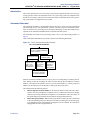
Product Description
ADMINISTRATOR GUIDE, ISSUE 1.1 – August 2005
Product Description
CONTENTS
PAGE
Introduction . . . . . . . . . . . . . . . . . . . . . . . . . . . . . . . . . . . . . . . . . . . . . . . . . . . . . . . . . . . . . 12
Inter-Tel CS-5200/5400 Communication Servers . . . . . . . . . . . . . . . . . . . . . . . . . . . . . 12
Inter-Tel Network Capability . . . . . . . . . . . . . . . . . . . . . . . . . . . . . . . . . . . . . . . . . . . . . 12
IP Resources . . . . . . . . . . . . . . . . . . . . . . . . . . . . . . . . . . . . . . . . . . . . . . . . . . . . . . . . . . 13
Internet Protocol Resource Application . . . . . . . . . . . . . . . . . . . . . . . . . . . . . . . . . . . . . 13
Inter-Tel 5000 IP Resource Usage . . . . . . . . . . . . . . . . . . . . . . . . . . . . . . . . . . . . . . . . . 13
Summary of Hardware and Software Features . . . . . . . . . . . . . . . . . . . . . . . . . . . . . . . . 13
Licensing. . . . . . . . . . . . . . . . . . . . . . . . . . . . . . . . . . . . . . . . . . . . . . . . . . . . . . . . . . . . . . . . 14
USB Security Key . . . . . . . . . . . . . . . . . . . . . . . . . . . . . . . . . . . . . . . . . . . . . . . . . . . . . . . . 14
Inter-Tel CS-5200. . . . . . . . . . . . . . . . . . . . . . . . . . . . . . . . . . . . . . . . . . . . . . . . . . . . . . . . . 15
Inter-Tel CS-5400. . . . . . . . . . . . . . . . . . . . . . . . . . . . . . . . . . . . . . . . . . . . . . . . . . . . . . . . . 15
Digital Expansion Interface . . . . . . . . . . . . . . . . . . . . . . . . . . . . . . . . . . . . . . . . . . . . . . . . 15
System Capacities . . . . . . . . . . . . . . . . . . . . . . . . . . . . . . . . . . . . . . . . . . . . . . . . . . . . . . . . 15
System Network Capacities . . . . . . . . . . . . . . . . . . . . . . . . . . . . . . . . . . . . . . . . . . . . . . . . 17
Voice Processing Systems . . . . . . . . . . . . . . . . . . . . . . . . . . . . . . . . . . . . . . . . . . . . . . . . . . 17
Basic Voice Mail . . . . . . . . . . . . . . . . . . . . . . . . . . . . . . . . . . . . . . . . . . . . . . . . . . . . . . 17
Enterprise Messaging . . . . . . . . . . . . . . . . . . . . . . . . . . . . . . . . . . . . . . . . . . . . . . . . . . . 18
Voice Processing Unit. . . . . . . . . . . . . . . . . . . . . . . . . . . . . . . . . . . . . . . . . . . . . . . . . . . 18
Voice Processing System Applications . . . . . . . . . . . . . . . . . . . . . . . . . . . . . . . . . . . . . . . . 18
Voice Mail Networking . . . . . . . . . . . . . . . . . . . . . . . . . . . . . . . . . . . . . . . . . . . . . . . . . . . . 21
Page 11
Product Description
INTER-TEL® CS-5200/5400 ADMINISTRATOR GUIDE, ISSUE 1.1 – August 2005
Introduction
The Inter-Tel 5000 Network Communications Solutions platform is a converged communications platform designed for use in small- and medium-sized business environments. It provides
an Internet Protocol (IP) solution for telecommunication needs and supports IP phones, InterTel digital phones, standard single line phones, and other endpoints.
The system provides call processing and business productivity features, messaging services
with Basic Voice Mail (BVM) and Fax over IP (FoIP), Wide Area Network (WAN) Fail Survivability, and a Power Fail Bypass relay. On the main chassis of the platform, the Inter-Tel
CS-5200/5400 Communication Servers, are ports for connecting two loop start trunks, two single line endpoints, external voice mail, Music On Hold (MOH), and Paging.
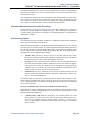
Inter-Tel CS-5200/5400 Communication Servers
The Inter-Tel CS-5200/5400 Communication Servers furnish the processing power and the
integration hardware and circuits for the Inter-Tel 5000 Network Communications Solutions
platform. The communication servers function identically, but the Inter-Tel CS-5200 provides
fewer IP resources than the Inter-Tel CS-5400. For an explanation of IP resources, refer to “IP
Resources,” which follows on this page.
In this guide, a “trunk” is an audio path that connects the Inter-Tel 5000 with the public telephone network. Both systems can support between 2 and 92 non-IP trunks. In addition, the CS5200 is capable of supporting 28 IP gateway trunks, IP network trunks, or IP endpoints, and
the CS-5400 is capable of supporting 116 IP gateway trunks, IP network trunks, or IP endpoints.
NOTE
System capacities cited in this guide refer to the maximum number possible before
making resource tradeoffs. The actual number of trunks or endpoints installed on a
system depends on the user’s requirements and the physical constraints and configuration of the system.
BVM is provided with the system, but o increase voice mail capacity BVM can be replaced
with either a Voice Processing Unit (VPU) or an Enterprise® Messaging (EM) system. For
details, refer to “Voice Processing Features” on page 257.
Digital signal processors (DSP) enable Conferencing, Dual Tone Multi-Frequency (DTMF)
detection, tone generation, modem operation, and Automatic Number Identification (ANI).
ANI is the technical term for Caller ID.
Inter-Tel Network Capability
Two or more Inter-Tel advanced communication platforms, Axxess or Inter-Tel 5000, can be
connected with T1/E1/PRI network spans to form a network. To the user, the network appears
as one integrated system. With few exceptions, the user can perform all of the functions across
the network that can be performed within a single system, or node.
In an Inter-Tel IP private network environment, IP endpoints can be programmed to traverse,
or bypass, the Network Address Translation (NAT) tables. The Inter-Tel 5000 may be placed
behind the firewall using a static NAT assignment. For details, contact you Inter-Tel equipment
provider.
Either communication server can operate as a stand-alone system or as a node in a network of
up to 63 Inter-Tel Axxess or Inter-Tel 5000 nodes. For network connectivity, Inter-Tel Axxess®
Converged Communications Platforms require software v7.0 or later for T1 point-to-point protocol (PPP) networking. IP networking requires v8.231 or later system software, IP Resources
Card (IPRC) firmware v9.0.0 or later, and applicable licensing.
Page 12
Introduction
INTER-TEL® CS-5200/5400
Product Description
ADMINISTRATOR GUIDE, ISSUE 1.1 – August 2005
IP Resources
This guide refers frequently to the term “IP resources,” which has an important meaning in
computer telephony (CT) jargon. In common English usage, the word “resources” refers to a
supply that can be drawn on when needed. Computing resources constitute the needed supply
to run CT applications, and different applications require different amounts of resources. The
supply of computing resources that is not actually in use is available to run applications.
A “resource” might be understood as an abstract way to describe the amount of computing
capability that voice processing software and hardware need to work together. Resources are
used to describe an interface of a physical device used for call processing, such as a phone, as
seen by a software application. Examples of such interfaces include a fax processing resource,
voice recognition resource, or text-to-speech resource.
The communication server installed—Inter-Tel CS-5200 or CS-5400—determines the amount
of IP resources the Inter-Tel 5000 can supply to support voice processing tasks.
Internet Protocol Resource Application
The Internet Protocol Resource Application (IPRA) supplies IP functionality for the system
and communicates to the IP phones, IP trunk gateways, and other IP endpoints across 10/
100Base-T Ethernet.
Inter-Tel 5000 IP Resource Usage
On the Inter-Tel 5000, IP resources are used to provide the following call processing capabilities:
•
IP endpoints
•
IP network connections
•
Faxing between Inter-Tel 5000 nodes
The correct allocation of IP resources is an important factor in maintaining a system that functions without calls being blocked. System Administrators can promote nonblocking system
performance by making sure that the allocation of system IP resources is appropriate for their
needs. System Administrators having questions or concerns about the allocation of system IP
resources should contact their Inter-Tel equipment and service provider.
Summary of Hardware and Software Features
Built on 32-bit architecture and packaged in a space-efficient 1¾-inch (4.45 cm)-high 1U chassis, the Inter-Tel CS-5200/5400 provides a robust IP communication solution. With appropriate
licensing, the Inter-Tel CS-5200/5400 delivers communication assets that include the following
hardware and features:
•
Linux® operating system
•
Connectivity for Loop Start, T1, T1/Primary Rate Interface (PRI), E1/PRI, and IP gateway (MCGP and SIP) trunks, and for trunk-only capability of Basic Rate Interface
(BRI)
•
Basic Voice Mail
•
Unified Messaging
•
Networking over IP
•
Networking over T1/E1 spans
•
Fax over IP (FoIP)—T.38—Inter-Tel 5000 to Inter-Tel 5000 nodes only
Summary of Hardware and Software Features
Page 13
Product Description
INTER-TEL® CS-5200/5400 ADMINISTRATOR GUIDE, ISSUE 1.1 – August 2005
•
CompactFlash memory card for storing system applications, customer database, and
voice mail messages
•
USB flash drive (thumb drive) for backing up voice mail prompts and messages
•
Support for IP, SIP, Multi-Protocol, Wireless IP, Multimedia Touch Screen, digital, and
single line hard phones, and for one PDA soft phone
•
Support for nonphone endpoints such as IP gateway trunks, IP SLAs, SLAs, fax
machines, and answering machines
•
Programmable Call Processing features (Refer to “System Features” on page 111)
•
Directory Look-Up
•
Hunt Groups
•
Automatic Call Distribution
•
Uniform Call Distribution
•
Open Architecture Interface (OAI)
•
Multilingual Support
•
Music-On-Hold
•
Paging
•
Power Fail Bypass circuitry
•
Wide Area Network (WAN) Fail Survivability
Licensing
The Inter-Tel CS-5200 is the basic system. In the default configuration, it comes with five IP
endpoint licenses and three IP networking resources. With required hardware and licensing, the
Inter-Tel CS-5200 can support a mix of up to 28 IP endpoints, IP network trunks, and/or IP
gateway trunks. Additional IP endpoint licenses are required before more than five IP endpoints will operate on a system.
The Inter-Tel CS-5400 is an Inter-Tel CS-5200 with a Processor Expansion Card (PEC-1) and
licensing added to the system. In the default configuration, it comes with five IP endpoint
licenses and six IP networking resources. With required hardware and licensing, the Inter-Tel
CS-5400 can support a mix of up to 116 IP endpoints, IP network trunks, and/or IP gateway
trunks.
Each of the DEIs is licensed separately, as are premium features. For lists of standard and premium features refer to “System Features” on page 111.
USB Security Key
The USB security key uniquely identifies a system by storing an Inter-Tel Master License.
Only the specific software license that has been digitally signed with the Master License data is
allowed to control the system. The key stores the essential components of the software licensing scheme.
The security key also ensures licensing integrity. When a system detects removal of its key, the
system disables audio for subsequent calls. When the audio is disabled, the system posts applicable alarms to the LCD panel on the front of the unit chassis and to the LCD on the Administrator endpoint. Alarm #122 indicates that the key is missing, while Alarm #125 identifies the
number of minutes before the system initiates a reset.
Page 14
Licensing
INTER-TEL® CS-5200/5400
Product Description
ADMINISTRATOR GUIDE, ISSUE 1.1 – August 2005
When the key is replaced and the correct serial number is detected by the system, the audio is
enabled and the reset countdown is aborted.
If the system powers up without the USB security key in place, the user must reload the software license through database programming.
Inter-Tel CS-5200
For smaller user environments, the Inter-Tel CS-5200 default configuration includes the Processor Module (PM-1), five IP endpoint licenses, three IP networking resources, and the CompactFlash, USB, and equipment interface ports on the chassis. If the three IP networking
resources are used, sufficient IP resources are available for installing 25 IP endpoints. All told,
with required interface hardware and licensing the Inter-Tel CS-5200 supports a mix of up to
28 IP endpoints, IP private networking trunks, and/or IP gateway trunks.
For system configuration, programming, and installation details, contact your authorized InterTel equipment provider.
Inter-Tel CS-5400
Adding a Processor Expansion Card (PEC-1) to the PM-1 and applicable licensing to the base
platform creates the Inter-Tel CS-5400. The default configuration of the larger-capacity system
includes six IP networking resources in addition to the five IP endpoint licenses and platform
interface ports on the chassis. If the six IP networking resources are used, sufficient IP
resources are available for installating 110 IP endpoints. With required interface hardware and
licensing, the Inter-Tel CS-5400 supports a mix of up to 116 IP endpoints, IP network trunks,
and/or IP gateway trunks.
Digital Expansion Interface
To provide Inter-Tel digital phone capability, one or two Digital Expansion Interface (DEI)
units can be added to the system chassis. Each DEI provides three bays that accept Digital
Endpoint Modules (DEM-16). Each DEM-16 supports 16 digital Inter-Tel phones or SingleLine Adapters (SLA), providing for connection of up to 48 Inter-Tel digital phones or SLAs.
Each SLA supports one or two single line analog phones.
In addition to IP endpoints, each licensed DEI connected to the Inter-Tel CS-5200 chassis provides capability to add up to three Digital Endpoint Modules (DEM-16) that would support up
to 48 digital endpoints.
For each digital phone substituted with a Single-Line Adapter (SLA), two single line phones
can be added to the system.
System Capacities
The Inter-Tel CS-5200/5400 chassis supports:
Inter-Tel CS-5200
•
Central Office (CO)/Local Exchange Trunks: Including the two loop start circuits
built into the chassis, up to 14 loop start trunks can be supported by the Inter-Tel 5000.
Up to three Loop Start Modules (LSM) can be installed, and LSMs are available with
either two or four ports.
•
T1/E1/PRI Spans: Up to three T1, T1/PRI, or E1/PRI spans can be connected to the
Inter-Tel CS-5200/5400 chassis through T1/E1/PRI modules. Each module supports one
span. A T1 span supports up to 24 trunks; a T1/PRI span supports up to 23 trunks; and,
an E1/PRI span supports up to 30 trunks. Trunk options in DB Programming include
Loop Start, Off-Premises Extension (OPX), Direct Inward Dial (DID) [Direct Dialing
Inward (DDI), in Europe], T1, T1/PRI, E1/PRI, and T1/E&M.
•
Endpoints: The Inter-Tel CS-5200/5400 supports Inter-Tel IP phones and other IP endpoints, IP and SIP trunk gateways, Inter-Tel digital phones and other digital endpoints,
Page 15
Product Description
INTER-TEL® CS-5200/5400 ADMINISTRATOR GUIDE, ISSUE 1.1 – August 2005
IP Single-Line Adapters (IP-SLA), Single-Line Adapters (SLA), and single line analog
phones and other endpoints.
•
Pocket PC SoftPhone: The Model 8601 is a SIP softphone that runs on selected Pocket
PC 2002 (or later) Personal Digital Assistant (PDA) platforms. The IPRA supports the
Model 8601 Pocket PC SIP-mode softphone, which is described in the following paragraph, but does not support Inter-Tel legacy IP SoftPhones.
•
Multi-protocol phones: A multi-protocol phone is one that operates either in Inter-Tel
Protocol (ITP) mode or in Session Initiation Protocol (SIP) mode. A SIP server is
required for SIP mode operation. Multi-protocol phones include Models 8620/8622,
8662, and 8690. Multi-protocol phones require software licenses.
•
Wireless phones: Models 8664, 8665, and 8668 are wireless phones that operate in ITP
mode.
•
Single line phones: In addition being able to install single line phones in each of the
two circuits built into the Inter-Tel CS-5200/5400 chassis, one single line phone can be
installed in with each IP-SLA, and two single line phones can be installed with each
SLA.
System Network Capacities
Two or more Inter-Tel Advanced Communications Platforms (Inter-Tel 5000 or Axxess) can be
connected to form a network that provides a seamless interface between the systems. To the
user, the network appears as one integrated system. With few exceptions, the user can perform
all of the functions across the network that can be performed within a single system.
In this guide, all references to a “network” mean two or more connected systems. Each system
in a network is called a “node.”
The maximum capacities for networking appear in Table 2.
Table 2. System Network Capacities
FEATURE/DEVICES
System Nodes per network
Local devices per node
CAPACITY
63
304*
Off-node devices per node
10,000
Devices per network
40,000
* The maximum number of endpoints and trunks that can be installed is limited by the number
of voice channels and/or system memory resources available.
Voice Processing Systems
Inter-Tel CS-5200/5400 Communication Servers support an internal Inter-Tel 5000 voice processing system, Basic Voice Mail (BVM), and two external voice processing systems, the
Voice Processing Unit (VPU) and Enterprise Messaging (EM).
Basic Voice Mail
Basic Voice Mail (BVM) is built into Inter-Tel 5000 platform capability to provide voice mail
and messaging services. BVM does not support Fax-On-Demand or Unified Messaging.
BVM messages are stored on a CompactFlash (CF) memory card formatted by Inter-Tel. The
card also stores system applications and the user database.
Page 16
System Network Capacities
INTER-TEL® CS-5200/5400
Product Description
ADMINISTRATOR GUIDE, ISSUE 1.1 – August 2005
The data capacity of the CF determines the amount of BVM message storage, which ranges
from 30 hours with a 256 MB card to more than 211 hours with a 1 GB card. For storage of
voice mail messages and greetings, custom prompts, and Record-A-Call messages, each system CF reserves a predetermined amount of memory. The larger the capacity of the CF, the
more memory will be available for storage, as shown in Table 3.
The amount of message storage, which is allocated for each user as a quota of the total storage
capacity, is programmable in minutes through DB Programming. A warning flag can be set for
each mailbox to alert the user when a specified percentage of the allocated quota has been
reached.
In addition to the standard US English prompts, each set of language prompts reduces by
approximately 75 minutes the amount of storage available for allocation. Table 3 shows the
amount of message storage available on the three sizes of CF before additional sets of prompts
are applied. In addition to US English, the system supports UK English, Spanish, and Japanese
language prompts.
Table 3. BVM Storage Capacities on CompactFlash Memory Cards
Compact Flash Card
Basic Voice Mail
Storage Capacity
256 MB with US English prompts
30 hr (1800 min)
512 MB with US English prompts
90 hr (5420 min)
1024 MB with US English prompts
211 hr (12,670 min)
When all of the IP resources available for BVM are busy, the next callers are camped-on to
wait for a resource to become available. Upgrading to an expanded, external voice mail system
is recommended when an unacceptable number of callers are being camped-on before they can
leave a voice message.
BVM can be replaced with an external Voice Processing Unit (VPU) or Enterprise® Messaging (EM) system. The VPU and EM systems can be installed on any or all nodes in the network to allow a caller to leave a message on a local voice processing system for a mailbox
located on another voice processing system in the network.
Enterprise Messaging
Enterprise Messaging (EM) is an optional external system that unifies communication and
messaging by providing access to voice mail, fax, and e-mail messages in the user’s mailbox.
In addition, EM provides automatic speech recognition capabilities and built-in Unified Messaging features. EM runs on the Windows 2000 operating system. For detailed information
about EM, refer to the Enterprise Messaging Installation Manual, part no. 780.8006.
Voice Processing Unit
The Voice Processing Unit (VPU) is an optional external system that provides integrated voice
processing. Integrated features include Voice Mail, Automated Attendant, Hunt Group
announcement and overflow, optional Fax-On-Demand, buffered SMDR, Record-A-Call, and
others. , with special applications software that can be attached to the telephone system. VPU
runs on either the Windows NT or Windows 2000 operating systems. For detailed information
about EM, refer to the Voice Processing Unit Installation Manual, part no. 835.2890.
Voice Processing System Applications
Inter-Tel voice processing systems support several voice processing system applications.
Depending on your site’s voice processing system, equipment, and licensing, you may have
access to one or more of the following voice processing system features:
Voice Processing System Applications
Page 17
Product Description
INTER-TEL® CS-5200/5400 ADMINISTRATOR GUIDE, ISSUE 1.1 – August 2005
•
Automated Attendant: Automated Attendant is a programmable feature that provides
automated call answering services. Calls can transfer, forward, or directly ring in to
Automated Attendant. When Automated Attendant answers a call, it plays a recording
that gives dialing instructions. After hearing the recording, or at any time while it is
playing, the caller may dial an extension or mailbox number. For information about the
Automated Attendant feature, refer to page 259.
•
Automated Attendant Recall Destination: If a call that is transferred by Automated
Attendant is not answered before the Transfer Voice Processor timer expires, the call
recalls the Automated Attendant Recall Destination. The Recall Destination announces
that the phone is unavailable and allows the caller to leave a message if the phone has
an associated mailbox, or to dial another extension. For information about the Automated Attendant Recall Destination, refer to page 260.
•
Automatic Fax Detection: With Automatic Fax Detection, Call Routing Announcement (CRA) applications and mailboxes can be programmed to automatically route
incoming fax calls to a specified extension or to an e-mail address. For information
about the Automatic Fax Detection, refer to page 263.
•
Automatic Speech Recognition (ASR): The EM system supports Automatic Speech
Recognition (ASR). ASR can be enabled on many levels within the voice processing
system. Using EM, subscribers can issue spoken commands to navigate the voice mail
menus. Subscribers and nonsubscribers can also use spoken commands to search the
voice mail directory and to navigate Automated Attendant menus and CRA paths.
When ASR resources are not available, subscribers and nonsubscribers can also perform these tasks by pressing the appropriate dialpad digits when prompted by the system. For information about ASR, refer to page 264.
•
Call Routing Announcement (CRA): This application can be used in place of a playback device and is useful for programming Hunt Group announcement and overflow
stations. When called, the CRA application plays a recording and then hangs up.
The CRA application uses digit translation to help calling parties reach their intended
destinations. Digit translation allows the caller to press a single digit to access a mailbox, a Fax-on-Demand function, a station, or a Hunt Group. Digit translation can be
programmed for each digit from 0 through 9, #, and *, plus a Timeout option that
applies if the caller does not enter a digit when prompted. If programmed, each digit
could lead the caller to a “digit translation node” that has its own set of digit translation
values. This layered CRA digit translation creates a “tree” of programmable digit translation nodes. For more detailed information about CRA, refer to page 265.
Page 18
•
Directory Services: Directory Services provide callers with a list of mailboxes and
extension IDs that can be accessed through Voice Mail or the Automated Attendant.
The Directory feature is available in each of the voice processing systems, but varies
slightly in the EM system. For information about directories, refer to page 268. For
information about using directories in EM, refer to page 271.
•
E-mail Reader: E-mail Reader is a licensable feature available with the EM voice processing system. It provides users with advanced mailbox capabilities through Text-ToSpeech (TTS) technology. When E-mail Reader is enabled for a mailbox, users can
access voice mail, e-mail, and fax messages by logging in to their mailboxes. E-mail
Reader announces the message envelope and can also “read” the text in the body of email messages. E-mail Reader users also have access to additional message options,
which vary based on the media type. For information about E-mail Reader, refer to
page 274.
•
Fax-On-Demand: The Fax-On-Demand feature is a specially programmed Call Routing Announcement application that uses digit translation to allow callers to select the
documents they want to have faxed to them. Callers can use a DTMF endpoint to
request one or more documents from the company’s fax library, the library that is also
Voice Processing System Applications
INTER-TEL® CS-5200/5400
•
•
•
•
•
Product Description
ADMINISTRATOR GUIDE, ISSUE 1.1 – August 2005
used in the Unified Messaging faxing feature. When the request is completed, the voice
processing system places a call to the caller’s fax machine to deliver the requested documents. For information about Fax-On-Demand, refer to page 274.
Record-A-Call: This feature allows a phone user to record a call-in-progress as a voice
mailbox message. When a phone user enters the Record-A-Call feature code, the system places a call to the phone’s assigned Record-A-Call application. When the application answers, the system sets up a conference call with the Record-A-Call mailbox. If
programmed, the mailbox plays a greeting to indicate that the recording is in progress.
For information about the Record-A-Call feature, refer to page 276.
Scheduled Time-based Application Routing (STAR): STAR enhances the programmability of the voice mail application greetings. Applications can be programmed to
play alternative greetings for holidays and weekends. A STAR application is a table of
up to 20 entries that serves as a “routing table.” STAR tells the voice processing system
which application to use to respond to incoming calls. Based on day-and-time information defined in the table, the identified applications are programmed to play the greetings and STAR routes the call to the predetermined application. For information about
STAR, refer to page 277.
Station Message Detail Recording (SMDR) Information Storage: SMDR information is stored only on the VPU voice processing system hard disk, then processed using
call record sorting software. BVM and EM do not support SMDR information storage.
Voice Mail and Message Notification Retrieval: Other than messages that are sent
through the Message Notification/Retrieval application, Voice Mail handles all voice
mail calls directed to it. If your system is using EM and E-Mail Reader is enabled for
the mailbox, users have access to advanced messaging features using their advanced
mailbox. With Voice Mail, callers hear the main company greeting, followed by a menu
of available options. Message Notification/Retrieval provides voice mail message notification and quick mailbox access. For information about Voice Mail and Message
Notification Retrieval, refer to page 279.
Unified Messaging: The Unified Messaging (UM) feature links the voice processing
system with e-mail and/or provides outgoing fax capabilities. Depending on which
voice processing system you are using, you may have UM version 2.2 or 2.3. For information about UM, refer to page 284.
Voice Processing System Applications
Page 19
Product Description
INTER-TEL® CS-5200/5400 ADMINISTRATOR GUIDE, ISSUE 1.1 – August 2005
Voice Mail Networking
A voice processing system can be installed on any or all nodes in the user’s network. These
voice processing systems can also be networked together to allow a caller to leave a message
on the local voice processing system for a mailbox located on another voice processing system
in the network.
Maximum capacities of networked voice processing systems are listed in Table 4.
Table 4. Network Capacities
FEATURE/DEVICES
CAPACITY
Voice Processing Systems per network
100a
Local or Off-Node Mailboxes/Extension IDs per Voice Processing System
node
10,000b
System Audio Interface Ports per node
40
Applications per node
150
Group Lists per node
Members per group list
1000
1500
Remote Message Notification Numbers per mailbox
18
Audiotex Recordings per node
500
Message Notification/Retrieval Applications per node
1
System Passwords per node
4
Time Slot Groups per node
10
a
This is the maximum number of nodes supported by the software. System traffic may limit
the actual number of nodes that can be supported without affecting system performance.
b
Page 20
This is the maximum number of mailboxes supported by the NT-based software.
Voice Mail Networking
INTER-TEL® CS-5200/5400
Administrator Procedures
ADMINISTRATOR GUIDE, ISSUE 1.1 – August 2005
Administrator Procedures
CONTENTS
PAGE
Introduction . . . . . . . . . . . . . . . . . . . . . . . . . . . . . . . . . . . . . . . . . . . . . . . . . . . . . . . . . . . . . 22
System Administrator Phone Designation . . . . . . . . . . . . . . . . . . . . . . . . . . . . . . . . . . . 22
Scheduled Delayed Major Resets . . . . . . . . . . . . . . . . . . . . . . . . . . . . . . . . . . . . . . . . . . 22
System Administrator Procedures . . . . . . . . . . . . . . . . . . . . . . . . . . . . . . . . . . . . . . . . . . . 23
Placing the Local System in Day or Night Mode. . . . . . . . . . . . . . . . . . . . . . . . . . . . . . 23
Placing Network Nodes in Day or Night Mode . . . . . . . . . . . . . . . . . . . . . . . . . . . . . . . 23
Setting System Date and Time . . . . . . . . . . . . . . . . . . . . . . . . . . . . . . . . . . . . . . . . . . . . 24
Setting Network Date and Time . . . . . . . . . . . . . . . . . . . . . . . . . . . . . . . . . . . . . . . . . . . 24
Synchronizing Network Time. . . . . . . . . . . . . . . . . . . . . . . . . . . . . . . . . . . . . . . . . . . . . 25
Programming the Database Using a System Administrator Phone . . . . . . . . . . . . . . . . 26
Station Programming. . . . . . . . . . . . . . . . . . . . . . . . . . . . . . . . . . . . . . . . . . . . . . . . 27
System Programming . . . . . . . . . . . . . . . . . . . . . . . . . . . . . . . . . . . . . . . . . . . . . . . 32
Trunk Programming . . . . . . . . . . . . . . . . . . . . . . . . . . . . . . . . . . . . . . . . . . . . . . . . 38
Programming System Speed Dial Numbers . . . . . . . . . . . . . . . . . . . . . . . . . . . . . . . . . . 45
Programming and Using Mini-DSS Buttons . . . . . . . . . . . . . . . . . . . . . . . . . . . . . . . . . 47
Managing System and Network Alarms. . . . . . . . . . . . . . . . . . . . . . . . . . . . . . . . . . . . . 49
System Alarms . . . . . . . . . . . . . . . . . . . . . . . . . . . . . . . . . . . . . . . . . . . . . . . . . . . . 49
Network Alarms . . . . . . . . . . . . . . . . . . . . . . . . . . . . . . . . . . . . . . . . . . . . . . . . . . . 49
Clearing Alarms . . . . . . . . . . . . . . . . . . . . . . . . . . . . . . . . . . . . . . . . . . . . . . . . . . . 52
Alarm Queue . . . . . . . . . . . . . . . . . . . . . . . . . . . . . . . . . . . . . . . . . . . . . . . . . . . . . . 52
Enabling/Disabling the Internal Modem . . . . . . . . . . . . . . . . . . . . . . . . . . . . . . . . . . . . 54
Resetting the Internal Modem . . . . . . . . . . . . . . . . . . . . . . . . . . . . . . . . . . . . . . . . . . . . 54
Using the Network Group Diagnostics Feature . . . . . . . . . . . . . . . . . . . . . . . . . . . . . . . 55
Seizing a Device . . . . . . . . . . . . . . . . . . . . . . . . . . . . . . . . . . . . . . . . . . . . . . . . . . . . . . . 55
Freezing/Unfreezing the System History . . . . . . . . . . . . . . . . . . . . . . . . . . . . . . . . . . . . 56
Freezing/Unfreezing the Network History . . . . . . . . . . . . . . . . . . . . . . . . . . . . . . . . . . . 56
Voice Mail Administrator Procedures . . . . . . . . . . . . . . . . . . . . . . . . . . . . . . . . . . . . . . . . 57
Recording a Broadcast Messages . . . . . . . . . . . . . . . . . . . . . . . . . . . . . . . . . . . . . . . . . . 58
Maintaining Mailboxes and Group Lists . . . . . . . . . . . . . . . . . . . . . . . . . . . . . . . . . . . . 58
Voice Mail Administrator Capabilities . . . . . . . . . . . . . . . . . . . . . . . . . . . . . . . . . . 58
Mailbox and Extension ID Personal Options . . . . . . . . . . . . . . . . . . . . . . . . . . . . . 59
Change Procedures for Mailbox Personal Options . . . . . . . . . . . . . . . . . . . . . . . . . 60
Changing A Group List Name . . . . . . . . . . . . . . . . . . . . . . . . . . . . . . . . . . . . . . . . 64
Importing Fax Documents . . . . . . . . . . . . . . . . . . . . . . . . . . . . . . . . . . . . . . . . . . . . . . . 64
Creating Audiotex Recordings . . . . . . . . . . . . . . . . . . . . . . . . . . . . . . . . . . . . . . . . . . . . 65
Recording Custom Voice Mail Prompts . . . . . . . . . . . . . . . . . . . . . . . . . . . . . . . . . . . . . 67
Administrator Programming Planning Sheets . . . . . . . . . . . . . . . . . . . . . . . . . . . . . . . . . 69
Page 21
Administrator Procedures
INTER-TEL® CS-5200/5400 ADMINISTRATOR GUIDE, ISSUE 1.1 – August 2005
Introduction
When programming your site’s database, the Inter-Tel-certified technician can program a
phone’s extension as both a System Administrator and a Voice Mail Administrator. Sometimes
the two jobs are handled by the same person. You can use a phone that has been designated as
an Administrator phone to perform certain programming tasks for the call processing system
and/or the voice mail system. In addition, the System Administrator phone shows system and
network alarm messages.
This section provides you with the instructions for performing System Administrator and Voice
Mail Administrator tasks. The information is presented as follows:
•
System Administrator Procedures begin on page 23.
•
Voice Mail Administrator Procedures begin on page 57.
A Quick Reference Guide containing instructions for frequently performed procedures is
located in the front of this guide.
NOTE
As a System Administrator, you must know which languages are considered Primary and Secondary for the system. The platform supports American English,
British English, Spanish, and Japanese prompts and displays.
System Administrator Phone Designation
Any Inter-Tel phone can be designated as a System Administrator phone through Database
Programming. However, to facilitate programming and to manage system Alarm messages,
Inter-Tel recommends using a six-line display phone for this purpose, such as the Model 8660
IP phone or Model 8560 digital phone.
NOTE
A single line phone cannot be used as an Administrator phone.
If a user of a non-Administrator display phone attempts to execute Administrator features, the
user will hear fast-busy reorder tones, and the display will show CANNOT ACCESS
RESERVED FEATURE.
Scheduled Delayed Major Resets
A delayed major reset is sometimes needed when programming the database using the Administrator phone. If a major reset is required, the message, ENTER SYS RESET OPTION
appears on the phone display. You can select to perform an immediate major reset when this
message is shown, or you can schedule a delayed major reset. The delayed major reset option
allows you to schedule a reset to occur when the system is not in use.
The following programming changes do not require a major reset:
•
•
•
•
•
•
Page 22
Changing extensions
Swapping extensions
Creating off-node devices
Changing ACD Agent IDs
Adding and removing extensions from Extension Lists
Equipping and unequipping devices
INTER-TEL® CS-5200/5400
Administrator Procedures
ADMINISTRATOR GUIDE, ISSUE 1.1 – August 2005
System Administrator Procedures
With a System Administrator phone, you can perform the following procedures:
•
•
•
•
•
•
•
•
•
•
Place the local node in night or day mode
Place other network nodes in night or day mode
Set the date and time of the local node
Set the network date and time
Synchronize clocks in the network
Make database changes (see page 26 for a list of programming areas)
Enable, disable, and reset local and off-node call processing application modems
Program System Speed Dial numbers on the local node
Receive and clear displayed system and network alarms
Use diagnostic mode features:
— Freeze and unfreeze the database history for the local node or any node in the network using programmed freeze zones
—
Print error logs
—
Seize specific devices for troubleshooting purposes
Placing the Local System in Day or Night Mode
You can use a System Administrator phone to place the local node in day or night mode. The
day or night mode selects preprogrammed database lists to determine trunk access, toll restriction, emergency outgoing access, etc. for the phones in the system. Active calls are not affected
when the Day–Night mode is changed.
To view Day–Night Mode status:
While on-hook, enter the Night Ring On/Off feature code (9860). You hear a single confirmation tone. The display shows NIGHT MODE IS ON (or OFF). If night mode was turned on,
the display shows THE SYSTEM IS IN NIGHT MODE until day mode is turned on.
Placing Network Nodes in Day or Night Mode
You can use a System Administrator phone to place one or more nodes in day or night mode.
The day–night mode determines which lists the system will use for trunk access, toll restriction, etc.
The network determines the day/night mode status of a call based on the day/night mode status
of the node where the trunk resides.
To turn night mode on:
1.
While on-hook, enter the Enable Network Night feature code (9861).
2.
When prompted to enter a node number., enter 01–63 for the desired node number. To
select all nodes, enter 00.
You hear a single confirmation tone. The display shows NIGHT MODE IS ON. Then
the display shows NODE X IS IN NIGHT MODE until day mode is turned on.
To turn day mode on:
1.
While on-hook, enter the Enable Network Day feature code (9862).
2.
When you are prompted to enter a node number, enter the desired node number.
You hear a single confirmation tone. The display shows DAY MODE IS ON.
Placing the Local System in Day or Night Mode
Page 23
Administrator Procedures
INTER-TEL® CS-5200/5400 ADMINISTRATOR GUIDE, ISSUE 1.1 – August 2005
Setting System Date and Time
NOTE
Inter-Tel CS-5200/5400 supports the Automatic Daylight Saving Time (British
Summer Time, in Europe) feature. However, the Enable Daylight Saving Time
flag in Database Programming must be set to Yes to use the Automatic Daylight
Saving Time/British Summer Time feature.
A System Administrator can manually reset the system time or date when it is necessary. For
example, when the system is defaulted or for daylight-saving time. Any Administrator can
change the date and time that appears on all display endpoints and in the SMDR reports. The
day of the week is automatically calculated and set by the system when the date is entered.
To set the system date and time:
NOTE
If necessary, press
MUTE
to backspace, or press
or CANCEL to start over.
1.
While on-hook, enter the Set Date/Time feature code (9800). Your display shows DATE
<current date>.
2.
If you do not need to change the date, press
XX:XX prompt.
3.
Use the dialpad buttons to enter the month, day, and year. For example, press 020301
for February 3, 2001. When finished, the display shows TIME <current time>. If you
entered the date incorrectly, the display shows INVALID DATE, and you are prompted
to enter a new date.
NOTE
#
or ACCEPT to skip to the TIME
If using a phone programmed for the Japanese language, enter the date
as year, month, day. For example, 050203 for February 3, 2005.
If you do not need to change the time, press # or ACCEPT twice to exit. The display
shows SYSTEM DATE AND TIME UPDATED.
4.
Use the dialpad buttons to enter the time in hours and minutes. For example, enter 0900
for 9:00. If you entered the time incorrectly, the display shows INVALID TIME and
you are prompted to enter a new time.
5.
If the system is set for 12-hour display format, the display shows SELECT AM OR
PM (AM=1 PM=2). Press 1 (or the AM menu button) for AM or press 2 (or the PM
menu button) for PM. The display shows SYSTEM DATE AND TIME UPDATED. If
you press any button other than 1 or 2, the display shows INVALID TIME and you are
prompted to enter a new time.
NOTE
If using a phone programmed for the Japanese language, the prompts will
be reversed and you will set the AM or PM before the hour and minutes.
Setting Network Date and Time
Occasionally, the network time or date needs to be reset, such as when the system is defaulted
or when daylight-saving time/British summer time is implemented. Any System Administrator
can change the date and time that appears on all display phones and that appears in the SMDR
reports in the network. The day of the week is automatically calculated and set by the system
when the date is entered.
Page 24
Placing Network Nodes in Day or Night Mode
INTER-TEL® CS-5200/5400
Administrator Procedures
ADMINISTRATOR GUIDE, ISSUE 1.1 – August 2005
To set the network date and time:
NOTE
If you make a mistake, press MUTE
leave it unchanged and start over.
to backspace or press
or CANCEL to
1.
While on-hook, enter the Set Network Date and Time feature code (9810). Your display
shows DATE <current date>.
2.
If you do not need to change the date, press
XX:XX prompt.
3.
Use the dialpad buttons to enter the month, day, and year. For example, press 020301
for February 3, 2001. When finished, the display shows TIME <current time>.
NOTE
#
or ACCEPT to skip to the TIME
If using a phone programmed for the Japanese language, enter the date
as year, month, day. For example, 050203 for February 3, 2005.
If you entered the date incorrectly, the display shows INVALID DATE, and you are
prompted to enter a new date.
If you do not need to change the time, press # or ACCEPT twice to exit. The display
shows SYSTEM DATE AND TIME UPDATED.
4.
Use the dialpad buttons to enter the time in hours and minutes. For example, enter 0900
for 9:00.
NOTE
If using a phone programmed for Japanese, the prompts are reversed and
you will set the AM or PM before the hour and minutes.
If you entered the time incorrectly, the display shows INVALID TIME, and you are
prompted to enter a new time.
5.
If the node is set for 12-hour display format, the display shows SELECT AM OR PM
(AM=1 PM=2). Press 1 (or the AM menu button) for AM or press 2 (or the PM
menu button) for PM. The display shows SYSTEM DATE AND TIME UPDATED. If
you press any button other than 1 or 2, the display shows INVALID TIME, and you are
prompted to enter a new time.
Synchronizing Network Time
System Administrators can synchronize the minutes past the hour across the network without
changing the hour. This is useful when the nodes are in different time zones.
NOTE
If the node time is off by more than 30 minutes, synchronizing the minutes may
cause the hour to change. Also, network time is automatically synchronized
every day at 12:30 AM (00:30), using the time setting on the node with the lowest number.
To synchronize the clocks in all nodes in the network:
While on-hook, enter the Synchronize Network Time feature code (9811). You hear a
confirmation tone, and the display shows NETWORK TIME SYNCHRONIZED.
Synchronizing Network Time
Page 25
Administrator Procedures
INTER-TEL® CS-5200/5400 ADMINISTRATOR GUIDE, ISSUE 1.1 – August 2005
Programming the Database Using a System Administrator Phone
Any System Administrator phone can perform database programming. However, programming
requires a display phone, such as an Executive Display, Professional Display or Model 8560
digital phone or the Model 8660 IP phone.
A System Administrator phone can be used to perform the following programming:
Phone Options:
•
•
•
•
•
•
Create or delete Administrator stations
Create or delete Attendant stations
Create or delete House Phones
Assign phones to Attendants
Program usernames
Program endpoint toll restriction
System Options:
•
•
•
•
Program Do-Not-Disturb (DND) messages
Program up to 10 passwords for the Database Programming feature
Program phone extensions
Swap extensions
Trunk Options:
•
Individual trunk answer supervision type, caller information, hybrid balance, signaling
type (DTMF or pulse), and trunk group assignment
•
Trunk group answer access, ring-in, toll restrictions, and trunk lists
A password can protect entry to the Database Programming feature at the Administrator phone.
A password prevents unauthorized users from altering the system database.
NOTE
Passwords are important to system security. Without sufficient password protection, the system database is vulnerable to unauthorized access.
Depending on the database changes made, the system may require a reset after programming.
If so, the system will prompt you for a reset and ask if it should be done immediately or
delayed. Delaying the reset may prevent interruption in service. However, if a reset is required
it should be done as soon as possible to permit proper system operation.
NOTE
A system reset will drop all calls in progress.
Entering Alphanumeric Information:
When entering alphanumeric information, such as a username, reminder message, or Do-NotDisturb message, press MSG or USE ALPHA MODE/USE NUMERIC MODE menu button to
switch back and forth between alphanumeric and numeric mode.
•
•
In numeric mode, the dialpad buttons are used to enter numbers 0-9, the pound ( # )
button is used for entering a hyphen (-), and the asterisk ( ) button is used for entering
a colon (:). For example, 1 00 would enter “1:00” in numeric mode.
In alphanumeric mode, dialpad buttons are used to enter the desired letters, numbers,
and punctuation. The number of times a button is pressed determines which character is
entered. For example, 533266 would enter “JEAN” in English. When adjoining characters are located under the same button, press FWD to advance to the next character.
For example, 66 FWD 6667776 would enter “NORM.”
Refer to the table on the following page to program information in alphanumeric mode.
Page 26
Synchronizing Network Time
INTER-TEL® CS-5200/5400
Administrator Procedures
ADMINISTRATOR GUIDE, ISSUE 1.1 – August 2005
(Note that letters correspond to the letters printed on dialpad buttons.) Japanese characters are available with the standard Multilingual Support feature included in your software license. Japanese is programmed as a Primary or Secondary Language, and the
Administrator’s phone is set for Japanese.
Use the following table to guide you as you program alphanumeric information.
NUMBER OF TIMES BUTTON IS PRESSED
BUTTON
1
2
3
4
5
6
7
8
9
10
11
KATAKANA CHARACTERS*
ENGLISH/SPANISH CHARACTERS
1
-
&
(
)
1
A
I
U
E
O
a
2
A
B
C
’
2
KA
KI
KU
KE
KO
i
3
D
E
F
!
3
SA
SHI
SU
SE
SO
u
4
G
H
I
*
4
TA
CHI
TSU
TE
TO
e
5
J
K
L
#
5
NA
NI
NU
NE
NO
o
6
M
N
O
Ñ
6
HA
HI
FU
HE
HO
tsu
7
P
Q
R
S
7
MA
MI
MU
ME
MO
ya
8
T
U
V
?
8
YA
YU
YO
.
,
yu
9
W
X
Y
Z
9
RA
RI
RU
RE
RO
yo
0
@
:
.
,
0
WA
WO
N
pa
ba
long
*The Japanese characters are only available if the Multilingual feature is enabled and Japanese
is installed as the secondary language.
Station Programming
You can use your Administrator phone to program the following endpoint information:
•
Create or delete Administrator phones: You can program any non-single line InterTel phone as an additional Administrator phone, or you can delete the designation of a
phone as an Administrator phones.
•
Create or delete Attendant phones: You can program any phone to be an Attendant
phone, or you can delete the designation of a phone as an Attendant phone.
•
Create or delete House Phones: You can program any phone to be a House Phone, or
you can delete House Phones.
•
Assign phones to Attendants: You can change the assigned Attendant for each phone.
•
Program usernames: You can program or change the username for any endpoint.
•
Program endpoint toll restrictions: You can program toll restriction classes of service
for endpoints. Endpoint toll restrictions are described in detail on page 157.
The endpoint Database Programming process is summarized in the flowchart shown on
page 31. For a Program Planning Sheet, refer to page 69.
NOTE
If necessary, at any time during the following procedure you can press the asterisk ( ) or Speaker button to cancel programming and discard any unsaved
changes.
To program endpoints:
1.
Station Programming
While on-hook, enter the Program Database feature code (9932).
Page 27
Administrator Procedures
INTER-TEL® CS-5200/5400 ADMINISTRATOR GUIDE, ISSUE 1.1 – August 2005
2.
If a password is required, the display shows ENTER PASSWORD. Use the dialpad to
enter your 1–8 digit password and press # . (If you enter an incorrect password or do
not press # , the display shows INVALID PASSWORD.)
If a password is not required, skip this step.
3.
The display shows ENTER DATABASE OPTION. (Display phones also show the
options: ENDPOINT, SYSTEM, and TRUNK.) Press 1 or the ENDPOINT menu button.
4.
The display shows ENTER ENDPOINT EXTENSION. Enter the extension number of
the phone to be programmed using one of the following methods. (If you enter an
invalid extension number, you hear reorder tones and must try again.)
Enter a complete number: Enter the extension number using your dialpad. When the
circuit information is displayed, press # again to continue.
Enter a partial number: Enter a partial extension number, then press # , the high end
of the Volume button, or the ACCEPT menu button. The display shows the extension
number, username and circuit number of the phone that most closely matches the partial
extension number. Press # or ACCEPT to program the displayed phone, or scroll to
another phone as described below.
Scroll through the numbers: To scroll through the extension number list, press the
high end of the Volume button or NEXT to scroll forward, or press the low end of the
Volume button or PREVIOUS to scroll backward. When the desired extension number
is displayed, press # or ACCEPT to continue.
5.
The display shows ENTER ENDPOINT OPTION. Select one of the following:
a. Endpoint Flags: This option allows you to set the Administrator phone, Attendant,
and House Phone flags. To select it, press 1 or the ENDPOINT FLAGS menu button. Three flags can be programmed: Administrator, Attendant, and House Phone.
However, you cannot program the Administrator flag for your own phone or for a
single line phone. To program the flags, do the following:
1.) To scroll to the desired flag: Press the high end of the Volume button or
NEXT to scroll forward, or press the low end of the Volume button or PREVIOUS to scroll backward.
2.) To enable or disable a displayed flag: Press 1 or the ON menu button to
enable the flag. Or, press 2 or the OFF menu button to disable the flag.
3.) To save your programming when all flags are set correctly: Press # or
ACCEPT to save the new flag settings. The display shows DATABASE
UPDATED and then returns to the ENTER ENDPOINT OPTION prompt.
4.) To exit without saving your changes: Press
or CANCEL to exit. The display shows NO UPDATE PERFORMED and then returns to the ENTER
ENDPOINT OPTION prompt.
Page 28
Station Programming
INTER-TEL® CS-5200/5400
Administrator Procedures
ADMINISTRATOR GUIDE, ISSUE 1.1 – August 2005
b. Endpoint Information: This option allows you to select an Attendant for the endpoint or program the endpoint’s username. To select it, press 2 or the ENDPOINT
INFO menu button. The display shows ENTER ENDPOINT INFO OPTION. Select
one of the following:
1.) Attendant: To assign an Attendant to serve this endpoint, press 1 or the
ATTENDANT menu button. The display shows ENTER ATTENDANT
EXTENSION. Enter the desired extension number. When the circuit information is displayed, press # again to return to the ENTER ENDPOINT INFO
OPTION prompt. The display shows DATABASE UPDATED. (Or, to cancel
your entry, press
or CANCEL. The display shows NO UPDATE PERFORMED.)
2.) Username: To change the username of the endpoint, press 2 or the USERNAME menu button. The display shows ENTER USERNAME. Enter the new
name as described on page 26. (Or, to cancel your entry, press
or CANCEL. The display shows NO UPDATE PERFORMED.)
c.
Toll Restriction: This option allows you to set the endpoint class of service for day
and/or night modes. To select it, press 3 or the TOLL RESTRICTION menu button. Then do the following:
1.) The display shows TOLL RESTRICTION OPTION. Press 1 or the COS
DAY menu button to program day mode toll restriction. Or, press 2 or the
COS NIGHT menu button to program night mode toll restriction.
2.) The display shows SET DAY (or NIGHT) COS XX. If this is not the COS
you want to program, scroll to the correct COS by pressing the high end of
the Volume button or NEXT to scroll forward, or press the low end of the Volume button or PREVIOUS to scroll backward. For more information about
COS, refer to page 158.
The default COS numbers are provided in Table .
Table 5: Default Class of Service (COS) Numbers
COS 02 – Deny Area/Office
COS 06 – Deny Equal Access
COS 03 – Deny Operator
COS 07 – Deny Local Calls
COS 04 – Deny Toll Access
COS 08 – Denied Numbers
COS 05 – Deny International
COS 09 – Allowed Numbers
3.) When the correct COS is displayed, press 1 or the ON menu button to
enable the toll restriction. Or, press 2 or the OFF menu button to disable it.
4.) If desired, repeat preceding step 2 and step 3 to program additional COS toll
restrictions.
5.) Press # or ACCEPT to save the COS programming. The display shows
DATABASE UPDATED and then returns to the TOLL RESTRICTION
OPTION prompt.
6.) Press
#
again to exit to the ENTER ENDPOINT OPTION prompt.
6.
When the display shows ENTER ENDPOINT OPTION, press # again to exit to the
ENTER ENDPOINT EXTENSION prompt. You can then program another endpoint by
repeating these steps or press # or ACCEPT once more to exit to the ENTER DATABASE OPTION prompt.
7.
When finished with all programming, press # while the ENTER DATABASE
OPTION prompt is displayed. This ends the programming session.
Station Programming
Page 29
Administrator Procedures
INTER-TEL® CS-5200/5400 ADMINISTRATOR GUIDE, ISSUE 1.1 – August 2005
8.
If a system reset is required, the display shows ENTER SYS RESET OPTION. Do one
of the following:
—
Delayed Reset: Press 1 or the DELAYED menu button to delay the reset. The display shows DELAYED RESET SCHEDULED. The system will be reset at the
pre-programmed time.
—
Immediate Reset: Press
now.
NOTE
Page 30
2
or the IMMEDIATE menu button to reset the system
A system reset will drop all calls in progress.
Station Programming
INTER-TEL® CS-5200/5400
Administrator Procedures
ADMINISTRATOR GUIDE, ISSUE 1.1 – August 2005
Figure 1. Endpoint Database Programming Flowchart
Enter Program Database
feature code 9932
ENTER DATABASE OPTION
Press 1 or ENDPOINT
menu button
ENTER ENDPOINT EXTENSION
Enter desired endpoint extension number, then #
ENTER ENDPOINT OPTION
Press 1 or ENDPOINT FLAGS
menu button
Press 2 or ENDPOINT INFO
menu button
Press 3 or TOLL RESTRICTION
menu button
ENDPOINT INFO OPTION
TOLL RESTRICTION OPTION
Select flag to program
Press 1 or
ON menu button
to enable
Press 2 or
OFF menu button
to disable
Press 1 or
ATTENDANT
menu button
Press 2 or
USERNAME
menu button
Enter
Attendant’s
extension
Enter
new
username
Press 1 or COS
Press 2 or COS
DAY menu button NIGHT menu button
for day mode
for night mode
SET DAY/NIGHT COS XX
If necessary, select COS number
to program by scrolling
Press 1 or
ON menu button
to enable COS
AT ANY LEVEL:
Press * or the Speaker button to cancel any unsaved changes and back up to exit programming.
Press 2 or
OFF menu button
to disable COS
If desired, select another COS number
to program by scrolling
Press # or ACCEPT to save changes and back
up one display level.
INFORMATION IN THIS CHART IS SHOWN
AS FOLLOWS:
YOUR INPUT
ENDPOINT DISPLAYS
Endpoint Database Programming Flowchart
Page 31
Administrator Procedures
INTER-TEL® CS-5200/5400 ADMINISTRATOR GUIDE, ISSUE 1.1 – August 2005
System Programming
You can use your Administrator phone to program the following system-wide information:
•
Define Do-Not-Disturb (DND) messages: The messages for the Do-Not-Disturb feature can be reprogrammed through an Administrator’s phone. Administrators can delete
or change messages 01–20 to any value up to 16 characters. For feature description and
DND message details, refer to “Do-Not-Disturb” on page 235. When the system has a
programmed Primary and Secondary Language, the system has default DND messages
in both languages. Available languages are American English, British English, Spanish,
and Japanese. The current language of the programming phone determines which list is
programmed. For a description of the Change Language feature, refer to “Multilingual
Capability” on page 172. The Secondary Language translation has the same meaning as
the Primary Language message. The following table lists the default DND messages.
Table 6: Default DND Messages
01 DO-NOT-DISTURB
11 OUT OF TOWN 'TIL
02 LEAVE A MESSAGE
12 OUT OF OFFICE
03 IN MEETING UNTIL
13 OUT UNTIL
04 IN MEETING
14 WITH A CLIENT
05 ON VACATION 'TIL
15 WITH A GUEST
06 ON VACATION
16 UNAVAILABLE
07 CALL ME AT
17 IN CONFERENCE
08 AT THE DOCTOR
18 AWAY FROM DESK
09 ON A TRIP
19 GONE HOME
10 ON BREAK
20 OUT TO LUNCH
When two languages are enabled and DND messages are changed, the programmer
should attempt to keep the meanings for the messages in both lists the same. That is, if
the Primary Language message 02 is changed to “PAGE ME,” a similar message should
be programmed for the Secondary Language message 02.
•
•
•
Page 32
Select an Administrator Database Programming password: Entry to the Database
Programming feature at the Administrator phones can be protected using a password. A
password would prevent unauthorized users from altering the system database.
Define reminder messages: System reminder messages can be changed using an
Administrator’s phone. For a feature description and operating instructions, refer to
“Reminder Messages” on page 244. The messages can have up to 16 characters each.
When Primary and Secondary Languages are enabled, the system has default reminder
messages in both languages. The current language of the programming phone determines which list is programmed. For a description of the Change Language feature,
refer to “Secondary Language Selection” on page 172. Each Secondary Language translation has the same meaning as the Primary Language message.
When two languages are enabled and reminder messages are changed, the programmer
should attempt to keep the meanings for the messages in both lists the same. That is, if
the Primary Language message 02 is changed to “GO TO AIRPORT,” a similar message should be programmed for the Secondary Language message 02.
Program new extension numbers for endpoints: The extension number for any endpoint can be changed by an Administrator. The new extension number cannot conflict
with an existing number.
System Programming
INTER-TEL® CS-5200/5400
•
Administrator Procedures
ADMINISTRATOR GUIDE, ISSUE 1.1 – August 2005
Swap extensions: An extension number can be relocated (swapped) to another endpoint. To swap extensions, the two affected endpoints must meet the following criteria:
— Both devices must reside on the same node as the Administrator performing the
swap.
—
Both devices must be the same type (i.e., both digital, both Inter-Tel Protocol
(ITP) mode, both SIP mode, or both single line phones).
—
Neither device can be the Administrator phone performing the swap.
The System-Wide Database Programming process is summarized in the flowchart shown on
page 37. For a Program Planning Sheet, turn to page 69.
If necessary, you can press
or the Speaker button to cancel programming and discard any
unsaved changes, at any time during the following procedure.
To program the system database:
NOTE
If you want to change the Japanese DND or reminder message settings, make
sure your phone is set in Japanese mode. For an explanation of the Change
Language feature, refer to “Secondary Language Selection” on page 172.
1.
While on-hook, enter the Program Database feature code (9932, or 9132 in Europe).
2.
If a password is required, the display shows ENTER PASSWORD. Use the dialpad to
enter your 1–8 digit password and press # . If you enter an incorrect password, the display shows INVALID PASSWORD.
If a password is not required, skip this step.
3.
The display shows ENTER DATABASE OPTION. Display phones show the options:
ENDPOINT, SYSTEM, and TRUNK. Press 2 or the SYSTEM menu button.
4.
The display shows ENTER SYSTEM OPTION. Select one of the following:
a. Do-Not-Disturb Messages: This option allows you to program the DND messages
used by the endpoints. To select it, press 1 or the DND MESSAGES menu button.
Then do the following:
1.) The display shows SELECT DND MESSAGE #. Enter a message number or
scroll to the desired message. (To scroll to the correct message, press the Volume button or the SCROLL plus NEXT and PREVIOUS menu buttons.)
2.) When the display shows the desired DND message, enter the new message as
described on page 26.
3.) Press # or ACCEPT to save the new message. The display shows DATABASE UPDATED and then returns to the SELECT DND MESSAGE prompt.
(Or, to cancel your entry, press
or CANCEL. The display shows NO
UPDATE PERFORMED.)
4.) To program another message, scroll to the desired message and repeat these
steps.
5.) Press
#
again to exit to the ENTER SYSTEM OPTION prompt.
b. Password: This option allows you to set a password that limits access to the
Administrator programming feature. To select it, press 2 or the PASSWORD
menu button. Then do the following:
1.) The display shows CHANGE PASSWORD TO. Enter a password of up to
eight digits, then press # . (Or, to erase the password and leave it blank, just
press # .)
System Programming
Page 33
Administrator Procedures
INTER-TEL® CS-5200/5400 ADMINISTRATOR GUIDE, ISSUE 1.1 – August 2005
2.) The display shows VERIFY PASSWORD. Enter the password exactly as you
did in the step above, followed by # . The display returns to the ENTER
SYSTEM OPTION prompt. (If you hear reorder tones and see an error message, the passwords did not match and you must start over at the CHANGE
PASSWORD prompt.)
c.
Reminder Messages: This option allows you to program the reminder messages
used by the endpoints. To select it, press 3 or the REMINDER MSGS menu button. Then do the following:
1.) The display shows SELECT REMINDER MSG #. Enter a message number or
scroll to the desired message. (To scroll to the message, press the Volume button or the SCROLL plus NEXT and PREVIOUS menu buttons.)
2.) When the display shows the desired message, enter the new message as
described on page 26.
3.) Press # or ACCEPT to save the new message. The display shows DATABASE UPDATED and then returns to the SELECT REMINDER MSG
prompt. (Or, to cancel your entry, press
or CANCEL. The display shows
NO UPDATE PERFORMED.)
4.) To program another message, scroll to the desired message and repeat these
steps.
5.) Press
#
again to exit to the ENTER SYSTEM OPTION prompt.
d. Station Extensions: This option allows you to assign new extension numbers to
stations/endpoints/phones. To select it, press 4 or the STN EXTENSION menu
button.
If programming a phone:
1.) Press 1 or CHANGE EXT. The display shows ENTER ENDPOINT EXTENSION. Enter the extension number of the phone to be programmed using one
of the following methods. If you enter an invalid extension number, you hear
reorder tones and must try again.
Enter a complete number: Enter the extension number using your dialpad.
When a valid number is entered, the circuit information is displayed. Press #
again to continue.
Enter a partial number: Enter a partial extension number, then press # , the
high end of the Volume button, or the ACCEPT menu button. The display
shows the extension number, username, and circuit number of the phone that
most closely matches the partial extension number. Press # or ACCEPT to
program the displayed phone, or scroll to another phone as described on the
following page.
Scroll through the numbers: To scroll through the extension number list,
press the high end of the Volume button or the NEXT menu button to scroll
forward, or press the low end of the Volume button or the PREVIOUS menu
button to scroll backward. When the desired extension number is displayed,
press # or ACCEPT to continue.
2.) The display shows CHANGE X <number> TO EXTENSION. Enter the new
extension number for the phone. If you enter an invalid number, you hear
reorder tones and must try again. If you entered an extension number that is
already assigned, the display shows CONFLICTING EXTENSION and you
hear reorder tones. When the display returns to ENTER ENDPOINT EXTENSION, you must start over and select a new extension number.
Page 34
System Programming
INTER-TEL® CS-5200/5400
Administrator Procedures
ADMINISTRATOR GUIDE, ISSUE 1.1 – August 2005
3.) Press # or ACCEPT to exit to the ENTER ENDPOINT EXTENSION
prompt. The display shows UPDATING DATABASE for four seconds and
then DATABASE UPDATED. (Or, to cancel your entry, press
or CANCEL. The display shows NO UPDATE PERFORMED.)
NOTE
Although the system begins to update the database when you
press # or ACCEPT, it may take longer than the four-second display to change the extension in the system, especially in a large or
busy system.
4.) Press # or ACCEPT again to exit to the ENTER SYSTEM OPTION prompt.
(If an extension number is displayed, press
to exit, instead of # or
ACCEPT.)
If swapping endpoints:
1.) Press 2 or SWAP EXTS. The display shows ENTER ENDPOINT EXTENSION. Enter the first extension number to be swapped using one of the following methods. (If you enter an invalid extension number, you hear reorder
tones and must try again.)
Enter a complete number: Enter the extension number using your dialpad.
When a valid number is entered, the circuit information is displayed. Press #
or ACCEPT to continue.
Enter a partial number: Enter a partial extension number, then press the #
button, the high end of the Volume button, or the ACCEPT menu button. The
display shows the extension number, user name and circuit number of the endpoint that most closely matches the partial extension number. Press # or
ACCEPT to continue, or scroll to another endpoint as described below.
Scroll through the numbers: To scroll through the extension number list,
press the high end of the Volume button or the NEXT menu button to scroll forward, or press the low end of the Volume button or the PREVIOUS menu button to scroll backward. When the desired extension number is displayed, press
# or ACCEPT to continue.
NOTE
If the feature times out while entering an extension number, the
displays shows INCOMPLETE EXTENSION.
2.) The display shows SWAP (extension) WITH EXTENSION. Enter the second
extension number to be swapped using the same methods previously
described. The display shows DATABASE UPDATED.
NOTE
If you cancel or terminate the feature without entering the second
extension number, the system discards any changes that have not
yet been saved, and the display shows NO UPDATE PERFORMED. If the entered extension is the Administrator phone performing the swap, the same extension number as the target
endpoint, or the wrong device type, the display shows CONFLICTING EXTENSION.
3.) When the display shows ENTER SYSTEM OPTION, press
to the ENTER DATABASE OPTION prompt.
#
again to exit
4.) When finished with all programming, press # while the ENTER DATABASE OPTION prompt is displayed. This ends the programming session.
5.) If a system reset is required, the display shows ENTER SYS RESET
OPTION. Do one of the following:
System Programming
Page 35
Administrator Procedures
INTER-TEL® CS-5200/5400 ADMINISTRATOR GUIDE, ISSUE 1.1 – August 2005
— Delayed Reset: Press 1 or the DELAYED menu button to delay the reset. The
display shows DELAYED RESET SCHEDULED. The system will be reset at
the pre-programmed time.
— Immediate Reset: Press
tem now.
NOTE
Page 36
2
or the IMMEDIATE menu button to reset the sys-
A system reset will drop all calls in progress.
System Programming
INTER-TEL® CS-5200/5400
Administrator Procedures
ADMINISTRATOR GUIDE, ISSUE 1.1 – August 2005
Figure 2. System Database Programming Flowchart
Enter Program Database
feature code 9932
ENTER DATABASE OPTION
Press 2 or SYSTEM menu button
ENTER SYSTEM OPTION
Press 1 or
DND MESSAGES
menu button
SELECT DND
MESSAGE
Press 2 or
PASSWORD
menu button
CHANGE
PASSWORD
Press 3 or
REMINDER MSGS
menu button
SELECT
REMINDER MSG
Enter message
number or select
DND message to
program by scrolling
Enter 0-8 digit
password and
press #
Enter message
number or select
message to program
by scrolling
(DND message)
SCROLL OR EDIT
VERIFY
PASSWORD
(Reminder message)
SCROLL OR EDIT
Enter the new
message using alpha
or numeric mode
and press #
Enter the new
password again
and press #
If desired, select
another message
to program
Press 4 or
STN EXTENSIONS
menu button
Press 1 or
CHANGE EXT
menu button
ENTER ENDPOINT
EXTENSION
Press 2 or
SWAP EXTS
menu button
ENTER ENDPOINT
EXTENSION
Enter the extension
number of the endpoint to be changed
Enter the extension
number of the first
endpoint to be swapped
and press #
Enter the new
message using alpha
or numeric mode
and press #
CHANGE (number)
SCROLL OR EDIT
SWAP (extension)
WITH EXTENSION
If desired, select
another message
to program
Enter the new
extension number
for the endpoint
and press #
Enter the extension
number of the second
endpoint to be swappe
and press #
AT ANY LEVEL:
Press * or the Speaker button to cancel any unsaved changes and back up to exit programming.
Press # or ACCEPT to save changes and back
up one display level.
INFORMATION IN THIS CHART IS SHOWN
AS FOLLOWS:
YOUR INPUT
ENDPOINT DISPLAYS
System Database Programming Flowchart
Page 37
Administrator Procedures
INTER-TEL® CS-5200/5400 ADMINISTRATOR GUIDE, ISSUE 1.1 – August 2005
Trunk Programming
The trunk information that can be programmed by an Administrator phone includes the following:
Individual trunks:
•
Answer Supervision type: Answer Supervision determines whether the system should
consider a call valid when it receives polarity reversal from the central office or wait for
the Valid Call timer to expire. Any outside call put on hold becomes valid immediately,
regardless of Answer Supervision or Valid Call timer status. There are three options
available under Answer Supervision type:
— Polarity Reversal: A loop reversal must be received to consider the call valid.
When the first loop reversal is received, the call is made valid immediately, and
the Inter-Tel phone display will begin call cost. When a second loop reversal is
received, the system will terminate the call.
NOTE
—
Valid Call Timer: After the Valid Call Timer expires, the call is validated. All
polarity reversals received before and after the Valid Call Timer are ignored.
—
Valid Call Timer with Polarity Reversal: If a loop reversal is received before
the Valid Call Timer expires, the call will be made valid immediately, and the
Inter-Tel phone display will begin call cost. When a second loop reversal is
received, the system will terminate the call. If a loop reversal is not received
before the Valid Call Timer expires, the call will be made valid by the timer. If a
loop reversal is received after the timer expires, the loop reversal is ignored, but
the call cost is reset. If a second loop reversal is then received, the system will terminate the call.
NOTE
•
•
•
•
•
•
•
Page 38
If a second loop reversal is not received, the system will not terminate
the call unless the inside party hangs up or loss-of-loop is received
from the telephone company.
If a second loop reversal is not received, the system will not terminate
the call unless the inside party hangs up or loss-of-loop is received
from the telephone company.
Caller ID: When selected, the Caller ID option indicates that the associated trunk will
provide caller identification signals. This capability can be programmed because of the
Advanced CO Interfaces feature that is included in your software license.
Hybrid balance: Hybrid balance can be set to Normal or Short to allow the installer to
adjust the hybrid impedance of the trunk based on local central office conditions.
Short: The short balance is used when trunks are supplied by other equipment located
within the same building, using private, copper wire termination (e.g., an OPX supplied
by another PBX that does not use the public network) or when the site is located close
to the central office.
Normal: The normal balance can be used by most trunks.
DTMF or dial pulse signaling: Trunks can be set for DTMF or dial pulse signals.
Trunk group assignment: Trunks can be assigned to trunk groups on an individual
basis.
Busy trunk: This feature allows you to temporarily remove a trunk from service. While
the trunk is out of service, it cannot be used for placing outgoing calls. However,
incoming calls on analog trunks will ring in and can be answered. Incoming calls on
ISDN trunks cannot be answered. The trunk will remain out of service until the Trunk
Busy Out timer expires or you place the trunk back in service.
Trunk Programming
INTER-TEL® CS-5200/5400
Administrator Procedures
ADMINISTRATOR GUIDE, ISSUE 1.1 – August 2005
Trunk groups:
•
Day/Night Answer Access: You can program separate lists for phones with allowedanswer access in day and night modes.
•
Day/Night Ring-In: You can program separate lists of endpoints with ring-in for day
and night modes.
•
Change Toll Restrictions: You can program toll restriction classes of service for the
trunk groups. Classes of service are described in detail on page 158.
•
Trunk List: Each trunk group has a programmed list of individual trunks.
The Trunk Database Programming process is summarized in the flowchart shown on page 43.
See page 69 for a Program Planning Sheet.
NOTE
If necessary, at any time during the following procedure you can press the asterisk ( ) or Speaker button to cancel programming and discard any unsaved
changes.
Entering extension numbers:
When the procedure asks you to enter an endpoint, trunk, or trunk group extension number,
you can use any of the following methods. (If you enter an invalid extension number, you hear
reorder tones and must try again.)
•
Enter a complete number: Enter the extension number using your dialpad. When the
circuit information is displayed, press # again to continue.
•
Enter a partial number: Enter a partial extension number then press # , the high end
of the Volume button, or the # menu button. The display shows the extension number,
username and circuit number of the endpoint, trunk, or trunk group that most closely
matches the partial extension number. Press # or ACCEPT to accept the displayed
extension, or scroll to another endpoint as described below.
Scroll through the numbers: To scroll through the extension number list, press the
high end of the Volume button or the NEXT menu button to scroll forward, or press the
low end of the Volume button or the PREVIOUS menu button to scroll backward. When
the desired extension number is displayed, press # or ACCEPT to continue.
•
To program trunk information:
1.
While on-hook, enter the Program Database feature code (9932).
2.
If a password is required, the display shows ENTER PASSWORD. Use the dialpad to
enter your 1–8 digit password and press # . (If you enter an incorrect password, the
display shows INVALID PASSWORD.)
If a password is not required, skip this step.
3.
The display shows ENTER DATABASE OPTION. Six-line display phones also show
the following options: ENDPOINT, SYSTEM, and TRUNK. Press 3 or the TRUNK
menu button. The display shows ENTER TRUNK OPTION.
4.
To Program an Individual Trunk: Press
Then program trunk options as follows:
1
or the INDIVIDUAL TRUNK menu button.
a. The display shows ENTER TRUNK EXTENSION. Enter the extension number of
the trunk to be programmed using one of the methods described on page 39.
b. The display shows INDIVIDUAL TRUNK OPTION. Enter one of the following
options. To view the last two options on a display phone, press the arrow (<< or
>>) menu button at the bottom of the display.
Answer Supervision: To program the answer supervision for the trunk, press 1 or
the ANS SUPERVISION menu button. When the display shows ANS SUPERVI-
Trunk Programming
Page 39
Administrator Procedures
INTER-TEL® CS-5200/5400 ADMINISTRATOR GUIDE, ISSUE 1.1 – August 2005
SION OPTION, press 1 or the POLARITY REVERSE menu button for the polarity-reversal supervision type. Or, press 2 or the VALID CALL menu button for
Valid Call timer supervision. Or, press 3 or the VALID + POLARITY menu button
for Valid Call timer with Polarity Reversal supervision. Then press # or ACCEPT
to continue.
Caller ID: To enable or disable Caller ID, press 2 or the CALLER ID menu button. When the display shows SET CALLER ID, press 1 or ON to enable the feature, or press 2 or OFF to disable it. Then press # or ACCEPT to continue.
Hybrid Balance: To set the hybrid balance of the trunk to normal or short, press 3
or the HYBRID BALANCE menu button. When the display shows HYBRID BALANCE OPTION, press 1 or the NORMAL menu button, or press 2 or the
SHORT menu button. Then press # or ACCEPT to continue.
DTMF/Dial-Pulse Signaling: To set the trunk for DTMF or dial-pulse signaling,
press 4 or the SIGNALING menu button. When the display shows ENTER SIGNALING OPTION, press 1 or the DTMF menu button, or press 2 or the PULSE
menu button. Then press # or ACCEPT to continue.
Trunk Group Number: To assign the trunk to a trunk group, press 5 or the TRUNK
GROUP menu button. When the display shows ENTER TRUNK GRP EXTENSION, enter the desired trunk group number using one of the methods described on
page 39.
Busy Trunk: To temporarily remove the trunk from service, press 6 or the BUSY
TRUNK menu button. When the display shows MARK TRUNK BUSY, press 1
or the ON menu button, or press 2 or the OFF menu button. Then press # or
ACCEPT to continue.
c.
5.
To exit, press # or ACCEPT to move backward through the prompts until you
reach the ENTER DATABASE OPTION prompt.
To Program A Trunk Group: Press
program the trunk group, as follows:
2
or the TRUNK GROUP menu button. Then
a. The display shows ENTER TRUNK GRP EXTENSION. Enter the extension number of the trunk group to be programmed using one of the methods described on
page 39.
b. The display shows ENTER TRUNK GROUP OPTION. Select one of the following
options. To view the last three options on a display phone, press the arrow (<< or
>>) menu button at the bottom of the display.
Answer Access For Day Or Night Mode: To program the endpoint(s) that will
have answer access for this trunk group for day mode, press 1 or the ANSACCESS DAY menu button. To program for night mode, press 2 or the ANSACCESS NIGHT menu button. When the display shows ENTER ENDPOINT
EXTENSION, perform the procedure described on the following page.
1.) Enter a endpoint extension using one of the methods described on page 39.
2.) The display shows the extension number and a Yes/No prompt. To include the
endpoint in the list, press 1 or the YES menu button, followed by # . Or, to
exclude the endpoint from the list, press 2 or the NO menu button, followed
by # .
3.) When the display returns to ENTER ENDPOINT EXTENSION, select
another extension number. Or, if finished programming the endpoint list, press
# or ACCEPT to continue.
Page 40
Trunk Programming
INTER-TEL® CS-5200/5400
Administrator Procedures
ADMINISTRATOR GUIDE, ISSUE 1.1 – August 2005
Ring-In For Day Or Night Mode: To program the endpoint that will have ring in
for this trunk group for day mode, press 3 or the RING-IN DAY menu button. To
program for night mode, press 4 or the RING-IN NIGHT menu button. When the
display shows ENTER ENDPOINT EXTENSION, enter endpoints into the list one
at a time as described above for Answer Access.
Toll Restriction: To program the toll restrictions for the trunk group, press 5 or
the TOLL RESTRICTION menu button. When the display shows TOLL RESTRICTION OPTION, press the numbers that correspond to the toll restrictions you want
to program, as follows:
1.) COS for day or night mode: To program the toll restriction class of service
for day mode, press 1 or the COS DAY menu button. To program class of
service for night mode, press 2 or the COS NIGHT menu button. The display
shows SET DAY (or NIGHT) COS XX. If this is not the COS you want to
program, scroll to the correct COS by pressing the high end of the Volume
button or the NEXT menu button to scroll forward, or press the low end of the
Volume button or the PREVIOUS menu button to scroll backward. The default
COS numbers are listed below. For definitions, refer to “Class of Service” on
page 158. COS 01 is not used for trunks. When the correct COS is displayed,
press 1 or the ON menu button to enable the toll restriction. Or, press 2 or
the OFF menu button to disable it. If desired, repeat this step to program additional COS toll restrictions. Then press # or ACCEPT to continue.
COS 02 – Deny Area/Office
COS 06 – Deny Equal Access
COS 03 – Deny Operator
COS 07 – Deny Local Calls
COS 04 – Deny Toll Access
COS 08 – Denied Numbers
COS 05 – Deny International
COS 09 – Allowed Numbers
2.) Exempt from ARS: To program the Exempt from ARS option, press 3 or
the EXEMPT FROM ARS button. When the display shows EXEMPT FROM
ARS, press 1 or the YES menu button to enable the option. Or, press 2 or
the NO menu button to disable it. Then press # or ACCEPT to continue.
3.) Subject to toll restriction: To program the trunk group Subject to Toll Restriction option, press 4 or the SUBJECT TO TOLL menu button. When the display shows SUBJECT TO TOLL, press 1 or the YES menu button to enable
the option. Or, press 2 or the NO menu button to disable it. Then press #
or ACCEPT to continue.
Trunk List: To program the list of trunks for the trunk group, press 6 or the
TRUNK LIST menu button. When the display shows ENTER TRUNK EXTENSION, enter trunks into the list as follows:
1.) Enter a trunk extension using one of the methods described on page 39.
2.) The display shows the extension number and a Yes/No prompt. Press 1 or
the YES menu button, followed by # , to include the trunk in the list. Or,
press 2 or the NO menu button, followed by # , to exclude the trunk from
the list.
3.) When the display returns to ENTER TRUNK EXTENSION, select another
extension number. Or, if finished programming the trunk list, press # or
ACCEPT to continue.
c.
6.
Trunk Programming
To exit, press # or ACCEPT to move backward through the prompts until you
reach the ENTER DATABASE OPTION prompt.
When finished with all programming, press # while the ENTER DATABASE
OPTION prompt is displayed. This ends the programming session.
Page 41
Administrator Procedures
INTER-TEL® CS-5200/5400 ADMINISTRATOR GUIDE, ISSUE 1.1 – August 2005
7.
If a system reset is required, the display shows ENTER SYS RESET OPTION. Do one
of the following:
•
Delayed Reset: Press 1 or the DELAYED menu button to delay the reset. The display shows DELAYED RESET SCHEDULED. The system will be reset at the preprogrammed time.
•
Immediate Reset: Press
now.
2
or the IMMEDIATE menu button to reset the system
CAUTION
Possible interruption of calls in progress. When the system is Reset, all
calls in progress are dropped immediately.
Page 42
Trunk Programming
INTER-TEL® CS-5200/5400
Administrator Procedures
ADMINISTRATOR GUIDE, ISSUE 1.1 – August 2005
Figure 3. Trunk Database Programming Flowchart
Enter Program Database
feature code 9932
ENTER DATABASE OPTION
Press 3 or TRUNK menu button
ENTER TRUNK OPTION
Press 2 or TRUNK GROUP
menu button
Press 1 or INDIVIDUAL TRUNK
menu button
ENTER TRUNK EXTENSION
ENTER TRUNK GRP EXTENSION
Enter desired trunk
extension number
SEE NEXT PAGE
INDIVIDUAL TRUNK OPTION
Press 1 or
ANSWER SUPERVISION
menu button
ANS SUPERVISION OPTION
Press 1 or POLARITY
REVERSE menu button
Press 2 or
CALLER ID
menu button
Press 2 or VALID
CALL menu button
Press 3 or VALID +
POLARITY menu button
SET CALLER ID
Press 1 or ON
menu button
Press 3 or
HYBRID BALANCE
menu button
Press 2 or OFF
menu button
HYBRID BALANCE OPTION
Press 1 or NORMAL
menu button
Press 4 or
SIGNALING
menu button
Press 2 or SHORT
menu button
ENTER SIGNALING OPTION
Press 1 or DTMF
menu button
Press 5 or
TRUNK GROUP
menu button
Press 2 or PULSE
menu button
ENTER TRUNK GRP EXTENSION
Enter the trunk group number
Press 6 or
TRUNK BUSY
menu button
MARK TRUNK BUSY
Press 1 or ON
menu button
Trunk Database Programming Flowchart
Press 2 or OFF
menu button
AT ANY LEVEL:
Press * or the Speaker button to cancel any unsaved
changes and back up to
exit programming.
Press # or ACCEPT to
save changes and back up
one display level.
INFORMATION IN THIS
CHART IS SHOWN AS
FOLLOWS:
YOUR INPUT
ENDPOINT DISPLAYS
Page 43
Administrator Procedures
INTER-TEL® CS-5200/5400 ADMINISTRATOR GUIDE, ISSUE 1.1 – August 2005
Trunk Database Programming Flowchart (Continued)
CONTINUED FROM PREVIOUS PAGE
Enter the number of the trunk group
to be programmed
TRUNK GROUP OPTION
Press 1 or
ANS ACCESS DAY
menu button
ENTER ENDPOINT EXTENSION
Press 2 or
ANS ACCESS NIGHT
menu button
Enter the desired extension number
Press 3 or
RING-IN DAY
menu button
(Extension number) YES/NO
Press 1 or YES
menu button
Press 4 or
RING-IN NIGHT
menu button
Press 5 or
TOLL RESTRICTION
menu button
TOLL RESTRICTION OPTION
Press 1 or COS
Press 2 or COS
DAY menu button NIGHT menu button
SET DAY/NIGHT COS XX
If necessary, select COS number
to program by scrolling
Press 1 or ON
menu button
Press 6 or
TRUNK LIST
menu button
Press 2 or NO
menu button
Press 3 or EXEMPT
FROM ARS menu button
Press 4 or SUBJECT
TO TOLL menu button
EXEMPT FROM ARS
SUBJECT TO TOLL
Press 1 or YES
menu button
Press 2 or NO
menu button
Press 1 or YES
menu button
Press 2 or NO
menu button
Press 2 or OFF
menu button
ENTER TRUNK EXTENSION
Enter the desired trunk number
(Extension number) YES/NO
Press 1 or YES
menu button
Page 44
Press 2 or NO
menu button
Trunk Database Programming Flowchart (Continued)
INTER-TEL® CS-5200/5400
Administrator Procedures
ADMINISTRATOR GUIDE, ISSUE 1.1 – August 2005
Programming System Speed Dial Numbers
System Speed Dial numbers and names can be programmed by the installer or at any Administrator phone. The System Speed Dial numbers can contain up to 48 digits each and can include
hookflashes and/or pauses for dialing a series of numbers. For example, the Speed Dial number
can contain an SCC local number, a pause, an access code, and the phone number. For using
PBX trunks, the other system’s trunk access codes, followed by a pause, may be included in
Speed Dial numbers. The lengths of the hookflash and the pause are determined by the programmable CO Hookflash and Pause Digit timers.
To program System Speed Dial numbers, use one of the following methods:
•
Use the dialpad to manually dial the number. To backspace, press
MUTE
.
•
•
Press REDIAL to enter the last number dialed or saved at the phone (up to 48 digits).
Press one of the Speed Dial buttons on the Inter-Tel phone to enter the outside phone
number (up to 16 digits) programmed under that button.
Speed dial names can contain up to 16 characters. To program Speed Dial names, dialpad buttons are used to enter the desired letters, numbers, and punctuation in English/Spanish, or Japanese (Katakana). When programming Speed Dial names, you can press MSG or USE
ALPHA MODE/USE NUMERIC MODE menu button to switch back and forth between alphanumeric and numeric mode.
•
•
In numeric mode, the dialpad buttons are used to enter numbers 0–9, the pound ( # )
button is used for entering a hyphen (-), and the asterisk ( ) button is used for entering
a colon (:). For example, 1
00 would enter “1:00” in numeric mode.
In alphanumeric mode, dialpad buttons are used to enter the desired letters, numbers,
and punctuation. The number of times a button is pressed determines which character is
entered. For example, 533266 would enter “JEAN.” When adjoining characters are
located under the same button, press FWD to advance to the next character. For
example, 66 FWD 6667776 would enter “NORM.” Refer to the following table to
program information in alphanumeric mode. (Note that letters correspond to the letters
printed on the dialpad buttons.) The Japanese characters are included in your standard
software license, and can be programmed as the Primary or Secondary Language.
Programming System Speed Dial Numbers
Page 45
Administrator Procedures
INTER-TEL® CS-5200/5400 ADMINISTRATOR GUIDE, ISSUE 1.1 – August 2005
Use the following table to guide you as you program alphanumeric information.
NUMBER OF TIMES BUTTON IS PRESSED
BUTTON
1
2
3
4
5
6
7
8
9
10
11
KATAKANA CHARACTERS*
ENGLISH/SPANISH CHARACTERS
1
-
&
(
)
1
A
I
U
E
O
a
2
A
B
C
’
2
KA
KI
KU
KE
KO
i
3
D
E
F
!
3
SA
SHI
SU
SE
SO
u
4
G
H
I
*
4
TA
CHI
TSU
TE
TO
e
5
J
K
L
#
5
NA
NI
NU
NE
NO
o
6
M
N
O
Ñ
6
HA
HI
FU
HE
HO
tsu
7
P
Q
R
S
7
MA
MI
MU
ME
MO
ya
8
T
U
V
?
8
YA
YU
YO
.
,
yu
9
W
X
Y
Z
9
RA
RI
RU
RE
RO
yo
0
@
:
.
,
0
WA
WO
N
pa
ba
long
*The Japanese characters are only available if the Multilingual feature is enabled and Japanese
is installed as the secondary language.
To program or change System Speed Dial numbers and names:
If you make a mistake, use the
NOTE
MUTE
button to backspace. Or, press
or CANCEL at any time to cancel the operation (the name and number in memory remains unchanged and the display shows FEATURE
CANCELED); then start over.
1.
While on-hook, enter the Program System Speed Dial feature code (9801). Display
phones show PROGRAM SYS SPD # (000–999).
2.
Enter the Speed Dial location code (000–999). The display shows ENTER NAME:
<current name>. If you do not continue to the next step, the display times out after the
Long Inter-digit timer expires and you must start over.
3.
To change or program the name: Enter the desired name for the Speed Dial number
using your dialpad as described on page 45, then press # or ACCEPT. Refer to the
chart on the previous page. If you make a mistake, use the MUTE button to back up
and erase existing characters or the CLEAR button to erase the whole entry.
To erase the current name and leave it blank: Press CLEAR or press
edly until the name is erased. Then press # or ACCEPT.
To leave the name the same: Press
Page 46
#
MUTE
repeat-
or ACCEPT.
4.
When the display shows ENTER NUMBER, enter the number, up to 48 digits, to be
stored using the dialpad, one of the Speed Dial buttons, or the REDIAL button. If necessary, use the MUTE button to back up and erase existing numbers. (Display phones
show the number as it is entered.) To include *, #, pause, or hookflash in the number,
press the Special button once for an asterisk (*), twice for a pound (#), three times for a
hookflash (F), or four times for a pause (P). Executive Display, Professional Display or
Model 8560 phone users can press the
, # , FLASH, or PAUSE menu buttons to
enter special characters. You cannot exceed 48 digits.
5.
Press # or ACCEPT to save the number. You hear a single progress tone when the
number is accepted. Your display shows SYS SPD BIN #XXX UPDATED.
Programming System Speed Dial Numbers
INTER-TEL® CS-5200/5400
Administrator Procedures
ADMINISTRATOR GUIDE, ISSUE 1.1 – August 2005
To erase System Speed Dial names or numbers:
1.
While on-hook, enter the Program System Speed Dial feature code (9801). Display
phones show PROGRAM SYS SPD # (000–999).
2.
Enter the Speed Dial location code (000–999). The display shows ENTER NAME:
<current name>.
3.
You may erase the name and/or number:
To erase the name: Press
MUTE
repeatedly until the name is erased or press CLEAR.
To erase the number: Press # or ACCEPT to display the ENTER NUMBER prompt,
then press MUTE repeatedly until the number is erased or press CLEAR.
4.
Press # or ACCEPT to exit. You hear a single progress tone when accepted. Your display shows SYS SPD BIN #XXX UPDATED.
Programming and Using Mini-DSS Buttons
Direct Station Select (DSS) buttons, located on a Mini-DSS unit or on an Inter-Tel phone, provide one-button access to extension numbers. If the button is equipped with a lamp, you can
visually monitor the status of the associated extension. Mini-DSS buttons are not available on
single line phones.
NOTE
You can program a DSS button for an off-node device, but not for “wildcard” offnode extensions.
Together, the lamps in the buttons create a busy lamp field that indicates the status of the
resource (e.g., endpoint, trunk, hunt group, or feature) assigned to the buttons. The table shown
below explains what Mini-DSS lamps indicate about the associated resource.
Table 7: Mini-DSS Lamp Meanings
IF THE LAMP IS . . .
THEN . . .
Solidly Lit
The associated resource is busy or all phones in the associated hunt
group are unavailable in Do-Not-Disturb, busy, or with hunt group
remove enabled. Or, the associated feature is enabled.
Slow Flash
The associated resource is in Do-Not-Disturb.
Fast Flash
The associated resource has a call ringing in or a call is camped on
to the hunt group. This option is programmable. If DSS ring flash is
disabled, a call ringing in to a phone shows a solidly lit lamp.
Continuous
Flutter
The associated resource is causing an ENDPOINT OFF-HOOK system alarm.
In Database Programming, Mini-DSS buttons may also be programmed for direct access to
other resources such as paging zones, or they can be assigned feature codes. Refer to “Endpoint Feature Codes” on page 119. Busy lamp indication is provided to show the idle or busy
status of the resource or feature.
NOTE
Programming a Mini-DSS button as a resource does not always provide a transfer capability. For example, a Mini-DSS button programmed for paging will not
transfer a party to the paging system.
Programming and Using Mini-DSS Buttons
Page 47
Administrator Procedures
INTER-TEL® CS-5200/5400 ADMINISTRATOR GUIDE, ISSUE 1.1 – August 2005
Programming Mini-DSS buttons:
1.
With the handset in the cradle, dial
2.
Press the Mini-DSS button and dial the desired extension number.
3
9
7
.
Once programmed, you can use your Mini-DSS button as follows:
•
•
•
You can place an intercom call to the extension that the button is programmed for by
pressing the button once.
You can transfer a call to the extension that the button is programmed for by pressing
the button once and hanging up. For transferred calls that are forwarded to Voice Mail
you will hear repeating double tones, and the display will show DEST FORWARDED
TO VOICE MAIL.
If the button has a lamp, you can visually monitor the status of the extension.
Placing an intercom call using Mini-DSS buttons:
1.
To use the handset: Lift the handset. The display shows ENTER EXTENSION NUMBER.
To use the speakerphone: While on-hook, press the Speaker button or
Speaker button lights. The display shows ENTER EXTENSION NUMBER.
IC
. The
2.
If you want to place a private (nonhandsfree) call to an Inter-Tel phone, press the
pound ( # ) button. The display shows RING EXTENSION NUMBER.
3.
Press the desired button.
If calling an Inter-Tel phone with handsfree answering enabled, you are immediately
connected.
If placing a private call, calling a hunt group, calling a single line phone, or calling
an Inter-Tel phone with the Handsfree feature disabled, you hear repeating double
tones until the call is answered.
If the called OHVA-enabled phone is busy and your phone is enabled for immediate
OHVA transmit, do not hang up when calling a busy phone. Press the Mini-DSS button
again. If the phone’s secondary voice path is available, you are immediately connected
for an off-hook voice announce call and may speak.
Transferring calls to stations:
1.
While on a call, press the desired Mini-DSS button. The call is placed on transfer hold.
a. Transfer to a station that is forwarded to Voice Mail: You hear repeating double
tones and the display shows DEST FORWARDED TO VOICE MAIL.
b. Transfer to Voice Mail: The system waits for you to enter the mailbox number.
The display shows ENTER MAILBOX. Enter the desired mailbox number. If you
do not enter a mailbox number before you hang up, the caller will be connected
to the Voice Mail unit and must enter the mailbox number after listening to the
introductory prompts.
2.
If desired, wait for an answer and announce the call. If you are calling a device that
does not accept handsfree calls (such as Automated Attendant location), the display
shows HANG UP TO FINISH TRANSFER.
3.
You have the following options:
To complete the transfer: Hang up or press another Call button. The display shows
CALL TRANSFERRED TO <username>.
Page 48
Programming and Using Mini-DSS Buttons
INTER-TEL® CS-5200/5400
Administrator Procedures
ADMINISTRATOR GUIDE, ISSUE 1.1 – August 2005
To transfer the call to hold: Press the Hold button or press ∞ and enter the Individual Hold feature code (336). The call will not ring or send call waiting signals until
the Hold timer expires.
To try another station: Press another Mini-DSS button.
To return to the caller: Press the lit Call button, trunk button, or
IC
button.
Reverse transferring (picking up a call ringing or holding at another extension):
EITHER, enter the Reverse Transfer feature code (4) and then press the DSS/BLF button of the station where the call is ringing.
OR, press the desired Mini-DSS button, and then press
Transfer feature code (4).
∞
and enter the Reverse
Managing System and Network Alarms
To allow one Administrator to monitor multiple nodes, the system provides both system alarms
and network-wide alarms.
System Alarms
The system’s Alarm Reporting feature detects equipment failures. If there is a system failure
that affects service, a major alarm is displayed at all affected phones.
When a minor equipment failure occurs, a minor alarm is generated and appears on the primary Attendant’s display and, if enabled, at Administrators’ phones. If enabled in the Message
Print programming, the alarm also appears in the error/message report.
Alarms 1–99 indicate problems that can be corrected without calling service personnel. Alarms
100–199 (telephone system) and 200–299 (voice processing system) require attention from service personnel. Note that when a Voice Mail alarm is in effect, the telephone system may be
functioning properly, but the voice processing system may be inoperative.
Network Alarms
Each node has two flags which determine whether the node broadcasts or receives networkwide alarms.
•
The Send Network Alarms flag determines whether a node will broadcast alarms that
occur on that node to the rest of the network.
•
The Receive Network Alarms flag determines whether the node will receive and display alarms sent by other nodes in the network.
To differentiate between network-wide and local alarms, network-wide alarms appear on
Administrator phones preceded by “NET ALARM,” and local system alarms are preceded with
“SYS ALARM.” Network-wide alarms will override system alarms on an Administrator’s
phone display.
On remote nodes, network-wide alarms will indicate the name of the node on which the alarm
occurred. The node name is obtained from the username.
Managing System and Network Alarms
Page 49
Administrator Procedures
INTER-TEL® CS-5200/5400 ADMINISTRATOR GUIDE, ISSUE 1.1 – August 2005
To respond to a minor alarm from any alarm display phone:
1.
When a minor alarm indication appears, write down the alarm information.
2.
While on-hook, clear the alarm by entering the Clear System Alarm feature code (9850)
or the Clear Network Alarm feature code (9851). The display shows SYSTEM (or
NETWORK) ALARM CLEARED.
3.
Take the appropriate action as indicated in Table 8.
Table 8: System Alarms
ALARM TEXT
SYS ALARM #10
xNNNN OFF HOOK
DESCRIPTION AND ACTION REQUIRED
A phone has remained off-hook and inactive past the expiration of
the Inactivity Alarm timer. The display and the SMDR indicate
which phone is off-hook. The lamps in the button for that phone on
Mini-DSS units and on the Speed Dial buttons of other phones
flutter continuously.
Locate the phone and replace the handset in the cradle. Calls
being transmitted over the secondary voice path are not affected or
interrupted by an off-hook alarm condition.
SYS ALARM #11
xNNNN EMERGENCY
A user has dialed the Emergency Call feature code. The system
has seized a trunk and dialed the emergency phone number that
will bring responders to the location where the system chassis is
installed.
The default Emergency Call code for US systems is 911, and the
default code for UK systems is 999. Emergency dial sequences,
such as 112 for some European localities, can be programmed for
the location where the system chassis is installed. However, if an
appropriate emergency phone number is dialed from a remote
location to ensure response to that location, no alarm will appear
at the Administrator(s).
No action required, just clear the alarm. To facilitate emergency
services reaching the party in need, determine who made the
emergency call and where help is needed.
SYS ALARM #12
CHECK PRINTER
The printer is not functioning properly.
Check the cable and the power cord connections and that the
printer is supplied with paper and ribbon.
SYS ALARM #13
CHECK PRINTER
The printer is not functioning properly.
Check the cable and the power cord connections and that the
printer is supplied with paper and ribbon.
SYS ALARM #14
SET DATE/TIME
The system real-time clock has not been initialized or has been
corrupted.
Set the system time and date as described on page 24.
SYS ALARM #15
CALL TECHNICIAN
The real-time clock chip is not operating.
Contact service personnel.
SYS ALARM #16
NO DELAYED MAJOR
The system was unable to perform a scheduled delayed major
reset because the system was not idle.
If this alarm recurs, contact service personnel.
Page 50
Network Alarms
INTER-TEL® CS-5200/5400
Administrator Procedures
ADMINISTRATOR GUIDE, ISSUE 1.1 – August 2005
Table 8: System Alarms (Continued)
ALARM TEXT
SYS MGR LINK ERR
<error string>
DESCRIPTION AND ACTION REQUIRED (CONTINUED)
The certificate is not yet valid or the system is not connected to the
appropriate System Manager server.
Contact service personnel.
SYS ALARM #18
SYS MGR INV CERT
A corrupt certificate was uploaded or there was an error in writing
the file.
Contact service personnel.
SYS ALARM #20
CHECK PRINTER
The printer is not functioning properly.
Check that the cable and the power cord are connected, and that it
has paper and toner.
SYS ALARM #21
V-MAIL 80% FULL
The external voice mail disk space is 80% of full. If it reaches
100%, Voice Mail cannot accept any messages until disk space is
made available.
Contact service personnel.
SYS ALARM #22
V-MAIL 100% FULL
100% of the external voice mail disk space is in use. Voice mail
cannot accept any messages until disk space is made available.
Contact service personnel.
SYS ALARM #23
SMDR 80% FULL
The SMDR disk space on the external voice processing system is
80% of full. If it reaches 100% before the SMDR information is
cleared, no further SMDR recording will be possible.
Contact service personnel.
SYS ALARM #24
SMDR 100% FULL
100% of the SMDR disk space on the external voice processing
system is in use. No further SMDR recording is possible.
Contact service personnel.
SYS ALARM #32
INSUF BAND
The IP Network does not have enough bandwidth to support the IP
call that is currently connected to the extension. If this alarm is
generated frequently, it could indicate a network problem that
requires the attention of your network administrator.
Notify your network administrator. The affected device is not
behind a firewall or NAT.
To respond to a major alarm from any alarm display phone, take the following action:
Table 9: Priority of Alarms by Type
ALARM TEXT
DESCRIPTION AND ACTION REQUIRED
#100–199
#200–224
These alarms indicate that an equipment failure has occurred that
requires the attention of service personnel.
SYS ALARM #NNN
Contact service personnel.
CALL TECHNICIAN
Be prepared to provide all alarm information, as well as what was
taking place when the alarm occurred.
A major alarm message, MAJOR ALARM, appears on all display phones in the event of a system-wide failure. If the major alarm appears on a group of endpoints, the associated Digital
Network Alarms
Page 51
Administrator Procedures
INTER-TEL® CS-5200/5400 ADMINISTRATOR GUIDE, ISSUE 1.1 – August 2005
Endpoint Module (DEM-16) may have failed. The warning might also appear on a single
phone if the phon or its cabling are defective. Because they indicate that all or part of the system is inoperative, major alarms require immediate attention from service personnel.
Clearing Alarms
An Administrator can clear a network-wide alarm on the local node only or on every node in
the network. To clear an alarm, you can use either the Administrator feature codes or the menu
buttons on your phone.
To use the feature codes to clear alarms:
Enter the appropriate feature code to clear the alarm. The clear alarms feature codes are as follows:
•
Clear Network Alarm (9851): This feature code clears network-wide alarms on every
node in the network, but will not affect system alarms. The Clear Network Alarm feature code may be entered on any node in the network, but the Send Network Alarms
flag must be set for you to clear alarms on other nodes in the network.
•
Clear System Alarm (9850): This feature code clears all local and network-wide system alarm displays on your node.
After you enter the feature code, the display shows SYSTEM (or NETWORK) ALARM
CLEARED, and the highest priority alarm is cleared. If another alarm is active, the display
shows that alarm. Enter the feature code again to clear the next alarm in the queue (only one
alarm is cleared at a time). When all alarms are cleared next highest priority alarm is displayed.
To use menu buttons to clear alarms:
•
•
EITHER, Press CLEAR ALARM to clear the currently displayed alarm. The display
shows SYSTEM (or NETWORK) ALARM CLEARED, and the next highest priority
alarm is displayed. If there are no more alarms, the display shows the idle menu.
OR, Press CLEAR ALL ALARMS to clear all alarms. The display shows ALL
ALARMS CLEARED, and the idle menu is shown.
NOTE
You can press IDLE MENU at any time to view the idle menu instead of the clear
alarm menu.
Alarm Queue
The Alarm Queue feature prioritizes system and network alarms based on severity and allows
System Administrators to view and handle critical alarms before addressing minor alarms. You
can then clear the individual alarm, or clear all the alarms in the queue, up to 30. When clearing alarms individually, the alarms are displayed in order of severity. When an extension has
dialed emergency services, the Emergency Alarm is the only priority 1 alarm. Other prioritized
alarms have a 2, 3, or 4 priority, based on the severity of the alarm.
Not all alarms have a number 1, 2, 3, or 4 priority. The numbered priority scheme is limited to
alarms that can cause a major or minor system reset. Those alarms in the Alarm Queue that
have a numbered priority (1–4) are displayed before the alarms that do not receive a numbered
priority. Alarms that do not have a numbered priority are prioritized in the queue by date and
time.
When alarms are generated:
•
Page 52
The highest priority alarm is placed in the front of the queue, regardless of when lower
priority alarms are generated. For example, if A114 (priority 3) and A116 (priority 4)
are currently in the queue, but A119 (priority 2) is generated, A119 is placed first in the
queue.
Clearing Alarms
INTER-TEL® CS-5200/5400
Administrator Procedures
ADMINISTRATOR GUIDE, ISSUE 1.1 – August 2005
•
Alarms with the same priority level are placed in the queue based on the time the alarm
was generated. For example, if A010 (priority 3) is generated at 10:30 AM, and A012
(priority 3) is generated at 10:32 AM, A012 is placed in the queue after A010.
•
If the queue contains 30 alarms, the oldest, lowest priority alarm is overwritten with the
new alarm. For example, if the queue currently holds 30 alarms, 20 of which are priority 4, and a priority 3 alarm is generated, the oldest priority 4 alarm is overwritten.
•
Repetitive alarms such as A125, are placed in the queue only once. If the alarm is
regenerated, the alarm that is currently in the queue is overwritten with the new alarm
data (if applicable) and time. For example, A125 is overwritten each time it is regenerated, which is every 5 minutes. This prevents the queue from being filled with duplicate
alarms.
The queue holds up to 30 alarms, with priority, 1 (high) to 4 (low), given to those listed in the
following table.
ALARM #
Alarm Queue
PRIORITY
ALARM #
PRIORITY
A010
Low
A108
Low
A011
Critical
A109
Med
A012
Low
A110
Med
A013
Low
A111
Med
A014
Low
A112
Med
A015
Low
A114
Med
A016
Low
A115
Med
A017
Low
A116
Low
A018
Low
A117
Low
A020
Low
A118
Low
A021
Low
A119
High
A022
Low
A120
Med
A023
Low
A121
High
A024
Low
A122
High
A025
Low
A123
High
A026
Low
A124
Med
A031
Low
A125
High
A032
Low
A126
Med
A100
Low
A127
Med
A101
Low
A128
Low
A102
Low
A200
Low
A103
Low
A201
Low
A104
Med
A202
Low
A105
Low
A203
High
A106
Low
A204
High
A107
Low
Page 53
Administrator Procedures
INTER-TEL® CS-5200/5400 ADMINISTRATOR GUIDE, ISSUE 1.1 – August 2005
Networked systems containing nodes running Inter-Tel Axxess v8.1 or earlier require special
attention because those nodes do not have the Alarm Queue feature.
In networks that include these early-version Axxess systems, a broadcast message is sent only
when the most recent network alarm is cleared. When the message is sent, that network alarm
is cleared on all nodes in the system. Once the alarm is cleared, Axxess v8.1 or earlier nodes
will not show any other alarms because they do not have a queue to store alarms.
Nodes that are running v8.2 and later, however, may still have additional alarms in the queue.
When this happens, each v8.2-and-later node must manually clear the other network alarms.
For example, imagine a three-node network with Node 1 running Axxess v8.0, Node 2 running
Axxess v9.0, and Node 3 running Inter-Tel 5000 v1.1. The following sequence of events could
possibly occur:
•
•
•
•
Node 1 generates two network alarms, one immediately after the other. However, Node
1 shows only the second alarm because it has no ability to queue alarms. Nodes 2 and 3
show both network alarms.
Node 1 clears the second alarm—the only one it can recognize—and a broadcast message is sent to the other nodes. Node 1 now shows no alarms, but Nodes 2 and 3 still
show the first alarm.
Node 2 then clears the first alarm, but a broadcast message is NOT sent.
Now, Nodes 1 and 2 show no alarms, but Node 3 still has one in its alarm queue. This
alarm will stay in the queue until Node 3 clears it or until the alarm is overwritten as a
repetitive alarm.
Enabling/Disabling the Internal Modem
Inter-Tel CS-5200/5400 internal modem performs multiple functions. When enabled, the
modem is for Database Programming, Message Print, SMDR, and for uploading software
licenses.
If disabled, the modem and extension is placed into DND. In DND, the modem rejects all calls
and does not allow camp ons. Any outside calls that attempt to ring a disabled modem are
automatically transferred to the Primary Attendant.
To enable/disable a modem:
1.
While on-hook, enter the Modem Enable (9866) or Modem Disable (9867) feature
code. The display shows ENABLE (DISABLE) MODEM EXT #.
2.
Enter the extension of the modem to enable/disable it. The display shows MODEM
ENABLED (or DISABLED).
If an invalid modem extension is entered, the display shows INVALID MODEM
EXTENSION.
Resetting the Internal Modem
CAUTION
Possible data corruption. Do not reset the modem if it is connected to a Database
Programming session. If you do, the programming session is dropped, potentially corrupting
the database. For this reason, Inter-Tel recommends that you assign the modem extension
to a Speed Dial button.
The internal modem must be reset if it fails to answer an incoming call or is out of sync with
an external modem.
Page 54
Enabling/Disabling the Internal Modem
INTER-TEL® CS-5200/5400
Administrator Procedures
ADMINISTRATOR GUIDE, ISSUE 1.1 – August 2005
To reset the internal modem:
NOTE
During a reset, any call connected to the modem is dropped.
1.
Enter the Modem Reset (9869) feature code. The display shows RESET MODEM
EXT#.
2.
Enter the modem extension number. The display shows MODEM RESET.
If an invalid modem extension is entered, the display shows INVALID MODEM
EXTENSION.
Using the Network Group Diagnostics Feature
The Network Group Diagnostics feature allows an Administrator to verify that Network
Groups have been programmed correctly. When the Network Group Diagnostics feature code
is entered, the platform initiates pings from each Inter-Tel IP device and determines if the other
devices respond to the ping. If a device does not respond to the ping or if a firewall is detected,
the system issues a Message Print message. For details, refer to “System Error/Message Print”
on page 249.
NOTE
Because this feature affects system performance, Inter-Tel recommends that you
run the diagnostics program after normal business hours when the system is idle.
The Network Group Diagnostics feature works on Inter-Tel proprietary IP devices for the local
node only. It does not work across nodes.
To run the Network Group Diagnostics:
1.
While on-hook, enter the Diagnostics Mode feature code (9900, or 9100 in Europe) to
turn on diagnostics mode. The display shows DIAGNOSTICS ON.
2.
Enter the Network Group Diagnostics feature code (by default, 9963, or 9163 in
Europe). The display shows NET GRP CHECK (YES = 1 NO = 2).
3.
When prompted, press 1 or ACCEPT to start the diagnostics feature. The display shows
NET GROUP DIAG IN PROGRESS.
When the diagnostics is complete, the phone displays one of the following messages:
•
•
NET GROUP CHECK COMPLETED: Indicates that all IP devices within the Network
Groups are capable of communicating via P2P audio.
NET GROUP CHECK ERRORS FOUND: Indicates that either some of the IP devices
are offline or there are NATs/firewalls located between the devices. Check Message
Print to determine which errors occurred.
Seizing a Device
For troubleshooting purposes, the Seize Device feature code allows an Administrator to enable
diagnostics mode and then seize a specific trunk or extension by entering the module, circuit,
and device number.
The Seize Device is affected by trunk restriction. The Administrator’s phone must have outgoing access permission for the trunk to seize it. Toll restriction is applied to any calls placed
after the trunk is seized.
To seize a device:
1.
While on-hook, enter the Diagnostics Mode feature code (9900, or 9100 in Europe) to
turn on diagnostics mode. The display shows DIAGNOSTICS ON.
2.
Press the Special button and enter the Seize Device feature code (9973, or 9173 in
Europe). The display shows ENTER MODULE.
Using the Network Group Diagnostics Feature
Page 55
Administrator Procedures
INTER-TEL® CS-5200/5400 ADMINISTRATOR GUIDE, ISSUE 1.1 – August 2005
3.
Enter the module number where the device to be seized is located (if you enter a single
digit, press # after the digit to continue). (If you enter an invalid module number, the
display shows INVALID MODULE NUMBER.) Do not enter the Unit number (0). The
display shows ENTER PORT.
4.
Enter the port (circuit) number of the device to be seized (if you enter a single digit,
press # after the digit to continue). Valid numbers depend on the type of module. (If
you enter an invalid module number, the display shows INVALID MODULE NUMBER.)
If there is only one device on the selected port, the selected device is seized as if the
user had directly entered the extension or trunk number.
If there is more than one device on the selected port, the display shows ENTER
DEVICE. Enter the number of the device to be seized. Valid numbers depend on the
type of devices installed. (If you enter an invalid device number, the display shows
INVALID DEVICE NUMBER.) When the device has been selected, it is seized as if
the user had directly entered the extension or trunk access number.
5.
Enter the Diagnostics Mode feature code (9900, or 9100 in Europe) to turn off diagnostics mode. The display shows DIAGNOSTICS OFF.
Freezing/Unfreezing the System History
When certain system failures occur, service personnel might request a “system history freeze.”
This allows them access to the system database so that they can analyze system activity for the
time period preceding the alarm.
To freeze or unfreeze system history:
NOTE
Do not perform this procedure unless directed to do so by service personnel.
1.
While on-hook, enter the Diagnostics Mode feature code (9900/9100) to turn on diagnostics mode. The display shows DIAGNOSTICS ON.
2.
Enter the Freeze System History feature code (9993, or 9193 in Europe) or Unfreeze
System History feature code (9998, or 9198 in Eruope). The display shows HISTORY
FROZEN (or UNFROZEN). If you attempt changing the state of the system history to
its current status, the display shows HISTORY ALREADY FROZEN (or UNFROZEN).
3.
Enter the Diagnostics Mode feature code (9900/9100) to turn off diagnostics mode. The
display shows DIAGNOSTICS OFF.
Freezing/Unfreezing the Network History
Administrators can freeze or unfreeze the fault history for any node in the network. Service
personnel can then pull the information from each node for troubleshooting purposes. Nodes
are assigned to freeze zones by the database programmer to allow selective freezes. You must
know which zone to freeze/unfreeze and then enter the freeze feature code followed by the
zone number.
A node can be in more than one freeze zone. If you freeze a zone that contains a node that is
already frozen, the display will show “SOME NODES ALREADY FROZEN” and the node
will remain frozen. If you unfreeze a zone with unfrozen nodes in it, the display shows “SOME
NODES ALREADY UNFROZEN.” To determine the individual freeze status of the nodes,
check the message print output.
NOTE
Page 56
Do not perform this procedure unless directed to do so by service personnel.
Freezing/Unfreezing the System History
INTER-TEL® CS-5200/5400
Administrator Procedures
ADMINISTRATOR GUIDE, ISSUE 1.1 – August 2005
To freeze or unfreeze network history:
1.
While on-hook, enter the Diagnostics Mode feature code (9900/9100) to turn on diagnostics mode. The display shows DIAGNOSTICS ON.
2.
Enter the Network Freeze Zone System Histories feature code (9939/9139) or Network
Unfreeze Zone System Histories feature code (9989/9189). Display shows SELECT
FRZ ZONE (0–9) #.
3.
Enter the number of the zone you want to freeze or unfreeze. The display shows
FREEZE ZONE XX IS FROZEN (or UNFROZEN). If you attempt change the state of
the system history to its current status, the display shows FREEZE ZONE XX
ALREADY FROZEN (or UNFROZEN).
4.
Enter the Diagnostics Mode feature code (9900/9100) to turn off diagnostics mode. The
display shows DIAGNOSTICS OFF.
Voice Mail Administrator Procedures
If your phone has been programmed as the Voice Mail Administrator, you can use special features that are not provided to other voice mailbox owners. The Voice Mail Administrator mailbox has all the end-user mailbox features, plus the ability to do the following:
•
•
•
•
Record a broadcast message
Perform mailbox and group list maintenance
Create and select custom audiotex recordings (voice mail company greetings, auto
attendant recordings, call routing announcements, and hunt group overflow and
announcement station recordings)
Import fax documents
•
Customize or reinstate voice mail prompts
NOTE
If ASR is enabled for your mailbox, you have the option of issuing a spoken command or pressing a dialpad button. For ASR guidelines, refer to
“Automatic Speech Recognition” on page 264.
To begin using the Voice Mail Administrator’s mailbox you will need to first initialize the
mailbox.
To initialize the Voice Mail Administrator’s mailbox:
1.
Dial the voice mail access number.
2.
Say “Login” or press
3.
Say or enter the Voice Mail Administrator’s mailbox number.
4.
Enter your default password (mailbox number) and then press
5.
If you want a password, enter a new password using digits 0–9 (up to 12 digits), and
then press # when you are done. The messaging system plays back your password.
to identify yourself as a subscriber.
If you do not want to use a password, just say “Skip” or press
NOTE
#
#
.
.
To provide system security, all mailboxes and extension IDs should have
a password. To make the passwords difficult to guess, they should not
match the mailbox number or consist of one digit repeated several times.
This is especially important for the Voice Mail Administrator's mailbox,
which allows programming access to other mailboxes.
6.
Say “Accept” or press to accept the entry or say “Erase” or press to erase and re-enter
your password. The system prompts you to record your directory name.
7.
After the tone, record your first and last names.
Freezing/Unfreezing the Network History
Page 57
Administrator Procedures
INTER-TEL® CS-5200/5400 ADMINISTRATOR GUIDE, ISSUE 1.1 – August 2005
8.
When prompted, do one of the following:
•
Say “Accept” or press
#
again to accept the name.
•
Say “Replay” or press
1
to replay the name you just recorded.
•
Say “Append” or press
•
Say “Re-record” or press
2
to add to your name.
3
to erase and re-record your name.
Once you have initialized your mailbox, you can access it and the Voice Mail Administrator’s
menu as indicated below.
To access the Voice Mail Administrator’s mailbox and menu:
1.
Dial the voice mail access number.
2.
Say “Login” or press
3.
Say or enter the Voice Mail Administrator’s mailbox number.
4.
Enter the password and then press
5.
Say “Nine” or press
given for entering the
to identify yourself as a subscriber.
.
to reach the Voice Mail Administrator menu. No prompt is
9
9
#
.
Recording a Broadcast Messages
You have the ability to make a single recorded message and send it to all Standard and
Receive-Only mailboxes. Extension IDs do not receive Broadcast Messages.
To record a broadcast message:
1.
Access the Voice Mail Administrator’s mailbox and menu.
2.
Say “Broadcast Message” or press
3.
Record the message.
1
to send a broadcast message.
If you exceed the maximum allotted time for message length, a prompt will notify you
and allow you to re-record the message or send it.
If voice mail is full, a message will notify you that it cannot accept the message. Hang
up and try again later.
4.
When you have completed the message, press
•
Say “Replay” or press
•
Say “Append” or press
•
Say “Erase” or press
•
Say “Accept” or press
NOTE
#
for the following options:
to replay the message.
1
2
to add to the message.
to erase and re-record the message.
3
#
to accept the message.
You must use the Accept option for the message to be sent. When
you hang up, the message is canceled.
Maintaining Mailboxes and Group Lists
Voice Mail Administrator Capabilities
Using the Voice Mail Administrator’s mailbox, you may provide basic voice mailbox and
group list maintenance. You do not need to know the password of a particular mailbox to perform maintenance on it.
Mailbox and group list maintenance includes the ability to:
•
•
Page 58
Record the name of a standard mailbox user, extension ID user, or Group List
Record a primary and alternate mailbox greeting
Recording a Broadcast Messages
INTER-TEL® CS-5200/5400
•
Administrator Procedures
ADMINISTRATOR GUIDE, ISSUE 1.1 – August 2005
Set additional personal options for a mailbox
NOTES
To provide system security, all mailboxes and extension IDs should have a
password. To make the passwords difficult to guess, they should not match
the mailbox number or consist of one digit repeated several times. This is
especially important for the Voice Mail Administrator's mailbox, which
allows programming access to other mailboxes
Mailbox and Extension ID Personal Options
Voice Mail mailboxes provide personal options that allow the user to customize messaging
functions. However, before personal mailbox options can be changed, the mailbox must be initialized by the user. For programming instructions to change personal options, refer to the
applicable Inter-Tel Phone User Guide, which are listed under “Phone User Guides” on page 6.
Each subscriber’s mailbox has the following personal options:
•
Greetings: A primary or alternate greeting is played when callers reach a user’s mailbox. Users can change a primary greeting at any time to reflect a change in status and/or
record and enable an alternate greeting. If you and the user elect not to record a personal greeting, the default system greeting is used.
NOTE
•
•
Directory Name: A recorded name is used to identify each mailbox in the directory
and to verify the mailbox number when messages are addressed by non-subscribers and
other subscribers. Although the name is recorded when a user first sets up the mailbox,
you can change it at any time.
Password: Passwords prevent unauthorized access to a mailbox. Although the mailbox
user creates a personal password when they first set up the mailbox, you can change it
at any time.
NOTE
•
•
The system has a database option called “Play Recording Instructions”
that affects mailbox greetings. If this option is enabled, the “leave a message after the beep” system prompt plays following the primary or alternate greeting. If disabled, no prompt is played and the beep preceding
recording occurs immediately after the primary or alternate greeting ends.
The Play Recording Instructions flag is enabled by default.
To provide system security, all mailboxes and extension IDs should have
a password. To make the passwords difficult to guess, they should not
match the mailbox number or consist of one digit repeated several times.
You should recommend to all users that they set a password.
Message Envelope Options: Each message is preceded by an “envelope” that can
include the time and date the message was left, the source of the message, and additional information that is associated with the media type. Voice mail messages have a
length envelope option, e-mail messages have a subject option, and faxes have a pages
option. By default, all envelope options are enabled for each type of message.
Remote Messaging: Remote Messaging is available for voice mail messages only and
is enabled in DB Programming on a per-mailbox basis. Using Remote Messaging, the
user can program voice mail to call the mailbox owner when a new message arrives.
Using a “cascade”—a series of up to nine telephone numbers, Voice Mail calls each
number until it successfully connects to a device such as a pager, answering machine,
etc. If for some reason Voice Mail is not able to use remote notification, the mailbox
receiveS a message stating that notification could not be completed. For more information about Remote Messaging options, refer to the applicable Inter-Tel phone user
guide.
Mailbox and Extension ID Personal Options
Page 59
Administrator Procedures
INTER-TEL® CS-5200/5400 ADMINISTRATOR GUIDE, ISSUE 1.1 – August 2005
•
•
•
Fax Destination Number: If an endpoint is programmed to receive incoming faxes, the
user can program the fax destination number that will receive the faxes that are sent to
the mailbox.
Message Search Order: This option allows the user to determine how to retrieve saved
or new messages based on the date and time they were received. The message search
order can be the earliest-received messages first (First In/First Out), or the latestreceived messages first (Last In/First Out).
Transfer Method: The Transfer Method personal option determines how the system
will handle incoming calls that Enterprise Messaging (EM) may execute. For example,
calls may be transferred to a mailbox or Extension ID by voice mail reply, a Call Routing Application, Automated Attendant, operator transfer, etc. Transfer Method options
include Unannounced, Announce-Only, and Screened. For usage instructions, refer to
“Call Screening Options” on page 261.
Change Procedures for Mailbox Personal Options
The Voice Mail Administrator can change personal options for individual mailboxes or for the
entire Voice Mail system, as described in the following procedures.
To record or change a personal greeting:
1.
Access the Voice Mail Administrator’s mailbox and menu. Refer to page 58.
2.
Say “Mailbox Maintenance” or press
option.
3.
Say or enter the mailbox or extension ID to be accessed. You hear the Personal Options
Menu.
4.
Say “Greeting” or press
lowing options:
5.
2
to access the Mailbox/Group List Maintenance
to record/change the personal greeting. You have the fol-
1
•
Say “Primary” or press
•
Say “Alternate” or press
•
Say “System” or press
to record and/or enable the primary greeting.
1
2
3
to record and/or enable the alternate greeting.
to enable the system default mailbox greeting.
If you selected the system greeting option, continue to the next step.
If you selected the primary or alternate greeting option, record the greeting when
prompted, then press # .
If you already have a primary or alternate greeting, it is played when you select primary or alternate.
You can then do one of the following:
6.
•
Say “Accept” or press
#
to accept the greeting.
•
Say “Replay” or press
1
to replay the greeting.
•
Say “Append” or press
2
•
Say “Erase” or press
to erase and re-record the greeting.
•
Say “Cancel” or press
Hang up or press
3
to add to the greeting. Press
#
when you are done.
to exit without changing the greeting.
to return to the previous menu.
To change the recorded directory name for a mailbox:
Page 60
1.
Access the Voice Mail Administrator’s mailbox and menu. Refer to page 58.
2.
Say “Mailbox Maintenance” or press
option.
3.
Say or enter the mailbox or extension ID to be accessed. You hear the Personal Options
Menu.
2
to access the Mailbox/Group List Maintenance
Change Procedures for Mailbox Personal Options
Administrator Procedures
ADMINISTRATOR GUIDE, ISSUE 1.1 – August 2005
INTER-TEL® CS-5200/5400
4.
5.
Say “Name” or press
2
. The recorded name is played. You have the following options:
•
Say “Accept” or press
#
to accept the recorded name.
•
Say “Replay” or press
1
to replay the recorded name.
•
Say “Append” or press
2
•
Say “Erase” or press
to erase and re-record the name.
Hang up or press
3
to add to the name.
to return to the previous menu.
To change a password:
1.
Access the Voice Mail Administrator’s mailbox and menu. Refer to page 58.
2.
Say “Mailbox Maintenance” or press
option.
3.
Say or enter the mailbox or extension ID to be accessed. You hear the Personal Options
Menu.
4.
Say “Password” or press
5.
If you want a password, enter a new password using digits 0–9 (up to 12 digits) and
press # when you are done.Voice mail plays back the password.
to access the Mailbox/Group List Maintenance
2
.
3
If you do not want to use a password, say “Skip” or press
that you have chosen not to have a password.
#
. Voice mail announces
6.
Say “Accept” or press # to accept the password as entered, or say “Re-enter” or press
3 to erase and re-enter the password.
7.
Hang up or press
to return to the previous menu.
To change and save a Message Envelope:
1.
Access the Voice Mail AdministratorVoice Mail Administrator’s mailbox and menu.
Refer to page 58.
2.
Say “Mailbox Maintenance” or press
option.
3.
Say or enter the mailbox or extension ID to be accessed. You hear the Personal Options
Menu.
4.
Say “Envelope” or press
5.
Select the media type you would like to change:
6.
to access the Mailbox/Group List Maintenance
2
to select the Message Envelope Options Menu.
4
•
Say “Voice Mail” or press.
•
Say “E-mail or press
•
Say “Facsimile” or press
1
.
.
2
3
.
You can then do any of the following:
•
Say “Time/Date” or press
•
Say “Source” or press
•
For voice mail, say “Length” or press
option.
•
For e-mail, say “Subject” or press
3
•
For faxes, say “Pages” or press
to enable or disable the pages option.
•
Say “All Options” or press
Options Menu.
•
Say “None” or press
Options Menu.
NOTE
2
5
1
to enable or disable the time/date option.
to enable or disable the message source option.
4
3
3
to enable or disable the message length
to enable or disable the subject option.
to enable all options and return to the Personal
to disable the entire envelope and return to the Personal
This option is not available for fax messages.
Change Procedures for Mailbox Personal Options
Page 61
Administrator Procedures
INTER-TEL® CS-5200/5400 ADMINISTRATOR GUIDE, ISSUE 1.1 – August 2005
7.
Hang up or press
to return to the previous menu.
To set up Remote Messaging, if enabled in DB Programming:
1.
Access the Voice Mail Administrator’s mailbox and menu. Refer to page 58.
2.
Say “Mailbox Maintenance” or press
option.
3.
Say or enter the mailbox or extension ID to be accessed. You hear the Personal Options
menu.
4.
Say “Remote” or press
5.
Say “Primary” or press
•
Say “Alternate” or press
–
Say “Number” or press
–
EITHER, say “Internal” or press 1 for an extension number.
OR, say “Outside” or press 2 for an outside number.
–
Say or enter the number.
2
.
To set up or change pager notification:
–
Say “Pager” or press
–
Say “Personal” or press
1
.
2
.
to enable or disable the number.
1
Say “Time” or press 2 . Then say or enter the time you want the message notification
to start and stop. Enter or say the times with two digits for the hour and two digits for
the minutes (e.g., 0900 = 9:00). If entering the time in 12-hour format:
•
Say “AM” or press
1
for a.m.
•
Say “PM” or press
2
for p.m.
NOTE
9.
to set up an alternate cascade.
2
To set up or change an extension, outside, or pager number:
Say “Change” or press
8.
to set up a primary cascade.
1
Say “Level” or press 1 and say or enter the number (1–9) of the level you want to program. You then have the following options:
•
7.
to access the Mailbox/Group List Maintenance
. You have the following options:
5
•
•
6.
2
For 24-hour notification, set the starting and ending times to be the
same.
Say “Days” or press
3
. Then select one of the following:
•
Say “Weekdays” or press
•
Say “Days” or press
•
Say “Day” or press 3 to select individual days. You are prompted to say or press
digits 1–7 which correspond to the days Sunday through Saturday.
Say “Category” or press
2
4
for Monday-Friday.
1
for all days.
. You have the following options:
•
Say “All Messages” or press
•
Say “Priority” or press
Hang up or press
#
2
1
for all messages.
for priority messages only.
to save the settings and exit.
To change the Transfer Method, if enabled in DB Programming:
Page 62
1.
Access the Voice Mail Administrator’s mailbox and menu. Refer to page 58.
2.
Say “Mailbox Maintenance” or press
option.
2
to access the Mailbox/Group List Maintenance
Change Procedures for Mailbox Personal Options
INTER-TEL® CS-5200/5400
Administrator Procedures
ADMINISTRATOR GUIDE, ISSUE 1.1 – August 2005
3.
Say or enter the mailbox or extension ID to be accessed. You hear the Personal Options
menu.
4.
Say “More” or press
5.
Say “Transfer” or press 5 . The system tells you what the current transfer method is.
You can then select the desired transfer method, as follows:
6.
9
for More Options.
•
Say “Unannounced” or press
•
Say “Screened” or press
•
Say “Announce” or press
3
•
Say “Cancel” or press
changes.
to return to the Personal Options Menu without making
Hang up or press
1
to select unannounced transfers.
to select screened transfers.
2
to select announce only transfers.
to return to the previous menu.
To change a fax destination number:
1.
Access the Voice Mail Administrator’s mailbox and menu. Refer to page 58.
2.
Say “Mailbox Maintenance” or press
option.
3.
Say or enter the mailbox or extension ID to be accessed. You hear the Personal Options
menu.
4.
Say “More” or press
5.
Say “Number” or press
6.
Say or enter the number of the fax destination.
7.
EITHER, say “Accept” or press
#
OR, say “Re-enter” and press
to erase and re-enter the number.
8.
Hang up or press
9
2
to access the Mailbox/Group List Maintenance
for More Options.
.
1
3
when you are done.
to return to the previous menu.
To change the message search order:
1.
Access the Voice Mail Administrator’s mailbox and menu. Refer to page 58.
2.
Say “Mailbox Maintenance” or press
option.
3.
Say or enter the mailbox or extension ID to be accessed. You hear the Personal Options
menu.
4.
Say “More” or press
9
for More Options.
5.
Say “Order” or press
2
for the Message Search Order.
6.
7.
8.
2
to access the Mailbox/Group List Maintenance
Select one of the following options:
•
Say “New” or press
•
Say “Saved” or press
to change the search order for new messages.
1
2
to change the search order for saved messages.
Your current message search order is played. Select one of the following options:
•
Say “First In” or press
First Out).
•
Say “Last In” or press
First Out).
•
Say “Cancel” or press
changes.
Hang up or press
1
2
to retrieve the earliest-received messages first (First In/
to retrieve the latest-received messages first (Last In/
to return to the Personal Options Menu without making
to return to the previous menu.
Change Procedures for Mailbox Personal Options
Page 63
Administrator Procedures
INTER-TEL® CS-5200/5400 ADMINISTRATOR GUIDE, ISSUE 1.1 – August 2005
Changing A Group List Name
A Group List is a collection of mailboxes that is programmed in DB Programming. Subscribers
can use Group Lists to send messages to several mailboxes simultaneously. With the Voice
Mail Administrator mailbox, you can record a name for the Group Lists that have been programmed in the system. However, before you can record a Group List name, you need to know
the Group List number assigned to the list. Group List names are used for verification purposes
only.
To record a group list name:
1.
Access the Voice Mail Administrator’s mailbox and menu. Refer to page 58.
2.
Say “Mailbox Maintenance” or press
option.
3.
Say or enter the Group List number to be accessed. The current name is played.
4.
After the tone, record the name for the selected list, and then press
following options:
5.
2
to access the Mailbox/Group List Maintenance
•
Say “Accept” or press
#
to accept the name.
•
Say “Replay” or press
1
to replay the name you just recorded.
•
Say “Erase” or press
Hang up or press
3
#
. You have the
to erase and re-record the name.
to return to the previous menu.
Importing Fax Documents
If your voice mail system has fax enabled, you can use the Voice Mail Administrator’s mailbox
to import fax documents. Imported documents can then be requested by callers who use a Call
Routing Announcement application programmed to provide the Fax-On-Demand service.
NOTE
It is recommended that you re-record system prompt number 672 (refer to
page 344) to let callers requesting faxes know what the valid time window is for
fax requests, and when they should expect the fax to be delivered if their request
falls outside of the valid time window.
To import a fax document:
1.
Using a fax machine, after you obtain dial tone, dial the voice mail access number.
2.
Access the Voice Mail Administrator’s mailbox and menu. Refer to page 58.
3.
Say “import fax” or press 4 to select the Import Fax option. (If the system does not
have a fax license, this option is not accepted.) The system may prompt you with one of
the following messages. If not, continue to the next step.
All system fax ports are busy: Hang up and try again later.
The system already contains the maximum number of fax documents allowed: Until
one or more fax documents are deleted from the system, there is no room for additional
documents.
The system does not have enough disk space to import any more documents: Until
one or more fax documents are deleted from the system, there is no room for additional
documents.
The system currently is at or above the Maximum Fax Library Size: Until one or more
fax documents are deleted from the system, there is no room for additional documents.
By default, the Maximum Fax Library Size field is set to 0 in DB Programming.
Page 64
Changing A Group List Name
INTER-TEL® CS-5200/5400
4.
Administrator Procedures
ADMINISTRATOR GUIDE, ISSUE 1.1 – August 2005
When prompted, say or enter the fax document number. One of the following occurs
when you enter the number:
If the document number does not already exist, the system asks you to verify the number. Say “Yes” or press # if the number is correct and go to the next step. Or, say “Reenter” or press 3 if you want to re-renter the number.
If the document number already exists, the system asks if you want to replace it. Say
“Yes” or press # if you want to replace the document and go to the next step. Or, say
“Re-enter” or press 3 if you want to re-enter the number.
If you did not enter a valid number, you are prompted to enter a new number.
5.
When prompted, press the Start button on the fax machine. One of the following may
occur:
If the system cannot communicate with your fax machine, check that it is working properly and say “Continue” or press # to try again. Return to step 4.
If the system runs out of disk space while importing the document or if the document
will cause the system to exceed the Maximum Fax Library Size, you cannot import this
document until one or more fax documents have been deleted from the system to create
disk space. Say “Cancel” or press # to return to step 4.
6.
When the fax transmission is complete, the system tells you that the document was
received. Say “Continue” or press # to continue importing documents, or hang up.
Creating Audiotex Recordings
Using voice mail, you can create and select up to 500 custom audiotex recordings including
voice mail company greetings, auto attendant greetings, call routing announcements, and hunt
group announcement/overflow recordings. Depending on how your system is programmed and
how the recordings will be used, you may need to record an ASR and a non-ASR version when
you customize a recording.
Each recording has a designated number. Numbers are then assigned to specific applications
using the Voice Mail Administrator’s mailbox or through DB Programming. Any recording
number (001–500) can be assigned to any voice processing system application. By default,
recording #001 is the default system voice mail main greeting, and recording #002 is the Automated Attendant main greeting. A single recording may be used for multiple applications. The
default audiotex recordings can be changed, but if the voice processing system database is
defaulted, the system recordings will be restored.
After making the required recordings, you must determine which recordings will play during
the telephone system’s day and night modes of operation. Programming day and night modes
for audiotex recordings can be done from either the Voice Mail Administrator’s mailbox or
through DB Programming.
When customizing audiotex recordings, you must enter a valid three-digit recording number, or
a single digit followed by # for recordings 1–9. If a valid number has been entered and a previous recording exists, the voice processing system will play it. This includes the two standard
default greetings. When no recording is associated with a recording number, you are prompted
to create a recording.
Once the recording has been made, the new recording replaces any previous recording. The
only recordings that can be retrieved are system default recordings #001 and #002. They can
be retrieved by defaulting the voice processing system database. The maximum recording time
for each custom audiotex recording is determined in DB Programming.
In DB Programming, link several greetings together for one application and/or use the special
UCD/ACD hunt group characters that tell the caller how many calls are ahead and how long
the wait will be. If you use the Voice Mail Administrator’s mailbox to record or assign a
Creating Audiotex Recordings
Page 65
Administrator Procedures
INTER-TEL® CS-5200/5400 ADMINISTRATOR GUIDE, ISSUE 1.1 – August 2005
recording to an application with a list of several recordings, your input will change only the
first entry in the list. You cannot change the other entries using the Voice Mail Administrator’s
mailbox.
NOTE
The custom audiotex program planning sheet is designed to help you plan and
record custom recordings. Refer to “Creating Audiotex Recordings” on page 65.
To make or change a custom audiotex recording:
1.
Access the Voice Mail Administrator’s mailbox and menu. Refer to page 58.
2.
Say “Options” or press
3
for recording options.
3.
Say “Custom” or press
1
to make a recording.
4.
When prompted, say or enter the desired recording number (001–500).
5.
If no recording exists, go to the next step.
If a standard (non-ASR) recording already exists, it is played. You have the following
options:
6.
•
Say “Standard” or press
•
Say “Copy” or press
•
Say “Speech Recognition” or press
1
to record a standard (non-ASR) greeting.
to copy the standard (non-ASR) greeting.
2
3
to record an ASR greeting.
When prompted, record the greeting or message, and then press
recording, you can:
#
•
Press
2
to pause while recording. (Say “Continue” or press
to continue.)
•
Press
3
to erase and re-record your message.
#
. While you are
If you exceed the maximum allotted time for recording length, a prompt will notify you
and allow you to re-record or save the recording.
If the voice processing system PC disk is full, a prompt will notify you that it cannot
accept the recording. Hang up and try again later.
7.
8.
9.
When finished recording, select one of the following options:
•
Say “Replay” or press
•
Say “Append” or press
2
to replay the message.
•
Say “Erase” or press
to erase and re-record the message.
•
Say “Accept” or press
1
3
to add to the message.
to accept.
#
To create an ASR recording, choose one of the following options:
•
Say “Copy” or press
•
Say “Speech Recognition” or press
to copy the standard (non-ASR) greeting.
2
3
to record an ASR greeting.
When finished, select one of the following options:
•
Say “Replay” or press
•
Say “Append” or press
2
to replay the message.
•
Say “Erase” or press
to erase and re-record the message.
•
Say “Accept” or press
1
3
#
to add to the message.
to accept.
To assign custom audiotex recordings to specific application extension numbers:
Page 66
1.
Access the Voice Mail Administrator’s mailbox and menu. Refer to page 58.
2.
Say “Options” or press
3.
Say “Select” or press
2
3
for recording options.
to select a recording.
Creating Audiotex Recordings
Administrator Procedures
ADMINISTRATOR GUIDE, ISSUE 1.1 – August 2005
INTER-TEL® CS-5200/5400
4.
When prompted, say or enter the extension number of the application to be programmed. (For example, if users dial 2000 to reach voice mail, enter 2000 to assign the
voice mail greeting.)
5.
Select the mode for the recording:
6.
•
Say “Day” or press
•
Say “Night” or press
•
Say “Cancel” or press
2
for night mode.
to return to the previous step.
Say or enter the desired recording number (001-500). If a recording already exists, it is
played. You have the following options:
•
Say “Yes” or press
•
Say “No” or press
NOTE
7.
for day mode.
1
to accept the recording.
#
to go back to step 4
If no recording exists, the system informs you, but assigns the recording number to the application. For instructions on how to make a custom recording, refer to “Creating Audiotex Recordings” on page 65.
Hang up or press
to return to the previous menu.
Recording Custom Voice Mail Prompts
The voice mail prompts consist of two sets of prerecorded options and instructions. One set of
prompts is for applications and mailboxes that have Automatic Speech Recognition (ASR)
enabled. The other set is for applications and mailboxes that do not use ASR. The prompts that
use ASR give the caller the option to issue a spoken command or press a dialpad digit to complete a task. The prompts that do not use ASR prompt the caller to press a dialpad digit only.
Most of the prerecorded voice mail prompts can be customized, using the Voice Mail Administrator’s mailbox. For prompts that cannot be replaced, you will hear a message informing you
of the status. To keep the system prompts consistent, when you customize the non-ASR version of a prompt, you should customize the ASR version also, if one exists.
If the Multilingual feature is enabled, you can change either the Primary or Secondary Language prompts. To change primary language prompts, the phone must be in the primary language mode, likewise for secondary language prompts.
A list of all US English prerecorded prompts is provided, beginning on page 293.
NOTES
If you change the text of the prompts, keep the content similar to the default text.
Otherwise, the prompts will not make sense to the listeners when played by
voice mail.
You must record custom recordings using the Voice Mail Administrator phone’s
handset. EM v1.0 does not support importing .wav files to use as custom recordings.
To record custom system prompts (or restore system prompts):
1.
Access the Voice Mail Administrator’s mailbox and menu. Refer to page 58.
2.
Say “Replacement” or press
3.
Say or enter the desired prompt number (001-907).
6
to select the System Prompt Replacement option.
If the number is not valid, you hear an error message and must choose another prompt
number.
4.
If the prompt is available in standard format only, go to the next step.
If the prompt is available in two formats, select one of the following:
•
Say “Standard” or press
Recording Custom Voice Mail Prompts
1
to record a standard (non-ASR) prompt.
Page 67
Administrator Procedures
INTER-TEL® CS-5200/5400 ADMINISTRATOR GUIDE, ISSUE 1.1 – August 2005
•
5.
Say “Speech Recognition” or press
3
to record an ASR prompt.
The current prompt is played. You have the following options:
•
Say “Replay” or press
•
Say “Replace” or press 3 to replace the system prompt with a custom prompt.
Record the prompt and then press # .
•
Say “System” or press
•
Say “Cancel” or press
to replay the prompt.
1
to reinstate the system prompt.
9
to leave the prompt unchanged.
If the voice processing system PC disk is full, a prompt will notify you that it cannot
accept the recording. Hang up and try again later.
If the newly created prompt is to be available in two formats, repeat step 5 to record the
other format.
6.
Page 68
When finished recording, you have the following options:
•
Say “Replay” or press
•
Say “Append” or press
•
Say “Erase” or press
•
Say “Accept” or press
to replay the recording.
1
2
to add to the message.
to erase and re-record the message.
3
#
to accept.
Recording Custom Voice Mail Prompts
INTER-TEL® CS-5200/5400
Administrator Procedures
ADMINISTRATOR GUIDE, ISSUE 1.1 – August 2005
Administrator Programming Planning Sheets
The following program planning sheets are designed to help you plan your site’s system and
voice mail programming.
Custom Audiotex Recordings
If you customize Audiotex recordings, use the table below to make note of the text. For further instructions, refer to
“Creating Audiotex Recordings” on page 65. Depending on which voice processing system your site uses, how your
system is programmed, and how the recordings are used, an ASR version, as well as a non-ASR version, may be
needed.
RECORDING #
Example
TEXT
Thank you for calling XYZ Company. All of our representatives are
busy right now. Please hold.
Recording Custom Voice Mail Prompts
WHERE USED (EXT #)
Ext.2011 (Hunt Group
Overflow Station)
Page 69
Administrator Procedures
INTER-TEL® CS-5200/5400 ADMINISTRATOR GUIDE, ISSUE 1.1 – August 2005
Endpoint Programming
Administrator Database Programming Password: ___________________________
Endpoint Information
For each station to be programmed, record the following information.
Endpoint Extension #:
Administrator endpoint?
Yes or No
Attendant endpoint?
Yes or No
House Phone?
Yes or No
This endpoint’s attendant:
Username:
Toll restriction classes of service:
Do-Not-Disturb Messages
DEFAULT DND MESSAGE
PRIMARY LANGUAGE
DND MESSAGE
SECONDARY LANGUAGE
DND MESSAGE
MESSAGE 01 (DO-NOT-DISTURB)
MESSAGE 02 (LEAVE A MESSAGE)
MESSAGE 03 (IN MEETING UNTIL)
MESSAGE 04 (IN MEETING)
MESSAGE 05 (ON VACATION/
HOLIDAY 'TIL)
MESSAGE 06 (ON VACATION
HOLIDAY)
MESSAGE 07 (CALL ME AT)
MESSAGE 08 (AT THE DOCTOR)
MESSAGE 09 (ON A TRIP)
MESSAGE 10 (ON BREAK)
MESSAGE 11 (OUT OF TOWN 'TIL)
MESSAGE 12 (OUT OF OFFICE)
MESSAGE 13 (OUT UNTIL)
MESSAGE 14 (WITH A CLIENT)
MESSAGE 15 (WITH A GUEST)
MESSAGE 16 (UNAVAILABLE)
MESSAGE 17 (IN CONFERENCE)
MESSAGE 18 (AWAY FROM DESK)
MESSAGE 19 (GONE HOME)
MESSAGE 20 (OUT TO LUNCH)
Page 70
Recording Custom Voice Mail Prompts
INTER-TEL® CS-5200/5400
:
Administrator Procedures
ADMINISTRATOR GUIDE, ISSUE 1.1 – August 2005
Reminder Messages
DEFAULT REMINDER MESSAGE
PRIMARY LANGUAGE
REMINDER MESSAGE
SECONDARY LANGUAGE
REMINDER MESSAGE
MESSAGE 01 (MEETING):
MESSAGE 02 (STAFF MEETING):
MESSAGE 03 (SALES MEETING):
MESSAGE 04 (CANCEL MEETING):
MESSAGE 05 (APPOINTMENT):
MESSAGE 06 (PLACE CALL):
MESSAGE 07 (CALL CLIENT):
MESSAGE 08 (CALL CUSTOMER):
MESSAGE 09 (CALL HOME):
MESSAGE 10 (CALL CORPORATE):
MESSAGE 11 (CALL ENGINEERING):
MESSAGE 12 (CALL MARKETING):
MESSAGE 13 (CALL ACCOUNTING):
MESSAGE 14 (CANCEL DND):
MESSAGE 15 (CANCEL CALL FWD):
MESSAGE 16 (TAKE MEDICATION):
MESSAGE 17 (MAKE RESERVATION):
MESSAGE 18 (REVIEW SCHEDULE):
MESSAGE 19 (LUNCH):
MESSAGE 20 (REMINDER):
Recording Custom Voice Mail Prompts
Page 71
Administrator Procedures
INTER-TEL® CS-5200/5400 ADMINISTRATOR GUIDE, ISSUE 1.1 – August 2005
Changing Station Extension Numbers
OLD EXTENSION NUMBER
NEW EXTENSION NUMBER
EXTENSION NUMBER
SWAPPED WITH EXTENSION
Swapping Stations
Page 72
Recording Custom Voice Mail Prompts
INTER-TEL® CS-5200/5400
Administrator Procedures
ADMINISTRATOR GUIDE, ISSUE 1.1 – August 2005
Individual Trunk Programming
Record the following information for each trunk to be programmed.
Answer Supervision Type:
Polarity Reversal or Valid Call or Valid Call with Polarity
Reversal
Caller ID?
Yes or No
Hybrid Balance:
Normal or Short
Signaling:
DTMF or Dial Pulse
Trunk Group Number:
Username:
Trunk Group Programming
Record the following information for each trunk group to be programmed.
Endpoints with Day Answer Access:
Endpoints with Night Answer Access:
Endpoints with Day Ring In:
Endpoints with Night Ring In:
Toll Restriction Classes of Service:
Trunks in Trunk Groups:
Recording Custom Voice Mail Prompts
Page 73
INTER-TEL® CS-5200/5400
Hardware and Endpoints
ADMINISTRATOR GUIDE, ISSUE 1.1 – August 2005
Hardware and Endpoints
CONTENTS
PAGE
Introduction . . . . . . . . . . . . . . . . . . . . . . . . . . . . . . . . . . . . . . . . . . . . . . . . . . . . . . . . . . . . . 77
Inter-Tel CS-5200/5400 Communication Servers Chassis . . . . . . . . . . . . . . . . . . . . . . . . 77
Chassis Interfaces/Connections . . . . . . . . . . . . . . . . . . . . . . . . . . . . . . . . . . . . . . . . . . . . . 77
Front of the Inter-Tel CS-5200/5400 Chassis. . . . . . . . . . . . . . . . . . . . . . . . . . . . . . . . . 77
Back of the Inter-Tel CS-5200/5400 Chassis . . . . . . . . . . . . . . . . . . . . . . . . . . . . . . . . . 78
Digital Expansion Interface . . . . . . . . . . . . . . . . . . . . . . . . . . . . . . . . . . . . . . . . . . . . . . 78
Digital Expansion Interface Unit. . . . . . . . . . . . . . . . . . . . . . . . . . . . . . . . . . . . . . . 78
Digital Endpoint Module. . . . . . . . . . . . . . . . . . . . . . . . . . . . . . . . . . . . . . . . . . . . . 78
Modules. . . . . . . . . . . . . . . . . . . . . . . . . . . . . . . . . . . . . . . . . . . . . . . . . . . . . . . . . . . . . . . . . 79
IP Operating Modes . . . . . . . . . . . . . . . . . . . . . . . . . . . . . . . . . . . . . . . . . . . . . . . . . . . . . . 79
Inter-Tel Protocol Mode . . . . . . . . . . . . . . . . . . . . . . . . . . . . . . . . . . . . . . . . . . . . . . . . . 80
Session Initiation Protocol Mode . . . . . . . . . . . . . . . . . . . . . . . . . . . . . . . . . . . . . . . . . . 80
IP and SIP Emergency Calls From A Remote Site . . . . . . . . . . . . . . . . . . . . . . . . . . . . 80
IP Endpoints. . . . . . . . . . . . . . . . . . . . . . . . . . . . . . . . . . . . . . . . . . . . . . . . . . . . . . . . . . . . . 81
Hard Multi-Protocol Phones. . . . . . . . . . . . . . . . . . . . . . . . . . . . . . . . . . . . . . . . . . . . . . 81
Model 8600 . . . . . . . . . . . . . . . . . . . . . . . . . . . . . . . . . . . . . . . . . . . . . . . . . . . . . . . 81
Model 8620/8622 . . . . . . . . . . . . . . . . . . . . . . . . . . . . . . . . . . . . . . . . . . . . . . . . . . 81
Model 8662 . . . . . . . . . . . . . . . . . . . . . . . . . . . . . . . . . . . . . . . . . . . . . . . . . . . . . . . 81
Model 8690 . . . . . . . . . . . . . . . . . . . . . . . . . . . . . . . . . . . . . . . . . . . . . . . . . . . . . . . 81
Hard IP Phones . . . . . . . . . . . . . . . . . . . . . . . . . . . . . . . . . . . . . . . . . . . . . . . . . . . . . . . . 82
Model 8660 . . . . . . . . . . . . . . . . . . . . . . . . . . . . . . . . . . . . . . . . . . . . . . . . . . . . . . . 82
IP PhonePlus . . . . . . . . . . . . . . . . . . . . . . . . . . . . . . . . . . . . . . . . . . . . . . . . . . . . . . 82
Model 8601 SoftPhone for Pocket PC . . . . . . . . . . . . . . . . . . . . . . . . . . . . . . . . . . . . . . 82
Models 8664, 8665, and 8668—Wireless Phones . . . . . . . . . . . . . . . . . . . . . . . . . . . . . 82
Gateways . . . . . . . . . . . . . . . . . . . . . . . . . . . . . . . . . . . . . . . . . . . . . . . . . . . . . . . . . . . . 82
AudioCodes MP-104 MGCP Gateway . . . . . . . . . . . . . . . . . . . . . . . . . . . . . . . . . . 82
AudioCodes MP-104 SIP Gateway. . . . . . . . . . . . . . . . . . . . . . . . . . . . . . . . . . . . . 82
IP Single Line Adapter . . . . . . . . . . . . . . . . . . . . . . . . . . . . . . . . . . . . . . . . . . . . . . . . . . 83
ITP and SIP Supported Features. . . . . . . . . . . . . . . . . . . . . . . . . . . . . . . . . . . . . . . . . . . 83
ITP and SIP Feature Exceptions. . . . . . . . . . . . . . . . . . . . . . . . . . . . . . . . . . . . . . . . . . . 86
IP Phone Flashing Light Indicators . . . . . . . . . . . . . . . . . . . . . . . . . . . . . . . . . . . . . . . . 87
ITP and SIP Connectivity . . . . . . . . . . . . . . . . . . . . . . . . . . . . . . . . . . . . . . . . . . . . . . . . . . 90
IP and SIP Endpoint Ports and Connectors . . . . . . . . . . . . . . . . . . . . . . . . . . . . . . . . . . 90
Battery Packs and Chargers . . . . . . . . . . . . . . . . . . . . . . . . . . . . . . . . . . . . . . . . . . . . . . 91
Power Supplies . . . . . . . . . . . . . . . . . . . . . . . . . . . . . . . . . . . . . . . . . . . . . . . . . . . . . . . . 91
IP Phone Limitations . . . . . . . . . . . . . . . . . . . . . . . . . . . . . . . . . . . . . . . . . . . . . . . . . . . 91
Peer-to-Peer Audio for IP and SIP Phones. . . . . . . . . . . . . . . . . . . . . . . . . . . . . . . . . . . 91
Automated Boot Code Update . . . . . . . . . . . . . . . . . . . . . . . . . . . . . . . . . . . . . . . . . . . . 92
Page 75
Hardware and Endpoints
INTER-TEL® CS-5200/5400 ADMINISTRATOR GUIDE, ISSUE 1.1 – August 2005
CONTENTS
PAGE
Features Common to IP and Digital Inter-Tel Endpoints . . . . . . . . . . . . . . . . . . . . . . . . 93
Model 8614 Mini-Direct Station Select Unit . . . . . . . . . . . . . . . . . . . . . . . . . . . . . . . . . 93
Phone Display Screens . . . . . . . . . . . . . . . . . . . . . . . . . . . . . . . . . . . . . . . . . . . . . . . . . . 93
Six-Line Display . . . . . . . . . . . . . . . . . . . . . . . . . . . . . . . . . . . . . . . . . . . . . . . . . . . 93
Two-Line Display . . . . . . . . . . . . . . . . . . . . . . . . . . . . . . . . . . . . . . . . . . . . . . . . . . 94
LCD Contrast Adjustment. . . . . . . . . . . . . . . . . . . . . . . . . . . . . . . . . . . . . . . . . . . . 95
Node and Circuit Number on Power-Up. . . . . . . . . . . . . . . . . . . . . . . . . . . . . . . . . 95
Default Inter-Tel Phone Feature Buttons . . . . . . . . . . . . . . . . . . . . . . . . . . . . . . . . . . . . 95
Keymaps . . . . . . . . . . . . . . . . . . . . . . . . . . . . . . . . . . . . . . . . . . . . . . . . . . . . . . . . . . . . . 96
Secondary Extension Appearances. . . . . . . . . . . . . . . . . . . . . . . . . . . . . . . . . . . . . . . . . 99
Headsets . . . . . . . . . . . . . . . . . . . . . . . . . . . . . . . . . . . . . . . . . . . . . . . . . . . . . . . . . . . . 100
Connecting a Headset . . . . . . . . . . . . . . . . . . . . . . . . . . . . . . . . . . . . . . . . . . . . . . 100
Disconnecting a Headset . . . . . . . . . . . . . . . . . . . . . . . . . . . . . . . . . . . . . . . . . . . . 101
Digital Endpoints . . . . . . . . . . . . . . . . . . . . . . . . . . . . . . . . . . . . . . . . . . . . . . . . . . . . . . . . 101
Inter-Tel Digital Phones . . . . . . . . . . . . . . . . . . . . . . . . . . . . . . . . . . . . . . . . . . . . . . . . 102
Display and Nondisplay Digital Phones . . . . . . . . . . . . . . . . . . . . . . . . . . . . . . . . 102
Executive and Professional Display Speakerphones. . . . . . . . . . . . . . . . . . . . . . . 102
Enhanced Speakerphones for Digital Phones. . . . . . . . . . . . . . . . . . . . . . . . . . . . . . . . 103
Digital Phone Flashing Light Indicators. . . . . . . . . . . . . . . . . . . . . . . . . . . . . . . . . . . . 104
Red and Green LEDs . . . . . . . . . . . . . . . . . . . . . . . . . . . . . . . . . . . . . . . . . . . . . . . . . . 105
Digital Phone Data Port Modules. . . . . . . . . . . . . . . . . . . . . . . . . . . . . . . . . . . . . . . . . 106
Personal Computer Data Port Module . . . . . . . . . . . . . . . . . . . . . . . . . . . . . . . . . 106
Modem Data Port Module. . . . . . . . . . . . . . . . . . . . . . . . . . . . . . . . . . . . . . . . . . . 106
Single Line Endpoints . . . . . . . . . . . . . . . . . . . . . . . . . . . . . . . . . . . . . . . . . . . . . . . . . . . . 106
Types of Single Line Endpoints . . . . . . . . . . . . . . . . . . . . . . . . . . . . . . . . . . . . . . . . . . 106
Off Premises Extensions (OPX) . . . . . . . . . . . . . . . . . . . . . . . . . . . . . . . . . . . . . . . . . . 107
Extended Ring Cadences . . . . . . . . . . . . . . . . . . . . . . . . . . . . . . . . . . . . . . . . . . . . . . . 107
Single Line Caller ID . . . . . . . . . . . . . . . . . . . . . . . . . . . . . . . . . . . . . . . . . . . . . . . . . . 107
Optional System Equipment. . . . . . . . . . . . . . . . . . . . . . . . . . . . . . . . . . . . . . . . . . . . . . . 108
Additional Information and Troubleshooting. . . . . . . . . . . . . . . . . . . . . . . . . . . . . . . . . 109
Page 76
INTER-TEL® CS-5200/5400
Hardware and Endpoints
ADMINISTRATOR GUIDE, ISSUE 1.1 – August 2005
Introduction
The Inter-Tel 5000 Network Communications Solutions platform can be licensed and programmed to support multi-protocol, IP, SIP, digital, and single line phones, as well as other
endpoints and system-enhancing hardware. The platform supports communication needs from
individual workstations to single-site or network-wide Hunt Group arrangements.
Types of hardware available include basic “hard” IP phones that typically support workers in
an office environment. Some phones are multi-protocol—that is, they operate in either IP or
SIP mode. Some operate in IP mode only and others operate in SIP mode only. Other options
include wireless IP phones, a “soft” phone that operates on a Personal Digital Assistant (PDA),
and Single-Line Adapters that support standard single line phones.
For Attendant-like capability, the system supports a 16-extension direct station select (MiniDSS) unit that attaches to one of Inter-Tel’s Six-Line Display IP or digital phones. To enable IP
communication through the public telephone network, the Inter-Tel CS-5200/5400 also supports gateway trunk hardware.
NOTE
For an explanation of what is meant by “endpoint,” refer to ““Endpoints” and
“Phones”” on page 2.
Inter-Tel CS-5200/5400 Communication Servers Chassis
The chassis of the Inter-Tel CS-5200/5400 Communication Server Unit houses the system processor module (PM-1), the Processor Expansion Card (PEC-1) as applicable, motherboard, and
power supply.
Physical dimensions of the unit appear in the following table.
Table 10. Inter-Tel CS-5200/5400 Communication Servers Chassis Dimensions
Dimension
Measurement (Metric)
Length
14.50 in. (36.83 cm)
Width
17.00 in. (43.18 cm)
Height
01.75 in. (4.45 cm) (1 U)
Weight
09.00 lb (4.08 kg)
Chassis Interfaces/Connections
The Inter-Tel CS-5200/5400 chassis provides multiple access portals to the features and functionality of platform. From the front of the chassis, the technician can set-up the system—and
programs it if desired—read system alarm messages, backup voicemail messages, and monitor
ongoing system events. From the back of the chassis, the technician can connect system power,
a local area network (LAN), trunks and spans, two single line endpoints, two loop start trunks,
and an external music source, paging system, and voice mail system.
Front of the Inter-Tel CS-5200/5400 Chassis
The front of the Inter-Tel CS-5200/5400 chassis provides the following interfaces:
Introduction
•
A two-line liquid crystal display (LCD) panel with control buttons.
•
Three Universal Serial Bus (USB) ports that provide for system monitoring by a technician, for backing up voice mail, and for installing the system’s licensing security key.
•
A Bay for an Inter-Tel-formatted CompactFlash memory card that stores system applications, the system database, and voice mail prompts and received messages.
Page 77
Hardware and Endpoints
INTER-TEL® CS-5200/5400 ADMINISTRATOR GUIDE, ISSUE 1.1 – August 2005
Back of the Inter-Tel CS-5200/5400 Chassis
The back of the Inter-Tel CS-5200/5400 chassis provides the following interfaces:
•
Two loop start trunk circuits in a single port, preprogrammed for connection to the local
telephone company central office (CO) [local exchange in Europe]. These circuits,
along with the two built-in single line circuits form the Inter-Tel 5000’s Power Fail
Bypass feature. The default settings can be reprogrammed by a certified Inter-Tel technician.
•
Two single line circuits in a single port, preprogrammed for connecting analog phones.
These circuits, along with the two built-in loop start trunk circuits form the Inter-Tel
5000’s Power Fail Bypass feature. The default settings can be reprogrammed by a certified Inter-Tel technician.
Power Fail Bypass: If power to the system is interrupted, an internal electrical relay automatically connects the two single line circuits
with the two loop start trunks to provide direct connection to CO/local
exchange trunk dial tone.
IMPORTANT
Under normal operating conditions, the circuits can be programmed
and used the same as any loop start/local exchange trunks or single
line circuits. However, when system power fails, the circuits automatically connect, regardless of any reprogramming that may have been
done.
•
One RCA socket for connection of an external paging system.
•
One 1/8-inch coaxial stereo socket for connection to a local music source for implementing Music-On-Hold and/or Background Music.
•
One DB-15 socket for connection to an external Voice Processing Unit or Enterprise®
Messaging Unit.
•
One 10/100Base-T Ethernet socket on the Processor Module (PM-1).
•
Three bays for inserting trunk circuit modules. The trunk module bays can be equipped
with any suitable combination of loop start/CO/local exchange trunks, T1, T1/PRI, or
E1/PRI multi-channel trunks, or BRM-S trunks. Each LSM-2 module supports two loop
start trunks; each LSM-4 module supports four loop start trunks; each T1/E1/PRI module supports one span; and, each BRM-S supports two BRI trunks.
•
One power cord socket.
Digital Expansion Interface
Installing the following hardware on the Inter-Tel 5000 platform incorporates digital capability
into the Internet Protocol (IP)-based Inter-Tel 5000 platform.
Digital Expansion Interface Unit
Each Digital Expansion Interface (DEI) unit and its associated hardware and software provides
digital capability. Dimensions of the DEI are the same as the Inter-Tel CS-5200/5400 Communication Servers chassis. Refer to “Inter-Tel CS-5200/5400 Communication Servers Chassis
Dimensions” on page 77.
Digital Endpoint Module
Each Digital Endpoint Module (DEM-16) provides 16 circuits for connecting Executive, Professional, Standard, and Associate Display phones, Axxess and Eclipse Basic Digital phones,
Model 8500, 8520, and 8560 phones, or Single-Line Adapters (SLA) to the system.
Page 78
Digital Expansion Interface Unit
INTER-TEL® CS-5200/5400
Hardware and Endpoints
ADMINISTRATOR GUIDE, ISSUE 1.1 – August 2005
Each DEM-16 is also equipped with a single Digital Signal Processor (DSP) to provide the following module and/or system resources:
•
Shared speakerphones for Axxess and Eclipse Basic, Standard and Associate Display,
and Models 8500, 8520, and 8560 phones.
•
Tone generating circuit for providing system tones (busy, reorder, Do-Not-Disturb,
etc.) to the phones connected to the module, if necessary. It is available in case there are
no voice channels available in the system to issue tones.
•
Switching matrix to allow access to any available time slot on the module’s PCM
highway (bus). This is provided since the module may need up to 32 simultaneous
voice channel connections.
Modules
With the Inter-Tel 5000 Network Communications Solutions platform, IP phones and endpoints connect directly to the system owner’s enterprise through local area network (LAN)
computer ports. Modules are the system hardware components used to connect to the public
telephone network outside the enterprise and to digital phones and endpoints inside the enterprise.
The Processor Module (PM-1) contains the main controlling microprocessor and associated
control logic and memory circuits. It is under the control of the IPR Application, which is
stored in flash memory and activated when the system is powered up. The PM-1 without a Processor Expansion Card (PEC-1) attached drives the Inter-Tel CS-5200 system. The PM-1 with
a PEC attached drives the Inter-Tel CS-5400 system. The PEC provides 82 additional IP
resources and increases the system’s processing capability.
The Inter-Tel 5000 supports two-port and four-port Loop Start Modules (LSM-2 and LSM-4),
T1/E1/Primary Rate Interface (T1/E1/PRI) modules, which require licensing when using PRI,
Basic Rate Modules (BRM-S) for Basic Rate Interface (BRI) trunk capability, and Digital Endpoint Modules (DEM-16).
IP Operating Modes
Depending on the model, Inter-Tel IP phones operate in Inter-Tel Protocol (ITP) mode or Session Initiation Protocol (SIP) mode.
Models 8600, 8620, 8622, 8662, and 8690 Multi-Protocol phones operate in ITP mode or SIP
mode. Models 8664, 8665, and 8668 wireless IP phones operate in ITP mode only. The Model
8601 SoftPhone operates in SIP mode only.
ITP mode supports nearly all of the system features except for the limitations listed on “IP
Phone Limitations” on page 91. SIP mode offers basic phone features and the flexibility of
shared extensions, which means you can use one extension with up to five different endpoints
on the telephone and voice processing systems.
NOTE
An endpoint may have certain hardware and software restrictions that prevent it
from fully supporting a feature. Consult the appropriate user guide to determine
which features are supported for your endpoint.
Supported features for the two modes appear in Table 11, "ITP and SIP Features and Feature
Codes" on page 83.
Digital Endpoint Module
Page 79
Hardware and Endpoints
INTER-TEL® CS-5200/5400 ADMINISTRATOR GUIDE, ISSUE 1.1 – August 2005
Inter-Tel Protocol Mode
When multi-protocol phones operate in ITP mode, they function like Inter-Tel digital phones.
They connect to Inter-Tel advanced communications platforms by way of an IP stream to the
IP Resource application running an Inter-Tel proprietary protocol. This is the same protocol
that the Model 8660 uses, which is a modified version of the protocol that the Model 8500
series digital phones use. The main difference is that the multi-protocol phones connect to the
system via IP.
The advantage of ITP mode over SIP mode is that ITP mode allows you to use the features and
functionality that the system provides for a digital phone. The disadvantage of ITP mode over
SIP mode is that when the phone is in ITP mode, it cannot connect to another vendor’s switch.
Multi-protocol phones are configured to use ITP by default.
To support multi-protocol phones in ITP mode, a Call Processing software license is required.
Session Initiation Protocol Mode
When the multi-protocol phones are in SIP mode, the phones use SIP to connect to the InterTel SIP Server (v1.1 or later). The advantage of running in SIP mode on an Inter-Tel advanced
communications platform is the use of the Shared Extension feature. A shared extension allows
up to five SIP phones to use the same extension number on the same system. Incoming calls to
a shared extension are sent to SIP phones simultaneously.
Once one of the endpoints answers the call, the SIP Server cancels the call to all other endpoints. This provides you with mobility so that you do not miss any calls when you are away
from your main desk. Another advantage of SIP mode is that the endpoint can run on another
vendor’s switch that supports SIP. The disadvantage of SIP mode on an Inter-Tel advanced
communications platform is the reduced feature set.
IP and SIP Emergency Calls From A Remote Site
To locate and quickly respond to a caller needing help, emergency response services depend on
accurate information from Caller ID or, in Europe, Calling Line ID (CLID) features. Because
of this reliance on Caller ID and CLID data, emergency responders can be misdirected or
delayed if the Caller ID or CLID information provided to a dispatcher is incorrect.
To help ensure that emergency services can respond quickly to IP or SIP endpoint calls from
remote sites, the remote site must be equipped with a correctly configured MGCP or SIP gateway. If an Emergency Call is dialed from a remote site equipped with a correctly configured
gateway, responders can be dispatched to the site of the emergency. However, if the remote site
is not equipped with a correctly configured gateway, the call will be identified, instead, as
coming from the location where the system chassis is located.
NOTICE
Emergency Call phone numbers include:
•
•
•
•
911, the default for US systems.
999, the default for UK systems.
If applicable, 112, an emergency number used widely in Europe outside of the UK.
Any emergency dial number sequence that is appropriate for the location. Ask your
Inter-Tel dealer or certified technician for details.
Also, if uninterruptible power supply (UPS) protection is not installed with the Inter-Tel 5000
system, IP and SIP endpoints will not operate if the power fails either at remote sites or at the
main system location. All IP and SIP endpoint users should be alerted to these potentially hazardous situations.
Page 80
Inter-Tel Protocol Mode
INTER-TEL® CS-5200/5400
Hardware and Endpoints
ADMINISTRATOR GUIDE, ISSUE 1.1 – August 2005
IP Endpoints
To allow system flexibility and cost efficiency, both Inter-Tel proprietary and other industrystandard endpoints can be used with the Inter-Tel 5000.
IP endpoints using Inter-Tel Protocol (ITP) and Session Initiation Protocol (SIP) modes allow
users to communicate using the Local Area Network (LAN) and the public telephone network.
IP and SIP hard phones can be identified by the additional ports on the back, which are used
for inserting LAN and power connections. IP and SIP phones operate like digital phones
installed on the system except for the limitations listed on “IP Phone Limitations” on page 91.
Hard Multi-Protocol Phones
Model 8600
The Model 8600 is a multi-protocol phone that has no display and a single Ethernet port.
Although the Model 8600 has a speaker, it does not have an external microphone. In addition
the Model 8600 has one jack that is shared for the headset and handset. This phone has no programmable buttons and two fixed buttons. This phone operates in ITP or SIP mode. Refer to
“IP Operating Modes” on page 79.
Model 8620/8622
The Model 8620 and 8622 are multi-protocol phones and have two-line LCDs. Both phones
have 25 programmable buttons and two fixed buttons. Both phones also have dedicated headset and handset jacks. The phones both have a speaker and a microphone for full speakerphone
operation. The only difference between the two phones is that the Model 8620 has one Ethernet
port and the Model 8622 has two. These phones operate in ITP or SIP mode. Refer to “IP
Operating Modes” on page 79.
Model 8662
The Model 8662 is a multi-protocol phone that has a six-line display. This phone has 25 programmable buttons and two fixed buttons. This phone also has eight menu buttons used to
access additional features from a menu shown on the display. The Model 8662 has dedicated
headset and handset jacks, a speaker and a microphone, and two Ethernet ports. This phone
operates in ITP or SIP mode. Refer to “IP Operating Modes” on page 79.
Model 8690
The Model 8690 is an advanced IP endpoint that has an LCD touch screen that displays a telephone-type interface. A stylus pen provides access to elements on the interface, which include
a dialpad, feature buttons, menu buttons and navigation buttons. The Model 8690 can operate
in Session Initiation Protocol (SIP) mode or Inter-Tel Protocol (ITP) mode (see page 82). This
endpoint uses a customized version of Microsoft® Windows CE.NET V4.2, and includes ports
and connectors for optional hardware and memory cards.
For more information about this unique IP endpoint, consult the appropriate documentation
listed below:
Model 8600
•
For supported features and end-user instructions: Model 8690 User Guide–Inter-Tel
Protocol Mode (part number 550.8116) or Model 8690 User Guide–Session Initiation
Protocol Mode (part number 550.8025)
•
For general administrator information: Model 8690 Administrator Guide (part number 550.8120)
•
For installation and maintenance information: IP Devices Installation Manual (part
number 835.2195)
Page 81
Hardware and Endpoints
INTER-TEL® CS-5200/5400 ADMINISTRATOR GUIDE, ISSUE 1.1 – August 2005
Hard IP Phones
Model 8660
The Model 8660 IP phone operates in ITP mode and supports both 10Base-T and 100Base-TX
interfaces. The phone has a six-line display with menu buttons, speaker and microphone, programmable and fixed buttons, and dedicated headset and handset jacks. This phone operates in
ITP mode.
IP PhonePlus
The IP PhonePlus operates in ITP mode. This phone has a six-line display with menu buttons,
speaker and microphone, and programmable and fixed buttons. It has one jack that is shared by
the headset and handset.
Model 8601 SoftPhone for Pocket PC
The Model 8601 is a software-based SIP soft phone that runs on selected Pocket PC 2002, or
later, Personal Digital Assistant (PDA) platforms. This phone operates in SIP mode only. For a
list of supported PDAs and information about installation and programming the Model 8601,
refer to the Model 8601 SoftPhone for Pocket PC Installation Manual (part no 835.2736).
Models 8664, 8665, and 8668—Wireless Phones
Model 8664, 8665, and 8668 are wireless, handheld portable phones. These phones operate
like a Model 8660 IP phone and support IPT mode. For details about these phones, refer to the
NetLink SVP Server and Model 8664/8665 Installation Manual, part no. 935.4521.
For instructions to operate the wireless phones, refer to the Model 8664/8665/8668 User
Guide, part no. 935.4522.
Gateways
The Inter-Tel 5000 Network Communications Solutions platform utilizes the gateway endpoints described in the following section to connect IP and SIP phones with the public
switched telephone network (PSTN).
NOTICE
Inter-Tel, Inc. assumes no responsibility for problems that may result from an unaccessible
line being connected to an MGCP or SIP gateway.
AudioCodes MP-104 MGCP Gateway
The Inter-Tel CS-520/5400 provides connection to the local PSTN using a third-party Media
Gateway Control Protocol (MGCP) endpoint.
AudioCodes MP-104 SIP Gateway
The system supports SIP (Session Initiated Protocol) trunks to reach the CO. SIP trunks allow
the system to communicate with the CO through SIP-enabled gateways. Inter-Tel supports the
AudioCodes MP-104 SIP gateway running v4.2, or later, software.
Inter-Tel provides technical support only for the AudioCodes MP-104 gateway.
SIP gateway trunks:
Page 82
Hard IP Phones
INTER-TEL® CS-5200/5400
Hardware and Endpoints
ADMINISTRATOR GUIDE, ISSUE 1.1 – August 2005
•
Are transparent to the system user because they perform like any other CO trunk in the
system.
•
Reside in CO trunk groups like other trunks. SIP trunk calls can be routed using Automatic Route Selection.
SIP gateway trunks support:
•
Transferring trunks, putting trunks on hold, and connecting trunks to conferences similar to other CO trunks in the system.
•
Making and receiving calls by any endpoint.
•
Peer-to-peer (P2P) audio by IP phones.
•
Dialing Emergency Call number sequences, such as 911 in the US and 999, 112, and
others in Europe.
NOTE
SIP trunks do not support the Direct Inward System Access (DISA) or speed
dial features.
The MP-104 does not support:
•
Pause digits. These digits are used to program a Speed Dial number or other digit string.
•
SIP registration, which is used for authentication purposes.
IP Single Line Adapter
The IP Single Line Adapter (SLA) provides an interface between the standard single line endpoint and a 10Base-T network. It allows you to make phone calls through the IP network. The
IP SLA has an Ethernet IEEE 802.3 10Mbps UTP interface. The IP SLA uses flash memory
and its software can be updated over the LAN.
ITP and SIP Supported Features
Users can access most features by entering a feature code using the endpoint’s dialpad buttons.
The following table shows the station features (and default feature codes) that are supported
for phones operating in ITP mode and SIP mode.
Support for some features varies by endpoint. For a complete list of supported features refer to
the appropriate user guide. For a summary of user guides and part numbers, refer to Table ,
"Phone User Guides" on page 6.
Table 11. ITP and SIP Features and Feature Codes
FEATURE NAME
FEATURE
CODE
ITP MODE
SIP MODE
√ = supported; x = not supported
Account Code – Following Calls
391
√
x
Account Code – Optional
390
√
x
ACD Agent Log In
326
√
x
ACD Agent Log Out
327
√
x
ACD Agent Log In/Out
328
√
x
ACD Agent Wrap-Up Terminate
329
√
x
Agent Help Request
375
√
x
Agent Help Reject
376
√
x
AudioCodes MP-104 SIP Gateway
Page 83
Hardware and Endpoints
INTER-TEL® CS-5200/5400 ADMINISTRATOR GUIDE, ISSUE 1.1 – August 2005
Table 11. ITP and SIP Features and Feature Codes (Continued)
FEATURE
CODE
ITP MODE
SIP MODE
Answer (Ringing Call)
351
√
√
Automatic Intercom Access On/Off
361
√
x
Automatic Line Access On/Off
360
√
x
Automatic Line Answer
350
√
x
Background Music On/Off
313
√
x
Call Forward All Calls
355
√
√
Call Forward If Busy
357
√
x
Call Forward If No Answer
356
√
x
Call Forward No Answer/Busy
358
√
x
5
√
√
Default Station
394
√
x
Directory
307
√
x
Display Time And Date (Inter-Tel Protocol IP Mode)
Show IP Address (SIP Mode)
300
√
√
Do-Not-Disturb
370
√
√
Do-Not-Disturb Cancel
371
√
√
Do-Not-Disturb On/Off
372
√
√
Do-Not-Disturb Override
373
√
x
Feature Button Default
395
√
x
Group Listen
312
√
√
Handsfree On/Off
319
√
x
Headset On
315
√
√
Headset Off
316
√
√
Headset On/Off
317
√
√
Hold – Individual
336
√
√
Hold – System
335
√
x
Hookflash/Recall
330
9
8
Hunt Group Remove
322
√
x
Hunt Group Replace
323
√
x
Hunt Group Remove/Replace
324
√
x
LCD Contrast Control
303
√
√
Message
365
√
√
Message – Cancel Message Left
366
√
x
FEATURE NAME
Conference
Page 84
AudioCodes MP-104 SIP Gateway
INTER-TEL® CS-5200/5400
Hardware and Endpoints
ADMINISTRATOR GUIDE, ISSUE 1.1 – August 2005
Table 11. ITP and SIP Features and Feature Codes (Continued)
FEATURE
CODE
ITP MODE
SIP MODE
Message – Cancel Message On Endpoint
368
√
x
Message – Silent Message
367
√
x
Microphone Mute On/Off
314
√
√
7
√
x
Page Receive On/Off
325
√
x
Program Buttons
397
√
x
Program Station Password
392
√
x
Queue (Callback) Request
6
√
x
Record-A-Call
385
√
x
Redial
380
√
√
Redirect Call
331
√
√
Reminder Message
305
√
x
Reminder Message Cancel
306
√
x
Remote Programming
359
√
x
4
√
√
Review Buttons
396
√
x
Ring Intercom Always On/Off
377
√
x
Ring Tone Selection
398
√
√
Routing Off
304
√
x
Station Speed Dial
382
√
x
Station Speed-Dial Programming
383
√
x
System Forward Enable
352
√
x
System Forward Disable
353
√
x
System Forward On/Off
354
√
x
System Speed Dial
381
√
x
Switch Keymap
399
√
x
Transfer To Hold
346
√
x
Transfer To Ring
345
√
x
FEATURE NAME
Page
Reverse Transfer (Call Pick-Up)
NOTE
Multi-protocol phones operating in SIP mode use the feature codes that are programmed on the node.
AudioCodes MP-104 SIP Gateway
Page 85
Hardware and Endpoints
INTER-TEL® CS-5200/5400 ADMINISTRATOR GUIDE, ISSUE 1.1 – August 2005
ITP and SIP Feature Exceptions
Some endpoints cannot fully support certain features due to hardware or software restrictions.
These exceptions are listed below by endpoint type.
Model 8600: The Model 8600 phone operates in ITP or SIP mode. However, it does not support the following features (feature code) in either mode:
•
Feature Button Default (395)
•
Microphone Mute On/Off (314)
•
Program Buttons (397)
•
Review Buttons (396)
•
Switch Keymap (399)
Model 8690: The Model 8690 phone operates in ITP or SIP mode. However, the phone does
not support the following features (feature code) in either mode:
•
Change Language (301)
•
Feature Button Default (395)
•
LCD Contrast Control (303)
•
Program Buttons (397)
•
Review Buttons (396)
•
Switch Keymap (399)
Models 8664, 8665, and 8668: The Model 8664, 8665, and 8668 wireless IP phones operate in
ITP mode. However, they do not support the following ITP features (feature code):
•
Automatic Intercom Access On/Off (361)
•
Automatic Line Access On/Off (360)
•
Background Music On/Off (313)
•
Change Language (301)
•
Group Listen (312)
•
Handsfree On/Off (319)
•
Headset On, Headset Off, Headset On/Off (315, 316, 317)
•
LCD Contrast Control (303)
•
Page Receive On/Off (325)
•
Switch Keymap (399)
Model 8601: The Model 8601 operates in SIP mode only. However, it does not support the
following SIP features (feature code):
•
Headset On, Headset Off, Headset On/Off (315, 316, 317)
•
LCD Contrast Control (303)
•
Show IP Address (300)
Feature Codes: The two feature codes in the table below function differently, depending on
the mode the phone is operating in.
Table 12: Feature Codes with Different Meanings for ITP and SIP Modes
FEATURE NAME
Show IP Address
Display Time/Date
Page 86
FEATURE
CODE
ITP MODE
SIP MODE
300
Displays the system
date and time, username, and extension.
Displays the IP
address of the phone.
ITP and SIP Feature Exceptions
INTER-TEL® CS-5200/5400
Hardware and Endpoints
ADMINISTRATOR GUIDE, ISSUE 1.1 – August 2005
Table 12: Feature Codes with Different Meanings for ITP and SIP Modes
FEATURE NAME
Show Version
Diagnostics–
Show Version
FEATURE
CODE
ITP MODE
SIP MODE
9928
[9128 in
Europe]
Displays the version
and date of the call
processing software.
Displays the firmware
version on the phone.
Voice mail displays: In SIP mode, voice mail displays are not supported, however, the user
will still receive audio prompts.
IP Phone Flashing Light Indicators
The phone Call buttons, trunk buttons, Speed Dial buttons, Hunt Group buttons, and some of
the feature buttons contain light-emitting diodes (LED). LED flash rates indicate the status of
the endpoints, trunks, and features.
For phones operating in ITP or SIP mode, the following table summarizes the meanings of the
LED flash rates in interruptions per minute (IPM).
Table 13. Flashing Light Indicators for IP and Multi-Protocol Phones
STEADY
0 IPM
BUTTON
SLOW
30 IPM
MEDIUM
120 IPM
FLUTTER
60/960 IPM
Models
8620 and
8662:
Intercom,
recall, conference,
camped on,
or transferred call is
ringing-in.
ANSWER
Call is
active
Call is
recalling
from hold or
transfer
The LED
flashes for
2–5 seconds and
then goes
out when
the conference is
established.
Conference
is recalling
your phone.
CALL
CNF
DND
FAST
240 IPM
Call or
queue callback is ringing in or
camped on
(waiting)
Call is on
hold at the
user’s
phone or
the user
has entered
a transfer
feature
code.1
A conference party
is on conference wait
hold.
Phone is in
Do-Not-Disturb.
IP Phone Flashing Light Indicators
Page 87
Hardware and Endpoints
INTER-TEL® CS-5200/5400 ADMINISTRATOR GUIDE, ISSUE 1.1 – August 2005
Table 13. Flashing Light Indicators for IP and Multi-Protocol Phones(Continued)
BUTTON
STEADY
0 IPM
FEATURE2
The feature is in
use.
FWD
Calls are
being forwarded.
HUNT
GROUP
All stations
in hunt
group are
unavailable.
SLOW
30 IPM
IC
Mini-DSS2
MSG
Phone is in
alphanumeric
mode.
MUTE
Microphone is
muted.
SPEAKER
SPEED
DIAL2
Page 88
Recalling
intercom
call is
camped on
(waiting).
The programmed
phone is in
DND.
FLUTTER
60/960 IPM
Intercom call is
camped on
(waiting).
An intercom
call is on hold
at the user’s
phone or the
user has
entered a
transfer feature code.1
The programmed
phone has a
call ringing
in.
Continuous
flutter indicates that
the programmed
phone was
left offhook.
Message is
waiting.
Speakerphone is on
or ready for
use. Or,
endpoint
programming is in
progress.
Designated endpoint is
busy or
unplugged.
FAST
240 IPM
Hunt group
has a call
camped on.
Intercom
call is in
progress.
The programmed
endpoint in
busy or
unplugged.
MEDIUM
120 IPM
Model 8600:
Intercom,
recall, conference,
camped on,
or transferred call is
ringing-in.
Designated endpoint is in
DND.
Designated
endpoint has
a call ringing in.
Continuous
flutter indicates that
the designated
phone was
left off
hook.
IP Phone Flashing Light Indicators
INTER-TEL® CS-5200/5400
Hardware and Endpoints
ADMINISTRATOR GUIDE, ISSUE 1.1 – August 2005
Table 13. Flashing Light Indicators for IP and Multi-Protocol Phones(Continued)
BUTTON
STEADY
0 IPM
SLOW
30 IPM
MEDIUM
120 IPM
FAST
240 IPM
FLUTTER
60/960 IPM
Trunk is in
use at your
endpoint.
Trunk is
recalling
from hold or
transfer.
Trunk is ringing in,
camped on
(waiting), or
in busy trunk
callback
queue to
your endpoint.
Trunk is on
hold.
TRUNK
Trunk is in
use at
another
endpoint, in
a conference at
your endpoint, or it
is
unplugged.
1
For transfers, the IC or CALL button LED goes out when the user hangs up.
Requires a programmable button.
2
IP Phone Flashing Light Indicators
Page 89
Hardware and Endpoints
INTER-TEL® CS-5200/5400 ADMINISTRATOR GUIDE, ISSUE 1.1 – August 2005
ITP and SIP Connectivity
Phones using ITP mode and SIP mode allow users to communicate using the Local Area Network (LAN) and the public telephone system.
IP and SIP calls can be routed through the Inter-Tel CS-5200/5400 or they can be configured as
members of the same Network Group. If the phones are configured as members of a Network
Group, they can use the Peer-to-Peer (P2P) audio feature, which is explained on page 91.
CAUTION
Possible Delay in Local Emergency Response to Remote Sites.
IP and SIP phone users should be alerted to the following hazardous situations:
•
If an Emergency Call phone number is dialed from an IP or SIP phone located at a
remote site that is not equipped with a correctly configured gateway, the call will be
placed from the location where system chassis is installed rather than from the location
where the emergency call is made.
In this situation, emergency responders may be dispatched to the wrong location. To
minimize the risk of remote site users misdirecting emergency responders, Inter-Tel
recommends regular testing of MGCP/SIP gateway trunk(s) for dial tone.
•
If uninterruptible power supply (UPS) protection has not been installed as part of the
Inter-Tel 5000 system, IP and SIP endpoints will not operate when electrical power fails
either at remote sites or at the main system location.
To place calls during a power failure in this situation, IP and SIP endpoint users can
only use a single line phone connected to one of the system’s power failure bypass
circuits or a local phone not connected to the system.
IP and SIP Endpoint Ports and Connectors
The ports and connectors on IP and SIP phones vary depending on the model number. The following ports and connectors may be included on your endpoint:
Page 90
•
Headset Jack: Connects to a headset.
•
Handset Jack: Connects to a handset.
•
Combined Headset/Handset Jack: Connects to a headset or handset.
•
LAN/Power Jack: Connects to an external power supply (see page 91)
•
LAN/Power Jack: Connects to a network hub or a switch
•
External Microphone Jack: Allows you to connect an external microphone to the endpoint. (8690 only)
•
External Speaker Jack: Allows you to connect an external speaker to the endpoint
(8690 only)
•
Reset Button: Resets the connection to the network (8690 only)
•
Compact Flash (CF) Port: Allows you to connect a CF memory card if additional
memory is needed (8690 only)
•
Personal Computer Memory Card International Association (PCMCIA) Port:
Allows you to connect a PCMCIA memory card if additional memory is needed (8690
only)
•
Universal Serial Bus (USB) Client Port: Connects the endpoint to a host computer
running ActiveSync® (8690 only).
•
USB Host Port: Allows you to connect a keyboard, mouse, or other USB device to
your endpoint (8690 only)
ITP and SIP Connectivity
INTER-TEL® CS-5200/5400
Hardware and Endpoints
ADMINISTRATOR GUIDE, ISSUE 1.1 – August 2005
Battery Packs and Chargers
Models 8664 and 8665 require a charged battery pack to operate. The Nickel Metal Hydride
(NiMH) rechargeable battery pack needs to be charged periodically. A charged battery pack
provides four hours of talk time or 80 hours of idle time. To save battery power, instruct the
user to place the phone in idle mode at the end of every call.
When the charge on the battery pack is low, the battery icon is displayed. The user will also
hear a soft beep through the earpiece every six seconds when the battery is low. When the battery pack is critically low, the phone will not work until the battery pack is charged
Power Supplies
Each SIP and IP endpoint must use a compatible power supply. Because there are many power
supply options, contact your authorized Inter-Tel equipment provider when selecting a power
supply for an IP or SIP endpoint.
IP Phone Limitations
SIP and IP phones:
•
Do not have a secondary voice path and consequently cannot support the Off-Hook
Voice Announce (OHVA) feature.
•
Cannot use a PCDPM or MDPM. Refer to “Digital Phone Data Port Modules” on
page 106.
•
Do not support full DSS/BLF units.
•
Do not support Desktop Open Architecture Interface (OAI) applications.
•
Do not support the Agent Help, Record-A-Call, and Station Monitor features while
using P2P audio. Refer to “System Features” on page 111.
Peer-to-Peer Audio for IP and SIP Phones
The P2P audio feature allows certain IP and SIP phones to transmit and receive audio directly
with each other rather than through the system chassis. The P2P feature reduces delay and
packet loss for IP and SIP endpoints.
Phones that support P2P audio include:
•
AudioCodes™ MP-104 MGCP gateway
•
ITP phones, except the IP SoftPhone
•
Multi-Protocol phones
•
SIP phones
To use P2P, the IP Resource Application and the IP and/or SIP phones must be upgraded with
v8.1 firmware. In addition, the phones must be programmed as members of the same Network
Group. Calls between IP and SIP phones that are members of separate Network Groups are
routed through the chassis and do not use P2P.
The Network Group Diagnostics feature allows a System Administrator to verify that the Network Groups are programmed correctly. For instructions on how to use the Network Group
Diagnostics feature, refer to page 55.
Battery Packs and Chargers
Page 91
Hardware and Endpoints
INTER-TEL® CS-5200/5400 ADMINISTRATOR GUIDE, ISSUE 1.1 – August 2005
Because IP phones connected on P2P calls do not use chassis resources, users cannot access
Agent Help, Record-A-Call, and Station Monitor features.
NOTICE
Passing real-time streaming data, such as audio, through encrypted virtual private networks
(VPN) may significantly impact the network performance, router and firewall functionality, and
audio quality.
To install and configure IP and SIP endpoints requires knowledge of appropriate network settings and familiarity with the associated hardware and software. Installation and configuration
information for all IP and SIP endpoints should be referred an Inter-Tel-ceritfied service technician. For further information, contact your authorized Inter-Tel equipment provider.
Automated Boot Code Update
Information about the automatic update of endpoint boot code is included in this guide for the
following reasons:
•
You may be unaware that the update is occurring.
•
Interruption of power to the endpoint during the download causes the endpoint to be
inoperable and unrecoverable.
A Model 8620/8622 or 8662 phone with v2.0.0 or later firmware uses a TFTP server to update
a crucial internal boot code. In any of the following situations, the phone checks its configuration file against a corresponding file on the TFTP server:
•
On startup
•
On command
•
On periodic timeout
If the phone detects new parameters during this check, it automatically initiates the boot update
procedure to download new boot code. However, the download is delayed if a call is in
progress or music on hold is enabled. The phone display changes to alert you that the update is
in progress.
CAUTION
Severe phone damage possible. If, during the boot code download, electrical current to
the phone is interrupted (e.g., through disconnection or a power outage), the phone
becomes inoperable and cannot be recovered. In that event, the phone must be returned to
Inter-Tel for repair.
Page 92
Automated Boot Code Update
INTER-TEL® CS-5200/5400
Hardware and Endpoints
ADMINISTRATOR GUIDE, ISSUE 1.1 – August 2005
Features Common to IP and Digital Inter-Tel Endpoints
Although their basic technologies and network connecting methods differ, IP and digital InterTel endpoints share both some physical characteristics and software features. For example,
both types of endpoint possess similar LCD windows, Call buttons, and feature buttons. They
share a common data structure, data entry fields in DB Programming, and call processing features. The following sections describe important similarities of IP and digital Inter-Tel endpoints.
Model 8614 Mini-Direct Station Select Unit
The Mini-DSS Unit is programmable and provides one-button access to 16 extension numbers
and/or feature buttons or resources. The Mini-DSS attaches to an IP Model 8660 or to digital
models 8520 or 8560 and does not require a PCDPM or an AC transformer. Mini-DSS buttons
contain LEDs that light or flash depending on the status of a station or the button’s programming. For details about the LEDs, refer to “IP Phone Flashing Light Indicators” on page 87.
Phone Display Screens
Several IP, SIP, and digital phone models are equipped with liquid crystal display (LCD)
screens that show caller and feature information.
NOTE
For phones operating in SIP mode, voice mail displays are not supported, but
the user does receive audio prompts.
Six-Line Display
Models 8660 and 8662 IP phones and the Model 8560 and Executive and Professional Display
digital phones are equipped with a six-line LCD screens. Refer to Figure 4 and Figure 5. Each
line displays up to 16 characters. The top two lines display standard call information and show
the same displays as other display phones. The remaining four lines display feature-related
menus that change with the function being performed by the phone (intercom call, outside call,
programming, etc.). The lines have four menu selection buttons on each side of the screen
(eight buttons) that are used to select displayed menu features. When there are two prompts on
a line, like PREVIOUS and NEXT, pressing the button next to the word selects the feature.
When there is only one prompt on a line, like DO NOT DISTURB, then pressing the button on
either side of the prompt will select it.
A system-wide Alternate Keyset Menu Displays flag determines the display that
Model 8660 IP phone and Model 8560,
Executive, and Professional digital phone
users see during an outside call. In the
default state, the display shows the following menu with Transfer-To-Hold on the first
menu and Flash on the “More...” menu:
If the Alternate Keyset Menu Displays flag
is enabled, Model 8660 IP phone and
Model 8560, Executive, and Professional
digital phone users see the following menu
with Flash on the first menu and TransferTo-Hold on the “More...” menu:
HOLD
TRANSFER
TRANSFER-TO-HOLD
MUTE
SYS HOLD
CNF
HOLD
TRANSFER
FLASH
MUTE
SYS HOLD
CNF
MORE...
MORE...
Enabling the Alternate Keyset Menu flag allows Centrex features to be accessed more easily,
using the FLASH menu option.
Features Common to IP and Digital Inter-Tel Endpoints
Page 93
Hardware and Endpoints
INTER-TEL® CS-5200/5400 ADMINISTRATOR GUIDE, ISSUE 1.1 – August 2005
Figure 4. Model 8560, 8660, or 8662 LCD Screen
LCD WITH SIX 16-CHARACTER LINES
8 LCD MENU SELECTION BUTTONS
Figure 5. Executive Display LCD Screen
LCD WITH SIX 16-CHARACTER LINES
8 LCD MENU SELECTION BUTTONS
Two-Line Display
The Model 8620/8622 IP phone, Models 8520 and Standard and Associate Display digital
phones are equipped with a two-line displays that support 16 characters per line.
When the phone is not in use, the display shows the extension number, username, time of day,
and date. Other displays include reminder messages, DND messages, numbers dialed, call
sources, elapsed time of calls, current call costs, error messages, phone status, programming
messages, etc. The displayed information is described throughout the instructions in this section of the guide.
Page 94
Model 8560, 8660, or 8662 LCD Screen
INTER-TEL® CS-5200/5400
Hardware and Endpoints
ADMINISTRATOR GUIDE, ISSUE 1.1 – August 2005
LCD Contrast Adjustment
The contrast of the LCD screens on IP and digital display phones is adjustable. Eight different
contrast levels are available. Examples follow for a two-line phone and a six-line phone. For
instructions to adjust the contrast on a specific phone, refer to the phone User Guide, as identified in “Phone User Guides” on page 6.
Examples:
To adjust the LCD contrast on the Model 8520, a two-line display phone:
1.
While the phone is idle, locate the contrast control wheel on the back, upper-right section of the phone.
2.
Adjust the contrast of the LCD screen by turning the wheel clockwise (lighter) or counterclockwise (darker).
To adjust the LCD contrast on the Model 8560, a six-line display phone:
∞ ) and enter the LCD Contrast
1.
While the phone is idle, press the Special button (
feature code (303).
2.
EITHER, Select LIGHTER or DARKER on the menu buttons.
OR, Use the Volume button to make your selection.
OR, Press the desired level (1–8).
3.
Press the Speaker button or ACCEPT to save your change.
NOTE
The Model 8620 IP phone is equipped with a contrast control knob to adjust
the contrast level. This knob is located on the back of the phone and can
be adjusted while viewing the display.
Node and Circuit Number on Power-Up
To aid in installation and troubleshooting procedures, display phones show their identification
for 5 seconds when power is turned on, when the system is reset, or when the phone line cord
is first plugged in (or removed and replaced). The extension number and assigned username
appear on the top line of the display, and the node number and circuit number appear on the
bottom line (for example, circuit 1.1.1 on node 2 would appear as 2:1.1.1). After the five-second identification display, the phone returns to the appropriate display, depending on its current
status.
Default Inter-Tel Phone Feature Buttons
When the system is in the default state, all phones are in the same keymap group and have the
following feature buttons. Feature code descriptions start on page 118. The Special button is
represented by keycaps with ∞ on the Inter-Tel phone.
The following table summarizes the functions of phone feature buttons.
Table 14. Feature Buttons
BUTTON
FUNCTION
CALL BUTTONS 1–4
Selects an outgoing trunk, if idle, or answers a call on the button.
IC
Selects a voice channel or picks up a holding or camped-on intercom call.
DND
Programmable button 1: Do-Not-Disturb On/Off (372)
LCD Contrast Adjustment
Page 95
Hardware and Endpoints
INTER-TEL® CS-5200/5400 ADMINISTRATOR GUIDE, ISSUE 1.1 – August 2005
Table 14. Feature Buttons(Continued)
BUTTON
FUNCTION
PROGRAMMABLE
BUTTONS 2–6, 14–16,
18, and 21–35
Undefined values. Can be programmed with any feature code, trunk
access code, or extension number, or can be programmed as an
endpoint extension or System Speed Dial bin.
CNF
Programmable Button 7: Conference (5)
HOLD
Programmable Button 8: Individual Hold (336)
TRANSFER
Programmable Button 9: Transfer to Ring (345)
SYS SPD
Programmable Button 10: System Speed Dial (381)
REDIAL
Programmable Button 11: Redial (380)
PAGE
Programmable Button 12: Page (7)
QUEUE
Programmable Button 13: Queue Request (6)
MUSIC
Programmable Button 17: Background Music (313)
PAGE ZONE 1
Programmable Button 19: Selects Page Zone 1 for making a page.
STN SPEED DIAL
Programmable Button 20: Station Speed Dial (382)
FWD
Call Forward All Calls (355) Also used for canceling Call Forward.
SPECIAL
Signals the system to expect a feature code.
ANSWER
Answer (351)
OUTGOING
Selects a trunk for placing an outgoing call using the phone’s Outgoing Call feature (8).
SPEAKER
Speakerphone On/Off
MSG
Message (365) – Also retrieves messages when the flashing MSG
button is pressed.
MUTE
Microphone Mute On/Off (314). This is a fixed-function button on
digital phones
DATA
Data (340)
STATION SPEED
DIAL BUTTONS 0–9
Used for storing and dialing one Station Speed Dial number each.
UNDEFINED
Some phones may have several undefined buttons that can be programmed as desired.
Keymaps
A keymap group determines the layout of the buttons for all the phones assigned to that group.
If any of the buttons in the keymap group are user-programmable or undefined, they can be
changed by the phone user. Up to 250 different keymap groups can exist. Each node contains
its own keymap programming.
Each Inter-Tel phone is assigned a standard keymap and can also have an alternate keymap.
For information about switching between standard and alternate keymaps, refer to page 169.
When the system is in the default state all phones are assigned to default Keymap 01. There are
no individual preprogrammed keymaps for each of the specific phone types. And, the default
Speaker, MSG , and MUTE buttons are not programmable.
As part of the installation procedure, the installer must make sure the buttons are labeled to
match their functions.
Page 96
Keymaps
INTER-TEL® CS-5200/5400
Hardware and Endpoints
ADMINISTRATOR GUIDE, ISSUE 1.1 – August 2005
The buttons in each keymap can be assigned the following functions:
•
Accept Button: Not required for digital phones. When using numeric mode, digital
phone users press on both arrows of the Volume button at once to accept an entry.
•
Cancel Button: No further programming is necessary. This button is used to cancel a
feature or cancel an entry when in numeric mode.
•
Call Button: Up to 10 Call buttons can be assigned in each keymap. These buttons are
used for call access. They are not associated with specific trunks. Instead, they are
assigned to calls in the order that the calls are placed or received. In the following
example, the user has three Call buttons.
The following table describes the use of three Call buttons.
Table 15. Call Buttons Example
ACTION
CALL BUTTON 1
CALL BUTTON 2
User places call #1
Shows status of call #1
Call #2 rings in while
call #1 is active
Shows status of call #1 Shows ring flash for
call #2
Calls #1 and #2 on
hold, call #3 placed
Shows hold flash for
call #1
Shows hold flash for
call #2
CALL BUTTON 3
Shows status of call
#3
If there are more calls in progress than there are Call buttons (e.g., if another call rings
in to the phone in the example), the new call will not have an available Call button and
will camp on to the phone until a Call button becomes available. The call will then
appear under the available button. Pressing an idle Call button will enter the programmed Outgoing Call feature for that phone. If no IC
button is programmed in
the keymap, intercom calls will appear under Call buttons.
NOTE
Keymaps
All keymaps should have at least one Call button if there is not an individual trunk button for every trunk.
•
Down Button: No further programming is necessary. This button can be used scrolling
backward through displays. When the phone is idle, it can be used for adjusting volume,
in place of the Volume button. Digital phones use the Volume button.
•
Mini-DSS Button: A Mini-DSS button dials the associated extension number when
pressed. If assigned to a button with a lamp, it will also show the status of the associated station. Mini-DSS buttons cannot be changed by the station user.
•
Feature Button: Programmed with feature codes. The feature code appears in the same
button location on all phones assigned to the keymap and cannot be changed by the
phone user.
•
Forward Button: Can be programmed with any of the Call Forwarding feature codes.
The forwarding code used by the button can be changed by the phone user.
•
Hunt Group Button:Like Mini-DSS buttons, this button dials a hunt group pilot number when pressed and, if assigned to a button with a lamp, will show the status of that
hunt group.
•
Individual Trunk Button: This button is associated with one trunk. It can be used for
placing outgoing calls, and for picking up calls on hold and answering incoming calls
on that trunk.
•
Intercom (IC) Button: The IC
ing and answering calls. If an
appear under a Call button.
button allows access to intercom channels for placbutton is not assigned, an intercom call will
IC
Page 97
Hardware and Endpoints
INTER-TEL® CS-5200/5400 ADMINISTRATOR GUIDE, ISSUE 1.1 – August 2005
Page 98
•
Next Button: Not required for digital phones. Digital phones use the Volume button for
scrolling forward through displays.
•
Page Zone Button: A page zone button is programmed with one of the page access
codes (9600–9609 or 9600–9649 depending on the software version) for quick access to
page zones (0–9 or 0–49 respectively).
•
Previous Button: Not required for digital phones. Digital phones use the Volume button for scrolling backward through displays.
•
Programmable Button: Up to 35 user-programmable buttons can be designated and
given default values in the keymap database. They can then be reprogrammed to enter
any of the trunk group access codes, extension numbers, or feature codes by the individual phone users as desired. Or, they can be programmed as System or Station Speed
Dial bins, or as secondary extension buttons (see below). The phone user or programmer can return the buttons to default values at any time.
•
Save Button: Used for saving volume levels or programmed phone features. Digital
phones use the Volume button, by pressing both ends at once.
•
Secondary Extension Button: Allows an phone user to have one-button access to calls
ringing or holding at another phone. It should be assigned to a button with a lamp so
that the secondary extension button can show the call status. If desired, a phone can
have several secondary extension buttons, each associated with a different station. For
details, refer to page 168.
•
SPKR Button: Used for turning the phone speaker or headset on and off.
•
Speed Dial Buttons: Each keymap can have up to 10 Speed Dial buttons. Each Speed
Dial button can be programmed by the phone user to dial one digit string. If assigned to
a button with a lamp, the lamp will show the status of an extension number if it is associated with that button.
•
Trunk Group Button: These buttons are associated with specific trunk group access
codes and are used for placing outgoing calls on trunks in the selected trunk group. If
assigned to a button with a lamp, the lamp will be lit if all trunks in the trunk group are
in use.
•
Undefined Button: Any button can be left undefined if it will not be needed. It can be
programmed, like a user-programmable button, as described above. If the phone user or
programmer returns the phone to default values, the button will return to being “undefined.”
•
Up Button: Not required for digital phones. When the phone is idle, the Up button can
be used for adjusting volume, in place of the Volume button. Digital phones use the
Volume button for scrolling forward through displays.
Keymaps
INTER-TEL® CS-5200/5400
Hardware and Endpoints
ADMINISTRATOR GUIDE, ISSUE 1.1 – August 2005
Secondary Extension Appearances
The Secondary Extension Appearances feature allows calls ringing or on individual hold at one
“primary” phone to appear on a “secondary extension button” at another phone. For example, a
secretary or assistant can have a secondary extension button for a supervisor’s phone, or one
phone can have several secondary extension buttons, each associated with a different primary
phone. The primary phone and the secondary phone must reside on the same node.
A secondary extension button functions as follows:
•
When a call is ringing or holding on any Call button at the primary phone, pressing the
secondary extension button will allow you to answer the call. This action allows you to
answer recalls, transfers, callbacks, and hunt group calls.
•
If the secondary extension button is unlit, pressing the button places an intercom call to
the primary phone. If the button is flashing, an intercom call can still be placed without
answering the incoming call by pressing the pound ( # ) button before the secondary
extension button, by pressing a Mini-DSS Unit button, or by manually dialing the primary phone’s extension number.
There are two programmable options that determine the type of call indications the phone user
will receive for calls on a secondary extension button:
•
Ring When n Calls at Extension: This programmable option allows the phone to
receive a burst of ringing when “n” number of calls are present at the associated primary phone. The ring signal will repeat periodically as long as “n” number of calls are
present at a primary phone. (This period is determined by the DKTS Secondary Extension Key Alerting Tone timer.) If “n” is set to 0, the secondary phone will never receive
the burst of ringing. This option is programmed individually for each secondary extension button, during keymap programming.
•
Transient Call Indication on Call Answer: This programmable endpoint flag determines whether the phone user will see a call display when answering a call by pressing
the secondary extension button or reverse-transferring the call. If enabled, the display
will tell if the call was ringing, recalling, transferred, or holding at the primary phone.
The secondary extension button can be located on an Inter-Tel phoneor on a Mini-DSS Unit.
There are two ways to make a secondary extension button:
•
Create a secondary extension button in the keymap and determine which endpoint it
will represent. This will be the same for all endpoints assigned to that keymap.
•
Set the default value of a user-programmable button to “secondary extension button” in
the keymap. This allows each phone user assigned to that keymap to determine the
associated endpoint for his or her secondary extension button. For button programming
procedures, refer to page 168.
User-programmable buttons cannot be made into secondary extension buttons by the phone
user; they can only be created in the database. Also, the phone user cannot change the button
into any other type of button (such as a Speed Dial or feature button), even though it is
assigned to a user-programmable button.
Any Inter-Tel phone button can be designated as a secondary extension button, but buttons
with lamps are recommended so that the secondary extension button can show call status. The
table on the next page shows the definition for each possible lamp flash rate.
The secondary extension button shows only calls that appear under the Call buttons at the primary phone. Any calls on individual trunk buttons at the primary phone are considered private
calls and will not appear on the secondary extension button.
Normally, the secondary extension button will not show intercom calls. However, if the primary phone does not have an IC button, intercom calls will appear under a Call button and,
therefore, will appear on the secondary extension button. If the primary phone is a single line
set, all calls will appear on the secondary extension button.
Secondary Extension Appearances
Page 99
Hardware and Endpoints
INTER-TEL® CS-5200/5400 ADMINISTRATOR GUIDE, ISSUE 1.1 – August 2005
After answering a call on the secondary extension button, the phone user can transfer it back to
the primary endpoint using one of the following methods:
•
Transfer to hold: To transfer the call to hold at the primary endpoint, press the secondary extension button, announce the call, if desired, and then hang up.
•
Transfer to ring: To transfer a call to the primary endpoint, press the TRANSFER button
and then the secondary extension button. You can announce the call, if desired, before
hanging up to complete the transfer.
Because the calls that appear on the secondary extension button are active only at the primary
endpoint, they will not follow call forwarding or system forwarding paths at the endpoint with
the secondary extension button.
Headsets
An electret headset can be connected to Inter-Tel Model 8600, 8620, and 8660 IP phones or to
Inter-Tel Model 8500, 8520, and 8560 digital phones. Pressing the Speaker button connects or
disconnects calls when the headset is attached.
Some headsets are equipped with a power-saver mode that disables the headset after a period
of silence. To prevent these headsets from missing portions of incoming calls, the “Headset
Connect Tone” endpoint flag must be enabled in DB Programming. Enabling this flag allows
the phone to generate a tone that activates the headset before connecting to an incoming call. In
the default state, the flag is disabled.
Models 8620 and 8660 IP phones and Models 8520 and 8560 digital phones are equipped with
headset jacks on the back. Plugging into the jack allows you to have the headset and the handset connected at the same time. You must still, however, enable/disable the headset using the
Headset Mode feature code.
IMPORTANT
If enabled in DB Programming, the Send Alert Burst To Headset flag
sends a single tone to a headset, instead of normal phone ring tones, when
a call is ringing at the phone (nonhandsfree intercom call, outside call,
queue callback, or reminder message). The tone is sent only once, when
the call is received, and does not repeat even if the call continues to ring
unanswered. It is intended as a “wake up” tone for headsets that have a
power-saving function that allows the endpoint to “sleep” if idle for a set
period. The flag is programmed on a endpoint-by-endpoint basis. By default
the flag is disabled.
Connecting a Headset
The following procedures describe how to connect a headset to an Inter-Tel phone.
To connect a headset to a Model 8620 or 8660 IP or a Model 8520 or 8560 digital phone:
Page 100
1.
Insert the headset plug into the vacant headset jack on the back of the phone.
2.
While on-hook, enter the Headset On feature code (315) or the Headset On/Off feature
code (317). The display shows HEADSET MODE ON.
Headsets
INTER-TEL® CS-5200/5400
Hardware and Endpoints
ADMINISTRATOR GUIDE, ISSUE 1.1 – August 2005
To connect a headset to all other Inter-Tel phones:
1.
Remove the coiled handset cord from the base of the phone. Leave the handset in the
cradle.
2.
Insert the headset plug into the vacant handset jack.
3.
While on-hook, enter the Headset On feature code (315) or the Headset On/Off feature
code (317). The display shows HEADSET MODE ON.
Disconnecting a Headset
The following procedures describe how to disconnect a headset from an Inter-Tel phone.
To disconnect the headset from a Model 8620 or 8660 IP or a Model 8520 or 8560 digital
phone:
1.
Unplug the headset cord from the back of the phone.
2.
While on-hook, enter the Headset Off feature code (316) or the Headset On/Off feature
code (317). The display shows HEADSET MODE OFF.
To disconnect the headset from all other Inter-Tel phones:
1.
Unplug the headset cord from the base of the phone.
2.
Plug the coiled handset cord into the base of the phone.
3.
While on-hook, enter the Headset Off feature code (316) or the Headset On/Off feature
code (317). The display shows HEADSET MODE OFF.
Digital Endpoints
With the addition of Digital Expansion Interface (DEI) equipment and appropriate licensing,
the Inter-Tel 5000 Network Communications Solutions platform supports the following digital
phones and endpoints.
•
Hard Digital Phones
—
Model 8500
—
Model 8520, Two-Line Display
—
Model 8560, Six-Line Display
—
Associate
—
Standard
—
Executive
—
Professional
—
Axxess® Basic
—
Eclipse™ Basic
•
Single-Line Adapter (SLA)
•
Single Line Phones
•
Modem Data Port Module (MDPM)
•
Personal Computer Data Port Module (PCDPM), audio only
Disconnecting a Headset
Page 101
Hardware and Endpoints
INTER-TEL® CS-5200/5400 ADMINISTRATOR GUIDE, ISSUE 1.1 – August 2005
Inter-Tel Digital Phones
The following paragraphs describe the features supported by Inter-Tel endpoints.
NOTE
Throughout this guide, the term “Inter-Tel endpoint” refers to full-feature endpoints/
phones manufactured and sold by Inter-Tel. The term does not apply to industrystandard single line DTMF phones.
Display and Nondisplay Digital Phones
The following display and non-display digital phones have a built-in speaker and microphone
that allow the user to answer intercom calls handsfree, dial while on-hook, monitor calls, and
listen to background music.
•
Models 8500, 8520, and 8560
•
Executive Display
•
Professional Display
•
Standard Display
•
Associate Display
•
Axxess Basic Digital
•
Eclipse Basic Digital
These phones can be programmed in individual endpoint programming to be allowed to use
system resources for standard and enhanced speakerphones. Enhanced mode allows for fullduplex operation over a limited volume range (the range depends on trunk characteristics, typically the range is 1-3). Enhanced speakerphones are explained below.
If a user presses the Speaker button while on-hook, the standard switched speakerphone function is activated and the speakerphone resource is assigned to that endpoint for the length of
the call. If a user requests the speakerphone function when speakerphone resources are not
available, the user will hear reorder tones, and the display will show NO SPKRPHN AVAIL
STAY OFF HOOK.
If the user attempts to change to the speakerphone and hangs up during a call when speakerphones are unavailable, the user will be forced into a monitor-only mode. The user will be able
to hear the other party but will not be allowed to transmit to them. In this mode, the user’s
MUTE button will be lit, and the display shows NO SPKRPHN AVAIL COME OFF HOOK.
Pressing the lit MUTE button will result in a burst of reorder tone; lift the handset to speak.
NOTE
On certain handsfree-to-handsfree intercom calls, voice volume levels may cause
feedback to occur. If this happens; one station user should pick up the handset.
Two display phones cannot be in enhanced mode while on a call together; one
phone must be off-hook to allow the other phone to enter enhanced speakerphone
mode. If both phones are on-hook, there is no benefit to having one phone in
enhanced mode.
Executive and Professional Display Speakerphones
Each Executive and Professional Display phone has a built-in, integrated speakerphone that
allows on-hook dialing and handsfree operation on outside calls and inside (intercom) calls.
The speakerphone can be used in standard mode or in enhanced mode which allows for fullduplex operation over a limited volume range (the range depends on trunk characteristics, typically the range is 1-3). Enhanced speakerphones are explained on the following page.
The Executive and Professional Display phone’s speakers can also provide background music
if an external music source is installed and the speaker is used to receive pages.
Page 102
Display and Nondisplay Digital Phones
INTER-TEL® CS-5200/5400
Hardware and Endpoints
ADMINISTRATOR GUIDE, ISSUE 1.1 – August 2005
A programming option can be used to disable the phone’s speakerphone capabilities. Or, the
user can disable the speakerphone for intercom calls using the Handsfree On/Off and/or Ring
Intercom Always On/Off feature code.
NOTE
On certain handsfree-to-handsfree intercom calls, voice volume levels may cause
feedback to occur. If this happens, one station user should pick up the handset.
Two display phones cannot be in enhanced mode while on a call together; one
phone must be off-hook to allow the other phone to enter enhanced speakerphone
mode. If both phones are on-hook, there is no benefit to having one phone in
enhanced mode.
Enhanced Speakerphones for Digital Phones
The following display and nondisplay digital phones have enhanced speakerphone capabilities:
•
Model 8500, 8520, and 8560
•
Executive, Professional, Standard, and Associate Display
•
Axxess and Eclipse Basic Digital
To use an enhanced speakerphone on a digital phone, the user establishes a call and presses
∞ (the Special button) and then the Speaker button (or presses ∞ and enters the
Enhanced Speakerphone feature code, 310). There will be about one second of white noise at
this point. Both parties should avoid speaking during this white noise, which is used to calibrate echo-canceling circuitry. After the white noise, there will be a confirmation tone that both
parties will hear (except for Executive Display and Professional Display phone users who will
hear the tone, but the other party will not). Then the user will be connected in an enhanced
handsfree call. If the speakerphone cannot be calibrated correctly due to trunk conditions, the
enhanced speakerphone will not be enabled and the display will show CANNOT ENABLE
ENHANCED MODE.
NOTE
It is normal for an outside party to hear a minimal amount of his or her own echo
when speaking to a digital phone in enhanced speakerphone mode. This is usually
acceptable to most callers on local calls and on most long-distance calls. However,
on some T1 and long-distance calls involving significant delays (for example,
cross-country T1 calls, overseas calls or calls via satellite), the amount of echo
may be objectionable, and the enhanced speakerphone mode should not be used
on these types of long-distance calls.
If an enhanced speakerphone call is placed on hold and then taken off hold on an Executive or
Professional Display phone, it remains an enhanced speakerphone call. For all other digital
phones, if the call is placed on hold, the call is returned to standard speakerphone mode.
A station can only have one enhanced speakerphone call. For example, if an Executive or Professional Display phone user makes an enhanced speakerphone call, puts it on hold, and establishes another enhanced speakerphone call, the first call will be turned back into a standard
speakerphone call.
A digital phone user can set up a conference and then, once it is established, presses the
∞ (Special button) and Speaker (or presses ∞ and enter the Enhanced Speakerphone
feature code, 310) to have an enhanced speakerphone call in the conference.
Executive and Professional Display Speakerphones
Page 103
Hardware and Endpoints
INTER-TEL® CS-5200/5400 ADMINISTRATOR GUIDE, ISSUE 1.1 – August 2005
Digital Phone Flashing Light Indicators
The following table summarizes digital phone LED flash rates in interruptions per minute
(IPM)..
Table 16. Inter-Tel Digital Phone LED Flash Rates
STEADY
0 IPM
CALL
CNF
DND
Yo u r s t a tion is in
Do-NotDisturb.
(Red LED)
FWD
Calls are
being forwarded.
(Red LED)
HUNT
GROUP
All stations
in
Hunt
Group are
unavailable. (Red
LED)
MEDIUM
120 IPM
FAST
240 IPM
FLUTTER
60/960 IPM
Call
is
active at
your station. (Green
LED*)
Call is recalling from hold
or transfer.
(Green
LED*)
Call
or
queue callback is ringing in or
camped on
(waiting).
(Green
LED*)
Call is on
hold. (Green
LED*)
Conference
is
in
progress.
(Green
LED*)
Conference
is recalling
your station.
(Green
LED*)
MSG
Station is in
alphanumeric
mode.
(Red LED)
MUTE
Microphone is
muted.
(Red LED)
A conference party
is on conference wait
hold. (Green
LED*)
Hunt group
has a call
camped on.
(Red LED)
Intercom
call is in
progress.
(Green
LED*)
IC
Page 104
SLOW
30 IPM
Recalling
intercom call
is camped
on. (Green
LED*)
Intercom
call
is
camped on
(waiting).
(Green
LED*)
Intercom
call is on
hold. (Green
LED*)
Message is
waiting. (Red
LED)
Executive and Professional Display Speakerphones
INTER-TEL® CS-5200/5400
Hardware and Endpoints
ADMINISTRATOR GUIDE, ISSUE 1.1 – August 2005
Table 16. Inter-Tel Digital Phone LED Flash Rates(Continued)
STEADY
0 IPM
SPEAKER
SPEED
DIAL OR
MINI-DSS
TRUNK
SLOW
30 IPM
MEDIUM
120 IPM
FAST
240 IPM
FLUTTER
60/960 IPM
Station has
a call ringing in. (Red
LED)
Continuous
flutter indicates that
the station
was left offhook. (Red
LED)
Tr u n k
is
ringing in or
camped on
(waiting).
(Red LED if
on another
station or
green if at
your station*)
Trunk is on
h ol d . ( Re d
LED if on
another station or green
if at your
station)*
Sp e a k e r phone is on
or ready for
u s e . O r,
station programming
is
in
progress.
(Red LED)
St a t i o n i s
busy
or
unplugged.
(Red LED)
Station is in
Do-Not-Disturb. (Red
LED)
Trunk is in
use at ano t h e r s ta tion, in a
conference
at
your station, or is
unplugged.
(Red LED)
Trunk is in
use at your
station.
(Green
LED*)
Tr u n k
is
recalling
from hold or
t r a n s f e r.
(Red LED)
O r,
busy
trunk queue
callback to
your station
(Green
LED*).
*The LED changing color condition only applies to Inter-Tel digital phones equipped with
LEDs that can light red or green in accordance with the way the buttons are programmed.
Red and Green LEDs
Inter-Tel Models 8500, 8520, and 8560 digital phones; Executive, Professional, Standard, and
Associate Display phones; and, Basic Digital phones have red and green LEDs in the button
lamps. When both colors are used, a green lamp generally indicates that the call is active, ringing, or holding at a station. (see below for a possible exception for direct ring-in calls). When
the lamp is red, the call is active, ringing, or holding at another station. Trunk access, allowedanswer permission, and the feature being used (for example, System Hold or Call Transfer)
determine whether you can pick up a (red) call from another station.
Two system-wide database programming options control these LEDs.
•
Allow Green LEDs: This flag gives the installer the option of having all red/green
phones and red-only phones operate the same, or allowing the red/green phones to use
the green LEDs. If this flag is enabled, the dual-color phones will use both the red and
green LEDs. If it is disabled, the phones will operate in red-only mode, like the phones
without green LEDs. In the default state, the flag is disabled.
Executive and Professional Display Speakerphones
Page 105
Hardware and Endpoints
INTER-TEL® CS-5200/5400 ADMINISTRATOR GUIDE, ISSUE 1.1 – August 2005
•
Use Green LEDs for Direct Ring: This flag determines whether direct ring-in calls
cause a red or green lamp. If the flag is enabled, direct ring-in calls to your station will
be green. If disabled, all direct ring-in calls will cause the LED to be red. In the default
state, this flag is enabled.
IMPORTANT
The Allow Green LEDs flag in Database Programming must
be enabled. Not applicable for programming multi-protocol IP
phones.
Digital Phone Data Port Modules
As described in the following paragraphs, two types of Data Port Modules that can be connected to Inter-Tel digital Models 8520 and 8560, Executive Display, Professional Display,
Standard Display, and Associate Display phones.
Personal Computer Data Port Module
The optional Personal Computer Data Port Module (PCDPM) can be installed on Standard,
Associate, Executive, and Professional Display phones or on Models 8520 or 8560 phones to
gain Off-Hook Voice Announce (OVHA) receive capability or to install an optional Modem
Data Port Module (MDPM).
NOTE
When used in conjunction with the Inter-Tel 5000 DEI product, the PCDPM supports
audio only with v1.1 software. In this version of software, the serial port is not functional on the PCDPM, and it does not transmit data, even though the name of the
device suggests that it does.
Modem Data Port Module
The optional Modem Data Port Module (MDPM) can be installed on Standard Display, Executive Display, Model 8520, or Model 8560 phones for attaching a modem-equipped data device
or a single line phone. The MDPM requires a PCDPM.
The Model 8416 Mini-DSS connects to Model 8520 or Model 8560 digital phones without
PCDPM and MDPM devices.
Single Line Endpoints
Industry-standard, single-line DTMF sets can be installed on the system and/or used as an offpremises extension (OPX). On-premises single line circuits can be used for installing AC-ringing single line phones, playback devices, and other single line devices.
The single-line sets are connected to Single Line Adapter (SLA) circuits, which are in turn
connected to available DEM-16 circuits. Off-premises stations can be connected to SLAs or
T1/E1/PRI modules.
•
Each SLA can support any combination of up to two single line endpoint or DID
devices.
•
T1/E1/PRI module circuits can be used for installing off-premises single line stations.
Types of Single Line Endpoints
Industry-standard, single line endpoints can be installed on the system and/or used as an offpremises extension (OPX). An on-premises single line endpoint can be an AC-ringing single
line phone, a playback device, and other single line device.
Single line dual-tone multifrequency (DTMF) phone users gain access to system features by
hookflashing (pressing and releasing the hookswitch quickly) and entering feature codes.
Page 106
Personal Computer Data Port Module
INTER-TEL® CS-5200/5400
Hardware and Endpoints
ADMINISTRATOR GUIDE, ISSUE 1.1 – August 2005
Off Premises Extensions (OPX)
Off premises extensions are remote single line DTMF endpoints connected to the Inter-Tel system through telephone company OPX circuits (or customer-provided circuits).
OPX phone users gain access to the features by hookflashing/recalling (pressing and releasing
the hookswitch quickly) and entering feature codes.
Some telephone company OPX networks do not recognize certain single line phone ring
cadences used in the system. This incompatibility results in an inability to provide certain ring
signals to OPX phones. Because of this, the system is equipped with an endpoint option known
as Extended Ring Cadences, which allows the ring cadences be altered for individual single
line circuits.
Extended Ring Cadences
Table 17 shows the different standard and extended ring cadences for the various types of single line endpoints used on the Inter-Tel telephone system in the United States.
Table 17. Ring Cadences for Single Line Endpoints
SINGLE LINE ENDPOINT
Single line phone connected to IP SLA, SLA,
or T1 OPX
Model 8560, Model
8520, Professional,
Executive, Standard
and
Associate MDPM
CADENCE TYPE
DESCRIPTION
Standard IC Ring
A repeating 2-sec cadence that rings twice.
Each ring lasts 200 ms and is separated
from the next ring by 400 ms of silence. The
remaining 1.2 sec is silent.
Extended IC Ring
A repeating 6-sec cadence that rings twice.
Each ring lasts 800 ms and is separated
from the next ring by 400 ms of silence. The
remaining 4 sec are silent
Standard CO Ring
A repeating 6-sec cadence that rings once
for 2 sec followed by 4 seconds of silence.
Extended CO Ring
Same as Standard CO Ring cadence.
Standard IC Ring
This cadence has two 250 ms rings every 2
sec.
Extended IC Ring
A repeating 3-sec cadence that rings once
for 1 sec followed by 2 sec of silence.
Standard CO Ring
A repeating 6-sec cadence that rings once
for 2 sec followed by 4 sec of silence.
Extended CO Ring
A repeating 6-sec cadence that rings once
for 4 sec followed by 2 sec of silence.
Single Line Caller ID
When a single line endpoint receives an incoming call, if the system has adequate Caller ID
resources, the single line endpoint displays the username and IC extension of the calling party.
This feature allows the single line endpoint to use the Caller ID information to perform certain
functions.
This feature is supported by single line endpoints, including endpoints and fax machines connected to an IP SLA or SLA single line port. The single line endpoint connected to the single
Single Line Endpoints
Page 107
Hardware and Endpoints
INTER-TEL® CS-5200/5400 ADMINISTRATOR GUIDE, ISSUE 1.1 – August 2005
line port must support Caller ID or Calling Line Identity Presentation (CLIP) as defined by
current industry-standard specifications.
NOTE
Some third-party device documents claim to support Caller ID, but in fact do not.
Because an extension is shorter than a 10-digit number that the device would normally receive, the device may not be capable of receiving the Caller ID information. Also, some third-party devices may display the extension in a telephone
number format rather than as an extension number. For example, an extension of
11023 may appear as “110-23,” or “- 1-1023,” etc.
Optional System Equipment
The following optional equipment can be purchased and installed with the Inter-Tel system.
Complete specifications and installation instructions are provided in the Inter-Tel CS-5200/
5400 Installation and Maintenance Manual, part no. 580.8001.
Voice Processing: Depending on the selected voice processing option, provides multiport integrated voice processing features (e.g., Voice Mail, Automated Attendant, Hunt Group
announcement and overflow, SMDR storage, Record-A-Call, etc.) Inter-Tel supports three
types of voice processing systems. For more information about voice processing systems and
supported features, refer to “Voice Processing Systems” on page 16.
Attendant Console: Allows Attendants to use their personal computers (PC) to answer and
manage incoming call traffic. It is primarily designed for use by Attendants of larger systemsthose systems with so many stations that using Mini-DSS Units is not practical. However, due
to its enhanced functionality, including electronic text messaging and directory dialing, the
Attendant Console is an attractive option for smaller systems as well.
External music sources: External music sources (radios, tape players, etc.) can be connected
to the system to provide music-on-hold and background music.
External paging speaker equipment: An amplifier and speakers can be connected to the system to provide external paging and background music to large areas, such as warehouses, loading docks, etc.
Mini-DSS (Model 8416): The IP Model 8660 and digital Model 8560 support the Mini-Direct
Station Select (Mini-DSS) Unit, which provides 16 programmable buttons that allow the user,
typically an attendant, to monitor up to 16 extensions. The unit attaches directly to the Model
8660 phone and does not require any peripheral equipment.
SMDR and error message recording output devices: Output devices can be connected by IP
socket only to record the data generated by the Station Message Detail Recording (SMDR) and
error message recording features. The Inter-Tel 5000 v1.1 does not support serial communication.
Surge/spike protector: A surge/spike protector should be installed to reduce the effects of AC
voltage surges and spikes that may cause system malfunctions, false logic, and/or damage to
the electronic components.
Facsimile (fax) machine: A fax machine may be connected and programmed to a single line
port built into the chassis or connected with an IP-SLA or SLA port.
Off-premises stations: Single line DTMF phones can be connected to the system at a remote
location. The connection is made through a telephone company OPX trunk.
Playback devices: A playback device such as an answering machine can be used in place of
the voice processing system interface to help process calls. The device answers a call, plays a
message, then disconnects from the call or transfers it to a Hunt Group to allow the caller
access to other system resources.
Page 108
Optional System Equipment
INTER-TEL® CS-5200/5400
Hardware and Endpoints
ADMINISTRATOR GUIDE, ISSUE 1.1 – August 2005
Additional Information and Troubleshooting
For additional information about multi-protocol endpoints not covered in this guide, refer to
the Multi-Protocol Endpoints: Supported Features, Buttons, and LED Indications document,
part no. 835.2840. For detailed troubleshooting information, including troubleshooting tables
for SIP and IP endpoints, refer to the latest version of the Inter-Tel CS-5200/5400 Communication Servers Installation and Maintenance Manual, part no. 580.8001.
Additional Information and Troubleshooting
Page 109
INTER-TEL® CS-5200/5400
System Features
ADMINISTRATOR GUIDE, ISSUE 1.1 – August 2005
System Features
CONTENTS
PAGE
Introduction. . . . . . . . . . . . . . . . . . . . . . . . . . . . . . . . . . . . . . . . . . . . . . . . . . . . . . . . . . . . . . . . 117
Access to the Features. . . . . . . . . . . . . . . . . . . . . . . . . . . . . . . . . . . . . . . . . . . . . . . . . . . . . . . . 117
Special Button and Hookflash . . . . . . . . . . . . . . . . . . . . . . . . . . . . . . . . . . . . . . . . . . . . . . . 117
Message Lamp . . . . . . . . . . . . . . . . . . . . . . . . . . . . . . . . . . . . . . . . . . . . . . . . . . . . . . . . . . . 117
Speaker Buttons . . . . . . . . . . . . . . . . . . . . . . . . . . . . . . . . . . . . . . . . . . . . . . . . . . . . . . . . . . 118
Hold Buttons . . . . . . . . . . . . . . . . . . . . . . . . . . . . . . . . . . . . . . . . . . . . . . . . . . . . . . . . . . . . 118
Dialpad “Hot” Buttons vs. “SPCL Key Required for Feature Code Entry” Flag . . . . . . . . 118
Feature Codes . . . . . . . . . . . . . . . . . . . . . . . . . . . . . . . . . . . . . . . . . . . . . . . . . . . . . . . . . . . 118
Trunk Access Codes . . . . . . . . . . . . . . . . . . . . . . . . . . . . . . . . . . . . . . . . . . . . . . . . . . . . . . 119
Endpoint Feature Codes. . . . . . . . . . . . . . . . . . . . . . . . . . . . . . . . . . . . . . . . . . . . . . . . . . . . 119
Administrator Feature Codes. . . . . . . . . . . . . . . . . . . . . . . . . . . . . . . . . . . . . . . . . . . . . . . . 125
Diagnostics Feature Codes . . . . . . . . . . . . . . . . . . . . . . . . . . . . . . . . . . . . . . . . . . . . . . . . . 127
Extension Numbers . . . . . . . . . . . . . . . . . . . . . . . . . . . . . . . . . . . . . . . . . . . . . . . . . . . . . . . 131
Attendant Phones . . . . . . . . . . . . . . . . . . . . . . . . . . . . . . . . . . . . . . . . . . . . . . . . . . . . . . . . . . . 132
Network and Local Primary Attendants . . . . . . . . . . . . . . . . . . . . . . . . . . . . . . . . . . . . . . . 132
One-Attendant or Multiple-Attendant Operation . . . . . . . . . . . . . . . . . . . . . . . . . . . . . . . . 132
Attendant Recall . . . . . . . . . . . . . . . . . . . . . . . . . . . . . . . . . . . . . . . . . . . . . . . . . . . . . . . . . 133
Hunt Groups . . . . . . . . . . . . . . . . . . . . . . . . . . . . . . . . . . . . . . . . . . . . . . . . . . . . . . . . . . . . . . . 134
Hunt Group Call Distribution . . . . . . . . . . . . . . . . . . . . . . . . . . . . . . . . . . . . . . . . . . . . . . . 134
Hunt Group Call Processing . . . . . . . . . . . . . . . . . . . . . . . . . . . . . . . . . . . . . . . . . . . . . . . . 135
Hunt Groups and Call Forwarding . . . . . . . . . . . . . . . . . . . . . . . . . . . . . . . . . . . . . . . . . . . 136
Hunt Group Remove/Replace and Do-Not-Disturb . . . . . . . . . . . . . . . . . . . . . . . . . . . . . . 136
UCD Hunt Groups . . . . . . . . . . . . . . . . . . . . . . . . . . . . . . . . . . . . . . . . . . . . . . . . . . . . . . . . 137
Announcement and Overflow Stations. . . . . . . . . . . . . . . . . . . . . . . . . . . . . . . . . . . . . 137
Voice Processing System Applications as Announcement/Overflow Stations . . . . . . 138
UCD Hunt Group Priority List . . . . . . . . . . . . . . . . . . . . . . . . . . . . . . . . . . . . . . . . . . . 139
UCD Hunt Group Supervisors and Station Monitoring . . . . . . . . . . . . . . . . . . . . . . . . 140
Supervisor Barge-In. . . . . . . . . . . . . . . . . . . . . . . . . . . . . . . . . . . . . . . . . . . . . . . . . . . . . . . 141
Station Monitor Enhancements . . . . . . . . . . . . . . . . . . . . . . . . . . . . . . . . . . . . . . . . . . 141
Accessing the Barge-In Features . . . . . . . . . . . . . . . . . . . . . . . . . . . . . . . . . . . . . . . . . 141
ACD Hunt Groups . . . . . . . . . . . . . . . . . . . . . . . . . . . . . . . . . . . . . . . . . . . . . . . . . . . . . . . . 143
ACD Call Distribution . . . . . . . . . . . . . . . . . . . . . . . . . . . . . . . . . . . . . . . . . . . . . . . . . 144
Page 111
System Features
INTER-TEL® CS-5200/5400 ADMINISTRATOR GUIDE, ISSUE 1.1 – August 2005
CONTENTS
PAGE
ACD Agent IDs . . . . . . . . . . . . . . . . . . . . . . . . . . . . . . . . . . . . . . . . . . . . . . . . . . . . . . 144
ACD Agent Log In and Log Out . . . . . . . . . . . . . . . . . . . . . . . . . . . . . . . . . . . . . . . . . 145
Restart ACD Idle Time Upon Login Flag . . . . . . . . . . . . . . . . . . . . . . . . . . . . . . . . . . 147
ACD Agent Wrap-Up Timer . . . . . . . . . . . . . . . . . . . . . . . . . . . . . . . . . . . . . . . . . . . . 147
Wrap-Up Mode for Holding ACD Calls . . . . . . . . . . . . . . . . . . . . . . . . . . . . . . . . . . . 147
ACD Agent ID Automatic Connect Flag . . . . . . . . . . . . . . . . . . . . . . . . . . . . . . . . . . . 148
Group Call Pick-Up . . . . . . . . . . . . . . . . . . . . . . . . . . . . . . . . . . . . . . . . . . . . . . . . . . . 148
ACD Hunt Groups Span Nodes. . . . . . . . . . . . . . . . . . . . . . . . . . . . . . . . . . . . . . . . . . . . . . 149
Database Programming . . . . . . . . . . . . . . . . . . . . . . . . . . . . . . . . . . . . . . . . . . . . . . . . 149
Operational Changes . . . . . . . . . . . . . . . . . . . . . . . . . . . . . . . . . . . . . . . . . . . . . . . . . . 150
Maintenance of Node-Spanning Hunt Groups . . . . . . . . . . . . . . . . . . . . . . . . . . . . . . . 150
Enabling the Send Camp-On Notifications to Members in DND Flag . . . . . . . . . . . . . . . . 151
Programming a Mini-DSS for Agent Wrap-Up. . . . . . . . . . . . . . . . . . . . . . . . . . . . . . . . . . 151
Trunk Features . . . . . . . . . . . . . . . . . . . . . . . . . . . . . . . . . . . . . . . . . . . . . . . . . . . . . . . . . . . . . 152
Caller ID, DNIS, and ANI . . . . . . . . . . . . . . . . . . . . . . . . . . . . . . . . . . . . . . . . . . . . . . . . . . 152
Inter-Tel Endpoint Displays. . . . . . . . . . . . . . . . . . . . . . . . . . . . . . . . . . . . . . . . . . . . . . . . . 152
Single Line Endpoint Displays . . . . . . . . . . . . . . . . . . . . . . . . . . . . . . . . . . . . . . . . . . . . . . 154
Outgoing-Access, Allowed-Answer, and Ring-In Assignments . . . . . . . . . . . . . . . . . . . . . 154
Answer Feature Code . . . . . . . . . . . . . . . . . . . . . . . . . . . . . . . . . . . . . . . . . . . . . . . . . . . . . 155
Automatic Route Selection (ARS). . . . . . . . . . . . . . . . . . . . . . . . . . . . . . . . . . . . . . . . . . . . 155
Basic Rate Module (BRM-S) 157
Toll Restriction . . . . . . . . . . . . . . . . . . . . . . . . . . . . . . . . . . . . . . . . . . . . . . . . . . . . . . . . . . 157
Class of Service . . . . . . . . . . . . . . . . . . . . . . . . . . . . . . . . . . . . . . . . . . . . . . . . . . . . . . . . . . 158
Emergency Call . . . . . . . . . . . . . . . . . . . . . . . . . . . . . . . . . . . . . . . . . . . . . . . . . . . . . . . . . . 160
Emergency Outgoing Access Lists. . . . . . . . . . . . . . . . . . . . . . . . . . . . . . . . . . . . . . . . 162
Ten Emergency Numbers . . . . . . . . . . . . . . . . . . . . . . . . . . . . . . . . . . . . . . . . . . . . . . . 162
Calling Party Number. . . . . . . . . . . . . . . . . . . . . . . . . . . . . . . . . . . . . . . . . . . . . . . . . . 162
Day and Night Modes . . . . . . . . . . . . . . . . . . . . . . . . . . . . . . . . . . . . . . . . . . . . . . . . . . . . . 164
Direct Inward System Access (DISA). . . . . . . . . . . . . . . . . . . . . . . . . . . . . . . . . . . . . . . . . 164
Security Codes . . . . . . . . . . . . . . . . . . . . . . . . . . . . . . . . . . . . . . . . . . . . . . . . . . . . . . . 165
Using DISA . . . . . . . . . . . . . . . . . . . . . . . . . . . . . . . . . . . . . . . . . . . . . . . . . . . . . . . . . 165
Inter-Tel Endpoint Features. . . . . . . . . . . . . . . . . . . . . . . . . . . . . . . . . . . . . . . . . . . . . . . . . . . 166
Volume Controls . . . . . . . . . . . . . . . . . . . . . . . . . . . . . . . . . . . . . . . . . . . . . . . . . . . . . . . . . 166
Selectable Ring Tone . . . . . . . . . . . . . . . . . . . . . . . . . . . . . . . . . . . . . . . . . . . . . . . . . . . . . . 167
Default Endpoint Identification on Display. . . . . . . . . . . . . . . . . . . . . . . . . . . . . . . . . . . . . 167
“All Transient Displays” Endpoint Flag . . . . . . . . . . . . . . . . . . . . . . . . . . . . . . . . . . . . . . . 167
“DKTS Alternate Transient Display Timer” Endpoint Flag and Timer . . . . . . . . . . . . . . . 168
“Transient Call Indication On Call Answer” Endpoint Flag . . . . . . . . . . . . . . . . . . . . . . . . 168
Page 112
INTER-TEL® CS-5200/5400
CONTENTS
System Features
ADMINISTRATOR GUIDE, ISSUE 1.1 – August 2005
PAGE
User-Programmable Feature Buttons . . . . . . . . . . . . . . . . . . . . . . . . . . . . . . . . . . . . . . . . . 168
Standard/Alternate Keymap Switching . . . . . . . . . . . . . . . . . . . . . . . . . . . . . . . . . . . . . . . . 169
Automatic Call Access . . . . . . . . . . . . . . . . . . . . . . . . . . . . . . . . . . . . . . . . . . . . . . . . . . . . 170
Music-On-Hold and Background Music . . . . . . . . . . . . . . . . . . . . . . . . . . . . . . . . . . . . . . . 171
Multilingual Capability . . . . . . . . . . . . . . . . . . . . . . . . . . . . . . . . . . . . . . . . . . . . . . . . . . . . . . 172
Endpoints . . . . . . . . . . . . . . . . . . . . . . . . . . . . . . . . . . . . . . . . . . . . . . . . . . . . . . . . . . . . . . . 172
Language Selection . . . . . . . . . . . . . . . . . . . . . . . . . . . . . . . . . . . . . . . . . . . . . . . . . . . 172
Secondary Language Selection. . . . . . . . . . . . . . . . . . . . . . . . . . . . . . . . . . . . . . . . . . . 172
Trunks . . . . . . . . . . . . . . . . . . . . . . . . . . . . . . . . . . . . . . . . . . . . . . . . . . . . . . . . . . . . . . . . . 173
Do-Not-Disturb and Reminder Messages . . . . . . . . . . . . . . . . . . . . . . . . . . . . . . . . . . . . . . 173
Voice Processing System . . . . . . . . . . . . . . . . . . . . . . . . . . . . . . . . . . . . . . . . . . . . . . . . . . . 174
Multi-Language Feature on Network Operation . . . . . . . . . . . . . . . . . . . . . . . . . . . . . . . . . 174
Directories . . . . . . . . . . . . . . . . . . . . . . . . . . . . . . . . . . . . . . . . . . . . . . . . . . . . . . . . . . . . . . 175
Change Language Feature Code . . . . . . . . . . . . . . . . . . . . . . . . . . . . . . . . . . . . . . . . . . . . . 175
Intercom Calls . . . . . . . . . . . . . . . . . . . . . . . . . . . . . . . . . . . . . . . . . . . . . . . . . . . . . . . . . . . . . . 175
Programming for Private Intercom Calls. . . . . . . . . . . . . . . . . . . . . . . . . . . . . . . . . . . . . . . 175
Ring Intercom Always . . . . . . . . . . . . . . . . . . . . . . . . . . . . . . . . . . . . . . . . . . . . . . . . . 175
Handsfree Enable/Disable . . . . . . . . . . . . . . . . . . . . . . . . . . . . . . . . . . . . . . . . . . . . . . 176
Endpoint-To-Endpoint Calling . . . . . . . . . . . . . . . . . . . . . . . . . . . . . . . . . . . . . . . . . . . . . . 176
Receiving Intercom Calls . . . . . . . . . . . . . . . . . . . . . . . . . . . . . . . . . . . . . . . . . . . . . . . 176
Placing Intercom Calls . . . . . . . . . . . . . . . . . . . . . . . . . . . . . . . . . . . . . . . . . . . . . . . . . 177
Intercom Camp On and Queue Callback . . . . . . . . . . . . . . . . . . . . . . . . . . . . . . . . . . . . . . . 178
Camp On. . . . . . . . . . . . . . . . . . . . . . . . . . . . . . . . . . . . . . . . . . . . . . . . . . . . . . . . . . . . 178
Busy Endpoint Callback Queue . . . . . . . . . . . . . . . . . . . . . . . . . . . . . . . . . . . . . . . . . . 179
Station-to-Station Messages . . . . . . . . . . . . . . . . . . . . . . . . . . . . . . . . . . . . . . . . . . . . . . . . . . . 180
Leaving Messages . . . . . . . . . . . . . . . . . . . . . . . . . . . . . . . . . . . . . . . . . . . . . . . . . . . . . . . . 181
Silent Messages . . . . . . . . . . . . . . . . . . . . . . . . . . . . . . . . . . . . . . . . . . . . . . . . . . . . . . 181
Canceling a Message Waiting Indication . . . . . . . . . . . . . . . . . . . . . . . . . . . . . . . . . . . 181
Responding to Messages . . . . . . . . . . . . . . . . . . . . . . . . . . . . . . . . . . . . . . . . . . . . . . . . . . . 182
Viewing Waiting Messages . . . . . . . . . . . . . . . . . . . . . . . . . . . . . . . . . . . . . . . . . . . . . 182
Answering Messages . . . . . . . . . . . . . . . . . . . . . . . . . . . . . . . . . . . . . . . . . . . . . . . . . . 182
Canceling a Waiting Message. . . . . . . . . . . . . . . . . . . . . . . . . . . . . . . . . . . . . . . . . . . . 183
Alternate Message Source . . . . . . . . . . . . . . . . . . . . . . . . . . . . . . . . . . . . . . . . . . . . . . 183
Off-Hook Voice Announce (OHVA) . . . . . . . . . . . . . . . . . . . . . . . . . . . . . . . . . . . . . . . . . . . . 184
Outside Calls . . . . . . . . . . . . . . . . . . . . . . . . . . . . . . . . . . . . . . . . . . . . . . . . . . . . . . . . . . . . . . . 186
Placing Outside Calls. . . . . . . . . . . . . . . . . . . . . . . . . . . . . . . . . . . . . . . . . . . . . . . . . . . . . . 186
Receiving Outside Calls . . . . . . . . . . . . . . . . . . . . . . . . . . . . . . . . . . . . . . . . . . . . . . . . . . . 188
Page 113
System Features
INTER-TEL® CS-5200/5400 ADMINISTRATOR GUIDE, ISSUE 1.1 – August 2005
CONTENTS
PAGE
On-Hook Monitoring . . . . . . . . . . . . . . . . . . . . . . . . . . . . . . . . . . . . . . . . . . . . . . . . . . . . . . 189
Group Listen Feature . . . . . . . . . . . . . . . . . . . . . . . . . . . . . . . . . . . . . . . . . . . . . . . . . . . . . . 189
Trunk Camp On and Busy Trunk Callback (Queue) . . . . . . . . . . . . . . . . . . . . . . . . . . . . . . 190
Trunk Camp On . . . . . . . . . . . . . . . . . . . . . . . . . . . . . . . . . . . . . . . . . . . . . . . . . . . . . . 190
Busy Trunk Callback (Queue) . . . . . . . . . . . . . . . . . . . . . . . . . . . . . . . . . . . . . . . . . . . 190
Account Codes. . . . . . . . . . . . . . . . . . . . . . . . . . . . . . . . . . . . . . . . . . . . . . . . . . . . . . . . . . . 191
Database-Programmed Account Codes . . . . . . . . . . . . . . . . . . . . . . . . . . . . . . . . . . . . 191
Optional Account Codes. . . . . . . . . . . . . . . . . . . . . . . . . . . . . . . . . . . . . . . . . . . . . . . . 192
Enabling the Account Codes for All Calls Following Feature. . . . . . . . . . . . . . . . . . . 192
Placing Calls On Hold . . . . . . . . . . . . . . . . . . . . . . . . . . . . . . . . . . . . . . . . . . . . . . . . . . . . . . . 193
Individual Hold . . . . . . . . . . . . . . . . . . . . . . . . . . . . . . . . . . . . . . . . . . . . . . . . . . . . . . . . . . 194
System Hold. . . . . . . . . . . . . . . . . . . . . . . . . . . . . . . . . . . . . . . . . . . . . . . . . . . . . . . . . . . . . 194
Consultation Hold . . . . . . . . . . . . . . . . . . . . . . . . . . . . . . . . . . . . . . . . . . . . . . . . . . . . . . . . 195
Hold Recall . . . . . . . . . . . . . . . . . . . . . . . . . . . . . . . . . . . . . . . . . . . . . . . . . . . . . . . . . . . . . 195
Microphone Mute . . . . . . . . . . . . . . . . . . . . . . . . . . . . . . . . . . . . . . . . . . . . . . . . . . . . . . . . 195
Call Waiting. . . . . . . . . . . . . . . . . . . . . . . . . . . . . . . . . . . . . . . . . . . . . . . . . . . . . . . . . . . . . . . . 196
Call Transfer . . . . . . . . . . . . . . . . . . . . . . . . . . . . . . . . . . . . . . . . . . . . . . . . . . . . . . . . . . . . . . . 197
Feature Codes . . . . . . . . . . . . . . . . . . . . . . . . . . . . . . . . . . . . . . . . . . . . . . . . . . . . . . . . . . . 197
Transferring Conference Calls. . . . . . . . . . . . . . . . . . . . . . . . . . . . . . . . . . . . . . . . . . . . . . . 197
Transfer to a System Forward . . . . . . . . . . . . . . . . . . . . . . . . . . . . . . . . . . . . . . . . . . . . . . . 197
Transfers and Outside Calls. . . . . . . . . . . . . . . . . . . . . . . . . . . . . . . . . . . . . . . . . . . . . . . . . 197
Transfer-to-Connect Endpoint Flag . . . . . . . . . . . . . . . . . . . . . . . . . . . . . . . . . . . . . . . . . . . 198
Transfer to Ring . . . . . . . . . . . . . . . . . . . . . . . . . . . . . . . . . . . . . . . . . . . . . . . . . . . . . . . . . . 198
Transfer to Hold. . . . . . . . . . . . . . . . . . . . . . . . . . . . . . . . . . . . . . . . . . . . . . . . . . . . . . . . . . 199
Transfer Recalls . . . . . . . . . . . . . . . . . . . . . . . . . . . . . . . . . . . . . . . . . . . . . . . . . . . . . . . . . . 199
Call Screening . . . . . . . . . . . . . . . . . . . . . . . . . . . . . . . . . . . . . . . . . . . . . . . . . . . . . . . . . . . . . . 200
Reverse Transfer . . . . . . . . . . . . . . . . . . . . . . . . . . . . . . . . . . . . . . . . . . . . . . . . . . . . . . . . . . . . 201
Conference Calls . . . . . . . . . . . . . . . . . . . . . . . . . . . . . . . . . . . . . . . . . . . . . . . . . . . . . . . . . . . . 202
Placing a Conference Call . . . . . . . . . . . . . . . . . . . . . . . . . . . . . . . . . . . . . . . . . . . . . . . . . . 203
Add Parties to a Conference . . . . . . . . . . . . . . . . . . . . . . . . . . . . . . . . . . . . . . . . . . . . . . . . 204
Exiting a Conference . . . . . . . . . . . . . . . . . . . . . . . . . . . . . . . . . . . . . . . . . . . . . . . . . . . . . . 204
Exiting and Re-Entering the Conference . . . . . . . . . . . . . . . . . . . . . . . . . . . . . . . . . . . 205
Ending the Conference and Placing All Parties on Hold . . . . . . . . . . . . . . . . . . . . . . . 205
Placing the Entire Conference on Hold . . . . . . . . . . . . . . . . . . . . . . . . . . . . . . . . . . . . 206
Record-A-Call . . . . . . . . . . . . . . . . . . . . . . . . . . . . . . . . . . . . . . . . . . . . . . . . . . . . . . . . . . . . . . 207
Agent Help . . . . . . . . . . . . . . . . . . . . . . . . . . . . . . . . . . . . . . . . . . . . . . . . . . . . . . . . . . . . . . . . . 208
Page 114
INTER-TEL® CS-5200/5400
CONTENTS
System Features
ADMINISTRATOR GUIDE, ISSUE 1.1 – August 2005
PAGE
System Forwarding. . . . . . . . . . . . . . . . . . . . . . . . . . . . . . . . . . . . . . . . . . . . . . . . . . . . . . . . . . 211
Individual Endpoint Forwarding Points. . . . . . . . . . . . . . . . . . . . . . . . . . . . . . . . . . . . . . . . 213
Hunt Group Forwarding Points . . . . . . . . . . . . . . . . . . . . . . . . . . . . . . . . . . . . . . . . . . . . . . 213
Handsfree Announce System Forward Option . . . . . . . . . . . . . . . . . . . . . . . . . . . . . . . . . . 213
Manual Call Forwarding and System Forwarding. . . . . . . . . . . . . . . . . . . . . . . . . . . . . . . . 214
System Forward Enable/Disable . . . . . . . . . . . . . . . . . . . . . . . . . . . . . . . . . . . . . . . . . . . . . 216
Unanswered System Forward Calls. . . . . . . . . . . . . . . . . . . . . . . . . . . . . . . . . . . . . . . . . . . 216
Call Forward . . . . . . . . . . . . . . . . . . . . . . . . . . . . . . . . . . . . . . . . . . . . . . . . . . . . . . . . . . . . . . . 217
FWD Button. . . . . . . . . . . . . . . . . . . . . . . . . . . . . . . . . . . . . . . . . . . . . . . . . . . . . . . . . . . . . 218
Forward to an Outside Number . . . . . . . . . . . . . . . . . . . . . . . . . . . . . . . . . . . . . . . . . . . . . . 218
Manual Forwarding to Public Network . . . . . . . . . . . . . . . . . . . . . . . . . . . . . . . . . . . . . . . . 219
Forward to the Message Center . . . . . . . . . . . . . . . . . . . . . . . . . . . . . . . . . . . . . . . . . . . . . . 219
Forward to an Attendant . . . . . . . . . . . . . . . . . . . . . . . . . . . . . . . . . . . . . . . . . . . . . . . . . . . 219
Forward to Voice Mail . . . . . . . . . . . . . . . . . . . . . . . . . . . . . . . . . . . . . . . . . . . . . . . . . . . . . 219
How to Forward Calls to an Extension or Outside Number . . . . . . . . . . . . . . . . . . . . . . . . 219
Speed Dial . . . . . . . . . . . . . . . . . . . . . . . . . . . . . . . . . . . . . . . . . . . . . . . . . . . . . . . . . . . . . . . . . 221
System Speed Dial. . . . . . . . . . . . . . . . . . . . . . . . . . . . . . . . . . . . . . . . . . . . . . . . . . . . . . . . 221
Viewing System Speed Dial Numbers . . . . . . . . . . . . . . . . . . . . . . . . . . . . . . . . . . . . . 222
Dialing System Speed Dial Numbers . . . . . . . . . . . . . . . . . . . . . . . . . . . . . . . . . . . . . . 222
Station Speed Dial . . . . . . . . . . . . . . . . . . . . . . . . . . . . . . . . . . . . . . . . . . . . . . . . . . . . . . . 223
Programming Station Speed Dial Numbers and Names. . . . . . . . . . . . . . . . . . . . . . . . 223
Viewing Station Speed Dial Numbers . . . . . . . . . . . . . . . . . . . . . . . . . . . . . . . . . . . . . 226
Dialing Station Speed Dial Numbers . . . . . . . . . . . . . . . . . . . . . . . . . . . . . . . . . . . . . . 226
Intercom, Speed Dial, and Feature Code Directories . . . . . . . . . . . . . . . . . . . . . . . . . . . . . . 227
House Phone . . . . . . . . . . . . . . . . . . . . . . . . . . . . . . . . . . . . . . . . . . . . . . . . . . . . . . . . . . . . . . . 230
Redial . . . . . . . . . . . . . . . . . . . . . . . . . . . . . . . . . . . . . . . . . . . . . . . . . . . . . . . . . . . . . . . . . . . . . 231
Using the Last Number Saved Feature . . . . . . . . . . . . . . . . . . . . . . . . . . . . . . . . . . . . . . . . 232
Using the Last Number Dialed Feature . . . . . . . . . . . . . . . . . . . . . . . . . . . . . . . . . . . . . . . . 233
Redirect Call . . . . . . . . . . . . . . . . . . . . . . . . . . . . . . . . . . . . . . . . . . . . . . . . . . . . . . . . . . . . . . . 233
Paging. . . . . . . . . . . . . . . . . . . . . . . . . . . . . . . . . . . . . . . . . . . . . . . . . . . . . . . . . . . . . . . . . . . . . 234
Remove from Paging. . . . . . . . . . . . . . . . . . . . . . . . . . . . . . . . . . . . . . . . . . . . . . . . . . . . . . . . . 235
Do-Not-Disturb . . . . . . . . . . . . . . . . . . . . . . . . . . . . . . . . . . . . . . . . . . . . . . . . . . . . . . . . . . . . . 235
Do-Not-Disturb Override . . . . . . . . . . . . . . . . . . . . . . . . . . . . . . . . . . . . . . . . . . . . . . . . . . . . . 239
Remote Programming . . . . . . . . . . . . . . . . . . . . . . . . . . . . . . . . . . . . . . . . . . . . . . . . . . . . . . . 239
Endpoint Password . . . . . . . . . . . . . . . . . . . . . . . . . . . . . . . . . . . . . . . . . . . . . . . . . . . . . . . 239
Page 115
System Features
INTER-TEL® CS-5200/5400 ADMINISTRATOR GUIDE, ISSUE 1.1 – August 2005
CONTENTS
PAGE
Remote Do-Not-Disturb Programming . . . . . . . . . . . . . . . . . . . . . . . . . . . . . . . . . . . . . . . . 240
Remote Forward Programming . . . . . . . . . . . . . . . . . . . . . . . . . . . . . . . . . . . . . . . . . . . . . . 241
Default Endpoint. . . . . . . . . . . . . . . . . . . . . . . . . . . . . . . . . . . . . . . . . . . . . . . . . . . . . . . . . . . . 242
Hookflash/Recall . . . . . . . . . . . . . . . . . . . . . . . . . . . . . . . . . . . . . . . . . . . . . . . . . . . . . . . . . . . . 243
Reminder Messages . . . . . . . . . . . . . . . . . . . . . . . . . . . . . . . . . . . . . . . . . . . . . . . . . . . . . . . . . 244
Record Keeping and Maintenance Features . . . . . . . . . . . . . . . . . . . . . . . . . . . . . . . . . . . . . 245
Call Cost Accounting. . . . . . . . . . . . . . . . . . . . . . . . . . . . . . . . . . . . . . . . . . . . . . . . . . . . . . 245
For Estimating Purposes Only . . . . . . . . . . . . . . . . . . . . . . . . . . . . . . . . . . . . . . . . . . . 245
Multicative Factor Adjustment. . . . . . . . . . . . . . . . . . . . . . . . . . . . . . . . . . . . . . . . . . . 246
Station Message Detail Recording. . . . . . . . . . . . . . . . . . . . . . . . . . . . . . . . . . . . . . . . . . . . 246
System Error/Message Print . . . . . . . . . . . . . . . . . . . . . . . . . . . . . . . . . . . . . . . . . . . . . . . . 249
Power Fail Bypass Capability . . . . . . . . . . . . . . . . . . . . . . . . . . . . . . . . . . . . . . . . . . . . . . . 252
Customized System Programming Reports . . . . . . . . . . . . . . . . . . . . . . . . . . . . . . . . . . . . . 252
Audio Diagnostics . . . . . . . . . . . . . . . . . . . . . . . . . . . . . . . . . . . . . . . . . . . . . . . . . . . . . . . . . . . 252
Audio Problems . . . . . . . . . . . . . . . . . . . . . . . . . . . . . . . . . . . . . . . . . . . . . . . . . . . . . . . . . . 253
Specifying Audio Direction. . . . . . . . . . . . . . . . . . . . . . . . . . . . . . . . . . . . . . . . . . . . . . . . . 253
Using Record-A-Call for Diagnostics . . . . . . . . . . . . . . . . . . . . . . . . . . . . . . . . . . . . . . . . . 253
Collecting Audio Diagnostics Data . . . . . . . . . . . . . . . . . . . . . . . . . . . . . . . . . . . . . . . . . . . 253
Using the Audio Diagnostics Feature . . . . . . . . . . . . . . . . . . . . . . . . . . . . . . . . . . . . . . . . . 254
Responding to the Audio Diagnostics Feature . . . . . . . . . . . . . . . . . . . . . . . . . . . . . . . . . . 255
Phantom Devices . . . . . . . . . . . . . . . . . . . . . . . . . . . . . . . . . . . . . . . . . . . . . . . . . . . . . . . . . . . 255
Page 116
INTER-TEL® CS-5200/5400
System Features
ADMINISTRATOR GUIDE, ISSUE 1.1 – August 2005
Introduction
The Inter-Tel 5000 Network Communications Solutions platform provides many user-friendly
features. To describe the system features, this chapter has been divided into the following sections:
•
Access to the Features: This section contains a list of the feature codes and their definitions.
•
System Organization: This section describes possible administrator assignments,
Attendant arrangements, and hunt groups (including UCD and ACD hunt groups).
•
Trunk Features: This section explains the trunk functions and programmable features,
including: dual-tone multi-frequency (DTMF) or dial-pulse signaling; types of trunks
(loop start, T1/E1/PRI); Caller ID, DNIS, and ANI; trunk groups; outgoing access,
allowed-answer, and ring-in assignments; call routing tables; day and night modes of
operation; automatic route selection (ARS); trunk and toll restriction; area/office code
number plans; emergency calls; and direct inward system access (DISA).
•
Endpoints: This section describes the endpoints supported by the system. Available
endpoints include IP phones operating in Inter-Tel Protocol (ITP) mode, IP Single-Line
Adapters (IP SLA), SIP phones, digital phones, and Mini-DSS (Direct Station Selection) Units, and single line endpoints such as single line phones, answering machines,
and fax machines.
•
Intercom, Outside, and General Call Processing Features: Several sections explain
the use of the endpoint features that are available to all endpoint users, including intercom call features, outside call features, and general call processing features.
•
Attendant Features: This section explains the special Attendant-only features and use
of the Mini-DSS Unit.
•
Administrator Features: This section explains the special Administrator-only features.
•
Record Keeping and Maintenance Features: For record keeping purposes, the system
offers station message detail recording (SMDR). A system error reporting feature provides self-diagnostic information to make the system easier to service.
Access to the Features
Inter-Tel endpoints have feature buttons that allow one-button dialing of feature codes. Information is programmed in the database to determine the arrangement of the feature buttons and
their default values. If desired, some of the endpoint feature buttons can be designated as userprogrammable buttons. See page 168 for more information.
Special Button and Hookflash
Depending on the feature and system programming, users can either enter feature codes immediately after lifting the handset or while on-hook, or they must signal the system before entering the feature code. Inter-Tel endpoint users signal the system by pressing the Special button
(which is represented by ∞ on the endpoint). Single line DTMF endpoint users perform a
hookflash (press and release the hookswitch quickly). If the user does not enter a code or begin
dialing before the Dial Initiation timer expires, the system sends reorder tones.
Message Lamp
Inter-Tel IP endpoints have a Message Lamp located on the upper, right-hand corner. This lamp
is programmable and is defaulted to the Message feature code (365). If you change the feature
code associated with this lamp, it flashes when the feature is active. For example, if you program the lamp for Individual Hold (336), the lamp flashes when a call is held at the endpoint.
Introduction
Page 117
System Features
INTER-TEL® CS-5200/5400 ADMINISTRATOR GUIDE, ISSUE 1.1 – August 2005
Speaker Buttons
On all Inter-Tel endpoints (except the Model 8000 Series endpoints) handsfree mode is controlled by a Speaker ( SPKR ) button. On the Model 8600, 8620, 8660, or 8662 endpoint, an
illustration of a speaker ( ) represents the Speaker button.
Hold Buttons
On all Inter-Tel endpoints (except the Model 8000 Series endpoints) the Hold feature is controlled by a Hold ( HOLD ) button. On Models 8600, 8620/8622, 8660, or 8662 endpoints, the
international hold illustration ( ) represents the Hold button.
Dialpad “Hot” Buttons vs. “SPCL Key Required for Feature Code Entry” Flag
Unless programmed to use the Special button when entering a feature code, all Inter-Tel endpoints have dialpad “hot” buttons that allow dialing of feature codes, extension numbers, and
trunk access codes without pressing the Special button or lifting the handset. As soon as a dialpad digit is pressed, the digit is recognized by the system.
There is a system-wide option called “SPCL Key Required for Feature Code Entry” that, if
enabled, requires Inter-Tel endpoint users to always press the Special button before entering a
feature code.
Regardless of programming, if an Inter-Tel endpoint user presses the Special button while onhook, the display shows ENTER FEATURE CODE, and the Executive Display, Professional
Display, or Model 8560 endpoint menu shows a list of feature codes. The user can enter the
desired code or press a menu button.
Feature Codes
Each of the endpoint features is assigned a feature code. Using the endpoint’s dialpad, these
codes are entered to select trunks, process calls, and use special features. Complete explanations of the features and instructions for using them begin on the next page.
The codes shown on the following pages are the values that are assigned when the system is in
the default state. If desired, they can be changed in Database Programming to any one- to fivedigit value.
NOTE
Page 118
Changing a feature code may affect the accessibility of other features.
Speaker Buttons
INTER-TEL® CS-5200/5400
System Features
ADMINISTRATOR GUIDE, ISSUE 1.1 – August 2005
Trunk Access Codes
These feature codes are used for selecting trunks when placing outgoing calls.
Table 18. Trunk Access Codes
FEATURE NAME
CODE
US/EUROPE
DEFINITION
Automatic Route Selection
(ARS)
92000*
Allows the system to select the desired route for
placing a call, as programmed in the database.
Trunk Group Access 1–208
92001–
92208*
Selects an available trunk from a programmed
group of trunks for placing an outside call.
911/
999 or as
applicable
Entering this feature code selects an outgoing
trunk and automatically dials the programmed
Emergency Call number, which is routed by
default out Trunk Group 1.
Emergency Call
CAUTION: IP and SIP endpoints at remote sites
require gateway trunks, gateways, and appropriate programming to reach their local emergency
responders.
Outgoing Call
8
Selects an outgoing trunk according to the programmed outgoing access mode for that endpoint. Inter-Tel endpoints use the OUTGOING
button or a Call button.
Endpoint Feature Codes
The following pages list the general feature codes. When a default feature button can be used
in place of the feature code, it is indicated at the end of the explanation. Refer to page 95 for a
listing of the default endpoint feature buttons.
Table 19. Endpoint Feature Code Definitions
FEATURE NAME
CODE
DEFINITION
Account Code – All Calls Following
391
Allows the endpoint user to enter a forced or
optional account code that will apply to all
calls following the entry of this feature code
and will appear in the SMDR. To disable the
All Calls Following feature, the feature code is
entered again without an account code.
Account Code – Optional
390
Allows the endpoint user to enter an optional
account code for SMDR reports during an outside call.
ACD Agent Login
ACD Agent Logout
ACD Agent Login/Logout Toggle
326
327
328
These feature codes allow an ACD hunt group
member (agent) to log into and out of the ACD
hunt group(s). The agent will only receive calls
through the ACD hunt group(s) while logged
in.
ACD Agent Wrap-Up Terminate
329
When an ACD agent completes a call, no
other ACD hunt group call will ring at the endpoint until the ACD Wrap-Up Timer expires or
the agent enters this feature code to terminate
the wrap-up session.
Trunk Access Codes
Page 119
System Features
INTER-TEL® CS-5200/5400 ADMINISTRATOR GUIDE, ISSUE 1.1 – August 2005
Table 19. Endpoint Feature Code Definitions(Continued)
FEATURE NAME
Page 120
CODE
DEFINITION
Agent Help
375
The Agent Help feature allows a endpoint user
to request help from a designated “Agent Help
Extension” during a two- or three-party call.
Agent Help Reject
376
When a request-for-help call rings, the Agent
Help Extension can choose to join the call or
enter this feature code to reject the request.
Answer (Ringing Call)
351
Answers the call that has been ringing or
holding the longest at that endpoint. Refer to
page 155 for the priority list. (Inter-Tel endpoints use the ANSWER button.)
Audio Diagnostics
320
When initiated, users are prompted to answer
questions about the audio problems by pressing specific keypad buttons.
Automatic CO Access On/Off
360
(Not used on single line endpoints) Allows the
endpoint user to determine how ringing outside calls will be answered: simply by lifting
the handset or pressing the Speaker button
(automatic answer), or by lifting the handset or
pressing the Speaker button and pressing a
Call button, individual trunk button or the
ANSWER button.
Automatic IC Access On/Off
361
(Not used on single line endpoints) Allows the
endpoint user to determine how ringing intercom calls will be answered: simply by lifting
the handset (automatic answer), or by lifting
the handset and pressing the IC button (or a
Call button, if there is no IC button).
Automatic Trunk Answer
350
Using this feature code, endpoint users with
allowed answer can pick up trunks that are
ringing into the system, but that are not actually ringing at their endpoints. This feature
does not pick up transferred calls or recalls
that are ringing at the endpoint.
Background Music On/Off
313
(Not used on single line endpoints) Turns on
and off background music heard through the
endpoint speaker.
Barge-In
386
Allows the supervisor to barge-in on a call to
help the hunt group member/agent.
Call Forward All Calls
355
Immediately forwards all calls to another endpoint or to an outside endpoint number. (InterTel endpoints use the FWD button.)
Call Forward If Busy
357
Immediately forwards all calls to another endpoint or to an outside endpoint number when
the endpoint is in use.
Call Forward If No Answer
356
Forwards all calls to another endpoint or to an
outside endpoint number if not answered
within a predetermined time.
Endpoint Feature Codes
INTER-TEL® CS-5200/5400
System Features
ADMINISTRATOR GUIDE, ISSUE 1.1 – August 2005
Table 19. Endpoint Feature Code Definitions(Continued)
FEATURE NAME
CODE
DEFINITION
Call Forward If No Answer/Busy
358
Forwards all calls to another endpoint or to an
outside endpoint number if not answered
within a predetermined amount of time, or
immediately if the endpoint is in use.
Change Language
301
An endpoint user can change the assigned
language for the endpoint by entering the
Change Language feature code while the endpoint is idle.
CO Hookflash
330
Sends a timed hookflash over the trunk while
on an outside call (includes conference calls).
5
Connects from three to four parties in a conference. A conference consists of any combination of inside and outside parties. (Inter-Tel
endpoints use the CNF button.)
Data
340
(Not used on single line endpoints) Allows
operation of a data device attached to an endpoint that has a PC Data Port Module and a
Modem Data Port Module (also requires a
modem-equipped data device).
Default Endpoint
394
This single feature code cancels account
codes for all calls following, Do-Not-Disturb,
manual call forwarding, background music,
ring intercom always, and queue requests;
restores handsfree mode, pages, hunt group
calls, and system forwarding; and returns endpoint volumes to default values.
Directories
307
(Display endpoints Only) Allows display endpoint users to search for extension numbers
or System Speed Dial numbers. The number
can then be dialed, if desired.
Display Outside Party Name On/
Off
379
(Display endpoints Only) When the endpoint
user enters this feature code, while connected
to a CO call that has outside party name information, the display will toggle between the
caller’s name and number. If there is no outside party name or the Expanded CO Call
Information On Displays flag is disabled, the
user will hear a burst of reorder tone and see
the CANNOT ACCESS FEATURE display. If
the Display Outside Party Name On/Off feature code is programmed in a user programmable button with a lamp, the lamp will be lit
when the outside party name is enabled and
off when the outside party number is enabled.
Display Time/Date (ITP)
Show IP Address (SIP)
300
(Display endpoints Only) Temporarily displays
the system date and time, username, and
extension number during a call or when other
displays are shown.
Conference
Feature code 300 displays the IP Address of
an endpoint if it is in SIP mode.
Endpoint Feature Codes
Page 121
System Features
INTER-TEL® CS-5200/5400 ADMINISTRATOR GUIDE, ISSUE 1.1 – August 2005
Table 19. Endpoint Feature Code Definitions(Continued)
FEATURE NAME
Page 122
CODE
DEFINITION
Do-Not-Disturb
Do-Not-Disturb Cancel
Do-Not-Disturb On/Off
370
371
372
The Do-Not-Disturb feature code halts all
intercom calls, transferred calls, and pages to
the endpoint. The Cancel code returns the
endpoint to normal operation. The on/off code
can be used to turn Do-Not-Disturb on or off.
(Inter-Tel endpoints use the DND button.)
Do-Not-Disturb Override
373
(Not used on single line endpoints) If enabled
in the database, allows the endpoint user to
break through another endpoint’s Do-Not-Disturb mode when placing an intercom call
Enhanced Speakerphone Enable
310
(Digital endpoints only) When entered at a
digital phone, this feature code enables the
enhanced speakerphone as described in “Display and Nondisplay Digital Phones’’ on
page 102. Digital endpoints can also use the
Special button + Speaker buttons.
Feature Key Default
395
(Not used on single line endpoints) endpoints
have user-programmable feature buttons that
can be set to enter feature codes. This code
returns the user-programmable buttons to the
database default values.
Group Listen
312
(Not used on single line endpoints) Allows a
user to transmit a conversation over the endpoint speaker while in handset or headset
mode
Handsfree On/Off
319
(Not used on single line endpoints) Disables/
enables the endpoint’s handsfree intercom
answering. Incoming intercom calls ring as private calls if handsfree answering is disabled.
Headset Enable
Headset Disable
Headset On/Off
315
316
317
(Not used on single line endpoints) The
enable code signals the system that a headset
has been connected to the endpoint. The disable code returns the endpoint to normal operation. The on/off feature code can be used to
toggle the feature on or off.
Hold – Individual
336
Places a call on hold so that it can be picked
up directly at that endpoint or through a
reverse transfer from any other endpoint.
(Inter-Tel endpoints use the HOLD button.)
Hold – System
335
Places an outside call on system hold. It can
be picked up directly at any endpoint that has
an individual trunk button and has allowedanswer and/or outgoing access for that trunk,
or by the endpoint that placed it on hold. (If
used on conference or intercom calls, the system places the call on individual hold.)
Hunt Group Remove
Hunt Group Replace
Hunt Group Remove/Replace
322
323
324
Removes the endpoint from its assigned hunt
group(s) or places it in again. Does not affect
non-hunt group calls. The remove/replace feature code can be used to toggle the feature.
Endpoint Feature Codes
INTER-TEL® CS-5200/5400
System Features
ADMINISTRATOR GUIDE, ISSUE 1.1 – August 2005
Table 19. Endpoint Feature Code Definitions(Continued)
FEATURE NAME
CODE
DEFINITION
LCD Contrast Adjustment
303
(Model 8620/8622, 8660, or 8662) Adjusts the
LCD contrast on the display. The endpoint
must be idle to use this feature.
Message
365
This feature code is used for leaving and
retrieving a message waiting indication at a
called endpoint or the called endpoint’s message center. Depending on how the message
was left, the called endpoint user either
retrieves the message from his/her message
center or from the endpoint that left the message. (Inter-Tel endpoints use the MSG button.)
Message – Cancel
366
Allows the endpoint user to cancel a message
waiting indication that he or she left at another
endpoint.
Message – Cancel Current
368
Cancels a message waiting indication that is
waiting at the endpoint without requiring the
user to respond to it. (Inter-Tel endpoints can
use the asterisk [*] button while viewing the
message.)
Message – Silent
367
Leaves a Message Waiting indication at a
endpoint without first placing an intercom call.
Mute On/Off
314
(Not used on single line endpoints) Turns the
microphone on or off during a call. If muted,
the endpoint user can hear the other party, but
the party cannot hear the endpoint user.
(Inter-Tel endpoints can also use the MUTE
button.)
7
When followed by a paging zone code (0–9 or
0–49), it allows announcements to be made
through endpoint speakers and any external
paging speakers in the page zone.
Page On/Off
325
(Not used on single line endpoints) Halts
pages through the endpoint speaker or allows
them to be received again.
Program Buttons
397
(Not used on single line endpoints) User-programmable feature buttons and Station Speed
Dial buttons can be programmed using this
feature code.
Program Endpoint Password
392
The endpoint password is used for the
Remote Programming feature. The password
can be changed by entering the Program Endpoint Password feature code at the endpoint
or when using the Remote Programming feature.
6
Requests (or cancels) an automatic callback
when a busy trunk or endpoint becomes available.
Page
Queue Request
Endpoint Feature Codes
Page 123
System Features
INTER-TEL® CS-5200/5400 ADMINISTRATOR GUIDE, ISSUE 1.1 – August 2005
Table 19. Endpoint Feature Code Definitions(Continued)
FEATURE NAME
CODE
DEFINITION
Record-A-Call
385
If the system is programmed with a Record-ACall application, the endpoints can be programmed to use the Record-A-Call feature. It
allows users to enter a feature code whenever
they want to record an ongoing call in their
designated Record-A-Call mailbox. Users can
retrieve the recorded messages later, just as
they would any other mailbox messages.
Redial
380
Redials the last outside phone number dialed
or saved at the endpoint (up to 48 digits). Also
used to save numbers at endpoints programmed for last number saved. (Inter-Tel
endpoints use the REDIAL button.)
Redirect Call
331
This feature allows the endpoint user to route
ringing outside, intercom, and camped on
calls to another endpoint, hunt group, or outside number. Routing of the redirected call is
still subject to trunk and toll restrictions. This
feature provides these options in addition to
the currently available options which allow the
endpoint user to redirect calls to Voice Mail or
Do-Not-Disturb. The Redirect Ringing Call feature does not require any premium features.
Reminder Message
Reminder Message Cancel
305
306
(Not used on single line endpoints) The endpoint user can set reminder messages that
signal the endpoint at specific times. Or, the
user can cancel all reminder messages for the
endpoint.
Remote Programming
359
Allows a user to place an endpoint in DND
mode, forward the endpoint’s calls, or change
the password; either from another endpoint or
through DISA.
Reverse Transfer (Call Pick-Up)
Page 124
4
Picks up a call ringing or holding at an endpoint or hunt group
Review Keys
396
(Not used on single line endpoints) User-programmable feature buttons and Station Speed
Dial buttons can be viewed using this feature
code.
Ring Intercom Always On/Off
377
Enables/disables the feature that allows the
endpoint to always place private (non-handsfree) intercom calls.
Ring Tone Selection
398
(Not used on single line endpoints) Selects
the type of ringing alert tone that will be heard
from the endpoint.
Routing Off
304
Disables System OAI Offering Control for
third-party applications. This feature requires
you to enter a password. Once you disable
routing, you cannot enable it again (i.e., only
the third-party application can enable routing).
Endpoint Feature Codes
INTER-TEL® CS-5200/5400
System Features
ADMINISTRATOR GUIDE, ISSUE 1.1 – August 2005
Table 19. Endpoint Feature Code Definitions(Continued)
FEATURE NAME
CODE
DEFINITION
Station Monitor
321
(Hunt Group supervisors only) Allows a designated hunt group supervisor to monitor a call
of anyone in the associated hunt group.
Station Speed Dial
Station Speed Dial Programming
382
383
Dials/programs one of the 10 Station Speed
Dial numbers when followed by a location
code (0–9). Inter-Tel endpoints use the Station
Speed Dial button plus a location code for programming and dialing, or they can program
Speed Dial buttons for one-button dialing.
Steal
387
Allows the supervisor to take away a call from
the hunt group member/agent.
Switch Keymap
399
(Not used on single line endpoints) This
allows an endpoint user to switch between
standard and alternate keymaps.
System Forward Enable
System Forward Disable
System Forward On/Off
352
353
354
Enables or disables the database-programmed System Forwarding feature for this
endpoint. The on/off feature code can be used
to toggle the feature on or off.
System Speed Dial
381
Dials one of the 1000 System Speed Dial
phone numbers when followed by a location
code (000–999). Also used for reviewing System Speed Dial numbers.
Transfer to Hold
346
Transfers a call to another endpoint and
places it on individual hold so that it does not
ring or send call waiting signals until it recalls.
Transfer to Ring
345
Transfers a call to another endpoint or to an
outside phone number.
Administrator Feature Codes
The following feature codes may be used only at designated Administrator endpoints. NonAdministrator endpoint users hear reorder tones if they attempt to use these feature codes.
Table 20. Administrator Feature Code Definitions
FEATURE NAME
CODE
(US/EUROPE)
DEFINITION
Clear Network Alarm
9851
Clears network-wide alarms on every node
in the network, but will not affect system
alarms. The Clear Network Alarm feature
code may be entered on any node in the
network, but the Send Network Alarms flag
must be set for the administrator to clear
alarms on other nodes in the network.
Clear System Alarm
9850
Clears all local and network-wide system
alarm displays on your node.
Administrator Feature Codes
Page 125
System Features
INTER-TEL® CS-5200/5400 ADMINISTRATOR GUIDE, ISSUE 1.1 – August 2005
Table 20. Administrator Feature Code Definitions(Continued)
FEATURE NAME
Diagnostics On/Off
CODE
(US/EUROPE)
9900/9100
DEFINITION
Enables or disables system diagnostics
mode to perform diagnostics functions such
as freezing/unfreezing the database, printing message logs, and seizing a device for
troubleshooting purposes.
NOTE: Because diagnostics mode affects
system performance, it is recommended that
you run the diagnostics program when the
system is idle.
Enable Network Day
9862
Places any or all remote nodes into day
mode (you are prompted for the node number).
Enable Network Night
9861
Places any or all remote nodes into night
mode (you are prompted for the node number).
Modem Disable
9867
Disables the internal modem; used in conjunction with the assigned extension number of the modem.
Modem Enable
9866
Enables the internal modem; used in conjunction with the assigned extension number of the modem.
Modem Reset
9869
Resets the internal modem; used when the
modem fails to answer an incoming call or
to synchronize with an external modem.
CAUTION: Database corruption could occur
if the modem is reset during a database
programming session. Inter-Tel recommends that you assign the modem extension to a Speed Dial button.
Page 126
Night Ring On/Off
9860
Places system in night mode or cancels
night mode. While in night mode, the night
toll and trunk restriction lists are used.
Periodic Diagnostics
On/Off
9825
Periodic diagnostics extends and improves
the functionality and checks and reconciliations performed on various resources in the
system.
Program System Speed
Dial
9801
Programs system-wide Speed Dial numbers
when followed by location codes (000–999).
Set Network Date/Time
9810
Programs the time and date for all nodes in
the system. (Local time and date can also
be reset by individual nodes.)
Set Time/Date
9800
Programs system time and date
Administrator Feature Codes
INTER-TEL® CS-5200/5400
System Features
ADMINISTRATOR GUIDE, ISSUE 1.1 – August 2005
Table 20. Administrator Feature Code Definitions(Continued)
FEATURE NAME
CODE
(US/EUROPE)
Synchronize Network Time
9811
DEFINITION
Synchronizes the minutes past the hour
across the network.
NOTE: If a node's time is off by more than
30 minutes, synchronizing the minutes may
cause the hour to change. Also, network
time is automatically synchronized every
day at 12:30 AM (00:30), using the time setting on the node with the lowest number.
Diagnostics Feature Codes
The Diagnostics Mode feature code (9900 in the US/9100 in Europe) must be entered at the
Administrator’s phone to enable system diagnostic mode before the following feature codes
can be used.
Table 21. Diagnostics Feature Code Definitions
FEATURE NAME
CODE
(US/EUROPE)
DEFINITION
Compression On/Off
9982/9182
Compresses call processing messages sent
to Database Programming, speeding up
transfers. You should not disable this feature
unless instructed to do so by Inter-Tel personnel.
Compression Statistics
9981/9181
Dumps various statistics related to the Database Programming compression algorithm.
This feature should be used only when
directed to do so by Inter-Tel personnel.
Diagnostic - ASAI Snoop
Off
9926/9126
This feature code turns off the ASAI output to
Message Print. ASAI is the protocol the system uses to talk to Database Programming
and the AVDAP. Turning this feature on helps
the Inter-Tel Engineers debug the messaging
between Call Processing and Database Programming or Call Processing and the AVDAP.
Diagnostic –
ASAI Snoop On
9927/9127
This feature code turns on the ASAI output to
Message Print. ASAI is the protocol the system uses to talk to Database Programming
and the voice processing system. Turning this
feature on helps the Inter-Tel Engineers
debug the messaging between Call Processing and Database Programming or Call Processing and the AVDAP.
Diagnostic –
Dump Extension
9922/9122
Allows an Inter-Tel field technician to dump a
device or structure when debugging a problem. The system dumps the internal data
structures for that extension to message print.
If you press the pound button (#) you are
prompted for a command. The command
allows you to enter an alphanumeric string of
the structure to dump.
Diagnostics Feature Codes
Page 127
System Features
INTER-TEL® CS-5200/5400 ADMINISTRATOR GUIDE, ISSUE 1.1 – August 2005
Table 21. Diagnostics Feature Code Definitions(Continued)
FEATURE NAME
Diagnostic –
Dump Node Information
CODE
(US/EUROPE)
9936/9136
DEFINITION
The user can easily dump node information to
Message Print using a single feature code.
Pressing the Dump Node Information feature
code dumps specified node information to
Message Print for diagnostic purpose. When
the system prompts for a node number, enter
the desired node number or zero (0) for all
nodes within a network. If the node does not
exist, an error message saying INVALID
NODE NUMBER appears and prompt the
user for a node number again.
After entering a node number, the system displays a confirmation message on the endpoint
display. This helps for the user to analyze
which nodes are up and which nodes are
down (the word ‘down’ does not mean that
the node is completely down, it simply means
the node is unreachable). For Example:
If all nodes are up, the display shows ALL
NODES ARE UP X. The ‘X’ represents the
total number of the nodes.
If node 3 and 5 of a 5-node network are
down, the display shows # NODES DOWN 2
3 5.
Page 128
Diagnostic – Dump
System Diagnostics
9933/9133
Allow a System Administrator to dump system
diagnostic information to Message Print.
Diagnostic –
Heap Dump
9943/9143
This is used by Inter-Tel software developers
and cannot be used in Beta or Production
software.
Diagnostic –
Heap Statistics
9947/9147
This feature code outputs miscellaneous heap
information to Message Print as well as putting up a message on the endpoint that indicates the percentage of available dynamic
heap memory. This feature code is useful in
determining if the system is losing heap memory and how quickly the system may be losing
it.
Diagnostics Feature Codes
INTER-TEL® CS-5200/5400
System Features
ADMINISTRATOR GUIDE, ISSUE 1.1 – August 2005
Table 21. Diagnostics Feature Code Definitions(Continued)
FEATURE NAME
Diagnostic - ISDN View
CODE
(US/EUROPE)
9948/9148
DEFINITION
This feature code is toggles through the three
different ISDN view output modes.
Entering the feature code the first time puts
the ISDN view feature into headers only
mode. In this mode the system outputs all
ISDN messages to message print in header
format (i.e., it does not contain any ISDN
information elements).
Entering the feature code the second time
puts the ISDN view feature into full mode. In
this mode the system outputs all ISDN message to message print in full format (i.e., each
ISDN information element).
Entering the feature code one more time turns
this feature off.
Diagnostic - Major Reset
9962/9162
This is used by Inter-Tel software developers
and cannot be used in Beta or Production
software.
Diagnostic - Mark As
Leaks
9945/9145
This is used by Inter-Tel software developers
and cannot be used in Beta or Production
software.
Diagnostic - Mark As
Quiescent
9946/9146
This is used by Inter-Tel software developers
and cannot be used in Beta or Production
software.
Diagnostic - Minor Reset
9964/9164
This is used by Inter-Tel software developers
and cannot be used in Beta or Production
software.
Diagnostic - Network
Freeze Zone
System Histories
9939/9139
Diagnostic - Network
Unfreeze Zone
System Histories
9989/9189
The system fault history for any freeze zone
in the network can be halted (frozen) or reenabled using these feature codes when
diagnostics mode is enabled. The fault history
can then be extracted from each zone and
used by service personnel when troubleshooting the system.
Diagnostic - Network
Groups
9963/9163
Allows an administrator to verify that the Network Groups on the local node are programmed properly. When 9963 is entered at
an administrator’s endpoint, the telephone
system initiates pings from each Inter-Tel IP
device on the local node and determines if
the other devices respond to the ping. If a
device does not respond to the ping or if a
firewall is detected, the system issues a Message Print message.
Diagnostic - Print
Auxdata
9972/9172
(Not Programmable) Sends a report to a designated printer or file that shows system reset
history information to be used for troubleshooting purposes.
Diagnostics Feature Codes
Page 129
System Features
INTER-TEL® CS-5200/5400 ADMINISTRATOR GUIDE, ISSUE 1.1 – August 2005
Table 21. Diagnostics Feature Code Definitions(Continued)
FEATURE NAME
CODE
(US/EUROPE)
DEFINITION
Diagnostic - Print
Message Log
9975/9175
(Not Programmable) Sends a report to a designated printer or file that lists system error
messages to be used for troubleshooting purposes.
Diagnostic - Print
Network Log
9976/9176
This feature code prints the network log to
message print. This feature is useful in determining the system of a networked system.
Diagnostic - Query Node
Traffic
9978/9178
Using this feature code you can query the
status of various devices on the system
based on the status of the traffic flags in Database Programming. The output is sent to
Message Print.
Diagnostic - Show
Version
9928/9128
To check the call processing software version
at an administrator's endpoint, you can enable
diagnostics mode, then enter this feature
code to view the version and date of the call
processing software.
However, feature code 9928 displays the firmware version of the endpoint if it is in SIP
mode.
Page 130
Diagnostic - SIP View
9987/9187
Allows the user to change the system wide
SIP output value. Options include No Output,
Headers and Full Output.
Diagnostic - Spare 1-3
9910–9912/
9110–9112
This is used by Inter-Tel software developers
and cannot be used in Beta or Production
software.
Diagnostic - System
History
9974/9174
This is used by Inter-Tel software developers
and cannot be used in Beta or Production
software.
Diagnostic - View
Displays
9983/9183
This is used by Inter-Tel software developers
and cannot be used in Beta or Production
software.
Program Database
9932/9132
Can be used for programming endpoint, system, and trunk parameters.
Seize Device
9973/9173
Used during troubleshooting to seize a specific trunk or endpoint by indicating the board
number, port number, and device number.
System History — Freeze
9993/9193
System History —
Unfreeze
9998/9198
The system fault history can be halted (frozen) or re-enabled using these feature codes
when diagnostics mode is enabled. Fault history is used by service personnel when troubleshooting the system
Diagnostics Feature Codes
INTER-TEL® CS-5200/5400
System Features
ADMINISTRATOR GUIDE, ISSUE 1.1 – August 2005
Extension Numbers
Extension numbers are recognized as feature codes by the system. When the system is in the
default state, the extension numbers are assigned as follows:
Table 22. Default Extension Numbers
FUNCTION
Extension Numbers
NUMBER
Attendant
0
Endpoints
1000–1999
Hunt groups 1–75
2000–2074 or 2000–2299
Voice Processing System Applications
2500–2999
Page Zones
9600–9609 or 9600–9649 (Used only for programming a feature button to select a page zone.)
External Page Ports
91000–91003
Individual Trunks
94000–95999 (Determined by the bay and device
number. Used for programming and troubleshooting.)
Page 131
System Features
INTER-TEL® CS-5200/5400 ADMINISTRATOR GUIDE, ISSUE 1.1 – August 2005
Attendant Phones
An Attendant phone can be called by dialing 0 from any of the phones served by them. Typically, an attendant phone is programmed to provide the following services:
•
Central operator for incoming calls
•
Message center
•
Recall endpoint for unanswered calls
Any phone can be designated as an Attendant phone during database programming. Attendant
stations should be equipped with display phones so the Attendant can see the source names and
numbers of Recall calls.
Model 8520 and 8560 phones support the Mini-DSS, which provides 16 user-programmable
buttons.
A hunt group can be assigned to serve as an Attendant. However, the individual stations in the
hunt group are not required to be programmed as Attendant phones, and the database will not
reflect that the individual phones serve as an Attendant for any other phones. The feature that
separates functions is especially useful when a Voice Mail hunt group is assigned as an Attendant. For information about Automated Attendant, refer to “Automated Attendant’’ on
page 259.
Network and Local Primary Attendants
One Attendant can be designated as the primary Attendant who can receive unsupervised outside call recalls, hunt group recalls, and calls that cannot be matched to patterns in call routing
tables.
When the Inter-Tel 5000 Network Communications Solutions platform is installed in a network, two types of primary Attendants are possible:
•
Node Attendants: There can be a primary Attendant for each node.
•
Network Primary Attendant: A network primary Attendant can be programmed on
each node. Typically, one Network Primary Attendant is shared by all of the nodes.
When the network needs to direct a call to an Attendant, it attempts to direct the call to
the network primary Attendant first. If the network primary Attendant is unavailable, it
directs the call to the Attendant on the node where the call originated.
If there is not a network or local primary Attendant, calls that would normally go to the primary Attendant (as described above) are handled as follows:
•
If the system has seized the call, but it has not been sent to an endpoint, it is disconnected.
•
If the call has been sent to an endpoint, it remains at the endpoint and rings until
answered.
•
If the call is not seized and not sent to an endpoint, the caller will hear ringing until he
or she hangs up. The call will not ring at any endpoint.
One-Attendant or Multiple-Attendant Operation
Each node can be set up with one Attendant or several Attendants, as follows:
Page 132
•
One Attendant: One Attendant provides all of the Attendant services listed on the preceding page. All trunks (except private trunks) are usually programmed to ring in at this
Attendant’s phone.
•
Multiple Attendants: Any or all phones can be programmed as Attendants. (For example, there may be one or more Attendants to serve each department in a business.)
Trunks are programmed to ring at any or all Attendant phones. Multiple Attendants can
Attendant Phones
INTER-TEL® CS-5200/5400
System Features
ADMINISTRATOR GUIDE, ISSUE 1.1 – August 2005
be arranged in a hierarchy. That is, one Attendant may be the Attendant for another. In
this case, the “serving” Attendant is reached by dialing 0 at the “served” Attendant.
Attendant Recall
When a call is placed on hold or is transferred from one endpoint to another, the Hold and
Transfer timers limit the amount of time the call may remain unattended. After that time, the
call recalls the phone that transferred it or placed it on hold, and the Recall timer is started. If
the call remains unanswered at the endpoint until the Recall timer expires, it recalls the endpoint’s Attendant and the Abandoned Call timer starts.
If there is no Attendant, the call continues to recall at the endpoint that transferred it or placed
it on hold. If the Attendant phone is busy, the call camps on and the display shows the source
of the recall. If the call is not answered before the Abandoned Call timer expires, the system
disconnects the call.
If an Attendant phone transfers a call and it is not answered before the Attendant Transfer
timer expires, it will recall the Attendant phone.
If a phone user transfers or forwards an outside call to an outside phone number, it becomes an
“unsupervised” CO-to-CO call because no inside parties are involved. The CO-to-CO call is
limited by the Unsupervised CO timer. When the timer expires, the call recalls the primary
Attendant phone and causes the CNF button to flash. Display phones show UNSUPERVISED CNF RECALL. This serves two purposes:
•
It allows the Attendant to monitor the length of CO-to-CO calls. When a CO-to-CO call
recalls, the Attendant can disconnect the call or allow it to continue.
•
If the callers hang up before the Attendant receives the recall, the system may not have
disconnected the trunks because a disconnect was not received from the central office.
The Attendant must disconnect the call.
When a recall rings at the Attendant’s phone, a Call or individual trunk button flashes at the
medium rate.
If the Attendant has calls forwarded, recalls from phones follow internal call forward requests.
Recalls do not forward to outside phone numbers, but recall the Attendant’s phone until they
are answered or the Abandoned Call timer expires. Placing the Attendant’s phone in Do-NotDisturb does not block recalls or direct ring-in calls.
If there is not a primary Attendant, recalls remain at the phones and ring until answered or disconnected by the system.
To answer a hold or transfer recall at an Attendant phone:
When you see a hold or transfer recall display (XXXX RCL FROM YYYY) and hear a recall
ringing:
1.
If desired, lift the handset.
2.
Outside call recall: Press the medium-flashing Call button or individual trunk button.
Or, press the ANSWER button. (If more than one trunk is recalling, pressing the
ANSWER button selects the outside call indicated on the display.)
Intercom call recall: Press the IC
button or the ANSWER menu button. (If you
are busy when the intercom call recalls, it will camp on. The IC
button flashes at
the medium rate, but you do not hear recall ring signals.)
Conference call recall: Press the flashing CNF button to connect with the conference call. The CNF button flashes slowly and the display shows CONFERENCE IN
PROGRESS. If the parties are still talking, press the CNF button again and hang up
to return the parties to their conversation. The CNF button flutters. You can enter the
conference at any time by pressing the fluttering CNF button. If the Hold timer
Attendant Recall
Page 133
System Features
INTER-TEL® CS-5200/5400 ADMINISTRATOR GUIDE, ISSUE 1.1 – August 2005
expires, the conference recalls your phone again. If the parties have hung up, hang up
to disconnect the call.
Hunt Groups
The Hunt Group feature permits calls to be placed to a group of stations and to be automatically transferred to an available phone within the group. Up to 75 hunt groups can be programmed in the database. Hunt group lists can contain individual endpoints and/or extension
lists. Non-ACD hunt group stations must reside on the same node. Off-node devices must be
ACD hunt group members.
The order in which hunt group endpoints receive incoming calls is determined by a list stored
in the database. An endpoint or extension list can appear in a single hunt group more than
once, and it can appear in multiple hunt group lists, if desired.
Hunt groups have their own extension numbers (defaults to 2000–2074). Individual endpoints
within the hunt group can be called using their assigned extension numbers.
Two other hunt group types are also available: UCD Hunt Groups, a standard feature on the
system, and ACD Hunt Groups, which is a premium feature. For UCD information, refer to
“UCD Hunt Groups’’ on page 137. For ACD, refer to “ACD Hunt Groups’’ on page 143.
NEW NEW NEW
•
A DB Programming flag that enables pre-Record-A-Call messaging capability
•
A flag titled “Return Automatic Call Distribution (ACD) Calls to Hunt Groups” that
can be set for individual Hunt Groups (HG). When enabled, this feature requeues a call
to the front of the Camp On queue for the HG the call came from. It allows a calling
party to immediately return to the front of the HG queue if the assigned agent station
goes into Do-Not-Disturb (DND) mode. If the flag is not enabled, the calling party will
continue to ring until the No Answer Advance timer expires or the agent removes DND
from the station and answers the call.
•
A system-wide flag titled “Single Idle Time for All Hunt Groups.” This feature invokes
an Automatic Call Distribution (ACD) algorithm that sends an incoming call to the
agent station with the longest idle time in all the HG queues a station belongs to. For
agent stations belonging to multiple HGs, this feature allows calls to be distributed to
other stations having the longest idle time, regardless of a station’s idle time status in an
individual HG.
Hunt Group Call Distribution
When an intercom or outside call is transferred or rings in to the pilot number, it circulates
through the hunt group in linear or distributed order until answered, as described below.
•
Linear order: Incoming calls
always start circulating by
ringing at the first phone (or
extension list) on the hunt
group list that is stored in the
database.
LINEAR HUNT GROUP CALL PROCESSING
Hunt group pilot
number 2000 called
Calls will always
begin search here
HUNT GROUP MEMBERS:
EXT. 1000
EXT. 1001
EXT. 1002
EXT. 1003
Distributed order: To even out the call load, distributed order shifts the starting point of each
call. When an phone user receives a call, the next endpoint or extension list in the hunt group
receives the next incoming call. If the receiving endpoint is busy (or all endpoints in the exten-
Page 134
Hunt Groups
INTER-TEL® CS-5200/5400
System Features
ADMINISTRATOR GUIDE, ISSUE 1.1 – August 2005
sion list are busy), or if there is no answer before the No Answer Advance timer expires, the
call goes to the next endpoint or extension list on the hunt group list.
NOTE
See “ACD Hunt Groups’’ on page 143 for information on the additional distribution
types available in ACD hunt groups.
DISTRIBUTED HUNT GROUP CALL PROCESSING
If an extension list is included in a hunt
group, a call will ring all endpoints on the
extension list when it reaches that point in
the hunt group list. Therefore, to create an
“all ring” type of hunt group, you can program the hunt group as either linear or distributed and then assign an extension list as
the only hunt group member.
Hunt group pilot
number 2000 called
1st call begins here
2nd call begins here
3rd call begins here
4th call begins here
EXT. 1000
EXT. 1001
EXT. 1002
EXT. 1003
Hunt Group Call Processing
Hunt group endpoints receive the following indications when a call is ringing in:
•
If an outside call is ringing, the endpoint designated to receive the call first shows ring
flash on the associated individual trunk button (if it has one) or a Call button until the
call is answered or the No Answer Advance timer expires and the call moves to the next
endpoint.
•
If hunt group camp on is allowed and all endpoints on the hunt group list are unavailable (busy, in Do-Not-Disturb, or with hunt group remove enabled), an intercom or outside call will camp on and the endpoints will receive the following indications:
•
—
Busy endpoints receive hunt group camp-on tones (if enabled) and display. If
there is an individual trunk button associated with the trunk, it shows ring flash.
(There is a programmable endpoint flag that can disable the camp-on tones for
hunt group calls.)
—
Endpoints with Hunt Group Remove enabled receive camp-on tones and display.
If there is an individual trunk button associated with the trunk, it shows ring flash.
—
Endpoints with Do-Not-Disturb enabled receive no camp on indications, but if
there is an individual trunk button associated with the trunk, it shows ring flash.
—
The first endpoint that becomes available receives ringing and a flashing trunk or
Call button. The camp-on and ring flash indications end at the other endpoints.
(The associated trunk button will be steadily lit at those endpoints to show that the
trunk is busy.)
If hunt group camp on is not allowed, and all endpoints on the hunt group list are
unavailable, the hunt group members will not have any camp-on indications. Callers
will hear one of the following:
—
Intercom callers will hear busy signals.
—
Callers on a trunk not needed to return busy signal (such as a T1 E&M) will
hear busy signals.
—
Callers on a trunk needed to return busy signal (such as a non-T1 loop-start) will
hear ringing, and the call will be sent to the primary Attendant.
—
ISDN callers hear busy signals.
Endpoints within the hunt group can receive direct trunk ring-in, intercom, forwarded, or transferred calls to their extension numbers without affecting other endpoints in the hunt group.
Hunt Group Call Processing
Page 135
System Features
INTER-TEL® CS-5200/5400 ADMINISTRATOR GUIDE, ISSUE 1.1 – August 2005
Hunt Groups and Call Forwarding
Hunt group programming affects the Call Forwarding feature in the following ways:
•
Hunt group calls follow unconditional forward: If an endpoint in a hunt group is in
the unconditional call forward mode to another endpoint, calls to the hunt group will
follow the endpoint forwarding request. A forwarded hunt group call will ring at the
forwarding destination until the No Answer Advance timer expires. If it is not answered
before the timer expires, the call will return to the hunt group and continue circulating
through the hunt group list.
•
Conditional forward dependent on timer interaction: Phones that are busy and have
their calls forwarded conditionally (no answer, busy, or unavailable) to another endpoint
will receive the hunt group call (if the endpoint is not busy) until the Forward No
Answer timer expires. At this point, if the hunt group’s No Answer Advance timer has
not expired, then the call will be forwarded. Once the No Answer Advance timer
expires, the call will circulate to the next endpoint in the hunt group list.
•
Hunt group calls will not forward to some destinations: Hunt group calls will not
forward to Voice Mail, outside numbers, or system forwarding paths.
•
Announcement and overflow endpoints can forward hunt group calls: If an
announcement or overflow endpoint has call forward enabled, hunt group calls will follow the forward and the forwarding destination endpoint will act as the announcement
or overflow endpoint.
•
Hunt groups can receive forwarded calls: Endpoints can forward calls to a hunt
group’s pilot number.
Hunt groups can be assigned as message centers and/or alternate message sources for individual endpoints.
Hunt Group Remove/Replace and Do-Not-Disturb
Hunt group members can temporarily stop hunt group calls from ringing at their endpoints by
entering the Hunt Group Remove feature code as described below. (If an endpoint is assigned
to more than one hunt group, this halts calls from all hunt groups. Hunt group assignments cannot be removed individually.) Do-Not-Disturb can also be used to halt hunt group and other
calls to the endpoint (see page 235 for details).
NOTE
This feature has no effect on ACD hunt groups. See page 145 for ACD login/
logout information.
When the Hunt Group Remove feature is enabled, the user will still receive the Camp On display and tone, and the individual trunk button flashes, if one exists, for calls to the hunt group.
The endpoint continues to receive calls placed to its extension number. Hunt group overflow
and announcement stations cannot block hunt group calls using this feature.
If an endpoint user has programmed a button for entering the Hunt Group Remove/Replace
feature code, and if that button has a lamp, the lamp will be lit whenever the endpoint is
removed from the hunt group.
To remove the endpoint from its hunt group(s) or replace the endpoint in its hunt
group(s):
Inter-Tel endpoints: While on- or off-hook, enter the Hunt Group Remove feature
code (322) to halt hunt group calls or enter the Hunt Group Replace feature code (323)
to return the endpoint to its hunt group(s). Or, use the Hunt Group On/Off feature code
(324) to toggle the hunt group mode on or off. You hear a confirmation tone, and the
display shows ACCEPT (or DIVERT) HUNT GROUP CALLS. If off-hook, hang up.
Single line endpoints: Lift the handset and enter the Hunt Group Remove feature code
(322) to halt hunt group calls or enter the Hunt Group Replace feature code (323) to
Page 136
Hunt Groups and Call Forwarding
INTER-TEL® CS-5200/5400
System Features
ADMINISTRATOR GUIDE, ISSUE 1.1 – August 2005
return the endpoint to its hunt group(s). Or, use the Hunt Group On/Off feature code
(324) to toggle the hunt group mode on or off. You hear dial tone.
UCD Hunt Groups
Uniform Call Distribution (UCD) hunt groups provide additional features to improve hunt
group efficiency. The features added when UCD is enabled are as follows:
•
Announcement and overflow endpoints pick up unanswered calls when the hunt group
endpoints are busy.
•
Hunt group priority ranking will place calls to one hunt group before another at endpoints that are members of more than one hunt group.
•
Hunt group supervisors can monitor outside calls of any member of the hunt group.
Announcement and Overflow Stations
Announcement and overflow stations are individual endpoints that receive unanswered calls
when all of the hunt group endpoints are unavailable. They are not usually included in the hunt
group list. Announcement and overflow stations can be separate endpoints or they can be the
same endpoint. Also, each of the hunt groups can have the same announcement and overflow
stations or they can be assigned different endpoints. In a network, the announcement and overflow stations can be off-node devices.
Figure 6. Announcement and Overflow Endpoints Example
Call rings in to
Ext. 2000
No Answer
Advance Timer
18 sec.
Ext. 1000
Announcement Timer
18 sec.
18 sec.
Ext. 1001
18 sec.
Announcement
Station
(once only)
Ext. 1002
Overflow Timer
72 sec.
18 sec.
Overflow
Station
Ext. 1006
18 sec.
Ext. 1007
Overflow Timer
72 sec.
18 sec.
Overflow
Station
Ext. 1011
18 sec.
Ext. 1012
Recall Timer
180 sec.
18 sec.
Ext. 1020
UCD Hunt Groups
Recall
Dest.
Can be
an Extension,
Voice Processing
System,
or a Hunt Group
Page 137
System Features
INTER-TEL® CS-5200/5400 ADMINISTRATOR GUIDE, ISSUE 1.1 – August 2005
Announcement Endpoints: When a call rings in or is transferred to a hunt group, the
Announcement and Recall timers are started. The incoming call circulates through the hunt
group until it is answered or the Announcement timer expires. When this timer expires, the
unanswered call is picked up by the designated announcement endpoint which is a playback
device that answers the call and plays a message. Meanwhile, the call continues circulating
through the hunt group (unless it was sent to a voice processing system application and then
transferred to an endpoint). If it is answered by an available hunt group endpoint while the
announcement station is connected to the call, the call will leave the announcement station.
Each direct ring-in call will transfer to the announcement endpoint only once. If it remains
unanswered when the Overflow timer expires, the call will be sent to the overflow station. Or,
if there is no overflow station, the call will be sent to the recall destination endpoint when the
Recall timer expires.
Overflow Endpoints: The Overflow timer is started when the Announcement timer expires or,
if there is no announcement endpoint, when the call is received by the hunt group. If an incoming hunt group call is unanswered when the Overflow timer expires, the call is picked up by an
overflow station. The overflow station is a playback device that answers the call and plays a
message.
Meanwhile, the call continues circulating through the hunt group (unless it was sent to a voice
processing system application and then transferred to a endpoint). If the call is answered by an
available hunt group endpoint while the overflow station is connected to the call, the call will
leave the overflow station. The Overflow timer restarts each time the unanswered call leaves
the endpoint at the overflow station. An unanswered call will return to the overflow station
each time the Overflow timer expires, until the call is answered by a hunt group station or it is
sent to the recall destination station.
The following table shows the path that an incoming hunt group call follows for possible combinations of announcement and overflow stations:
Table 23. Incoming Hunt Group Call Paths
ANNOUNCEMENT
STATION
OVERFLOW
STATION
No
No
Call remains in hunt group.
Yes
No
Call goes to announcement endpoint
only once, after Announcement timer
expires.
No
Yes
Call goes to overflow endpoint after
each expiration of Overflow timer.
Yes
Call goes to announcement endpoint
once (after Announcement timer
expires) then goes to overflow endpoint
after each expiration of Overflow timer.
Yes
CALL PATH
If an announcement or overflow station has Call Forward enabled, hunt group calls will follow
the forward, and the forwarding destination endpoint will act as the announcement or overflow
station.
Voice Processing System Applications as Announcement/Overflow Stations
When a voice processing system application is used as an announcement or overflow station,
calls to the application automatically stop circulating through the hunt group if the caller
selects a valid digit translation option (such as pressing a digit to select an extension from a
Call Routing Announcement menu), and the call is transferred. This allows the application to
send the call to other endpoints without the call being “pulled back” into the hunt group when a
Page 138
Voice Processing System Applications as Announcement/Overflow Stations
INTER-TEL® CS-5200/5400
System Features
ADMINISTRATOR GUIDE, ISSUE 1.1 – August 2005
hunt group endpoint answers the call. However, if the caller does not dial a valid digit translation option, the call will be pulled back if a hunt group member answers.
NOTE
Standard Display, Associate Display, Axxess Basic, Eclipse Basic, Model 8500,
8520, and 8560 Phones do not send DTMF tones on intercom calls and therefore
cannot stop circulating through the hunt group by dialing a digit.
A Call Routing Announcement application’s message can be programmed to include the
caller’s queue position and/or estimated wait time. The queue position announcement tells the
caller how many calls are ahead of his or her call. This includes calls being served and waiting
calls (however, all calls being served count as one call). The estimated wait time is based on a
programmed Average Connect Time Per Call multiplied by the number of calls ahead of the
caller in the queue, divided by the number of available hunt group members (avg. connect time
per call × no. of waiting calls ÷ available members). For details, refer to “Call Routing
Announcement’’ on page 265.
If a voice processing system application is used as an announcement or overflow endpoint or
as the recall destination, and the system is unable to communicate with the voice processing
system, outside calls will not be sent to the announcement or overflow application. They will
continue to camp on to the hunt group.
UCD Hunt Group Priority List
Some endpoints may be members of more than one UCD hunt group. For this reason, hunt
groups are assigned a “priority level.” The priority level determines which hunt group’s calls
should be received first when calls ring in or camp on to several hunt groups at once.
UCD priority levels range from 0 (low) to 75 (high). If an endpoint is a member of multiple
hunt groups that have the same priority level, calls received by those hunt groups will be
queued in the order they were received by the telephone system. (Non-UCD hunt groups are
treated as if they have a priority level of 0.)
Figure 7. UCD Hunt Group Priority Levels
PRIORITY LEVELS
Calls ring in or
camp on to all
hunt groups
PRIORITY
LEVEL
UCD Hunt Group Priority List
ORDER CALLS
ARE RECEIVED
1
HUNT GROUP
Ext. 2000
2
8
HUNT GROUP
Ext. 2001
1
0
HUNT GROUP
Ext. 2002
3
Page 139
System Features
INTER-TEL® CS-5200/5400 ADMINISTRATOR GUIDE, ISSUE 1.1 – August 2005
UCD Hunt Group Supervisors and Station Monitoring
The Station Monitor feature allows hunt group supervisors to monitor the calls of anyone in a
specified hunt group. It can be useful in training or in evaluating the performance of hunt
group members.
NOTE
As a courtesy, hunt group members should be notified in advance that their calls
may be monitored. In addition, a programmable option can be enabled that
sends a tone to the endpoint being monitored whenever the hunt group supervisor joins an ongoing call.
Call monitoring may be illegal in some locations. The end user is responsible for
ensuring that use of this feature is in compliance with local law.
In Database Programming, each hunt group can have one or more endpoints assigned as the
hunt group supervisor(s). The supervisor must reside on the same node as the hunt group members. (An extension list can be assigned as the supervisor to provide multiple supervisors.) The
supervisor is usually not a member of the hunt group. If the supervisor is a member of the hunt
group, the Hunt Group Remove/Replace feature can be used at any time without affecting the
Station Monitor ability. If desired, one endpoint can be assigned as the supervisor for more
than one hunt group.
To monitor a hunt group member’s call, the supervisor enters the Station Monitor feature code
(321) and dials an extension number. The supervisor is then connected to the call and can hear
both parties, but cannot be heard by either one. If the monitored call is terminated, transferred,
or placed on hold by the hunt group member, the monitor function is terminated.
In the associated hunt group, the supervisor may monitor any active intercom or CO-to-intercom call (both hunting and non-hunting), including incoming, outgoing, and DISA-to-intercom
calls. Conference calls and calls that do not involve hunt group members cannot be monitored.
If the supervisor attempts to monitor a endpoint that is not on an active call that allows monitoring, the system sends reorder tones, and the supervisor must enter the feature code again to
try another number. If the supervisor attempts to monitor a non-hunt group or an idle endpoint
in the hunt group, the system sends reorder tones and cancels the Endpoint Call Monitor feature.
Station monitoring requires conferencing circuits. If resources are not available when a supervisor attempts to monitor a endpoint, the supervisor’s display will show NO CNF CIRCUITS
AVAILABLE, and the monitor will not be allowed. Multiple supervisors can monitor the same
endpoint, providing that a conference circuit is available for each supervisor.
The supervisor endpoint cannot use the Agent Help feature while monitoring a call.
NOTE
Station Monitoring is not supported on an IP or SIP device engaged in a P2P
call. For details, refer to “Peer-to-Peer Audio for IP and SIP Phones’’ on page 91.
To monitor a hunt group call (designated supervisor only):
1.
To use the speakerphone: While on-hook, enter the Endpoint Call Monitoring feature
code (321). You hear a confirmation tone and the Speaker button lights. The display
shows ENTER EXT TO MONITOR.
To use the handset: Lift the handset and enter the Endpoint Call Monitoring feature
code (321). You hear a confirmation tone. The display shows ENTER EXT TO MONITOR.
2.
Dial the extension number, (or press the lit station Speed Dial or Mini-DSS button) of
the endpoint to be monitored. You are automatically connected to the call and the display shows MONITORING <username>.
3.
To monitor another hunt group member's call: Enter the Endpoint Call Monitoring
feature code (321), and dial the extension number or press the Speed Dial button.
To terminate monitor: If off-hook, hang up. If on-hook, press the Speaker button.
Page 140
UCD Hunt Group Supervisors and Station Monitoring
INTER-TEL® CS-5200/5400
System Features
ADMINISTRATOR GUIDE, ISSUE 1.1 – August 2005
Supervisor Barge-In
Station Monitor Enhancements
In previous system versions, the Station Monitor feature allowed hunt group supervisors to
monitor the calls of anyone in a specified hunt group. The supervisor entered the Station Monitor feature code (default is 321) to connect to the call and hear both parties, without being
heard by either one. With v9.0, tThe Barge-In feature adds new functionality to the Station
Monitor feature. When silent monitoring a call, the supervisor now has the following options:
•
Barge-In: Allows the supervisor to barge-in on a call to help the hunt group member/
agent (default feature code is 386).
•
Record: Allows the supervisor to record the call to review it later (feature code 385).
The supervisor may also hang up and continue to record the call until one of the parties
on the call hangs up or puts the call on hold. The record option allows the supervisor to
record several calls at once and have them delivered to his or her mailbox.
•
Steal: Allows the supervisor to steal (take away) the call from the hunt group member/
agent (default feature code is 387).
•
Join and Record: (For 6-line display endpoints only.) Allows the supervisor to join
and record the call simultaneously. This feature is useful if the supervisor wants to
review the call later.
Supervisors must be monitoring a call before they can access any of the Barge-In features
(barge-in, steal, record, or join and record). Like the Station Monitor feature, Barge-In requires
conferencing circuits. If resources are not available when a supervisor attempts one of these
features, the system sends reorder tones and the supervisor sees NO CNF CIRCUITS AVAILABLE on the display.
A silent monitor call is rejected if:
•
A hunt group member or agent is on a conference call.
•
The hunt group member or agent is on a peer-to-peer (P2P) call.
•
A hunt group member or agent is getting agent help.
•
Another supervisor has already joined the call.
When the above situations occur, the supervisor will see SILENT MONITOR REJECTED on the
display.
NOTE
The Barge-In/Silent-Monitor feature can be used across all Inter-Tel network
nodes, as long as all Axxess nodes are running at least v9.0. The System
Administrator can also now add off-node Endpoints as hunt-group supervisors.
Accessing the Barge-In Features
A supervisor may silent monitor a hunt-group member/agent if that supervisor is designated as
a supervisor of the group to which the member/agent is logged in.
Three fields are associated with the Barge-In feature in DB Studio. These programmable fields
control the Barge-In notification tone and display.
To monitor a call:
1.
To use the speakerphone: While on-hook, enter the Station Monitor feature code
(default is 321). After hear a confirmation tone, the Speaker button lights. The display
shows ENTER EXT TO MONITOR.
To use the handset: Lift the handset and enter the Station Monitoring feature code
(default is 321). After a confirmation tone, ENTER EXT TO MONITOR is displayed.
Supervisor Barge-In
Page 141
System Features
INTER-TEL® CS-5200/5400 ADMINISTRATOR GUIDE, ISSUE 1.1 – August 2005
2.
3.
Dial the extension number (or press the lit station Speed Dial or Mini-DSS button) of the
endpoint to be monitored. After automatically
connecting to the call, the display shows
MONITORING <extension number>.
While silent monitoring a call, you have the following options:
•
Barge in on the call
•
Return to silently monitoring the call
•
Record the call.
NOTE
MONITORING
EXT 12345
BARGE-IN
RECORD
JOIN AND RECORD
STEAL
Only 6-line display endpoints have the menu buttons mentioned in
these instructions. Users who have endpoints with a 2-line display,
or no display, must use the feature codes to access the Barge-In
features.
To barge in on a call: Press the BARGE-IN
menu button or enter the feature code 386
(default). On display endpoints, the display
shows BARGE-IN IN PROGRESS. While on a
call, you can monitor, record, or steal the call
by entering the appropriate feature code or by
pressing the appropriate menu button.
BARGE-IN
IN PROGRESS
MONITOR
RECORD CALL
STEAL
To return to silently monitoring the call: Press
the feature code 386 (default) again or press
the MONITOR menu button.
To record the call: Press the RECORD menu
button or enter the Record-A-Call feature code
(default is 385). On display endpoints, the display shows MONITORING <extension number>. While on a call, enter the appropriate
feature code or press the appropriate menu button to monitor or steal the call.
MONITORING
EXT 12345
BARGE-IN
RECORD
JOIN AND RECORD
STEAL
To stop recording the call: Enter feature code
385 again or press the STOP RECORDING
menu button.
To steal a call: press the STEAL menu button Supervisor Display
or enter the Steal feature code (default is 387).
CALL STOLEN
On display endpoints, the display shows CALL
FROM
EXT 12345
STOLEN FROM <extension number>. The
hunt group member display shows CALL
Hunt Group Member Display
STOLEN BY <extension number>. When the
CALL STOLEN
supervisor steals a call, it becomes a regular
BY EXT 12345
call. While on the call, enter feature code 385
or press the RECORD menu button to record it.
Page 142
Accessing the Barge-In Features
INTER-TEL® CS-5200/5400
System Features
ADMINISTRATOR GUIDE, ISSUE 1.1 – August 2005
To join and record a call: Press the JOIN AND
RECORD menu button or enter the Join feature
code (default is 386), followed by the RecordA-Call feature code (default is 385). On display endpoints, the display shows BARGE-IN
IN PROGRESS. While on a call, the supervisor
can monitor, stop recording, or steal the call by
entering the appropriate feature code or press
the appropriate menu button.
To stop recording the call: enter feature code
385 (default) again or press the MONITOR or
STOP RECORDING menu button.
4.
To terminate any of the features: If off-hook,
hang up or enter the specific feature code of the
feature you want to terminate. If on-hook, press
the Speaker button or enter the specific feature
code of the feature you want to terminate. On
display endpoints, the display shows BARGEIN TERMINATED or SILENT MONITOR
TERMINATED (if you are silent monitoring at
the time of termination).
BARGE-IN
IN PROGRESS
MONITOR
STOP RECORDING
STEAL
BARGE-IN
TERMINATED
OR
SILENT MONITOR
TERMINATED
ACD Hunt Groups
NOTE
The Automatic Call Distribution Hunt Groups premium feature is required to use
ACD hunt group features.
Automatic Call Distribution (ACD) can be programmed to distribute hunt group calls to equalize call time or call count among the available members. If the System OAI Events premium
feature is included in your software license, ACD hunt groups can also be programmed to send
call information records that can be processed by an external device connected to a system
serial port (such as Call Center Suite).
ACD hunt groups can use the standard hunt group features described on page 134, and/or the
UCD features described on page 137.
ACD Hunt Groups
Page 143
System Features
INTER-TEL® CS-5200/5400 ADMINISTRATOR GUIDE, ISSUE 1.1 – August 2005
ACD Call Distribution
When an intercom or outside call is transferred or rings in to the ACD hunt group, it can circulate in linear or distributed order (as described on page 134) or using one of the following ACD
distribution methods:.
NOTE
•
•
The Restart ACD Idle Time Upon Login flag affects how the longest idle
time is calculated. See page 147 for more information.
Longest Idle: An incoming
call is sent to the endpoint
that has not been involved in
a call to this hunt group for
the longest period of time. (It
does not count calls that were
received through other hunt
groups, direct ring-ins, or
transfers.
Balanced Call Count: To
balance the call load, each
incoming call is sent to the
endpoint that has received the
fewest calls through this hunt
group. (It does not count calls
that were received through
other hunt groups, direct ringins, or transfers.)
NOTE
LONGEST IDLE DISTRIBUTION
ACD HUNT GROUP
Ext. 2000
Next call will be sent here
Ext. 1000
Ext. 1001
Ext. 1002
Ext. 1003
TIME IDLE
(3 min.)
(10 min.)
(6 min.)
(1 min.)
BALANCED CALL COUNT DISTRIBUTION
ACD HUNT GROUP
Ext. 2000
Next call will be sent here
NUMBER OF CALLS
Ext. 1000 (10 calls)
Ext. 1001 (16 calls)
Ext. 1002 (6 calls)
Ext. 1003 (3 calls)
When an agent logs in to a balanced call count ACD hunt group (or
comes out of Do-Not-Disturb mode), the system checks the average call
count for that ACD hunt group and assigns that average count to the endpoint logging in. This prevents the agent who is logging in from receiving
all of the incoming calls until the call count of the lowest agent catches up
with his call count. For example, if there are five agents logged in whose
call counts are 5, 5, 5, 10, and 10, the average call count of 7 will be
assigned to the next agent who logs in.
If an extension list is included in an ACD hunt group set for Longest Idle or Balanced Call
Count distribution, it will treat each endpoint in the extension list as a separate agent; it will
not ring all of the endpoints on the list at the same time. If the hunt group is set for linear or
distributed order, a call will ring all endpoints on an extension list at the same time when the
call reaches that point in the hunt group list.
ACD Agent IDs
ACD hunt group members are referred to as “agents.” Agents log in to the ACD hunt group to
receive calls and log out to halt ACD hunt group calls. An ACD hunt group can be programmed to circulate calls to agents in two ways:
•
Page 144
Agent IDs: If the hunt group is programmed to use ACD Agent IDs, each agent is
assigned an Agent ID number which he or she enters during the login procedure
(described below). The hunt group calls are routed to logged in agents, according to
their Agent ID number instead of their endpoint extension. Because the Agent ID is not
associated with any endpoint extension, the agent can use any endpoint in the system to
log in and does not have to use the same endpoint every time.
ACD Call Distribution
INTER-TEL® CS-5200/5400
System Features
ADMINISTRATOR GUIDE, ISSUE 1.1 – August 2005
Members: If the hunt group is not programmed to use Agent IDs, it will have a list of endpoints and will send calls to the endpoints where agents are logged in.
NOTE
For optimum system performance, there should not be more than 1000 Agent
IDs in any hunt group and no more than 2000 Agent ID entries in all hunt groups
combined.
ACD Agent IDs can be included in Extension Lists which allow several ACD Agents to
receive a call at once.
When a call camps on to an ACD hunt group that uses Agent IDs, only the agents currently
logged in to the hunt group will receive camp-on indications. ACD hunt group supervisors will
receive visual camp-on displays if they are programmed as members of the hunt group and
have the ACD Agent Logout feature enabled.
ACD Agent Log In and Log Out
ACD hunt group members are referred to as “agents.” Agents can log in to and out of the ACD
hunt group at any time. While logged in, the agent will receive calls through the ACD hunt
group. When the agent is logged out, calls to that ACD hunt group will bypass the endpoint.
(The Hunt Group Remove/Replace feature, described on page 136, does not have any effect on
ACD hunt group calls when entered by an ACD agent. However, placing the agent’s endpoint
in Do-Not-Disturb will halt all ACD and non-ACD hunt group calls.)
The following diagram illustrates how the Agent ID is used to log in or log out.
Figure 8. ACD Hunt Group Agent Log In and Log Out
AGENT ID IN UCD/ACD HUNT GROUP
HUNT GROUP
Ext. 2000
HUNT GROUP
ANNOUNCEMENT
STATION
Ext. 1222
OVERFLOW
STATION
ID 2370
Agent ID
can be logged
in or out
RECALL STATION
There are three feature codes that can be used for logging in to and out of the ACD hunt
groups: ACD Agent Login, ACD Agent Logout, and ACD Agent Login/Logout. The first two
perform only one operation. The third (Login/Logout) is a toggle feature code that logs the
endpoint in or out of all associated ACD hunt groups at once. If the toggle feature code is programmed in a user-programmable button with a lamp, the lamp will be lit when the agent is
logged in to an ACD hunt group and available to receive calls, and it will be unlit when the
agent is logged out.
To log out of all of your ACD hunt groups at once using the login/logout feature code:
While on- or off-hook (single line users must lift the handset), enter the ACD Agent Login/
Logout feature code (328). The display shows AGENT LOGGED OUT OF ALL ACDS, and
you hear a confirmation tone. Hang up if off-hook.
ACD Agent Log In and Log Out
Page 145
System Features
INTER-TEL® CS-5200/5400 ADMINISTRATOR GUIDE, ISSUE 1.1 – August 2005
To log in to all of your ACD hunt groups at once using the login/logout feature code:
1.
While on- or off-hook (single line users must lift the handset), enter the ACD Agent
Login/Logout feature code (328). If you were already logged in, the display shows
AGENT LOGGED OUT OF ALL ACDS, and you hear a confirmation tone. If you
were not logged in, continue to the next step.
2.
The display shows AGENT LOGIN AGENT ID. Do one of the following:
—
To log in to all ACD hunt groups for which you have an Agent ID: Enter your
Agent ID. The display shows AGENT LOGGED INTO ALL ACDS. You are
logged into only the ACD hunt group(s) that use the Agent ID that you entered.
Hang up if off-hook. If another agent is already logged in at this endpoint, you
hear reorder tones, and the display shows DIFFERENT AGENT ID ALREADY
USED. You must have the other agent log out before you can use that endpoint.
—
To log in to all of your ACD hunt groups that do not use Agent IDs: Press # .
The display shows AGENT LOGGED INTO ALL ACDS. You are logged into
only the ACD hunt group(s) that do not use Agent IDs. Hang up if off-hook.
To log in to one or more hunt groups using the ACD agent login feature code:
1.
While on- or off-hook (single line users must lift the handset), enter the ACD Agent
Login feature code (326). The display shows AGENT LOGIN ACD NUMBER.
2.
Enter the pilot number of the desired ACD hunt group. (Or, you can press
to several ACD hunt groups at once.)
#
to log in
If you entered an invalid hunt group number, the display shows NOT AN ACD
HUNT GROUP, and you hear reorder tones.
3.
The display shows AGENT LOGIN AGENT ID. Then do one of the following:
—
To log in to ACD hunt group(s) using Agent IDs: Enter your Agent ID. The display shows AGENT LOGGED INTO ALL ACDS. You are logged into only the
ACD hunt group(s) that you requested in step 2 that use the Agent ID that you
entered in this step. If another Agent ID is already logged in at this endpoint,
you hear reorder tones and the display shows DIFFERENT AGENT ID
ALREADY USED. You must have the other agent log out before you can use that
endpoint.
—
To log in to ACD hunt group(s) that do not use Agent IDs: Press # . The display shows AGENT LOGGED INTO ALL ACDS. You are logged into only the
ACD hunt group(s) that you requested in step 2 that do not use Agent IDs.
If you are already logged in, the display shows ALREADY LOGGED INTO xxxxx.
If you are not a member of the entered hunt group, the display shows NOT AN
AGENT IN THIS HUNT GROUP, and you hear reorder tones. Start over.
4.
If off-hook, hang up. Repeat the procedure to log in to additional ACD groups.
To log out of an ACD hunt group:
1.
While on- or off-hook, enter the ACD Agent Logout feature code (327). One of the following will occur:
If you were logged in to only one hunt group, you hear a confirmation tone, and the
display shows AGENT LOGGED OUT OF (hunt group). The procedure is complete.
Hang up if you were off-hook.
If you were logged in to more than one hunt group, you hear a confirmation tone, and
the display shows AGENT LOGOUT ACD NUMBER. Go to the next step.
If you were not logged in to any hunt group, the display shows NOT LOGGED INTO
ANY ACD GROUP, and you hear reorder tone.
Page 146
ACD Hunt Group Agent Log In and Log Out
INTER-TEL® CS-5200/5400
2.
System Features
ADMINISTRATOR GUIDE, ISSUE 1.1 – August 2005
Dial the pilot number of the desired ACD hunt group or press pound ( # ) to log out of
all of your ACD hunt groups. You hear a confirmation tone, and the display shows
AGENT LOGGED OUT OF (hunt group).
If you were not logged in to the hunt group number that you entered, the display
shows NOT LOGGED INTO (hunt group). Start over.
3.
If off-hook, hang up.
Restart ACD Idle Time Upon Login Flag
The Restart ACD Idle Time Upon Login flag determines where an agent is placed in a longest
idle queue when he or she logs back in to a hunt group. When enabled, the agent’s idle time is
reset to zero whenever he or she logs in (i.e., that agent will be least likely to receive the next
distributed call). If disabled, the agent’s idle time includes the time the agent was logged out of
the hunt group (i.e., that agent will be most likely to receive the next distributed call). By
default, this flag is disabled.
This flag is programmable for each individual hunt group.
ACD Agent Wrap-Up Timer
Each time an agent ends an ACD hunt group call, the endpoint goes into “wrap-up” mode, and
the ACD Wrap-Up Duration timer is started. Until that timer expires, the agent will not receive
another call through any ACD hunt group. However, the agent can receive non-ACD hunt
group calls, direct ring-in calls, and transfers.
The range of the ACD Wrap-Up Duration timer is 1 to 65,535 seconds. The default value is 15
seconds. It is programmed individually for each ACD hunt group.
If an agent wants to terminate the wrap-up mode before the timer expires, he or she can use the
following procedure.
To terminate ACD agent wrap-up:
While on- or off-hook (single line users must lift the handset), enter the ACD Wrap-Up
Terminate feature code (329). The display shows ACD WRAP-UP TERMINATED. (If
you were not logged in to an ACD hunt group, the display shows CANNOT ACCESS
RESERVED FEATURE.)
Wrap-Up Mode for Holding ACD Calls
If enabled, the system flag called “Wrap-Up Mode For Holding ACD Calls” places an ACD
agent’s endpoint in wrap-up mode when an ACD call is placed on Hold. However, the ACD
Wrap-Up Duration timer is not activated.
This feature prevents the agent from receiving additional ACD hunt group calls after placing
an ACD call on Hold while the endpoint is idle. The endpoint can still receive non-ACD calls,
as usual. If the flag is disabled, the agent will be available to receive additional ACD calls as
soon as an ACD call is placed on Hold. In the default state, this flag is disabled.
This flag applies to any type of Hold, including Individual, System, Transfer, and ConferenceWait Hold. If the call is terminated or if it is reverse transferred by another endpoint, the ACD
agent’s endpoint will be made available to receive incoming ACD calls.
If the agent wants to terminate the Wrap-Up Mode while an ACD call is on Hold, the procedure described in the preceding section can be used.
Restart ACD Idle Time Upon Login Flag
Page 147
System Features
INTER-TEL® CS-5200/5400 ADMINISTRATOR GUIDE, ISSUE 1.1 – August 2005
ACD Agent ID Automatic Connect Flag
When the ACD Agent ID flag is enabled, and the agent is using a headset, ACD hunt group
calls will automatically be connected following a short ring burst. This feature will not work if
the agent is not using a headset.
When the ACD agent logs in or removes the endpoint from Do-Not-Disturb mode, the first call
will ring until the ACD agent answers it. However, every time an ACD hunt group call is
received after the first call, the agent will hear the ring burst from the endpoint and the call will
be automatically connected.
This flag overrides the endpoint’s Transfer-to-Connect endpoint flag, which is disabled by
default.
Group Call Pick-Up
When the Group Call Pick-Up feature is enabled, a call ringing in to a hunt group or one of its
endpoints can be picked up at any other endpoint. Users can enter the Reverse Transfer feature
code (4) and dial a hunt group’s pilot number to pick up a call that is ringing in to the hunt
group’s pilot number or to any endpoint within that hunt group.
The system follows the priority list shown below to determine which call is picked up. The
system follows the hunt group list (always beginning with the first endpoint on the list) to
check each endpoint in the hunt group and then the overflow endpoint for one type of call at a
time. If there is more than one call of the same type at the selected endpoint, the call that was
received by the endpoint first is picked up. Holding calls and queue callbacks cannot be picked
up.
1.
Calls to the hunt group pilot number
2.
CO calls
3.
a.
Direct ring-in calls
b.
Transferred calls
c.
Recalls
d.
Camped-on calls
IC calls
a.
Direct ring-in calls
b.
Transferred calls
c.
Recalls
d.
Camped-on calls
NOTE
Group Call Pick-up can only retrieve calls from endpoints that are currently
logged in to the hunt group. You cannot use this feature to pick up calls from
members who have logged out using the Hunt Group Remove feature code.
Also, Group Call Pick-up cannot be used on ACD Hunt Groups that use Agent
IDs. It can only be used on hunt groups that use lists of extensions. If the ACD
Hunt Group flag is enabled, the Group Call Pick-up flag will be dimmed.
To pick up a call that is ringing at a hunt group:
Page 148
1.
Lift the handset, and/or enter the Reverse Transfer feature code (4). You hear a single
progress tone.
2.
Dial the pilot number of the hunt group where the call is ringing.
ACD Agent ID Automatic Connect Flag
INTER-TEL® CS-5200/5400
System Features
ADMINISTRATOR GUIDE, ISSUE 1.1 – August 2005
Inter-Tel endpoints: If the system is programmed for direct connection of reverse
transferred calls, you are immediately connected. If not, press the flashing CALL, individual trunk, or IC button.
Single line endpoints: You are automatically connected.
ACD Hunt Groups Span Nodes
The premium feature called Remote Automatic Call Distribution Hunt Groups allows ACD
hunt groups to span nodes. Node-spanning ACD hunt groups can have either members or ACD
Agent IDs.
•
Members: ACD hunt group members may include off-node endpoints, off-node single
lines, and Hunt Group Member extension lists.
•
ACD Agent IDs: Unlike members, there are no off-node Agent IDs. Agent IDs are
considered global throughout all nodes in which the Agent exists. This means that if
you create Agent ID 100 on one node, you must also create Agent ID 100 on all other
nodes that have an endpoint that a user may want to login to the hunt group using that
ID.
The Remote ACD Hunt Groups premium feature must be included in the software license
where the hunt group resides as well as any node that wants to have users login to the nodespanning hunt group. The ACD Hunt Groups premium feature is also required. Because of this
fact, there are several cases that must be considered. The following table shows the different
displays and results for logging in to and out of ACD hunt groups with the different combinations of the premium feature and the ACD Hunt Group enabled/disabled.
Table 24. Displays and Results for Logging In and Out
ENDPOINT
NODE
HUNT
GROUP
NODE
Yes
Yes
Yes
LOGIN
DISPLAY
LOGIN
RESULT
LOGIN “ALL”
DISPLAY
LOGIN “ALL”
RESULT
AGENT
LOGGED
INTO HUNT
GROUP
XXXX
Agent
logged into
hunt group.
AGENT
LOGGED INTO
ALL ACDS
Agent logged
into all local and
remote groups.
No
CANNOT
ACCESS
RESERVED
FEATURE
Agent not
logged into
group.
AGENT
LOGGED INTO
ALL ACDS
Agent logged
into all local
hunt groups, but
not remote
where feature
disabled.
No
Yes
CANNOT
ACCESS
RESERVED
FEATURE
Agent not
logged into
group.
AGENT
LOGGED INTO
ALL ACDS
Agent logged
into all local, but
no remote
groups.
No
No
CANNOT
ACCESS
RESERVED
FEATURE
Agent not
logged into
group.
AGENT
LOGGED INTO
ALL ACDS
Agent logged
into all local, but
no remote
groups.
Database Programming
•
ACD hunt groups have options allowing the addition of endpoint off-node devices, single line off-node devices, and hunt group member extension lists containing local or
off-node endpoints or both.
ACD Hunt Groups Span Nodes
Page 149
System Features
INTER-TEL® CS-5200/5400 ADMINISTRATOR GUIDE, ISSUE 1.1 – August 2005
•
If the Remote Call Distribution Hunt Groups premium feature is not included in the
node’s software license, the off-node options will not appear in the list when programming members for ACD hunt groups.
Operational Changes
•
The Station Monitor feature remains limited to a single node. Members who are logged
in to a remote node or who are logged in to the supervisor’s node from a remote node
cannot be monitored.
•
Hunt groups with remote members rely on network links among nodes. Node availability and software version compatibility affects hunt group log-in procedures as follows:
•
—
Hunt group members attempting to log in to all hunt groups will be logged in to
only those hunt groups on nodes that are reachable. The display of the user’s
phone will only indicate log-in results for reachable nodes.
—
Members logging out of all hunt groups will be logged out of groups on reachable
nodes immediately and will automatically be logged out of groups on unreachable
nodes as soon as the link to the node is restored. The phone will display MESSAGE PENDING in this case.
—
When users attempt to log in to a remote hunt group on a node running system
software that is not Inter-Tel CS-5200/5400, the endpoint display will show NOT
AN ACD HUNT GROUP.
—
If users try to log into a hunt group on a node that is not Inter-Tel CS-5200/5400,
the display will show the message NOT AN AGENT IN THIS ACD GROUP.
The ACD Wrap-Up functions apply the following prioritization method for hunt groups
with remote members:
—
The first criterion is priority level. The hunt group with the highest priority gets
the available agent first.
—
In the event of a tie in priority, hunt groups located locally take priority over those
located on remote nodes.
—
In cases where ties in priority occur within the local node, the hunt group with the
longest camped on call will receive the available agent.
—
Given off-node ties in priority, the first hunt group to camp on will receive the
available agent.
Maintenance of Node-Spanning Hunt Groups
•
Page 150
Deletion of an ACD agent from a hunt group is done from the node on which the hunt
group resides or from a remote node.
—
If an agent is deleted on the node containing hunt group(s) of which he is a member, then the agent is removed from all hunt group(s) on that node and is logged
out.
—
If the agent is deleted from a remote node, the agent is logged off from that node,
but remains a member of any hunt group(s) located on other nodes.
•
If the hunt group is deleted, all remotely logged-in endpoints will be logged out.
•
If the extension number of an ACD Hunt Group is changed, any local or remote endpoints that are logged in will reflect the change. If links are down at the time of the
change, remote nodes will not receive the change and an import/export process will be
necessary to update the information on the affected nodes.
•
Removing an Agent ID from a hunt group agent list logs out any endpoint, local or
remote, that is logged in to that hunt group using that Agent ID.
Operational Changes
INTER-TEL® CS-5200/5400
•
System Features
ADMINISTRATOR GUIDE, ISSUE 1.1 – August 2005
With the node-spanning features of ACD hunt groups, changing Agent IDs can be done
from two possible locations: on the node where the group resides or on a node where
the logged-in endpoint resides.
—
When changing an Agent ID on the node where the hunt group resides, the
remotely logged-in endpoint using that Agent ID will be logged out even though
the Agent ID still exists on the remote node. The hunt group will then contain the
new Agent ID in its removed list, making the new Agent ID available for log-in
use.
—
When changing an Agent ID on the node on which the logged-in endpoint resides
(a node remote from the hunt group), the remote member will be logged out and
the old Agent ID will no longer exist on that node. The hunt group on the original
node will contain the old Agent ID in its removed list, because this ID still exists
on that node.
•
During a database restore on a node containing ACD hunt groups that use Agents IDs,
all Agents IDs are placed into each hunt group’s removed list. All endpoints will be
logged out during the restore.
•
When the extension number of a logged-in endpoint is changed, the new extension will
be logged in with the same Agent ID and will not be disconnected. This applies to endpoints logged in both remotely and locally.
Enabling the Send Camp-On Notifications to Members in DND Flag
The Send Camp-On Notifications to Members in DND flag is located under System\Devices
and Feature Codes\Hunt Groups\Local\<Hunt Group>. This flag indicates whether or not
camp-on burst tones are sent to hunt group members that are in DND or that are logged out.
When sent to display endpoints, the display also indicates N CALLS WAITING FOR <HUNT
GROUP>, where N is the number of calls that are currently camped on to the hunt group. This
allows hunt group members to see the hunt group queue in real-time.
If this flag is enabled:
•
UCD hunt group members that are in DND will receive camp-on notifications.
•
ACD hunt group members that do NOT use agent IDs will receive camp-on notifications when the members are NOT logged in to the hunt group. This, in effect, is the
same as being in DND from the hunt group perspective.
•
ACD hunt group members that use agent IDs will receive camp-on notifications only
when the agent is logged in to the hunt group and in DND. Agents also receive notifications while in wrap-up.
If the flag is disabled, which is the default setting, camp-on notifications are not sent to hunt
group members.
Programming a Mini-DSS for Agent Wrap-Up
ACD agents can program a Mini-DSS button to light while they are in wrap-up mode. When
the wrap-up timer has expired, the lamp turns off, and the agent is available for calls again. To
use this feature, the agent’s phone must have an available user-programmable button.
To program a Mini-DSS for agent wrap-up at an agent endpoint:
1.
Enter the Program Keys feature code (397 by default).
2.
Press the button to program.
3.
Enter the ACD Agent Wrap-Up Terminate feature code (329 by default). The button is
now programmed for wrap-up indications.
Enabling the Send Camp-On Notifications to Members in DND Flag
Page 151
System Features
INTER-TEL® CS-5200/5400 ADMINISTRATOR GUIDE, ISSUE 1.1 – August 2005
Because the button is programmed with the ACD Agent Wrap-Up Terminate feature, agents
can also press the button to be removed from wrap-up mode. When the agent terminates the
wrap-up time, the lamp turns off.
Trunk Features
This section explains the trunk functions and programmable features.
CAUTION
Possible trunk misuse. While this system is designed to be reasonably secure against
CO trunk misuse by outside callers, there is no implied warranty that it is not vulnerable to
unauthorized intrusions and toll fraud. If the central office does not provide supervision it
will not disconnect the call when one party hangs up; it is possible for a caller to remain
connected to a CO trunk circuit. If this happens, and the caller begins dialing, the call could
be placed through the system and would then be billed to the system’s owner. The system
cannot check this type of call for toll restriction and may not register the call in SMDR. This
problem could arise when a call is connected to an endpoint or when a call is in an unsupervised conference.
Caller ID, DNIS, and ANI
NOTE
The standard Advanced CO Interfaces feature is required to use the following
features.
The system supports Caller ID, ANI, and DNIS to data about the source of the call.
•
Caller ID: Caller ID information gives the caller’s phone number and/or name.
•
Automatic Number Identification (ANI): ANI information identifies the caller’s
phone number. The system receives a specified number of digits.
•
*ANI*: This is a form of ANI that does not have a specified number of digits. The system receives a star (*) before the ANI digits to signal the beginning of the caller’s
phone number. Then there is another star after the digits to signal the end of the ANI
information.
•
Dialed Number Identification Service (DNIS): DNIS identifies the number that was
dialed to reach your location. The system receives a base number and a specified number of digits that identify the dialed number.
•
*DNIS*: This is a form of DNIS that does not have a specified number of digits. The
system receives a star (*) before the DNIS digits to signal the beginning of the dialed
number. Then there is another star after the digits to signal the end of the DNIS information.
•
*ANI*DNIS*: This is a two-stage address service that provides both the caller’s phone
number and the dialed number. It combines the *ANI* and the *DNIS* features
described above.
Inter-Tel Endpoint Displays
Whether call information appears on the Inter-Tel endpoint display and what information
appears, is determined by endpoint flags in the database. The flags include:
•
Page 152
Expanded CO Call Information on Displays: This flag determines whether call information (trunk name or call information) is displayed at the endpoint. If it is enabled, the
Outside Call Party Information Has Priority flag (described below) determines what is
Trunk Features
INTER-TEL® CS-5200/5400
System Features
ADMINISTRATOR GUIDE, ISSUE 1.1 – August 2005
displayed. If it is disabled, the programmed trunk group username will appear on the
display. In the default state, this flag is enabled.
•
Outside Party Call Information Has Priority: If the Expanded CO Call Information
flag is enabled (as described above), this flag determines what information is displayed
at the endpoint. If enabled, any call that is received on a trunk that provides outside call
information (for example, Caller ID or ANI), will be identified on the endpoint’s display with the call information. If disabled, the display will show the DID or DNIS
information for the call (if available). In the default state, this flag is enabled.
•
Display Outside Name: If this flag is enabled, the endpoint user can switch between
the outside party name and number when connected to a CO call with outside party
information. The endpoint user enters the Display Outside Party Name On/Off feature
code (379). In addition, the enhanced ring-in displays will provide the user with more
information such as both Caller ID name and number if available, or tell the user if a
Caller ID number is blocked or out-of-area. This is an endpoint flag that applies to
Inter-Tel endpoints only. In the default state, this flag is enabled.
The system provides the user with advanced displays for direct ring-in calls if the endpoint has
both of the following endpoint flags enabled: “Expanded CO Call Information on Displays”
and “Outside Party Call Information Has Priority.”
A typical direct ring in display would look like the following: “TRNK GRP 1 RINGING IN.”
However, with the enhanced displays, the system will attempt to display the name of the outside caller on line 1 and the number of the outside caller on line 2.
When a CO call rings into the system, the system uses the following criteria to determine the
name that will appear on the display endpoints. The criteria are listed from highest priority to
lowest priority.
Display Line 1
The following criteria are used to display the name on the top line of the ring-in display. This
assumes that all of the necessary endpoint flags are properly set and usernames are correctly
filled in or left blank (at the programmer’s discretion) for Call Routing Tables and Trunk
Group Names.
1.
Outside Party Name provided by the Desktop Application, if available.
2.
Outside Party Name provided by Caller ID, if enabled at the system-wide flag level.
3.
Outside Party Name provided by System Speed Dial. If the collected number matches a
number in a Speed Dial bin, the system uses the name of the corresponding Speed Dial
bin.
4.
Outside Party Number provided by the Desktop Application.
5.
Outside Party Number provided by Caller ID, if enabled at the system-wide flag level.
6.
Outside Party Number provided by ANI service, if enabled at the system-wide flag
level.
7.
Call Routing Table Name, if the name is not blank.
8.
Trunk Group Name, if the name is not blank.
9.
Default Trunk Group Name (TG XXXXX).
Display Line 2
The following criteria are used to display the number on the bottom line of the ring-in display.
This assumes that all of the necessary flags are properly set.
1.
Outside Party Number provided by the Desktop Application, if available.
2.
Outside Party Number provided by Caller ID, if enabled at the system-wide flag level.
3.
Outside Party Number provided by ANI service, if enabled at the system-wide flag
level.
Inter-Tel Endpoint Displays
Page 153
System Features
INTER-TEL® CS-5200/5400 ADMINISTRATOR GUIDE, ISSUE 1.1 – August 2005
4.
Number Absence Reason, such as Caller ID “OUT-OF-AREA” or “PRIVATE”
(blocked) message.
5.
RINGING IN display.
ANI and Caller ID information is also sent to the Voice Mail application to provide the caller’s
phone number as part of the message envelope
Single Line Endpoint Displays
Caller ID to single line endpoints uses the calling party information that the system receives
from the central office (CO). Once programmed, on-hook single line endpoints display the
calling party’s phone number after the first ring when they receive an incoming CO call. The
Caller ID information is also displayed if the single line endpoint receives a transferred call
from another endpoint that has calling party information.
NOTE
Caller ID is not transmitted to Single-Line adapters (SLAs).
Single line endpoint Caller ID requires the following provisions:
•
Calling Party information services from the telephone company CO
•
Advanced CO Interfaces, which is a standard feature on the Inter-Tel CS-5200/5400
•
CO trunks programmed for Caller ID
•
Programming that enables the single line endpoint to receive Caller ID signals
Outgoing-Access, Allowed-Answer, and Ring-In Assignments
Each trunk group has programmed lists of endpoints for outgoing-access, allowed-answer, and
ring-in assignments for day and night modes.
Outgoing-access assignment for a particular trunk group or node trunk group permits the endpoint user to place calls using trunks in that trunk group. Each endpoint has a default outgoing
access code programmed in the database. When the user presses the OUTGOING button, presses
an idle Call button, or enters the Outgoing Call feature code (8), the system automatically
selects an outgoing trunk.
NOTE
Page 154
Because the network does not allow users to directly access trunks on other
nodes, each trunk group’s Outgoing Access can contain only endpoints on the
local node. Users must use ARS to access trunks on other nodes.
•
Allowed-answer access to a particular trunk group permits the endpoint user to answer
incoming calls on the trunks in that trunk group, even if the endpoint does not have
ring-in assignment for that trunk group. Endpoints cannot have allowed-answer assignment for trunk groups on other nodes. On Inter-Tel endpoints, the individual trunk button flashes (if one exists) to indicate the ringing call. If a endpoint is programmed with
allowed-answer access only (no ring-in) for a trunk group, direct ring-in calls on that
trunk group can be answered by entering the Automatic Trunk Answer feature code
(350) or pressing the flashing individual trunk button.
•
Ring-in assignment for a particular trunk group can be assigned to one or more endpoints, extension lists, or voice processing system applications; to a hunt group; to
DISA; or to a call routing table. A trunk can ring in to an endpoint or voice processing
system application on another node. The ring in destination(s) for the trunk group will
receive direct ring-in calls on trunks in that trunk group. On Inter-Tel endpoints with
ring in, the individual trunk or Call button flashes, and the display indicates a ringing
call. Allowed answer for the trunk group is automatically assigned to an endpoint with
ring in.
Single Line Endpoint Displays
INTER-TEL® CS-5200/5400
System Features
ADMINISTRATOR GUIDE, ISSUE 1.1 – August 2005
When Inter-Tel endpoints have outgoing-access or ring-in assignments, the associated individual trunk buttons show the status of their trunks.
Endpoints that do not appear on any of the lists cannot place or directly receive outside calls;
they are limited to intercom calls, conferences, transferred calls, and retrieving calls on system
hold. A call on system hold can only be picked up at the endpoint that placed it on hold or at an
endpoint that has an individual trunk button and has allowed-answer and/or outgoing access for
that trunk.
A private trunk group with one or more trunks can be established by programming outgoingaccess, ring-in, and allowed-answer permission for the trunk group to only one endpoint.
Answer Feature Code
For calls that are ringing or holding at the endpoint, the user may enter the Answer feature
code (351) or press the ANSWER button. When more than one call is ringing or holding, the
following priority list determines which call is answered first:
•
Ringing calls (ring ins, recalls, callbacks, or transfers) are answered in the order they
were received.
•
Calls on individual hold are answered in the order they were placed on hold.
Automatic Route Selection (ARS)
ARS is a money-saving feature that allows the system to be programmed to select the least
expensive route for placing outgoing calls. It can be used for placing outgoing calls and transferring or forwarding calls to outside phone numbers. Endpoints can be restricted to using only
ARS for placing outgoing calls. Also, because users do not have direct access to trunks on
other nodes, ARS is the only way users can place calls using the other nodes’ trunks.
ARS is programmed using route groups and facility groups.
•
•
Answer Feature Code
Route Groups: A route group contains dialing patterns and facility groups.
—
The dialing patterns are used to determine the calls that will be routed through the
route group. For example, the default dial pattern for Route Group 1 is N+ (any
number of digits beginning with digit 2–9). If a number is dialed that begins with
1, it will not be routed through this route group.
—
Each route group has an ordered list of facility groups that contains lists of local
trunk groups and/or nodes. There can be 100 facility groups in the system. The
facility groups should be programmed so that the least-expensive route is checked
and, if available, is selected first. If the least-expensive facility group is not available, the system checks the other groups in the list until it finds an available trunk.
Facility Groups: A facility group contains trunk group/node lists and dial rules.
—
The trunks can include local trunk groups or nodes.
—
The dial rules tell the system what to dial. The system can have up to 32 dial rules,
26 of which are programmable. Each facility group can use up to 32 dial rules. For
example, if the selected route group requires that the number contain “1” but no
area code, the dial rules include the 1 and drop the area code. The modified phone
number can contain up to 32 digits. (If SMDR is enabled, the modified phone
number, not the digits dialed, will appear in the SMDR call record.) When programming ARS, you can use preset dial rules or create new dial rules that add up
to 16 digits each.
—
The preprogrammed dial rules are:
—
Dial Rule #1 – Echo Equal Access: This non-programmable dial rule includes the
equal access digits (10XXX or 101XXXX) in the number, if dialed.
Page 155
System Features
INTER-TEL® CS-5200/5400 ADMINISTRATOR GUIDE, ISSUE 1.1 – August 2005
—
Dial Rule #2 – Echo Toll Field: The toll field (1, 0, 01, or 011) is included in the
number, if dialed. This dial rule is non-programmable.
—
Dial Rule #3 – Echo 3 Digits After Toll Field: With this non-programmable dial
rule, the three digits after the toll field are included in the number. (These digits
are usually the area code or country code.)
—
Dial Rule #4 – Echo Local Address: This non-programmable dial rule allows
ARS to dial the phone number that was dialed by the user.
—
Dial Rule #5 – Add Account Code: This non-programmable dial rule causes the
system to dial the account code that is associated with the call, when it is available. The account code can be entered using any of the account code types, including All Calls Following, as long as the system receives the account code before
the end of dialing. (To use an optional account code, the code must be entered
before the number is dialed.)
—
Dial Rule #6 – Add Extension Number: This non-programmable dial rule tells
the system to include the extension number of the endpoint or voice processing
system application that is being used to place the call.
—
Dial Rule #7 – Add #: This dial rule adds a pound (#) to the number dialed. This
dial rule can be programmed.
When ARS is selected, the user dials the number (including the area code, if needed), and the
system does the following:
1.
Checks the dialed number and matches the dialing pattern to a route group: The
system checks the route groups in numerical order and selects the first group that
applies to the dialing pattern of the number that was dialed.
NOTE
If the Emergency Call feature is programmed to use ARS, the emergency
calls will always go through Route Group 1, regardless of route group programming.
2.
Selects a facility group: If all of the trunks are busy, and the endpoint is enabled for
ARS camp on, the call will camp on to the facility group until a trunk is available.
3.
Checks for toll restrictions and outgoing access: Before the number is modified by
the facility group’s dial rules, the system checks the endpoint toll restrictions and outgoing access to determine whether the call is allowed. If allowed, the system continues to
the next step. If not allowed, the system sends reorder tones, and the call is not placed.
All calls placed using ARS are toll restricted, regardless of whether the selected trunk is
subject to toll restriction. However, Emergency Call feature calls are never tollrestricted.
4.
Adds or deletes digits according to the facility group chosen: Each facility group has
a programmed set of dial rules that tells the system what to dial. For example, if the
selected route group requires that the number contain “1” but no area code, the dial
rules include the 1 and drop the area code.
5.
Dials the modified phone number: If the number is allowed, the system seizes an idle
trunk in one of the selected trunk groups, waits for the Dialing Wait After Connect
timer to expire, and then dials the number.
When ARS is used, the user hears dial tone when the feature code is entered (manually or automatically using a Call button, the ARS button, or the OUTGOING button). The user then dials
the number and hears silence until the trunk is seized and dialing is completed. (The user will
not hear the digits being dialed.) The call appears under an available Call or trunk button.
Page 156
Automatic Route Selection (ARS)
INTER-TEL® CS-5200/5400
System Features
ADMINISTRATOR GUIDE, ISSUE 1.1 – August 2005
Figure 9. ARS Example
1
11
Station user enters 1234
account code and dials
1-602-961-9000
Inter-Tel
CS-5200/5400
Communication
Server
2
ARS does the following:
•
•
•
•
CO
OUTGOING CALL
DIALED =
1-602-961-9000-1234
•
Checks the number and
finds dialing pattern 602+
in Route Group 2.
Selects a facility group
with an available trunk.
Checks toll restriction and
outgoing access.
Uses dial rules to modify
the number:
Echo 3 Digits After Toll
Echo Local Address
Add Account Code
Dials the modified number.
Basic Rate Module (BRM-S)
IMPORTANT
Basic Rate Interface (BRI) capability is supported only in Inter-Tel Europe
installations.
Each Basic Rate Module (BRM-S) provides two BRI S/T-interface ports for connecting BRI
trunks to the system. The BRM-S does not support video conferencing or connection of BRI
endpoints to the system.
Each ISDN BRI port provides two trunks/circuits/bearer-channels for a total of four BRI trunks
possible on each BRM-S module in the chassis.
Toll Restriction
The following features provide toll restriction on the system and are described in further detail
in this section.
•
ARS Example
Trunk Group Toll Restriction: Each trunk group can be designated as “subject to toll
restriction” or “not subject to toll restriction” in Database Programming. If subject to
toll restriction, endpoint class of service is checked when the trunk group is selected for
placing an outgoing call. The exceptions to trunk group toll restriction are as follows:
—
Emergency Call Feature: When the Emergency Call feature code is entered, the
designated trunk access code is used to seize a trunk and the programmed emergency number is dialed regardless of any endpoint or trunk group toll restrictions.
—
Automatic Route Selection (ARS): Calls placed using ARS (except Emergency
Call feature calls) are always subject to toll restriction, regardless of the selected
trunk group’s toll restriction programming. Note that only the endpoint COS is
checked; the trunk group COS is not.
—
Network ARS Calls: When determining toll restriction for an ARS outgoing call,
the network checks the endpoint toll restriction based on the database information
on the node on which the endpoint resides, not the node that contains the trunk
which the system uses to place the call. The system does not check the trunk COS
for ARS calls.
Page 157
System Features
INTER-TEL® CS-5200/5400 ADMINISTRATOR GUIDE, ISSUE 1.1 – August 2005
•
Exemption from ARS-Only Restriction: Each trunk group may be designated as
“exempt from automatic route selection (ARS) only.” If exempt, endpoint users with
the ARS-Only class of service can select the trunk group directly.
•
Absorbed Digits: Trunk groups that are subject to toll restriction can be programmed
to “absorb” (ignore) the first digit(s) dialed. This allows the system to handle the dialed
digits just as they would be by the local telephone company or PBX to which the system is connected.
•
Endpoint and Trunk Group Classes of Service: Each endpoint and trunk group can
be assigned one or more classes of service (COS) to restrict or allow certain digit patterns when an outside call is dialed. Trunk group COS is not checked if ARS is used.
Class of Service
Each endpoint and each trunk group that is subject to toll restriction is assigned a toll restriction class of service (COS) that restricts dialing patterns on outside calls.
COS is programmed individually for endpoints, voice processing system applications, and
trunk groups. Separate COS designations are available for day and night modes. An endpoint
or trunk group can be completely unrestricted or can have a combination of COSs.
System Speed Dial numbers can be programmed to bypass COS restrictions on a system-wide
basis. If the option is not enabled, all System Speed Dial numbers are subject to toll restriction.
Because a condition may exist where a critical or life-threatening situation needs to be
reported, using the Emergency Call feature code will override all toll restrictions and trunk
access programming.
Note that if the trunk group is not subject to toll restriction, neither the trunk group nor endpoint COS is checked, unless the call is placed using ARS. ARS calls are subject to endpoint
toll restriction only.
The first nine COS designations (01–09) have default values. COS designations (10–16) do not
have default values and are blank. All of the classes of service are programmable. Each may be
specified as an “allowed” or “denied” class of service, dialing patterns can be programmed for
each, and each can be assigned to endpoints and trunk groups as needed.
The default values of COS 01–09 appear in the following table.
Table 25. Class of Service Default Values
COS
01
Page 158
NAME
ARS Only
RESTRICTION
This is an endpoint class of service only. It is not used for trunk
groups. Also, the Automatic Route Selection (ARS) feature, which
is standard on the Inter-Tel CS-5200/5400, is required. Calls can
only be placed using the ARS feature. The user will hear reorder
tones when attempting to place a call using any other method. A
restricted user can still select individual trunks if the trunks are
designated as “exempt from ARS Only,” as described on
page 158, or if they were transferred, were placed on hold, or are
recalling or ringing. Trunk restriction determines which trunks in
the ARS route group can be selected by the endpoint or application.
Class of Service
INTER-TEL® CS-5200/5400
System Features
ADMINISTRATOR GUIDE, ISSUE 1.1 – August 2005
Table 25. Class of Service Default Values(Continued)
COS
Class of Service
NAME
RESTRICTION
02
Deny Area/
Office
This restriction is divided into eight user groups to allow the use of
varying area/office code restriction tables. This is useful for reducing restrictions for some of the endpoints, applications, or trunk
groups while increasing restrictions for others. Each endpoint,
application, and trunk group is assigned a day mode and a night
mode user group in Database Programming. Within each user
group, area codes can be designated as restricted, allowed, or
extended. Restricting an area code prevents users from placing
calls to that area code. Allowing an area code allows all office
codes within that area code. Designating an area code as
extended allows the programmer to determine which office codes
(up to 800) are allowed or restricted within that area code.
03
Deny
Operator
Calls to operator numbers are restricted.
04
Deny Toll
Access
Calls to numbers containing a toll string (defaults to 1) are
restricted.
05
Deny
International
Calls to international numbers are restricted.
06
Deny Equal
Access
Calls that begin with equal access digits (10XXX or 101XXXX) are
restricted.
07
Deny Local
Calls
Calls to local numbers are restricted.
08
Denied
Numbers
Calls to programmed “denied” numbers (defaults to
1900NXXXXXX+ and 976XXXX+) are restricted.
09
Allowed
Numbers
Calls to programmed “allowed” numbers (defaults to
1800NXXXXXX+) are allowed, even if number also matches a dial
pattern in a restricted class of service that is assigned to the endpoint, application, or trunk group being used.
Page 159
System Features
INTER-TEL® CS-5200/5400 ADMINISTRATOR GUIDE, ISSUE 1.1 – August 2005
Emergency Call
NOTICE
It is the responsibility of the organization and person(s) performing the installation and maintenance of Inter-Tel Advanced Communications Platforms to know and comply with all regulations required for ensuring Emergency Outgoing Access at the location of both the main
system and any remote communication endpoints.
Ask your Inter-Tel equipment provider or Inter-Tel-certified technician for details about InterTel systems’ Emergency Call capability. Remote IP and SIP endpoints may require gateway
access to nearby emergency responders.
Emergency Call phone numbers include:
•
•
911, the default for Inter-Tel systems located in the United States (US).
•
•
If applicable, 112, an emergency number used widely in Europe outside of the UK.
999, the default for Inter-Tel systems located in the European market and used primarily in the United Kingdom (UK).
Any emergency number, such as for a police or fire station, that is appropriate for the
location of the main system and/or remote endpoints.
The Inter-Tel 5000 allows immediate access to local emergency facilities when an endpoint
user enters the Emergency Call feature code. The dialing pattern defaults to 911 in US systems
and to 999 on systems in the European market. When activated, the Emergency Call feature
selects a trunk or routes the call based on endpoint programming. When activated, the Emergency Call feature overrides all toll restrictions and trunk access programming.
Emergency Extensions can be programmed for each endpoint, and Day/Night Emergency Outgoing Access Lists are used to validate the extension making the emergency call. When a user
dials the Emergency Call phone number at intercom or CO dial tone, emergency outgoing
access is granted based on system programming and what the user dialed, as described in the
following scenarios:
•
If the user dials the Emergency Call feature code from an endpoint with a trunk or trunk
group programmed as the Emergency Extension, the Emergency Call feature routes the
call based on the endpoint’s Emergency Extension. The trunk or trunk group does not
validate the endpoint originating the emergency call against the trunk group’s Emergency Day/Night Outgoing Access List. An idle trunk is seized and the system automatically dials Emergency Number 1.
•
If the user dials the Emergency Call feature code from an endpoint with ARS programmed as the Emergency Extension:
a.
The Emergency Call feature routes the call based on the endpoint’s Emergency
Extension.
b.
The call is routed to Route Group 1.
c.
The call tries the first facility group in Route Group 1.
d.
The trunk group or node trunk group validates the endpoint originating the emergency call against the group’s Emergency Day/Night Outgoing Access List.
e.
If the call is denied, it tries the next member in the facility group. If each member
denies the call, the call tries the next facility group in Route Group 1’s list.
If everything is denied due to Emergency Outgoing Access, the call is routed once
again to Route Group 1. The system then tries to route the call on the first facility
group in Route Group 1. The trunk group or node trunk group does not validate
the endpoint originating the emergency call against the group’s Emergency Day/
Night Outgoing Access List. If no trunks are available, the system tries to route
Page 160
Emergency Call
INTER-TEL® CS-5200/5400
System Features
ADMINISTRATOR GUIDE, ISSUE 1.1 – August 2005
the call on the next member in the facility group. If all of the members are
unavailable, the call will Camp On to Route Group 1 until a trunk is available.
•
If the user accesses a trunk or trunk group and dials any Emergency Number (1–10),
the trunk or trunk group does not validate the endpoint originating the emergency call
against the trunk group’s Emergency Day/Night Outgoing Access List. An idle trunk is
seized, and the system automatically dials the emergency number.
•
If the user accesses ARS and dials any Emergency Number (1–10):
a.
The call is routed to Route Group 1.
b.
The call tries the first facility group in Route Group 1.
c.
The trunk group or node trunk group validates the endpoint originating the emergency call against the group’s Emergency Day/Night Outgoing Access List.
d.
If the call is denied, the call tries the next member in the facility group. If each
member denies the call, the call tries the next facility group in Route Group 1’s
list.
If everything is denied due to Emergency Outgoing Access, the call is routed once again to
Route Group 1. The system then tries to route the call to the first facility group in Route Group
1. The trunk group or node trunk group does not validate the endpoint originating the emergency call against the group’s Emergency Day/Night Outgoing Access List. If no trunks are
available, the system tries the next member in the facility group. If all of the members are
unavailable, the call will Camp On to Route Group 1 until a trunk is available.
NOTE
Inter-Tel recommends that only local trunks be installed and used for emergency
trunk access and that only local trunks be programmed in Route Group 1. Programming a node in Route Group 1 may cause the system to access a trunk on
a separate node when ARS is used for emergency access. If this occurs, Emergency Outgoing Access is no longer validated.
The system will allow the Dialing Wait After Connect timer to expire and will then dial the
digit string programmed in the database as the emergency number.
At the time the call is processed, a minor alarm will be generated by the system and sent to all
Administrator endpoints. Also, if the Message Print option is enabled, the alarm message is
sent to the designated output port.
Figure 10. Emergency Call Feature Flow Diagram
Inter-Tel 5000
Database Programming
Endpoint user
dials the
Emergency
Extension
Emergency Extension =
Trunk Group 1 (92001)
OR
Direct Trunk Access
Call placed
to the programmed
Emergency Number
Alarm #11
displays
Emergency Number =
911, 999, or as appropriate
Message Print printout,
if enabled
Emergency Call Feature Flow Diagram
Page 161
System Features
INTER-TEL® CS-5200/5400 ADMINISTRATOR GUIDE, ISSUE 1.1 – August 2005
Emergency Outgoing Access Lists
The Inter-Tel 5000 supports two outgoing access lists called Emergency Day Outgoing Access
and Emergency Night Outgoing Access. These lists, which are similar to the Day/Night Outgoing Access lists, are programmable for CO Trunk Groups and Node IP Connection Groups.
These lists default to the Auto Extension List PP051: Auto: All Endpoints.
Ten Emergency Numbers
The system can store up to 10 emergency numbers that are dialed when the Emergency Call
feature is used.
When the Emergency Call feature code is dialed, the system selects a trunk from Trunk Group
1 and automatically dials the number programmed in the database as Emergency Number 1.
For systems operating in the US, the default Emergency Number 1 is 911. For systems operating in the European market, the default Emergency Number 1 is 999.
If a user accesses a trunk or ARS and dials Emergency Numbers 1–10, the dialed number will
automatically override all toll restrictions and trunk access programming.
If the system is installed in an area where emergency responder services such as 911or 999 are
not available, Inter-Tel recommends substituting the phone number for the local police or fire
department or the telephone company operator.
This feature can be made inoperative by removing all trunk access and/or by removing the
dialed digit string. If Emergency Call is not operational, the system presents a warning message that the feature has been disabled. The programmer must acknowledge or change this condition before system operation can continue.
Like other feature codes, the Emergency Call feature code can be changed from 911 or 999 to a
different code, if necessary.
An Emergency Number is blocked when no trunks or Emergency Numbers are programmed in
the database or when all trunks in a trunk group are busy.
If the Emergency Call feature is programmed to use ARS, Route Group 1 for local calls will be
used even if its dial patterns are reprogrammed.
Emergency calls, by default, use the first local trunk group and will not be sent using node
trunk groups on other nodes. However, when ARS is used to place an emergency call, Route
Group 1 is used even if it contains nodes. This means that the network can access a trunk on a
node other than the user’s node if the user accesses ARS and dials the Emergency Number.
When a user places an emergency call, every Administrator in the network receives the emergency alarm, Alarm #11.
IMPORTANT
Local trunks must be installed and used for Emergency Number trunk
access. Nodes should not be used in Route Group 1.
Calling Party Number
Each endpoint can be programmed to send an identifying number when a call is placed. The
Calling Party Number field is located in Devices and Feature Codes/Endpoints/Individual Endpoint programming. This information is required by government regulation for emergency calls
in areas. Up to 48 digits can be programmed in the Calling Party Number field. However,
check with your service provider to determine their specific requirements for this field. This
number will be sent in the ISDN setup message in the Calling Party Number Information Element. In addition, the system will also send the extension number of the endpoint in the Calling Party Number Subaddress Information Element.
NOTE
Page 162
No default number exists for this field. It is up to the programmer to supply the
correct Emergency Calling Party Number for each endpoint.
Emergency Outgoing Access Lists
INTER-TEL® CS-5200/5400
System Features
ADMINISTRATOR GUIDE, ISSUE 1.1 – August 2005
If an Off Premises Extension is used for dialing and Emergency Number such as 911 in the US
or 999 in the European market, the emergency responder operators will see Calling Party Number or the address of the location of the system, not the off-premises address. Off-premises personnel should be prepared to give the correct address and other pertinent information if it is not
programmed as the Calling Party Number.
The following diagrams illustrate a remote site without and with an MGCP/SIP gateway.
Figure 11. Example of a Remote Site Without an MGCP/SIP Gateway
911
Operator
Caller dials 911
PSTN
IP NETWORK
Inter-Tel 5000
Located in Phoenix, Arizona
USA
480-961-9000
IP Endpoint
Phoenix, Arizona
USA
Caller ID Display:
480-961-9000
Remote Site
Located in Orange, California
USA
714-283-1600
Figure 12. Example of a Remote Site with an MGCP/SIP Gateway
911
Operator
PSTN
Orange, California
USA
MGCP/SIP
Gateway
IP NETWORK
(i.e., AudioCodes)
Caller ID Display:
714-283-1600
Caller dials 911
IP Endpoint
Inter-Tel 5000
Phoenix, Arizona
USA
480-961-9000
Remote Site
Located in Orange, California
USA
714-283-1600
.
NOTE
The MGCP/SIP gateway is intended to connect to the PSTN. Connecting the
MGCP gateway to single line ports on other telephone systems is currently not
supported.
When configured with an MGCP/SIP Gateway, the system can be programmed so that when an
Emergency Number such as 911 or 999 is dialed from an IP endpoint, the associated calling
name and number, not the system, is sent to the emergency responder operators.
Example of a Remote Site Without an MGCP/SIP Gateway
Page 163
System Features
INTER-TEL® CS-5200/5400 ADMINISTRATOR GUIDE, ISSUE 1.1 – August 2005
CAUTION
Possible Delay in Local Emergency Response to Remote Sites.
IP and SIP endpoint users should be alerted to the following hazardous situations:
•
If an Emergency Call phone number is dialed from an IP or SIP endpoint located at a
remote site that is not equipped with a correctly configured gateway, the call will be
placed from the location where the system chassis is installed rather than from the location where the emergency call is made.
In this situation, emergency responders may be dispatched to the wrong location. To
minimize the risk of remote site users misdirecting emergency responders, Inter-Tel
recommends regular testing of MGCP/SIP gateway trunk(s) for dial tone.
•
If uninterruptible power supply (UPS) protection has not been installed as part of the
Inter-Tel 5000 system, IP and SIP endpoints will not operate when electrical power fails
either at remote sites or at the main system location.
To place calls during a power failure in this situation, IP and SIP endpoint users can
only use a single line endpoint connected to one of the power failure bypass circuits
built-in to the system chassis. If an endpoint connected to a power failure bypass
circuit is not available, users should make emergency calls from a local phone not
connected to the system.
Day and Night Modes
Separate lists appear in the database for Class of Service, Outgoing Access, Allowed Answer,
and Ring In assignments for day and night modes. When an Administrator enters the Night
Ring feature code, the system uses the night mode lists. When the system is in day mode, the
day lists are used. Active calls are not affected when the mode is changed.
System Administrators can place any or all remote nodes into night mode or day mode. The
default feature code for Enable Network Night is 9861. The default feature code for Disable
Network Night is 9862.
NOTE
The Night Ring On/Off feature code (9860) affects only the node on which the
Administrator resides. For a complete explanation of System Administrator features, refer to page 23.
Direct Inward System Access (DISA)
DISA is a programmable feature that allows an outside party to dial into the system from an
external DTMF endpoint and then dial extension numbers, hunt group pilot numbers, and offnode device extensions. DISA callers do not have access to outgoing trunks or page zones.
Any of the trunk groups can be programmed to receive incoming DISA calls in day and/or
night mode. When not in use for DISA, the trunk group can be used for placing outgoing calls
by endpoints with outgoing access permission.
NOTE
Due to the natural characteristics of the trunk, the volume level of DTMF tones
transmitted over the trunk may be substantially reduced before reaching the system. This natural degradation in tone volume may adversely affect the reliability
of the DISA feature. Other factors which can affect DISA performance are trunk
noise and the quality and strength of the DTMF tones generated by the off-premises endpoint itself. If the system cannot recognize a DTMF digit, the call is
automatically sent to the primary Attendant.
When a DISA user calls an extension number, the call rings as a direct ring-in call, even if the
called endpoint is busy or in Do-Not-Disturb. The DISA caller hears music or ringing (determined by a system-wide option in Database Programming) until the Transfer Available or
Page 164
Day and Night Modes
INTER-TEL® CS-5200/5400
System Features
ADMINISTRATOR GUIDE, ISSUE 1.1 – August 2005
Transfer Busy timer expires. Then, if the call is not answered, it recalls the called endpoint’s
Attendant. If the called endpoint is forwarded, the call follows the programmed forwarding
path.
When a hunt group pilot number receives a call through DISA, the call rings or circulates
according to how the hunt group is programmed (i.e., linear or distributed).
If a caller dials a valid hunt group pilot number that has no members assigned to it, the call
automatically rings at the primary Attendant endpoint until the Abandoned Call timer expires.
If the call is not answered before the Abandoned Call timer expires, the call is disconnected.
Security Codes
DISA trunks can be assigned security codes (up to eight digits in length) that are required for
access to the system. The installer can program separate codes for each DISA trunk group to be
used during day and/or night modes.
NOTE
To prevent unauthorized access to the outgoing trunks, all trunk groups using
DISA should have a security code.
During database programming, the programmer can determine the number of times that a
caller may unsuccessfully attempt to enter a security code and/or dial an extension number. If
the user does not succeed within the determined number of attempts, the call will be disconnected (if the security code is invalid) or transferred to the primary Attendant (if the extension
number is invalid).
Using DISA
NOTE
If DTMF decoders are unavailable when a DISA call is received, the incoming
DISA call is automatically sent to the primary Attendant.
To use DISA:
1.
From a DTMF endpoint, dial the phone number of the DISA trunk. When the call is
answered by the system, you hear system intercom dial tone.
If you hear a single progress tone, enter the appropriate (day or night) DISA security
code, followed by pound (#).
2.
Dial an extension number or a hunt group pilot number. (To call the primary Attendant,
dial 0.) You hear music or ringing until the call is answered.
Figure 13. DISA Example
DISA
1
Caller dials DISA
n u m b e r, h e a r s
dial tone, and
enters password
(if required)
Security Codes
Inter-Tel
CS-5200/5400
Communication
Server
2
Caller can dial a voice processing
system, station, or hunt group
extension number
Page 165
System Features
INTER-TEL® CS-5200/5400 ADMINISTRATOR GUIDE, ISSUE 1.1 – August 2005
Inter-Tel Endpoint Features
The following sections describe how to use Inter-Tel endpoint features.
Volume Controls
On Inter-Tel endpoints, volume is controlled in the following ways:
•
On Model 8600, 8620/8622, and 8660 endpoints, illustrations of speakers ( and
)
represent higher and lower volume levels. Press the
end of the button to lower the
volume and the
end of the button to raise the volume.
•
On the Executive, Standard, and Axxess Basic Phones, an illustration on the button
(that looks like this
) represents higher and lower volume levels. Press the
lower end in place of the down arrow and the higher end in place of the up arrow.
•
On the Professional, Associate, and Eclipse Basic Phones, arrows on the key represents
higher and lower volume levels.
•
The other Inter-Tel endpoints have separate VOL UP and VOL DOWN keys.
NOTE
The volume adjustment button on the digital endpoints also can be used
for scrolling through displays.
To change volumes on an Inter-Tel endpoint:
Press the appropriate button to raise or lower the volume, using one of the procedures listed
below. A confirmation tone will alert you when you have reached the highest or lowest possible volume. On display endpoints, the display shows VOLUME LEVEL X. The “X” represents the level and changes as the volume is raised or lowered.
•
To change handset intercom voice volume: Adjust the volume while on an off-hook
(handset) intercom call.
•
To change handsfree intercom voice and paging volume: Adjust the volume while on
an on-hook (speakerphone) intercom call.
•
To change handset outside call voice volume: Adjust the volume while on an offhook (handset) outside call.
•
To change handsfree outside call voice volume: Adjust the volume while on an onhook (speakerphone) outside call.
•
To change headset intercom voice volume: (Model 8620 and 8660 endpoints only)
Adjust the volume while using the headset and on an intercom call.
•
To change background music volume: Adjust the volume while listening to music
through the endpoint speaker. The selected background music volume level is automatically saved.
•
To change alerting tone (ring tone) volume: Adjust the volume while the endpoint is
ringing or idle. OR, while on-hook, press both edges of the Volume button to hear the
currently programmed volume. Then adjust the volume.
•
To change handset progress tone volume: Press the desired arrow while listening to
intercom dial tone through the handset.
•
To change speakerphone progress tone volume: Press the desired arrow while listening to intercom dial tone through the speakerphone.
3.
To save the setting on a digital endpoint: Press both edges of the Volume button at the
same time. The display shows VOLUME SAVED.
If this step is not performed, the phone will return to the previous volume level when
the call or tone ends, except for the ringing alert tone or background music volume,
which is automatically saved at the most recent volume level.
Page 166
Inter-Tel Endpoint Features
INTER-TEL® CS-5200/5400
System Features
ADMINISTRATOR GUIDE, ISSUE 1.1 – August 2005
To return an Inter-Tel endpoint to default volume levels:
While on- or off-hook, enter the Default Endpoint feature code (394). If off-hook, hang up. The
display shows ENDPOINT DEFAULTED.
NOTE
Entering this feature code also cancels Do-Not-Disturb, manual call forwarding,
background music, ring intercom always, all calls following account code, headset mode, and queue requests; and restores handsfree mode, pages, hunt group
calls, and system forwarding.
Selectable Ring Tone
The tone of the endpoint ring signals (all tones except call waiting) can be changed by the user
to create distinctive ringing. If endpoints are placed close together, changing the tone makes
each endpoint’s ring easier to recognize. On all Inter-Tel endpoints, the tone is changed by
entering a feature code and a code, as described below.
There are ten ring tone options (0–9). Selection 0 will turn off the ring signals.
To change endpoint ring tone:
1.
While on-hook, enter the Program Ring Tone feature code (398). The display shows
SELECT RING TYPE (0–9) OR SCROLL.
2.
To select a specific ring tone: Enter a number 1–9 for the desired ring tone. The display shows RING TYPE X SELECTED.
To scroll through the tones: Press the low end of the Volume button or the PREVIOUS button to scroll backward through the tones. Press the high end of the Volume
button or the NEXT button to scroll forward. (You cannot scroll to selection 0, you
must enter it as described below.) The display shows RING TYPE X SELECTED.
To turn off ringing: Enter 0 or press the RINGER OFF menu button. The display
shows RING TYPE OFF SELECTED.
3.
Lift and replace the handset or press the pound button ( # ), both ends of the Volume
button, or the ACCEPT button to exit. The selected tone will be heard when the endpoint rings (unless ringing was disabled). The display shows RING TYPE X SAVED.
Default Endpoint Identification on Display
When a display endpoint is idle, the extension number, username, time, and date are displayed.
While on a call, in Do-Not-Disturb, or unconditionally forwarded, other information appears
on the display. To redisplay the default ID, use the following procedure.
To display the date, time, username, and extension number:
On a Model 8600, 8620, 8660, or 8662 endpoint, press the Special button and enter
the Display Time/Date feature code (300). The date, time, username, extension number, and endpoint status are displayed for 5 seconds. If the endpoint is operating in SIP
mode, entering code 300 will display the IP address of the endpoint.
“All Transient Displays” Endpoint Flag
The “All Transient Displays” endpoint flag, when enabled, allows all transient call handling
displays to appear on the endpoint display. If it is disabled, the CALL TRANSFERRED TO
XXXX and MESSAGE LEFT FOR XXXX transient displays does not appear.
Each transient display appears for 5 seconds before another display can take its place. Disabling the flag allows high-traffic stations such as Attendants to change displays more quickly
after a message is left by the endpoint user or after a call is transferred.
This endpoint option cannot be programmed by the user. It is a database-programmable flag.
Selectable Ring Tone
Page 167
System Features
INTER-TEL® CS-5200/5400 ADMINISTRATOR GUIDE, ISSUE 1.1 – August 2005
“DKTS Alternate Transient Display Timer” Endpoint Flag and Timer
As an alternative to (or in addition to) disabling the call transfer and message transient displays, as previously described, the programmer can use a combination of an endpoint flag and
a timer to control all of the endpoints’ transient displays (not just the call transfer and message
displays). The “DKTS Alternate Transient Display Timer” endpoint flag, if enabled, allows all
transient displays to be controlled by the “DKTS Alternate Transient Display” timer.
The “DKTS Alternate Transient Display” timer can be set to 1–255 tenths of a second (0.1–
25.5 seconds). The default value is 10 tenths of a second (1 second). This timer affects only
those Inter-Tel endpoints with the “DKTS Alternate Transient Display Timer” flag enabled.
“Transient Call Indication On Call Answer” Endpoint Flag
This programmable endpoint flag determines whether the endpoint user sees a call display
when answering a call by pressing a secondary extension button or by reverse transferring. If
enabled, the display shows if the call was ringing, recalling, transferred, or holding at the other
endpoint.
User-Programmable Feature Buttons
NOTE
This feature does not apply to single line endpoints.
Individual Inter-Tel endpoint buttons can be designated “user-programmable” in the keymaps
during database programming. The installer can program the default feature codes, and the
endpoint user can reprogram the feature codes as desired. Default endpoint feature codes are
shown on page 357. Up to 35 user-programmable endpoint buttons can be programmed to
enter any of the general feature codes.
Inter-Tel display endpoints have a special FWD key if the buttons are in the default state,
however, it can be programmed to use any of the Forward feature codes. When the FWD button is pressed, the display shows a menu of call forwarding options. The user must then select
the desired option by pressing the corresponding button next to the display. If the FWD button is programmed to use any other Forward feature code (355-358), the forwarding options
will not be displayed when the FWD button is pressed. Any Inter-Tel endpoint user can make
any user-programmable button a FWD button that uses any one of the forwarding feature
codes (355-358).
Secondary extension buttons, described on page 98, can be assigned to user-programmable buttons during keymap programming. If so, the endpoint user can determine the primary endpoint
that is associated with the secondary extension button by using the feature button programming
procedures given below.
To display the current button entries:
1.
While on-hook, enter the Review Keys code (396). The display shows PRESS THE
KEY TO REVIEW.
2.
Press the feature or Speed Dial button(s) to be displayed. The display shows the feature,
username, or speed dial location name and KEY VALUE: <feature code, extension
number, or location code>. For a secondary extension button, the display shows SECONDARY: <endpoint>.
To return the buttons to default values:
While on- or off-hook, enter the Feature Key Default feature code (395). If off-hook,
hang up. The display shows FEATURE KEYS DEFAULTED.
Page 168
“DKTS Alternate Transient Display Timer” Endpoint Flag and Timer
INTER-TEL® CS-5200/5400
System Features
ADMINISTRATOR GUIDE, ISSUE 1.1 – August 2005
To program a feature code in a user-programmable button or assign a primary endpoint
to a secondary extension button:
1.
While on-hook, enter the Program Keys feature code (397). Display phones show
PRESS THE KEY TO PROGRAM.
2.
Press the desired feature or secondary extension button. The display shows the current
feature, endpoint, or Speed Dial location name and KEY VALUE: <feature, extension,
or location code>.
Enter the feature code or extension number to be stored under that button. (If programming the
FWD button, only Call Forwarding feature codes 355–358 will be accepted.) You hear a single progress tone when the programming is completed. Display phones show the newly programmed feature.
If you attempt to program a nonprogrammable button or enter an invalid code, you hear repeating reorder tones, and the feature code assigned to the button will remain unchanged. Display
phones show NON-PROGRAMMABLE KEY or FEATURE CODE INVALID.
NOTE
3.
If you do not enter a feature code before the Long Interdigit timer expires, the
feature code assigned to the button is not changed.
To program other buttons, repeat the procedure.
NOTE
Speed-dial buttons are programmed using the procedure shown below.
Entering an extension number, using the above instructions, will create a
DSS button for that extension number, not a Speed Dial button, even if the
button was previously programmed as a Speed Dial button.
To create a Speed Dial location in a user-programmable button:
1.
While on-hook, enter the Program Keys feature code (397). Display endpoints show
PRESS THE KEY TO PROGRAM.
2.
Press the desired feature button. The display shows the current feature, user, or speed
dial location name and KEY VALUE: <feature or name>.
3.
Enter the Station Speed Dial feature code (382) or the System Speed Dial feature code
(381). The display shows SELECT STN SPEED or SELECT SYS SPEED.
4.
Enter the desired Speed Dial bin number (0–9 for endpoint, 000–999 for system). The
display shows the current contents of that bin.
5.
To program a new number in a Station Speed Dial bin, follow the instructions given on
page 225. Administrators can use the procedures on page 45 to program System Speed
Dial locations.
Standard/Alternate Keymap Switching
In Database Programming, each Inter-Tel endpoint is assigned a standard keymap and can also
have an alternate keymap. The user can switch keymaps by entering a feature code.
Having two keymaps provides the user with access to more features or trunks. In most situations, the user would have one button programmed with the Switch Keymap feature code (399)
in each keymap so that it would be easy to change the keymap. (If the user-programmed button
has a lamp, the lamp is lit when the alternate keymap is active.)
When keymaps are switched, any user-programmable buttons in the maps retain their user-programmed values; they are not returned to default during the switch. However, if the keymaps
do not have the same user-programmable buttons in the same positions, the location of individual buttons may change when the keymaps change.
If a user switches keymaps during an outside call, the call will appear on the appropriate trunk
or Call button for that keymap. The button assignment may not be the same for both keymaps.
Standard/Alternate Keymap Switching
Page 169
System Features
INTER-TEL® CS-5200/5400 ADMINISTRATOR GUIDE, ISSUE 1.1 – August 2005
For example, it could appear under a Call button on one map and an individual trunk button on
the other.
If a button is not available in the currently active keymap when a call rings in, the user will still
see the correct display, hear ringing, and can answer as usual.
To switch between keymaps when the endpoint is idle:
While on-hook, enter the Switch Keymap feature code (399). The display shows
STANDARD KEYMAP IS ACTIVE or ALTERNATE KEYMAP IS ACTIVE.
To switch between keymaps during a call:
While on a call, press the Special button and enter the Switch Keymap feature code
(399). The display momentarily shows STANDARD KEYMAP IS ACTIVE or
ALTERNATE KEYMAP IS ACTIVE.
Automatic Call Access
This feature allows an Inter-Tel endpoint user to determine the way incoming calls are
answered by entering a feature code to select the type of call access. The four variations are as
follows:
•
No Automatic Call Access: The user hears intercom dial tone when the handset is lifted
and must press a Call or individual trunk button (or the ANSWER button) to answer an
outside call, or press the IC button (or Call button, if there is no IC button) to
answer an intercom call.
•
Automatic Intercom Call Access Only: The user can answer ringing intercom calls by
simply lifting the handset, but outside calls must be answered by pressing a Call button,
an individual trunk button, or the ANSWER button.
•
Automatic Outside Call Access Only: The user can answer ringing outside calls by lifting the handset, but ringing intercom calls must be answered by pressing the IC
button (or Call button, if there is no IC button).
Automatic Access For All Calls: The user can answer any ringing call by lifting the handset. If
no call is ringing, the user hears intercom dial tone when the handset is lifted. (This is the way
single line endpoints work. When the system is in the default state, all Inter-Tel endpoints have
this type of call access.).
NOTE
In all variations, users can receive handsfree intercom calls (if enabled).
The selected option determines how all types of ringing intercom or outside calls (direct calls,
transferred calls, recalls, etc.) are answered. If more than one call is ringing at the endpoint, the
first call received is the first answered.
When programmed for automatic outside call access, a user with allowed answer, but without
ring in, for a ringing trunk must always press an individual trunk button for that trunk or enter
the Automatic Trunk Answer feature code (350) to answer the incoming call. Transferred calls
and recalls can be answered by lifting the handset.
Camped-on calls cannot be answered by simply lifting the handset or pressing the Speaker button. For example, an endpoint is programmed to automatically answer ringing outside calls,
but requires pressing the IC
button to answer ringing intercom calls. If a private intercom
call rings in and is immediately followed by an outside call ringing in, the display shows the
intercom call message, and the outside call camps on. The intercom call also camps on when
the handset is lifted. The user can then choose between the camped on calls by pressing either
the IC button or the Call or individual trunk button (or ANSWER button).
The automatic call access options outlined below can be programmed at Inter-Tel endpoints
only. Single line endpoints are designed to automatically answer ringing intercom and outside
calls by lifting the handset and cannot be changed.
Page 170
Automatic Call Access
INTER-TEL® CS-5200/5400
System Features
ADMINISTRATOR GUIDE, ISSUE 1.1 – August 2005
To program outside call access:
To change the current outside call access option to its opposite (toggle on or off), enter
the Automatic Trunk Access On/Off feature code (360). You hear a confirmation tone.
The display shows AUTO TRNK ACCESS ON (or OFF).
To program intercom call access:
To change the current intercom access option to its opposite (toggle on or off), enter
the Automatic Intercom Access On/Off feature code (361). You hear a confirmation
tone. The display shows AUTO IC ACCESS ON (or OFF).
Music-On-Hold and Background Music
The Music-On-Hold feature not only makes waiting on hold as pleasant as possible, but it
assures the holding party that the call is still connected.
Endpoint users can listen to background music by entering the Background Music feature code
(313).
The system can be equipped with one optional external music sources for the Music-On-Hold
feature. The music source can be a customer-provided radio, tape player, or other device connected to the Music On Hold (MOH) jack on the back of the Inter-Tel CS-5200/5400 unit.
When a music source is installed, music-on-hold is enabled or disabled in Database Programming. If music is not desired, the system can be programmed for tick-tones or silence on hold.
(The Background Music feature uses the music source connected to the unit only).
NOTE
In some circumstances, there may be broadcast restrictions associated with the
music heard by callers on hold. Check with the music's original distributor and/or
the radio station for copyright and broadcast restrictions concerning music-onhold.
In a network, each node has its own music source(s). If a caller on Node 1 is holding for a user
on Node 2, the caller hears the music on node 2. Note that if a caller is holding for a user on
Node 1 and the call moves to Node 2 (due to a transfer, forward, or recall), the user will stop
hearing the music on Node 1 and will begin hearing the music on Node 2.
The music-on-hold option that will be heard by outside callers on the trunks in the trunk group
can be set for music, silence, tick tones, ringback, or silence. Throughout the manual, the term
“music” refers to the selected option.
Background music is interrupted for calls, pages, endpoint programming, and ringing.
NOTE
If you receive complaints from IP endpoint users about losing background music,
there may be a firewall issue. Contact your local Inter-Tel dealer for assistance.
To turn endpoint background music on or off:
While on- or off-hook, enter the Background Music On/Off feature code (313) or press
the analog endpoint’s MUSIC button. If off-hook, hang up. The display shows BACKGROUND MUSIC ON (or OFF).
Music-On-Hold and Background Music
Page 171
System Features
INTER-TEL® CS-5200/5400 ADMINISTRATOR GUIDE, ISSUE 1.1 – August 2005
Multilingual Capability
NOTE
This feature requires 0 feature units, but it is installer-programmable to prevent
unintentional language changes by users in an all-English system.
The system provides a choice between American English, British English, Spanish, and Japanese prompts and displays. The system selects the language to use for each call, as determined
by the trunk, endpoint, and voice processing system programming, as described below. Japanese prompts can be viewed only on the digital display phones. Other Inter-Tel phones do not
support Japanese displays.
Endpoints
Language Selection
The system can be programmed to use a Primary Language and a Secondary Language. The
available languages are American English, British English, Mexican Spanish, and Japanese.
An endpoint flag in Database Programming determines the language that will be used by each
endpoint.
For example, if the endpoint is programmed for American English, all Inter-Tel endpoint displays will appear in American English. Also, when the endpoint is used for calling a voice processing system application, the voice prompts will be in American English (unless overridden
by a Call Routing Announcement as described on page 174). If programmed for Japanese, the
displays will be in Japanese (Katakana) characters and the voice prompts will be in Japanese
(unless overridden). By default, all endpoints are set for the system’s Primary Language.
NOTE
Only digital display endpoints will display Japanese prompts. Other Inter-Tel endpoints do not support Japanese displays.
All displays and default messages in the system are provided in American English, British
English, Japanese, and Spanish. Endpoint-programmed messages, including those programmed
through the administrator’s endpoint, can include English/Spanish or Japanese characters, or a
combination. In displayed lists, such as directories, the English/Spanish characters are alphabetized before the Japanese characters. Therefore, Japanese names will be at the end of the list.
When programming a feature that requires a time and date, an English/Spanish endpoint user
will enter the date in the order “month, day, year” and the time in the order “time, AM/PM.”
The Japanese endpoint user will enter the date as “year, month, day” and the time as “AM/PM,
time.” The displays show the time and date differently, as well. For example, the English/Spanish display will show the time and date as “12:25 TUE NOV 28” and the Japanese display will
show “TUE 11/28 12:25.”
Secondary Language Selection
A field titled “Secondary Language” is provided for each endpoint in the system. This field
corresponds to the Change Language feature (301). This feature toggles between the System
Primary Language and the endpoint Secondary Language, or it can specify a language. This
allows any endpoint in the system to have its own secondary language or use the System Secondary Language, giving the system the ability to support more than two languages.
If an endpoint’s Secondary Language field is programmed as Use Primary Language, the
Change Language feature will do nothing because the endpoint will toggle between the System
Primary Language and the endpoint Secondary Language (the System Primary Language).
If a phone’s Secondary Language field is programmed as Use Secondary Language, the
Change Language feature will toggle between the System Primary Language and the phone’s
Secondary Language, which is the System Secondary Language. This state is the system
default.
Page 172
Multilingual Capability
INTER-TEL® CS-5200/5400
System Features
ADMINISTRATOR GUIDE, ISSUE 1.1 – August 2005
If an phone’s Secondary Language field is programmed as Japanese, the Change Language feature will toggle between the System Primary Language and the phone Secondary Language,
which is Japanese.
The Language field for endpoints indicates the language the endpoint is currently set to. This
field used to toggle between the Use Primary Language and Use Secondary Language. It can
be set to any specific language along with the Use Primary Language and Use Secondary Language. A side effect of changing the Language field is that if you change it to Japanese at the
same time the endpoint Secondary Language field is set to Spanish, then the user will have no
way to get back to Japanese if they enter the Change Language feature code. This situation
occurs because the first time the user enters the feature code, the system will toggle the endpoint to the Use Primary Language. The next time the user enters the feature code, the system
will toggle the language to the endpoint’s Secondary Language, which is Spanish. To avoid
this situation, simply change the endpoint’s Secondary Language to Japanese and the endpoint’s Language field to Japanese.
NOTE
Setting an endpoint’s Secondary Language field to a specific language will not
work across nodes unless all nodes in the system are at least 5.2F6 or later. This
is because the older systems do not understand specific languages and expect
to receive only Primary Language or Secondary Language values.
Trunks
A flag in Database Programming determines the language that will be used by each trunk. The
language choices are Use Primary Language, Use Secondary Language, American English,
British English, Japanese, or Spanish. This field can be set to any specific language so that the
system can support more than two languages. If the trunk is programmed for the Primary Language, callers who reach a voice processing system application will hear the voice prompts in
the Primary Language (unless overridden by a Call Routing Announcement as described on the
following page). If programmed for the Secondary Language, the voice prompts will be in the
Secondary Language (unless overridden). By default all trunks are set for the Primary Language.
NOTE
Setting a trunk or digit translation Language field to a specific language will not
work across nodes unless all the nodes in the Inter-Tel network are at least
v5.2F6 or later. This constraint exists because the older Inter-Tel systems do not
understand specific languages and expect to receive only Primary Language or
Secondary Language values.
Do-Not-Disturb and Reminder Messages
The system has default Do-Not-Disturb and Reminder Messages in both languages. The messages that use Japanese characters can be reprogrammed only through an Administrator’s endpoint or Database Programming. Refer to “System Programming’’ on page 32.
The language of the messages seen by the users, both when programming their endpoints and
when calling another endpoint that is in Do-Not-Disturb, are determined by the endpoint’s programmed language. That is, if an endpoint is programmed for Japanese, the user will see only
Japanese messages when programing a message. If a Japanese-programmed endpoint calls an
English-programmed endpoint that has selected Do-Not-Disturb message 02, the Japanese endpoint user will see the Japanese version of message 02. Of the IP endpoints, only the Model
8660 can use Japanese prompts.
NOTE
Only digital display endpoints will display Japanese prompts. Other Inter-Tel endpoints do not support Japanese prompts.
When Do-Not-Disturb or Reminder Messages are reprogrammed, the programmer should
attempt to keep the meanings for the messages in both lists the same. That is, if the Primary
Trunks
Page 173
System Features
INTER-TEL® CS-5200/5400 ADMINISTRATOR GUIDE, ISSUE 1.1 – August 2005
Language Do-Not-Disturb message 02 is changed to “PAGE ME,” a similar message should be
programmed for the Secondary Language Do-Not-Disturb message 02.
Voice Processing System
When a voice processing system application receives a call from an endpoint or trunk, the system tells the application which language is programmed for that device. For example:
•
If a trunk programmed for American English rings in to an application, the voice processing system will play the American English prompts.
•
If an endpoint programmed for Japanese calls Voice Mail, the user will hear Japanese
prompts.
•
If an endpoint programmed for American English receives a call on a trunk that is programmed for Japanese, and then transfers the call to Voice Mail, the caller (using the
trunk) will hear Japanese voice prompts.
•
If a Japanese endpoint is forwarded to Voice Mail, a caller on an American English endpoint or trunk will hear the “American English” prompts (the user-recorded mailbox
greeting will be heard in the language in which it was recorded) when the call is forwarded.
When using a Call Routing Announcement application with digit translation, the individual
voice processing system applications assigned to the digits can be programmed to override the
device language and provide prompts in one language only. Using this method, you can program a Call Routing Announcement tree that offers callers a choice between languages. For
example:
•
The Call Routing Announcement application could have a greeting that says, “Thank
you for calling. For English prompts, press 1. NIHONGO WA, 2 WO OSHITE KUDASAI (for Japanese, press 2).”
•
The digit translation for digit 1 would lead to an application that overrides the calling
device’s programming and uses only American English prompts.
•
The digit translation for digit 2 would lead to an application that overrides the calling
device’s programming and uses only Japanese prompts.
In the example above, the digit translations could be nodes that lead to various other American
English-only or Japanese-only applications. Or, the first level can give more choices, such as
English Voice Mail or Automated Attendant and Japanese Voice Mail and Automated Attendant. Either way, the individual applications or nodes can be programmed to play only one language or they can use the device’s language, as needed.
Multi-Language Feature on Network Operation
Nodes do not have to use the same Primary and Secondary languages because the Voice Mail
system installs all existing language prompts, not just prompts for the languages designated as
Primary or Secondary. Therefore, for calls across network nodes, if the language does not
match between the two nodes, the called Voice Mail system searches for the designated language in its system in the following order; Primary language, Secondary language, American
English, British English, Japanese, and Spanish and uses the designated language. If the designated language does not exist in the Voice Mail system, the system uses the default Primary
language instead.
Page 174
Voice Processing System
INTER-TEL® CS-5200/5400
System Features
ADMINISTRATOR GUIDE, ISSUE 1.1 – August 2005
Directories
If Multilingual Support is enabled, directory users will be able to enter English/Spanish and
Japanese (Katakana) characters, as needed. Procedures for using the directories are given on
page 227.
In directories, the English characters are alphabetized before the Japanese characters. Therefore, Japanese names will be at the end of the list, after the English names.
Change Language Feature Code
A user can change the assigned language for the endpoint by entering the Change Language
feature code only when the endpoint is idle.
To change the endpoint language:
Inter-Tel endpoints: Enter the Change Language feature code (301) to change your
endpoint between the Primary and Secondary Language, as desired. The display
changes to the current language.
Single line endpoints: Lift the handset and enter the Change Language feature code
(301) to change your endpoint between the Primary and Secondary Language, as
desired. (To verify the current language, you can call a voice processing system application that does not override the device language.)
An Inter-Tel endpoint user can assign the Change Language feature code to any user-programmable button.
Changing an endpoint’s language automatically changes any display. For example, if an endpoint changes from English to Spanish while in Do-Not-Disturb mode with message 02, the
display would change from American English message 02 to Spanish message 02.
NOTE
Only digital display endpoints display Japanese prompts. Other Inter-Tel endpoints
do not support Japanese prompts.
Intercom Calls
NOTE
When the procedures tell you to hookflash, quickly press and release the hookswitch. If you press the hookswitch to hang up, hold it down for a couple of seconds. Otherwise, the system recognizes it as a hookflash/recall.
The intercom (IC) feature allows the user to place endpoint-to-endpoint calls that can be
answered either in handsfree mode or in private, or non-handsfree, mode. A user that reaches a
busy endpoint can camp on, request callback queue, or leave a message. As described in this
section, other features that apply to both outside and IC calls include call waiting, call transfer,
reverse transfer, call forwarding, and placing calls on hold.
The network allows handsfree intercom calls when calling from one node to another, unless the
call camps on to the node before being sent to the other node.
Programming for Private Intercom Calls
A user places private IC calls by pressing the pound ( # ) button before dialing the extension
number. Or, the endpoint can be programmed to always send and/or receive private calls using
the Ring Intercom Always or Handsfree Disable features.
Ring Intercom Always
An endpoint user can always place private calls by programming the endpoint with the Ring
Intercom Always feature code. While this feature is enabled, the called party hears repeating
double tones. To answer, the called party must lift the handset or press the Speaker button,
Directories
Page 175
System Features
INTER-TEL® CS-5200/5400 ADMINISTRATOR GUIDE, ISSUE 1.1 – August 2005
ANSWER button, or
IC
button. If the endpoint does not have an IC button, the call
will appear under a Call button. In the default database, all single line endpoints have this feature enabled.
To turn ring intercom always on or off:
Inter-Tel endpoints: While on-hook, enter the Ring Intercom Always On/Off feature
code (377). The display shows RING IC ALWAYS ON (or OFF).
Single line endpoints: Lift the handset. Enter the Ring Intercom Always On/Off feature code (377).
Handsfree Enable/Disable
An Inter-Tel endpoint user can always receive private calls by disabling the endpoint Handsfree Answering feature using the Handsfree On/Off feature code, as described in the following
paragraph. The endpoint user hears repeating double tones when receiving an intercom call. To
answer while Handsfree Mode is disabled, the user must lift the handset or press the Speaker,
ANSWER , or
IC
button.
To enable or disable handsfree mode:
While on-hook, enter the Handsfree On/Off feature code (319). The display shows
HANDSFREE MODE ON (or OFF).
Endpoint-To-Endpoint Calling
Receiving Intercom Calls
To receive an intercom call on an Inter-Tel endpoint:
If you hear a double tone and a call announcement (handsfree call), and the Speaker
button is lit, respond handsfree or lift the handset. (Display endpoints show IC TO
(username) to identify the source of the call.)
If you hear repeating double tones (private call), lift the handset, or press the Speaker,
ANSWER , or
IC
button to respond handsfree. (Display endpoints show INTERCOM CALL FROM <username> to identify the source of the call.)
Model 8660 or 8662: Instead of answering the call, you may press one of the following menu buttons:
— SEND TO V-MAIL: This option appears only if you have a Voice Mailbox.
Pressing this button sends the call directly to your mailbox greeting.
— IC CALL TO DND: Pressing this button sends Do-Not-Disturb tones to the
caller and allows you to program a Do-Not-Disturb message. If using a display
endpoint, the caller sees DO-NOT-DISTURB. For detailed instructions about
using Do-Not-Disturb, refer to page 235.
To receive an intercom call on a single line endpoint:
When you hear repeating double tones, lift the handset.
To receive a transferred-to-hold intercom call:.
NOTE
If the endpoint does not have an
button.
IC
button, the call will appear under a Call
Inter-Tel endpoints: When the IC button (or Call button) is fluttering and the display shows <calling endpoint> TFR FROM <transferring endpoint>, lift the handset
and press the IC
button (or Call button). Or, while on-hook, press the IC
but-
Page 176
Handsfree Enable/Disable
INTER-TEL® CS-5200/5400
System Features
ADMINISTRATOR GUIDE, ISSUE 1.1 – August 2005
ton (or Call button) to speak handsfree. You are connected to the caller. Executive Display, Professional Display, and Model 8560 phone users have the same menu button
options as described for a ringing intercom call.
Single line endpoints: When you hear a page announcing that a call is holding at your
endpoint, lift the handset (at your endpoint) and enter the Individual Hold feature code
(336). You are connected to the caller.
Placing Intercom Calls
When placing an intercom call, begin dialing before the Dial Initiation timer expires. If the
timer expires, the system drops the connection and sends reorder tones.
To place an intercom call:.
NOTE
1.
In the procedure below, if you want to place a private (non-handsfree) call to an
Inter-Tel endpoint, press the pound ( # ) button before dialing the extension number.
For all Inter-Tel endpoints:
To use the handset: Lift the handset. If the endpoint has a display it shows ENTER
EXTENSION NUMBER.
To use the speakerphone: Skip to step 2 (begin dialing). The Speaker button lights.
The display shows ENTER EXTENSION NUMBER.
Executive Display, Professional Display, and Model 8660 or 8662: Lift the handset
or begin dialing as described above. The display shows ENTER EXTENSION NUMBER. You may press one of the following menu buttons:
—
IC DIRECTORY: Press this button to use the Intercom Directory feature. Refer to
page 227 for instructions.
—
OUTSIDE CALL: If you would rather make an outside call, press this button and
refer to the instructions on page 186.
Single line phones: Lift the handset. (If the DTMF decoders are busy, you hear
silence. Hang up and try again.)
2.
Dial an extension number. The number can be 0 for the Attendant, an endpoint extension number, or a hunt group pilot number. Display endpoints show the number dialed.
If you dial too slowly, the Inter-digit timer may expire and you will hear reorder tones.
One of the following will occur:
a.
If calling a handsfree Inter-Tel endpoint, speak after you hear a double tone. The
display shows IC TO <username>.
b.
If placing a private call or calling a single line endpoint, a hunt group, or an
Inter-Tel endpoint with handsfree disabled, you hear repeating double tones until
the call is answered. The display shows CALL RINGING FOR <username>.
When the call is answered, the display shows IC TO <username>. Executive Display, Professional Display, and Model 8560 endpoint users can press one of the
following menu buttons while the call is ringing:
— LEAVE MESSAGE: This button appears only if you have called a station.
Press this button to leave a message waiting indication at the station. Refer to
page 180 for details.
— LEAVE VOICE MAIL: This button appears only if the called station has a
Voice Mailbox. Press this button to call the station’s Voice Mailbox.
Placing Intercom Calls
Page 177
System Features
INTER-TEL® CS-5200/5400 ADMINISTRATOR GUIDE, ISSUE 1.1 – August 2005
c.
If you dial an invalid number, you hear reorder tones. Display endpoints show
INVALID NUMBER. If you do not have an assigned Attendant and you dialed 0,
the display shows NO ATTENDANT PROGRAMMED. If you dialed a hunt
group number with no assigned endpoints, the display shows NO MEMBERS IN
HUNT GROUP.
d.
If the called endpoint is busy, the display shows <username> IS BUSY. You have
the following options (in addition to the menu buttons described previously):
e.
1. Disconnect: Hang up and try later. If dialing handsfree (Inter-Tel endpoints
only), press the Speaker button to disconnect.
2. Camp on: Do not hang up, your call camps on. When the called endpoint is
available, a private call is placed. Refer page 178 for details.
3. Request a callback (queue): This is similar to camping on except that you
hang up and wait for the busy endpoint to become available. (For more information, refer to page 179.) Executive Display, Professional Display, and
Model 8560 endpoint users can press the QUEUE menu button.
If you hear a repeating signal of four fast tones and a pause, the endpoint is in
Do-Not-Disturb. You can use the Queue Callback feature or, if enabled on your
endpoint, use the Do-Not-Disturb Override feature to place a nonhandsfree call to
the endpoint by pressing the Special button and entering the Do-Not-Disturb
Override feature code (373) or pressing the OVERRIDE DND menu button.
f.
If the called endpoint is busy, in Do-Not-Disturb, or there is no answer, you can
leave a message waiting indication with the endpoint itself or with the endpoint’s
message center. For details, refer to page 180. Executive Display, Professional
Display, and Model 8560 endpoint users can press the LEAVE MESSAGE or
LEAVE VOICE MAIL menu button.
g.
If the called station is a busy endpoint, and if all the necessary conditions for
OHVA are enabled, you can complete the call using the Off-Hook Voice
Announce feature. For a complete explanation of this feature, refer to “Off-Hook
Voice Announce (OHVA)’’ on page 184.
Intercom Camp On and Queue Callback
Camp On and Queue Callback requests allow the caller to wait for an available resource. A
user waiting for a specific resource (a trunk or a endpoint) will be served before a user waiting
for a group that contains that specific resource (trunk group or hunt group). This includes
camped on Emergency Call feature calls—if the Emergency Call feature uses a trunk group,
requests for specific trunks will be processed ahead of the emergency call.
Camp On
When a user calls a busy endpoint or hunt group, the system sends a busy signal. The caller
can wait off-hook to camp on (after the Camp On timer expires) and hear music while waiting
until the called endpoint is available. The system periodically sends Call Waiting signals to the
busy endpoint(s).
A user can camp on to busy endpoints on other nodes and will hear the other node’s music-onhold while camped on.
If an endpoint enables Do-Not-Disturb while an intercom call is camped on, the camped-on
caller is removed from the camped on state and that caller receives Do-Not-Disturb indications
(see page 196). Intercom callers cannot camp on to an endpoint that is in Do-Not-Disturb.
To camp on to an extension number:
•
Page 178
All Inter-Tel endpoints: If you hear a busy signal when calling an extension number
and want to camp on, do not hang up. If Music-On-Hold is enabled, you hear music
Intercom Camp On and Queue Callback
INTER-TEL® CS-5200/5400
System Features
ADMINISTRATOR GUIDE, ISSUE 1.1 – August 2005
while camped on. When the endpoint is available, a private call is automatically placed,
and you hear repeating double tones until the call is answered. The display shows
WAITING FOR <username>.
•
Model 8660 or 8662: You may press one of the following menu buttons:
— LEAVE MESSAGE: This button appears only if you have called an endpoint.
Press this button to leave a Message Waiting indication at the endpoint. Refer
to page 180 for details.
— LEAVE VOICE MAIL: This button appears only if the called endpoint has a
Voice Mailbox. Press this button to call the endpoint’s Voice Mailbox.
— QUEUE: Press this button to request a callback when the resource is available,
as described on the next page.
Busy Endpoint Callback Queue
When a called endpoint is busy or in Do-Not-Disturb, the caller can apply the Queue Callback
feature and hang up until the endpoint becomes available. This can be done even if the call
camps on. Each endpoint can apply only one active Queue Callback request at a time.
The Queue Callback feature can also be used when calling a hunt group if all endpoints are
unavailable.
A user cannot queue onto busy resources on another node.
Queue callbacks must be answered before the Queue Callback timer expires. If a callback is
not answered, the queue is canceled. If the endpoint is busy when called back, the queue
request is placed behind any other waiting queue requests.
Queue callbacks do not follow forwarding and are not blocked by Do-Not-Disturb mode.
To request a callback from a endpoint:
1.
Inter-Tel endpoints: When you hear a busy signal or Do-Not-Disturb signal (a repeating signal of four fast tones and a pause) when calling an extension number, press the
QUEUE menu button. Or press the Special button, enter the Queue Callback feature
code (6), and hang up. The display shows QUEUE REGISTERED FOR (username).
Single line endpoints: When you hear a busy signal or Do-Not-Disturb signal when
calling an extension number, hookflash and enter the Queue Callback feature code (6).
Then hang up.
2.
When the queued endpoint is available, your endpoint will ring. Display endpoints
show (username) IS NOW AVAILABLE. Lift the handset or press the ANSWER button. A private call is automatically placed to the queued endpoint.
Executive Display, Professional Display, and Model 8660 or 8662: You may press
one of the following menu buttons:
•
CANCEL QUEUE: To cancel the queue request, press this button without lifting
the handset.
•
ANSWER: You may press this button instead of lifting the handset to answer the
queue callback using the speakerphone.
To cancel a queue request before the queued endpoint becomes available:
•
Inter-Tel endpoints: While on-hook, enter the Queue Callback feature code (6). The
display shows QUEUE REQUEST CANCELED.
•
Single line endpoints: Lift the handset, enter the Queue Callback feature code (6), and
hang up.
Busy Endpoint Callback Queue
Page 179
System Features
INTER-TEL® CS-5200/5400 ADMINISTRATOR GUIDE, ISSUE 1.1 – August 2005
Station-to-Station Messages
Intercom callers may leave a message waiting indication if a called endpoint is busy, if there is
no answer, if the endpoint is in Do-Not-Disturb, or when they are connected to or placed on
hold by another endpoint. Users are allowed to leave message for, and respond to messages
from, users on other nodes. There are two messaging options:
•
Have the called party return your call. Display endpoints show the source and time
of the message. When the called party responds to the message indication, a call is automatically placed to your endpoint.
•
Leave a message with the called party's message center. Display endpoints show that
a message was left with the endpoint user’s assigned message center. When the called
party responds to the message indication, a call is automatically placed to his or her
message center.
To signal that a message is waiting, a called Inter-Tel endpoint’s MSG button flashes, and the
display shows the number of waiting messages. Each time the MSG button is pressed, the
display shows the message source for each of the waiting messages in the order they were
received. For messages from endpoints, the display shows MSG: (endpoint) and the date and
time of the message. For messages from Voice Mailboxes, the display shows XX MESSAGES
FROM MBOX XXXX to indicate the number of waiting messages in each mailbox that left a
message. (This is especially helpful at endpoints with multiple mailboxes.) For single line endpoints, a system programming option can be enabled that sends six short message waiting
tones when the user lifts the handset or presses the hookswitch.
NOTE
IP and digital phones are equipped with a Message Lamp located on the upper
right-hand corner of the endpoint. If programmed for the Message Waiting feature, this lamp flashes/lights whenever the MSG button flashes/lights. For
details, refer to page 117.
Any endpoint, voice processing system application, hunt group, or off-node device can be designated as the message center for an endpoint. However, an endpoint cannot be programmed as
its own message center.
If the designated message center is a Voice Mail hunt group, the Voice Mail hunt group is
called after the Message Wait timer expires. When the Voice Mail unit answers the call, the
called party’s “mailbox” is automatically dialed. The caller can then leave a message in the
mailbox. The called party’s MSG button flashes, and the message display indicates that the
message was left by the Voice Mail hunt group.
Each endpoint user can leave message waiting indications at more than one endpoint. If more
than one message is received from one endpoint, the message display shows only the first message, and all other requests are ignored.
When a endpoint is forwarded or has system forwarding, and a caller leaves a Message Waiting
indication after calling the forwarded endpoint, the message indication appears at the original
endpoint instead of the one that received the forwarded call.
Page 180
Station-to-Station Messages
INTER-TEL® CS-5200/5400
System Features
ADMINISTRATOR GUIDE, ISSUE 1.1 – August 2005
Leaving Messages
To leave a message waiting indication:
1.
When calling an endpoint, if you hear a busy signal, Do-Not-Disturb signal (repeating
signal of four fast tones and a pause), or the call is not answered:
Inter-Tel endpoints: Press the MSG button. Or press the Special button and enter
the Message feature code (365). The endpoint receives a Message Waiting indication.
The display shows HANG UP OR WAIT FOR MESSAGE CENTER.
Single line endpoints: Hookflash and enter the Message feature code (365).
2.
To have the called party call you: Hang up or press a trunk button or the IC
button to disconnect before the Message Wait timer expires. The display shows MESSAGE LEFT FOR <username>.
To leave the message with the called party's message center: Do not hang up. When the
Message Wait timer expires, a private call is automatically placed to the called party’s message
center. (If the message center is a Voice Mail hunt group, the called party’s mailbox is automatically dialed after the Voice Mail unit answers the call.) Leave your message with the message
center and hang up. The called endpoint receives message waiting indications. If the message
center does not answer the call (that is placed after the timer expires), the display will show
that the message was from your endpoint and you will be called when the endpoint user
responds to the message indications. The display shows MESSAGE LEFT FOR <username>.
NOTE
If the endpoint you are calling does not have a designated message center, you
will hear dial tone immediately after pressing the MSG button. The endpoint
will receive a Message Waiting indication.
Silent Messages
Silent messages can be placed while on- or off-hook without making an intercom call to the
endpoint. This method should be used by analog Voice Mail units.
To leave a silent message:
Executive Display, Professional Display, and Model 8660 or 8662: While on-hook,
press the MSG button. Then press the LEAVE MESSAGE menu button. The display
shows LEAVE MESSAGE ON EXTENSION. Enter the desired extension number. The
number is shown on the display. (If desired, you can press the IC DIRECTORY menu
button to use the intercom directory to look up a number. Refer to page 227 for instructions.)
Other Inter-Tel endpoints: While on-hook, enter the Silent Message feature code
(367). Then dial the extension number of the desired endpoint.
Single line endpoints: Lift the handset and enter the Silent Message feature code
(367). Then dial the extension number of the desired endpoint and hang up.
Canceling a Message Waiting Indication
Occasionally, before the person you called responds to your message, you may want to cancel
a Message Waiting indication that you left on their endpoint. If the message was left with the
person’s message center, you cannot cancel the Message Waiting indication; only the message
center can cancel that message. Use the following procedure to cancel a message that you left
on an endpoint.
To cancel a message you left:
1.
Leaving Messages
Executive Display, Professional Display, and Model 8660 or 8662: While on-hook,
press the MSG button. Then press the CANCEL MESSAGE menu button. The display
shows CANCEL MESSAGE ON EXT#. If desired, you can press the IC DIRECTORY
Page 181
System Features
INTER-TEL® CS-5200/5400 ADMINISTRATOR GUIDE, ISSUE 1.1 – August 2005
menu button to use the intercom directory to look up a number. Refer to page 227 for
instructions.
Other Inter-Tel endpoints: While on- or off-hook at your endpoint, enter the Cancel
Message feature code (366). The display shows CANCEL MESSAGE ON EXT #.
Single line endpoints: Lift the handset and enter the Cancel Message feature code
(366).
2.
Enter the extension number of the endpoint that has the message indication that you
want to cancel. You hear intercom dial tone if off-hook, or confirmation tone if onhook. The display shows MESSAGE CANCELED FOR <username>. If a message was
not present at the called endpoint, you hear reorder tones and the display shows NO
MESSAGES TO CANCEL).
Responding to Messages
Viewing Waiting Messages
To view received messages at a display endpoint:
1.
If your MSG button is flashing, one or more messages are waiting and the display
shows YOU HAVE XX MESSAGES.
Model 8660 or 8662: While on-hook, press the VIEW MESSAGES menu button. Then
press PREVIOUS or NEXT to scroll to the desired message.
Other Inter-Tel endpoints: While on-hook, press the
view waiting messages.
2.
MSG
button repeatedly to
A displayed message will show MESSAGE RECEIVED FROM EXT XXXX. If
desired, you can answer or cancel a message while it is displayed, as described below.
Answering Messages
To answer messages at a display endpoint:
1.
When the desired message is displayed (as described above), press the # button or the
REPLY menu button while on- or off-hook. Depending on how the message was left, an
intercom call is placed to the endpoint that left the message or to your message center.
NOTE
If, when you respond to the message, the called endpoint is unavailable
(does not answer a private call, is busy, or is in Do-Not-Disturb), your
MSG
button continues to flash (and the display indicates a waiting
message) unless you immediately leave a message before hanging up or
cancel the message after hanging up. The message waiting indications
are canceled automatically only when you have actually connected with
the called endpoint. Message indications from Voice Mail will only be
cleared if you save or delete the waiting Voice Mail message. The
MSG
button will re-light if you clear the message indication without
saving or deleting the Voice Mail.
If the MSG button continues to flash, there is another message <display shows the
next message. Repeat step 1.
To answer messages at a non-display endpoint or single line endpoint:
1.
Page 182
Inter-Tel endpoints: If you see a flashing endpoint MSG button, press the MSG
button. Depending on how the message was left, an intercom call is placed to either the
endpoint that left the message or your message center.
Responding to Messages
INTER-TEL® CS-5200/5400
System Features
ADMINISTRATOR GUIDE, ISSUE 1.1 – August 2005
Single line phones: If you hear single line message waiting tones (six tones) after lifting the handset or hookflashing when the endpoint is idle, enter the Message feature
code (365). Depending on how the message was left, an intercom call is placed to
either the endpoint that left the message or your message center.
If the called endpoint does not answer, is busy, or is in Do-Not-Disturb, you may hang
up or leave a message at that endpoint before hanging up. You will continue to receive
message waiting indications ( MSG button flash or tones), unless you left a message
while attempting to retrieve the message or canceled the message after hanging up. The
message waiting indications are canceled when you are actually connected with the
called endpoint. Message indications from Voice Mail will only be cleared if you save
or delete the waiting Voice Mail message. The MSG button will re-light if you clear
the message indication without saving or deleting the Voice Mail message.
2.
If message waiting indications continue, there is another message. Repeat this procedure.
Canceling a Waiting Message.
NOTE
Message indications from Voice Mail will only be cleared if you save or deletes
the waiting Voice Mail message. The MSG button will re-light if you clear the
message indication without saving or deleting the Voice Mail message.
To cancel a displayed message without answering at an Inter-Tel endpoint:
1.
When the message you want to cancel is displayed (as described on the previous page),
remain on-hook and press the asterisk ( ) button or the DELETE menu button. The
message is canceled.
2.
If the MSG button continues to flash, there is another message. The display shows the
next message. Either respond to it or cancel it.
To cancel a message without answering at a single line endpoint or without displaying
messages at an Inter-Tel endpoint:
1.
If you receive message waiting indications, enter the Cancel Current Message feature
code (368). The message is canceled.
2.
If you continue to receive message waiting indications, there is another message. Either
respond to it or cancel it.
Alternate Message Source
The Alternate Message Source feature was developed to enable a voice mail unit to leave messages through an endpoint location or hunt group that is designated as its alternate message
source. When a message is left on the voice mail unit for an user who has an assigned mailbox,
the called endpoint receives the Message Waiting indications. If it is a display phone, the display shows MESSAGE RECEIVED FROM <alternate message source> rather than from the
voice mail circuit. When the user retrieves the message, an intercom call is placed to the alternate message source.
An endpoint’s message center or alternate message source does not need to be on the same
node as the endpoint. It can be a phone, hunt group, Voice Processing application, or any offnode device.
Canceling a Waiting Message.
Page 183
System Features
INTER-TEL® CS-5200/5400 ADMINISTRATOR GUIDE, ISSUE 1.1 – August 2005
Off-Hook Voice Announce (OHVA)
The Off-Hook Voice Announce (OHVA) feature allows an intercom caller (either single line
or Inter-Tel phone) to establish voice contact with the called Inter-Tel phone user, even though
the user already has a call in progress on the handset. The called party can then talk freely on
both connections, using the handset for the original call and the speakerphone for the OHVA
intercom call. The caller on the handset call will be able to hear the OHVA call.
In a network, intercom callers can establish OHVA calls to Inter-Tel phones on other nodes.
A PC Data Port Module (PCDPM) must be installed on a digital display phone to provide the
secondary voice path needed for the OHVA feature.
NOTE
IP and SIP phones do not support OHVA.
To enable the OHVA, the following must be completed:
•
The OHVA system flag must be enabled. When the system is in the default state, this
flag is enabled.
•
Each OHVA-equipped Inter-Tel endpoint can be programmed for placing and/or receiving OHVA calls. By default, OHVA is disabled at the station level.
•
Other Inter-Tel endpoints and single line endpoints can be programmed for placing
OHVA calls, as desired. Inter-Tel endpoints without PC Data Port Modules or secondary voice paths, and single line endpoints cannot receive OHVA calls since they do not
have secondary voice path circuitry. By default, OHVA is disabled at the station level.
•
Mini-DSS-equipped digital display phones can be programmed to override the Camp
On and OHVA Screening timers and make Immediate OHVA calls. This is a useful
option for Attendant stations.
Any combination of OHVA-enabled and -disabled stations is available through database programming. For example, all Attendants may be programmed to make, but not receive, OHVA
calls, while other stations are allowed to receive, but not place, OHVA calls.
OHVA calls cannot be processed if the secondary voice path or the speakerphone of the called
phone is not available. This occurs when the endpoint has a different OHVA call in progress,
has an active data call in progress, is on an active handsfree intercom or outside call, has
handsfree disabled, has a call being changed from handset to speakerphone, has a headset
enabled, or is in Do-Not-Disturb. Also, OHVA calls are not possible if the caller is placing a
private intercom call or has the Ring Intercom Always feature enabled.
IMPORTANT
To place an OHVA call using a single line phone, the Ring Intercom Always
feature must be disabled. To disable this feature, lift the handset of the single line phone and dial feature code 377. By default, the Ring Intercom
Always feature is enabled.
If you press the MUTE button while speaking to an OVHA caller on the speakerphone, the
handset microphone will be muted and the caller on the handset will not hear you or the OHVA
caller. When you press MUTE again, the handset microphone is re-enabled.
Page 184
Off-Hook Voice Announce (OHVA)
INTER-TEL® CS-5200/5400
System Features
ADMINISTRATOR GUIDE, ISSUE 1.1 – August 2005
To place an OVHA call:
1.
2.
When placing an intercom
call to a busy OHVA-enabled
Inter-Tel phone, do not hang
up. You hear busy signals
until the Camp On and OHVA
Screening timers expire. If
you hear music after the
Camp On timer expires, conditions for an OHVA call
were not met and you are
camped-on. Refer to
page 178.)
OFF-HOOK VOICE ANNOUNCE
ENDPOINT WITH
PCDPM
Ext. 1103
1
Caller places a call
to ext. 1002 and
hears busy signal
Ext. 1002
ACTIVE
CALL ON
HANDSET
2
Display shows INTERCOM
CALL FROM 1103
3
After 5 seconds, call is
established on speaker, if not
blocked.
When the OHVA Screening timer expires—and if the endpoint’s secondary voice path
is available—you are automatically connected to the called party’s speakerphone.
To place an immediate off-hook voice announce call (Inter-Tel phones with Mini-DSS
buttons only):
NOTE
This method can only be used if the database has been programmed to allow
Inter-Tel phones with Mini-DSS buttons to bypass the Camp On and OHVA
Screening timers.
1.
When an intercom call is placed, using a Mini-DSS button, to a busy OHVA-enabled
Inter-Tel endpoint, do not hang up.
2.
Press the Mini-DSS button for that endpoint again. If the endpoint’s secondary voice
path is available, you are immediately connected and may speak.
To receive an OHVA call (OHVA-enabled Inter-Tel phones only):
1.
While on a call using the handset, you hear a camp-on tone. The display shows CALL
ANNOUNCE FROM <username>. Do nothing. When the OHVA Screening timer
expires, you hear a double tone. You are connected with the intercom caller via the
speakerphone. Your original call remains connected on the handset..
NOTE
The system provides the following language options: American English,
British English, Spanish, and Japanese prompts and displays. Administrators must know which languages are considered Primary and Secondary for the system.
If you press MUTE while speaking to the caller on the speakerphone, the handset
microphone will be muted and the caller on the handset will not hear you or the OHVA
caller. Press MUTE again to enable the handset.
2.
To terminate the OHVA call: Press the lit Speaker button or have the OHVA caller
hang up. If you terminate the original call by hanging up the handset, you remain connected to the OHVA call in the handsfree intercom mode.
To block an off-hook voice announce call (OHVA-enabled Inter-Tel endpoints only):
1.
While on a call using the handset, you hear a camp-on tone. The display shows CALL
ANNOUNCE FROM <username>. To cause the intercom call to camp on, press the
Speaker button. The IC button flashes.
2.
If you want to send Do-Not-Disturb signals to the camped-on call, press the
button.
Off-Hook Voice Announce (OHVA)
DND
Page 185
System Features
INTER-TEL® CS-5200/5400 ADMINISTRATOR GUIDE, ISSUE 1.1 – August 2005
Outside Calls
When a trunk is selected for receiving or placing an outside call, the voice channel is seized
and cannot be used by any other endpoint (unless the Conference feature is used, see
page 202). If the desired trunk is busy, the user can camp on or request a queue callback. Other
features that apply to both outside and intercom calls are discussed later in this section of the
manual. They include placing calls on hold, call waiting, call transfer, reverse transfer, conferencing, and call forwarding. Refer to page 154 for an explanation of outgoing-access, allowedanswer, and ring-in assignments.
Placing Outside Calls
Inter-Tel endpoints can be programmed to select a trunk, a trunk group, or ARS when a Call
button is pressed. In the default state, all Call buttons are programmed for ARS access.
On display endpoints, the dialed number is displayed with hyphens separating the toll field,
equal access field, area code, office code, hookflashes, pauses, asterisks, pounds, Centrex
codes, and/or absorbed digits. When the system absorbs local trunk digits, the digits are displayed even when they are not dialed. (For example, if 423 is absorbed and 6767 is dialed,
423-6767 is displayed.).
NOTE
When placing a call, begin dialing before the Dial Initiation timer expires. If the
timer expires, the system drops the trunk connection and sends repeating reorder tones. This prevents a trunk from being tied up accidentally.
To place an outside call:
1.
Lift the handset. (Inter-Tel endpoint users can dial on-hook by skipping this step.)
2.
Select an outgoing trunk, using one of the methods below. The associated individual
trunk or Call button flashes slowly. (If on-hook, the Speaker button is lit.).
NOTE
You must have outgoing access to a trunk to seize it.
Model 8660 or 8662: Press the OUTGOING menu button.
Any Inter-Tel endpoint: Select a trunk using one of the following methods:
•
Press an individual trunk button for direct access.
•
Enter a trunk group access code (92001-92208) or press a trunk group button. This
selects a trunk in the chosen trunk group. (If the group has not been programmed,
the display shows NO TRUNKS IN TRUNK GROUP.)
•
If your endpoint is programmed to select a trunk group when a Call button is
pressed, press a Call button for outgoing access.
•
Refer to the Automatic Route Selection (ARS) procedure on the next page.
•
Enter the Outgoing Calls feature code (8). This automatically selects an outgoing
trunk according to the programmed outgoing access mode for your endpoint.
Single line endpoints: Select a trunk using one of the following methods:
3.
•
Enter the Outgoing Call feature code (8). This automatically selects an outgoing
trunk according to the programmed outgoing access mode for your endpoint.
•
Enter a trunk group access code (92001–92208).
•
Refer to the Automatic Route Selection (ARS) procedure on the next page.
You hear one of the following signals:
•
Page 186
Outside dial tone: Manually dial, speed dial, or redial the desired phone number
or use the outside directory. (Display endpoints show the numbers dialed. When
Outside Calls
INTER-TEL® CS-5200/5400
System Features
ADMINISTRATOR GUIDE, ISSUE 1.1 – August 2005
dialing is ended and the call is determined to be valid, the display shows the
elapsed time and call cost.) If you hear repeating reorder tones, you dialed a
restricted number. Also, if you dial too slowly and the Interdigit timers expire, the
call may be dropped, and you will hear repeating reorder tones. If using an InterTel endpoint that is on-hook, you may lift the handset to speak privately. Go to the
next step. On Inter-Tel endpoints, an individual trunk or Call button flashes slowly
and the display shows the call cost and elapsed time.
Model 8660 or 8662 endpoint users may press one of the following menu buttons:
— OUTSIDE DIR: This button appears only if you are using ARS. Press the button to use the outside directory as described on page 227.
— STN SPEED DIAL: Press this button to use an Station Speed Dial number as
described on “Station Speed Dial’’ on page 223.
— SYS SPEED DIAL: Press this button to use a System Speed Dial number as
described on page 221.
— REDIAL: Press this button to redial the last number dialed (or saved) as
described on page 231.
4.
•
Single progress tone: Enter a forced account code using the dialpad buttons or a
pre-programmed Speed Dial button (refer to page 191). The display shows
ENTER ACCOUNT CODE and the digits as they are entered. You hear outside
dial tone when the code is accepted. On Inter-Tel endpoints, an individual trunk or
Call button flashes slowly.
•
Repeating reorder tones: You are restricted from the trunk group chosen; choose
another trunk group. Or, you are restricted to using ARS only; try again using
ARS (see page 187). The display shows OUTGOING ACCESS DENIED.
After dialing the call, you can place it on hold, transfer it, set up a conference, enter
optional account codes, etc., as described in this manual. The Model 8660 or 8662 has
menu buttons for easy use of outside call features.
If you dialed an invalid or restricted phone number, you hear reorder tones and the
display shows INVALID OUTSIDE NUMBER or RESTRICTED OUTSIDE NUMBER.
5.
To use the speakerphone, if equipped: If off-hook, speak handsfree when the party
answers. If on-hook, press the Speaker button and hang up.
To change from speakerphone to handset: Lift the handset and speak. The Speaker
button goes off. You may later transfer back to the speakerphone by pressing the
Speaker button and hanging up.
6.
To terminate the call: If on-hook, disconnect by pressing the Speaker button. If offhook, hang up.
To place a call using automatic route selection:
1.
Inter-Tel endpoints: While on- or off-hook, enter the Automatic Route Selection feature code (92000), or press the ARS button. You hear dial tone.
Single line endpoints: Lift the handset and enter the Automatic Route Selection feature code (92000). You hear a single progress tone followed by dial tone.
NOTE
Placing Outside Calls
If required, enter a forced account code using the dialpad or a pre-programmed Speed Dial button (see page 191). Display endpoints show
ENTER ACCOUNT CODE and the digits as they are entered. You hear a
progress tone when the code is accepted.
Page 187
System Features
INTER-TEL® CS-5200/5400 ADMINISTRATOR GUIDE, ISSUE 1.1 – August 2005
2.
Dial the phone number. Use the MUTE button to backspace if you make a mistake.
Include the area code, if needed. You hear one of the following signals.
•
Single progress tone: Your call is being placed. The associated individual trunk
or Call button flashes slowly. Model 8660 or 8662 endpoint users have the same
options as described for outgoing calls on the previous page.
•
Busy signals, then music: All of the trunks in the route group are busy. Do one of
the following:
•
1. Camp-on and wait for the trunk.
2. Request a queue callback: The system places your endpoint in a queue for
the trunk. When you hear ringing and the display shows TG XXXX (or group
name) IS NOW AVAILABLE, lift the handset; Inter-Tel endpoint users may
also need to press the fast flashing Call button or individual trunk button (or
the ANSWER button). You hear dial tone and digits being dialed. The associated individual trunk or Call button flashes slowly.
Repeating reorder tones: You are restricted from the number dialed or from
using the route selected. The display shows INVALID OUTSIDE NUMBER or
RESTRICTED OUTSIDE NUMBER. If the number that you dialed does not
match any of the programmed ARS route group patterns, the display shows
UNABLE TO ROUTE CALL.
Receiving Outside Calls
To receive an outside call on an Inter-Tel phone:
You will hear one of the following signals when receiving an outside call.
•
Repeating long tones and a Call button or individual trunk button is flashing at
the fast rate: A call is ringing in. Lift the handset and/or press the flashing individual
trunk button, flashing Call button, or ANSWER button. (Model 8660 or 8662 phone
users who have a programmed Voice Mail extension can press the SEND TO V-MAIL
menu button to transfer the call to Voice Mail.) The individual trunk or Call button
flashes slowly during the call. Display endpoints show <trunk name> RINGING IN.
•
Intercom call or page announcing a call and a Call button or individual trunk button is flashing at the fast rate: A call has been transferred to your endpoint. Lift the
handset and/or press the flashing individual trunk button, flashing Call button, or
ANSWER button. (Model 8660 or 8662 endpoint users that have a programmed Voice
Mail extension can press the SEND TO V-MAIL menu button to transfer the call to Voice
Mail.) The individual trunk or Call button flashes slowly during the call. Display endpoints show TG XXXX or group name TFER FROM EX XXXX or username.
•
An individual trunk button is flashing at the fast rate, there is no ring signal, and
you have allowed answer for the trunk. You may hear ringing on another endpoint: Press the fast-flashing individual trunk button as described above or enter the
Automatic Trunk Answer feature code (350). (The ANSWER button cannot be used to
answer these calls.)
To receive a call on a single line endpoint:
You hear a page announcing a transfer and/or repeating long double tones: A call
is ringing in. Lift the handset; you are connected to the caller.
You hear a call ringing in on another endpoint and you have allowed answer: Lift
the handset and enter the Automatic Trunk Answer feature code (350). You are connected to the lowest-numbered trunk ringing in for which you have allowed answer.
Page 188
Receiving Outside Calls
INTER-TEL® CS-5200/5400
System Features
ADMINISTRATOR GUIDE, ISSUE 1.1 – August 2005
To receive a call that was transferred to hold:
When you hear a page announcing that an outside call is holding at your endpoint (a Call button or individual trunk button is fluttering):
Inter-Tel endpoints: Lift the handset and/or press the fluttering Call button or individual trunk button, or press the ANSWER button. You are connected to the caller.
Single line phones: Lift the handset and press the Hold button or enter the Individual
Hold feature code (336). You are connected to the caller.
On-Hook Monitoring
An Inter-Tel endpoint user with a speakerphone can monitor the call (listen to a recorded message, wait for the call to be answered, or wait on hold), and then speak handsfree when
answered.
To use on-hook monitor:
1.
While on a call, press the Speaker button and hang up. If you do not want to be heard
and if the MUTE button is not lit, press the MUTE button or MUTE menu button, or
press the Special button and enter the Microphone Mute On/Off feature code (314). You
can hear the other party (if the microphone is muted, you cannot be heard). The Speaker
button is lit (and the MUTE button is lit if the microphone was muted).
2.
To return to the conversation: You may lift the handset or speak handsfree. (If the
microphone was muted, press the lit MUTE button or the UNMUTE menu button to
speak. The MUTE button goes off.)
Group Listen Feature
The Group Listen feature allows an Inter-Tel endpoint user to transmit a conversation over the
endpoint speaker while in handset or headset mode. This allows other people in the room to listen to the conversation. However, the endpoint microphone remains disabled so that only the
headset or handset user can speak.
This feature cannot be used on a handsfree call. The user must be on a call using the handset or
a headset before entering the feature code. Group Listen cannot be used on single line phones.
To turn the Group Listen feature on or off during a call:
While on a call using the handset or a headset, press the Special button and enter the Group
Listen feature code (312). You hear a confirmation tone, and the display shows GROUP LISTEN ON or GROUP LISTEN OFF. The other party will not hear the confirmation tone.
NOTE
If using a headset when Group Listen is enabled, the volume control adjusts the
volume of the headset, not the speaker.
When the Group Listen feature is active in handset mode, the Speaker button lamp will remain
unlit. This allows the user to place the call into handsfree mode at any time during the call by
pressing the Speaker button. When the feature is active in headset mode, the Speaker lamp is
lit. Pressing the button will disconnect the call.
The Group Listen feature code can be programmed under a feature button just like any other
feature. The button functions as a toggle. If the button has a lamp, it is lit when the feature is
activated and unlit when the feature is turned off.
If the Group Listen feature is active when an OHVA call is received by the endpoint, the
OHVA call will camp on because the speaker is busy.
On-Hook Monitoring
Page 189
System Features
INTER-TEL® CS-5200/5400 ADMINISTRATOR GUIDE, ISSUE 1.1 – August 2005
Trunk Camp On and Busy Trunk Callback (Queue)
Camp On and Callback Queue requests allow the caller to wait for an available resource. A
user waiting for a specific resource (a trunk or a endpoint) will be served before a user waiting
for a group that contains that specific resource, such as a trunk group or hunt group. This
includes camped on Emergency Call feature calls.
Trunk Camp On
When a user attempts to select a busy outgoing trunk or trunk group, the system sends a busy
signal. The user can wait off-hook to camp on until the trunk is available.
A user can camp on to busy resources on other nodes and will hear the other node’s music-onhold while camped on. When the system has several routing options for a call, it tries to use
each route, in order, until it finds a free route. If it is unable to find a free route, the system tries
once again to use the first route. If the first route is still busy, the system camps on to the first
route.
To camp on to an outgoing trunk group:
1.
When you hear a busy signal after selecting an outgoing trunk, do not hang up. You
camp on and hear music until a trunk in the trunk group is available. The display shows
WAITING FOR <trunk name>.
2.
When you hear a single progress tone and outside dial tone, dial the desired phone number. The associated Call button or individual trunk button flashes slowly.
Busy Trunk Callback (Queue)
If you attempt to select a busy outgoing trunk group and hear a busy signal or if you camp on,
you can request a queue callback and hang up until the system signals your endpoint that a
trunk in the trunk group is available. Each endpoint can place only one queue request at a time.
If a second request is made, the first request is canceled and replaced by the second request.
A user cannot queue onto busy resources on another node.
Queue callbacks must be answered before the Queue Callback timer expires. If a callback is
not answered, the queue is canceled. If the endpoint is busy when a trunk in the queued trunk
group becomes available, the queue request is placed at the end of the queue list.
To queue a busy outgoing trunk:
1.
Inter-Tel endpoints: When you hear a busy signal while selecting a trunk. Or if you are
camped on, press the QUEUE button, or press the Special button and enter the Queue
Callback feature code (6) and hang up. The display shows QUEUE REGISTERED
FOR <trunk name>.
Single line endpoints: When you hear a busy signal while selecting a trunk or if you
are camped on, hookflash and enter the Queue Callback feature code (6). Hang up.
2.
Your endpoint rings when the queued trunk is available. Display endpoints show TG
XXXX or group name IS NOW AVAILABLE.
3.
Inter-Tel endpoints: Lift the handset and/or press the fast-flashing Call button, individual trunk button, or the ANSWER button. Then dial the desired phone number. The
associated Call button or individual trunk button flashes slowly. If ARS was used when
the call was placed originally, the number is dialed automatically.
Single line endpoints: Lift the handset and dial the desired number. If all DTMF
decoders are busy when your endpoint is called back, the system sends repeating reorder tones instead of dial tone, and the queue is canceled. If ARS was used when the
call was placed originally, the number is dialed automatically.
Page 190
Trunk Camp On and Busy Trunk Callback (Queue)
INTER-TEL® CS-5200/5400
System Features
ADMINISTRATOR GUIDE, ISSUE 1.1 – August 2005
To cancel a queue before the callback:
Inter-Tel endpoints: While on-hook, press the CANCEL QUEUE button or QUEUE
button. Or, enter the Queue Callback feature code (6). The display shows QUEUE
REQUEST CANCELED.
Single line endpoints: Lift the handset and enter the cancel Queue Callback feature
code (6). Hang up.
Account Codes
Account codes are 3- to 12-digit codes that can be used in conjunction with the Station Message Detail Recording (SMDR) feature to aid record keeping. Account codes can be assigned
to measure endpoint use and/or to identify calls for customer billing. There are Standard,
Forced, and Optional types of account codes. The account code, when used, is recorded in the
SMDR report as soon as the call is completed. If more than one account code is entered during
a call, the last account code that was entered is recorded.
Database-Programmed Account Codes
Any endpoint can be assigned a standard account code or one of six types of forced account
codes (four are ARS dependent). Or, if desired, the endpoint can lack an associated account
code.
There can be up to 512 standard and 512 forced account codes in the database.
The account code types are:
Account Codes
•
Standard: Standard account codes automatically appear in the SMDR printout to identify calls from this endpoint. The user is not required to enter any digits during the call.
•
Forced – All Calls Validated: If this type of account code is enabled, the user must
enter a forced account code before an outside call can be placed. If the code matches
one of the pre-programmed forced account codes in the database, the call is allowed. If
the code does not match, the call is blocked. Endpoints with this account code type cannot forward calls to outside phone numbers.
•
Forced – All Calls Non-Validated: With this account code type, the user must enter an
account code before placing an outside call. The code is not checked against any lists,
and the call is allowed as soon as the code is entered. Endpoints with this account code
type cannot forward calls to outside phone numbers.
•
Forced – Local Toll Calls Validated: This account code type requires the user to enter
an account code after dialing a local toll call number (a toll call within the local area
codes) or a long distance call when using ARS. If the code matches one of the pre-programmed forced account codes in the database, the call is allowed. If the code does not
match, the call is blocked. Endpoints with this account code type cannot forward calls
to outside phone numbers.
•
Forced – Local Toll Calls Non-Validated: This account code type requires the user to
enter an account code after dialing a local toll call number (a toll call within the local
area codes) or a long distance call when using ARS. The code is not checked against
any lists, and the call is allowed as soon as the code is entered. Endpoints with this
account code type cannot forward calls to outside phone numbers.
•
Forced – Long-Distance Toll Calls Validated: When this account code type is
enabled, the user only has to enter an account code if the system detects that a long distance call (a toll call outside of the local area codes) has been dialed when ARS is used.
If the code matches one of the pre-programmed forced account codes in the database,
the call is allowed. If the code does not match, the call is blocked. Endpoints with this
account code type cannot forward calls to outside phone numbers.
Page 191
System Features
INTER-TEL® CS-5200/5400 ADMINISTRATOR GUIDE, ISSUE 1.1 – August 2005
•
Forced – Long-Distance Toll Calls Non-Validated: When this account code type is
enabled, the user only has to enter an account code if the system detects that a long distance call (a toll call outside of the local area codes) has been dialed when the ARS is
used. The code is not checked against any lists, and the call is allowed as soon as the
code is entered. Endpoints with this account code type cannot forward calls to outside
phone numbers.
•
None: If the user will not be required to enter an account code, this option is selected.
The user may still use optional account codes or enable the Account Code For All Calls
Following feature, as desired.
If the system is installed in a network, the network validates account codes against the account
code table on the same node as the caller. The account code follows the call as it moves from
node to node and appears on every SMDR record associated with the call. However, if an
optional account code is entered during the call, that account code will be used in the SMDR
report.
If ARS Dial Rule #5 (Add Account Code) is enabled, the account code must be entered before
the end of dialing for it to be included in the dialed digits. Forced, standard, and “all calls following” account codes are automatically entered before the digits. If using an optional account
code, it must be entered after seizing a trunk, but before dialing the number, to be included in
the ARS digits.
Optional Account Codes
Optional account codes can be entered at any time during a call. These user-defined codes are
not preprogrammed, but must be within the maximum length set in programming. If entered,
optional account codes are printed in the SMDR report for that call in place of standard or
forced account codes that may have been used.
To enter an optional account code after selecting a trunk or while on an outside call:
1.
Inter-Tel endpoints: Press the Special button and enter the Optional Account Code feature code (390). Display endpoints show ENTER ACCT CODE. The outside party, if
any, does not hear you enter the code.
Single line endpoints: Hookflash and enter the Optional Account Code feature code
(390). The outside party, if any, hears music until step 2 is completed.
2.
Enter the account code using the dialpad; Inter-Tel endpoint users may press a Speed
Dial button to enter an account code number that has been stored in that Speed Dial
number location. (Display endpoints show numbers. You hear a single progress tone
when the code is accepted. Single line users are reconnected when the system accepts
the account code. (If an account code is entered that has fewer than the programmed
maximum number of digits, press # to return to the call. Pressing
will cancel the
account code entry.)
Enabling the Account Codes for All Calls Following Feature
You can use the Account Code For All Calls Following feature to enter an account code once
and apply it to all calls placed from that endpoint until the feature is canceled. The account
code is stored in system memory and is used for all calls made by that endpoint. It affects other
account code programming as follows:
Forced: If forced account codes are enabled for the endpoint, the “all calls following” account
code is used for all calls and the user will not be prompted to enter an account code until the
“all calls following” code is canceled.
NOTE
Page 192
If account codes are validated, and the Account Code For All Calls Following is
an invalid code, calls will not be allowed at the endpoint until the code is
removed or reprogrammed.
Optional Account Codes
INTER-TEL® CS-5200/5400
System Features
ADMINISTRATOR GUIDE, ISSUE 1.1 – August 2005
•
Standard: If standard account codes are enabled for the endpoint, the “all calls following” account code overrides the standard code.
•
None: If no forced or standard account codes are enabled for the endpoint, the “all calls
following” code will be used as an optional account code.
•
Optional: In the event that this feature is in effect and an optional account code is also
entered, the optional account code will override the “all calls following” account code
for that call only. All subsequent calls will be associated with the “all calls following”
account code.
To cancel this feature, the feature code is entered without an account code (just press
minate programming).
#
to ter-
To enter an account code and use it for all following calls:
1.
Inter-Tel endpoints: Enter the Account Code For All Calls Following feature code
(391). Display endpoints show ENTER ACCT CODE.
Single line endpoints: Lift the handset and enter the Account Code For All Calls Following feature code (391).
2.
Enter the account code using the dialpad; Inter-Tel endpoint users may press a Speed
Dial button to enter an account code number that has been stored in that Speed Dial
number location. If an account code is entered that has fewer than the programmed
maximum number of digits, press # to terminate the code. Display endpoints show
numbers. You hear a single progress tone when the code is accepted.
To cancel the account code for all calls following feature:
1.
Inter-Tel phones: Enter the Account Code For All Calls Following feature code (391).
Display endpoints show ENTER ACCT CODE.
Single line phones: Lift the handset and enter the Account Code For All Calls Following feature code (391).
2.
If on-hook, lift and replace the handset, or press
#
to exit. If off-hook, hang up.
Placing Calls On Hold
There are several ways to place intercom and outside calls on hold. While on hold, the caller
hears music (if equipped). There are three hold applications in the system:
•
Individual Hold places the call on hold at one endpoint. It can then be picked up
directly at that endpoint or it can be picked up at another endpoint using the Reverse
Transfer feature.
•
System Hold places the call on hold so that it can then be picked up directly at any
Inter-Tel endpoint that has an individual trunk button and has allowed-answer and/or
outgoing access for the associated trunk or at the endpoint that placed it on hold.
Attempting to place a conference on system hold will place the conference on individual hold. Intercom calls cannot be placed on system hold. Single line endpoints cannot
place calls on system hold; attempting to do so at a single line endpoint will place the
call on individual hold. In a network setting, when a user puts a trunk on system hold,
only that user and users on the same node as the trunk can access the call.
•
Consultation Hold allows a single line endpoint user to pause during a call, use other
system features, and then return to the caller by hookflashing. If the user attempts to
hang up after placing a call on consultation hold, the call recalls the endpoint.
If a call remains on hold until the Hold timer expires, it recalls the endpoint where it is on hold,
and the Recall timer is started. If it is still unanswered when the Recall timer expires, it recalls
the endpoint’s Attendant, and the Abandoned Call timer is started. If the endpoint does not
have an Attendant, the call continues to recall at the endpoint that placed it on hold. If the call
Placing Calls On Hold
Page 193
System Features
INTER-TEL® CS-5200/5400 ADMINISTRATOR GUIDE, ISSUE 1.1 – August 2005
is not answered before the Abandoned Call timer expires, the call is disconnected by the system.
For users’ convenience, the system has two Hold timers: Hold and Hold–Alternate. In the
default state, the Alternate timer is set for a longer time period than the Hold timer. However,
both timers are programmable. The “Alternate Hold Timer” endpoint flag determines which
timer each endpoint will use. If the flag is disabled, the endpoint uses the Hold timer. If it is
enabled, the endpoint uses the Alternate timer.
NOTE
Inter-Tel endpoint users can avoid the Hold timer by muting the microphone during a call instead of placing the call on hold. If this is done, the caller will not hear
Music-On-Hold and will not recall the endpoint.
Individual Hold
To place an intercom or outside call on individual hold:
1.
While on the call:
Inter-Tel endpoints: Press the Hold button or press the Special button and enter the
Individual Hold feature code (336). You hear intercom dial tone and the Call button,
individual trunk button, or IC button flutters.
Single line endpoints: Hookflash and enter the Individual Hold feature code (336).
You hear intercom dial tone.
2.
Hang up or place another call.
To return to the caller on individual hold:
Inter-Tel endpoints: Lift the handset and/or press the fluttering
intercom calls, or the Call button or individual trunk button (or the
for outside calls.
button for
ANSWER button)
IC
Single line endpoints: Lift the handset and enter Individual Hold feature code (336).
System Hold
NOTE
This feature does not apply to single line endpoints.
To place an outside call on system hold (Inter-Tel endpoints only):
1.
While on a call, press the Special button and enter the System Hold feature code (335).
You hear intercom dial tone, and the associated Call button or individual trunk button
flutters.
2.
Hang up or place another call.
To return to a call on system hold (Inter-Tel endpoints only):
At any Inter-Tel endpoint that shows a fluttering individual trunk button for the call
and has allowed-answer and/or outgoing access for that trunk, lift the handset and/or
press the fluttering button.
At the Inter-Tel endpoint that placed the call on hold, press the fluttering individual
trunk or Call button.
NOTE
Page 194
Intercom calls and conferences cannot be placed on system hold. If you
attempt to do so, the call or conference will actually be placed on individual hold.
Individual Hold
INTER-TEL® CS-5200/5400
System Features
ADMINISTRATOR GUIDE, ISSUE 1.1 – August 2005
Consultation Hold
To use Consultation Hold (single line phones only):
1.
While on a call, hookflash to place the call on consultation hold. You hear three short
tones followed by dial tone.
2.
You can place a call or enter a feature code.
NOTE
3.
If you hang up while the call is on consultation hold, the call immediately
recalls your endpoint. If you hang up after dialing an extension number,
the call transfers to that endpoint.
Return to the caller on hold by hookflashing.
Hold Recall
To answer a hold recall:
When the recall rings at your endpoint, the display shows <endpoint or trunk>
RECALLING. Lift the handset or press the ANSWER button. Executive Display, Professional Display, and Model 8560 phone users can press the ANSWER menu button.
Single line endpoints are automatically connected; Inter-Tel endpoint users may need
to press the flashing Call or individual trunk button.
Microphone Mute
Whether handsfree or using the handset, you can temporarily turn off your microphone while
on a call. The call is still connected; you can hear the other party, but they cannot hear you.
Since the call is not placed on hold, no timer is activated. The MUTE button is lit when the
microphone is muted; the light will go off when you press the MUTE button to re-enable the
microphone.
If you receive an Off-Hook Voice Announce call (refer to page 184), you can press the MUTE
button while speaking to the OHVA caller to mute the handset microphone. The caller on the
handset will not hear you or the OHVA caller. When you press MUTE again, the handset
microphone is re-enabled.
You cannot mute the microphone on your phone while your call is on hold at another phone.
NOTE
If you receive complaints from IP phone users about losing audio on muted calls,
there may be a firewall issue. Contact your local Inter-Tel dealer for assistance.
Muting the endpoint microphone:
1.
To temporarily turn off your microphone while on a call, press the
MUTE
button or
MUTE menu button, or press the Special button and enter the Microphone Mute On/Off
feature code (314). The MUTE button is lit, and the display shows MICROPHONE
MUTE ON. If off-hook, do not hang up (unless you press the Speaker button first).
2.
Consultation Hold
Press the lit MUTE button or UNMUTE menu button, or press the Special button and
enter the feature code (314) to turn the microphone on. The MUTE button goes off, and
the display shows MICROPHONE MUTE OFF.
Page 195
System Features
INTER-TEL® CS-5200/5400 ADMINISTRATOR GUIDE, ISSUE 1.1 – August 2005
Call Waiting
While an endpoint is in use, incoming intercom and outside calls camp on until the busy endpoint is available. The busy party hears a single Camp On tone every 15 seconds, unless the
Camp On Tone timer is changed or Camp On tones are disabled at the endpoint.
A endpoint programming flag titled Camp On Indications allows Camp On tones to be enabled
or disabled for incoming intercom and outside calls. This flag is programmed on an endpointby-endpoint basis.
The DID/E&M Receive Busy Instead Of Camp-On endpoint flag determines whether E&M
and DID callers will receive busy signal or receive ringback and camp on when calling a busy
endpoint. In the default state, busy tones are disabled, and the callers will hear ringback while
camped on to the called endpoint. This flag is programmed on a endpoint-by-endpoint basis.
To respond to call waiting using an Inter-Tel endpoint:
1.
If, while on a call, you hear a single camp-on tone and/or see the IC button, a Call
button, or an individual trunk button flashing rapidly, you have a call waiting. The display indicates the type of call that is waiting (intercom, outside, recall, etc.). If you are a
hunt group member, the display shows the number of calls camped on to the hunt
group. Do one of the following:
•
If you want to end the current call, hang up. A waiting outside call rings as an
incoming call; an intercom call rings as a private call. Answer as usual.
•
If you want to place the current call on hold, press the Hold button or press the
Special button and enter the Individual Hold feature code (336). The Call button,
individual trunk button, or IC
button flutters (unless an intercom call is
IC
camped on, in which case the
button flashes rapidly until the camped on
call is picked up, then the IC
button flutters). Answer the waiting call by
pressing the flashing Call button, individual trunk button, or IC button.
•
If using Model 8660 or 8662: You may press one of the following menu buttons:
— ANSWER: Press this button to end the current call and answer the ringing call.
— SEND TO V-MAIL: This button appears only if you have a Voice Mailbox.
Press this button to transfer the call to your mailbox.
— IC CALL TO DND: Pressing this button will send Do-Not-Disturb tones to the
caller. If using a display Inter-Tel endpoint, the caller will see DO-NOT-DISTURB.
2.
To return to the holding call: Press the fluttering individual trunk button, Call button,
or IC button.
To respond to call waiting using a single line endpoint:
When you hear a single camp-on tone every 15 seconds while you are on a call, another call is
waiting. Do one of the following.
1.
If you want to end the current call, hang up. The call rings at your endpoint. Lift the
handset to speak to the waiting caller.
If you want to place the current call on hold, hookflash and then enter the Individual
Hold feature code (336). You are connected with the waiting caller.
2.
To return to the first call on hold:
If you want to end the current call, hang up. Return to the holding call by lifting the
handset and entering the Individual Hold feature code (336).
If you want to place the current call on hold and connect with the original call:
Hookflash and then enter the Individual Hold feature code (336) twice.
Page 196
Call Waiting
INTER-TEL® CS-5200/5400
System Features
ADMINISTRATOR GUIDE, ISSUE 1.1 – August 2005
To move a camped-on intercom call to Do-Not-Disturb:
While on a call, you hear call waiting signals:
Endpoints with menu buttons: Press the DO-NOT-DISTURB, or IC CALL TO DND
menu button.
Other Inter-Tel endpoints: Press the DND button or enter a Do-Not-Disturb feature
code (370 or 372). The DND button lights. The intercom caller is no longer camped
on and receives Do-Not-Disturb indications.
Single line endpoints: Hookflash and enter a Do-Not-Disturb feature code (370 or
372). The intercom caller is no longer camped on and receives Do-Not-Disturb indications. Hookflash twice to return to the current call.
Call Transfer
The following paragraphs describe transfer feature codes and the different ways to transfer
calls on the Inter-Tel 5000.
Feature Codes
Either of two feature codes can be used to transfer intercom and outside calls to other endpoints, voice processing system applications, hunt groups, off-node devices, or outside phone
numbers. The call transfer options are as follows:
•
Transfer to ring: You can transfer intercom or outside calls to another endpoint, a
voice processing system application, a hunt group, or an outside phone number.
•
Transfer to hold: Either intercom or outside calls can be transferred to another endpoint and placed on hold using this feature.
Transferring Conference Calls
An established conference can be transferred to an endpoint. While the transfer is taking place,
the parties in the conference remain connected to each other and may converse. The transfer
will appear at the destination endpoint in the same manner as any other transferred call along
with a CONFERENCE TFR FROM <username> display and may be answered by the endpoint
user.
Transfer to a System Forward
When a user transfers a call to the principal station of a system forwarding path, the Handsfree
Announce System Forward system-wide flag determines what the caller will hear. If enabled,
the caller will place a handsfree call to the principal station and can announce the transfer. The
call does not enter the forwarding path. If the option is disabled, the transferring user will hear
ringing and can announce the call only if it is answered by the principal station or one of the
forwarding points.
Transfers and Outside Calls
If a user answers another call while a party is waiting on transfer hold, the waiting party will be
moved to individual hold at that endpoint. If the Hold timer expires while a call is on transfer
hold, the call will recall the endpoint. The user must return to the call on hold and begin the
transfer process again. There may be some reduction in voice volume when an outside call is
transferred to an outside phone number depending on the quality of the trunks in use.
Call Transfer
Page 197
System Features
INTER-TEL® CS-5200/5400 ADMINISTRATOR GUIDE, ISSUE 1.1 – August 2005
Transfer-to-Connect Endpoint Flag
If the Transfer-To-Connect Allowed endpoint flag is enabled, an announced transfer call
(including an announced transfer from Voice Mail) connects immediately with the destination
once the transferring party hangs up. (If the flag is disabled, the recipient must press a Call button or the ANSWER button to answer the transferred call). If the user has a headset enabled, or
if the user picks up the handset for the initial call and the transferring party disconnects, the
transferred party hears a single tone and then is immediately connected without any further
action from the user. Calls will not automatically connect in handsfree speakerphone mode.
This flag applies only to Inter-Tel endpoints and is disabled in the default state.
Transfer to Ring
To transfer a call or conference:
1.
Inter-Tel endpoints: While on a call, press the TRANSFER button, or press the Special
button and enter the Transfer to Ring feature code (345). Intercom dial tone is heard.
The display shows TRANSFER CALL TO EXTENSION.
Single line endpoints: While on a call, hookflash. Tones are heard, followed by intercom dial tone.
2.
EITHER, Select an outgoing trunk group or press the OUTSIDE PHONE menu button,
and dial the desired phone number. If all trunks in the trunk group are busy, select
another trunk group or camp on and wait for a trunk. If you hear repeating reorder
tones, you dialed a restricted phone number. To return to the caller on transfer hold,
press the lit Call button, trunk button, or IC
button (Inter-Tel endpoint) or hookflash twice (single line endpoint).
OR, Dial the desired extension number or press a Speed Dial button, the VOICE MAIL
menu button, or the MESSAGE CENTER menu button. Model 8660 or 8662 users can
use the Directory feature by pressing the IC DIRECTORY menu button. The number
can be an endpoint extension number, 0 for the Attendant, a hunt group pilot number,
or a Voice Mail extension number.
a.
Transfer to an endpoint that is forwarded to Voice Mail: You hear repeating
double tones and the display shows DEST FORWARDED TO VOICE MAIL.
b.
Transfer to Voice Mail: The system waits for you to enter the mailbox number.
The display shows ENTER MAILBOX. Enter the desired mailbox number. Users
of Executive and Professional Display phones and Model 8560 phones can access
the Directory feature by pressing the IC DIRECTORY menu button, if the system
is validating mailbox numbers. If you do not enter a mailbox number before you
hang up, the caller is connected to the Voice Mail unit and must enter the mailbox
number after listening to the introductory voice prompts.
3.
If desired, wait for an answer and announce the call. If you are calling an endpoint such
as Automated Attendant that does not accept call announcements, the display shows
HANG UP TO FINISH TRANSFER.
4.
You have the following options:
To complete the transfer: Hang up or press another Call button. The display shows
CALL TRANSFERRED TO <user name>.
To return to the caller: Press the fluttering Call button, trunk button, or
ton (Inter-Tel endpoint) or hookflash twice (single line phone).
IC
but-
To try another endpoint: Press the TRANSFER button or press the Special button and
enter the Transfer to Ring feature code (345). Then dial another extension number.
Page 198
Transfer-to-Connect Endpoint Flag
INTER-TEL® CS-5200/5400
System Features
ADMINISTRATOR GUIDE, ISSUE 1.1 – August 2005
To transfer the call to hold when calling an endpoint (Inter-Tel phones only): Press
the HOLD button or the TRANSFER-TO-HOLD menu button. Or press the Special
button and enter the Individual Hold feature code (336). The call will not ring or send
Call Waiting signals until the Hold timer expires.
Transfer to Hold
A call transferred to hold at a phone does not ring or send a display message while holding.
After the Hold timer expires, the phone rings or sends Call Waiting signals. Also, calls transferred to Hold do not recall to the transferring party’s phone. Rather, they recall to the receiving party’s Attendant if unanswered after the Hold and Recall timers expire. Besides the
procedure listed below, Inter-Tel phone users have an alternative method for transferring calls
to hold; refer to step 4 in the previous procedure.
To transfer a call to Hold:
1.
Model 8660 or 8662: While on a call, press the TRANSFER-TO-HOLD menu button.
The display shows TRANSFER CALL TO EXTENSION.
Other Inter-Tel endpoints: While on a call, press the Special button and enter the
Transfer To Hold feature code (346). The display shows TRANSFER CALL TO
EXTENSION.
Single line endpoints: While on a call, hookflash and enter the Transfer To Hold feature code (346).
2.
Model 8660 or 8662 users can use the Directory feature by pressing the IC DIRECTORY
menu button.
3.
Hang up to complete the transfer.
To pick up a call that was transferred to Hold:
If a call was transferred to Hold at your endpoint:
Inter-Tel endpoints: When your IC
button, a Call button, or individual trunk button is fluttering, lift the handset and/or press the fluttering button or the ANSWER button for an outside call. You are connected to the caller.
Single line endpoints: Lift the handset and enter the Individual Hold feature code
(336). You are connected to the call.
Transfer Recalls
If a call is transferred to another phone and is not answered before the appropriate Transfer
timer expires (and if it was not transferred to hold), the call recalls the transferring phone’s
recall destination (defaults to the phone) and the Recall timer is started. The call rings until the
Recall timer expires. If unanswered, it recalls the transferring party’s Attendant, and the Abandoned Call timer is started. (If the transferring endpoint has no Attendant, the call continues to
recall at the transferring endpoint.) If the call is not answered before the Abandoned Call timer
expires, the call is disconnected by the system.
In a network, a phone’s transfer recall destination can be an off-node device.
To answer a transfer recall:
Inter-Tel endpoints: When the recall rings at your endpoint, the display shows <username> RECALLING FROM <username>. Lift the handset and/or press the ANSWER
button. Press the medium-flashing Call button or individual trunk button, or press the
ANSWER button if the call is not automatically connected.
Single line endpoints: If you hear a repeating signal of four tones and a pause, lift the
handset. You are immediately connected.
Transfer to Hold
Page 199
System Features
INTER-TEL® CS-5200/5400 ADMINISTRATOR GUIDE, ISSUE 1.1 – August 2005
Call Screening
Calls transferred from the Automated Attendant or a Call Routing Announcement application
can be screened, announced, or unannounced. Separate programming flags in the database
determine the methods used for transferring calls to endpoints with mailboxes, endpoints with
extension IDs, and extensions without mailboxes or IDs.
When a call is received by Automated Attendant or Call Routing Announcement and the caller
enters an extension number, the programmed Transfer Method determines how the call will be
transferred. The Transfer Method flags can be programmed in the database. If allowed in mailbox programming, they can also be programmed by the mailbox user. The available Transfer
Methods are as follows:
•
Announce Only: The caller is asked to state his or her name. Then the call is transferred to the associated extension number. When the user answers the transfer, the voice
processing system plays the caller’s name and completes the transfer.
•
Screened: The caller is asked to state his or her name. Then the call is transferred to the
associated extension number. When the called party answers the transfer, the voice processing system plays the caller’s name. The called party has the options of replaying the
name, sending the call to Voice Mail if the extension has a mailbox, transferring the call
to another extension, accepting the call, or rejecting the call.
•
Unannounced: The call is transferred to the associated extension number without
announcing the call. This method is applied in the default state.
In a network setting, the voice processing system can provide call screening for a destination
extension on another node. However, the node where the voice processing system is connected
must have an off-node device programmed for the destination extension and access to the
remote node.
Receiving an Announced Or Screened Transferred Call: Depending on the Transfer
Method programmed for your mailbox or extension ID, one of the following will occur when
you receive a call transfer from Automated Attendant or Call Routing Announcement:
•
“Announce Only” Calls: When the caller enters your extension number, the system
asks the caller to record his or her name. The voice processing system then places a private call to your endpoint. When you answer, it plays “You have a call from (caller's
name).” It then completes the transfer, and the transferred call rings at your endpoint.
Answer as usual.
•
“Screened” Calls: When the caller enters your extension number, the system asks the
caller to record his or her name. The voice processing system then places a private call
to your endpoint. When you answer, it plays “You have a call from (caller's name),”
and gives you the following options:
•
Page 200
—
To accept the call, press
your endpoint.
—
To replay the announcement, press
—
To send the call to Voice Mail, press 2 or the SEND TO V-MAIL menu button.
The caller is transferred to your mailbox and hears your personal greeting.
—
To forward the call to another extension, press 3 or the FORWARD menu button. Then enter the extension number. The call is sent to the other endpoint. If that
endpoint has screened or announced transfers, the caller’s name is played again
for that endpoint.
—
To refuse the call, press
or the REFUSE menu button, or simply hang up. The
caller receives a recording that says you are not available and offers the option of
leaving a message.
#
or the ACCEPT menu button. The call will ring at
1
or the REPLAY menu button.
“Unannounced” Calls: This is the default method for transferring a call. The call is
transferred to your endpoint without any kind of announcement.
Call Screening
INTER-TEL® CS-5200/5400
System Features
ADMINISTRATOR GUIDE, ISSUE 1.1 – August 2005
Reverse Transfer
Calls ringing or recalling at a endpoint or a hunt group can be picked up at any other endpoint,
using this feature. Calls on hold can also be picked up from endpoints. A user can reverse
transfer a call from a endpoint or a hunt group on another node.
If more than one call is ringing or holding at the endpoint or hunt group, a priority list determines which call is reverse transferred. Calls are selected in the following order, and if more
than one call of the same type is at the endpoint, the calls are picked up in the order they were
received:
1.
Ringing calls
2.
Camped-on calls
3.
Holding outside calls
4.
Holding intercom calls
If a call is reverse transferred from a hunt group announcement or overflow endpoint, and an
endpoint in the hunt group becomes available, the call will be disconnected from your endpoint
immediately when answered by the hunt group endpoint.
Group Call Pick-up: When the Group Call Pick-Up feature is enabled, a call ringing in to a
hunt group or one of its endpoints can be picked up at any other endpoint. Users can enter the
Reverse Transfer feature code (4) and dial a hunt group’s pilot number to pick up a call that is
ringing in to the hunt group’s pilot number or to any endpoint within that hunt group. See
page 148 for details about the Group Call Pick-Up feature.
NOTE
Group Call Pick-up does not affect DSS lamp status any differently than standard
hand group calls or individual calls.
There is a programmable endpoint flag called “Transient Call Indication On Call Answer” that
determines whether the user sees a call display when reverse transferring a call (or using a secondary extension button). If the flag is enabled, the display indicates whether the call was ringing, recalling, transferred, or holding at the other endpoint.
To reverse transfer a call:
EITHER, Lift the handset (Inter-Tel endpoints can remain on-hook) and enter the
Reverse Transfer (Call Pick-Up) feature code (4), then dial the extension or pilot number where the call is ringing or holding. You are automatically connected to the caller.
OR, Lift the handset (Inter-Tel endpoints can remain on-hook) and dial the extension or
pilot number where the call is ringing or holding, then press the Special button or
hookflash and enter the Reverse Transfer (Call Pick-Up) feature code (4). You are
automatically connected to the caller.
Reverse Transfer
Page 201
System Features
INTER-TEL® CS-5200/5400 ADMINISTRATOR GUIDE, ISSUE 1.1 – August 2005
Conference Calls
Users can establish multi-party conference calls without operator assistance. There can be up
to four parties in a conference. In addition to the initiating endpoint, the conference can include
any combination of up to three intercom and/or outside calls.
NOTE
During a conference call, some reduction in voice volume may be noticed,
depending on CO trunk quality.
During a conference, if any user presses a dialpad button, the DTMF tones will be heard by all
other parties in the conference. This allows conference callers access to DTMF-controlled
devices.
Using the call transfer feature described on page 197, an established conference can be transferred to another endpoint. While the transfer is taking place, the parties in the conference
remain connected to each other and may converse. The transfer will appear at the destination
endpoint in the same manner as any other transferred call along with a CONFERENCE TFR
FROM <user name> display and may be answered by the party.
NOTICE
While Inter-Tel systems are designed to be reasonably secure against CO trunk misuse by
outside callers, there is no implied warranty that the Inter-Tel system is invulnerable to all
forms of unauthorized use.
For example, unauthorized use could occur if the CO/local exchange does not provide
“supervision” on the telephone lines connected to the system. Without CO/local exchange line
supervision a party might not be disconnected from the Inter-Tel system when they hang up.
Without line supervision it is possible for the caller to remain connected to a CO/local
exchange trunk circuit that is connected to the Inter-Tel system. If the caller then begins dialing, the call could be placed through the Inter-Tel system and would then be billed to the
Inter-Tel system's owner.
The Inter-Tel system cannot check or control this type of call for toll restriction and may not
register the call in SMDR. This situation could occur when a call is connected to a phone on
a line without supervision or when a conference call is placed on a line without supervision.
In a network setting, a user can build a conference with party members (endpoints and/or
trunks) on other nodes. The conference circuits used to build the conference will be allocated
from the originating party’s node. Any party, not just the originating party, can add a party
member to the conference.
Page 202
•
If the party who adds the new member is on the originating party’s node, the party will
be added to the conference circuit already allocated. This conference is still restricted to
the four party limit.
•
If the party who adds the new member is not on the originating party’s node, a new conference circuit is allocated from the second node. Because this allows more than four
parties in a conference, users should be warned that voice levels can be degraded as
more parties are added to the conference.
Conference Calls
INTER-TEL® CS-5200/5400
System Features
ADMINISTRATOR GUIDE, ISSUE 1.1 – August 2005
Placing a Conference Call
To place a conference call while on a call with an Inter-Tel phone:
1.
Press the CNF button, or press the Special button and enter the Conference feature
code (5). The party is on conference wait hold (hears music) and the CNF button
flutters. The display shows CALL NEXT PARTY TO CNF.
To place a conference call while on a call with a single line phone:
1.
Hookflash and enter the Conference feature code (5). The party is on conference wait
hold (hears music).
2.
Place an intercom or outside call to another party (or return to a call on hold) to be
included in the conference. Users of Executive and Professional Display phones and
Model 8560 phones can press the IC DIRECTORY or OUTSIDE DIR menu buttons to
look up numbers, if desired..
NOTE
An existing conference is not a valid “party” for another conference.
To place the party on conference wait hold with an Inter-Tel endpoint:
Press the
CNF
button again. Or, press the Special button and enter 5 again.
To place the party on conference wait hold with a single line endpoint:
Hookflash and enter the Conference feature code (5). The party is on conference
wait hold (hears music).
3.
Repeat step 2 until all desired parties are on conference wait hold (or the maximum
allowed number has been reached).
4.
Connect all waiting parties in the conference:
To connect all waiting parties in the conference with an endpoint that has menu
buttons:
Press the CONNECT TO CONFERENCE menu button. All parties are connected.
The display shows CNF IN PROGRESS. The CNF button and a Call button flash
slowly. Use the following menu buttons:
HOLD: Press this button to place the conference on hold.
DISCONNECT: Press this button to remove your endpoint from the conference.
If there are no other endpoints in the conference, all parties are disconnected. If
there is still another endpoint in the conference, the parties remain connected.
ADD PARTY: This button appears only if you have not reached the maximum
number of allowed parties. Press this button to leave the conference parties connected while you place another call to be added to the conference.
MUTE: Press this button to switch the microphone on or off during the conference.
TRANSFER CNF: Press this button and enter an extension number to transfer
the conference to another endpoint or the Voice Mail application.
To connect all waiting parties in the conference with another type of Inter-Tel
endpoint:
Press the CNF button again. Or, press the Special button and enter 5 again.
All parties are connected. Display endpoints show CNF IN PROGRESS. The
CNF
button and a Call button flash slowly.
Placing a Conference Call
Page 203
System Features
INTER-TEL® CS-5200/5400 ADMINISTRATOR GUIDE, ISSUE 1.1 – August 2005
To connect all waiting parties in the conference with a single line endpoint: When all parties are on conference wait hold, hookflash and enter the Conference feature code (5). All parties are connected.
If the number of parties in your conference exceeds the capacities of the system
resources, you will hear reorder tone and see a display that tells you MAX NUMBER OF PARTIES EXCEEDED. To complete the conference setup, return to the
parties on conference wait hold one by one (Inter-Tel endpoint users press the
IC
associated Call or
button, single line endpoint users enter the Individual
Hold feature code twice) and release parties until there are fewer than the maximum. Then repeat step 5 to connect the conference.
NOTE
Add Parties to a Conference
Parties cannot be added when the maximum number of participants has been
reached.
NOTE
To add parties to an existing conference (any inside party) on an Inter-Tel endpoint:
1.
During the conference, press the CNF button. The other parties remain connected.
The Call button and CNF button flutter.
2.
Place an intercom or outside call to the other party (or return to a call on hold) to be
included in the conference and press the CNF button.
3.
To connect all parties in a conference: Press the
4.
To add another party: Repeat steps 1-3 again.
CNF
button again.
To add parties to an existing conference (any inside party) on a single line endpoint:
1.
During the conference, hookflash. The other parties remain connected.
2.
Place an intercom or outside call to the other party to be included in the conference (or
return to a call on hold). Hookflash and enter the Conference feature code (5).
3.
To connect all parties in a conference: Hookflash and enter the Conference feature
code (5) again.
4.
To add another party: Repeat steps 1-3 again.
Exiting a Conference
There are several options for leaving the conference:
•
Exit the conference by hanging up. The other parties remain connected only if at least
one is the endpoint of an inside party. You cannot return to the conference. If there are
no inside party endpoints remaining in the conference, it is disconnected.
•
Leave the conference and allow the outside parties to remain connected by pressing the
CNF
button or entering the Conference feature code. You can return to the conference at any time.
•
End the conference and place all of the parties on individual hold. You can return to the
parties one at a time.
•
Place the entire conference on hold. The conferenced parties remain connected.
NOTE
Page 204
If a user attempts to place a conference call on system hold, the conference will be placed on individual hold.
Add Parties to a Conference
INTER-TEL® CS-5200/5400
System Features
ADMINISTRATOR GUIDE, ISSUE 1.1 – August 2005
Exiting and Re-Entering the Conference
To exit the conference and leave the other parties connected (any inside party) with an
Inter-Tel endpoint:
During the conference, press the
button flutters.
NOTE
CNF
button and hang up. The
CNF
button and a Call
If all remaining parties are outside parties and the Hold timer expires while you
are out of the conference, the conference recalls your endpoint. The recall rings
at your endpoint and the CNF button flashes at the medium rate. The display
shows CONFERENCE RECALLING. Press the CNF button to return to the
conference. If the recall is not answered before the Recall timer expires, it will
recall the Attendant.
To return to the conference:
Lift the handset and/or press the
CNF
button again.
To exit the conference and leave the other parties connected (any inside party) with a single line endpoint:
During the conference, hookflash and hang up.
NOTE
If the Hold timer expires while you are out of the conference, the parties recall
your endpoint. When the recall rings at your endpoint, lift the handset to answer
the recall. If the recall is not answered before the Recall timer expires, it will recall
the Attendant.
To return to the conference: Lift the handset and/or enter the Conference feature
code (5).
Ending the Conference and Placing All Parties on Hold
To end the conference and put all parties on hold (any inside party) with an Inter-Tel
endpoint:
During the conference, press the CNF button and hang up. The
Call button flutters. The parties are still connected in a conference.
CNF
button and a
To place the parties on individual hold: Press the Hold button or enter the Individual
Hold feature code (336). You can then return to each party individually by pressing the
associated Call or IC button.
To end the conference and put all parties on hold (any inside party) with a single line endpoint:
During the conference, hookflash and hang up. The parties are still connected in a conference.
To place the parties on individual hold: Lift the handset and enter the Individual
Hold feature code (336). You can then return to each party individually by entering the
Individual Hold feature code again.
Exiting and Re-Entering the Conference
Page 205
System Features
INTER-TEL® CS-5200/5400 ADMINISTRATOR GUIDE, ISSUE 1.1 – August 2005
Placing the Entire Conference on Hold
Any inside party involved in a conference can place the conference on hold at his or her endpoint. The other conference parties remain connected and can converse. The user that placed
the conference on hold can then place calls or use system features while the conference is on
hold. Then the user can return to the conference on hold. Note, however, that a conference may
not be terminated while it is on hold.
Once a user has moved a conference to hold, the user may, if desired, establish another conference. Because each conference is established under a separate Call button, it is possible for the
user to have access to any individual conference for further call processing. If the user elects to
use the CNF button for conference access, the CNF button will rotate through the conferences in priority order. The CNF button will always reflect the status of the top-priority conference. The priority order for the CNF button when multiple conferences are in effect is:
•
Conference or call on transfer hold
•
Ringing (ring in, recall, or camp on) conference
•
Conference on hold
•
Active conference
To place the conference on hold (any inside party) during a conference call with an InterTel endpoint:
Press the Hold button or press the Special button and enter the Individual Hold feature
code (336). The conferenced parties remain connected. The call and CNF buttons
flutter.
To place the conference on hold (any inside party) during a conference call with a single
line endpoint:
Hookflash and then enter the Individual Hold feature code (336). The conferenced parties
remain connected.
NOTE
If you do not return to the conference before the Hold timer expires, the conference will recall your endpoint. If the recall is not answered, the conference will
recall to your Attendant's endpoint. At the Attendant, the call will be terminated
automatically after the Abandoned Recall timer if no inside parties are still in the
conference and if it is not answered by the Attendant. (If the Attendant answers
the call, a conference is re-established with the Attendant endpoint as one of the
conference parties.)
To return to the conference with an Inter-Tel endpoint:
Press the Hold button,
CNF
button, or the fluttering Call button.
To return to the conference with a single line endpoint:
Lift the handset and enter the Conference feature code (5).
Page 206
Placing the Entire Conference on Hold
INTER-TEL® CS-5200/5400
System Features
ADMINISTRATOR GUIDE, ISSUE 1.1 – August 2005
Record-A-Call
If your system is programmed with a Record-A-Call application, the endpoints can be programmed to use the Record-A-Call feature. It allows users to enter a feature code whenever
they want to record an ongoing call in their designated Record-A-Call mailbox. Users can
retrieve the recorded messages later, just as they would any other mailbox messages.
When a user requests the Record-A-Call feature, the system establishes a conference call with
the current call parties and a mailbox. If there are no conference circuits available when the
user requests Record-A-Call, or if there are already four parties on the call, the user hears reorder tones and cannot use the feature.
The Record-A-Call mailbox records the call as a Voice Mail message. All parties will be
included in the recording. If desired, the Record-A-Call mailbox can be programmed to play a
message announcing that the Record-A-Call feature is in progress. There can be separate messages for day and night modes.
To signal to the other parties that the Record-A-Call feature is in use, a system-wide Record-ACall Tone flag can be enabled during system programming. If the flag is disabled, there will be
no alerting tone. If enabled, the beep will occur periodically throughout the call. The RecordA-Call Tone Interval timer determines how often this tone is generated. If the timer is set to 0,
the tone is generated only when the feature is first activated.
There are two ways an endpoint can be programmed to use this feature:
•
The endpoint can be programmed to use its personal mailbox, or another mailbox, as
the assigned Record-A-Call mailbox. Only this assigned mailbox can be selected. This
state is the default programming for all endpoints.
•
The endpoint can be programmed with a default mailbox, but with the option of selecting a different mailbox. If the user chooses to not enter a mailbox number, the system
automatically selects the default mailbox.
In a network setting, the Record-A-Call destination does not have to be on the same node as
the endpoint, but the voice processing system must be programmed with a mailbox for that
endpoint.
When the requesting user hangs up, all parties are automatically disconnected. If all parties on
the call hang up except the requesting user, an intercom call will remain connected between the
requesting endpoint and the Record-A-Call application. This allows the user to make additional
comments before ending the recording.
When the user turns off Record-A-Call or ends the call being recorded, the system delivers the
message to the mailbox. The associated endpoint will receive Message Waiting indications as
usual.
A monitored endpoint can initiate a Record-A-Call session without terminating call monitoring. Hunt group supervisors, however, cannot initiate a Record-A-Call while monitoring an
endpoint, and an endpoint using Record-A-Call cannot be monitored. In other words, to use
Record-A-Call and station monitoring simultaneously, the supervisor must first be monitoring
the endpoint, and the endpoint, not the supervisor, must initiate the recording.
The Record-A-Call feature code can be assigned to a user-programmable feature button. If the
feature button has a lamp, it flashes while the Record-A-Call conference is being set up and is
lit while the feature is active.
The programmer can set a maximum length for Record-A-Call messages. The Record-A-Call
Maximum Message Length timer can be set at 0-600 minutes. A 0 setting allows messages of
any length, limited only by the available disk space. The default is 30 minutes. (This overrides
the mailbox’s maximum message length setting. However, if a Record-A-Call message
exceeds the maximum message length, the mailbox will be considered full until that Record-ACall message is deleted.)
As with any other conference call, any inside party involved in a Record-A-Call conference
can use the Hold, Transfer, Agent Help, or other features. However, if any inside party has
Record-A-Call
Page 207
System Features
INTER-TEL® CS-5200/5400 ADMINISTRATOR GUIDE, ISSUE 1.1 – August 2005
enhanced speakerphone enabled, the enhanced mode will be disabled when the conference
begins and must be re-enabled if desired.
NOTE
Record-A-Call is not supported on IP or SIP devices on P2P calls. For details,
refer to “Peer-to-Peer Audio for IP and SIP Phones’’ on page 91.
To use Record-A-Call with an Inter-Tel endpoint:
1.
Press the Special button and dial the Record-A-Call feature code (385) or press the
RECORD-A-CALL menu button. The display shows REQUESTING RECORD-A-
CALL.
2.
If required or allowed, enter the desired mailbox number. The display shows ENTER
MAILBOX NUMBER. (If you do not enter a mailbox number, and you have a default
Record-A-Call mailbox, the system will automatically select your default mailbox. If
you do not have a default mailbox, the feature will time out or can be canceled by
pressing # or ACCEPT.)
3.
You hear a confirmation tone when the Record-A-Call feature is activated. The display
shows RECORD-A-CALL IN PROGRESS.
4.
To turn off Record-A-Call, repeat step 1 or end the call. The display shows RECORDA-CALL TERMINATED.
To use Record-A-Call with a single line endpoint:
1.
During a call, hookflash and dial the Record-A-Call feature code (385).
2.
If required or allowed, enter the desired mailbox number. The display shows ENTER
MAILBOX NUMBER. (If you do not enter a mailbox number, and you have a default
Record-A-Call mailbox, the system will automatically select your default mailbox. If
you do not have a default mailbox, the feature will time out or can be canceled by
pressing # or ACCEPT.)
3.
You hear a confirmation tone when the Record-A-Call feature is activated. The display
shows RECORD-A-CALL IN PROGRESS.
4.
To turn off Record-A-Call, repeat step 1 or end the call. The display shows RECORDA-CALL TERMINATED.
Agent Help
NOTE
The Agent Help premium feature is required to use Agent Help.
The Agent Help feature allows a user to request help from a designated “Agent Help Extension” during a two- or three-party call. When the request-for-help call rings, the Agent Help
Extension can choose to join the call or reject the request. The Agent Help Extension can be a
supervisor or other endpoint, an extension list, or a hunt group.
In Database Programming, an endpoint has two entries that can affect how this feature operates.
•
Page 208
The Agent Help Extension field determines the endpoint that is called when the Agent
Help feature code is entered at the endpoint. This field can be set to any valid extension
number for an endpoint, extension list, or hunt group, or it can be set to “None.”
Agent Help
INTER-TEL® CS-5200/5400
•
System Features
ADMINISTRATOR GUIDE, ISSUE 1.1 – August 2005
The User-Keyed Extension flag, if enabled, allows the user to select the endpoint that
will receive the Agent Help request, even if a default Agent Help Extension is programmed as described in the item above.
Table 26. Agent Help Extension and User-Keyed Extension Fields
AGENT HELP
EXTENSION
USER-KEYED
EXTENSION
RESULT
Ext. number
Disabled
The Agent Help Extension is called when the feature code is entered.
Ext. number
Enabled
The user is prompted to enter the desired number
after the feature code is entered. If a number is
not entered before the dialing timer expires, the
programmed Agent Help Extension number is
dialed automatically.
None
Enabled
The user is prompted to enter the desired number
after the feature code is entered.
None
Disabled
The user hears reorder tone if the feature code is
entered.
When a user enters the Agent Help feature code, a private call is placed to the endpoint Agent
Help Extension. While the call is ringing at the supervisor’s extension, neither the requesting
user nor any other parties on the call can hear the private call ringing. If the supervisor answers
the call, the system creates a conference to include the supervisor in the requesting user’s original call.
If the Agent Help Extension is an Inter-Tel endpoint, the microphone is muted, and the supervisor cannot be heard unless he or she presses the MUTE button. If the Agent Help Extension
is a single line endpoint, the supervisor can be heard as soon as the conference is established.
In either case, the supervisor can hear all other parties on the call.
NOTE
Agent Help is not supported on IP or SIP devices in P2P calls. For details, refer
to “Peer-to-Peer Audio for IP and SIP Phones’’ on page 91.
In a network setting, the Agent Help Extension does not need to reside on the same node as the
user requesting Agent Help.
The type of endpoint determines how the Agent Help Extension is alerted:
•
Display endpoints—If the Agent Help Extension is a display endpoint, the display
shows that the incoming private call is an Agent Help request and identifies the username of the requesting station. The Agent Help Extension can choose to reject the call
by not answering it or by entering the Agent Help Reject feature code (376). The call
appears under the IC button (or a Call button if there is no IC button).
•
Non-Display endpoints and single line endpoints—The Agent Help Request private
call rings just as any private intercom call would; there is no way to distinguish it.
If the Agent Help Extension is an extension list or hunt group, the private call circulates as
usual until it is answered. If an Agent Help request is not answered before the Forward No
Answer timer expires, the request is considered rejected.
To signal to the other parties that the Agent Help Extension has joined the call, a system-wide
Agent Help Tone flag can be enabled during database programming. If the flag is disabled,
there will be no alerting tone. A timer, called the Agent Help Tone Interval timer, determines
how often this tone is generated. If the timer is set to 0, the tone is generated only when the
Agent Help Extension enters the call, a party is added to the call, or the call is placed on hold
and retrieved.
Agent Help
Page 209
System Features
INTER-TEL® CS-5200/5400 ADMINISTRATOR GUIDE, ISSUE 1.1 – August 2005
If the Agent Help feature code is assigned to an Inter-Tel endpoint feature button with a lamp,
the lamp status shows the following:
•
The lamp flashes when the Agent Help Extension is being called.
•
The lamp goes off if the Agent Help request is rejected or the feature is terminated.
•
The lamp is lit solidly when the Agent Help Extension is in the conference.
When the requesting user hangs up, all parties are automatically disconnected. The Agent Help
Extension can leave the call at any time, without affecting the other parties, by hanging up. If
the other party (or parties) hangs up first, the requesting station and the Agent Help Extension
remain connected in an intercom call. The requesting station can cancel the request (or remove
the Agent Help Extension from the call) by re-entering the Agent Help feature code, thereby
terminating the feature.
If necessary, the requesting endpoint in an Agent Help call can use the Hold, Transfer, RecordA-Call, or other features during the call, while the Agent Help Extension is connected. However, if any inside party has enhanced speakerphones enabled, the enhanced mode will be disabled when the Agent Help conference begins and must be re-enabled if still desired.
The Agent Help feature will not function in the following cases:
•
If the feature is not enabled in Premium Features, any user attempting to enter the
Agent Help feature code will hear reorder tones and, if at a display endpoint, see a
RESERVED FEATURE display.
•
The Agent Help Extension cannot be in Do-Not-Disturb mode or have call forwarding
enabled. If so, the requesting user will hear reorder tones after entering the Agent Help
feature code or entering the desired extension number. The Agent Help request will not
follow the forward or any programmed system forwarding.
•
If the user who enters the Agent Help feature code is on a four-party conference call,
the system will send reorder tones to signal that the Agent Help Extension cannot be
added. There can be a maximum of four parties in a conference; attempting to add the
Agent Help Extension would exceed the maximum.
•
If there are no conference circuits available when the user enters the Agent Help feature
code, the user will hear reorder tones and must try again later when circuits are available.
If the call is being monitored by a hunt group supervisor, the monitoring feature is terminated
when the Agent Help Extension joins the call; an Agent Help conference call cannot be monitored.
•
To use the Agent Help feature with an Inter-Tel endpoint:
While on a call, press the Special button and then enter the Agent Help feature code
(375). Users of Executive and Professional Display phones and Model 8560 phones
can press the AGENT HELP menu button.
Page 210
a.
If you hear reorder tone, the Agent Help feature is not available at your station,
you already have four parties in your call, no conference circuit is currently available, or the Agent Help Extension is in Do-Not-Disturb.
b.
Depending on programming, you may be prompted to enter an extension number.
If so, enter the extension number of the station you want to call for help. If you do
not enter a valid extension number, you hear reorder tones and must start over.
The display shows REQUESTING AGENT HELP.
c.
If the Agent Help Extension accepts the call, you will hear the Agent Help tone,
if enabled. Display endpoints show AGENT HELP IN PROGRESS. When the
Agent Help Extension hangs up, your display shows AGENT HELP TERMINATED.
Agent Help
INTER-TEL® CS-5200/5400
d.
•
System Features
ADMINISTRATOR GUIDE, ISSUE 1.1 – August 2005
If the Agent Help Extension rejects the call, you will hear a confirmation tone.
Display endpoints will show AGENT HELP REJECTED.
To use the Agent Help feature with a single line endpoint:
While on a call, hookflash and then enter the Agent Help feature code (375).
a.
If you hear reorder tone, the Agent Help feature is not available at your endpoint,
you already have four parties in your call, no conference circuit is currently available, or the Agent Help Extension is in Do-Not-Disturb.
b.
Depending on programming, you may be prompted to enter an extension number.
If so, enter the extension number of the endpoint you want to call for help. If you
do not enter a valid extension number, you hear reorder tones and must start over.
The display shows REQUESTING AGENT HELP.
c.
If the Agent Help Extension accepts the call, you will hear the Agent Help tone,
if enabled. Display endpoints show AGENT HELP IN PROGRESS. When the
Agent Help Extension hangs up, your display shows AGENT HELP TERMINATED.
d.
If the Agent Help Extension rejects the call, you will hear a confirmation tone.
Display endpoints will show AGENT HELP REJECTED.
To respond to an Agent Help request at a display endpoint:
When you receive a private call from an Agent Help request, you will see a display
that shows (name) REQUESTS HELP. You can do one of the following:
To accept the call: Answer as usual or press the ANSWER menu button. You hear
the Agent Help Tone, if enabled. Your display shows AGENT HELP IN
PROGRESS.
To reject the call: Enter the Agent Help Reject feature code (376) or press the
REJECT HELP menu button. You hear confirmation tone.
To place your endpoint in Do-Not-Disturb to block the call: Enter the Do-NotDisturb feature code (370) or press the DND button or the IC CALL TO DND
menu button.
System Forwarding
System forwarding is a standard feature that provides the ability to program the system so that
calls ringing at an endpoint will follow a database-programmed “forwarding path” that routes
the call based on the type of call and the status of the intended endpoint. (The Call Forwarding
endpoint feature can be used to override System Forwarding.) Several terms will be used to
describe this feature, including:
•
Principal Station: Original endpoint being called.
•
Forwarding Point: A destination (endpoint, hunt group, or off-node device) to which
the system-forwarded call is directed. Each forwarding path can contain up to four forwarding points.
•
Forwarding Path: The sequence of forwarding points to which the call will be sent.
Forwarding paths are programmed in the database. Up to 200 unique paths can be programmed. Each endpoint can have up to three forwarding paths.
Two system timers are used with this feature:
•
System Forwarding
System Forwarding Initiate: This timer determines how long a call will ring (unanswered) at the principal station before moving to the first forwarding point. The default
value is 15 seconds, and the range is 2–255 seconds.
Page 211
System Features
INTER-TEL® CS-5200/5400 ADMINISTRATOR GUIDE, ISSUE 1.1 – August 2005
•
System Forwarding Advance: This timer determines how long the call will ring
(unanswered) before moving to the next forwarding point. The default value is 15 seconds, and the range is 2-255 seconds.
For each forwarding path assigned to the endpoint, the system checks the following three criteria to determine if and when a call should be forwarded:
•
•
•
Type of incoming call: The following six different types of calls can be programmed to
be sent to the forwarding path:
—
Outside calls received through a call routing table (including DID and E&M calls,
but not including DISA calls)
—
Ringing outside calls
—
Transferred outside calls (including Automated Attendant and Voice Mail transfers)
—
Recalling outside calls
—
DISA calls (including DISA calls received through a call routing table)
—
Intercom calls
Endpoint status: The system recognizes four different types of endpoint status.
—
No Answer: If the call is not answered at the principal station before the System
Forwarding Initiate timer expires, the system sends the call to the forwarding path.
—
Busy: If the principal station is busy, the system immediately sends the call to the
forwarding path. Both “No Answer” and “Busy” can be selected together to form
a “Not Available” status.
—
Do-Not-Disturb: If the principal station is in Do-Not-Disturb, the system immediately sends the call to the forwarding path.
—
Immediate: The system immediately sends the call to the forwarding path. The
principal station user cannot answer an immediately forwarded call, but can
reverse transfer it from the forwarding point.
Day-mode/night-mode status: The system day/night mode is used to determine if a
forwarding path is taken. Either day mode, night mode, or both may be specified.
For an example, refer to the diagram below. In the example, the principal station user wants
direct ring-in or transferred calls to ring at his or her endpoint during day mode. The principal
station has a forwarding path with two forwarding points: a hunt group and Voice Mail. If the
principal does not answer the call, it follows the forwarding path to forwarding point #1, a hunt
group. If the hunt group does not answer the call, it would continue on the forwarding path and
go to the principal station Voice Mailbox (forwarding point #2).
If the principal station is an Inter-Tel endpoint, the “ring principal once” option can
be set that will signal the principal station
when a call begins to follow the forwarding path. The signal to the principal station
consists of a display (CALL SENT TO
FORWARD PATH) and a single burst of
ring tone. The call cannot be answered at
the principal station, but can be reverse
transferred from the system forward point.
CALL RINGS IN TO PRINCIPAL STATION
NO
ANSWER
CALL IS SENT TO FWD POINT #1 - HUNT GROUP
CALL IS SENT TO FWD POINT #2 - VOICE MAIL
If a call rings in to multiple endpoints, and
one or more of those endpoints has system forwarding, the call will not follow any of the forwarding paths. Agent Help requests will not follow any forwarding path.
If a principal station or a endpoint forwarding point is a member of a hunt group, calls placed
to the hunt group’s pilot number are unaffected by system forwarding. The hunt group calls
will be received at the endpoint as usual and will not enter the system forwarding path.
Page 212
System Forwarding
INTER-TEL® CS-5200/5400
System Features
ADMINISTRATOR GUIDE, ISSUE 1.1 – August 2005
A call follows only the forwarding path of the principal, even if a forwarding point has a forwarding path of its own. The call that originated at the principal station will follow only the
principal station’s forwarding path.
Individual Endpoint Forwarding Points
The ringing duration at each endpoint forwarding point is determined by the System Forwarding Advance timer (defaults to 15 seconds). If the endpoint forwarding point is busy, the call
will camp-on until the System Forwarding Advance timer expires and then it moves to the next
forwarding point.
If the endpoint forwarding point is in Do-Not-Disturb, the forwarding path will bypass that
endpoint and immediately send the call to the next forwarding point.
If a forwarding point is a voice processing system application, and the system is unable to
communicate with the voice processing system, the call will bypass the forwarding point.
An endpoint forwarding point can place calls or transfer calls to the principal.
Hunt Group Forwarding Points
If a forwarding point is a hunt group, a call following the forwarding path will be sent to the
announcement endpoint or overflow endpoint as usual; it will advance to the next forwarding
point if not answered before the System Forwarding Advance timer expires.
The call will ring at the hunt group until the System Forwarding Advance timer expires. It will
then move to the next forwarding point. The No Answer Advance timer determines how long
the call will ring at each hunt group endpoint, as usual.
If all endpoints in a hunt group forwarding point have Do-Not-Disturb or hunt group remove
enabled, the call will camp on until the System Forwarding Advance timer expires. The call
will then be sent to the next forwarding point.
Handsfree Announce System Forward Option
When a call is transferred to the principal station by another endpoint user and the principal
station's system forward is set for the “no answer” endpoint status, a system-wide option
determines what the caller hears, as shown in the table below.
Table 27. Handsfree Announce and System Forward Options
HANDSFREE
ANNOUNCE
OPTION
SYSTEM
FORWARD
OPTION
RESULT
Disabled
Intercom and/or
outside calls forwarded
The intercom call from the transferring endpoint enters the
forwarding path after the System Forwarding Initiate timer
expires. The transferring user hears ringing and can
announce the call only if it is answered.
Enabled
Outside calls forwarded
The transferring user will place a handsfree call to the
principal station and can announce the transfer; the System
Forwarding Initiate timer does not start until the transfer is
completed.
Enabled
Intercom calls forwarded
The handsfree announce option is overridden and the
intercom call from the transferring station enters the forwarding path after the System Forwarding Initiate timer
expires. The transferring user hears ringing and can
announce the call only if it is answered.
Enabled or
Disabled
Calls forwarded to
Voice Mail
The transfer is completed when the transferring endpoint
hangs up. The principal station's mailbox number is automatically dialed.
Individual Endpoint Forwarding Points
Page 213
System Features
INTER-TEL® CS-5200/5400 ADMINISTRATOR GUIDE, ISSUE 1.1 – August 2005
Manual Call Forwarding and System Forwarding
If the principal station or a forwarding point has manual call forward enabled (using the
FWD button or one of the Call Forwarding feature codes), the Call Forward feature overrides
System Forwarding.
Figure 14. System Forward and Manual Call Forward Example
PRINCIPAL STATION USING BOTH
SYSTEM AND MANUAL CALL FORWARD
Principal
Station
SYSTEM
FORWARD
MANUAL
FORWARD
1st System
Forwarding Poin t
Manual Forward
Destination
2nd System
Forwarding Poin t
Unanswered calls
at the Principal
Station will be
sent here
f a forwarding point has the Call Forward feature enabled, a system-forwarded call will ring at the forward
destination until it is answered or the
System Forward Advance timer
expires; then the call moves on to the
next forwarding point.
I
FORWARDING POINT
USING
MANUAL CALL FORWARD
System forwarded calls from
Principal Station will be sent
here if not answered at 1st
Forwarding Point
Principal
1st System
Station
Forwarding Point
SYSTEM
FORWARD
MANUAL
FORWARD
2nd System
Forwarding Poin t
Manual Forward
Destination
Page 214
Manual Call Forwarding and System Forwarding
INTER-TEL® CS-5200/5400
System Features
ADMINISTRATOR GUIDE, ISSUE 1.1 – August 2005
If a station forwarding point is manually forwarded to Voice Mail, the call
will not follow the manual forward to
the voice processing system; it will
ring at the station forwarding point.
FORWARDING POINT
FORWARDED TO VOICE PROCESSING SYSTEM
System forwarded calls from
Principal Station will be sent
here if not answered at 1st
Forwarding Point
Principal
1st System
Station
Forwarding Point
SYSTEM
FORWARD
2nd System
Forwarding Poin t
MANUAL
FORWARD
Voice
Processing Unit
Manual Forward
Destination
If the principal station receives a
manually forwarded call (not a system forward), that call will not follow the principal station’s system
forwarding path.
PRINCIPAL STATION IS MANUAL
FORWARD DESTINATION
SYSTEM
FORWARD
MANUAL
FORWARD
Principal
Station
System
Forwarding Poin t
Manually forwarded calls will
stop here and will not be sent
to System Forwarding Point
If an infinite forward loop results
from the combination of manual forwards and system forwarding paths,
the endpoint that was originally
intended to receive the call will ring,
even if the endpoint is in Do-NotDisturb.
INFINITE LOOP CAUSED BY
SYSTEM AND MANUAL CALL FORWARD
Calls received by this station
will not follow the manual
forward if other two stations are
unavailable.
Manual
Forward
System
Forward
System Forward and Manual Call Forward Example
Manual
Forward
Page 215
System Features
INTER-TEL® CS-5200/5400 ADMINISTRATOR GUIDE, ISSUE 1.1 – August 2005
System Forward Enable/Disable
The user can enter feature codes that disable or enable System Forward at that endpoint. This
flag does not affect the endpoint’s appearance on any other endpoint’s call forwarding path.
The flag only determines whether the endpoint will have its own calls System Forwarded.
To enable or disable system forwarding:
•
Inter-Tel endpoints: Enter the System Forward On (352), System Forward Off (353),
or System Forward On/Off (354) feature code. The display shows SYSTEM FORWARD ON (or OFF). If disabled, the system ignores any System Forward paths programmed for this endpoint until System Forward is enabled.
•
Single line endpoints: Lift the handset and enter the System Forward On (352), System
Forward Off (353), or System Forward On/Off (354) feature code. If disabled, the system ignores any System Forward paths programmed for this endpoint until System Forward is enabled.
Unanswered System Forward Calls
If a call that is following a System Forward path is not answered or all forwarding points are in
Do-Not-Disturb or busy, its final destination depends on the type of call, as shown in Table 28.
Table 28. Final Destinations for Types of Calls
TYPE OF
CALL
ALL FWD POINTS
BUSY OR DO-NOT-ANSWER
ALL FWD POINTS
IN DO-NOT-DISTURB
Intercom
Rings at the last forwarding point
until it is answered or the caller
hangs up.
Call never leaves the principal endpoint.
Call routing
ring-in (except
DISA)
Rings at last forwarding point until it
is answered or caller hangs up.
Rings at the principal endpoint until it
is answered or the caller hangs up.
Direct ring-in
Rings at last forwarding point until it
is answered or caller hangs up.
Rings at the principal endpoint until it
is answered or the caller hangs up.
Transfer from
an endpoint,
Automated
Attendant, or
Voice Mail
Recalls the transferring endpoint's
transfer recall destination when the
System Forwarding Advance timer
expires at the last forwarding point.
If immediate forwarding is enabled,
rings the principal endpoint until the
applicable Transfer timer expires.
Then it recalls the transferring endpoint's transfer recall destination.
If a conditional forwarding is enabled,
rings principal endpoint until the System Forward Initiate timer expires.
Then it recalls the transferring endpoint's transfer recall destination.
DISA (including Call Routing to DISA)
Page 216
Rings at last forwarding point until
the Abandoned Call timer expires.
Rings at the principal endpoint until
the Abandoned Call timer expires.
System Forward Enable/Disable
INTER-TEL® CS-5200/5400
System Features
ADMINISTRATOR GUIDE, ISSUE 1.1 – August 2005
Table 28. Final Destinations for Types of Calls(Continued)
TYPE OF
CALL
Recalls
ALL FWD POINTS
BUSY OR DO-NOT-ANSWER
ALL FWD POINTS
IN DO-NOT-DISTURB
Recalls the principal endpoint's
Attendant when the System Forwarding Advance timer expires at
the last forwarding point.
If immediate forwarding is enabled,
rings principal endpoint until the
Recall timer expires. Then it recalls
the principal endpoint's Attendant.
If the principal endpoint does not
have an Attendant, the call continues to ring at the last forwarding
point until the Abandoned Call timer
expires.
If a conditional forwarding is enabled,
rings principal endpoint until the System Forward Initiate timer expires.
Then it recalls the principal endpoint's Attendant.
If the principal endpoint does not
have an Attendant, the call continues
to ring at the principal endpoint until
the Abandoned Call timer expires.
Call Forward
With Call Forward, a user can route incoming intercom and outside calls (including direct ringin calls) to another endpoint, to a hunt group, or to an outside phone number, if allowed by toll
and trunk restrictions. In a network setting, the network allows the user to forward calls to endpoints or hunt groups on another node. (See also page 240.)
The four forwarding options are:
•
Forward all calls: All incoming calls are immediately forwarded.
•
Forward if no answer: Incoming calls are forwarded if they are not answered before
the Forward No Answer timer expires.
•
Forward if busy: Incoming calls are immediately forwarded if the endpoint is busy.
•
Forward if no answer or busy: Incoming calls are forwarded immediately if the endpoint is busy or if calls are not answered before the Forward No Answer timer expires.
If forward all calls is enabled, display endpoints show the call forwarding status and destination until the request is canceled. If one of the conditional forwards is enabled (no answer,
busy, or no answer/busy), display endpoints show the forward status for five seconds and then
return to normal. If the endpoint receiving the forward is equipped with a display endpoint, it
shows EXT XXXX FWD FROM EXT XXXX for each forwarded call received.
Users can chain Forwards from endpoint to endpoint provided that the Forwards do not form a
logical loop and the chain does not include more than 10 endpoints. The conditional Forward
features (if busy, if no answer, if busy/no answer) may form a loop that the system cannot
detect until a call is placed to the forwarding endpoint. For example, if two users forward their
calls to each other using the Forward If Busy feature, the system accepts the requests. However, if a call rings in while both endpoints are busy, the forwards create an illegal loop. In this
case, the call camps on to the called endpoint and that endpoint’s display shows INVALID
FORWARD PATH.
If more than one endpoint has ring in for a trunk group, direct ring-in calls on that trunk group
will forward to extension numbers, but not outside numbers or Voice Mail ports. The display of
the endpoint receiving the forwarded call will show it as a forwarded call, and the Call button
or individual trunk button flashes to show ring in. The individual trunk button also flashes on
the endpoint that is being forwarded.
Calls cannot be forwarded to restricted outside phone numbers or to endpoints in Do-Not-Disturb. If the endpoint that is programmed to receive your forwarded calls is later placed in Do-
Call Forward
Page 217
System Features
INTER-TEL® CS-5200/5400 ADMINISTRATOR GUIDE, ISSUE 1.1 – August 2005
Not-Disturb and you receive a call, you will momentarily see a display showing that the destination endpoint is in Do-Not-Disturb; the call will remain at your endpoint.
NOTE
Direct ring-in calls that are forwarded to an endpoint in DND will ring the DND
endpoint in accordance with the rules of DND.
If your endpoint is in Do-Not-Disturb and you have call forwarding programmed, the call is
still forwarded, unless you enabled Forward No Answer. With Forward No Answer, intercom
callers will see the programmed Do-Not-Disturb display, and the call will not be forwarded.
If calls are forwarded to a voice processing system application, and the system is unable to
communicate with the voice processing system PC, the call will not be forwarded. It will
remain at your endpoint.
Call Forward overrides System Call Forward at the principal endpoint.
If an endpoint is programmed for Forward No Answer or Forward No Answer/Busy and
receives a transferred call, the Forward No Answer timer is started when the intercom call
from the transferring endpoint begins ringing. The Forward No Answer timer is restarted if the
transferring endpoint completes the transfer before the timer expires (the transferred call will
then be forwarded when the timer expires).
Agent Help Request calls, queue callbacks, and recalls do not forward, except that a recall at
an Attendant’s endpoint will forward to another endpoint.
FWD Button
Some Inter-Tel endpoints use a combination of the default FWD key and forwarding menu
keys. When the default FWD key is pressed, the display shows a menu of call forwarding
options. The user must then select the desired option by pressing the corresponding key next to
the display. If the FWD key is programmed to use any other Forward feature code (355–358)
the forwarding options will not be displayed when the FWD key is pressed; the Inter-Tel
endpoint will operate the same as any other Inter-Tel endpoint.
Any Inter-Tel endpoint user can make any user-programmable button a FWD button that uses
one of the forwarding feature codes (355–358). Refer to the procedures on page 168 for programming user-programmable buttons.
A user-programmed FWD button is lit only when the endpoint is programmed for the call
forwarding condition enabled by that button. For example, if a user-programmed FWD button is set to forward calls when the endpoint is busy, the button will be lit when the Forward If
Busy feature is enabled, but not if the Forward If No Answer feature is enabled.
If an Inter-Tel endpoint user has both a fixed FWD button and a user-programmable FWD
button, the fixed button will always light when the endpoint is forwarded. However, the userprogrammable FWD button will be lit only when the forwarding option activated by that button has been selected. For example, if the user has the Forward All Calls feature programmed
under a user-programmable button, that button will light if either the fixed or programmable
FWD button is used to select that feature. However, if the fixed button or a feature code is
used to set the Forward If Busy feature, only the fixed button will light.
Forward to an Outside Number
When programming an endpoint for call forward to an outside phone number, a trunk access
code is programmed before the phone number. If the endpoint is called while the selected trunk
group is busy, the call will not be forwarded. Calls will ring at the forwarded endpoint until the
call is answered or the caller hangs up. The forwarded endpoint’s display shows FORWARD
TO BUSY TRUNK.
The forwarded endpoint’s (not the intercom caller’s) trunk and toll restrictions are checked
when an intercom call is forwarded to an outside number.
Page 218
FWD Button
INTER-TEL® CS-5200/5400
System Features
ADMINISTRATOR GUIDE, ISSUE 1.1 – August 2005
When an outside call is forwarded to an outside number, the Unsupervised CO timer is activated. When the timer expires, the call recalls the Attendant. If the Attendant does not answer
the recall before the Abandoned Call timer expires, the call is disconnected.
Endpoints with Forced Local Toll Call and Forced Long-Distance Toll Call account codes cannot forward calls to outside numbers.
If a trunk group is assigned direct ring in to multiple endpoints, and one of those endpoints is
forwarded to an outside number, incoming calls on that trunk group are not forwarded to the
outside number.
NOTE
Depending on central office trunk quality, some reduction in voice volume may
occur when an outside call is forwarded to an outside phone number.
Manual Forwarding to Public Network
If disabled, the endpoint flag called Manual Forwarding to Public Network prevents the endpoint from manually forwarding calls to the public network. This prevents users from calling in
to a local endpoint and reaching toll numbers by way of the Call Forward feature.
Forward to the Message Center
Endpoint users can forward calls to their message centers. Inter-Tel endpoint users can forward
calls to their designated message center by pressing the FWD button and then the MSG
button or MESSAGE CENTER menu button. Single line users must use the Call Forward procedure and dial the extension number of the message center.
Forward to an Attendant
Endpoint users can forward calls to their Attendant by pressing the
0 , or by entering a Call Forwarding feature code and dialing 0 .
FWD
button and then
Forward to Voice Mail
If an endpoint is forwarded to Voice Mail or if the message center is a Voice Mail hunt group,
the user’s mailbox number is automatically dialed when the Voice Mail unit answers the forwarded call.
If a chain of forwarded endpoints ends in Voice Mail, the mailbox number of the first endpoint
in the chain will be selected when the Voice Mail unit answers the call.
If a trunk group is assigned direct ring in to multiple endpoints, and one of those endpoints is
forwarded to a Voice Mail unit, incoming calls on that trunk group are not forwarded to the
Voice Mail unit.
How to Forward Calls to an Extension or Outside Number
Endpoint users can also forward calls using the Remote Programming feature described on
page 239.
To forward calls:
1.
Executive Display, Professional Display, and Model 8560 Endpoints: Press the
FWD button. The display shows SELECT TYPE OF FORWARD. Press the menu
button for the desired forwarding option (ALL, NO ANSWER, BUSY, or NO
ANSWER/BUSY). The display shows ENTER FORWARD DEST.
2.
Inter-Tel endpoints: While on- or off-hook, press the FWD button or enter one of the
following feature codes. (Display endpoints show ENTER FORWARD DEST.)
•
Call Forward All Calls (355)
Manual Forwarding to Public Network
Page 219
System Features
INTER-TEL® CS-5200/5400 ADMINISTRATOR GUIDE, ISSUE 1.1 – August 2005
•
Call Forward If No Answer (356)
•
Call Forward If Busy (357)
•
Call Forward If No Answer Or Busy (358)
Single line endpoints: Lift the handset and enter one of the feature codes listed above.
3.
If forwarding to an extension number or pilot number, do one of the following:
•
Press a Mini-DSS button.
•
Dial the extension number or pilot number to receive the calls.
•
Dial 0 to forward to your Attendant.
•
(Inter-Tel endpoint users only) Press the MSG button or MESSAGE CENTER
menu button to forward calls to your message center (Executive Display, Professional Display, and Model 8560 endpoint users only) Press the VOICE MAIL
button to forward to your mailbox.(Executive Display, Professional Display, and
Model 8560 endpoint users only) Press the IC DIRECTORY menu button to look
up and select a number..
NOTE
If you dialed an invalid extension number, your display shows FORWARD TO INVALID NUMBER, you hear reorder tones, and must try
again. If you dialed an endpoint that is in Do-Not-Disturb, the display
shows DESTINATION IN DND, you hear reorder tones, and you
must enter a new destination.
If forwarding to an outside phone number, do one of the following:
•
Dial a trunk access code (8 or 92001–92208). The display shows ENTER PHONE
#. Dial the desired phone number.
•
(Inter-Tel endpoint users only) Press a trunk access button ( OUTGOING , ARS,
trunk group button, or trunk button). The display shows ENTER PHONE #. Dial
the desired phone number. (Executive Display, Professional Display, and Model
8560 endpoint users only) Press the OUTSIDE PHONE menu button. The display shows ENTER PHONE #. Dial, speed dial, or redial the desired phone number or press the OUTSIDE DIR menu button to look up and select a number..
NOTE
4.
If the Forward destination is invalid because of toll restriction, ARSOnly restriction, no outgoing access for the trunk, no ARS or ARS
route group for the dialed number, or an invalid dialed number, you
hear reorder tones and must enter a new destination. The display
explains why the call was denied.
Inter-Tel endpoints: If off-hook, hang up. You hear a progress tone, and the FWD
button is lit. The display shows FWD (condition) TO XXXX. If you attempted to forward calls to a endpoint that is unconditionally forwarded to your endpoint or if the forwarding path already has 10 endpoints, your display shows INVALID FORWARD
PATH, you hear reorder tones, and you must enter a new destination.
Single line endpoints: Hang up.
Page 220
How to Forward Calls to an Extension or Outside Number
INTER-TEL® CS-5200/5400
System Features
ADMINISTRATOR GUIDE, ISSUE 1.1 – August 2005
To cancel any call forward request:
•
Executive Display, Professional Display, and Model 8560 phones: Press the FWD
button and then press the FWD OFF menu button. You hear a progress tone and the
FWD button is unlit. The display shows ANY CALL FORWARD CANCELED.
•
Inter-Tel endpoints: Press the lit FWD button (the Speaker button lights) then press
the Speaker button (both buttons go off). You hear a progress tone. Display endpoints
show ANY CALL FORWARD CANCELED.
•
Single line endpoints: Lift the handset, enter any Call Forwarding feature code (355358), and hang up.
Speed Dial
The following three system features provide Speed Dial:
•
System Speed Dial: Up to 1000 System Speed Dial numbers can be stored in the system. Each System Speed Dial number can contain up to 48 digits.
•
Station Speed Dial: Each endpoint user can program up to ten 16-digit Station Speed
Dial numbers. Display phone users can program a 16-character name for each Station
Speed Dial number.
•
System Directory (Intercom and Outside): The intercom directory enables display
endpoint users to “look up” intercom extension numbers and usernames. The outside
directory enables display endpoint users to “look up” System Speed Dial numbers and
associated names.
System Speed Dial
Speed Dial allows phone users to dial stored phone numbers quickly. Up to 1000 System
Speed Dial numbers containing 48 digits each, can be stored with identifying names in system
memory. Refer to the System Directory feature on page 227 and Caller ID on page 152.
Each node in a network has its own System Speed Dial numbers. System Speed Dial numbers
can be used only on the node where they are programmed.
To keep System Speed Dial numbers confidential, some or all can be programmed as non-display numbers. Non-display numbers can be used by any endpoint user, but are displayed only
on the programming station’s endpoint. Nondisplay numbers cannot be redialed or saved as
Station Speed Dial numbers at a display endpoint. Nondisplay numbers will appear in the
SMDR record.
System Station Speed Dial names can be programmed by an Administrator using English/
Spanish or Japanese characters, or a combination. The programmed language for the endpoint
does not affect the characters that can be viewed. That is, no matter what language the endpoint
uses or which characters are in the name, the endpoint user will be able to see the Station
Speed Dial names exactly the way they were programmed. In lists, such as Station Speed Dial
directories, the English/Spanish characters are alphabetized before the Japanese characters Japanese names will be at the end of the list.
System Speed Dial numbers are subject to toll restriction unless a system-wide option has been
enabled that allows any endpoint to dial any System Speed Dial number regardless of toll
restriction.
The System Speed Dial numbers are stored using location codes (000–999). When dialed, the
numbers appear on a display endpoint unless they have been programmed as non-display numbers. Display endpoint users can also view System Speed Dial numbers and names without
dialing; however, with non-display numbers, only the name is displayed.
Speed Dial
Page 221
System Features
INTER-TEL® CS-5200/5400 ADMINISTRATOR GUIDE, ISSUE 1.1 – August 2005
System Speed Dial codes 000–999 can be stored in user-programmable endpoint buttons by
following the directions given on page 168. These buttons allow one-button dialing of System
Speed Dial numbers.
The System Speed Dial numbers and names are stored in battery-backed RAM and will not be
erased in the event of a power failure.
The System Speed Dial numbers and names are programmed by the installer or at any Administrator endpoint. For programming instructions, refer to page 45.
Viewing System Speed Dial Numbers
To view System Speed Dial numbers and names:.
NOTE
If you make a mistake, use the
MUTE
button to backspace.
1.
While on-hook, press SYS SPDL or enter the System Speed Dial feature code (381). The
display shows REVIEW SYS SPEED # (000–999).
2.
Enter the desired location code (000–999) or press the SEARCH menu button. The display shows the programmed name and number.
3.
If desired, scroll forward through the Speed Dial locations in alphabetical order by
pressing the high end of the Volume button or the NEXT button, or scroll backward by
pressing the low end of the Volume button or the PREVIOUS button.
4.
Repeat steps 2 and 3 for each Speed Dial location to be viewed. Or, press
or CAN-
CEL to terminate this feature.
5.
To automatically select a trunk and dial the displayed number, press
#
.
Dialing System Speed Dial Numbers
To dial System Speed Dial numbers at an Inter-Tel endpoint:
1.
If desired, lift the handset and select an outgoing trunk. (You may skip this step.)
2.
Press SYS SPDL or enter the System Speed Dial feature code (381). The display shows
REVIEW SYS SPEED # (000–999). Non-display endpoint users hear a confirmation
tone.
3.
Enter the location code (000–999) for the desired number. If you have not selected a
trunk, press # or the ACCEPT menu button to accept the number and automatically
select a trunk. Or, press the ARS button, a trunk button, a trunk group button, or the
OUTGOING button to select a trunk. The number is automatically dialed. Display endpoints show the number dialed unless it is a non-display number. If you hear reorder
tones, your endpoint is restricted from dialing the selected number. If the display shows
INVALID BIN NUMBER, you entered an invalid Speed Dial location code.
To dial System Speed Dial numbers at a single line endpoint:
Page 222
1.
Lift the handset and select an outgoing trunk.
2.
Hookflash and enter the System Speed Dial feature code (381). You hear a confirmation
tone.
3.
Enter the location code (000–999) for the desired number. The number is automatically
dialed. If you hear reorder tones, your endpoint is restricted from dialing the selected
number.
Viewing System Speed Dial Numbers
INTER-TEL® CS-5200/5400
System Features
ADMINISTRATOR GUIDE, ISSUE 1.1 – August 2005
Station Speed Dial
Each endpoint user can program up to ten 16-digit Station Speed Dial numbers. Single line
endpoints use Speed Dial location codes (0–9). Inter-Tel endpoints use Speed Dial buttons, if
programmed in the Inter-Tel endpoint keymap, or location codes 0–9. Together, the lamps in
the Inter-Tel Station Speed Dial buttons create a busy lamp field that indicates the status of the
endpoints programmed under the buttons, as summarized in Table 13, “Flashing Light Indicators for IP and Multi-Protocol Phones,” on page 87. Speed Dial buttons can contain outside
phone numbers, feature codes, extension numbers, or hunt group pilot numbers.
Station Speed Dial codes can be stored in user-programmable buttons to create Speed Dial buttons.
Programming Station Speed Dial Numbers and Names
When entering the outside phone numbers, use one of the following methods:
•
Use the dialpad to manually dial the number.
•
On an Inter-Tel endpoint, press the REDIAL button to enter the last number (up to the
first 16 digits) dialed or saved at the endpoint.
•
On an Inter-Tel endpoint, press the SYS SPDL button and enter the System Speed Dial
location code (000–999) to store one of the System Speed Dial numbers in a Station
Speed Dial location. If the number is over 16 digits, only the first 16 digits are stored.
Non-display System Speed Dial numbers cannot be stored in Station Speed Dial locations.
If desired, outside phone numbers can be preceded with a trunk access code to allow one-button dialing of outside phone numbers. For example, a button programmed with “89619000”
would select a trunk using the Outgoing Calls feature code (8) then dial 961-9000.
An endpoint extension number can be preceded with a pound (#) to always speed dial private
intercom calls to the endpoint. Or, a “4” may be entered before an endpoint extension number
or hunt group pilot number to reverse transfer (pick up) calls from that endpoint or hunt group.
If either of these options is used, normal handsfree intercom calls cannot be placed using that
Station Speed Dial location or Speed Dial button and the Speed Dial button will not show the
endpoint’s status.
An outside phone number can be preceded by a trunk access code for easier trunk selection and
number dialing. Endpoint users can also program pauses and/or hookflashes (recalls in Europe)
into the stored outside phone numbers. For example, the number can contain a specialized
common carrier (SCC) local number, a pause, and an access code. When programming Speed
Dial numbers, each hookflash and each pause is considered one digit. The durations of the
hookflash and the pause are determined by the programmable CO Hookflash and Pause Dialing Digit Length timers.
Display endpoint users can program an associated name for each Station Speed Dial number.
Speed Dial names can contain up to 16 characters. To program Speed Dial names, dialpad buttons are used to enter the desired letters, numbers, and punctuation in English, Spanish and/or
Japanese (Katakana). Only digital display phones can display Japanese characters. When programming Speed Dial names, you can press the MSG button or USE ALPHA MODE/USE
NUMERIC MODE menu button to switch back and forth between alphanumeric and numeric
mode.
Station Speed Dial
•
In numeric mode, the dialpad buttons are used to enter numbers 0–9, the pound ( # )
button is used for entering a hyphen (-), and the asterisk ( ) button is used for entering
a colon (:). For example, 1
00 would enter “1:00” in numeric mode.
•
In alphanumeric mode, dialpad buttons are used to enter the desired letters, numbers,
and punctuation. The number of times a button is pressed determines which character is
entered. For example, 533266 would enter “JEAN.” When adjoining characters are
Page 223
System Features
INTER-TEL® CS-5200/5400 ADMINISTRATOR GUIDE, ISSUE 1.1 – August 2005
located under the same button, press the FWD button to advance to the next character.
For example, 66 FWD 6667776 would enter “NORM.” Refer to the chart on the next
page to program information in alphanumeric mode. (Note that letters correspond to the
letters printed on the dialpad buttons.)
To program Station Speed Dial numbers at a display phone:.
NOTE
1.
2.
3.
4.
Page 224
If you make a mistake, press
or CANCEL; then start over. The number in
memory remains unchanged. Or, use the
MUTE
button to backspace.
While on-hook, enter the Program Station Speed Dial feature code (383). The display
shows PROGRAM STN SPD (0–9) OR SCROLL. Do one of the following:
•
Use a Speed Dial button: Press the Speed Dial button to be programmed.
•
Use a location code: Dial the desired Speed Dial location code (0–9).
•
Scroll through the displayed numbers: Scroll to the desired number by pressing
the Volume, NEXT, or PREVIOUS button.
•
Use the Executive or Professional Display the Model 8560 phone menu: Use
the menu buttons to select a Speed Dial location.
When the display shows ENTER NAME do one of the following:
•
To change or program the name: Enter the desired name for the Speed Dial
number using your dialpad as described on “Programming in Alphanumeric
Mode.’’ on page 237. Refer to the chart on the following page. Then press # or
ACCEPT. If you make a mistake, use the MUTE button to back up and erase
existing characters or the CLEAR button to erase the whole entry.
•
To erase the current name and leave it blank: Press CLEAR or press
repeatedly until the name is erased. Then press # or ACCEPT.
•
To leave the name the same: Press
#
MUTE
or ACCEPT.
When the display shows ENTER NUMBER do one of the following:
•
To enter or change a number: Dial the extension number or phone number (up
to 16 digits, including pauses and hookflashes) to be stored. To include *, #, a
hookflash, or a pause in the number, press the Special button once for an asterisk
(*), twice for a pound (#), three times for a hookflash, or four times for a pause.
You can enter more than one *, #, or hookflash in a row by pressing the FWD
button to move to the next character (not necessary after pauses). If you make a
mistake, press MUTE to back up and erase, or press
or CANCEL to leave the
number unchanged; then start over at step 1.
•
To erase an existing number and leave it blank: Press
is erased.
Press
#
MUTE
until the number
to exit. Repeat these steps for each additional number to be stored.
Programming Station Speed Dial Numbers and Names
INTER-TEL® CS-5200/5400
System Features
ADMINISTRATOR GUIDE, ISSUE 1.1 – August 2005
Table 29. Programming Station Speed Dial Numbers Using the Dialpad.
NUMBER OF TIMES BUTTON IS PRESSED
BUTTON
1
2
3
4
5
6
7
8
9
10
11
KATAKANA CHARACTERS*
ENGLISH/SPANISH CHARACTERS
1
-
&
(
)
1
A
I
U
E
O
a
2
A
B
C
’
2
KA
KI
KU
KE
KO
i
3
D
E
F
!
3
SA
SHI
SU
SE
SO
u
4
G
H
I
*
4
TA
CHI
TSU
TE
TO
e
5
J
K
L
#
5
NA
NI
NU
NE
NO
o
6
M
N
O
Ñ
6
HA
HI
FU
HE
HO
tsu
7
P
Q
R
S
7
MA
MI
MU
ME
MO
ya
8
T
U
V
?
8
YA
YU
YO
.
,
yu
9
W
X
Y
Z
9
RA
RI
RU
RE
RO
yo
0
@
:
.
,
0
WA
WO
N
pa
ba
long
*The Japanese characters are only available if the Multilingual feature is enabled and Japanese
is installed as the secondary language.
To program Station Speed Dial numbers at a nondisplay endpoint:.
NOTE
If you make a mistake, press
or CANCEL; then start over. The number in
memory remains unchanged. Or, use the
MUTE
button to backspace.
1.
While on-hook, enter the Program Station Speed Dial feature code (383).
2.
Press the Speed Dial button to be programmed or dial the Speed Dial location code (0–
9). If you hear reorder tones, you entered an invalid speed dial location code; try again.
3.
Do one of the following:
4.
•
To enter or change a number: Dial the extension number or phone number (up
to 16 digits, including pauses and hookflashes) to be stored. To include *, #, a
hookflash, or a pause in the number, press the Special button once for an asterisk
(*), twice for a pound (#), three times for a hookflash, or four times for a pause.
You can enter more than one *, #, or hookflash in a row by pressing the FWD
button to move to the next character (not necessary after pauses). If you make a
mistake, press MUTE to back up and erase, or press
or CANCEL to leave the
number unchanged; then start over at step 1.
•
To erase an existing number and leave it blank: press
is erased.
Press
#
MUTE
until the number
to exit. Repeat these steps for each additional number to be stored.
Programming Station Speed Dial Numbers and Names
Page 225
System Features
INTER-TEL® CS-5200/5400 ADMINISTRATOR GUIDE, ISSUE 1.1 – August 2005
To program Station Speed Dial numbers at a single line endpoint:.
NOTE
If you make a mistake, press
remains unchanged.
; then start over. The number in memory
1.
Lift the handset and enter the Program Station Speed Dial feature code (383). You hear
a confirmation tone.
2.
Dial the Speed Dial location code (0–9). If you hear reorder tones, you entered an
invalid speed dial location code; try again.
3.
Do one of the following:
4.
•
To enter or change a number: Dial the extension number or phone number (up
to 16 digits, including pauses and hookflashes) to be stored. To include *, #, a
hookflash, or a pause in the number, hookflash once for an asterisk (*), twice for a
pound (#), three times for a hookflash, or four times for a pause. If you make a
mistake, press
to leave the number unchanged; then start over at step 1.
•
To erase an existing number and leave it blank: Overwrite the existing number
by entering only a hookflash as the new number.
Hang up to exit. Repeat these steps for each additional number to be stored.
Viewing Station Speed Dial Numbers
To view the contents of a Speed Dial button (on a display endpoint):
1.
While on-hook, enter the Review Keys feature code (396). The display shows PRESS
THE KEY TO REVIEW. Press the desired Speed Dial button. The display shows the
currently stored number and name.
2.
After viewing the number, press the Speaker button,
display to return to date and time.
, or
#
to exit, or wait for the
To view the stored numbers and names (on a display endpoint):
1.
2.
While on-hook, enter the Program Station Speed Dial feature code (383). The display
shows PROGRAM STN SPD # (0–9) OR SCROLL. Do one of the following:
•
Use a location code: Dial the desired Speed Dial location code (0–9). When the
name is displayed, press # or ACCEPT to view the number.
•
Scroll through the displayed numbers: Scroll to the desired number by pressing
the Volume, NEXT, or PREVIOUS button. The name and number are displayed for
each location.
•
Use the Executive or Professional Display or the Model 8560 phone menu:
Use the menu buttons to select the desired Speed Dial location. When the name is
displayed, press # or ACCEPT to view the number.
After viewing the number, press the Speaker button,
display to return to date and time.
, or
#
to exit, or wait for the
Dialing Station Speed Dial Numbers
To dial a Station Speed Dial number at a single line endpoint:
Page 226
1.
Lift the handset. (Inter-Tel endpoints can remain on-hook.)
2.
If placing an outside call, select an outgoing trunk or use ARS. If placing an intercom
call or if the outside number contains a trunk access code, skip this step.
3.
Hookflash and enter the Station Speed Dial feature code (382). You hear a confirmation
tone. Then dial the location code (0–9). The number is dialed.
Viewing Station Speed Dial Numbers
INTER-TEL® CS-5200/5400
System Features
ADMINISTRATOR GUIDE, ISSUE 1.1 – August 2005
To dial a Station Speed Dial number at a non-display endpoint:
1.
Lift the handset or remain on-hook.
2.
If placing an outside call, select an outgoing trunk or use ARS. If placing an intercom
call or if the outside number contains a trunk access code, skip this step.
3.
Inter-Tel endpoint with a Speed Dial button: Press the Speed Dial button of the
desired number. The number is dialed.
Inter-Tel endpoint without a Speed Dial button: Enter the Station Speed Dial feature
code (382). You hear a confirmation tone. Then enter the location code (0–9). The
number is dialed.
To dial a Station Speed Dial number at a display endpoint:
1.
Lift the handset or remain on-hook.
2.
If placing an outside call, select an outgoing trunk or use ARS. If placing an intercom
call or if the outside number contains a trunk access code, skip this step.
3.
Inter-Tel endpoint with a Speed Dial button: Press the Speed Dial button of the
desired number. The number is dialed. Display endpoints show the number.
Inter-Tel endpoint without a Speed Dial button: Enter the Station Speed Dial feature
code (382). Then do one of the following to dial the number:
•
•
•
Use a location code: Dial the desired Speed Dial location code (0–9).
Scroll through the displayed numbers: Scroll to the desired number by pressing
the Volume, NEXT, or PREVIOUS button.
Use the Executive or Professional Display or the Model 8560 phone menu: Use
the menu buttons to select the desired Speed Dial location.
Intercom, Speed Dial, and Feature Code Directories
NOTE
Single line phones do not support the Directory feature.
The Directory feature enables display endpoint users to “look up” intercom extension numbers
and usernames, System Speed Dial numbers and names, or system feature codes. Once the
desired information has been displayed, the user may automatically dial the number, store the
number in a Station Speed Dial location, select a different number/name, terminate the directory routine, or switch to the other directory. A directory search can be performed when a call
is waiting on conference or transfer hold at the station.
In a network setting, a user can see intercom directory names and extension numbers for all
devices that are programmed as “off-node devices” on the local node. Devices that are represented by wildcard off-node extensions will not show up in the intercom directory.
To use the directory, the user enters a letter, a string of letters, a valid extension number, or a
valid feature code. If searching for a name, the full name need not be entered. The system will
find the closest match and show the number and its associated name on the endpoint display.
Or, the user can scroll alphabetically through the stored list of names. (It is not possible to
scroll through the extension numbers or feature codes numerically; extensions and features
scroll alphabetically.)
Directory names can include English/Spanish or Japanese characters, or a combination. In the
directories, English/Spanish characters are alphabetized before the Japanese characters. Therefore, Japanese names will be at the end of the list.
NOTE
When using Japanese as the Primary or Secondary language, you can only
search for last names in IC and CO directories. You cannot search based on the
first name.
Intercom, Speed Dial, and Feature Code Directories
Page 227
System Features
INTER-TEL® CS-5200/5400 ADMINISTRATOR GUIDE, ISSUE 1.1 – August 2005
Keypad buttons are used to enter the desired English and or Spanish or Japanese (Katakana)
letters, numbers, and punctuation. Refer to the chart on the next page. Only digital display endpoints can be used for viewing Japanese prompts. The station user can switch between numeric
and alphanumeric modes. (Numeric mode = MSG button unlit; alphanumeric mode =
MSG
button lit.) In alphanumeric mode, the number of times a button is pressed determines
which character is entered. For example, 77776444844 would enter “SMITH.” When adjoining
characters are located under the same button, press the FWD button once to advance to the
next character. For example, 5666 FWD 66337777 would enter “JONES.” The letters correspond to the letters printed on the dialpad buttons.
NOTE
The Message Lamp on Model 8500, 8520, and 8560 phones occupies the upper
right-hand corner of the endpoint. If programmed for the Message feature, the
lamp lights in alphanumeric mode.
The intercom directory is automatically updated whenever usernames and/or extension number
information is reprogrammed. The outside directory is updated whenever a System Speed Dial
number or name is reprogrammed.
Only Administrator phones can view administrator feature codes using the directory. If the
Diagnostics Mode feature is enabled, the diagnostic feature codes can also be viewed.
Use the following table as a guide for your entries using the keypad buttons.
Table 30. Using the Dialpad to Locate Extension Numbers in the System Directory.
NUMBER OF TIMES BUTTON IS PRESSED
BUTTON
1
2
3
4
5
6
7
8
9
10
11
KATAKANA CHARACTERS*
ENGLISH/SPANISH CHARACTERS
1
-
&
(
)
1
A
I
U
E
O
a
2
A
B
C
’
2
KA
KI
KU
KE
KO
i
3
D
E
F
!
3
SA
SHI
SU
SE
SO
u
4
G
H
I
*
4
TA
CHI
TSU
TE
TO
e
5
J
K
L
#
5
NA
NI
NU
NE
NO
o
6
M
N
O
Ñ
6
HA
HI
FU
HE
HO
tsu
7
P
Q
R
S
7
MA
MI
MU
ME
MO
ya
8
T
U
V
?
8
YA
YU
YO
.
,
yu
9
W
X
Y
Z
9
RA
RI
RU
RE
RO
yo
0
@
:
.
,
0
WA
WO
N
pa
ba
long
*The Japanese characters are only available if the Multilingual feature is enabled and Japanese
is installed as the secondary language.
Page 228
Intercom, Speed Dial, and Feature Code Directories
INTER-TEL® CS-5200/5400
System Features
ADMINISTRATOR GUIDE, ISSUE 1.1 – August 2005
To perform a directory search:
1.
While on- or off-hook, enter the Directory feature code (307). The MSG button lights
(and the Speaker button lights if on-hook) and the display shows DIR TYPE: (IC=1
OUT=2 FEAT=3).
2.
Press one of the following:
3.
•
For Intercom Directory: Press 1 or the IC DIRECTORY menu button to select
the intercom directory. The display shows INTERCOM NAME.
•
For Outside Directory: Press 2 or the OUTSIDE DIR menu button to select the
outside number directory. The display shows OUTSIDE NAME.
•
For Feature Directory: Press 3 or the FEATURE DIR menu button to select the
feature code directory. The display shows FEATURE NAME.
Enter alpha and/or numeric characters for the number, code, or user/feature name (up to
10 characters for intercom directory, 16 for outside or feature directory). If searching
for a name, the whole name does not have to be entered. You may switch between
modes by pressing the MSG button or the USE NUMERIC MODE/USE ALPHA
MODE menu button. If necessary, press
to cancel the search.
a.
In numeric mode ( MSG button unlit): Press the dialpad buttons to enter a valid
feature, extension, or Speed Dial location number. Press MUTE to backspace, if
necessary. Press the SEARCH menu button, or press MSG to change to alphanumeric mode and then press # to begin the search.
b.
In alphanumeric mode ( MSG button lit): Press the dialpad buttons to enter the
desired characters. Refer to the chart above. Press FWD once to advance or
twice to leave a space. Press MUTE to backspace. Press # or the SEARCH menu
button to begin the search. The closest match will be displayed. Executive Display, Professional Display, and Model 8560 endpoint users can return to the initial
entry by pressing the START OVER menu button.
4.
If desired, press the high end of the Volume button or the NEXT button to scroll forward
alphabetically through the directory or press the low end of the Volume button or the
PREVIOUS button to scroll backward.
5.
Do one of the following:
•
To store the selected number in a Station Speed Dial location: Press the desired
Speed Dial button. You hear confirmation tone when the number is accepted.
•
To automatically dial a displayed extension number: Press # , the IC button, or the ACCEPT button. (If an intercom call is camped on and the IC button is lit, pressing the IC
button answers the waiting call and terminates the
Directory feature.)
•
To dial a displayed outside number: Press # , the CALL menu button, or a Call
button. The system automatically dials the number using your programmed outgoing access code.
•
To dial a displayed feature code: Press
automatically dials the feature code.
•
To search for another name or number: Repeat the procedure starting at step 3.
Intercom, Speed Dial, and Feature Code Directories
#
or the ACCEPT button. The system
Page 229
System Features
INTER-TEL® CS-5200/5400 ADMINISTRATOR GUIDE, ISSUE 1.1 – August 2005
House Phone
This feature provides users with the ability to place a predesignated intercom or outside call
simply by lifting the handset (or pressing the Speaker button, if using an Inter-Tel endpoint) on
a designated House Phone. In a network, the House Phone can be programmed to dial an offnode device. Several applications for this feature include:
•
Courtesy paging endpoint: Visitors hear pages instructing them to pick up the house
phone (such as the paging endpoints used in airport terminals). When they lift the handset, they are connected to a pre-programmed station user who can give them a message
or connect them to a call.
•
Emergency endpoint: The House Phone can be programmed to automatically dial the
Emergency Call feature code. Using the House Phone for this purpose could save time
in an emergency.
•
Service endpoint: Customers can use the House Phone(s) to place orders or receive
special services from the lobby. For example, the House Phone would automatically
dial the extension number of a service representative (or hunt group number of the service department).
•
Intercom network: House Phones could be placed in specific locations throughout a
building (such as examination rooms in a doctor’s office) and could be programmed to
call a specific endpoint or group of endpoints (such as nurses’ stations).
Any endpoint may be designated as a House Phone in Database Programming. However, this
feature is usually assigned to single line endpoints. The primary Attendant should not be designated as a House Phone.
The number dialed by the House Phone is determined by the station’s Speed Dial programming. The number programmed through the database or in Station Speed Dial location 0 is
automatically dialed during day mode, and the number in location 1 is dialed during night
mode. This number can be either an extension number or an outside phone number. If it is an
outside number, it must be preceded with a trunk access code (and a pause if necessary).
Once the House Phone status has been programmed, the Speed Dial number can only be
changed while on-hook (if it is an Inter-Tel endpoint) or through individual endpoint information (special purpose endpoint) programming because lifting the handset will cause the endpoint to dial the designated number.
Incoming calls take precedence over outgoing calls. If using a single line endpoint or an InterTel endpoint that is programmed for automatic trunk access (see page 170), any ringing call is
automatically answered when the handset is lifted or the Speaker button is pressed.
The “House Phone Mode” flag determines whether a single line House Phone returns dial tone
or does not return dial tone after the called party disconnects. At the System level of programming, all House Phones may be set in either Normal mode or Restricted mode. At the individual Endpoint level of programming, a House Phone must be programmed to dial specific digits
as soon as the handset is taken off-hook. The programmed digits may ring a specific endpoint
or a Hunt Group that rings multiple endpoints.
Normal mode allows the user to enter a feature code or place a call after the automatically
called number hangs up. Restricted mode prevents the user from performing any operation
other than placing a House Phone call. The System default state is Normal.
Page 230
House Phone
INTER-TEL® CS-5200/5400
System Features
ADMINISTRATOR GUIDE, ISSUE 1.1 – August 2005
The interaction of the House Phone Mode flag with the programmed Speed Dial number and
system feature is shown in Table 31.
Table 31. House Phone Mode Interactions
SITUATION
DAY/NIGHT
NUMBER
NORMAL MODE
RESTRICTED MODE
House phone user
lifts the handset
Complete extension
Dials the extension
number
Dials the extension number
House phone user
lifts the handset
Blank
User receives intercom
dial tone
User receives reorder
tone
House phone user
lifts the handset
Incomplete
extension number
System dials the partial number and waits
for further digits
System dials partial number, then times out after
Long Interdigit timer
expires, and sends reorder tones
House phone is connected to ARS, and
the user performs a
hookflash
Dials an outside
number using
ARS
System inserts a hookflash in the number
and registers end-ofdialing
System restarts ARS by
clearing the number and
returns outside dial tone
to the user
House phone is con- N/A
nected to an outside
call, and the user
performs a hookflash
The call is placed on
consultation hold, and
the user hears intercom dial tone
The trunk dials a hookflash, and toll restriction
is restarted
Party the house
phone is connected
to hangs up before
the house phone
user
User receives intercom
dial tone and can use
another feature code
or dial a number
System redials the house
phone digits after the SL
Wait for Disconnect timer
expires
N/A
Redial
The Redial feature can store one phone number in Redial memory of the endpoint. If the endpoint user reaches a busy number, is disconnected, or receives no answer, the number can be
readily redialed. To redial, the user lifts the handset and presses the REDIAL button or enters the
Redial feature code (380). A trunk access code is automatically entered and the phone number
is redialed.
If redialing is activated while still connected to an outside call, the connection is dropped and
the trunk is reseized before the number is dialed.
Only one phone number can be stored in an endpoint’s Redial memory at a time. This number
can be stored in either of the following ways, depending on endpoint programming:
•
Last Number Saved: The desired number is manually stored in Redial memory by the
station user. Dialing other numbers does not change the stored number. It only changes
when a new number is stored.
•
Last Number Dialed: The last number manually dialed or speed dialed is automatically stored. It changes every time the user dials a phone number. Last Number Dialed
is the default state of the Redial feature.
The Last Number Saved and Last Number Dialed features work differently depending on the
station status when it is used, as shown in Individual endpoint programming determines the
mode of the Redial feature, either Last Number Dialed or Last Number Saved. The Redial feature code (380) performs the Redial function and is programmed under the REDIAL button.
Redial
Page 231
System Features
INTER-TEL® CS-5200/5400 ADMINISTRATOR GUIDE, ISSUE 1.1 – August 2005
Nondisplay System Speed Dial numbers cannot be redialed at a display endpoint.
Table 32. Redial Interactions
Endpoint Status When
User
Activiates Redial
Endpoint Programmed for
Last Number Saved
Endpoint Progrmmed for
Last Number Dialed
Idle
Saves the last trunk access
code and phone number that
was dialed.
A trunk is selected using the
same trunk access code as
used to place last outside call,
and the last phone number is
dialed.
Intercom dial tone (on- or
off-hook)
Saves the last trunk access
code and phone number that
was dialed.
A trunk is selected using the
same trunk access code as
used to place last outside call,
and the last phone number is
dialed.
On an intercom call
Releases the current call,
seizes a trunk using the saved
trunk access code, and dials
the saved phone number.
Releases the current call,
seizes a trunk using the access
code used on the last outside
call, and dials the last phone
number dialed.
After selecting a trunk but
before dialing
Redials the saved phone number on the currently selected
trunk, instead of the saved
trunk access.
Redials the last phone number
dialed, using the currently
selected trunk.
After selecting a trunk and
dialing one or more digits
Releases the current call,
seizes a trunk using the saved
trunk access code, and dials
the saved phone number.
Releases the current call,
reseizes the trunk (using the
access code used on that call),
and redials the digits that were
dialed.
On an incoming outside
call
Releases the current call,
seizes a trunk using the saved
trunk access code, and dials
the saved phone number.
Releases the current trunk,
seizes a trunk using the same
trunk access code used on the
last outgoing call, and dials the
last number dialed.
Using the Last Number Saved Feature
Use the following procedures to save and redial numbers at stations that are programmed to
use the Last Number Saved feature.
To save a number on a station programmed for last number saved:
NOTE
The saved number is replaced each time you repeat this procedure.
Inter-Tel endpoints: While the endpoint is idle or while listening to intercom dial
tone, press the REDIAL button, or press the Special button and enter the Redial feature
code (380). You hear a confirmation tone, and the display shows LAST OUTSIDE
NUMBER SAVED.
Single line endpoints: Lift the handset and enter the Redial feature code (380). When
you hear the confirmation tone, hang up.
To redial a number (last number saved):
Inter-Tel endpoints: While on a call or after selecting a trunk, press the REDIAL button, or press the Special button and enter the Redial feature code (380). Refer to the
Page 232
Using the Last Number Saved Feature
INTER-TEL® CS-5200/5400
System Features
ADMINISTRATOR GUIDE, ISSUE 1.1 – August 2005
chart on the previous page to determine which trunk is selected. The saved phone number is dialed.
Single line endpoints: While on a call or after selecting a trunk, hookflash and then
enter the Redial feature code (380). Refer to the chart on the previous page to determine which trunk is selected. The saved phone number is dialed.
Using the Last Number Dialed Feature
Use the following procedure to redial numbers at stations that are programmed to use the Last
Number Dialed feature.
To redial a number (last number dialed):
Inter-Tel endpoints: While on- or off-hook, press the REDIAL button, or press the Special button and enter the Redial feature code (380). Refer to the chart on the previous
page to determine which trunk is selected and which digits are dialed.
Single line endpoints: Lift the handset or hookflash. Then enter the Redial feature
code (380). Refer to the chart on the previous page to determine which trunk is
selected and which digits are dialed.
Redirect Call
The Redirect Call feature code is located under System/Devices and Feature Codes/Feature
Codes. The Redirect Call Feature (feature code 331) allows Inter-Tel endpoint users to route
ringing outside, intercom, and camped on calls to another station, hunt group, or outside number. Routing of the redirected call is still subject to trunk and toll restrictions. This feature provides these options in addition to the currently available options which allow the station user to
redirect calls to Voice Mail or Do-Not-Disturb.
The Redirect Ringing Call feature does not require premium features. Some specific aspects of
this feature are described below.
•
If the user has an Executive Display, Professional Display, or Model 8560 endpoint, the
display will show a call menu option which reads SEND TO DEST. The user may
choose this option or enter feature code 331. The display then prompts the user to enter
the destination number directly or by scrolling through the IC directory.
•
For non-display endpoints, calls are redirected using the feature code 331. This code is
entered, followed by the desired destination number.
•
If the endpoint receiving the redirected call is a display endpoint, it will show EXT
XXXX FWD FROM EXT XXXX just as it does for a manually forwarded call.
•
Calls may not be redirected back to the originating station. This will result in a message
on the display saying CALL FORWARDED TO SOURCE. For non-display endpoints,
the call will simply ring back at the station.
•
Calls may not be redirected to restricted outside numbers, to stations in Do-Not-Disturb
mode, or to stations that are forwarded. Redirected calls will not follow call forwarding.
•
Agent Help Request calls, queue callbacks, and recalls cannot be redirected (these types
of calls do not follow call forwarding).
•
Calls cannot be redirected to another station’s mailbox, because redirected calls will not
follow forwarding.
•
If the call is redirected to an unreachable destination, it will not be redirected and will
ring back at the original station.
Using the Last Number Dialed Feature
Page 233
System Features
INTER-TEL® CS-5200/5400 ADMINISTRATOR GUIDE, ISSUE 1.1 – August 2005
•
If an ARS, trunk group, or trunk number is entered, the system will prompt the user to
enter the destination phone number. Calls may not be redirected to a node number, but
may be directed to a station on another node by entering the correct extension number.
•
If the applicable Forwarding timer expires before the user completes the redirection
process, the system terminates the call.
Paging
The Paging feature allows announcements to be made through endpoint internal speakers.
Optional external paging equipment (amplifiers and paging speakers) may also be installed.
There can be up to 10 paging zones. When the system is in the default state, all Inter-Tel endpoints are assigned to paging zone 1 to provide an all-page zone. Inter-Tel endpoints, trunks,
and the external paging port(s) can be assigned to any, all, or none of the paging zones, as
desired.
NOTE
Placing a large number of Inter-Tel endpoints in a paging zone may affect system
performance. If system operation is affected when a page is placed to a particular page zone, remove some Inter-Tel endpoints from that zone or change to
external paging for the area served by that page zone.
In a network, all Inter-Tel endpoints and trunks within a page zone must reside on the same
node as the page zone. However, a page zone can contain external page ports on other nodes.
NOTE
Because the external paging ports have intercom numbers (91000 and 91001),
stations can place an intercom call to the external paging ports, instead of using
the Page feature, to make a page over the external paging speakers.
Pages are not heard on Inter-Tel endpoints that have been removed from paging (using the feature code as described below), are in Do-Not-Disturb, are ringing, or are in use. Also, background music on endpoints and on external speakers connected to endpoint speaker leads is
interrupted for pages. If a trunk in a paging zone is unplugged, the page cannot be completed.
If desired, Inter-Tel endpoint users can program feature buttons to select the paging zones 0–9
(or 0–49) using paging access codes 9600–9609 (or 9600–9649).
The Page timer limits the length of pages. If it is set to 0, pages are unlimited in length.
To make a page:
1.
Lift the handset.
2.
Inter-Tel endpoints—Press the PAGE button, or enter the Page feature code (7). The
display shows SELECT PAGE ZONE # (0–9).
Single line endpoints—Enter the Page feature code (7).
Page 234
3.
Enter the zone code (0–9 or 0–49) for the desired zone.
4.
After the single progress tone, make your page before the Page timer expires. If you
hear reorder tones, and the display shows PAGE ZONE NOT PROGRAMMED, there
are no stations in the selected page zone. If the display shows PAGE ZONE BUSY
TRY AGAIN LATER, the necessary system resources are busy or the paging zone is
being used by another station. Users cannot camp on to or queue the paging system.
5.
Hang up.
Paging
INTER-TEL® CS-5200/5400
System Features
ADMINISTRATOR GUIDE, ISSUE 1.1 – August 2005
Remove from Paging
An Inter-Tel endpoint user can prevent the endpoint from receiving pages or allow it to receive
pages again using these feature codes. If the endpoint is assigned to more than one page zone,
all zones are removed or replaced; the user cannot toggle individual zones.
To halt or enable zone pages:
1.
While on- or off-hook, enter the Page Receive On/Off feature code (325) to prevent the
endpoint from receiving pages. You hear a confirmation tone and the display shows
PAGE RECEIVE ON (or OFF).
2.
If off-hook, hang up.
Do-Not-Disturb
Placing a phone in Do-Not-Disturb mode halts all pages, incoming intercom calls, camped-on
calls, and transferred calls to that station. Queue callbacks, recalls, and direct ring-in calls are
not blocked. Another user calling the station while it is in Do-Not-Disturb hears a repeating
signal of four fast tones and a pause. Display phones show the Do-Not-Disturb message. The
user cannot Camp On, but can queue or leave a message at the station.
NOTE
Direct ring-in calls forwarded to a station in DND will ring according to the DND
rules.
If desired, individual phones can be prevented from using Do-Not-Disturb by disabling the DoNot-Disturb option in the database.
If a hunt group station is in Do-Not-Disturb, calls to the user’s hunt group do not cause the
phone to ring, but the individual trunk button will flash if all other stations in the hunt group
are busy, forwarded, have hunt group remove enabled, or are in Do-Not-Disturb. Hunt group
announcement stations and overflow stations can use Do-Not-Disturb to block hunt group calls
by using Do-Not-Disturb.
Inter-Tel phones may be given Do-Not-Disturb override permission. These stations, when
reaching a phone in Do-Not-Disturb, can enter the Do-Not-Disturb Override feature code (373)
to place a non-handsfree intercom call to the station. Single line phones cannot be enabled to
use the Do-Not-Disturb Override feature.
When a phone is placed in DND, the user may select one of 20 system-stored messages that
will appear on the top line of the display (unless Do-Not-Disturb is enabled while the user is on
a call or off-hook, in which case message 1 is automatically selected). When a phone in DoNot-Disturb is called by a display endpoint user, the caller sees the selected message.
Remove from Paging
Page 235
System Features
INTER-TEL® CS-5200/5400 ADMINISTRATOR GUIDE, ISSUE 1.1 – August 2005
Do-Not-Disturb messages are programmed in the database or using an Administrator endpoint.
Default Do-Not-Disturb messages are programmed as shown in the following table.
Table 33. Do-Not-Disturb Messages
01 DO-NOT-DISTURB
11 OUT OF TOWN 'TIL
02 LEAVE A MESSAGE
12 OUT OF OFFICE
03 IN MEETING UNTIL
13 OUT UNTIL
04 IN MEETING
14 WITH A CLIENT
05 ON VACATION 'TIL
15 WITH A GUEST
06 ON VACATION
16 UNAVAILABLE
07 CALL ME AT
17 IN CONFERENCE
08 AT THE DOCTOR
18 AWAY FROM DESK
09 ON A TRIP
19 GONE HOME
10 ON BREAK
20 OUT TO LUNCH
Do-Not-Disturb works as follows in a network setting:
•
Each node has a list of Do-Not-Disturb messages that can be used only on that node.
•
An Intercom caller sees other users Do-Not-Disturb status when calling across nodes.
•
The network allows DND override across nodes.
The system has default Do-Not-Disturb messages in both the Primary and Secondary Language. However, messages that use Japanese characters can be reprogrammed only through a
Model 8660 endpoint designated as an Administrator endpoint. Refer to “System
Programming’’ on page 32.
The language of the messages seen by the station user, both when programming his or her station and when calling another station that is in Do-Not-Disturb, is determined by the station’s
programmed language. That is, if a station is programmed for Japanese, the user will see only
Japanese messages when programing a Do-Not-Disturb message. If that station calls an American English-programmed station that has selected Do-Not-Disturb message 02, the Japanese
station’s user will see the Japanese version of message 02.
NOTE
Only digital display phones display Japanese prompts.
The second line of the message can be customized with a numeric/alphanumeric message of up
to 16 characters (English/Spanish and/or Japanese characters). The customized message is
entered as described below. When entering a customized Do-Not-Disturb message, you can
press the MSG button or USE ALPHA MODE/USE NUMERIC MODE menu button to switch
back and forth between alphanumeric and numeric mode.
Page 236
•
In numeric mode, the dialpad buttons are used to enter numbers 0-9, the pound ( # )
button is used for entering a hyphen (-), and the asterisk ( ) button is used for entering
a colon (:). For example, 1
00 would enter “1:00” in numeric mode. When programming a custom Do-Not-Disturb message, the station is automatically in numeric mode.
•
In alphanumeric mode, dialpad buttons are used to enter the desired letters, numbers,
and punctuation. The number of times a button is pressed determines which character is
entered. For example, 33377744432999 would enter “FRIDAY.” When adjoining characters are located under the same button, press the FWD button once to advance to
the next character. For example, 6 FWD 666 FWD 6632999 would enter “MONDAY.”
Do-Not-Disturb
INTER-TEL® CS-5200/5400
System Features
ADMINISTRATOR GUIDE, ISSUE 1.1 – August 2005
Use the following table as a guide for your entries using the keypad buttons.
Table 34. Programming in Alphanumeric Mode.
NUMBER OF TIMES BUTTON IS PRESSED
BUTTON
1
2
3
4
5
6
7
8
9
10
11
KATAKANA CHARACTERS*
ENGLISH/SPANISH CHARACTERS
1
-
&
(
)
1
A
I
U
E
O
a
2
A
B
C
’
2
KA
KI
KU
KE
KO
i
3
D
E
F
!
3
SA
SHI
SU
SE
SO
u
4
G
H
I
*
4
TA
CHI
TSU
TE
TO
e
5
J
K
L
#
5
NA
NI
NU
NE
NO
o
6
M
N
O
Ñ
6
HA
HI
FU
HE
HO
tsu
7
P
Q
R
S
7
MA
MI
MU
ME
MO
ya
8
T
U
V
?
8
YA
YU
YO
.
,
yu
9
W
X
Y
Z
9
RA
RI
RU
RE
RO
yo
0
@
:
.
,
0
WA
WO
N
pa
ba
long
*The Japanese characters are only available if the Multilingual feature is enabled and Japanese
is installed as the secondary language.
When using either mode, endpoint users may use the Speed Dial buttons and/or the REDIAL
button to enter stored numbers or messages. Speed Dial numbers can be chained together when
entering messages that require more that 16 keystrokes to create the desired message. When
programming a message in Speed Dial memory, you can use the Special button to enter a
hookflash (F) in place of the FWD button to advance or insert spaces, or to enter a pause (P)
to change numeric/alphanumeric modes within the message. The Special button can also be
used to enter * or # in the Speed Dial number. Users can also place their endpoints in Do-NotDisturb using the Remote Programming feature described on page 239.
To enable Do-Not-Disturb mode:
1.
Inter-Tel endpoints: While on-hook, press the DND button, or enter the Do-Not-Disturb feature code (370) or Do-Not-Disturb On/Off feature code (372). Display endpoints show SELECT DND MESSAGE # (01–20).
2.
Single line endpoints: Lift the handset and enter the Do-Not-Disturb feature code
(370) or the Do-Not-Disturb On/Off feature code (372). You hear a progress tone.
3.
To select message 01 (DO-NOT-DISTURB):
Inter-Tel endpoints—Press the Speaker button or lift and replace the handset.
The DND button lights.
Single line endpoints—Hang up.
To select any of the 20 preprogrammed messages: Enter the desired number (01–
20), or press the SCROLL menu button to begin scrolling. Display endpoint users may
scroll through the messages by pressing the high end of the Volume button or the
NEXT button to go forward, or the low end of the Volume button or the PREVIOUS
button to go backward (the display shows the selected message). If you enter an invalid
message number, you will hear reorder tones, and the display shows INVALID DND
MESSAGE NUMBER; try again.
Do-Not-Disturb
Page 237
System Features
INTER-TEL® CS-5200/5400 ADMINISTRATOR GUIDE, ISSUE 1.1 – August 2005
4.
5.
If desired, customize the second line of the message: Use any combination of the following methods.
a.
Remain in numeric mode: Press the dialpad buttons to enter the desired number.
Use the pound button ( # ) for a hyphen (-) and the asterisk button ( ) for a
colon (:). Inter-Tel endpoint users can press the FWD button once to leave a
space, or press the MUTE button to backspace.
b.
Change to alphanumeric mode (Inter-Tel endpoints only): Press the MSG button (the button lights) or the USE ALPHA MODE menu button, then enter the
desired characters. Refer to the chart above. Inter-Tel endpoint users can press the
FWD button once to advance or twice to leave a space, or press the MUTE
button to backspace.
c.
Use Speed Dial and/or redial numbers (Inter-Tel endpoints only): In either
numeric or alphanumeric mode, you can speed dial a number (using the Speed
Dial button or feature code). In numeric mode you can press the REDIAL button to
enter the stored characters. You may chain Speed Dial and/or redial numbers
together.
Terminate programming:
Inter-Tel endpoints—Press the Speaker or the ACCEPT button, or lift and replace the
handset. The DND button lights. Display endpoints show selected message. Date and
time appear on the second line if there is no customized message.
Single line endpoints—Hang up.
To cancel Do-Not-Disturb:
Model 8660 or 8662: While on-hook, press the lit
and the display shows DO-NOT-DISTURB OFF.
DND
button. The button goes off,
Other Inter-Tel endpoints: While on-hook, press the lit DND button, or enter the
Cancel Do-Not-Disturb feature code (371) or Do-Not-Disturb On/Off feature code
(372). The button goes off, and the display shows DO-NOT-DISTURB OFF.
Single line endpoint: Lift the handset, enter the Cancel Do-Not-Disturb feature code
(371) or Do-Not-Disturb On/Off feature code (372), and hang up.
To place your busy endpoint in Do-Not-Disturb while a call is camped on:
If, while on a call, you hear Call Waiting signals and you want to let the caller know you do not
want to be disturbed:
Inter-Tel endpoints—Press the DND button or press the Special button and then
enter a Do-Not-Disturb feature code (370 or 372). The button lights. The display
shows DO-NOT-DISTURB ON. The intercom caller is no longer camped on and
receives Do-Not-Disturb indications.
NOTE
The following procedure will interrupt the call you are on.
Single line endpoints—Hookflash/recall and enter the a Do-Not-Disturb feature code
(370 or 372). The call you are on is placed on Consultation Hold. The intercom caller
is taken off of Camp On and receives Do-Not-Disturb indications. To return to the call
you interrupted, hookflash/recall twice.
Page 238
Do-Not-Disturb
INTER-TEL® CS-5200/5400
System Features
ADMINISTRATOR GUIDE, ISSUE 1.1 – August 2005
Do-Not-Disturb Override
If your Inter-Tel endpoint is enabled for Do-Not-Disturb override and you hear Do-Not-Disturb
tones when placing an intercom call, you may use the following procedure to break through
Do-Not-Disturb and complete the call.
Do-Not-Disturb override (Inter-Tel endpoints with this feature enabled only):
When you hear Do-Not-Disturb tones while placing an intercom call, press the Special button
and enter the Do-Not-Disturb Override feature code (373). If the called station is idle, the call
rings as a private intercom call. If the called station is busy, your call camps on.
Remote Programming
The Remote Programming feature allows a user to place an endpoint in Do-Not-Disturb mode
(DND) or forward the station’s calls, or change the password; either from another station or
through DISA. Each station has a password to limit access to this feature. (See page 164 for
information about DISA.)
In a network, Remote Programming can be performed on one node for any Inter-Tel endpoint
that is programmed as an off-node device on that node. You must go through DISA for remote
programming of any endpoints that are not programmed as off-node devices.
Endpoint Password
The endpoint password is used only for the Remote Programming feature.
NOTE
To prevent unauthorized use of the call forward feature, all endpoints using
Remote Programming should have a password. To make the passwords difficult
to guess, they should not match the extension number or consist of one digit
repeated several times.
The endpoint password can be up to 8 digits in length. The default password is the extension
number of the endpoint. The password can be changed by entering the Program Station Password feature code at the endpoint or when using the Remote Programming feature. It can also
be programmed through Individual Endpoint programming.
If the password is changed from an endpoint, the user will be prompted for the old password,
then the new password, and will be asked to verify the new password. If it is programmed
through Remote Programming, the user will already have entered a correct password. In this
case, the user is prompted only for the new password and then asked to verify the password.
Should the verified password and new password not match, the old password will be retained
and the programming session canceled.
To change the station password from your station:
1.
Enter the Program Station Password feature code (392). You hear a confirmation tone.
If you have a display, it shows ENTER PASSWORD.
2.
Enter your current password, followed by #. (At default, it is your extension number.) If
you have a display, it shows NEW PASSWORD.
NOTE
If you enter an incorrect password, the display will show INVALID PASSWORD, and your endpoint will return to the idle state.
3.
Enter the new password followed by
4.
Enter the new password again for verification followed by # . You hear a confirmation
tone. If you have a display, it shows PASSWORD SAVED. Your station returns to idle.
Do-Not-Disturb Override
#
. You hear a confirmation tone.
Page 239
System Features
INTER-TEL® CS-5200/5400 ADMINISTRATOR GUIDE, ISSUE 1.1 – August 2005
To change the endpoint password using remote programming:
1.
If calling from an outside endpoint, access the system through a DISA line. Enter the
DISA security code (if applicable). You hear a confirmation tone.
If programming from another endpoint, lift the handset or press the Speaker button.
2.
Enter the Remote Programming feature code (359). You hear a confirmation tone. If
you have a display, it shows ENTER EXTENSION. Users of Executive and Professional Display phones and Model 8560 phones can press the IC DIR button to use the
intercom directory to look up a number.
3.
Enter the extension to be programmed. You hear a confirmation tone. If you have a display, it shows ENTER PASSWORD. If you entered an invalid extension number, you
will hear reorder tones and can try again.
4.
Enter the extension’s password followed by
#
. You hear a confirmation tone.
If you enter an incorrect password, the display will show INVALID PASSWORD.
Outside callers will be returned to dial tone, and stations will return to the idle state.
5.
Enter the Program Station Password feature code (392). You hear a confirmation tone.
If you have a display, it shows NEW PASSWORD.
6.
Enter the new password, followed by
7.
Enter the new password again for verification, followed by #. You hear a confirmation
tone. If you have a display, it shows PASSWORD SAVED. Outside callers will hear
dial tone, and endpoint return to the idle state.
#
. You hear a confirmation tone.
Remote Do-Not-Disturb Programming
To place a station in Do-Not-Disturb mode using the remote programming feature:
NOTE
1.
After each entry, non-display endpoint users will hear a confirmation tone. Outside callers using a DISA line will hear confirmation tone followed by DISA dial
tone. Display endpoint users will not hear confirmation tones but will see a
prompt asking for the next entry.
If calling from an outside endpoint, access the system through a DISA line. Enter the
DISA security code, if applicable. You hear a confirmation tone followed by DISA dial
tone.
If programming from another station, lift the handset or press the Speaker button.
2.
Enter the Remote Programming feature code (359). If you have a display, it shows
ENTER EXTENSION. Model 8660 or 8662 endpoint users can press the IC DIR button
to use the intercom directory to look up a number.
3.
Enter the extension to be placed in DND. If you have a display, it shows ENTER PASSWORD. If you entered an invalid extension number, you will hear reorder tones and
can try again.
4.
Enter the extension’s password, followed by
FEATURE CODE.
NOTE
Page 240
#
. If you have a display, it shows ENTER
If you enter an incorrect password, the display will show INVALID PASSWORD, and the call is disconnected. Station users will hear reorder
tones.
Remote Do-Not-Disturb Programming
INTER-TEL® CS-5200/5400
5.
System Features
ADMINISTRATOR GUIDE, ISSUE 1.1 – August 2005
To turn on Do-Not-Disturb:
a.
Enter the Do-Not-Disturb On feature code (370). (The On/Off feature code cannot
be used in remote programming.) If you entered an invalid feature code, you will
hear reorder tones and can try again.
NOTE
If the station you are programming is not allowed to use DND, you
hear reorder tones, and the display shows CANNOT ACCESS
RESERVED FEATURE. Outside callers are returned to dial tone, and
stations return to the idle state.
b.
Enter the desired Do-Not-Disturb message number (01-20). If you entered an
invalid message number, you will hear reorder tones and can try again.
c.
Enter the optional second-line message text, if desired, using any combination of
the following methods:
Remain in numeric mode: Press the dialpad buttons to enter the desired number.
Use the pound button ( # ) for a hyphen (-) and the asterisk button ( ) for a
colon (:). Inter-Tel endpoint users can press the FWD button once to leave a
space, or press the MUTE button to backspace.
Change to alphanumeric mode (Inter-Tel endpoints only): Press the MSG button (the button lights) or the USE ALPHA MODE menu button, then enter the
desired characters. (Refer to the chart and instructions in your user guide.) InterTel endpoint users can press the FWD button once to advance or twice to leave a
space, or press the MUTE button to backspace.
Use Speed Dial and/or redial numbers (Inter-Tel endpoints only): In either
numeric or alphanumeric mode, you can speed dial a number (using the Speed
Dial button or feature code). In numeric mode you can press the REDIAL button to
enter the stored characters. You may chain Speed Dial and/or redial numbers
together.
a.
6.
Hang up to complete the programming.
To turn off Do-Not-Disturb: Enter the Do-Not-Disturb Off feature code (371). (The
On/Off feature code cannot be used in remote programming.) The call is automatically
disconnected when the feature code is accepted. If you entered an invalid feature code,
you will hear reorder tones and can try again.
Remote Forward Programming
To forward a station using the remote programming feature:
NOTE
1.
After each entry, non-display endpoint users will hear a confirmation
tone. Outside callers using a DISA line will hear confirmation tone followed by DISA dial tone. Display endpoint users will not hear confirmation tones but will see a prompt asking for the next entry.
If calling from an outside endpoint, access the system through a DISA line. Enter the
DISA security code (if applicable). You hear a confirmation tone followed by DISA
dial tone.
If programming from another station, lift the handset or press the Speaker button.
2.
Enter the Remote Programming feature code (359). If you have a display, it shows
ENTER EXTENSION. Model 8660 or 8662 endpoint users can press the IC DIR button
to use the intercom directory to look up a number.
Remote Forward Programming
Page 241
System Features
INTER-TEL® CS-5200/5400 ADMINISTRATOR GUIDE, ISSUE 1.1 – August 2005
3.
Enter the extension to be forwarded. If you have a display, it shows ENTER PASSWORD. If you entered an invalid extension number, you will hear reorder tones and can
try again.
4.
Enter the extension’s password, followed by
FEATURE CODE.
NOTE
5.
#
. If you have a display, it shows ENTER
If you enter an incorrect password, the display will show INVALID PASSWORD, and the call is disconnected. Station users will hear reorder tones.
To turn on Call Forward:
a.
Enter one of the following Call Forward feature codes. If you entered an invalid
feature code, you will hear reorder tones and can try again.
Call Forward All Calls
Call Forward If Busy
Call Forward If No Answer
Call Forward If No Answer/Busy
a.
355
357
356
358
Enter the forwarding destination. This can be an extension number or a trunk
access code followed by an outside phone number.
If the forward destination is an extension number, programming is complete, and
the call is disconnected automatically.
If the forward destination is an outside number, hang up to complete programming.
If the station is not permitted to forward to the destination entered, you will hear
reorder tones and can try again.
If you hang up before entering a forward destination, the programmed forward
is canceled.
6.
To turn off Call Forward: Enter 355 and then hang up instead of entering a destination. You hear a confirmation tone.
Default Endpoint
An endpoint user can enter one feature code that will return the following features to their
default states. Returning an endpoint to default:
•
•
•
Page 242
Cancels the following features, if in effect:
—
Do-Not-Disturb
—
Manual Call Forwarding
—
Queue Request
—
Account Code for All Calls Following
—
Background Music
—
Ring Intercom Always
—
Headset Mode
Restores the following features, if disabled:
—
Handsfree
—
Page Receive
—
Hunt Group Replace
—
System Forwarding
Returns endpoint volumes to default levels
Default Endpoint
INTER-TEL® CS-5200/5400
System Features
ADMINISTRATOR GUIDE, ISSUE 1.1 – August 2005
•
Returns endpoints to the standard keymap
•
If the endpoint is a member of one or more ACD hunt groups, logs into the hunt
group(s)
This feature is especially useful for installers and troubleshooters who need to know exactly
how a given station is programmed.
To return the station to default:
Inter-Tel endpoints—While on- or off-hook, enter the Default Station feature code
(394). You hear a confirmation tone, and the display shows STATION DEFAULTED.
If off-hook, hang up.
Single line endpoints—Lift the handset and enter the Default Station feature code
(394). You hear a confirmation tone followed by dial tone. Hang up.
Hookflash/Recall
A timed hookflash (recall in Europe) may be required for Inter-Tel endpoint and single line
users to use certain telephone company or PBX features. The CO hookflash/recall feature code
sends a timed hookflash/recall over the trunk when entered. A hookflash/recall restarts the call
cost display and toll restriction, plus it starts a new line in the SMDR printout. However, the
call remains on the same Call button.
The Hookflash/Recall feature can be enabled or disabled on a trunk group-by-trunk group
basis. It can be used on any outside call, including conference calls.
The duration of the hookflash/recall can be changed by reprogramming the LS/GS CO Hookflash timer (default value is 0.6 seconds). If the system is not installed behind a PBX, the
Hookflash timer must be programmed to be compatible with the system’s trunks.
To send a timed hookflash/recall while on a trunk:
Inter-Tel endpoints—Press the Special button and enter Hookflash feature code 330.
Single line endpoints—Hookflash and then enter the Hookflash feature code 330.
Hookflash/Recall
Page 243
System Features
INTER-TEL® CS-5200/5400 ADMINISTRATOR GUIDE, ISSUE 1.1 – August 2005
Reminder Messages
NOTE
This feature does not apply to single line endpoints.
Reminder messages are set, like an alarm clock, to signal an Inter-Tel endpoint at a specified
time. The user can select the message and time up to 24 hours in advance. Twenty different
reminder messages are available. These messages can be reprogrammed by the installer or
using an administrator’s station. They are limited to 16 characters.
At the programmed time, the reminder message signals the station with eight short tones. A
display endpoint shows the message until it is canceled; a non-display endpoint receives tones
only. If the station is busy, the user still hears the tones and the message displays for 10 seconds during the call, then the display returns after the user hangs up. (Reminder displays interrupt, but do not affect, programming.)
Table 35. Default Reminder Messages
01 MEETING
11 CALL ENGINEERING
02 STAFF MEETING
12 CALL MARKETING
03 SALES MEETING
13 CALL ACCOUNTING
04 CANCEL MEETING
14 CANCEL DND
05 APPOINTMENT
15 CANCEL CALL FWD
06 PLACE CALL
16 TAKE MEDICATION
07 CALL CLIENT
17 MAKE RESERVATION
08 CALL CUSTOMER
18 REVIEW SCHEDULE
09 CALL HOME
19 LUNCH
10 CALL CORPORATE
20 REMINDER
In a network, each node has a list of reminder messages that can be used only on that node.
The system has default reminder messages in both the Primary and Secondary Languages.
However, messages using Japanese characters can be reprogrammed only through an administrator’s station. Refer to “System Programming’’ on page 32.
The language of the messages seen by the station user is determined by the station’s programmed language. That is, if a station is programmed for Japanese, the user will see only Japanese messages when programing a reminder message.
NOTE
Only digital display endpoints will display Japanese prompts. Other Inter-Tel endpoints do not support Japanese prompts.
To request reminder messages:
NOTE
Lift and replace the handset to stop the process without selecting a message.
1.
While on-hook, enter the Reminder Message feature code (305). Display endpoints
show SELECT REMINDER MSG # (01–20).
2.
To select a specific message: Enter the two-digit message code (01–20). (Display endpoints show the selected message and SCROLL OR ACCEPT.)
To scroll through the messages: View the available messages by pressing the high
end of the Volume button or the NEXT button to scroll forward or pressing the low end
of the Volume button or the PREVIOUS button to scroll backward. Each message displays for 0.5 seconds before another can be selected. When the desired message is displayed, press # or ACCEPT.
Page 244
Reminder Messages
INTER-TEL® CS-5200/5400
3.
System Features
ADMINISTRATOR GUIDE, ISSUE 1.1 – August 2005
Enter the time that you want to receive the message. (If using a station programmed for
Japanese, these prompts will be reversed, and you will set the AM/PM before the hour
and minutes.)
a.
Enter the hour and minutes using four digits (e.g., 0900 for 9:00).
b.
If the system is set for 12-hour display format, the display shows SELECT AM
OR PM. Press 1 or the AM button for AM or press 2 or the PM button for PM.
You hear a progress tone when it is accepted, and the display momentarily shows
the selected reminder message and time.
NOTE
If an invalid time is entered, you hear reorder tones and must enter
the time again. Display endpoints show INVALID TIME.
To receive a reminder message:
1.
At the selected time, you hear eight short tones, and the message is displayed. Do one
of the following:
If your station is idle, go to the next step.
If you are on a call, the message will display for 10 seconds. After you hang up, the
reminder message returns and must be cleared.
If you are programming your Inter-Tel endpoint, the programming function is interrupted. The message will display, but will not interrupt programming; you can continue. After programming is completed, the reminder message will return and must be
cleared.
2.
To clear the message: Remain on-hook and press
REMINDER MESSAGE CLEARED.
. The display shows EXPIRED
To cancel all of your reminder message requests:
While on-hook, enter the Cancel Reminder Message feature code (306). The display
shows REMINDER MSGS CANCELED. You cannot view or cancel individual messages.
Record Keeping and Maintenance Features
The record keeping and maintenance features available include the following items:
•
Call Cost Accounting
•
System Error/Message Printing
Call Cost Accounting
For Estimating Purposes Only
NOTE
The system's Call Cost Accounting feature is intended to provide a cost estimate
that is applied to the various classes of calls. Due to the wide variation in
charges among network carriers, the system's call cost calculation cannot be
used as a prediction of actual charges. This feature can only be used as a management tool to estimate call cost.
The Call Cost Accounting feature estimates the cost of outgoing and incoming calls, displays it
on the Inter-Tel endpoints, and prints it in the SMDR reports. The cost is based on the type of
call, phone number dialed, the elapsed time of the call, the day of the week, and the time of
day. A table in the database supplies the rates for all types of calls, including multiplicative
Record Keeping and Maintenance Features
Page 245
System Features
INTER-TEL® CS-5200/5400 ADMINISTRATOR GUIDE, ISSUE 1.1 – August 2005
factors for evening and weekend rate changes on outgoing calls. The equation for calculating
call cost is:
Daytime Rate X Multiplicative Factor X Connect Time
Multicative Factor Adjustment
The multiplicative factor adjusts the daytime per-minute call cost for evening and weekend
rates of outgoing calls. For example, the evening call cost multiplier is 0.65 if calls are 35%
less expensive after 5:00 PM. The daytime rate (D), evening (E) multiplicative factor, and
night/weekend (N/W) multiplicative factors are used on the following schedule.
Table 36. Multiplicative Factor Cost Adjustments
SUN
MON
TUE
WED
THU
FRI
SAT
8 AM TO 5 PM
N/W
D
D
D
D
D
N/W
5 PM TO 11 PM
E
E
E
E
E
E
N/W
11 PM TO 8 AM
N/W
N/W
N/W
N/W
N/W
N/W
N/W
If call cost is set to zero, call cost will not display during the call and the SMDR printout will
show $00.00.
In a network setting, the call cost shown on the display and SMDR output use the factors and
rates for the node on which the trunk resides. In other words, if a station on Node 1 dials what
is considered a long-distance number on Node 1, but the call is routed to Node 2 where the
number is considered local, the Inter-Tel endpoint will use the local call cost rate from Node 2.
The call rate used for calls between nodes will be based on the Network call rate.
All outgoing calls using a trunk that is not subject to toll restriction are classified as one of the
following call types for call cost calculation (call cost type is programmed in the database).
•
Free
•
Local
•
Toll Local
•
Toll Long Distance
•
Incoming
•
Operator
•
Network
•
International
Station Message Detail Recording
Station Message Detail Recording (SMDR) is a system feature that provides a detailed record
of outgoing and incoming calls. The system records only valid calls. Outgoing calls become
valid when, depending on system programming, the Valid Call timer expires or polarity reversal is detected. Outgoing calls become valid immediately if placed on hold or transferred.
Incoming calls are always valid immediately.
Endpoint call data can be recorded on a customer-provided printer or an alternate device, such
as a magnetic tape or floppy disk. The voice processing system PC can also be used to capture
Station Message Detail Recording (SMDR) information. The SMDR information is stored in a
file on the voice processing system PC hard disk for later retrieval.
Selectable SMDR options include any combination of the following. (See page 245 for an definition of call cost types.)
Page 246
•
Record All Incoming Calls: Records all incoming calls that are answered, except DID/
DNIS calls.
•
Record All Local Calls: Records all calls that use the “local” call cost.
Multicative Factor Adjustment
INTER-TEL® CS-5200/5400
System Features
ADMINISTRATOR GUIDE, ISSUE 1.1 – August 2005
•
Record All Free Calls: Records all calls that use the “free” call cost.
•
Record All Ring-in Diagnostics: A ring-in message is recorded for every incoming
call (whether answered or unanswered) to indicate how long it rang.
•
Record All Toll Local Calls: Records all calls that use the “toll local” call cost.
•
Record All Toll Long Distance Calls: Records all calls that use the “toll long distance” call cost.
•
Record All Operator Calls: Records all calls that use the “operator” call cost.
•
Record All International Calls: Records all calls that use the “international” call cost.
•
Record All DISA Calls: Records all DISA calls.
•
Record All Conference Calls: Records all conference calls. If all conference parties
exit except one station and one outside party, the call is no longer considered a conference and, when completed, it will be recorded using the appropriate call cost for that
outside call.
•
Record All DID/DNIS Calls: Records all calls received through DID and DNIS.
•
Record All Trunk To Trunk Calls: Records all calls made from one outside caller to
another.
•
Record All Network Calls: Records all calls placed to and received from network
nodes.
•
Record All Off-Node Devices: Records all calls placed to and received from off-node
devices.
The service technician can determine whether absorbed digits, equal access digits, and/or toll
field digits appear in the SMDR printout. As an example, assume the following number was
dialed: 89 (other system’s trunk access code) - 10288 (equal access code) - 1 (toll field) - 602
(area code) - 961-9000 (seven-digit number). The following programming options can be used:
•
Suppress Absorbed Digits: Absorbed digits (on local or PBX lines) will not appear in
the report if this option is selected. In the sample above, the absorbed digits (the other
system’s trunk access code) would be suppressed so that only 10288- 1-602-961-9000
appears.
NOTE
If absorbed digits are repeatable on a local line, the absorbed digits will
not appear in the SMDR report even when repeated.
•
Suppress Equal Access Digits: Equal access digits will not appear in the report if this
option is selected. In the sample above, the equal access code field would be suppressed
to print only 89-1-602-961- 9000.
•
Suppress Toll Digits: When this option is selected, toll digits will not appear in the
report. In the sample above, the toll field would be suppressed so that only 89-10288602-961-9000 prints.
Any combination of the above can be used. If all three fields are suppressed, only 602-9619000 will print.
The service technician can also suppress or allow call information in the SMDR report “Dialed
Digits” field. The following options are available:
•
Suppress Outside Party Number: Caller information that is received through ANI or
Caller ID will not appear if this option is selected.
•
Suppress Trunk Number: Information received through DID or DNIS will not be
included in the report if this option is selected.
Station Message Detail Recording
Page 247
System Features
INTER-TEL® CS-5200/5400 ADMINISTRATOR GUIDE, ISSUE 1.1 – August 2005
The service technician can determine which equipped station(s) and/or trunks will be included
in the report, and whether off-node devices will be included in reports. However, for incoming
calls, DISA calls, conference calls, and/or ring-in diagnostics, all calls are recorded even when
they involve stations not in the programmed station list.
SMDR can be programmed to record the elapsed time of calls in seconds (S=XXXXXX) or
hours and minutes (HH:MM). If programmed to record elapsed time in seconds, the ELAPSED
TIME field will show “S=XXXXXX” (XXXXXX represents the number of seconds) for calls
up to 999999 seconds long. For calls lasting longer than 999999 seconds, ELAPSED TIME
will show “HH:MM” (hours and minutes rounded up to the nearest minute).
The SMDR output report is printed as shown on the following page. A page heading (with the
day of the week, date, month, year and column headings) is generated just after midnight to
show the change in date. A header is also printed after output from another system source
(alarm, informative message, etc.), using the same output device, interrupts the SMDR output.
Figure 15. SMDR Report Format
TYP EXT# TRUNK
DIALED DIGITS
XX XXXXXXXXXXX <28 characters>
TYP
Call type abbreviations for:
*
START ELAPSED COST
ACCOUNT CODE
HH:MM HH:MM:SS $XX.XX XXXXXXXXXXXX*
Free
000
Local
LOC
Toll Local
TLC
Toll Long Distance
TLD
Operator and International
O/I*
DISA
DSA
Conference
CNF
DID/DNIS (non-DISA)
DID
Incoming
IN
Network
NET
If the Display “O/I” for Operator and International Calls flag is disabled, operator calls are
displayed under “OP” and international calls are displayed under “INT.” See page 5-305 for
details about this flag.
EXT
The extension number (XXXXX) of the last endpoint to handle the call is shown. For a COto-CO call, this field shows the extension number of the second trunk involved. For a conference call, it shows the endpoint that initiated or answered the call. For an unanswered ring-in,
it shows *****. An outgoing call that has been initiated by another trunk will show the initiating trunk’s number.
TRUNK
The extension number of the trunk used during the call is shown. For an IP network call
(using the networking IPR Application), this field shows the extension number of the IP connection used for the call.
DIALED
DIGITS
For an outgoing call: The first 28 digits of the telephone number are shown (if ARS was
used to place the call, the modified number, not the dialed digits, are shown). A “>” at the end
of the number indicates that more than 28 digits were dialed.
Page 248
SMDR Report Format
INTER-TEL® CS-5200/5400
System Features
ADMINISTRATOR GUIDE, ISSUE 1.1 – August 2005
Figure 11. SMDR Report Format (Continued)
Some digits may be suppressed (see the previous page for an explanation). For a conference
call, this field shows the endpoint that brought the trunk into the conference unless the conference ends as a call with only one endpoint and one trunk or if all conference parties are put on
individual hold (in which case the field shows the last party to handle the call).
For an incoming call: This field is determined by the service type of the trunk that was used
for the call and whether the digits are being suppressed. If the information is not suppressed, it
is included in the report as follows:
Table 37. SMDR Report Format
SERVICE TYPE
CALL RECORD SHOWS:
RING-IN RECORD* SHOWS:
DID, DNIS, or *DNIS*
(not DISA ring-in)
Trunk DID or DNIS Information
Ring... Trunk DID or DNIS
Information
DID, DNIS, or *DNIS*
with DISA ring-in
Blank if answered; DISA digits if unanswered
DISA calls do not generate
a ring-in record
Caller ID, ANI, or *ANI*
Outside Party ANI or Caller
ID
Ring...Outside Party ANI or
Caller ID
*ANI*DNIS*
Outside Party ANI or Caller
ID and Trunk DID or DNIS
Information
Ring...Outside Party ANI or
Caller ID and Trunk DID or
DNIS Information
None
Blank
Blank
*Ring-in records appear only if ring-in diagnostic records are enabled as described on
page 246.
START
This shows the time that the call became valid (see page 246 for an explanation). For an unanswered ring-in, it shows the time the call began ringing. It is shown in 24-hour time (00:00 23:59).
ELAPSED
This shows the call length from the START time (above) until disconnect or the length of time
an unanswered call was ringing. If the option is enabled that shows call duration in seconds,
calls up to 999999 seconds long appears as S=XXXXXX (XXXXXX represents the number
of seconds) and calls lasting longer than 999999 seconds appear as HH:MM (hours and minutes).
COST
This is the approximate cost of the call ($XX.XX), based on the database information. If cost
exceeds $99.99, it is printed without the decimal point ($XXXXX). If it exceeds $99999,
$$$$$$ is shown instead. If there is no cost, the field is blank.
ACCOUNT
CODE
This is a standard, forced, or optional account code (up to 16 digits). An optional account
code overrides standard or forced account codes. The field is blank if no account code was
used.
NOTE
If an asterisk (*) appears at the end of the record, as shown in the sample, it indicates that the call was terminated because the system detected a disconnect
signal from the trunk (that is, the caller hung up before the station user on the
call).
System Error/Message Print
The system has a self-diagnostic feature that monitors the system. When a system fault or other
noteworthy condition is detected, the software determines the impact of the condition and classifies it as a major or minor alarm or as other message type. If the Message Print option is
enabled, the messages are sent to the designated output port. For a complete list of Diagnostics
codes, refer to the Message Print Diagnostics Manual (part number 550.8018).
System Error/Message Print
Page 249
System Features
INTER-TEL® CS-5200/5400 ADMINISTRATOR GUIDE, ISSUE 1.1 – August 2005
The service technician may enable any combination of the error message types. The available
message types include the following:
•
Information Messages: These messages give information regarding system operation.
•
Warning Messages: The warnings in these messages indicate that a condition exists
which may affect system performance.
•
Alarm Messages: Alarm messages indicate that a minor alarm has occurred, but that
general system operation was not affected.
•
Severe Messages: These messages indicate that a severe error occurred in the system.
The messages can be programmed to be sent to any output device attached to the system. Messages can be printed through only one system port at a time. The print width is adjustable (64,
80, or 132 characters) to accommodate different output devices. When a line of information is
longer than the programmed width, the information is printed on subsequent lines and preceded with “+” to indicate the continuation.
The system database also has a reserved area for recording the history of messages to allow
service personnel to request a report at any time. The message history area has enough memory
to maintain a record of at least 50 of the most recently generated messages. When the reserved
area is full, the more recent messages begin to replace the older ones so that the most recent
messages are available.
In a network setting, each node has its own message print programming, message print output
port, and message print output port backup. There should be a message print terminal at each
node to monitor node and network performance and aid in troubleshooting.
•
If a node’s Message Print output port is a node, the network sends Message Print
records to the specified node.
•
You cannot select a node as the message print output port backup.
•
If Message Print output programming forms a loop, the system will send the output to
the node’s backup Message Print port. For example, if the Message Print port on Node
1 routes to Node 2 and the Message Print port on Node 2 routes to Node 1, the configuration will cause an infinite loop. Message Print reports for Node 1 would be printed to
the backup serial port on Node 2 and vice versa.
•
A two digit node number is inserted in front of the sequence number to indicate the
node where the message originated. The following is an example of the new message
print string format for a message the originated on node 3:
•
-03:001- 15:30 03-20 M6009 WRN EG CP
•
Corrupted Queue Was Cleared: HISTORY QUEUE
•
Message Print will not route diagnostic messages that apply to another node, except
during manual Message Print requests. Those messages will only be printed locally.
•
Message Print will not route messages during a startup or reset. The system will wait
one minute before starting to send messages. Startup messages will only be printed
locally.
•
Messages may not be printed in time sequence order on remote nodes. The order of an
incoming message print depends on how the message print was routed to the destination
node. Therefore, a message print could possibly arrive at the destination message print
node out of order.
In addition to the messages, the following error indications will occur in the event of a system
alarm:
•
Page 250
If a major system alarm occurs, MAJOR ALARM appears on all display endpoints. The
warning may also appear on a single display phone if the phone is defective. If all endpoints on the system are inoperative, the alarm message appears on the Administrator’s
display phone and the chassis LCD panel.
System Error/Message Print
INTER-TEL® CS-5200/5400
•
System Features
ADMINISTRATOR GUIDE, ISSUE 1.1 – August 2005
A minor alarm sends a message to the primary Attendant and to Administrators, if programmed to receive alarms.
Each message record includes the following fields:
•
Sequence Number: This field shows the order in which the faults occurred. If there is a
skip in a series of sequence numbers, it indicates that a message was logged that is not
programmed to be printed.
•
Time: The Time field shows the time that the fault occurred. This field shows the hours
and minutes in 24-hour format as HH:MM.
•
Date: The Date field shows the date that the indicated fault occurred. The date shows
the month and date as MM-DD.
•
Fault Code: The Code field holds the associated number of the indicated fault. This
field is four characters in length and the first character is an “M” for messages or “A”
for minor alarms. Each of the different system faults that the system is capable of
detecting is assigned a unique number (M100–M999 or A001–A299) in the system
database.
•
Type: This field indicates the following:
•
•
—
Alarms: The field shows “ALARM” for system faults that have not stopped system operation.
—
Information Messages: The field shows “INF.” The condition requires no attention.
—
Warning Messages: The field shows “WRN.” The condition requires attention
because it may affect system performance.
—
Severe Messages: The field shows “SVR.” The condition requires attention
because it has affected or will affect system performance.
Realm: This field does not appear for Alarm messages. This two-character field indicates the realm responsible for the message. The field will contain one of the following
abbreviations:
—
DB indicates that the message applies to the system database. These problems can
often be fixed with appropriate database programming.
—
HW indicates the messages concerns the system hardware. Typically these problems are corrected by adjusting or replacing the affected hardware.
—
EG is indicative of a software error which will, most likely, require the intervention or attention of an Inter-Tel software engineer.
Source: This field does not appear for Alarm messages. This two-character field indicates the software source responsible for the message.
—
CP indicates that Call Processing is the source
—
OS refers to the Operating System
—
SS refers to the System Software
—
AL refers to a Voice Processing System link
•
Text: The Text field holds a text message that identifies the particular fault indicated by
the record. This field is at least 40 characters in length and may extend onto subsequent
lines if necessary to present adequate information about the fault. The information
printed on an additional line is preceded with the character “+” to indicate the continuation.
•
Auxiliary: When necessary, additional information may be printed as part of a message
on separate lines. This additional information is referred to as “auxiliary text.” To identify this text as pertaining to the previous message, each line is preceded with the
“<“character.
System Error/Message Print
Page 251
System Features
INTER-TEL® CS-5200/5400 ADMINISTRATOR GUIDE, ISSUE 1.1 – August 2005
Power Fail Bypass Capability
The Inter-Tel CS-5200/5400 chassis contains relay contacts that can be used for power fail
bypass. This feature allows one or two single line phones to connect to predetermined trunks in
the event of a processor board failure or a power failure. The single line phones and CO trunks
are required.
Customized System Programming Reports
Customized system programming reports can be created through the database. The programmer can select the programming area to be reported and then select the information that will be
included. When extension numbers are listed in a report, they can be sorted by name, extension
number or circuit number. Reports can also be titled.
Audio Diagnostics
The Audio Diagnostics feature code (320) allows users to generate diagnostics information for
audio problems. When the Audio Diagnostics feature is initiated, users are prompted to answer
questions about the audio problems by pressing specific dialpad buttons. Based on those
answers, the system generates Alarm 128 on the Administrator endpoint. For details, refer to
“Managing System and Network Alarms’’ on page 49.
The Audio Diagnostics feature can be accessed when the endpoint is idle or when the user is
on an active call. The amount of diagnostics information that the endpoint provides to the system depends on the state of the endpoint when the feature is accessed. An active call produces
more diagnostic information than an endpoint in an idle state. If users do not want to access the
Audio Diagnostics feature while on a call, they can access the feature immediately after they
hang up.
In the following scenarios, the diagnostics information is not captured:
Page 252
•
If the user accesses the Audio Diagnostics feature but does not respond to the prompts
on the display, the feature times out after 30 seconds.
•
If either the user or the other party terminates the call before completing the diagnostics, the feature is terminated.
Power Fail Bypass Capability
INTER-TEL® CS-5200/5400
System Features
ADMINISTRATOR GUIDE, ISSUE 1.1 – August 2005
Audio Problems
When the Audio Diagnostics feature code (320) is entered, the system prompts users to select a
characteristic of the audio problem. Users with 6-line display endpoints can either press the
menu button that corresponds to the displayed audio problem or enter the numeric codes for
the audio problem on their dialpads. Users with 2-line-display endpoints, or no-display endpoints, must enter the numeric codes on their dialpads because they do not have menu buttons.
A list of the 12 audio problems and the numbers associated with them is provided in the following table.
Table 38. Default Audio Diagnostics Audio Problem Numbers
AUDIO PROBLEM
NUMBER
AUDIO PROBLEM
NUMBER
Echo
01
Too Loud
07
Static
02
Distorted
08
One-Way Audio
03
Delayed Audio
09
No Audio
04
Clipping
10
Choppy Audio
05
Cross-Talk
11
Too Soft
06
Other
12
Although 12 predefined audio problems are available, only four can be programmed for the
system. The default numbers of the four selected audio problems may also be changed.
Specifying Audio Direction
After selecting the audio problem, the system prompts the user to choose the direction of the
audio problem. The following options are available:
•
ONLY I HEAR IT (users with a 2-line display, or a no-display, endpoint press
•
ONLY THE OUTSIDE (users with a 2-line display, or a no-display, endpoint press
2
•
WE BOTH HEAR IT (users with a 2-line display, or a no-display, endpoint press
)
1
)
3
)
Using Record-A-Call for Diagnostics
If the Record-A-Call feature has been programmed for the station, users can record the call
while using the Audio Diagnostics feature (see page 254).
NOTE
The Record-A-Call feature cannot be used on certain calls such as Agent Help,
Station Monitor, Conferences, and Paging.
Collecting Audio Diagnostics Data
If your Inter-Tel service technician instructs you to collect this diagnostics data, perform a
System History Freeze using the instructions in page 56.
Audio Problems
Page 253
System Features
INTER-TEL® CS-5200/5400 ADMINISTRATOR GUIDE, ISSUE 1.1 – August 2005
Using the Audio Diagnostics Feature
Only endpoints with the Audio Diagnostics feature enabled can use the feature.
NOTE
Only 6-line display endpoints have the menu buttons mentioned in these instructions. Users who have endpoints with a 2-line display, or no display, must use the
numeric entries to use the Audio Diagnostics feature.
To use the Audio Diagnostics feature:
1.
If the endpoint is idle, while on-hook, enter the Audio Diagnostics feature code (320).
If you are on an active call, press
code (320).
∞
, then enter the Audio Diagnostics feature
The display shows PLEASE SELECT AUDIO PROBLEM.
2.
Do one of the following to select an audio
problem:
EITHER, Press the desired menu button.
OR, Enter the two-digit numeric code (01–12)
that corresponds to the audio problem (Refer
to page 253).
ENTER TWO DIGIT
AUDIO PROBLEM
ECHO
STATIC
DELAYED AUDIO
OTHER
The display shows PLEASE SELECT AUDIO
DIRECTION.
3.
Select the direction of the audio problem.
PLEASE SELECT
AUDIO DIRECTION
EITHER, Press the desired menu button.
OR, Press the dialpad button that corresponds
to one of the following responses:
•
Press
1
for ONLY I HEAR IT.
•
Press
2
for ONLY OTHER PARTY.
ONLY I HEAR IT
ONLY OTHER PARTY
WE BOTH HEAR IT
• Press 3 for WE BOTH HEAR IT.
If the Record-A-Call feature is enabled for your endpoint, the display shows WOULD
YOU LIKE TO RECORD CALL?
4.
If the Record-A-Call feature is available, you
have the option of recording the call.
WOULD YOU LIKE
TO RECORD CALL?
EITHER, Press the desired menu button.
OR, Press the dialpad button that corresponds
to one of the following responses:
•
Press
1
to record the call.
•
Press
2
to continue without recording.
NOTE
5.
If the system cannot accurately record the call, the display shows
CALL CANNOT BE COMPLETED.
Hang up to complete the Audio Diagnostics
feature.
When the Audio Diagnostics selections are
completed, the system generates Alarm 128
Page 254
YES
NO
ALARM #128
x12345 AUDIO FRZ
CLEAR ALARM
CLEAR ALL ALARMS
IDLE MENU
Using the Audio Diagnostics Feature
INTER-TEL® CS-5200/5400
System Features
ADMINISTRATOR GUIDE, ISSUE 1.1 – August 2005
and the administrator station displays
ALARM #128 <extension number> AUDIO FRZ.
NOTE
To learn which Audio Diagnostics codes have been enabled for the system, consult an Inter-Tel field technician.
Responding to the Audio Diagnostics Feature
To respond to Alarm 128:
Alarm 128 indicates that someone has completed the Audio Diagnostics feature. Contact your
Inter-Tel service technician so that they can poll the information for troubleshooting purposes.
Phantom Devices
Phantom devices are virtual extension numbers that are created for users who are usually not
physically in the office and who do not need endpoints to retrieve calls or messages. Phantom
devices do not consume a physical hardware address and do not count against the system totaldevice count.
Phantom devices:
•
Cannot make or receive calls
•
Cannot be programmed as System Administrators
•
Have a Voice Mailbox
•
Have the ability to forward endpoint calls to a current location (such as to a cell endpoint, pager, or home endpoint)
If the phantom device has a Voice Mailbox, the extension appears in the Voice Mail directory
and the system intercom (IC) directory. Voice mail indications and endpoint silent messages
are stored in the phantom device information.
Phantom devices remain in Do-Not-Disturb (DND) mode at all times and programming will
not allow them to go out of DND. When created, a phantom device is automatically set into
DND. By default, the phantom DND status is “Unavailable,” but you can access the Remote
Programming feature code (359) to change the DND status.
When created, phantom devices are automatically added to the All Endpoints extension list.
Phantom devices can be forwarded and follow the rules for endpoint manual forwarding and
system forwarding.
Responding to the Audio Diagnostics Feature
Page 255
INTER-TEL® CS-5200/5400
Voice Processing Features
ADMINISTRATOR GUIDE, ISSUE 1.1 – August 2005
Voice Processing Features
CONTENTS
PAGE
Introduction. . . . . . . . . . . . . . . . . . . . . . . . . . . . . . . . . . . . . . . . . . . . . . . . . . . . . . . . . . . . . . . . 259
Automated Attendant . . . . . . . . . . . . . . . . . . . . . . . . . . . . . . . . . . . . . . . . . . . . . . . . . . . . . . . . 259
Automated Attendant Applications . . . . . . . . . . . . . . . . . . . . . . . . . . . . . . . . . . . . . . . . . . . 260
Automated Attendant Recall Destination . . . . . . . . . . . . . . . . . . . . . . . . . . . . . . . . . . . . . . 260
Automated Attendant Custom Audiotex Recordings . . . . . . . . . . . . . . . . . . . . . . . . . . . . . 261
Call Screening Options . . . . . . . . . . . . . . . . . . . . . . . . . . . . . . . . . . . . . . . . . . . . . . . . . . . . 261
Extension ID . . . . . . . . . . . . . . . . . . . . . . . . . . . . . . . . . . . . . . . . . . . . . . . . . . . . . . . . . . . . 262
Automatic Fax Detection . . . . . . . . . . . . . . . . . . . . . . . . . . . . . . . . . . . . . . . . . . . . . . . . . . . . . 263
Fax E-mail Requirements . . . . . . . . . . . . . . . . . . . . . . . . . . . . . . . . . . . . . . . . . . . . . . . . . . 263
Fax Card Requirements . . . . . . . . . . . . . . . . . . . . . . . . . . . . . . . . . . . . . . . . . . . . . . . . . . . . 263
Fax E-mail Message Format . . . . . . . . . . . . . . . . . . . . . . . . . . . . . . . . . . . . . . . . . . . . . . . . 263
Automatic Speech Recognition . . . . . . . . . . . . . . . . . . . . . . . . . . . . . . . . . . . . . . . . . . . . . . . . 264
Call Routing Announcement . . . . . . . . . . . . . . . . . . . . . . . . . . . . . . . . . . . . . . . . . . . . . . . . . . 265
Automated Attendant Custom Audiotex Recordings . . . . . . . . . . . . . . . . . . . . . . . . . . . . . 265
Call Screening . . . . . . . . . . . . . . . . . . . . . . . . . . . . . . . . . . . . . . . . . . . . . . . . . . . . . . . . . . . 266
Digit Translation . . . . . . . . . . . . . . . . . . . . . . . . . . . . . . . . . . . . . . . . . . . . . . . . . . . . . . . . . 266
Digit Translation Nodes. . . . . . . . . . . . . . . . . . . . . . . . . . . . . . . . . . . . . . . . . . . . . . . . . . . . 266
Directories . . . . . . . . . . . . . . . . . . . . . . . . . . . . . . . . . . . . . . . . . . . . . . . . . . . . . . . . . . . . . . . . . 268
Locating a Name . . . . . . . . . . . . . . . . . . . . . . . . . . . . . . . . . . . . . . . . . . . . . . . . . . . . . . . . . 269
Changing the First/Last Name Search . . . . . . . . . . . . . . . . . . . . . . . . . . . . . . . . . . . . . 269
Listening to the Next/Previous Name. . . . . . . . . . . . . . . . . . . . . . . . . . . . . . . . . . . . . . 270
Accepting a Name . . . . . . . . . . . . . . . . . . . . . . . . . . . . . . . . . . . . . . . . . . . . . . . . . . . . . . . . 270
Requesting Additional Information . . . . . . . . . . . . . . . . . . . . . . . . . . . . . . . . . . . . . . . . . . . 270
Searching the Voice Mail Directory. . . . . . . . . . . . . . . . . . . . . . . . . . . . . . . . . . . . . . . . . . . 270
EM Directories . . . . . . . . . . . . . . . . . . . . . . . . . . . . . . . . . . . . . . . . . . . . . . . . . . . . . . . . . . . . . 271
E-mail Reader . . . . . . . . . . . . . . . . . . . . . . . . . . . . . . . . . . . . . . . . . . . . . . . . . . . . . . . . . . . . . . 274
Fax-On-Demand . . . . . . . . . . . . . . . . . . . . . . . . . . . . . . . . . . . . . . . . . . . . . . . . . . . . . . . . . . . . 274
Record-A-Call . . . . . . . . . . . . . . . . . . . . . . . . . . . . . . . . . . . . . . . . . . . . . . . . . . . . . . . . . . . . . . 276
Scheduled Time-based Application Routing (STAR) . . . . . . . . . . . . . . . . . . . . . . . . . . . . . . 277
Page 257
Voice Processing Features
INTER-TEL® CS-5200/5400 ADMINISTRATOR GUIDE, ISSUE 1.1 – August 2005
CONTENTS
PAGE
Voice Mail . . . . . . . . . . . . . . . . . . . . . . . . . . . . . . . . . . . . . . . . . . . . . . . . . . . . . . . . . . . . . . . . . 279
Voice Mail and Message Notification/Retrieval Applications . . . . . . . . . . . . . . . . . . . . . . 279
Mailboxes . . . . . . . . . . . . . . . . . . . . . . . . . . . . . . . . . . . . . . . . . . . . . . . . . . . . . . . . . . . . . . 280
Group Lists . . . . . . . . . . . . . . . . . . . . . . . . . . . . . . . . . . . . . . . . . . . . . . . . . . . . . . . . . . . . . 281
Message Notification to Endpoints . . . . . . . . . . . . . . . . . . . . . . . . . . . . . . . . . . . . . . . . . . . 281
Cascading Remote Message Notification . . . . . . . . . . . . . . . . . . . . . . . . . . . . . . . . . . . . . . 281
Primary and Alternate Notification . . . . . . . . . . . . . . . . . . . . . . . . . . . . . . . . . . . . . . . 282
Message Flags . . . . . . . . . . . . . . . . . . . . . . . . . . . . . . . . . . . . . . . . . . . . . . . . . . . . . . . 282
Retry Call Attempts . . . . . . . . . . . . . . . . . . . . . . . . . . . . . . . . . . . . . . . . . . . . . . . . . . . 282
Notification Numbers . . . . . . . . . . . . . . . . . . . . . . . . . . . . . . . . . . . . . . . . . . . . . . . . . . 283
Subscriber Features . . . . . . . . . . . . . . . . . . . . . . . . . . . . . . . . . . . . . . . . . . . . . . . . . . . . . . . . . 284
Unified Messaging. . . . . . . . . . . . . . . . . . . . . . . . . . . . . . . . . . . . . . . . . . . . . . . . . . . . . . . . . . . 284
Version 2.2 Description . . . . . . . . . . . . . . . . . . . . . . . . . . . . . . . . . . . . . . . . . . . . . . . . . . . . 284
Level 1 . . . . . . . . . . . . . . . . . . . . . . . . . . . . . . . . . . . . . . . . . . . . . . . . . . . . . . . . . . . . . 285
Levels 2 and 3. . . . . . . . . . . . . . . . . . . . . . . . . . . . . . . . . . . . . . . . . . . . . . . . . . . . . . . . 287
Version 2.3 Description . . . . . . . . . . . . . . . . . . . . . . . . . . . . . . . . . . . . . . . . . . . . . . . . . . . . 287
Integrated Solution . . . . . . . . . . . . . . . . . . . . . . . . . . . . . . . . . . . . . . . . . . . . . . . . . . . . 287
Outlook Client-Based Solution. . . . . . . . . . . . . . . . . . . . . . . . . . . . . . . . . . . . . . . . . . . 290
Page 258
INTER-TEL® CS-5200/5400
Voice Processing Features
ADMINISTRATOR GUIDE, ISSUE 1.1 – August 2005
Introduction
This section describes the voice processing system features supported by Inter-Tel voice processing systems. Features are dependent on the voice processing system, the equipment used,
and the site’s licensing. Contact your local Inter-Tel reseller to determine which voice processing system features are supported on your system.
Automated Attendant
The automated attendant is a programmable feature that can be used to provide an automated
call answering service. Calls can transfer, forward, or directly ring in to an automated attendant. An external voice processing system (Enterprise Messaging or Voice Processing Unit) is
required for the Automated Attendant feature on the Inter-Tel 5000 system.
For information on external voice processing systems, refer to “Voice Processing Systems” on
page 16.
Calls to Automated Attendant are processed as shown in the following illustration.
Figure 16. Call to Automated Attendant Example
CALL TO AUTOMATED ATTENDANT
.
Automated Attendant answers
and plays a greeting followed by
a menu of options.
Caller selects option
Call is sent to
endpoint, hunt
group, Voice
Mail, or operator destination.
Caller does not
select an option
Caller uses the
directory and
can select the
name of
desired party.
Call is sent to
the Automated
Attendant’s
designated
dial-0 operator.
Call is sent to endpoint,
hunt group, Voice Mail,
or operator destination.
When an automated attendant answers a call, it plays a recording that gives dialing instructions. During or after the recording, the caller may then directly dial an endpoint extension
number, Voice Mail access number (if there is no associated mailbox), or hunt group pilot
number. Or, the caller may use the directory to look up the desired extension.
The caller then has the following options:
Introduction
•
Dial an endpoint extension number: If an extension number is dialed, the call is transferred to the selected endpoint. If ringback tones are enabled, the caller hears ringing
while the call is being transferred. If ringback is not enabled, the caller hears music. If
the called endpoint is forwarded, the call follows the programmed forward.
•
Dial a hunt group number: When a hunt group number is dialed, the call is transferred
to the selected hunt group. The call rings or circulates according to how the hunt group
is programmed (linear or distributed). If ringback tones are enabled, the caller hears
ringing while the call is being transferred.
Page 259
Voice Processing Features
INTER-TEL® CS-5200/5400 ADMINISTRATOR GUIDE, ISSUE 1.1 – August 2005
•
Dial the Voice Mail application’s extension number: The caller can reach the Voice
Mail main greeting by dialing the application extension number (access number)
assigned to the Voice Mail feature. The caller can then leave a message as a non-subscriber or access any of the Voice Mail subscriber features. (See page 279 for Voice
Mail information.)
•
Use the directory: If the caller does not know the extension or mailbox number of the
desired party, he or she can spell the name using the dialpad buttons and “look up” the
number in the directory. (This option can be disabled in the database. Or, if there are no
names recorded for the individual mailboxes or for the system’s extension IDs, this
option will not be provided.) Directory names can be sorted by first or last name. (Refer
to page 279 for information about using the directory.)
•
Dial the operator access destination: If the caller needs further assistance, dialing 0
will access the voice processing system’s programmed operator destination. Or, if the
caller is on a rotary endpoint and cannot enter a digit, the call will be automatically
transferred to the operator destination. (The operator access destination is programmed
in the database. There can be separate destinations for day and night modes.)
NOTE
Due to the natural characteristics of the trunk, the volume level of DTMF
tones transmitted over the trunk may be substantially reduced before
reaching the system and voice processing system. This natural degradation in tone volume may adversely affect the reliability of the Automated
Attendant feature. Other factors which can affect Automated Attendant
performance are trunk noise and the quality and strength of the DTMF
tones generated by the off-premises endpoint itself.
Automated Attendant Applications
There are a number of different uses for this feature. Here are two examples:
•
Direct ring-in calls to a busy Attendant could be forwarded to Automated Attendant
(using the Call Forward If Busy feature or system forwarding).
•
Calls could ring in directly to Automated Attendant application’s extension number
when the system is in day and/or night mode.
Automated Attendant Recall Destination
When an endpoint receives a call that has been routed through Automated Attendant, the call is
handled as a transferred, call and the display shows TFR FROM <description>. If the call is
not answered, the call recalls Automated Attendant’s recall destination. The recall destination
is usually the Automated Attendant Recall Destination application which announces that the
called endpoint is unavailable and allows the caller to choose to leave a message (if the endpoint has an associated mailbox) or dial another extension number.
CALL TO AUTOMATED ATTENDANT
Automated Attendant answers and transfers the
call to the destination selected by the caller.
The party receiving the transfer does not answer
before the Transfer Voice Processing timers
expires.
Call goes to the Automated Attendant Recall Destination where caller selects option.
Call is sent to station’s
associated mailbox
Page 260
Call is sent to endpoint,
hunt group, Voice Mail,
or operator destination.
Automated Attendant Applications
INTER-TEL® CS-5200/5400
Voice Processing Features
ADMINISTRATOR GUIDE, ISSUE 1.1 – August 2005
If the Recall Destination fails to answer a call, it is automatically sent to the recall destination’s
programmed Attendant. If the call is not answered there, it is disconnected after the Abandoned Call timer expires.
If an invalid number is dialed, the caller is prompted to enter another number. If a caller fails to
enter a number before the Inactivity Alarm timer expires, the caller is prompted again. The
caller cannot access trunks or enter feature codes through the Automated Attendant application. Trunk access codes and feature codes are considered invalid numbers.
Automated Attendant Custom Audiotex Recordings
Custom audiotex recordings are made using the Voice Mail Administrator’s mailbox as
described on “Creating Audiotex Recordings” on page 65. Each recording is associated with a
recording number and assigned to the application(s) in DB Programming or using the System
Administrator’s mailbox.
Call Screening Options
Calls transferred from the Automated Attendant or a Call Routing Announcement application
can be screened, announced, or unannounced.
When an Automated Attendant or Call Routing Announcement application receives a call, and
the caller enters an extension number, the phone-programmed Transfer Method determines
how the call is transferred. Transfer Method flags can be programmed in the database by the
service technician, but if allowed in mailbox programming, they can also be programmed by
the mailbox user. Transfer Method options include:
•
Announce Only: The caller is asked to state his or her name. Then the call is transferred to the associated extension number. When the endpoint user answers the transfer,
the application plays the caller’s name and completes the transfer.
•
Screened: The caller is asked to state his or her name. Then the call is transferred to the
associated extension number. When the endpoint user answers the transfer, the application plays the caller’s name. The endpoint user has the options of replaying the name,
sending the call to Voice Mail (if the extension has a mailbox), transferring the call to
another extension, accepting the call, or rejecting the call.
•
Unannounced: The call is transferred to the associated extension number after the
Voice Processing Unit checks the endpoint to determine its status (busy, available, ringing, etc.). This is the default method.
In a network setting, an external voice processing system can provide call screening for a destination extension on another node. However, the node where the external voice processing system is connected must have an off-node device programmed for the destination extension and
access to the remote node.
To receive an Announce Only, Screened, or Unannounced transferred call:
Depending on the Transfer Method programmed for the mailbox or extension ID, one of the
following will occur when a transferred call is received from the automated attendant or a Call
Routing Announcement application:
•
“Announce Only” Calls: When the caller enters your extension number, the system
asks the caller to record his or her name. The Voice Processing Unit then places a private call to your endpoint. When you answer, it plays “You have a call from (caller's
name).” It then completes the transfer, and the transferred call rings at your endpoint.
Answer as usual.
Automated Attendant Custom Audiotex Recordings
Page 261
Voice Processing Features
INTER-TEL® CS-5200/5400 ADMINISTRATOR GUIDE, ISSUE 1.1 – August 2005
•
•
“Screened” Calls: When the caller enters your extension number, the system asks the
caller to record his or her name. The Voice Processing Unit then places a private call to
your endpoint. When you answer, it plays “You have a call from (caller's name),” and
gives you the following options:
—
To accept the call, press
your endpoint.
—
To replay the announcement, press
—
To send the call to voice mail, press 2 or the SEND TO V-MAIL menu button.
The caller is transferred to your mailbox and hears your personal greeting.
—
To forward the call to another extension, press 3 or the FORWARD menu button.
Then enter the extension number. The call is sent to the other endpoint. If that endpoint has screened or announced transfers, the caller’s name will be played again
for that endpoint.
—
To refuse the call, press
or the REFUSE menu button, or simply hang up. The
caller receives a recording that says you are not available and offers them the
option of leaving a message.
#
or the ACCEPT menu button. The call will ring at
1
or the REPLAY menu button.
“Unannounced” Calls: This is the default method for transferring a call. The call is
transferred to your endpoint without any kind of announcement.
Extension ID
Extension IDs are used in conjunction with transferring calls through the Automated Attendant
or using the Extension Directory. The extension ID allows callers to be transferred to endpoints
and applications that do not have mailboxes. It also allows the endpoint or application to have
a recorded name in the directory. This feature is set up and initialized using Database Programming and Voice Mail features.
If an Extension ID has been created in Database Programming for an endpoint extension number, either the principal owner of the extension or the Voice Mail Administrator must set up
(initialize) the ID with a new password and record a name for use in the Extension Directory.
At default, the extension ID password is the same as the extension number.
If the Extension ID has not been “initialized,” calls can still be transferred to the associated
extension number. However, they cannot be accessed from the directory. If the Extension ID’s
username has not been recorded, it cannot be heard when callers access the Extension Directory. The name must be recorded in order to fully initialize the Extension ID. See page 57 for
more information on initializing Extension IDs.
NOTE
To provide system security, all extension IDs should have a password. To make
the passwords difficult to guess, they should not match the endpoint’s extension
number or consist of one digit repeated several times. The default password
should be changed the first time the user logs in.
Once a password has been set up and the name recorded, the extension owner may access
Extension ID Options which allows the associated directory name and password to be modified.
If an Extension ID has not been created for a endpoint, callers using Automated Attendant cannot be transferred to that destination. Instead, these callers will receive a system recording notifying them of an invalid entry and are routed back to Automated Attendant’s main menu.
Individual extension IDs can be programmed as “Private” in Database Programming. A Private
number is included in the directory and can be dialed if the caller knows the number, but the
extension number information is not available to the caller; only the name is played.
Page 262
Extension ID
INTER-TEL® CS-5200/5400
Voice Processing Features
ADMINISTRATOR GUIDE, ISSUE 1.1 – August 2005
Extension IDs can also be programmed as “Unlisted.” That means that the number will not be
included in the directory, but can be dialed if the caller knows the extension number.
Calls transferred from the Automated Attendant or a Call Routing Announcement application
to endpoints with extension IDs can be screened, announced, or unannounced. Programming
flags determine the methods used for transferring calls to endpoints with Extension IDs. For
details, refer to “Call Screening Options” on page 261.
Automatic Fax Detection
NOTE
This feature is only available when using an external voice processing system,
either EM or VPU.
With Automatic Fax Detection, Call Routing Announcement applications and mailboxes can
be programmed to automatically route incoming fax calls to a specified extension or to an email address.
If the feature is enabled, the mailbox or Call Routing Announcement Application will automatically listen for fax tone.
•
A mailbox will listen for fax tones during the mailbox greeting and while a message is
being recorded. If the mailbox detects fax tones, the call will be transferred to the specified extension or e-mail address. If the tones are detected after a recording has started,
the call will be disconnected.
•
Call Routing Applications will be able to detect fax tones during the greeting and up to
time-out. The fax tone detection will also be disabled if the caller performs an action
that removes them from the Call Routing Announcement (transferring to an extension,
transferring to a mailbox, etc.).
If the fax card is busy when an incoming fax call is received, the call will be disconnected.
Fax E-mail Requirements
To send faxes to an e-mail address using the Fax-On-Demand feature, the Unified Messaging
feature, described on page 284, must also be enabled.
Fax Card Requirements
To send and receive faxes, the voice processing system PC must have a fax card installed. This
can be the same fax card that supports the Fax-On-Demand feature. The software will support
up to eight fax ports.
Fax E-mail Message Format
The e-mail message sent by the Voice Mail has the following components:
•
To: The TO line contains the recipient’s e-mail address.
•
From: The FROM line contains the e-mail address of the voice processing system. If
an E-mail Real Name has been programmed for the voice processing system, it will also
be shown on this line.
•
Subject: The SUBJECT line contains the line “Fax received from <source>.” The
source will be the Call Routing Application number or the mailbox number from where
the fax is received, for example: CRA 2505 or MB 1000.
•
Received On: The RECEIVED ON line contains the date and time that fax was
received.
•
FAX.TIF file attachment: The file attachment appears as a file with the name
FAX.TIF. To view the fax, the user must display the TIF file using graphics software.
Fax E-mail Requirements
Page 263
Voice Processing Features
INTER-TEL® CS-5200/5400 ADMINISTRATOR GUIDE, ISSUE 1.1 – August 2005
Automatic Speech Recognition
The Enterprise Messaging (EM) voice processing system supports Automatic Speech Recognition (ASR), which allows users to access voice mail, call routing applications, the automated
attendant and the directories by issuing spoken commands instead of dialing digits on their
endpoint. Because ASR is a very flexible feature, it can be enabled or disabled on several different levels. ASR also allows subscribers and non-subscribers to navigate automated attendant
menus, call routing applications, and search the directories using voice commands. When ASR
is enabled for a user’s mailbox, he or she can issue spoken commands to navigate the voice
mail menus. ASR is currently supported on EM voice processing systems only.
If ASR is enabled on a voice processing system, users are prompted to speak or press a digit on
the dialpad to complete a voice mail task. If ASR is not enabled, users are only prompted to
press a digit. When ASR is not enabled, users can still navigate the menus and perform tasks
by pressing the appropriate dialpad digits when prompted.
The following ASR guidelines are provided in the endpoint user guides. Instruct users to follow these guideline for best results when using ASR.
Page 264
•
When completing a mailbox-related task, either say the command each time or press the
dialpad digits each time. Pressing the dialpad digits will temporarily disable ASR for
the current call.
•
Use the handset when issuing spoken commands. Your endpoint’s speaker can pick up
background noise and other sounds, which may cause the system to misinterpret a command.
•
If your endpoint has a display, voice mail options are shown on the display. If you don’t
hear the command word when the prompt is announced, look at the display for the
appropriate voice command.
•
When you use the dialpad digits to complete a task, you are sometimes prompted to
press # to indicate to the system that you have finished entering digits. It is not necessary to say “Pound” when using ASR. The silence that follows your voice command
replaces the # digit.
•
While you are recording a message, ASR is temporarily disabled, therefore you cannot
issue spoken commands to access recording options like pause and erase. If you attempt
to issue a spoken command while you are recording, your recording will include the
command you issued. To access recording options, you must press the appropriate dialpad digits.
•
You cannot use ASR to set up your e-mail password. For security reasons, you must
enter your e-mail password characters by pressing the appropriate dialpad digits. Entering passwords this way prevents others from overhearing your password.
•
If the system cannot interpret your voice commands for three consecutive attempts,
ASR is temporarily disabled by the system for the current call. You can still complete
tasks using the dialpad digits; however, you will no longer be prompted to say a command.
•
You can temporarily disable ASR for the current call by selecting option eight from the
main menu.
Fax E-mail Message Format
INTER-TEL® CS-5200/5400
Voice Processing Features
ADMINISTRATOR GUIDE, ISSUE 1.1 – August 2005
Call Routing Announcement
The Call Routing Announcement application can be used as a simple playback device that
plays a message and then hangs up to disconnect the call. This is especially useful for programming hunt group announcement and overflow endpoints. Or, the Call Routing Announcement
application can use digit translation which allows the caller to press a single digit for access to
a endpoint, hunt group, or mailbox.
CALL TO CALL ROUTING ANNOUNCEMENT
WITHOUT DIGIT TRANSLATION
Call Routing Announcement
answers and plays a recording.
Call Routing Announcement hangs
up. (If this is an announcement or
overflow endpoint, the call returns to
the hunt group.)
CALL TO CALL ROUTING ANNOUNCEMENT
WITH DIGIT TRANSLATION
Call Routing Announcement
answers and plays a greeting
Caller selects option
Call is sent to endpoint, hunt group,
Voice Mail, operator destination, digit
translation node, or
directory as determined by digit programming.
Caller does not
select an option
(Timeout)
Call is sent to endpoint, hunt group,
Voice Mail, operator destination, digit
translation node, or
directory as determined by Timeout
programming.
When a Call Routing Announcement application is used as a hunt group announcement or
overflow endpoint, calls to the application automatically stop circulating through the hunt
group if the caller selects a valid digit translation option. This allows the application to send
the call to other endpoints without the call being “pulled back” into the hunt group when a hunt
group endpoint becomes available and answers the call. However, if the caller does not dial a
valid digit translation option, the call will be pulled back if a hunt group member answers.
Automated Attendant Custom Audiotex Recordings
When accessed, the Call Routing Announcement application will play a custom audiotex
recording and then hang up.
Call Routing Announcement
Page 265
Voice Processing Features
INTER-TEL® CS-5200/5400 ADMINISTRATOR GUIDE, ISSUE 1.1 – August 2005
Call routing announcements are recorded using the Voice Mail Administrator’s mailbox as
described on “Creating Audiotex Recordings” on page 65. Each announcement is assigned to
use a “custom greeting” number in Database Programming.
Recordings for fax documents should include all dialing instructions. The recording should
state whether documents can be selected by number and/or list all options. If fax delivery times
are set to specific days or times, the recording should also include this information.
Call Screening
Calls transferred from the Automated Attendant or a Call Routing Announcement application
can be screened, announced, or unannounced. Separate programming flags determine the
methods used for transferring calls to endpoints with mailboxes, endpoints with extension IDs,
and extensions without mailboxes or IDs. For details, refer to “Call Screening Options” on
page 261.
Digit Translation
Digit translation allows callers to dial a single digit to access a designated extension number,
mailbox, or hunt group. Up to 12 digit translation storage locations (#, *, 0–9) are available for
each Call Routing Announcement application. To use digit translation, the Call Routing
Announcement application must have special programming.
After the application is created and programmed, the Voice Mail Administrator’s mailbox is
used to make a custom audiotex recording that explains the options to callers, as described on
“Creating Audiotex Recordings” on page 65. The custom audiotex recording is then assigned
to the Call Routing Announcement application. A caller who listens to the Call Routing
Announcement recording can dial the single-digit location number to reach the designated destination. For example, if the hunt group extension for a customer support group is programmed
for digit 3, the recording should say something like, “For customer support, press 3.”
The system provides a choice between Primary and Secondary Language prompts and displays. The available languages are American English, British English, Spanish, and Japanese.
The system selects the language to use for each call, as determined by the trunk, endpoint, and
voice processing system programming. When using a Call Routing Announcement application
with digit translation, the individual voice processing system applications assigned to the digits
can be programmed to override the device language and provide prompts in one language only.
Using this method, you can program a Call Routing Announcement tree that offers callers a
choice between languages. For more information, refer to “Language Selection” on page 172.
Digit Translation Nodes
A “digit translation node” is a digit translation destination that allows further digit translation
options. Unlike extension and mailbox destinations, a digit translation node does not move the
call to a specific location. Instead, it offers additional dialing options. A digit translation node
can use any of the Actions, including transfers to other digit translation nodes.
The use of digit translation nodes allows the programmer to create a Call Routing Announcement with several layers to form a digit translation “tree.” The tree can be made up of digits
with destinations and/or digit translation nodes with additional translations. An example of a
Call Routing Announcement application with a multi-layered tree is shown on the next page.
Page 266
Call Screening
INTER-TEL® CS-5200/5400
Voice Processing Features
ADMINISTRATOR GUIDE, ISSUE 1.1 – August 2005
Figure 17. Sample Call Routing Announcement Tree
EXT 2500: “Thank you for calling X Company, if
you know the party’s extension number, you may
dial it now. For a company directory, press #. For
Sales information press 3. For technical support,
press 4.”
CALLER DIALS #
CALLER DIALS A
CALLER DIALS A
NUMBER THAT BEGINS NUMBER THAT BEGINS
WITH 1
WITH 2
Company
Directory
CALLER DIALS 0
Transfer to
Operator
Call is sent to extension
number dialed
Transfer to Sales Node:
“To speak to the operator,
press 0. To select Sales information by fax, press 1. To
speak to a Sales representative, press 2.”
CALLER DIALS 1
CALLER DIALS 4
Transfer to Hunt Group
2001 (Tech Support)
CALLER DIALS 2
Transfer to Node (Sales Info Fax):
“If you know the fax document number,
please dial it now. If you want to speak to
the operator, dial 0. For a product list, dial
2. For a price list, dial 3. For training information, dial 4. Then press # to check your
selections and enter your fax number or
press * to cancel.”
CALLER DIALS 0
CALLER DIALS 3
Transfer to Extension
2000 (Sales Hunt Group)
Transfer to Operator
CALLER DIALS
1997, 1998, or 1999
Fax with that number is selected.
CALLER DIALS 2
Selects Fax Document 1999 - Product List
CALLER DIALS 3
Selects Fax Document 1998 - Price List
CALLER DIALS 4
Selects Fax Document 1997 - Training
CALLER DIALS #
End Fax Selections: System requests dialing information and send fax, then returns to Main Menu.
CALLER DIALS *
Cancel Fax Selections: System returns to greeting.
Sample Call Routing Announcement Tree
Page 267
Voice Processing Features
INTER-TEL® CS-5200/5400 ADMINISTRATOR GUIDE, ISSUE 1.1 – August 2005
Directories
The following two types of voice processing system directories can be enabled (or disabled) in
the system:
•
The Voice Mailbox Directory is a list of mailbox subscribers, their recorded names,
and mailbox numbers.
•
The Automated Attendant Directory, provided to all Auto Attendant callers, is a list
of all mailbox subscribers and extension ID owners and their recorded names.
The directories can be selected in the following ways:
•
From the Voice Mail or Automated Attendant main menu: Say “Directory” if Automatic Speech Recognition is enabled.
•
From the Voice Mail or Automated Attendant main menu: Say “Directory” or press
the # button.
•
Using a Call Routing Announcement application: Press the Digit Translation digit
designated for directory access. (See page 266 for a detailed explanation of digit translation.)
•
As a Voice Mail subscriber: Subscribers can access the directory by saying “Directory” or by pressing # whenever they are prompted to enter a mailbox number.
NOTE
Nonsubscribers can only use ASR to search the directories if ASR has
been enabled for the directory. Subscribers can only use ASR to search
the directories if ASR is enabled for the directory and the mailbox.
If a directory is disabled or empty because no names are recorded for any of the system’s mailboxes and extension IDs, callers will not hear the prompt that allows access to the directory.
However, if the caller does try to access the directory if it is disabled, he or she will be
instructed that the selection is invalid and returned to the initial instructions.
Recorded names are added to the directories when the owner of the mailbox or extension ID
has initialized the name. If the mailbox or ID is not initialized, the directory will include only
the mailbox number or extension ID number. (Group Lists are not included in either type of
directory.)
The caller can use ASR (if enabled) or press dialpad buttons to enter the name. The application
then plays the closest matching directory name that corresponds to the digits entered by a
caller. Once the name has been played, the system will return a menu of options, including the
following:
Page 268
•
Listening to the previous or next name in the directory
•
Listening to additional information (This option is not available if the mailbox or extension ID number has been classified in the database as a “Private” number.)
•
Spelling a new name
•
Toggling from a last to first name search mode
•
Accepting the name
Directories
INTER-TEL® CS-5200/5400
Voice Processing Features
ADMINISTRATOR GUIDE, ISSUE 1.1 – August 2005
Locating a Name
Two methods may be used to enter a name using your endpoint’s dialpad digits: Quick Spell
and Exact Spell. Outside callers and endpoint users with nondisplay endpoints and single line
endpoints use Quick Spell. Display endpoints use the Exact Spell method.
•
Quick Spell callers press a single digit (or button) from their endpoint dialpad for each
letter or character entered. For example, dialpad button 2 shows ABC, button 3
shows DEF, etc. To enter JONES, you would press 5 6 6 3 7 . Some characters
are not shown on the buttons: for “Q” press 7 , for “Z” press 9 , for punctuation
marks press the 1 button.
•
Exact Spell callers press the dialpad buttons to enter the name. The number of times a
button is pressed determines which character is entered, as shown on the chart below.
When adjoining characters are located under the same button, press FWD once to
advance to the next character. For example, 5666 FWD 66337777 would enter
“JONES.”
Table 39. Quick Spell and Exact Spell Dialpad Entries
NUMBER OF TIMES BUTTON IS PRESSED
BUTTON
1
2
3
4
1
-
2
A
3
4
5
&
(
)
1
B
C
’
2
D
E
F
!
3
G
H
I
*
4
5
J
K
L
#
5
6
M
N
O
Ñ
6
7
P
Q
R
S
7
8
T
U
V
?
8
9
W
X
Y
Z
9
0
@
:
.
,
0
After the digits have been entered, the caller presses # to begin the search. The Automated
Attendant application plays the name that most closely matches the digit(s) that were entered.
If # is pressed without entering any digits, the caller will hear the first name in the directory.
If a user presses 0 at any time while spelling a name, the system will play a helpful prompt
instructing the caller how to enter a name. (Display endpoint users will receive Exact Spell
instructions; all other users will hear Quick Spell instructions.)
Changing the First/Last Name Search
Each directory can be programmed to be organized by last name or by first name. Callers
accessing a directory receive system voice prompts that ask them to enter the first or last name
of the person for whom they want to leave a message.
If an Executive Display, Professional Display, or Model 8560 phone with menu buttons is used
to access a directory, the caller may switch back and forth from looking up a last name, to a
first name simply by pressing the corresponding menu button. Callers using other Inter-Tel
phones or single line phones can press 5 to toggle between last and first name.
Locating a Name
Page 269
Voice Processing Features
INTER-TEL® CS-5200/5400 ADMINISTRATOR GUIDE, ISSUE 1.1 – August 2005
Listening to the Next/Previous Name
After a name has been played, the caller can listen to the previous name in the directory by
pressing 1 . To listen to the next name, the caller can press 3 .
The directory lists are circular. That is, when the end of the list is reached, the next name
played will be the first name in the directory. Or, if the caller scrolls to the beginning of the list,
the “previous” name played will be the last name in the directory.
Accepting a Name
When the caller is using the Voice Mail feature and accepts a name, the caller is transferred to
the corresponding mailbox. Then the caller will hear either the subscriber’s recorded greeting,
recorded directory name, or, if no recording has been made, the “mailbox number XXX is not
available” prompt. The caller can then record a message.
If the caller is using the Automated Attendant feature, and accepts the name, the caller is transferred to the selected destination (endpoint or mailbox) if it is available. If an endpoint extension is dialed and the destination is not available, the caller is sent to the associated mailbox, if
one exists.
Requesting Additional Information
After a name is selected from the directory, the caller has the option of requesting additional
information. When requested, the mailbox number, extension number, and name are played (if
they have not been disallowed).
Individual mailboxes and extension IDs can be programmed as “Private” in Database Programming. A Private number is included in the directory and can be dialed by a caller who knows
the number, but the associated mailbox and extension number information are not available to
the caller; only the name is played.
Mailboxes and extension IDs can also be programmed as “Unlisted.” That means that the number will not be included in the directory, but can be dialed if the caller knows the extension
number.
Searching the Voice Mail Directory
To search the voice mail directory by saying the name:
If Automatic Speech Recognition (ASR) is enabled, you are given the option to search for a
name in the directory by saying it. When prompted, say the full name (most accurate results),
first name, or last name of the person you are searching for. The system searches the voice mail
directory and returns a list of names. If ASR is not enabled on your voice mail system, you can
use the dialpad buttons to search the directory (see below).
NOTE
If one to nine matches are located, you can browse the list of returned names
and select the correct name from the list. If the system locates 10 or more
matches, you are prompted to say “First” or “Last” to limit your search to a first or
last name.
To search the directory using the endpoint’s dialpad digits:
1.
2.
3.
Page 270
Dial the Voice Mail access number. You hear the recorded system greeting.
Say “Directory” or press # for Directory Services.
The buttons on your endpoint are labeled with letters. Use Quick Spell (non-display
endpoint or single line) or Exact Spell (display endpoint) to enter the desired name, as
described on page 269, then press # . (If you want to exit from the directory without
selecting a name, press
or hang up.)
Listening to the Next/Previous Name
INTER-TEL® CS-5200/5400
4.
Voice Processing Features
ADMINISTRATOR GUIDE, ISSUE 1.1 – August 2005
The Voice Mail application will play the selected name. Do one of the following:
•
•
•
Say “Accept” or press # to accept a name.
Say “Previous” or press 1 to hear the previous name in the directory.
Say “More” or press 2 to hear additional information for the selected name (if
allowed).
Say “Next” or press 3 to hear the next name in the directory.
Say “New” or press 4 and say or spell a new name to search for a different name.
Say “Cancel” or press
to exit the directory.
•
•
•
EM Directories
Directories contain a list of extensions or mailboxes and the names programmed for them. The
following directories can be enabled (or disabled) in the system:
•
The Mailbox Directory is a list of mailbox subscribers, their recorded names, and
mailbox numbers.
•
The Automated Attendant Directory is a list of all mailbox subscribers and extension
ID owners and their recorded names.
NOTE
Group Lists are not included in either type of EM directory.
The directory function is accessible to all incoming callers and voice mail subscribers. The
directory is built automatically through the voice mail subscribers and extensions. Recorded
names are added to the directories when the mailbox or extension ID owner has initialized the
name. The directory also includes extensions that do not have a voice mailbox, if the extension
is programmed with an Extension ID. If the mailbox or ID is not initialized, the directory will
include only the mailbox number or extension ID number.
The ASR feature allows callers to search the directory and make calls to endpoints more efficiently. If ASR is disabled, callers must use their dialpad to spell the name of the endpoint user,
department, or group that they were searching for. When ASR is enabled, callers can search the
directory by saying the name of the endpoint user and the directory will search and locate a
match.
Private Numbers: Individual mailboxes and extension IDs can be programmed as “Private” in
DB Studio. A Private number is included in the directory and can be dialed by a caller who
knows the number, but the associated mailbox and extension number information are not available to the caller; only the name is played.
Unlisted Numbers: Mailboxes and extension IDs can also be programmed as “Unlisted.” That
means that the number will not be included in the directory but can be dialed if the caller
knows the extension number.
Directory Access: Callers can access the directory in the following ways:
•
•
From the voice mail or Automated Attendant main menu:
—
EITHER, say “Directory”
—
OR, press
—
OR, press the DIRECTORY menu button
#
From a Call Routing Announcement application, say or press the digit assigned through
Digit Translation for directory access. For a detailed explanation of digit translation,
refer to page 266.
If a directory is disabled or empty because no names are recorded for any of the system’s mailboxes and extension IDs, callers will not hear the prompt that allows access to the directory. If
EM Directories
Page 271
Voice Processing Features
INTER-TEL® CS-5200/5400 ADMINISTRATOR GUIDE, ISSUE 1.1 – August 2005
the caller presses # or a Directory menu button anyway, the prompts states that the selection
is invalid and the initial instructions are repeated.
Searches: With the voice mail directory, subscribers and non-subscribers can use speech recognition (if ASR is enabled) or dialpad digits (if ASR is disabled) to search for names in the
directory. Subscriber names are automatically added to the directory when the user’s mailbox
is initialized. ASR may not be able to locate names that are pronounced differently than they
are spelled. For these types of names, use the alternate search method of spelling the name
using the endpoint dialpad digits. Refer to Table on page 273.
A caller begins a directory search by selecting the directory option from the menu. The caller is
prompted to say or spell the last name of the mailbox user they would like to locate. When the
caller searches for a name, the directory locates all matches (first and last names) for the name.
For example, if the caller searches for the name John, the system locates all of the subscribers
in the system with the first or last name of John. The list of matches might include the names
John Smith, John Jones, John Nielson, David John, Robert John, etc.
When one to 10 matches are located, the caller can browse the list of returned names by selecting the Previous (say “Previous” or press 1 ) and Next (say “Next” or press 3 ) options. The
directory lists are circular. That is, when the end of the list is reached, the next name played
will be the first name in the directory. When the correct name is played the caller says “Yes” or
presses # to select it. If the caller is a subscriber using a display endpoint, the names matching the search are displayed, and the caller can select a name by pressing the corresponding
menu button.
If the system locates more than 10 matches, the caller can either browse the list using the
options mentioned above, or filter the list by responding to the filtering questions generated by
the system. To narrow the search, the system prompts the caller to indicate whether the name is
the first or last name. After the caller has responded, the system returns a list of names that corresponds to the caller’s filter parameters. If the system cannot locate an exact match, it returns
the closest match found.
Additional Information: After the caller accepts a name from the directory, he or she has the
option of requesting additional information by saying “More” or by pressing 2 . When
requested, the system plays the mailbox number, extension number, and name (if they have not
been disallowed).
To perform a directory search:
1.
Dial the voice mail number.
2.
Say “Directory” or press
3.
Say the last name of the person you are searching for or press the appropriate dialpad
buttons to spell the name. Refer to Table on page 273.
#
.
If 10 or fewer matches are located, you can access and browse the list immediately
(see step 4).
If the list contains more than 10 matches, you have the option to browse or filter the
list. (skip step 4, and see step 5).
4.
If 10 or fewer matches are located, you have the following options:
•
•
•
•
•
•
Page 272
Say “Yes” or press # to accept the name that is played.
Say “Previous” or press 1 to browse to the previous name in the list.
Say “More” or press 2 to hear more information about the subscriber.
Say “Next” or press 3 to browse to the next name in the list.
Say “New” or press 4 to search for a new name.
Say “Cancel” or press * to exit the directory.
EM Directories
INTER-TEL® CS-5200/5400
5.
Voice Processing Features
ADMINISTRATOR GUIDE, ISSUE 1.1 – August 2005
If more than 10 matches are located, the system prompts you to browse or filter the list.
Do one of the following:
•
•
Say “Yes” or press 1 to browse the list. (See step 4 for options).
Say “No” or press 2 to select the filter option and then respond to one of the following filter questions:
– The system begins by asking you if the name you are searching for is the last
name. If it is, say “Yes,” press 1 , say the last name, or spell the last name.
–
If you did not respond to the first question, the system asks if the name you
are searching for is the first name. If it is, say “Yes,” press 1 , say the first
name, or spell the first name.
After the list has been filtered by first or last name, a smaller list of names is returned.
You can then browse the list and select the appropriate name (see step 4).
To use the dialpad buttons to spell a name: When prompted, press the appropriate dialpad
buttons to spell the name. The number of times a button is pressed determines which character
is entered, as shown in the digit map table below. When adjoining characters are under the
same button, press FWD to advance to the next character. For example, 5666 FWD
66337777 enters “Jones.”
Table 40. Dialpad Alphanumeric Coding Layout
NUMBER OF TIMES BUTTON IS PRESSED
BUTTON
1
2
3
4
5
1
-
&
(
)
1
2
A
B
C
‘
2
3
D
E
F
!
3
4
G
H
I
*
4
5
J
K
L
#
5
6
M
N
O
ñ
6
7
P
Q
R
S
7
8
T
U
V
?
8
9
W
X
Y
Z
9
0
@
:
.
,
0
Outside caller search method: Outside callers must use the “Quick Spell” method of searching the directory, if ASR is not enabled. When an outside caller accesses the voice mail directory, he or she is prompted to press the digits on the dialpad that correspond to the name they
are searching for. For example, dialpad button 2 corresponds to ABC, button 3 corresponds
to DEF, etc. To enter the name “Jones,” the caller would press 5 6 6 3 7 . The system
finds the closest match based on the caller’s entry.
NOTE
EM Directories
Press
7
for “Q,”
9
for “Z,” and
1
for punctuation marks.
Page 273
Voice Processing Features
INTER-TEL® CS-5200/5400 ADMINISTRATOR GUIDE, ISSUE 1.1 – August 2005
When the caller accepts the directory name from voice mail, the caller is transferred to the corresponding mailbox. After the transfer the caller either hears the subscriber’s recorded greeting, their recorded directory name, or, if no recording has been made, the “mailbox number
XXX is not available” prompt. The caller can then record a message.
When the caller accepts the directory name from the Automated Attendant, the caller is transferred to the selected destination (endpoint or mailbox) if it is available. If the destination is not
available, the caller is transferred to the associated mailbox, if one exists.
E-mail Reader
The EM voice processing system supports E-mail Reader which, if enabled, provides access to
voice mail, e-mail, and fax messages that are located in an advanced mailbox. E-mail Reader
uses Text-to-Speech (TTS) capabilities to convert the text in an e-mail message to a .wav file.
When the user accesses an e-mail message, E-Mail Reader announces the e-mail according to
the envelope options that the user set. Then, after the envelope is played, E-mail Reader reads
the text in the body of the message. Additional options for e-mail messages include reply, forward, save, and delete. E-mail Reader is supported only on EM voice processing systems.
When the user accesses a fax message, E-mail Reader announces the fax envelope according to
the envelope options that the user set up. Because a fax message is received by the e-mail
server as an attachment to an e-mail message in the form of a .tif file, E-mail Reader cannot
read the text in the body of the fax. To view a fax and read it, users must access it from their email account. Fax options include saving, deleting, and forwarding to another fax machine.
For detailed information about using standard voice mailboxes and advanced mailboxes with
E-mail Reader capabilities, see the appropriate endpoint user guide.
Fax-On-Demand
The Fax-On-Demand feature provides fax services to callers. It is a specially programmed Call
Routing Announcement application that uses digit translation to allow callers to select the documents they want to have faxed to them.
With Fax-On-Demand, callers can use a DTMF endpoint to request one or more documents
from the company’s fax library, the library that is also used in the Unified Messaging faxing
feature. When the request is completed, the voice processing system places a call to the caller’s
fax machine to deliver the requested documents.
The Fax-On-Demand process is shown in the following steps:
1.
The caller reaches the Call Routing Announcement application either through direct
ring-in or transfer.
2.
After listening to the introductory recording, the caller selects a document by entering a
document number or using digit translation, depending on digit translation node programming. If the document is selected by number, the system will ask the caller to verify the entry by pressing #. If the number is invalid, the system alerts the caller and
returns to the introductory recording.
3.
The system checks the availability of the document, and one of the following occurs:
•
•
Page 274
If the document is available, the system tells the caller how many documents have
been selected and how many more documents can be requested (as determined by
the Maximum Selections Allowed value in the database). It then returns to the
recording to allow the caller to select more documents or end the selection process.
If the document has been deleted or is being updated, the caller is told that the document is unavailable and returns to the recording.
E-mail Reader
INTER-TEL® CS-5200/5400
Voice Processing Features
ADMINISTRATOR GUIDE, ISSUE 1.1 – August 2005
4.
If desired, the caller selects additional documents, and the system checks for their availability as described above. If the maximum number of allowed documents has been
reached, the system informs the caller and gives the option of returning to the greeting
or ending the selection process. If a caller selects the same document more than once,
the system informs the caller of the error and allows another selection.
5.
If desired, the caller can cancel the document selections at this point by pressing the
Cancel Fax Selections digit (usually *). However, once the next steps are completed,
the faxes will be delivered.
6.
When the caller ends the selection process by pressing the End Fax Selections digit
(usually #), or reaches the allowed maximum number of documents, the system
requests fax dialing information from the caller.
7.
The caller enters and verifies his or her extension number (to be printed on the cover
sheet) and the caller’s fax machine phone number.
8.
The system checks the entered number, and one of the following occurs:
•
9.
10.
If the number is valid, the system tells the caller when the document will be delivered (this depends on the programmed fax delivery times in the voice processing
system database) and returns to the recording.
• If the number cannot be dialed by the Message Notification/Retrieval application
due to toll restrictions, the system tells the caller that the number cannot be dialed
and asks for a new number.
• If the caller enters an invalid number, the system tells the caller the number is
invalid and asks for a new number.
The caller hangs up or returns to step 2 to select more documents. (If more documents
are selected and canceled, the documents that were selected and accepted previously
will still be sent. Each time the caller accepts the documents and enters the dialing
information, the documents are prepared for transmittal. They cannot be canceled after
that point.)
The Message Notification/Retrieval application places a call to the caller’s fax machine
as soon as a fax port is available, unless one of the following occurs:
•
If the fax was requested outside of the programmed fax delivery times, the system
will wait until the Fax Delivery Start Time on an allowed day of the week before it
attempts to send the document. The Fax Delivery Start and Stop times determine
when faxes can be sent. Start and stop times can be set to any time period, up to 24
hours. The programmer can also determine which days of the week faxes will be
sent.
• If other calls are going out and the programmed Maximum Number of Outgoing
Calls has been met, the system waits for an available outgoing call to send the fax.
• If a fax port or trunk is not available or if a requested document is not available,
the system delays delivery until the resource or document is available.
• If a requested document has been deleted, the system will complete the delivery,
but will indicate on the cover sheet that the document is no longer available.
• If a fax delivery fails after one or more pages have been transmitted, the system
remembers which pages were not sent and tries again to send only those pages. For
example, if the transmission failed in the middle of page 3 of 5, the system would
attempt to send only pages 3, 4, and 5 on the retry. The cover sheet on the retry will
say, “This fax is the continuation of...” and the description for the fax will include
“continued” in the title.
Documents are stored in the fax library using the System Administrator’s mailbox. To do so, a
fax machine places a call to the System Administrator’s mailbox and sends the document. For
instructions, refer to “Importing Fax Documents” on page 64.
Fax-On-Demand
Page 275
Voice Processing Features
INTER-TEL® CS-5200/5400 ADMINISTRATOR GUIDE, ISSUE 1.1 – August 2005
Fax-On-Demand transmits a cover sheet with each faxed document that includes the recipient’s
extension number, your company name (as programmed in the database), the date, the number
of pages to be sent, and a list of included documents. If you want, you can store a company
logo to be used on the cover sheet. The logo can be up to 5.5 inches high; if it is larger, the system automatically cuts it off at 5.5 inches. The logo document is stored, like other fax documents, using the System Administrator mailbox.
If you have several fax documents, you may want to create and store a “catalog” document that
callers can request before continuing their selections. For example, the catalog can include the
document number, title, description of the contents, number of pages, and last revision date for
each document.
Fax documents can be saved and restored using the Voice Processing Save And Restore database program. The system Save And Restore operation has no effect on fax documents. However, if the system database is defaulted, all fax documents are deleted.
The digit translation node used for fax document selection should have a greeting that explains
how to select documents. For example, it can say something like, “Welcome to Fax-OnDemand. For a product list, press 1. For a price list, press 2. When you have made your selections, press # to continue. Or, to cancel your selections, press *.” Or, you can use a series of
digit translation nodes that break the document selection into categories and/or allow callers to
dial individual document numbers. If fax delivery times are set to specific days or times, the
introductory recording should also include this information.
Record-A-Call
NOTE
The Record-A-Call feature is required to use Record-A-Call.
If the voice processing system has a Record-A-Call application, the users can enter a feature
code to record ongoing calls in their designated Record-A-Call mailboxes. Users can retrieve
the recorded messages later, just as they would any other mailbox message.
The Record-A-Call mailbox records the call as a Voice Mail message. All parties will be
included in the recording. If desired, the Record-A-Call mailbox can be programmed to play a
message announcing that the Record-A-Call feature is in progress. There can be separate messages for day and night modes.
A Record-A-Call tone can be programmed to alert callers at the beginning of the recording.
Also, it can be programmed to beep periodically throughout the recording.
There are two ways an endpoint can be programmed to use this feature:
•
The endpoint can use its personal mailbox, or any other mailbox, as the assigned
Record-A-Call mailbox. No other mailbox can be selected. (This is the default programming for all endpoints.)
•
The endpoint can be programmed with a default mailbox, but with the option of selecting a different mailbox. If the user chooses to not enter a mailbox number, the system
automatically selects the default mailbox.
When the requesting endpoint user hangs up, all parties are automatically disconnected. If all
parties on the call hang up, except the requesting endpoint user, an intercom call will remain
connected between the requesting endpoint and the Record-A-Call application. This allows the
user to make additional comments before ending the recording.
When the endpoint user turns off Record-A-Call or ends the call being recorded, the voice processing system delivers the message to the mailbox. The endpoint associated with the mailbox
will receive message waiting indications as usual. For message retrieval instructions, refer to
the appropriate Inter-Tel endpoint user guide.
Page 276
Record-A-Call
INTER-TEL® CS-5200/5400
Voice Processing Features
ADMINISTRATOR GUIDE, ISSUE 1.1 – August 2005
The service technician can set a maximum length for Record-A-Call messages. The Record-ACall Maximum Message Length timer can be set at 0–600 minutes. A 0 setting allows messages of any length, limited only be the available disk space. The default is 30 minutes.
In a network setting, the Record-A-Call destination does not have to be on the same node as
the endpoint, but the voice processing system must have a mailbox for that endpoint.
For more information on using the Record-A-Call feature, refer to page 207.
Scheduled Time-based Application Routing (STAR)
Scheduled Time-based Application Routing (STAR) allows you to have applications with alternate greetings and/or different programming set up for holidays, weekends, and other scheduled events.
A STAR application is basically a “routing table” for voice processing system applications.
When a direct ring-in call (from a trunk group or call routing table) rings in to a STAR application, it sends the call to another application, according to its programmed schedule. The caller
will not be aware of this transfer, but will hear the programmed day or night greeting for the
destination application. The STAR application itself does not play a greeting.
STAR can be used with any type of application except Auto Attendant Recall and Record-ACall. You can even send calls from one STAR application to another, thereby “chaining” the
applications to increase the number of available schedules.
A STAR application can contain up to 20 scheduling entries with the following fields:
•
Application: This is the application (call routing announcement, Automated Attendant, etc.) that is used when the scheduling information applies to the incoming call.
•
Start/Stop Date: If the schedule is going to be active on a single day or for a period of
days, it will have Start and Stop Dates. (To have the schedule active on only one day,
the Start and Stop Dates can be the same day.)
•
Days of the Week: The schedule can be used on specific days of the week.
•
Specific Times or Day/Night Mode: The schedule can be set to be active for a specific
period of time on the selected day(s). Or, it can be set to be active in day or night mode.
The following chart shows several samples of STAR entries. Note that there are two entries for
Labor Day and Memorial Day, and that Christmas Day and Christmas Holiday overlap.
Table 41. STAR Programming Entries
ENTRY
DESCRIPTION
DATE
DAY
TIME INTERVAL
DAY/NIGHT
APPLICATION
Both
2601
1
Labor Day
Sep 1
2
Labor Day
Sep 1
10:00 AM–2:00 PM
2600
3
Memorial Day
May 30
8:00 AM–5:00 PM
2605
4
Memorial Day
May 30
5:00 PM–8:00 AM
2606
5
Christmas Day
Dec 25
Both
2607
6
Christmas Holiday
Dec 24 - Jan 2
Both
2608
7
Weekends
Sat, Sun
Both
2612
8
Lunch Break
M-F
9
Night Shift
M-F
Night
2614
10
Day Shift
M-F
Day
2615
11:00 AM–1:00 PM
2613
The first entry in the table is checked first, and so on, until a match is found. So it is important
that you program the applications in the correct order.
Scheduled Time-based Application Routing (STAR)
Page 277
Voice Processing Features
INTER-TEL® CS-5200/5400 ADMINISTRATOR GUIDE, ISSUE 1.1 – August 2005
For example:
•
The Labor Day entry, with a specific time, comes before the Day/Night entry so that a
different message is played from 10:00 AM to 2:00 PM only.
•
The early time intervals come before the later intervals on Memorial Day.
•
Dec. 25 comes before the range of dates Dec. 24–Jan. 4 so that the special holiday message will be played on that day only.
Once a match is found, the application corresponding to the matched entry is invoked. If no
match is found, the application programmed in the “Default Application” field is used.
When programming the days and times, be careful not to overlap. For example, if you place a
date entry for Dec. 25 after a day of the week entry for Monday, and Christmas falls on a Monday, the “Monday” application will be selected instead of the “Dec. 25” application.
Page 278
Scheduled Time-based Application Routing (STAR)
INTER-TEL® CS-5200/5400
Voice Processing Features
ADMINISTRATOR GUIDE, ISSUE 1.1 – August 2005
Voice Mail
The Voice Mail feature allows callers to send and receive recorded messages from any endpoint or DTMF endpoint. (Dial pulse signaling is not recognized by the voice processing system. Callers using dial pulse endpoints will be routed to the Voice Mail application’s Dial-0
Destination for assistance.)
Voice Mail and Message Notification/Retrieval Applications
Two types of applications are combined to provide the Voice Mail feature: Voice Mail and
Message Notification/Retrieval.
•
Voice Mail: This application
handles all calls that are directed
to Voice Mail (other than the
Message Notification/Retrieval
application) placed by subscribers and nonsubscribers. Callers
will hear the main company
greeting, followed by a menu of
available options. Endpoints can
forward or transfer calls directly
to their mailbox using this application’s extension number. This
application can also be the message center for the subscribers’
endpoints.
CALL TO VOICE MAIL
Voice mail answers and plays a
greeting followed by a menu of
options.
Caller selects option
Call is sent to
mailbox. Or a
subscriber
enters his own
mailbox.
Caller does not
select an option
Caller uses the
directory and
can select the
name of
desired party.
Call is sent to
the Voice Mail
designated
dial-0 operator.
Call is sent to selected mailbox.
•
Message Notification/Retrieval: Only one Message Notification/Retrieval application may
be created for the system. When
endpoint users respond to message indications left by Voice
Mail, they reach the Message
notification/Retrieval application and are prompted only for
their password.
Endpoint users and outside callers gain
access to the Voice Mail application in
the following ways:
Voice Mail
MESSAGE IS LEFT IN A MAILBOX
Voice mail leaves a message waiting indication at the endpoint designated as the message notification endpoint for the mailbox.
Endpoint user responds to message indication (presses MSG button or enters feature
INTERCOM CALL IS PLACED TO
MESSAGE NOTIFICATION/RETRIEVAL
APPLICATION (Alternate Message Source)
•
By dialing the phone number or
extension number assigned to
the Voice Mail application
•
By being transferred to Voice
Mail by Automated Attendant
•
By being forwarded to the Voice Mail when a called endpoint is unavailable (via the
Call Forwarding or System Forwarding features)
•
By responding to Message Waiting indications
Endpoint user is prompted for
the password to his mailbox.
Page 279
Voice Processing Features
INTER-TEL® CS-5200/5400 ADMINISTRATOR GUIDE, ISSUE 1.1 – August 2005
Callers will hear the Voice Mail company greeting and recorded instructions that tell them
what to do next. Users simply listen to the prompts and press the dialpad button that corresponds to the desired choice. If the user does not respond immediately, a second set of prompts
is played.
Most prompts are interruptible, and users can press the desired button at any time during the
prompt. The prompt will then stop and the system will act on the requested choice.
Mailboxes
A mailbox is a storage location on the voice processing system PC hard disk that stores all
messages that have been directed to it. (The hard disk also stores prompts, greetings, and special programming.) Each “Subscriber” (member of the voice message system) is assigned a
unique mailbox number. At system default, the passwords are the same as the mailbox numbers. (For example, the default password for mailbox 1001 is “1001.”)
There are three types of mailboxes on the Voice Mail system: Standard, Receive-Only and System Administrator. There can also be Extension IDs which are endpoints that do not have mailboxes, but that are included in the recorded directory.
•
The Standard mailbox owner receives all of the available subscriber options as authorized through database programming. Standard mailbox features include:
—
Listening to new messages
— Recording and sending messages
— Deleting and restoring messages
— Saving messages
— Personal options (greeting, password, etc.)
— Remote messaging (if authorized through database programming)
•
A Receive-Only mailbox type may only listen to new messages, save, delete, or recover
them and access personal options. This type of mailbox is restricted from recording and
sending messages and has no access to remote messaging.
•
There can be only one Voice Mail Administrator. The Voice Mail Administrator has all
of the options a Standard mailbox subscriber has, plus these features:
— Record and send broadcast messages to all subscribers of the Voice Mail system
— Provide mailbox and group list maintenance
— Record and select Custom Audiotex Recordings
•
Extension IDs are used in conjunction with transferring calls through the Automated
Attendant or using the Extension Directory. The extension ID allows callers to be transferred to endpoint extensions which do not have mailboxes and allows the endpoint user
to record a directory name and set up a password.
Calls transferred from the Automated Attendant or a Call Routing Announcement application
to a endpoint with a mailbox can be screened, announced, or unannounced. Separate programming flags determine the methods used for transferring calls to endpoints with mailboxes.
During database programming, each mailbox is assigned a dial-0 operator destination. When a
caller presses 0 while listening to the mailbox’s personal greeting or recording instructions,
or while recording a non-subscriber message, the operator destination is called. The operator
can be one of the following types:
Page 280
•
Mailbox: If the operator is a mailbox, the caller will hear the operator destination’s personal greeting after pressing 0 .
•
Endpoint extension number: If the operator destination is an extension number, the
caller will hear the Automated Attendant transfer prompt while the call is placed to the
Mailboxes
INTER-TEL® CS-5200/5400
Voice Processing Features
ADMINISTRATOR GUIDE, ISSUE 1.1 – August 2005
extension number (“Please hold while I transfer your call to...”), unless it has been disabled at the mailbox. If the endpoint user does not answer, the caller will be asked if he
wants to leave a message, if the operator’s extension has an associated mailbox. If the
caller chooses not to leave a message, the call returns to the main menu of the application being used (Call Routing Announcement, Voice Mail, or Automated Attendant).
•
Application extension number: If the operator destination is an application’s extension number, the call is transferred to that application’s main menu.
•
Operator: If the operator destination is set to “Operator,” the caller will be transferred
to the operator destination programmed in the voice processing system database.
•
None: If the operator destination is set to “None,” the
0
will be ignored.
Group Lists
Group lists are programmed in the database. They are lists of mailboxes that can be used by
any Subscriber for sending messages to several mailboxes simultaneously. The information
that is programmed for group lists include the following:
•
Group list description
•
Group list number
•
Mailboxes included in the list
There can be up to 1000 group lists in the system and up to 1500 entries per group list.
Group Lists are not included in the Automated Attendant or Voice Mail directories.
Instructions for using group lists are provided in the appropriate endpoint user guides.
Message Notification to Endpoints
Each mailbox has a programmed Message Notification Endpoint. This is usually the extension
number that matches the mailbox number (associated mailbox). However, a different number
can be used for the mailbox’s message notification endpoint (non-associated mailbox).
•
Associated: When the extension number, message notification number, and mailbox
number for an endpoint all match, that endpoint user can forward calls to Voice Mail
and have the call go directly to the associated mailbox’s personal greeting. (Even if
other mailboxes use that extension number as their message notification extension.)
•
Non-Associated: The extension number assigned as the Message Notification Endpoint
for a non-associated endpoint is an extension number that does not match the mailbox
number. (For example, a hunt group pilot number can have a mailbox, but the message
notification must be sent to a specific endpoint so that a message lamp can be lit or
message notification signal can be sent.) If an endpoint user’s extension number does
not match a mailbox number, and the endpoint user forwards calls to Voice Mail, the
caller will hear the main Voice Mail greeting and must enter a mailbox number.
When a mailbox receives a message, the message notification endpoint is signaled. If it is an
Inter-Tel endpoint, the MSG button is lit and the display shows that a message has been
received. A single line endpoint will receive message waiting signals, if enabled system-wide.
Cascading Remote Message Notification
Remote Messaging is a subscriber feature that is enabled through database programming. Subscribers may program a series of specific phone numbers, a “cascade,” for the Voice Mail system to call when new messages are received by their mailboxes. Refer to the appropriate user
guides for instructions on using cascading remote message notification.
Group Lists
Page 281
Voice Processing Features
INTER-TEL® CS-5200/5400 ADMINISTRATOR GUIDE, ISSUE 1.1 – August 2005
Primary and Alternate Notification
Each mailbox can have a Primary and/or an Alternate notification cascade of numbers. The
notification numbers are programmed to be accessed during specific days and times.
The Voice Mail system monitors subscriber mailboxes continuously. During monitoring, if new
messages have been received, the system will check to see if Primary notification is turned on.
If it is, the system will check the day and time programming. If the current time is within the
programmed notification day and time, the Voice Mail system will make the notification call(s)
to the numbers in the Primary Notification cascade. If Primary Notification is turned off or if
the day or time does not match, the Voice Mail system will immediately make the same check
for Alternate Notification and possibly place calls to the numbers in the Alternate Notification
cascade.
When the voice processing system makes a notification call, it moves through the appropriate
notification cascade level by level as determined by the notification and retry programming
described below. When the system reaches the last level in the cascade, it will return to level 1
and begin again, if necessary.
If the system is not able to place the call within the parameters of the programmed notification
day and time (due to busy facilities or invalid programming), the mailbox will receive a message stating that notification could not be completed (the mailbox owner will hear the message
next time he or she accesses the mailbox.)
The number of calls that the voice processing system can process simultaneously is determined
by the Maximum Number of Outgoing Calls flag. It defaults to 2, but can be programmed to
use all of the enabled voice processing system voice channels.
Message Flags
When the mailbox is being programmed for remote notification, message notification can be
set to place the notification call when any message is received or only when priority messages
are received. (This defaults to “All Messages.”) Another mailbox flag, called “Call For Each
New Message,” determines when the voice processing system will attempt to make the notification call when more than one message is waiting to be heard:
•
If the Call For Each New Message flag is enabled, the voice processing system will
attempt immediate notification each time a new message (or priority message, depending on the option selected) is received, regardless of the status of the applicable retry
timer. If a retry is in progress, it will place the call to the number on the cascade table
that would have received the retry call, as described below. (For example, if the voice
processing system was on level 3 of a cascade, attempting retries, it will not start over
again at level 1. It will place the call to level 3.)
•
If the Call For Each New Message flag is disabled, new messages will not generate a
remote notification attempt until the Subscriber has logged on and listened to the waiting message(s). (However, retry calls will be attempted if the applicable retry timer
expires, as described below.)
Retry Call Attempts
The mailbox can be programmed to retry notification calls when it encounters a busy trunk or
trunk group. Each cascade level can be programmed with a Number of Call Attempts value of
1–1000 calls.
If the mailbox user accesses the mailbox between the time the message is received and when
remote notification is successful, the system will stop attempting remote notification. It is
assumed that the mailbox user listened to the message when the mailbox was accessed. How-
Page 282
Primary and Alternate Notification
INTER-TEL® CS-5200/5400
ever, the MSG
been heard.
Voice Processing Features
ADMINISTRATOR GUIDE, ISSUE 1.1 – August 2005
button at the endpoint will remain lit if there are any messages that have not
Each level also has a Number Called Busy timer and a Pager Notification Retry timer or Personal Number No Answer timer. These timers determine how long the voice processing system
will wait before making the next notification attempt when messages are waiting to be heard
(unless it is overridden by the Each New Message flag). These timers can be set to a value of
0–255 minutes. If set to 0, it retries the cascade level immediately, for as many attempts as
allowed by the Number of Call Attempts field. If the message(s) has not been picked up by
then, the system moves to the next cascade level. The default setting for the Pager Notification
Retry timer is 20 minutes. The Number Called Busy and Personal Number No Answer timers
default to 5 minutes.
NOTE
The 0-minute timer value should be used cautiously. If the system is forced to
make several calls in quick succession, it will impair the voice processing system's ability to place other outgoing calls. It should be used primarily with cascades in which all of the members want to receive notification at approximately
the same time. In this case, all levels except the last could be set to 0-minute
retries with 1 allowed call attempt. However, the last level in the cascade should
be programmed with a longer Pager Notification Retry timer so that the system
does not continuously cycle through the cascade levels. (Continuous cycling is
also prevented somewhat by a per-mailbox 15-call limit. Due to FCC regulations,
the voice processing system can allow a mailbox to make only 15 calls in rapid
succession without a 10 minute pause.)
Notification Numbers
Each cascade level has a programmed notification number that can be an extension number or
an outside phone number.
When an outside phone number is used, the system will access an outgoing trunk using the
code programmed for that level. The code contains a pre-programmed trunk access code and
followed by an outgoing access termination feature code, if needed.
Notification calls to outside phone numbers can be sent to a pager or to a number where a person will answer (personal number).
Notification Numbers
•
If the call goes to a pager, the system will dial the programmed Pager Dial String, then
disconnect the call. The dial string should include any digits that the paging company
requires when the call is answered, the pager LCD number, and the pager termination
code, if needed. Also, if desired, the pager string can be programmed to show the number of the mailbox that placed the call and/or the number of waiting messages in the
mailbox.
•
If the call goes to a personal number, the system will play a prompt announcing that the
call is from Voice Mail, play the directory name or mailbox number that originated the
call, and play user instructions. The listener can then enter the mailbox number’s password to gain access to the mailbox and hear the message. The listener has three chances
to enter a correct password. If the system receives an incorrect password three times,
the Voice Mail system will disconnect the call immediately, and the attempt is considered unsuccessful.
Page 283
Voice Processing Features
INTER-TEL® CS-5200/5400 ADMINISTRATOR GUIDE, ISSUE 1.1 – August 2005
Subscriber Features
Before subscribers can use voice mail, they must set up their mailbox. Mailbox setup and configuration options include:
•
Initializing a mailbox
•
Setting up an e-mail password (if E-Mail Reader is enabled)
•
Recording personal greetings
•
Recording a directory name
•
Changing a password
•
Changing a message envelope
•
Programming remote messaging
•
Changing the call screening transfer method
•
Programming a fax destination
•
Changing the message search order
After the subscriber’s mailbox is configured, mailbox tasks include the following:
•
Accessing a mailbox
•
Disabling and enabling ASR (if ASR is enabled)
•
Accessing voice mail messages
•
Accessing e-mail, and fax messages (if E-Mail Reader is enabled)
•
Recording and sending voice messages
•
Canceling unheard voice messages
•
Recovering deleted messages
Instructions for all of the subscriber tasks are located in the endpoint user guides. In addition to
instructions for the tasks listed on the previous page, endpoint user guides contain frequentlyasked questions, guidelines for using ASR, information about using E-Mail Reader, and flowcharts for the standard voice mailbox and the advanced mailbox.
For the appropriate user guide for voice mail and mailbox information, refer to “Phone User
Guides” on page 6.
Unified Messaging
The Unified Messaging (UM) feature links the voice processing system with e-mail and/or provides outgoing fax capabilities. The Voice Processing Unit (VPU) uses Unified Messaging version 2.2. The Enterprise Messaging (EM) voice processing system uses UM version 2.3. The
following sections provide information on each version.
NOTE
Unified Messaging is not supported in Basic Voice Mail (BVM).
Version 2.2 Description
The following three levels of Unified Messaging features are included in v2.2.
•
Page 284
Level 1 Voice Mail As E-mail Attachments: This provides users the ability to receive
a Voice Mail message as an e-mail message with a voice attachment. The voice attachment will be in the form of a “wave” (.wav) file that can be played on any computer
equipped with a sound card, speakers, and multimedia software (such as Sound
Recorder). Users can choose to receive the messages as Voice Mail and e-mail (Copy &
Forward) or as e-mail only (Forward Only). The e-mail server can use SMTP\POP3,
Subscriber Features
INTER-TEL® CS-5200/5400
Voice Processing Features
ADMINISTRATOR GUIDE, ISSUE 1.1 – August 2005
VIM, MAPI protocol. The number of users with Level 1 is limited by a security button
attached to the voice processing system PC.
•
Level 2 with Microsoft Outlook/Exchange: To use this voice processing system level,
the mailbox E-mail Gateway field must be programmed for Unified Messaging, and the
user’s PC must have Microsoft Outlook/Exchange and the Unified Messaging Client
software installed. Voice mail messages are sent to the Voice Mail server and are stored
on the voice processing system. This allows the user to play the messages using the
Inter-Tel endpoint speakerphone or the PC’s speakers. The number of users with Unified Messaging is limited by a security button attached to the voice processing system
PC.
•
Level 3 with Microsoft Outlook/Exchange and Outbound Fax: This level is the
same as Level 2, with outbound fax server features added. Use of the outbound fax
server functionality does not require a mailbox, only the Microsoft Outlook/Exchange
and Unified Messaging Client software. Therefore, the number of outbound fax users is
not limited by the security button; only the number of mailboxes with Unified Messaging enabled are limited.
Level 1
When a mailbox receives a Voice Mail message or uses the Voice Mail Record-A-Call feature,
one of four things can occur, depending on how the mailbox’s E-Mail Gateway field is programmed.
•
If the field is programmed to DISABLED, the Voice Mail or Record-A-Call message is
delivered to the mailbox just as normal and no e-mail is sent.
•
If the field is programmed to FORWARD ONLY, the voice processing system will convert the Voice Mail or Record-A-Call message to an 8-bit WAV file, build an e-mail
message, attach the WAV file, and send the e-mail message to the address specified in
the mailbox’s E-mail Address field. Once the e-mail message is sent, the original message will be deleted from the mailbox. (If the e-mail message cannot be delivered to the
specified address, it will be stored as a Voice Mail message in the mailbox and will not
be deleted.)
NOTE
•
Mailboxes programmed for FORWARD ONLY cannot use the Remote
Notification feature. Because all messages are automatically sent to the Email Address, there is no Voice Mail message to trigger the Remote notification.
If the mailbox’s E-mail field is programmed to COPY & FORWARD, the Voice Mail or
Record-A-Call message will be stored in the mailbox, and the voice processing system
will convert the file to WAV, attach it to an e-mail message, and deliver the e-mail message to the address specified in the mailbox’s E-mail Address field.
NOTE
Due to the nature of network connections, voice processing system software is designed to handle a network failure gracefully. If the network link
from the voice processing system to the e-mail server is down, the voice
processing system will store the messages in a queue. If the network does
not come back up in 15 minutes, the voice processing system will deliver
all pending messages in the queue back to the Voice Mailboxes and temporarily disable the e-mail queue until the network is available. This means
that new messages will remain in the mailboxes and will not be converted
to e-mail messages until the network link is restored.
Level 1 Unified Messaging is a “one-way” feature. That is, the user cannot reply to the sender
of a Voice Mail message using e-mail. If a user attempts to reply, the message will be sent to
Level 1
Page 285
Voice Processing Features
INTER-TEL® CS-5200/5400 ADMINISTRATOR GUIDE, ISSUE 1.1 – August 2005
the administrator’s E-mail Address instead of to the sender of the Voice Mail message. The
user should forward the message or send a new message instead of replying. In Levels 2 and 3,
the user can reply to any message from another mailbox, using the Outlook/Exchange “Reply”
or “Reply to All” options.
E-mail messages containing .wav files can be forwarded to other e-mail addresses or stored
on the computer’s local drive, just like any other e-mail message. Or, the .wav file can be
detached from the message and stored on the computer.
To use Level 1 Unified Messaging, the customer must have an existing e-mail system based on
Message Application Programming Interface (MAPI), Vendor Independent Messaging (VIM),
or Simple Mail Transport Protocol/Post Office Protocol (SMTP/POP3).
The following list shows the e-mail systems that are supported, and the protocols on which
they are based:
•
Microsoft Mail or Microsoft Outlook/Exchange (MAPI)
•
cc: Mail or Lotus Notes (VIM)
•
Internet mail (SMTP/POP3)
For complete instructions on using Unified Messaging, refer to the Unified Messaging User
Guide, part number 550.8111.
The e-mail message sent by the Voice Mail will have the following components:
•
To: The TO line will contain the recipient’s e-mail address.
•
From: The FROM line will contain the e-mail address of the voice processing system.
If an E-Mail Real Name has been programmed for the voice processing system, it will
also be shown on this line.
•
Subject: The SUBJECT line will contain the line “<length of message> Message for
MB <number> from <source>.” If the message is marked priority, the subject line will
be preceded by the word “PRIORITY.” The source of the Voice Mail message will
appear as one of the following:
—
MB <number>
—
x <extension number>
—
the Voice Mail system
—
an unknown caller
—
an outside caller at <phone number>
If the message is from an extension ID or a mailbox, the programmed username will be
shown inside parentheses after the number. For example: mailbox 1000 (ADMIN).
Page 286
•
Received on: The RECEIVED ON line contains the date and time that the Voice Mail
was received by the mailbox.
•
Priority, Private, or Certified: If the Voice Mail message was sent with a delivery
option, the body will contain the line “Message marked <PRIORITY, PRIVATE or CERTIFIED>.” Note that this is for informational purposes only and does not affect the email message itself. For example, if a Voice Mail message is marked for certified delivery, the sender will receive a confirmation when the recipient listens to the Voice Mail
message using the mailbox. However, the sender will not receive confirmation when the
recipient reads the e-mail.
•
WAV file attachment: The .wav file attachment will appear as a file with the name
vm.wav. To listen to the message, the user must play the .wav file using multimedia
software (such as Sound Recorder).
Level 1
INTER-TEL® CS-5200/5400
Voice Processing Features
ADMINISTRATOR GUIDE, ISSUE 1.1 – August 2005
Levels 2 and 3
To use Level 2 or 3 Unified Messaging, you must have the following:
•
An existing e-mail system based on Microsoft Outlook/Exchange (MAPI).
•
The mailboxes’ E-mail Gateway fields are programmed for “Unified Messaging.”
The Outlook message that contains the Voice Mail will have the following components:
•
•
To: This line will contain the recipient’s name and mailbox number.
From: This line will contain the sender’s name and mailbox or Caller ID, if known, or
Unknown.
•
Subject: This line will say “Voice Mail Message.” If the message has been forwarded,
it is preceded by FW.
•
Sent: This line contains the date and time that the Voice Mail was received by the mailbox.
•
Priority Messages: If the message is marked “Priority,” the subject line will be preceded by an exclamation mark (!) and, in the Options tab, the Importance field is High.
•
Private Messages: If the message is marked “Private,” the Sensitivity field in the
Options tab will be set to Private.
•
Certified Messages: If the Voice Mail message is marked for certified delivery, the
Track Option on the Options tab is checked.
Version 2.3 Description
For EM, Unified Messaging is available in two configurations: as an Integrated Solution, and
as an Outlook client-based solution. By default, EM includes 25 UM licenses that allow users
to customize features based on the solution chosen.
Unified Messaging features allow users to:
•
Receive voice mail messages via e-mail.
•
Receive inbound faxes via e-mail.
•
Send voice mail messages via e-mail (Outlook client-based solution only).
•
Send outbound faxes via e-mail (Outlook client-based solution only).
NOTE
UM v2.3 is available only for systems using Enterprise Messaging.
Integrated Solution
The Integrated Solution (also known as Level 1 in previous versions) allows users to receive
voice mail messages and faxes as e-mail messages with attachments. (An integrated fax port in
the EM unit is used for fax functionality.) The voice mail attachment is in the form of a .wav
file that can be played on most multimedia computers (equipped with a sound card and speakers). The fax attachment is in the form of a .tif file that can be viewed using most graphics
software. Users can choose to receive the messages as voice mail and e-mail (Forward &
Copy) or as e-mail only (Forward Only).
The following diagram shows an example of the Integrated Solution installation.
Levels 2 and 3
Page 287
Voice Processing Features
INTER-TEL® CS-5200/5400 ADMINISTRATOR GUIDE, ISSUE 1.1 – August 2005
Figure 18. Integrated Solution Installation Example
Receive voice mail messages and faxes via e-mail
Receive/send voice mail messages
Telephone
System
LAN
Copy and Forward
LAN
Forward Only
or Forward and Copy
Local Voice Mail
IMAP Server
Remote E-mail and
Faxes Server
(e.g., IMAP or SMTP/POP3)
Fax Port
EM Unit
NOTE
Integrated solution does not require the UM Server and UM Client software. It is
set up primarily in telephone system and voice messaging system programming.
When a mailbox receives a voice mail message or uses the voice mail Record-A-Call feature,
one of the following options occurs, depending on how the mailbox’s E-mail Gateway field is
programmed (under Voice Processor\Devices\Mailboxes\<mailbox extention>\Fax/E-mail Forwarding).
NOTICE
Enterprise Messaging has been designed to process outbound fax messages and will support up to 200 pages in queue at the same time. If more page capacity is required, then a
stand-alone fax server is recommeded.
The available E-mail Gateway options for Integrated solution are described below:
•
Disabled: The voice mail or Record-A-Call message is delivered to the mailbox just as
normal, and no e-mail is sent.
•
Forward Only: The EM unit converts the voice mail or Record-A-Call message to an
8-bit .wav file, builds an e-mail message, attaches the .wav file, and sends the e-mail
message to the address specified in the mailbox’s E-mail Address field. When the email message is sent, the original message is deleted from the mailbox. If the e-mail
message cannot be delivered to the specified address, it is stored as a voice mail message in the mailbox and is not deleted.
NOTE
Page 288
Mailboxes programmed for “Forward Only” cannot use the Remote Notification feature. Because all messages are automatically sent to the E-mail
Address, no voice mail message exists to trigger the Remote notification.
Integrated Solution Installation Example
INTER-TEL® CS-5200/5400
•
Voice Processing Features
ADMINISTRATOR GUIDE, ISSUE 1.1 – August 2005
Forward & Copy: The voice mail or Record-A-Call message is stored in the mailbox,
and the EM unit converts the file to .wav, attaches it to an e-mail message, and delivers the e-mail message to the address specified in the mailbox’s E-mail Address field.
NOTE
Due to the nature of network connections, the voice messaging software is
designed to handle a network failure gracefully. If the network link from the
EM unit to the e-mail server is down, the EM unit stores the messages in a
queue. If the network is not up in 15 minutes, the EM unit delivers all
pending messages in the queue back to the voice mailboxes and temporarily disables the e-mail queue until the network is available. This means
that new messages remain in the mailboxes and are not converted to email messages until the network link is restored.
Integrated solution is a “one-way” feature. That is, the user cannot reply to the sender of a
voice mail message using e-mail. If a user attempts to reply, the message will be sent to the
Administrator’s E-mail Address instead of to the sender of the voice mail message. The user
should forward the message or send a new message instead of replying.
NOTE
In Outlook Client-based solution, the user can reply to any message from
another mailbox, using the Outlook/Exchange “Reply” or “Reply to All” options.
E-mail messages containing .wav files can be forwarded to other e-mail addresses or stored
on the computer’s local drive, just like any other e-mail message. Or, the .wav file can be
detached from the message and stored on the computer.
The e-mail message sent by voice mail has the following components:
•
To: Contains the recipient’s e-mail address.
•
From: Contains the e-mail address of the EM unit. If an E-mail Real Name has been
programmed for the EM unit, it will also be shown on this line.
•
Subject: Contains the line “<length of message> Message for MB <number> from
<source>.” If the message is marked priority, the subject line will be preceded by the
word “PRIORITY.” The source of the voice mail message will appear as one of the following:
—
MB <number>
—
x <extension number>
—
The voice mail system
—
An unknown caller
—
An outside caller at <phone number>
NOTE
If the message is from an extension ID or a mailbox, the programmed username will be shown in parentheses after the number,
for example: mailbox 1000 (ADMIN).
•
Received On: Contains the date and time that the voice mail was received by the mailbox.
•
Priority, Private, or Certified: If the voice mail message was sent with a delivery
option, the body will contain the line “Message marked <PRIORITY, PRIVATE or
CERTIFIED>.” Note that this is for informational purposes only and does not affect the
e-mail message itself. For example, if a voice mail message is marked for certified
delivery, the sender will receive a confirmation when the recipient listens to the voice
mail message using the mailbox. However, the sender will not receive confirmation
when the recipient reads the e-mail.
Integrated Solution Installation Example
Page 289
Voice Processing Features
INTER-TEL® CS-5200/5400 ADMINISTRATOR GUIDE, ISSUE 1.1 – August 2005
•
WAV File Attachment: Appears as a file with the name vm.wav. To listen to the message, the user must play the .wav file using multimedia software (such as Sound
Recorder).
Outlook Client-Based Solution
NOTE
If you are using Microsoft® Outlook® 2002 with Unified Messaging client 2.3xx,
you will need to install Microsoft Office 2002 Service Pack update SP3.
The Outlook Client-based solution works with a separate Microsoft® Exchange e-mail server
to provide complete e-mail functionality.
The Outlook Client-based solution provides the same inbound fax capabilities as in Integrated
solution. However, it also allows the use of Outlook to send (outbound) and receive (inbound)
voice mail messages and faxes via the EM unit (voice mail messages are stored on the EM
unit; they are not file attachments). It also allows user the choice of playing the messages using
the endpoint speakerphone or the PC speakers.
The following diagram shows an example of the Outlook Client-Based Solution installation.
Figure 19. Outlook Client-Based Solution Installation Example
Receive/send voice mail messages and faxes via e-mail
A PC with Microsoft
Outlook and UM Client
software
Receive/send voice mail messages
Telephone
System
LAN
LAN
Local Voice Mail
IMAP Server
(Microsoft Exchange)
Fax Port
UM Server
LAN
Remote E-mail and
Faxes Server
(e.g., IMAP or SMTP/POP3)
EM Unit
The Outlook message that contains the voice mail has the following components:
Page 290
•
To: Contains the recipient’s name and mailbox number.
•
From: Contains the sender’s name and mailbox or caller ID (CLIP in Europe), if
known, or Unknown.
•
Subject: If the message is from a endpoint, it indicates “VM message from mailbox
xxxx.” If the message is from a UM Client user, it indicates the description that the user
had entered in their message. If the message has been forwarded, it is preceded by FW.
•
Sent: Contains the date and time that the Voice Mail was received by the mailbox.
•
Priority Messages: If the message is marked “Priority,” the subject line will be preceded by an exclamation mark (!) and, in the Options tab, the Importance field is High.
Outlook Client-Based Solution
INTER-TEL® CS-5200/5400
Voice Processing Features
ADMINISTRATOR GUIDE, ISSUE 1.1 – August 2005
•
Private Messages: If the message is marked “Private,” the Sensitivity field in the
Options tab will be set to Private.
•
Certified Messages: If the voice mail message is marked for certified delivery, the
Track Option on the Options tab is checked.
For complete instructions about using UM Outlook Client-based solution, refer to the Unified
Messaging User Guide, part number 550.8111.
Outlook Client-Based Solution Installation Example
Page 291
INTER-TEL® CS-5200/5400
Voice Processing Prompts
ADMINISTRATOR GUIDE, ISSUE 1.1 – August 2005
Voice Processing Prompts
CONTENTS
PAGE
Default Voice Processing Prompts . . . . . . . . . . . . . . . . . . . . . . . . . . . . . . . . . . . . . . . . . . 294
BVM, EM, and VPU Voice Prompts . . . . . . . . . . . . . . . . . . . . . . . . . . . . . . . . . . . . . . 294
EM Voice Prompts . . . . . . . . . . . . . . . . . . . . . . . . . . . . . . . . . . . . . . . . . . . . . . . . . . . . 312
Page 293
Voice Processing Prompts
INTER-TEL® CS-5200/5400 ADMINISTRATOR GUIDE, ISSUE 1.1 – August 2005
Default Voice Processing Prompts
This section contains the default voice prompts for the voice processing systems supported by
the Inter-Tel CS-5200/5400 platform. The Inter-Tel platform supports the following voice processing systems:
•
Basic Voice Mail: The built-in voice processing system, Basic Voice Mail (BVM) provides voice mail and voice messaging for system users. BVM runs on the Linux® operating system and does not support Fax-On-Demand, buffered SMDR, or Unified
Messaging. If part of a network, mailboxes on an Inter-Tel CS-5200/5400 node
equipped only with BVM cannot forward messages to, or receive messages forwarded
from, mailboxes on other nodes.
•
Enterprise® Messaging: Enterprise Messaging (EM) runs on the Windows 2000 operating system. EM is Inter-Tel’s the newest voice processing system. EM unifies communication and messaging by providing access to voice mail, fax, and e-mail messages
in the user’s mailbox. In addition, EM provides automatic speech recognition capabilities and built-in Unified Messaging features. For detailed information about EM, see
the Enterprise Messaging Installation Manual (part no. 780.8006).
•
Voice Processing Unit: The Voice Processing Unit (VPU) runs on either the Windows
NT or Windows 2000 operating systems. The VPU system is installed on an IBM-compatible PC that is connected to the Inter-Tel system to provide integrated voice processing features such as Voice Mail, Directories, Record-A-Call, etc.
BVM, EM, and VPU Voice Prompts
The following table shows all of the U.S. English default system voice mail prompts for the
Voice Processing Unit (VPU) and the Basic Voice Mail (BVM).
Table 42. Voice Prompts: BVM, EM, and VPU
PROMPT ID
Page 294
CONTENT
001
To leave a message, please enter a mailbox number.
002
For the directory, press pound.
003
To reach an operator, press 0.
004
I'm sorry...
005
...is not available.
006
The number entered is not valid.
007
Using the buttons on your phone, please spell the last name of the person,
then press POUND. For the letter Q, press 7. For the letter Z, press 9.
008
To exit the directory, press STAR.
009
Mailbox number...
010
If this is correct, press POUND.
011
For the previous name in the directory, press 1.
012
To hear additional information, press 2.
013
To hear the next directory name, press 3.
INTER-TEL® CS-5200/5400
Voice Processing Prompts
ADMINISTRATOR GUIDE, ISSUE 1.1 – August 2005
Table 42. Voice Prompts: BVM, EM, and VPU (Continued)
PROMPT ID
CONTENT
014
To spell a new name, press 4.
015
Extension number...
017
...is not a valid choice.
018
Please try again.
019
After the tone, please record your message. When finished, you may hang up
to deliver the message or press POUND for more options.
020
Message delivered.
021
To replay, press 1.
022
To erase and re-record, press 3.
023
To append this recording, press 2.
024
To accept, press POUND.
025
Please record after the tone. To end, press POUND.
026
Recording erased.
027
Recording stopped.
028
Please begin speaking after the tone.
029
Message play stopped. To continue, press POUND.
030
Enter the destination mailbox or group list number.
031
Logon canceled.
032
Enter your password. Then press POUND.
033
There have been 3 invalid attempts to log onto your mailbox.
034
Invalid password.
035
Thank you for calling. Good-bye.
036
To access Voice Mail features, you must change your system-assigned password.
037
You have not finished setting up your mailbox.
038
Subscriber access denied.
039
Because this is the first time you are accessing your mailbox, you must record
your name for the company directory.
Page 295
Voice Processing Prompts
INTER-TEL® CS-5200/5400 ADMINISTRATOR GUIDE, ISSUE 1.1 – August 2005
Table 42. Voice Prompts: BVM, EM, and VPU (Continued)
Page 296
PROMPT ID
CONTENT
040
Since you are accessing your mailbox for the first time, you should be aware
of a few standard features. To cancel an option you have accessed and return
to the previous menu, press STAR. To accept your recording or dialing
sequence, or to advance to your next message, press POUND. For help, you
may press 0 at any time you are at a menu and Voice Mail will replay the current menu and or give you additional information. Certain Voice Mail features
such as remote messaging are available from your mailbox only if authorized
by your System Administrator. Your mailbox is now fully set up.
041
Your password may be up to 12 digits.
042
Enter your new password, then press POUND. If you don't want a password,
press POUND now.
043
You new password is...
044
The number entered is too long.
045
To accept this entry, press POUND.
046
To erase and re-enter, press 3.
047
Password erased.
048
Password saved.
049
Your mailbox is full and cannot receive any new messages. Please delete old
messages.
050
Not used.
051
Not used.
052
Your mailbox is almost full. Please delete any messages you no longer need
so new messages may arrive.
053
You have...
054
You have one new message.
055
...new messages.
056
...of which is priority.
057
You have no new messages.
058
You have one saved message.
059
...saved messages.
060
Remote messaging is currently enabled.
061
To listen to new messages, press 1.
062
To record a message, press 2.
063
To listen to saved messages, press 3.
INTER-TEL® CS-5200/5400
Voice Processing Prompts
ADMINISTRATOR GUIDE, ISSUE 1.1 – August 2005
Table 42. Voice Prompts: BVM, EM, and VPU (Continued)
PROMPT ID
CONTENT
064
For personal options, press 4.
065
To setup remote messaging, press 5.
066
For your primary setup, press 1.
067
For your alternate setup, press 2.
068
If this is the correct destination, press POUND.
069
To send this message now, press POUND.
070
For special delivery options, press 9.
071
To return to the previous menu, press STAR.
072
Message canceled.
073
To mark this message private, press 1.
074
To mark this message for certified delivery, press 2.
075
To mark this message priority, press 3.
076
Message marked private.
077
Message marked certified.
078
Message marked priority.
079
To send this message to additional mailboxes, press POUND.
080
To backup within your message or recording, press 1.
081
To pause at any time, press 2.
082
To advance press 3.
083
To lower the Voice Mail volume, press 4.
084
To increase volume, press 6.
085
To save this message, press 7.
086
To delete this message, press 9.
087
To skip to the end of your message or re cording, press POUND.
088
To return to the main menu, press STAR.
089
To reply to this message, press 2.
090
To forward a copy of this message to another destination, press 3.
091
To skip back to the previous message, press 4.
092
To replay the message envelope, press 5.
Page 297
Voice Processing Prompts
INTER-TEL® CS-5200/5400 ADMINISTRATOR GUIDE, ISSUE 1.1 – August 2005
Table 42. Voice Prompts: BVM, EM, and VPU (Continued)
PROMPT ID
Page 298
CONTENT
093
To listen to your next message, press 6.
094
There are no previous messages.
095
Message saved.
096
Message deleted.
097
There are no further messages.
098
Message received...
099
...at...
100
...from...
101
...totaling...
102
...minutes...
103
...minute...
104
...seconds...
105
...second...
106
Message received from an outside caller.
107
To record an introduction with a copy of this message, press 1.
108
To change your personal greeting, press 1.
109
To change your name in the directory, press 2.
110
To change your password, press 3.
111
To change your message envelope, press 4.
112
To replay the message, press 1.
113
To use your primary greeting, press 1.
114
To select your alternate greeting, press 2.
115
To select the system greeting, press 3.
116
After the tone, please record your greeting, then press POUND.
117
Greeting saved.
118
After the tone, please record your name, then press POUND.
119
Name saved.
120
Your message envelope is currently set to return...
121
...all information.
INTER-TEL® CS-5200/5400
Voice Processing Prompts
ADMINISTRATOR GUIDE, ISSUE 1.1 – August 2005
Table 42. Voice Prompts: BVM, EM, and VPU (Continued)
PROMPT ID
CONTENT
122
...time and date...
123
...message source...
124
...and...
125
...message length...
126
To turn on all envelope options, press 4.
127
For message source, press 2.
128
For message length, press 3.
129
This option is now off.
130
This option is now on.
131
For time and date, press 1.
132
Your message envelope will play all options.
133
...is turned on to call you at...
134
AM
135
PM
136
...Extension ID number...
137
...Every day.
138
...Monday through Friday.
139
Sunday
140
Monday
141
Tuesday
142
Wednesday
143
Thursday
144
Friday
145
Saturday
146
To turn this number on or off, press 1.
147
To change the telephone number, press 2.
148
To change times of day, press 2.
149
To change days of the week, press 3.
150
For pager notification, press 1.
Page 299
Voice Processing Prompts
INTER-TEL® CS-5200/5400 ADMINISTRATOR GUIDE, ISSUE 1.1 – August 2005
Table 42. Voice Prompts: BVM, EM, and VPU (Continued)
PROMPT ID
Page 300
CONTENT
151
For personal phone notification, press 2.
152
For notification of all new messages, press 1.
153
For priority-only, press 2.
154
Please enter the destination telephone number and wait for further instructions.
155
The new number is...
156
Please enter the start time.
157
Please enter the stop time.
158
I'm sorry. You must program a telephone number first.
159
Invalid time.
160
For AM, press 1.
161
Please select the days of the week on which you wish to be notified.
162
Not used.
163
Please enter your mailbox number.
164
Today
165
Yesterday
166
January
167
February
168
March
169
April
170
May
171
June
172
July
173
August
174
September
175
October
176
November
177
December
178
First
INTER-TEL® CS-5200/5400
Voice Processing Prompts
ADMINISTRATOR GUIDE, ISSUE 1.1 – August 2005
Table 42. Voice Prompts: BVM, EM, and VPU (Continued)
PROMPT ID
CONTENT
179
Second
180
Third
181
Fourth
182
Fifth
183
Sixth
184
Seventh
185
Eighth
186
Ninth
187
Tenth
188
Eleventh
189
Twelfth
190
Thirteenth
191
Fourteenth
192
Fifteenth
193
Sixteenth
194
Seventeenth
195
Eighteenth
196
Nineteenth
197
Twentieth
198
Twenty-first
199
Twenty-second
200
Twenty-third
201
Twenty-fourth
202
Twenty-fifth
203
Twenty-sixth
204
Twenty-seventh
205
Twenty-eighth
206
Twenty-ninth
207
Thirtieth
Page 301
Voice Processing Prompts
INTER-TEL® CS-5200/5400 ADMINISTRATOR GUIDE, ISSUE 1.1 – August 2005
Table 42. Voice Prompts: BVM, EM, and VPU (Continued)
PROMPT ID
Page 302
CONTENT
208
Thirty-first
209
...the Voice Mail system.
210
The system is set to notify you between...
211
...is turned off.
212
...is turned on to call your pager at...
213
...with all new messages.
214
...with all priority messages.
215
...starting at...
216
...ending at...
217
For mailbox and group list maintenance, press 2.
218
To send a message to all subscribers, press 1.
219
To make a custom recording, press 1.
220
To select a custom recording, press 2.
221
Not used.
222
Please enter the recording number.
223
After the tone, please record. Then press POUND.
224
Recording saved.
225
To continue recording, press POUND.
226
Not used.
227
No saved messages.
228
To change and spell the first name, press 5.
229
To change and spell the last name, press 5.
230
Using the buttons on your phone, please spell the first name of the person.
Then press POUND. For the letter Q, press 7. For the letter Z, press 9.
231
No message left.
232
...last...
233
...an outside caller at...
234
Message was sent from...
235
This matches the mailbox of...
INTER-TEL® CS-5200/5400
Voice Processing Prompts
ADMINISTRATOR GUIDE, ISSUE 1.1 – August 2005
Table 42. Voice Prompts: BVM, EM, and VPU (Continued)
PROMPT ID
CONTENT
236
...an unknown caller.
237
To turn off the envelope, press 5.
238
To accept the changes, press POUND.
239
The envelope is turned off.
240
Please enter the application extension number.
241
To select a day recording, press 1.
242
To select a night recording, press 2.
243
If this is the correct recording, press POUND.
244
Warning, no recording has been made.
245
Invalid application entered.
246
...is not a valid recording number.
247-252
Not used.
253
This is a return receipt verifying the message sent has been heard.
254
I'm sorry. Private messages cannot be for warded.
255
This is the message center calling for...
256
If you are the correct person, press POUND.
257
...One
258
...Two
259
...Three
260
...Four
261
...Five
262
...Six
263
...Seven
264
...Eight
265
...Nine
266
...Ten
267
...Eleven
268
...Twelve
269
...Thirteen
Page 303
Voice Processing Prompts
INTER-TEL® CS-5200/5400 ADMINISTRATOR GUIDE, ISSUE 1.1 – August 2005
Table 42. Voice Prompts: BVM, EM, and VPU (Continued)
PROMPT ID
Page 304
CONTENT
270
...Fourteen
271
...Fifteen
272
...Sixteen
273
...Seventeen
274
...Eighteen
275
...Nineteen
276
...Twenty
277
...Thirty
278
...Forty
279
...Fifty
280
...Sixty
281
...Seventy
282
...Eighty
283
...Ninety
284
...Hundred
285
This mailbox is currently full and cannot receive new messages.
286
Oh
287
...of which are priority.
288
Priority message received...
289
Otherwise, press STAR.
290
When you are finished entering mailbox numbers, press POUND.
291
Otherwise, press POUND.
292
For PM, press 2.
293
For Sunday, press 1.
294
For Monday, press 2.
295
For Tuesday, press 3.
296
For Wednesday, press 4.
297
For Thursday, press 5.
298
For Friday, press 6.
INTER-TEL® CS-5200/5400
Voice Processing Prompts
ADMINISTRATOR GUIDE, ISSUE 1.1 – August 2005
Table 42. Voice Prompts: BVM, EM, and VPU (Continued)
PROMPT ID
CONTENT
299
For Saturday, press 7.
300
For Monday through Friday service, press 1.
301
For all the days of the week, press 2.
302
Thousand
303
The hard disk is...
304
...percent full.
305
I'm sorry. Voice mail is full and cannot re cord any messages.
306
Zero
307
POUND
308
STAR
309
Group list number...
310
Please speak louder.
311
You have recorded for the maximum time permitted.
312
Not used.
313
Resuming playback.
314
You have one priority message.
315
Use 2 digits for the hour and 2 digits for the minutes.
316-317
Not used.
318
You have chosen not to have a password.
319
I'm sorry. This mailbox is currently in use and cannot be accessed. Please try
again later.
320
Not used.
321
If you are calling from a rotary-type phone, please stay on the line and your
call will be answered.
322
You cannot reply to a system sent message.
323
Zero is not a valid entry. To spell a name, please press one number on the
phone dialpad for each letter of the person's name you are entering. For the
letter A, press the number 2 button one time and for the letter F, press the
number 3 button one time. When you are finished, press POUND.
Page 305
Voice Processing Prompts
INTER-TEL® CS-5200/5400 ADMINISTRATOR GUIDE, ISSUE 1.1 – August 2005
Table 42. Voice Prompts: BVM, EM, and VPU (Continued)
Page 306
PROMPT ID
CONTENT
324
Zero is not a valid entry. To spell a name, please press the associated number
on the phone dialpad with the desired letter of the person's name you are
entering. For the letter A, press the number 2 button once. for the letter B,
press it twice and for the letter C, three times. When you are finished, press
POUND.
325
Please select the days of the week.
326
To select individual week days, press 3.
327
Service is set for Monday through Friday.
328
Service is set for each day of the week.
329
Recording canceled.
330
The system was busy and could not deliver message notification at the specified time.
331
The system was unable to deliver message notification due to a programming
error.
332
Extension ID...
333
...the operator.
334
...the operator...
335
Remote Messaging will call...
336
To change a cascade level, press 1.
337
To select a message notification category, press 4.
338
Please enter the cascade level you wish to program.
339
...with a pager number of...
340
To change the pager dial string, press 3.
341
To call an internal extension, press 1.
342
To call an outside number, press 2.
343
Not used.
344
Please enter the digits for your digital pager and wait for further instructions.
345
The new pager number is...
346
Mailbox Number
347
New Message Count
348
Pause
349
You must program a telephone number first.
INTER-TEL® CS-5200/5400
Voice Processing Prompts
ADMINISTRATOR GUIDE, ISSUE 1.1 – August 2005
Table 42. Voice Prompts: BVM, EM, and VPU (Continued)
PROMPT ID
CONTENT
350
You have chosen not to have a pager number.
351
Cascade Level...
352
You did not enter a valid document number.
353
This document is currently unavailable.
354
... is not a valid document number.
355
You have already selected that document.
356
To cancel, press STAR.
357
You have selected the maximum number of documents allowed.
358
To send your fax, press pound.
359
You have selected one document.
360
You haven't selected any documents yet.
361
You may select one more document during this call.
362
You may select up to...
363
... more documents during this call.
364
Selections Canceled.
365
The number that will appear on your fax cover sheet is...
366
You have chosen not to have your extension appear on your cover sheet.
367
If you would like to have your fax automatically delivered to you later, press
pound.
368
To re-enter the number, press 3.
369
If you wish to have your extension appear on your cover sheet, enter the
extension followed by the POUND button.
370
If you are calling from your fax machine, press 1.
371
Press the start button on your fax machine now.
372
All of our fax lines are currently busy.
373
Please try again later.
374
Your fax will be delivered to...
375
Your fax will be delivered shortly.
376
I am unable to communicate with your fax machine. Please make sure it is
operating properly and try again.
Page 307
Voice Processing Prompts
INTER-TEL® CS-5200/5400 ADMINISTRATOR GUIDE, ISSUE 1.1 – August 2005
Table 42. Voice Prompts: BVM, EM, and VPU (Continued)
PROMPT ID
Page 308
CONTENT
377
Please enter the 10 digit area code and telephone number of your fax
machine.
378
The number you enter may be up to twenty digits in length.
379
Your fax is scheduled to be delivered at...
380
Please enter a document number.
381
When you have finished importing documents, press star.
382
Document number...
383
...is currently in use.
384
...already exists.
385
To replace this document, press POUND.
386
Document received.
387
Press POUND to continue.
388
To import a fax document, press 4.
389
If this is an international call, enter 011 followed by your country code and
your fax number. Then, press POUND.
390
I'm sorry. I'm not allowed to dial that number.
391
To receive your documents, please hang up and call from your fax machine.
392
The system does not have enough disk space to import your document.
393
The system is unable to import your document because it will exceed the
Maximum Fax Library Size.
394
For recording options, press 3.
395
There are...
396
... calls ahead of you.
397
Your call should be answered within...
398
You have selected...
399
...documents.
400
Hello, you've reached the Inter-Tel voice processing system.
401
Hello, you've reached the Inter-Tel automated call processing system.
402
To change your message search order, press 2.
403
Your current message search order is first in first out.
INTER-TEL® CS-5200/5400
Voice Processing Prompts
ADMINISTRATOR GUIDE, ISSUE 1.1 – August 2005
Table 42. Voice Prompts: BVM, EM, and VPU (Continued)
PROMPT ID
CONTENT
404
Your current message search order is last in, first out.
405
To search for messages first in first out, press 1.
406
To search for messages last in first out, press 2.
407
To change the search order for new messages, press 1.
408
To change the search order for saved messages, press 2.
409-499
Not used.
500
If you know your party's extension number, enter it now.
501
To leave a message, press 1.
502
To try another extension, press 2.
503
Please hold while your call is being transferred to...
504
Not used.
505
To return to the menu, press 2.
506
Your fax is scheduled to be delivered on...
507
The system already contains the maximum number of fax documents allowed.
508
The system does not have enough disk space to import any more documents.
509
The system is currently at or above the Maximum Fax Library Size.
510
Levels 1 through 9 are currently disabled.
511
Your call will be answered in the order it was received.
512
There is one call ahead of you.
513
To change your transfer method, press 5.
514
Your current transfer method is unannounced.
515
Your current transfer method is screened.
516
Your current transfer method is announce only.
517
To select unannounced transfers, press 1.
518
For screened transfers, press 2.
519
For announce only, press 3.
520
Who should I say is calling?
521
To replay the announcement, press 1.
522
To send this call to Voice Mail, press 2.
Page 309
Voice Processing Prompts
INTER-TEL® CS-5200/5400 ADMINISTRATOR GUIDE, ISSUE 1.1 – August 2005
Table 42. Voice Prompts: BVM, EM, and VPU (Continued)
PROMPT ID
523
To forward this call to another extension, press 3.
524
To accept this call, press POUND.
525
To refuse this call, press STAR.
526
You have a call from...
527-534
535
536-537
Page 310
CONTENT
Not used.
Please enter the extension number.
Not used.
538
For system prompt replacement or reinstatement, press 6.
539
Please enter the number of the system prompt.
540
The system prompt has been replaced by the following custom prompt...
541
The original system prompt is...
542
To replace this system prompt with a custom prompt, press 3.
543
...is not a valid system prompt number.
544
To delete the custom prompt and reinstate the system prompt, press 9.
545
To replace this custom prompt with a new custom prompt, press 3.
546
You have no deleted messages.
547
You have one deleted message.
548
...deleted messages.
549
To recover deleted messages, press 2.
550
To recover this message, press 7.
551
Message recovered.
552
To purge this message, press 9.
553
Message purged.
554
To listen to deleted messages, press 1.
555
To recover all messages, press 2.
556
To purge all messages, press 3.
557
...messages recovered.
558
...messages purged.
559
...message recovered.
INTER-TEL® CS-5200/5400
Voice Processing Prompts
ADMINISTRATOR GUIDE, ISSUE 1.1 – August 2005
Table 42. Voice Prompts: BVM, EM, and VPU (Continued)
PROMPT ID
CONTENT
560
...message purged.
561
For message options, press 5.
562
For more options, press 9.
563
To change the fax destination number, press 1.
564
Please enter the extension number of your fax destination, followed by the [#]
button.
565
Your fax destination is...
566
You have chosen not to have a fax destination.
567
Invalid extension.
568
Fax destination saved.
569
Fax destination erased.
570
To cancel unheard sent messages, press 1.
571
All sent messages have been heard.
572
Enter the destination mailbox.
573
This mailbox has one unheard message.
574
...unheard messages.
575
To append to the message, press 2.
576
To leave a Voice Mail message, press 1.
577
To make a return call, press 2.
578
Please hold while your call is being transferred to an outside number.
579–580
Not used.
581
…has just listened to the original message.
582
This mailbox has...
583
This message was canceled by the originator.
584
I’m sorry, there are no network mailboxes available for node...
585
For the directory, press # now.
586
I’m sorry, you cannot reply to this network message.
587
The following message could not be delivered to...
588
This nonsubscriber message could not be delivered to...
Page 311
Voice Processing Prompts
INTER-TEL® CS-5200/5400 ADMINISTRATOR GUIDE, ISSUE 1.1 – August 2005
Table 42. Voice Prompts: BVM, EM, and VPU (Continued)
PROMPT ID
CONTENT
589
Enter the number of the remote extension.
590
To cancel this message, press *.
591
Fax-on-demand was unable to deliver one or more faxes. Please view the Fax
Delivery Report for details.
592
I'm sorry. I'm not allowed to dial that number.
593
Message received from an outside number with no Caller ID information.
594
I'm sorry. I do not have valid Caller ID information.
595
...the network...
596
Your call is being handled by the Inter-Tel voice processing system.
EM Voice Prompts
The following table shows all of the US English default system voice prompts for ASR- and
non ASR-enabled Enterprise Messaging (EM) systems. Prompts designated by an asterisk (*)
cannot be re-recorded.
Table 43. Voice Prompts: Non-ASR and ASR
PROMPT ID
CONTENT (NON-ASR)
CONTENT (ASR)
001
To leave a message, please enter a mailbox
number.
To leave a message, please say or enter a
mailbox number.
002
For the directory, press pound.
For the directory, say “Directory” or press
pound.
003
To reach an operator, press zero.
To reach an operator, say “Operator” or press
zero.
004
I’m sorry...
N/A
005
...is not available.
N/A
006
The number entered is not valid.
N/A
007
Using the keys on your telephone, please spell
the name of the person, then press pound. For
the letter Q, press seven. For the letter Z,
press nine. To advance to the next character,
please wait for two seconds or press another
key. To exit the directory, press star.
Please say the name of the person you are
trying to reach. Otherwise, using the keys on
your telephone, please spell the last name of
the person, then press pound. For the letter Q,
press seven. For the letter Z, press nine. To
advance to the next character, please wait for
two seconds or press another key. To exit the
directory, press star.
008
To exit the directory, press star.
To exit the directory, say “Cancel” or press
star.
Page 312
INTER-TEL® CS-5200/5400
Voice Processing Prompts
ADMINISTRATOR GUIDE, ISSUE 1.1 – August 2005
Table 43. Voice Prompts: Non-ASR and ASR (Continued)
PROMPT ID
CONTENT (NON-ASR)
CONTENT (ASR)
009
Mailbox number...
N/A
010
If this is correct, press pound.
If this is correct, say “Yes” or press pound.
011
For the previous name in the directory, press
one.
For the previous name, say “Previous” or
press one.
012
To hear additional information, press two.
To hear additional information, say “More” or
press two.
013
To hear the next directory name, press three.
To hear the next name, say “Next” or press
three
014
To spell a new name, press four.
To spell a new name, say “New” or press four.
015
Extension number...
N/A
016
Not Used
Not Used
017
...is not a valid choice.
N/A
018
Please try again.
N/A
019
After the tone, please record your message.
When finished, you may hang up to deliver the
message or press pound for more options.
N/A
020
Message delivered.
N/A
021
To replay, press one.
To replay, say “Replay” or press one.
022
To erase and re-record, press three.
To erase and re-record, say “Erase” or press
three.
023
To append this recording, press two.
To append this recording, say “Append” or
press two.
024
To accept, press pound.
To accept, say “Accept” or press pound.
025
Please record after the tone. To end, press
pound.
N/A
026
Recording erased.
N/A
027
Recording stopped.
N/A
028
Please begin speaking after the tone.
N/A
Page 313
Voice Processing Prompts
INTER-TEL® CS-5200/5400 ADMINISTRATOR GUIDE, ISSUE 1.1 – August 2005
Table 43. Voice Prompts: Non-ASR and ASR (Continued)
PROMPT ID
CONTENT (NON-ASR)
CONTENT (ASR)
029
Message play stopped. To continue, press
pound.
Message play stopped. To continue, say
“Resume” or press pound.
030
Enter the destination mailbox or group list
number.
Say or enter the destination mailbox or group
list number.
031
Logon canceled.
N/A
032
Enter your password. Then press pound.
Say or enter your password.
033
There have been three invalid attempts to log
onto your mailbox.
N/A
034
Invalid password.
N/A
035
Thank you for calling. Good-bye.
N/A
036
To access mailbox features, you must change
your system-assigned password.
N/A
037
You have not finished setting up your mail box.
N/A
038
Subscriber access denied.
N/A
039
Because this is the first time you are entering
your mailbox, you must record your name for
the company directory.
N/A
040
Since you are entering your mailbox for the
first time, you should be aware of a few standard features. To cancel an option you have
accessed and return to the previous menu
press star. To accept your recording or dialing
sequence, or to advance to your next message press pound. For help, you may press
zero at any time you are at a menu and the
system will replay the current menu and or
give you additional information. Certain mailbox features such as remote messaging are
available only if authorized by your System
Administrator. Your mailbox is now fully set up.
Since you are entering your mailbox for the
first time, you should be aware of a few standard features. To cancel an option you have
accessed and return to the previous menu,
say “Cancel” or press star. To accept your
recording or dialing sequence, or to advance
to your next message, say “Accept” or press
pound. For help, say “Help” or press zero to
replay the current menu and/or give you additional information. Certain mailbox features
such as remote messaging are available only
if authorized by your System Administrator.
Your mailbox is now fully set up.
041
Your password may be up to 12 digits.
N/A
042
Enter your new password, then press pound. If
you don’t want a password, press pound now.
Say or enter your new password. If you don’t
want a password, say “Skip” or press pound.
043
Your new password is…
N/A
044
The number entered is too long.
N/A
Page 314
INTER-TEL® CS-5200/5400
Voice Processing Prompts
ADMINISTRATOR GUIDE, ISSUE 1.1 – August 2005
Table 43. Voice Prompts: Non-ASR and ASR (Continued)
PROMPT ID
CONTENT (NON-ASR)
CONTENT (ASR)
045
To accept this entry, press pound.
To accept this entry, say “Accept” or press
pound.
046
To erase and re-enter, press three.
To erase and re-enter, say “Re-enter” or press
three.
047
Password erased.
N/A
048
Password saved.
N/A
049
Your mailbox is full and cannot receive any
new messages. Please delete old messages.
N/A
050
Not used
N/A
051
Not used
N/A
052
Your mailbox is almost full. Please delete any
messages you no longer need so new messages may arrive.
N/A
053
You have...
N/A
054
You have one new message.
N/A
055
...new messages.
N/A
056
...of which is priority.
N/A
057
You have no new messages.
N/A
058
You have one saved message.
N/A
059
...saved messages.
N/A
060
Remote messaging is currently enabled.
N/A
061
To listen to new messages, press one.
To listen to new messages, say “New” or press
one.
062
To record a message, press two.
To record a message, say “Record” or press
two.
063
To listen to saved messages, press three.
To listen to saved messages, say “Saved” or
press three.
064
For personal options, press four.
For personal options, say “Personal” or press
four.
Page 315
Voice Processing Prompts
INTER-TEL® CS-5200/5400 ADMINISTRATOR GUIDE, ISSUE 1.1 – August 2005
Table 43. Voice Prompts: Non-ASR and ASR (Continued)
PROMPT ID
CONTENT (NON-ASR)
CONTENT (ASR)
065
To setup remote messaging, press five.
To setup remote messaging, say “Remote” or
press five.
066
For your primary setup, press one.
For your primary setup, say “Primary” or press
one.
067
For your alternate setup, press two.
For your alternate setup, say “Alternate” or
press two.
068
If this is the correct destination, press pound.
If this is the correct destination, say “Yes” or
press pound.
069
To send this message now, press pound.
To send this message now, say “Send” or
press pound.
070
For special delivery options, press nine.
For special delivery options, say “Options” or
press nine.
071
To return to the previous menu, press star.
To return to the previous menu, say “Cancel”
or press star.
072
Message canceled.
N/A
073
To mark this message private, press one.
To mark this message private, say “Private” or
press one.
074
To mark this message for certified delivery,
press two.
To mark this message for certified delivery, say
“Certified” or press two.
075
To mark this message priority, press three.
To mark this message priority, say “Priority” or
press three.
076
Message marked private.
N/A
077
Message marked certified.
N/A
078
Message marked priority.
N/A
079
To send this message to additional mail boxes,
press pound.
To send this message to additional mail boxes,
say “Yes” or press pound.
080
To rewind your message or recording, press
one.
To rewind your message or recording, say
“Backup” or press one.
081
To pause at any time, press two.
To pause at any time, say “Pause” or press
two.
082
To fast forward your message or recording,
press three.
To fast forward your message or recording say
“Forward” or press three.
083
To lower the volume, press four.
To lower the volume, say “Lower” or press
four.
084
To raise the volume, press six.
To raise the volume, say “Higher” or press six.
Page 316
INTER-TEL® CS-5200/5400
Voice Processing Prompts
ADMINISTRATOR GUIDE, ISSUE 1.1 – August 2005
Table 43. Voice Prompts: Non-ASR and ASR (Continued)
PROMPT ID
CONTENT (NON-ASR)
CONTENT (ASR)
085
To save this message, press seven.
To save this message, say “Save” or press
seven.
086
To delete this message, press nine.
To delete this message, say “Delete Message”
or press nine.
087
To skip to the end of your message or recording, press pound.
To skip to the end of your message or recording, say “Skip” or press pound.
088
To return to the main menu, press star.
To return to the main menu, say “Cancel” or
press star.
089
To reply to this message, press two.
To reply to this message, say “Reply” or press
two.
090
To forward a copy of this message to another
destination, press three.
To forward a copy of this message to another
destination, say “Forward” or press three.
091
To replay the previous message, press four.
To replay the previous message, say “Previous” or press four.
092
To replay the message envelope, press five.
To replay the message envelope, say “Envelope” or press five.
093
To listen to your next message, press six.
To listen to your next message, say “Next” or
press six.
094
There are no previous messages.
N/A
095
Message saved.
N/A
096
Message deleted.
N/A
097
There are no further messages.
N/A
098
Message received...
N/A
099
...at...
N/A
100
...from...
N/A
101
...totaling...
N/A
102
...minutes...
N/A
103
...minute...
N/A
104*
...seconds...
N/A
105
...second...
N/A
Page 317
Voice Processing Prompts
INTER-TEL® CS-5200/5400 ADMINISTRATOR GUIDE, ISSUE 1.1 – August 2005
Table 43. Voice Prompts: Non-ASR and ASR (Continued)
PROMPT ID
CONTENT (NON-ASR)
CONTENT (ASR)
106
Message received from an outside caller.
N/A
107
To record an introduction with a copy of this
message, press one.
To record an introduction with a copy of this
message, say “Record” or press one.
108
To change your personal greeting, press one.
To change your personal greeting, say “Greeting” or press one.
109
To change your name in the directory, press
two.
To change your name in the directory, say
“Name” or press two.
110
To change your password, press three.
To change your password, say “Password” or
press three.
111
To change your message envelope, press four.
To change your message envelope, say
“Envelope” or press four.
112
To replay the message, press one.
To replay the message, say “Replay” or press
one.
113
To select your primary greeting, press one.
To select your primary greeting, say “Primary”
or press one.
114
To select your alternate greeting, press two.
To select your alternate greeting, say “Alternate” or press two.
115
To select the system greeting, press three.
To select the system greeting, say “System” or
press three.
116
After the tone, please record your greeting,
then press pound.
N/A
117
Greeting saved.
N/A
118
After the tone, please record your name, then
press pound.
N/A
119
Name saved.
N/A
120
Your message envelope is currently set to
return...
N/A
121
...all information.
N/A
122
...time and date...
N/A
123
...message source...
N/A
124*
...and...
N/A
125
...message length...
N/A
Page 318
INTER-TEL® CS-5200/5400
Voice Processing Prompts
ADMINISTRATOR GUIDE, ISSUE 1.1 – August 2005
Table 43. Voice Prompts: Non-ASR and ASR (Continued)
PROMPT ID
CONTENT (NON-ASR)
CONTENT (ASR)
126
To turn on all envelope options, press four.
To turn on all envelope options, say “All
Options” or press four.
127
For message source, press two.
For message source, say “Source” or press
two.
128
For message length, press three.
For message length, say “Length” or press
three.
129
This option is now off.
N/A
130
This option is now on.
N/A
131
For time and date, press one.
For time and date, say “Time, Date” or press
one.
132
Your message envelope will play all options.
N/A
133
...is turned on to call you at...
N/A
134*
AM
N/A
135*
PM
N/A
136
...Extension ID number...
N/A
137
...Every day.
N/A
138
...Monday through Friday.
N/A
139*
Sunday
N/A
140*
Monday
N/A
141*
Tuesday
N/A
142*
Wednesday
N/A
143*
Thursday
N/A
144*
Friday
N/A
145*
Saturday
N/A
146
To turn this number on or off, press one.
To turn this number on or off, say “Change” or
press one.
Page 319
Voice Processing Prompts
INTER-TEL® CS-5200/5400 ADMINISTRATOR GUIDE, ISSUE 1.1 – August 2005
Table 43. Voice Prompts: Non-ASR and ASR (Continued)
PROMPT ID
CONTENT (NON-ASR)
CONTENT (ASR)
147
To change the telephone number, press two.
To change the telephone number, say “Number” or press two.
148
To change times of day, press two.
To change times of day, say “Time” or press
two.
149
To change days of the week, press three.
To change days of the week, say “Days” or
press three.
150
For pager notification, press one.
For pager notification, say “Pager” or press
one.
151
For personal phone notification, press two.
For personal phone notification, say “Personal”
or press two.
152
For notification of all new messages, press
one.
For notification of all new messages, say “All
Messages” or press one.
153
For priority-only, press two.
For priority-only, say “Priority” or press two.
154
Please enter the destination telephone number
and wait for further instructions.
Please say or enter the destination telephone
number and wait for further instructions.
155
The new number is...
N/A
156
Please enter the start time.
Please say or enter the start time.
157
Please enter the stop time.
Please say or enter the stop time.
158
I’m sorry. You must program a telephone number first.
N/A
159
Invalid time.
N/A
160
For AM, press one.
For AM, say “AM” or press one.
161
Please select the days of the week on which
you wish to be notified.
N/A
162
Not used
N/A
163
Please enter your mailbox number.
Please say or enter your mailbox number.
164
Today
N/A
165
Yesterday
N/A
166*
January
N/A
167*
February
N/A
Page 320
INTER-TEL® CS-5200/5400
Voice Processing Prompts
ADMINISTRATOR GUIDE, ISSUE 1.1 – August 2005
Table 43. Voice Prompts: Non-ASR and ASR (Continued)
PROMPT ID
CONTENT (NON-ASR)
CONTENT (ASR)
168*
March
N/A
169*
April
N/A
170*
May
N/A
171*
June
N/A
172*
July
N/A
173*
August
N/A
174*
September
N/A
175*
October
N/A
176*
November
N/A
177*
December
N/A
178*
First
N/A
179*
Second
N/A
180*
Third
N/A
181*
Fourth
N/A
182*
Fifth
N/A
183*
Sixth
N/A
184*
Seventh
N/A
185*
Eighth
N/A
186*
Ninth
N/A
187*
Tenth
N/A
188*
Eleventh
N/A
189*
Twelfth
N/A
Page 321
Voice Processing Prompts
INTER-TEL® CS-5200/5400 ADMINISTRATOR GUIDE, ISSUE 1.1 – August 2005
Table 43. Voice Prompts: Non-ASR and ASR (Continued)
PROMPT ID
CONTENT (NON-ASR)
CONTENT (ASR)
190*
Thirteenth
N/A
191*
Fourteenth
N/A
192*
Fifteenth
N/A
193*
Sixteenth
N/A
194*
Seventeenth
N/A
195*
Eighteenth
N/A
196*
Nineteenth
N/A
197*
Twentieth
N/A
198*
Twenty-first
N/A
199*
Twenty-second
N/A
200*
Twenty-third
N/A
201*
Twenty-fourth
N/A
202*
Twenty-fifth
N/A
203*
Twenty-sixth
N/A
204*
Twenty-seventh
N/A
205*
Twenty-eighth
N/A
206*
Twenty-ninth
N/A
207*
Thirtieth
N/A
208*
Thirty-first
N/A
209
...the Voice Mail system.
N/A
210
The system is set to notify you between...
N/A
211
...is turned off.
N/A
Page 322
INTER-TEL® CS-5200/5400
Voice Processing Prompts
ADMINISTRATOR GUIDE, ISSUE 1.1 – August 2005
Table 43. Voice Prompts: Non-ASR and ASR (Continued)
PROMPT ID
CONTENT (NON-ASR)
CONTENT (ASR)
212
...is turned on to call your pager at...
N/A
213
...with all new messages.
N/A
214
...with all priority messages.
N/A
215
...starting at...
N/A
216
...ending at...
N/A
217
For mailbox and group list maintenance, press
two.
For mailbox and group list maintenance, say
“Mailbox Maintenance” or press two.
218
To send a message to all subscribers, press
one.
To send a message to all subscribers, say
“Broadcast Message” or press one.
219
To make a custom recording, press one.
To make a custom recording, say “Custom” or
press one.
220
To select a custom recording, press two.
To select a custom recording, say “Select” or
press two.
221
Not Used
Not Used
222
Please enter the recording number.
N/A
223
After the tone, please record. Then press
pound.
N/A
224
Recording saved.
N/A
225
To continue recording, press pound.
To continue recording, say “Continue” or press
pound.
226
Not Used
Not Used
227
You have no saved messages.
N/A
228
To spell the first name, press five.
To search by first name, say “First” or press
five.
229
To spell the last name, press five.
To search by last name, say “Last” or press
five.
230
Using the keys on your telephone, please spell
the first name of the person. Then press
pound. For the letter Q, press seven. For the
letter Z, press nine.
Please say the first name of the person you
are trying to reach. Otherwise, using the keys
on your telephone, please spell the first name
of the person, then press pound. For the letter
Q, press seven. For the letter Z, press nine.
Page 323
Voice Processing Prompts
INTER-TEL® CS-5200/5400 ADMINISTRATOR GUIDE, ISSUE 1.1 – August 2005
Table 43. Voice Prompts: Non-ASR and ASR (Continued)
PROMPT ID
CONTENT (NON-ASR)
CONTENT (ASR)
231
No message left.
232
...last...
233
...an outside caller at...
234
Message was sent from...
N/A
235
This matches the mailbox of...
N/A
236
...an unknown caller.
N/A
237
To turn off the envelope, press five.
To turn off the envelope, say “None” or press
five.
238
To accept the changes, press pound.
To accept the changes, say “Accept” or press
pound.
239
The envelope is turned off.
N/A
240
Please enter the application extension number.
Please say or enter the application extension
number.
241
To select a day recording, press one.
To select a day recording, say “Day” or press
one.
242
To select a night recording, press two.
To select a night recording, say “Night” or
press two.
243
If this is the correct recording, press pound.
If this is the correct recording, say “Yes” or
press pound.
244
Warning, no recording has been made.
N/A
245
Invalid application entered.
N/A
246
...is not a valid recording number.
N/A
247
Not used
N/A
248
Not used
N/A
249
Not used
N/A
250
Not used
N/A
251
Not used
N/A
Page 324
N/A
INTER-TEL® CS-5200/5400
Voice Processing Prompts
ADMINISTRATOR GUIDE, ISSUE 1.1 – August 2005
Table 43. Voice Prompts: Non-ASR and ASR (Continued)
PROMPT ID
CONTENT (NON-ASR)
CONTENT (ASR)
252
Not used
N/A
253
This is a return receipt verifying the message
sent has been heard.
N/A
254
I’m sorry. Private messages cannot be for
warded.
N/A
255
This is the message center calling for...
N/A
256
If you are the correct person, press pound.
If you are the correct person, say “Yes” or
press pound.
257*
...One
N/A
258*
...Two
N/A
259*
...Three
N/A
260*
...Four
N/A
261*
...Five
N/A
262*
...Six
N/A
263*
...Seven
N/A
264*
...Eight
N/A
265*
...Nine
N/A
266*
...Ten
N/A
267*
...Eleven
N/A
268*
...Twelve
N/A
269*
...Thirteen
N/A
270*
...Fourteen
N/A
271*
...Fifteen
N/A
272*
...Sixteen
N/A
273*
...Seventeen
N/A
Page 325
Voice Processing Prompts
INTER-TEL® CS-5200/5400 ADMINISTRATOR GUIDE, ISSUE 1.1 – August 2005
Table 43. Voice Prompts: Non-ASR and ASR (Continued)
PROMPT ID
CONTENT (NON-ASR)
CONTENT (ASR)
274*
...Eighteen
N/A
275*
...Nineteen
N/A
276*
...Twenty
N/A
277*
...Thirty
N/A
278*
...Forty
N/A
279*
...Fifty
N/A
280*
...Sixty
N/A
281*
...Seventy
N/A
282*
...Eighty
N/A
283*
...Ninety
N/A
284*
...Hundred
N/A
285
This mailbox is currently full and cannot
receive new messages.
N/A
286*
Oh
N/A
287
...of which are priority.
N/A
288
Priority message received...
N/A
289
Otherwise, press star.
Otherwise, say “No” or press star.
290
When you are finished entering mailbox numbers, press pound.
N/A
291
Otherwise, press pound.
Otherwise, say “Send” or press pound.
292
For PM, press two.
For PM, say “PM” or press two.
293
For Sunday, press one.
For Sunday, say “Sunday” or press one.
294
For Monday, press two.
For Monday, say “Monday” or press two.
295
For Tuesday, press three.
For Tuesday, say “Tuesday” or press three.
Page 326
INTER-TEL® CS-5200/5400
Voice Processing Prompts
ADMINISTRATOR GUIDE, ISSUE 1.1 – August 2005
Table 43. Voice Prompts: Non-ASR and ASR (Continued)
PROMPT ID
CONTENT (NON-ASR)
CONTENT (ASR)
296
For Wednesday, press four.
For Wednesday, say “Wednesday” or press
four.
297
For Thursday, press five.
For Thursday, say “Thursday” or press five.
298
For Friday, press six.
For Friday, say “Friday” or press six.
299
For Saturday, press seven.
For Saturday, say “Saturday” or press seven.
300
For Monday through Friday service, press one.
For Monday through Friday service, say
“Weekdays” or press one.
301
For all the days of the week, press two.
For all the days of the week, say “Days” or
press two.
302*
Thousand
N/A
303
The hard disk is...
N/A
304
...percent full.
N/A
305
I’m sorry. The system is full and cannot record
any messages.
N/A
306*
Zero
N/A
307
pound
N/A
308
star
N/A
309
Group list number...
N/A
310
Please speak louder.
N/A
311
You have recorded for the maximum time permitted.
N/A
312
Not used
N/A
313
Resuming playback.
N/A
314
You have one priority message.
N/A
315
Use two digits for the hour and two digits for
the minutes.
N/A
316
Not used
N/A
Page 327
Voice Processing Prompts
INTER-TEL® CS-5200/5400 ADMINISTRATOR GUIDE, ISSUE 1.1 – August 2005
Table 43. Voice Prompts: Non-ASR and ASR (Continued)
PROMPT ID
CONTENT (NON-ASR)
CONTENT (ASR)
317
Not used
N/A
318
You have chosen not to have a password.
N/A
319
I’m sorry. This mailbox is currently in use and
cannot be accessed. Please try again later.
N/A
320
Not used
N/A
321
If you are calling from a rotary-type telephone,
please stay on the line and your call will be
answered.
N/A
322
You can not reply to a system sent message.
N/A
323
Not used
N/A
324
Not used
N/A
325
Please select the days of the week.
N/A
326
To select individual week days, press three.
To select individual week days, say “Day” or
press three.
327
Service is set for Monday through Friday.
N/A
328
Service is set for each day of the week.
N/A
329
Recording canceled.
N/A
330
The system was busy and could not deliver
message notification at the specified time.
N/A
331
The system was unable to deliver message
notification due to a programming error.
N/A
332
Extension ID...
N/A
333
...the operator.
N/A
334
...the operator...
N/A
335
Remote Messaging will call...
N/A
336
To change a cascade level, press one.
To change a cascade level, say “Level” or
press one.
337
To select a message notification category,
press four.
To select a message notification category, say
“Category” or press four.
Page 328
INTER-TEL® CS-5200/5400
Voice Processing Prompts
ADMINISTRATOR GUIDE, ISSUE 1.1 – August 2005
Table 43. Voice Prompts: Non-ASR and ASR (Continued)
PROMPT ID
CONTENT (NON-ASR)
CONTENT (ASR)
338
Please enter the cascade level you wish to
program.
Please enter the cascade level you wish to
program. Say or enter one through nine using
the keys on your telephone.
339
...with a pager number of...
N/A
340
To change the pager dial string, press three.
To change the pager dial string, say “Pager” or
press three.
341
To call an internal extension, press one.
To call an internal extension, say “Internal” or
press one.
342
To call an outside number, press two.
To call an outside number, say “Outside” or
press two.
343
Not used
344
Please enter the digits for your digital pager
and wait for further instructions.
Please say or enter the digits for your digital
pager and wait for further instructions.
345
The new pager number is...
N/A
346
Mailbox Number
N/A
347
New Message Count
N/A
348
Pause
N/A
349
You must program a telephone number first.
N/A
350
You have chosen not to have a pager number.
N/A
351
Cascade Level...
N/A
352
You did not enter a valid document number.
N/A
353
This document is currently unavailable.
N/A
354
... is not a valid document number.
N/A
355
You have already selected that document.
N/A
356
To cancel this message, press star.
To cancel this message, say “Cancel” or press
star.
357
You have selected the maximum number of
documents allowed.
N/A
358
To send your fax, press pound.
To send your fax, say “Send” or press pound.
Page 329
Voice Processing Prompts
INTER-TEL® CS-5200/5400 ADMINISTRATOR GUIDE, ISSUE 1.1 – August 2005
Table 43. Voice Prompts: Non-ASR and ASR (Continued)
PROMPT ID
CONTENT (NON-ASR)
CONTENT (ASR)
359
You have selected one document.
N/A
360
You haven’t selected any documents yet.
N/A
361
You may select one more document during
this call.
N/A
362
You may select up to...
N/A
363
... more documents during this call.
N/A
364
Selections cancelled.
N/A
365
The number that will appear on your fax cover
sheet is...
N/A
366
You have chosen not to have your extension
appear on your cover sheet.
N/A
367
If you would like to have your fax delivered in
the future, press pound.
If you would like to have your fax delivered in
the future, say “Delay” or press pound.
368
To re-enter the number, press three.
To re-enter the number, say “Re-enter” or
press three.
369
If you wish to have your extension appear on
your cover sheet, enter the extension followed
by pound.
If you wish to have your extension appear on
your cover sheet, say or enter the extension
then say or press pound.
370
If you are calling from your fax machine, press
one.
If you are calling from your fax machine, say
“Yes” or press one.
371
Press the start button on your fax machine
now.
N/A
372
All of our fax lines are currently busy.
N/A
373
Please try again later.
N/A
374
Your fax will be delivered to...
N/A
375
Your fax will be delivered shortly.
N/A
376
I am unable to communicate with your fax
machine. Please make sure it is operating
properly and try again.
N/A
377
Please enter the 10 digit telephone number of
your fax machine, including area code.
Please say or enter the 10 digit fax number,
including area code.
378
The number you enter may be up to twenty
digits in length.
N/A
Page 330
INTER-TEL® CS-5200/5400
Voice Processing Prompts
ADMINISTRATOR GUIDE, ISSUE 1.1 – August 2005
Table 43. Voice Prompts: Non-ASR and ASR (Continued)
PROMPT ID
CONTENT (NON-ASR)
CONTENT (ASR)
379
Your fax is scheduled to be delivered at...
N/A
380
Please enter a document number.
Please say or enter the document number.
381
When you have finished importing documents,
press star.
When you are done importing documents, say
“Finished” or press star.
382
Document number...
N/A
383
...is currently in use.
N/A
384
...already exists.
N/A
385
To replace this document, press pound.
To replace this document, say “Replace” or
press pound.
386
Document received.
N/A
387
Press pound to continue.
Say “Continue” or press pound to continue.
388
To import a fax document, press four.
To import a fax document, say “Import Fax” or
press four.
389
If this is an international call, enter 011 followed by the country code and fax number.
Then press pound.
If this is an international call, say or enter 011
followed by the country code and fax number.
Then say or press pound.
390
I’m sorry. I’m not allowed to dial that number.
N/A
391
To receive your documents, please hang up
and call from your fax machine.
N/A
392
The system does not have enough disk space
to import your document.
N/A
393
The system is unable to import your document
because it will exceed the Maximum Fax
Library Size.
N/A
394
For recording options, press three.
For recording options, say “Options” or press
three.
395
There are...
N/A
396
... calls ahead of you.
N/A
397
Your call should be answered within...
N/A
398
You have selected...
N/A
Page 331
Voice Processing Prompts
INTER-TEL® CS-5200/5400 ADMINISTRATOR GUIDE, ISSUE 1.1 – August 2005
Table 43. Voice Prompts: Non-ASR and ASR (Continued)
PROMPT ID
CONTENT (NON-ASR)
CONTENT (ASR)
399
...documents.
N/A
400
Hello, you have reached the Inter-Tel voice
processing system.
N/A
401
Hello, you’ve reached the Inter-Tel automated
call handling system.
N/A
402
To change your message search order, press
two.
To change your message search order, say
“Order” or press two.
403
Your current message search order is first in
first out.
N/A
404
Your current message search order is last in,
first out.
N/A
405
To search for messages first in first out, press
one.
To search for messages first in first out, say
“First In” or press one.
406
To search for messages last in first out, press
two.
To search for messages last in first out, say
“Last In” or press two.
407
To change the search order for new messages, press one.
To change the search order for new messages, say “New” or press one.
408
To change the search order for saved messages, press two.
To change the search order for saved messages, say “Saved” or press two.
409
You have received a new message
N/A
410
You have received a new voice mail
N/A
411
You have received a new e-mail
N/A
412
You have received a new fax
N/A
413
You have received…
N/A
414
Not used
N/A
415
Not used
N/A
416
Not used
N/A
417
Not used
N/A
418
Not used
N/A
419
Not used
N/A
Page 332
INTER-TEL® CS-5200/5400
Voice Processing Prompts
ADMINISTRATOR GUIDE, ISSUE 1.1 – August 2005
Table 43. Voice Prompts: Non-ASR and ASR (Continued)
PROMPT ID
CONTENT (NON-ASR)
CONTENT (ASR)
420
Not used
N/A
421
Not used
N/A
422
Not used
N/A
423
Not used
N/A
424
Not used
N/A
425
Not used
N/A
426
Not used
N/A
427
Not used
N/A
428
Not used
N/A
429
Not used
N/A
430
Not used
N/A
431
Not used
N/A
432
Not used
N/A
433
Not used
N/A
434
Not used
N/A
435
Not used
N/A
436
Not used
N/A
437
Not used
N/A
438
Not used
N/A
439
Not used
N/A
440
Not used
N/A
441
Not used
N/A
Page 333
Voice Processing Prompts
INTER-TEL® CS-5200/5400 ADMINISTRATOR GUIDE, ISSUE 1.1 – August 2005
Table 43. Voice Prompts: Non-ASR and ASR (Continued)
PROMPT ID
CONTENT (NON-ASR)
CONTENT (ASR)
442
Not used
N/A
443
Not used
N/A
444
Not used
N/A
445
Not used
N/A
446
Not used
N/A
447
Not used
N/A
448
Not used
N/A
449
Not used
N/A
450
Not used
N/A
451
Not used
N/A
452
Not used
N/A
453
Not used
N/A
454
Not used
N/A
455
Not used
N/A
456
Not used
N/A
457
Not used
N/A
458
Not used
N/A
459
Not used
N/A
460
Not used
N/A
461
Not used
N/A
462
Not used
N/A
463
Not used
N/A
Page 334
INTER-TEL® CS-5200/5400
Voice Processing Prompts
ADMINISTRATOR GUIDE, ISSUE 1.1 – August 2005
Table 43. Voice Prompts: Non-ASR and ASR (Continued)
PROMPT ID
CONTENT (NON-ASR)
CONTENT (ASR)
464
Not used
N/A
465
Not used
N/A
466
Not used
N/A
467
Not used
N/A
468
Not used
N/A
469
Not used
N/A
470
Not used
N/A
471
Not used
N/A
472
Not used
N/A
473
Not used
N/A
474
Not used
N/A
475
Not used
N/A
476
Not used
N/A
477
Not used
N/A
478
Not used
N/A
479
Not used
N/A
480
Not used
N/A
481
Not used
N/A
482
Not used
N/A
483
Not used
N/A
484
Not used
N/A
485
Not used
N/A
Page 335
Voice Processing Prompts
INTER-TEL® CS-5200/5400 ADMINISTRATOR GUIDE, ISSUE 1.1 – August 2005
Table 43. Voice Prompts: Non-ASR and ASR (Continued)
PROMPT ID
CONTENT (NON-ASR)
CONTENT (ASR)
486
Not used
N/A
487
Not used
N/A
488
Not used
N/A
489
Not used
N/A
490
Not used
N/A
491
Not used
N/A
492
Not used
N/A
493
Not used
N/A
494
Not used
N/A
495
Not used
N/A
496
Not used
N/A
497
Not used
N/A
498
Not used
N/A
499
Not used
N/A
500
If you know your party’s extension number,
enter it now.
If you know your party’s extension, please say
or enter it now.
501
To leave a message, press one.
To leave a message, say “Leave Message” or
press one.
502
To try another extension, press two.
To try another extension, say “Extension” or
press two.
503
Please hold while your call is being transferred
to...
N/A
504
Not used
N/A
505
To return to the menu, press two.
To return to the menu, say “Menu” or press
two.
506
Your fax is scheduled to be delivered on...
N/A
Page 336
INTER-TEL® CS-5200/5400
Voice Processing Prompts
ADMINISTRATOR GUIDE, ISSUE 1.1 – August 2005
Table 43. Voice Prompts: Non-ASR and ASR (Continued)
PROMPT ID
CONTENT (NON-ASR)
CONTENT (ASR)
507
The system already contains the maximum
number of fax documents allowed.
N/A
508
The system does not have enough disk space
to import any more documents.
N/A
509
The system is currently at or above the Maximum Fax Library Size.
N/A
510
Levels one through nine are currently disabled.
N/A
511
Your call will be answered in the order it was
received.
N/A
512
There is one call ahead of you.
N/A
513
To change your transfer method, press five.
To change your transfer method, say “Transfer” or press five.
514
Your current transfer method is unannounced.
N/A
515
Your current transfer method is screened.
N/A
516
Your current transfer method is announce only.
N/A
517
To select unannounced transfers, press one.
To select unannounced transfers, say “Unannounced” or press one.
518
For screened transfers, press two.
For screened transfers, say “Screened” or
press two.
519
For announce only, press three.
For announce only, say “Announce” or press
three.
520
Who should I say is calling?
N/A
521
To replay the announcement, press one.
To replay the announcement, say “Replay” or
press one.
522
To send this call to Voice Mail, press two.
To send this call to voice mail, say “Voice Mail”
or press two.
523
To forward this call to another extension, press
three.
To forward this call to another extension, say
“Forward” or press three.
524
To accept this call, press pound.
To accept this call, say “Accept” or press
pound.
525
To refuse this call, press star.
To refuse this call, say “Refuse” or press star.
526
You have a call from...
N/A
Page 337
Voice Processing Prompts
INTER-TEL® CS-5200/5400 ADMINISTRATOR GUIDE, ISSUE 1.1 – August 2005
Table 43. Voice Prompts: Non-ASR and ASR (Continued)
PROMPT ID
CONTENT (NON-ASR)
CONTENT (ASR)
527
To change the time and date, press five.
N/A
528
The current time is...
N/A
529
To accept the current time, press pound.
N/A
530
To enter a new time, use two digits for the
hour and two digits for the minutes.
N/A
531
The current date is...
N/A
532
To accept the current date, press pound.
N/A
533
To enter a new date, use two digits for the
month, two digits for the day, and two digits for
the year.
N/A
534
Invalid date.
N/A
535
Please enter the extension number.
Please say or enter the extension number.
536
Not used
N/A
537
Not used
N/A
538
For system prompt replacement or reinstatement, press six.
For system prompt replacement or reinstatement, say “Replacement” or press six.
539
Please enter the number of the system
prompt.
Please say or enter the number of the system
prompt.
540
The system prompt has been replaced by the
following custom prompt...
N/A
541
The original system prompt is...
N/A
542
To replace this system prompt with a custom
prompt, press three.
To replace this system prompt with a custom
prompt, say “Custom” or press three.
543
...is not a valid system prompt number.
N/A
544
To delete the custom prompt and reinstate the
system prompt, press nine.
To delete the custom prompt and reinstate the
system prompt, say “System” or press nine.
545
To replace this custom prompt with a new custom prompt, press three.
To replace this custom prompt with a new custom prompt, say “New Prompt” or press three.
546
You have no deleted messages.
N/A
Page 338
INTER-TEL® CS-5200/5400
Voice Processing Prompts
ADMINISTRATOR GUIDE, ISSUE 1.1 – August 2005
Table 43. Voice Prompts: Non-ASR and ASR (Continued)
PROMPT ID
CONTENT (NON-ASR)
CONTENT (ASR)
547
You have one deleted message.
N/A
548
...deleted messages.
N/A
549
To recover deleted messages, press two.
To recover deleted messages, say “Recover”
or press two.
550
To recover this message, press seven.
To recover this message, say “Recover” or
press seven.
551
Message recovered.
N/A
552
To purge this message, press nine.
To purge this message, say “Purge” or press
nine.
553
Message purged.
N/A
554
To listen to deleted messages, press one.
To listen to deleted messages, say “Listen” or
press one.
555
To recover all messages, press two.
To recover all messages, say “Recover” or
press two.
556
To purge all messages, press three.
To purge all messages, say “Purge” or press
three.
557
...messages recovered.
N/A
558
...messages purged.
N/A
559
...message recovered.
N/A
560
...message purged.
N/A
561
For message options, press five.
For message options, say “Options” or press
five.
562
For more options, press nine.
For more options, say “More” or press nine.
563
To change the fax destination number, press
one.
To change the fax destination number, say
“Number” or press one.
564
Please enter the extension number of your fax
destination, followed by the pound key.
Please say or enter the extension number of
your fax. Then say or press pound.
565
Your fax destination is...
N/A
566
You have chosen not to have a fax destination.
N/A
567
Invalid extension.
N/A
Page 339
Voice Processing Prompts
INTER-TEL® CS-5200/5400 ADMINISTRATOR GUIDE, ISSUE 1.1 – August 2005
Table 43. Voice Prompts: Non-ASR and ASR (Continued)
PROMPT ID
CONTENT (NON-ASR)
CONTENT (ASR)
568
Fax destination saved.
N/A
569
Fax destination erased.
N/A
570
To cancel unheard sent voice mail messages,
press one.
To cancel unheard sent voice mail messages,
say “Unheard” or press one.
571
All sent messages have been heard.
N/A
572
Enter the destination mailbox.
Say or enter the destination mailbox.
573
This mailbox has one unheard message.
N/A
574
...unheard messages.
N/A
575
To append to the message, press two.
To append the message, say “Append” or
press two.
576
To leave a Voice Mail message, press one.
To leave a Voice Mail message, say “Voice
Mail” or press one.
577
To make a return call, press two.
To make a return call, say “Call Back” or press
two.
578
Please hold while your call is being transferred
to an outside number.
N/A
579
Enter the number of the remote mailbox.
Say or enter the number of the remote mailbox.
580
... followed by pound.
N/A
581
…has just listened to the original message.
N/A
582
This mailbox has...
N/A
583
Not Used
Not Used
584
Not Used
Not Used
585
Not Used
Not Used
586
Not Used
Not Used
587
To hear the recipients, press three.
To hear the recipients, say “Hear” or press
three.
588
Not used
N/A
Page 340
INTER-TEL® CS-5200/5400
Voice Processing Prompts
ADMINISTRATOR GUIDE, ISSUE 1.1 – August 2005
Table 43. Voice Prompts: Non-ASR and ASR (Continued)
PROMPT ID
CONTENT (NON-ASR)
CONTENT (ASR)
589
Not used
N/A
590
Not used
N/A
591
Not used
N/A
592
I’m sorry. I’m not allowed to dial that number.
N/A
593
Message received from an outside number
with no caller ID information.
N/A
594
I’m sorry. I do not have valid Caller ID information.
N/A
595
…the network…
N/A
596
Your call is being handled by the Inter-Tel
voice processing system.
N/A
597
You have no new e-mails.
N/A
598
... new e-mails
N/A
599
you have one new e-mail.
N/A
600
...saved e-mails.
N/A
601
You have one saved e-mail.
N/A
602
You have no new faxes.
N/A
603
... new faxes.
N/A
604
You have one new fax.
N/A
605
...saved faxes.
N/A
606
You have one saved fax.
N/A
607
The system has not been properly configured.
N/A
608
To listen to voice mails, press one.
To listen to voice mails, say “Voice Mail” or
press one.
609
To listen to e-mails, press three.
To listen to e-mails, say “E-mail” or press
three.
Page 341
Voice Processing Prompts
INTER-TEL® CS-5200/5400 ADMINISTRATOR GUIDE, ISSUE 1.1 – August 2005
Table 43. Voice Prompts: Non-ASR and ASR (Continued)
PROMPT ID
CONTENT (NON-ASR)
CONTENT (ASR)
610
To listen to faxes, press six.
To listen to Fax messages, say “Facsimile” or
press six.
611
You have no new messages.
N/A
612
with the subject...
N/A
613
I’m sorry, you cannot delete this e-mail.
N/A
614
To reply to all recipients, press one.
To reply to all recipients, say “Everyone” or
press one.
615
To reply to just the sender, press two.
To reply to just the sender, say “Sender” or
press two.
616
I’m sorry, this message was received from an
unknown source.
N/A
617
Please enter the digits for the fax destination
and wait for further instructions.
N/A
618
The system could not access your e-mail
account with the known password.
N/A
619
...totalling
N/A
620
...pages
N/A
621
I’m sorry, you cannot delete this fax.
N/A
622
For voice mails, press one.
For voice mails, say “Voice Mail” or press one.
623
For e-mails, press two.
For e-mails, say “E-mail” or press two.
624
For faxes, press three.
For faxes, say “Facsimile” or press three.
625
Not Used
Not Used
626
Not Used
Not Used
627
Not Used
Not Used
628
Not Used
Not Used
629
Not Used
Not Used
630
voice mail
N/A
Page 342
INTER-TEL® CS-5200/5400
Voice Processing Prompts
ADMINISTRATOR GUIDE, ISSUE 1.1 – August 2005
Table 43. Voice Prompts: Non-ASR and ASR (Continued)
PROMPT ID
CONTENT (NON-ASR)
CONTENT (ASR)
631
e-mail
N/A
632
Fax
N/A
633
Not Used
Not Used
634
Not Used
Not Used
635
Not Used
Not Used
636
Not Used
Not Used
637
Not Used
Not Used
638
Not Used
Not Used
639
Not used
Not Used
640
Not Used
Not Used
641
Not Used
Not Used
642
Not Used
Not Used
643
Not Used
Not Used
644
Not Used
Not Used
645
...flagged...
N/A
646
...saved....
N/A
647
...answered...
N/A
648
...recent...
N/A
649
...deleted...
N/A
650
…one page…
N/A
651
...voice mails...
N/A
652
...e-mails...
N/A
Page 343
Voice Processing Prompts
INTER-TEL® CS-5200/5400 ADMINISTRATOR GUIDE, ISSUE 1.1 – August 2005
Table 43. Voice Prompts: Non-ASR and ASR (Continued)
PROMPT ID
CONTENT (NON-ASR)
CONTENT (ASR)
653
...faxes...
N/A
654
This message is marked...
N/A
655
...flagged...
N/A
656
...saved...
N/A
657
...answered...
N/A
658
...recent...
N/A
659
...deleted...
N/A
660
...with attachment...
N/A
661
For your voice mail envelope, press one.
For your voice mail envelope, say “Voice Mail”
or press one.
662
For your e-mail envelope, press two.
For your e-mail envelope, say “E-mail” or
press two.
663
For your fax envelope, press three.
For your fax envelope, say “Facsimile” or
press three.
664
For message filters, press six.
For message filters, say “Filters” or press six.
665
For the message subject, press three.
For the message subject, say “Subject” or
press three.
666
...message subject...
N/A
667
...message filters...
N/A
668
For the number of pages, press three.
For the number of pages, say “Pages” or
press three.
669
You cannot turn all fax envelope options off.
N/A
670
...number of pages...
N/A
671
You have no new voice mails.
N/A
672
Fax scheduled for delivery.
N/A
673
...new voice mails.
N/A
Page 344
INTER-TEL® CS-5200/5400
Voice Processing Prompts
ADMINISTRATOR GUIDE, ISSUE 1.1 – August 2005
Table 43. Voice Prompts: Non-ASR and ASR (Continued)
PROMPT ID
CONTENT (NON-ASR)
CONTENT (ASR)
674
You have one priority voice mail.
N/A
675
You have one new voice mail
N/A
676
...saved voice mails…
N/A
677
You have one saved voice mail.
N/A
678
To listen to messages, press one.
To listen to messages, say “Messages” or
press one.
679
The system is momentarily unable to process
your request.
The system is momentarily unable to process
your request.
680
To wait for resources to become available,
press one.
To wait for resources to become available, say
“Wait” or press one.
681
To cancel the request and return to a previous
menu, press star.
To cancel the request and return to a previous
menu, say “Cancel” or press star.
682
Not Used
Not Used
683
You have one unheard voice mail.
N/A
684
You have one heard voice mail.
N/A
685
… unheard voice mail…
N/A
686
… heard voice mail…
N/A
687
You have no unheard voice mails.
N/A
688
Not Used
Not Used
689
Not Used
Not Used
690
Not Used
Not Used
691
Not Used
Not Used
692
Not Used
Not Used
693
You have one priority e-mail
N/A
694
Not Used
Not Used
695
Not Used
Not Used
Page 345
Voice Processing Prompts
INTER-TEL® CS-5200/5400 ADMINISTRATOR GUIDE, ISSUE 1.1 – August 2005
Table 43. Voice Prompts: Non-ASR and ASR (Continued)
PROMPT ID
CONTENT (NON-ASR)
CONTENT (ASR)
696
Not Used
Not Used
697
Not Used
Not Used
698
Not Used
Not Used
699
Not Used
Not Used
700
N/A
Please spell the first few letters of where you
would like to search in the directory.
701
...hours...
N/A
702
...hour...
N/A
703
<10 second pause>
N/A
704
<five second pause>
N/A
705*
<one second pause>
N/A
706
Fax cancelled
N/A
707
telephone number…
N/A
708
Not Used
Not Used
709
Your results match more than…
Your results match more than…
710
…entries.
…entries.
711
If you would like to browse these results, press
one. To filter your search, press two.
If you would like to browse these results,
please say “Yes” or press one. To filter your
search, say “No” or press two.
712
If the result is the first name, press one. Otherwise, please tell me the first name by pressing
the keys on your telephone.
If that name is the first name, say “Yes” or
press one. Otherwise, please tell me the first
name by saying, spelling, or pressing the keys
on your telephone.
713
If the result is the last name, press one. Otherwise, please tell me the last name by pressing
the keys on your telephone.
If that name is the last name, say “Yes” or
press one. Otherwise, please tell me the last
name by saying, spelling, or pressing the keys
on your telephone.
715
Not Used
Not Used
716
Not Used
Not Used
Page 346
INTER-TEL® CS-5200/5400
Voice Processing Prompts
ADMINISTRATOR GUIDE, ISSUE 1.1 – August 2005
Table 43. Voice Prompts: Non-ASR and ASR (Continued)
PROMPT ID
CONTENT (NON-ASR)
CONTENT (ASR)
717
…one saved voice mail
N/A
718
…one saved e-mail
N/A
719
…one saved fax
N/A
720
…one saved message
N/A
721
… unheard voice mails
N/A
722
… heard voice mails
N/A
723
Not Used
Not Used
724
Not Used
Not Used
725
Not Used
Not Used
726
Not Used
Not Used
727
…one heard voice mail
N/A
728
Not Used
Not Used
729
Not Used
Not Used
730
Not Used
Not Used
731
I’m sorry, I didn’t understand your response.
N/A
732
The system prompt you have selected has two
formats.
N/A
733
To select the standard format, press one.
To select the standard format, say “Standard”
or press one.
734
To select the speech-recognition format, press
two.
To select the speech-recognition format, say
“Speech Recognition” or press two.
735
To replace the standard format, press one.
To replace the standard format, say “Standard”
or press one.
736
To replace the speech-recognition format,
press one.
To replace the speech-recognition format, say
“Speech Recognition” or press one.
737
Not Used
Not Used
Page 347
Voice Processing Prompts
INTER-TEL® CS-5200/5400 ADMINISTRATOR GUIDE, ISSUE 1.1 – August 2005
Table 43. Voice Prompts: Non-ASR and ASR (Continued)
PROMPT ID
CONTENT (NON-ASR)
CONTENT (ASR)
738
Not Used
Not Used
739
Speech recognition has been disabled for this
call.
N/A
740
Not Used
Not Used
741
... messages…
N/A
742
...seen...
N/A
743
Not Used
Not Used
744
Not Used
Not Used
745
You have no saved voice mails.
N/A
746
Not Used
Not Used
747
You have no saved e-mails.
N/A
748
Not Used
Not Used
749
You have no saved faxes.
N/A
750
Not Used
Not Used
751
voice mail received...
N/A
752
E-mail received...
N/A
753
Fax received...
N/A
754
Priority voice mail received...
N/A
755
Priority e-mail received...
N/A
756
Not Used
Not Used
757
and seen
N/A
758
and recent
N/A
759
and answered
N/A
Page 348
INTER-TEL® CS-5200/5400
Voice Processing Prompts
ADMINISTRATOR GUIDE, ISSUE 1.1 – August 2005
Table 43. Voice Prompts: Non-ASR and ASR (Continued)
PROMPT ID
CONTENT (NON-ASR)
CONTENT (ASR)
760
and deleted
N/A
761
Not Used
Not Used
762*
...Million...
N/A
763*
...Billion...
N/A
764*
...Trillion...
N/A
765*
...Minus...
N/A
766*
...Dollar...
N/A
767*
...Dollars...
N/A
768*
...Cent...
N/A
769*
...Cents...
N/A
770
<Pause>
N/A
771*
O’clock
N/A
772*
...Point...
N/A
773
I was unable to connect to your voice mail
server.
N/A
774
I was unable to connect to your e-mail server.
N/A
775
I was unable to connect to your fax server.
N/A
776
If you have changed your password, press
one.
If you have changed your password, say
“Password” or press one.
777
To continue without these messages, press #.
To continue without these messages, say
“Continue” or press #.
778*
dash
N/A
779*
ampersand
N/A
780*
at
N/A
781*
left parenthesis
N/A
Page 349
Voice Processing Prompts
INTER-TEL® CS-5200/5400 ADMINISTRATOR GUIDE, ISSUE 1.1 – August 2005
Table 43. Voice Prompts: Non-ASR and ASR (Continued)
PROMPT ID
CONTENT (NON-ASR)
CONTENT (ASR)
782*
right parenthesis
N/A
783*
underscore
N/A
784*
space
N/A
785*
Tilde
N/A
786*
a
N/A
787*
b
N/A
788*
c
N/A
789*
apostrophe
N/A
790*
lower A
N/A
791*
lower B
N/A
792*
lower C
N/A
793*
d
N/A
794*
e
N/A
795*
F
N/A
796*
exclamation point
N/A
797*
lower D
N/A
798*
lower E
N/A
799*
lower F
N/A
800*
g
N/A
801*
h
N/A
802*
I
N/A
803*
star
N/A
Page 350
INTER-TEL® CS-5200/5400
Voice Processing Prompts
ADMINISTRATOR GUIDE, ISSUE 1.1 – August 2005
Table 43. Voice Prompts: Non-ASR and ASR (Continued)
PROMPT ID
CONTENT (NON-ASR)
CONTENT (ASR)
804*
lower G
N/A
805*
lower H
N/A
806*
lower I
N/A
807*
j
N/A
808*
k
N/A
809*
l
N/A
810*
pound
N/A
811*
lower J
N/A
812*
lower K
N/A
813*
lower L
N/A
814*
m
N/A
815*
n
N/A
816*
o
N/A
818*
lower M
N/A
819*
lower N
N/A
820*
lower O
N/A
821*
p
N/A
822*
q
N/A
823*
r
N/A
824*
s
N/A
825*
lower P
N/A
826*
lower Q
N/A
Page 351
Voice Processing Prompts
INTER-TEL® CS-5200/5400 ADMINISTRATOR GUIDE, ISSUE 1.1 – August 2005
Table 43. Voice Prompts: Non-ASR and ASR (Continued)
PROMPT ID
CONTENT (NON-ASR)
CONTENT (ASR)
827*
lower R
N/A
828*
lower S
N/A
829*
T
N/A
830*
u
N/A
831*
v
N/A
832*
question mark
N/A
833*
lower T
N/A
834*
lower U
N/A
835*
lower V
N/A
836*
w
N/A
837*
x
N/A
838*
Y
N/A
839*
z
N/A
840*
lower W
N/A
841*
lower X
N/A
842*
lower Y
N/A
843*
lower Z
N/A
844*
colon
N/A
845*
period
N/A
846*
comma
N/A
847*
forward slash
N/A
848*
backward slash
N/A
Page 352
INTER-TEL® CS-5200/5400
Voice Processing Prompts
ADMINISTRATOR GUIDE, ISSUE 1.1 – August 2005
Table 43. Voice Prompts: Non-ASR and ASR (Continued)
PROMPT ID
CONTENT (NON-ASR)
CONTENT (ASR)
849*
plus sign
N/A
850
Please hold while I check your e-mail.
N/A
851
...one unreadable message
N/A
852
...unreadable messages
N/A
853
You have no unreadable messages
N/A
854
To manage unreadable messages, press six
N/A
855
unreadable message...
N/A
856
If you are finish, please press pound. Otherwise, press the next key to continue spelling.
N/A
857
Your quota grace limit has been reached.
N/A
858
please hold while I check your messages.
N/A
859
The message could not be played.
N/A
860
Not Used
Not Used
861
I’m sorry there are no network mailboxes
available for Node...
N/A
862
I’m sorry. This message cannot be forwarded.
N/A
863
I could not connect to any of your remote servers. You will be redirected to the local voice
mail view.
N/A
864
Not Used
Not Used
865
Not Used
Not Used
866
Not Used
Not Used
867
Not Used
Not Used
868
Not Used
Not Used
869
Not Used
Not Used
Page 353
Voice Processing Prompts
INTER-TEL® CS-5200/5400 ADMINISTRATOR GUIDE, ISSUE 1.1 – August 2005
Table 43. Voice Prompts: Non-ASR and ASR (Continued)
PROMPT ID
CONTENT (NON-ASR)
CONTENT (ASR)
870
Not Used
Not Used
871
Not Used
Not Used
872
Not Used
Not Used
873
Not Used
Not Used
874
Not Used
Not Used
875
Not Used
Not Used
876
To record a standard greeting press one.
To record a standard greeting, say “Standard”
or press one.
877
To copy the standard greeting to the speechrecognition greeting, press two.
To copy the standard greeting to the speechrecognition greeting, say “Copy” or press two.
878
To record a speech-recognition greeting press
three.
To record a speech-recognition greeting say
“Speech Recognition” or press three.
879
If you would like to copy this recording to the
speech-recognition greeting, press one.
If you would like to use this recording as the
speech-recognition greeting, say “Copy” or
press one.
880
To record a new speech-recognition greeting,
press three.
To record a new speech-recognition greeting,
say “New” or press three.
881
ñ (pronunciation: en-yay)
N/A
882
I'm sorry. This system prompt is not available
for replacement.
N/A
883
The following message could not be delivered
to...
N/A
884
To disable Speech Recognition mailbox commands for this call, press eight.
To disable Speech Recognition mailbox commands for this call, say 'Disable' or press
eight.
885
Speech Recognition disabled.
N/A
886
I could not create a secure connection to your
remote server. You will be redirected to the
local voice-mail view.
N/A
887
Please contact your system administrator.
N/A
888
E-mail Reader was unable to retrieve your
faxes from your e-mail server due to a login
failure.
N/A
Page 354
INTER-TEL® CS-5200/5400
Voice Processing Prompts
ADMINISTRATOR GUIDE, ISSUE 1.1 – August 2005
Table 43. Voice Prompts: Non-ASR and ASR (Continued)
PROMPT ID
CONTENT (NON-ASR)
CONTENT (ASR)
889
E-mail Reader was unable to retrieve your emails from your e-mail server due to a login
failure.
N/A
890
Please enter your e-mail account password.
This is case sensitive. Using the keypad, you
can scroll through symbols, numbers, and letters, both lower and upper case.
Please spell or enter your e-mail account
password. This is case sensitive. You can
speak symbols, numbers, and letters. For
upper case letters, say 'upper' followed by the
letter.
891
Using the keys on your telephone, please spell
the last name of the person. Then press
pound. For the letter Q, press seven. For the
letter Z, press nine.
Please say the last name of the person you
are trying to reach. Otherwise, using the keys
on your telephone, please spell the last name
of the person, then press pound. For the letter
Q, press seven. For the letter Z, press nine.
892
You have no voice-mails
N/A
893
You have no e-mails
N/A
894
You have no faxes
N/A
895
...Network extension...
N/A
896
To enable Speech Recognition mailbox commands for this call, press eight.
To enable Speech Recognition mailbox commands for this call, say “Enable” or press
eight.
897
There was an error accessing your messages;
you will be returned to the main-menu
N/A
898
...Network Mailbox...
N/A
899
N/A
I think you said “delete.” If this is correct,
please press 1; if this is not correct, please
press 2.
900
Speech Recognition enabled.
N/A
901
No days selected.
No days selected.
902
On
On
903
Off
Off
904
N/A
N/A
905
N/A
N/A
906
N/A
N/A
907
Message dated…
Message dated…
908
E-mail Reader was unable to retrieve your
faxes and e-mails from your e-mail server due
to a login failure.
E-mail Reader was unable to retrieve your
faxes and e-mails from your e-mail server due
to a login failure.
Page 355
Voice Processing Prompts
INTER-TEL® CS-5200/5400 ADMINISTRATOR GUIDE, ISSUE 1.1 – August 2005
Table 43. Voice Prompts: Non-ASR and ASR (Continued)
PROMPT ID
CONTENT (NON-ASR)
CONTENT (ASR)
909
To copy this message to additional mailboxes,
press four.
To copy this message to additional mailboxes,
say “Copy” or press four.
Page 356
INTER-TEL® CS-5200/5400
Default Feature Codes
ADMINISTRATOR GUIDE, ISSUE 1.1 – August 2005
Default Feature Codes
Trunk Access Codes
FEATURE NAME
Automatic Route Selection (ARS)
Trunk Group Access 1-208
Emergency Calls
Outgoing Call
CODE (US/
EUROPE)
92000*
92001–92208*
911/999
8
*These feature codes may differ depending on the software version.
Station Feature Codes
FEATURE NAME
CODE (US/
EUROPE)
FEATURE NAME
CODE (US/
EUROPE)
Display Outside Party Name On/Off
379
Display Time/Date (IP Mode)
Display IP Address (SIP Mode)
300
Do-Not-Disturb
Do-Not-Disturb Cancel
Do-Not-Disturb On/Off
370
371
372
Do-Not-Disturb Override
373
Enhanced Speakerphone Enable
310
Feature Key Default
395
Group Listen
312
Account Code – All Calls Following
391
Handsfree On/Off
319
Account Code – Optional
390
ACD Agent Login
ACD Agent Logout
ACD Agent Login/Logout Toggle
326
327
328
Headset Enable
Headset Disable
Headset On/Off
315
316
317
Hold – Individual
336
ACD Agent Wrap-Up Terminate
329
Hold – System
335
Agent Help
375
Agent Help Reject
376
Hunt Group Remove
Hunt Group Replace
Hunt Group Remove/Replace
322
323
324
Answer (Ringing Call)
351
LCD Contrast
303
Audio Diagnostics
320
Message
365
Automatic CO Access On/Off
360
Message – Cancel
366
Automatic IC Access On/Off
361
Message – Cancel Current
368
Automatic Trunk Answer
350
Message – Silent
367
Background Music On/Off
313
Mute On/Off
314
Barge-In
386
Page
Call Forward All Calls
355
Page On/Off
325
Call Forward If Busy
357
Program Bit Rate
393
Call Forward If No Answer
356
Program Keys
397
Call Forward If No Answer/Busy
358
Program Station Password
392
Change Language
301
Queue Request
CO Hookflash
330
Record-A-Call
385
Conference
5
7
6
Redial
380
Data
340
Redirect Call
331
Default Station
394
Directory
307
Reminder Message
Reminder Message Cancel
305
306
Page 357
Default Feature Codes
INTER-TEL® CS-5200/5400 ADMINISTRATOR GUIDE, ISSUE 1.1 – August 2005
FEATURE NAME
Remote Programming
Reverse Transfer (Call Pick-Up)
CODE (US/
EUROPE)
359
4
Review Keys
396
Ring Intercom Always On/Off
377
Ring Tone Selection
398
Routing Off
304
Station Monitor
321
Station Speed Dial
Station Speed Dial Programming
382
383
Steal
387
Switch Keymap
399
System Forward Enable
System Forward Disable
System Forward On/Off
352
353
354
System Speed Dial
381
Transfer to Hold
346
Transfer to Ring
345
Administrator Feature Codes
FEATURE NAME
CODE (US/
EUROPE)
Automatic Diagnostics Delivery
On/Off
9823
Clear Network Alarm
9851
Clear System Alarm
9850
Diagnostics On/Off
9900/9100
Diagnostics Feature Codes
The Diagnostics Mode feature code (9900/9100) must be entered
before the following feature codes can be used.
FEATURE NAME
CODE (US/
EUROPE)
Compress On/Off
9982/9182
Compression Statistics
9981/9181
Diagnostic - ASAI Snoop Off
9926/9126
Diagnostic - ASAI Snoop On
9927/9127
Diagnostic - Dump Extension
9922/9122
Diagnostic - Dump Node Information
9936/9136
Diagnostic - Dump System
Diagnostics
9933/9133
Diagnostic - Heap Dump
9943/9143
Diagnostic - Heap Statistics
9947/9147
Diagnostic - ISDN View
9948/9148
Diagnostic - Major Reset
9962/9162
Diagnostic - Mark As Leaks
9945/9145
Diagnostic - Mark As Quiescent
9946/9146
Diagnostic - Minor Reset
9964/9164
Diagnostic - Network Freeze Zone
System Histories
9939/9139
Diagnostic - Network Unfreeze
Zone System Histories
9989/9189
Diagnostic - Network Group
9963/9163
Diagnostic - Print Auxdata
9972/9172
Diagnostic - Print Message Log
9975/9175
Diagnostic - Print Network Log
9976/9176
Diagnostic - Query Node Traffic
9978/9178
Diagnostic - Show Version
9928/9128
Diagnostic - SIP View
9987/9187
Diagnostic - Spare 1-3
9910-9912/
9110-9112
Enable Network Day
9862
Enable Network Night
9861
Modem Disable
9867
Modem Enable
9866
Modem Reset
9869
Night Ring On/Off
9860
Diagnostic - System History
9974/9174
Periodic Diagnostics On/Off
9825
Diagnostic - View Displays
9983/9183
Program System Speed Dial
9801
Program Database
9932/9132
Set Network Date/Time
9810
Seize Device
9973/9173
Set Time/Date
9800
System History — Freeze
9993/9193
Synchronize Network Time
9811
System History — Unfreeze
9998/9198
Page 358
INTER-TEL® CS-5200/5400
Index
ADMINISTRATOR GUIDE, ISSUE 1.1 – August 2005
Index
A
Abbreviations list 8
Absorbed digits 158
Accept Button 98
Accepting a Name 270
Access to the Features 117
Account Codes 191
all calls following 192
forced 191
on outside calls 187
standard 191
Account Codes for All Calls Following 192
ACD Agent
Agent IDs 144
agent wrap-up 147
login/logout 145
Wrap-Up Timer 147
ACD Hunt Group Flags
ACD Agent ID (automatic connect) 148
Restart ACD Idle Time Upon Login 147
Wrap-Up Mode for ACD Calls 147
ACD Hunt Groups 143
agents 145, 146
balanced count 144
call circulation 144
login/logout 145
longest idle 144
members 145
spanning network nodes 149
using extension lists 144
Acronyms list 8
Adjusting LCD Contrast 96
Administrator
endpoint programming 29
feature codes 125, 358
freeze/unfreeze 59
network alarms 51
Night Mode 25
night mode 25
programming 29
Administrator (Continued)
setting time and date 26
Speed Dial programming 47
Administrator (Continued)
system alarms 51
Administrator endpoint programming capability 28
Advanced CO Interfaces 40
Agent Help 140, 208
Alarms
alarm messages 250
alarm numbers and priorities 55
alarm queue 54
clearing 54
major 53
minor 52
network 51, 54
system 51
Allow Green LEDs 106
Allowed Answer 154
day/night 164
feature code 155
All-Ring Hunt Group 135
Alphanumeric Mode 28, 47
Alternate Hold Timer 194
Alternate Keymap 97, 169
Alternate Menu Displays 94
Alternate Message Source 136, 183
Analog Endpoints
display 95
volume control 107
ANI 152, 153
ANI in SMDR 247
Announce Only Calls 200
Announced Transfer 200, 261, 266
Announcement and Overflow Stations 137
Answer Feature Code 155
Answer Supervision 40
Answering Messages 182
ARS
see Automatic Route Selection 155
ASR
see Automatic Speech Recognition 19
Page 359
Index
INTER-TEL® CS-5200/5400 ADMINISTRATOR GUIDE, ISSUE 1.1 – August 2005
Attendants
Attendant Recall 133
endpoints 132
primary 132, 133
programming 29
serving other attendants 133
transfer timer 133
Audio Diagnostics 252
AudioCodes MP-104 MGCP Gateway 84
AudioCodes MP-104 SIP Gateway 84
Audiotex Recordings
Creating 68
Custom 68
Custom Automated Attendant 261
Automated Attendant
applications 260
custom recordings 68, 261
directory 260
feature description 18, 259
recall destination 260
Voice Processor 259
Automatic Call Access 170
Automatic Daylight-Saving Time 26
Automatic Fax Detection 263
Automatic Intercom Answer 170
Automatic Outside Call Answer 170
Automatic Route Selection
ARS-Only Class of Service 158
Default Feature Codes 357
dial patterns/strings 155
Dial Rules 155
Emergency Calls 156
exemption from ARS 157
Facility Groups 155
feature description 155
network ARS calls 157
placing a call using ARS 187
Route Groups 155
toll restriction 156
Automatic Speech Recognition 19
Auxiliary Message Record Field 251
Axxess Basic Volume Control 166
B
Background Music 109, 171
Balanced Count Hunt Group 144
Basic Rate Interface (BRI) 157
Basic Rate Module (BRM-S) 157
Page 360
Basic Voice Mail
description 17
standard prompts 294
storage capacities 17
Boot Code
boot code update 93
download interruption 93
BRI capability 157
BRM-S 157
Broadcasting Messages 61
Busy Endpoint Callback Queue 179
Busy Signal Instead of Camp On DID/E&M 196
Busy Trunk Callback Queue 190
Busy Trunk Option 40
C
Call Buttons 98
Call Center Suite 143
Call Cost Accounting 245, 246
Call Forwarding 217
all calls 217
FWD button 218
hunt groups 136
if busy 217
if no answer 217
if no answer/busy 217
remote programming 241
system 211
to message center 219
to outside number 218
to voice mail 219
unsupervised CO timer 219
Call Forwarding calls 219
Call Pick-Up 201
Call Processing Version Feature Code 130
Call Routing Announcement 19, 265, 266
Call Routing Table 212
Call Screening 200, 261, 266
Call Transfer 197
Call Waiting 196
Callback Queue
endpoint 178
feature code 125, 358
trunk 190
Caller ID
in SMDR 247
Caller ID, DNIS, and ANI 152
Caller Information 153
INTER-TEL® CS-5200/5400
Calling Party Number 162
Camp On 178
endpoint 178
hunt groups 135
moving call to DND 197
tones 196
trunk 190
Canceling a Message Waiting Indication 181
Canceling a Waiting Message 183
Cascade levels, Enabling and Disabling 65
Cascading Remote Messaging 281
Change Language Feature Code 175
Chassis interfaces 79
Circuit Number Display 96
Class of Service (COS) 158
ARS only 158
day/night 164
Speed Dial override 221
Clearing alarms
Clear Network Alarm 54
Clear System Alarm 54
general description 54
Conferencing 202
adding parties 204
exiting/parties on hold 205
exiting/re-entering 204
placing on hold 206
Connecting a Headset 101
Consultation Hold 193, 195
Custom Audiotex Recordings 68
Customized System Programming Reports 252
Customized Voice Mail Prompts 70
D
Database Programming Additions 149
Database-Programmed Account Codes 191
Date and Time Display 26, 166
Date Message Record Field 251
Day and Night Modes 164
Default Endpoint 242
Default Extension Numbers 131
Default Feature Codes 357
Default Voice Processing Prompts 294
Diagnostic - Dump Node Information 128
Index
ADMINISTRATOR GUIDE, ISSUE 1.1 – August 2005
Diagnostics
network 59
system 59
Dial Initiation Timer 117
Dial Patterns/Strings 158
Dial Rules 155, 192
Dial-0 Destination
mailbox 280
Voice Processor 260, 279
Dialing Station Speed-Dial Numbers 226
Dialpad ”Hot” Buttons 118
DID/DNIS 152, 247
DID/E&M Receive Busy Instead of Camp-On 196
Digit Translation 266
nodes 266
programming 266
Digital Endpoint Data Port Modules 107
Digital Keyset Card (DKSC)
speakerphone resources 81
switching matrix 81
tone generator 81
Direct Inward System Access 164
security codes 165
using the feature 165
Direct Station Selection (DSS)
programming and using the Mini-DSS Unit 49
Direct Station Selection/Busy Lamp Field (DSS/BLF)
reverse transfer 51
transferring calls 50
Directories 175, 268
Directory 279
automated attendant 260
feature code 227
intercom 227
mailbox recording 62
name 62
Speed Dial 227
using Quick Spell or Exact Spell 269
voice mail 62
voice mailbox 271
Voice Processor 260, 262, 268
Directory Services 19
DISA
see Direct Inward System Access 164
Disconnecting a Headset 102
Display and Non-display Digital Endpoints 103
Displays 153
Distributed Hunt Group 134
DNIS 152
Document navigation aids 5
Page 361
Index
INTER-TEL® CS-5200/5400 ADMINISTRATOR GUIDE, ISSUE 1.1 – August 2005
Do-Not-Disturb 235
call forwarding 217
messages 235
override 235, 239
programming 34
remote programming 240
Do-Not-Disturb and Reminder Messages 173
Down Button 98
DSS/BLF Button 98
DSS/BLF Key 98
Dual-Tone Multi-Frequency (DTMF) Signaling 40
E
Eclipse Basic Volume Control 166
Elapsed Time in Seconds for SMDR 248
EM Directories 271
EM, BVM, and VPU voice prompts 294
E-Mail Format 286
E-mail Reader 19
Emergency Call 160
ARS routing 156
feature description 157
IP and SIP endpoints from remote site 82
toll restriction override 158
Emergency Call Feature 160
Emergency Calling Party Number 162
Emergency Calls 162
minor alarm 161
network 162
Emergency endpoint 230
Emergency Numbers 162
override trunk access and toll restrictions 162
Emergency Outgoing Access List 160
Enabling/Disabling the Internal Modem 56
End the Conference and Place All Parties on Hold 205
Endpoint
features 166
handsfree enable/disable 176
LED indicators 89
Endpoint display
default ID information 167
how to refresh ID data 167
Endpoint Feature Codes 119
Endpoint Features Return to Default 242
Endpoint flags
“DKTS Alternate Transient Display Timer” 168
“Transient Call Indication On Call Answer” 168
Display Outside Name 153
Page 362
Endpoint flags (Continued)
Expanded CO Call Information on Displays 153
Outside Party Call Information Has Priority 153
Endpoint Off-Hook Alarm 51
Endpoints 103, 172
"hot" dialpad 118
automatic answer 170
caller information 153
display phone alternate menu display 94
displays 152
DSS/BLF button 49
keymaps 97
LEDs 89
optional equipment
headsets 101
MDPM 107
PCDPM 107
ring tone selection 167
secondary extension buttons 100
SPCL button 117
volume controls 107
Endpoints supported 83
Endpoint-to-endpoint calling 176
Endpoint-to-Endpoint Messages 180
alternate message source 183
answering 182
canceling a message that’s been sent 181
canceling a waiting message 183
indications 180
mailboxes 180
silent 181
viewing 182
Enhanced Speakerphone 104
digital endpoints 104
feature code 125, 358
Enhanced Speakerphones for Digital Endpoints 104
Enterprise Messaging
Automated Attendant Directory 271
Error Reporting 249
Exact Spell search for Directory name 269
Executive and Professional Display Endpoint Speakerphones 103
Executive Display Endpoint 95
Exiting a Conference 204
Exiting and Re-Entering the Conference 205
Extension ID 260, 261, 262, 280
Extension ID personal options 62
Extension Lists
in ACD hunt groups 144
in hunt groups 135
INTER-TEL® CS-5200/5400
Extension Numbers
directory 268
programming 34
External Music Source 109, 171
External Paging 109
F
Facility Groups 155
Facsimile (fax) Machine 109
Fault Code Message Record Field 251
Fax Card Required 263
Fax E-Mail Message Format 263
Faxes
importing 67
Fax-On-Demand 274
audiotex recordings 266
nodes 266
Fax-on-Demand
importing faxes 67
Feature Buttons 98, 117
endpoints 98
feature codes 125, 358
initialized values 96
Feature Codes 197
directory 227
general 119, 357
trunk access 118
Feature codes 118
Feature Codes, Default 357
Features 118
Audio Diagnostics 252
Call Screening 200
Do-Not-Disturb 235
network group diagnostics 57
Paging 234
peer-to-peer (P2P) 92
Phantom Devices 255
Speed Dial 221
summary of system 12
Transfer Recall 199
Transfer to Hold 199
Transfer to Ring 198
Forced Account Codes
all calls non-validated 191
all calls validated 191
entered 187
feature description 191
local toll calls non-validated 191
Index
ADMINISTRATOR GUIDE, ISSUE 1.1 – August 2005
Forced Account Codes (Continued)
local toll calls validated 191
long distance toll calls nonvalidated 192
long distance toll calls validated 191
validated 191
Forward
to an attendant 219
to an outside number 218
to the message center 219
to voice mail 219
Forward (FWD) Button 98
Forward (FWD) Key
programming 218
Forwarding Path 211
Freeze/Unfreeze
feature description 59
Freezing/Unfreezing the Network History 59
Freezing/Unfreezing the System History 59
G
Gateway, MGCP 15
Gateways 84
Greetings 62
Group Call Pick-Up 148, 201
Group Listen Feature 189
Group Lists 281
H
Handsfree
announce system forward 197, 213
enable/disable 176
network calls 175
Hazard identification 7
Headsets
connect tone 101
enable/disable 125, 358
Hold
alternate hold timer 194
button 118
consultation 193, 195
feature codes 125, 358
individual 193
recall 193, 195
system 193
Hookflash 117, 243
Page 363
Index
INTER-TEL® CS-5200/5400 ADMINISTRATOR GUIDE, ISSUE 1.1 – August 2005
House Phone 230
enabled by Station Speed Dial 230
for an intercom network 230
for courtesy paging 230
for dialing off-node destination 230
for emergency dialing 230
for service calling 230
mode 231
programming 29
Hunt Groups 134
as alternate message source 136
as message center 136
average wait time 139
call circulation 134
call distribution 134
call forwarding 136
call processing 135
camp on 135
capacity 134
DISA calls 165
distributed 134
Do-Not-Disturb 235
forwarding points 213
Hunt Group Button 98
incoming call paths 138
keymap buttons 98
linear 134
pilot number 134
queue position 139
remove/replace 136
ring in 135
station lists 134
supervisor 140
system forwarding point 213
using extension lists 135
Hybrid Balance 40
I
IC Button 98
IC Key 98
Importing Fax Documents 67
Individual Endpoint Forwarding Points 213
Page 364
Individual Hold 193, 194
Individual Trunk Buttons 98
Individual Trunk Keys 98
Information Messages 250
Integrated Solution 287
Intercom
feature code directory 227
number display 166
Speed Dial 227
Intercom Calls 175
automatic answer 170
callback queue 178
camp on 178
messages 180
off-hook voice announce 184
placing calls 177
private 175
receiving calls 176
Intercom Camp On and Queue Callback 178
Internal Modem
enable/disable 56
reset 57
Internet Protocol
see IP 91
Inter-Tel Endpoints 103
Inter-Tel Protocol (ITP) Mode 82
Supported Features 85
IP 89
IP (Internet Protocol)
endpoints 91
IP device limitations 92
IP Devices 15
MGCP trunk gateway 84
IP and SIP endpoints 91
Feature Exceptions 88
IP SLA 91
peer-to-peer (P2P) 92
IP and SIP Features 91
IP endpoints
IP PhonePlus 84
IP Single-Line Adapter (SLA) 85
Model 8601 SoftPhone for Pocket PC 84
Model 8614 Mini-DSS Unit 94
Model 8660 84
INTER-TEL® CS-5200/5400
Index
ADMINISTRATOR GUIDE, ISSUE 1.1 – August 2005
J
M
Japanese prompts and displays
alphanumeric 28
date and time 26
Do-Not-Disturb 34
multilingual capability 172
network date and time 27
reminder messages 34
System Speed Dial 221
Mailbox
directory 271
numbers 271
private 271
unlisted number 271
Mailboxes 280
associated/non-associated 281
dial-0 destination 280
directory 62, 268
directory names 268
envelope settings 62
message indications 180
message notification station 281
operator destination 280
passwords 62, 280
receive only 280
remote messaging 280
standard 280
subscriber access 284
system administrator 280
Maintaining mailboxes and Group Lists 61
Maintenance of Node-Spanning Hunt Groups 150
Major Alarm 53
Major Alarms 51, 249
Manual Call Forwarding and System Forwarding 214
Manual Forwarding to Public Network 219
MDPM 107
Media Gateway Control Protocol
See MGCP 84
Media Gateway Control Protocol (MGCP) Gateway 15
Message Center 180
hunt group as 136
Message Envelope Contents 62
Message Lamp 117
Message Notification 281
Associated 281
multiple mailboxes 281
Non-Associated 281
stations 281
Message Notification Message Flags
All Messages 282
Call for Each New Message 282
Priority Only 282
Message Notification Retrieval 20
Message Notification/Retrieval 279
Message Record Fields 251
K
Keymaps 97
Keymaps, Switching 169
L
Language 27
alphanumeric 28
date and time 26
Do-Not-Disturb 34
multilingual capability 172
primary vs. secondary 34
System Speed Dial 221
Language Selection 172
Last Number Dialed
automatic storage/save 231
using the feature 233
Last Number Saved
using the feature 232
LCD Contrast Adjustment 96
LCD Touch Screen 83
Leaving Messages 181
Light Emitting Diode (LED)
red and green 106
Light Emitting Diode (LED) flash rates 89
Light-Emitting Diode (LED)
red/green 106
Linear Hunt Group 134
Liquid Crystal Display (LCD) 95
Listening to the Next/Previous Name 270
Locating a Name 269
Longest Idle search 144
Page 365
Index
INTER-TEL® CS-5200/5400 ADMINISTRATOR GUIDE, ISSUE 1.1 – August 2005
Messages
alternate message source 183
answering 182
canceling 181
endpoint-to-endpoint 180
indications 180
mailboxes 180
reminder 244
viewing 182
MGCP (Media Gateway Control Protocol)
AudioCodes MP-104 84
Microphone Mute 125, 195, 358
Microsoft Outlook/Exchange 285
Minor Alarm 52
Minor Alarms 51, 249
Model 8520 Endpoint
LCD 95
Model 8690 83
Modem 56
Modem Data Port Module 107
MSG Button 180
Multi-Language Feature on Network Operation 174
Multilingual Capability 172
alphanumeric mode 28
Do-Not-Disturb 34
reminder messages 34
set system date and time 26, 27
System Speed Dial 221
Multiple-Attendant Operation 132
Multi-Protocol endpoints
Model 8600 83
Model 8620/8622 83
Model 8662 83
Model 8690 83
Music-On-Hold 109, 171
background music 171
music source 171
network 171
Mute Button 195
N
Network
account codes 192
agent help extension 209
alarms 51, 54
call cost 246
call forward 217
Camp On 178, 190
Page 366
Network (Continued)
conference calls 202
Do-Not-Disturb 236
emergency calls 162
handsfree calls 175
message print 250
messages 180
music on hold 171
night mode 164
Record-A-Call 207, 277
reminder messages 244
remote feature programming 239
reverse transfer 201
ring in 154
setting time 26
speed dialing 221
synchronizing time 27
Network Alarms 51, 54
Network and Local Primary Attendants 132
Network Group
diagnostics 57
Network Group Diagnostics 92
Network History
freeze/unfreeze history 59
Next Button 98
Next Key 99
Night Mode 25, 164
Node and Circuit Number On Power-Up 96
Nodes 266
alarms 51, 54
number on phone display 96
primary attendant 132
Notification Numbers 283
Numeric Mode 28, 47
O
Off Premises Extension (OPX) endpoints 109
Off-Hook Voice Announce (OHVA) 184
blocking 184
using the MUTE button 184
One-Attendant Operation 132
One-Attendant or Multiple-Attendant Operation 132
On-Hook Dialing/Monitoring 189
On-Hook Monitoring 189
Operational Changes 150
Operator Destination
mailbox 280
voice processor 260, 279
INTER-TEL® CS-5200/5400
Optional Account Codes 192
Optional Equipment
headsets 101
MDPM 107
PCDPM 107
Outbound Fax 285
Outgoing Access 154, 164
Outlook Client-Based Solution 290
Outside Calls 186
account codes 191
automatic answer 170
callback queue 190
Camp On 190
header 186
on-hook dialing/monitoring 189
placing 186
receiving 188
remote message notification 283
Outside Party Call Information 153
Overflow Stations 137, 138
P
P2P (Peer-to-Peer) 92
Page Zone Buttons 99
Page Zone Keys 98
Pager Notification 281
Paging 125, 234, 235, 358
Passwords 62
endpoint 239
extension ID 262
mailbox 62, 280
programming 34
PC Data Port Module (PCDPM) 184
PCDPM
<Emphasis>See Personal Computer Data Port Module 107
for OHVA functionality on digital phones 184
Peer-to-Peer (P2P) Audio 92
Personal Computer Data Port Module
description 107
Personal Greeting 62
Personal Number 281
Phantom Devices 255
Phone User Guides 6
Index
ADMINISTRATOR GUIDE, ISSUE 1.1 – August 2005
Phones
circuit number display 96
Mini-DSS buttons 98
LEDs 106
Pilot Numbers 134
Placing
calls on hold 193
entire conference on hold 206
intercom calls 177
nodes in day or night mode 25
outside calls 186
system in night mode 25
the system in Night Mode 25
Placing a conference call 203
Playback Device 109
announcement station 138
call routing announcement 265
overflow station 138
Polarity Reversal 40
Power Failure Capabilities 252
Power Failure Transfer 252
Power interruption during boot code download 93
Premium Features
System OAI 143
Previous Button 98
Previous Key 99
Primary and Alternate Notification 282
Primary Attendant 132, 133
Principal Station 211
Priority Level 139
Private Calls 175
Private Number
extension ID 262
mailbox 270, 271
Private Trunk Group 155
Procedures
Call Forward to an extension
Call Forward to an outside number 219
changing a directory name 63
changing a fax destination number 66
changing a message envelope 64
changing the first/last name Directory search 269
changing the transfer method 65
Conference call 203
Dialing System Speed Dial numbers 222
Viewing
Station Speed Dial numbers 226
Viewing System Speed Dial numbers 222
Processor Module (PM-1)
design features 81
Page 367
Index
INTER-TEL® CS-5200/5400 ADMINISTRATOR GUIDE, ISSUE 1.1 – August 2005
Programming
date and time notification 65
DSS/BLF Buttons 50
private intercom calls 175
System Speed Dial numbers 47
Programming and Using Mini-DSS Unit buttons 49
Programming from an Administrator endpoint
create or delete endpoints 28
entering alphanumeric information 28
system database programming 28
system options 28
Programming System features 34
Prompts
alphanumeric 28
date and time 26
Do-Not-Disturb 34
multilingual capability 172
network date and time 27
reminder messages 34
System Speed Dial 221
Q
Queue
see Callback Queue 178
Quick Spell search for Directory name 269
R
Realm Message Record Field 251
Recall
attendant forwarding of 133
Attendant Recall 133
hold 133, 193, 195
system forwarding 216
transfer 199
unsupervised call 133
Receive Network Alarms 51, 54
Receiving Intercom Calls 176
Receiving Outside Calls 188
Record
all conference calls 247
all DID/DNIS calls 247
all DISA calls 247
all free calls 247
all incoming calls 246
all international calls 247
all local calls 246
all network calls 247
Page 368
Record (Continued)
all operator 247
all ring-in diagnostics 247
all toll local calls 247
all toll long distance calls 247
all trunk to trunk calls 247
Record Keeping and Maintenance Features 245
Record-A-Call 19, 207, 268, 276
tone 207
tone interval timer 207
Recording Custom Voice Mail Prompts 70
Red 106
Red and Green LEDs 106
Redial 231
Last Number Dialed 231
Last Number Saved 231
Redialing
feature code 125, 358
Redirect Call 124, 233
Reference documents 6
Reminder Messages 34, 173, 244
Remote Do-Not-Disturb Programming 240
Remote Feature Programming 239
Call Forwarding 241
Do-Not-Disturb 240
Remote Forward Programming 241
Remote Messaging 280, 281
Remote Notification Cascade 281
Remove From Paging 235
Remove/Replace Hunt Group 136
Remove/Replace Paging 235
Reports 252
Requesting Additional Information 270
Resetting the Internal Modem 56
Responding to Messages 182
Retry Call Attempts 282
Reverse Transfer 201
DSS/BLF 51
transient call indication 168, 201
Ring In
day/night 164
DISA 164
hunt groups 135
Ring Intercom Always 175
Ring Principal Once 212
Ring secondary ext. after n calls at primary ext. 98, 100
Ring Tone Selection 167
Ring Zones 108
Ring-In Assignments 154
Route Groups 155
INTER-TEL® CS-5200/5400
Routing Off 124
S
Sample Call Routing Announcement Tree 267
Save Button 98
Save Key 99
Scheduled Time-based Application Routing 277
feature description 19
Screened Calls 200
Screened Transfer 200, 261, 266
Searching the Voice Mail Directory 270
Secondary Extension Buttons 98, 99, 100, 168
Secondary Extensions
ring after n-number of calls at primary ext. 100
transient call indication on call answer 100
Secondary Language Selection 172
Secure Socket Layer x
Security codes for DISA 165
Seizing a Device 57
Selectable Ring Tone 167
Send Network Alarms 51, 54
Sequence Number Message Record Field 251
Session Initiation Protocol
see SIP 91
Session Initiation Protocol (SIP) Mode 82
Setting Network Date and Time 26
Setting System Date and Time 26
Setting Time and Date 26
Severe Messages 250
Silent Messages 181
Single 108
Single Line Endpoints 107, 204
Single-Line Adapter (SLA) 107
Single-Line Card (SLC) 107
Single-Line Sets
ring zones 108
SIP (Session Initiation Protocol)
endpoints 91
SIP Supported Features 85
SMDR
see Station Message Detail Recording
report format 248, 249
SMDR Information Storage and Retrieval 279
Source Message Record Field 251
SPCL Button 117, 118
Speaker Buttons 98, 99
Index
ADMINISTRATOR GUIDE, ISSUE 1.1 – August 2005
Speakerphone
DSPs 81
enhanced 104, 125, 358
standard 104
Special Button and Hookflash 117
Speed Dial 221
feature codes 125, 358
location codes 221
non-display numbers 221
pause/hookflash/recall 223
Station Speed Dial programming 223
System 221
Speed Dial Buttons 98, 99, 168
Speed Dialing
pauses/hookflashes 47
PBX 47
programming 47
Standard Account Codes 191
Standard Display Endpoint
LCD 95
Standard Keymap 97, 169
Standard Speakerphone 104
Standard/Alternate Keymap Switching 169
STAR
see Scheduled Time-based Application Routing
Station Message Detail Recording
account codes 191
call information storage feature 20
Error Message Recording Output Devices 109
Station Message Detail Recording (SMDR) 246
buffering 246
display elapsed time in seconds 248
options 246
report format 248
suppressed digits 247
Station Monitor 140
Station Speed Dial
feature code 125
feature codes 358
House Phone 230
Subscriber 280
Subscriber Features 284
Supervisors 139
Suppress Absorbed Digits 247
Suppress Equal Access Digits 247
Suppress Outside Party Number 247
Suppress Toll Digits 247
Suppress Trunk Number 247
Suppressed Digits 247
Surge/Spike Protector 109
Page 369
Index
INTER-TEL® CS-5200/5400 ADMINISTRATOR GUIDE, ISSUE 1.1 – August 2005
Swap Extension 37
Switching Matrix on DKSC 81
Synchronize Network Time 27
Synchronizing Network Time 27
System 221
System Administrator 280
System Administrator Features 25
System Administrator Procedures 25
System Alarms 51
System and Network Alarm Reporting 51
System Error Reporting 249
System Error/Message Printing 249
System Features 117
System Forwarding 211, 212
advance timer 211
enable/disable 215
handsfree announce option 197, 213
initiate timer 211
recalls 216
ring principal once 212
System History 59
System Hold 193, 194
System OAI 143
System Programming 34
System programming with Administrator endpoint 34
System Prompts 70
System Registry 83
System Report Programming 252
System Speed Dial 221
feature code 125
feature codes 358
location codes 221
on-display number 221
pauses/hookflashes 47
PBX trunks 47
programming 47
System Speed Dial Buttons 222
toll restriction override 158, 221
System-wide flag
“SPCL Key Required for Feature Code Entry” 118
T
T1 Card (T1C) OPX 107
T1/E1/PRI Spans 15
Page 370
Table
Administrator Feature Codes 125
Agent Help Extension 209
Alarm Numbers and Priorities 55
Alphanumeric Directory Search 228
Call Button Assignments 98
Class of Service Default Values 158
Diagnostics Feature Code Definitions 127
DSS Lamp Behavior 49
Endpoint Feature Codes 119
Entering Alphanumeric Information 29, 48, 225,
228, 237
Handsfree Announce System Forward 213
House Phone Mode interactions 231
Locating a Name Alphanumerically 269
Major Alarm Text, Description, and Action 53
Multiplicative Factor in Call Cost 246
Network Capacity Features/Devices 17
Redial Last Number Dialed or Last Number Saved
232
Speed Dial Alphanumeric Entry 224
STAR Alphanumeric Entry 278
Trunk Access Codes 119
Unanswered System Forward Calls 216
Voice Mail Networks Feature/Devices 21
Tables
Audio Diagnostics audio problem numbers 253
Default Extension Numbers 131
Text Message Record Field 251
TFTP Server 93
Time Display 26, 166
Time Display, Network 26
Time Message Record Field 251
Toll Restriction
absorbed digits 158
call forwarding 218
programming 29
Speed Dal override 221
Toll restriction
controlling with ARS 156
COS override for Emergency Calls 158
overridden when dialing an Emergency Number
162
Speed Dial Override 158
Trunk Groups subject to toll restriction 157
using endpoint COS 158
utilizing Trunk Group COS 158
Voice Processor 158
Tone Generator 81
INTER-TEL® CS-5200/5400
Transfer 197
attendant transfer timer 133
conference 202
conference to voice mail 197
DSS/BLF Unit 50
methods 200, 261, 266
recall 199
to a system forward 197
to hold 101, 197
to ring 101, 197, 198
to voice mail 50, 198
voice processor timer 260
Transfer Recall 199
Transfer to Hold 199
Transfer to Ring 198
Transferring Conference Calls 197
Transfers and Outside Calls 197
Transfer-to-Connect Allowed Endpoint Flag 198
Transient Call Indication 168
Transient Call Indication on Call Answer 100, 168,
201
Trunk 40
Trunk Camp On 190
Trunk Camp On and Busy Trunk Callback Queue 190
Trunk Features 152
Trunk Group Buttons 99
Trunk Group Keys 98
Trunk Groups
allowed answer 154
outgoing access 154
private 155
programming 40
ring in 154
Trunk Programming 28, 40
Trunks 173
access codes 118
answer supervision 40
busy out programming 40
caller information 152
capacity 15
DTMF/dial-pulse signals 40
features 152
hybrid balance 40
programming 40
Two-Line Endpoint Liquid Crystal Display (LCD) 95
Two-Stage Caller Identification 152
Type Message Record Field 251
Index
ADMINISTRATOR GUIDE, ISSUE 1.1 – August 2005
U
UCD Hunt Groups 137, 139
announcement stations 137
overflow stations 137
priority level 139
priority list 139
supervisors 139
supervisors and Station Monitoring 140
UM Outlook Client-Based Solution 290
Unannounced Calls 201
Unanswered System Forward Calls 216
Undefined Buttons 99
Unified Messaging 284
level 1 285
level 2 285
level 3 285
Unified Messaging Integrated Solution 287
Unified Messaging Required for Fax E-Mail 263
Unlisted Number
extension ID 263
mailbox 270, 271
Unsupervised CO Timer
attendant recall 133
call forwarding 219
Up Button 98, 99
USB security key 14
Use Green LEDs for Direct Ring 106
Use Primary Language 173
Use Secondary Language 173
User Guides 6
User-Keyed Extension 208
Username
display 166
programming 29
User-Programmable Buttons 98, 99, 100, 168
Using
Mini-DSS Unit buttons 49
the Network Group Diagnostics Feature 57
V
Valid Call Timer 40
Validated Account Codes 191
Version Feature Code 130
View Call Processing Version 130
Viewing
waiting messages 182
Page 371
Index
INTER-TEL® CS-5200/5400 ADMINISTRATOR GUIDE, ISSUE 1.1 – August 2005
Voice Mail 20, 279
alternate message source 183
as message center 180
custom recordings 68
directory 268
fax destination number 62
mailbox and extension ID personal options 62
mailbox password 62
mailbox personal greetings 62
mailboxes 280
maintaining mailboxes and Group Lists 61
Message Envelope Settings 62
message retrieval order 62
recording a broadcast message 61
Remote Messaging 62
subscribers 280, 284
system administrator 280
system prompts 70
Transfer Method personal option 62
transfer to 50, 198
user’s directory name 62
Voice Processor 279
Voice Mail & Message Notification/Retrieval 279
Voice Mail Administrator Features 60
Voice Mail Administrator Procedures 60
Voice Mail Flowchart 373
Voice Mail Networking 21
Voice Mailbox Directory 271
Voice mailbox personal options 62
Voice Processing Features 1, 11, 23, 77, 111, 257,
294
Voice Processing Systems 17
Page 372
Voice Processor 109, 174, 279
alarms 51
as announcement or overflow stations 138
as forwarding point 213
auto attendant recall destination 260
automated attendant 259, 260
Automated Attendant recordings 261
call routing announcement 265
communication to system 139, 218
dial-0 destination 260, 279
digit translation 266
directory 260, 262, 268
extension ID 262
fax-on-demand 274
features 1, 11, 23, 77, 111, 257
in hunt groups 138
message notification/retrieval 279
operator destination 260, 279
Record-A-Call 276
SMDR buffering 246
system prompts 70
voice mail 279
Voice Prompts Non-ASR and ASR 312
Volume Control
endpoints 166
Volume Controls 107
W
Warning Messages 250
Wav File Attachment 286
Wrap-Up Mode for ACD Calls 147
Voice Mail Flowchart
NOTE: At any menu level, you can say “Cancel” or press
“Accept” or press
#
to cancel or return to the previous menu or say
to accept.
ADMINISTRATOR MAILBOX MENU
ACCESSING THE SYSTEM
ADMINISTRATOR’S MAILBOX
• EITHER, Press the MSG button to
respond to a message from voice
mail.
OR, Call the voice mail extension
number, say “Login” or press
,
and say or enter your mailbox
number.
“Broadcast Message”
1
“Mailbox Maintenance”
2
Recording “Options”
3
“Import Fax”
4
System Prompt “Replacement”
6
SENDING A MESSAGE
• Enter your password (press # ).
• Say or press 9 to access administrator features.
Enter Group Number
CREATE CUSTOM RECORDING
1
“Append”
2
“Erase” and Re-Record
3
“Accept”
#
“Primary” Greeting
1
“Alternate” Greeting
2
MAKING A RECORDING
During your recording:
3
“System” Greeting
(See Recording Options)
2
Record Directory “Name”
(See Recording Options)
Change “Password”
3
Change “Envelope” Settings
4
1
“E-Mail”
2
“Facsimile”
Then select:
3
After you finish:
EITHER, Hang up
#
OR, For options
RECORDING OPTIONS
“Replay”
1
“Cancel”
“All Options”
4
“Accept”
“None”
5
9
“Replay”
1
“Replace”
3
“System”
9
“Cancel”
#
“Options”
MESSAGE ORDER
1
“New” Messages
TRANSFER METHOD
“Unannounced”
2
“Day” Mode
1
“Night” Mode
2
#
IMPORT FAX DOCUMENT
Replace
#
“Re-enter” Number
3
If document number does not exist:
Verify Number
#
“Re-enter” Number
3
REMOTE MESSAGING
5
5
ASSIGN CUSTOM RECORDINGS
#
RECORD CUSTOM PROMPTS
“Transfer” Method
#
If document number exists:
3
2
3
“Accept”
Hang up to cancel
Re-enter number
“Length/Subj./Pages”
Message “Order”
“Erase”
Verify number
3
1
2
#
“Erase” and Re-record
Fax “Number”
“Append”
“Continue”
“Append”
2
1
3
2
“Alternate” Cascade
“Replay
“Erase” and Re-record
1
“More” Options
#
2
“Source”
1
3
“Continue”
“Pause”
“Time, Date”
“Primary” Cascade
“Erase” and Re-record
Enter Recording Number
If recording number exists:
2
“Remote” Messaging
2
“Select” Recording
Enter Ext. Number
Enter Mode:
1
Record “Greeting”
“Voice Mail”
“Replay”
If no recording exists,
see “Making a Recording”
PERSONAL OPTIONS
“Pause”
After your message:
If existing recording plays:
Enter Mailbox Number
or Extension ID
During your message:
1
2
“Saved” Messages
Then set search order:
Program Cascade “Level”
Enter cascade level number, then:
“Change”
1
Enter “Personal” #
2
Enter “Pager” #
3
Enter “Time” of Day
2
Set “Days” of Week
3
Monday-Friday
1
All Days
2
Individual Days 1-7
3
4
Select Message “Category”
“Screened”
2
“First In”
1
All Messages
1
“Announce” Only
3
“Last In”
2
Priority Messages
2
“Cancel”
1
Part No. 580.8001
Issue 1.1, August 2005
A691/9112A