1
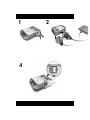
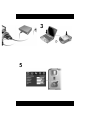
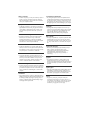
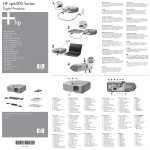
making a connection
een verbinding tot stand brengen
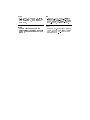
• On some computers, you must press certain keys (such as
Fn+F4 or Fn+F5) to activate the computer’s VGA port
and send the display to the projector. See the enclosed
card or your computer manual.
• Bij sommige computers moet u een bepaalde toetsencombinatie (bijvoorbeeld Fn+F4 of Fn+F5) gebruiken om
de VGA-poort van de computer te activeren en de weergavegegevens naar de projector te sturen. Zie hiervoor
de bijgevoegde kaart of de handleiding bij de computer.
pøipojení
• V nkterých počítačích je nutné stisknout určité klávesy
(napíklad Fn+F4 nebo Fn+F5), aby bylo možné aktivovat port VGA a odeslat zobrazení do projektoru. Informace naleznete na piložené kart nebo v píručce k
počítači.
Herstellen einer Verbindung
• Bei einigen Computern müssen Sie bestimmte Tasten
drücken (z. B. Fn+F4 oder Fn+F5), um den VGAAnschluss des Computers zu aktivieren und die Bildschirmdaten an den Projektor zu senden (siehe mitgelieferte Übersicht in Ihrem Computerhandbuch).
podłczanie
• W przypadku niektórych komputerów konieczne jest
nacinicie pewnych kombinacji klawiszy (np. Fn+F4 lub
Fn+F5) w celu aktywowania portu VGA tak, aby komputer przesłał obraz do projektora. Zajrzyj do
załczonej karty lub instrukcji obsługi komputera.
fazer a conexão
• Em alguns computadores, você precisa pressionar determinadas teclas (como Fn+F4 ou Fn+F5) para ativar a
porta VGA do computador e enviar a tela para o projetor. Veja o cartão anexo ou o manual de seu computador.
cómo realizar una conexión
• En algunos ordenadores, es necesario pulsar algunas
teclas (como Fn+F4 o Fn+F5) para activar el puerto VGA
del ordenador y enviar la imagen al proyector. Consulte
la tarjeta adjunta o el manual de su ordenador.
établissement d’une connexion
• Sur certains ordinateurs, vous devez appuyer sur une
combinaison de touches (telle que Fn+F4 ou Fn+F5) pour
activer le port VGA de l’ordinateur et envoyer ce qui
s’affiche vers le projecteur. Veuillez consulter la carte
incluse ou la documentation de votre ordinateur.
attivazione del collegamento
• Su alcuni computer è necessario premere una combinazione di tasti (ad esempio, Fn+F4 o Fn+F5) per attivare la
porta VGA del computer ed inviare la schermata al proiettore. Consultare la scheda allegata o il manuale del
computer.
csatlakoztatás
• Egyes számítógépeken egy bizonyos billentykombináció
(például Fn+F4 vagy Fn+F5) lenyomásával aktiválnia kell
a számítógép VGA portját, hogy a kép megjelenjen a
kivetítn. További útmutatást a mellékelt kártyán vagy a
számítógép kézikönyvében talál.
• VGA (, Fn+F4 Fn+F5). .
.
pripojenie
• Na niektorých poèítaèoch je potrebné stlaèi″ urèitú
kombináciu klávesov (napr. Fn+F4 alebo Fn+F5) na
aktiváciu portu VGA poèítaèa a prepnutie zobrazovania na
projektor. Preštudujte si priloženú kartu alebo príruèku k
poèítaèu.
bağlantı yapma
• Bazı bilgisayarlarda bilgisayarın VGA bağlantı noktasını
etkin kılmak ve görüntüyü projektöre göndermek için
bazı tuşlara (Fn+F4 veya Fn+F5 gibi) basılması gerekir.
Ekteki karta veya bilgisayarınızın el kitabına bakın.
• µ , µ µ ( Fn+F4 Fn+F5) VGA µ . ∆
.