1
4
1.
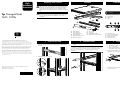
Install the Server
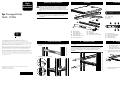
Insert the inner slide rails with the NAS server attached into the
outer slide rails as shown. Push the server all the way into the
rack, making sure that the inner slide rails lock into place.
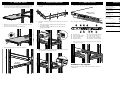
5 Install the Cable Arm
1.
2.
2.
3.
Slide the server in and out of the rack several times, allowing
the rails to position properly.
Lock the server in place using the thumbscrews.
Thread the velcro straps through the cable management arm
as shown.
Attach the cable management arm to the slide rail at the back of
the rack.
a. Insert the cable arm’s hinged bracket into the slide rails
receiving hooks 1.
b. Rotate the bracket forward and lock into place with the
spring loaded tab 2.
6
1.
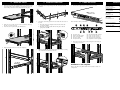
Cable the Server
Product Documentation
Connect the required cables to the back of the server.
1
2
10
2
1
4.
3
4
5
8
9
7
6
1
2
3
4
5
AC power plug
Mouse connector (green)
Video connector (blue)
Serial port (teal)
PCI expansion slot
2.
Route and secure the cables to the management arm using the
velcro straps as shown.
6
7
8
9
-
LVD SCSI Controller connector
RJ-45 connector for NIC 1
RJ-45 connector for NIC 2
USB connectors (2) (black)
Keyboard connector (purple)
Tighten the slide rails rear screws (4) completely.
3.
contains rack installation instructions
for experienced installers
HP StorageWorks
NAS 1200s
1U rack template
serves as a tool to quickly measure and
mark a rack for proper installation of a
NAS 1200s
HP StorageWorks
NAS 1200s
Installation Guide
provides product overview, requirements
and configuration options and
instructions for the NAS 1200s
HP StorageWorks
NAS 1200s
Documentation CD
contains electronic versions of all NAS
1200s product documents including:
Administration Guide
Quick Start Guide
Rack Installation Instructions
HP Warranty fulfillment
document
provides information on how to obtain
a printed warranty for your NAS 1200s
HP Important Safety
Information booklet
contains information about common
sense precautions necessary when
working with equipment powered at wall
receptacle service levels
Rack removed for clarity of illustration.
2
1
HP StorageWorks
NAS 1200s Rack
Installation Instructions
Insert the front of the cable managements arm into the receiving
clip of the slide rail assembly as shown.
Installation is now complete.
Refer to the HP StorageWorks NAS 1200s Installation Guide for
configuration.