1
4
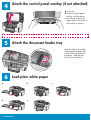
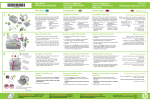
Attach the control panel overlay (if not attached)
a Lift the lid.
b Align the control panel
overlay with the device.
c Press down firmly on all
edges and in the center of
the overlay to secure it.
The control panel overlay must be attached for the HP All-in-One to work!
5
Attach the document feeder tray
Align the tabs on the edge
of the document feeder tray
with the slots on the top of
the device. Slide the tray
until it locks into place.
6
Load plain white paper
a
b
d
e
2 • HP All-in-One
c